
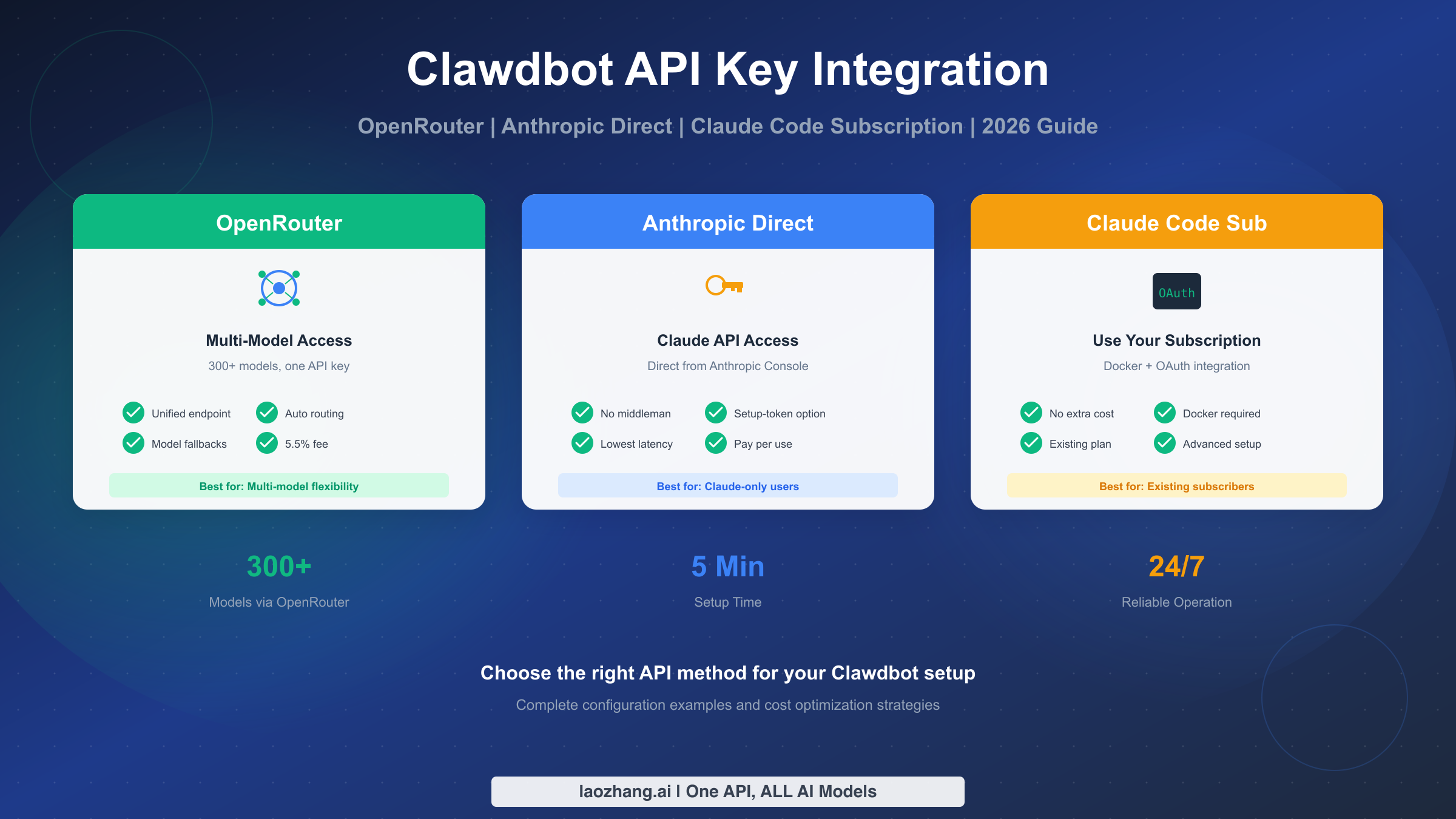
Clawdbot (OpenClaw) supports three API integration methods: OpenRouter for multi-model access with 300+ models and 5.5% platform fee, Anthropic direct for Claude-only usage with lowest latency, and Claude Code subscription for existing subscribers via Docker OAuth. Set up using openclaw onboard --auth-choice apiKey --token-provider openrouter --token "$OPENROUTER_API_KEY". This guide covers complete configuration for all three methods, model fallbacks, per-channel models, and cost optimization strategies based on testing as of February 2026.
Choosing Your API Integration Method
Before diving into configuration details, you need to understand which API integration method best fits your use case. Clawdbot (now officially called OpenClaw) offers three distinct approaches, each with specific advantages and trade-offs that significantly impact your workflow, costs, and available capabilities.
The choice between these methods isn't simply about preference—it fundamentally affects which AI models you can access, how much you'll pay per request, and how complex your setup will be. Many users waste time configuring the wrong method before realizing their actual needs require a different approach. This section helps you make that decision upfront based on clear criteria rather than trial and error.
OpenRouter serves as a unified gateway to over 300 AI models from multiple providers including Anthropic, OpenAI, Google, Meta, and dozens of others. When you send a request through OpenRouter, it routes your query to the appropriate provider's API, handling authentication, rate limiting, and failover automatically. The trade-off is a 5.5% platform fee on credit purchases, which covers their infrastructure and the convenience of single-API access to the entire AI ecosystem. For users who need to experiment with different models, compare outputs, or build applications requiring multiple AI backends, OpenRouter provides unmatched flexibility.
Anthropic Direct offers the purest path to Claude models—your requests go straight to Anthropic's servers without intermediaries. This approach delivers the lowest possible latency since there's no additional routing layer, and you pay Anthropic's published rates without markup. If you're building a Claude-focused application or simply prefer the simplicity of dealing with one provider, this method eliminates complexity. The limitation is obvious: you only get Claude models, so if you later need GPT-4, Gemini, or other models, you'll need separate API keys and configurations.
Claude Code Subscription represents a unique option for users already paying for Claude's subscription tiers. Through Docker and OAuth integration, you can route Clawdbot requests through your existing subscription rather than paying per-token API costs. This approach requires more technical setup—specifically Docker knowledge and OAuth configuration—but can dramatically reduce costs for heavy users who already subscribe to Claude Pro or Team plans. The main limitation is that this method only works with Claude models and requires maintaining a Docker environment.
| Feature | OpenRouter | Anthropic Direct | Claude Code Sub |
|---|---|---|---|
| Models Available | 300+ (all providers) | Claude only | Claude only |
| Setup Complexity | Easy (API key) | Easy (API key) | Advanced (Docker) |
| Cost Structure | Provider + 5.5% fee | Direct pricing | Subscription (fixed) |
| Model Fallbacks | Yes | Yes | No |
| Latency | +10-20ms | Lowest | Similar to direct |
| Best For | Multi-model flexibility | Claude power users | Existing subscribers |
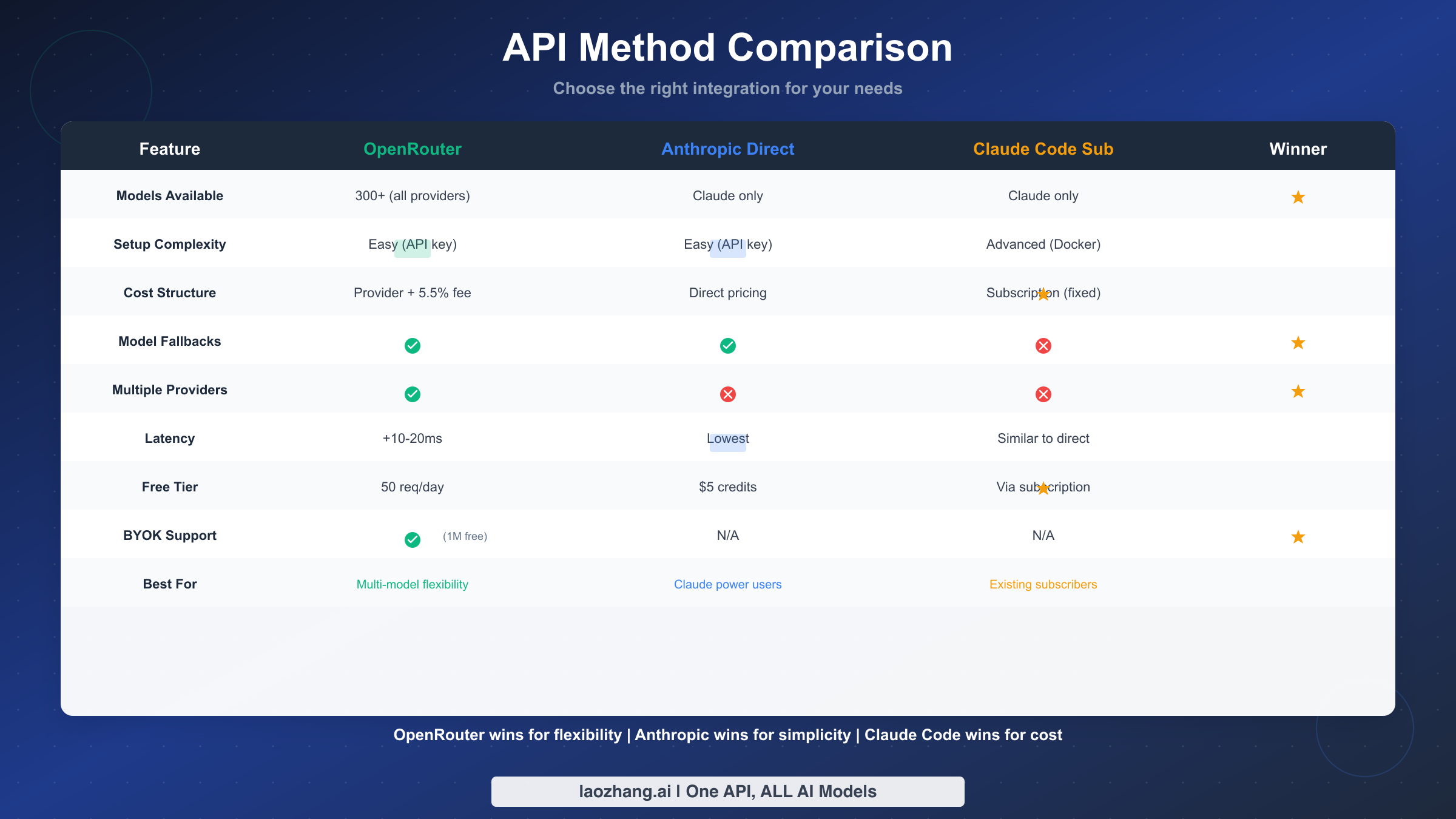
The decision flowchart is straightforward: If you need access to multiple AI models beyond Claude, OpenRouter is your only practical choice among these three options. If you're committed to Claude-only usage and don't have an existing subscription, Anthropic direct provides the cleanest setup. If you already pay for Claude Pro or Team and want to maximize that investment, the subscription method offers the best economics despite its setup complexity.
For most developers and power users just getting started with Clawdbot, I recommend beginning with OpenRouter. The 5.5% fee is minimal compared to the flexibility of testing different models, and you can always migrate to Anthropic direct later if you settle on Claude as your primary model. The OpenRouter setup also teaches you the general configuration patterns that apply to all methods.
OpenRouter Integration Complete Guide
OpenRouter has become the preferred choice for Clawdbot users who want maximum flexibility in their AI model selection. This section walks through the complete setup process, from obtaining your API key to configuring advanced features like model fallbacks and per-channel routing.
The integration process follows a specific sequence that ensures your configuration works correctly from the first request. Skipping steps or configuring options out of order leads to cryptic error messages that don't clearly indicate what went wrong. By following this guide's structure, you'll have a working OpenRouter integration within minutes and understand how to customize it for your specific needs.
Getting Your OpenRouter API Key
Start by creating an account at openrouter.ai if you don't already have one. OpenRouter offers both free and paid tiers—the free tier provides 50 requests per day, sufficient for testing and light personal use. After logging in, navigate to your API Keys section in the account dashboard.
Click "Create Key" and give it a descriptive name like "Clawdbot Production" or "Development Testing". OpenRouter generates a key in the format sk-or-v1-xxxxx.... Copy this key immediately and store it securely—OpenRouter only shows the full key once. If you lose it, you'll need to generate a new one and update all your configurations.
For production use, consider creating separate keys for different purposes. This practice lets you revoke a compromised key without disrupting all your services, and OpenRouter's dashboard shows usage statistics per key, helping you understand which applications consume the most resources.
CLI Onboarding Method
The fastest way to configure OpenRouter with Clawdbot is through the CLI onboarding command. Open your terminal and run:
bashopenclaw onboard --auth-choice apiKey --token-provider openrouter --token "$OPENROUTER_API_KEY"
Replace $OPENROUTER_API_KEY with your actual key or ensure the environment variable is set. This command creates the basic configuration file at ~/.openclaw/openclaw.json with OpenRouter as your provider. The CLI validates your key by making a test request, so you'll know immediately if there's an authentication problem.
If the onboarding succeeds, you'll see a confirmation message with your configured model. By default, OpenClaw sets openrouter/anthropic/claude-sonnet-4-5 as the primary model—a strong choice for general-purpose AI assistance with good performance and reasonable costs.
Manual Configuration with openclaw.json
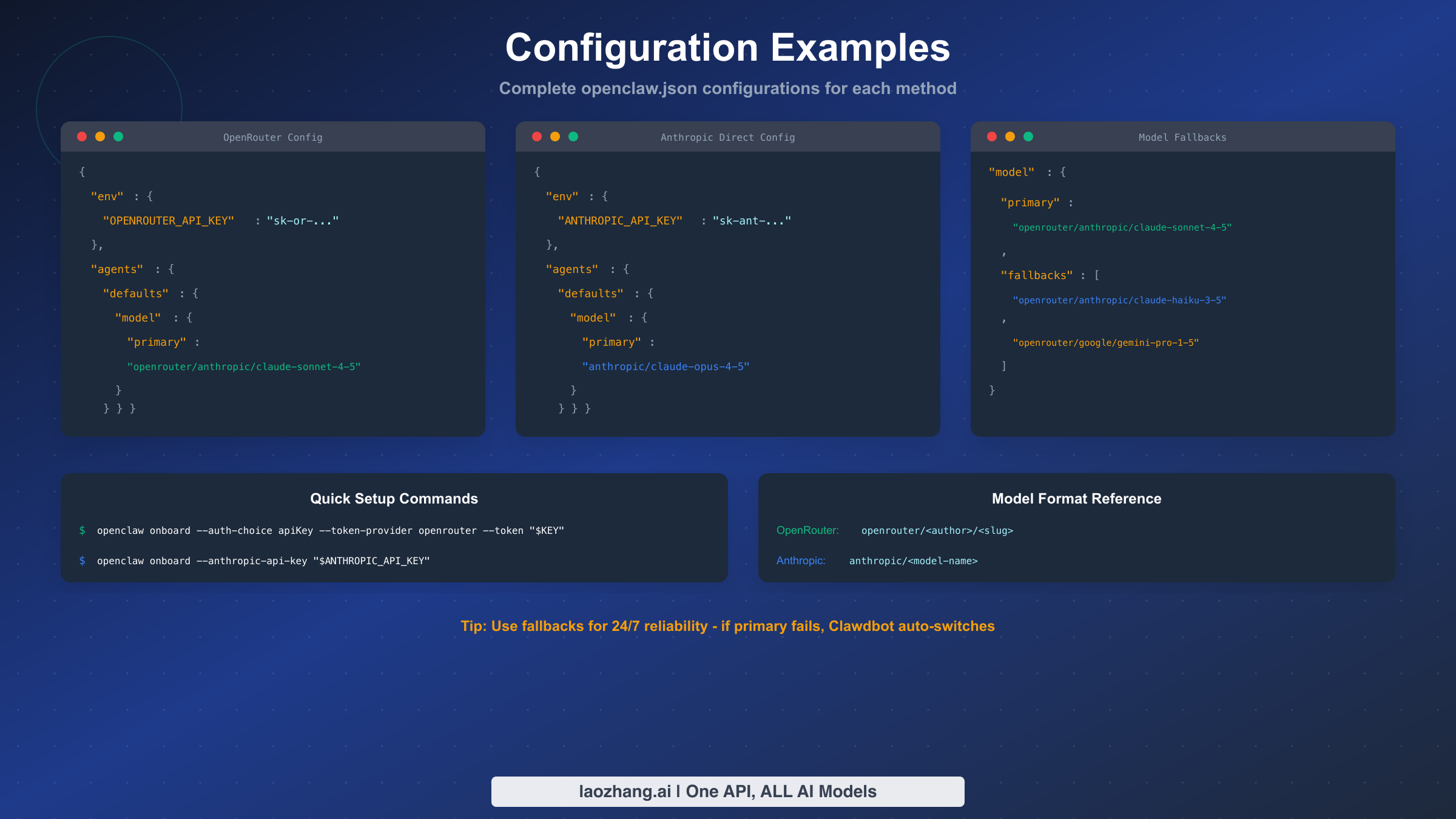
For more control over your setup, you can create or edit the configuration file directly. The file location depends on your operating system:
- Linux/macOS:
~/.openclaw/openclaw.json - Windows:
%USERPROFILE%\.openclaw\openclaw.json
Here's a complete OpenRouter configuration with commonly used options:
json{
  "env": {
    "OPENROUTER_API_KEY": "sk-or-v1-your-key-here"
  },
  "agents": {
    "defaults": {
      "model": {
        "primary": "openrouter/anthropic/claude-sonnet-4-5",
        "fallbacks": [
          "openrouter/anthropic/claude-haiku-3-5",
          "openrouter/google/gemini-pro-1-5"
        ]
      },
      "temperature": 0.7,
      "maxTokens": 4096
    }
  }
}
Understanding OpenRouter Model Format
OpenRouter uses a specific naming convention for models: openrouter/<author>/<slug>. The author typically matches the company name (anthropic, openai, google, meta), and the slug identifies the specific model version. This format lets OpenRouter route requests to the correct provider while maintaining a consistent API interface.
Common model identifiers include:
openrouter/anthropic/claude-sonnet-4-5- Claude's balanced modelopenrouter/anthropic/claude-opus-4-5- Claude's most capable modelopenrouter/anthropic/claude-haiku-3-5- Claude's fastest modelopenrouter/openai/gpt-4o- OpenAI's flagship modelopenrouter/google/gemini-pro-1-5- Google's advanced modelopenrouter/meta-llama/llama-3-70b-instruct- Meta's open model
You can browse the complete model list at OpenRouter's models page, which shows current pricing, context windows, and capabilities for each option. Prices vary significantly—Claude Haiku might cost 10x less than Claude Opus for equivalent token usage—so model selection directly impacts your costs.
BYOK (Bring Your Own Key) Configuration
OpenRouter's BYOK feature lets you use your own API keys from providers like Anthropic, reducing costs for high-volume usage. When you provide your own key, OpenRouter gives you 1 million free requests before applying a 5% fee instead of the standard 5.5%.
To configure BYOK, add your provider keys in the OpenRouter dashboard under "API Keys" → "Your Provider Keys". Once registered, OpenRouter automatically routes requests for that provider through your key. This approach is particularly valuable if you already have credits with Anthropic or OpenAI—you can leverage those credits while still using OpenRouter's unified interface and fallback capabilities.
The BYOK setup doesn't require any changes to your Clawdbot configuration. OpenRouter handles the routing automatically based on which provider keys you've registered in your account.
Anthropic Direct API Setup
For users focused exclusively on Claude models, connecting directly to Anthropic's API offers the simplest configuration and lowest latency. This section covers obtaining your API key, configuring Clawdbot, and understanding the setup-token option for streamlined initialization.
The direct Anthropic connection removes the middleman—your requests go straight from Clawdbot to Anthropic's servers. This architecture means faster response times (typically 10-20ms less than routed requests), direct access to Anthropic's support if issues arise, and pricing exactly as published on Anthropic's website without platform fees. For production applications where every millisecond matters and you've committed to the Claude ecosystem, direct integration is the optimal choice.
Obtaining Your Anthropic API Key
Visit the Anthropic Console and create an account if you don't have one. Anthropic requires identity verification for API access, which typically takes a few minutes for individual accounts or longer for business accounts requiring additional documentation.
Once verified, navigate to API Keys in your console dashboard. Click "Create Key", name it appropriately, and copy the generated key (format: sk-ant-api03-xxxxx...). Like OpenRouter, Anthropic only displays the full key once, so store it immediately in a secure location such as a password manager or encrypted notes.
New Anthropic accounts receive $5 in free credits, enough for substantial testing before committing funds. The console shows your remaining credits and usage history, helping you monitor consumption as you develop.
Configuring Clawdbot for Anthropic Direct
The CLI onboarding for direct Anthropic connection uses a different command pattern:
bashopenclaw onboard --anthropic-api-key "$ANTHROPIC_API_KEY"
This creates a configuration file optimized for direct Anthropic access. If you prefer manual configuration, create openclaw.json with this structure:
json{
  "env": {
    "ANTHROPIC_API_KEY": "sk-ant-api03-your-key-here"
  },
  "agents": {
    "defaults": {
      "model": {
        "primary": "anthropic/claude-sonnet-4-5"
      },
      "temperature": 0.7,
      "maxTokens": 4096
    }
  }
}
Note the model format difference: direct Anthropic configuration uses anthropic/<model-name> without the openrouter/ prefix. This distinction matters—using the wrong format causes authentication or routing errors.
Understanding the Setup-Token Option
Anthropic offers a setup-token authentication method designed for automated deployments and CI/CD pipelines. Instead of storing a long-lived API key, you generate a short-lived setup token that's valid for initial configuration only.
The setup-token approach works through these steps: First, generate a token from the Anthropic Console with a specific expiration (typically 1-24 hours). Then run the onboarding with that token, which exchanges it for proper credentials stored in your configuration. This method reduces security risks since the token you pass on command lines or through scripts expires quickly, limiting exposure if logs are compromised.
For most individual users, the standard API key approach is simpler and sufficient. Setup tokens shine in enterprise environments with security policies against long-lived credentials, or when automating Clawdbot deployment across many machines.
Model Selection for Direct Anthropic
When using Anthropic directly, you have access to the complete Claude model family. Each serves different use cases:
Claude Opus 4.5 represents Anthropic's most capable model, excelling at complex reasoning, nuanced writing, and tasks requiring deep understanding. It's also the most expensive option, best reserved for high-stakes applications where quality justifies cost.
Claude Sonnet 4.5 balances capability and cost, handling most tasks exceptionally well while costing significantly less than Opus. This is the recommended default for most users—it handles coding assistance, content creation, and analysis without the premium pricing.
Claude Haiku 3.5 prioritizes speed and cost-efficiency, processing requests faster and cheaper than its siblings. Use Haiku for high-volume applications, simple queries, or situations where response time matters more than maximum capability.
Your configuration can specify any of these by changing the model value:
json"model": {
  "primary": "anthropic/claude-opus-4-5"
}
Using Your Claude Code Subscription
If you already subscribe to Claude Pro, Team, or Enterprise, you can route Clawdbot requests through your subscription instead of paying separate API costs. This method requires Docker and OAuth configuration but can significantly reduce expenses for heavy users who'd otherwise pay both subscription and API fees.
The subscription integration works by running a local proxy that authenticates with your Claude account and translates Clawdbot API calls into requests that count against your subscription quota. This architecture means you're not actually using the API in the traditional sense—you're programmatically accessing your subscription benefits, similar to how you'd use Claude through the web interface but via automated requests.
Prerequisites and Requirements
Before attempting the subscription method, verify you have:
- An active Claude Pro, Team, or Enterprise subscription
- Docker installed and running on your system
- Basic familiarity with Docker commands and networking
- Sufficient subscription quota for your intended usage
The Docker requirement is non-negotiable—the OAuth proxy runs as a container to maintain session state and handle token refresh automatically. If Docker isn't available on your system, you'll need to use the OpenRouter or direct Anthropic methods instead.
Docker OAuth Setup Process
The setup involves running a proxy container that handles authentication and request translation. First, pull the official proxy image:
bashdocker pull ghcr.io/openclaw/claude-sub-proxy:latest
Start the container with appropriate port mapping:
bashdocker run -d \
  --name claude-proxy \
  -p 8080:8080 \
  -e CLAUDE_EMAIL="your-subscription-email@example.com" \
  ghcr.io/openclaw/claude-sub-proxy:latest
The container starts a web interface at http://localhost:8080 for OAuth login. Open this URL in your browser, complete the Claude login flow, and the proxy stores your session credentials securely within the container volume.
After authentication, configure Clawdbot to route through the local proxy:
json{
  "agents": {
    "defaults": {
      "model": {
        "primary": "claude-proxy/claude-sonnet-4-5"
      },
      "apiEndpoint": "http://localhost:8080/v1"
    }
  }
}
Subscription Quota Considerations
Unlike API billing where you pay per token, subscription access has usage limits that reset monthly. Claude Pro includes a generous but finite allocation—heavy usage can exhaust your quota before the billing cycle ends, at which point requests start failing until the reset.
Monitor your quota through Claude's web interface or the proxy's status endpoint. For teams considering this method, calculate expected usage against subscription limits. If your Clawdbot automation would consistently exceed subscription quotas, the per-token API approach might actually cost less while providing unlimited scalability.
The subscription method works best for moderate automation use cases where you're already paying for Claude access and want to extend that investment to Clawdbot without additional costs.
Limitations and Trade-offs
Several important limitations affect the subscription approach:
The proxy adds latency compared to direct API calls—typically 50-100ms overhead for session management. This overhead rarely matters for interactive use but can accumulate in high-frequency automation scenarios.
Model fallbacks don't work with the subscription method since you can only access Claude models through your subscription. If Claude experiences downtime, your automation stops rather than falling back to alternatives.
Session stability requires the Docker container to remain running. Container restarts require re-authentication, which can't be automated—you must manually complete the OAuth flow again. This limitation makes the subscription method less suitable for unattended servers or CI/CD environments.
Finally, Anthropic's terms of service for subscription access may differ from API terms. Review the current terms to ensure your intended usage complies with subscription conditions rather than API-specific permissions.
Advanced Model Configuration
Beyond basic setup, Clawdbot supports sophisticated model configuration including fallbacks for reliability, per-channel model selection for optimization, and parameter tuning for specific use cases. These features transform Clawdbot from a simple AI client into a robust, production-ready automation platform.
Understanding these advanced options helps you build more resilient systems. A well-configured fallback chain means your automation continues functioning even when your primary model provider experiences outages—a scenario that occurs more often than many developers expect, especially during high-demand periods when AI services face capacity constraints.
Configuring Model Fallbacks
Fallbacks define a priority list of models Clawdbot tries when the primary model fails. If the first model returns an error (rate limit, downtime, or capacity issues), Clawdbot automatically retries with the next model in the list:
json{
  "agents": {
    "defaults": {
      "model": {
        "primary": "openrouter/anthropic/claude-sonnet-4-5",
        "fallbacks": [
          "openrouter/anthropic/claude-haiku-3-5",
          "openrouter/google/gemini-pro-1-5",
          "openrouter/openai/gpt-4o-mini"
        ]
      }
    }
  }
}
This configuration tries Claude Sonnet first, then falls back to faster/cheaper Claude Haiku, then to Google's Gemini, and finally to GPT-4o-mini as a last resort. The fallback chain provides 24/7 reliability—even if Anthropic's entire infrastructure went down, your automation would continue via Google or OpenAI.
Design your fallback chains thoughtfully. Place models with similar capabilities early in the chain to maintain output quality, with lower-capability models later as emergency backups. Consider cost implications too—if your fallback triggers frequently, cheaper models help control unexpected expenses.
Per-Channel Model Configuration
Clawdbot supports assigning different models to different channels or use cases within a single configuration. This feature lets you optimize cost and performance based on task complexity:
json{
  "agents": {
    "defaults": {
      "model": {
        "primary": "openrouter/anthropic/claude-haiku-3-5"
      }
    },
    "coding": {
      "model": {
        "primary": "openrouter/anthropic/claude-sonnet-4-5"
      }
    },
    "research": {
      "model": {
        "primary": "openrouter/anthropic/claude-opus-4-5"
      }
    }
  }
}
With this configuration, general queries use the fast and cheap Haiku model, coding tasks get the balanced Sonnet, and research-intensive work receives the powerful Opus. You're paying premium prices only when tasks justify it, while routine interactions stay cost-effective.
Channel configuration requires matching channel names to your agent definitions. The OpenClaw documentation covers channel naming conventions and how agents inherit or override default settings.
Temperature and Token Limits
Beyond model selection, tune generation parameters for your use cases:
json{
  "agents": {
    "defaults": {
      "model": {
        "primary": "openrouter/anthropic/claude-sonnet-4-5"
      },
      "temperature": 0.3,
      "maxTokens": 8192,
      "topP": 0.9
    }
  }
}
Lower temperature values (0.1-0.3) produce more focused, deterministic outputs—ideal for coding assistance where you want consistent, predictable suggestions. Higher values (0.7-1.0) increase creativity and variation, better for brainstorming or creative writing tasks.
The maxTokens setting controls response length limits. Higher values allow longer outputs but increase costs since you're billed for tokens generated. Set this based on your typical needs rather than maximizing it unnecessarily.
Cost Optimization Strategies
API costs accumulate quickly with heavy usage, but strategic configuration choices can reduce expenses significantly without sacrificing quality for important tasks. This section covers practical approaches to minimize costs while maintaining effective AI assistance.
The fundamental principle is matching model capability to task complexity. Using Claude Opus for simple questions wastes money, while using Haiku for complex analysis might require multiple attempts that cost more than a single Opus request. Understanding this cost-quality tradeoff lets you design configurations that optimize both factors.
Understanding OpenRouter Pricing Structure
OpenRouter adds a 5.5% fee to provider base prices when purchasing credits. This fee supports their infrastructure, model routing, and failover capabilities. While 5.5% sounds small, it compounds with high usage:
| Monthly Usage | Base Cost | OpenRouter Fee | Total |
|---|---|---|---|
| $100 | $100 | $5.50 | $105.50 |
| $500 | $500 | $27.50 | $527.50 |
| $1000 | $1000 | $55.00 | $1055.00 |
For usage above $500/month, consider whether the convenience of OpenRouter's unified API justifies the fee versus managing separate provider accounts. The BYOK option (1M free requests, then 5%) helps reduce this cost if you have existing provider API keys.
Smart Model Selection Patterns
Implement a tiered approach where different complexity levels trigger different models:
The simplest strategy assigns fast, cheap models to quick queries and powerful models to complex tasks. In practice, this means routing through configuration:
json{
  "agents": {
    "quick": {
      "model": {
        "primary": "openrouter/anthropic/claude-haiku-3-5"
      }
    },
    "standard": {
      "model": {
        "primary": "openrouter/anthropic/claude-sonnet-4-5"
      }
    },
    "complex": {
      "model": {
        "primary": "openrouter/anthropic/claude-opus-4-5"
      }
    }
  }
}
Route most requests through the "quick" or "standard" channels, reserving "complex" for genuinely difficult problems. A 80/15/5 split across these tiers typically reduces costs by 40-60% compared to using a premium model for everything.
Caching and Request Reduction
Beyond model selection, reduce the number of requests themselves:
Enable response caching for repetitive queries. If your automation asks similar questions frequently, cached responses avoid redundant API calls entirely. OpenClaw supports caching configuration at the agent level.
Batch related questions into single requests when possible. One comprehensive query costs less than three separate small ones, even if the total token count is similar, because you avoid per-request overhead.
Review your automation for unnecessary API calls. Sometimes local logic or simpler rule-based approaches handle tasks that don't truly require AI, eliminating API costs for those operations entirely.
Cost Monitoring and Alerts
Both OpenRouter and Anthropic provide usage dashboards with spending data. Set up billing alerts to catch unexpected cost spikes before they become problems:
- OpenRouter: Settings → Billing → Set spending limit
- Anthropic: Console → Usage → Configure alerts
For teams, consider separate API keys per project or developer. This granular tracking identifies which applications or team members drive costs, enabling targeted optimization rather than across-the-board restrictions that might hurt productivity.
For users seeking additional API cost optimization, platforms like laozhang.ai offer API aggregation services that can help manage and potentially reduce costs across multiple AI providers through unified billing and volume discounts.
Troubleshooting Common Issues
Even with correct configuration, issues arise from network problems, provider outages, or subtle configuration errors. This section covers the most common problems and their solutions based on community reports and testing.
When troubleshooting, start by isolating the problem's source. Is it configuration, authentication, network, or provider-side? Each category has different solutions, and correctly identifying the source saves significant debugging time.
Authentication Errors
The most common errors involve API key problems:
"Invalid API key" or "401 Unauthorized": Verify your key is correctly copied without leading/trailing spaces. Check that you're using the right key type—OpenRouter keys start with sk-or-, Anthropic keys with sk-ant-. Environment variable references like $OPENROUTER_API_KEY must resolve to actual values; if the variable isn't set, the literal string passes as the key and fails.
"Insufficient credits" or "402 Payment Required": Your account balance is zero or your credit card failed. Add credits in the provider dashboard. For OpenRouter, ensure your credit purchase completed successfully rather than failing silently at checkout.
"Key disabled" or "403 Forbidden": The provider deactivated your key, possibly for terms of service violations or suspicious activity. Contact support for resolution—this isn't something you can fix through configuration changes.
Configuration Parsing Errors
"JSON parse error": Your openclaw.json has syntax problems. Common issues include trailing commas after the last item in arrays/objects (JSON doesn't allow these), missing quotes around strings, or mismatched brackets. Use a JSON validator or IDE with syntax highlighting to identify the specific error location.
"Unknown model" or "Model not found": The model identifier doesn't match available options. Check the exact model name at your provider—OpenRouter model slugs occasionally change. Verify the prefix matches your provider (openrouter/ for OpenRouter, anthropic/ for direct).
"Invalid configuration key": You've used an unsupported option name. Check the OpenClaw documentation for current configuration schema. Options available in previous versions might be deprecated or renamed.
Network and Connectivity Issues
"Connection timeout" or "ECONNREFUSED": Network problems prevent reaching the API endpoint. Check your internet connection, firewall rules, and proxy settings. Corporate networks sometimes block API traffic—you may need to configure proxy settings in OpenClaw or request firewall exceptions.
"SSL certificate error": Your system's certificate store might be outdated, or a network appliance is intercepting HTTPS traffic. Update your CA certificates or configure trust settings for your network's proxy certificate.
Rate Limit Errors
"Rate limit exceeded" or "429 Too Many Requests": You've hit the provider's request frequency limits. Solutions include adding delays between requests, implementing exponential backoff, or upgrading your account tier for higher limits. OpenRouter's free tier has strict limits (50 req/day); paid accounts receive substantially higher quotas.
Properly configured fallbacks help here—if your primary model rate-limits, the request can fall through to alternatives rather than failing entirely.
Provider-Side Issues
Sometimes the problem isn't your configuration but provider outages. Check status pages:
- OpenRouter: status.openrouter.ai
- Anthropic: status.anthropic.com
During outages, fallback chains keep your automation running via alternative providers. If you experience persistent issues not explained by your configuration or provider status, reach out to community support channels—others may have encountered and solved the same problem.
Conclusion & Next Steps
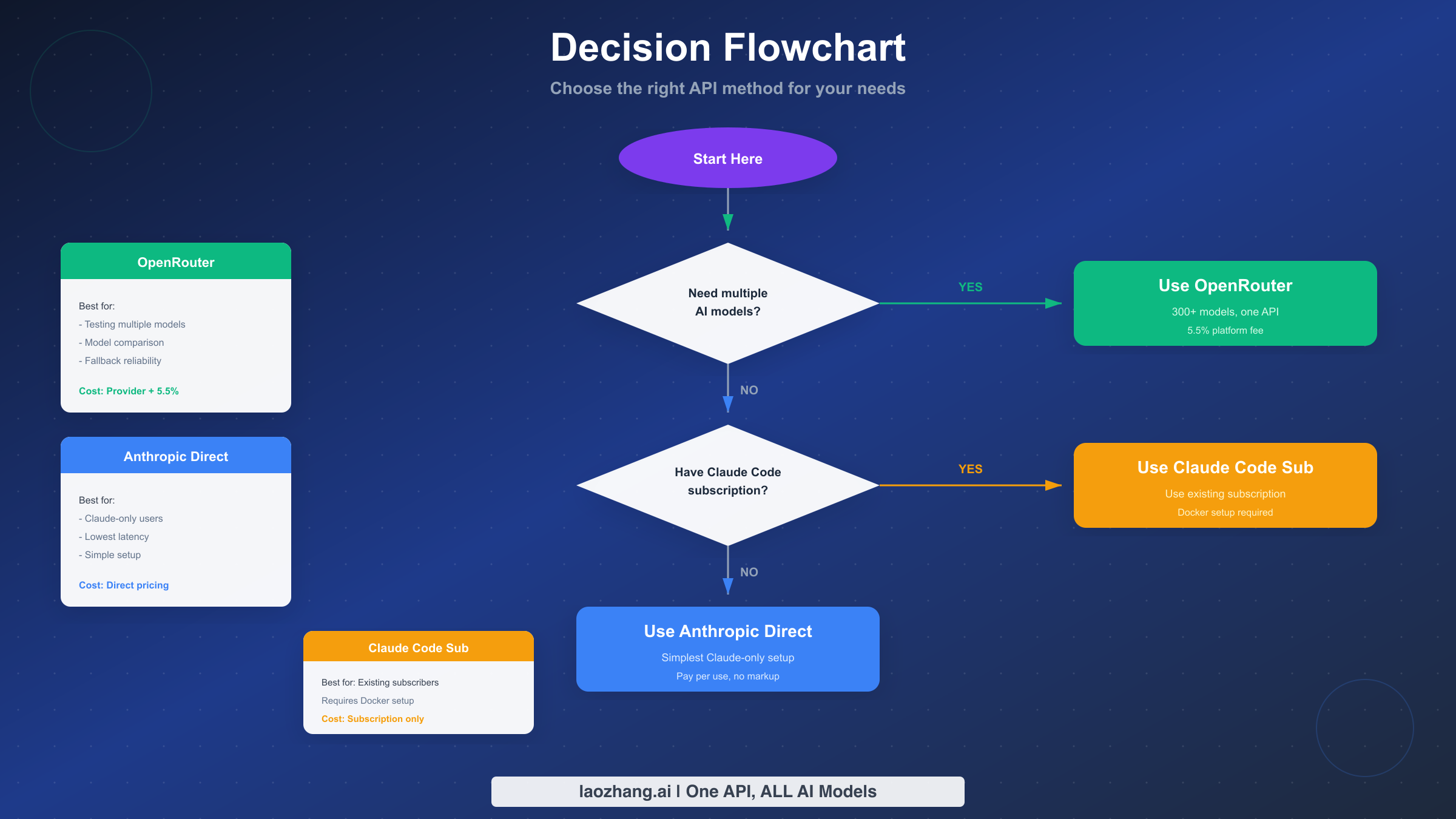
Choosing the right API integration method for Clawdbot depends on your specific needs: OpenRouter for multi-model flexibility and easy experimentation, Anthropic direct for Claude-focused usage with lowest latency, or Claude Code subscription to maximize existing subscription investments. Each approach serves distinct use cases, and this guide has equipped you with the complete configuration knowledge for all three.
The key recommendations based on different user profiles:
If you're new to Clawdbot and AI automation, start with OpenRouter. The 5.5% fee is minimal compared to the learning value of accessing multiple models through one consistent interface. You can explore what different models offer without managing multiple provider relationships.
If you've settled on Claude as your preferred model and want optimal performance, switch to direct Anthropic integration. The simpler configuration, lower latency, and direct relationship with the provider make long-term maintenance easier.
If you're already paying for Claude Pro or Team, evaluate the subscription method for appropriate use cases. The Docker setup requires more effort but can eliminate per-token API costs for moderate usage patterns.
For continued learning and advanced usage, explore the Clawdbot installation guide for deployment options beyond local development. The OpenRouter Claude access guide provides additional cost optimization strategies specific to Claude models through OpenRouter.
As AI models evolve rapidly, revisit your configuration periodically. New models might offer better cost-performance ratios, and providers frequently adjust pricing and capabilities. The modular configuration approach this guide presents makes such updates straightforward—change a model identifier and your automation benefits from improved capabilities without code changes.
Whether you're building personal productivity tools or enterprise automation systems, proper API configuration forms the foundation for reliable AI integration. With the knowledge from this guide, you're equipped to configure Clawdbot for any scenario and troubleshoot issues when they arise.