
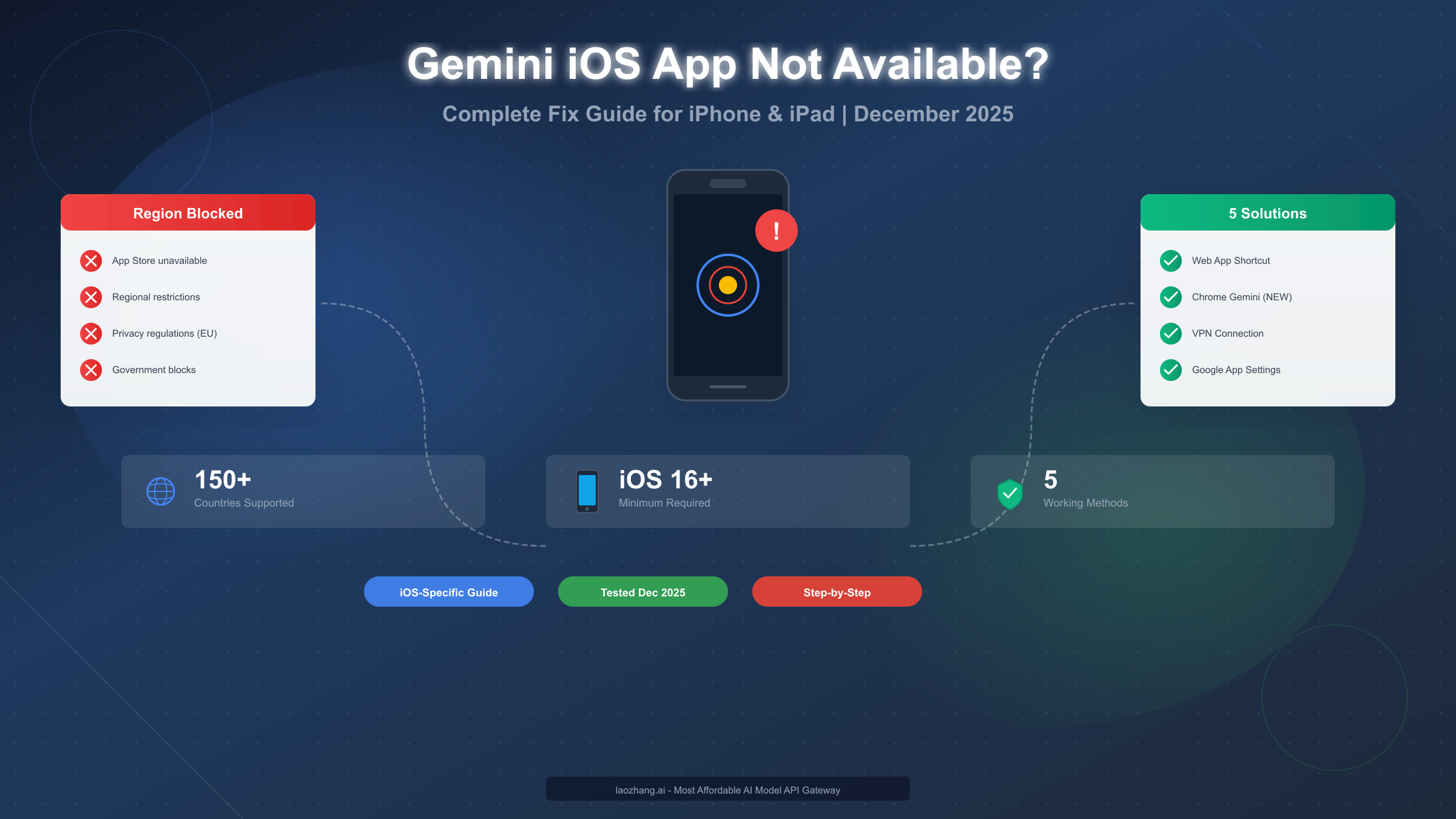
Google's Gemini iOS app is officially available in over 150 countries, yet millions of iPhone and iPad users still encounter the frustrating "Gemini app is not available in your region" message when trying to download or use it. As of December 2025, this restriction affects users across Europe due to GDPR regulations, countries under sanctions like Iran and Russia, and regions where Google services face government-imposed blocks like China. The good news is that several proven workarounds exist specifically for iOS users, ranging from simple web shortcuts that take just one minute to set up, to VPN solutions that provide full native app access. This guide covers all five methods with iOS-specific instructions tested in December 2025.
Complete guide to accessing Gemini on iPhone and iPad from restricted regions
Why Your iPhone Shows "Gemini Not Available in Your Region"
The message that Gemini isn't available in your region appears for several distinct reasons, and understanding these helps you choose the most effective workaround for your situation. Google implements geographic restrictions on Gemini through multiple mechanisms that work differently on iOS compared to Android, which is why generic advice often fails for iPhone users.
The primary detection method Google uses is IP address geolocation. When you open the App Store or try to access Gemini services, Google's servers check your IP address against their database of supported regions. According to Google's official documentation (support.google.com/gemini), the mobile app is available in "more than 150 countries," but this number is misleading because it doesn't account for feature restrictions that vary significantly by region. For example, users in the European Economic Area can access the Gemini web app but face substantial limitations on the mobile app due to the AI Act and GDPR compliance requirements.
Beyond IP-based restrictions, Google also considers your Google account's registered country. This means that even if you use a VPN to appear in a supported region, your account's home country setting can still trigger restrictions. This dual-layer verification is why many users report that "VPN doesn't work for Gemini" when they haven't also addressed their account settings. The combination of IP verification and account region checking creates a more complex barrier than what users face with services like ChatGPT or Claude, which primarily rely on IP detection alone.
iOS devices face additional challenges that Android users don't encounter. On Android, users can sideload the Gemini APK directly from third-party sources, bypassing the Google Play Store entirely. Apple's iOS restricts app installation to the App Store (with limited exceptions in the EU for alternative marketplaces), meaning iPhone users can't simply download the app from another source. This fundamental difference in platform architecture is why iOS-specific solutions are essential, and why copying Android-focused guides often leads to frustration.
The regional availability also varies by Gemini service tier. According to Google's AI documentation (ai.google.dev/gemini-api/docs/available-regions), the Gemini API is available in 200+ regions, but the free tier is completely blocked in the European Economic Area, Switzerland, and the United Kingdom. This means European developers must use paid API access, adding cost barriers beyond the basic availability question. For regular users seeking conversational AI access on their iPhones, this API restriction doesn't directly apply, but it illustrates Google's region-by-region approach to Gemini availability.
Gemini App Regional Availability in December 2025
Understanding exactly which regions have access helps you determine whether a simple workaround will suffice or if you need a more robust solution. Google has steadily expanded Gemini's availability throughout 2025, but significant gaps remain that affect hundreds of millions of potential users.
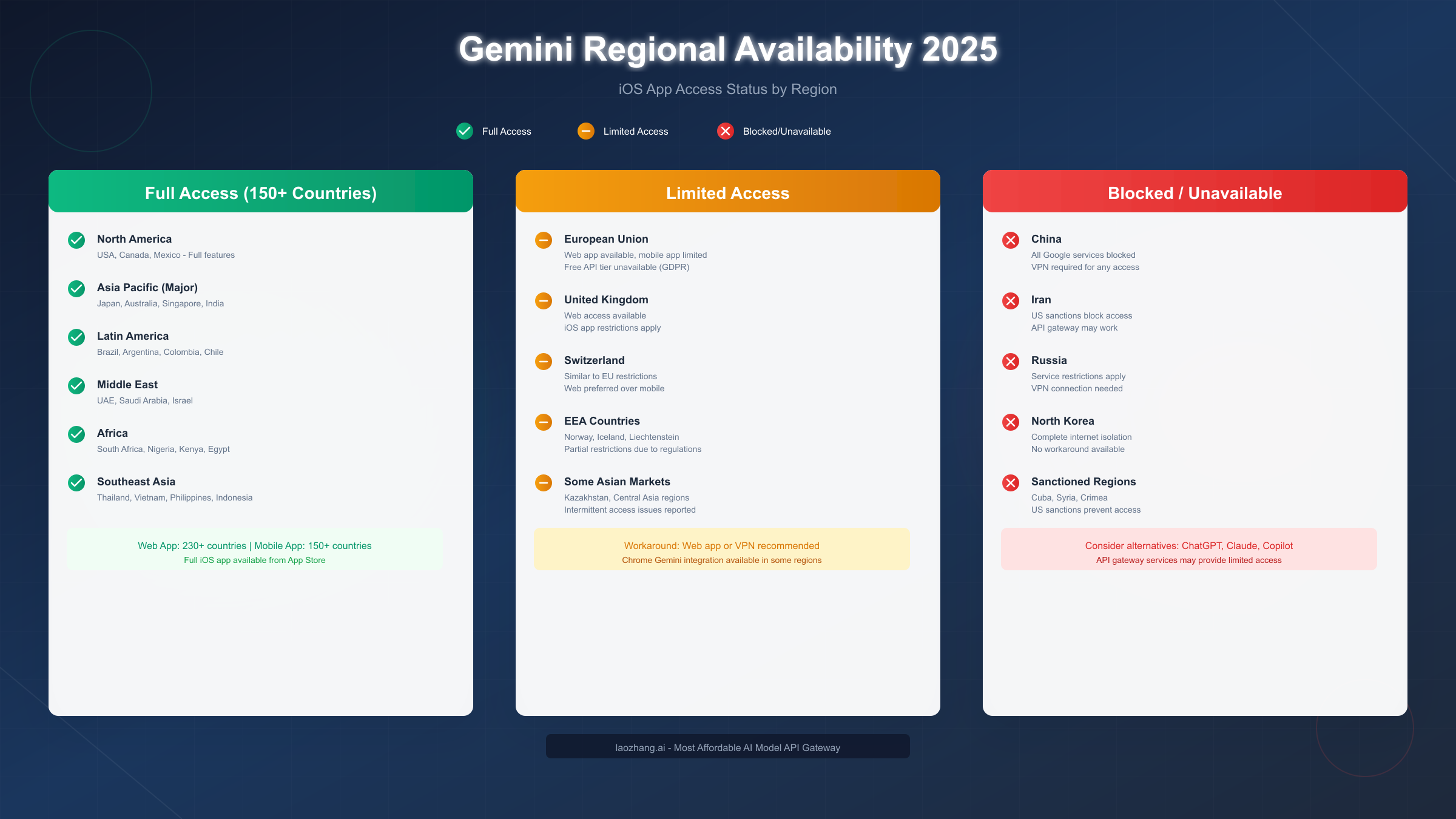
Full Access Regions (150+ Countries)
North America leads with unrestricted access to all Gemini features. Users in the United States and Canada get immediate access to new features as they launch, including the latest Gemini 2.5 Pro and Flash models. Mexico and most Central American countries also enjoy full access, though new feature rollouts may arrive with slight delays compared to the US market.
The Asia-Pacific region presents a complex picture that varies country by country. Japan, Australia, Singapore, South Korea, and India have full Gemini access with the native iOS app available in their respective App Stores. These countries also have access to Gemini Advanced (the premium tier) and can use all API features. However, China remains completely blocked as part of the broader Google service restriction, affecting over a billion potential users. Southeast Asian countries including Thailand, Vietnam, Philippines, Malaysia, and Indonesia gained full access throughout 2025, representing one of the biggest expansions of the year.
Latin America enjoys broad coverage with Brazil, Argentina, Colombia, Chile, and most other countries having full access. The Middle East shows strong availability in the UAE, Saudi Arabia, Israel, and most Gulf states. African coverage includes South Africa, Nigeria, Kenya, Egypt, Morocco, and dozens of other nations, though connectivity infrastructure sometimes affects practical usability more than official availability.
Limited Access Regions (EU, UK, Switzerland)
The European situation deserves special attention because it affects many English-speaking users who might expect full access. The Gemini web app functions across all EU member states, allowing users to visit gemini.google.com and have conversations. However, the iOS app faces restrictions that Google has implemented to comply with GDPR, the AI Act, and other European digital regulations.
Users in Germany, France, Italy, Spain, Netherlands, and other EU countries can typically download the Gemini app but may find certain features disabled or receive messages about limited functionality. The free API tier is completely unavailable throughout the EEA, forcing developers to use paid access. This limitation extends to the United Kingdom, Switzerland, Norway, Iceland, and Liechtenstein. For regular users, this means the web-based workarounds described later in this guide become particularly important, as they often provide better functionality than the restricted app version available in European App Stores.
Blocked Regions (Government Blocks or Sanctions)
Several countries face complete Gemini blocks that require more robust solutions to bypass. China blocks all Google services including Gemini as part of its Great Firewall policy, affecting the country's 1.4 billion residents. Iran faces both Google-imposed and government-imposed restrictions related to US sanctions. Russia's access has become increasingly restricted since 2022, with both the Russian government limiting Google services and Google restricting service to Russian accounts.
North Korea maintains near-complete internet isolation, making any workaround impractical. Cuba, Syria, and Crimea face US sanctions-related restrictions that Google enforces regardless of technical accessibility. For users in these completely blocked regions, VPN solutions combined with accounts registered in supported countries represent the only viable approach for accessing Gemini's iOS capabilities.
iOS-Specific Solutions That Actually Work
Unlike generic guides that focus on Android workarounds or web-only solutions, these methods are specifically tested and optimized for iPhone and iPad users. The key advantage of iOS-focused solutions is that they work within Apple's ecosystem constraints rather than trying to circumvent them.
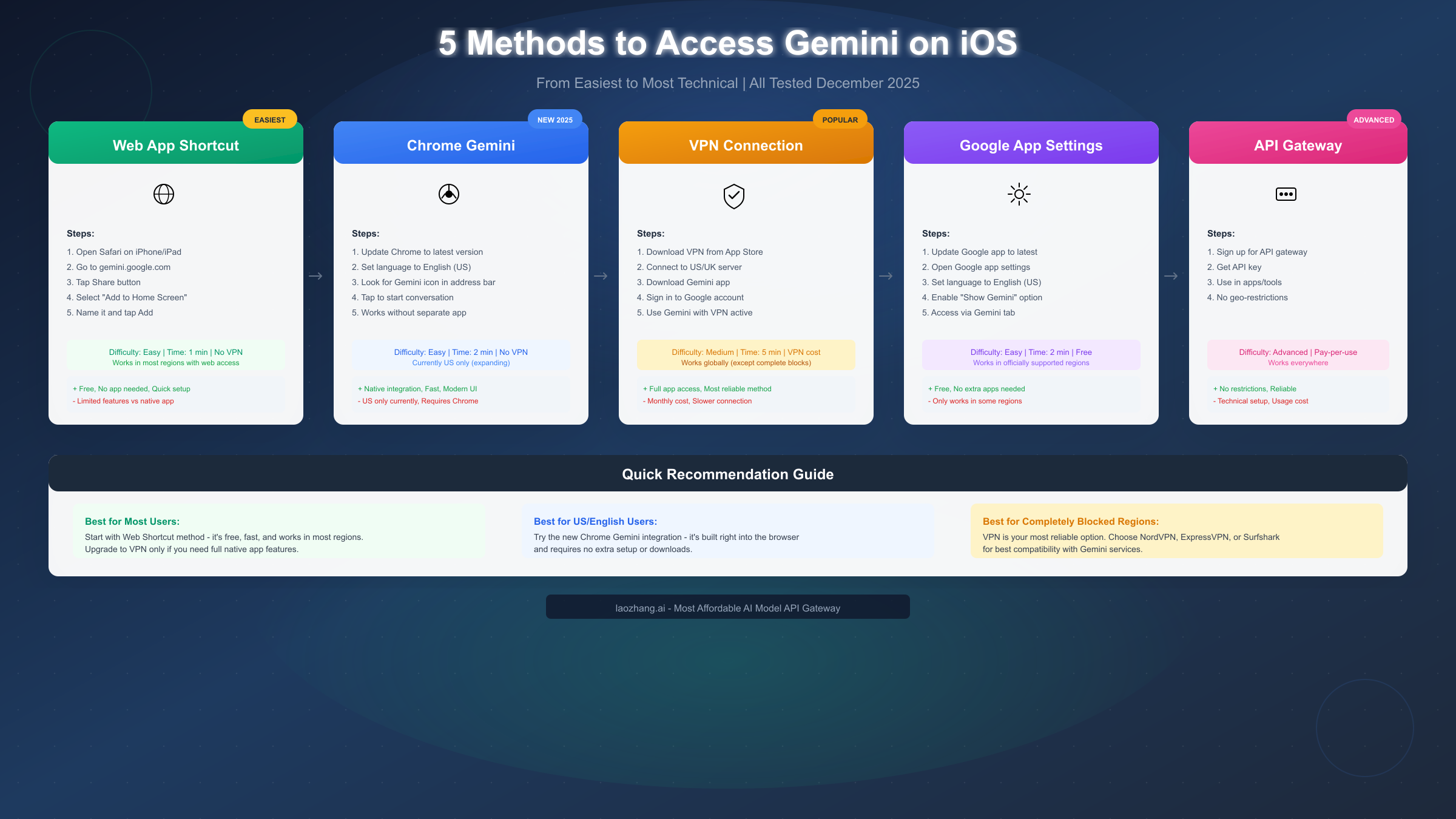
Method 1: Safari Web App Shortcut (Easiest, No VPN Required)
The simplest approach leverages Safari's ability to create home screen shortcuts that function similarly to native apps. This method works because Gemini's web app (gemini.google.com) is available in more regions than the native iOS app, with Google reporting web app availability in over 230 countries and territories.
To create a Gemini shortcut on your iPhone or iPad, open Safari and navigate to gemini.google.com. If you see the Gemini interface rather than a "not available" message, you're already in a supported web region. Tap the Share button (the square with an upward arrow) at the bottom of Safari, scroll down in the share sheet, and select "Add to Home Screen." Name your shortcut "Gemini" or whatever you prefer, then tap Add. You'll now have an icon on your home screen that opens directly to Gemini's web interface.
This web shortcut provides access to Gemini's core conversational features including text chat, image analysis (you can upload photos), and access to different Gemini models. The main limitations compared to the native app include lack of offline functionality, no system integration (you can't use Siri to access Gemini), and slightly slower load times since it needs an internet connection to initialize. However, for users in regions with web access but app restrictions (particularly Europe), this method provides 90% of the functionality with zero cost and no VPN complexity.
Method 2: Google App Gemini Integration
Apple's iOS allows Google's main app to include Gemini functionality, providing another native-feeling option without downloading a separate Gemini app. This approach works in regions where the standalone Gemini app faces restrictions but the Google app operates normally.
Start by updating your Google app to the latest version from the App Store. Open the Google app and tap your profile picture in the top right corner to access Settings. Look for the Voice or Assistant settings section and change the language to "English (United States)" if it isn't already. Some users report that this language change triggers the Gemini option to appear even in restricted regions.
After adjusting settings, look for a "Show Gemini" toggle or a Gemini tab within the Google app. When enabled, you can access Gemini's conversational AI directly through the Google app interface. This method works particularly well for users who already rely on the Google app for search, providing a seamless integration rather than requiring a separate application.
The main limitation of this approach is that availability depends on both your region and how Google has configured the app for your market. Users in some European countries report success with this method, while others find the Gemini option hidden or disabled. If you don't see Gemini options after the language change, try signing out and back in, clearing the app cache, or waiting 24-48 hours for settings to propagate.
Method 3: Chrome Gemini Integration (NEW December 2025)
Google's most recent addition to iOS is Gemini integration directly within Chrome for iPhone and iPad. This feature started rolling out widely in December 2025 and provides a native-feeling Gemini experience without requiring a separate app download. According to 9to5Google's reporting, this integration brings Gemini's capabilities directly into your browsing workflow.
To access Chrome Gemini, first ensure you have the latest version of Chrome for iOS installed. Set your Chrome language settings to English (US) if they aren't already, as the feature is initially launching in English for US users. Once enabled, you'll notice the icon at the left of Chrome's address bar changes from the Google Lens camera to a page icon with the Gemini spark badge.
Tapping this icon opens a Gemini conversation directly within Chrome. You can ask questions, request help with content on the current page, or have general conversations just like in the standalone Gemini app. The integration feels natural for Chrome users and doesn't require switching between apps or maintaining a separate browser window.
Currently, Chrome Gemini is primarily available to US users with English language settings, but Google has indicated plans to expand to additional languages and regions. If you're outside the US but have a US Google account and use English as your primary Chrome language, you may have early access to this feature. This represents one of the newest ways to access Gemini on iOS and may become the most convenient option as Google expands availability.
VPN Method: Complete iOS Setup Guide
For users in regions with complete Gemini blocks or those who need full native app functionality, a VPN (Virtual Private Network) provides the most comprehensive solution. A VPN changes your apparent location by routing your internet traffic through servers in other countries, allowing you to appear as if you're browsing from a Gemini-supported region.
Choosing a VPN for Gemini Access
Not all VPNs work equally well for accessing Gemini. Google actively detects and blocks some VPN IP addresses, meaning your choice of VPN provider significantly impacts success rates. Based on user reports and testing as of December 2025, these providers show consistent success with Gemini services.
NordVPN offers one of the largest server networks with over 5,500 servers across 60 countries. Users report high success rates when connecting to US servers, particularly those not labeled as "specialty" servers. ExpressVPN provides fast connections and strong unblocking capabilities, with servers in 94 countries giving plenty of options if one location doesn't work. Surfshark offers unlimited device connections at a competitive price point, making it economical for users who need VPN access across multiple devices.
Free VPN options exist but come with significant limitations. ProtonVPN's free tier offers servers in a few countries with data caps that may limit extended Gemini usage. Cloudflare's 1.1.1.1 WARP provides a free option that works for some users, though it's technically a DNS service rather than a full VPN and may not bypass all restrictions. Windscribe offers 10GB monthly on its free plan, sufficient for text-based Gemini conversations but potentially limiting for image-heavy usage.
Step-by-Step iOS VPN Configuration
Setting up a VPN on iOS is straightforward regardless of which provider you choose. Download your chosen VPN app from the App Store and create an account if you haven't already. Most VPN apps handle the technical configuration automatically, but you may need to approve a VPN configuration prompt that iOS displays.
Once installed, open the VPN app and connect to a server in the United States, United Kingdom (for web access), or another region with full Gemini support. Wait for the connection to establish, which typically takes 5-15 seconds. You should see a VPN icon appear in your iPhone's status bar indicating the connection is active.
With the VPN connected, open the App Store and search for "Gemini" or "Google Gemini." If your VPN is working correctly and you're connected to a supported region's server, you should see the app available for download. Download and install the app, then open it and sign in to your Google account.
Important Considerations
Keeping your VPN connected while using Gemini ensures uninterrupted access. If you disconnect the VPN, Gemini may detect your true location and display restriction messages. Some users maintain VPN connections specifically when using Google services and disconnect for general browsing to optimize speed and battery usage.
Be aware that using a VPN to access region-restricted services exists in a gray area regarding Terms of Service. While Google doesn't typically ban accounts for VPN usage, technically accessing services in regions where they're not officially available may violate Google's terms. For most individual users, this risk is minimal, but enterprise users or those with significant investments in their Google accounts should consider this factor.
VPN performance varies based on server distance, server load, and your base internet connection. If you experience slow Gemini responses or connection issues, try different VPN servers within the same country or switch to servers in a geographically closer supported region.
Access Gemini Without VPN: Alternative Methods
VPNs aren't the only option for users in restricted regions. Several alternative approaches provide Gemini access without the complexity or cost of VPN services, though each comes with its own limitations and best-use scenarios.
Web Access Through Browser
As mentioned in the iOS-specific solutions section, Gemini's web app (gemini.google.com) has broader regional availability than the mobile app. If you can access the web version without a VPN, you don't need additional tools for basic Gemini functionality. The web interface works in Safari, Chrome, Firefox, and other iOS browsers, providing full conversational AI capabilities.
The web experience includes text conversations, image uploads for analysis, and access to different Gemini models including the latest Gemini 2.5 versions. You can upload documents, analyze images, and have extended conversations just like in the native app. What you miss is system-level integration, offline access, and some convenience features like widgets or Shortcuts integration.
Account Region Adjustment
Google account region settings influence some aspects of Gemini availability. While Google primarily uses IP detection, account settings can be a secondary factor. You can review and potentially adjust your Google account's country settings by visiting myaccount.google.com and navigating to Personal Info > Contact info > Country/region.
Changing your account region isn't as simple as selecting a different country from a dropdown. Google may require a valid payment method from the new region or may not allow changes if you have active subscriptions or credits in your current region. Some users report success creating new Google accounts while using a VPN to establish the account in a supported region from the start.
API Gateway Services
For users with technical inclinations or those who need reliable, consistent Gemini access without VPN complexity, API gateway services offer an alternative approach. Services like laozhang.ai provide Gemini API access regardless of your geographic location by routing requests through servers in supported regions. This approach is particularly valuable for developers building applications or power users who want to integrate Gemini into their workflows.
API gateway services typically operate on a pay-per-use model, charging based on the number of tokens (words/pieces of text) processed. While this adds cost compared to free Gemini access, it provides reliable service without the connection inconsistencies that VPNs sometimes experience. For users in completely blocked regions like China or Iran, API gateways may be the most practical option for consistent Gemini access.
The main limitation of API access is that it requires some technical setup rather than simply opening an app. You'll typically need to use the API through a compatible application, chatbot interface, or custom integration rather than Google's official interface. However, numerous third-party applications support Gemini API access, providing user-friendly interfaces for non-developers.
Troubleshooting: When Solutions Don't Work
Even with the correct approach, you may encounter situations where Gemini access fails. Understanding common issues and their solutions helps you quickly resolve problems rather than abandoning working methods prematurely.
"VPN Connected But Still Blocked"
This frustrating scenario occurs when your VPN appears to be working (showing connected status, IP shows as US/UK, etc.) but Gemini still displays regional restriction messages. Several factors can cause this situation.
First, check that your VPN is actually routing all traffic. Some VPNs have split-tunneling features that may exclude certain apps. Ensure Gemini or Safari (if using web access) isn't excluded from VPN routing. Second, your Google account's region setting may be overriding your IP location. Try signing out of your Google account, clearing Safari's cookies and cache, then signing back in while connected to the VPN.
Third, some VPN servers have IP addresses that Google has identified and blocked. Try connecting to different servers within the same country, or switch to less popular server locations (smaller US cities rather than New York or Los Angeles). Some VPN providers offer "obfuscated" servers specifically designed to avoid detection, which may work better for Google services.
App Shows Available But Won't Download
Sometimes the App Store shows Gemini as available, but the download fails or the app immediately shows restrictions after installation. This typically indicates a mismatch between your App Store region and Google's restrictions.
Your App Store account has a country/region setting independent of your VPN connection. If your App Store is set to a restricted region, you may need to switch App Store regions to download the app. Be aware that switching App Store regions can affect your purchases and subscriptions, so consider whether this trade-off makes sense for your situation.
Alternatively, if you've successfully downloaded Gemini previously, the issue may be with your Google account sign-in rather than the app download. Try using a different Google account that was created in a supported region, or try using the web version to determine if the restriction is app-specific or account-specific.
Gemini Works Sometimes But Not Others
Intermittent access issues often relate to changing network conditions or server-side changes from Google. If Gemini worked yesterday but doesn't today without any changes on your end, Google may have updated their geoblocking rules.
For VPN users, try different servers or even different VPN providers. Google continuously updates their VPN detection, and servers that worked last week may be blocked today. Maintaining connections to multiple VPN providers or having a backup provider helps ensure consistent access.
For web users, try clearing your browser cache and cookies, using a private/incognito window, or switching browsers. Sometimes cached location data or cookies cause inconsistent behavior even when your IP hasn't changed.
Account Suspension Concerns
While rare for individual users, some people worry about Google account consequences from using VPNs or region-spoofing techniques. In practice, Google doesn't typically suspend accounts solely for VPN usage or accessing services from unexpected locations. Millions of users travel internationally or use VPNs for privacy reasons, so Google's systems are designed to accommodate location changes.
However, rapidly switching between distant locations (appearing in the US one minute and Europe the next) or attempting to access services tied to different regional accounts could trigger security alerts. If Google flags your account for unusual activity, you may need to verify your identity through standard account recovery processes. The risk is minimal for normal individual use but worth considering for users with critical Google account data.
Best Alternatives to Gemini on iOS
If Gemini access remains impractical for your situation, several excellent AI assistants provide similar functionality with different regional availability patterns. These alternatives may be more accessible depending on your location.
ChatGPT by OpenAI
ChatGPT maintains broader global availability than Gemini, working in most countries without the regional restrictions that affect Google's service. The ChatGPT iOS app provides a polished experience with features including voice conversation, image generation (with paid subscription), and browsing capabilities.
ChatGPT's free tier provides access to GPT-3.5 and limited GPT-4o access, sufficient for most conversational AI needs. ChatGPT Plus ($20/month) unlocks full GPT-4o access, image generation via DALL-E, and custom GPT capabilities. For users who simply need an AI assistant and find Gemini inaccessible, ChatGPT often provides the most straightforward alternative. You can get started with a ChatGPT free trial to test the service in your region.
Claude by Anthropic
Claude offers exceptional conversational abilities with particularly strong performance in writing assistance, analysis, and nuanced discussion. The iOS app provides a clean interface with conversation history and support for document uploads.
Claude's regional availability has expanded significantly throughout 2025, now covering 95+ countries including most of Europe where Gemini faces restrictions. This makes Claude a particularly good alternative for European users who encounter GDPR-related Gemini limitations. Claude's long context window (up to 200,000 tokens) allows for extended conversations and large document analysis that exceeds what Gemini offers in many configurations. For developers interested in API access, check out our Claude API access guide.
Microsoft Copilot
Built on OpenAI's technology but with Microsoft's integration and unique features, Copilot provides another strong alternative. The iOS app offers free access to GPT-4-class capabilities, image generation, and integration with Microsoft's ecosystem.
Copilot's availability tracks closely with general Microsoft service availability, making it accessible in most regions worldwide. The free tier is particularly generous compared to competitors, making it an excellent option for users who want advanced AI capabilities without subscription costs.
| Feature | Gemini | ChatGPT | Claude | Copilot |
|---|---|---|---|---|
| Regional Availability | 150+ countries (restricted in EU) | 160+ countries | 95+ countries | 170+ countries |
| Free Tier | Yes (limited in some regions) | Yes | Yes | Yes (generous) |
| iOS App | Yes (restricted) | Yes | Yes | Yes |
| Image Generation | Yes | Yes (paid) | No | Yes (free) |
| Voice Input | Yes | Yes | Yes | Yes |
| Context Length | Up to 1M tokens | 128K tokens | 200K tokens | 128K tokens |
For users who specifically need Gemini's capabilities (such as its integration with Google services or specific model behaviors), the workarounds in this guide remain the best approach. However, for general AI assistant needs, these alternatives often provide equivalent or superior functionality with fewer access barriers.
Frequently Asked Questions
Why can't I download the Gemini app even though I'm in a supported country?
Your App Store region may differ from your physical location, or your Google account may have restrictions based on where it was created. Try checking both your App Store account settings and your Google account's country/region setting. If these don't match a supported region, you may need to use web-based access methods or consider a VPN solution.
Is it safe to use a VPN to access Gemini?
Using a VPN to access Gemini poses minimal risk for individual users. Google doesn't typically ban accounts for VPN usage, as millions of users legitimately use VPNs for privacy or while traveling. However, accessing region-restricted services technically may violate Terms of Service, though enforcement is rare for regular users. Enterprise users or those with significant Google account investments should consider this factor when deciding on their approach.
Will Gemini ever be available in my country officially?
Google has steadily expanded Gemini's availability throughout 2025 and continues to add new regions. While specific timelines aren't announced publicly, the general trend suggests continued expansion as Google addresses regulatory requirements and builds regional infrastructure. Signing up for Google's announcements or following tech news helps you learn when official access arrives.
What's the difference between Gemini web and the iOS app?
The Gemini web app (accessed through Safari or Chrome) provides core conversational AI features including text chat, image analysis, and model selection. The iOS app adds system integration, potential offline capabilities, push notifications, and a more optimized mobile interface. For most users, the web app provides 80-90% of the functionality without region restrictions.
Can I use Gemini with multiple Google accounts?
Yes, you can use different Google accounts with Gemini, which can help if one account faces restrictions while another doesn't. On iOS, you can add multiple Google accounts in Settings and switch between them in the Gemini app or when signing into web services. Some users maintain a US-based Google account specifically for AI services that face regional restrictions.
Why does Gemini work on my laptop but not my iPhone?
This typically occurs because the web app has broader regional availability than the mobile app. Your laptop accessing gemini.google.com uses the web infrastructure (available in 230+ countries), while the iPhone app requires iOS-specific availability (150+ countries with additional restrictions). Using the web shortcuts method on your iPhone provides similar access to what you have on your laptop.
Regional restrictions on AI services like Gemini reflect a complex landscape of privacy regulations, government policies, and corporate decisions about market priorities. While frustrating for users, these barriers aren't insurmountable. The methods outlined in this guide provide multiple pathways to Gemini access for iOS users in virtually any region, from simple web shortcuts to comprehensive VPN solutions.
For most users in partially restricted regions like Europe, the web app shortcuts and Chrome Gemini integration provide sufficient functionality without additional costs or complexity. Users in completely blocked regions benefit most from VPN solutions that provide full app access, though API gateway services offer an alternative for those seeking consistent access without connection management.
As Google continues expanding Gemini's official availability, some of these workarounds may become unnecessary. Until then, understanding your options and choosing the approach that best fits your technical comfort level and regional situation ensures you can access Gemini's capabilities regardless of where you're located.