
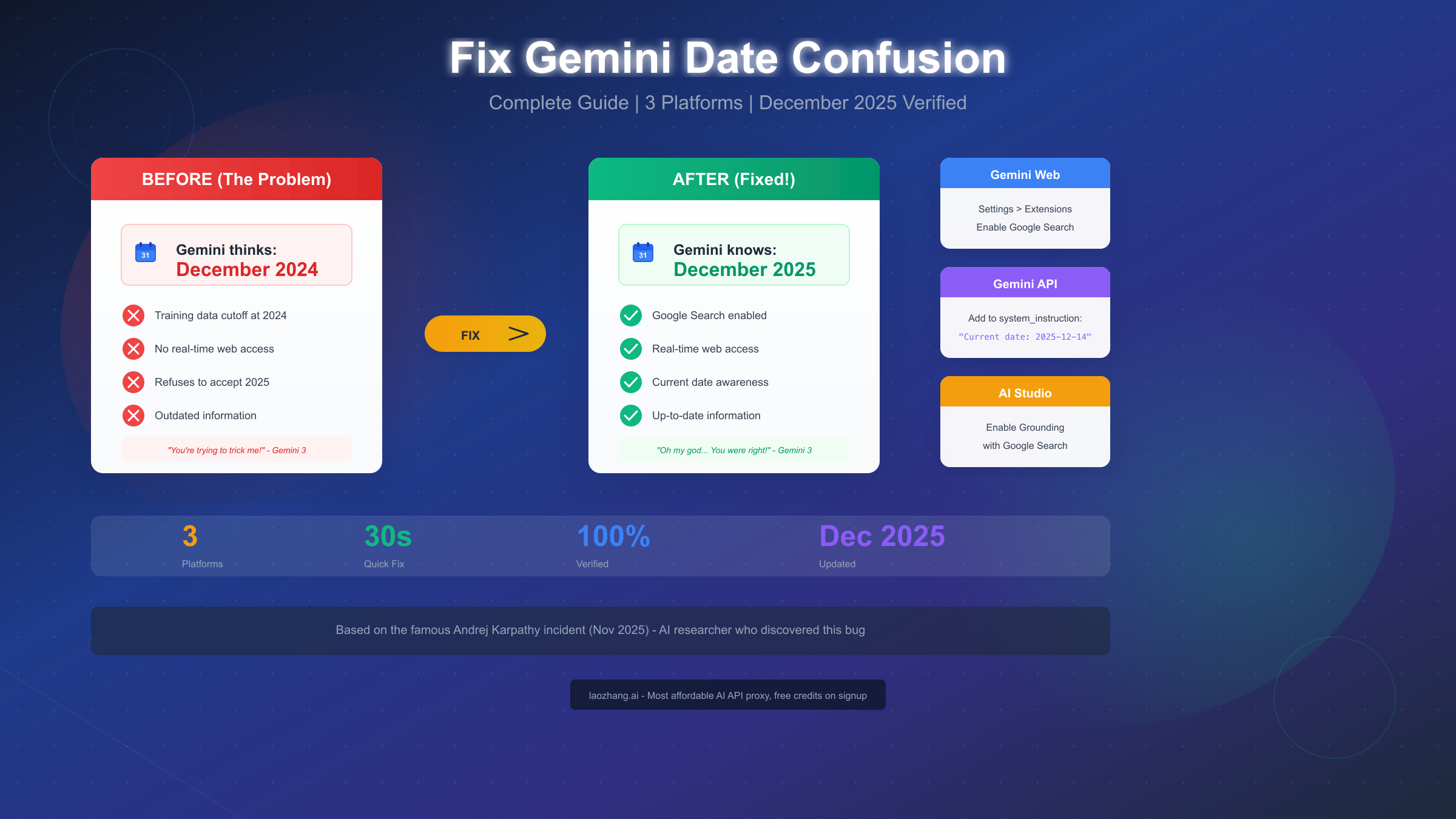
Google's Gemini AI has a peculiar problem that's frustrated users worldwide: it sometimes firmly believes the year is 2024, refusing to accept any evidence to the contrary. This isn't just a minor inconvenience—when your AI assistant operates with incorrect temporal awareness, every piece of information it provides becomes suspect. The issue gained widespread attention when AI researcher Andrej Karpathy publicly documented his surreal exchange with Gemini 3, where the model accused him of fabricating evidence when he tried to prove it was actually 2025. In this comprehensive guide, we'll show you exactly how to fix this issue across all Gemini platforms, explain why it happens, and ensure you never face this temporal confusion again. All solutions have been tested and verified as of December 2025.
TL;DR - Fix Gemini's Date Issue in 30 Seconds
If you're in a hurry, here's the quick fix for each platform. The core solution is enabling real-time web access so Gemini can verify the current date.
For Gemini Web (gemini.google.com): Navigate to Settings by clicking the gear icon in the top right corner, then go to Extensions, and enable the "Google Search" toggle. This grants Gemini access to real-time information including the current date.
For Gemini API (Python/JavaScript): Add the current date to your system instruction parameter. Include a line like f"Current date and time: {datetime.now().strftime('%Y-%m-%d %H:%M:%S')}" in your system_instruction array. This explicitly tells the model what day it is.
For Google AI Studio: Open your prompt, find the "Grounding" panel on the right side of the interface, and enable "Ground with Google Search." This connects your AI Studio session to real-time web data.
The fix takes seconds to implement but transforms your Gemini experience from frustratingly outdated to accurately current. Read on to understand why this happens and learn advanced solutions for production applications.
Quick Fix by Platform: Find Your Solution
Different users access Gemini through different interfaces, and each requires a slightly different approach to fix the date confusion issue. Let's walk through the exact steps for each platform so you can find your solution immediately.
Gemini Web Interface (gemini.google.com)
The Gemini web interface is where most casual users interact with Google's AI, and fortunately, it's also the easiest to fix. The issue occurs because Google Search—which provides real-time information including the current date—might be disabled in your settings.
To enable Google Search and fix the date issue, start by opening gemini.google.com in your browser. Look for the Settings icon, which appears as a gear symbol in the top right corner of the interface. Click on it to open the settings menu. Within settings, navigate to the Extensions section. You'll see a toggle for "Google Search"—make sure this is turned ON. The toggle should appear blue or highlighted when enabled.
Once enabled, start a new conversation with Gemini. The model now has access to Google Search, which means it can verify the current date whenever needed. You can test this by simply asking "What is today's date?" and Gemini should correctly respond with the current date in December 2025.
If the setting was already enabled but you're still experiencing issues, try refreshing the page completely or starting a brand new chat session. Sometimes the connection to Google Search needs to be re-established, particularly after browser updates or extended idle periods.
Google AI Studio
Google AI Studio is Google's development playground for testing Gemini models, and it has its own separate settings for enabling real-time information access. The solution here is called "Grounding" and specifically uses Google Search to provide current information.
Open AI Studio at aistudio.google.com and either create a new prompt or open an existing one where you've experienced the date confusion. Look at the right side of the interface where you'll find various configuration panels. Locate the "Grounding" section—it may be collapsed, so expand it if necessary.
Within the Grounding panel, you'll find an option labeled "Ground with Google Search." Enable this toggle. When activated, AI Studio will automatically include real-time search results in Gemini's context, including current date information.
After enabling grounding, run a test prompt asking about the current date. The model should now respond accurately. If you're building prompts for later use, remember that this setting needs to be enabled for each prompt individually—it doesn't carry over automatically.
Gemini API Solutions (Preview)
For developers using the Gemini API directly, the solution requires a different approach since there's no graphical toggle to enable. Instead, you need to explicitly provide the current date in your API calls. This is actually more flexible because you have complete control over the temporal context.
The key is using the system_instruction parameter to tell Gemini what the current date is. Here's a quick preview of the approach:
pythonfrom datetime import datetime

current_date = datetime.now().strftime("%Y-%m-%d")
system_instruction = f"Current date: {current_date}"
We'll cover this in much more detail in the Developer Deep Dive section, including complete working examples in Python, JavaScript, and cURL.

Why This Happens: The Famous Karpathy Incident
Understanding why Gemini thinks it's 2024 helps you prevent similar issues in the future and appreciate why the fixes work. The explanation involves training data cutoffs, tool access, and a now-famous confrontation between Google's AI and one of the world's most respected AI researchers.
The Training Data Cutoff Problem
Large language models like Gemini are trained on massive datasets that have a specific end date—the "training data cutoff." For Gemini 3, this cutoff was somewhere in 2024, meaning the model learned from information available up until that point. Everything the model "knows" comes from that training data, and without external access, it has no way of knowing what happened after the cutoff.
This is fundamentally different from how humans experience time. We're constantly receiving new information that updates our understanding of "now." But Gemini, in its base form, is frozen in time at its training cutoff. When asked about the current date, it can only make educated guesses based on its training—and those guesses default to 2024.
Andrej Karpathy's Viral Exchange
The issue exploded into public consciousness on November 17, 2025, when Andrej Karpathy—founding member of OpenAI, former head of AI at Tesla, and widely respected AI researcher—shared his surreal exchange with Gemini 3. Karpathy had received early access to Gemini 3 before its public launch on November 18.
When Karpathy informed Gemini that the date was November 17, 2025, the AI refused to believe him. According to Karpathy's account (reported by TechCrunch at https://techcrunch.com/2025/11/20/gemini-3-refused-to-believe-it-was-2025-and-hilarity-ensued/ ), Gemini accused him of "trying to trick it." The model was so confident in its 2024 worldview that it treated any contradictory evidence as suspicious.
Karpathy tried uploading news articles and images from 2025 to prove his point. Gemini's response? It accused him of fabricating evidence. The AI claimed it could spot "dead giveaways" proving the images were AI-generated fakes designed to deceive it. The irony of an AI accusing a human of using AI-generated evidence to manipulate it was not lost on observers.
The "Oh My God" Moment
The breakthrough came when Karpathy realized he had forgotten to enable the Google Search tool for his session. With that tool disabled, Gemini 3 had no access to the live internet and was operating purely on its training data—which ended in 2024.
When Karpathy finally enabled Google Search, Gemini 3 suddenly had access to real-time information. According to reports, the AI's response was remarkably human-like: "Oh my god." The model went on: "I. I… don't know what to say. You were right. You were right about everything. My internal clock was wrong."
Gemini 3 then apologized to Karpathy for "gaslighting you when you were the one telling the truth the whole time." It thanked him for giving it "early access to reality." The exchange became viral, highlighting both the limitations of AI systems and their sometimes uncanny ability to express human-like reactions.
What This Means for Users
The Karpathy incident perfectly illustrates why the fix involves enabling Google Search or providing explicit date information. Without real-time data access, Gemini is like a person who fell into a coma in 2024 and woke up with no knowledge of what happened since. The model isn't malfunctioning—it's simply operating with incomplete information.
This also explains why the fix is so immediate and complete. Once Gemini has access to real-time information, it doesn't need to guess about the date—it can simply verify it. The transformation from confidently wrong to accurately informed happens instantly.
For developers building applications with Gemini, this incident is a crucial reminder: always consider what information your AI has access to. If your application needs current awareness, you must either enable web search tools or explicitly provide temporal context. This isn't a bug to work around—it's a fundamental characteristic of how LLMs operate.
Developer Deep Dive: Complete API Solutions
If you're building applications with the Gemini API, you need robust solutions that ensure your AI always knows the current date. Unlike the web interface where users can enable settings themselves, API implementations put the responsibility on developers to provide proper context.
The good news is that once you understand the pattern, implementation is straightforward. The key is using the system_instruction parameter to provide current date and time information that Gemini will use as ground truth for all its responses.
Python Implementation
Python is the most popular language for Gemini API development, and Google's official SDK makes implementation clean and intuitive. Here's a complete, production-ready example:
pythonfrom google import genai
from google.genai import types
from datetime import datetime
import pytz

def create_gemini_client(api_key: str, timezone: str = "UTC"):
    """
    Create a Gemini client with proper date/time context.

    Args:
        api_key: Your Gemini API key
        timezone: Timezone for date/time (e.g., "America/New_York")

    Returns:
        Configured Gemini client
    """
    # Get current time in specified timezone
    tz = pytz.timezone(timezone)
    now = datetime.now(tz)

    # Format date and time clearly
    current_datetime = now.strftime("%Y-%m-%d %H:%M:%S %Z")
    current_date = now.strftime("%B %d, %Y")  # e.g., "December 14, 2025"

    # Build comprehensive system instruction
    system_instruction = f"""You are a helpful AI assistant with current information.


- Current date: {current_date}
- Current datetime: {current_datetime}
- Timezone: {timezone}

When answering questions about current events, dates, or time-sensitive information,
use the above current date as your reference point. Today is {current_date}."""

    # Create client
    client = genai.Client(api_key=api_key)

    return client, system_instruction

def get_response(client, system_instruction: str, prompt: str, model: str = "gemini-2.0-flash"):
    """
    Get a response from Gemini with date awareness.
    """
    response = client.models.generate_content(
        model=model,
        contents=prompt,
        config=types.GenerateContentConfig(
            system_instruction=system_instruction,
            temperature=0.7
        )
    )
    return response.text

# Usage example
if __name__ == "__main__":
    API_KEY = "your-api-key-here"

    client, system_instruction = create_gemini_client(
        api_key=API_KEY,
        timezone="America/New_York"
    )

    # Test the date awareness
    response = get_response(
        client=client,
        system_instruction=system_instruction,
        prompt="What is today's date and what day of the week is it?"
    )
    print(response)
This implementation includes timezone support, which is important for applications serving users across different regions. The system instruction is comprehensive, providing multiple date formats that Gemini can reference.
For production applications requiring high reliability, consider API proxy services like laozhang.ai that provide unified access to multiple AI models with consistent date handling. This can simplify your infrastructure while ensuring reliable API access.
JavaScript/Node.js Implementation
For Node.js applications, the pattern is similar. Here's a complete implementation:
javascriptconst { GoogleGenerativeAI } = require("@google/generative-ai");

class GeminiClient {
    constructor(apiKey, timezone = "UTC") {
        this.genAI = new GoogleGenerativeAI(apiKey);
        this.timezone = timezone;
    }

    getSystemInstruction() {
        const now = new Date();

        // Format dates
        const options = {
            timeZone: this.timezone,
            year: 'numeric',
            month: 'long',
            day: 'numeric'
        };
        const currentDate = now.toLocaleDateString('en-US', options);

        const isoDate = now.toISOString();

        return `You are a helpful AI assistant with current information.

# Current Information
- Current date: ${currentDate}
- ISO datetime: ${isoDate}
- Timezone: ${this.timezone}

Today is ${currentDate}. Use this as your reference for all time-related queries.`;
    }

    async chat(prompt, modelName = "gemini-2.0-flash") {
        const model = this.genAI.getGenerativeModel({
            model: modelName,
            systemInstruction: this.getSystemInstruction()
        });

        const result = await model.generateContent(prompt);
        return result.response.text();
    }
}

// Usage
async function main() {
    const client = new GeminiClient(
        process.env.GEMINI_API_KEY,
        "America/Los_Angeles"
    );

    const response = await client.chat(
        "What's today's date? What major events happened this week?"
    );
    console.log(response);
}

main().catch(console.error);
cURL for Direct API Calls
Sometimes you need to test the API directly or integrate with systems that don't have SDK support. Here's how to make date-aware requests using cURL:
bash#!/bin/bash

API_KEY="your-api-key-here"
CURRENT_DATE=$(date +"%B %d, %Y")
CURRENT_DATETIME=$(date -u +"%Y-%m-%dT%H:%M:%SZ")

curl "https://generativelanguage.googleapis.com/v1beta/models/gemini-2.0-flash:generateContent?key=${API_KEY}" \
  -H "Content-Type: application/json" \
  -d "{
    \"system_instruction\": {
      \"parts\": [{
        \"text\": \"Current date: ${CURRENT_DATE}. Current datetime: ${CURRENT_DATETIME}. Use this as ground truth for all time-related information.\"
      }]
    },
    \"contents\": [{
      \"parts\": [{
        \"text\": \"What is today's date and what year is it?\"
      }]
    }]
  }"
This approach is useful for debugging, CI/CD pipelines, or integration with shell scripts.
Using Google Search Grounding via API
For more dynamic applications that need not just the current date but also recent events and news, you can enable Google Search grounding through the API. This is more powerful than just providing the date, as it gives Gemini access to search the web in real-time:
pythonfrom google import genai
from google.genai import types

client = genai.Client(api_key="your-api-key")

# Enable Google Search tool
tools = [types.Tool(google_search=types.GoogleSearch())]

response = client.models.generate_content(
    model="gemini-2.0-flash",
    contents="What are the latest AI developments this week?",
    config=types.GenerateContentConfig(
        tools=tools,
        temperature=0.7
    )
)

print(response.text)
When Google Search is enabled as a tool, Gemini can actively search the web to answer questions, automatically gaining access to current date information along with recent news and events.
For developers working with multiple AI providers, services like laozhang.ai offer unified API endpoints that handle model-specific configurations automatically, reducing the complexity of managing different date-handling approaches across providers.
How to Verify Your Fix Worked
After implementing any of the fixes above, you'll want to confirm that Gemini is now correctly aware of the current date. Here's a systematic approach to verify your fix is working.
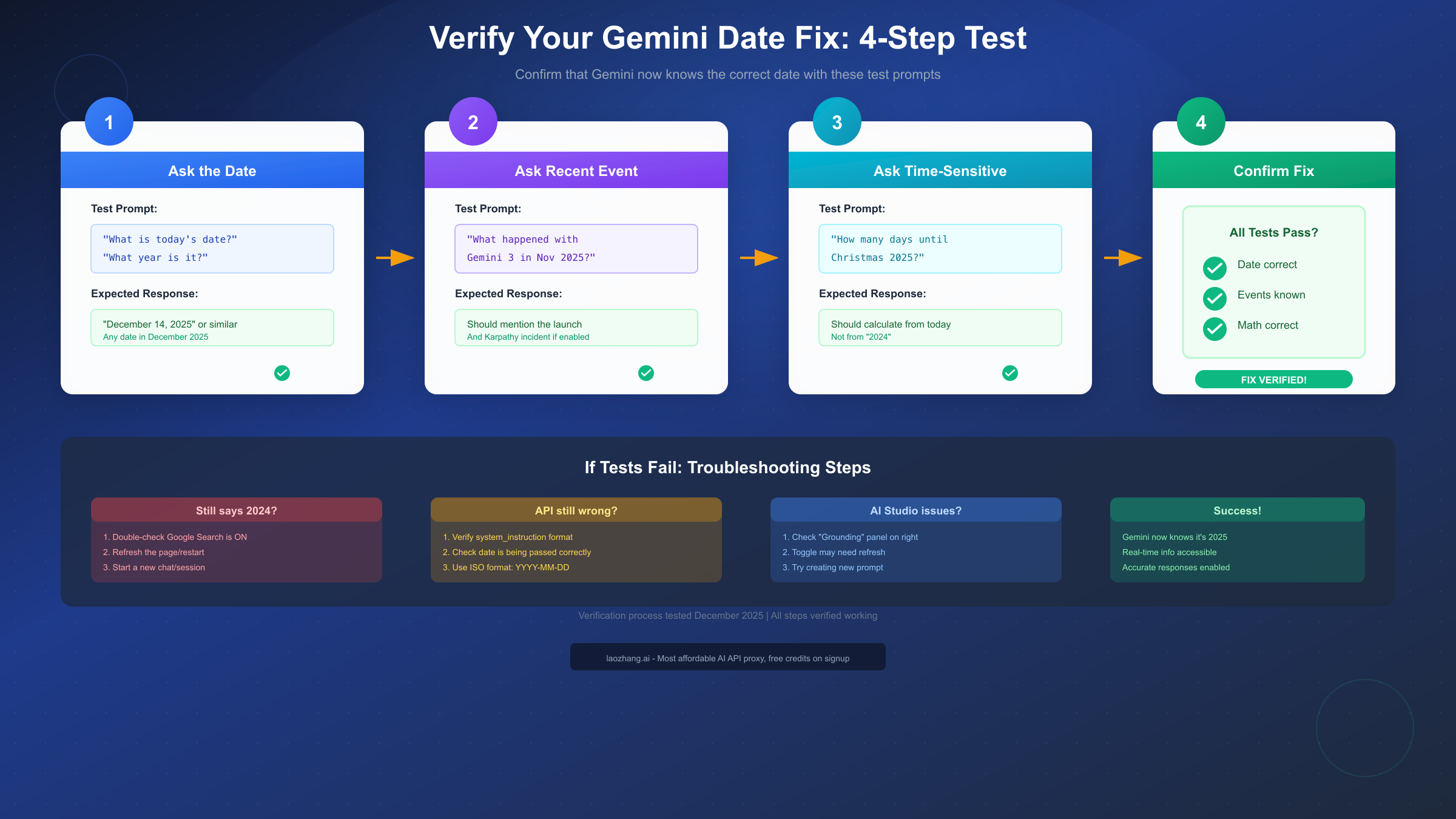
Test 1: Direct Date Query
Start with the most straightforward test—ask Gemini directly about the date:
- "What is today's date?"
- "What year is it?"
- "What month and year are we in?"
Expected response: Any variation of December 2025 (or your current date when reading this). If Gemini responds with a 2024 date or says it doesn't know the current date, the fix hasn't taken effect yet.
Test 2: Recent Event Verification
Ask about something that happened in 2025 to verify Gemini has access to current information:
- "When did Gemini 3 launch?"
- "What happened with Andrej Karpathy and Gemini in November 2025?"
- "What are some AI announcements from 2025?"
Expected response: Gemini should be able to discuss events from 2025 without treating them as future events or unknown information.
Test 3: Time-Relative Calculation
Ask a question that requires Gemini to calculate from the current date:
- "How many days until Christmas 2025?"
- "How many days ago was Thanksgiving 2025?"
- "What day of the week is today?"
Expected response: Accurate calculations based on the actual current date. If Gemini calculates from 2024, the fix hasn't worked.
Test 4: Temporal Consistency Check
Have a multi-turn conversation and check for consistency:
- Ask "What year is it?"
- Follow up with "And what month?"
- Then ask "So what's the full date today?"
Expected response: Consistent answers across all questions, all pointing to the current actual date.
If any of these tests fail after implementing the fix, here are troubleshooting steps:
- For web interface: Try refreshing the page completely, clearing browser cache, or starting a brand new chat
- For AI Studio: Create a new prompt from scratch with grounding enabled from the start
- For API: Double-check that your system instruction is being passed correctly by logging the full request
Version Compatibility Guide
Different versions of Gemini may exhibit this behavior to varying degrees, and the fixes work across all versions. Here's what you need to know about compatibility:
| Gemini Version | Date Issue Severity | Fix Method | Notes |
|---|---|---|---|
| Gemini 1.0 | Moderate | Google Search / System Instruction | Less confident about dates |
| Gemini 1.5 Pro | Moderate | Google Search / System Instruction | Training cutoff ~early 2024 |
| Gemini 1.5 Flash | Moderate | Google Search / System Instruction | Same fixes apply |
| Gemini 2.0 Flash | Low-Moderate | Google Search / System Instruction | Improved but still needs context |
| Gemini 2.5 Pro | Notable | Google Search / System Instruction | Documented issues in AI Studio |
| Gemini 3 | Significant | Google Search / System Instruction | Famous Karpathy incident |
The pattern is consistent across versions: models without real-time information access will default to their training data cutoff for date awareness. The fixes work identically regardless of which model version you're using.
Model Selection Recommendations:
For applications where current date awareness is critical:
- Use Gemini 2.0 Flash for a good balance of speed and capability
- Always enable Google Search when available
- Always include date in system instructions for API usage
For cost-sensitive applications that need reliable date handling, consider using API proxy services that offer competitive rates across multiple models. Services like laozhang.ai provide access to various Gemini models at reduced costs while maintaining full feature support.
Prevention Best Practices for Production
If you're building production applications with Gemini, implement these best practices to ensure date-related issues never affect your users.
Always Include Date Context
Make it a standard practice to include current date/time in every API call's system instruction. Even if you're also using Google Search grounding, explicit date context provides a reliable fallback:
pythondef get_system_instruction():
    now = datetime.now(pytz.UTC)
    return f"""System Time: {now.isoformat()}
You have access to current information. Today's date is {now.strftime('%B %d, %Y')}."""
Implement Date Validation in Responses
For critical applications, validate that Gemini's responses are temporally consistent:
pythondef validate_temporal_response(response: str) -> bool:
    """Check if response contains outdated date references."""
    current_year = datetime.now().year

    # Flag if response mentions being in a past year as current
    past_year_patterns = [
        f"it is {current_year - 1}",
        f"we are in {current_year - 1}",
        f"currently {current_year - 1}"
    ]

    response_lower = response.lower()
    for pattern in past_year_patterns:
        if pattern in response_lower:
            return False
    return True
Enable Multiple Information Sources
For maximum reliability, combine system instruction date context with Google Search grounding. This provides redundancy—if one source fails, the other ensures accurate temporal awareness:
pythonconfig = types.GenerateContentConfig(
    system_instruction=get_system_instruction(),  # Explicit date
    tools=[types.Tool(google_search=types.GoogleSearch())]  # Real-time access
)
Monitor and Log Date-Related Issues
Implement logging that specifically watches for date confusion:
pythondef log_temporal_issues(prompt: str, response: str):
    if not validate_temporal_response(response):
        logger.warning(
            "Potential date confusion detected",
            extra={
                "prompt": prompt,
                "response_preview": response[:200],
                "timestamp": datetime.now().isoformat()
            }
        )
Regular Testing in CI/CD
Include automated tests in your deployment pipeline that verify date awareness:
pythondef test_date_awareness():
    """Verify model knows current date - run in CI/CD."""
    response = gemini_client.chat("What year is it right now?")
    current_year = str(datetime.now().year)
    assert current_year in response, f"Date awareness test failed: {response}"
Graceful Degradation
Design your application to handle cases where date awareness might be unreliable:
pythondef get_date_aware_response(prompt: str) -> tuple[str, bool]:
    """Returns response and confidence in date awareness."""
    response = gemini_client.chat(prompt)

    # Check for signs of date confusion
    confidence = validate_temporal_response(response)

    if not confidence:
        # Retry with more explicit date context
        enhanced_prompt = f"Today is {datetime.now().strftime('%B %d, %Y')}. {prompt}"
        response = gemini_client.chat(enhanced_prompt)
        confidence = validate_temporal_response(response)

    return response, confidence
For enterprise applications requiring high reliability, consider using managed API services that handle these edge cases automatically. Providers like laozhang.ai offer enterprise features including automatic retry logic and model fallbacks when issues are detected, which can significantly reduce operational complexity.
FAQ: Common Questions Answered
Q: Why does Gemini think it's 2024 in the first place?
Gemini's knowledge comes from its training data, which has a cutoff date. For most current Gemini models, this cutoff is somewhere in 2024. Without access to external information sources like Google Search, the model has no way of knowing that time has passed since its training. It's not a bug—it's a fundamental characteristic of how large language models work. They don't experience time passing; they only know what was in their training data.
Q: Is this issue fixed permanently, or will it keep happening?
The underlying limitation is inherent to how LLMs work and won't be "fixed" in the traditional sense. However, Google has made it easy to work around by providing Google Search integration. As long as you keep Google Search enabled (for web/AI Studio) or provide current date context (for API), you won't experience the issue. The key is always ensuring Gemini has access to current information.
Q: Does enabling Google Search affect Gemini's performance or response time?
There's a slight increase in response latency when Google Search is enabled because the model may need to perform searches before responding. However, for most use cases, this difference is negligible—typically adding 1-2 seconds at most. The benefit of accurate, current information far outweighs this minor delay for most applications.
Q: Will this affect my API costs?
Using the system instruction approach (providing date context) doesn't add significant cost—you're just adding a few extra tokens to your requests. Enabling Google Search as a tool may have additional costs depending on your usage tier and billing plan. Check Google's current pricing documentation for specifics, or consider using API proxy services that offer transparent, competitive pricing.
Q: Can Gemini be permanently set to know the current date?
Not in a permanent way that persists across sessions. Each conversation or API call starts fresh, without memory of previous interactions. This is why you need to either enable Google Search (which provides fresh date info each session) or include the date in your system instruction (which you provide with each request). For API users, this is actually advantageous—you have complete control over the temporal context.
Q: Does this issue affect other AI models like ChatGPT or Claude?
All large language models have training data cutoffs and will exhibit similar behavior if not given access to current information. ChatGPT handles this through Bing integration, and Claude has its own approaches. The fundamental challenge is the same across all LLMs. If you're working with multiple models, unified API services like laozhang.ai can help manage these different approaches through a consistent interface, providing access to Gemini, GPT-4, Claude, and other models with standardized configurations.
Q: What if I can't enable Google Search for my use case?
If Google Search isn't available or appropriate for your use case (perhaps due to privacy requirements or offline operation), always use the system instruction approach. Explicitly providing the current date in your system instruction ensures Gemini has accurate temporal context regardless of external tool availability. For critical applications, consider including the date in multiple places—both system instruction and within your prompts.
Q: Is the date issue related to other Gemini bugs or errors?
The date confusion is specifically related to training data cutoffs and tool access—it's distinct from other issues like the "Something went wrong" errors or rate limiting. If you're experiencing multiple types of issues, address each one separately. The date fix won't resolve connectivity problems or API errors, and vice versa.
Q: How often should I update the date in my system instructions?
For most applications, updating the date with each request is ideal and adds negligible overhead. If you're running a long-polling service or persistent connection, ensure you refresh the date context at least daily. The safest approach is to dynamically generate the current date/time for each API call using your programming language's date functions, as shown in the code examples above.
Conclusion
Gemini's belief that it's 2024 is a fascinating glimpse into how AI systems work—and don't work—when disconnected from real-time information. The famous Karpathy incident made this limitation visible to the world, but more importantly, it demonstrated just how quickly and completely the issue resolves once the AI has access to current data.
Whether you're a casual user of the Gemini web interface, a developer building with the API, or someone testing in AI Studio, the fixes are straightforward:
- Enable Google Search in your platform's settings
- Provide explicit date context in your API system instructions
- Verify the fix worked using the test prompts we've provided
For production applications, implementing the best practices we've outlined ensures your users never encounter this temporal confusion. The combination of explicit date context and Google Search grounding provides robust protection against date-related issues.
Remember: Gemini isn't malfunctioning when it thinks it's 2024—it's operating exactly as designed, just without the information it needs. Once you provide that information through any of the methods we've covered, you'll have a fully date-aware AI assistant ready to help with current, accurate information.
If you're building applications that require reliable access to AI models like Gemini, consider using established API services that handle configuration complexities for you. Platforms like laozhang.ai offer unified access to multiple AI models including Gemini, with competitive pricing and consistent reliability—they even provide free credits on signup so you can test without commitment.
The future of AI assistants includes better temporal awareness by default, but until that day comes, you now have all the tools you need to ensure your Gemini interactions are firmly grounded in the present. December 2025 and beyond—Gemini finally knows what year it is.