
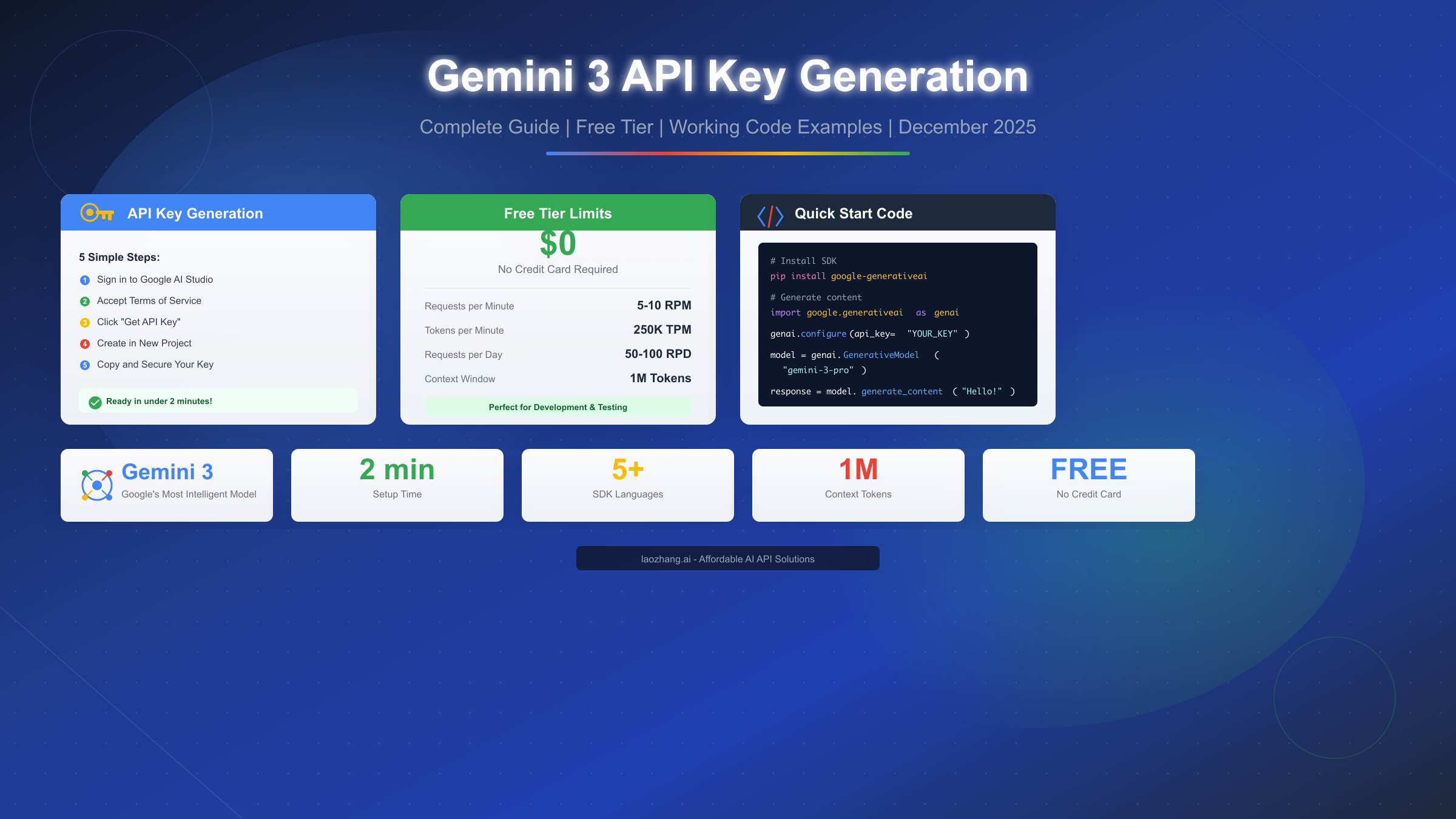
Generating a Gemini 3 API key takes approximately two minutes through Google AI Studio, and the entire process requires no credit card or billing setup. Google's latest Gemini 3 model family represents their most intelligent AI offering to date, featuring advanced reasoning capabilities, native multimodal support, and a generous free tier that makes it accessible to developers at any level. This December 2025 guide walks you through every step from initial signup to making your first API call, including detailed troubleshooting solutions and security best practices that most tutorials overlook.
What is Gemini 3 API and Why Should You Use It
Google's Gemini 3 represents a significant leap forward in AI capabilities, positioning itself as the company's most sophisticated model family designed specifically for complex reasoning and agentic workflows. Unlike its predecessors, Gemini 3 was built from the ground up to handle autonomous coding tasks, multi-step reasoning problems, and seamless multimodal processing across text, images, audio, and video inputs. The model excels at understanding context across extended conversations, supporting up to one million tokens in its context window—roughly equivalent to processing an entire novel or extensive codebase in a single query.
The practical implications for developers are substantial. When you integrate Gemini 3 into your applications, you gain access to capabilities that previously required multiple specialized models or complex orchestration systems. A single API call can analyze a technical diagram, read accompanying documentation, and generate implementation code while maintaining awareness of your project's existing architecture. This unified approach simplifies development workflows considerably and reduces the integration complexity that often accompanies multi-model systems.
Understanding the Model Variants
Google currently offers several variants within the Gemini 3 family, each optimized for different use cases and budget considerations. Gemini 3 Pro delivers the highest reasoning capabilities and is ideal for complex tasks requiring nuanced understanding and sophisticated outputs. For applications where speed takes priority over maximum intelligence, Gemini 3 Flash provides significantly faster response times while maintaining strong performance across most common tasks. The pricing structure reflects these tradeoffs, with Flash models costing substantially less per token processed.
The free tier deserves special attention for developers just starting their AI integration journey. Google provides generous allowances that enable meaningful experimentation and development without any upfront costs. You can process thousands of requests daily without entering payment information, making it possible to build and test entire applications before committing to production-level usage. This approach differs notably from competitors who require billing setup from the first API call.
Comparing with Previous Generations
If you've worked with Gemini 1.5 or 2.0 previously, the transition to Gemini 3 brings several important improvements worth understanding. The reasoning capabilities show marked enhancement, particularly in multi-step problem-solving scenarios where earlier models sometimes lost track of intermediate conclusions. Code generation accuracy has improved significantly, with fewer syntax errors and better adherence to specified programming patterns. Perhaps most notably, the model's ability to maintain coherent, contextually-aware responses across lengthy conversations has reached a level where it can serve as a genuine development partner rather than just a completion engine.
Step-by-Step: Generate Your Gemini 3 API Key
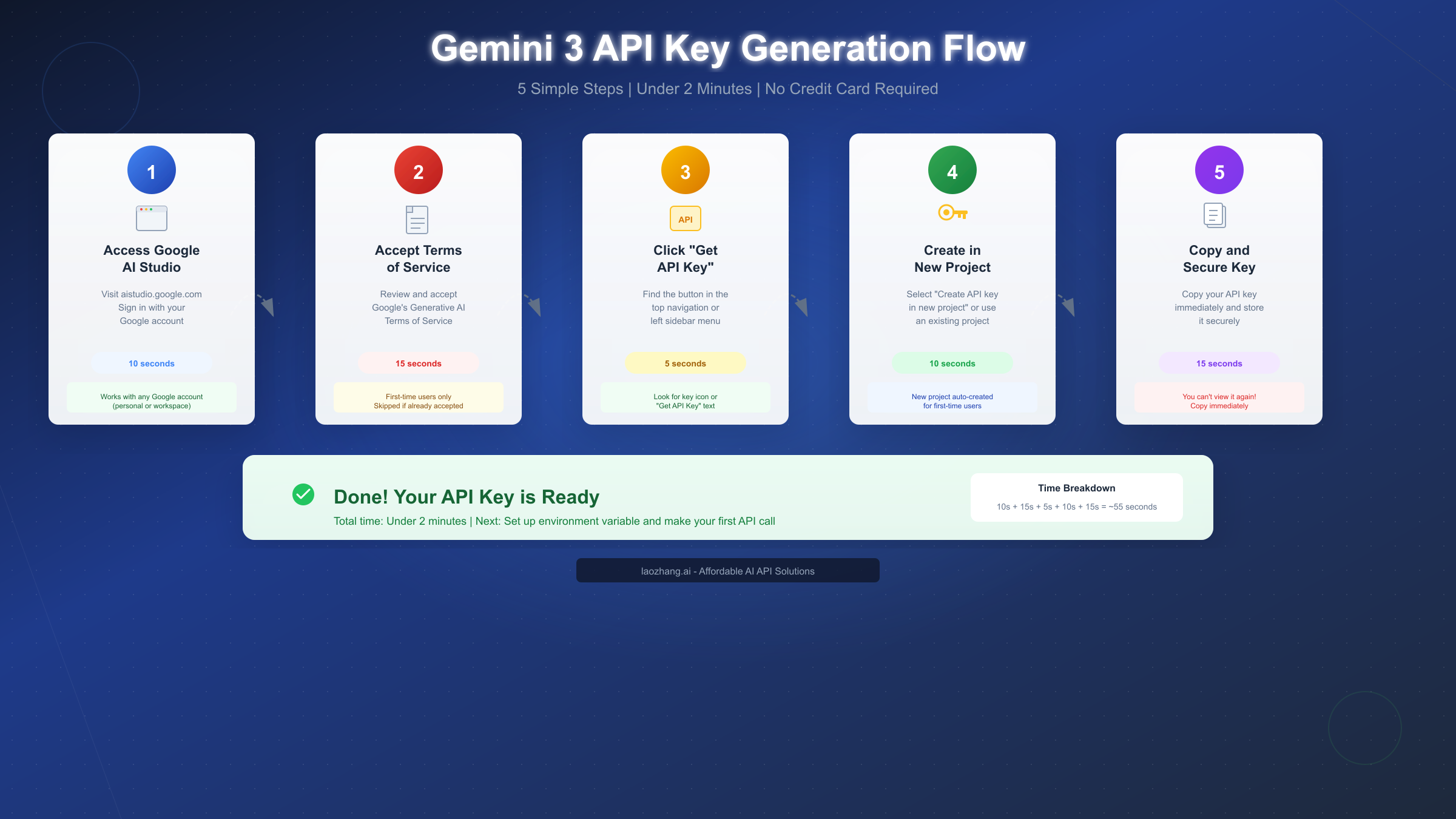
The API key generation process through Google AI Studio is straightforward and designed to get developers started as quickly as possible. The entire procedure typically takes under two minutes for new users and even less for those with existing Google Cloud experience. Let me walk you through each step with the detail needed to avoid common pitfalls that can cause unnecessary delays.
Step 1: Access Google AI Studio
Navigate to aistudio.google.com in your web browser. Google AI Studio serves as the central hub for all Gemini API interactions, offering both an interactive playground for testing prompts and the administrative interface for managing API keys. You'll need to sign in with a Google account—any standard Gmail or Google Workspace account works perfectly. If you're using a corporate Google Workspace account, ensure your organization hasn't restricted access to AI Studio through administrative policies, as some enterprises implement such controls.
Step 2: Accept the Terms of Service
First-time visitors encounter a Terms of Service agreement for Google's Generative AI services. This step appears only once per account and requires reviewing Google's usage policies for their AI products. The terms cover standard provisions regarding appropriate use, data handling, and service limitations. Take a moment to read through them—they contain important information about how your prompts and responses may be used for service improvement. Click "Accept" or "Continue" to proceed to the main dashboard.
Step 3: Navigate to API Keys Section
Once inside AI Studio, locate the API Keys section through one of two paths. The most direct route is clicking "Get API Key" in the top navigation bar, which Google highlights prominently for new users. Alternatively, access the full key management interface through the left sidebar menu, where you'll find options for creating, viewing, and managing multiple keys. The sidebar approach proves more useful when you need to manage keys across different projects or review existing key configurations.
Step 4: Create Your API Key
Click the "Create API Key" button to initiate key generation. Google presents two options at this stage: creating a key in a new project or selecting an existing Google Cloud project. For most developers getting started, the "Create API key in new project" option provides the simplest path forward. Google automatically provisions a new Cloud project with appropriate configurations, handling the backend setup that would otherwise require manual configuration. If you have existing Google Cloud infrastructure and prefer to keep your Gemini usage within that organizational structure, select the appropriate project from the dropdown instead.
Step 5: Copy and Secure Your Key Immediately
Upon key creation, Google displays your new API key exactly once. This is critically important—you cannot retrieve this key again after leaving this screen. Copy the entire key string immediately and store it in a secure location. Many developers make the mistake of assuming they can return to view the key later, only to find they must generate a new one. Consider copying it to a password manager, secure notes application, or your development environment's secrets management system before doing anything else.
Verification: Test Your Key Works
Before proceeding with integration, verify your key functions correctly using a simple cURL command. Open your terminal and execute the following request, replacing YOUR_API_KEY with your actual key:
bashcurl "https://generativelanguage.googleapis.com/v1beta/models/gemini-3-pro:generateContent?key=YOUR_API_KEY" \
  -H 'Content-Type: application/json' \
  -X POST \
  -d '{"contents":[{"parts":[{"text":"Hello, Gemini!"}]}]}'
A successful response returns JSON containing the model's reply to your greeting. If you receive an error, the troubleshooting section later in this guide covers common issues and their solutions.
Understanding Free Tier Limits and Pricing
Google's pricing structure for the Gemini API offers one of the most accessible entry points among major AI providers. The free tier operates without any billing activation requirement, meaning you can develop and test applications extensively before committing financial resources. Understanding the specific limits helps you plan your development workflow and anticipate when you might need to upgrade to paid access.
The free tier enforces usage quotas across three dimensions: requests per minute (RPM), tokens per minute (TPM), and requests per day (RPD). For Gemini 3 Pro preview models, typical limits hover around 5-10 requests per minute, approximately 250,000 tokens per minute, and 50-100 requests per day. These values fluctuate based on model variant, geographic region, and Google's current capacity allocation. The limits prove generous enough for development work, testing, and small-scale applications while encouraging upgrade consideration for production deployments.
When Free Tier Suffices
The free tier handles numerous practical scenarios without requiring paid access. Individual developers building personal projects, students learning AI integration patterns, and teams prototyping new features all find the limits adequate for their needs. A 50-100 request per day allowance enables thorough testing of prompt engineering approaches, integration logic verification, and user experience refinement. If your application processes requests intermittently rather than handling continuous high-volume traffic, free tier access may serve your needs indefinitely.
Consider your actual usage patterns when evaluating tier suitability. A chatbot receiving a few dozen queries daily operates comfortably within free limits. An internal tool used by a small team for occasional AI-assisted tasks similarly fits the free tier profile. However, customer-facing applications expecting consistent traffic typically outgrow free tier constraints quickly and benefit from the higher quotas paid tiers provide.
Paid Tier Pricing Details
When your requirements exceed free tier limits, Google's pay-as-you-go pricing activates upon billing enablement. Current pricing for Gemini 3 Pro stands at approximately $2 per million input tokens and $12 per million output tokens for requests under 200,000 tokens. Longer context requests—those utilizing Gemini's impressive million-token window—incur slightly higher rates of $4 per million input tokens and $18 per million output tokens.
For cost comparison context, processing approximately 750 words consumes roughly 1,000 tokens. A typical API request involving a few paragraphs of input and receiving a paragraph-length response might use 500-1,500 total tokens. At standard rates, such requests cost fractions of a cent each, making the API highly economical for most applications. Services like laozhang.ai offer API proxy solutions that can further optimize costs for high-volume usage scenarios.
| Tier | Input Price | Output Price | Daily Limit | Credit Card |
|---|---|---|---|---|
| Free | $0 | $0 | 50-100 RPD | Not required |
| Pay-as-you-go | $2/1M tokens | $12/1M tokens | Unlimited | Required |
| High volume | $4/1M tokens | $18/1M tokens | Unlimited | Required |
Your First API Call: Python and Node.js Code Examples
Moving from API key to working code requires understanding Google's SDK patterns and implementing proper error handling from the start. The examples below demonstrate production-ready approaches that go beyond basic "hello world" demonstrations to show patterns you'll actually use in real applications.
Python Implementation
Python remains the most popular language for AI integration work, and Google provides excellent SDK support through the google-generativeai package. Install the SDK using pip with Python 3.9 or later:
bashpip install google-generativeai
The following example demonstrates proper initialization, error handling, and response processing:
pythonimport google.generativeai as genai
import os
from typing import Optional

def setup_gemini(api_key: Optional[str] = None) -> genai.GenerativeModel:
    """Initialize Gemini with proper configuration and error handling."""
    key = api_key or os.environ.get("GEMINI_API_KEY")
    if not key:
        raise ValueError("API key required: set GEMINI_API_KEY or pass directly")

    genai.configure(api_key=key)
    return genai.GenerativeModel("gemini-3-pro")

def generate_content(model: genai.GenerativeModel, prompt: str) -> str:
    """Generate content with comprehensive error handling."""
    try:
        response = model.generate_content(prompt)
        return response.text
    except genai.types.BlockedPromptException:
        return "Content blocked due to safety filters"
    except genai.types.StopCandidateException as e:
        return f"Generation stopped: {e.finish_reason}"
    except Exception as e:
        return f"Error: {str(e)}"


if __name__ == "__main__":
    model = setup_gemini()
    result = generate_content(model, "Explain quantum computing in simple terms")
    print(result)
This implementation addresses several concerns that basic examples ignore. The setup function accepts either a direct API key or reads from environment variables, supporting both development convenience and production security practices. Error handling catches Gemini-specific exceptions like blocked prompts and stopped generations, providing meaningful feedback rather than cryptic stack traces.
Node.js Implementation
JavaScript and TypeScript developers can integrate Gemini through the official @google/generative-ai package. Install via npm:
bashnpm install @google/generative-ai
The following TypeScript example shows a robust implementation pattern:
typescriptimport { GoogleGenerativeAI, HarmCategory, HarmBlockThreshold } from "@google/generative-ai";

const genAI = new GoogleGenerativeAI(process.env.GEMINI_API_KEY || "");

async function generateContent(prompt: string): Promise<string> {
  const model = genAI.getGenerativeModel({
    model: "gemini-3-pro",
    safetySettings: [
      {
        category: HarmCategory.HARM_CATEGORY_HARASSMENT,
        threshold: HarmBlockThreshold.BLOCK_MEDIUM_AND_ABOVE,
      },
    ],
  });

  try {
    const result = await model.generateContent(prompt);
    const response = result.response;
    return response.text();
  } catch (error) {
    if (error instanceof Error) {
      if (error.message.includes("429")) {
        return "Rate limit exceeded. Please wait and retry.";
      }
      return `Generation failed: ${error.message}`;
    }
    return "Unknown error occurred";
  }
}

// Usage
generateContent("Write a haiku about programming")
  .then(console.log)
  .catch(console.error);
The Node.js example includes explicit safety settings configuration, demonstrating how to customize content filtering thresholds based on your application's requirements. The error handling specifically checks for rate limit responses (HTTP 429), which becomes increasingly important as your usage scales toward tier limits. For applications requiring unified access to multiple AI providers, services like laozhang.ai provide a single API interface that abstracts provider-specific implementation details.
Chat Conversation Example
Beyond single-turn generation, many applications require maintaining conversation context across multiple exchanges. Gemini's chat interface handles this elegantly:
pythonimport google.generativeai as genai
import os

genai.configure(api_key=os.environ.get("GEMINI_API_KEY"))
model = genai.GenerativeModel("gemini-3-pro")

# Initialize chat with conversation history
chat = model.start_chat(history=[])

def chat_with_gemini(user_message: str) -> str:
    """Send a message and get a response, maintaining conversation context."""
    try:
        response = chat.send_message(user_message)
        return response.text
    except Exception as e:
        return f"Chat error: {str(e)}"

# Multi-turn conversation
print(chat_with_gemini("Hi, I'm learning Python. Can you help?"))
print(chat_with_gemini("What's the difference between lists and tuples?"))
print(chat_with_gemini("Can you show me an example of each?"))
Each subsequent message automatically includes prior conversation context, enabling natural multi-turn interactions without manual history management.
Security Best Practices for API Keys
Protecting your API key prevents unauthorized usage charges and potential abuse through your credentials. Security should be considered from the moment you receive your key, not as an afterthought when problems arise. The practices outlined here represent industry standards that every developer should implement regardless of project scale.
Environment Variable Configuration
Never embed API keys directly in source code. Instead, store them as environment variables that your application reads at runtime. This approach prevents accidental exposure through version control commits and separates configuration from code. Configure your environment based on your operating system:
For macOS and Linux using bash:
bashexport GEMINI_API_KEY="your-api-key-here"
echo 'export GEMINI_API_KEY="your-api-key-here"' >> ~/.bashrc
For macOS using zsh (default on modern Macs):
bashexport GEMINI_API_KEY="your-api-key-here"
echo 'export GEMINI_API_KEY="your-api-key-here"' >> ~/.zshrc
For Windows PowerShell:
powershell$env:GEMINI_API_KEY = "your-api-key-here"
[System.Environment]::SetEnvironmentVariable("GEMINI_API_KEY", "your-api-key-here", "User")
After setting environment variables, restart your terminal session or source the configuration file for changes to take effect.
API Key Restrictions
Google Cloud Console allows adding restrictions to your API keys, limiting their capabilities even if compromised. Navigate to the API Keys page in Cloud Console and configure restrictions based on your deployment model. For web applications, restrict keys to specific HTTP referrer domains. Server-side applications benefit from IP address restrictions that accept requests only from your server infrastructure. Mobile applications can restrict by application ID and signing certificate, preventing extraction and reuse.
Common Security Mistakes to Avoid
The most frequent security failures involve version control systems. Never commit API keys to Git repositories, even private ones. Use .gitignore to exclude configuration files containing secrets, and consider tools like git-secrets that prevent accidental commits of credential patterns. If you accidentally commit a key, immediately regenerate it through Google AI Studio—the compromised key remains vulnerable in Git history even after removal from current files.
Avoid logging API keys in application output, error messages, or debugging statements. Production applications should never include keys in URLs as query parameters, where they appear in server logs and browser histories. When implementing API proxies or middleware through services like laozhang.ai, ensure the proxy handles key management rather than exposing credentials to client-side code.
Troubleshooting Common Issues
Even with careful setup, various issues can interrupt your Gemini integration. Understanding common error patterns and their solutions accelerates debugging and reduces frustration during development. The following covers errors you'll most likely encounter and how to resolve them efficiently.
Error 400: Invalid Argument
HTTP 400 errors indicate malformed requests, typically caused by incorrect API call structure or invalid parameter values. Common causes include typos in model names, improperly formatted content arrays, or missing required fields in the request body. To resolve this, verify your request structure matches the API specification exactly. Ensure the model name reads precisely as gemini-3-pro or another valid variant. Check that your content array contains properly nested parts with text fields. Test with the minimal example from this guide to isolate whether the issue lies in request structure or prompt content.
Error 403: Permission Denied
Permission errors arise from API key problems—either invalid keys, keys without proper Gemini API enablement, or organizational restrictions blocking access. To fix this issue, confirm your API key is copied completely without truncation. Verify the Gemini API is enabled in your Google Cloud project by visiting the API library in Cloud Console. If using a Google Workspace account, check with your administrator about potential restrictions on AI services. Generate a fresh key if problems persist, as keys occasionally become invalid without clear cause.
Error 429: Rate Limit Exceeded
Rate limit errors occur when requests exceed your tier's allocated quotas. Free tier users encounter these more frequently due to lower limits, especially during intensive testing periods. The solution involves implementing exponential backoff in your code—wait progressively longer between retries (1 second, then 2, then 4, etc.). Monitor your usage through Google Cloud Console to understand consumption patterns. Consider spreading requests across longer time windows or upgrading to paid tier if limits consistently constrain your workflow. API management services like laozhang.ai can help distribute requests across multiple projects to optimize quota utilization.
Error 500: Internal Server Error
Server errors indicate problems on Google's infrastructure rather than your implementation. These occur occasionally and typically resolve quickly. Simply retry your request after a brief delay. If errors persist beyond a few minutes, check the Google Cloud Status Dashboard for any ongoing incidents affecting Gemini API services. File a support case through Cloud Console if extended outages impact your production systems.
| Error Code | Common Cause | Quick Fix |
|---|---|---|
| 400 | Malformed request | Verify request structure |
| 403 | Invalid or restricted key | Regenerate API key |
| 429 | Rate limit exceeded | Implement backoff, upgrade tier |
| 500 | Server issue | Retry after delay |
Gemini 3 vs OpenAI vs Claude: Which Should You Choose
Selecting an AI provider involves weighing multiple factors beyond raw capability benchmarks. Each major platform offers distinct advantages depending on your specific requirements, existing infrastructure, and budget constraints. Understanding these tradeoffs helps you make an informed decision aligned with your project's priorities.
Gemini 3's Competitive Advantages
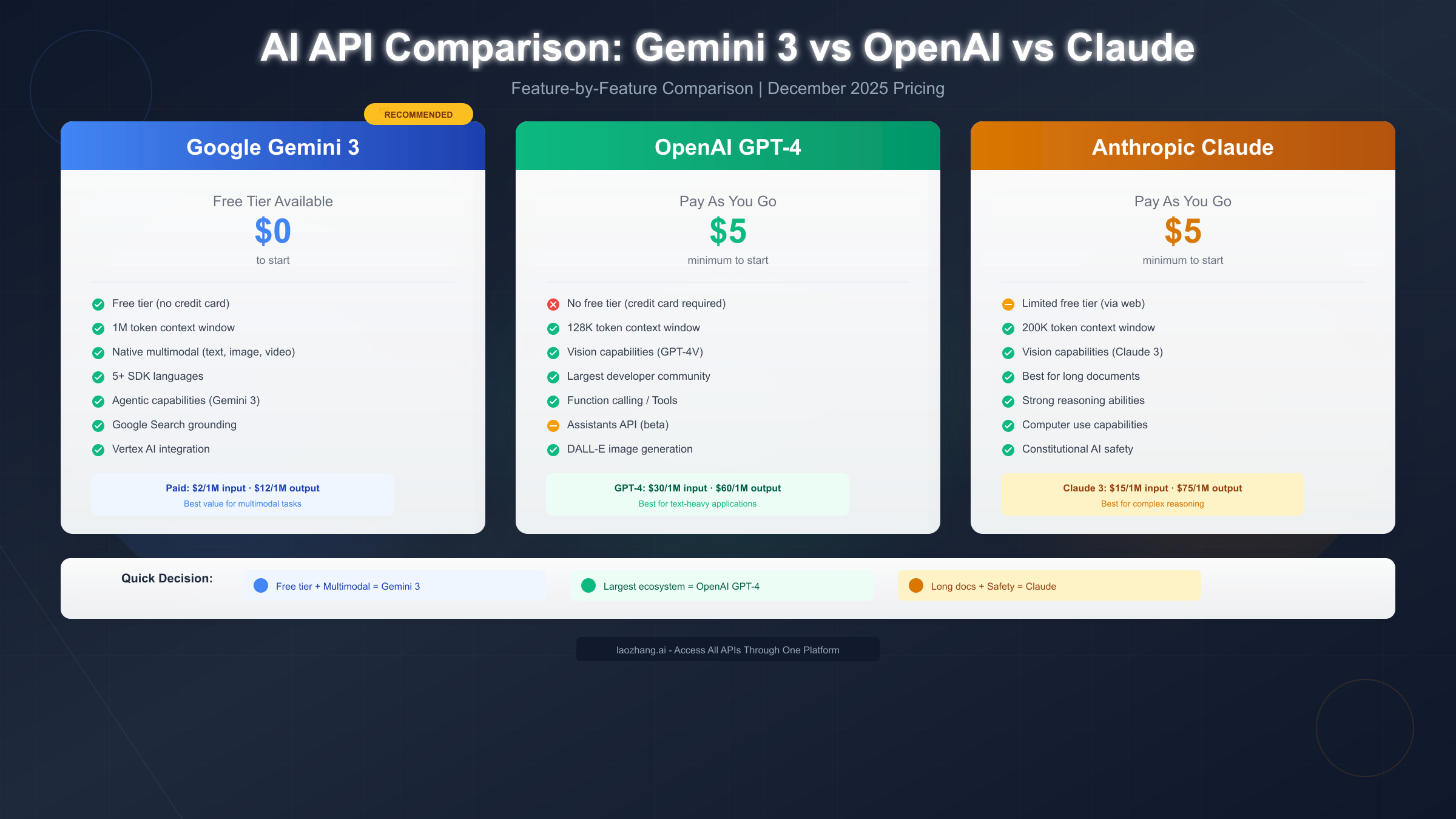
Gemini 3 stands out primarily through its accessible free tier and exceptional multimodal capabilities. No other major provider offers comparable free access without requiring credit card registration, making Gemini particularly attractive for experimentation, education, and early-stage development. The native ability to process text, images, audio, and video through a unified interface simplifies applications that would otherwise require multiple specialized models. Google's infrastructure integration means seamless access to Search grounding, which enhances factual accuracy by referencing current web content.
The million-token context window opens possibilities that shorter-context models simply cannot address. Processing entire codebases, lengthy documents, or extended conversation histories becomes feasible without complex chunking strategies or context management systems. For applications requiring broad situational awareness, this capability proves transformative.
When OpenAI GPT-4 Makes Sense
OpenAI maintains the largest developer ecosystem, offering extensive community resources, tutorials, and third-party integrations. If your project benefits from abundant examples and community support, GPT-4's ecosystem advantage carries real weight. The Assistants API provides sophisticated agent-building capabilities that exceed what Gemini currently offers in that specific domain.
However, OpenAI requires billing setup from the first API call—there's no free tier for API access. This creates a higher barrier for casual experimentation and means even minimal testing incurs costs. For established projects with predictable budgets, this matters less than for exploratory work.
When Claude Excels
Anthropic's Claude models demonstrate particular strength in long-document analysis and nuanced reasoning tasks. The 200K token context window, while smaller than Gemini's million-token capacity, handles most practical scenarios adequately. Claude's "Constitutional AI" approach emphasizes safety and helpfulness in ways some applications specifically require.
Claude's API also lacks a substantive free tier, requiring prepaid credits before making calls. The computer use capabilities represent unique functionality not available elsewhere, enabling automation scenarios that other providers don't support.
Recommendation Summary
Choose Gemini 3 for: free tier access, multimodal applications, extremely long context requirements, or Google ecosystem integration. Choose OpenAI for: maximum ecosystem support, sophisticated agent frameworks, or when existing codebases already integrate OpenAI patterns. Choose Claude for: safety-critical applications, long-document analysis, or computer automation use cases.
For projects requiring flexibility across providers, unified API services like laozhang.ai enable switching between Gemini, GPT-4, and Claude through a single integration, eliminating provider lock-in and simplifying cost optimization.
Next Steps and Resources
With your Gemini 3 API key secured and initial integration complete, several paths forward can deepen your capabilities and expand your applications. The following resources and project ideas help translate basic API access into practical, valuable implementations.
Official Documentation and Learning Resources
Google maintains comprehensive documentation at ai.google.dev, covering advanced topics including fine-tuning, embeddings, and specialized model applications. The Gemini 3 developer guide at ai.google.dev/gemini-api/docs/gemini-3 details the latest model capabilities and best practices. For interactive experimentation, Google AI Studio at aistudio.google.com provides a playground environment where you can test prompts and configurations before implementing them in code.
Project Ideas to Build Skills
Starting simple builds confidence before tackling complex integrations. Consider building a command-line chatbot that maintains conversation context across sessions. Progress to a document summarizer that handles various file formats. Experiment with image analysis by building an application that describes uploaded photos. Each project reinforces different aspects of Gemini's capabilities while producing genuinely useful tools.
Production Considerations
Before deploying applications to users, address several operational concerns that development environments often mask. Implement comprehensive logging to track API usage patterns and identify optimization opportunities. Set up billing alerts in Google Cloud Console to avoid unexpected charges as usage scales. Consider implementing response caching for repeated queries to reduce API calls and improve latency. For high-traffic applications, API management through services like laozhang.ai provides rate limiting, request queuing, and cost optimization features that simplify production operations.
Community and Support
The Google AI community forums provide spaces for questions, troubleshooting, and discussion with other developers. Stack Overflow hosts active Gemini API tags where experienced developers share solutions to common challenges. For enterprise deployments or complex technical issues, Google Cloud support channels offer direct assistance from Google engineers.
Your Gemini 3 API key unlocks access to one of the most capable AI systems available today. The free tier provides ample room for learning and experimentation, while the paid tiers scale to support production workloads of any size. Start with simple integrations, gradually incorporate more advanced features, and build toward applications that meaningfully leverage AI capabilities in ways that create real value for your users.