
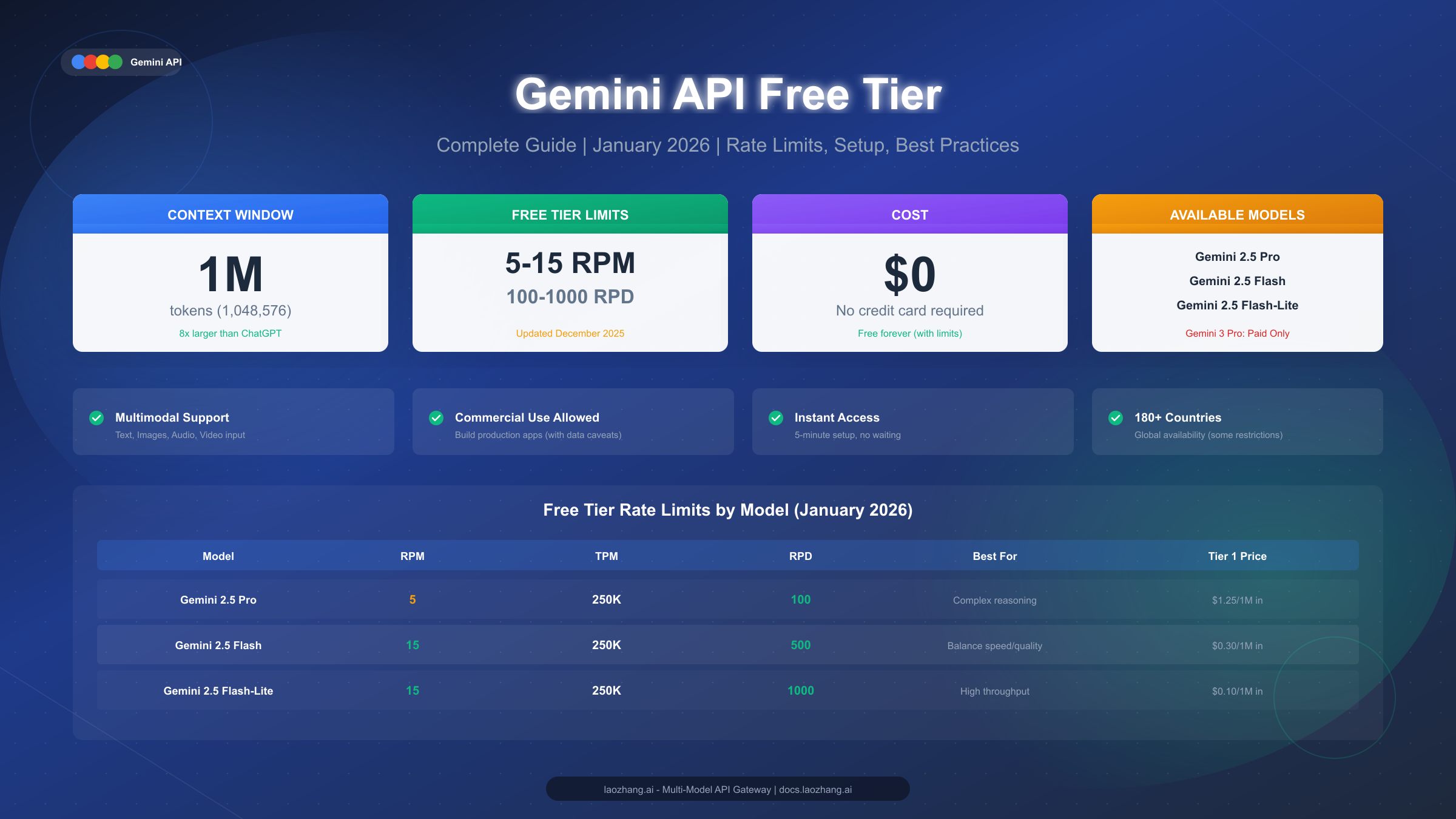
Yes, the Google Gemini API still has a free tier as of March 13, 2026. The short version is that you can still create a key in Google AI Studio without a credit card and send real API traffic to current Gemini models, but the practical answer depends on three things Google spreads across separate pages: your project tier, your region or end-user geography, and the exact model you choose.
That is why so many pages about google gemini api free tier feel incomplete. One post will say Gemini is free, another will say you need billing, and a third will say the quotas suddenly dropped to zero. All three can be true in context. Google still documents free-of-charge usage on the current Gemini pricing page, but the public rate-limit story is less neatly surfaced than it was in older docs, billed projects behave differently from free projects, and forum threads show that some accounts hit 429 RESOURCE_EXHAUSTED together with 0 RPM or 0 RPD quota displays. This guide puts those pieces in one place so you can decide whether the free path is good enough for your prototype, internal tool, or small production workload.
TL;DR
- Yes, Gemini API free tier still exists on March 13, 2026 for Gemini Developer API projects in supported regions.
- The current free lineup is centered on Gemini 2.5 models, not older Gemini 2.0 defaults. Google’s pricing page still shows free-of-charge rows for Gemini 2.5 Pro, Gemini 2.5 Flash, and Gemini 2.5 Flash-Lite.
- Quotas are project-level, not key-level. Multiple API keys inside one project still share one quota pool.
- Billing changes the project behavior. Google’s billing FAQ and Firebase quota docs make clear that free and billed usage should be thought of as project states, not just “more quota on the same setup.”
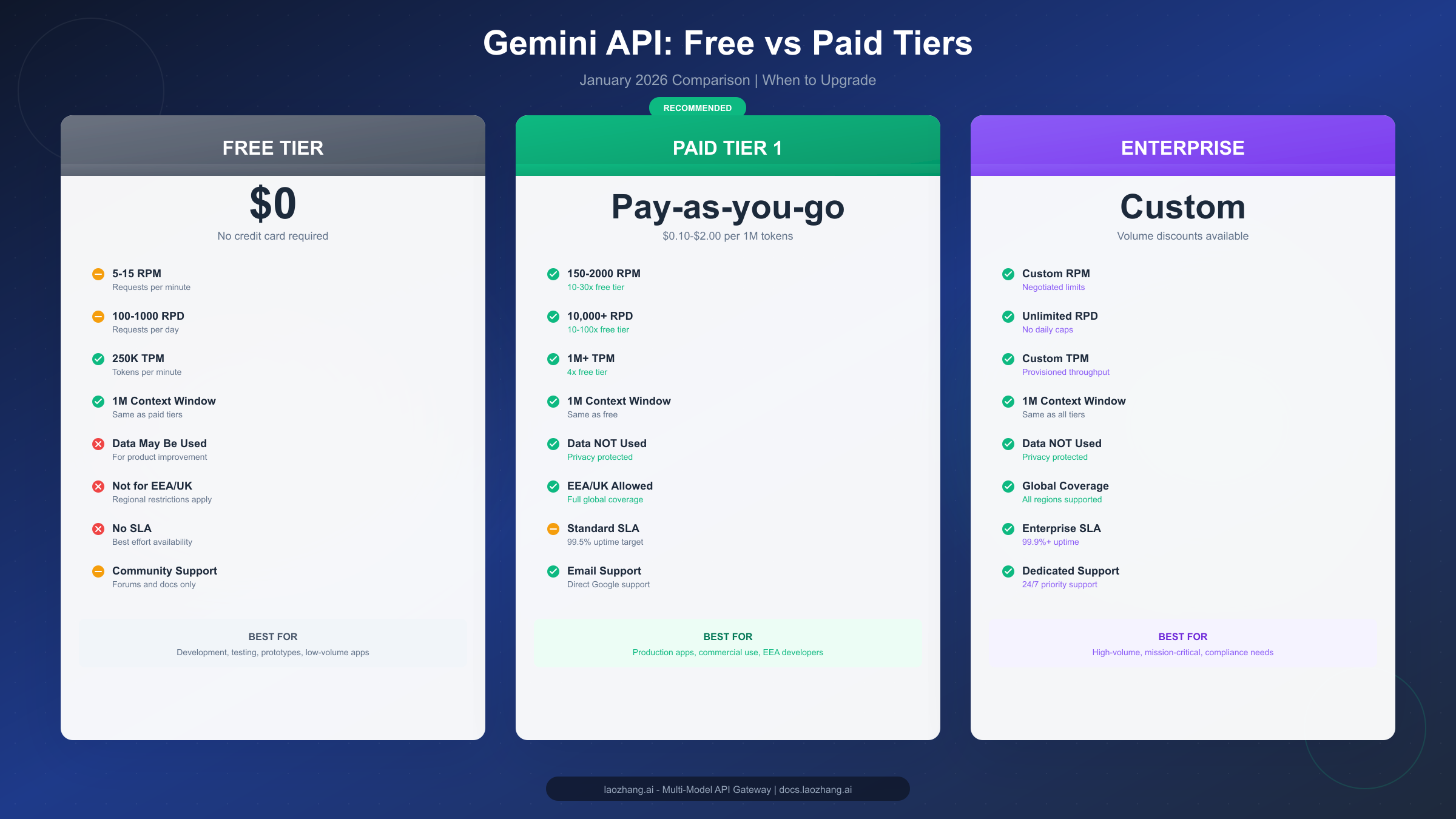
- Free tier is fine for learning, prototyping, and low-volume automation. It is a weak foundation for anything that needs EU or UK coverage, stable quota headroom, or privacy guarantees.
- If you see
429plus0 RPM,0 TPM, or0 RPD, treat that as a standing, rollout, or backend issue, not only normal overuse.
Is The Google Gemini API Still Free In March 2026?
The direct answer is yes, but the word "free" needs precision. Google still documents a free tier for the Gemini API, and the current setup flow in Google AI Studio still lets you create an API key without entering a card first. The official Gemini API quickstart explicitly says you can get the key for free in Google AI Studio, and the billing page still refers to both a free tier and a paid tier.
Where people get confused is the jump from "the API has a free tier" to "my project will keep behaving like a free project forever." Google documents pricing, rate limits, regions, and billing on separate pages, and those pages do not all expose the same level of detail. The pricing page is clear that several current Gemini models still have free-of-charge usage. The rate-limit page is clear that quotas are tier-based and subject to change. Firebase documentation adds another important detail: Google adjusted Gemini Developer API quotas for both Free Tier and Paid Tier 1 on December 7, 2025, and says quotas depend on your project's standing with Google Cloud.
In practice, that means the best way to think about Gemini free tier in 2026 is this:
- You can still start for free.
- Free access is model-specific and quota-limited.
- Your quotas belong to the project, not the individual key.
- Billing is not just a credit-card toggle; it changes how the project is treated.
- Region and policy rules can override the simplistic "Gemini is free" headline.
That framing already beats a large part of the current SERP because it matches how Google’s own documentation is organized. The average competitor page still leads with one of two oversimplifications: either “Gemini is totally free” or “Gemini is basically paid now.” Neither is accurate enough for a real build decision.
Which Gemini Models Still Have Free Access?
As of March 13, 2026, Google’s pricing page still shows free-of-charge usage for Gemini 2.5 Pro, Gemini 2.5 Flash, and Gemini 2.5 Flash-Lite. That is the first thing a useful article should make obvious, because many older tutorials still center Gemini 2.0 Flash or the loose old label "Gemini Pro" without clarifying what is current.
The second thing a good article should say is that Google’s current public docs do not surface every free-tier request limit in one neat in-page table anymore. The pricing page gives the strongest official proof that free-of-charge usage still exists. The rate-limit landing page confirms the tier structure, but not always the full row-by-row free table inline. So the best public snapshot is a synthesis of the pricing page, Google's historically published quota table, the December 2025 Firebase quota note, and current community reports. That is why you should treat the table below as a dated public reference point rather than a promise that the numbers will never move.
| Model | Free status on current Google pricing page | Best public free-tier quota snapshot | Best fit | Main caveat |
|---|---|---|---|---|
| Gemini 2.5 Pro | Free-of-charge row exists | 5 RPM, 250,000 TPM, 100 RPD | complex reasoning, code review, analysis | strongest model, but the tightest daily cap |
| Gemini 2.5 Flash | Free-of-charge row exists | 10 RPM, 250,000 TPM, 250 RPD | general apps, chat, content, coding | best balance, but still easy to outgrow |
| Gemini 2.5 Flash-Lite | Free-of-charge row exists | 15 RPM, 250,000 TPM, 1,000 RPD | high-volume lightweight tasks | lower reasoning depth than Pro or Flash |
| Gemini 2.0 Flash | no longer the recommended default | legacy quotas vary by doc snapshot | older integrations only | deprecated on March 3, 2026; avoid for new builds |
Three decisions follow from that table.
First, if you want the simplest default for a real prototype, Gemini 2.5 Flash is usually the safest starting point. It is current, fast enough for interactive flows, and materially more forgiving than 2.5 Pro. You can use 2.5 Pro for difficult reasoning or code cases, but if you make Pro your default free model, you will hit quota ceilings much earlier.
Second, Flash-Lite is more important than most beginner guides admit. A lot of Gemini free-tier frustration comes from using the most expensive reasoning tier for tasks that do not need it. If your workload is classification, extraction, routing, templated rewrites, or first-pass summarization, Flash-Lite is usually the better free-tier economics play because it preserves the stronger models for the prompts that actually need them.
Third, do not build a 2026 tutorial around Gemini 2.0 Flash unless you are explicitly helping people migrate away from it. Google’s deprecations page says Gemini 2.0 Flash and Gemini 2.0 Flash Live were deprecated on March 3, 2026, with shutdown scheduled for September 24, 2026. The same page also notes that image generation using Gemini 2.0 Flash was shut down on March 31, 2026. That is current enough to matter: a page that still recommends Gemini 2.0 Flash as the free default is already aging poorly.
One more nuance matters for searchers comparing Gemini to other AI APIs: "free model access" and "large context window" are not the same as "high free throughput." Google is still strong on model access and long context, but the free-tier request budget is tighter than many teams expect. That is why the right answer is usually not “Gemini free tier is generous” or “Gemini free tier is useless.” It is generous for learning and low-volume automation, and restrictive for anything user-facing that can spike unexpectedly.
How Gemini Free Tier Actually Works
The cleanest mental model is that Gemini quotas attach to the project, not to the individual key. You can create multiple keys inside one Google Cloud or AI Studio project, but you do not magically multiply your quota by doing so. If the project is free-tier and the project budget is exhausted, every key under that project feels it. If the project is billed, every key in that project inherits billed behavior.
That project-level model explains several common surprises:
- Why separate frontend and backend keys still collide with each other.
- Why enabling billing on the project matters more than creating a new key.
- Why moving the same application to a brand-new project can change the quota picture.
- Why forum threads about zero quotas often talk about the project state rather than a single key.
Google’s billing FAQ and Firebase quota-and-pricing page are the key official references here. The billing FAQ says new Google Cloud billing accounts may be eligible for a $300 free trial credit that can be used with the Gemini API. That is useful, but it is not the same thing as the no-card free tier. Firebase documentation adds the sharper implementation detail: once you upgrade a project to the paid tier, requests in that project can become billable.
This is the practical difference:
| Project state | Card required | Best for | What changes | Main risk |
|---|---|---|---|---|
| Free project | No | learning, prototypes, internal tools, local testing | lowest barrier to entry and free-of-charge model access | tight quotas, weaker predictability, some policy limits |
| Billed project / Tier 1 path | Yes | MVPs, staging, production, regional compliance | much higher headroom and clearer production path | requests can become billable and cost governance matters |
| Vertex AI or enterprise path | Yes | regulated teams, enterprise rollout, data governance | regional controls and enterprise operations | more setup complexity |
Another gap in many SERP pages is the difference between Google AI Studio usage and Gemini API usage. The billing FAQ says Google AI Studio usage remains free of charge unless you explicitly use a paid API key. That matters because some readers conflate “chatting in AI Studio” with “running my app through the Gemini Developer API.” They are related surfaces, but not the same billing path.
If you are comparing free tier to a production path, also read our internal guides on Gemini API key tiers and how Gemini paid tier upgrades work. They go deeper on threshold mechanics and when moving off a free project becomes the rational choice.
The high-level decision rule is simple. Stay on a free project if your workload is irregular, low-stakes, and easy to queue. Move to a billed project the moment your app has real users, real SLAs, or real compliance constraints. The difference between those two states matters more than squeezing every possible request out of the free allowance.
How To Get A Free API Key In Google AI Studio
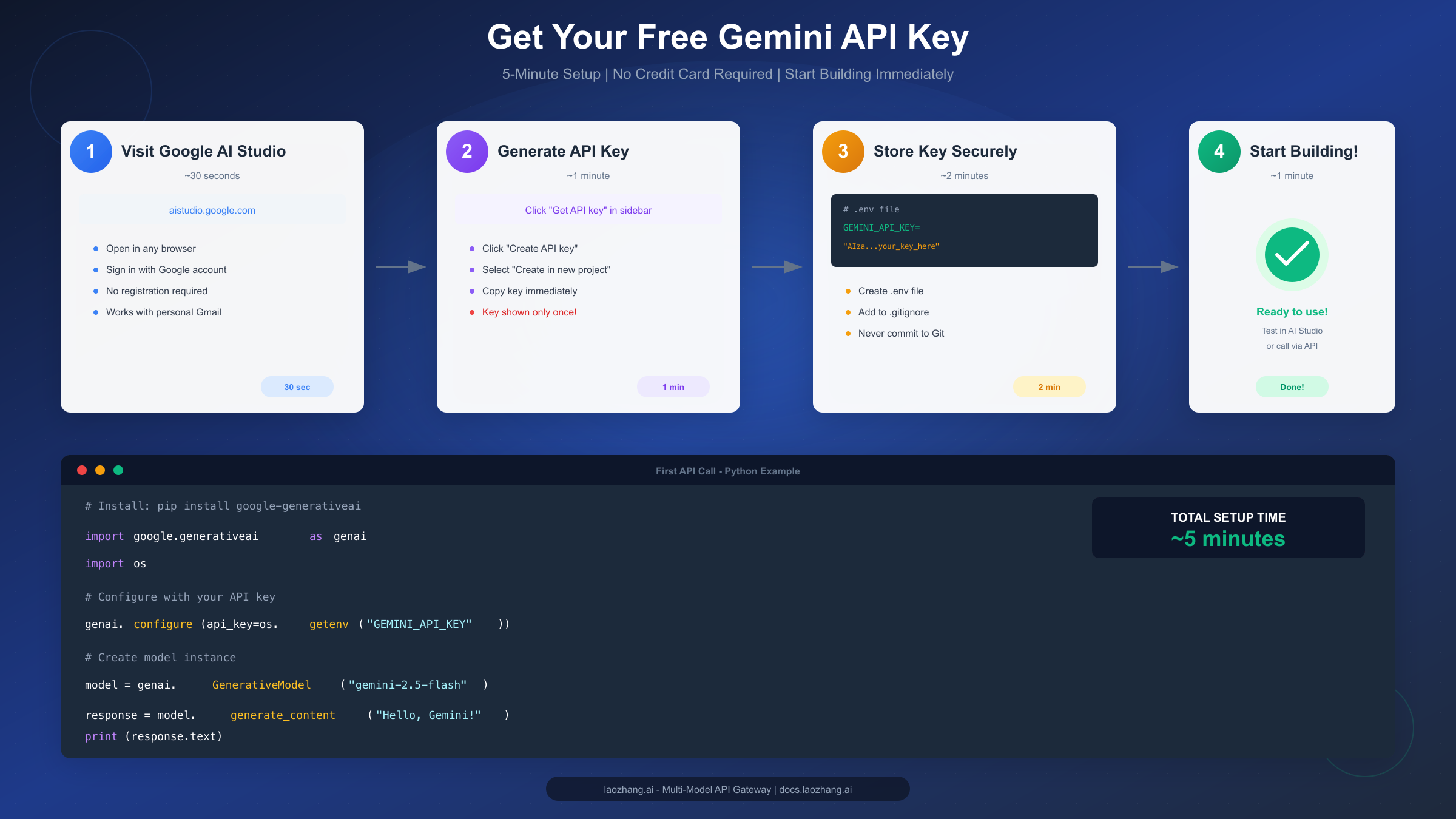
The current setup flow is still easy, and the official quickstart remains the best reference. The part most blog posts miss is that the setup instructions changed materially when Google standardized on the new Google GenAI SDK. If a tutorial still tells you to install google-generativeai, it is outdated. Google’s libraries page says the Google GenAI SDKs reached GA in May 2025 and that the legacy libraries were deprecated as of November 30, 2025.
The current free-key flow is:
- Go to
aistudio.google.comand sign in with a Google account. - Open Get API key.
- Choose Create API key in new project if you want the cleanest free-project start.
- Copy the key immediately.
- Store it as
GEMINI_API_KEY, not in source code. - Test with the current SDK or REST example before wiring it into an app.
Here is the current Python quickstart pattern, updated to the supported SDK:
pythonfrom google import genai


client = genai.Client()

response = client.models.generate_content(
    model="gemini-2.5-flash",
    contents="Give me three sentences on how the Gemini API free tier works."
)

print(response.text)
And here is the current REST shape:
bashcurl "https://generativelanguage.googleapis.com/v1beta/models/gemini-2.5-flash:generateContent" \
  -H "x-goog-api-key: $GEMINI_API_KEY" \
  -H "Content-Type: application/json" \
  -X POST \
  -d '{
    "contents": [
      {
        "parts": [
          {
            "text": "Explain the Gemini API free tier in one paragraph."
          }
        ]
      }
    ]
  }'
Two setup mistakes show up constantly in support threads and copied tutorials.
The first is using a stale SDK. If your code examples still import google.generativeai, you are following pre-GA library guidance. That does not just make the tutorial look old; it also leaves readers on a weaker integration path with feature gaps and deprecation baggage.
The second is using the same free project for every environment. Because quotas are project-level, it is often smarter to give development, staging, and experiments separate projects even before you start paying. That does not create infinite free quota, but it does keep a noisy test script from consuming the same daily pool as a demo environment you care about.
For readers who want a deeper setup walkthrough, our internal Gemini API key guide covers the security side in more detail. The short version is still the same: store the key in environment variables, never commit it, and do not expose a raw Gemini key directly in a public frontend unless you understand the abuse implications.
Why Gemini Free Tier Stops Working
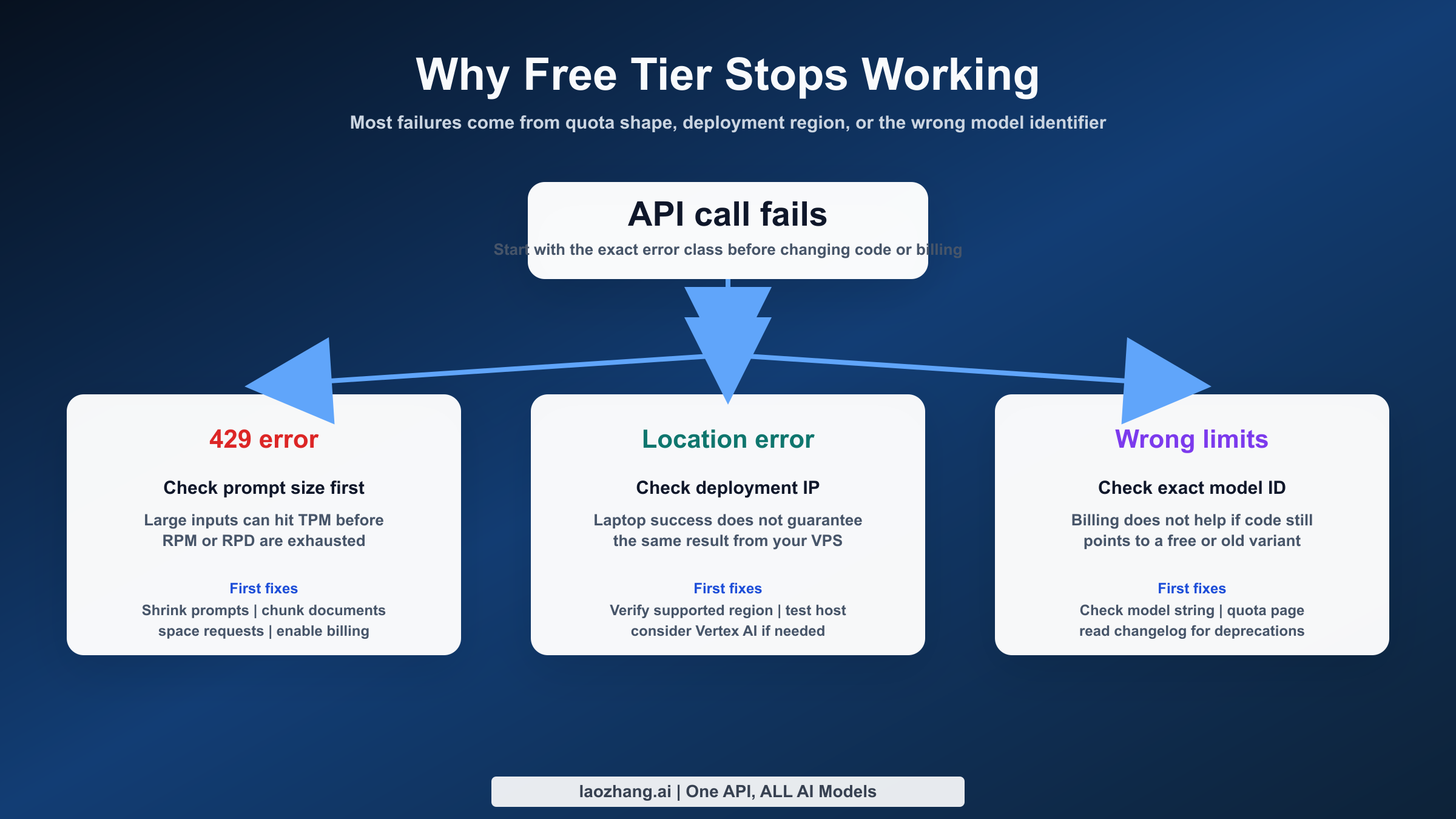
This is where the average SERP result gets weak. Most guides explain only the normal case: you used too many requests, got a 429, then you should wait and retry. That is true, but it is only half the story. Google’s forum now has multiple threads where users report 429 RESOURCE_EXHAUSTED together with quotas displayed as 0 RPM, 0 TPM, or 0 RPD. There are also reports where the user upgraded the project and still saw zero quotas afterward.
So you need to separate normal quota exhaustion from abnormal quota state problems.
| Symptom | Most likely cause | What to do first |
|---|---|---|
429 after burst traffic | RPM or TPM exceeded | back off for 60 seconds and queue requests |
429 late in the day | RPD exhausted | wait for the daily reset or use a different project path |
0 RPM or 0 TPM shown in quota UI | account standing, rollout, or backend issue | verify project state, then wait and escalate if it persists |
0 RPD after enabling billing | project upgrade not fully propagated or standing problem | confirm the correct project is billed and give it time before support escalation |
| free key works in AI Studio but fails in app | wrong project, stale library, or bad environment variable | test with the official quickstart snippet first |
The healthy free-tier operational pattern is boring by design. Queue requests. Retry with exponential backoff. Cache repeated prompts when possible. Use Flash-Lite for bulk work. Save Pro for genuinely complex jobs. If your architecture assumes free-tier burst capacity without throttling, the failure is architectural, not just quota-related.
The more interesting case is the zero-quota pattern. When you see a normal 429, you usually know what happened: you ran out of minute or day budget. When you see a quota surface showing zeros, treat it as a different class of problem. At that point the right steps are:
- Confirm you are looking at the correct project.
- Re-test with Google’s official quickstart code, not your full app.
- Check whether the problem is model-specific or affects every model.
- Wait long enough to rule out ordinary minute-level throttling.
- If the zeros persist, collect screenshots and request IDs and use the Google forum or support route tied to your project state.
This is exactly why free tier is best for experimentation and lightweight automation, not as the single point of failure for a production workflow. If a user-facing product depends on predictable Gemini availability, the operational answer is not “retry forever on the free tier.” It is to move to a billed path, or at minimum design a queue and fallback strategy around the reality that free quotas can change or degrade.
If your issue is a normal rate-limit case, our dedicated guide on fixing Gemini API 429 errors goes deeper on backoff and traffic shaping patterns.
Region And Compliance Gotchas
Region is the part of the Gemini free-tier story that generic blog posts tend to bury in one sentence, if they mention it at all. Google’s available regions page says the Gemini API is available in more than 200 countries and territories, which sounds broad. But the same docs and linked terms also matter for another reason: if you serve end users in the EEA, the UK, or Switzerland, Google directs you to paid services only.
That means there are two different region questions:
- Can I, the developer, access Gemini Developer API from my location?
- Am I allowed to use the free path for the users my application serves?
The second question is the one many teams miss. A US-based founder may assume the free tier is fine because their own location is supported, but if the app serves German or UK users, the paid-services requirement matters immediately. This is a practical product and legal issue, not a trivia detail.
There is also a privacy difference between free and billed behavior that decision-makers care about. Google’s public pricing and billing materials distinguish between the free tier and billed usage in how prompts and outputs are handled. If your application touches customer documents, source code, contracts, or internal analytics, the "no card required" path is usually the wrong long-term answer even if it works technically. The free path is attractive because it is frictionless; the billed path is attractive because it is operationally cleaner.
For readers in blocked or awkward regions, direct Gemini access can also be inconsistent in practice. If you are specifically working around regional access issues, read our guide on using Gemini in China. The exact workaround you choose is less important than understanding that access geography, end-user geography, and billing state are three different variables.
One more product-surface nuance is worth stating explicitly: Google AI Studio, Gemini Developer API, Firebase AI Logic, and Vertex AI are related surfaces, but they are not interchangeable. A lot of pricing confusion comes from people reading one surface’s quota notes and assuming they apply literally to another. For a small prototype, Gemini Developer API via AI Studio is usually the simplest path. For stricter enterprise requirements, Vertex AI is often the better end state even if the initial prototype started in AI Studio.
Should You Stay Free Or Enable Billing?
If you are a solo developer, student, hobby builder, or internal-tool operator, the Gemini API free tier is still good enough to be genuinely useful in 2026. You can test model quality, prototype workflows, build low-volume automations, and evaluate Gemini against OpenAI or Claude without paying first. That is still real value, and it is why the keyword remains competitive.
If you are deciding whether to bet a product on it, use this rule:
- Stay free if the app is low-volume, queueable, and not compliance-sensitive.
- Enable billing if the app has real users, real peaks, or real privacy expectations.
- Move faster to paid or Vertex if the app serves the EEA, UK, or Switzerland.
The hard part is not the card itself. The hard part is being honest about whether the workload still belongs in the "prototype" bucket. Many teams try to stretch free tier into a pre-production tier. That works right up until a quota change, region rule, or zero-quota bug lands on the wrong day.
For cost planning, the useful comparison is not "free versus expensive." It is "free versus predictable." Billed Gemini usage is usually still inexpensive compared with engineering time lost to brittle quota management. If you want more detail on current paid-side economics, see our related pieces on Gemini API pricing in 2026 and best Gemini API alternatives for blocked or constrained workloads.
The bottom line is straightforward. The Google Gemini API free tier is still real in March 2026. It is a good entry point, a good evaluation path, and a decent tool for low-volume builders. It is not a production guarantee, not a universal regional answer, and not a substitute for a billed architecture once a project starts to matter. If you treat it like a free sandbox with dated constraints, it is excellent. If you treat it like a silent production SLA, it will disappoint you.