
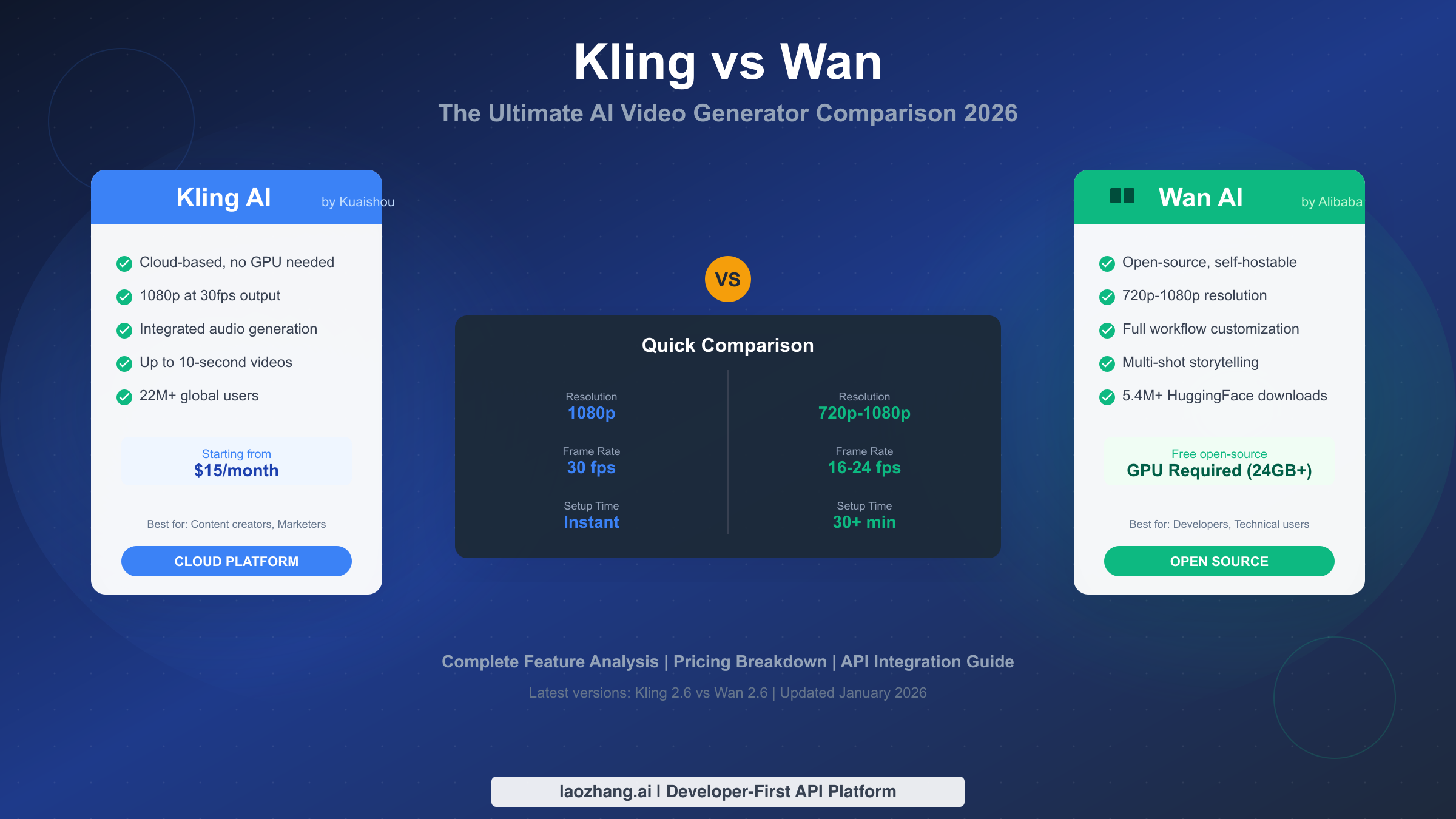
Choosing between Kling and Wan comes down to one fundamental question: do you want cloud-based convenience or open-source control? Kling, developed by Kuaishou, offers a polished cloud platform with 1080p output and integrated audio generation for $15-99/month. Wan, from Alibaba, provides a free open-source alternative that requires a 24GB+ GPU but eliminates recurring costs entirely. For most content creators seeking quick results without technical setup, Kling delivers better value. Developers and high-volume users who can invest in GPU hardware will find Wan more cost-effective over time.
TL;DR
Choose Kling if you want: Instant setup, 1080p at 30fps, integrated audio-visual generation, no technical knowledge required. Best for content creators, marketers, and businesses needing consistent output.
Choose Wan if you want: Full customization, no subscription costs, self-hosting control, and you have a 24GB+ GPU. Best for developers, enterprises with high volume, and technical users who prefer open-source tools.
Quick Numbers: Kling has 22 million users and generated $20.83 million in Q1 2025. Wan has 5.4 million downloads on HuggingFace. Both latest versions (2.6) released December 2025.
The Core Difference: Cloud vs Self-Hosted AI Video
The Kling vs Wan comparison fundamentally comes down to platform architecture. This distinction shapes everything else—pricing, setup complexity, customization options, and long-term costs.
Kling operates as a cloud-based SaaS platform. You sign up, pay a subscription, and generate videos through their web interface or API. There's no software to install, no hardware to purchase, and no technical configuration required. Kuaishou handles all the infrastructure, which means you get consistent performance regardless of your local computing resources. The tradeoff is ongoing subscription costs and limited customization options.
Wan functions as an open-source model you can run locally. Alibaba released it on HuggingFace and ModelScope, where anyone can download and deploy it. This approach gives you complete control over the generation process, enables deep customization through ComfyUI workflows, and eliminates recurring subscription fees. However, you need significant hardware investment—specifically a GPU with at least 24GB VRAM like the RTX 4090—and technical knowledge to set everything up.
This architectural difference creates distinct user experiences. With Kling, you're trading money for convenience. With Wan, you're trading time and technical effort for cost savings and flexibility. Neither approach is objectively better; the right choice depends entirely on your specific situation, which is why understanding your user profile matters before diving into feature comparisons.
For developers looking for simplified API access to both platforms, services like laozhang.ai provide unified endpoints that can reduce integration complexity.
Quick Decision: Which One Is Right for You?
Rather than listing features and hoping you'll figure out which matters, let's work backwards from your actual situation. The decision flowchart below maps common user profiles to clear recommendations.
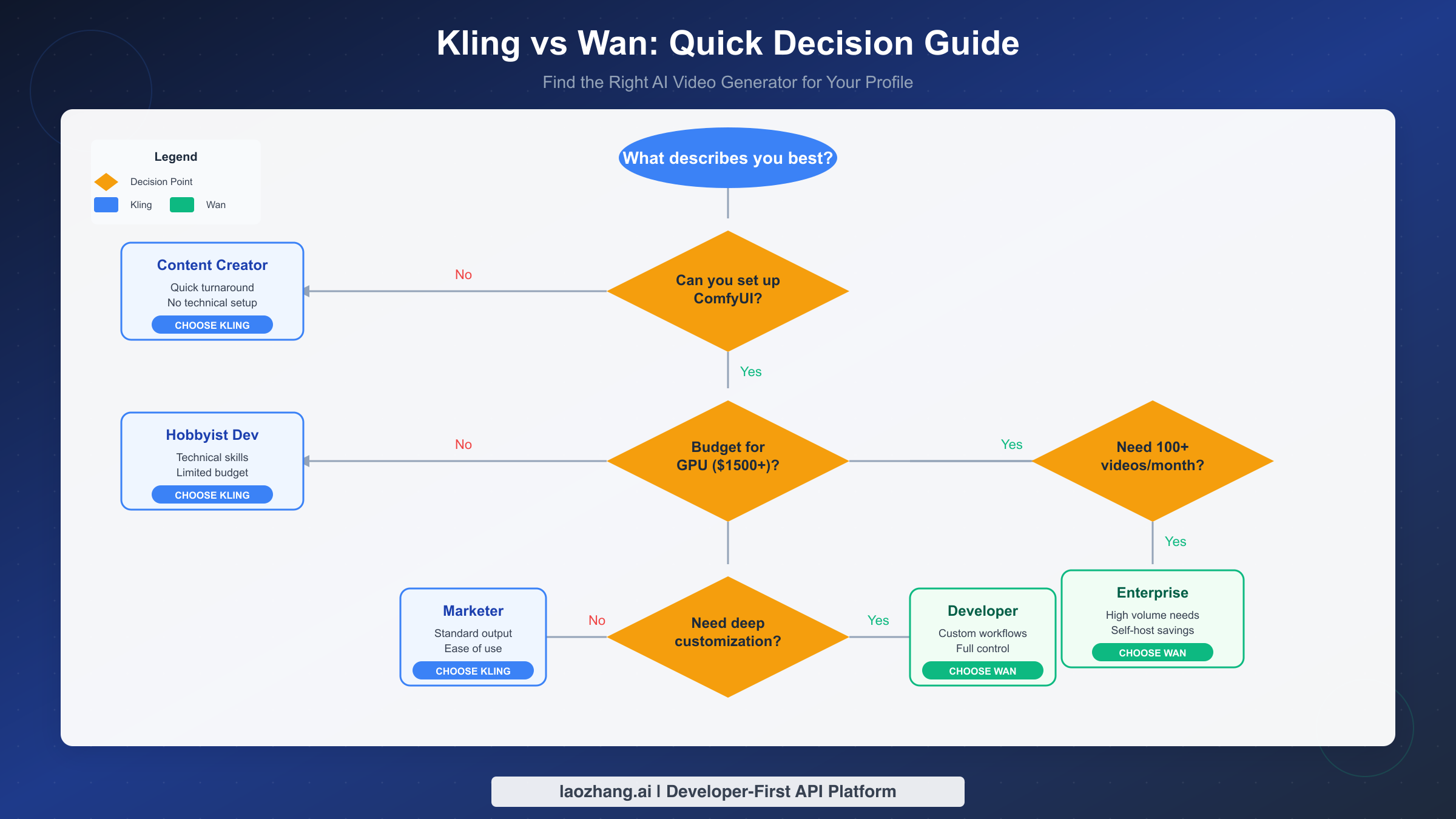
Profile 1: Content Creator or Marketer. You need videos for social media, ads, or promotional content. Technical setup isn't your strength, and you value speed over complete customization. Your budget can handle $15-50/month, and you produce 20-100 videos monthly. Recommendation: Kling. The cloud-based approach eliminates friction, and the integrated audio generation in Kling 2.6 handles most common use cases.
Profile 2: Hobbyist Developer. You have technical skills and enjoy experimenting with AI tools. However, spending $1,500+ on a GPU just for video generation doesn't make sense for your casual use. You might produce 10-30 videos monthly for personal projects. Recommendation: Kling. Despite your technical ability, the cost-benefit analysis favors Kling's entry tier until your volume justifies hardware investment.
Profile 3: Professional Developer or Technical User. You need deep customization, want to build custom workflows in ComfyUI, and plan to integrate video generation into larger systems. You can invest in GPU hardware and prefer open-source solutions for long-term flexibility. Recommendation: Wan. The open-source nature allows modifications, and self-hosting eliminates per-video costs that would otherwise scale with your usage.
Profile 4: Enterprise or High-Volume User. Your organization needs hundreds or thousands of videos monthly. Cost efficiency at scale matters more than initial setup complexity. You have technical staff or can hire consultants for implementation. Recommendation: Wan for self-hosting. At 500+ videos monthly, self-hosting breaks even on GPU investment within 2-3 months.
The decision thresholds are clearer than most comparison articles suggest. Below 100 videos monthly with limited technical resources, Kling wins on convenience. Above 200 videos monthly with technical capability, Wan wins on cost. The gray zone between 100-200 videos requires honest assessment of your technical comfort and time availability.
Feature-by-Feature Comparison
With your user profile identified, here's the detailed technical comparison that informs specific capability differences.
| Feature | Kling AI | Wan AI |
|---|---|---|
| Platform Type | Cloud-based SaaS | Open-source, self-hostable |
| Developer | Kuaishou (Beijing) | Alibaba Cloud |
| Latest Version | 2.6 (December 2025) | 2.6 (December 2025) |
| Max Resolution | 1080p | 720p-1080p |
| Frame Rate | 30 fps | 16-24 fps |
| Video Duration | Up to 10 seconds | 5-10 seconds |
| Render Time | 90-350 seconds | 27-110 seconds (on RTX 4090) |
| Audio Generation | Native integrated | Requires separate workflow |
| GPU Required | None (cloud) | 24GB+ VRAM recommended |
| API Access | Official API available | Via self-hosted endpoints |
| Customization | Moderate (presets) | Extensive (ComfyUI workflows) |
Resolution and Frame Rate Analysis. Kling maintains a consistent 1080p at 30fps across all tiers, providing broadcast-quality output suitable for professional use. Wan's output varies based on your hardware and configuration—while it can achieve 1080p, the default optimized setting is often 720p to balance quality and generation speed. The frame rate difference (30fps vs 16-24fps) affects motion smoothness, with Kling producing more fluid movement in action sequences.
Render Time Considerations. Raw render times favor Wan on high-end hardware, but this comparison is misleading without context. Kling's 90-350 seconds happens on Kuaishou's infrastructure, meaning you can queue multiple generations while doing other work. Wan's faster times require your local GPU to be occupied, preventing other tasks. For batch processing, Kling's queue system often proves more practical despite longer individual render times.
Audio-Visual Integration. Kling 2.6's simultaneous audio-visual generation represents a significant workflow advantage. You can generate videos with synchronized voiceovers, sound effects, and ambient audio in a single pass. Wan requires separate audio generation and manual synchronization—manageable for developers but adding complexity for typical creators.
For a broader view of how these tools compare to other options in the market, check out our comprehensive AI video model comparison.
Video Quality and Performance Analysis
Beyond specifications, actual output quality determines whether a tool meets your needs. Based on test results from multiple SERP sources and user reports, here's how Kling and Wan perform in practice.
Visual Fidelity. Kling 2.6 leads in visual quality according to recent comparisons. The platform excels at lighting, rendering, and maintaining character coherence throughout videos. Colors appear natural and well-balanced, and the overall production quality matches professional standards. Wan 2.6 produces visually appealing results but sometimes struggles with inconsistent textures and slightly synthetic-looking outputs—though this varies significantly based on configuration and prompting.
Motion Dynamics. Both platforms handle motion well, but with different characteristics. Kling produces exceptionally stable video with smooth transitions and natural movement. Wan's motion can appear more dynamic but occasionally introduces inconsistencies, particularly in complex scenes. For action sequences requiring precise movement, Kling generally performs more reliably.
Character Consistency. Maintaining character appearance across frames remains challenging for all AI video generators. In testing, Kling 2.1 demonstrated superior character consistency throughout videos, while Wan 2.2 occasionally showed drift in character features during longer sequences. This difference matters significantly for narrative content or brand mascot animations.
Audio Synchronization. Kling 2.6's integrated audio generation produces well-synchronized voiceovers and sound effects. Lip sync accuracy remains imperfect but represents current state-of-the-art. Wan requires external audio tools, and achieving similar synchronization demands additional workflow complexity and expertise.
Prompt Adherence. Kling tends to follow prompts more literally, which works well for specific creative intentions but can feel limiting. Wan's interpretation allows more creative variation—beneficial for artistic exploration but potentially frustrating when you need exact prompt execution. Short, simple prompts work better with Kling; complex, nuanced prompts often produce more interesting results with Wan.
For specific use cases like Kling's image-to-video capabilities, the platform demonstrates particular strength in maintaining source image fidelity while adding natural motion.
Complete Pricing Breakdown
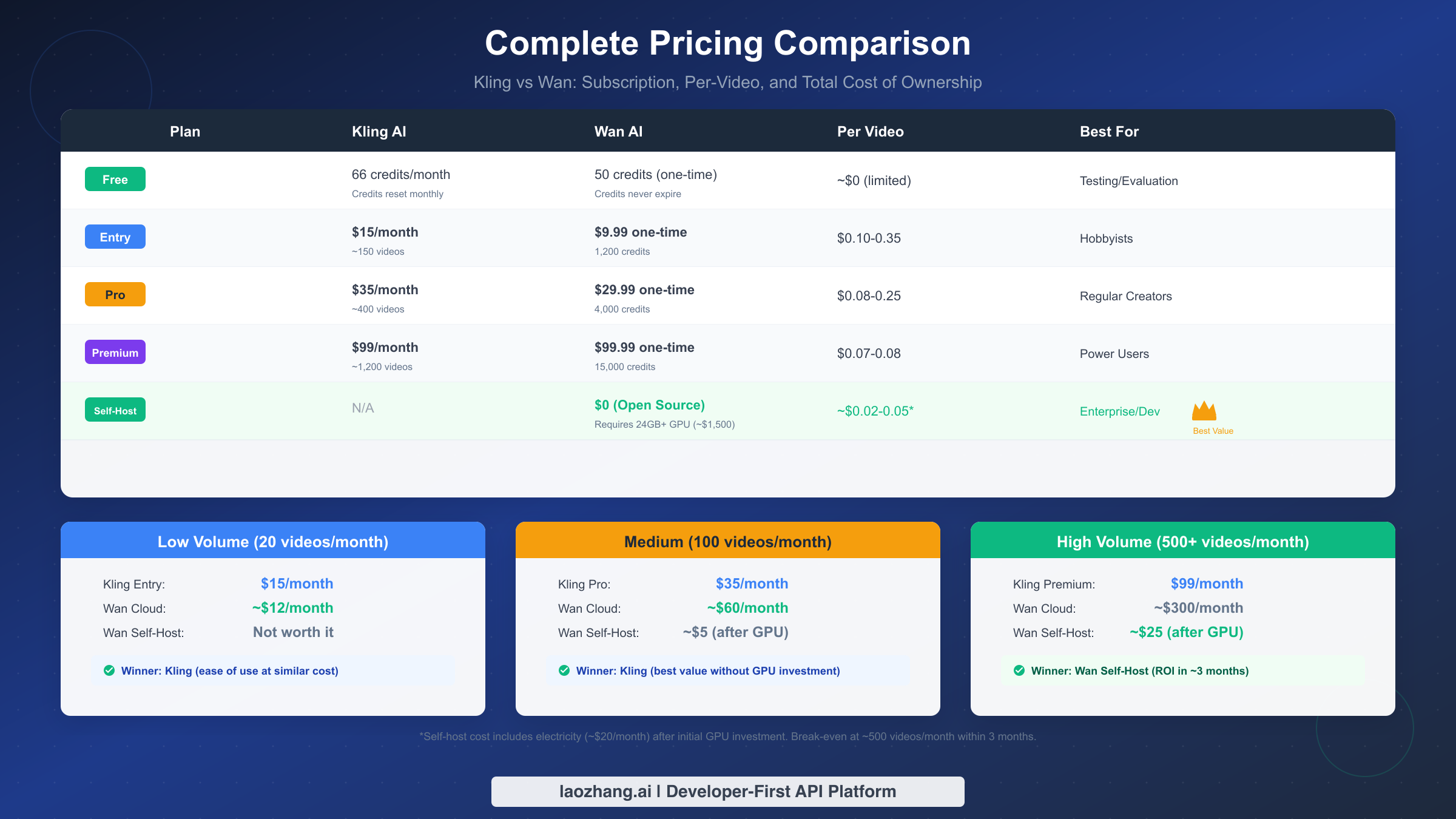
Pricing determines long-term viability more than any feature comparison. Here's the comprehensive cost analysis including hidden factors most comparisons miss.
Kling Subscription Tiers (Monthly)
| Tier | Price | Credits | Approx. Videos | Per-Video Cost |
|---|---|---|---|---|
| Free | $0 | 66/month | ~10-15 | $0 (limited) |
| Entry | $15 | ~600 | ~150 | ~$0.10 |
| Pro | $35 | ~1,600 | ~400 | ~$0.09 |
| Premium | $99 | ~4,800 | ~1,200 | ~$0.08 |
Wan Pricing Options
| Option | Initial Cost | Ongoing Cost | Per-Video Cost |
|---|---|---|---|
| Cloud (via services) | $0 | ~$0.60/video | $0.60 |
| One-time credits | $9.99-99.99 | None | $0.007-0.10 |
| Self-host | ~$1,500 (GPU) | ~$20/month (electricity) | ~$0.02-0.05 |
Total Cost of Ownership Analysis
The critical insight missing from most comparisons is the break-even calculation for Wan self-hosting. The math works differently at various volume levels.
Low Volume (20 videos/month): At this usage level, Kling Entry ($15/month) competes directly with Wan's cloud options (~$12/month). The minimal cost difference doesn't justify Wan's additional complexity. Kling wins on convenience without significant cost penalty.
Medium Volume (100 videos/month): Kling Pro at $35/month provides adequate credits. Wan cloud at $0.60/video would cost ~$60/month—significantly more expensive. Wan self-hosting would cost ~$5/month after GPU investment, but that $1,500 initial investment takes over 2 years to recover at this volume. Kling remains the practical choice for most users at this tier.
High Volume (500+ videos/month): The equation shifts dramatically. Kling Premium at $99/month covers approximately 1,200 videos. Wan cloud would cost ~$300/month. Wan self-hosting at ~$25/month (primarily electricity) recovers the GPU investment within 2-3 months. For sustained high-volume production, self-hosting Wan provides substantial long-term savings.
Hidden Cost Factors. Time investment matters more than most users anticipate. Setting up Wan on ComfyUI, optimizing workflows, and maintaining the system requires 20-40 hours initially and ongoing maintenance. If your hourly rate is $50+, that setup time alone approaches Kling's annual subscription cost. Factor this into your decision honestly.
API Access and Developer Integration
For developers building applications that incorporate AI video generation, API access quality significantly impacts implementation complexity and maintenance burden.
Kling API Overview. Kuaishou provides official API access through their developer platform. The API supports text-to-video, image-to-video, and the newer audio-visual generation features. Rate limits depend on your subscription tier, and pricing follows the same credit-based system as the web interface. Documentation quality is reasonable, though some features require contacting their enterprise team for access.
Wan Integration Approach. Since Wan is open-source, API access means running your own endpoints. Most developers use ComfyUI as the backend, exposing generation capabilities through custom API wrappers. This approach provides complete control over the API design but requires infrastructure management. Popular community implementations exist on GitHub that simplify this setup.
Unified API Access via laozhang.ai. For developers who want simplified access to multiple AI video services including both Kling-style and Wan-style generation, platforms like laozhang.ai offer unified endpoints. This approach reduces integration complexity—you implement one API and can switch between different models based on use case or cost optimization. The tradeoff is adding a dependency on a third-party service.
Python Integration Example
Here's a basic implementation pattern for Kling-style API integration:
pythonimport requests
import time

class VideoGenerator:
    def __init__(self, api_key, base_url="https://api.example.com" ):
        self.api_key = api_key
        self.base_url = base_url
        self.headers = {"Authorization": f"Bearer {api_key}"}

    def generate_video(self, prompt, duration=5, resolution="1080p"):
        response = requests.post(
            f"{self.base_url}/v1/video/generate",
            headers=self.headers,
            json={
                "prompt": prompt,
                "duration": duration,
                "resolution": resolution
            }
        )
        return response.json()["task_id"]

    def wait_for_completion(self, task_id, timeout=600):
        start_time = time.time()
        while time.time() - start_time < timeout:
            status = self.check_status(task_id)
            if status["state"] == "completed":
                return status["video_url"]
            time.sleep(10)
        raise TimeoutError("Video generation timed out")

    def check_status(self, task_id):
        response = requests.get(
            f"{self.base_url}/v1/video/status/{task_id}",
            headers=self.headers
        )
        return response.json()
This pattern applies to most cloud-based video generation APIs. For Wan self-hosted implementations, you'd build similar wrappers around your ComfyUI installation, typically using websocket connections for progress tracking.
Rate Limits and Quotas. Kling enforces rate limits based on subscription tier—Free users face strict daily limits, while Premium users can generate continuously within their credit balance. Self-hosted Wan has no rate limits beyond your hardware capacity, though generation speed depends on GPU performance. A single RTX 4090 handles one generation at a time, with each taking 30-120 seconds depending on settings.
If you're exploring free AI image-to-video tools, understanding these API integration patterns helps evaluate whether cloud APIs or self-hosted solutions better fit your application architecture.
Getting Started: First Video in 5 Minutes
Theory matters less than getting started. Here are streamlined quick-start guides for both platforms.
Kling Quick Start (5 Steps)
-
Visit klingai.com and create an account using email or Google authentication. The process takes under a minute.
-
Navigate to the video generation section. You'll see options for text-to-video and image-to-video. Start with text-to-video for your first attempt.
-
Enter a simple prompt. Start straightforward: "A cat sitting on a windowsill watching rain fall outside, cozy indoor lighting." Complex prompts work better once you understand the platform's interpretation style.
-
Select your settings: 5-second duration, 16:9 aspect ratio, standard quality. Premium settings require paid credits, but standard quality works well for testing.
-
Click generate and wait 2-3 minutes. Your video will appear in the generation history, downloadable in MP4 format.
Wan Quick Start (5 Steps - Requires Technical Setup)
-
Ensure you have a compatible GPU (RTX 3090/4090 or equivalent with 24GB+ VRAM). Install ComfyUI following the official GitHub instructions.
-
Download Wan model weights from HuggingFace. The primary model is approximately 8GB. Place files in your ComfyUI models directory.
-
Install the Wan ComfyUI node pack. Most implementations require additional nodes for video output handling.
-
Load a pre-built workflow from the ComfyUI community. The Wan repository includes starter workflows for text-to-video and image-to-video.
-
Run your first generation. Expect 3-5 minutes on RTX 4090, longer on less powerful hardware. Output saves to your configured output directory.
Common Mistakes to Avoid
For Kling: Don't start with extremely complex prompts or expect perfect prompt adherence. The platform interprets prompts somewhat loosely—work with this tendency rather than fighting it.
For Wan: Don't underestimate setup time. Budget 4-8 hours for initial configuration if you're not already familiar with ComfyUI. GPU memory errors are common—the 8.19GB VRAM requirement is a minimum, and generation often fails on GPUs with less than 12GB free.
For both: Start with 5-second videos before attempting longer durations. Quality often degrades in longer videos, and shorter content lets you iterate faster on prompting technique.
FAQ
Is Wan really free? The model itself is free and open-source. However, running it requires expensive hardware—a 24GB GPU costs $1,500+, and cloud GPU rental runs $0.60+ per video. "Free" applies only if you already own suitable hardware.
Can I use Kling videos commercially? Yes, Kling includes commercial licensing with all paid tiers. Free tier videos have restrictions—check their terms of service for current limitations. Wan's open-source license allows commercial use without restrictions.
Which produces better quality videos? Kling 2.6 currently produces more consistently high-quality output with better motion stability and character coherence. Wan 2.6 can match or exceed this quality with optimized settings and careful prompting, but requires more expertise to achieve consistently.
How long until Wan self-hosting pays off? At 500 videos/month, you recover the ~$1,500 GPU investment in approximately 2-3 months compared to Kling Premium. At 200 videos/month, break-even takes 5-6 months. Below 100 videos/month, subscription services remain more economical indefinitely.
Can I access both through a single API? Yes, unified API platforms like laozhang.ai provide access to multiple AI video generation models through single endpoints. This simplifies integration if you want to test different models or optimize costs dynamically.
Final Verdict: Making Your Choice
After comprehensive analysis, the recommendation simplifies to a straightforward decision tree.
Choose Kling if any of these apply:
- You value convenience and want to start generating immediately
- Your technical comfort doesn't extend to GPU setup and ComfyUI workflows
- Your monthly volume stays below 200 videos
- You need integrated audio-visual generation without additional tools
- Your budget comfortably accommodates $15-99/month
Choose Wan if all of these apply:
- You have technical skills for ComfyUI setup and maintenance
- You can invest $1,500+ in GPU hardware or already own suitable equipment
- Your monthly volume exceeds 200 videos (ideally 500+)
- You need deep customization for specific workflows
- You prefer open-source solutions for long-term flexibility
For most content creators, marketers, and casual users, Kling represents the practical choice. The convenience advantage outweighs cost differences until volume reaches levels that justify infrastructure investment.
For developers, technical teams, and high-volume enterprises, Wan's self-hosting model provides substantial long-term savings and flexibility. The upfront complexity investment pays dividends through reduced ongoing costs and complete control over the generation pipeline.
The worst decision is analysis paralysis. Both tools produce professional-quality AI video. Pick the one matching your profile, start creating, and adjust if your needs change. The AI video generation landscape evolves rapidly—both Kling and Wan release significant updates every few months, so today's limitations may disappear in tomorrow's versions.