
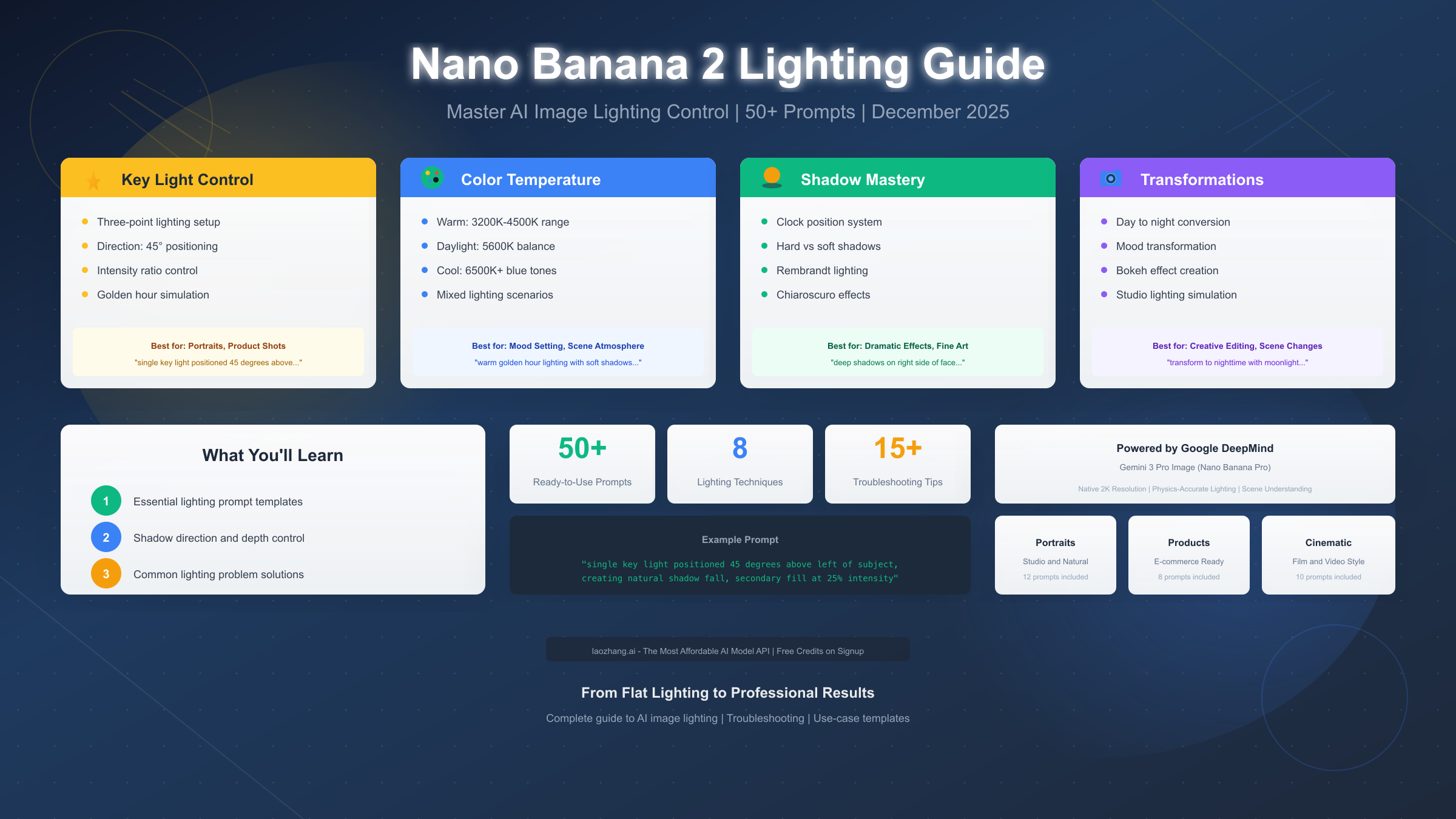
Nano Banana 2, Google DeepMind's advanced AI image generation model (officially Gemini 3 Pro Image), offers remarkably sophisticated lighting control through natural language prompts. Unlike earlier AI image generators that treated lighting as an afterthought, Nano Banana 2 understands the physics of light, allowing you to specify light direction, intensity, color temperature, and shadow behavior with precision previously reserved for professional photography software. This guide provides everything you need to transform flat, lifeless AI images into professionally lit masterpieces.
Whether you're creating portrait photography, product shots, cinematic scenes, or artistic compositions, understanding how to communicate lighting requirements to Nano Banana 2 will dramatically improve your results. The model responds to cinematography terminology, photography concepts, and natural language descriptions—but knowing which approach works best for different scenarios requires understanding both the tool's capabilities and the fundamentals of lighting theory. This guide bridges that gap with practical techniques and ready-to-use prompts tested across hundreds of generations.
What is Nano Banana 2 Lighting Control?
Nano Banana 2 represents a fundamental shift in how AI models handle image lighting. Rather than applying lighting as a superficial filter or post-processing effect, the model plans scenes before rendering them, calculating how light would naturally interact with surfaces, cast shadows, and create highlights. This "thinking" approach to image generation means that lighting prompts don't just adjust brightness—they influence the entire composition, from shadow falloff to color temperature shifts in ambient areas.
The model's lighting capabilities emerged from Google DeepMind's research into physics-accurate rendering within generative models. According to the official Google Blog announcement from November 2025, Nano Banana Pro delivers "native 2K resolution, physics-accurate lighting, and flawless text rendering" by applying reasoning to understand relationships between objects, illumination sources, and compositional elements. This means the model understands that a subject lit from the left should cast shadows toward the right, that golden hour light creates warm highlights with cool shadows, and that studio lighting setups follow predictable patterns.
For users accustomed to earlier AI image generators, this represents a significant upgrade. Previous models often produced images with inconsistent shadow directions, impossible lighting scenarios, and flat illumination that lacked depth. Nano Banana 2's approach reduces these issues substantially, though achieving optimal results still requires understanding how to communicate your lighting intentions effectively through prompts.
The practical implications are significant for content creators. Portrait photographers can specify Rembrandt lighting patterns and expect accurate triangle shadows on cheeks. Product photographers can request clean softbox illumination for e-commerce images. Cinematographers working on concept art can describe complex three-point lighting setups and receive results that match professional standards. The key lies in learning the vocabulary and prompt structures that the model responds to most effectively, which this guide covers in detail throughout the following sections.
If you're looking for reliable API access to test these lighting techniques at scale, laozhang.ai provides affordable access to Gemini image models with generous free credits for new users.
Lighting Fundamentals for AI Prompting
Understanding traditional lighting concepts dramatically improves your ability to communicate with Nano Banana 2. The model was trained on vast amounts of photography and cinematography content, meaning it recognizes and responds to established terminology. When you use precise lighting terms rather than vague descriptions, the model can leverage its training to produce more accurate, predictable results.
The Three-Point Lighting System
Three-point lighting forms the foundation of professional portrait and product photography, and Nano Banana 2 responds exceptionally well to prompts based on this system. The setup consists of three distinct light sources, each serving a specific purpose in shaping the subject's appearance.
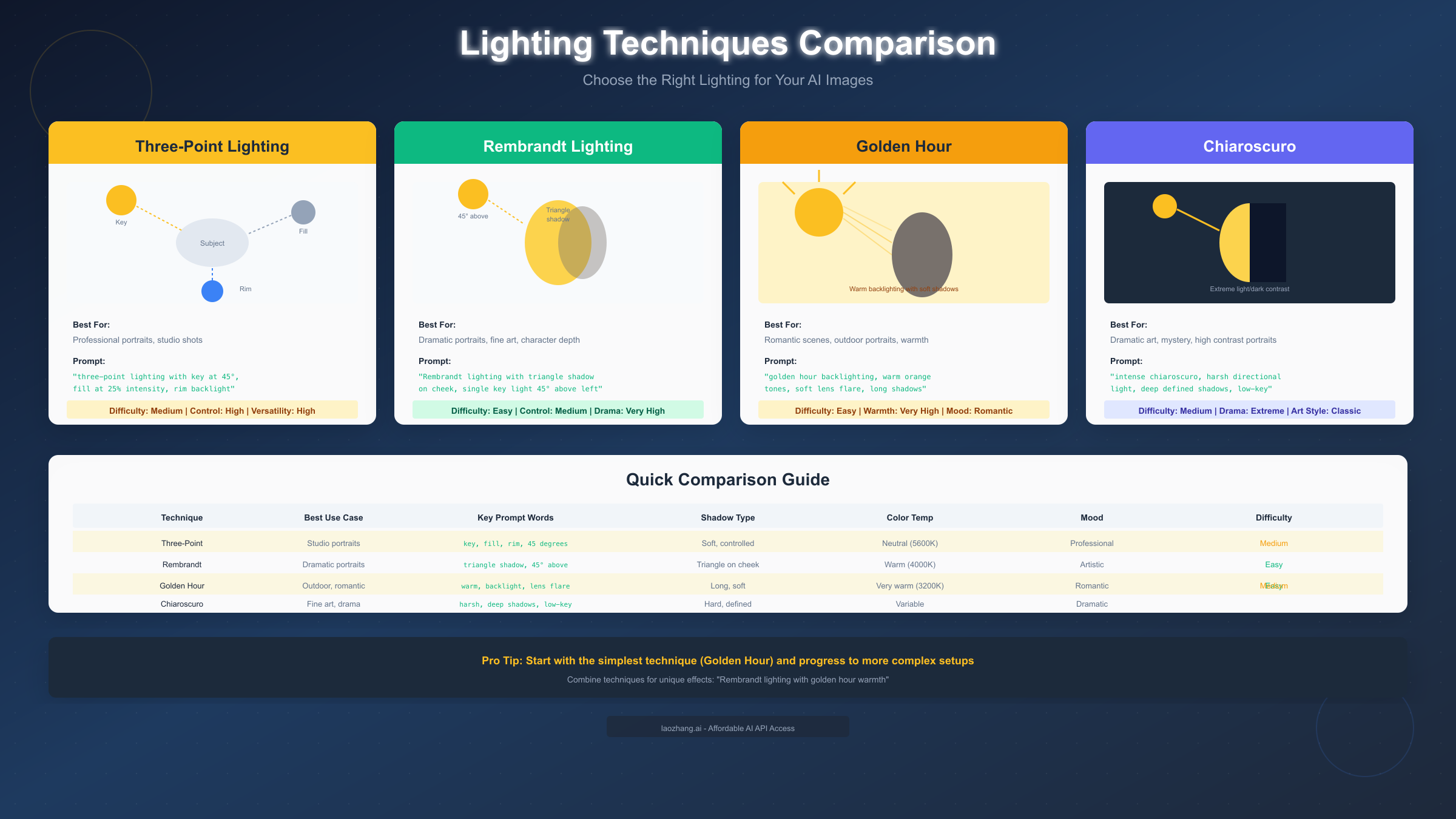
The key light serves as the primary illumination source, typically positioned at a 45-degree angle to the subject—either above and to the left, or above and to the right. This light creates the main shadows that define facial structure or product contours. In prompts, you can specify this precisely: "key light positioned 45 degrees above and to the left of subject" produces consistent results because the model understands this standard positioning.
The fill light reduces harsh shadows created by the key light, positioned on the opposite side at lower intensity. Photographers typically set fill light at 25-50% of key light intensity. For AI prompts, specifying "secondary fill light at 25% intensity from the right side, softening shadows without eliminating them" gives the model clear parameters to work with.
Rim light (also called backlight or hair light) separates the subject from the background by creating a luminous edge around their outline. This technique proves particularly valuable in AI image generation where subjects sometimes blend into backgrounds. The prompt "rim light from behind creating subtle halo effect around subject edges" consistently produces better depth separation.
Color Temperature Basics
Color temperature, measured in Kelvin, describes the warmth or coolness of light. Nano Banana 2 understands both technical Kelvin values and descriptive color temperature terms, though combining both approaches produces the most reliable results.
Warm light (2700K-3500K) creates cozy, intimate atmospheres with orange and yellow tones. Think of candlelight, sunset, or tungsten bulbs. In prompts, you can specify "warm lighting at approximately 3200K" or use descriptive terms like "warm golden light similar to late afternoon sun."
Neutral daylight (5000K-5600K) represents balanced white light without color bias, ideal for accurate color reproduction. Product photographers prefer this temperature for e-commerce images. Prompts like "neutral daylight white balance at 5600K for accurate color representation" work well for technical accuracy.
Cool light (6500K+) creates clinical, modern atmospheres with blue undertones. Overcast skies, electronic screens, and fluorescent lights fall into this category. Specifying "cool lighting with slight blue cast, approximately 7000K" produces distinct results from warm lighting prompts.
Understanding these fundamentals allows you to communicate more precisely with Nano Banana 2. Rather than hoping the model interprets "nice lighting" correctly, you can specify exactly what you want. For more techniques on crafting effective image prompts, see our comprehensive image prompting guide.
Essential Lighting Prompts Library
The following prompts have been tested extensively with Nano Banana 2 and produce reliable results. Each prompt follows the structure that the model responds to best: specific technical instructions followed by mood or quality descriptors.
Portrait Lighting Prompts
Portrait lighting requires careful attention to facial shadows and skin tone rendering. The following prompts address common portrait scenarios:
Professional Headshot Lighting
single softbox key light positioned 45 degrees above and left of subject,
creating gentle shadow transition on right side of face, fill light at 30%
intensity from right to lift shadows without eliminating them, neutral
white balance at 5600K, professional studio background separation
This prompt produces clean corporate headshot lighting suitable for LinkedIn profiles, company websites, and professional portfolios. The specific angle and intensity percentages help Nano Banana 2 create consistent results across multiple generations.
Rembrandt Portrait Lighting
dramatic Rembrandt lighting with single key light creating signature
triangle shadow beneath the eye on shadowed side of face, minimal fill
to maintain strong contrast, warm color temperature around 4000K for
painterly quality, deep shadows adding depth and dimension
Rembrandt lighting, named after the Dutch master painter, creates a distinctive triangle of light on the shadowed cheek. This prompt reliably produces the characteristic pattern that signals artistic portrait photography.
Beauty/Fashion High-Key Lighting
bright high-key beauty lighting with large softbox above camera position,
additional fill lights eliminating all harsh shadows, clean white
background, skin appearing luminous and flawless, slight catch lights
in eyes, color temperature 5500K for accurate skin tones
High-key lighting minimizes shadows for a fresh, bright aesthetic common in beauty and fashion photography. The prompt's emphasis on shadow elimination and luminous skin helps Nano Banana 2 achieve the desired effect.
Product Photography Prompts
Product shots demand precise lighting control to showcase items accurately while maintaining visual appeal:
Clean E-Commerce Product Shot
professional product photography lighting with large diffused softbox
overhead creating soft, even illumination, minimal shadows directly
beneath product, white seamless background, neutral 5600K color
temperature for accurate color reproduction, subtle gradient from
top to bottom adding depth
Dramatic Product Hero Shot
hero product lighting with dramatic single key light from upper left
creating strong defined shadows, rim light from behind separating
product from dark background, slight lens flare for dynamic feel,
contrast between bright highlights and deep shadows
Cinematic Lighting Prompts
Cinematic lighting creates mood and atmosphere that tells a story:
Golden Hour Cinematic
golden hour backlighting with warm orange sun creating lens flare and
rim light around subject silhouette, long dramatic shadows stretching
toward camera, sky transitioning from deep orange to purple, overall
warm color grading with crushed blacks
Film Noir Low-Key
film noir lighting with harsh single light source creating strong
geometric shadows, high contrast between illuminated areas and deep
blacks, Venetian blind shadow patterns on wall, cool desaturated
color palette, mysterious atmospheric mood
These prompts serve as starting points. Nano Banana 2's conversational editing capability means you can generate an initial image, then refine with follow-up prompts like "make the shadows softer" or "add more warmth to the lighting."
Natural Light Prompts
Natural lighting creates organic, authentic-feeling images that work well for lifestyle content, environmental portraits, and outdoor scenes:
Soft Window Light
portrait lit by large north-facing window creating soft, even
illumination wrapping gently around facial features, minimal harsh
shadows, background slightly darker than subject, natural daylight
color temperature around 5500K, intimate indoor atmosphere
Dappled Forest Light
outdoor portrait in forest clearing with dappled sunlight filtering
through tree canopy, creating organic patterns of light and shadow
across subject, warm green color cast from foliage, bright highlights
contrasting with deep forest shadow areas, natural environmental mood
Overcast Soft Light
portrait under overcast sky creating giant natural softbox effect,
extremely soft shadows with gentle gradual falloff, even illumination
across entire face, slightly cool color temperature around 6000K,
professional beauty lighting quality from natural source
Atmospheric and Mood Prompts
These prompts create specific emotional atmospheres through lighting:
Moody Blue Hour
twilight blue hour lighting with deep blue ambient sky, warm artificial
lights providing contrast, subject illuminated by warm practical light
against cool blue environment, cinematic color contrast between warm
and cool, contemplative atmospheric mood
Mysterious Fog/Haze
atmospheric scene with volumetric fog catching light beams, visible
god rays streaming through environment, soft diffused illumination
with reduced contrast, ethereal mysterious mood, light appearing
almost tangible in thick atmosphere
Neon Urban Night
urban night scene with colorful neon signs providing primary
illumination, mixed color lighting in pink, blue and green, harsh
reflections on wet surfaces, cyberpunk aesthetic, high contrast
between bright neon sources and dark shadow areas
Mastering Shadow and Color Control
Beyond basic lighting setups, precise control over shadow behavior and color temperature separates amateur results from professional-quality images. Nano Banana 2 offers sophisticated control over these elements when you use the right prompt language.
Shadow Direction Using the Clock System
Professional photographers and cinematographers often describe light direction using clock positions, with the subject at the center. This system translates effectively to AI prompts because it provides unambiguous spatial information:
- 12 o'clock: Light directly above, creates shadows directly below features
- 3 o'clock: Light from subject's right, shadows fall to the left
- 6 o'clock: Light from below (horror lighting), creates unsettling upward shadows
- 9 o'clock: Light from subject's left, shadows fall to the right
Combining clock positions with height creates precise three-dimensional placement. For example, "key light from 10 o'clock position at 45-degree elevation" places the light above-left of the subject, creating the classic portrait lighting pattern. This prompt structure reduces inconsistency because the model can calculate shadow directions mathematically rather than interpreting vague descriptions.
Example prompt using clock positioning:
dramatic portrait with key light from 10 o'clock position elevated 45
degrees, creating strong defined shadows falling toward lower right,
minimal fill allowing shadows to remain deep and sculptural, subject's
left side dramatically illuminated while right side falls into shadow
Shadow Hardness and Softness
Shadow edge quality dramatically affects image mood. Hard shadows with sharp edges create drama and intensity, while soft shadows with gradual falloff feel gentle and flattering. Nano Banana 2 responds to explicit instructions about shadow characteristics:
Hard Shadow Prompt:
harsh directional lighting creating sharp-edged shadows with no
gradual transition, point light source similar to midday sun or
bare bulb, high contrast between lit and shadowed areas, geometric
shadow patterns with crisp defined edges
Soft Shadow Prompt:
large diffused light source creating soft gradual shadows with gentle
falloff, shadow edges transitioning smoothly from dark to light over
several inches, flattering illumination reducing harsh contrast,
similar to large window with sheer curtains
Color Temperature Mixing
Real-world lighting often involves multiple color temperatures—warm indoor lights mixing with cool daylight from windows, for example. Nano Banana 2 can render these complex scenarios:
mixed lighting scene with warm tungsten practicals (3200K) providing
ambient indoor glow while cool daylight (6500K) streams through
window creating blue highlights on subject's face, subtle color
contrast between warm shadows and cool highlights, cinematic color
separation
For developers building applications that require consistent lighting across many generated images, laozhang.ai's API provides the reliability needed for production workloads with Gemini image model access.
Advanced Lighting Transformations
Nano Banana 2's scene understanding capabilities extend beyond static lighting—the model can transform existing image lighting or create complex lighting scenarios that would require extensive post-production in traditional photography.
Day-to-Night Transformation
One of Nano Banana 2's most impressive capabilities is convincingly transforming daylight scenes to nighttime while maintaining realistic lighting physics. The model recalculates how moonlight, streetlights, and ambient glow would illuminate the scene:
Prompt for day-to-night conversion:
transform to nighttime with full moon providing cool blue-white
illumination from upper left, warm orange glow from streetlights
creating pools of light on ground, deep blue sky with visible
stars, long soft shadows from moonlight, windows showing warm
interior light spilling outward
This transformation works because Nano Banana 2 understands that nighttime scenes have different shadow behaviors, color temperatures, and contrast characteristics than daytime scenes.
Mood Transformation Through Lighting
The same subject can evoke completely different emotional responses depending on lighting treatment. These prompts demonstrate how lighting alone changes mood:
From neutral to romantic:
add warm golden hour backlighting with soft lens flare, reduce
overall contrast for dreamy quality, introduce warm color grading
with lifted shadows, subtle bokeh in background suggesting intimate
atmosphere
From neutral to dramatic:
convert to low-key chiaroscuro lighting with single harsh light
source from side, crush blacks for deep shadows with minimal detail,
high contrast between illuminated highlights and shadow areas,
theatrical dramatic mood
Studio Lighting Simulation
Nano Banana 2 can simulate complex studio lighting setups that would require expensive equipment and expertise in the real world:
professional studio beauty lighting with ring light as key creating
signature circular catch lights in eyes, additional overhead softbox
for hair light, white V-flats on either side bouncing fill, clean
white seamless background with subtle gradient, color temperature
precisely matched across all sources at 5500K
For creative workflows involving multiple lighting variations, testing prompts through services like laozhang.ai allows rapid iteration without excessive costs.
Troubleshooting Common Lighting Problems
Even with precise prompts, AI-generated images sometimes exhibit lighting issues. Understanding how to diagnose and fix these problems through prompt modification saves time and produces better results.

Problem: Flat, Lifeless Lighting
Symptoms: Image lacks depth, subject doesn't pop from background, shadows are weak or absent.
Diagnosis: The prompt likely lacks directional lighting information, or uses vague terms like "good lighting" that don't provide clear guidance.
Solution: Add explicit directional lighting with defined shadow behavior:
add directional key light from upper left at 45 degrees creating
defined shadows for depth and dimension, ensure visible shadow
falloff on right side of subject, maintain contrast ratio between
lit and shadowed areas
Problem: Harsh, Unflattering Shadows
Symptoms: Dark shadows under eyes ("raccoon eyes"), hard shadow edges making subject look tired or aged, unflattering contrast.
Diagnosis: Key light too harsh or positioned too high without adequate fill.
Solution: Add fill light and soften the key:
soften shadows with diffused fill light from camera position at
40% intensity of key, gradual shadow transitions rather than hard
edges, maintain enough shadow for dimension while avoiding harsh
unflattering dark areas under facial features
Problem: Inconsistent Shadow Directions
Symptoms: Shadows point in different directions across the image, creating an impossible lighting scenario that looks artificial.
Diagnosis: The initial prompt may have been ambiguous about light source position, or the model combined multiple conflicting lighting concepts.
Solution: Explicitly define a single primary light source:
establish single primary light source from upper left, all shadows
throughout scene consistently falling toward lower right, maintain
lighting logic across entire composition, any secondary lights
should be subtle enough not to create competing shadow directions
Problem: Wrong Color Temperature
Symptoms: Skin tones appear orange or blue, colors feel unnatural, mood doesn't match intent.
Diagnosis: Color temperature wasn't specified, allowing the model to choose arbitrarily, or conflicting temperature descriptions confused the model.
Solution: Specify exact color temperature with reference:
correct color temperature to neutral daylight at 5600K, ensure
accurate skin tones without orange or blue color cast, white
surfaces appearing truly white, colors rendered accurately as
they would appear under balanced midday light
Problem: No Subject-Background Separation
Symptoms: Subject blends into background, image lacks depth, flat two-dimensional appearance.
Diagnosis: Missing rim or backlight that typically creates edge definition.
Solution: Add rim lighting:
add rim light from behind subject creating luminous edge that
separates subject from background, subtle halo effect around
hair and shoulders, maintain enough intensity to create visible
separation without overexposure
These troubleshooting techniques apply to most AI image generation tools, though Nano Banana 2's conversational editing makes iterative fixes particularly straightforward.
Advanced Troubleshooting Techniques
For persistent lighting issues that don't respond to basic fixes, these advanced techniques often help:
Resetting with explicit negatives: Sometimes the model carries over unwanted characteristics from previous attempts. Adding explicit negative instructions can help: "lighting must NOT be flat, shadows must NOT be absent, ensure strong directional illumination."
Providing reference context: If the model interprets your scene incorrectly, add context about the setting: "professional photography studio with controlled lighting" or "outdoor location at specific time of day." This context helps the model select appropriate lighting defaults.
Breaking complex prompts into stages: For elaborate lighting setups, consider generating a simpler version first, then using conversational editing to add complexity. "Add a subtle rim light from behind" works better as a refinement than trying to specify everything initially.
Adjusting other scene elements: Sometimes lighting problems stem from incompatible scene descriptions. An "outdoor sunny beach" setting may override attempts at dramatic low-key lighting. Ensuring all prompt elements support your lighting intent improves consistency.
Understanding how to diagnose and fix lighting issues transforms frustrating dead-ends into learning opportunities that improve your prompting skills over time.
Lighting by Use Case
Different applications demand different lighting approaches. This section provides specialized prompts optimized for specific use cases.
Portrait Photography
Professional Business Portrait:
corporate headshot lighting with large softbox at 45 degrees
camera right, fill panel on left reducing contrast to 3:1 ratio,
clean gray gradient background, neutral expression professionally
lit, catch lights visible in both eyes, color temperature 5500K
for accurate reproduction
Environmental Portrait:
natural window light portrait with subject positioned near large
north-facing window, soft directional illumination wrapping around
facial features, ambient room fill maintaining detail in shadows,
slightly warm color temperature suggesting comfortable interior
Artistic Character Portrait:
dramatic character portrait with single harsh key light creating
strong facial shadows, background falling to complete darkness,
film noir aesthetic with high contrast, eyes catching specular
highlight while cheekbones and jawline dramatically sculpted by
side lighting
Product Photography
White Background E-Commerce:
clean product photography on pure white background, large overhead
softbox creating even illumination with minimal shadows, small
accent light from behind for edge definition, color accuracy
critical at 5600K daylight balance, product floating on seamless
white without visible shadows
Lifestyle Product Shot:
lifestyle product photography with warm natural window light,
product positioned in contextual setting, soft shadows grounding
product in scene, warm inviting color temperature around 4500K,
slight depth of field blur on background elements
Hero Product with Drama:
dramatic hero product shot on dark background, single key light
creating sculptural highlights and deep shadows, rim light
defining product edges against darkness, reflective surfaces
showing controlled specular highlights, premium luxury aesthetic
Landscape and Architecture
Golden Hour Landscape:
landscape at golden hour with low sun creating long dramatic
shadows across terrain, warm orange light on foreground elements,
cool blue shadows in distant features, subtle lens flare from
sun near frame edge, saturated warm color grading
Architectural Interior:
interior architecture photography with balanced exposure between
bright windows and interior, supplementary flash fill maintaining
detail in shadows, vertical lines properly aligned, cool daylight
through windows mixing with warm interior practicals
Character and Concept Art
Fantasy Character Lighting:
fantasy character portrait with dramatic rim light suggesting
magical energy, cool blue accent light from below contrasting
with warm key from above, painterly rendering quality, strong
value contrast supporting heroic character design
Sci-Fi Environmental:
science fiction scene with harsh overhead industrial lighting
creating strong downward shadows, neon accent colors in blue
and purple, atmospheric haze catching light beams, high tech
aesthetic with clinical cool color temperature
Horror/Dark Fantasy:
ominous horror lighting with single harsh light source from below
creating unsettling upward shadows on face, deep black negative
space surrounding subject, cool desaturated palette with sickly
green undertones, oppressive claustrophobic atmosphere
Anime/Manga Style:
anime style lighting with clean cel-shaded shadows, bright key
light creating crisp shadow edges without gradation, vibrant
saturated colors, sparkle effects in eyes from multiple catch
lights, stylized aesthetic departing from photorealism
Food and Still Life Photography
Food photography requires careful attention to surface textures and appetizing color rendering:
Appetizing Food Shot:
professional food photography lighting with large overhead softbox
creating gentle shadows beneath food items, warm color temperature
around 4500K enhancing appetizing qualities, slight backlighting
creating luminous translucency in beverages and sauces, steam
visible where appropriate
Moody Rustic Food:
dark moody food photography with single directional side light,
dramatic shadows creating depth and texture, warm tungsten color
temperature, rustic wooden surface reflecting warm tones, shallow
depth of field isolating subject
These specialized prompts serve as templates you can customize for specific projects. The key is maintaining the structural elements (light direction, intensity ratios, color temperature) while adjusting descriptive elements for your particular subject. Experimentation with combining elements from different categories often produces unique and compelling results.
The versatility of Nano Banana 2's lighting system means that once you understand the underlying principles, you can adapt techniques across different use cases. Portrait lighting principles apply to character art, product photography techniques inform food photography, and cinematic approaches enhance nearly any subject matter.
For video-related AI work, understanding lighting principles also applies—see our guide on AI video generation capabilities for extending these concepts to motion content. Additionally, for those working with image-to-image editing techniques, lighting adjustments represent one of the most common and valuable transformation types.
Professional Workflow Tips
Integrating Nano Banana 2 lighting control into a professional workflow requires understanding how to balance creative experimentation with production efficiency. These workflow tips help maximize quality while minimizing iteration cycles.
Start with established lighting patterns. Rather than inventing custom lighting from scratch, begin with proven setups like three-point lighting or Rembrandt, then modify specific elements. The model's training data heavily features these classic patterns, making them more reliable starting points than experimental configurations.
Build a prompt library for your common use cases. If you frequently generate headshots, product shots, or specific artistic styles, create template prompts with lighting setups that consistently work well. Document which prompts produce which results so you can reproduce successful lighting quickly.
Use iterative refinement strategically. Nano Banana 2's conversational editing allows you to adjust lighting after initial generation. Start with broader lighting descriptions, then refine specific elements: "add more shadow depth on the right side" or "warm up the color temperature slightly." This approach often produces better results than trying to specify everything in one prompt.
Test lighting variations systematically. When developing a new lighting style, generate multiple variations with controlled changes—only adjust one variable at a time. This helps identify which prompt elements most strongly influence the output, building your understanding of the model's responses.
Consider the complete image composition. Lighting doesn't exist in isolation. The most effective prompts consider how lighting interacts with other elements: subject pose, background, color palette, and mood. A prompt describing "dramatic side lighting" may produce different results depending on whether the background is specified as dark or bright.
For high-volume professional work, reliable API access becomes essential. Services providing Gemini image API access, such as laozhang.ai, offer the consistency and throughput needed for production workflows, along with cost structures that make extensive testing economically viable.
Understanding Model Limitations
While Nano Banana 2 offers sophisticated lighting control, understanding its limitations helps set realistic expectations and develop effective workarounds.
Complex multi-source lighting scenarios can sometimes produce inconsistent results. The model handles three-point lighting well, but setups with five or more distinct light sources may show unpredictable shadow interactions. For complex lighting, consider generating with simpler setups and conceptualizing additional lights through post-processing if needed.
Physically impossible lighting requests will produce unpredictable results. The model's physics-based approach means requests that violate lighting physics (like shadows going in opposite directions from a single source) will either be corrected by the model or produce artifacts. Working within physical plausibility produces more consistent results.
Color temperature accuracy varies depending on scene context. While the model understands Kelvin values, it balances technical specifications against aesthetic judgment. A 3200K specification in a scene the model interprets as "outdoors midday" may be adjusted toward daylight temperature. Providing context that matches your color temperature intent improves accuracy.
Iterative editing has limitations. While you can refine lighting through conversation, major lighting changes (like converting a front-lit image to dramatic side lighting) may not produce clean results through editing alone. For significant lighting changes, generating a new image often works better than extensive iterative adjustment.
Consistency across generations remains challenging. Even with identical prompts, slight variations in lighting will occur between generations. For projects requiring exact lighting matches across multiple images, expect to generate several variations and select the closest matches rather than achieving perfect consistency automatically.
Understanding these limitations allows you to work with the model's strengths while planning for situations where manual intervention or alternative approaches may be necessary.
Quick Reference and FAQ
Lighting Prompt Cheat Sheet
| Lighting Style | Key Prompt Words | Best For |
|---|---|---|
| Three-Point | "key at 45°, fill at 25%, rim behind" | Professional portraits |
| Rembrandt | "triangle shadow, single key" | Dramatic portraits |
| Golden Hour | "warm backlight, lens flare, long shadows" | Romantic, outdoor |
| High-Key | "bright, minimal shadows, clean" | Beauty, fashion |
| Low-Key | "single harsh light, deep blacks" | Drama, film noir |
| Softbox | "large diffused source, soft shadows" | Products, headshots |
Shadow Control Quick Reference
| Direction | Prompt Phrasing |
|---|---|
| Left shadows | "light from right side" |
| Right shadows | "light from left side" |
| Below chin shadows | "light from above" |
| Dramatic side shadows | "single light from 90 degrees" |
| Minimal shadows | "flat frontal lighting" |
Color Temperature Quick Reference
| Temperature | Kelvin | Description |
|---|---|---|
| Candlelight | 1800K | Very warm orange |
| Tungsten | 3200K | Warm yellow |
| Golden Hour | 4000K | Warm gold |
| Daylight | 5600K | Neutral white |
| Overcast | 6500K | Slightly cool |
| Blue Hour | 7500K+ | Cool blue |
Frequently Asked Questions
Does Nano Banana 2 understand Kelvin values?
Yes, the model responds to Kelvin specifications, though combining technical values with descriptive language produces more reliable results. "Warm lighting at approximately 3200K similar to tungsten bulbs" gives the model both technical and contextual information.
How do I maintain consistent lighting across multiple images?
Use detailed, specific prompts with exact numerical values for angles and intensities. Maintain the same prompt structure across generations, modifying only subject-specific elements. For production workflows requiring consistency, API access through providers like laozhang.ai allows parameter control that improves reproducibility.
Can I use photography lighting diagram notation?
Nano Banana 2 understands common lighting diagram conventions. Terms like "key from 10 o'clock at 45 degrees" or "fill at camera position" work well because they're unambiguous.
What if the model ignores my lighting instructions?
If initial results don't match your lighting intent, use conversational refinement: "The lighting is too flat. Add stronger directional key light from the upper left creating more defined shadows." This iterative approach often succeeds where single prompts fail.
How detailed should lighting prompts be?
More detail generally produces more accurate results, but there's a balance. Include: light direction, light quality (hard/soft), color temperature, and shadow behavior. Avoid contradictory instructions or excessive complexity that might confuse the model.
Does lighting affect image generation time?
Complex lighting scenarios may slightly increase generation time as the model calculates physics-based lighting interactions. However, the difference is minimal compared to overall generation time.
Summary
Mastering lighting in Nano Banana 2 transforms AI image generation from a random process into a controlled creative tool. The key principles to remember: use specific directional language based on clock positions and angles, specify color temperature in Kelvin with descriptive context, control shadow behavior through fill light ratios, and iterate conversationally when results need refinement.
The prompts in this guide provide tested starting points, but your best results will come from understanding the underlying principles and adapting them to your specific needs. Nano Banana 2's "thinking" approach to image generation means it responds well to logical, physics-based lighting descriptions—treat it like you're directing a cinematographer rather than applying filters.
Key Takeaways for Immediate Application:
The most effective approach to Nano Banana 2 lighting involves starting with proven lighting patterns rather than inventing from scratch. Three-point lighting, Rembrandt patterns, and golden hour setups have extensive representation in the model's training data, making them reliable foundations for customization.
Troubleshooting follows predictable patterns. Flat images need directional light sources. Harsh shadows need fill light. Color issues need explicit temperature specifications. Depth problems need rim lighting. Knowing these mappings accelerates problem-solving.
Professional workflows benefit from systematic prompt libraries. Document which prompts produce which results, build templates for common use cases, and iterate systematically by changing one variable at a time. This structured approach produces better results than random experimentation.
The model's limitations—complex multi-source setups, perfect consistency, extreme lighting changes through editing—represent areas where human judgment and post-processing complement AI generation. Understanding these boundaries helps set appropriate expectations and develop effective workarounds.
For consistent production work with these techniques, reliable API access makes the difference between experimentation and practical workflow integration. Services like laozhang.ai provide the infrastructure needed to apply these techniques at scale, with cost structures that make extensive testing economically viable for professional workflows.
Whether you're generating professional headshots, product photography, or creative concept art, the lighting control capabilities of Nano Banana 2 enable results that previously required expensive equipment and professional expertise. The investment in learning proper lighting prompting pays dividends across every image you generate.