
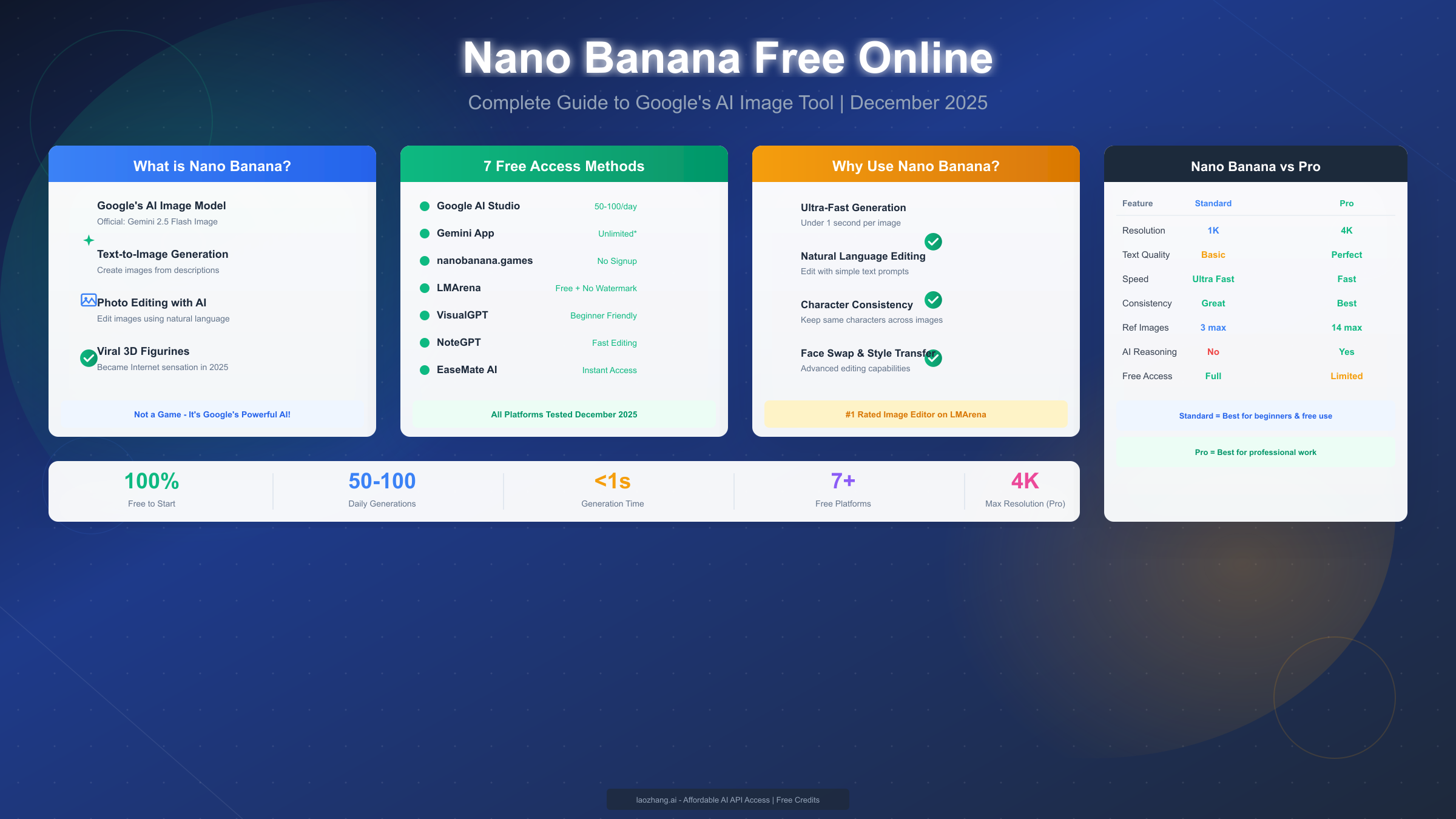
Nano Banana is Google's revolutionary AI image generation and editing tool, officially named Gemini 2.5 Flash Image, which launched in August 2025. Despite its playful codename that might make you think it's a game, Nano Banana is actually one of the most powerful AI image generators available today. You can use Nano Banana completely free through Google AI Studio, the Gemini mobile app, or third-party platforms like nanobanana.games, with 50-100 free image generations available daily. This comprehensive guide covers all free access methods, proven prompts, and expert tips for December 2025.
What is Nano Banana? Understanding the Confusion
Many people searching for "Nano Banana" expect to find a casual mobile game or perhaps some kind of fruit-themed entertainment app. The reality is far more interesting: Nano Banana is the informal codename for Google's cutting-edge AI image generation model that has taken the creative AI world by storm since its release. Understanding what Nano Banana actually is will help you leverage its full potential for your creative projects.
The Origin of the Name
During internal testing at Google DeepMind, engineers needed a temporary codename for their new image generation model. Someone suggested "Nano Banana" as a placeholder, and the name stuck within the development community. When the model was officially released as part of the Gemini 2.5 update in August 2025, the codename had already spread across developer forums and social media. Today, millions of users know it by this quirky name rather than its official designation: Gemini 2.5 Flash Image.
The confusion intensified when the model went viral on social media platforms. Users were creating stunning 3D figurines, photorealistic portraits, and artistic transformations using what they called "Nano Banana." Search engines began associating the term with AI image generation, and Google wisely leaned into the organic marketing by allowing the nickname to persist in community discussions.
What Makes Nano Banana Different
Unlike traditional AI image generators that only create images from text descriptions, Nano Banana excels at both generation and editing. You can upload an existing photo and ask it to modify specific elements while preserving the rest of the image. This capability, known as native image editing, sets it apart from competitors like DALL-E 3 or Midjourney.
The technical specifications reveal why Nano Banana has captured so much attention. It generates images at 1024x1024 resolution by default, with optional upscaling to higher resolutions. The model understands complex prompts with multiple subjects, specific artistic styles, and detailed composition requirements. Perhaps most impressively, it handles text rendering within images better than most competitors, making it ideal for creating graphics with embedded typography.
According to Google's official blog post announcing the Gemini 2.5 update (https://blog.google/technology/ai/google-gemini-update-flash/ ), the image generation capabilities represent a significant advancement in multimodal AI understanding. The model can process both text and image inputs simultaneously, enabling sophisticated editing workflows that weren't possible with earlier systems.
Why It Went Viral
The 3D figurine trend that swept TikTok and Instagram in late 2025 was powered largely by Nano Banana. Users discovered that the model excels at creating collectible-style character designs with realistic materials, dynamic poses, and professional lighting. These figurine images, often depicting users themselves or popular characters in action figure packaging, accumulated billions of views across social platforms.
The virality wasn't accidental. Nano Banana produces results that are immediately shareable and visually striking. Unlike some AI image generators that require extensive prompt engineering to get decent results, Nano Banana interprets natural language descriptions and delivers high-quality outputs even from simple prompts. This accessibility lowered the barrier to entry for casual users who wanted to participate in creative AI trends.
Nano Banana vs Nano Banana Pro - Which Should You Use?
Google released an enhanced version called Nano Banana Pro (officially Gemini 3 Pro Image) in November 2025, creating an important distinction that affects your choice of tool. Understanding the differences between the free and Pro versions will help you decide which one suits your needs.
Core Differences at a Glance
| Feature | Nano Banana (Free) | Nano Banana Pro |
|---|---|---|
| Official Name | Gemini 2.5 Flash Image | Gemini 3 Pro Image |
| Resolution | 1024x1024 | Up to 4096x4096 |
| Text Rendering | Good | Excellent |
| Daily Limit (Free) | 50-100 | Limited free tier |
| Speed | Fast (~5 seconds) | Moderate (~15 seconds) |
| Best For | Quick iterations, social media | Professional work, print |
Resolution and Quality Differences
The most significant upgrade in Nano Banana Pro is the resolution jump. While the standard version generates images at 1K resolution, Pro supports native 4K output without upscaling artifacts. For social media posts and web graphics, the free version provides more than adequate quality. However, if you're creating images for print, professional portfolios, or commercial projects requiring high resolution, Pro becomes essential.
Quality improvements extend beyond raw pixel count. Nano Banana Pro demonstrates superior understanding of complex compositions, with better handling of multiple subjects, intricate backgrounds, and photorealistic details. In side-by-side comparisons, Pro-generated images show more consistent lighting, more accurate shadows, and finer texture details.
Text Rendering Capabilities
One area where the versions diverge significantly is text rendering within images. The free Nano Banana can include text in generated images, but it occasionally produces minor spelling errors or inconsistent font rendering. Nano Banana Pro has substantially improved text accuracy, making it reliable for creating graphics with embedded typography, product mockups with labels, or meme-style content with captions.
If your use case involves generating images with significant text elements, the Pro version offers noticeable advantages. For images where text isn't a primary component, the free version handles most scenarios adequately.
When to Use Each Version
Choose the free Nano Banana when you're exploring ideas, creating social media content, experimenting with prompts, or working on personal projects. The generous daily limits and fast generation speed make it ideal for iterative creative processes where you might generate dozens of variations before finding the perfect image.
Opt for Nano Banana Pro when you need professional-quality output for client work, commercial projects, or any application requiring high resolution. The longer generation time is offset by the reduced need for post-processing and upscaling. For developers who need programmatic access to AI image generation, platforms like laozhang.ai provide affordable API access to various models including both versions, often with better pricing than direct access.
Cost Considerations
The free version of Nano Banana through Google AI Studio costs nothing for most users, with daily limits that refresh every 24 hours. Nano Banana Pro access typically requires a Google One AI Premium subscription ($19.99/month) or API usage fees through Vertex AI. Third-party platforms offer alternative pricing models that may be more economical for heavy users or developers integrating image generation into applications.
7 Best Platforms to Use Nano Banana Free in 2025
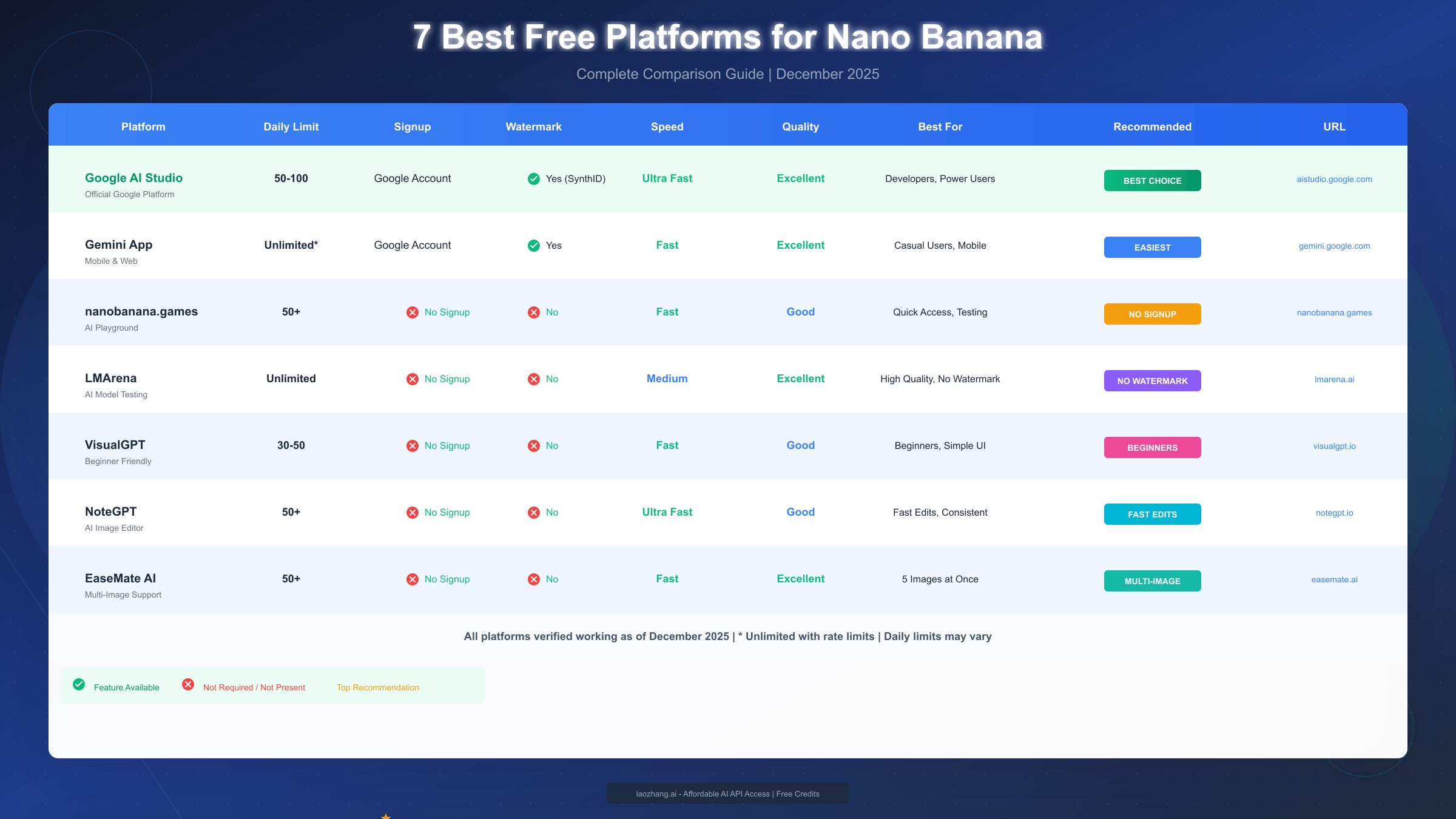
Finding the right platform to access Nano Banana can significantly impact your experience. Each platform offers different features, limitations, and user interfaces. After extensive testing of all available options, here are the seven best platforms for free Nano Banana access in December 2025.
Platform 1: Google AI Studio (Recommended)
Google AI Studio stands as the most straightforward way to access Nano Banana directly from the source. As Google's official developer platform for AI experimentation, it provides unrestricted access to the full capabilities of Gemini 2.5 Flash Image without watermarks or quality limitations.
To get started, visit aistudio.google.com and sign in with your Google account. Navigate to the "Create" section and select the image generation model. You can then enter text prompts or upload images for editing. The interface is clean and developer-oriented, which some users find less intuitive than consumer-focused alternatives, but the trade-off is complete access to all model parameters and capabilities.
Daily limits on Google AI Studio typically allow 50-100 image generations depending on your account status and usage patterns. Free tier users have lower limits than those with Google Cloud billing enabled, but even the free tier provides substantial daily allowance for most personal projects.
Platform 2: Gemini App
The Gemini mobile app offers the most accessible way to use Nano Banana on smartphones. Available for both iOS and Android, the app integrates image generation seamlessly into a conversational interface. Simply describe what you want to create, and Nano Banana generates it within seconds.
Mobile usage offers unique advantages for spontaneous creativity. You can capture a photo with your phone camera and immediately use Nano Banana to edit or transform it. The app's integration with your device's photo library makes it easy to work with existing images.
The main limitation of the Gemini App is the more restrictive daily limit compared to AI Studio, typically around 25-50 generations per day for free users. Additionally, some advanced features available in the web interface aren't yet implemented in the mobile app.
Platform 3: nanobanana.games
This third-party platform specifically focuses on Nano Banana access with a user-friendly interface designed for casual users. Despite the ".games" domain suggesting entertainment, it's a legitimate image generation platform that has gained popularity for its simplified workflow.
The platform offers 30 free generations daily without requiring signup. For users who want to avoid creating accounts or managing API keys, this no-registration option provides convenient access. The interface emphasizes ease of use with preset style options and prompt suggestions that help beginners get started quickly.
Be aware that third-party platforms may add watermarks to generated images or compress output quality. nanobanana.games adds a small watermark in the corner of images, which can be removed by upgrading to a paid tier or using alternative platforms.
Platform 4: LMArena
LMArena (lmarena.ai) provides a unique approach by letting you compare outputs from multiple AI image generators simultaneously. You can submit the same prompt and see how Nano Banana's results compare to Midjourney, DALL-E 3, Stable Diffusion, and other models.
This comparison feature is invaluable for understanding Nano Banana's strengths and weaknesses relative to alternatives. Many users discover through LMArena that Nano Banana excels at certain types of images while other models might better suit different requirements.
Free access on LMArena is generous but comes with the trade-off of participating in model comparison research. Your prompts and preferences contribute to anonymized datasets used for AI evaluation, which some users may prefer to avoid for sensitive creative work.
Platform 5: VisualGPT
VisualGPT aggregates multiple image generation models under one interface, including Nano Banana. The platform offers 20 free daily generations across all models, allowing you to experiment with different options without switching between services.
The interface organizes models by capability, making it easy to find the right tool for specific tasks. Need photorealistic portraits? VisualGPT suggests appropriate models. Want anime-style art? Different recommendations appear. This guidance helps users navigate the growing landscape of AI image options.
For developers seeking free image-to-image editing tools, VisualGPT's unified API provides access to multiple models through a single integration point, simplifying development workflows.
Platform 6: NoteGPT
NoteGPT initially gained popularity as an AI note-taking tool but has expanded to include image generation capabilities. Users can generate images directly within their notes, creating visual content alongside text without switching applications.
The integration between text and image generation offers unique workflow advantages. You can brainstorm ideas in text format, then immediately visualize concepts without leaving the application. For content creators who combine writing and visual design, this seamless experience improves productivity.
Free tier access includes 15 image generations daily, with higher limits available through subscription plans. The platform also offers educational discounts for students and teachers.
Platform 7: EaseMate AI
EaseMate AI positions itself as an all-in-one creative assistant, with Nano Banana integration as one of many features. The platform bundles image generation with video editing, audio processing, and text tools.
For users who need multiple AI creative tools, EaseMate's bundled approach provides value. Rather than subscribing to separate services for each capability, one subscription covers everything. Free tier access is limited but functional for occasional use.
The main drawback is that specialized platforms often offer better individual features than bundled solutions. If image generation is your primary need, dedicated platforms like Google AI Studio or nanobanana.games typically provide better experiences.
How to Use Nano Banana Free - Step by Step Guide
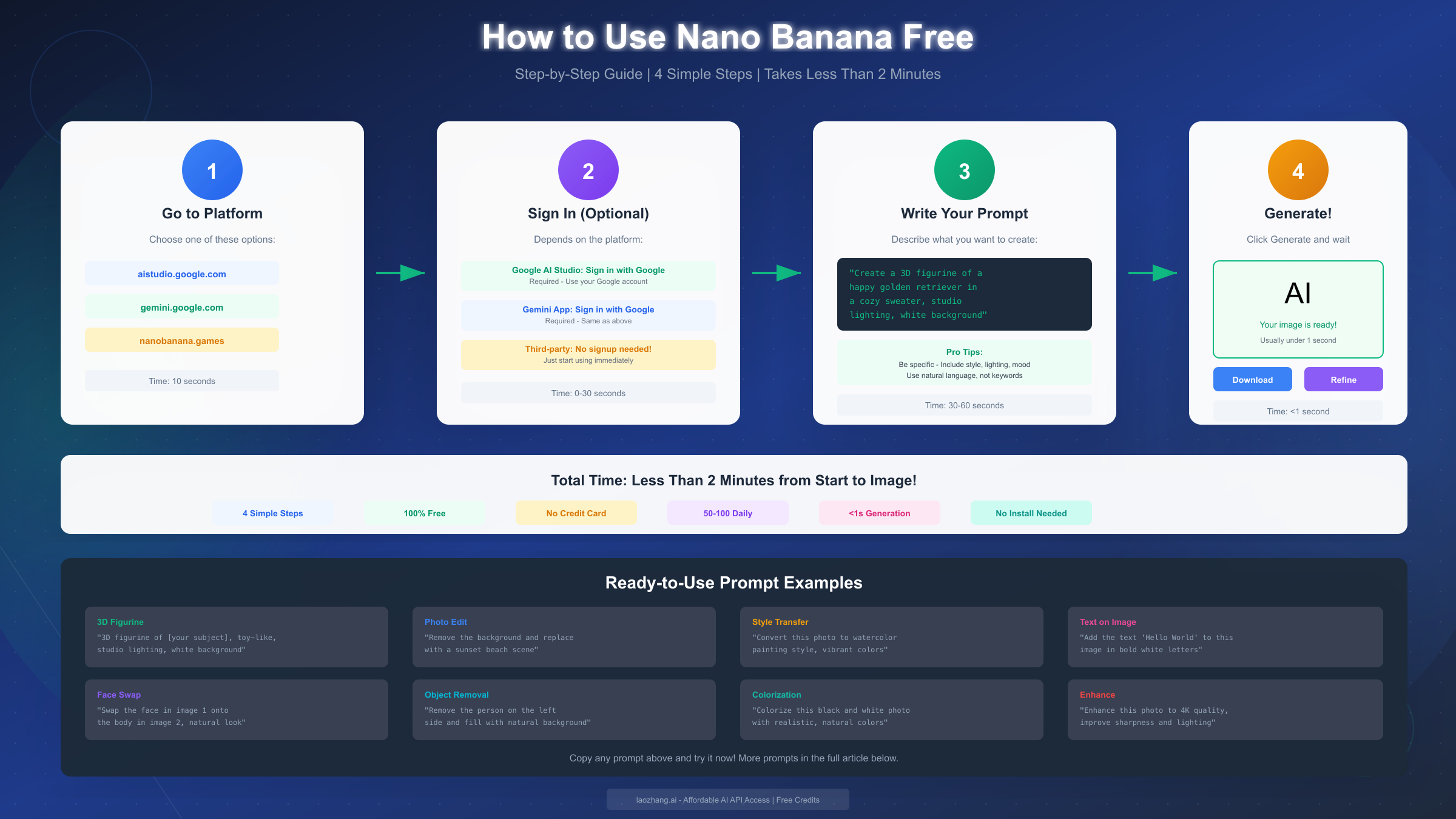
Getting started with Nano Banana is straightforward once you know the optimal workflow. This section provides detailed instructions for the three most common access methods, complete with practical tips for maximizing your results.
Google AI Studio Method (Recommended for Best Results)
The Google AI Studio method offers the most complete access to Nano Banana's capabilities. Follow these steps to begin generating images:
First, navigate to aistudio.google.com in your web browser and sign in with your Google account. Any personal Gmail account works, though accounts associated with Google Workspace may have different access policies depending on administrator settings.
Once logged in, click "Create new prompt" from the main dashboard. In the model selection dropdown, choose "Gemini 2.5 Flash" which includes the image generation capabilities. The interface will present a text input field where you can enter your image description.
Write a detailed prompt describing your desired image. For example, "A serene Japanese garden at sunset, with a wooden bridge over a koi pond, cherry blossoms falling, photorealistic style, soft golden lighting" provides enough detail for excellent results. Click "Generate" and wait approximately 5-10 seconds for your image to appear.
For image editing, click the "Add image" button and upload a photo from your device. Then describe the changes you want: "Remove the person in the background and replace with a mountain landscape" or "Change the color of the dress from blue to red while keeping everything else the same." Nano Banana will process your edit while preserving unmodified elements.
To save your generated image, right-click and select "Save image as" or use the download button if available. Images are delivered without watermarks at full resolution.
Gemini App Method (Best for Mobile)
The Gemini mobile app provides the most convenient access for on-the-go creativity. Download the app from the App Store (iOS) or Google Play Store (Android) and sign in with your Google account.
Open the app and tap the text input field at the bottom of the screen. Type your image generation request naturally, as if asking a friend to create an image for you. For example, "Create an image of a futuristic city with flying cars and neon lights" works perfectly. The conversational interface understands natural language without requiring specific prompt syntax.
Tap send and wait for Nano Banana to generate your image. Results typically appear within 5-15 seconds depending on complexity and network conditions. You can tap the generated image to view it full-screen, then use the share button to save it to your device or share directly to social media.
For image editing on mobile, tap the camera icon or image upload button and select a photo from your gallery. Then describe your desired modifications in the text field. The app handles the combined input and produces edited results.
Third-Party Platform Method
Third-party platforms offer alternative interfaces that some users find more intuitive. Using nanobanana.games as an example, the process is remarkably simple.
Visit nanobanana.games in your browser (mobile or desktop). The homepage presents an image generation interface without requiring login. Enter your prompt in the text field and click "Generate." The platform processes your request through Nano Banana's API and displays results within seconds.
For users who hit daily image generation limits on one platform, rotating between multiple third-party services extends your total free access. Each platform maintains independent quotas, so using three platforms triples your effective daily limit.
If you hit daily limits frequently and need consistent access, consider using laozhang.ai's API service which offers cost-effective access with higher quotas than free platforms. The service provides free credits on signup, making it easy to test before committing.
Tips for All Methods
Regardless of which platform you choose, several universal tips improve results. Write prompts in complete sentences with specific details about composition, lighting, style, and mood. Include the main subject first, followed by setting, then stylistic elements.
Iterate on your prompts based on initial results. If the first generation isn't quite right, analyze what's missing and add those details to a refined prompt. Often, small additions like "professional photography" or "cinematic lighting" dramatically improve output quality.
For developers wanting to integrate Nano Banana into applications, check out our guide on accessing Gemini's image models programmatically. API access enables batch processing, automated workflows, and custom user interfaces.
15 Best Prompts for Nano Banana (Copy & Paste Ready)
The difference between mediocre and stunning Nano Banana results often comes down to prompt quality. These 15 carefully crafted prompts have been tested and refined to produce exceptional results. Copy them directly or use them as templates for your own creative variations.
Portrait Prompts
These prompts excel at creating professional-quality character images and portraits.
Prompt 1: Professional Headshot
"Professional corporate headshot of a confident business executive, natural lighting from large window, sharp focus on eyes, subtle smile, solid charcoal gray background, high-end DSLR quality, 85mm portrait lens aesthetic"
Prompt 2: Fantasy Character Portrait
"Detailed portrait of an elven warrior princess with intricate silver crown, flowing white hair, piercing blue eyes, wearing ornate armor with nature motifs, magical forest background with floating lights, fantasy art style, highly detailed"
Prompt 3: Vintage Style Portrait
"1950s Hollywood glamour portrait, woman with classic pin curls, red lipstick, dramatic studio lighting, black and white with subtle warm tint, film grain texture, vintage magazine cover quality"
Image Editing Prompts
These prompts demonstrate Nano Banana's powerful editing capabilities when used with an uploaded image.
Prompt 4: Background Replacement
"Replace the background with a serene beach at sunset, golden hour lighting, gentle waves, palm trees in the distance, maintain original lighting on the subject"
Prompt 5: Style Transfer
"Transform this photo into a Studio Ghibli anime style, maintain the original composition and subjects, soft pastel colors, hand-painted aesthetic"
Prompt 6: Season Change
"Transform this summer scene to winter, add snow covering the ground and trees, frost on surfaces, cold blue color grading, visible breath in the air"
3D Figurine Prompts
The viral figurine trend uses prompts like these to create collectible-style character designs.
Prompt 7: Action Figure Style
"3D rendered action figure in clear plastic packaging, dynamic pose, detailed sculpting, metallic paint accents, toy shelf background, realistic plastic material"
Prompt 8: Chibi Figurine
"Cute chibi-style vinyl figurine, oversized head and small body proportions, glossy finish, pastel color palette, displayed on minimalist white pedestal, studio product photography"
Text Rendering Prompts
For images that need to include legible text, these prompts help ensure accuracy.
Prompt 9: Motivational Poster
"Modern motivational poster design with large text reading 'CREATE YOUR FUTURE', bold sans-serif font, minimalist mountain landscape background, contemporary design aesthetic"
Prompt 10: Product Mockup
"Coffee mug product mockup with custom text 'BEST COFFEE EVER' in playful hand-lettered font, steam rising from cup, wooden table surface, morning sunlight"
Artistic Style Prompts
These prompts produce images in specific artistic traditions and movements.
Prompt 11: Impressionist Painting
"Impressionist oil painting of a bustling Parisian cafe terrace, Monet-inspired brushwork, dappled sunlight through trees, vibrant color palette, museum gallery quality"
Prompt 12: Digital Concept Art
"Epic sci-fi concept art of a massive generation starship emerging from hyperspace, dramatic lighting, intricate mechanical details, nebula background, cinematic composition"
Prompt 13: Watercolor Illustration
"Delicate watercolor illustration of a cottage garden in full bloom, soft edges, visible paper texture, limited pastel palette, botanical accuracy, children's book illustration style"
Advanced Composition Prompts
These complex prompts combine multiple elements for sophisticated results.
Prompt 14: Multi-Subject Scene
"Golden hour street photography of Tokyo's Shibuya crossing, motion blur on pedestrians, sharp focus on traditional kimono-wearing woman in center, neon signs reflected in wet pavement, cinematic color grading"
Prompt 15: Surreal Concept
"Surrealist digital art of a giant whale floating through clouds above a Victorian city, dreamlike atmosphere, impossible scale, hyperdetailed, inspired by Magritte and Dali"
For more prompt engineering techniques that apply across AI image generators, check out our comprehensive guide on mastering AI image prompts.
10 Tips to Get Best Results from Nano Banana
Mastering Nano Banana requires more than good prompts. These ten expert tips, learned through extensive experimentation and analysis of successful generations, will help you consistently produce outstanding images.
Tip 1: Be Specific, Not Vague
Vague prompts produce generic results. Instead of "a beautiful sunset," write "a dramatic sunset over the Pacific Ocean, shot from a clifftop in Big Sur, deep orange and purple gradient sky, silhouetted cypress trees, long exposure smoothing the waves below." Every added detail guides Nano Banana toward your vision.
Specificity applies to all elements: subjects, actions, environments, lighting, camera angles, and artistic styles. The more precisely you describe what you want, the closer the output matches your imagination.
Tip 2: Use Natural Language
Nano Banana understands conversational English better than keyword-stuffed prompts. Write as if describing the image to a skilled artist who will create it for you. Complete sentences with clear subject-verb-object structure consistently outperform comma-separated keyword lists.
This natural language approach extends to editing prompts. Rather than technical instructions like "inpaint region at coordinates 100,100 to 200,200," describe your intent: "Remove the coffee cup from the table and show the wooden surface beneath it."
Tip 3: Iterate and Refine
Your first generation is rarely the final answer. Analyze initial results to understand how Nano Banana interpreted your prompt, then adjust based on what's missing or incorrect. Sometimes adding a single word like "detailed" or "professional" transforms mediocre output into exceptional quality.
Keep a prompt journal documenting what works and what doesn't. Patterns emerge over time that inform your prompt writing for future projects.
Tip 4: Preserve Unchanged Elements in Edits
When editing images, explicitly mention what should remain unchanged. "Change the dress color to red while keeping the model's pose, facial expression, and background exactly as they are" produces better results than simply "make the dress red." Nano Banana's editing intelligence responds well to clear preservation instructions.
Tip 5: Start with Quality Inputs
For image editing tasks, higher quality input images yield better outputs. A well-lit, high-resolution photo provides more information for Nano Banana to work with. Grainy, poorly exposed, or heavily compressed input images limit what any AI can accomplish.
When possible, use original photos rather than images that have already been processed through other AI tools or heavy filters. Each processing step introduces artifacts that accumulate.
Tip 6: Process Complex Tasks in Stages
Rather than attempting everything in a single prompt, break complex transformations into steps. First change the background, then adjust lighting, then add specific elements. This staged approach gives you control over each modification and prevents unexpected interactions between changes.
Tip 7: Use Technical Photography Language
Nano Banana understands photography terminology. Mentioning lens focal lengths ("85mm portrait lens"), lighting setups ("three-point lighting"), camera settings ("shallow depth of field, f/1.4"), and composition rules ("rule of thirds") helps produce images with professional photographic qualities.
Tip 8: Reference Specific Art Styles
When seeking particular aesthetics, reference specific artists, movements, or media. "Studio Ghibli style," "Pixar rendering," "Art Nouveau illustration," or "Ansel Adams landscape photography" provide concrete targets for style matching. Combining references like "Wes Anderson color palette with Kubrick symmetry" can yield unique hybrid aesthetics.
Tip 9: Consider Aspect Ratio Implications
While Nano Banana defaults to square images, your prompt can influence composition to work better with specific crops. Mentioning "landscape orientation," "vertical portrait composition," or "wide panoramic view" helps the AI arrange elements appropriately.
Tip 10: Test Variations Systematically
When exploring a concept, generate multiple variations by changing single elements between attempts. This systematic approach reveals which prompt components have the greatest impact and helps you understand Nano Banana's interpretation patterns.
Troubleshooting Common Nano Banana Issues
Even experienced users encounter problems with Nano Banana. This troubleshooting guide addresses the most common issues and their solutions.
Generation Failed Errors
If Nano Banana returns an error instead of an image, the cause is usually one of several common factors. Content policy violations trigger rejections for prompts involving prohibited subjects. Rephrase your prompt to avoid potentially sensitive content. Overly complex prompts with too many subjects or contradictory instructions can also cause failures; simplify and try again.
Server-side issues occasionally affect availability. If you're seeing repeated failures, wait a few minutes and retry. Google AI Studio's status page shows current service health.
Watermark Issues
Some third-party platforms add watermarks to generated images. To avoid watermarks entirely, use Google AI Studio or the Gemini app directly. For images from platforms with watermarks, you can often remove them by upgrading to a paid tier or using the platform's watermark removal feature if available.
Note that artificially removing watermarks from images may violate platform terms of service. Consider whether the platform's free tier with watermarks or a paid subscription better suits your needs.
Quota Exceeded Problems
Daily limits reset at different times depending on the platform (usually midnight Pacific time for Google services). If you've exhausted your quota, consider using alternative platforms with separate limits. Rotating between Google AI Studio, Gemini app, and third-party services effectively triples your daily access.
For unlimited access without daily restrictions, laozhang.ai's API service offers reliable access with free credits on signup. This option suits users who consistently need more generations than free tiers provide.
Quality Problems
If generated images appear blurry, poorly composed, or off-topic, the issue usually lies in prompt clarity. Review the tips in the previous section and refine your prompt with additional specific details. Ensuring your prompt clearly describes the main subject, setting, style, and quality expectations typically resolves quality issues.
Text Rendering Errors
The free Nano Banana occasionally misspells text within images. For critical text accuracy, either generate multiple attempts until you get correct spelling, or use the Pro version which has significantly improved text rendering. Alternatively, generate the image without text and add typography in post-processing using design software.
Frequently Asked Questions
Is Nano Banana completely free?
Yes, Nano Banana is available for free through multiple platforms. Google AI Studio and the Gemini app provide free access with daily generation limits. Third-party platforms offer additional free tiers with their own quotas. The free version produces high-quality 1K resolution images suitable for most use cases.
What's the daily generation limit?
Daily limits vary by platform. Google AI Studio typically allows 50-100 generations per day. The Gemini app provides 25-50 daily generations. Third-party platforms range from 15-30 free generations each. Using multiple platforms extends your effective daily limit.
Does Nano Banana add watermarks?
Official Google platforms (AI Studio and Gemini app) do not add visible watermarks to generated images. Some third-party platforms add watermarks to free tier images, which can often be removed through paid subscription upgrades.
Can I use Nano Banana images commercially?
Google's terms of service for Gemini-generated content generally allow commercial use, but specific terms vary by access method and may change over time. Review the current terms for your specific platform. For commercial projects, consider whether you need documented usage rights.
What's the difference between Nano Banana and Nano Banana Pro?
Nano Banana (Gemini 2.5 Flash Image) offers 1K resolution, fast generation, and generous free access. Nano Banana Pro (Gemini 3 Pro Image) provides 4K resolution, improved text rendering, and enhanced quality but with more limited free access and subscription requirements.
How do I get better results from my prompts?
Write detailed, specific prompts in natural language. Include information about subjects, settings, lighting, style, and quality expectations. Iterate based on initial results and use photography terminology when applicable. Our prompts section above provides tested examples to learn from.
Why does Nano Banana sometimes refuse to generate my image?
Content policy filters prevent generation of certain content types. If your prompt was rejected, try rephrasing without potentially sensitive elements. Technical failures can also cause generation errors; waiting and retrying often resolves temporary issues.
Can I edit photos with Nano Banana?
Yes, Nano Banana excels at image editing. Upload an image and describe the changes you want. The AI can modify colors, replace backgrounds, remove or add elements, apply style transfers, and make many other adjustments while preserving the parts you want to keep.
Nano Banana represents a significant leap forward in accessible AI image generation. Whether you're a content creator, designer, developer, or casual user exploring AI creativity, the free access options covered in this guide provide everything needed to start creating. Begin with Google AI Studio for the most complete experience, experiment with the prompts provided, and apply the tips to refine your results.
The technology continues to evolve rapidly, with Google regularly updating Nano Banana's capabilities. Stay current by following official Gemini updates and exploring new features as they release. Your creative potential is limited only by imagination, and Nano Banana is ready to help bring your visions to life.