
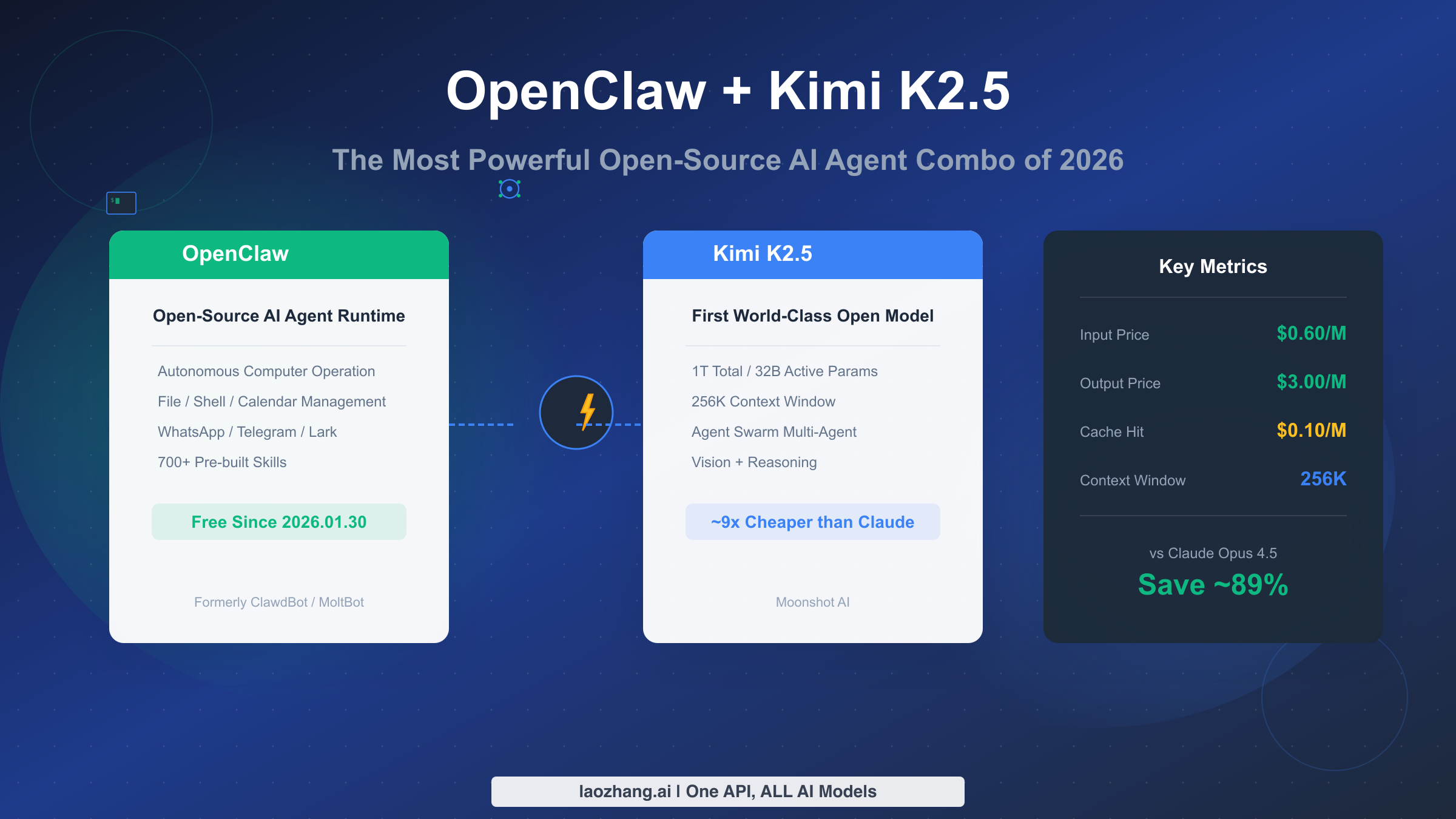
OpenClaw is an open-source AI Agent Runtime that enables AI models to autonomously operate your computer—reading and writing files, executing commands, and managing schedules. Kimi K2.5 is Moonshot AI's first open-source model to achieve world-class performance, ranking alongside Claude Opus 4.5 and Gemini 3 Pro on the Design Arena. On January 30, 2026, OpenClaw announced free Kimi K2.5 access, bringing top-tier AI Agent capabilities to everyone at roughly 1/9 the cost. This guide will walk you through setting up this combination from scratch and help you determine if it's right for your use case.
What Are OpenClaw and Kimi K2.5?
Before diving into the setup tutorial, let's understand the core positioning of these two tools—this will help you judge whether this solution fits your needs. OpenClaw and Kimi K2.5 solve two fundamental problems in the AI Agent ecosystem: one addresses "how to let AI operate computers," while the other tackles "how to access top-tier reasoning capabilities at low cost."
OpenClaw's core value lies in being an open-source AI Agent Runtime. Think of it as the AI model's "body"—it transforms AI from a mere conversational tool into an assistant that can actually execute tasks. OpenClaw's predecessor was ClawdBot (later renamed MoltBot), which underwent multiple iterations before being re-released as OpenClaw in early 2026. It supports over 700 pre-built Skills covering file operations, shell commands, calendar management, and instant messaging integrations (WhatsApp/Telegram/Lark). More importantly, OpenClaw is completely open-source, giving you full control over its behavior in your environment.
Kimi K2.5's core value is being the first truly world-class open-source large language model. Moonshot released this model in January 2026, featuring a MoE (Mixture of Experts) architecture with 1 trillion total parameters but only 32 billion active parameters. This means it maintains top-tier performance while keeping inference costs far below comparable closed-source models. According to various benchmarks, Kimi K2.5's performance on code, math, and reasoning tasks rivals Claude Opus 4.5 and GPT-5.2, but at one-tenth the price.
The significance of combining these two lies in this: you can use an open-source Runtime (OpenClaw) + an open-source model (Kimi K2.5) to build a fully autonomous, low-cost AI Agent system. This was unimaginable a year ago—back then, your only choices were expensive closed-source APIs or underperforming open-source models.
Why Is This Combo Creating Such Buzz?
On January 30, 2026, the OpenClaw team announced free Kimi K2.5 access—this news sparked a massive response in the developer community. To understand why, we need to look at the current state of the AI Agent market.
Over the past year, the AI Agent concept has evolved from hype to practical implementation. Products like Claude Code, Cursor, and Windsurf have given developers a taste of "AI automated coding," but these tools share a common problem: they're too expensive. Take Claude Code, for example—using the Claude Opus 4.5 model costs $5/million input tokens, and with moderate monthly usage, API bills easily exceed $50-100. For individual developers or small teams, this is a significant expense.
The OpenClaw + Kimi K2.5 combination breaks this deadlock. First, OpenClaw itself is free and open-source with no licensing fees. Second, Kimi K2.5's API pricing is extremely competitive—input costs only $0.60/million tokens (cache miss) or even $0.10/million tokens (cache hit), making it 8-50 times cheaper than Claude Opus 4.5. This means what used to cost $50 per month in API fees might now cost only $5-10.
More importantly, Kimi K2.5's performance doesn't suffer despite the low price. According to Moonshot's published test results and community user feedback, Kimi K2.5's performance on most programming tasks is comparable to Claude Opus 4.5, and in some Chinese language scenarios, it even has advantages (after all, it's a model trained by a Chinese team). This "quality maintained, price slashed" combination naturally attracts enthusiastic adoption.
Another factor driving the buzz is the triumph of open-source spirit. In the AI field, the debate between open-source and closed-source has always been a hot topic. Kimi K2.5's release proves that open-source models can match closed-source quality, giving the entire open-source community tremendous confidence. OpenClaw's decision to provide free Kimi K2.5 access also signals to the community that top-tier AI capabilities shouldn't belong only to those who can afford high API fees.
Step-by-Step Installation Guide
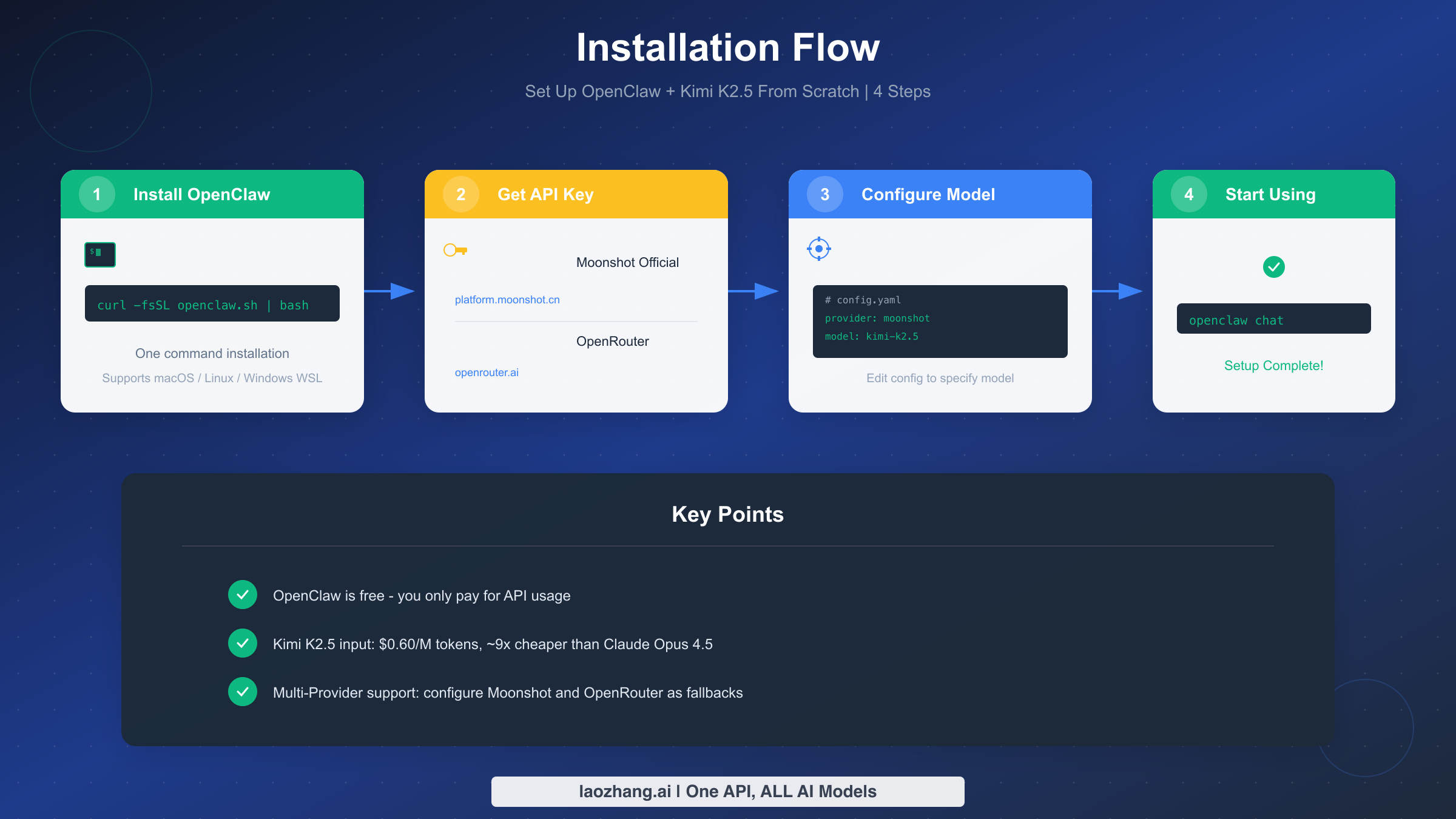
Now let's get into the practical setup. This section will guide you through installing and configuring OpenClaw + Kimi K2.5 from scratch. The process is divided into "Quick Start" and "Full Setup" paths—choose based on your needs.
Quick Start Path (5 minutes) is for users who want to try it out first. Ensure your system meets basic requirements: macOS 12+, Ubuntu 20.04+, or Windows 11 WSL2. Then run this command in your terminal to install OpenClaw:
bashcurl -fsSL https://get.openclaw.ai | bash
After installation, you can use OpenClaw's free Kimi K2.5 quota to start experimenting. Run the following command to start an interactive chat:
bashopenclaw chat
If everything works correctly, you should see OpenClaw's welcome interface and can begin conversing with the AI. Note that the free quota has limits—if you need more usage, you'll need to configure your own API Key.
Full Setup Path (15-20 minutes) is for users who need production-ready configuration. This path helps you configure your own Moonshot API Key for a stable experience.
Step one is obtaining a Moonshot API Key. Visit platform.moonshot.cn, register an account, then go to the console and create a new Key in the "API Keys" section. Copy this Key—you'll need it shortly. Moonshot provides some free trial credits, then charges based on usage.
Step two is configuring OpenClaw. The configuration file is located at ~/.openclaw/config.yaml. Open this file with your preferred editor, find the providers section, and add or modify the Moonshot configuration:
yamlproviders:
  moonshot:
    api_key: "your-moonshot-api-key-here"
    base_url: "https://api.moonshot.cn/v1"
    default_model: "kimi-k2.5"
Step three is setting the default Provider. In the same configuration file, find the default_provider field and set it to moonshot:
yamldefault_provider: moonshot
After saving the configuration file, run openclaw config test to verify your setup. If you see "Configuration valid," your setup is complete.
Alternative: OpenRouter. If you encounter stability issues with Moonshot's API, you can configure OpenRouter as a backup. OpenRouter is an API aggregation platform supporting multiple models, including Kimi K2.5. Register at openrouter.ai, get an API Key, then add to your configuration file:
yamlproviders:
  openrouter:
    api_key: "your-openrouter-api-key"
    base_url: "https://openrouter.ai/api/v1"
    default_model: "moonshot/kimi-k2.5"
You can configure multiple Providers simultaneously—OpenClaw supports switching between them at runtime.
Cost Comparison: How Much Can You Save?
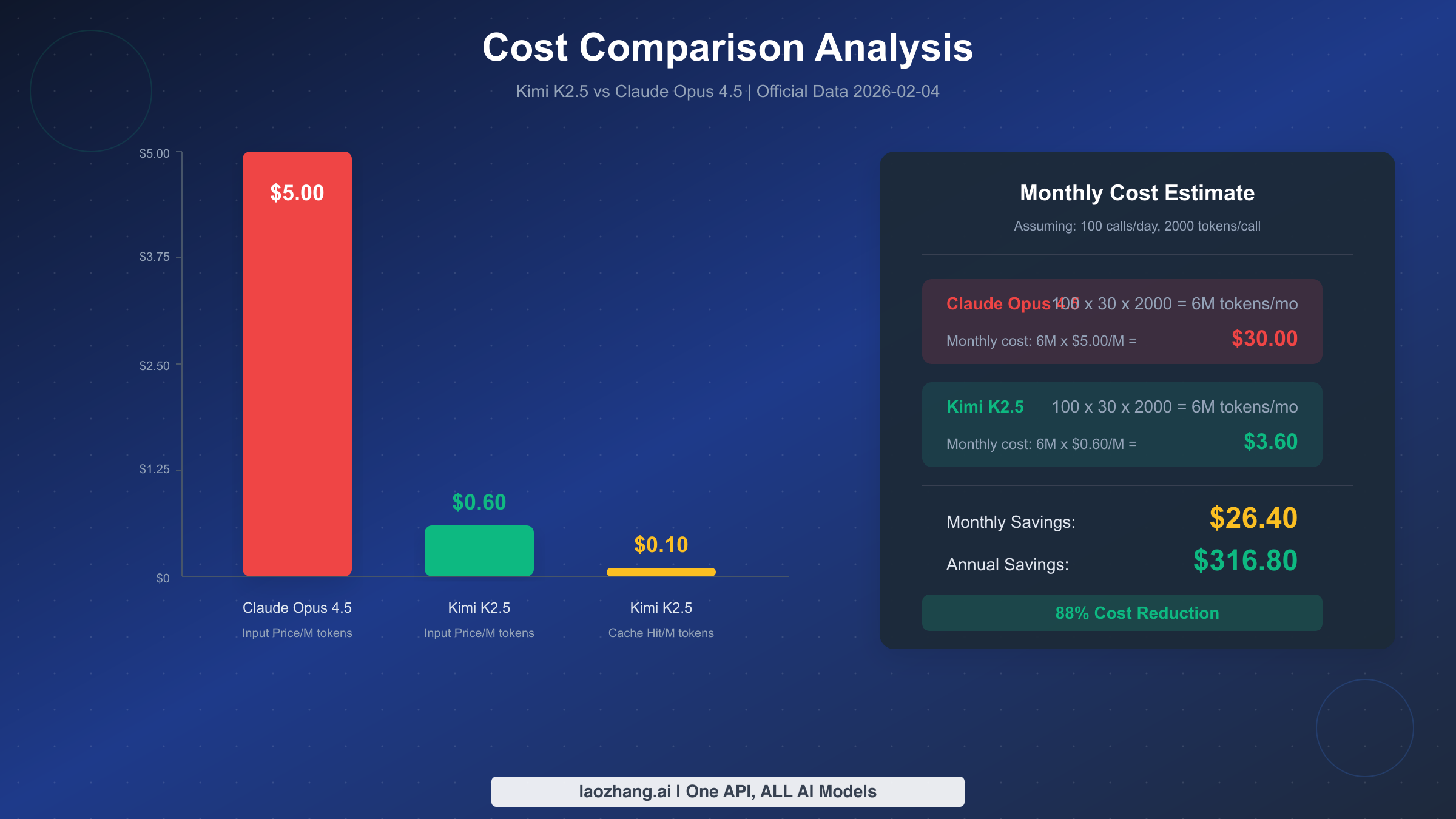
Cost is the primary reason many users choose OpenClaw + Kimi K2.5. This section uses concrete numbers to help you calculate your potential savings based on your usage patterns.
Let's look at official pricing first. According to Moonshot's official website (verified 2026-02-04), Kimi K2.5 API pricing is as follows:
| Billing Item | Price |
|---|---|
| Input (cache hit) | $0.10 / million tokens |
| Input (cache miss) | $0.60 / million tokens |
| Output | $3.00 / million tokens |
| Context window | 262,144 tokens (256K) |
For comparison, Claude Opus 4.5's input price is approximately $5.00 / million tokens. This means Kimi K2.5 is about 8x cheaper (cache miss) to 50x cheaper (cache hit) for input costs.
Let's calculate a typical scenario. Assume you're a moderate user averaging 100 AI Agent interactions per day, with each conversation consuming 2,000 tokens (1,000 input + 1,000 output). Monthly usage would be: 100 × 30 days × 2,000 tokens = 6 million tokens.
Claude Opus 4.5 monthly cost: 6M tokens × $5.00/M = $30.00
Kimi K2.5 monthly cost (assuming 50% cache hit rate):
- Input: 3M tokens × ($0.10 × 0.5 + $0.60 × 0.5) = 3M × $0.35 = $1.05
- Output: 3M tokens × $3.00/M = $9.00
- Total: approximately $10.05
In practice, since Kimi K2.5's output pricing is relatively higher, if your use case generates more output than input, the cost advantage narrows. But in most Agent scenarios (lots of system prompts + relatively brief outputs), input dominates, and the cost advantage remains clear.
Annualized savings: Based on the above estimate, using Kimi K2.5 saves about $20 monthly, which translates to $240 per year. Heavy users will save even more.
Cost optimization tips: Cache hits are key to reducing costs. Moonshot's caching mechanism automatically caches recent prompts, so if your system prompts remain stable, subsequent requests enjoy the $0.10/M preferential rate. We recommend placing unchanging instructions in system prompts so they get cached.
If you want to manage multiple AI model APIs on one platform, laozhang.ai offers multi-model aggregation services including Kimi K2.5, providing unified billing and usage management.
Security Configuration and Risk Control
Using an AI Agent requires granting it certain system permissions, which brings security considerations. This section helps you understand what permissions OpenClaw needs, why it needs them, and how to configure minimal permissions to reduce risk.
OpenClaw's required permissions fall into three categories. The first is file system access—OpenClaw needs to read and write files to perform automation tasks like creating projects, modifying code, and organizing documents. The second is shell command execution—this is the core capability of AI Agents, allowing them to run various programs and scripts. The third is network access, used for API calls, downloading resources, and interacting with external services.
These permissions do carry risks. A misconfigured Agent might accidentally delete important files, execute dangerous commands, or leak sensitive information. But this doesn't mean you shouldn't use it—the key is proper risk control.
Minimal permission configuration is the first line of defense. OpenClaw supports fine-grained permission control—you can limit which directories it can access and which commands it can execute in your configuration file. Open ~/.openclaw/config.yaml and find the permissions section:
yamlpermissions:
  filesystem:
    allowed_paths:
      - ~/projects    # Only allow access to project directory
      - ~/Downloads   # Allow access to downloads directory
    denied_paths:
      - ~/.ssh        # Deny access to SSH keys
      - ~/.config     # Deny access to config files
  shell:
    allowed_commands:
      - git
      - npm
      - python
      - node
    denied_commands:
      - rm -rf
      - sudo
      - chmod
Sandbox deployment is an even safer option. If you're concerned about the Agent's impact on your local system, consider running OpenClaw in a Docker container or virtual machine. This way, even if the Agent behaves abnormally, it won't affect the host system. OpenClaw provides official Docker images:
bashdocker run -it --rm \
  -v ~/projects:/workspace \
  -e MOONSHOT_API_KEY=your-key \
  openclaw/openclaw:latest
Operation auditing is also important. OpenClaw logs all executed commands and file operations by default, stored in ~/.openclaw/logs/. Regularly checking these logs helps you understand what the Agent has been doing. If you notice unusual operations, you can adjust permission settings accordingly.
API Key security shouldn't be overlooked either. Don't hardcode API Keys in your code or commit them to version control. Use environment variables or dedicated key management tools for storage.
Use Case Selection and Technology Choices
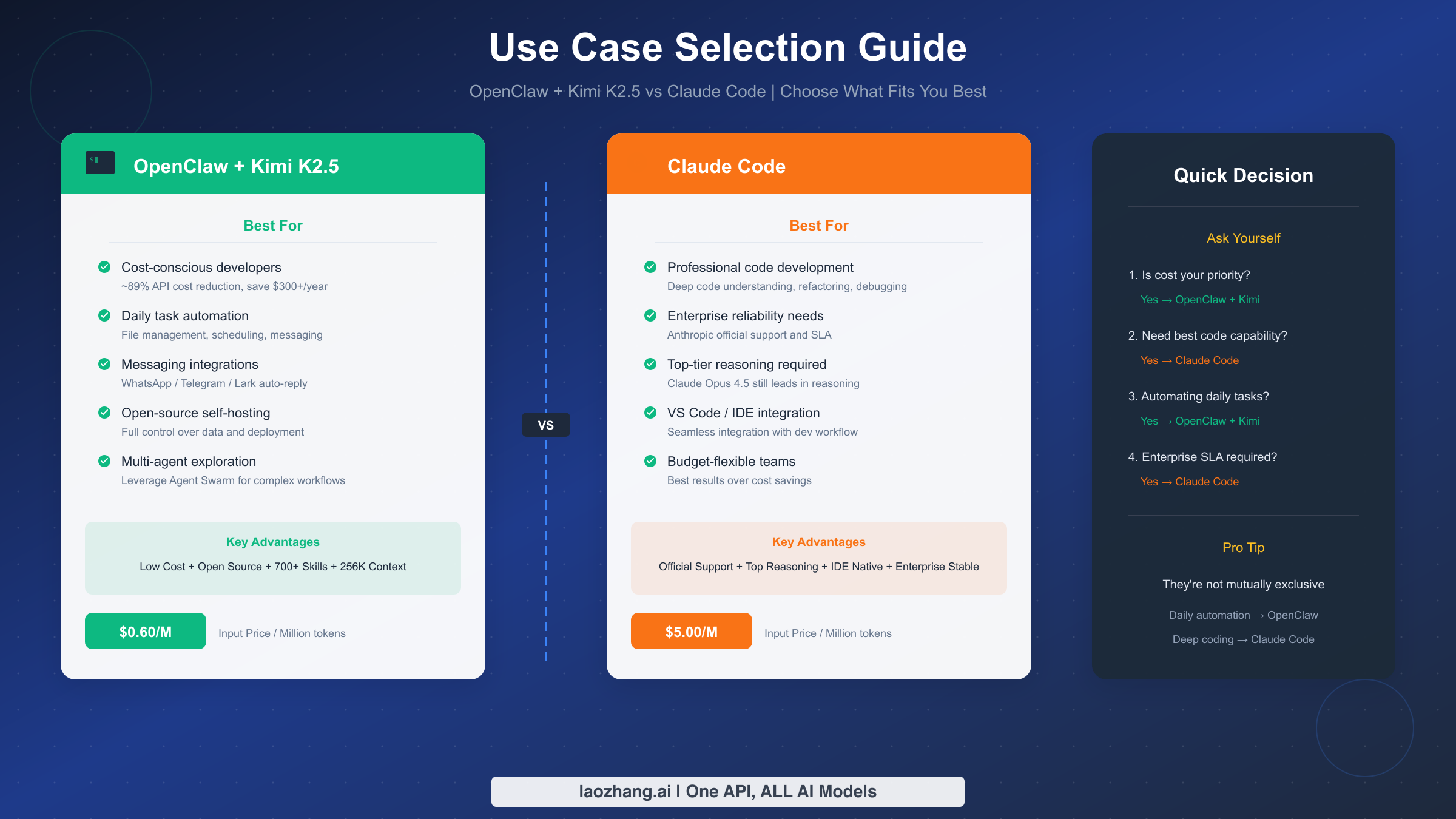
While OpenClaw + Kimi K2.5 is powerful, it's not suitable for every scenario. This section helps you determine whether this solution fits your needs and when you should consider alternatives.
Scenarios where OpenClaw + Kimi K2.5 excels fall into five main categories. First is cost-conscious individual developers—if you mainly work on personal projects or learning, with a limited monthly API budget, this combo gives you top-tier AI capabilities at minimal cost. Second is automating daily tasks like file organization, calendar management, and message handling—OpenClaw's 700+ pre-built Skills cover most common needs. Third is instant messaging integration—if you need to deploy an AI assistant on WhatsApp, Telegram, or Lark, OpenClaw provides mature solutions. Fourth is open-source self-hosting needs—for data-sensitive enterprises or privacy-conscious users, OpenClaw's fully open-source nature means complete control over data flow. Fifth is multi-agent collaboration exploration—Kimi K2.5 supports Agent Swarm capabilities, suitable for building complex multi-Agent workflows.
Scenarios better suited for Claude Code include several cases. First is professional code development—if your main work involves coding, especially refactoring and debugging large projects, Claude Code's deep VS Code integration and Claude Opus 4.5's advantages in code comprehension may provide a better experience. If you're interested in this topic, check out our Claude Code China Usage Guide and Claude Code vs Cursor Comparison. Second is enterprise-grade reliability requirements—if you need SLA guarantees and official technical support, Anthropic's closed-source service is more appropriate. Finally, for cutting-edge reasoning capability—although Kimi K2.5 is very capable, Claude Opus 4.5 remains the ceiling for certain complex reasoning tasks.
The decision process can be simplified to a few questions: Is cost your primary concern? → Yes → OpenClaw + Kimi. Need the strongest code capabilities? → Yes → Claude Code. Need to automate daily tasks? → Yes → OpenClaw + Kimi. Enterprise SLA requirements? → Yes → Claude Code.
Worth emphasizing: these two solutions aren't mutually exclusive. Many users take this approach: use OpenClaw + Kimi for daily automation tasks (save money), use Claude Code for deep programming work (better results). You can absolutely choose different tools for different tasks.
FAQs and Troubleshooting
During setup and usage, you may encounter some issues. This section compiles the most common problems from the community along with solutions to help you quickly diagnose issues.
Issue 1: "command not found" during installation
This usually means the installation script didn't properly set up your PATH. The solution is to manually add OpenClaw's path to your shell configuration file. If you use zsh (macOS default), edit ~/.zshrc and add export PATH="$HOME/.openclaw/bin:$PATH", then run source ~/.zshrc. For bash users, the corresponding file is ~/.bashrc.
Issue 2: API calls return 401 Unauthorized
This indicates an API Key configuration problem. First, check that the api_key in your configuration file was copied correctly (watch for extra spaces). Second, confirm your Moonshot account has sufficient balance or free quota. Finally, try generating a new API Key.
Issue 3: Responses are very slow
Kimi K2.5's response speed depends on multiple factors: prompt length, output length, server load, etc. If it's consistently slow, try these approaches: reduce system prompt length (keep only essential instructions); use streaming mode for a better experience; switch to alternative Providers like OpenRouter.
Issue 4: Chinese output has garbled characters
This is usually a terminal encoding issue. Ensure your terminal supports UTF-8 encoding. On macOS or Linux, running export LANG=en_US.UTF-8 typically resolves this.
Issue 5: Want to use multiple Providers simultaneously
OpenClaw supports configuring multiple Providers. Add multiple provider configurations to your file, then specify which to use via command-line arguments: openclaw chat --provider openrouter.
When official APIs become unstable, consider using aggregation platforms like laozhang.ai as alternatives. These platforms typically have multiple routing lines for better stability.
Issue 6: How to upgrade OpenClaw?
OpenClaw supports automatic upgrades. Run openclaw upgrade to check for and install the latest version. If automatic upgrade fails, you can re-run the installation script to perform an overwrite installation.
Summary and Next Steps
This article has covered all aspects of the OpenClaw + Kimi K2.5 combination. Let's recap the key points: OpenClaw is an open-source AI Agent Runtime, Kimi K2.5 is the first open-source model to achieve world-class performance, and combining them delivers AI Agent capabilities approaching Claude Opus 4.5 at roughly 1/9 the cost.
For different types of users, our recommendations are as follows. If you're a technology enthusiast, we suggest starting with the Quick Start path to get things running and experience AI Agent capabilities, then decide whether to invest in deeper configuration. If you're a cost-conscious developer, this solution is perfect for you—spend 5-10 minutes on full setup and start saving money immediately. If you're an enterprise user, we recommend evaluating in a sandbox environment first, confirming it meets business requirements before considering large-scale deployment.
Next steps:
- Complete installation following this guide
- Try a few simple tasks, like having the Agent organize files or query information
- Based on actual experience, adjust permission settings and usage habits
- If you encounter issues, refer to the troubleshooting section or visit the OpenClaw official community
The era of AI Agents is arriving. OpenClaw + Kimi K2.5 enables everyone to experience this technology at low cost. Whether or not you ultimately choose this solution, we hope this guide helps you make a more informed decision.