Note (October 6, 2026): The Veo 3.1 preview models recommended below as Sora replacements (
veo-3.1-generate-preview,veo-3.1-fast-generate-preview,veo-3.1-lite-generate-preview) are scheduled to shut down on October 22, 2026, per Google's deprecations page; Google recommendsgemini-omni-1.1-flashas the replacement. Check that page before building on Veo.
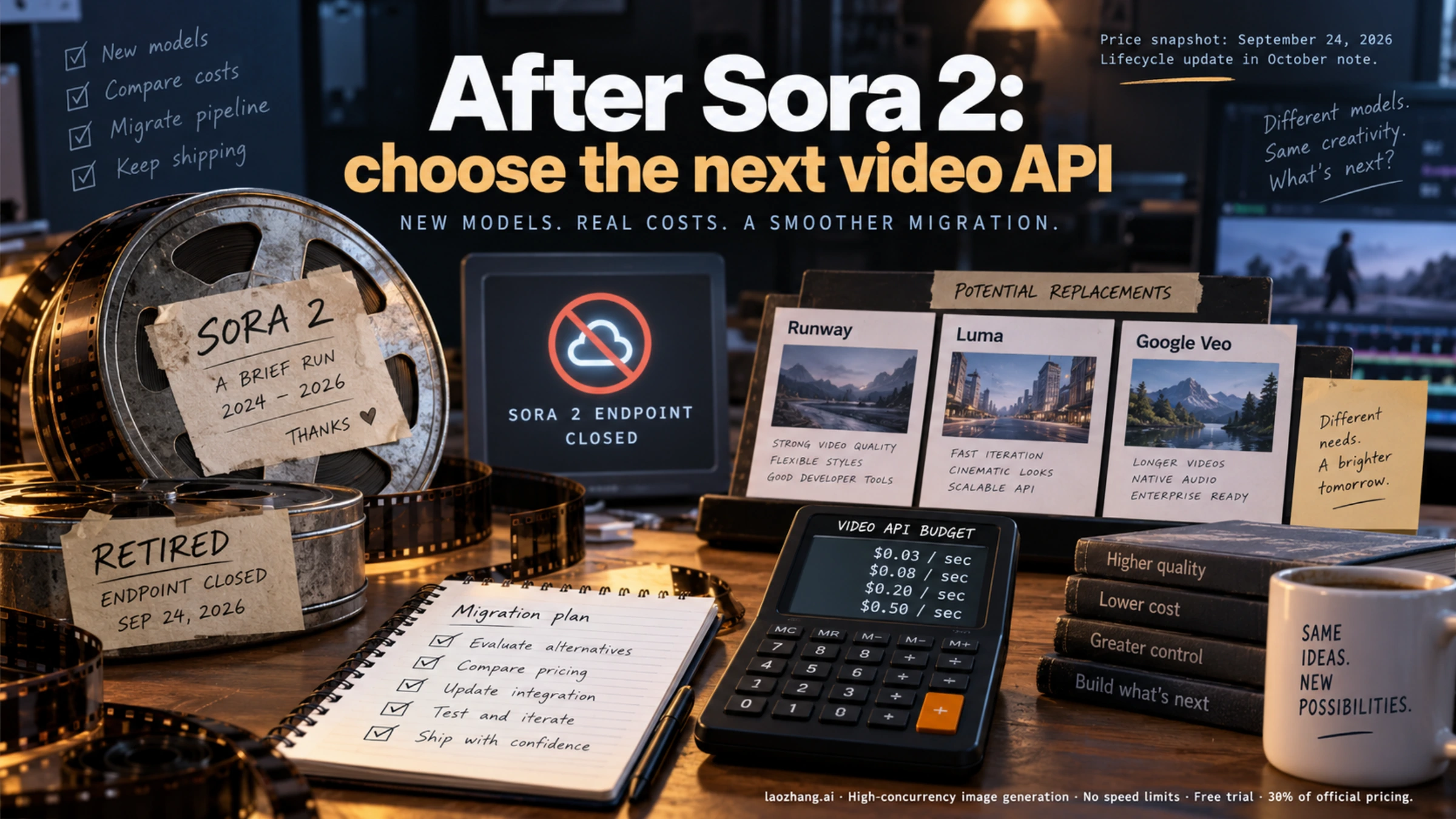
OpenAI shut down the Sora 2 API on September 24, 2026. That day it removed the Videos API along with the sora-2 and sora-2-pro model IDs and their dated snapshots, and its deprecation notice names no replacement. The one official endpoint still documented belongs to Microsoft: Azure OpenAI lists sora-2 as a preview at $0.10 per second of 720p video, and its model retirement schedule ends that model on October 15, 2026, with no successor.
So if you need Sora 2 itself, Azure is the only documented option, at the price OpenAI used to charge, for three more weeks. Anything that has to keep running after mid-October needs a different model, and the cheapest documented ones cost half of what sora-2 did per second:
- Lowest price per second: Veo 3.1 Lite on the Gemini API at $0.05 for 720p with audio, MiniMax H3 Max at $0.05 for 480P, and Runway Gen-4 Turbo at $0.05 for image-to-video only.
- Same budget as
sora-2: Veo 3.1 Fast at 720p and Gemini Omni Flash, both about $0.10 per second. - Longer single takes: MiniMax H3 and H3 Max go up to 15 seconds per clip; Seedance 2.5 on BytePlus ModelArk goes up to 30 seconds at about $0.23 per second for 720p.
- Former
sora-2-prousers at 1080p: Veo 3.1 Lite ($0.08 per second), Veo 3.1 Fast ($0.12) and Veo 3.1 ($0.40) all cost less than Pro's old $0.70. - Cheap per-video "Sora 2 API" offers: don't prepay. Their upstream can't be checked from outside, and after October 15 no official host of Sora 2 is documented.
Prices on this page are list prices from each provider's own pricing page, per second of generated video, as of September 24, 2026.
Does the Sora 2 API still work?
Not through OpenAI. This is where each way of reaching Sora 2 stands as of September 24, 2026:
| Where | Status | Price | What comes next |
|---|---|---|---|
OpenAI API: Videos API, sora-2, sora-2-pro and dated snapshots | Shut down September 24, 2026 | Was $0.10–$0.70 per second | OpenAI names no replacement |
| Sora web and app | Discontinued April 26, 2026 | — | Exports and refunds are covered in OpenAI's help article |
Azure OpenAI sora-2, version 2025-12-08 (Preview) | Still offered | $0.10 per second, 720p | Retires October 15, 2026, with no replacement |
| Third-party "Sora 2 API" resellers | Upstream can't be verified | Per video or credit packs | No official host documented after October 15 |
Dates and prices come from the OpenAI Help Center, OpenAI's deprecation notice, Microsoft's retirement schedule and the Azure OpenAI pricing page. Microsoft can move its dates, so recheck the schedule before you count on the last few days.
Two details matter if Sora 2 calls are still in your code:
- OpenAI hasn't documented the error body or status code that a removed Sora model now returns. Treat any failure on
sora-2orsora-2-proas permanent, and take those calls out of your retry loops rather than backing off and trying again. - On Azure,
sora-2version 2025-10-06 already retired on July 15, 2026, so only version 2025-12-08 is left. Microsoft's lifecycle policy says retired models return410 Gone. Expect calls to fail outright once that version retires on October 15, not a gradual slowdown.
For reference, OpenAI's last list prices per second of output were $0.10 for sora-2 at 720p, and $0.30, $0.50 and $0.70 for sora-2-pro at 720p, 1024×1792 and 1080p. Both model pages now carry a Legacy label. Those numbers are the baseline for every comparison below.
Is Azure's Sora 2 preview worth using until October 15?
Only in one case: you already have an Azure subscription with an Azure OpenAI resource in a supported region, and you have Sora 2 work to finish before mid-October. Setting up Azure from scratch for three weeks of a preview model means migrating twice.
Here is what the preview gives you, according to Microsoft's Sora 2 documentation:
sora-2only. The retirement schedule has nosora-2-prorow, so don't plan on a Pro tier.- Video at 720×1280 or 1280×720, in clips of 4, 8 or 12 seconds, with audio.
- Text-to-video, image-to-video and remix of a previously generated video.
- $0.10 per second at Azure's Global list price. An 8-second clip costs $0.80 and a 12-second clip costs $1.20.
And here is what it costs you besides money:
- It's a preview, and Microsoft doesn't recommend preview models for production.
- Microsoft states that Sora 2 "blocks all IP and photorealistic content." Copyrighted characters and music are rejected. So are real people, including public figures, and input images with human faces.
- Jobs are available for up to 24 hours after creation. Download each result the same day.
If your code uses the OpenAI Python SDK, the switch is mostly configuration, because Azure's v1 API follows OpenAI's Sora 2 schema:
import os
from openai import OpenAI

client = OpenAI(
    api_key=os.environ["AZURE_OPENAI_API_KEY"],
    base_url="https://YOUR-RESOURCE-NAME.openai.azure.com/openai/v1/",
)
# Pass your Azure deployment name as `model`. videos.create, videos.retrieve
# and videos.download_content keep the same shape as before.
Use the same three weeks to move to a replacement. After October 15, calls to that deployment fail.
Why cheap per-video Sora 2 offers can't be relied on now
Cheap "Sora 2 API" access came in two forms, and both have lost their source.
Reverse APIs ran pools of Sora accounts and automated the Sora web app, then resold the output per clip. OpenAI discontinued the Sora web and app experiences on April 26, 2026, so that method has had no documented upstream since.
Forwarding gateways passed requests to OpenAI's official API. That upstream closed on September 24. The only official Sora 2 endpoint left is Azure's preview, which charges $0.10 per second of output until October 15.
As of September 24, 2026, some sites still sell "Sora 2 API" access at $0.10 to $0.50 per video or in monthly credit packs. For comparison, one 8-second clip costs $0.80 at Azure's list price. From outside, you can't see which upstream serves an offer like that, if any, or for how long. After October 15, no official host of Sora 2 is documented at all.
If you still depend on one of these services:
- Don't prepay for credits or a subscription.
- Top up only what the current job needs, download every clip as soon as it finishes, and have a replacement running by October 15.
Sora 2 replacements by price per second
Every figure below is a list price per second of generated video, as of September 24, 2026, charged by the provider in the second column. Gemini Omni Flash and Seedance 2.5 bill in tokens, so their figures are converted and marked "about." Resolutions don't line up exactly across vendors: MiniMax sells 768P and 2K rather than 720p and 1080p. Read the resolution column before comparing numbers.
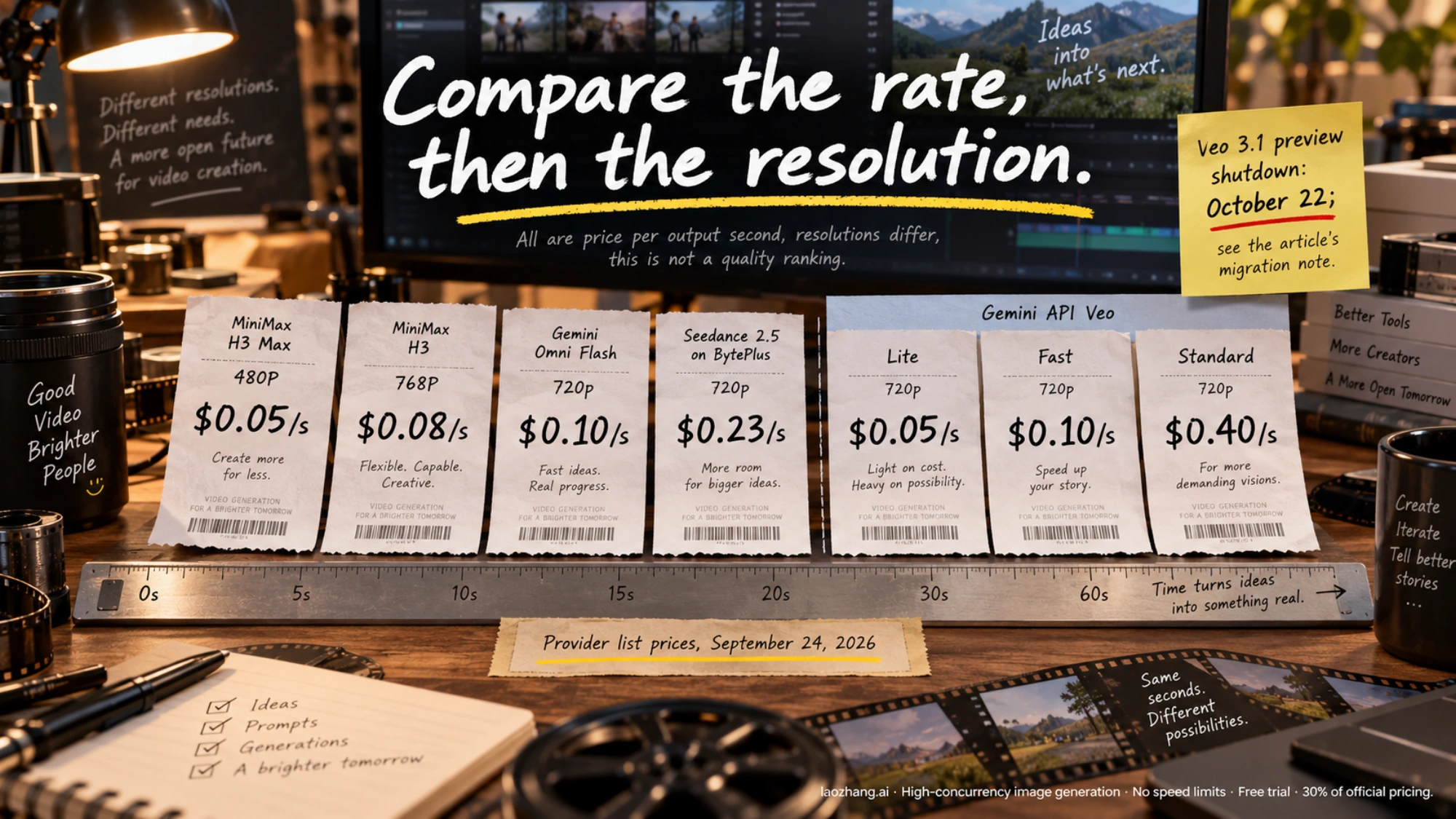
Up to 768P, against sora-2
| Model (API ID) | Buy from | Resolution | Price per second | One 8-second clip |
|---|---|---|---|---|
Veo 3.1 Lite (veo-3.1-lite-generate-preview) | Gemini API | 720p | $0.05 | $0.40 |
MiniMax H3 Max (MiniMax-H3-Max) | MiniMax | 480P | $0.05 | $0.40 |
Runway Gen-4 Turbo (gen4_turbo), image-to-video only | Runway API | Not priced by resolution | $0.05 | — |
MiniMax H3 Max (MiniMax-H3-Max) | MiniMax | 768P | $0.08 | $0.64 |
MiniMax H3 (MiniMax-H3) | MiniMax | 768P | $0.08 | $0.64 |
Veo 3.1 Fast (veo-3.1-fast-generate-preview) | Gemini API | 720p | $0.10 | $0.80 |
Gemini Omni Flash (gemini-omni-1.1-flash) | Gemini API | 720p | About $0.10 | About $0.80 |
Sora 2 (sora-2), preview until October 15 | Azure OpenAI | 720p | $0.10 | $0.80 |
Runway Gen-4.5 (gen4.5) | Runway API | Not priced by resolution | $0.12 | — |
Seedance 2.5 (dreamina-seedance-2-5-260628) | BytePlus ModelArk | 720p | About $0.23 | About $1.85 |
Veo 3.1 (veo-3.1-generate-preview) | Gemini API | 720p | $0.40 | $3.20 |
sora-2 (old OpenAI price) | OpenAI (shut down) | 720p | $0.10 | $0.80 |
sora-2-pro (old OpenAI price) | OpenAI (shut down) | 720p | $0.30 | $2.40 |
1080p to 4k, against sora-2-pro
| Model | Buy from | Resolution | Price per second | One 8-second clip |
|---|---|---|---|---|
| Veo 3.1 Lite | Gemini API | 1080p | $0.08 | $0.64 |
| Veo 3.1 Fast | Gemini API | 1080p | $0.12 | $0.96 |
| MiniMax H3 | MiniMax | 2K | $0.13 | $1.04 |
| Veo 3.1 Fast | Gemini API | 4k | $0.30 | $2.40 |
| Veo 3.1 | Gemini API | 1080p | $0.40 | $3.20 |
| Seedance 2.5 | BytePlus ModelArk | 1080p | About $0.57 | About $4.55 |
| Veo 3.1 | Gemini API | 4k | $0.60 | $4.80 |
sora-2-pro (old OpenAI price) | OpenAI (shut down) | 1024×1792 | $0.50 | $4.00 |
sora-2-pro (old OpenAI price) | OpenAI (shut down) | 1080p | $0.70 | $5.60 |
What sits behind those numbers:
- Gemini API (pricing): Veo 3.1 is paid tier only and "Not available" on the free tier. Google states, "You will only be charged if your video is successfully generated." Vertex AI has its own price list. Veo at 1080p and 4k requires 8-second clips.
- Gemini Omni Flash is billed in tokens. Google counts 5,792 tokens per second of 720p video and puts that at about $0.10 per second. Its 1080p and 4k outputs are upscaled, and their price isn't included here.
- MiniMax (pay-as-you-go pricing): reference images beyond the free allowance (5 for H3, 2 for H3 Max) and input video cost extra.
- Seedance 2.5 is billed in tokens: roughly (input video seconds + output seconds) × width × height × frame rate ÷ 1,024. The rate is $10.70 per million tokens for 480p and 720p without input video, and $11.70 for 1080p (ModelArk pricing). At 24 fps and 16:9, that is 21,600 tokens per second of 720p (about $0.231) and 48,600 per second of 1080p (about $0.569). Only successful generations are billed.
- Runway (API pricing) sells credits at $0.01 each. Gen-4 Turbo uses 5 credits per second and accepts only an image as input; Gen-4.5 uses 12 and takes text or an image. Runway's pricing page doesn't list the durations each model accepts, so the table shows no clip price for them.
The same model can cost more through a gateway
Runway also resells other companies' models at its own rates. It lists Veo 3.1 Fast with audio at $0.15 per second, where the Gemini API charges $0.10 at 720p. Its Gemini Omni Flash price ($0.10) and MiniMax H3 Max prices ($0.05 at 480p, $0.08 at 768p) match the makers' lists. It also sells Seedance 2.5 at $0.30 per second for 720p, plus charges for input and reference video and an 80-credit ($0.80) minimum per generation.
Runway does offer one thing the Gemini API doesn't: Veo without audio. It lists Veo 3.1 at $0.20 per second and Veo 3.1 Fast at $0.10 without sound, while on the Gemini API Veo audio is always on. If your pipeline adds its own sound, Runway's silent Veo 3.1 costs half of Google's $0.40 list price, although Runway's pricing page doesn't state the output resolution for these tiers.
A gateway is worth using when you want one bill, or when you can't buy a model directly where you are: BytePlus ModelArk's availability list, for example, doesn't include the United States. Just don't assume the gateway is the cheap option. Compare its rate with the maker's list for each model you plan to use.
What your clips will cost: price per second × seconds × clips
One formula works for every provider:
Cost = price per second × seconds per clip × clips generated
"Clips generated" includes takes you throw away. Veo and Seedance 2.5 don't bill failed generations, but every provider bills a finished clip you decide not to use.
Example: 100 clips a month, 8 seconds each, which is 800 seconds of output with every take kept.
| Model and resolution | Price per second | 800 seconds of output |
|---|---|---|
| Veo 3.1 Lite, 720p | $0.05 | $40 |
| MiniMax H3 Max, 480P | $0.05 | $40 |
| MiniMax H3 or H3 Max, 768P | $0.08 | $64 |
| Sora 2 on Azure, 720p (until October 15) | $0.10 | $80 |
| Veo 3.1 Fast, 720p | $0.10 | $80 |
| Gemini Omni Flash, 720p | About $0.10 | About $80 |
| Veo 3.1 Fast, 1080p | $0.12 | $96 |
| Seedance 2.5, 720p (ModelArk) | About $0.231 | About $185 |
| Veo 3.1, 1080p | $0.40 | $320 |
sora-2-pro, 1080p (old OpenAI price) | $0.70 | $560 |
If you keep one take in three, multiply by three: the Veo 3.1 Lite line becomes $120 and the Veo 3.1 Fast 720p line $240. These are generation charges only. Paid reference images, input video and your own editing time come on top.
Which Sora 2 replacement fits your situation
Price, clip length, resolution, audio and where you can pay narrow the list quickly. Your own prompts settle the rest, because no price table tells you which model handles your shots best. If none of the special cases below applies, start with Veo 3.1 Lite and move up to Veo 3.1 Fast, then Veo 3.1, only when the cheaper tier falls short on your prompts.
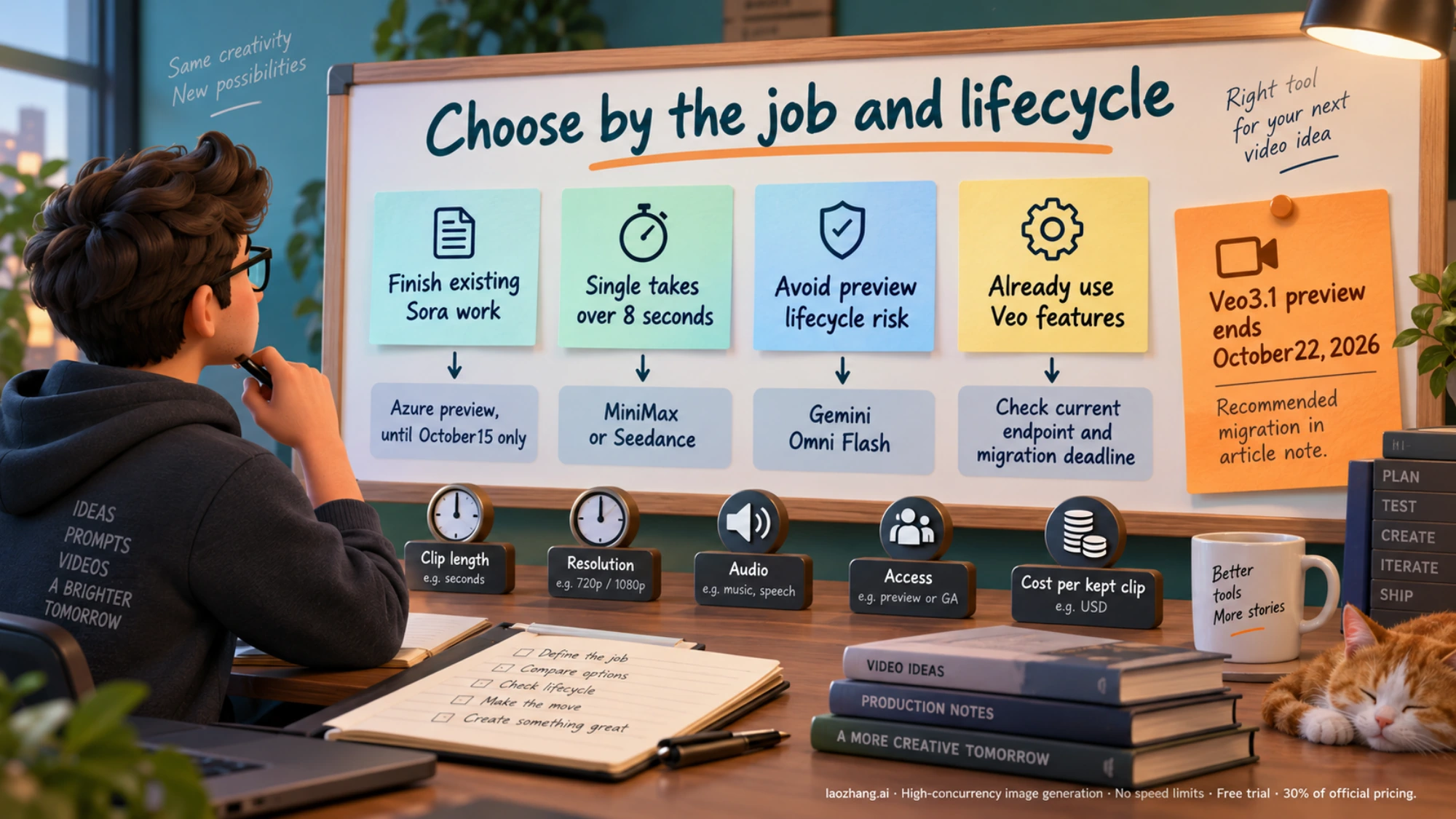
| If you need | Start with | Why | Watch for |
|---|---|---|---|
| The lowest price per second, with sound | Veo 3.1 Lite | $0.05 per second at 720p, $0.08 at 1080p; audio is always generated | Preview model ID; 4, 6 or 8 seconds per clip; no extension, reference images or 4k |
A generally available model at the sora-2 budget | Gemini Omni Flash | About $0.10 per second at 720p; Google's recommended default video model; takes text, image, audio and video input; can extend a clip to 40 seconds in steps of up to 10 seconds | 1080p and 4k output is upscaled; first-generation length isn't stated |
Veo features at the sora-2 budget | Veo 3.1 Fast | $0.10 per second at 720p, $0.12 at 1080p, $0.30 at 4k; extends Veo-generated 720p video up to 148 seconds | Preview model ID; 8 seconds per generation at most |
| Single takes longer than 8 seconds | MiniMax H3 or H3 Max | Up to 15 seconds per clip; H3 costs $0.08 (768P) or $0.13 (2K) per second | MiniMax's API docs don't describe audio output |
| Single takes up to 30 seconds | Seedance 2.5 on BytePlus ModelArk | 4–30 seconds per generation; also edits and extends video | About $0.23 per second at 720p; ModelArk's availability list excludes the US, Russia and mainland China |
A replacement for sora-2-pro at 1080p | Veo 3.1 Lite, then Veo 3.1 Fast, then Veo 3.1 | $0.08, $0.12 or $0.40 per second, all below Pro's $0.70 | 1080p requires 8-second clips; move up a tier only if the cheaper one falls short on your prompts |
| Motion for still images you already have | Runway Gen-4 Turbo | $0.05 per second | Image input only; audio not stated |
| One more batch of real Sora 2 | Azure OpenAI sora-2 preview | The same model and API shape at $0.10 per second | Ends October 15; 720p only; no photorealistic content |
Google's video generation overview recommends Gemini Omni Flash as the default, and Veo 3.1 when you need scene extension, last-frame control or integration with an existing pipeline. Omni's extension limits are in Google's Omni documentation, and MiniMax's clip lengths and modes are in its video generation guide.
If Seedance 2.5 and MiniMax H3 are both on your list, Seedance 2.5 vs MiniMax H3: Which to Test First and What It Costs goes deeper on US access and long takes. For the Google side, Seedance 2.5 vs Gemini Omni: Which Should You Test First? compares duration, references and conversational editing.
What changes when you move off Sora 2
Sora 2, Veo and MiniMax all follow the same create, poll and download loop, but the names, limits and storage rules differ. Map these before you rewrite anything:
| In your Sora 2 code | Veo 3.1 (Gemini API, Python SDK) | MiniMax H3 or H3 Max (REST) |
|---|---|---|
model="sora-2" | model="veo-3.1-lite-generate-preview", or the Fast or standard ID | "model": "MiniMax-H3" or "MiniMax-H3-Max" |
size="1280x720" or "720x1280" | resolution="720p" plus aspect_ratio="16:9" or "9:16" | "resolution" of "768P", "2K" or "480P", plus "ratio" |
seconds="4", "8" or "12" | duration_seconds of 4, 6 or 8 | "duration" of 4–15 (H3) or 5–15 (H3 Max) |
input_reference image for the first frame | image= argument | image_url item with "role": "first_frame" |
Poll videos.retrieve(id) until completed | Poll client.operations.get(operation) until operation.done | Poll GET /v2/query/video_generation/{task_id} until succeeded |
videos.download_content(id) | client.files.download(...) | Download from task.content.url |
Then check the differences that break pipelines quietly:
- Clip length. Sora 2 on Azure takes 4, 8 or 12 seconds. Veo 3.1 stops at 8 seconds per generation, so a 12-second shot needs a longer-clip model or Veo's extension. Extension works only with Veo 3.1 and Veo 3.1 Fast, not Lite, and only on Veo-generated 720p video; the Veo documentation lists extensions of 7 seconds, up to 20 times.
- Resolution names. 768P isn't 720p, and 2K isn't 1080p. Compare actual outputs, not labels.
- Audio. Veo 3.1 always generates audio, and Gemini Omni Flash returns video with audio. MiniMax's API docs treat audio as an input or reference, and Runway's pages don't state audio output for Gen-4 Turbo or Gen-4.5. If you relied on Sora 2's sound, test audio on your shortlist or plan a separate audio step.
- Storage. Google keeps generated Veo videos on its servers for 2 days, and Azure's Sora 2 jobs last 24 hours. Download every result as soon as its job finishes and store it yourself.
- Billing unit. Sora 2 billed per second of output, and so do MiniMax, Veo and Runway. Gemini Omni Flash and Seedance 2.5 bill tokens, and on MiniMax and Seedance 2.5 input video adds to the bill. Track spend from the usage each API reports rather than a flat per-second assumption.
- Content rules. Each provider filters differently. In the EU, UK, Switzerland and MENA, Veo accepts only
allow_adultfor person generation. Azure's Sora 2 blocks photorealistic content and real people. A prompt that passed on Sora 2 can fail elsewhere, and the reverse. - Model status. The three Veo 3.1 IDs are marked Preview, while Veo 3 and Veo 3 Fast are Stable and Gemini Omni Flash is generally available. After losing Sora 2, weigh whether a preview ID belongs at the core of a production pipeline.
- Account and payment. The Gemini API needs the paid tier for video, and Russia, Belarus, mainland China, Hong Kong and Macao aren't on Google's available regions list. MiniMax's international platform is run from Singapore, bills through Stripe and offers the United States as a service region; H3 and H3 Max are sold only through pay-as-you-go, and MiniMax's video packages don't cover them. ModelArk's availability list excludes the US, Russia and mainland China. Runway sells credits in its developer portal, and sales tax may apply. Confirm that your country and payment method work before you build around a model.
- A test before you prepay. Top up the minimum and run 5 to 10 of your real Sora 2 prompts at the resolution and length you'll ship. Then work out the cost per clip you'd actually use. That number, not the list price, is what you compare.
Here is a minimal Veo 3.1 Lite call in Python that follows the pattern in Google's Veo documentation. It needs pip install google-genai and a paid-tier key in the GEMINI_API_KEY environment variable:
import time

from google import genai
from google.genai import types

client = genai.Client()  # reads GEMINI_API_KEY from the environment

operation = client.models.generate_videos(
    model="veo-3.1-lite-generate-preview",
    prompt="A paper boat drifts down a rain-soaked street at dusk, low camera, soft neon reflections",
    config=types.GenerateVideosConfig(
        resolution="720p",
        aspect_ratio="16:9",
        duration_seconds=8,
    ),
)

while not operation.done:
    time.sleep(10)
    operation = client.operations.get(operation)

response = operation.response
if operation.error or not response or not response.generated_videos:
    raise RuntimeError(f"No video returned: {operation.error}")

video = response.generated_videos[0]
client.files.download(file=video.video, destination="clip.mp4")
At 720p and 8 seconds, each successful run costs $0.40 at the list price above.
FAQ
Is there a free Sora 2 API or API key?
Not from an official source. OpenAI's Sora API is gone, Azure bills $0.10 per second, and Google doesn't offer Veo 3.1 on the Gemini API free tier either. A "free Sora 2 API key" offered after September 24, 2026 has no documented place to run the model.
How much did the Sora 2 API cost? Sora 2 pricing before the shutdown
OpenAI charged per second of output: $0.10 for sora-2 at 720p, and $0.30, $0.50 or $0.70 for sora-2-pro at 720p, 1024×1792 and 1080p. An 8-second sora-2 clip cost $0.80, and the same length on sora-2-pro at 1080p cost $5.60. Azure's preview still charges the sora-2 rate until October 15.
Can I still use Sora 2 Pro?
No official host documents it. OpenAI removed sora-2-pro on September 24, 2026, and Microsoft's retirement schedule lists only sora-2 versions for Azure. At 1080p, Veo 3.1 Lite ($0.08 per second), Veo 3.1 Fast ($0.12) and Veo 3.1 ($0.40) all cost less than Pro's old $0.70.
Is there still a Sora subscription?
No. OpenAI discontinued the Sora web and app experiences on April 26, 2026. Its help article covers exports and refunds, and says purchased ChatGPT or Sora credits can still be used for Codex.
What happens to videos generated through the Sora API?
OpenAI's discontinuation article covers exports for the Sora app, not for API output, and the Videos API was removed as a whole on September 24. Keep your own copies of anything you generated. On Azure, download each job within 24 hours of creating it, and before October 15.