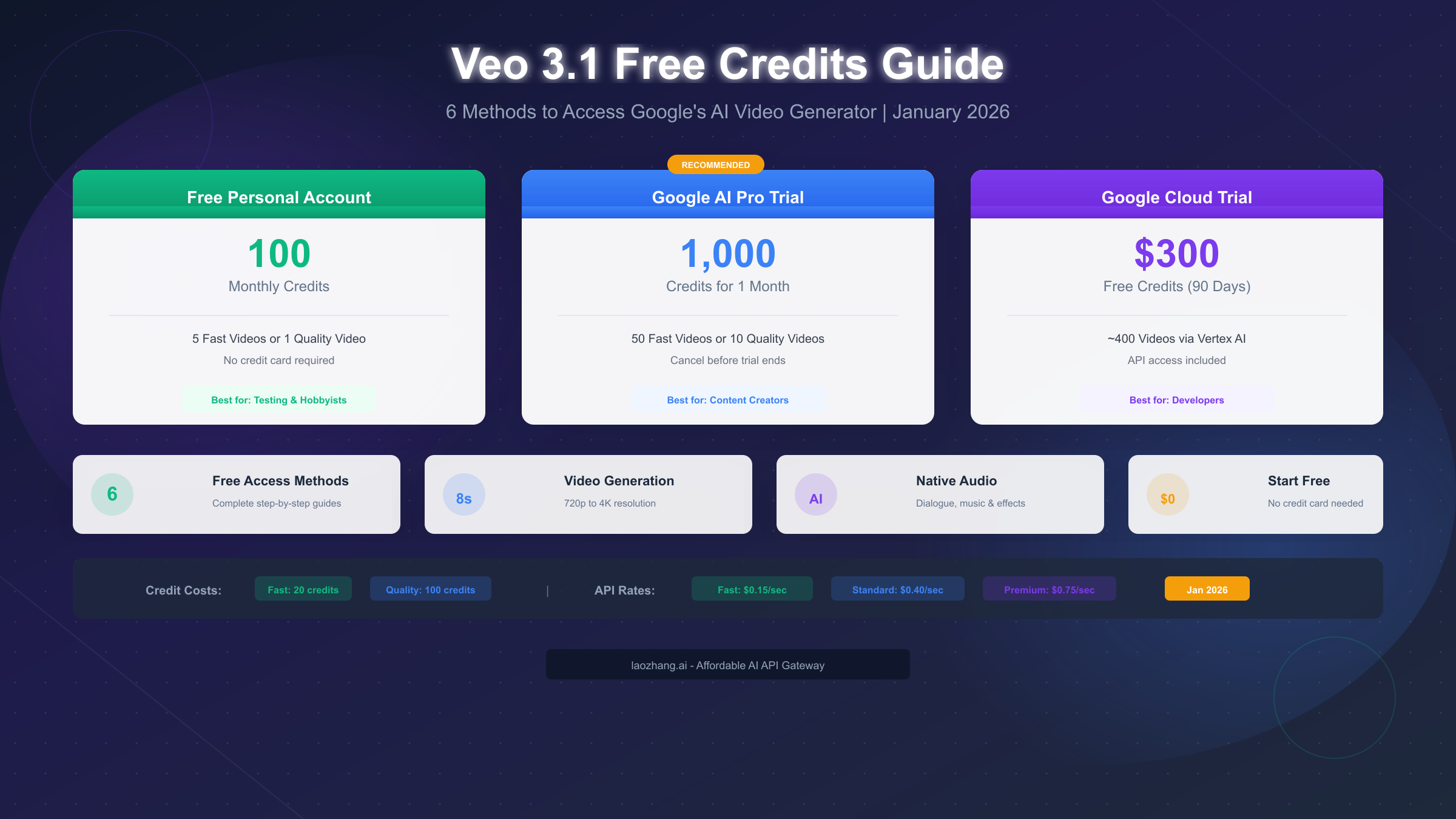
Google provides free Veo 3.1 credits to all personal Google accounts without requiring any subscription. As of January 2026, every personal Google account receives 100 monthly AI credits (or 180 credits in certain regions) that work with Flow and Whisk platforms to generate AI videos. These credits translate to approximately 5 Fast-mode videos or 1 Quality-mode video per month. For users who need more generation capacity, Google also offers a 1-month free trial of Google AI Pro with 1,000 credits, and new Google Cloud users can access $300 in trial credits valid for 90 days. This comprehensive guide covers all six free access methods, explains the credit system in detail, and provides step-by-step instructions to help you start generating AI videos today.
Quick Answer: Veo 3.1 Free Credits Available Now
The short answer is yes—you can absolutely use Veo 3.1 for free in January 2026, though the amount of free access varies significantly depending on which method you choose. Google has structured its free tier to give casual users enough credits to experiment with the technology while incentivizing serious users to consider paid subscriptions.
Every personal Google account that isn't subscribed to Google AI Pro or Ultra automatically receives 100 monthly AI credits. This allocation refreshes on the first day of each month and does not roll over to the next billing cycle, so any unused credits disappear when the new month begins. In some countries and regions, this free allocation increases to 180 monthly credits, though Google hasn't published an official list of which regions qualify for the higher amount.
To put these numbers in perspective, generating one 8-second video in Fast mode consumes approximately 20 credits, while Quality mode videos require around 100 credits each. This means your 100 free monthly credits can produce roughly 5 Fast-mode videos or just 1 Quality-mode video. The Fast mode outputs 720p to 1080p resolution with faster generation times, while Quality mode delivers higher fidelity up to 4K with more detailed rendering.
For users who need more than the basic free tier, several other free access paths exist. The Google AI Pro subscription offers a 1-month free trial with 1,000 credits—enough for approximately 50 Fast-mode or 10 Quality-mode videos. Google Cloud new users receive $300 in trial credits valid for 90 days, which translates to roughly 400 videos when using the API at standard rates. Students with valid .edu email addresses can access the Google One AI Student Program, which provides 15 months of free access with 1,000 credits per month.
Understanding the Veo 3.1 Credit System
The credit system determines how much you can generate and at what quality level, making it essential to understand before diving into any access method. Google has designed a tiered structure that balances accessibility for casual users with premium features for professional creators.
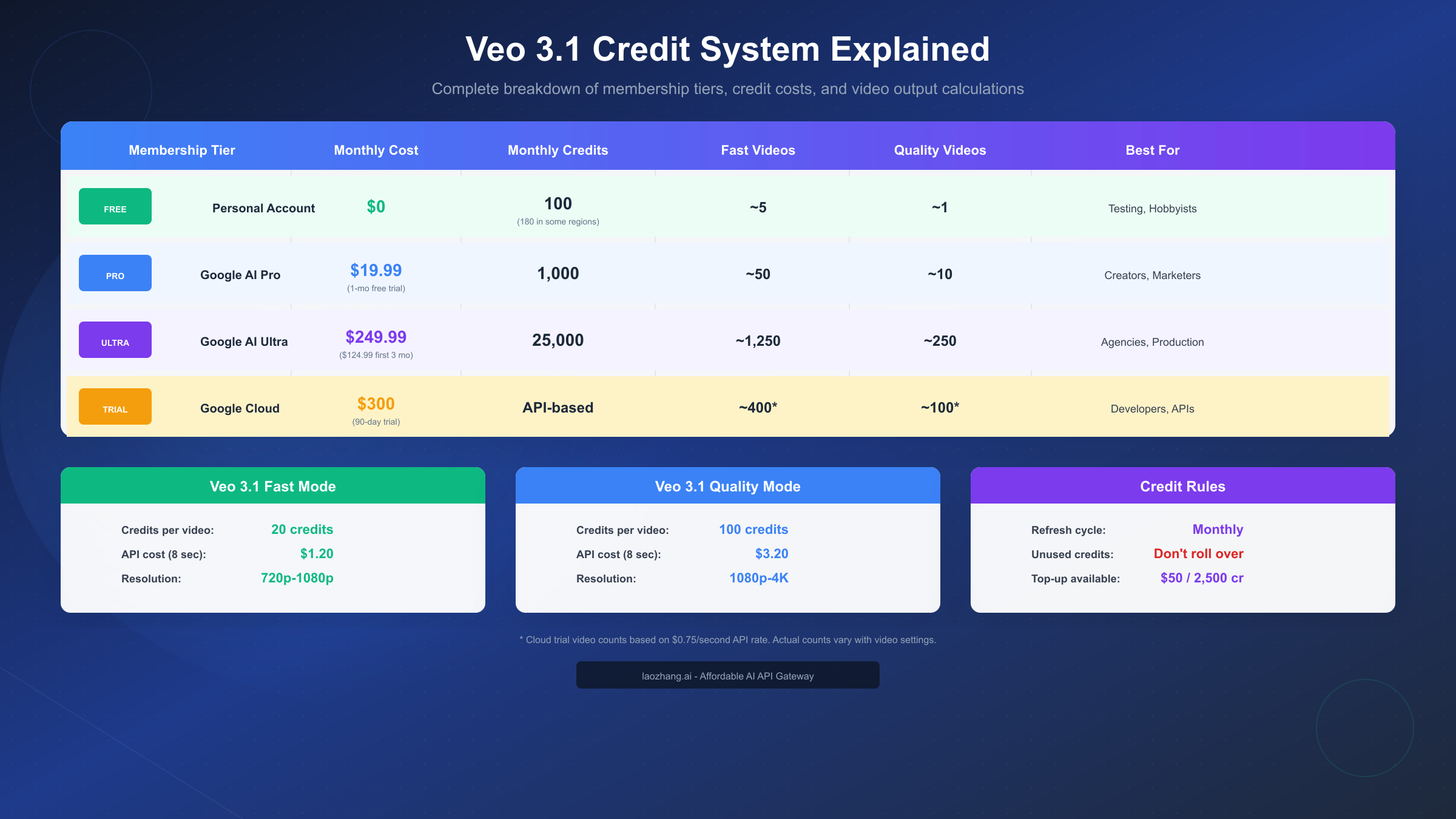
At the foundation, credits function as a universal currency across Google's AI generation tools. When you generate a video, the system deducts credits based on the generation mode you select, with Fast mode being the most economical and Quality mode consuming significantly more resources. The exact credit consumption has varied slightly across different sources, but according to official Google documentation from January 2026, Fast mode videos consume 20 credits each while Quality mode videos require 100 credits.
The membership tiers create a clear progression from free users to enterprise-level access. Free personal accounts receive 100 monthly credits at no cost, providing just enough for testing and occasional use. Google AI Pro subscribers pay $19.99 per month for 1,000 credits, which works out to approximately $0.02 per credit when divided evenly. Google AI Ultra at $249.99 monthly (or $124.99 for the first three months as an introductory offer) provides 25,000 credits, reducing the per-credit cost significantly for high-volume users.
Fast Mode vs Quality Mode
Understanding when to use each mode helps maximize your free credits. Fast mode generates videos more quickly, typically completing in 30-60 seconds, and produces output at 720p to 1080p resolution. This mode works well for initial concept testing, social media content where ultra-high quality isn't critical, and rapid iteration on prompts to find the right visual direction.
Quality mode takes longer to generate, sometimes requiring 2-3 minutes per video, but delivers superior output quality. Videos can reach up to 4K resolution with more refined details, better motion coherence, and more accurate interpretation of complex prompts. This mode makes sense for final production content, professional marketing materials, and any application where visual quality directly impacts value.
One critical rule to remember is that unused credits don't roll over. If you have 60 credits remaining on the last day of the month, they disappear when your allocation refreshes. This "use it or lose it" policy encourages consistent usage rather than hoarding, and should factor into your generation planning especially on paid tiers where credits cost real money.
For users who exhaust their monthly credits and need additional capacity, Google offers top-up credit packs starting at $50 for 2,500 credits. However, these supplemental credits are priced at a premium compared to subscription allocations, making them better suited for occasional overages rather than primary access.
All 6 Free Access Methods Compared
With multiple pathways to free Veo 3.1 access, choosing the right method depends on your specific situation—whether you're a casual user, content creator, developer, or student. Each method offers different credit amounts, duration, and requirements that affect its suitability for different use cases.
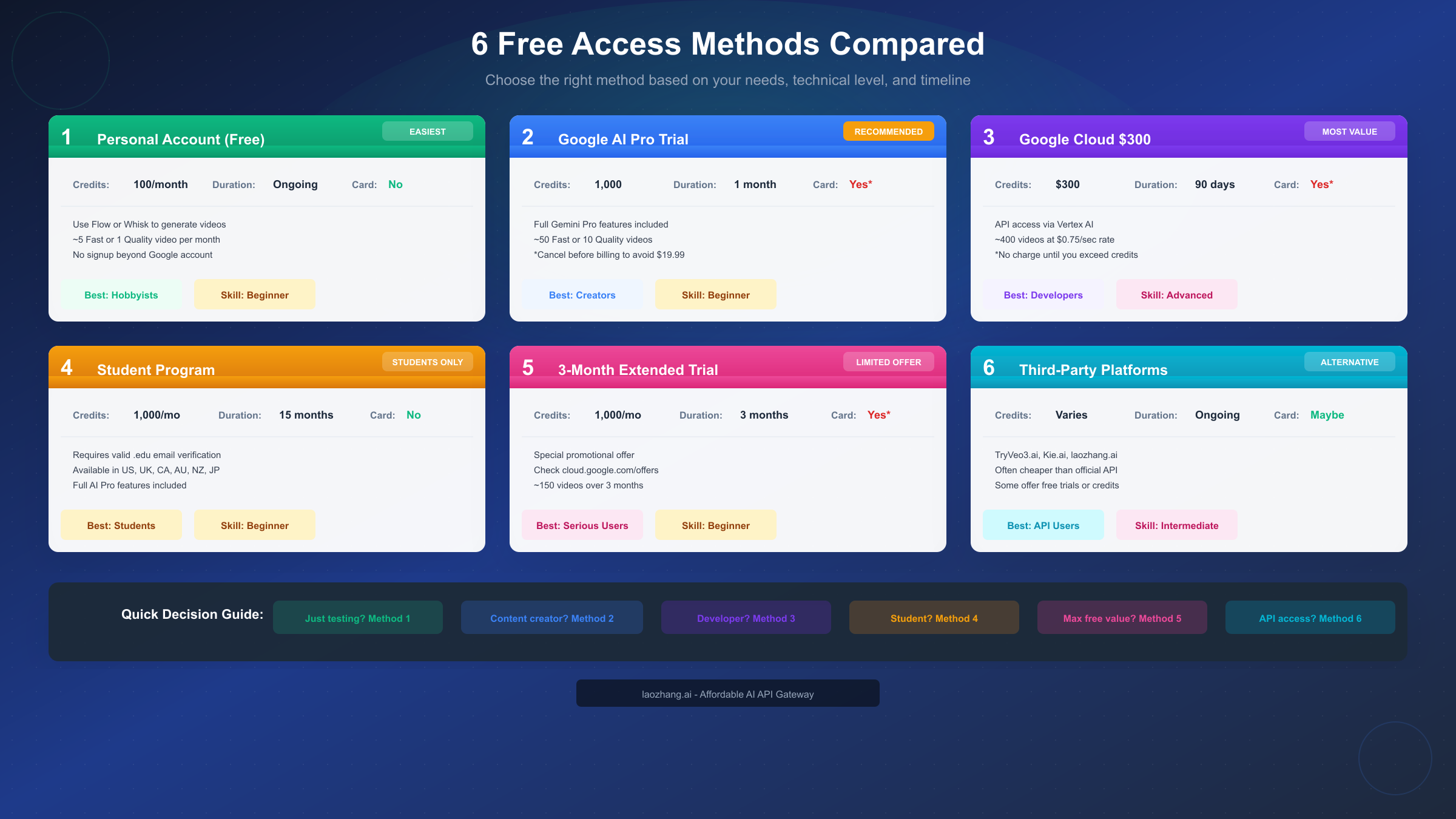
The comparison reveals clear patterns about which users should choose which method. Students have a uniquely advantageous path through the education program, while developers benefit most from Google Cloud trial credits that include API access. Content creators typically find the AI Pro trial most practical, as it provides substantial credits with a familiar consumer interface.
Method 1 (Personal Account) represents the simplest entry point with zero barriers. You need only a Google account to access 100 monthly credits indefinitely. The limitation is quantity—100 credits restricts you to approximately 5 Fast-mode videos monthly, which works for experimentation but not consistent content production.
Method 2 (AI Pro Trial) offers the best balance of simplicity and capacity for most users. The 1,000 credits during the trial month enable meaningful production—enough to create 50 Fast-mode videos or produce a month's worth of social media content. The catch is that you must remember to cancel before the trial ends to avoid the $19.99 monthly charge.
Method 3 (Google Cloud) provides the highest total value at $300 in credits, but requires more technical setup through the Vertex AI interface. This method suits developers who need API access for integration projects or anyone comfortable with cloud console navigation.
Method 4 (Student Program) delivers exceptional value for eligible users—15 months of 1,000 monthly credits without payment information required. The verification process requires a valid .edu email from supported countries (US, UK, Canada, Australia, New Zealand, Japan), limiting availability but providing the best deal for those who qualify.
Method 5 (Extended Trial) occasionally appears as a promotional offer providing 3 months of access. Availability varies, so check the Google Cloud offers page for current promotions. When available, this path provides substantial runway for serious evaluation.
Method 6 (Third-Party Platforms) includes services like TryVeo3.ai, Kie.ai, and laozhang.ai that provide Veo 3.1 access through their own interfaces. Some offer free credits or trials, and many provide lower per-video costs than direct Google access. For developers building applications, API gateway services like laozhang.ai often offer competitive rates below official API pricing while simplifying integration and billing.
Method 1 – Free Personal Account Credits
Starting with the free personal account credits requires the least setup and works for anyone with an existing Google account. This method provides ongoing access without time limits, making it ideal for casual experimentation and learning the platform.
To activate your free credits, navigate to labs.google.com/fx/tools/flow in your web browser while signed into your personal Google account. Flow is Google's creative studio that integrates Veo 3.1 for video generation along with other AI creation tools. Upon first access, you should see your available credit balance displayed in the interface—typically showing 100 credits for most regions or 180 credits for eligible areas.
The process involves no payment information, no trial period to track, and no cancellation to remember. Your credits refresh automatically on the first day of each calendar month, and the allocation continues indefinitely as long as you maintain a personal Google account. This makes the free tier genuinely free in the long term, unlike trial offers that require vigilance about billing dates.
With 100 credits, strategic usage becomes important. Fast mode at 20 credits per video allows 5 generations monthly, while Quality mode at 100 credits gives you only a single video. A practical approach involves using Fast mode for initial experiments and prompt refinement, then reserving Quality mode for when you've perfected your prompt and want the best possible output.
The limitations of this method center on quantity and access restrictions. Five videos per month won't support consistent content creation or production workflows. Additionally, some regions face access restrictions, and VPN usage to circumvent these restrictions carries account risk. If you're in an unsupported region, the Google Cloud method with its $300 trial credits may provide more reliable access.
Users who find 100 credits insufficient but don't want to commit to a paid subscription should consider combining this method with others. The free personal credits renew monthly, so you can use them alongside a Google Cloud trial or AI Pro trial to maximize your total free generation capacity during the trial periods.
Method 2 – Google AI Pro Free Trial
The Google AI Pro free trial represents the most practical option for users who want meaningful generation capacity without upfront payment. With 1,000 credits over one month, you can create approximately 50 Fast-mode videos or 10 Quality-mode videos—enough to evaluate the technology thoroughly or produce a month of content.
Activating the trial begins at one.google.com/explore-plan/aipro where you'll see the AI Pro subscription options. Click the "Start free trial" or equivalent button to begin the enrollment process. Google requires you to add a payment method to activate the trial, but you won't be charged during the trial period as long as you cancel before it ends.
During the trial, you gain access to the full Google AI Pro feature set beyond just Veo 3.1 credits. This includes enhanced access to Gemini models, priority generation queue during high-demand periods, and access to features that free-tier users don't receive. The 1,000 monthly credit allocation gives you substantial room for experimentation and production.
The critical action item is setting a calendar reminder to cancel before the trial's end date. After the one-month trial concludes, your payment method will be charged $19.99 for the next month's subscription. Many users intend to cancel but forget, resulting in unintended charges. Set a reminder for 2-3 days before your trial ends to give yourself time to complete the cancellation process.
Cancellation involves navigating to your Google One subscription settings at one.google.com/settings and selecting the option to cancel your AI Pro subscription. After cancellation, you retain access until the current billing period ends but won't be charged for subsequent months. Your credit balance may show remaining credits from the trial period that you can use until they expire.
For users who discover genuine value in Veo 3.1 during the trial, the $19.99 monthly price point for 1,000 credits represents reasonable value compared to competitors. Each credit costs roughly $0.02 under this plan, and the consumer-friendly interface makes ongoing use straightforward compared to API-based access methods.
Method 3 – Google Cloud $300 Credits
The Google Cloud trial provides the highest-value free access path, offering $300 in credits valid for 90 days through the Vertex AI platform. This method suits developers and technical users who want API access for integration projects, or anyone comfortable navigating the cloud console interface.
Registration begins at cloud.google.com where new users can sign up for the free trial. The process requires a Google account, basic billing information (credit card or other payment method), and acceptance of the Cloud terms of service. Google explicitly states that you won't be charged until you manually upgrade to a paid account or exhaust your trial credits and opt into billing.
After account creation, navigate to the Vertex AI section within Google Cloud Console. The Media Studio feature provides the generation interface where you can create Veo 3.1 videos. The API pricing for Veo 3.1 varies by quality tier: Fast mode costs approximately $0.15 per second, Standard mode runs $0.40 per second, and Premium/Full quality charges $0.75 per second of generated video.
Using the $300 credits at the $0.75 per second Premium rate, you can generate approximately 400 seconds of video content (about 50 eight-second clips). If you optimize by using the Fast tier at $0.15 per second, the same credits stretch to roughly 2,000 seconds (250 eight-second clips). This substantial allocation provides genuine production capacity for developers building applications or content creators with heavy generation needs.
The 90-day validity window gives you three months to use these credits, providing longer runway than the one-month AI Pro trial. However, this method requires more technical navigation than the consumer-focused Flow interface, and the API-based approach means building integration code if you want programmatic access.
For developers who need consistent API access beyond the trial period, third-party providers offer competitive alternatives. Services like laozhang.ai (docs.laozhang.ai) provide Veo 3.1 API access at rates typically 20-40% below Google's direct pricing, while handling authentication and billing through simpler interfaces. These providers aggregate access across multiple AI services, making them practical for applications that use multiple AI capabilities.
Which Method is Right for You?
Selecting the optimal access method requires matching your situation to the specific advantages each path offers. The decision factors include technical comfort level, available time for setup and learning, total credits needed, and whether you have special eligibility like student status.
For Casual Testing and Experimentation: Method 1 (Personal Account) provides the easiest starting point. The 100 monthly credits renew indefinitely without any payment or cancellation concerns, making it ideal for users who want to occasionally experiment with AI video without commitment. This method also makes sense as a baseline that you can supplement with other trial methods when you need more capacity.
For Content Creators and Marketers: Method 2 (AI Pro Trial) delivers the best experience-to-effort ratio. The 1,000 credits during the trial month give you enough capacity to produce meaningful content—approximately 10-50 videos depending on quality mode selection. The consumer interface through Flow is more intuitive than the Cloud console, and the trial period provides enough time to evaluate whether the technology fits your workflow.
For Developers and API Integration: Method 3 (Google Cloud) offers the most flexibility and total value. The $300 in credits over 90 days exceeds other methods in both amount and duration. API access enables programmatic generation, custom integration, and automated workflows that aren't possible through consumer interfaces. If you're building an application that incorporates AI video generation, this method provides the foundation you need.
For Students: Method 4 (Student Program) is clearly the best choice if you qualify. Fifteen months of access with 1,000 monthly credits—no payment information required—provides the most generous free allocation available. The verification process requires a valid .edu email from supported countries, but successful verification unlocks exceptional value.
Veo 3.1 vs Sora: Quick Comparison
When evaluating Veo 3.1 against OpenAI's Sora, several distinctions emerge. Veo 3.1 supports up to 4K resolution output compared to Sora's 1080p maximum, making it preferable for high-resolution production needs. Veo 3.1 also generates native audio including dialogue, music, and sound effects, while Sora requires separate audio production. However, Sora can produce longer clips (up to 20 seconds versus Veo's 8 seconds) and offers built-in editing features like Remix and Recut that Veo lacks.
Pricing differs significantly as well. Veo 3.1 through AI Pro costs $19.99/month for 1,000 credits (roughly 10-50 videos), while Sora access requires ChatGPT Plus at $20/month or ChatGPT Pro at $200/month. For pure cost efficiency on shorter videos, Veo 3.1 typically edges out Sora, especially when using third-party API providers at reduced rates.
Regional Access & Availability
Geographic restrictions affect Veo 3.1 access, and understanding these limitations helps you choose the most reliable access method for your location. Google has not published a comprehensive list of supported regions, but user reports and documentation provide guidance on availability patterns.
The United States, United Kingdom, and Canada have the most complete access, with all methods functioning without restriction. Australia, New Zealand, and Japan support most access paths including the student program. European Union countries have generally stable access, though some specific features may have availability variations due to AI regulation differences.
Many Asian, African, and South American countries face restrictions that prevent direct access to Flow and other Veo 3.1 interfaces. Users in these regions often resort to VPN services to access the platform, but this approach carries risks. Google's terms of service prohibit circumventing geographic restrictions, and accounts that appear to be using VPNs may face suspension or termination. The risk level varies—some users report long-term use without issues while others have experienced account warnings.
For users in restricted regions, the Google Cloud method (Method 3) sometimes provides more reliable access than consumer interfaces, as Vertex AI has different availability policies than consumer products. However, this isn't guaranteed, and the Cloud console may also be restricted depending on your location.
The safest approach for users in restricted regions involves considering third-party API providers that handle geographic routing on their end. These services maintain their own infrastructure in supported regions and provide API access that works globally. While this adds a layer between you and Google's services, it eliminates the personal account risk associated with VPN usage.
If you're uncertain about availability in your region, the simplest test is attempting to access labs.google.com/fx/tools/flow while logged into your Google account. If the page loads and shows your credit balance, your region supports access. If you receive an error or geographic restriction message, you'll need to consider alternative approaches.
Maximizing Your Free Credits
Whether you're working with 100 monthly credits or the 1,000 from a trial, strategic usage significantly extends your generation capacity. These optimization strategies help you produce more videos from the same credit allocation.
The Fast-First Workflow
The most effective credit conservation approach uses Fast mode for all initial experimentation and prompt development, switching to Quality mode only for final production renders. Since Fast mode costs only 20% of Quality mode's credits, you can iterate through 5 prompt variations in Fast mode for the same cost as a single Quality generation.
Start by drafting your prompt and generating a Fast mode preview. Evaluate whether the visual direction matches your intent—check subject placement, action execution, environment rendering, and overall composition. Refine your prompt based on what you observe, then generate another Fast preview. Continue this iteration cycle until you're satisfied with the output direction, then switch to Quality mode for the final render.
Prompt Optimization for Efficiency
Well-crafted prompts produce better results on the first attempt, reducing the iterations needed to achieve desired output. Structure your prompts using this pattern: Action + Subject + Environment + Style + Camera + Audio. For example: "A golden retriever runs through autumn leaves in a sunlit forest, cinematic style, tracking shot following the dog, sounds of rustling leaves and distant birds."
Avoid vague descriptors that require multiple attempts to clarify. Instead of "beautiful landscape," specify exactly what you want: "mountain lake at sunrise with mist rising from the water, pine forest surrounding the shore." The more precisely you describe your vision, the more likely the first generation will match your expectations.
Batch Planning
Rather than generating videos spontaneously throughout the month, plan your generation sessions in advance. List the videos you need, write and refine prompts before consuming credits, and schedule focused generation sessions where you work through multiple videos efficiently. This approach minimizes wasted credits on spontaneous experiments that don't serve your goals.
Quality vs Quantity Trade-offs
Your 100 monthly free credits can produce 5 Fast-mode videos OR 1 Quality-mode video—not both at the maximum. Consider which trade-off serves your needs better. For social media content where multiple posts matter more than maximum quality, prioritize Fast mode quantity. For a single important piece like a product demo or portfolio piece, invest all credits in one Quality generation.
For production workloads that exceed free credit allocations, comparing provider options becomes worthwhile. Third-party API services like laozhang.ai typically offer Veo 3.1 access at rates 20-40% below Google's direct API pricing, effectively stretching your budget further when free credits are exhausted.
FAQ & Troubleshooting
How many free Veo 3.1 videos can I make per month?
With the standard 100 monthly free credits, you can generate approximately 5 Fast-mode videos (at 20 credits each) or 1 Quality-mode video (at 100 credits each). Some regions receive 180 credits instead, which allows roughly 9 Fast-mode videos or 1 Quality-mode video plus some Fast-mode generations.
Do unused credits roll over to the next month?
No. Credits expire at the end of each billing cycle and do not accumulate. If you have 60 credits remaining on the last day of the month, they disappear when your new allocation arrives. Plan your usage to consume available credits before they expire.
What happens if my free trial charges me?
If you forgot to cancel the Google AI Pro trial and were charged $19.99, you can request a refund by contacting Google support within 14 days of the charge. Navigate to support.google.com and explain that you intended to cancel the trial but missed the deadline. Google typically grants first-time refund requests, though this isn't guaranteed.
Why can't I access Veo 3.1 in my country?
Geographic restrictions affect many regions. If you receive access errors, your country may not be supported yet. Options include waiting for expanded availability, using the Google Cloud method (sometimes has different restrictions), or considering third-party providers that handle geographic routing. VPN usage is possible but carries account risk due to terms of service violations.
Is the video quality different between free and paid accounts?
The video quality for a given mode (Fast or Quality) is identical whether you're using free credits or paid subscription credits. The difference is only in how many videos you can generate, not the quality of individual outputs.
How long do Google Cloud trial credits last?
The $300 Google Cloud trial credits remain valid for 90 days from account creation. After this period, unused credits expire, and continued usage requires manual upgrade to a paid billing account.
Can I use multiple free methods together?
Yes. The free personal account credits renew monthly and stack with trial offers. You could theoretically use your 100 free credits, activate the AI Pro trial for 1,000 additional credits, and create a Google Cloud account for $300 more—though you'd need to manage multiple interfaces and remember cancellation dates.
Summary and Next Steps
Veo 3.1 offers legitimate free access through multiple pathways, with the right choice depending on your specific needs and situation. The 100 monthly free credits for personal accounts provide a permanent no-cost entry point, while trial offers like AI Pro (1,000 credits for one month) and Google Cloud ($300 for 90 days) enable more substantial production.
Key Takeaways:
The free credit structure lets casual users experiment indefinitely while providing trial paths for serious evaluation. Fast mode at 20 credits per video offers the most economical generation, while Quality mode at 100 credits delivers higher fidelity for important productions. Credits don't roll over, so plan monthly usage to avoid waste.
Recommended Next Steps:
If you're new to Veo 3.1, start with Method 1 by accessing labs.google.com/fx/tools/flow with your Google account. Use your 100 free credits to experiment with the platform and understand the generation capabilities. Once you've validated that Veo 3.1 meets your needs, consider the AI Pro trial for more serious content production.
For developers interested in API integration, the Google Cloud $300 trial provides the best foundation. Set up your Cloud account, explore Vertex AI's Media Studio, and evaluate whether the API-based workflow suits your application requirements. For production workloads, compare direct API pricing with third-party providers like laozhang.ai that often offer reduced rates.
Students should prioritize Method 4 if eligible—the 15 months of 1,000 monthly credits represents the most generous free allocation available. Verify your eligibility at one.google.com/student-offer and complete the .edu email verification process.
Whatever path you choose, the technology is genuinely accessible for free experimentation. The key is selecting the method that matches your usage patterns and remembering to optimize credit consumption through strategic Fast/Quality mode selection.