
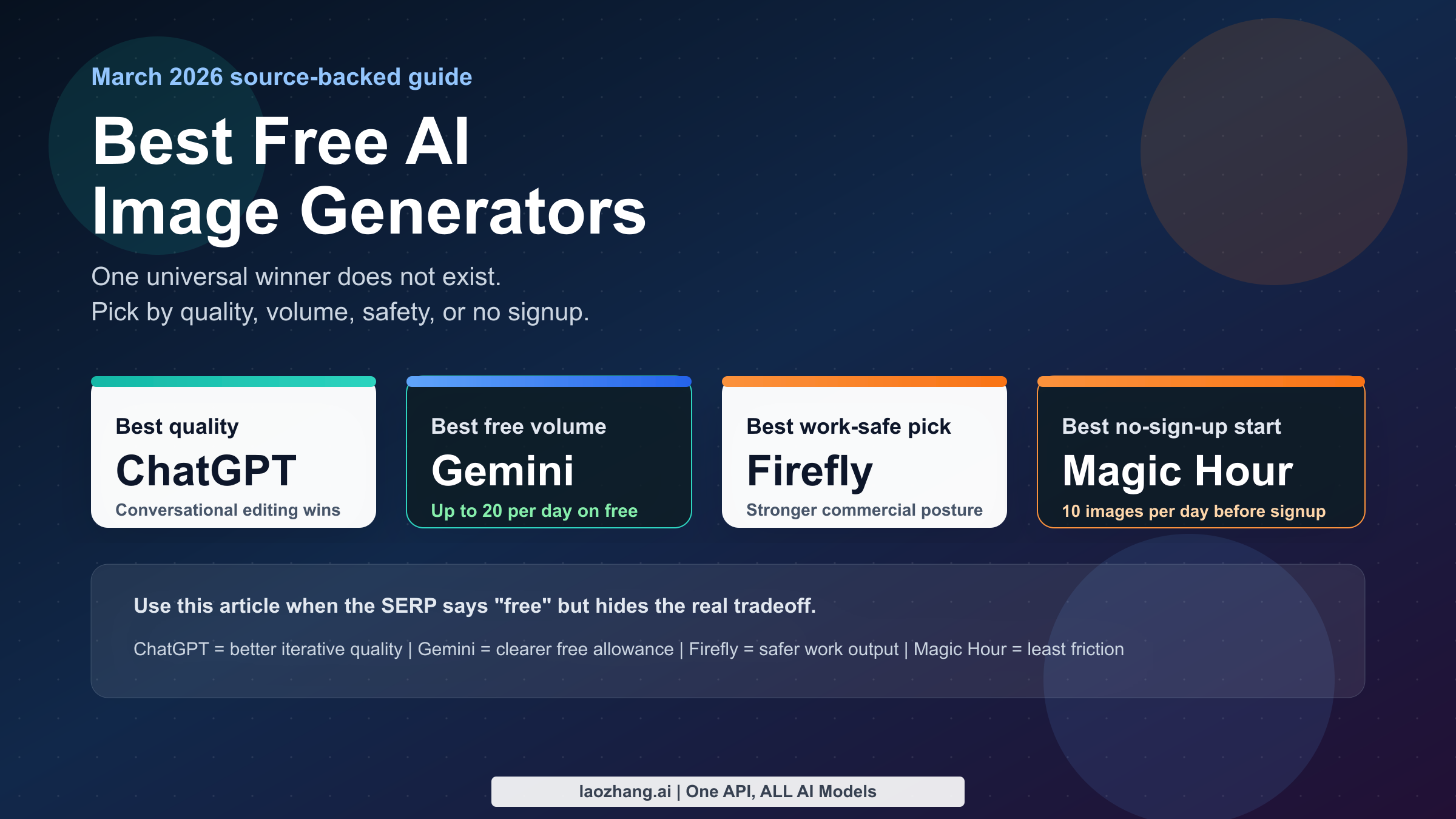
Short answer: the best free online AI image generator in March 2026 is not a single tool. If you want the strongest overall image quality and conversational editing, start with ChatGPT Free. If you want the most predictable mainstream free volume, use Gemini with Nano Banana 2, which Google currently lists at up to 20 images per day on the free plan. If you need the safest commercial-facing recommendation, use Adobe Firefly. If you refuse to create an account, Magic Hour is the cleanest low-friction option I found.
That split matters because the current SERP keeps flattening very different products into the same word, free. In practice, one tool may be free with vague rolling limits, another may be free with a hard daily cap, and another may be free only for personal use or with attribution conditions. I compared the current official pages for OpenAI, Google Gemini, Adobe Firefly, Magic Hour, Fotor, and Freepik, then used that source set to rank what is actually useful right now.
TL;DR
If you only want a recommendation and do not care about the full comparison, this is the fastest answer I can defend as of March 13, 2026. ChatGPT Free is the best overall free browser tool because OpenAI lets free users create and edit images, and the conversation workflow still feels stronger than most single-shot generators. Gemini is the better choice if your main problem is daily throughput rather than pure output polish, because Google is unusually clear about current plan-level image allowances. Firefly is not the most generous free tool, but it is the safest answer when a reader asks, "Which one would you use for work that might touch a client or brand team?" Magic Hour and Fotor both matter because they solve different friction problems that the bigger names do not solve well.
The other key takeaway is negative: there is still no mainstream tool that is honestly both unlimited and free. If a page uses that phrase, it usually means one of four things: undocumented throttling, reward-based credits, personal-use restrictions, or a free browser tier sitting on top of a paid API. That does not make the tools useless, but it does mean a responsible comparison has to label the tradeoff instead of hiding it.
| Need | Best pick | Why it wins | Current free reality |
|---|---|---|---|
| Best overall quality and editing | ChatGPT Free | Best conversational workflow, good prompt following, image editing in one place | Free image creation exists, but OpenAI does not publish a stable daily image number |
| Best predictable daily volume | Gemini / Nano Banana 2 | Google publishes a clear free-plan allowance and recent rollout info | Up to 20 images/day on free as checked March 13, 2026 |
| Best commercial-facing choice | Adobe Firefly | Strongest mainstream commercial-safety positioning | Free plan exists, but free usage is credit-limited |
| Best no-sign-up option | Magic Hour | Clear browser access without account creation | 10 images/day without signup, personal use only |
| Best low-friction downloads | Fotor | Reward-based free credits plus no-watermark positioning | 8 free credits for first-time users, up to 30 extra via rewards |
If you are specifically choosing between Google and OpenAI, the decision is simple. Use ChatGPT when you care more about quality, editing, and iterative refinement. Use Gemini when you care more about getting more free images through a mainstream official product. If you already know you will need a paid developer path, stop reading generic "free online" pages and go straight to the relevant pricing docs, because Google's own Gemini API pricing page makes clear that the image-generation API is a paid path even though the Gemini app has a free consumer tier.
What "free online" actually means in 2026
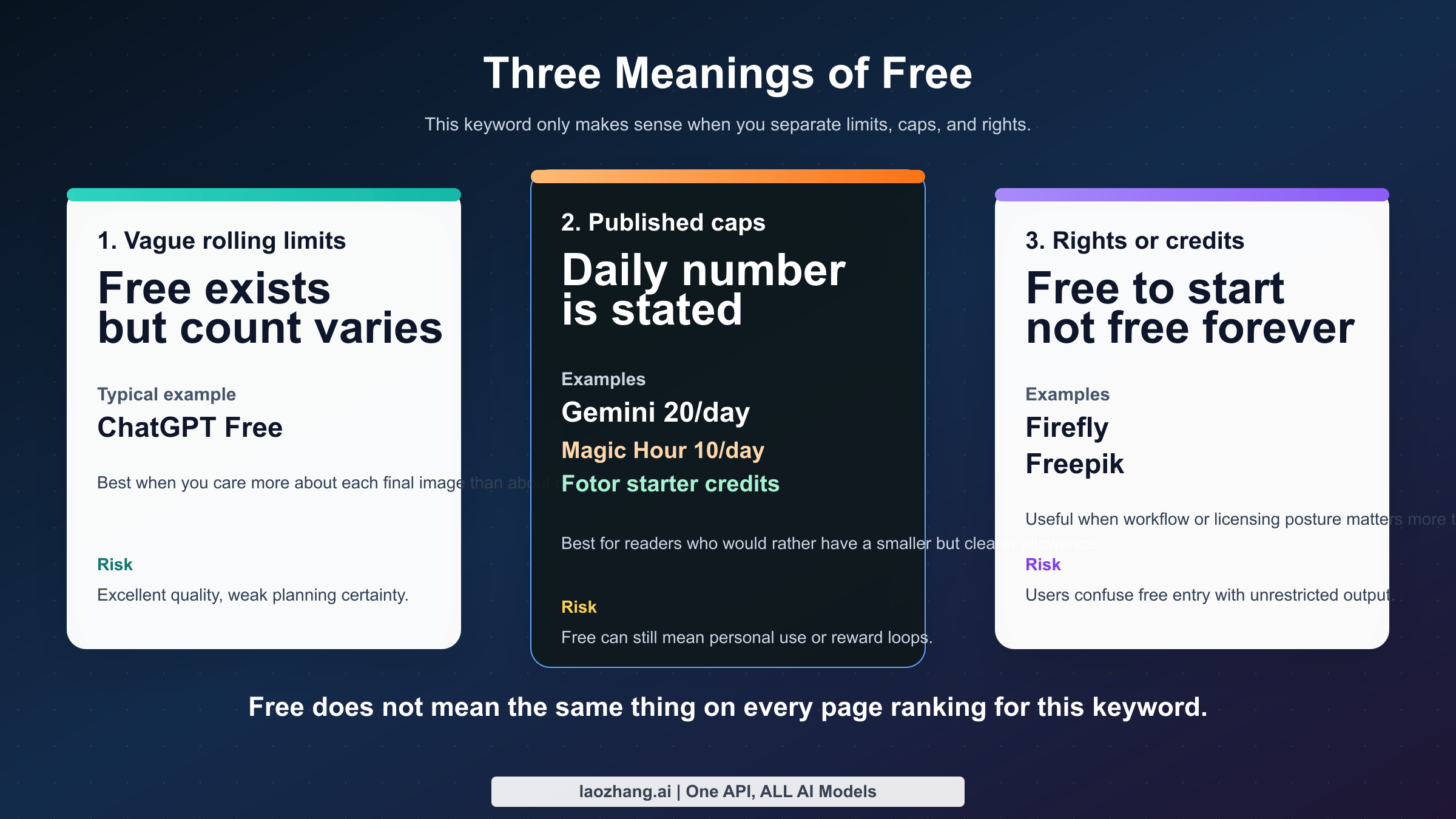
The biggest mistake in this topic is assuming that all "free" tools live in the same category. They do not. In March 2026, free online AI image generators fall into three practical buckets. The first bucket is free with undocumented rolling limits. ChatGPT Free fits here: OpenAI explicitly says free users can create images, but it does not promise a fixed daily number in the help documentation. That makes the tool excellent for occasional high-quality work and awkward for anyone who needs dependable output volume.
The second bucket is free with a documented allowance. Gemini is the cleanest mainstream example right now because Google publishes plan-level image limits on the Gemini help page. Magic Hour and Fotor also belong in this bucket because they publish clearer top-of-funnel allowances than many competitors do, even though the surrounding rights story is more limited or less business-friendly.
The third bucket is free to try, but only inside a tighter rights or credit model. Firefly and Freepik sit closest to this pattern. They are not fake products and they are not bad recommendations. They are simply easy to misuse if a reader interprets free as unlimited, unrestricted, and commercially clean. Those are not the same thing.
| Free bucket | What it usually means | Tools in this guide | Main risk |
|---|---|---|---|
| Undocumented rolling limits | Vendor allows free usage but does not promise a fixed image count | ChatGPT Free | Great output, weak predictability |
| Published daily or reward-based allowance | Vendor states a daily cap, starter credits, or reward credits | Gemini, Magic Hour, Fotor | Users mistake a trial allowance for a permanent free workflow |
| Free plan inside a broader paid rights system | Browser access is free, but credits or rights stay constrained | Firefly, Freepik | Users assume "free to start" equals clean for client work |
Once you see those buckets, the low quality of the SERP becomes obvious. Most ranking pages optimize for screenshots, prompt galleries, and brand logos. They spend far less time on the questions real readers actually use to choose a tool: How many images can I create before I hit a wall? Do I need to sign in? Will the result download cleanly? Can I safely use it in work that might touch a client? And is the vendor free on the web but paid in the API? Those are the questions that determine whether a "free" generator saves time or wastes it.
The 6 tools worth your time
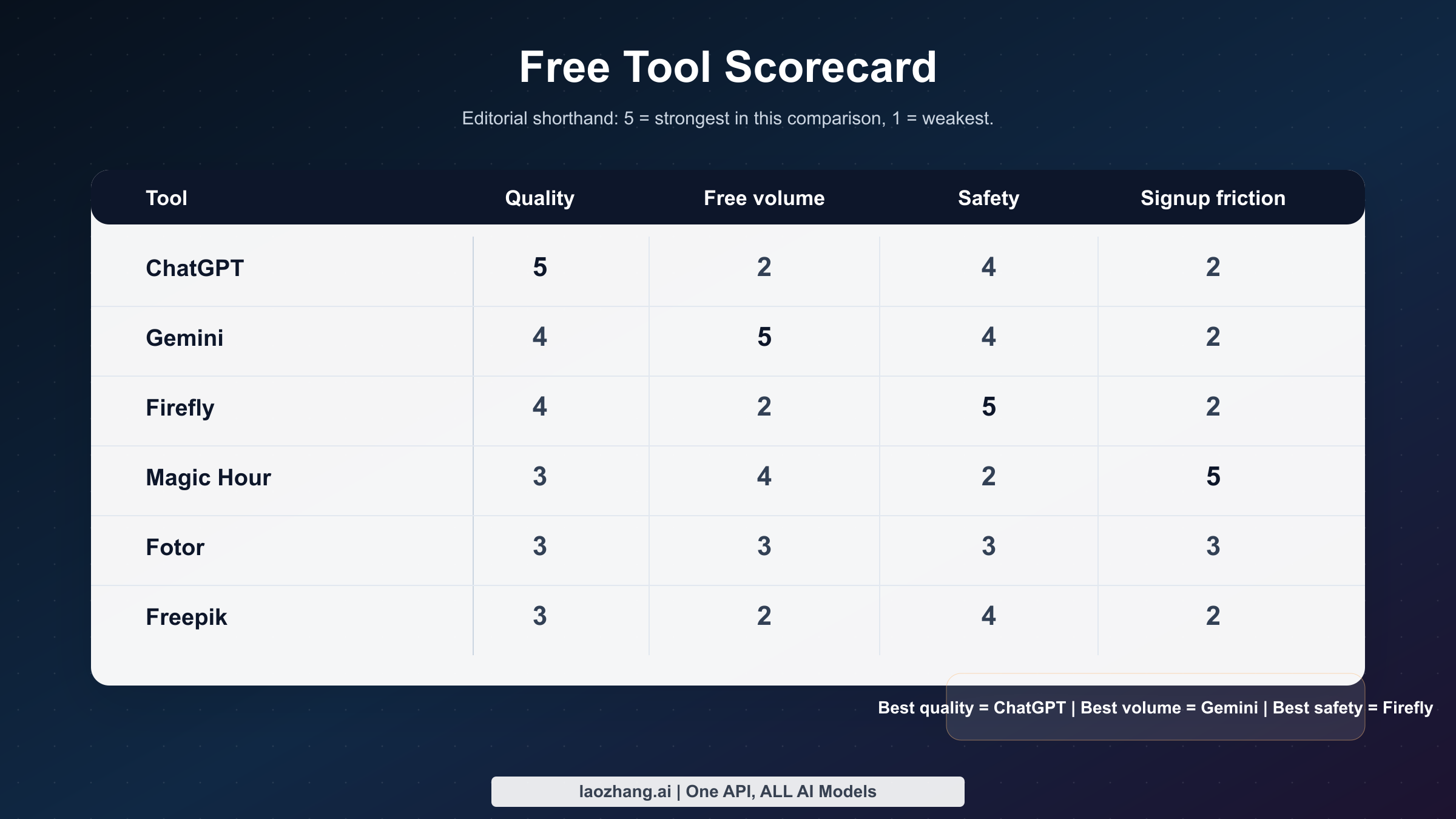
The list below is intentionally short. I did not try to include every free wrapper or every landing page ranking for the keyword because that would recreate the same problem as the SERP. Instead, I kept the six options that currently cover the most common reader needs: one best overall pick, one best high-volume mainstream pick, one commercial-facing pick, one no-sign-up pick, one low-friction credit-based pick, and one hybrid design-library option.
ChatGPT and Gemini lead this field for different reasons. ChatGPT is the better default if you care about image quality, prompt-following, and editing the same image across turns. Gemini is the better default if you want a more clearly stated free allowance from a mainstream vendor and you are comfortable working inside Google's image-generation flow. Firefly is the business-safe answer, Magic Hour is the low-friction casual answer, Fotor is the "I need a few clean downloads quickly" answer, and Freepik is only worth prioritizing if you already live in a design-asset workflow where templates, stock, and AI generation are part of the same process.
| Tool | Sign-up required | Current free allowance | Watermark story | Commercial-safety story | Best for |
|---|---|---|---|---|---|
| ChatGPT Free | Yes | Free image creation, but no fixed published daily count | OpenAI does not market a visible watermark requirement on the help pages used here | Good for general use, but treat rights review separately for brand-sensitive work | Best overall quality and editing |
| Gemini / Nano Banana 2 | Yes | Up to 20 images/day on free as checked March 13, 2026 | Google says image-generation limits may vary; product flow changed in February 2026 | Strong for mainstream casual use, weaker than Firefly for conservative legal buyers | Best predictable daily volume |
| Adobe Firefly | Yes | Free plan with limited generative credits | Adobe positions downloads inside a design-suite workflow rather than a gimmick-free funnel | Strongest mainstream commercial-facing posture in this group | Best for safer work output |
| Magic Hour | No for starter use | 10 images/day with no signup, 80 bonus plus 20/day with account | Download friction is low | Free plan is personal use only | Best no-sign-up tool |
| Fotor | Yes for sustained use | 8 free credits for first-time users, reward path up to 30 | Fotor advertises no-watermark downloads | Good casual use, weaker enterprise trust story | Best low-friction free-credit option |
| Freepik | Yes | Free plan with limited daily access and attribution requirements | Output quality is less the issue than plan structure | Strong only if you accept the broader platform tradeoffs | Best for users already inside a design library workflow |
One useful way to read that table is to ask which tool you would regret choosing for the wrong reason. You would regret choosing ChatGPT if you needed a reliable daily quota and hit a wall after a few images. You would regret choosing Gemini if you expected the very best iterative editing experience and instead found a more utility-first workflow. You would regret choosing Firefly if you wanted high free volume, and you would regret choosing Magic Hour if you discovered too late that your use case was not really personal. Fotor and Freepik both work best when you are honest about wanting convenience more than absolute model leadership.
The repo already has deeper single-tool coverage for some of these product families. If you want a platform-specific walkthrough rather than this market overview, the most useful follow-ups are the detailed guides on Nano Banana free online access, Nano Banana 2 free usage and limits, and ChatGPT image generation limits on the free plan.
Best overall for image quality and editing: ChatGPT Free
ChatGPT Free is my best overall recommendation because it solves the part of image generation that most browser tools still handle badly: getting from a rough prompt to a usable final image without feeling like you are restarting every time. OpenAI's current help documentation says free users can create images and that ChatGPT can both generate new images and edit existing ones. That matters because the typical real-world workflow is not "type once, perfect image appears." It is "generate, inspect, nudge, fix, crop, and reframe." ChatGPT remains the most natural mainstream interface for that loop.
There is also a quality-of-life advantage in the way ChatGPT handles context. When you want to change only one part of an image, or preserve a concept across several revisions, the chat format reduces the amount of prompt reconstruction you need to do. In practice, that is often more valuable than a nominal extra few free images because it lowers waste. If one system gives you more quota but burns those generations through a clumsy workflow, it can still be less useful than the one with a better editing loop.
That said, the limit story is why ChatGPT does not win every category. The Free Tier FAQ says free users can create images but also states that free-tier limits are lower than those on paid plans. The separate image creation help page explains that generation can take up to 2 minutes depending on demand and complexity. Those two details together tell you how to use the product intelligently. It is excellent when each generation matters. It is poor when your goal is cranking through dozens of disposable variations in a day.
The current community signal points in the same direction. Reddit threads from early 2026 show users hitting free image caps quickly and inconsistently. I treat those posts as friction signals rather than hard quota evidence, because OpenAI itself does not publish a fixed daily number in the documentation I checked. The practical conclusion is straightforward: assume ChatGPT Free is a premium sampler, not a volume engine. If you need stable throughput or production automation, switch either to Gemini's consumer free tier for more images or to a paid API path rather than pretending the free ChatGPT tier is a dependable workflow.
This is also why broad "best free AI image generator" posts often undersell the difference between quality and volume. ChatGPT wins if your bar is "Can I get a better final image with fewer frustrating iterations?" It loses if your bar is "How many decent images can I extract before dinner?" Those are different jobs. The right comparison is not just tool versus tool, but workflow versus workflow.
Best for predictable daily volume: Gemini with Nano Banana 2
Gemini is the strongest mainstream free-volume recommendation because Google is currently much more explicit than OpenAI about what the free plan includes. On the current Gemini Apps limits page, Google lists Nano Banana 2 image generation at up to 20 images per day on the free plan, with higher allowances on paid tiers. That does not mean every account sees the exact same experience every minute of the day. Google also warns that image-generation limits may change without notice. Still, compared with the vaguer messaging around some competitors, this is unusually useful.
The second reason Gemini matters is freshness. Google changed the product experience recently. In a Workspace Updates post dated February 26, 2026, Google announced that Nano Banana 2 replaced the previous default Gemini image flow, while some prior Pro users could still regenerate with Nano Banana Pro in specific paths. That single change explains a lot of current user confusion. Many ranking pages are already outdated because they describe the older Gemini image experience as though nothing changed.
If you are choosing a free tool primarily by how many images you can make in a day, Gemini deserves to start ahead of ChatGPT. A documented allowance of 20 images/day is simply easier to plan around than a free tier where the vendor confirms the feature exists but does not promise a stable count. The tradeoff is that Gemini does not feel as strong as ChatGPT for conversation-first editing. It is better thought of as the mainstream "I want more shots on goal" option, not the absolute strongest end-to-end refinement environment.
There is one more practical reason to understand Gemini clearly: the free web experience does not imply a free developer path. Google's own Gemini API pricing page shows that image-generation models such as Gemini 2.5 Flash Image and Gemini 3.1 Flash Image Preview are paid in the API. As checked on March 13, 2026, Gemini 2.5 Flash Image standard output is listed at $0.039 per image, and the page shows no free tier for these image models in the API. This distinction matters because a lot of broad keyword pages mash together app access and developer pricing until the reader no longer knows what is free where.
If your use case is part creative play and part serious comparison, Gemini also becomes more useful when paired with the existing Google-focused articles already in this repo. The natural next reads are the broader Nano Banana free online guide and the more specific Nano Banana 2 free usage breakdown. Those pages go deeper into the model family; this page is the market overview for people choosing between categories of free tools.
Best commercial-facing and low-friction alternatives
Adobe Firefly is the easiest answer when the reader's real question is not "Which free generator makes the prettiest image?" but "Which free generator would I feel least nervous using in work?" Adobe's advantage is not raw free generosity. It is positioning. The Firefly plans page clearly treats Firefly as part of a commercial creative stack, and Adobe's generative credits FAQ makes clear that free users get a limited number of generative credits. That is why I rank Firefly as the best commercial-facing option and not as the best general free deal. It is a "safer work answer," not a "most free output" answer.
Magic Hour wins a different category entirely. Its value is speed to first image. The current product page says you can create 10 images per day without signing up, and that users who create an account get 80 bonus images plus 20 images per day after signup. The same page also says the free plan is for personal use only. That last clause is exactly why generic listicles often mislead users. A tool can be excellent for casual browser usage and still be the wrong answer for anything client-facing. If your real need is "I need something now and I do not want to open another account," Magic Hour is one of the clearest answers in the market right now.
Fotor is less exciting as a model story and more useful as a convenience story. Its current page advertises 8 free credits for first-time users, a path to claim up to 30 extra free credits through rewards, and no-watermark downloads. That combination makes it practical for users who need a handful of images and care a lot about download cleanliness. The tradeoff is that rewards-based credit systems often age badly for heavy users because the workflow turns into account maintenance. Fotor is a useful starter tool, not the foundation of a high-volume creative process.
Freepik is the most conditional recommendation in this article. I would not send a general reader there first if their only goal was "best free online AI image generator." I would send them there if they already work inside template, stock, or design-library workflows and want AI generation to live beside those assets. Its pricing page describes a free plan with limited daily access and attribution requirements, while commercial AI licenses are surfaced as paid-plan benefits. That is workable, but it is not the same kind of clean beginner answer as ChatGPT, Gemini, or Magic Hour.
| Tool | Best reason to choose it | Best reason to skip it | Current number worth remembering |
|---|---|---|---|
| Adobe Firefly | Safer answer for business-facing work | Free plan is not generous enough for heavy experimentation | Free users get limited generative credits |
| Magic Hour | Fastest path to an image with no account | Free plan is personal use only | 10/day no signup, 80 bonus plus 20/day with account |
| Fotor | Easy free-credit starter with no-watermark pitch | Rewards model does not scale elegantly | 8 starter credits, up to 30 extra via rewards |
| Freepik | Useful if you already want AI plus design assets in one stack | Too conditional to be the best general answer | Free plan includes limited daily access and attribution requirements |
The simplest way to use this section is to stop hunting for a universal winner. Firefly, Magic Hour, Fotor, and Freepik are not trying to solve the exact same user problem. Firefly solves risk posture. Magic Hour solves account friction. Fotor solves fast clean downloads. Freepik solves workflow adjacency. If you make them compete on one axis, you miss why they exist.
Hidden traps behind the word "free"
The first trap is assuming that a clean browser experience today means a clean workflow tomorrow. This is especially common with vague credit systems and reward programs. A tool can look generous on day one and still collapse into friction once the starter allowance is gone. That is why I prefer vendors that at least tell you the headline number up front, even when the number is smaller.
The second trap is confusing no watermark with safe to use however you want. Those are not the same thing. A service can let you download a visually clean image and still bind the free plan to personal use, attribution, or some other restriction that matters later. Magic Hour is the clearest example in this source set because the attraction and the caveat sit on the same page: easy free use, but personal-use-only on the free plan.
The third trap is mixing web access with API access. Gemini is the most important example because Google's free consumer tier is genuinely useful, while the API image-generation path is clearly priced as paid. When a roundup page compresses those into one statement like "Google's AI image generator is free," the reader walks away with the wrong mental model. Free on the website does not mean free in production, and free for casual play does not mean cost-effective for automation.
The fourth trap is ignoring recency. Google's Gemini image flow changed on February 26, 2026. OpenAI's free image experience is still shaped by dynamic system limits rather than one fixed promise. Adobe continues to segment capabilities through credits. Any article that presents these as static products without exact dates is not really helping the reader make a current decision.
| Trap | Tools most affected | What the reader should do instead |
|---|---|---|
| "Free" equals unlimited | Almost all of them | Ask whether the vendor publishes a cap, credits, or rights caveat |
| No watermark equals unrestricted use | Fotor, Magic Hour, similar starter tools | Check plan terms, not just the download appearance |
| Free website equals free API | Gemini most clearly, but not only Gemini | Read the pricing doc before building a workflow around it |
| Old tutorials still match the current UI | Gemini, ChatGPT, any fast-moving model family | Check the latest help or product-update page with a real date |
| Reward credits are the same as a permanent free tier | Fotor and other engagement-based tools | Treat reward systems as a bridge, not the core plan |
Once you know those traps, the keyword becomes much easier. You stop asking, "Which site says free the loudest?" and start asking, "Which tradeoff is acceptable for my use case?" That is a better question, and it produces better choices.
Which free tool should you choose?
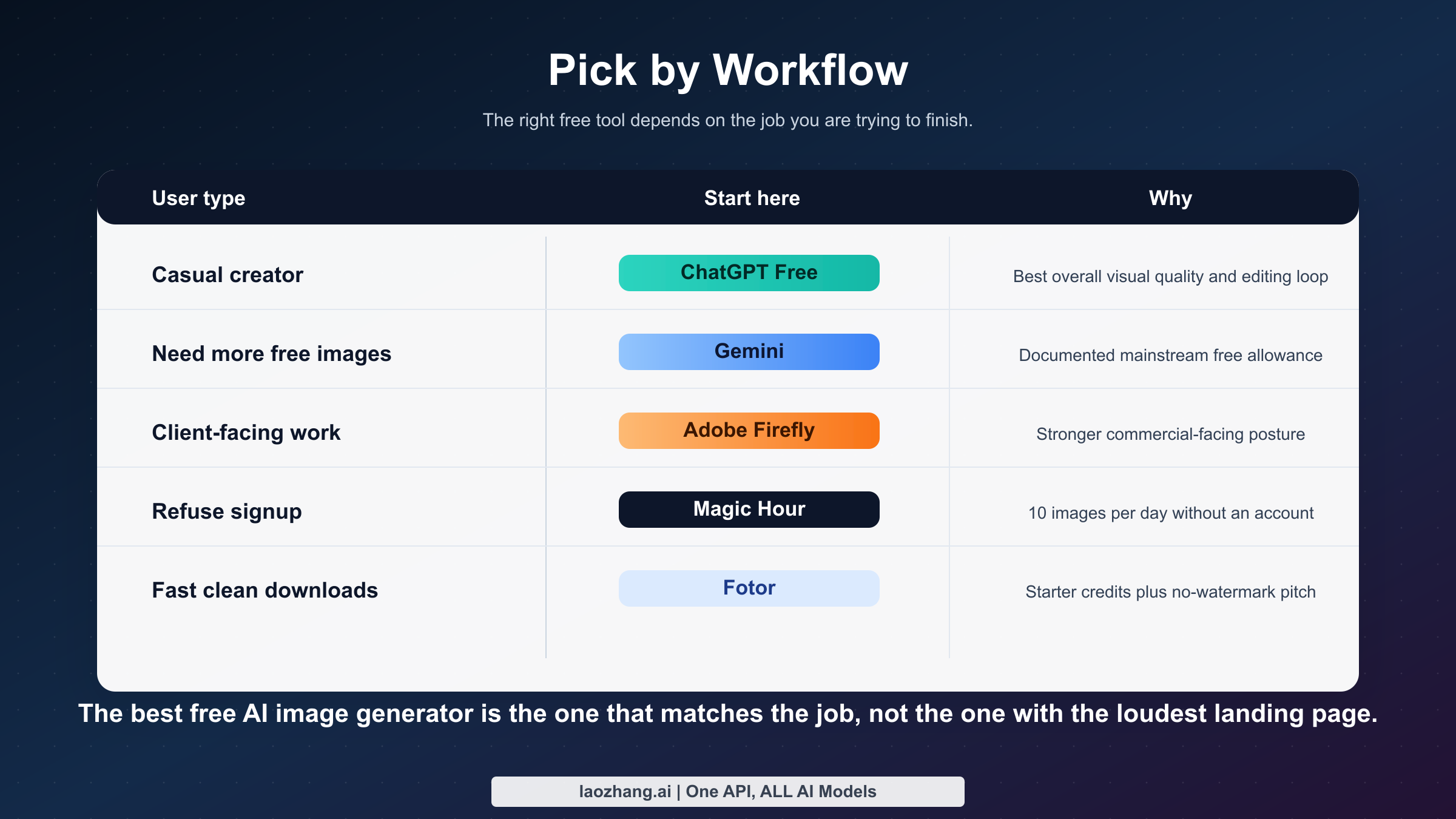
The cleanest final recommendation is to choose by workflow, not by brand loyalty. If you are a casual creator making a few social posts a week, use ChatGPT first and keep Gemini as your overflow or comparison option. If you are a student or hobbyist who mostly cares about the number of daily generations you can reasonably expect, start with Gemini. If you are a marketer or consultant who needs a safer answer for brand-facing work, start with Firefly even if it gives you fewer free shots. If you hate sign-up walls, go straight to Magic Hour. If you only need a few clean files quickly and are willing to work inside a credits model, Fotor is fine.
That means the best free online AI image generator is really a decision matrix, not a throne. The highest-quality free experience and the highest-volume free experience are no longer the same product. The safest business answer and the least frictional browser answer are not the same product either. Once you accept that, this market stops feeling messy.
| You are this kind of user | Start here | Second choice | Why |
|---|---|---|---|
| Casual creator who wants the best-looking free output | ChatGPT Free | Gemini | Better iterative editing, stronger overall workflow |
| User who mainly wants more free images per day | Gemini | Fotor | Published mainstream allowance beats vague limits |
| Marketer or freelancer making client-facing visuals | Adobe Firefly | ChatGPT | Firefly has the better commercial-facing posture |
| User who refuses signup | Magic Hour | None in this list beats it on friction | Clear browser access with 10/day starter allowance |
| User who just needs a few clean downloads fast | Fotor | ChatGPT | Reward credits plus no-watermark positioning |
| Designer already living in asset libraries and templates | Freepik | Firefly | Value comes from workflow adjacency, not from being the best raw generator |
If you are still on the fence between Google and OpenAI specifically, there is one more helpful shortcut. Choose ChatGPT when you already know you will want to revise the same idea several times. Choose Gemini when you already know you want to create more total images and are happy to trade some workflow nuance for a better-defined allowance. That simple rule will be right more often than any one-number leaderboard.
FAQ
What is the best free online AI image generator in 2026?
If you mean best overall, it is ChatGPT Free. If you mean best documented free daily allowance from a major vendor, it is Gemini with Nano Banana 2. Those are different answers because quality, editing, and throughput are no longer perfectly aligned in one free tool.
Which free AI image generator has no watermark?
Fotor explicitly markets no-watermark downloads on its current page. That does not automatically make it the best general tool, and it definitely does not mean every free-use restriction disappears. It simply means download cleanliness is part of the product pitch.
Which free AI image generator is best for commercial use?
Adobe Firefly is the safest mainstream recommendation in this comparison because Adobe frames the product inside a commercial creative workflow. It still uses a limited-credit free model, so it is not the most generous free option. It is the best answer when legal comfort matters more than free volume.
Is any AI image generator really unlimited and free?
Not in the mainstream browser tools I reviewed. If a page says "unlimited," read the fine print for rolling throttles, reward credits, personal-use-only terms, or a hidden upgrade path. As of March 13, 2026, I would treat truly unlimited free image generation as a marketing claim, not a practical planning assumption.
What is the difference between free web access and paid API access?
The browser product is the consumer-facing experience. The API is the developer-facing production path. Those can have completely different pricing. Gemini is the clearest example right now: the Gemini app has a useful free image tier, while the Gemini image API is priced as paid on Google's own pricing page.
When should I stop chasing free tiers and just pay?
The honest threshold is when predictability matters more than the headline price. If you are hitting limits every day, or you need automation, or you are spending more time rotating between "free" tools than finishing the work, the free tier has stopped being cheap. It is now costing you focus. At that point, a paid plan or API is usually the more rational option.