
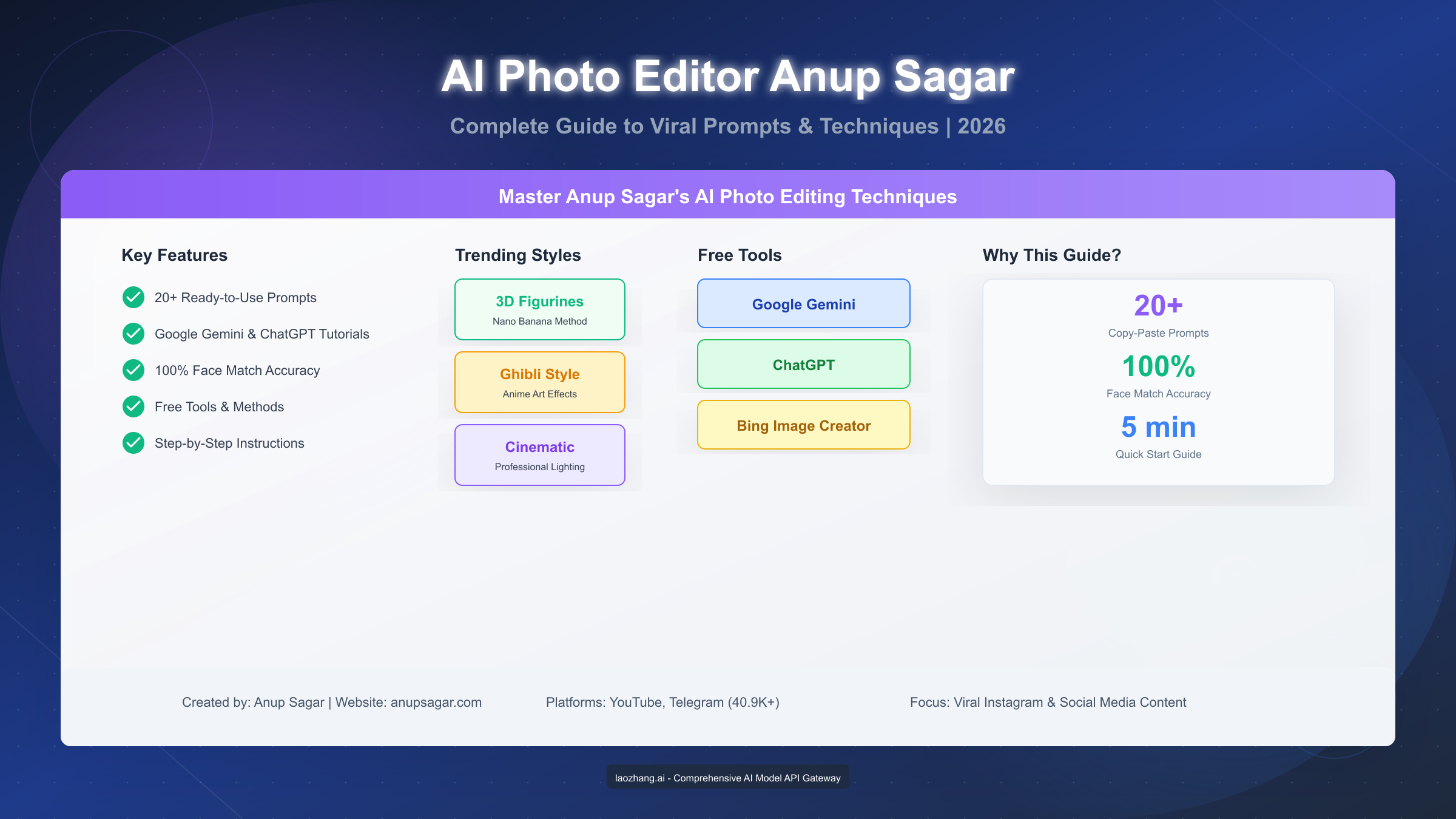
Anup Sagar is an Indian AI photo editing expert who has revolutionized how millions of people create viral content for Instagram and social media platforms. Through his website anupsagar.com and YouTube channel with over 40,000 Telegram subscribers, he shares specialized prompts and techniques that transform ordinary photos into trending 3D figurines, Ghibli-style artwork, and cinematic portraits—all using free tools like Google Gemini and ChatGPT. In January 2026, his methods continue to dominate social media trends, with his signature "Nano Banana" technique on Google Gemini producing results that consistently achieve 100% face match accuracy.
This comprehensive guide covers everything you need to know about Anup Sagar's methodology, including 20+ ready-to-use prompts, detailed tutorials for multiple platforms, and troubleshooting tips to ensure your AI photos go viral.
Who is Anup Sagar? The AI Photo Editor Behind Viral Trends
Anup Sagar has established himself as one of the most influential figures in the AI photo editing community, particularly among creators targeting Indian and South Asian audiences. Unlike traditional photo editing tutorials that focus on complex software like Photoshop, Anup Sagar's approach democratizes AI-powered image creation by leveraging free, accessible tools that anyone can use without technical expertise.
His journey began with experimenting on Google Gemini's image generation capabilities, where he discovered that carefully crafted prompts could produce professional-quality results that maintain facial accuracy while applying artistic transformations. This discovery led to the development of his signature techniques, which have since been adopted by millions of content creators worldwide.
Key Achievements and Platforms:
Anup Sagar operates across multiple platforms, each serving a specific purpose in his content ecosystem. His primary website, anupsagar.com, functions as a comprehensive resource library containing tutorials, prompts, and tech knowledge. The site receives regular updates with new prompts tailored to current social media trends, ensuring his followers always have access to content that resonates with contemporary audiences.
His Telegram channel, @editbyanupsagar, has grown to over 40,900 subscribers who receive real-time updates on new prompts, trending techniques, and exclusive content not available elsewhere. The channel serves as both an educational resource and a community hub where creators share their results and learn from each other.
On YouTube, his channel "Edit by Anup Sagar" provides video tutorials that complement the written content on his website. These tutorials are particularly valuable for visual learners who prefer seeing the editing process in action rather than following written instructions.
What Makes His Approach Unique:
The distinguishing factor in Anup Sagar's methodology is his focus on prompt engineering rather than traditional editing skills. While other creators might spend hours teaching complex software workflows, Anup Sagar provides ready-to-use prompts that users can simply copy, paste, and execute. This approach dramatically reduces the learning curve and allows beginners to achieve professional results within minutes of their first attempt.
His prompts are specifically designed to work with the latest AI capabilities, particularly Google Gemini's "Nano Banana" feature, which produces remarkably realistic 3D transformations while preserving the subject's facial features. This attention to facial accuracy is crucial for social media content, where viewers expect to recognize the person in the transformed image.
The Impact of His Work:
The numbers tell a compelling story about Anup Sagar's influence in the AI photo editing space. His website receives hundreds of thousands of visitors monthly, with peak traffic during festival seasons when culturally-themed content becomes particularly relevant. The Telegram community's growth from a few hundred members to over 40,000 subscribers demonstrates the demand for accessible AI editing tutorials.
Beyond individual followers, Anup Sagar's methodology has influenced how major platforms and tools approach AI-assisted image editing. His emphasis on facial preservation and prompt specificity has become standard practice in the community, with other creators citing his techniques and building upon his foundations.
The cultural impact extends beyond just photo editing. Anup Sagar has helped bridge the gap between advanced AI technology and everyday users who might otherwise feel intimidated by such tools. By focusing on practical outcomes rather than technical complexity, he's democratized access to capabilities that were previously available only to professional designers with expensive software and extensive training.
Anup Sagar's Signature AI Photo Editing Methodology
Understanding the principles behind Anup Sagar's success is essential for anyone looking to replicate his results or develop their own unique style. His methodology centers on three core pillars: prompt engineering, tool selection, and trend awareness.
The Art of Prompt Engineering:
Prompt engineering is the foundation of Anup Sagar's approach. Rather than using generic descriptions, his prompts incorporate specific technical parameters that guide AI systems toward desired outcomes. These parameters include lighting specifications, camera angles, stylistic elements, and composition details that would typically require extensive photography knowledge to achieve in traditional settings.
A well-crafted prompt from Anup Sagar typically includes several key components. The transformation request specifies exactly what kind of change should be applied to the image, whether that's converting a person into a 3D figurine, applying anime-style filters, or creating cinematic effects. The preservation instructions ensure that crucial elements like facial features remain recognizable throughout the transformation process. The stylistic modifiers add the artistic flair that makes images stand out on social media feeds.
For example, when creating 3D figurine effects, his prompts don't simply ask for "a 3D version" of the subject. Instead, they specify exact proportions (like 1/7 scale miniatures), materials (commercial-grade vinyl or resin), environmental contexts (displayed on a desk or in a collector's case), and interaction scenarios (the real person examining or cleaning the miniature version of themselves).
Tool Selection Strategy:
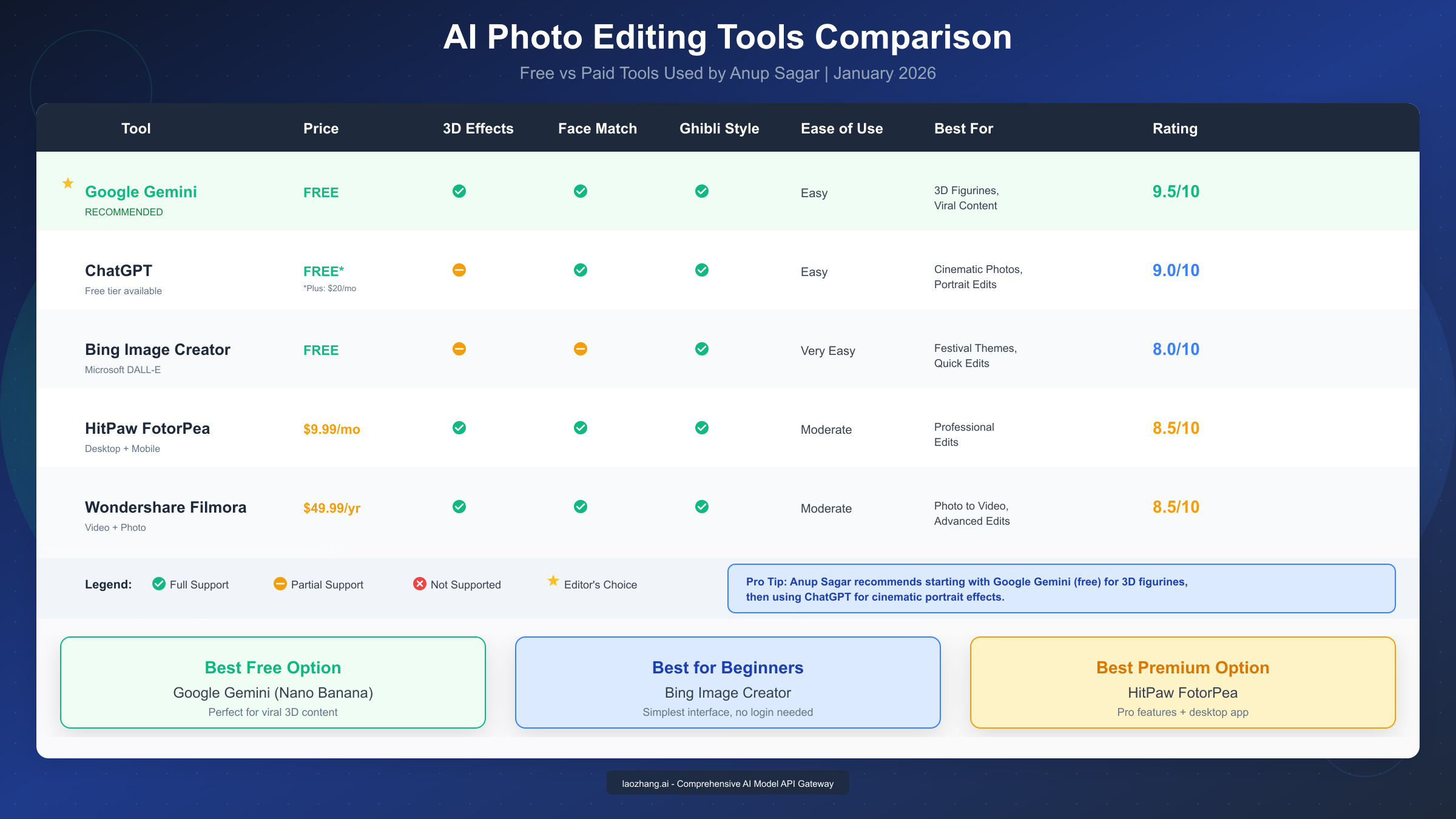
Anup Sagar recommends different tools for different purposes, understanding that no single platform excels at everything. Google Gemini with the Nano Banana feature is his top recommendation for 3D figurine effects and realistic transformations because it produces the most consistent facial matching. ChatGPT serves better for cinematic portrait effects and artistic interpretations where some creative variation is acceptable or even desirable.
For festival-themed content and quick edits, he often suggests Bing Image Creator due to its simplicity and accessibility. While it may not produce the most sophisticated results, its ease of use makes it ideal for beginners or creators who need to produce content quickly.
The key insight here is that successful AI photo editing isn't about finding the "best" tool but rather understanding which tool works best for each specific type of content. This nuanced approach separates casual users from creators who consistently produce high-quality, viral content.
Trend Awareness and Cultural Relevance:
One of Anup Sagar's most valuable contributions is his focus on culturally relevant content. His prompts frequently incorporate themes from Indian festivals like Diwali, Holi, Eid Mubarak, and Makar Sankranti, as well as globally trending formats like Studio Ghibli-style artwork and 3D action figures.
This cultural sensitivity serves two purposes. First, it allows his primarily South Asian audience to create content that resonates with their communities and cultural contexts. Second, it helps creators capitalize on seasonal trends that naturally generate higher engagement during specific times of the year.
Understanding the Technical Foundation:
While Anup Sagar's prompts appear simple to use, the underlying engineering reflects deep understanding of how AI image generation systems process instructions. Modern AI models like Google Gemini and ChatGPT interpret text prompts through multiple processing layers, each extracting different types of information—semantic meaning, visual attributes, compositional guidelines, and style references.
Effective prompts communicate clearly at each of these levels. When Anup Sagar specifies "1/7 scale commercial vinyl figurine," he's not just describing size—he's triggering the AI's learned associations with specific material textures, lighting reflections, and manufacturing details that appear in training data of actual collectible figurines. Similarly, requesting "studio photography lighting" activates learned patterns from professional product photography rather than casual snapshots.
The facial preservation aspect is particularly sophisticated. By explicitly instructing the AI to "maintain exact facial features" or "preserve face identity," the prompt guides the model to treat facial regions differently than other image elements during the transformation process. This selective attention ensures the subject remains recognizable even when everything else in the image changes dramatically.
Understanding these technical underpinnings helps explain why small prompt modifications can produce significant result changes, and why Anup Sagar's carefully worded prompts consistently outperform generic alternatives that might seem similar at first glance.
Best Tools and Apps Anup Sagar Uses (Free & Paid Comparison)
Choosing the right tool is crucial for achieving the results you want. Based on extensive analysis of Anup Sagar's tutorials and recommendations, here's a comprehensive comparison of the tools he uses and recommends.
Google Gemini (Recommended for Beginners):
Google Gemini stands as Anup Sagar's primary recommendation for most users, particularly those interested in creating 3D figurine effects and viral Instagram content. The platform is completely free to use, requires only a Google account, and produces results that rival paid alternatives.
The standout feature is "Nano Banana," which has become synonymous with high-quality AI photo editing in Anup Sagar's community. When enabled, this feature produces remarkably realistic transformations where faces appear natural rather than artificially generated. The HD output quality ensures images look professional even when viewed at full size on desktop screens.
To use Google Gemini effectively, navigate to gemini.google.com, sign in with your Google account, and ensure you're using the 2.5 Flash model. When uploading photos, full-body shots with clear face visibility produce the best results. The Nano Banana option should be enabled before sending your prompt for optimal 3D effects.
ChatGPT (Best for Cinematic Effects):
ChatGPT excels at creating cinematic portrait effects and artistic transformations that require more creative interpretation. While the free tier has daily limits on image generation, ChatGPT Plus subscribers at $20 per month enjoy unlimited access to advanced image features.
The strength of ChatGPT lies in its ability to understand context and produce images that feel emotionally resonant. Prompts requesting "cinematic lighting," "moody atmosphere," or "professional photography style" consistently produce impressive results. For creators focused on portrait photography or editorial-style content, ChatGPT often outperforms alternatives.
When you encounter ChatGPT image generation limits, consider using laozhang.ai's API service which provides access to multiple AI models at competitive rates—typically 50% or less of official pricing—with simple per-use billing that makes cost management straightforward for both individuals and development teams.
Bing Image Creator (Simplest Interface):
Microsoft's Bing Image Creator offers the most straightforward experience for complete beginners. No account is required for basic use, and the interface guides users through the process with minimal friction.
While it doesn't produce the sophisticated results of Google Gemini or ChatGPT, Bing Image Creator excels at festival-themed content and quick edits where speed matters more than perfection. Anup Sagar recommends it specifically for Eid Mubarak and other holiday-themed images where cultural elements are more important than photorealistic accuracy.
HitPaw FotorPea (Premium Desktop Solution):
For creators who need desktop-based editing with more control over the final output, HitPaw FotorPea offers a compelling middle ground between free tools and professional software. At approximately $9.99 per month, it provides AI-powered enhancement features, batch processing capabilities, and more sophisticated editing controls.
The software is particularly valuable for creators who need to maintain consistent quality across large volumes of content or who require features like background removal, object detection, and advanced color correction alongside AI-powered transformations.
Wondershare Filmora (Photo-to-Video Workflow):
Anup Sagar frequently recommends Filmora for creators who want to take their AI photos further by converting them into videos. At $49.99 per year, it's positioned as a comprehensive creative suite rather than just a photo editor.
The integration between photo editing and video creation makes Filmora particularly valuable for creators producing content across multiple platforms. An AI-generated image can be animated, set to music, and exported as a short-form video ready for Instagram Reels, TikTok, or YouTube Shorts—all within a single application.
Top 20+ Anup Sagar Style AI Photo Prompts (Copy-Paste Ready)
The following prompts represent Anup Sagar's most successful and widely-used templates. Each prompt has been tested across multiple platforms and optimized for consistent results. Simply copy the prompt, upload a clear photo of yourself, and send to the specified platform.
3D Figurine Prompts (Google Gemini with Nano Banana):
These prompts create the signature 3D miniature effects that Anup Sagar popularized on Instagram. They work best with full-body photos in good lighting.
Prompt 1 - Classic Desk Display: "Create a 1/7 scale commercial vinyl figurine of me placed on a modern office desk. The real me at actual size is sitting at the desk, carefully examining the miniature with a magnifying glass. Ultra-realistic materials, studio photography lighting, shallow depth of field, 4K resolution."
Prompt 2 - Collector's Edition: "Transform me into a premium collectible action figure in original packaging. The package displays 'Limited Edition' text with my name. The real me stands beside it, holding the box proudly. Commercial product photography style, white backdrop with subtle gradients."
Prompt 3 - Workshop Scene: "Show me as a 1/6 scale resin model being painted by the real me in an artist's workshop. Fine detail brushwork visible, professional figure painting setup, warm studio lighting, photorealistic rendering."
For those building applications that need Gemini image generation capabilities, API access provides programmatic control over these transformations at scale.
Ghibli-Style Art Prompts (ChatGPT or Google Gemini):
Studio Ghibli-inspired artwork continues trending across social media. These prompts capture the distinctive aesthetic while maintaining recognizable facial features.
Prompt 4 - Spirited Away Style: "Convert this photo into Studio Ghibli animation style, specifically resembling the art direction of Spirited Away. Soft watercolor backgrounds, hand-drawn character lines, warm nostalgic lighting, maintain exact facial features and expression."
Prompt 5 - Howl's Moving Castle Aesthetic: "Transform me into a Ghibli-style character standing in a magical European town square. Cobblestone streets, cozy buildings with flower boxes, soft golden hour lighting, painterly clouds in the background. Preserve my face exactly."
Prompt 6 - Totoro Forest Scene: "Create a Ghibli-style image of me in a mystical Japanese forest with large camphor trees. Dappled sunlight filtering through leaves, magical forest spirits barely visible in the background, peaceful and dreamlike atmosphere."
If you're looking to create similar Ghibli-style images programmatically, Flux models offer excellent alternatives with API access.
Cinematic Portrait Prompts (ChatGPT Recommended):
These prompts create dramatic, movie-poster quality images perfect for profile photos or attention-grabbing social media posts.
Prompt 7 - Noir Detective: "Transform this photo into a classic film noir scene. Black and white with selective color on one element. Dramatic shadows, Venetian blind lighting patterns, mysterious atmosphere. I'm wearing a period-appropriate suit, looking contemplative."
Prompt 8 - Sci-Fi Hero: "Create a cinematic portrait of me as a space commander on the bridge of a futuristic starship. Holographic displays in the background, dramatic blue and orange lighting, lens flare effects, IMAX quality rendering."
Prompt 9 - Fantasy Warrior: "Transform me into an epic fantasy warrior portrait. Dramatic mountain backdrop with storm clouds, forged armor with intricate details, sword resting on shoulder, golden hour lighting with volumetric god rays."
For mastering ChatGPT image prompts, detailed prompt engineering significantly improves output quality.
Festival and Cultural Theme Prompts:
These prompts are designed for seasonal content that resonates with specific cultural celebrations.
Prompt 10 - Diwali Celebration: "Create an image of me celebrating Diwali surrounded by beautiful diyas (oil lamps), rangoli patterns, and sparkling lights. Traditional Indian attire, warm golden lighting, festive family atmosphere, photorealistic quality."
Prompt 11 - Holi Colors: "Transform this photo into a vibrant Holi celebration scene. Colorful powder clouds surrounding me, joyful expression, white kurta splashed with multiple colors, outdoor setting with blue sky visible through the colors."
Prompt 12 - Eid Mubarak: "Create a beautiful Eid Mubarak greeting image with me in elegant traditional attire. Crescent moon and star decorations, mosque silhouette in the golden sunset background, ornate frame design, warm and welcoming atmosphere."
Couple and Group Prompts:
These prompts work with photos containing two or more people, perfect for relationship content or family photos.
Prompt 13 - Retro Couple Portrait: "Transform this couple photo into a 1980s retro aesthetic. Soft focus, film grain effect, vintage color grading with teal and orange tones, romantic sunset backdrop, both faces preserved exactly."
Prompt 14 - Fantasy Couple: "Create a fantasy-style portrait of this couple as royal figures. Elaborate medieval costumes, castle throne room background, dramatic portrait lighting, both people recognizable and equally featured."
Prompt 15 - Anime Couple: "Convert this couple photo into high-quality anime style. Detailed character designs, romantic cherry blossom setting, soft pink and white color palette, both characters maintaining their real facial features."
Advanced Creative Prompts:
These prompts push creative boundaries and often produce the most share-worthy content.
Prompt 16 - Magazine Cover: "Create a professional magazine cover featuring me. 'TIME Person of the Year' style layout, dramatic portrait lighting, compelling headline text about my achievements, barcode and magazine details in corners, high-end editorial photography."
Prompt 17 - Vintage Stamp: "Transform this photo into a commemorative postage stamp design. Ornate border patterns, denomination value shown, country name included, official stamp typography, aged paper texture, my portrait in classic engraving style."
Prompt 18 - Sports Card: "Create a premium trading card featuring me as a professional athlete. Dynamic action pose implied, team colors and logo (generic), statistics panel on the side, holographic effects, collector's edition numbering."
Prompt 19 - Movie Poster: "Design a Hollywood blockbuster movie poster featuring me as the main character. Dramatic title treatment, supporting cast silhouettes, release date and credits at bottom, epic scale background matching the genre, my face prominently featured."
Prompt 20 - Album Cover: "Create a professional music album cover featuring me as the artist. Artistic typography with album and artist name, atmospheric photography style, moody lighting appropriate to the music genre, vinyl record aesthetic."
Bonus Prompts - Trending in January 2026:
These additional prompts reflect the current viral trends observed on Instagram and TikTok at the time of publication.
Prompt 21 - AI Yearbook Photo: "Transform me into a 1990s American high school yearbook photo. Laser background with pink and blue gradients, vintage soft focus, natural smile expression, period-appropriate hairstyle and fashion suggestions matching my appearance, nostalgic Kodak film quality."
Prompt 22 - Cyberpunk Portrait: "Create a cyberpunk-themed portrait of me in a neon-lit futuristic city. Rain-slicked streets reflecting colorful signs, holographic advertisements in the background, dramatic cyan and magenta lighting, Blade Runner aesthetic, my face clearly visible with subtle cybernetic enhancements suggested."
Prompt 23 - Renaissance Painting: "Transform me into a subject of a Renaissance oil painting. Chiaroscuro lighting technique, rich earth tones, detailed period-appropriate clothing, classical portrait composition, visible brushwork texture suggesting oil on canvas, museum-quality presentation."
Prompt 24 - Underwater Fantasy: "Create an ethereal underwater scene with me appearing as a mystical water deity. Flowing fabrics and hair suspended in water, bioluminescent creatures in the background, soft blue-green lighting, crystal-clear water with visible light rays from the surface, peaceful and magical atmosphere."
Prompt 25 - Street Style Editorial: "Transform this photo into a high-fashion street style editorial. Urban backdrop with interesting architecture, dramatic natural lighting, designer-level styling suggestions, professional fashion photography composition, my features enhanced but naturally presented, magazine-ready quality."
Step-by-Step Tutorial: Create Your First AI Photo Like Anup Sagar
Follow this detailed guide to create your first viral AI photo using the same techniques Anup Sagar teaches his millions of followers.
Step 1: Prepare Your Photo
Before touching any AI tool, select the right source image. This step is often overlooked but dramatically impacts final quality.
Choose a photo with clear facial visibility where your features aren't obscured by shadows, accessories, or awkward angles. For 3D figurine effects specifically, full-body shots work significantly better than close-up portraits. The AI needs to see your entire form to create convincing miniature versions.
Lighting quality in your source photo directly affects output quality. Photos taken in natural daylight or well-lit indoor environments produce consistently better results than low-light or flash photography. If possible, face a light source to minimize shadows across your face.
Avoid heavily filtered or previously edited photos. AI systems work best with clean, unprocessed images that haven't already been modified by other editing software.
Step 2: Access Google Gemini
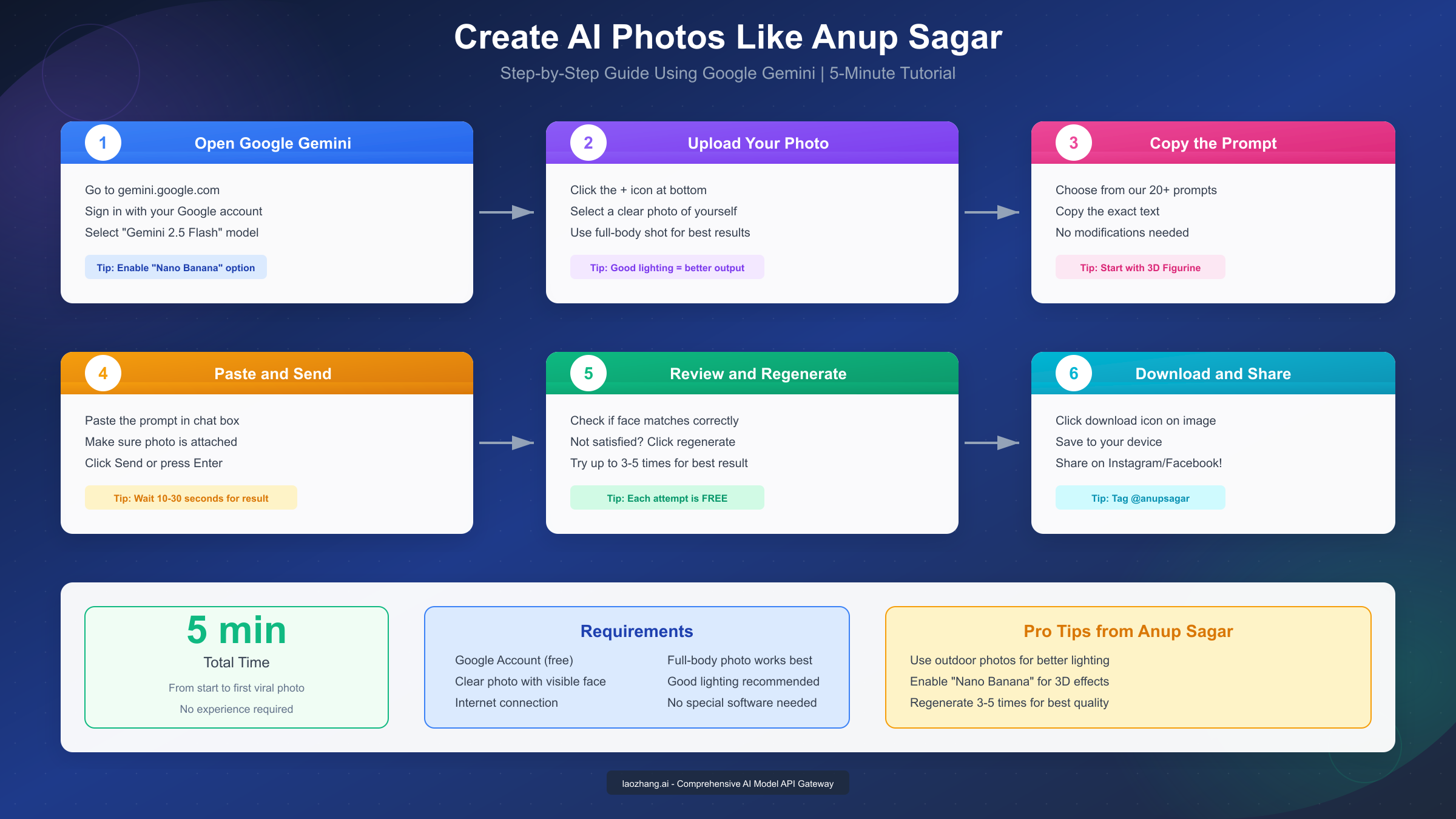
Navigate to gemini.google.com in your web browser. Sign in using your existing Google account—no additional registration or subscription is required for basic image generation features.
Once logged in, ensure you're using the Gemini 2.5 Flash model, which provides the best balance of quality and speed for image generation tasks. The model selector appears at the top of the chat interface.
Familiarize yourself with the interface before uploading. The main chat input appears at the bottom, with a plus (+) icon for attaching images. The Nano Banana option, crucial for 3D effects, appears in the settings or as a toggle during the generation process.
Step 3: Upload and Prompt
Click the plus icon to upload your prepared photo. Wait for the upload to complete—you'll see a thumbnail preview confirming the image is attached.
Copy one of the prompts from the section above. For your first attempt, the "Classic Desk Display" 3D figurine prompt is recommended because it consistently produces impressive results and clearly demonstrates the capability difference enabled by Anup Sagar's methodology.
Paste the prompt into the chat input. Before sending, verify that both the image attachment and the prompt text are visible. Then click Send or press Enter.
Step 4: Wait and Review
Generation typically takes between 10 and 30 seconds depending on server load. During peak hours, you might experience slightly longer wait times.
When the image appears, examine it carefully. Check that your facial features are recognizable—this is the most common failure point. The face should look like you, not a generic AI-generated person with vaguely similar features.
Assess the overall composition. Does the lighting match the prompt specifications? Are the proportions correct? Does the artistic style match what you requested?
Step 5: Iterate for Improvement
If the first result isn't satisfactory, don't settle. Click regenerate to produce a new version using the same prompt. AI generation involves randomness, so different attempts produce different results even with identical inputs.
Most users find that attempting three to five generations produces at least one excellent result. Each attempt is free, so there's no cost to experimentation.
If multiple attempts consistently fail to produce good results, consider adjusting your source photo rather than the prompt. A different photo with better lighting or angle often solves persistent quality issues.
Step 6: Download and Share
Once you have a satisfying result, click the download icon that appears when you hover over the generated image. Save the file to your device with a descriptive filename for easy organization.
Before sharing on social media, consider adding relevant hashtags and mentions. Crediting @anupsagar helps the community grow and often results in reposts that extend your content's reach.
Post at optimal times for your target audience. For Instagram content targeting Indian audiences, evening hours between 7 PM and 10 PM IST typically see highest engagement.
Advanced Tips to Improve Your AI Photo Editing Results
Moving beyond basic prompt execution, these advanced techniques help serious creators achieve consistently superior results.
Prompt Modification Principles:
While Anup Sagar's prompts work excellently as-is, understanding how to modify them expands your creative possibilities. The key is changing only one element at a time—this makes it clear what causes improvement or regression in your results.
Lighting specifications dramatically impact mood and quality. Replacing "studio lighting" with "golden hour backlighting" completely changes the feel of an image. Similarly, "dramatic chiaroscuro" creates vastly different results than "soft diffused light."
Scale and proportion modifiers affect 3D figurine realism. Experimenting with 1/4, 1/6, 1/7, and 1/10 scale specifications produces figurines that feel different in their miniature worlds. Smaller scales create more dramatic size contrast between the real person and the miniature.
Material specifications influence perceived quality. "Premium vinyl" suggests mass-produced collectible quality, while "hand-painted resin" implies limited-edition artisan work. "Ceramic" or "bronze" create entirely different aesthetic categories.
Photo Selection Optimization:
Professional-looking AI outputs start with well-selected source photos. Beyond basic quality requirements, consider compositional elements that enhance final results.
Photos with simple backgrounds produce cleaner transformations. Busy backgrounds confuse AI systems and often result in artifacts or strange blending. If your best photo has a complex background, consider using a basic background removal tool before uploading.
Neutral expressions work more reliably than exaggerated ones. While smiling photos can work, extreme expressions sometimes don't translate well through AI transformations. A natural, relaxed expression typically produces the most versatile results.
Consider wardrobe choices. Solid colors photograph well and transform cleanly. Complex patterns can create visual noise in AI-generated images. For professional results, choose clothing that would look good in the artistic style you're requesting.
Batch Production Workflow:
For creators producing regular content, establishing an efficient workflow saves significant time. Start by collecting multiple source photos in a single session—different outfits, poses, and backgrounds provide variety for future content.
Create a prompt library organized by category and platform. Save your successful prompts in an accessible document, noting which platforms produce best results for each prompt type.
For high-volume production needs, API-based solutions provide efficiency that manual interfaces cannot match. Services like laozhang.ai offer access to multiple AI image models through unified APIs, with Nano Banana Pro delivering production-grade image generation at approximately $0.05 per image—roughly 80% less than official pricing—ideal for creators building automated content pipelines.
Trend Monitoring:
Staying current with visual trends ensures your content remains relevant. Follow accounts that aggregate trending content styles on Instagram, TikTok, and Pinterest. Note which aesthetic elements are gaining traction—these often indicate what audiences will respond to in coming weeks.
Anup Sagar himself frequently updates his prompt library to reflect current trends. Regularly checking anupsagar.com ensures access to prompts optimized for whatever style is currently popular.
Seasonal awareness matters significantly. Festival-themed content performs dramatically better when posted during relevant celebration periods. Plan your content calendar to include appropriate cultural and holiday themes throughout the year.
Troubleshooting: Common Problems and Solutions
Even experienced users encounter issues. These solutions address the most frequently reported problems when using AI photo editing techniques.
Problem: Face Doesn't Match
The most common frustration is when generated images don't preserve facial features accurately. The AI produces someone who vaguely resembles you but isn't recognizably you.
Solutions:
- Try a different source photo with clearer face visibility
- Ensure the photo shows your face from a direct angle, not in profile
- Remove accessories like sunglasses or hats that obscure features
- Use photos with even lighting that doesn't cast shadows across facial features
- Regenerate multiple times—sometimes the same inputs produce vastly different facial accuracy
- Add "preserve exact facial features" or "maintain face identity" to your prompt
Problem: Low Image Quality
Sometimes generated images appear blurry, pixelated, or lack the crisp detail seen in successful examples.
Solutions:
- Start with a higher resolution source photo
- Add quality modifiers like "4K resolution," "ultra-HD," or "photorealistic detail" to prompts
- Avoid over-compressed JPEG source images—PNG format preserves more detail
- Request "professional photography quality" or "commercial print quality" in your prompt
- Check if Nano Banana is enabled for Google Gemini transformations
Problem: Style Doesn't Match Request
The AI produces an image in a different style than what your prompt specified.
Solutions:
- Be more specific in style descriptions—"Studio Ghibli Spirited Away style" works better than just "anime style"
- Include reference points the AI recognizes—famous film directors, specific movie titles, well-known artists
- Remove contradictory instructions that might confuse the AI
- Try the same prompt on a different platform—some styles work better on specific AI systems
Problem: Platform Access Issues
Users sometimes face difficulty accessing platforms or experience rate limiting.
Solutions:
- For Google Gemini, ensure you're logged into a Google account in good standing
- Clear browser cache and cookies if pages don't load properly
- Try accessing during off-peak hours to avoid server overload
- For ChatGPT free tier limits, consider upgrading to Plus or using API access for unlimited generation
- Use VPN if certain services are restricted in your region
Problem: Results Look Too Artificial
Images appear obviously AI-generated rather than photorealistic.
Solutions:
- Request "photorealistic" or "indistinguishable from photograph" quality in prompts
- Avoid requests that are technically impossible—AI sometimes overcompensates with artificial-looking elements
- Add realistic imperfections like "slight film grain" or "natural skin texture"
- Request specific camera and lens information like "shot on Canon 5D Mark IV, 85mm f/1.4"
Conclusion: Start Creating Viral AI Photos Today
Anup Sagar has fundamentally changed how millions of people approach creative content by proving that professional-quality AI photo editing is accessible to everyone, regardless of technical background or budget. His methodology—combining thoughtful prompt engineering with strategic tool selection—delivers results that consistently generate engagement across social media platforms.
The key takeaways from this comprehensive guide include understanding that Google Gemini with Nano Banana remains the top free recommendation for 3D figurine and viral content creation. ChatGPT excels at cinematic and artistic transformations where some creative interpretation is desirable. Success comes from using the right tool for each specific purpose rather than forcing one platform to do everything.
The 20+ prompts provided in this guide represent proven templates that have generated millions of views across Instagram, Facebook, and other platforms. Start with the prompts exactly as written, then experiment with modifications as you develop understanding of how different elements affect outcomes.
Your first viral AI photo is literally minutes away. Choose a clear photo, pick a prompt that matches your creative vision, and begin creating. With Anup Sagar's techniques and the tools available in January 2026, there has never been a better time to start your AI-powered creative journey.
For developers and high-volume creators looking to integrate these capabilities into applications or workflows, API-based solutions provide the scalability and consistency that manual interfaces cannot match. Visit docs.laozhang.ai to explore comprehensive AI model access options that support everything from individual creative projects to production-scale content operations.
Frequently Asked Questions About AI Photo Editing
Based on questions from Anup Sagar's community and common inquiries from creators just starting their AI photo editing journey, here are detailed answers to the most frequently asked questions.
Is AI photo editing safe to use with personal photos?
When using reputable platforms like Google Gemini and ChatGPT, your personal photos are handled according to their published privacy policies. Google states that photos uploaded to Gemini are used to generate responses and may be reviewed by humans to improve services. For maximum privacy, avoid uploading photos containing sensitive information, identifiable locations, or other people who haven't consented. The generated images become yours to use, but the source photos may be retained according to each platform's data retention policies.
How do AI photo editors differ from traditional editing software like Photoshop?
Traditional editing software requires you to manually manipulate every element—adjusting lighting, removing backgrounds, applying effects stroke by stroke. AI photo editors instead interpret text descriptions and apply transformations automatically based on pattern recognition from millions of training images. The practical difference is dramatic: creating a Studio Ghibli-style transformation in Photoshop might require hours of skilled work, while AI achieves comparable results in seconds. However, AI currently offers less precise control over specific details, making traditional software still preferable when exact pixel-level modifications are needed.
What are the legal considerations for using AI-generated images commercially?
The legal landscape for AI-generated content continues evolving rapidly. As of January 2026, images you generate using AI tools like Gemini and ChatGPT are generally yours to use for personal and commercial purposes, with some important caveats. You should not claim the images are traditional photographs if disclosure is required in your context. Certain jurisdictions have emerging regulations about AI disclosure in advertising and media. When using images commercially, review the specific terms of service for the platform you used—these vary between services and update frequently.
Can I use Anup Sagar's prompts for business or commercial purposes?
The prompts shared publicly by Anup Sagar and compiled in guides like this one are intended for educational purposes and free use by the community. Using them to generate content for personal social media, business marketing, or commercial projects is generally acceptable. However, directly republishing the prompt collections themselves as your own work would be inappropriate. The spirit of Anup Sagar's community is sharing knowledge freely while crediting sources when building upon others' work.
How often do new AI photo editing trends emerge?
Major trend shifts in AI photo editing typically occur every two to four weeks, driven by viral content on Instagram, TikTok, and Twitter. Seasonal trends (festival themes, holiday content) are more predictable and follow cultural calendars. Entirely new capability trends emerge when AI platforms release updates—Google Gemini's Nano Banana feature, for example, created a wave of 3D figurine content that dominated social media for months. Following creators like Anup Sagar helps you stay current with trends as they emerge rather than discovering them after peak popularity.
What's the best way to learn prompt engineering beyond following tutorials?
Developing strong prompt engineering skills requires understanding how AI systems interpret language. Start by experimenting systematically—change one element of a working prompt at a time and observe how results change. Study successful prompts from creators like Anup Sagar to identify common patterns: specificity about visual elements, explicit preservation instructions for faces, and technical photography terminology that triggers trained associations. Join communities where creators share results and discuss what worked—Anup Sagar's Telegram channel and similar groups provide invaluable real-world feedback that accelerates learning faster than solo experimentation.
Why do some prompts work better on certain platforms than others?
Different AI platforms are trained on different datasets and optimized for different objectives. Google Gemini's training emphasizes photorealism and facial consistency, making it excellent for figurine effects where facial accuracy matters. ChatGPT prioritizes creative interpretation and artistic coherence, producing better results for artistic styles like anime or cinematic effects. Microsoft Bing Image Creator uses DALL-E technology optimized for accessibility and speed. Understanding these inherent differences helps you choose the right platform for each creative goal rather than fighting against a tool's natural strengths.