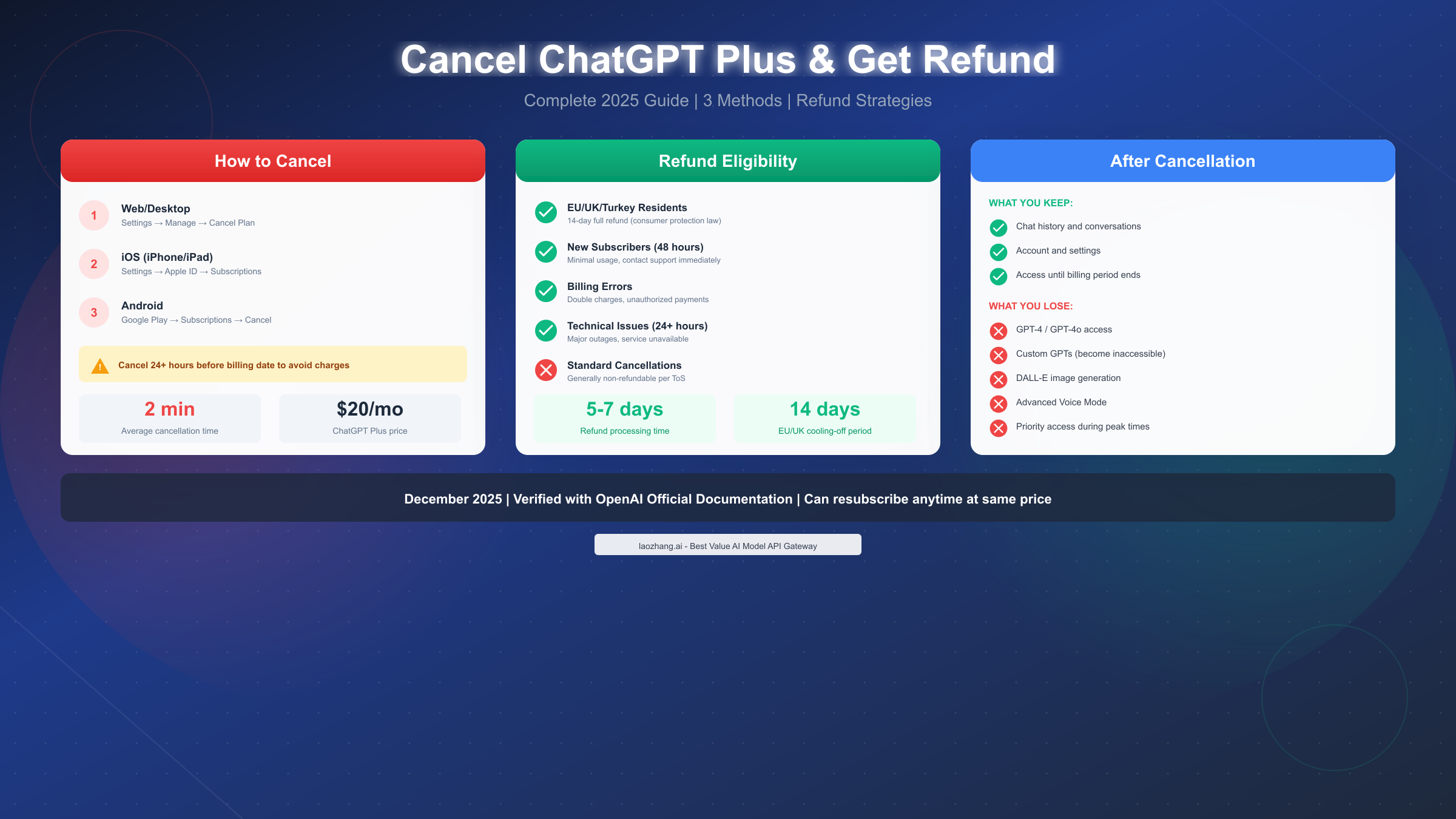
Canceling your ChatGPT Plus subscription takes just 2 minutes through Settings → Manage my subscription → Cancel Plan. For refunds, OpenAI's policy is generally non-refundable, but important exceptions exist: EU, UK, and Turkey residents have 14-day full refund rights under consumer protection law, new subscribers within 48 hours with minimal usage may qualify, and billing errors receive immediate refunds. As of December 2025, the $20/month Plus subscription can be canceled anytime without penalty, and you'll retain access to premium features until your billing period ends. This comprehensive guide covers every cancellation method plus proven refund strategies that actually work.
Quick Answer: How to Cancel and Get a Refund
Before diving into the detailed steps, here's the essential information you need to know about canceling ChatGPT Plus and requesting a refund. The process varies depending on where you originally subscribed, and your refund eligibility depends on specific circumstances that we'll explore thoroughly in this guide.
Cancellation Methods by Platform:
| Platform | Where to Cancel | Time Required | Access After Canceling |
|---|---|---|---|
| Web/Desktop | chatgpt.com → Settings → Manage subscription | 2 minutes | Until billing period ends |
| iOS (iPhone/iPad) | Settings app → Apple ID → Subscriptions | 2 minutes | Until billing period ends |
| Android | Google Play Store → Subscriptions | 2 minutes | Until billing period ends |
Refund Eligibility Quick Check:
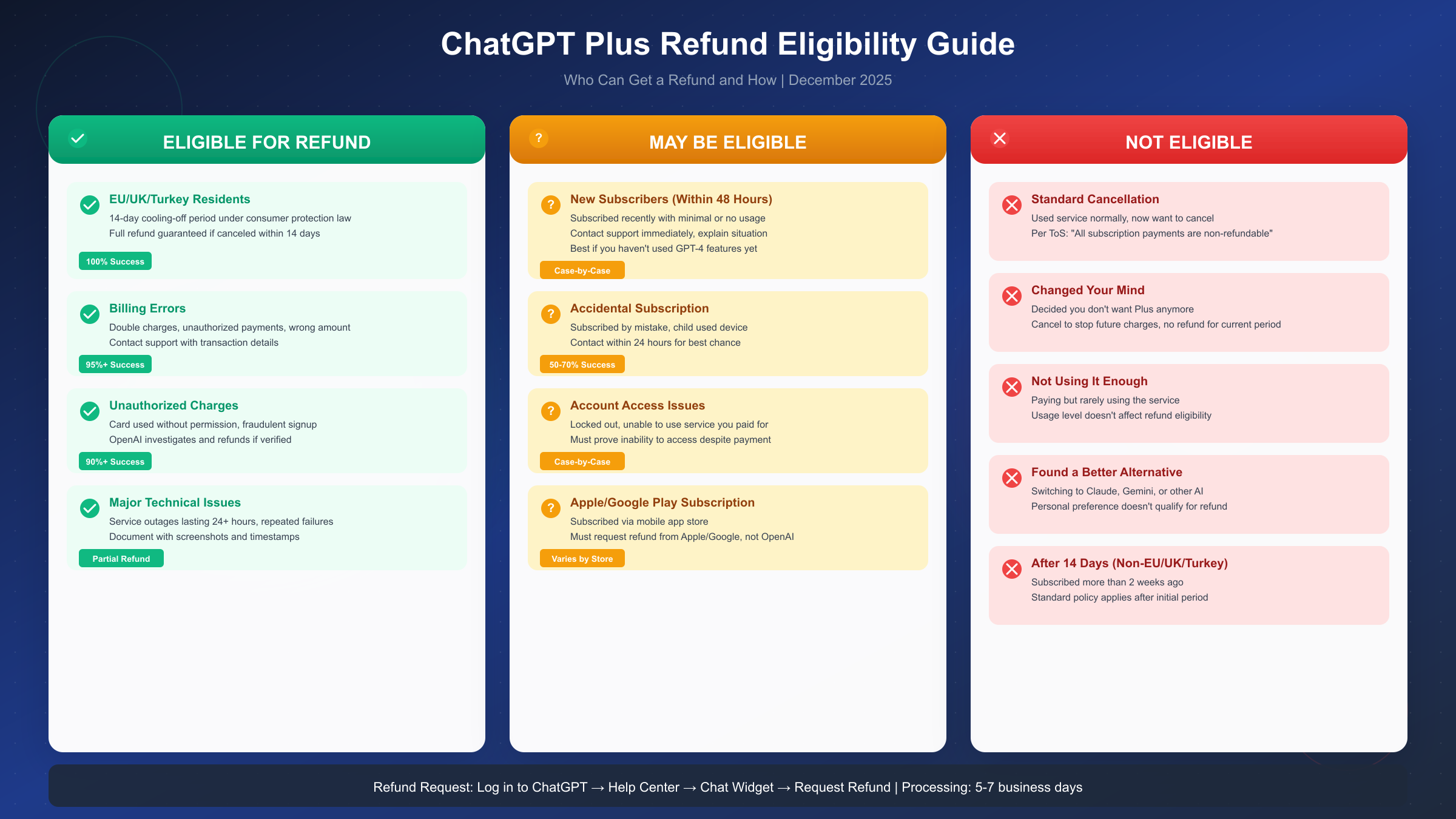
The official OpenAI policy states that subscription fees are non-refundable. However, according to OpenAI's Help Center (https://help.openai.com/en/articles/7232895-how-do-i-request-a-refund-for-my-chatgpt-subscription ), several exceptions allow refunds: EU/UK/Turkey residents within 14 days of purchase, billing errors or duplicate charges, unauthorized transactions, and significant technical issues lasting more than 24 hours. New subscribers who contact support within 48 hours with minimal usage also have a reasonable chance of receiving a refund on a case-by-case basis.
Understanding these fundamentals will help you navigate the cancellation process smoothly and determine whether you qualify for a refund. Let's explore each method in detail.
How to Cancel ChatGPT Plus on Web/Desktop
Canceling your ChatGPT Plus subscription through the web interface is the most straightforward method for users who subscribed directly on chatgpt.com. This section provides a complete walkthrough of the process, including troubleshooting tips for common issues you might encounter.
The web cancellation process works through Stripe, OpenAI's payment processor. When you access your subscription management page, you're actually interacting with Stripe's billing portal, which handles the actual cancellation. This is important to understand because it explains why the interface might look different from the main ChatGPT website.
Complete Step-by-Step Process:
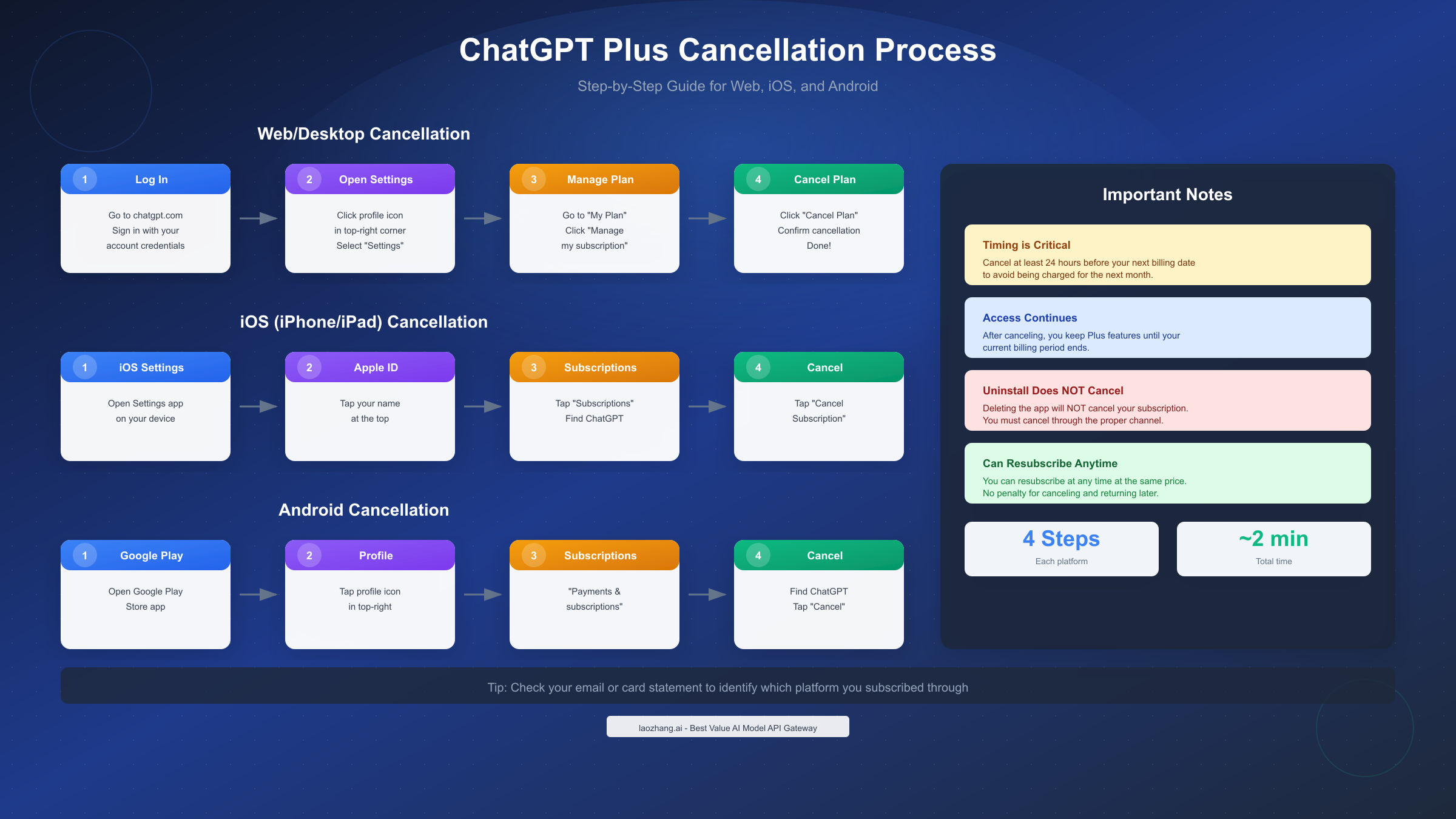
Start by navigating to chatgpt.com in your web browser and signing in with the account that holds your Plus subscription. Once logged in, locate your profile icon in the bottom-left corner of the screen (or top-right on some interface versions). Click on it to open the dropdown menu, then select "Settings" from the available options.
Within the Settings menu, find the "Subscription" or "My Plan" section. You'll see information about your current subscription status, including your billing date and the plan type. Click on "Manage my subscription" or "Manage" to access the Stripe billing portal. This will open in a new tab or redirect you to the subscription management interface.
On the subscription management page, you'll see your payment method, billing history, and the option to cancel. Click "Cancel Plan" or "Cancel Subscription" and follow the confirmation prompts. OpenAI may ask why you're canceling—you can select any reason or skip this step if possible. After confirming, you'll receive an email confirmation of your cancellation.
What If You Can't Find the Cancel Button?
A common frustration users report is difficulty locating the cancellation option. If you're having trouble, try navigating to the "Upgrade to Plus" or "View Plans" page. If you're already subscribed, this page typically shows a message like "You already have this plan" along with a "Manage subscription" link. Clicking this link should take you directly to the billing portal where you can cancel.
Another approach is to access the billing portal directly. Log into ChatGPT, then visit https://chat.openai.com/settings/subscription in your browser. This URL should take you directly to your subscription settings. If you subscribed through a different method (iOS or Android app store), you won't find cancellation options here—you'll need to cancel through the respective app store.
Verification and Confirmation:
After completing the cancellation, verify that it was successful by checking for a confirmation email from OpenAI or Stripe. You can also return to your subscription settings to confirm the status shows "Canceled" or indicates an end date for your subscription. Keep this confirmation for your records, especially if you plan to request a refund.
How to Cancel ChatGPT Plus on Mobile (iOS and Android)
Mobile app subscriptions work differently from web subscriptions because they're processed through Apple's App Store or Google Play Store rather than directly through OpenAI. This means you must cancel through the respective platform, not through the ChatGPT app or website. Understanding this distinction is crucial—many users waste time looking for cancellation options in the wrong place.
iOS Cancellation (iPhone and iPad)
If you subscribed to ChatGPT Plus through the iOS app using Apple Pay or your Apple ID, Apple handles your billing. The ChatGPT app and OpenAI's website cannot cancel or refund your subscription in this case. You must go through Apple's subscription management system.
To cancel on iOS, open the Settings app on your iPhone or iPad. Tap your name at the top of the screen to access your Apple ID settings. Select "Subscriptions" from the menu options. You'll see a list of all your active and expired subscriptions. Find "ChatGPT" in the list and tap on it. Finally, tap "Cancel Subscription" and confirm your decision when prompted.
If you don't see ChatGPT in your subscriptions list, this could mean you subscribed through a different method (web or Android) or using a different Apple ID. Check other Apple IDs you might have used, or verify your subscription source by checking your email for the original purchase confirmation.
Apple's Refund Policy: For iOS subscriptions, refund requests must go through Apple, not OpenAI. Apple generally offers refunds for subscriptions canceled within 48 hours or in cases of technical issues. You can request a refund at reportaproblem.apple.com using your Apple ID. Apple's refund decisions are made on a case-by-case basis, and they tend to be more lenient with first-time refund requests.
Android Cancellation (Google Play)
Android users who subscribed through the Google Play Store must also cancel through Google rather than OpenAI. Similar to iOS, the ChatGPT app cannot process cancellations for Play Store subscriptions.
To cancel on Android, open the Google Play Store app on your device. Tap your profile picture in the top-right corner, then select "Payments & subscriptions." Tap "Subscriptions" to see your active subscriptions. Find "ChatGPT" and tap on it, then select "Cancel subscription" and follow the prompts to confirm.
Alternatively, you can manage subscriptions through a web browser at play.google.com/store/account/subscriptions. This is useful if you don't have access to the device where you originally subscribed.
Critical Warning: Uninstalling the ChatGPT app does NOT cancel your subscription. This is perhaps the most common mistake users make. Your subscription continues to renew until you explicitly cancel it through the methods described above. Deleting the app simply removes it from your device while payments continue processing in the background.
Google Play Refund Policy: Google offers refunds for subscriptions in certain circumstances. Refunds requested within 48 hours of subscription start date are typically approved. For older subscriptions, you can submit a refund request through the Google Play support page, explaining your situation. Google usually processes approved refunds within 10 business days.
How to Identify Your Subscription Source
Not sure where you originally subscribed? Here are several ways to find out:
Check your email: Search your inbox for confirmation emails from "OpenAI," "Apple," or "Google Play" related to ChatGPT. The sender will indicate which platform processed your payment.
Check your bank or credit card statement: Look for the charge description. Charges from Apple show as "APPLE.COM/BILL" or similar. Google Play charges appear as "GOOGLE *CHATGPT" or similar. Direct OpenAI charges show as "OPENAI" or "CHATGPT."
Check within ChatGPT: Log into chatgpt.com and go to Settings → Subscription. If you see subscription management options, you likely subscribed through the web. If it shows no subscription or redirects you to upgrade, you may have subscribed through a mobile app.
Understanding your subscription source is essential not only for cancellation but also for refund requests, as each platform has different refund policies and processes.
How to Request a ChatGPT Plus Refund
Requesting a refund for ChatGPT Plus requires understanding your eligibility and following the correct process for your situation. While OpenAI's official stance is that subscription fees are non-refundable, the reality is more nuanced. This section breaks down exactly who can get a refund and how to maximize your chances.
Refund Eligibility Categories
Eligible for Full Refund:
EU, UK, and Turkey residents have statutory consumer protection rights that override OpenAI's standard terms. Under the Consumer Rights Directive and similar regulations, you have a 14-day "cooling-off" period during which you can cancel any online subscription for a full refund without providing a reason. This applies regardless of how much you used the service. To exercise this right, simply contact OpenAI support within 14 days of your subscription start date and reference your consumer rights.
Billing errors always qualify for refunds. If you were charged twice, charged the wrong amount, or charged after already canceling, OpenAI will refund the erroneous charge. These cases are straightforward—provide your transaction details and the issue will typically be resolved within 5-7 business days.
Unauthorized charges also receive refunds after investigation. If someone used your payment method without permission to subscribe to ChatGPT Plus, contact OpenAI immediately. They will investigate and, if your claim is verified, issue a refund. You should also contact your bank or credit card company to dispute the charge.
May Be Eligible for Refund:
New subscribers within 48 hours stand a reasonable chance of receiving a refund, especially with minimal or no usage. While not guaranteed, OpenAI support has shown flexibility in these cases. The key is acting quickly and explaining your situation clearly. Mention if you subscribed accidentally, if the service didn't work as expected immediately after purchase, or if you didn't realize the cost.
Accidental subscriptions, particularly when a child made the purchase or you clicked through prompts without intending to subscribe, may qualify depending on the circumstances. Document what happened and contact support promptly.
Significant technical issues lasting more than 24 hours, such as major service outages or inability to access features you're paying for, may warrant a partial refund. Keep documentation including screenshots and timestamps of the issues you experienced.
Not Eligible for Refund:
Standard cancellations where you simply decided you no longer want the service don't qualify under OpenAI's policy. If you used ChatGPT Plus normally and then decided to cancel because you don't need it anymore, want to save money, or found an alternative service, you won't receive a refund for any unused portion of your billing period.
Step-by-Step Refund Request Process
For web subscriptions, follow this process: First, log into ChatGPT at chatgpt.com using the account associated with your subscription. This is important because OpenAI verifies your identity through your logged-in account. Next, navigate to the Help Center at help.openai.com. Look for the chat widget (usually in the bottom-right corner of the page) and click on it to start a conversation.
In your message, clearly state that you want to request a refund for your ChatGPT Plus subscription. Include your account email, the date of the charge, the amount charged, and the specific reason you believe you qualify for a refund. If you're an EU/UK/Turkey resident, explicitly mention your consumer protection rights and the 14-day cooling-off period.
The support team typically responds within 24-48 hours. If eligible, refunds are processed within 5-7 business days and returned to your original payment method. You'll receive an email confirmation when the refund is processed.
Refund Request Template for EU/UK/Turkey Residents:
Subject: Refund Request - ChatGPT Plus Subscription

Hello,

I am writing to request a full refund for my ChatGPT Plus subscription under my consumer rights as a resident of [UK/EU country/Turkey].

Account email: [your email]
Subscription start date: [date]
Amount charged: $20.00 USD

Under the Consumer Rights Directive [or Consumer Contracts Regulations for UK], I am exercising my right to cancel this subscription within the 14-day cooling-off period and request a full refund.

Please process this refund to my original payment method. I understand this may take 5-7 business days.

Thank you for your assistance.

[Your name]
Mobile App Refund Requests
For iOS subscriptions, you must request refunds through Apple, not OpenAI. Visit reportaproblem.apple.com, sign in with your Apple ID, find the ChatGPT subscription charge, and select "Request a refund." Choose an appropriate reason and submit your request. Apple typically responds within 48 hours.
For Android subscriptions, visit support.google.com/googleplay and navigate to the refund request section. Alternatively, open the Google Play Store app, go to your account settings, find the subscription, and look for refund options. Google usually processes decisions within a few business days.
What Happens After You Cancel ChatGPT Plus
Understanding what happens after cancellation helps you plan accordingly and avoid surprises. Many users worry about losing their data or being unable to return later. This section addresses those concerns comprehensively.
Access During Remaining Subscription Period
When you cancel your ChatGPT Plus subscription, you don't lose access immediately. Your cancellation takes effect at the end of your current billing period. This means if you paid on December 15th and cancel on December 20th, you continue to have full Plus access until January 15th (or your next billing date). During this time, all premium features remain available: GPT-4 and GPT-4o access, DALL-E image generation, Advanced Voice Mode, custom GPTs, and priority access during peak times.
OpenAI explicitly confirms this in their documentation: "When you cancel a ChatGPT Plus, Pro, or Team plan, the subscription stops renewing at the end of your billing period. You continue to enjoy paid-tier features—like GPT-4 access, longer context, and faster speed—until that date."
What You Keep vs. What You Lose
What You Keep:
Your chat history and conversations remain accessible even after your Plus subscription ends. All the conversations you've had with ChatGPT are stored in your account and viewable at any time. This is a common concern, but rest assured—canceling Plus doesn't delete your history.
Your account settings, preferences, and any customizations you've made persist. Your email, profile information, and preferences remain intact.
If you upgrade to Plus again in the future, everything will be as you left it. There's no penalty or loss of data for canceling and returning.
What You Lose When Plus Ends:
Access to GPT-4 and GPT-4o models stops when your billing period ends. You'll be downgraded to GPT-3.5 (or whatever the current free tier model is). This means slower responses, shorter context windows, and less sophisticated outputs.
Custom GPTs you created become inaccessible, but they're not deleted. If you resubscribe later, you'll regain access to all your custom GPTs exactly as you left them. However, you won't be able to use or edit them while on the free tier.
DALL-E image generation is a Plus feature. After cancellation, you'll no longer be able to generate images through ChatGPT. Consider downloading any images you've created that you want to keep.
Advanced Voice Mode and other premium features also become unavailable. You'll have access to basic voice features on the free tier, but the advanced conversational capabilities require Plus.
Priority access during peak times disappears. As a free user, you may experience longer wait times or limited access when OpenAI's servers are busy.
Data Retention Policy
OpenAI retains your data according to their privacy policy, separate from your subscription status. Canceling Plus doesn't trigger data deletion. If you want your data deleted, you must submit a separate account deletion request through Settings → Data Controls → Delete Account. Be aware that account deletion is permanent and removes all your conversations, custom GPTs, and account access.
If you're considering alternatives to ChatGPT Plus, many users find that ChatGPT's free tier still offers substantial value for casual use, though with the limitations mentioned above.
Important Timing and Billing Tips
Timing your cancellation correctly can save you money and prevent unwanted charges. This section covers the critical timing considerations and billing cycle details you need to know.
The 24-Hour Rule
OpenAI recommends canceling at least 24 hours before your next billing date to ensure the cancellation processes in time. Payment processors sometimes have delays, and if your cancellation request is still processing when the billing cycle renews, you may be charged for another month.
To find your next billing date, go to Settings → Subscription in ChatGPT. Your billing date is shown there. If your billing date is the 15th and you want to avoid the next charge, cancel by the 13th to be safe.
Understanding Your Billing Cycle
ChatGPT Plus bills monthly from your original subscription date. If you subscribed on December 10th, you'll be billed on the 10th of each month (or the closest available date if that day doesn't exist in a month). The subscription automatically renews until you explicitly cancel.
There's no prorated refund for partial months. If you cancel on day 3 of your billing cycle, you still have access for the remaining 27+ days, but you don't get money back for those unused days. This is standard practice for monthly subscriptions.
Setting Reminders
If you want to try ChatGPT Plus but aren't sure you'll want to keep it, set a calendar reminder for 2-3 days before your next billing date. This gives you time to evaluate whether the subscription is worth keeping and cancel if needed without risking another charge.
Some users employ a strategy of subscribing for one month, using it intensively, then canceling before renewal. This is perfectly acceptable—there's no penalty for doing this, and you can resubscribe anytime at the standard price.
Checking for Charges: After canceling, monitor your payment method for the next billing date. If you see an unexpected charge, contact OpenAI support immediately. Billing errors do happen, and they're typically resolved quickly when reported promptly.
Keep your cancellation confirmation email as proof. This documentation is valuable if there's any dispute about whether you canceled before your billing date.
Frequently Asked Questions
Can I get a refund if I only used ChatGPT Plus for a few days?
Generally, no—OpenAI's policy doesn't offer refunds based on usage level. However, if you're within 48 hours of subscribing and have minimal usage, you might try contacting support. Your best chance for a refund is if you're in the EU, UK, or Turkey (14-day right), experienced billing errors, or had significant technical issues. Otherwise, canceling stops future charges but doesn't refund the current period.
What happens to my custom GPTs when I cancel?
Your custom GPTs become inaccessible but are not deleted. They remain saved in your account, and you'll regain full access to them if you resubscribe to Plus later. Think of it as your GPTs being "paused" rather than lost. If you created GPTs that are important to you, consider documenting their configurations before canceling, just in case.
Can I resubscribe to ChatGPT Plus after canceling?
Yes, absolutely. You can resubscribe at any time through the same process you originally used. There's no penalty, waiting period, or price increase for returning subscribers. Your account, chat history, and custom GPTs will all be restored when you resubscribe. OpenAI wants you back and makes the process easy.
I subscribed on my phone but can't find the subscription. What do I do?
If you subscribed through the ChatGPT iOS or Android app, your subscription is managed by Apple or Google, not OpenAI. Check your Apple Subscriptions (Settings → [Your Name] → Subscriptions on iPhone) or Google Play subscriptions (Play Store → Profile → Payments & subscriptions). If it's not there either, check your email for the original purchase confirmation to identify which account or service processed your payment.
Will canceling ChatGPT Plus delete my account?
No. Canceling your subscription only stops your Plus membership—your account remains active with free tier access. All your chat history, settings, and data remain intact. Account deletion is a separate action that must be explicitly requested through Settings → Data Controls → Delete Account.
How long does it take to get a refund?
When a refund is approved, OpenAI processes it within 5-7 business days. The funds then appear in your account according to your bank's processing time, which may add a few more days. For Apple or Google Play refunds, the timeline is similar—typically 5-10 business days total.
Can I cancel ChatGPT Plus and switch to the free tier immediately?
When you cancel, you retain Plus access until your current billing period ends—you can't switch to free immediately. However, if you want to stop using Plus features right away, you can simply choose not to use them. The free tier is always available through the same account.
Is there a free trial for ChatGPT Plus?
OpenAI occasionally offers trials, but there's no standard free trial for ChatGPT Plus. If you're curious about Plus features, check if any trial offers are currently available, or consider the one-month subscription approach—try it for a month and cancel if it doesn't meet your needs.
For developers who prefer pay-as-you-go pricing over fixed monthly subscriptions, API-based access through services like laozhang.ai offers an alternative with flexible pricing starting from $5 credit and access to multiple AI models including GPT-4. This can be more cost-effective for occasional users who don't need constant access. For more details on API options, visit https://docs.laozhang.ai/.
Conclusion and Next Steps
Canceling your ChatGPT Plus subscription is a straightforward process that takes just a few minutes once you know where to look. The key points to remember are: identify your subscription source (web, iOS, or Android), use the appropriate cancellation method, and time your cancellation at least 24 hours before your billing date to avoid unwanted charges.
Regarding refunds, while the official policy is non-refundable, legitimate exceptions exist. EU, UK, and Turkey residents have guaranteed 14-day refund rights. Billing errors, unauthorized charges, and significant technical issues also qualify. New subscribers who act within 48 hours have a reasonable chance if they contact support promptly.
After canceling, you'll retain access until your billing period ends, your chat history stays intact, and your custom GPTs are preserved for if you return. There's no penalty for canceling and resubscribing later—OpenAI makes it easy to come back whenever you're ready.
If ChatGPT Plus isn't meeting your needs, remember that the free tier still offers substantial capabilities for many use cases. Alternatively, understanding Plus usage limits might help you determine if upgrading to a different tier or exploring alternatives better fits your workflow.
Whatever you decide, you now have all the information needed to manage your ChatGPT subscription confidently. The cancellation process is designed to be user-friendly, and OpenAI's support team is available through their Help Center chat if you encounter any issues along the way.