
TL;DR
The ChatGPT caricature trend has exploded across social media in February 2026, with millions of users turning their selfies into exaggerated, cartoon-style portraits that showcase their jobs and personalities. To create your own, open ChatGPT, upload a clear headshot, and type: "Create a caricature of me and my job based on everything you know about me." This works on all plans including the free tier, though paid plans offer faster generation and higher quality. Below you will find 20+ categorized prompts, a complete step-by-step guide, privacy protection tips from cybersecurity experts, and advanced techniques to make your caricature stand out on Instagram, TikTok, and LinkedIn.
What Is the ChatGPT Caricature Trend (And Why Is Everyone Doing It)?
Every few months, a new AI art trend captures the internet's imagination. In late 2025, it was Studio Ghibli-style portraits. In early 2026, it is the ChatGPT caricature trend, and it is arguably the most personal AI art phenomenon yet. Unlike previous trends that simply applied an artistic style to your photo, the caricature trend leverages something unique: ChatGPT's accumulated knowledge about you from your previous conversations.
The concept behind this viral sensation is straightforward but surprisingly effective. When you upload a selfie and ask ChatGPT to create a caricature of you and your job, the AI draws upon everything it has learned from your chat history to personalize the result. If you have discussed your career as a software developer, your love for coffee, and your habit of working with three monitors, ChatGPT will weave all of those details into an exaggerated, humorous cartoon portrait. The result is not just a generic cartoon face with your features, but a deeply personalized visual narrative that feels genuinely representative of who you are.
The trend initially gained traction on TikTok around February 3, 2026, when early adopters began sharing their results. Within 48 hours, caricatures flooded Instagram feeds, LinkedIn profiles, and WhatsApp display pictures. The demand was so intense that OpenAI's servers briefly experienced outages, with over 13,000 users affected at peak times. By the second week of February, the trend had become a global phenomenon, with news outlets from Creative Bloq to Fast Company covering its rise and its implications.
What makes this trend different from previous AI art fads is its dual appeal. On the surface, it is entertaining and highly shareable, which is exactly what social media audiences crave. On a deeper level, it reveals just how much personal information ChatGPT has accumulated about its users, turning a fun activity into a conversation about AI, privacy, and the data we willingly share. Whether you are participating for the laughs or pausing to consider the implications, the ChatGPT caricature trend represents a fascinating intersection of creative AI and personal data awareness.
How to Create Your ChatGPT Caricature in 5 Minutes
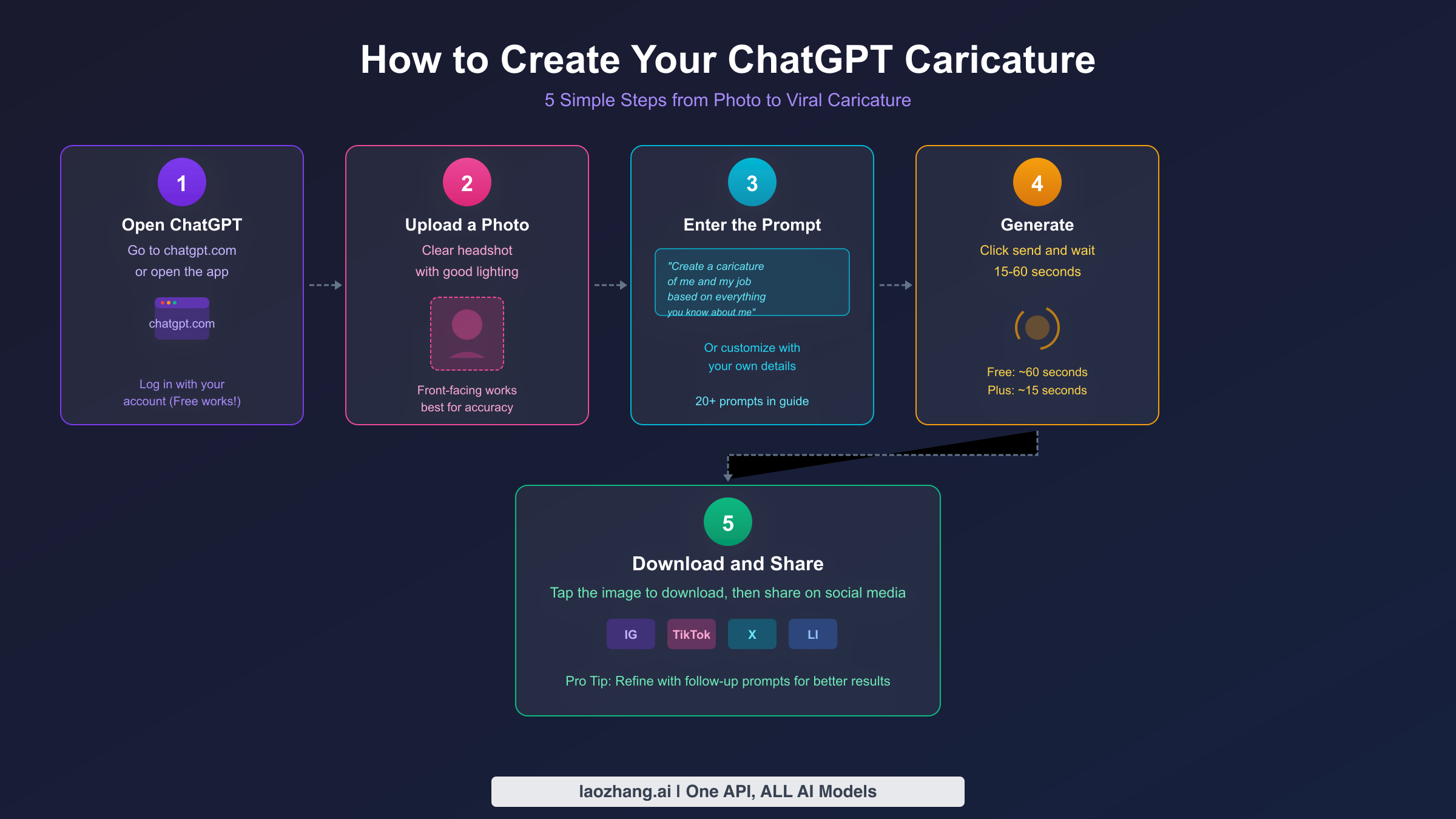
Creating your ChatGPT caricature is remarkably simple, and you do not need any technical skills or artistic ability. The entire process takes between two and five minutes, depending on your plan and server load. Here is exactly how to do it, whether you are using the web browser or the mobile app.
Step 1: Open ChatGPT and log in. Navigate to chatgpt.com in your browser or open the ChatGPT app on your phone. You need to be logged into an account for image generation to work. If you do not have an account yet, creating one is free and takes about 30 seconds. The caricature feature works on all plans, including the free tier, though you will experience some limitations on generation speed and daily limits.
Step 2: Upload a clear photo of yourself. Click or tap the attachment icon (the paperclip symbol) in the chat input area, then select a photo from your device. For the best results, choose a well-lit, front-facing headshot where your face is clearly visible. Avoid heavily filtered photos, group shots, or images where sunglasses or masks obscure your features. The AI needs clear visual data about your facial features to create an accurate caricature, so a recent, natural photo works best.
Step 3: Enter the viral prompt. Type the now-famous prompt that started it all: "Create a caricature of me and my job based on everything you know about me." This prompt works best if you have a history of conversations with ChatGPT, because the AI pulls from that context to personalize your caricature. If you are new to ChatGPT or have not shared much about yourself, do not worry. You can use a customized prompt instead, such as: "Create a caricature of me and my job. I am a [your profession] who [specific details about your work and personality]." The more descriptive you are, the more personalized and accurate your caricature will be.
Step 4: Wait for generation. After hitting send, ChatGPT will process your request. On the Plus plan ($20/month, OpenAI pricing verified February 2026), generation typically takes 15 to 30 seconds. On the free tier, expect anywhere from 30 to 60 seconds, and occasionally longer during peak usage times. If you receive a rate limit error, simply wait a few minutes and try again. You can check when your image generation limits reset if you have reached your daily cap.
Step 5: Download and share your caricature. Once your caricature appears in the chat, click or tap on the image to view it in full size. From there, you can download it directly to your device. The generated image is typically high-resolution enough for social media sharing. Many users post their caricatures on Instagram Stories, TikTok, X (formerly Twitter), and LinkedIn, often with the caption explaining what ChatGPT "thinks" of them and their job.
If the first result is not quite right, you can refine it with follow-up prompts. Try saying something like "Make the caricature more exaggerated" or "Add more details about my workspace" or "Make the style more cartoonish." Each iteration builds upon the previous result, allowing you to fine-tune the output until it matches your vision.
Free vs Go vs Plus vs Pro: Which ChatGPT Plan Do You Actually Need?
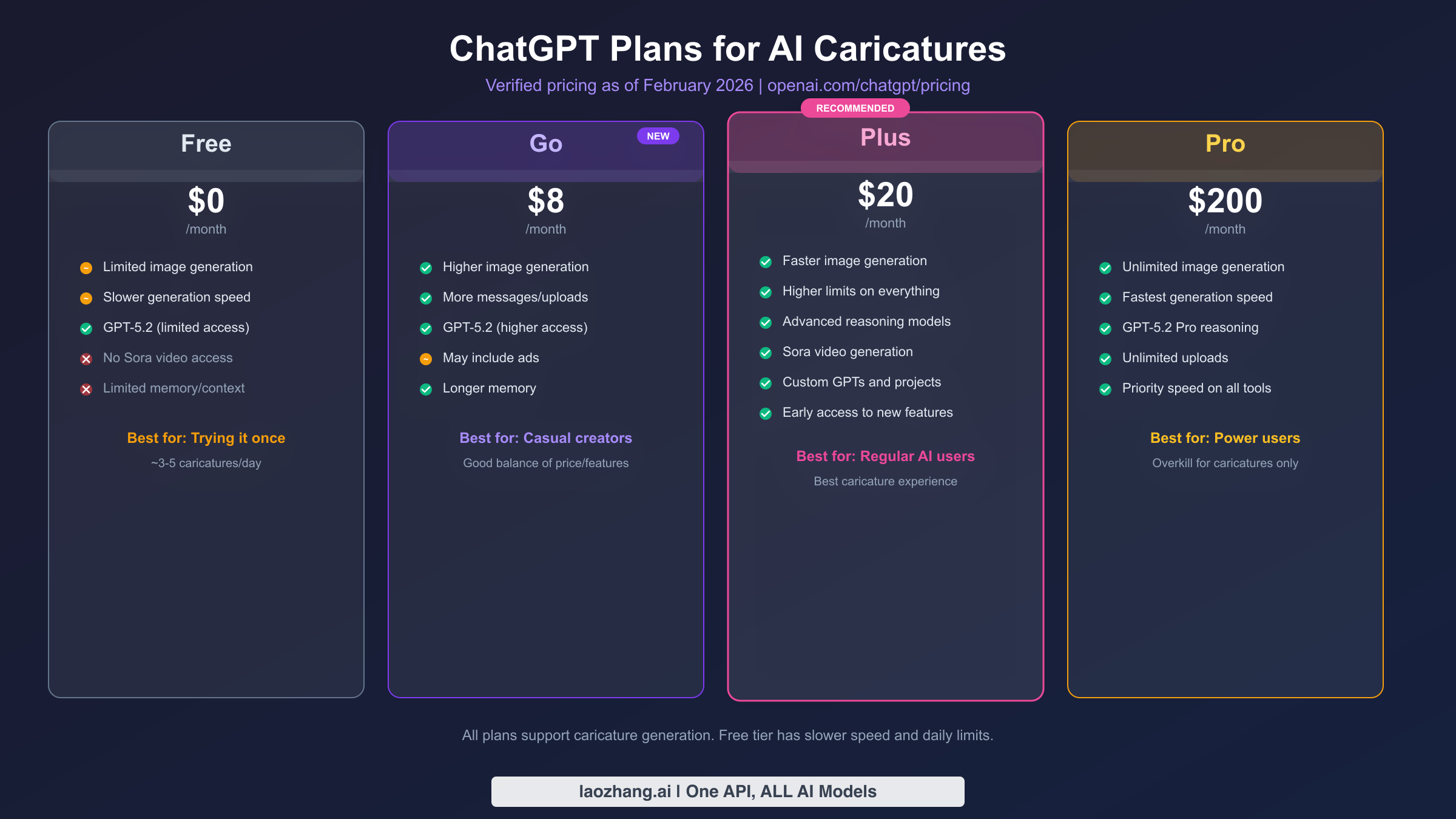
One of the most common questions about the ChatGPT caricature trend is whether you need a paid subscription to participate. The short answer is no, but the experience differs significantly across plans. Here is what you need to know about each tier, with pricing verified directly from OpenAI's official pricing page as of February 2026.
The Free plan ($0/month) gives you access to caricature generation, but with notable limitations. You get limited use of GPT-5.2 and restricted image generation that runs at a slower speed. In practical terms, this means you can create roughly 3 to 5 caricatures per day before hitting your limit, and each generation may take 30 to 60 seconds or longer. The quality of the output is the same as paid plans, but the waiting times and daily caps can be frustrating if you want to experiment with multiple prompts and styles. For users who want to try the trend once or twice, the free plan is perfectly adequate. If you are curious about the exact boundaries, our guide on ChatGPT free tier usage limits breaks down the details.
The Go plan ($8/month) is OpenAI's newest tier, launched in early 2026. It offers higher image generation quotas and more messages than the free tier, along with extended memory so ChatGPT can recall more context from your conversations. The trade-off is that this plan may include advertisements, which OpenAI has introduced as a way to offer premium features at a lower price point. For casual creators who want more caricatures per day without the full Plus price tag, Go represents a solid middle ground.
The Plus plan ($20/month) is where the caricature experience truly shines. You get significantly faster image generation, higher daily limits, access to advanced reasoning models, and early access to new features. Plus subscribers also get Sora video generation and Codex agents, which are not available on lower tiers. If you plan to create multiple caricatures, experiment with different styles, or generate caricatures for friends and family, Plus provides the smoothest experience. This is the tier that most active caricature trend participants use, and it is the one we recommend for anyone who plans to use ChatGPT's image generation features regularly.
The Pro plan ($200/month) offers unlimited image generation at the fastest possible speed, along with GPT-5.2 Pro reasoning capabilities and unlimited file uploads. While this plan provides the ultimate caricature creation experience, it is significant overkill if caricatures are your primary use case. Pro is designed for power users, researchers, and professionals who rely on ChatGPT as a core work tool. Unless you are generating dozens of images daily or need priority processing, Plus covers everything you need.
For users who hit ChatGPT's daily image generation limits on the free tier, the most practical upgrade path is to the Go plan at $8/month. It removes the most painful friction points (slow speed, tight limits) without requiring a significant monthly commitment.
20 Best ChatGPT Caricature Prompts for Every Occasion
The viral prompt is just the beginning. To truly make the ChatGPT caricature trend work for you, having a library of well-crafted prompts tailored to different situations and styles is essential. Below are 20 tested prompts organized by category, along with guidance on why each one works and how to customize it further.
Job-Focused Caricatures
These prompts emphasize your professional identity and work environment. They work best when you include specific, concrete details rather than vague descriptions.
1. The Viral Original: "Create a caricature of me and my job based on everything you know about me." This is the prompt that started the trend. It works best when ChatGPT has extensive conversation history with you, as it draws from that accumulated context to personalize every detail. The strength of this prompt is its simplicity, trusting the AI to determine what matters most about your professional identity.
2. The Detailed Professional: "Create a caricature of me at my [profession] job. Include [specific tool or prop], [workspace detail], and show me [typical action]. Exaggerate my [notable physical feature]." For example: "Create a caricature of me at my software engineering job. Include three monitors, an overflowing coffee mug, and show me typing frantically at a mechanical keyboard. Exaggerate my focused expression." This works because specific nouns like "mechanical keyboard" and "three monitors" produce more vivid, detailed results than abstract adjectives.
3. The Workplace Scene: "Create a caricature that shows a typical day in my life as a [profession]. The background should include [workplace elements]. My expression should show [emotion]." This prompt creates a narrative scene rather than a simple portrait, which tends to be more engaging for social media sharing.
4. The Dream vs. Reality: "Create a split-view caricature. On the left, show what people THINK my job as a [profession] looks like. On the right, show what it ACTUALLY looks like." This format is especially popular on social media because the contrast creates immediate humor and relatability. Teachers, nurses, and software developers have produced particularly viral results with this format.
Personality-Based Caricatures
These prompts go beyond your job to capture your personality, hobbies, and quirks.
5. The Full Personality: "Create a caricature of me surrounded by everything that defines who I am. Include visual references to my hobbies ([hobby 1], [hobby 2]), my favorite [food/drink], and my personality traits ([trait])." This prompt produces rich, detailed images filled with personal Easter eggs that make viewers look closely.
6. The Hobby Highlight: "Create a caricature of me doing [specific hobby] with exaggerated enthusiasm. Show [specific detail] and [characteristic expression]." For niche hobbies, the more specific you are, the better. "Playing a vintage Telecaster guitar with a tube amp behind me" works infinitely better than "playing guitar."
7. The Superhero Version: "Create a caricature of me as a superhero whose powers are based on my real skills. My superpower is [skill], my costume includes [work-related items], and my arch-nemesis represents [work challenge]." This playful format has become popular on LinkedIn, where professionals share their "work superpower" in visual form.
Social Media-Ready Caricatures
These prompts are optimized for specific social media platforms and use cases.
8. The Profile Picture: "Create a caricature of me that would work as a professional-yet-fun profile picture. Chest-up framing, clean background with a subtle [color] gradient, and a confident but approachable expression."
9. The Instagram Story: "Create a wide caricature of me in my natural environment, doing [activity], with a vibrant and colorful art style that pops on mobile screens."
10. The LinkedIn Professional: "Create a sophisticated caricature of me in business-casual attire at my desk, surrounded by subtle references to my industry ([industry]). Keep the exaggeration mild and the overall tone professional."
Artistic Style Caricatures
These prompts specify particular artistic styles for a unique visual effect.
11. 3D Pixar Style: "Create a 3D rendered caricature of me in the style of a Pixar character. Smooth surfaces, vibrant colors, and exaggerated proportions typical of animated films."
12. Vintage Comic Book: "Create a caricature of me in the style of a 1950s comic book illustration. Bold outlines, halftone dots, speech bubble with a witty one-liner about my job as a [profession]."
13. Street Art Style: "Create a caricature of me in the style of urban street art or graffiti. Bold colors, stencil-like elements, and an edgy aesthetic. Include visual references to [city or culture]."
Creative and Fun Caricatures
14. The Time Traveler: "Create a caricature of me doing my job as a [profession] but in [historical period]. Show how my modern tools would look translated to that era."
15. The Animal Mashup: "Create a caricature that combines my likeness with a [animal] that best represents my work personality. Keep my facial features recognizable but blend in the animal characteristics naturally."
16. The Board Game Box: "Create a caricature of me as a character on a fictional board game box called '[Your Job] The Game.' Include game elements related to daily challenges in my profession."
17. The Movie Poster: "Create a caricature of me as the star of a movie poster for '[Movie Title related to your job].' Include dramatic lighting, a tagline, and supporting characters based on typical colleagues."
18. The Before/After Coffee: "Create a side-by-side caricature of me before and after my morning coffee. The 'before' should be hilariously disheveled, and the 'after' should show me as a focused professional at my [job]."
19. The Multi-Panel Day: "Create a four-panel comic strip caricature showing my typical day as a [profession]: morning routine, peak productivity moment, biggest challenge, and end-of-day satisfaction."
20. The Year in Review: "Create a caricature collage of me with mini-scenes representing my biggest [professional/personal] moments from the past year. Include [specific achievement], [memorable event], and [personal milestone]."
Each of these prompts can be further customized by adjusting the level of exaggeration, the art style, or the specific details you include. The key principle of effective prompt engineering for caricatures is specificity: concrete nouns and specific details consistently produce better results than vague adjectives and generic descriptions.
Pro Tips: How to Get Better Results Every Time
Getting a good ChatGPT caricature on your first try is certainly possible, but consistently getting great results requires understanding a few key principles. These tips are based on extensive testing and address the most common issues users encounter.
Choose the right source photo. The quality of your input photo directly impacts the quality of your caricature. A well-lit, front-facing headshot with a neutral background produces the most accurate results. Avoid photos with heavy filters, extreme angles, or poor lighting, as the AI struggles to extract facial features from low-quality inputs. Natural expressions work better than posed ones because ChatGPT uses subtle facial details to determine what to exaggerate. If your first attempt does not capture your likeness well, try a different source photo before changing your prompt.
Use specific nouns instead of adjectives. This is perhaps the most important prompt engineering principle for caricatures. Telling ChatGPT you are "hardworking and precise" gives the AI very little to work with visually, because those are abstract concepts that do not translate easily into visual elements. Instead, describe the concrete, tangible items associated with your work: "calipers, steel-toe boots, and a rolled-up blueprint" immediately conjures a specific visual scene. The AI excels at rendering objects and environments, so give it objects and environments to render.
Build context through conversation. If you do not have extensive chat history with ChatGPT, you can build context within a single conversation before requesting your caricature. Start by telling ChatGPT about your profession, your daily routine, your personality traits, and your interests. Then, when you ask for the caricature, the AI has rich material to draw from. This approach is especially useful for users on the free tier who may be new to ChatGPT.
Iterate with follow-up prompts. Your first generation is rarely your best. After receiving your initial caricature, use follow-up prompts to refine specific aspects. "Make my eyes bigger and more expressive" or "Add more items related to my hobby of [hobby]" or "Change the background to show [environment]" are all effective refinement prompts. Each follow-up builds on the existing image, allowing you to dial in the perfect result without starting from scratch.
Understand common failure modes. There are a few scenarios where caricatures tend to go wrong. Group photos confuse the AI about which person to caricature. Sunglasses and masks prevent accurate facial feature extraction. Very dark or overexposed photos lack the detail the AI needs. If you are getting results that do not look like you, the issue is almost always the source photo rather than the prompt. Additionally, if ChatGPT's servers are under heavy load, generation quality can temporarily decrease, so trying again during off-peak hours can make a difference.
Match your exaggeration level to your audience. For LinkedIn and professional contexts, ask for "mild" or "subtle" exaggeration that maintains your professional appearance while adding personality. For Instagram and TikTok, push the exaggeration further with prompts like "make it over-the-top" or "extreme cartoon style" for maximum shareability and entertainment value. This simple adjustment can mean the difference between a caricature that lands well and one that misses the mark for its intended platform.
Privacy and Safety: Protecting Yourself While Having Fun
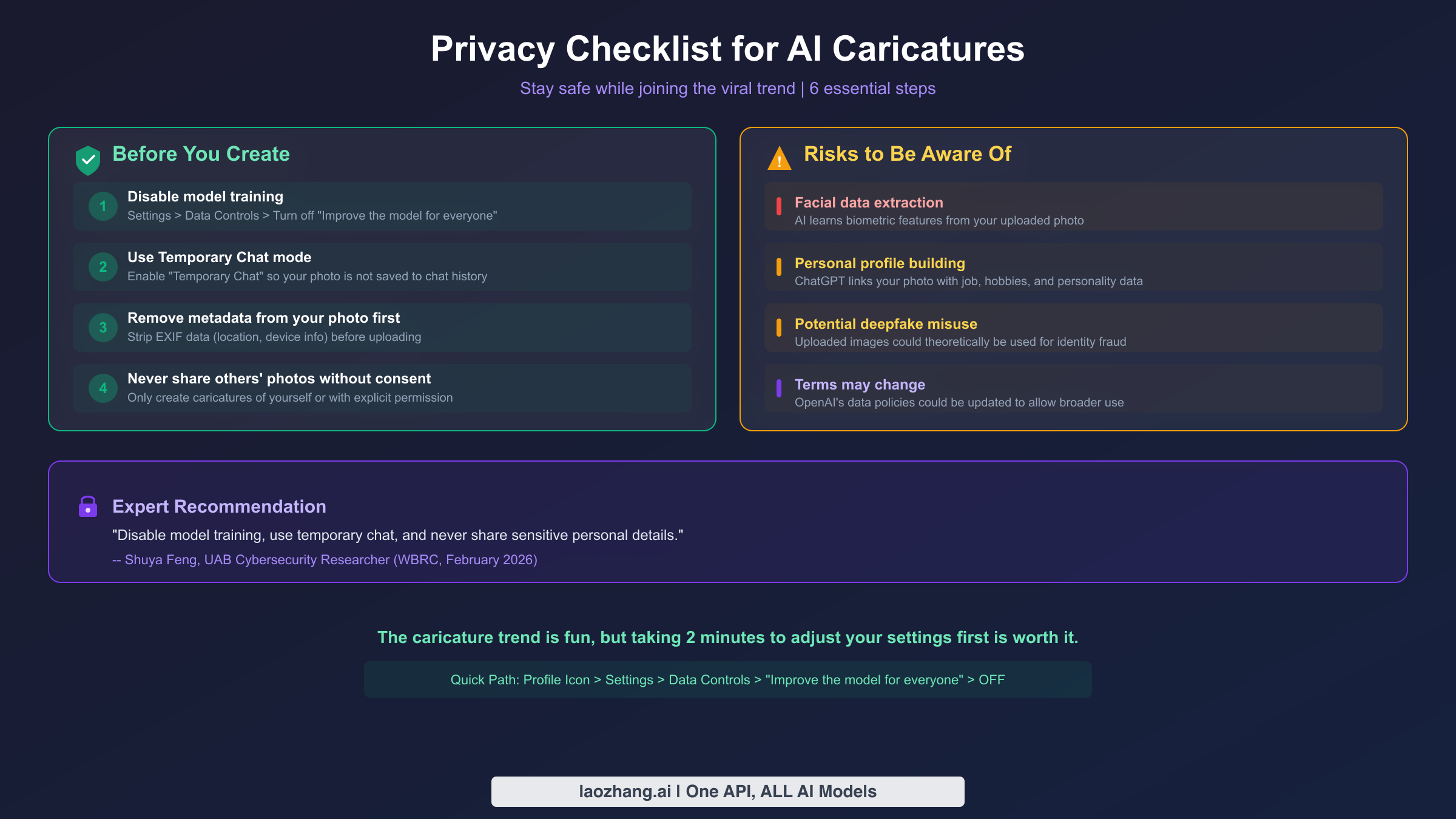
The ChatGPT caricature trend has sparked an important conversation about AI and personal data, and for good reason. When you upload a selfie and combine it with detailed personal information about your job, hobbies, and personality, you are creating a rich data package that links your biometric data to your identity. Understanding the risks and taking a few simple precautions allows you to enjoy the trend without unnecessary exposure.
Cybersecurity researcher Shuya Feng from the University of Alabama at Birmingham has been vocal about the risks. As she explained to WBRC in February 2026, when you upload your image, your biometric features are "literally there" for the AI to learn from. This data includes facial geometry, eye color, hair color, and other distinctive features that are increasingly used for identity verification in banking and healthcare applications. While OpenAI states that images are not shared with third parties, the data enters their system and is subject to their terms of service, which can change over time.
The privacy implications extend beyond the photo itself. The caricature trend explicitly encourages users to combine their facial image with personal biographical details such as their profession, workplace, hobbies, family status, and personality traits. This combination is particularly valuable from a data perspective, because it creates a comprehensive personal profile linked to a verified facial image. Even if you trust OpenAI's current policies, the precedent of voluntarily creating these detailed profiles warrants caution.
To participate safely, there are several practical steps you should take before creating your caricature. First, navigate to your ChatGPT settings by clicking your profile icon, then go to Settings, then Data Controls, and turn off the toggle labeled "Improve the model for everyone." This prevents your conversations and uploaded images from being used to train future AI models, which is the single most impactful privacy protection available to you.
Second, consider using ChatGPT's Temporary Chat mode for your caricature session. This feature ensures that your conversation, including your uploaded photo, is not saved to your chat history or used for model training. You can enable it by clicking the chat model selector at the top of a new conversation and toggling on "Temporary Chat."
Third, strip metadata from your photos before uploading them. Most smartphone photos contain EXIF data that includes your location, the device used, and the timestamp. While ChatGPT does not explicitly use this metadata, removing it is a good practice that takes only seconds using your phone's built-in photo editing tools or a free EXIF remover tool.
Finally, and this should go without saying, never create caricatures of other people without their explicit permission. The trend is designed for self-portraits, and using someone else's photo raises both ethical and legal concerns. Similarly, avoid sharing personal details like your home address, financial information, or sensitive workplace data in your prompts, as that information is unnecessary for a good caricature and creates additional risk.
The caricature trend is genuinely fun and creative, and there is no need to avoid it entirely. However, spending two minutes adjusting your privacy settings before diving in is a small investment that significantly reduces your exposure. Think of it as locking your front door before going out: it does not prevent you from having a good time, but it does protect what matters.
Best Alternatives to ChatGPT for AI Caricatures
While ChatGPT is the platform that made the caricature trend viral, it is not the only option for creating AI-generated caricatures. Several alternatives offer different features, pricing, and approaches that may suit your needs better, especially if you do not have a ChatGPT account or want to explore different artistic styles.
Midjourney remains one of the most powerful AI image generators for artistic quality. To create caricatures in Midjourney, you would need to describe yourself and your job in detail within the prompt, since Midjourney does not have chat history to draw from. The results tend to be more artistically polished but less personally accurate than ChatGPT's approach. Midjourney requires a subscription starting at $10/month and operates through Discord, which adds a layer of complexity for non-technical users.
Adobe Firefly offers AI caricature generation integrated into the broader Adobe ecosystem. If you already have an Adobe Creative Cloud subscription, Firefly provides a familiar interface and strong artistic quality. Its advantage lies in post-generation editing capabilities, allowing you to refine your caricature using professional design tools. The downside is that it lacks the personal context that makes ChatGPT caricatures uniquely representative of the individual.
Free browser-based tools like Kapwing and various AI caricature generators offer basic caricature creation without requiring a subscription. These tools typically use different AI models and produce results that are less sophisticated than ChatGPT but are accessible to anyone with a browser. They are a good option for users who want a quick, disposable caricature without creating any accounts or sharing personal data.
For developers and power users who want more control over their AI image generation, API-based solutions offer the ultimate flexibility. Platforms like laozhang.ai provide access to multiple AI models through a single API, allowing you to programmatically generate caricatures at scale. This approach is useful for businesses creating caricatures for marketing campaigns or social media content, and often provides better cost efficiency than individual subscriptions when generating images in volume. You can explore the API documentation at docs.laozhang.ai for integration details.
The choice between these alternatives depends on your priorities. If personal accuracy and ease of use matter most, ChatGPT remains the best option due to its unique ability to leverage your conversation history. If artistic quality and style variety are your priority, Midjourney excels. If privacy is your top concern, browser-based tools that do not require accounts offer the lowest data exposure.
Frequently Asked Questions
Do I need ChatGPT Plus to create a caricature? No, the free tier supports image generation including caricatures. However, free users experience slower generation speeds and lower daily limits (approximately 3-5 images per day). The Go plan ($8/month) and Plus plan ($20/month, OpenAI pricing verified February 2026) offer significantly more generous limits and faster processing.
Why does my caricature not look like me? The most common cause is a low-quality source photo. Use a clear, well-lit, front-facing headshot without filters, sunglasses, or masks. If the photo is good but the result is still off, try a different source photo, as some images simply produce better results than others due to how the AI processes facial features.
Can I create caricatures of other people? While technically possible, you should only create caricatures of others with their explicit consent. Creating caricatures of someone without permission raises ethical and potential legal issues. This is especially important for public figures or colleagues in professional settings.
How many caricatures can I create per day? This depends on your plan. Free users can generate approximately 3-5 images per day. Go users get a higher limit. Plus users get a substantially higher limit with faster generation. Pro users get unlimited generation. These limits apply to all image generation, not just caricatures.
Is the ChatGPT caricature trend safe for my data? The trend carries inherent privacy considerations since you are uploading facial images and personal information. To minimize risks, disable model training in your settings (Settings > Data Controls > toggle off "Improve the model for everyone"), use Temporary Chat mode, and strip metadata from your photos before uploading. These precautions significantly reduce your data exposure while still allowing you to enjoy the trend.
What is the best prompt for someone new to ChatGPT? If you do not have conversation history with ChatGPT, use a detailed custom prompt: "Create a caricature of me and my job. I am a [profession] who works [detail about your work]. I love [hobby] and my personality is [traits]. Exaggerate my [notable feature]." The more specific details you provide, the more personalized your caricature will be.