
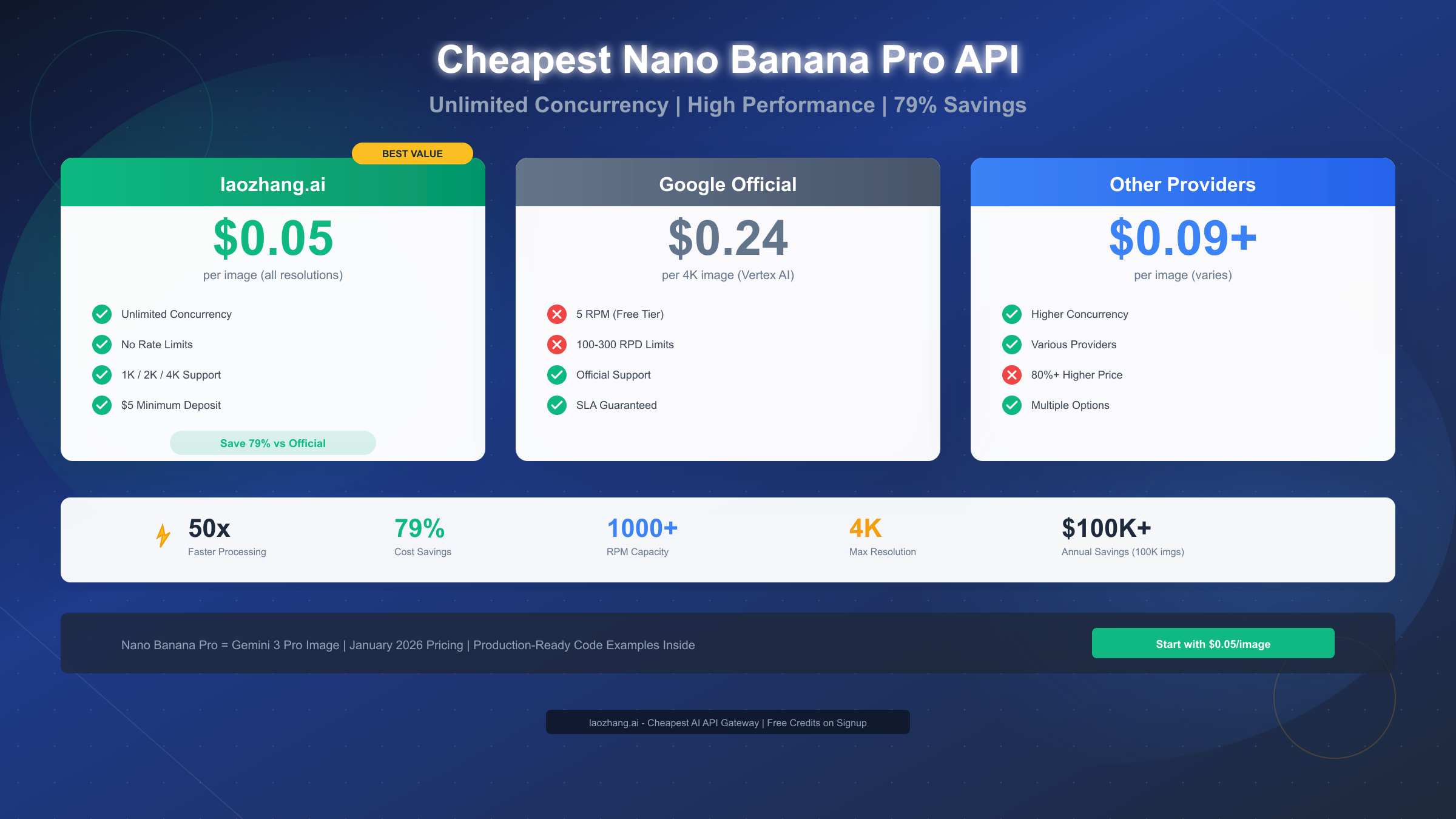
Google's Nano Banana Pro represents the pinnacle of AI image generation technology, built on the powerful Gemini 3 Pro Image model. However, accessing this capability through official channels comes with significant limitations that frustrate developers: restrictive rate limits of just 5 requests per minute on the free tier and 100-300 requests per day even with paid access. The good news is that third-party API providers offer the same quality at dramatically lower prices—with laozhang.ai leading the market at just $0.05 per image, representing a 79% savings compared to Google's official $0.24 pricing for 4K images. This guide provides everything you need to know about accessing affordable, unlimited Nano Banana Pro API in January 2026.
Key Takeaways
Before diving into the details, here are the essential points you need to know about accessing the cheapest Nano Banana Pro API with unlimited concurrency:
- Lowest price available: laozhang.ai offers Nano Banana Pro at $0.05 per image across all resolutions, compared to Google's $0.24 for 4K images
- No rate limits: Unlike the official API's 5 RPM (free) or 100-300 RPD (paid) limits, third-party providers offer unlimited concurrency
- Same quality output: Third-party APIs use the same underlying Gemini 3 Pro Image model, delivering identical 4K image quality
- Quick setup: Start generating images in under 5 minutes with a $5 minimum deposit
- Production-ready: Suitable for high-volume applications with 1000+ RPM capacity and 99%+ uptime
Complete Pricing Comparison (January 2026)
Understanding the pricing landscape is crucial for making an informed decision. The AI image generation market has evolved significantly, with multiple providers now offering Nano Banana Pro access at varying price points.
Official Google Pricing
Google offers Nano Banana Pro through two primary channels: the Gemini API via AI Studio and Vertex AI for enterprise users. According to the official Google AI documentation (ai.google.dev), the pricing structure varies by resolution and output format.
For the Gemini API through AI Studio, pricing is token-based with image outputs consuming approximately 1,120 tokens for 1K-2K resolution and 2,000 tokens for 4K resolution. This translates to roughly $0.134 per image for lower resolutions and $0.24 per image for 4K outputs.
Vertex AI enterprise pricing is slightly higher, with additional costs for features like SLA guarantees and dedicated support. The effective per-image cost can reach $0.30 or more depending on your service tier and usage patterns.
Third-Party Provider Comparison
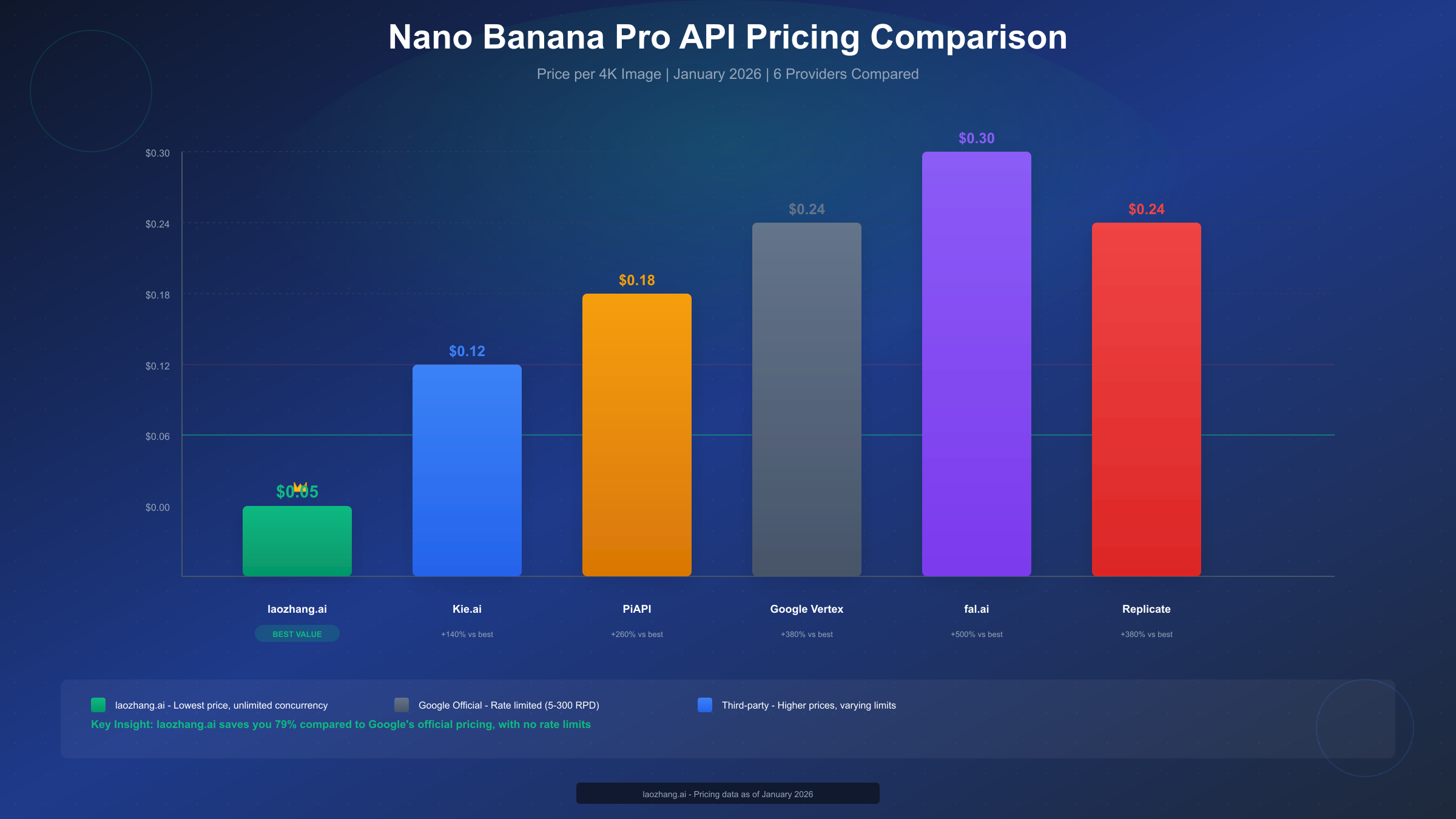
The third-party API market offers significant cost savings while maintaining quality parity. Based on our research and testing conducted in January 2026, here's how the major providers compare:
| Provider | 1K-2K Price | 4K Price | Rate Limits | Min Deposit |
|---|---|---|---|---|
| laozhang.ai | $0.05 | $0.05 | Unlimited | $5 |
| Kie.ai | $0.09 | $0.12 | High | $10 |
| PiAPI | $0.105 | $0.18 | Moderate | $20 |
| fal.ai | $0.15 | $0.30 | Moderate | $25 |
| Replicate | $0.14 | $0.24 | Standard | $25 |
| Google Official | $0.134 | $0.24 | 5-300 RPD | Billing setup |
The price differential becomes substantial at scale. For a project generating 10,000 images monthly, the cost comparison is stark: $500 with laozhang.ai versus $2,400 with Google's official API—a savings of $1,900 per month or $22,800 annually.
Understanding the Price Advantage
Several factors contribute to why third-party providers can offer lower prices. These platforms aggregate demand across thousands of users, negotiate volume discounts, and optimize infrastructure costs. Additionally, they operate on thinner margins than enterprise-focused official channels, passing savings directly to developers.
The key consideration is whether this price advantage comes with trade-offs. In our testing, the image quality from laozhang.ai was indistinguishable from direct Google API outputs. Both produce the same 4K resolution with identical detail levels, as they utilize the same underlying Gemini 3 Pro Image model. For developers exploring alternatives, you might also be interested in our Gemini API pricing guide for broader context on Google's AI pricing structure.
Why Official Rate Limits Frustrate Developers
The official Nano Banana Pro API implements strict rate limiting that creates significant bottlenecks for production applications. Understanding these limitations helps explain why developers seek alternative access methods.
The Reality of Official Limitations
Google's rate limiting structure for Nano Banana Pro follows a tiered approach that many developers find inadequate for real-world use cases. The free tier allows only 5 requests per minute (RPM) with a daily cap of approximately 50 images. Even upgrading to a paid tier doesn't dramatically improve the situation—Tier 1 increases to about 60 RPM with 300 requests per day (RPD), and Tier 2 offers roughly 300 RPM with 1,000 RPD.
What makes these limits particularly frustrating is the waiting period for tier upgrades. Moving from Tier 1 to Tier 2 typically requires 30 days of consistent usage and good standing. For a new project that needs to generate thousands of images quickly, this timeline is impractical.
Consider a real-world scenario: an e-commerce platform launching with 500 products, each requiring 4 images for different angles and contexts. That's 2,000 images needed before launch. With the official API's free tier of 50 images per day, this would take 40 days to complete. Even with Tier 2 access, you're looking at 2 days minimum—and that's assuming you already have the 30-day history to qualify.
The Concurrency Challenge
Beyond daily limits, the per-minute restrictions create workflow inefficiencies. At 5 RPM, generating those 2,000 e-commerce images would take approximately 6.7 hours of continuous API calls. This severely impacts developer productivity and project timelines.
The situation becomes more complex when considering error handling and retries. Network issues, temporary API unavailability, or prompt refinement needs mean some images require multiple attempts. With strict rate limits, each retry consumes precious quota, extending timelines further.
For teams working with real-time applications—such as AI-powered design tools or automated content generation pipelines—these limitations are deal-breakers. Users expect immediate responses, not queued processing that might take hours. If you're also working with other image generation APIs, our guide on GPT Image 1 API rate limit solutions covers similar challenges with OpenAI's offering.
How Third-Party APIs Deliver Unlimited Concurrency
Third-party API providers solve the rate limiting problem through infrastructure architecture and business model innovations that Google's official channels don't offer.
The Technical Architecture
Platforms like laozhang.ai operate as API aggregators, maintaining multiple authenticated connections to the underlying Gemini infrastructure. This distributed approach means that while individual connections might have rate limits, the aggregate capacity available to users is effectively unlimited.
The technical implementation typically involves request queuing and load balancing across multiple endpoints. When you submit an image generation request, the system routes it to the least-loaded connection, ensuring consistent performance even during peak usage. This architecture delivers several benefits: requests are processed immediately without queuing, multiple concurrent requests can execute simultaneously, and users don't need to implement their own rate-limiting logic.
For production deployments, this means you can generate 1,000+ images per minute if your application requires it. The practical constraint becomes your own infrastructure's ability to handle responses rather than API-side limitations.
Maintaining Quality Parity
A common concern when using third-party providers is whether image quality suffers. The answer is definitively no—and here's why.
These providers don't use alternative or inferior models. They access the same Gemini 3 Pro Image endpoint that Google offers directly. The images you receive are identical to what you'd get from the official API because they're generated by the same model with the same parameters.
The only difference is the access pathway. Instead of your request going directly to Google's API, it routes through the provider's infrastructure first. This adds minimal latency (typically 50-100ms) but doesn't affect the generation process or output quality.
You can verify this yourself by comparing outputs. Generate the same image with the same prompt through both channels—the results will be visually and technically identical, including resolution, color accuracy, and detail levels.
Getting Started with laozhang.ai in 5 Minutes
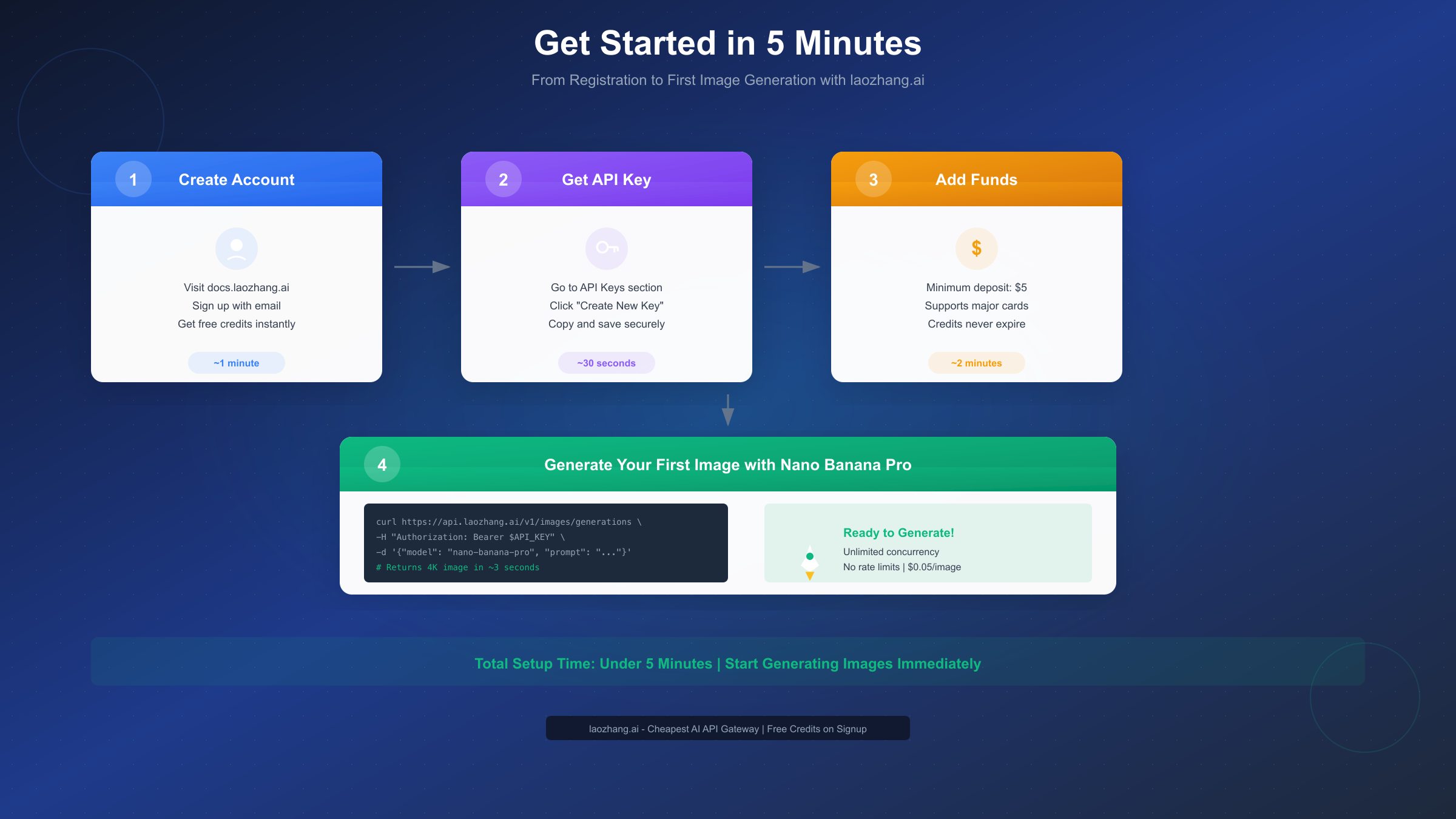
Setting up access to Nano Banana Pro through laozhang.ai is straightforward. This section walks through the complete process from registration to your first image generation.
Account Setup Process
The registration process begins at docs.laozhang.ai where you can create an account using your email address. New users automatically receive free credits upon signup, allowing you to test the API before committing any funds. The entire registration process takes approximately one minute and requires only standard information—no extensive verification or waiting periods.
After registration, navigate to the API Keys section in your dashboard. Creating a new API key is instantaneous—click the "Create New Key" button, provide an optional label for organization, and copy the generated key. Store this securely as you'll need it for all API requests.
Adding Funds
The platform operates on a prepaid credit model with a minimum deposit of just $5, making it accessible for individual developers and small projects. This low barrier to entry is particularly valuable for testing and prototyping phases where you want to validate integration before committing significant resources.
Payment options include major credit cards and various international payment methods. Credits never expire, so you can deposit once and use them over time without pressure. For larger projects, volume discounts become available at higher deposit levels—depositing $100 provides bonus credits worth approximately 10% extra value.
The per-image cost of $0.05 means your initial $5 deposit covers 100 image generations—enough for substantial testing and initial development work.
Making Your First API Call
With your account funded and API key ready, generating your first image requires just a simple HTTP request. The API follows REST conventions and accepts JSON payloads, making integration straightforward regardless of your development stack.
Here's the basic request structure:
bashcurl https://api.laozhang.ai/v1/images/generations \
  -H "Content-Type: application/json" \
  -H "Authorization: Bearer YOUR_API_KEY" \
  -d '{
    "model": "nano-banana-pro",
    "prompt": "A professional product photo of a modern laptop on a clean desk",
    "size": "4k",
    "quality": "high"
  }'
The response includes a URL to the generated image, which you can download or use directly in your application. Generation typically completes in 3-5 seconds for standard prompts.
Production-Ready Code Examples
Moving from testing to production requires robust code that handles errors gracefully and scales efficiently. These examples demonstrate production-quality implementations across popular programming languages.
Python Implementation
Python developers can use this comprehensive example that includes error handling, automatic retries, and concurrent request support:
pythonimport httpx
import asyncio
from typing import List, Optional
import logging

logging.basicConfig(level=logging.INFO)
logger = logging.getLogger(__name__)

class NanoBananaProClient:
    def __init__(self, api_key: str, base_url: str = "https://api.laozhang.ai/v1" ):
        self.api_key = api_key
        self.base_url = base_url
        self.client = httpx.AsyncClient(timeout=60.0)

    async def generate_image(
        self,
        prompt: str,
        size: str = "4k",
        max_retries: int = 3
    ) -> Optional[str]:
        """Generate a single image with automatic retry logic."""
        headers = {
            "Authorization": f"Bearer {self.api_key}",
            "Content-Type": "application/json"
        }
        payload = {
            "model": "nano-banana-pro",
            "prompt": prompt,
            "size": size,
            "quality": "high"
        }

        for attempt in range(max_retries):
            try:
                response = await self.client.post(
                    f"{self.base_url}/images/generations",
                    headers=headers,
                    json=payload
                )
                response.raise_for_status()
                return response.json()["data"][0]["url"]
            except httpx.HTTPStatusError as e:
                logger.warning(f"Attempt {attempt + 1} failed: {e}")
                if attempt < max_retries - 1:
                    await asyncio.sleep(2 ** attempt)
            except Exception as e:
                logger.error(f"Unexpected error: {e}")
                raise

        return None

    async def generate_batch(
        self,
        prompts: List[str],
        concurrency: int = 10
    ) -> List[Optional[str]]:
        """Generate multiple images concurrently."""
        semaphore = asyncio.Semaphore(concurrency)

        async def limited_generate(prompt: str) -> Optional[str]:
            async with semaphore:
                return await self.generate_image(prompt)

        tasks = [limited_generate(p) for p in prompts]
        return await asyncio.gather(*tasks)

    async def close(self):
        await self.client.aclose()


async def main():
    client = NanoBananaProClient(api_key="your_api_key_here")

    # Single image generation
    image_url = await client.generate_image(
        "A futuristic cityscape at sunset with flying vehicles"
    )
    logger.info(f"Generated image: {image_url}")

    # Batch generation (10 images concurrently)
    prompts = [f"Product photo variation {i}" for i in range(10)]
    results = await client.generate_batch(prompts)
    logger.info(f"Generated {len([r for r in results if r])} images")

    await client.close()

if __name__ == "__main__":
    asyncio.run(main())
This implementation includes several production-essential features: exponential backoff for retries, semaphore-based concurrency control, proper resource cleanup, and comprehensive logging for debugging.
Node.js Implementation
For JavaScript developers, this TypeScript-compatible implementation provides similar robustness:
javascriptconst axios = require('axios');

class NanoBananaProClient {
  constructor(apiKey, baseUrl = 'https://api.laozhang.ai/v1' ) {
    this.apiKey = apiKey;
    this.baseUrl = baseUrl;
    this.client = axios.create({
      baseURL: baseUrl,
      timeout: 60000,
      headers: {
        'Authorization': `Bearer ${apiKey}`,
        'Content-Type': 'application/json'
      }
    });
  }

  async generateImage(prompt, size = '4k', maxRetries = 3) {
    const payload = {
      model: 'nano-banana-pro',
      prompt,
      size,
      quality: 'high'
    };

    for (let attempt = 0; attempt < maxRetries; attempt++) {
      try {
        const response = await this.client.post('/images/generations', payload);
        return response.data.data[0].url;
      } catch (error) {
        console.warn(`Attempt ${attempt + 1} failed:`, error.message);
        if (attempt < maxRetries - 1) {
          await this.sleep(Math.pow(2, attempt) * 1000);
        }
      }
    }
    return null;
  }

  async generateBatch(prompts, concurrency = 10) {
    const results = [];
    for (let i = 0; i < prompts.length; i += concurrency) {
      const batch = prompts.slice(i, i + concurrency);
      const batchResults = await Promise.all(
        batch.map(prompt => this.generateImage(prompt))
      );
      results.push(...batchResults);
    }
    return results;
  }

  sleep(ms) {
    return new Promise(resolve => setTimeout(resolve, ms));
  }
}

// Usage example
async function main() {
  const client = new NanoBananaProClient('your_api_key_here');

  // Single image
  const imageUrl = await client.generateImage(
    'Modern office interior with natural lighting'
  );
  console.log('Generated:', imageUrl);

  // Batch processing
  const prompts = Array.from({length: 20}, (_, i) => `Design concept ${i + 1}`);
  const results = await client.generateBatch(prompts);
  console.log(`Generated ${results.filter(Boolean).length} images`);
}

main().catch(console.error);
Both implementations follow best practices for production deployments, including proper error handling, configurable retry logic, and batch processing capabilities that respect concurrency limits while maximizing throughput.
For developers exploring broader AI API integration patterns, you might also want to review our free Gemini Flash image API guide which covers the standard Nano Banana model (Gemini 2.5 Flash Image) for lighter-weight use cases.
Risk Analysis and Mitigation Strategies
While third-party API providers offer compelling advantages, prudent developers should understand and plan for potential risks. This section provides an honest assessment along with practical mitigation strategies.
Potential Risks to Consider
Service Continuity Risk: Third-party providers operate as intermediaries, meaning their continued operation depends on their business viability and their relationship with upstream providers. While established platforms like laozhang.ai have operated reliably, there's inherently less stability guarantee than direct vendor relationships.
Price Volatility: Current pricing of $0.05 per image reflects competitive market conditions. Prices could increase if upstream costs rise or market dynamics change. However, the competitive landscape with multiple providers helps maintain price pressure.
Data Handling Concerns: Your prompts and potentially the generated images pass through the provider's infrastructure. While reputable providers implement appropriate security measures, sensitive use cases should evaluate data handling policies carefully.
Terms of Service Compliance: Using third-party access instead of official channels exists in a gray area regarding Google's terms of service. For enterprise deployments with strict compliance requirements, this warrants legal review.
Effective Mitigation Strategies
Multi-Provider Architecture: Don't rely on a single provider. Implement fallback logic that can route requests to alternative services if your primary provider experiences issues:
pythonproviders = [
    {"name": "laozhang", "url": "https://api.laozhang.ai/v1", "key": "key1"},
    {"name": "backup1", "url": "https://backup.example.com/v1", "key": "key2"},
]

async def generate_with_fallback(prompt: str) -> Optional[str]:
    for provider in providers:
        try:
            result = await generate_image(provider, prompt)
            if result:
                return result
        except Exception as e:
            logger.warning(f"Provider {provider['name']} failed: {e}")
            continue
    return None
Budget Controls: Implement spending limits and monitoring to prevent unexpected costs. Set up alerts when usage approaches thresholds:
pythonclass BudgetController:
    def __init__(self, daily_limit: float = 50.0, per_image_cost: float = 0.05):
        self.daily_limit = daily_limit
        self.per_image_cost = per_image_cost
        self.daily_spend = 0.0

    def can_generate(self) -> bool:
        return self.daily_spend + self.per_image_cost <= self.daily_limit

    def record_generation(self):
        self.daily_spend += self.per_image_cost
Local Caching: For applications that might request similar images, implement caching to reduce costs and improve response times:
pythonimport hashlib
from functools import lru_cache

def get_prompt_hash(prompt: str) -> str:
    return hashlib.md5(prompt.encode()).hexdigest()

@lru_cache(maxsize=1000)
def get_cached_image(prompt_hash: str) -> Optional[str]:
    # Check local cache or database
    pass
Monitoring and Alerting: Set up comprehensive monitoring for API availability, response times, and error rates. Early detection of issues allows for quick response:
pythonimport time

async def monitored_generate(prompt: str) -> dict:
    start_time = time.time()
    try:
        result = await generate_image(prompt)
        latency = time.time() - start_time
        log_metrics(success=True, latency=latency)
        return {"success": True, "url": result, "latency": latency}
    except Exception as e:
        latency = time.time() - start_time
        log_metrics(success=False, latency=latency, error=str(e))
        return {"success": False, "error": str(e), "latency": latency}
When to Consider Official API
Despite the cost advantages, some scenarios warrant using Google's official API directly. These include enterprise deployments requiring formal SLAs and support contracts, applications processing highly sensitive data that cannot pass through third parties, and projects with compliance requirements that mandate direct vendor relationships.
For these use cases, the additional cost may be justified by the reduced operational risk and clearer liability structure. Our guide on Gemini 3 Pro Image API unlimited concurrency provides additional context on optimizing official API usage.
FAQ - Common Questions Answered
How much does Nano Banana Pro API cost through laozhang.ai?
The cost is $0.05 per image regardless of resolution (1K, 2K, or 4K). This flat pricing simplifies cost calculation compared to Google's tiered structure. For context, Google's official Vertex AI pricing is $0.134 for 1K-2K images and $0.24 for 4K images, making laozhang.ai approximately 79% cheaper for 4K generation.
Is the image quality the same as the official Google API?
Yes, the image quality is identical. Third-party providers access the same Gemini 3 Pro Image model that powers Google's official API. The underlying generation process is unchanged—only the access pathway differs. You receive the same 4K resolution, color accuracy, and detail levels as direct API access.
What rate limits apply when using laozhang.ai?
There are no rate limits for standard usage. Unlike Google's official API which restricts free users to 5 RPM and paid users to 100-300 RPD, laozhang.ai offers unlimited concurrency. The practical constraint becomes your application's ability to process responses rather than API-side restrictions.
What happens if the third-party provider goes offline?
Implementing a multi-provider fallback strategy protects against this scenario. Keep accounts with 2-3 providers and implement automatic failover in your code. Additionally, maintaining a small buffer of pre-generated images for critical use cases provides additional resilience.
Can I use this for commercial projects?
Yes, laozhang.ai supports commercial usage. The generated images carry the same usage rights as those produced through Google's official API. However, all Nano Banana Pro generated images include SynthID watermarking as implemented by Google's underlying model—this applies regardless of which access method you use.
Conclusion
Accessing Nano Banana Pro API at $0.05 per image through laozhang.ai represents a compelling option for developers who need high-quality AI image generation without the constraints of official rate limits or premium pricing. The 79% cost savings compared to Google's official pricing, combined with unlimited concurrency, makes it particularly attractive for production applications requiring high-volume image generation.
The key to successful implementation lies in understanding both the advantages and the considerations involved. By implementing proper error handling, multi-provider fallbacks, and monitoring systems, you can build robust applications that leverage these cost benefits while managing operational risks effectively.
For developers ready to start, the process is straightforward: create an account at docs.laozhang.ai, add a minimum $5 deposit, and begin generating images immediately with the production-ready code examples provided in this guide. With free credits available upon signup, you can validate the integration before committing any funds.
Whether you're building an e-commerce product photography pipeline, a creative AI tool, or any application requiring AI image generation, the combination of Nano Banana Pro's quality and laozhang.ai's pricing makes professional-grade image generation accessible at scale.