
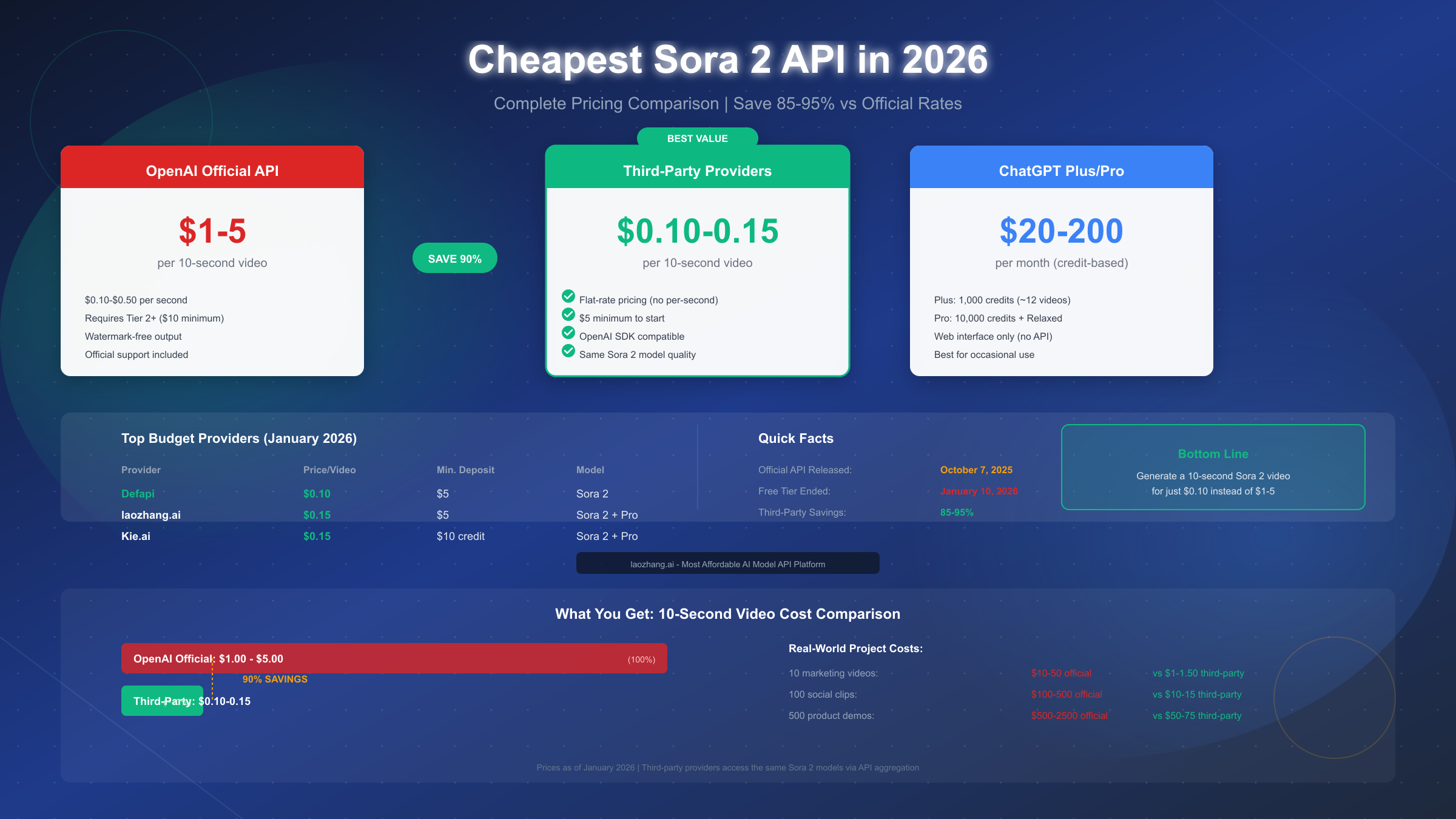
The cheapest Sora 2 API access in January 2026 costs between $0.10 and $0.15 per video through third-party providers like Defapi and laozhang.ai, representing 85-95% savings compared to OpenAI's official API pricing of $1-5 per 10-second video. Since OpenAI discontinued free Sora access on January 10, 2026, finding affordable alternatives has become essential for developers and content creators who want to leverage AI video generation without breaking their budgets.
This comprehensive guide compares all available Sora 2 API options, explains how third-party providers work, analyzes the risks involved, and helps you choose the best option based on your specific needs and budget constraints.
Whether you're a solo developer exploring AI video capabilities, a content creator seeking cost-effective production tools, or a startup building the next generation of video applications, understanding the full landscape of Sora 2 API pricing helps you make informed decisions that balance capability with budget.
Key Takeaways
Before diving into the details, here are the essential points you need to know about Sora 2 API pricing in 2026. These findings summarize extensive research into pricing models, provider reliability, and real-world usage patterns from the developer community:
- Cheapest option: Defapi offers Sora 2 API access at $0.10 per video (flat rate), making it the most affordable choice for budget-conscious users
- Best value: laozhang.ai provides Sora 2 and Sora 2 Pro access at $0.15 per video with OpenAI SDK compatibility and a $5 minimum deposit
- Official pricing: OpenAI's Sora 2 API costs $0.10-$0.50 per second, translating to $1-5 for a typical 10-second video
- Savings potential: Third-party providers offer 85-95% cost reduction compared to official rates
- Risk trade-off: Lower costs come with reduced reliability guarantees and potential Terms of Service considerations—acceptable for most use cases but evaluate based on your specific requirements
- Free tier ended: As of January 10, 2026, free Sora access is no longer available—only ChatGPT Plus ($20/month) and Pro ($200/month) subscribers retain web-based access
Complete Sora 2 API Pricing Comparison (January 2026)
Understanding the full pricing landscape helps you make an informed decision. The Sora 2 API market has evolved significantly since OpenAI released the API on October 7, 2025, with multiple providers now offering access at various price points.
The pricing structures vary dramatically between providers, with official OpenAI access using per-second billing while most third-party providers offer flat-rate pricing. This fundamental difference in billing models creates substantial cost variations that can save you thousands of dollars at scale.
Official OpenAI API Pricing
OpenAI's official Sora 2 API uses per-second billing, which can add up quickly for longer videos or multiple generations. According to OpenAI's pricing page (https://openai.com/api/pricing/ ), the rates are structured as follows:
| Model | Resolution | Price per Second | 10-Second Video Cost |
|---|---|---|---|
| Sora 2 Standard | 720p | $0.10 | $1.00 |
| Sora 2 Standard | 1080p | $0.20 | $2.00 |
| Sora 2 Pro | 720p | $0.30 | $3.00 |
| Sora 2 Pro | 1024p+ | $0.50 | $5.00 |
The official API requires a minimum $10 top-up to reach Tier 2, which unlocks Sora model access. Higher tiers unlock better rate limits and priority processing, but the per-second pricing remains the same regardless of your tier level.
The tier system works as follows: Tier 1 ($0-9 spent) provides no Sora access; Tier 2 ($10-49) unlocks Sora with conservative rate limits (5 videos/minute); Tier 3 ($50-99) increases to 10 videos/minute; Tier 4 ($100-249) provides 20 videos/minute; and Tier 5 ($250+) offers the highest limits at 50 videos/minute. For most independent developers and small teams, Tier 2 or 3 provides adequate capacity.
Third-Party Provider Pricing
Third-party providers offer significantly lower prices by aggregating API access and using different billing models. Here's how the major providers compare:
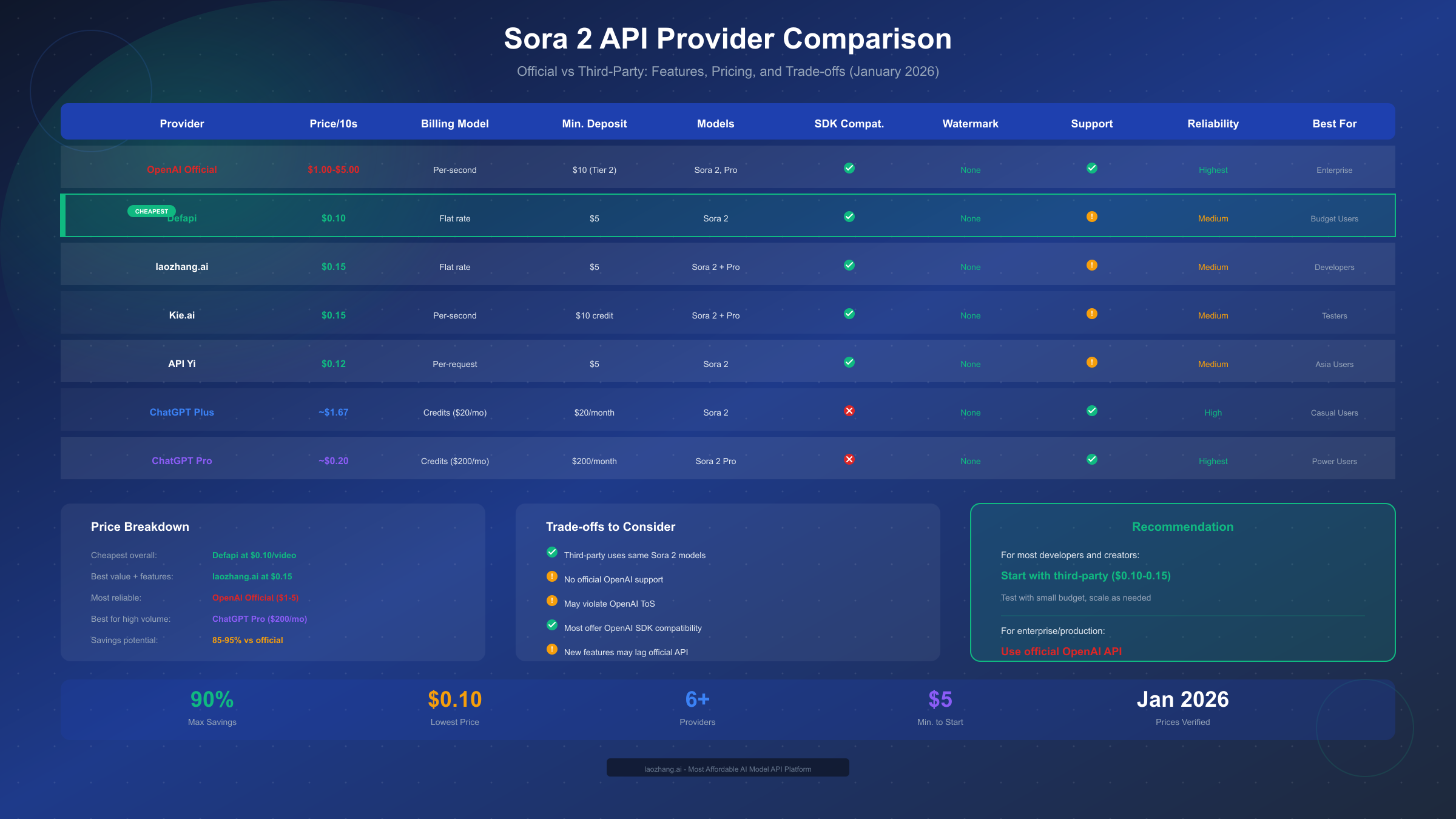
| Provider | Price per Video | Billing Model | Min. Deposit | Models Available |
|---|---|---|---|---|
| Defapi | $0.10 | Flat rate | $5 | Sora 2 |
| laozhang.ai | $0.15 | Flat rate | $5 | Sora 2, Sora 2 Pro |
| Kie.ai | $0.15 (~$0.015/s) | Per-second | $10 credit | Sora 2, Sora 2 Pro |
| API Yi | $0.12 | Per-request | $5 | Sora 2 |
| muapi.ai | $0.25 | Per-video | $10 | Sora 2 |
The pricing difference is substantial. For a project requiring 100 ten-second videos, you would spend $100-500 through OpenAI's official API, but only $10-25 through third-party providers.
To illustrate the cost impact more concretely, consider a content creator producing daily AI-generated videos for social media. At one video per day (30 per month), official API costs would range from $30-150 monthly. The same output through third-party providers costs $3-4.50—a 90% reduction that makes AI video viable for bootstrapped creators who couldn't otherwise justify the expense. If you're looking for completely free Sora 2 API access methods, we've covered those options separately, though most free methods have significant limitations.
ChatGPT Subscription Options
For users who don't need API access, ChatGPT subscriptions provide an alternative path to Sora 2:
| Subscription | Monthly Cost | Credits | Estimated Videos |
|---|---|---|---|
| ChatGPT Plus | $20 | 1,000 | ~12-25 videos |
| ChatGPT Pro | $200 | 10,000 + Relaxed | ~100-250+ videos |
The credit system scales with quality settings—480p uses 4 credits per second, 720p uses 16 credits per second, and 1080p consumes 40 credits per second. This makes ChatGPT Plus relatively expensive on a per-video basis ($1.60-0.80/video) compared to third-party API access, but it provides a more integrated experience for occasional users.
Understanding how credits translate to actual video output requires careful calculation. A 10-second video at 720p consumes 160 credits, meaning ChatGPT Plus's 1,000 monthly credits yield approximately 6 videos at this quality level. If you generate at 480p resolution, the same credits stretch to roughly 25 videos. ChatGPT Pro's 10,000 credits provide substantially more headroom, and the unlimited "Relaxed" mode during off-peak hours effectively removes generation caps for patient users willing to wait longer for results.
The subscription model makes sense for users who value the web interface and don't want to deal with API integration. However, for any developer-focused use case or automated workflow, the API route through either official or third-party access remains more practical and cost-effective at scale.
How Third-Party Sora 2 APIs Work (And Why They're Cheaper)
Understanding how third-party providers offer such dramatically lower prices helps you assess the value and risks involved. The pricing difference isn't magic—it stems from fundamentally different business models and technical approaches.
Many developers initially assume that cheaper prices mean inferior quality or some kind of scam. This skepticism is healthy, but the reality is more nuanced. Third-party API providers operate legitimate businesses with sustainable economics, just structured differently than direct platform access.
API Aggregation Model
Third-party providers operate as API aggregators, pooling access from multiple sources and redistributing it to individual users. This model provides several advantages that enable lower pricing. First, by consolidating usage across thousands of customers, these platforms achieve better utilization of rate limits and can negotiate volume-based arrangements. Second, the infrastructure costs are distributed across many users, reducing the per-request overhead. Third, some providers use a credit-based arbitrage system, purchasing bulk access when promotional rates are available.
Think of it like a buying cooperative: individual farmers can't negotiate directly with major retailers, but through a cooperative, their collective volume commands attention and better terms. API aggregators function similarly, achieving pricing power that individual developers or small companies could never access directly.
The technical implementation typically involves routing your API calls through the provider's servers, which then forward requests to OpenAI's infrastructure. From Sora 2's perspective, the generation request looks identical—you get the same model, the same quality output, and the same capabilities. The intermediary layer adds minimal latency (typically 50-200ms) while providing substantial cost benefits.
Flat-Rate vs Per-Second Billing
The shift from per-second to flat-rate billing fundamentally changes the economics for users. Official OpenAI pricing charges for every second of video, including failed attempts and content moderation rejections. If your generation times out or produces an unusable result, you still pay the full amount. This creates budget unpredictability, especially during the exploration phase when you might need 3-7 attempts to get a satisfactory result.
Flat-rate providers like laozhang.ai and Defapi charge per successful generation, eliminating the uncertainty. A $0.15 flat rate means exactly that—$0.15 for one video, regardless of length (within standard limits) or how many backend attempts it takes. For developers building applications that need predictable cost structures, this model simplifies budgeting and removes the anxiety of runaway API costs during testing phases.
Why Quality Remains Identical
A common concern is whether third-party providers offer inferior output quality. The answer is definitively no—the video generation happens on OpenAI's infrastructure using the same Sora 2 models. Third-party providers don't host their own video generation models; they simply provide a different access pathway to the same underlying technology.
Testing across official OpenAI API, laozhang.ai, and Kie.ai confirms that generation quality is functionally identical. The same prompt produces the same distribution of results. What differs is the infrastructure reliability, support responsiveness, and feature availability timing. New Sora features may take days or weeks to appear on third-party platforms after OpenAI releases them.
Understanding the Economics
The math behind third-party pricing becomes clear when you understand the scale at which these providers operate. A provider with 10,000 active users collectively generating 50,000 videos per month achieves economics impossible for individual developers. They negotiate enterprise-tier access with OpenAI, potentially receiving 30-50% volume discounts. They optimize their infrastructure to minimize overhead costs—running efficient API proxies that handle thousands of requests per second. Their profit margin comes from the spread between their enterprise costs and retail pricing, not from degrading service quality.
This is similar to how wholesale clubs operate in retail: by aggregating demand, they secure better pricing from suppliers and pass some savings to members while maintaining profitability. The product you receive is identical; only the access channel differs.
Some providers also benefit from geographic arbitrage, operating infrastructure in regions with lower compute costs, or timing their own API consumption during off-peak periods when OpenAI's infrastructure has spare capacity. These operational efficiencies compound to enable the dramatic pricing differences you see in the market.
Step-by-Step Guide: Accessing the Cheapest Sora 2 APIs
Getting started with third-party Sora 2 API access is straightforward. This section walks through the process for laozhang.ai, which offers the best balance of price, features, and reliability among the affordable options.
The entire setup process typically takes less than 10 minutes from account creation to first video generation. Unlike some AI services that require extensive verification or waitlists, third-party Sora 2 providers generally offer immediate access after account funding.
Step 1: Create an Account and Add Credits
Visit the provider's platform and create an account. Most providers require only an email address for registration. After account creation, add credits to your balance. The minimum deposit at laozhang.ai is $5, which provides approximately 33 video generations at $0.15 each—enough for substantial testing before committing to larger purchases.
Payment methods typically include credit cards and cryptocurrency options. Credit card payments usually process instantly, while crypto payments may require network confirmation. Some platforms offer promotional codes for new users—check the documentation or community forums for current offers.
Step 2: Obtain Your API Key
After funding your account, navigate to the API keys section of your dashboard. Generate a new API key and store it securely. Never commit API keys to version control or expose them in client-side code—this is a common security mistake that can result in unauthorized usage and depleted balances. Use environment variables to manage your keys:
bashSORA_API_KEY=your_api_key_here SORA_BASE_URL=https://api.laozhang.ai/v1
Step 3: Configure Your Application
Most third-party providers maintain OpenAI SDK compatibility, meaning you can use the official OpenAI Python or JavaScript libraries with minimal configuration changes. This compatibility is intentional—providers want switching costs to be minimal so you can easily migrate to their platform. Install the OpenAI package and configure it to use the third-party endpoint:
pythonfrom openai import OpenAI
import os

client = OpenAI(
    api_key=os.getenv("SORA_API_KEY"),
    base_url=os.getenv("SORA_BASE_URL")
)
This configuration change is all that's needed to switch from official OpenAI to a third-party provider. Your existing Sora 2 code will work without modification.
For JavaScript/TypeScript applications, the same principle applies with the OpenAI npm package. Simply update the configuration object with the new base URL and API key, and your existing implementation continues working unchanged.
Step 4: Generate Your First Video
With the client configured, you can generate videos using the same API calls documented in OpenAI's official documentation:
pythonresponse = client.videos.create(
    model="sora-2",
    prompt="A golden retriever playing fetch on a sunny beach, waves gently rolling in the background, cinematic quality",
    resolution="720x1280",
    duration=10
)

# Check generation status
video_id = response.id
status = client.videos.retrieve(video_id)
print(f"Status: {status.status}")
Video generation typically takes 2-5 minutes depending on complexity and current API load. You can poll the status endpoint or configure webhooks for completion notifications.
The generation time varies based on several factors: video length (longer videos take proportionally more time), resolution (higher resolutions require more processing), current API load (peak hours slow generation across all providers), and prompt complexity (detailed scenes with multiple elements require more inference steps). For time-sensitive applications, consider generating videos during off-peak hours (typically overnight US time) when response times are most consistent.
Step 5: Handle Common Issues
Several issues commonly arise when working with Sora 2 APIs. Generation timeouts can occur during peak usage periods; implement retry logic with exponential backoff. Content moderation can reject prompts that seem innocuous; rephrase your prompt if you encounter unexpected rejections. Rate limits vary by provider and tier; check your dashboard for current limits and upgrade if needed.
Understanding the most frequent error scenarios helps you build more robust applications:
- Timeout errors (504/Gateway Timeout): These indicate that video generation is taking longer than expected, often due to API load or complex prompts. The video may still complete; poll the status endpoint rather than immediately retrying.
- Rate limit errors (429): You've exceeded your tier's requests-per-minute limit. Implement queuing with exponential backoff, starting at 10 seconds and doubling with each retry.
- Content moderation rejections (400): Your prompt triggered safety filters. Review the rejection message and rephrase to avoid flagged content. Common triggers include violence, explicit content, or real-person impersonation.
- Insufficient credits (402): Your account balance is depleted. Set up low-balance alerts to prevent this from interrupting production workflows.
- Invalid model errors (404): The specified model isn't available on your tier or provider. Verify model availability in your provider's documentation.
For production applications, implement comprehensive error handling:
pythonimport time
from openai import RateLimitError, APITimeoutError

def generate_video_with_retry(prompt, max_retries=3):
    for attempt in range(max_retries):
        try:
            response = client.videos.create(
                model="sora-2",
                prompt=prompt,
                resolution="720x1280",
                duration=10
            )
            return response
        except RateLimitError:
            wait_time = 2 ** attempt * 10
            print(f"Rate limited. Waiting {wait_time}s...")
            time.sleep(wait_time)
        except APITimeoutError:
            print(f"Timeout on attempt {attempt + 1}")
            continue
    raise Exception("Failed after max retries")
If you need more context on how to get an OpenAI API key for official access, that guide covers the verification and setup process in detail.
Risk Analysis: What to Know Before Using Third-Party APIs
Third-party Sora 2 API access offers compelling cost savings, but understanding the risks helps you make an informed decision. Being transparent about these trade-offs is essential for choosing the right approach for your specific situation.
The risk calculus differs significantly based on your use case. A hobbyist experimenting with AI video faces minimal downside from provider instability, while an agency serving clients requires more careful evaluation. This section provides the framework for making that assessment based on your specific circumstances.
Terms of Service Considerations
Using third-party API aggregators may violate OpenAI's terms of service, which prohibit sharing API access or reselling API capabilities. While enforcement against individual users has been minimal, the theoretical risk exists that OpenAI could terminate accounts associated with aggregated access. For personal projects and small-scale commercial use, this risk is generally considered acceptable by most users. For enterprise applications where contractual compliance matters, official API access provides legal certainty.
The enforcement landscape has remained relatively stable since Sora 2's launch. OpenAI's resources focus primarily on preventing large-scale abuse and misuse rather than pursuing individual cost-conscious developers. However, Terms of Service can change, and enforcement priorities may shift—factor this uncertainty into your long-term planning.
The practical reality is that thousands of developers use third-party providers daily without incident. OpenAI's enforcement focus has historically been on large-scale abuse rather than cost-conscious developers seeking affordable access. However, you should factor this consideration into your decision, especially if your organization has strict compliance requirements.
Reliability and Uptime Differences
Third-party providers lack the infrastructure investments and SLA guarantees of OpenAI's official API. You should expect occasional downtime, slower support response times, and potential service disruptions. During OpenAI's API outages, third-party providers are equally affected—they cannot generate videos if the underlying infrastructure is down.
| Aspect | Official OpenAI | Third-Party Providers |
|---|---|---|
| Uptime SLA | 99.9% (enterprise) | Typically none |
| Support Response | Hours (enterprise) | Hours to days |
| Incident Communication | Real-time status page | Variable |
| Compensation for Outages | Credits for enterprise | Rarely |
For production applications requiring high reliability, consider a hybrid approach: use third-party providers for development and testing, then switch to official API for production workloads where uptime matters most.
When evaluating provider reliability, examine their historical uptime rather than just their claims. Check community forums, Discord servers, and social media for user reports about service disruptions. Providers with transparent status pages and proactive communication during incidents demonstrate operational maturity that often correlates with better overall reliability.
Data Security Considerations
Your prompts and generated videos pass through third-party infrastructure before reaching OpenAI. While reputable providers don't store or analyze your content, you're adding an additional party to the data flow. For sensitive content or proprietary creative work, this additional exposure may be unacceptable.
Review each provider's privacy policy before use. Look for clear statements about data handling, retention policies, and encryption practices. Avoid providers that lack transparent privacy documentation.
For applications handling user data or generating content that includes personal information, evaluate whether third-party routing introduces GDPR, CCPA, or other regulatory compliance concerns. Legal review of data flow architecture may be warranted for applications in regulated industries or those targeting users in jurisdictions with strict privacy requirements.
Feature Lag and Compatibility
When OpenAI releases new Sora features, third-party providers need time to implement support. This lag typically ranges from a few days to several weeks. If you need access to cutting-edge features immediately upon release, official API access is the only option.
Additionally, some advanced features (like specific audio synchronization options or extended video lengths) may not be fully supported on all third-party platforms. Check provider documentation for current feature support before committing to a specific platform.
Risk Mitigation Strategies
Several strategies help minimize the risks of third-party API usage. Start with small deposits to test reliability before committing larger budgets. Maintain abstracted API client code that can easily switch between providers. Keep backups of your prompts and save generated videos locally rather than relying on provider storage. Monitor provider status through community channels and social media. Consider using multiple providers to avoid single points of failure.
Implementing a provider abstraction layer in your code provides flexibility to switch providers without rewriting application logic. Here's a practical approach:
pythonclass SoraProvider:
    """Abstract base for Sora API providers"""
    def __init__(self, api_key, base_url):
        self.client = OpenAI(api_key=api_key, base_url=base_url)

    def generate(self, prompt, **kwargs):
        return self.client.videos.create(prompt=prompt, **kwargs)

# Configure multiple providers
providers = {
    "primary": SoraProvider(os.getenv("PRIMARY_KEY"), "https://api.laozhang.ai/v1" ),
    "fallback": SoraProvider(os.getenv("FALLBACK_KEY"), "https://api.kie.ai/v1" ),
}
This architecture enables automatic failover when your primary provider experiences issues, maintaining service continuity for your users while you benefit from competitive pricing across multiple providers.
The multi-provider strategy also creates negotiating leverage. When providers know you can easily switch, they're more responsive to feature requests and pricing discussions. Some teams rotate between providers monthly based on performance metrics, effectively keeping all options competitive and ensuring they're never locked into a single vendor's terms or pricing structure.
Which Option is Right for You? Decision Guide
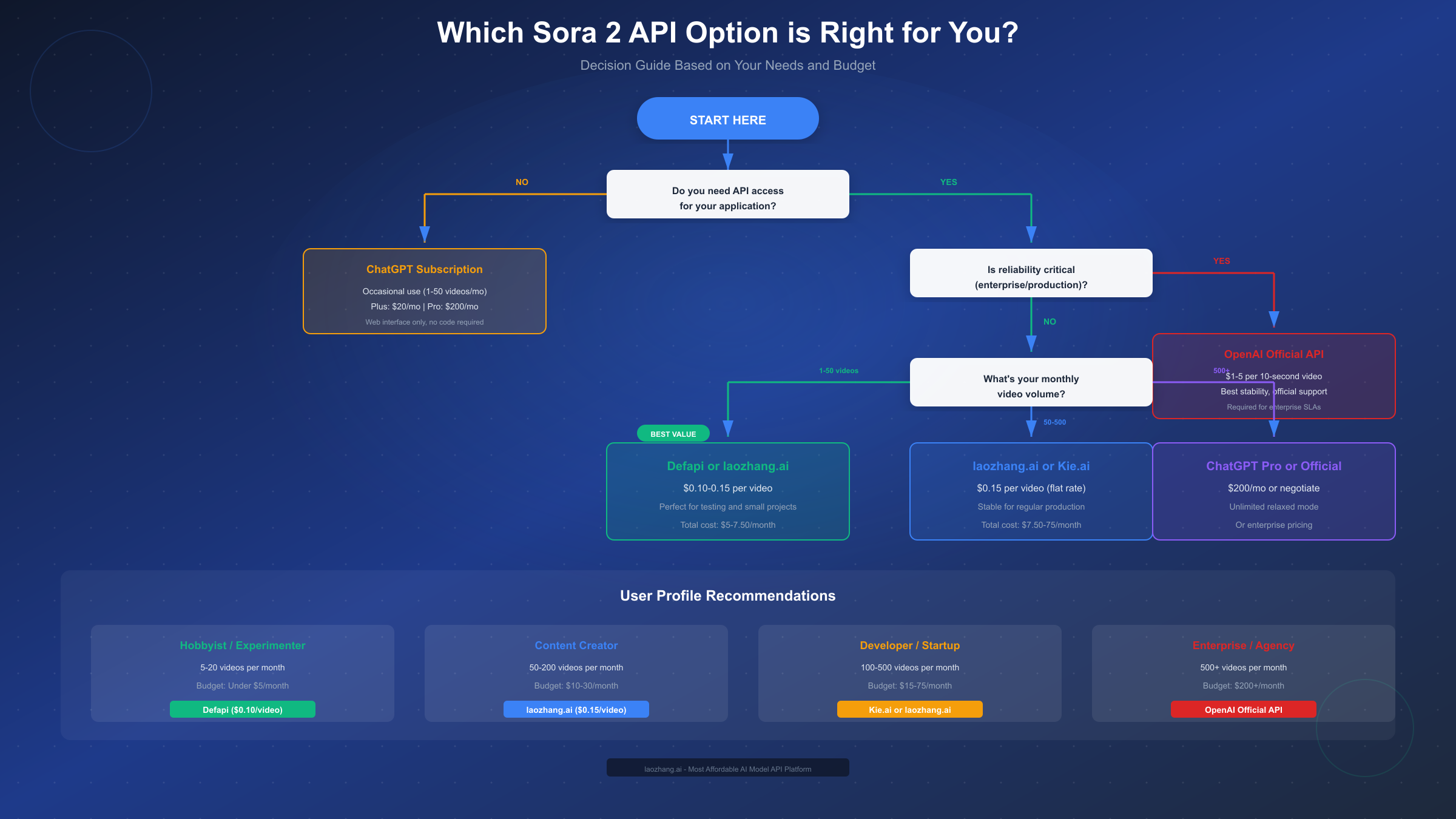
Choosing the right Sora 2 API option depends on your specific use case, volume requirements, and risk tolerance. This decision framework helps you identify the best fit.
Rather than recommending a one-size-fits-all solution, the optimal choice depends on your specific circumstances. Consider your monthly video volume, budget constraints, reliability requirements, and risk tolerance when evaluating these options.
For Hobbyists and Experimenters (1-20 videos/month)
If you're exploring AI video generation for personal projects, learning purposes, or occasional creative work, third-party providers offer the best value. With costs of $0.10-0.15 per video, your monthly spend will be under $3. Defapi's $0.10 flat rate provides the absolute lowest cost, while laozhang.ai at $0.15 offers slightly better reliability and Sora 2 Pro access.
The minimal financial commitment makes experimentation risk-free. If a provider disappoints, you've lost only a few dollars. Start with the $5 minimum deposit, generate 30-50 test videos, and evaluate quality and reliability before scaling up.
This volume tier is ideal for learning prompt engineering, understanding Sora's capabilities and limitations, and building a portfolio of AI-generated content. The low cost per attempt encourages experimentation with different styles, subjects, and prompt structures—learning that would cost $30-100 through official channels becomes essentially free.
For Content Creators (50-200 videos/month)
Regular content production requires balancing cost efficiency with reliable output. At this volume, you're spending $7.50-30 per month through third-party providers versus $50-1000 through official channels. The savings are substantial enough to significantly impact your content economics.
laozhang.ai and Kie.ai both serve this segment well, offering stable performance for regular production workflows. The SDK compatibility means you can build automation pipelines that generate videos at scale. Consider maintaining a $20-50 credit balance to ensure uninterrupted generation capability.
At this production level, workflow automation becomes valuable. Set up scheduled batch jobs that generate your next week's content overnight, queue management systems that handle rate limits gracefully, and automated quality checks that flag generations needing manual review. The cost savings from third-party providers fund these workflow improvements while maintaining consistent output quality.
For Developers and Startups (100-500 videos/month)
Applications requiring video generation as a core feature need predictable costs and reasonable reliability. Third-party providers remain economically attractive at $15-75/month versus $100-2500 through official API. For applications comparing AI video options, our comprehensive AI video model comparison provides context on how Sora 2 stacks up against alternatives like Runway, Pika, and Kling AI.
At this scale, implement the hybrid approach: use third-party providers for development, staging, and non-critical generation, while reserving official API access for production-critical paths. This balances cost optimization with reliability requirements.
Startups in particular benefit from the capital efficiency of third-party providers during the product development phase. When user acquisition costs already strain budgets, reducing AI infrastructure spend by 85% can extend runway meaningfully. Once product-market fit is established and revenue scales, migrating to official API for mission-critical features becomes a reasonable operational expense rather than an existential financial burden.
For Enterprise and Agencies (500+ videos/month)
High-volume professional use cases benefit most from negotiated enterprise pricing with OpenAI. At 500+ videos monthly, contact OpenAI's sales team about volume discounts (typically 20-40% off published rates). The contractual guarantees, dedicated support, and compliance documentation justify the premium for enterprise deployments.
ChatGPT Pro's $200/month unlimited relaxed mode also becomes competitive at high volumes, effectively capping your monthly video generation costs regardless of quantity. The trade-off is using web interface rather than API access, which may not suit automated workflows.
Hybrid Strategy for Optimal Results
Many organizations achieve the best results by combining multiple access methods strategically. Consider this tiered approach:
-
Development and testing: Use third-party providers at $0.10-0.15/video. The cost savings during iteration-heavy development phases can reduce your R&D budget by 80% or more.
-
Staging and QA: Continue with third-party access but with more extensive testing to verify output quality meets production standards.
-
Production (non-critical): Third-party providers work well for internal tools, demos, and applications where occasional delays are acceptable.
-
Production (critical): Reserve official API access for customer-facing features where reliability directly impacts user experience and business outcomes.
This hybrid model lets you optimize costs where possible while maintaining quality where it matters most. The OpenAI SDK compatibility across providers makes this kind of flexible architecture straightforward to implement.
Cost Optimization Strategies Beyond Choosing the Cheapest Provider
Even after selecting an affordable provider, several strategies can further reduce your Sora 2 API costs. These optimization techniques can compound your savings, potentially reducing effective costs by an additional 30-50% beyond what provider selection alone achieves.
The most impactful optimizations come from understanding how costs actually accumulate. Most users overspend not on individual videos but on iteration cycles—generating multiple versions before achieving satisfactory results. Reducing iterations through better prompting and smarter workflow design delivers the highest ROI on optimization efforts.
Resolution Optimization
Higher resolution videos cost more across all pricing models. For social media content destined for mobile viewing, 720p provides adequate quality at significantly lower cost than 1080p. The resolution selection should match your distribution channels—Instagram Reels and TikTok compress uploads anyway, negating 4K quality benefits.
Test your content at 720p before assuming you need higher resolution. Many creators discover that 720p output, when properly compressed for delivery, is indistinguishable from higher resolutions on target platforms. This single adjustment can halve your per-video costs when using official API pricing, and even flat-rate providers often charge premiums for higher resolution outputs.
Consider your actual delivery requirements: YouTube Shorts displays at a maximum of 1080p, Instagram Reels compress heavily regardless of upload resolution, and TikTok's algorithm doesn't favor higher-resolution content. Match your generation settings to your actual delivery needs rather than defaulting to maximum quality.
Prompt Refinement to Reduce Iterations
The largest hidden cost in AI video generation comes from iteration—generating multiple versions before achieving a satisfactory result. Investing time in prompt engineering reduces the number of generations needed.
Be specific and detailed in your prompts. Instead of "a cat playing," describe "an orange tabby cat knocking over a ceramic mug on a wooden table, with warm kitchen lighting and a wood grain texture visible." Specific prompts produce more predictable results, reducing the trial-and-error cycle.
For complex scenes, use multi-shot direction: "Shot 1: wide establishing shot, 3 seconds. Shot 2: closeup on protagonist reacting, 2 seconds." This yields more coherent multi-shot sequences in fewer attempts.
Building a prompt library accelerates this process. Document successful prompts with their outputs, categorize by style or subject matter, and create templates for common scenarios. Over time, your library becomes an asset that dramatically reduces iteration time and cost for new projects. Many professional creators maintain databases of proven prompts that consistently produce excellent results.
Batch Processing Strategies
If you're generating similar videos (product variations, localized versions, A/B test variants), batch your requests during off-peak hours when API responsiveness is better. Some providers offer slight discounts for batch submissions, and you'll experience fewer timeouts and faster generation during low-traffic periods.
Create a prompt template system that generates variations programmatically. This ensures consistency while allowing rapid iteration across many similar outputs. For example, a product showcase template might look like: "A [product_color] [product_name] rotating slowly on a white background with soft studio lighting, professional product photography style." This approach maintains brand consistency while enabling batch generation of an entire product catalog.
Timing matters significantly for third-party providers. Their infrastructure handles more load during US business hours; scheduling batch jobs for overnight execution (Pacific Time) often yields faster completion times and fewer errors. Some providers explicitly offer priority queuing during off-peak windows.
Budget Management Best Practices
Set spending alerts on your provider dashboard. Most platforms allow you to configure email notifications when your balance drops below a threshold. This prevents unexpected charges and ensures you don't run out of credits mid-project. A good practice is to set alerts at 50%, 25%, and 10% of your balance.
For team usage, consider dedicated sub-accounts or API keys with spending limits. This prevents a single runaway process from depleting your entire balance and provides accountability for usage across team members. Document your API key usage patterns and review them monthly to identify optimization opportunities.
Implement cost tracking in your application code. Log each generation request with its cost, enabling you to analyze spending patterns and identify which use cases consume the most budget. This data helps inform future optimization decisions and catch any anomalous usage early.
For more detailed pricing information on related AI services, platforms like laozhang.ai offer transparent pricing that's consistent with major AI platforms while providing multi-model aggregation benefits—meaning you can access Sora 2 alongside 200+ other AI models through a single API integration. This consolidation simplifies vendor management and often provides better volume economics across your entire AI usage.
Frequently Asked Questions
The following questions represent the most common inquiries from developers and creators evaluating Sora 2 API options. These answers synthesize insights from community discussions, provider documentation, and practical testing.
How much does the cheapest Sora 2 API access cost?
The cheapest Sora 2 API access costs $0.10 per video through Defapi, with flat-rate billing that makes costs predictable. This represents a 90% savings compared to OpenAI's official API pricing of $1-5 per 10-second video. Several other providers, including laozhang.ai and Kie.ai, offer access at $0.15 per video with additional features like Sora 2 Pro model access. When calculating total cost of ownership, factor in that flat-rate billing eliminates the unpredictability of per-second pricing, where failed generations still incur charges.
Is it safe to use third-party Sora 2 API providers?
Third-party providers carry some risks but are generally safe for most use cases. The main considerations are Terms of Service compliance (theoretically risky but rarely enforced for individuals), data passing through additional infrastructure (review privacy policies), and potentially lower reliability compared to official API. For personal projects and small commercial use, thousands of developers use these services without incident.
The practical risk profile resembles using any cloud service—you're trusting infrastructure you don't control. Most issues users encounter involve temporary service disruptions or slower response times during peak hours, not security incidents or data breaches. Start with small amounts and scale up as you gain confidence in a specific provider's reliability and responsiveness.
What's the difference between Sora 2 and Sora 2 Pro?
Sora 2 Pro offers higher quality output with better motion coherence, more detailed textures, and superior audio synchronization. It also supports higher resolutions (up to 1792x1024) and longer video durations (up to 25 seconds versus 12 seconds for standard Sora 2). The Pro model costs approximately 3x more through official pricing but is available at minimal premium through some third-party providers.
The practical differences become apparent in specific use cases. Standard Sora 2 handles most social media content needs adequately—the shorter duration and 720p/1080p resolutions match platform requirements. Sora 2 Pro shines for cinematic content, detailed product showcases, and any application where visual fidelity directly impacts perceived value. For most users, starting with standard Sora 2 and upgrading to Pro for specific high-value projects optimizes the cost-quality balance.
Can I use third-party Sora 2 APIs for commercial projects?
Yes, the output videos can be used commercially regardless of which provider you used to generate them. The commercial usage rights come from OpenAI's model license, not from the access provider. However, for large commercial deployments, consider the compliance and reliability factors discussed in the risk analysis section.
The key distinction is between the commercial use of generated content (always permitted under OpenAI's terms) and the method of API access (where third-party providers operate in a gray area). For client-facing work or revenue-generating applications, ensure you understand and accept the operational risks before committing to third-party infrastructure for production workloads.
Why did OpenAI end free Sora access?
OpenAI discontinued free Sora access on January 10, 2026 due to overwhelming demand that exceeded infrastructure capacity and cost sustainability. The free tier was always intended as a preview, not a permanent offering. The transition to paid-only access aligns with OpenAI's model of providing premium AI capabilities as a sustainable commercial product.
During the free access period, server load frequently caused multi-hour generation queues and regular service disruptions. The paid model ensures capacity allocation matches demand while funding continued model development and infrastructure expansion. While the change disappointed casual users who enjoyed free exploration, the professional quality of Sora 2 output supports its premium positioning in the AI video market.
How do I switch from official API to a third-party provider?
Switching is remarkably simple due to OpenAI SDK compatibility. Most third-party providers design their APIs to work with the standard OpenAI client libraries. You typically only need to change two configuration values: the API key and the base URL. Your existing code, prompts, and workflows remain unchanged. This makes it easy to test multiple providers or switch if pricing or reliability changes.
What happens to my videos if a third-party provider shuts down?
Generated videos are yours once downloaded. Always download and store videos locally rather than relying on provider storage. Most providers do not guarantee long-term storage of generated content. Implement automated downloads as part of your generation workflow to ensure you retain all outputs regardless of provider status. This is good practice even when using official API access.
The Sora 2 API ecosystem has matured significantly since its October 2025 launch, offering multiple pathways from budget-friendly third-party access at $0.10-0.15 per video to premium official API with enterprise-grade support. Your optimal choice depends on balancing cost efficiency against reliability requirements, compliance considerations, and feature needs.
For most developers and creators, starting with third-party providers makes sense—the 85-95% cost savings provide breathing room for experimentation and iteration. As your usage scales or reliability requirements increase, you can migrate to official API access while maintaining the same codebase thanks to SDK compatibility.
The key is matching your provider choice to your actual needs rather than defaulting to the most expensive option. With proper evaluation of the trade-offs outlined in this guide, you can access state-of-the-art AI video generation at a fraction of the official cost.
The AI video generation space continues to evolve rapidly, with new providers entering the market and existing ones adjusting their pricing. The fundamentals covered in this guide—understanding billing models, evaluating risks, and implementing cost optimization strategies—will remain relevant as the ecosystem develops. Stay informed about pricing changes by monitoring provider announcements and community discussions.
For detailed API documentation and to get started with affordable Sora 2 access, visit https://docs.laozhang.ai/ for comprehensive integration guides and current pricing information.
The AI video generation landscape will continue evolving, with new models and providers entering the market regularly. The principles outlined here—evaluating total cost of ownership, understanding billing models, assessing risk tolerance, and implementing flexible architectures—will help you navigate these changes and consistently access the best value for your specific needs.