
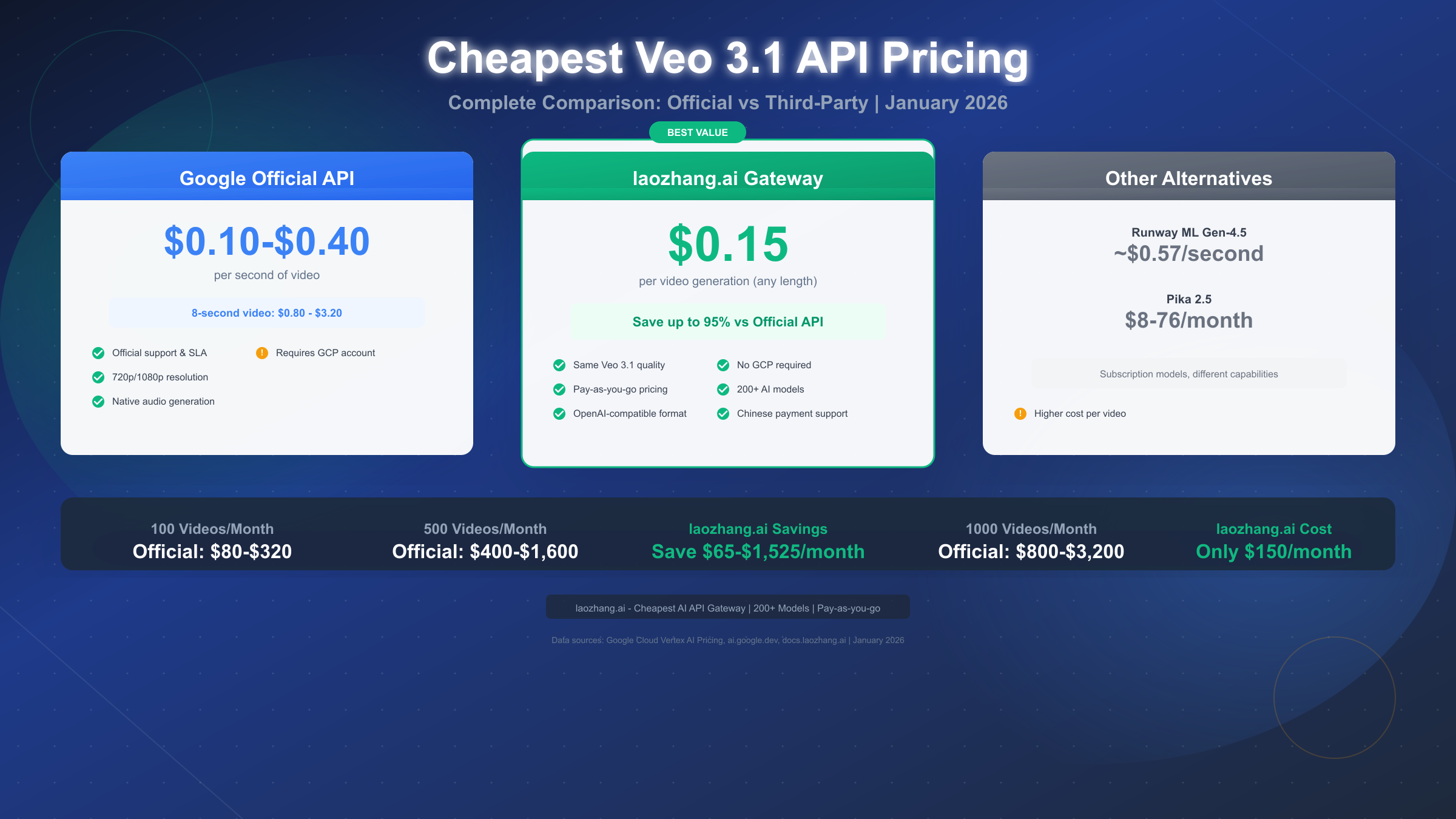
Looking for the cheapest Veo 3.1 API access? Google's official pricing starts at $0.10-$0.40 per second, meaning an 8-second video costs $0.80-$3.20. However, third-party API gateways like laozhang.ai offer Veo 3.1 at just $0.15 per video generation—representing savings of up to 95% compared to official rates. This January 2026 guide provides a complete pricing comparison across all providers and walks you through exactly how to start generating AI videos for less.
Complete pricing comparison: Official Google API vs third-party alternatives
What is Veo 3.1 and Why Developers Want It
Google DeepMind's Veo 3.1 represents the current pinnacle of AI video generation technology, offering capabilities that were science fiction just two years ago. Released in late 2025, Veo 3.1 can generate high-fidelity 8-second videos at 720p or 1080p resolution with stunning realism and natively generated audio—a feature that sets it apart from virtually every competitor in the market.
The model accepts both text prompts and image inputs, allowing developers to create videos from scratch or animate existing images with remarkable accuracy. What makes Veo 3.1 particularly valuable is its audio generation capability: rather than requiring separate audio synthesis, the model natively produces sound effects, ambient noise, and even dialogue that matches the visual content. This integrated approach eliminates the need for additional post-production work that other video generation tools require.
According to Google's benchmarks using the MovieGenBench evaluation framework, human evaluators consistently preferred Veo 3.1 outputs over competing models for overall preference, text alignment, and visual quality. The model supports advanced features including reference images for scene guidance, character consistency across scenes, camera movement controls, and video extension up to 20 iterations. For developers building video-centric applications, Veo 3.1 offers production-ready quality that can directly integrate into commercial workflows.
For a broader perspective on how Veo fits into the current landscape, our comprehensive AI video models comparison analyzes Veo alongside Sora, Runway, and other leading options.
Complete Pricing Comparison: All Your Options
Understanding Veo 3.1 pricing requires navigating different billing models across multiple providers. Google charges per-second, while alternatives may use per-video or subscription models. The following table standardizes all costs to make direct comparison possible.
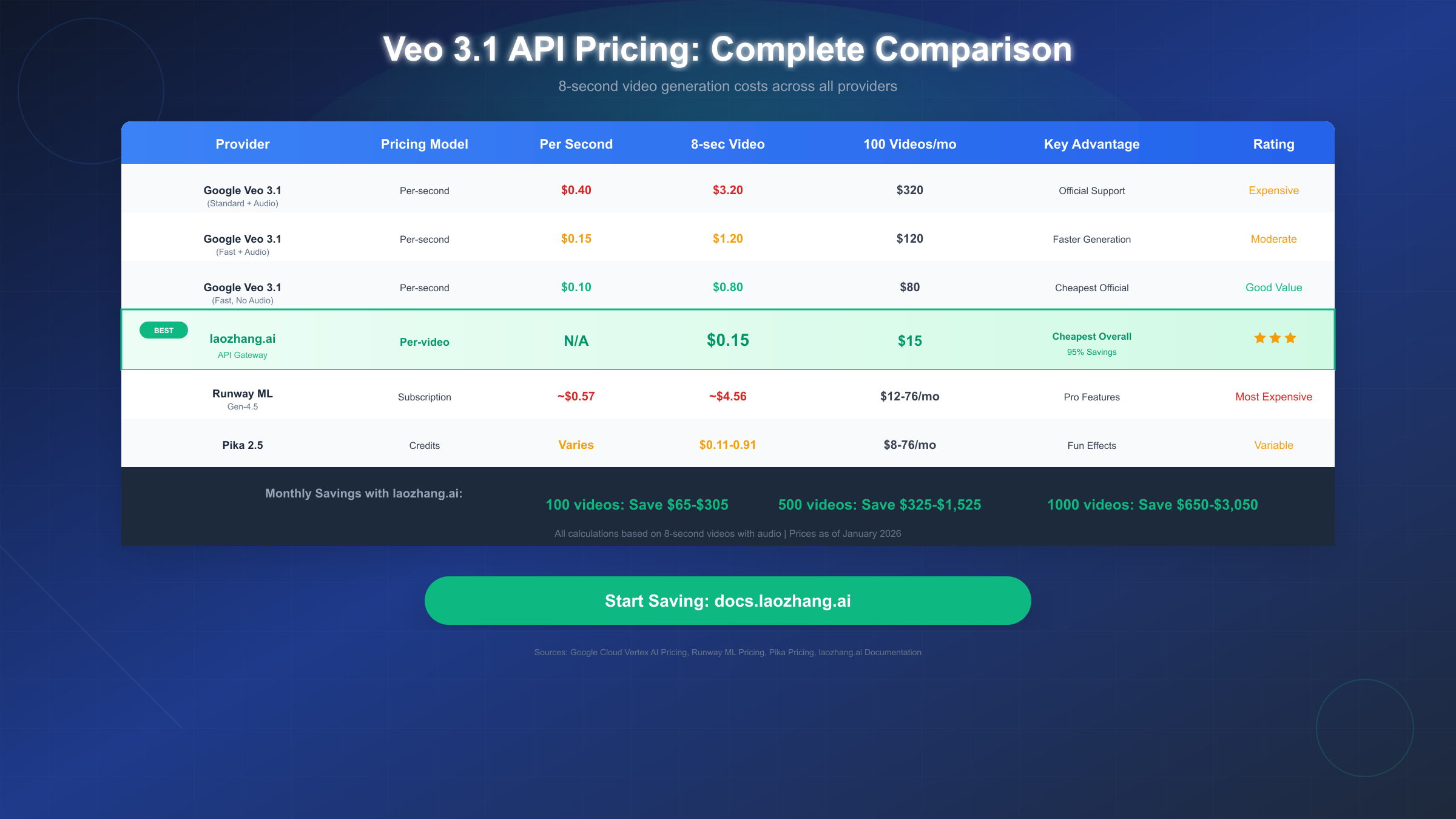
Official Google Pricing (via Vertex AI and Gemini API)
Google offers Veo 3.1 through both Vertex AI (enterprise) and the Gemini API (developers). The pricing structure varies based on generation speed and audio inclusion:
| Tier | Per Second | 8-Second Video | Best For |
|---|---|---|---|
| Standard + Audio | $0.40 | $3.20 | Maximum quality |
| Fast + Audio | $0.15 | $1.20 | Production use |
| Standard Video-only | $0.20 | $1.60 | No audio needed |
| Fast Video-only | $0.10 | $0.80 | Budget official |
The "Fast" variants optimize for generation speed while maintaining quality, making them suitable for production environments where latency matters. Audio generation doubles the cost compared to video-only output, reflecting the additional computational resources required.
For developers already using Google Cloud services, our Gemini API pricing guide provides detailed information on the broader ecosystem and potential batch discounts.
Third-Party API Gateway: laozhang.ai
Among all options analyzed, laozhang.ai offers the most aggressive pricing for Veo 3.1 access. Rather than per-second billing, the platform charges a flat $0.15 per video generation regardless of duration (up to the model's 8-second maximum). This pricing model eliminates the complexity of calculating per-second costs and provides predictable budgeting.
The $0.15 per-video price represents significant savings compared to Google's official tiers. For an 8-second video with audio, users save between $0.65 (vs Fast tier) and $3.05 (vs Standard tier) per generation. At scale, these savings compound dramatically—generating 1,000 videos monthly costs $150 through laozhang.ai versus $800-$3,200 through official channels.
The platform maintains quality parity by routing requests to Google's actual Veo 3.1 infrastructure rather than hosting alternative models. This proxy architecture means developers receive identical output quality while benefiting from simplified access and reduced costs.
Alternative Platforms
Runway ML (Gen-4.5): Runway operates on a subscription model with credit allocations. The Standard plan at $12/month provides approximately 25 seconds of Gen-4.5 generation, translating to roughly $0.57 per second. While Runway offers excellent creative tools and a professional editing interface, per-video costs significantly exceed both Google official and third-party alternatives.
Pika 2.5: Pika uses a credit-based system with plans ranging from $8-$76/month. Credit costs vary by model and feature, with videos costing between 10-80 credits. The variable pricing makes direct comparison challenging, but costs generally range from $0.11-$0.91 per video depending on settings and plan tier.
Monthly Cost Summary
For developers planning regular usage, monthly projections clarify the long-term cost implications:
| Volume | Google Official | laozhang.ai | Savings |
|---|---|---|---|
| 100 videos | $80-$320 | $15 | $65-$305 |
| 500 videos | $400-$1,600 | $75 | $325-$1,525 |
| 1,000 videos | $800-$3,200 | $150 | $650-$3,050 |
These calculations assume 8-second videos with audio using Google's range from Fast ($0.80/video) to Standard ($3.20/video) tiers.
Official Google API: Quick Start Guide
While not the cheapest option, the official Google API provides direct support, SLA guarantees, and integration with other Google Cloud services. The following guide covers the essential steps for getting started.
Prerequisites
Access to Veo 3.1 requires a Google Cloud account with billing enabled. The model is available through both Vertex AI (for enterprise deployments) and the Gemini API (for developer projects). Pricing remains consistent across both access methods.
Basic Python Implementation
Google provides the google-genai Python package for API interaction. The following code demonstrates text-to-video generation:
pythonfrom google import genai
import time


client = genai.Client(api_key="YOUR_GOOGLE_API_KEY")

# Generate video from text prompt
operation = client.models.generate_videos(
    model="veo-3.1-generate-preview",
    prompt="A golden retriever playing fetch on a sunny beach, waves crashing in the background",
    config={
        "aspect_ratio": "16:9",
        "duration_seconds": 8,
        "resolution": "1080p"
    }
)

# Wait for generation to complete
while not operation.done:
    print("Generating video...")
    time.sleep(10)
    operation = client.operations.get(operation)

# Download the result
video = operation.response.generated_videos[0]
client.files.download(file=video.video)
video.video.save("output.mp4")

print(f"Video saved! Generation took {operation.metadata.duration}s")
Key Parameters
The API supports several configuration options that affect both output and cost:
Aspect Ratio: Choose between 16:9 (landscape) or 9:16 (portrait/mobile). The aspect ratio affects framing but not pricing.
Resolution: Options include 720p and 1080p. Higher resolution provides better quality but note that 1080p output is limited to 8-second maximum duration.
Duration: Specify 4, 6, or 8 seconds. Longer videos cost proportionally more under per-second billing.
Negative Prompt: Specify elements to exclude from generation, improving prompt adherence for complex scenes.
Generation Time and Limits
Video generation latency ranges from 11 seconds to 6 minutes depending on server load and configuration. Generated videos are retained for 2 days in Google's storage before automatic deletion—download promptly to avoid data loss.
Rate limits apply based on your Google Cloud tier. New accounts typically start with conservative limits that increase based on usage history and account standing.
Cheapest Option: laozhang.ai Complete Tutorial
For developers prioritizing cost efficiency, laozhang.ai provides the most economical path to Veo 3.1 access. This section provides a complete setup guide from account creation through first video generation.
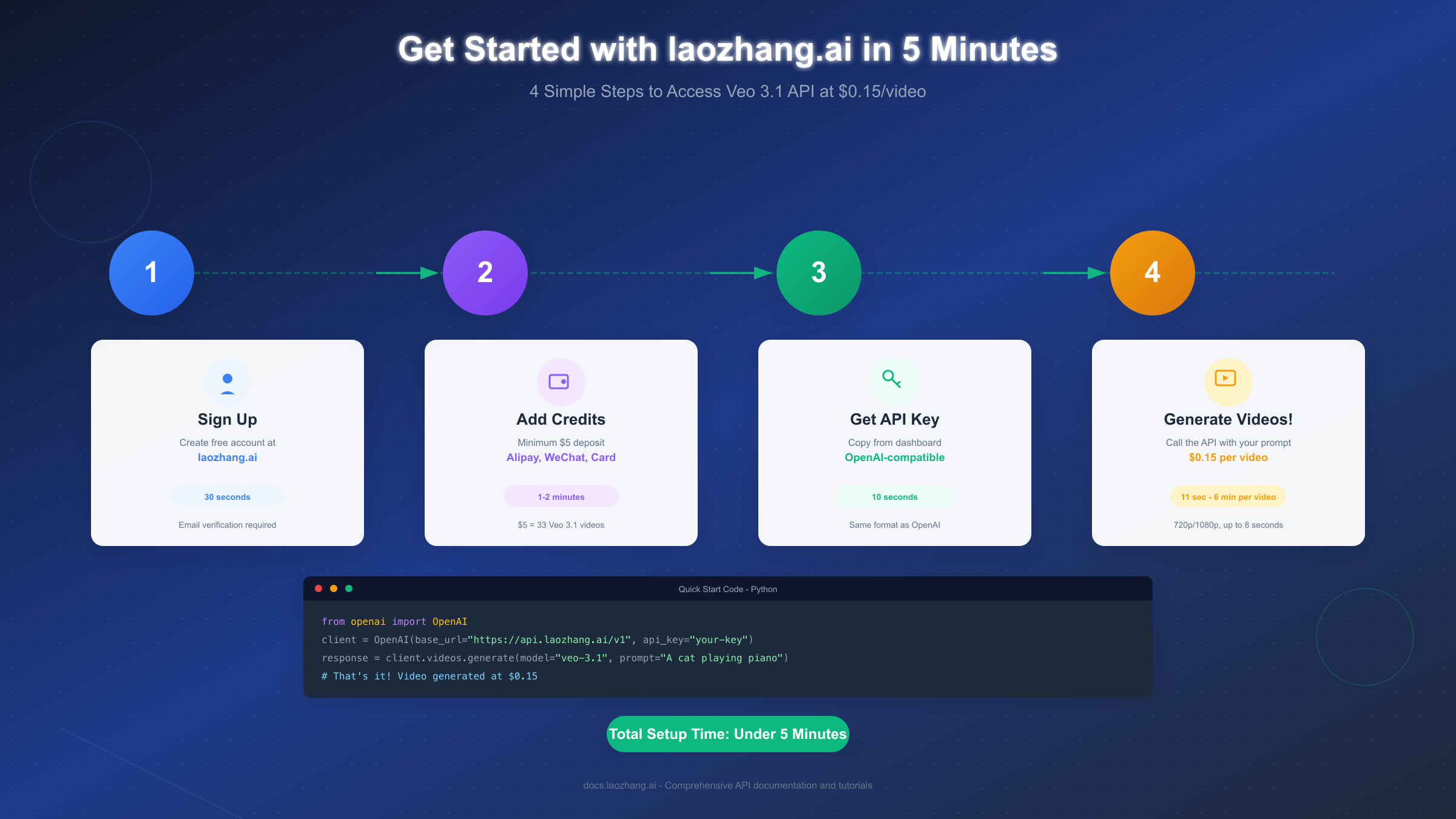
Step 1: Create Your Account
Navigate to laozhang.ai and click the registration button. The signup process requires only an email address and password—no phone verification or identity documents needed. Account creation typically completes in under 30 seconds.
After registration, verify your email through the confirmation link. This step activates your account and unlocks API access.
Step 2: Add Credits
laozhang.ai operates on a pay-as-you-go model with no subscription requirements. The minimum deposit is $5, which provides approximately 33 Veo 3.1 video generations at current pricing.
The platform supports multiple payment methods designed for global accessibility:
- Alipay: Instant processing for Chinese users
- WeChat Pay: Alternative Chinese payment option
- Credit/Debit Cards: International Visa, Mastercard, and UnionPay accepted
- Cryptocurrency: Select crypto options available for privacy-focused users
For larger volumes, bulk deposits of $100 or more often include bonus credits. The platform's documentation at docs.laozhang.ai lists current promotions and volume discounts.
Step 3: Generate Your API Key
Access your dashboard after login to find the API key section. Click "Generate New Key" to create credentials for programmatic access. The key follows OpenAI-compatible formatting, simplifying integration with existing codebases.
Copy your API key and store it securely—treat it like a password. The key provides full access to your account balance and should never be committed to public repositories or shared in plain text.
Step 4: Make Your First API Call
laozhang.ai maintains OpenAI API compatibility, meaning existing OpenAI SDK code requires only a base URL change. The following Python example demonstrates Veo 3.1 generation:
pythonfrom openai import OpenAI

# Initialize client with laozhang.ai endpoint
client = OpenAI(
    base_url="https://api.laozhang.ai/v1",
    api_key="your-laozhang-api-key"
)

# Generate video using Veo 3.1
response = client.videos.generate(
    model="veo-3.1",
    prompt="A majestic eagle soaring over snow-capped mountains at sunset",
    config={
        "duration": 8,
        "resolution": "1080p",
        "audio": True
    }
)

# Access the generated video
video_url = response.video_url
print(f"Video generated: {video_url}")
print(f"Cost: \$0.15")
The API returns a URL to the generated video, which remains accessible for 48 hours. Download videos promptly for permanent storage.
Advanced Features
Beyond basic text-to-video generation, the laozhang.ai Veo 3.1 endpoint supports:
Image-to-Video: Provide a reference image to animate existing visuals. The API accepts image URLs or base64-encoded data.
pythonresponse = client.videos.generate(
    model="veo-3.1",
    prompt="Gentle breeze rustling the leaves",
    image_url="https://example.com/forest-scene.jpg"
)
Video Extension: Extend existing Veo-generated videos by up to 7 seconds per iteration, allowing creation of longer sequences through chaining.
Style Transfer: Include reference images to guide aesthetic choices without directly animating them.
The platform provides access to 200+ AI models beyond Veo, including GPT-4, Claude, and various image generation models—all through the same API key and account balance.
Real Cost Calculations: 100, 500, 1000 Videos
Abstract pricing becomes meaningful only when applied to real usage scenarios. The following calculations help developers project actual expenses based on typical production volumes.
Individual Creator (100 Videos/Month)
A content creator producing daily video content for social media might generate approximately 100 videos monthly. Cost comparison at this volume:
| Provider | Monthly Cost | Per-Video Average |
|---|---|---|
| Google Standard | $320 | $3.20 |
| Google Fast | $80 | $0.80 |
| laozhang.ai | $15 | $0.15 |
| Runway Standard | ~$144 | ~$1.44 |
At 100 videos monthly, laozhang.ai users save between $65-$305 compared to official Google pricing. The savings cover the cost of approximately 4-20 additional months of video generation at equivalent volumes.
Small Team (500 Videos/Month)
A small agency or development team integrating video generation into client projects might require 500 videos monthly across various campaigns:
| Provider | Monthly Cost | Annual Cost |
|---|---|---|
| Google Standard | $1,600 | $19,200 |
| Google Fast | $400 | $4,800 |
| laozhang.ai | $75 | $900 |
Annual savings with laozhang.ai reach $3,900-$18,300 at this volume. These savings could fund significant infrastructure improvements or additional team resources.
Production Scale (1,000+ Videos/Month)
Larger operations generating video at scale see the most dramatic cost differences:
| Provider | Monthly Cost | Cost Difference |
|---|---|---|
| Google Standard | $3,200 | Baseline |
| Google Fast | $800 | -$2,400 |
| laozhang.ai | $150 | -$3,050 |
At production scale, laozhang.ai pricing enables video generation workflows that would be prohibitively expensive through official channels. The $3,050 monthly savings translates to $36,600 annually—potentially funding multiple full-time positions or significant technology investments.
Break-Even Analysis
For teams considering the switch from official APIs, break-even occurs almost immediately given the per-video savings. Even accounting for potential setup time and code migration, the cost differential justifies the transition within days of typical usage patterns.
Are Third-Party APIs Safe? How They Work
Developer skepticism toward third-party API services is healthy—understanding how these platforms operate addresses legitimate concerns about quality, security, and reliability.
How API Gateways Function
Platforms like laozhang.ai operate as API gateways or proxies rather than hosting alternative models. When you make an API request, the gateway:
- Receives your request at their endpoint
- Authenticates using their own credentials with the upstream provider (Google)
- Forwards your prompt to the actual Veo 3.1 model
- Returns the generated content to you
This architecture means the video generation occurs on Google's actual infrastructure using Google's actual model. The quality is identical to direct API access because it literally is the same model processing your request.
Why Gateways Can Offer Lower Prices
Several factors enable third-party gateways to undercut official pricing:
Volume Discounts: Gateways aggregate requests from thousands of users, qualifying for enterprise-tier pricing that individual developers cannot access. These savings partially pass through to end users.
Operational Efficiency: By specializing in API management, gateways optimize routing, caching, and request handling to minimize overhead costs.
Competitive Positioning: The AI API market is competitive. Gateways price aggressively to build user bases, accepting lower margins in exchange for market share.
Geographic Arbitrage: Operating costs vary globally. Platforms based in regions with lower operational expenses can offer reduced pricing while maintaining profitability.
Security Considerations
Legitimate concerns about third-party services include data handling and privacy. Reputable gateways like laozhang.ai:
Don't Store Prompts Long-Term: Requests are processed and discarded. Prompts aren't retained for training or analysis beyond temporary logging for debugging.
Don't Store Generated Content: Videos are temporarily hosted for delivery, then deleted. The gateway doesn't maintain archives of user-generated content.
Use Encrypted Transmission: All API communication occurs over HTTPS, preventing interception of prompts or credentials.
Provide Transparent Terms: Published privacy policies detail data handling practices. Avoid platforms that obscure these details.
When to Use Official APIs
Despite cost advantages, official APIs remain appropriate in certain scenarios:
- Regulatory Requirements: Some industries mandate direct vendor relationships for audit purposes
- SLA Requirements: Mission-critical applications may require Google's uptime guarantees
- Support Needs: Complex implementations benefit from official technical support channels
- Enterprise Procurement: Corporate policies may restrict third-party service usage
For most individual developers, startups, and small teams, third-party gateways provide equivalent functionality at substantially reduced cost.
Which Option is Right for You? Decision Guide
Choosing between API providers depends on your specific situation. The following framework helps identify the best fit for different use cases.
Choose Google Official API If:
You operate in a regulated industry requiring vendor accountability, need guaranteed SLA performance for production systems, or have enterprise procurement requirements that mandate direct relationships with technology providers. Organizations with significant Google Cloud investments may also benefit from unified billing and support channels.
Choose laozhang.ai If:
Cost efficiency is your primary concern and you're comfortable with third-party services. This includes:
- Individual developers and hobbyists exploring video generation
- Startups optimizing burn rate during early stages
- Agencies managing multiple client projects with variable volumes
- Educational institutions and researchers with limited budgets
- Any project where the 80%+ cost savings meaningfully impact viability
Choose Runway ML or Pika If:
You need creative tools beyond raw API access. Runway provides an excellent editing interface and creative workflow features. Pika offers unique effects and style options not available elsewhere. If you're a content creator rather than a developer, these platforms' user interfaces may provide more value than pure API access.
Hybrid Approach
Many organizations benefit from a hybrid strategy: use third-party APIs for development, testing, and lower-stakes production while maintaining official API access for mission-critical applications requiring maximum reliability guarantees.
For teams exploring free alternatives to supplement paid usage, our guide to free image-to-video AI tools covers options that can reduce overall video generation costs through strategic tool selection.
FAQ: Common Questions About Veo 3.1 API Pricing
How much does Veo 3.1 API cost officially?
Google charges $0.10-$0.40 per second depending on tier and audio inclusion. An 8-second video with audio costs $1.20-$3.20 through official channels. The "Fast" tier at $0.15/second provides the best official value for most use cases.
Is there a free Veo 3.1 API option?
Google doesn't offer a free tier for Veo 3.1. However, new Google Cloud accounts sometimes receive promotional credits applicable to API usage. Check current promotions on the Google Cloud Free Tier page.
What's the cheapest way to use Veo 3.1?
Third-party API gateways offer the lowest per-video costs. laozhang.ai charges $0.15 per video regardless of duration, representing up to 95% savings compared to standard official pricing.
Is laozhang.ai safe to use?
The platform operates as an API gateway, routing requests to Google's actual infrastructure. Your prompts are processed but not stored long-term. The service has operated since 2023 with consistent availability. Standard security practices (API key protection, HTTPS) apply as with any API service.
How long does video generation take?
Generation time ranges from 11 seconds to 6 minutes depending on server load and video complexity. The "Fast" tier options generally complete more quickly than standard tiers.
What video lengths and resolutions does Veo 3.1 support?
Veo 3.1 generates videos up to 8 seconds at 720p or 1080p resolution. Both 16:9 (landscape) and 9:16 (portrait) aspect ratios are supported. Video extension features allow chaining multiple generations for longer content.
Can I use Veo 3.1 for commercial projects?
Yes, both official and third-party API access permit commercial usage. All Veo-generated content includes SynthID watermarking per Google's policy, identifying it as AI-generated. Check specific terms for any additional restrictions.
How do I switch from OpenAI to Veo 3.1?
For laozhang.ai users, the process requires only changing the base URL in your API configuration from api.openai.com to api.laozhang.ai and updating the model parameter to veo-3.1. The SDK and request format remain compatible.
Pricing data current as of January 2026. For the latest rates, consult official documentation at cloud.google.com/vertex-ai/pricing, ai.google.dev/pricing, and docs.laozhang.ai.