Understanding Claude API pricing is essential for building cost-effective AI applications. Whether you're a startup prototyping your first chatbot or an enterprise deploying at scale, knowing exactly how much each API call costs—and how to optimize those costs—can mean the difference between a sustainable product and runaway expenses.
This comprehensive guide covers everything you need to know about Claude API pricing in 2026: from basic token costs across all nine available models to advanced optimization strategies like batch processing (50% off) and prompt caching (90% savings). We'll include practical code examples, cost calculators, and real-world scenarios to help you budget accurately and reduce your AI spending.
What you'll learn in this guide:
- Complete pricing for all 9 Claude models (Opus, Sonnet, Haiku)
- How tokens work and why output costs 5x more than input
- Batch processing implementation for 50% savings
- Prompt caching strategies for up to 90% cost reduction
- Long context pricing and when premium rates apply
- Claude vs OpenAI vs Google Gemini pricing comparison
- Production-ready Python and TypeScript code examples
- Real-world cost calculation scenarios
Understanding Claude API Token Pricing
Before diving into specific prices, let's clarify how Claude API pricing actually works. Unlike subscription-based pricing, Claude uses a pay-as-you-go token-based model where you're charged based on the text you send and receive. This model provides flexibility—you only pay for what you use—but requires understanding how tokens translate to costs.
What Are Tokens and How Are They Counted?
Tokens are the fundamental units of text that language models process. Unlike characters or words, tokens represent pieces of text that the model's tokenizer has identified as meaningful units. For English text, one token equals approximately 4 characters or 0.75 words. However, this ratio varies significantly based on language and content type.
Token counting examples:
| Text | Approximate Tokens | Tokens per Character |
|---|---|---|
| "Hello, world!" | 3 tokens | 0.23 |
| 1,000 words of English prose | ~1,333 tokens | — |
| 1,000 characters of Python code | ~250-400 tokens | 0.25-0.40 |
| 1,000 characters of Chinese | ~500-700 tokens | 0.50-0.70 |
| 1,000 characters of JSON data | ~200-300 tokens | 0.20-0.30 |
| Base64 encoded image data | ~1.3x character count | 1.30 |
The key insight is that specialized content like code, technical documentation, or non-Latin scripts often tokenizes differently than conversational English. Claude's tokenizer (based on Byte Pair Encoding or BPE) handles most content efficiently, but always test with representative samples when estimating costs.
Practical tokenization insights:
- Whitespace matters: Extra spaces and newlines consume tokens. Minified code uses fewer tokens than formatted code.
- Common words are efficient: Frequent English words like "the," "and," "is" typically encode as single tokens.
- Technical terms split: Uncommon technical terms like "Kubernetes" or "anthropomorphic" may split into multiple tokens.
- Numbers vary: Simple numbers like "42" are usually one token, but "3.14159265359" might be several.
- Punctuation accumulates: Heavy use of special characters in regex or markup increases token count.
To accurately estimate tokens for your specific content, use Anthropic's tokenizer API or check the usage field returned with every API response. This provides exact token counts for both input and output.
Input vs Output Pricing: Why Output Costs 5x More
Claude API charges separately for input tokens (what you send) and output tokens (what Claude generates). Across all models, output tokens cost approximately 5x more than input tokens. This pricing structure reflects the computational reality of language model inference.
Why the significant cost difference?
-
Computational intensity: Generating new tokens requires running the full inference pass for each token sequentially. While processing input can happen largely in parallel across the GPU, output generation is inherently sequential—each new token depends on all previous tokens.
-
Memory bandwidth: Output generation maintains state (the KV cache) across all previous tokens and must update this state with each new token generated. This memory-intensive process is the primary bottleneck for modern LLM inference.
-
Quality assurance: Each output token goes through safety classifiers, quality checks, and potentially multiple sampling attempts to ensure coherent, safe responses.
-
Uncertainty in length: Input length is known upfront, allowing efficient batching. Output length is unpredictable, requiring more flexible (and expensive) resource allocation.
Optimization implications of the 5:1 ratio:
This pricing structure has profound implications for application design:
| Application Pattern | Input/Output Ratio | Cost Dominated By |
|---|---|---|
| Document summarization | 100:1 | Input |
| Chatbot with brief Q&A | 1:1 | Output |
| Code generation from specs | 1:5 | Output |
| RAG with context | 50:1 | Input |
| Long-form content writing | 1:10 | Output |
If your application generates long responses from short prompts, output costs will dominate your bill. Conversely, applications that process large documents with brief summaries will be input-heavy. Design your prompts and expected outputs accordingly.
Context Window Impact on Pricing
Claude models offer different context window sizes, and this affects both capability and pricing:
| Context Window | Models | Pricing Impact | Use Case |
|---|---|---|---|
| 200K tokens | Opus 4.5, Haiku 4.5, all legacy | Standard rates | Most applications |
| 1M tokens | Sonnet 4.5 | Premium for >200K | Large codebases, books |
When using Sonnet 4.5's extended 1M context, requests exceeding 200K input tokens trigger premium pricing. Specifically, both input and output rates increase significantly once you cross the 200K threshold:
- Input: $3.00/MTok → $6.00/MTok (2x increase)
- Output: $15.00/MTok → $22.50/MTok (1.5x increase)
This tiered pricing is crucial for applications processing large codebases, legal documents, or book-length content. You should carefully consider whether you truly need the full context or whether chunking strategies would be more economical.
Complete Claude API Pricing Table (All Models)
Claude offers nine distinct models spanning three capability tiers: Opus (most intelligent), Sonnet (balanced), and Haiku (fastest). Here's the complete pricing breakdown as of January 2026, verified against official Anthropic documentation.
Current Generation Models (4.5 Series)
The 4.5 series represents Claude's latest and most capable models, featuring significant improvements in reasoning, coding, and instruction following:
| Model | Input Cost/MTok | Output Cost/MTok | Context Window | Speed | Best For |
|---|---|---|---|---|---|
| Claude Opus 4.5 | $5.00 | $25.00 | 200K | Slowest | Complex reasoning, research, multi-step analysis |
| Claude Sonnet 4.5 | $3.00 | $15.00 | 1M | Medium | Coding, long documents, general production |
| Claude Haiku 4.5 | $1.00 | $5.00 | 200K | Fastest | Real-time chat, classification, high-volume |
Performance-to-price highlights:
-
Opus 4.5 scores 80.9% on SWE-bench Verified, making it the most capable coding model available. It excels at complex, multi-step reasoning tasks that require deep understanding. Despite being the most expensive Claude model, it's actually 66% cheaper than its predecessor (Opus 4/4.1 at $15/$75).
-
Sonnet 4.5 offers 1M context at the same base price as 200K models—exceptional value for document-heavy workloads. It represents the sweet spot for most production applications, delivering strong performance at reasonable cost. The extended context enables processing entire codebases or book-length documents in a single request.
-
Haiku 4.5 delivers "near-frontier" performance at 5x lower cost than Sonnet. Anthropic designed Haiku for speed-critical applications where response latency matters more than maximum capability. It's ideal for real-time chat, classification tasks, and high-volume batch processing.
Production Models (4.x Series)
The 4.x series includes current production models and legacy options that remain available for backward compatibility:
| Model | Input Cost/MTok | Output Cost/MTok | Context Window | Status | Notes |
|---|---|---|---|---|---|
| Claude Opus 4.1 | $15.00 | $75.00 | 200K | Legacy | Original premium model |
| Claude Opus 4 | $15.00 | $75.00 | 200K | Legacy | First Opus release |
| Claude Sonnet 4 | $3.00 | $15.00 | 200K | Production | Widely deployed |
| Claude Sonnet 3.7 | $3.00 | $15.00 | 200K | Legacy | Extended thinking |
| Claude Haiku 3.5 | $0.80 | $4.00 | 200K | Production | Good capability/price |
| Claude Haiku 3 | $0.25 | $1.25 | 200K | Budget | Lowest cost option |
Important pricing observations:
-
Opus 4.5 represents a 66% cost reduction compared to Opus 4/4.1 while delivering superior performance. There's rarely a reason to use legacy Opus models unless you have prompts specifically tuned for their behavior or regulatory requirements mandate using certified model versions.
-
Haiku 3 remains the budget champion at $0.25/$1.25 per MTok—just $312/month for 1 million classification requests. For high-volume, quality-tolerant applications, this pricing is difficult to beat.
-
Sonnet pricing is stable across versions 3.7, 4, and 4.5, making upgrades cost-neutral. This consistency allows you to adopt newer models without budget surprises.
Model Selection Guide: Matching Capability to Cost
Choosing the right model involves balancing capability, speed, and cost. Here's a comprehensive decision framework:
| Use Case | Recommended Model | Why This Choice | Monthly Cost* |
|---|---|---|---|
| Customer support chatbot | Haiku 4.5 | Fast responses, good understanding | ~$120 |
| Code assistant/IDE integration | Sonnet 4.5 | Strong coding, large context | ~$360 |
| Research analysis/reports | Opus 4.5 | Maximum reasoning capability | ~$600 |
| Simple classification/routing | Haiku 3 | Minimum viable quality | ~$30 |
| Document summarization | Sonnet 4 | Reliable, cost-effective | ~$360 |
| Multi-language translation | Haiku 4.5 | Speed with quality | ~$150 |
| Legal document analysis | Opus 4.5 | Precision critical | ~$800 |
| Content moderation | Haiku 3.5 | Balance speed/accuracy | ~$90 |
*Estimates based on 10,000 requests with 1,000 input / 200 output tokens each.
The pattern is clear: start with Haiku for prototyping, scale with Sonnet for production, and reserve Opus for tasks that genuinely require maximum intelligence. Many teams use a tiered approach, routing simple requests to Haiku while escalating complex ones to Sonnet or Opus.

Batch Processing: Save 50% on API Costs
Batch processing is one of the most impactful cost-saving features in Claude API. By accepting asynchronous processing within a 24-hour window, you receive a flat 50% discount on both input and output tokens. This discount applies to all models without exception.
How Batch API Works
The Batch API processes requests asynchronously, typically completing within minutes but guaranteeing delivery within 24 hours. This flexibility allows Anthropic to optimize resource utilization, passing savings to you. Here's the complete workflow:
- Submit batch: Send a collection of requests with unique custom IDs
- Validation: API validates all requests upfront, rejecting invalid ones
- Processing: Claude processes requests in optimized batches during low-demand periods
- Progress tracking: Poll the batch status or use webhooks for notification
- Results retrieval: Download results using batch ID, matched by custom ID
Batch pricing comparison (all 50% off standard rates):
| Model | Standard Input | Batch Input | Standard Output | Batch Output |
|---|---|---|---|---|
| Opus 4.5 | $5.00/MTok | $2.50/MTok | $25.00/MTok | $12.50/MTok |
| Sonnet 4.5 | $3.00/MTok | $1.50/MTok | $15.00/MTok | $7.50/MTok |
| Haiku 4.5 | $1.00/MTok | $0.50/MTok | $5.00/MTok | $2.50/MTok |
| Haiku 3 | $0.25/MTok | $0.125/MTok | $1.25/MTok | $0.625/MTok |
When to Use Batch Processing
Batch processing is ideal when you can tolerate latency in exchange for cost savings:
Ideal use cases:
- Nightly report generation and analytics
- Bulk document processing and summarization
- Training data preparation and augmentation
- Scheduled content generation
- Background data extraction
- Non-interactive analysis pipelines
- A/B testing different prompts at scale
Not suitable for:
- Real-time user interactions requiring immediate response
- Chatbots and conversational interfaces
- Time-sensitive alerts and notifications
- Interactive coding assistants
- Live customer support
- Streaming applications
The decision is straightforward: if users aren't waiting for the response in real-time, batch processing should be your default choice.
Batch Processing Implementation (Python)
Here's a production-ready Python implementation for batch processing:
pythonimport anthropic import time from typing import List, Dict, Any client = anthropic.Anthropic() def process_batch( requests: List[Dict[str, Any]], model: str = "claude-sonnet-4-5-20250514", max_tokens: int = 1024 ) -> List[Dict[str, Any]]: """ Process multiple requests with 50% batch discount. Args: requests: List of dicts with 'id' and 'content' keys model: Claude model to use max_tokens: Maximum tokens per response Returns: List of results with 'id' and 'content' keys """ # Create batch request batch = client.beta.messages.batches.create( requests=[ { "custom_id": str(req.get("id", i)), "params": { "model": model, "max_tokens": max_tokens, "messages": [ {"role": "user", "content": req["content"]} ] } } for i, req in enumerate(requests) ] ) print(f"Batch created: {batch.id}") print(f"Status: {batch.processing_status}") # Poll for completion with exponential backoff wait_time = 5 max_wait = 300 # 5 minutes max between polls while batch.processing_status != "ended": time.sleep(wait_time) batch = client.beta.messages.batches.retrieve(batch.id) print(f"Status: {batch.processing_status} " f"({batch.request_counts.succeeded}/{batch.request_counts.processing})") # Increase wait time for long-running batches wait_time = min(wait_time * 1.5, max_wait) # Collect results results = [] for result in client.beta.messages.batches.results(batch.id): if result.result.type == "succeeded": results.append({ "id": result.custom_id, "content": result.result.message.content[0].text, "usage": { "input": result.result.message.usage.input_tokens, "output": result.result.message.usage.output_tokens } }) else: results.append({ "id": result.custom_id, "error": result.result.error.message }) return results documents = [ {"id": "doc-001", "content": "Summarize this financial report: ..."}, {"id": "doc-002", "content": "Extract key metrics from: ..."}, {"id": "doc-003", "content": "Analyze sentiment in: ..."}, ] summaries = process_batch(documents) for summary in summaries: print(f"{summary['id']}: {summary.get('content', summary.get('error'))[:100]}...")
Batch Processing Implementation (TypeScript)
For TypeScript/Node.js applications:
typescriptimport Anthropic from "@anthropic-ai/sdk"; const client = new Anthropic(); interface BatchRequest { id: string; content: string; } interface BatchResult { id: string; content?: string; error?: string; usage?: { input: number; output: number }; } async function processBatch( requests: BatchRequest[], model: string = "claude-sonnet-4-5-20250514", maxTokens: number = 1024 ): Promise<BatchResult[]> { // Create batch const batch = await client.beta.messages.batches.create({ requests: requests.map((req, i) => ({ custom_id: req.id || `request-${i}`, params: { model, max_tokens: maxTokens, messages: [{ role: "user" as const, content: req.content }], }, })), }); console.log(`Batch created: ${batch.id}`); // Poll for completion let currentBatch = batch; while (currentBatch.processing_status !== "ended") { await new Promise((resolve) => setTimeout(resolve, 5000)); currentBatch = await client.beta.messages.batches.retrieve(batch.id); console.log(`Status: ${currentBatch.processing_status}`); } // Collect results const results: BatchResult[] = []; for await (const result of client.beta.messages.batches.results(batch.id)) { if (result.result.type === "succeeded") { const message = result.result.message; results.push({ id: result.custom_id, content: message.content[0].type === "text" ? message.content[0].text : undefined, usage: { input: message.usage.input_tokens, output: message.usage.output_tokens, }, }); } else { results.push({ id: result.custom_id, error: result.result.error?.message || "Unknown error", }); } } return results; } // Usage const documents: BatchRequest[] = [ { id: "doc-001", content: "Analyze this code for security issues: ..." }, { id: "doc-002", content: "Generate unit tests for: ..." }, ]; processBatch(documents).then((results) => { results.forEach((r) => console.log(`${r.id}: ${r.content?.slice(0, 100)}...`)); });
The breakeven calculation for batch processing is straightforward: if you can wait up to 24 hours for results and have more than a handful of requests, batch processing always wins. Even a single request processed via batch saves 50%—there's no minimum volume requirement.
Prompt Caching: Achieve 90% Cost Reduction
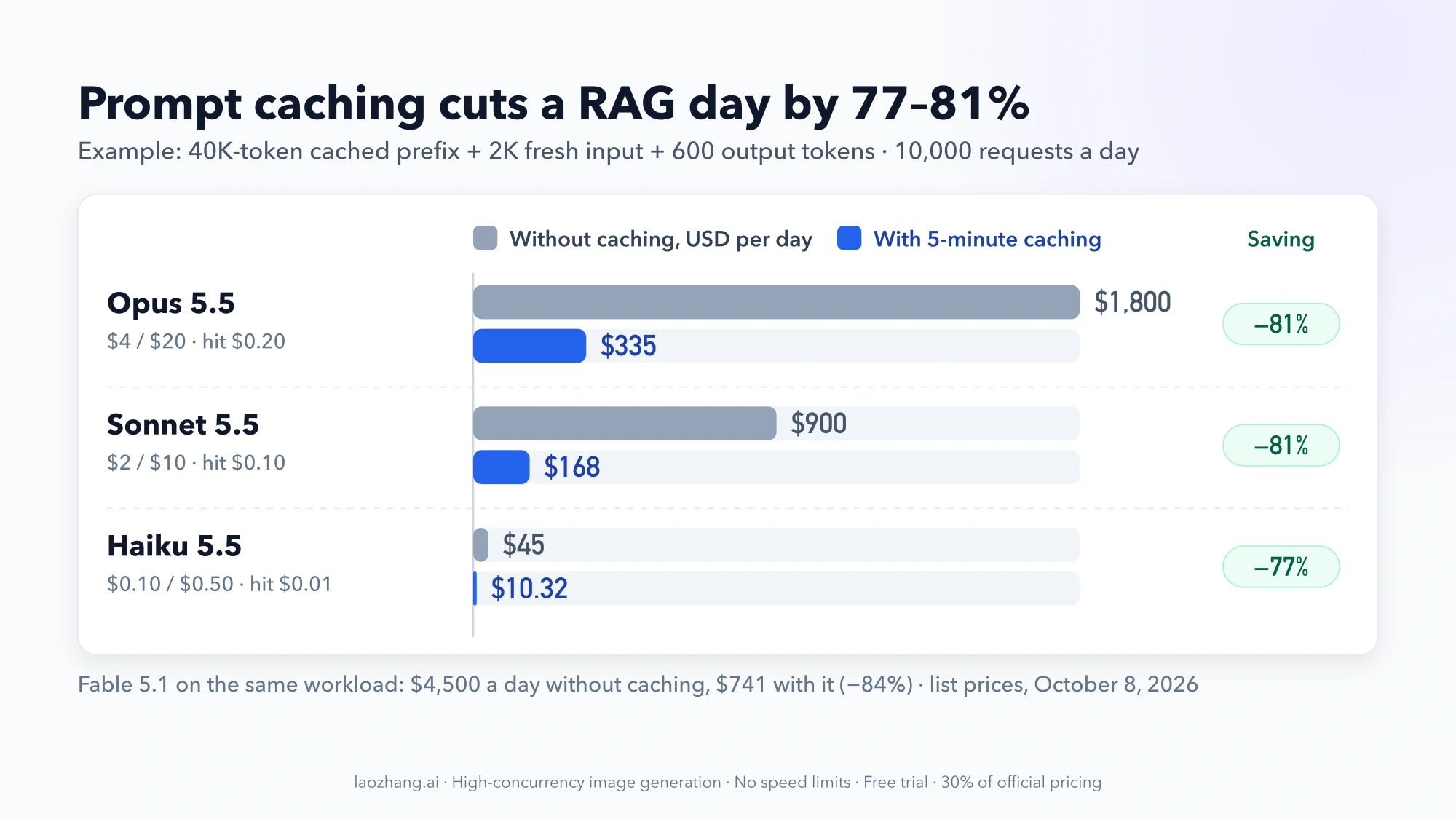
Prompt caching is Claude API's most powerful cost optimization feature for applications with repeated content. By caching static content like system prompts, few-shot examples, or reference documents, you pay a one-time write cost and then enjoy 90% savings on all subsequent reads.
Cache Pricing Mechanics
Prompt caching uses a two-tier pricing model that rewards repeated usage:
| Operation | Cost Multiplier | Explanation |
|---|---|---|
| Cache Write | 1.25x base input | First time caching content (5-min TTL) |
| Cache Write (Extended) | 2.0x base input | First time caching (1-hour TTL) |
| Cache Read | 0.1x base input | Subsequent uses (90% off!) |
Per-model cache pricing for 5-minute TTL:
| Model | Base Input | Write Cost/MTok | Read Cost/MTok | Read Savings |
|---|---|---|---|---|
| Opus 4.5 | $5.00 | $6.25 | $0.50 | 90% |
| Sonnet 4.5 | $3.00 | $3.75 | $0.30 | 90% |
| Haiku 4.5 | $1.00 | $1.25 | $0.10 | 90% |
Extended 1-hour TTL pricing:
| Model | Write Cost/MTok | Read Cost/MTok |
|---|---|---|
| Opus 4.5 | $10.00 | $0.50 |
| Sonnet 4.5 | $6.00 | $0.30 |
| Haiku 4.5 | $2.00 | $0.10 |
The extended TTL doubles write cost but maintains the same read price—worthwhile for longer sessions or applications with bursty traffic patterns.
Cache Breakeven Analysis
When does caching pay off? Let's calculate precisely:
Scenario: 50,000 token system prompt, Sonnet 4.5 pricing
Without caching (n requests):
- Cost per request: 50K × $3.00/MTok = $0.15
- Total cost: $0.15 × n
With caching (n requests):
- Write cost (once): 50K × $3.75/MTok = $0.1875
- Read cost (n-1 times): 50K × $0.30/MTok = $0.015 per request
- Total cost: $0.1875 + $0.015 × (n-1)
Breakeven point: $0.1875 + $0.015(n-1) = $0.15n Solving: n = 1.39 requests
After just 2 requests, caching saves money! Here's the savings trajectory:
| Requests | Without Cache | With Cache | Savings | Savings % |
|---|---|---|---|---|
| 1 | $0.15 | $0.1875 | -$0.04 | -25% |
| 2 | $0.30 | $0.2025 | $0.10 | 33% |
| 5 | $0.75 | $0.2475 | $0.50 | 67% |
| 10 | $1.50 | $0.3225 | $1.18 | 78% |
| 50 | $7.50 | $0.9225 | $6.58 | 88% |
| 100 | $15.00 | $1.67 | $13.33 | 89% |
By request 100, you've achieved 89% savings—approaching the theoretical 90% maximum.
Implementation Guide
Here's how to implement prompt caching in Python with proper monitoring:
pythonimport anthropic from dataclasses import dataclass from typing import Optional client = anthropic.Anthropic() # Large system prompt that will be cached (e.g., 50K+ tokens) SYSTEM_PROMPT = """You are an expert code reviewer with deep knowledge of: - Python best practices and PEP standards - TypeScript/JavaScript patterns - Security vulnerabilities (OWASP Top 10) - Performance optimization techniques - Clean code principles Review code for: 1. Bugs and logical errors 2. Security vulnerabilities 3. Performance issues 4. Code style violations 5. Maintainability concerns [... additional guidelines totaling 50,000+ tokens ...] """ @dataclass class CacheStats: cache_read_tokens: int = 0 cache_write_tokens: int = 0 regular_input_tokens: int = 0 @property def cache_hit_rate(self) -> float: total = self.cache_read_tokens + self.cache_write_tokens return self.cache_read_tokens / total if total > 0 else 0 def log(self): print(f"Cache read: {self.cache_read_tokens:,} tokens") print(f"Cache write: {self.cache_write_tokens:,} tokens") print(f"Cache hit rate: {self.cache_hit_rate:.1%}") def create_cached_message( user_content: str, stats: Optional[CacheStats] = None ) -> str: """ Use prompt caching for repeated system prompts. The first call writes to cache (1.25x cost). Subsequent calls read from cache (0.1x cost = 90% savings). """ response = client.messages.create( model="claude-sonnet-4-5-20250514", max_tokens=4096, system=[ { "type": "text", "text": SYSTEM_PROMPT, "cache_control": {"type": "ephemeral"} # Enable caching } ], messages=[{"role": "user", "content": user_content}] ) # Track cache performance usage = response.usage if stats: stats.cache_read_tokens += usage.cache_read_input_tokens or 0 stats.cache_write_tokens += usage.cache_creation_input_tokens or 0 stats.regular_input_tokens += usage.input_tokens return response.content[0].text # Usage example stats = CacheStats() # First call: cache write review1 = create_cached_message("Review this Python code: def foo()...", stats) stats.log() # Shows cache write # Subsequent calls: cache read (90% savings!) review2 = create_cached_message("Review this TypeScript: function bar()...", stats) review3 = create_cached_message("Review this JavaScript: const baz = ...", stats) stats.log() # Shows high cache hit rate
For a complete guide on prompt caching patterns and advanced techniques, see our Claude API Prompt Caching Guide.
Caching vs Batch: Which to Choose?
| Factor | Prompt Caching | Batch Processing |
|---|---|---|
| Maximum savings | 90% on cached portion | 50% on everything |
| Latency | Real-time responses | Up to 24 hours |
| Best for | Repeated prompts/context | Bulk one-time jobs |
| Minimum requirement | ~1,024 tokens to cache | No minimum |
| TTL limitations | 5 min or 1 hour | N/A |
| Combinable? | Yes! | Yes! |
Pro tip: You can combine both features for maximum savings. Use batch processing with cached system prompts: you get 90%+ savings on repeated input content plus 50% discount on all output tokens. For a 50K system prompt with 1K output, combining both features can reduce costs by over 75%.
Long Context Pricing (>200K Tokens)
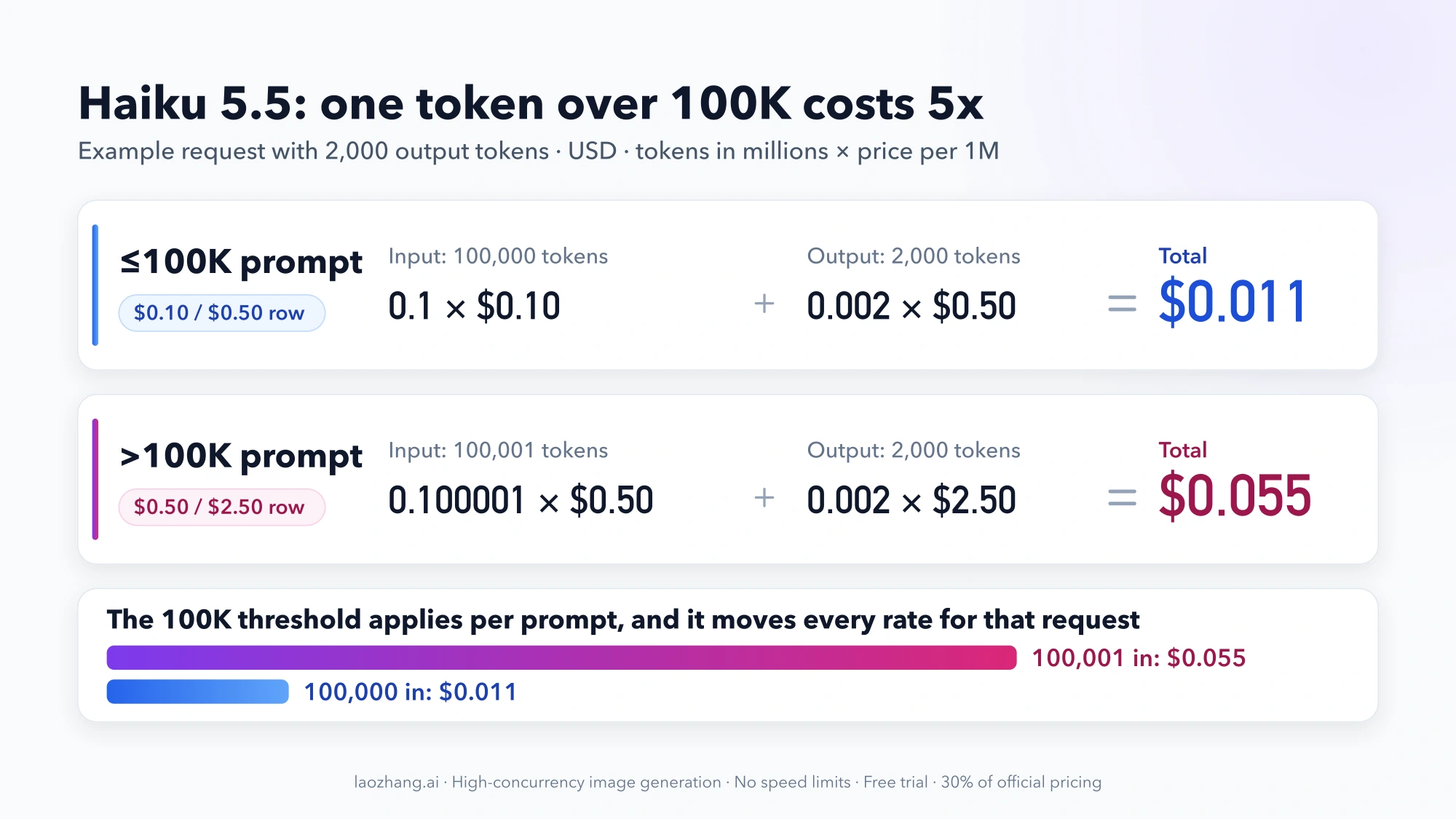
Claude Sonnet 4.5's 1M token context window enables processing entire codebases, book-length documents, or extensive conversation histories. However, requests exceeding 200K input tokens incur premium pricing that you should understand before designing your application.
Extended Context Surcharges
When using Sonnet 4.5 with more than 200K input tokens:
| Component | Standard (≤200K) | Extended (>200K) | Increase |
|---|---|---|---|
| Input | $3.00/MTok | $6.00/MTok | 2x |
| Output | $15.00/MTok | $22.50/MTok | 1.5x |
Important: The premium pricing applies to the entire request once you exceed 200K, not just the tokens above the threshold.
Detailed example calculation:
Processing a 500K token document with 5K token summary:
- Input: 500K × $6.00/MTok = $3.00
- Output: 5K × $22.50/MTok = $0.1125
- Total: $3.11 per request
For comparison, using three 166K-chunk requests at standard pricing:
- Input: 500K × $3.00/MTok = $1.50
- Output: 15K × $15.00/MTok = $0.225 (more output due to chunk overhead)
- Total: $1.725 per request (45% cheaper)
However, the chunked approach loses cross-document coherence. For tasks requiring holistic understanding, the extended context premium may be worthwhile.
Managing Long Context Costs
When working with large documents, consider these strategies to minimize costs:
1. Chunking with synthesis Split documents at natural boundaries (chapters, sections), process separately, then synthesize results:
pythondef process_large_document(document: str, chunk_size: int = 150_000) -> str: """Process large documents in chunks to avoid extended context pricing.""" chunks = split_at_boundaries(document, chunk_size) summaries = [] for i, chunk in enumerate(chunks): summary = client.messages.create( model="claude-sonnet-4-5-20250514", max_tokens=2000, messages=[{ "role": "user", "content": f"Summarize this section (part {i+1}/{len(chunks)}):\n{chunk}" }] ).content[0].text summaries.append(summary) # Synthesize chunk summaries final_summary = client.messages.create( model="claude-sonnet-4-5-20250514", max_tokens=4000, messages=[{ "role": "user", "content": f"Synthesize these section summaries into a coherent whole:\n\n" + "\n\n".join(summaries) }] ).content[0].text return final_summary
2. Hierarchical summarization Summarize sections first, then summarize the summaries. This pyramid approach maintains coherence while staying under the 200K threshold.
3. Selective context via RAG Use embeddings to retrieve only relevant portions of large documents rather than including everything:
pythondef selective_context(query: str, documents: List[str], top_k: int = 10) -> str: """Retrieve relevant context instead of using full documents.""" # Embed query query_embedding = get_embedding(query) # Find most relevant chunks relevant_chunks = [] for doc in documents: chunks = split_into_chunks(doc, 10_000) # 10K token chunks for chunk in chunks: similarity = cosine_similarity(query_embedding, get_embedding(chunk)) relevant_chunks.append((similarity, chunk)) # Take top-k most relevant relevant_chunks.sort(reverse=True) context = "\n\n".join(chunk for _, chunk in relevant_chunks[:top_k]) return context # Typically under 200K tokens
4. Hybrid approaches Use Haiku for initial filtering/classification, then Sonnet only for portions requiring detailed analysis. This can reduce costs 5-10x for large document processing.
The extended context is genuinely valuable for tasks requiring holistic understanding—comprehensive code refactoring, legal contract analysis, or maintaining narrative continuity across a novel. But for most summarization and extraction tasks, chunking proves more economical.
Interactive Cost Calculator
Understanding pricing tables is one thing, but calculating your actual costs requires considering your specific usage patterns. Here's how to estimate costs accurately.

Cost Estimation Formula
The fundamental formula for API cost calculation:
Request Cost = (Input Tokens × Input Rate / 1,000,000) +
(Output Tokens × Output Rate / 1,000,000)
Monthly Cost = Request Cost × Requests per Month
With optimizations:
Optimized Cost = Base Cost ×
(1 - Batch Discount) ×
(1 - Cache Savings × Cacheable Portion)
Real-World Scenarios
Scenario 1: Customer Support Chatbot
- Model: Haiku 4.5
- Avg conversation: 3 turns
- Input per turn: 2,000 tokens (history + context)
- Output per turn: 500 tokens
- Volume: 10,000 conversations/month
Per conversation: 3 × ((2,000 × \$1/MTok) + (500 × \$5/MTok))
= 3 × (\$0.002 + \$0.0025)
= \$0.0135
Monthly: \$0.0135 × 10,000 = \$135/month
Scenario 2: Code Review Pipeline
- Model: Sonnet 4.5
- Avg file: 5,000 tokens
- System prompt: 50,000 tokens (cached)
- Output: 2,000 tokens
- Volume: 5,000 reviews/month
First request (cache write):
Input: (50,000 × \$3.75/MTok) + (5,000 × \$3/MTok) = \$0.1875 + \$0.015 = \$0.2025
Output: 2,000 × \$15/MTok = \$0.03
Total: \$0.2325
Subsequent requests (cache read):
Input: (50,000 × \$0.30/MTok) + (5,000 × \$3/MTok) = \$0.015 + \$0.015 = \$0.03
Output: 2,000 × \$15/MTok = \$0.03
Total: \$0.06
Monthly: \$0.2325 + (\$0.06 × 4,999) = \$300.17/month
Without caching: \$0.2325 × 5,000 = \$1,162.50/month
Savings: 74%
Scenario 3: Document Processing Pipeline
- Model: Sonnet 4.5 (batch)
- Avg document: 20,000 tokens
- Output: 3,000 tokens
- Volume: 50,000 documents/month (batch processed)
Per document (batch pricing):
Input: 20,000 × \$1.50/MTok = \$0.03
Output: 3,000 × \$7.50/MTok = \$0.0225
Total: \$0.0525
Monthly: \$0.0525 × 50,000 = \$2,625/month
Standard pricing would be: \$5,250/month
Batch savings: 50%
Optimization Impact Summary
| Base Spend | With Batch | With Cache* | Combined* |
|---|---|---|---|
| $500/mo | $250/mo | $275/mo | $137/mo |
| $1,000/mo | $500/mo | $550/mo | $275/mo |
| $5,000/mo | $2,500/mo | $2,750/mo | $1,375/mo |
| $10,000/mo | $5,000/mo | $5,500/mo | $2,750/mo |
*Assumes 50% of input tokens are cacheable and benefit from 90% read savings.
Claude vs Competitors: Pricing Comparison
How does Claude API pricing compare to OpenAI GPT and Google Gemini? Understanding the competitive landscape helps you make informed provider decisions.
Claude vs OpenAI GPT Models
| Model | Input/MTok | Output/MTok | Context | Strengths |
|---|---|---|---|---|
| Claude Opus 4.5 | $5.00 | $25.00 | 200K | Complex reasoning, coding |
| GPT-4o | $5.00 | $20.00 | 128K | Multimodal, speed |
| Claude Sonnet 4.5 | $3.00 | $15.00 | 1M | Context length, coding |
| GPT-4o Mini | $0.15 | $0.60 | 128K | Ultra-low cost |
| Claude Haiku 4.5 | $1.00 | $5.00 | 200K | Speed, quality balance |
Key competitive insights:
-
Opus vs GPT-4o: Similar input pricing ($5), but Opus output is 25% more expensive ($25 vs $20). Opus compensates with larger context (200K vs 128K) and stronger coding benchmarks (80.9% SWE-bench vs ~71%).
-
Sonnet vs GPT-4o: Sonnet wins on value—40% cheaper input, 25% cheaper output, and 8x larger context (1M vs 128K). For most applications, Sonnet 4.5 offers superior value.
-
Haiku vs GPT-4o Mini: GPT-4o Mini is significantly cheaper ($0.15 vs $1.00 input), but Haiku 4.5 delivers meaningfully better quality on complex tasks. Choose based on quality requirements.
Claude vs Google Gemini
| Model | Input/MTok | Output/MTok | Context | Strengths |
|---|---|---|---|---|
| Claude Sonnet 4.5 | $3.00 | $15.00 | 1M | Coding, reasoning |
| Gemini 1.5 Pro | $3.50 | $10.50 | 2M | Long context, multimodal |
| Claude Haiku 4.5 | $1.00 | $5.00 | 200K | Fast, quality balance |
| Gemini 1.5 Flash | $0.075 | $0.30 | 1M | Ultra-low cost |
Key competitive insights:
-
Gemini 1.5 Pro offers cheaper output and larger context (2M tokens), but Claude typically outperforms on coding and complex reasoning benchmarks.
-
Gemini 1.5 Flash is dramatically cheaper than any Claude model—about 7x cheaper than Haiku 4.5 for input. Ideal for high-volume, quality-tolerant applications where you can accept lower capability.
-
Claude's competitive advantage lies in code generation quality, complex reasoning, and precise instruction following. For applications where these matter, the price premium pays off.
Provider Selection Framework
| Priority | Recommended Provider |
|---|---|
| Maximum coding quality | Claude (Opus or Sonnet) |
| Lowest possible cost | Google Gemini Flash |
| Best value balance | Claude Sonnet 4.5 |
| Largest context | Google Gemini 1.5 Pro |
| Multimodal capabilities | Tie (all competitive) |
| Enterprise compliance | Depends on requirements |
For most production use cases in 2026, Claude Sonnet 4.5 offers the best overall value—strong performance, reasonable pricing, and unmatched 1M context window.
Cost Optimization Strategies
Beyond batch processing and prompt caching, here are proven techniques to reduce Claude API costs without sacrificing capability.
1. Right-Size Model Selection
Don't use Opus when Sonnet suffices. Don't use Sonnet when Haiku works. Implement intelligent routing:
pythondef select_model(task: dict) -> str: """ Select the most cost-effective model for the task. Criteria: - task_complexity: simple, moderate, complex - tokens_needed: context size requirement - quality_threshold: minimum acceptable quality """ complexity = task.get("complexity", "moderate") tokens = task.get("tokens_needed", 0) quality = task.get("quality_threshold", 0.8) if complexity == "simple" or quality < 0.7: # Classification, extraction, simple Q&A return "claude-haiku-4-5-20250514" elif complexity == "moderate": # Coding, analysis, content generation if tokens > 200_000: return "claude-sonnet-4-5-20250514" # 1M context return "claude-sonnet-4-20250514" else: # complex # Research, multi-step reasoning, edge cases return "claude-opus-4-5-20250514"
2. Token Count Optimization
Reduce token usage without sacrificing quality:
pythonimport re def optimize_prompt(content: str) -> str: """Compress prompts while maintaining meaning.""" # Remove redundant whitespace content = " ".join(content.split()) # Common abbreviations (save ~5-10% on verbose prompts) replacements = { "for example": "e.g.", "that is": "i.e.", "in other words": "i.e.", "and so on": "etc.", "please note that": "note:", "it is important to": "importantly,", } for long, short in replacements.items(): content = content.replace(long, short) # Remove filler phrases fillers = [ "I would like you to", "Could you please", "I want you to", "Please make sure to", ] for filler in fillers: content = content.replace(filler, "") return content.strip()
3. Response Length Control
Output tokens cost 5x more—control response length aggressively:
pythondef create_concise_message(user_content: str, max_output: int = 500) -> str: """Request concise responses to minimize output costs.""" response = client.messages.create( model="claude-sonnet-4-5-20250514", max_tokens=max_output, # Hard limit messages=[{ "role": "user", "content": f"{user_content}\n\nRespond concisely in 2-3 sentences." }] ) return response.content[0].text
4. Implement Cost Tracking and Alerts
Monitor and alert on API spending to catch runaway costs early:
pythonfrom dataclasses import dataclass, field from datetime import datetime from typing import Dict @dataclass class CostTracker: """Track API costs with budget alerts.""" daily_budget: float = 100.0 daily_spend: float = 0.0 last_reset: datetime = field(default_factory=datetime.now) spending_history: Dict[str, float] = field(default_factory=dict) PRICING = { "claude-opus-4-5": {"input": 5.0, "output": 25.0}, "claude-sonnet-4-5": {"input": 3.0, "output": 15.0}, "claude-sonnet-4": {"input": 3.0, "output": 15.0}, "claude-haiku-4-5": {"input": 1.0, "output": 5.0}, "claude-haiku-3-5": {"input": 0.8, "output": 4.0}, "claude-haiku-3": {"input": 0.25, "output": 1.25}, } def _reset_if_needed(self): """Reset daily counter at midnight.""" now = datetime.now() if self.last_reset.date() != now.date(): self.spending_history[self.last_reset.strftime("%Y-%m-%d")] = self.daily_spend self.daily_spend = 0.0 self.last_reset = now def track(self, model: str, input_tokens: int, output_tokens: int) -> float: """Track API call cost and check budget.""" self._reset_if_needed() # Parse model name to get base pricing model_base = "-".join(model.split("-")[:4]) rates = self.PRICING.get(model_base, self.PRICING["claude-sonnet-4-5"]) cost = ( input_tokens * rates["input"] / 1_000_000 + output_tokens * rates["output"] / 1_000_000 ) self.daily_spend += cost # Alert thresholds if self.daily_spend > self.daily_budget: print(f"ALERT: Daily budget exceeded! ${self.daily_spend:.2f}/${self.daily_budget}") elif self.daily_spend > self.daily_budget * 0.8: print(f"Warning: 80% of daily budget used (${self.daily_spend:.2f})") return cost def get_monthly_projection(self) -> float: """Project monthly costs based on current spending.""" days_elapsed = len(self.spending_history) + 1 total_spent = sum(self.spending_history.values()) + self.daily_spend return (total_spent / days_elapsed) * 30
5. Consider API Aggregators
Services like laozhang.ai offer Claude API access at discounted rates through volume aggregation. Benefits include:
- Lower pricing: Typically 10-30% below official rates through bulk purchasing
- Unified billing: One account for Claude, GPT, Gemini, and other providers
- No VPN required: Direct access from regions with connectivity restrictions
- Usage analytics: Enhanced monitoring dashboards and cost tracking
- Failover support: Automatic routing between providers for reliability
For high-volume applications spending $5,000+/month, even a 15% discount saves $750 monthly—$9,000 annually. The savings often outweigh any integration overhead.

Additional Costs and Considerations
Beyond token pricing, be aware of these additional charges and constraints:
Web Search
Claude can perform web searches when enabled:
- Cost: $10 per 1,000 searches
- Use case: Real-time information retrieval, fact-checking
- Consideration: For high-volume use, maintaining your own search index (Elasticsearch, Algolia) may be more economical
Code Execution
Claude's code execution sandbox enables running generated code:
- Cost: $0.05 per hour of container time
- Free tier: 50 hours per day per organization
- Use case: Data analysis, testing, interactive development
Rate Limits by Tier
Rate limits affect capacity planning and may require tier upgrades:
| Tier | Spend | Requests/Min | Tokens/Min | Tokens/Day |
|---|---|---|---|---|
| Free | $0 | 50 | 40K | 1M |
| Tier 1 | $5+ | 500 | 60K | 1.5M |
| Tier 2 | $50+ | 1,000 | 80K | 2.5M |
| Tier 3 | $200+ | 2,000 | 160K | 5M |
| Tier 4 | $1,000+ | 4,000 | 400K | 10M |
For enterprise rate limit increases beyond Tier 4, contact Anthropic sales directly.
Frequently Asked Questions
What are Claude's free tier limits?
New users receive $5 in free API credits (no credit card required). These credits never expire and apply to all Claude models. At Haiku 3 pricing ($0.25/$1.25), that's approximately 4 million input tokens or 800K output tokens—enough for substantial prototyping.
How accurate are token count estimates?
The "4 characters ≈ 1 token" rule is approximately 80% accurate for English prose. For precise counting before making requests, use Anthropic's tokenizer API. After requests, the usage field provides exact counts. Code and non-English text typically require more tokens per character.
Can I change models mid-project?
Yes, all Claude models share the same API interface. Switching models requires only changing the model parameter. However, prompt engineering may need adjustment—prompts optimized for Opus might need simplification for Haiku.
Are there volume discounts?
Anthropic offers committed use discounts for high-volume customers through enterprise agreements. Contact sales for:
- Annual commitments with locked pricing (protection against increases)
- Custom rate limits above Tier 4
- Priority support and dedicated account management
- Enterprise SLAs with uptime guarantees
Typical discounts range 15-30% for annual commitments exceeding $100K.
How does billing work?
Claude API uses pay-as-you-go billing:
- Credits are consumed as you make API calls
- Usage is tracked in real-time (visible in console within minutes)
- You can add payment methods for automatic replenishment
- Credit alerts notify you at 50%, 75%, and 90% usage
- Monthly invoicing available for enterprise customers
For detailed console navigation, see our Claude API Console Guide.
What about enterprise pricing?
Enterprise pricing is custom-quoted based on:
- Expected monthly/annual volume
- Commitment term (1-3 years typical)
- Support requirements (dedicated vs. standard)
- Compliance needs (SOC 2, HIPAA, etc.)
Reach out to Anthropic enterprise sales for a quote.
How often do prices change?
Claude API pricing has historically decreased over time as Anthropic optimizes inference efficiency. The transition from Opus 4/4.1 ($15/$75) to Opus 4.5 ($5/$25) represents a 66% reduction. Price decreases are announced in advance; increases would likely come with significant advance notice.
Getting Started with Claude API
Ready to start using Claude API? Here's your quick-start guide:
- Sign up at platform.claude.com
- Get API key from Settings → API Keys
- Claim free credits ($5 automatically applied)
- Install SDK:
- Python:
pip install anthropic - Node.js:
npm install @anthropic-ai/sdk
- Python:
- Make first call: See our Claude API Key Guide
For detailed pricing information, always refer to the official Anthropic pricing page.
Conclusion
Claude API pricing in 2026 offers exceptional value, particularly with the dramatic cost reductions in the 4.5 series. By understanding the pricing structure and leveraging optimization features, you can build powerful AI applications cost-effectively:
Key takeaways:
- Opus 4.5 at $5/$25 delivers premium intelligence at 66% lower cost than its predecessor—the most capable model is now accessible to more developers
- Sonnet 4.5 at $3/$15 with 1M context offers the best balance for most production use cases
- Haiku 4.5 at $1/$5 enables high-volume applications at minimal cost
- Batch processing provides a flat 50% discount for non-urgent workloads
- Prompt caching achieves 90% savings on repeated content after just 2 requests
- Combining optimizations can reduce costs by 75%+ in ideal scenarios
Recommended optimization strategy:
- Start with the smallest viable model (Haiku → Sonnet → Opus)
- Implement prompt caching for any repeated content over 1,024 tokens
- Use batch processing for all non-real-time workloads
- Monitor spending with the CostTracker pattern shown above
- Consider API aggregators like laozhang.ai for additional savings at scale
With these strategies, you can maximize the value of your Claude API investment while building applications that would have been cost-prohibitive just years ago.
For comprehensive guides across the Claude ecosystem, explore our complete Claude API pricing guide.