
![Claude Opus 4.5 Message Limit Reset Time: Complete Guide to All Plans [2025]](/posts/en/claude-opus-message-limit-reset/img/cover.png)
Claude Opus 4.5 message limits reset on two separate schedules: every 5 hours for session limits and every 7 days for weekly limits. The session reset uses a rolling window that begins when you send your first message, not at fixed times. Weekly limits, introduced by Anthropic in mid-2025, provide an additional cap that prevents sustained heavy usage. Understanding both systems is essential for planning your work and avoiding unexpected interruptions.
The introduction of Claude 4.5 brought significant changes to how Anthropic manages usage. Opus 4.5, their most capable model, consumes your allocation faster than Sonnet variants, leading Anthropic to officially recommend "Sonnet 4.5 for everyday use." This guide provides everything you need to understand the reset timing, plan differences, and strategies for maximizing your Claude experience without hitting frustrating limits.
Understanding Claude's Dual Reset System
Claude implements a two-tiered limit system that often confuses users encountering restrictions for the first time. The session-based 5-hour limit handles short-term usage bursts, while the weekly limit prevents any single user from consuming excessive resources over longer periods. Both limits must have available capacity for you to continue using Claude.
The 5-hour session limit works as a rolling window. When you send your first message, the clock starts. Five hours later, your session allocation refreshes regardless of when within that window you hit your limit. This means if you exhaust your messages in the first hour, you'll wait four hours for the reset. If you pace yourself, you might never notice the limit at all.
Weekly limits operate differently. Introduced in mid-2025, these caps track your cumulative usage across a 7-day rolling period. Unlike the session limit, weekly limits don't fully reset—they continuously calculate your usage over the past seven days. If you consumed heavily on Monday, that consumption gradually "falls off" throughout the following week.
The interaction between these two systems creates scenarios that often puzzle users. You might see your session reset after 5 hours but still find yourself at your limit because your weekly allocation is exhausted. Alternatively, you might have plenty of weekly capacity but hit your session cap during an intensive work session. Both limits must have available capacity for continued usage.
For API users, the system differs again. The API uses a token-bucket algorithm that continuously replenishes capacity rather than resetting at fixed intervals. Response headers like anthropic-ratelimit-requests-reset provide exact timestamps for when your bucket will reach a specified level, enabling precise scheduling of API calls.
Session-Based Limits: The 5-Hour Window Explained
The session-based limit represents your immediate usage capacity. For Pro subscribers, this translates to approximately 45 messages per 5-hour window for short conversations. This number isn't fixed—it varies based on message length, model selection, attached files, and current Claude capacity.
Message length significantly impacts your effective limit. A "message" in Claude's accounting isn't simply one prompt and one response. Longer conversations carry forward context, and each exchange consumes capacity proportional to the total conversation length. A conversation with extensive code blocks or document analysis consumes more allocation than simple Q&A exchanges.
The rolling window mechanism means your limit doesn't reset at midnight or any fixed time. Instead, it's always five hours from your earliest consumption within the current window. If you used Claude at 9 AM, noon, and 2 PM, your 9 AM usage drops off at 2 PM, your noon usage drops off at 5 PM, and so on. This creates a continuously adjusting limit rather than discrete reset events.
Checking your remaining capacity is straightforward. In the Claude web interface, your current status appears in Settings under Usage. In Claude Code, the /usage command displays your remaining allocation and time until reset. The interface shows when your next reset occurs, helping you plan whether to continue working or take a break.
When you hit your session limit, you'll receive a clear notification indicating the limit has been reached. The notification includes the time until your next reset, allowing you to decide whether to wait, enable extra usage for pay-as-you-go access, or switch to a different approach entirely.
For users on Max plans, the session limit increases to approximately 225 messages per 5-hour window—roughly five times the Pro allocation. This increased capacity, combined with access to Opus in Claude Code, makes Max plans attractive for power users who frequently hit Pro limits.
Weekly Limits: The Newer Restriction You Need to Know
Anthropic introduced weekly limits in mid-2025 specifically to address heavy usage patterns, particularly in Claude Code. Before weekly limits, determined users could essentially achieve unlimited usage by working in 5-hour sprints. The weekly cap prevents this while still allowing substantial daily use.
The weekly limit operates on a rolling 7-day window, not a calendar week. Your usage from exactly seven days ago continuously "expires," making room for new capacity. This means there's no single "reset day"—instead, your limit gradually refreshes as older usage ages out of the calculation window.
Weekly limits vary significantly by model. Opus 4 and Opus 4.5 have much stricter weekly limits than Sonnet variants. This reflects both the computational cost of running Opus and Anthropic's desire to ensure broad access to their most capable model. On a Max 5x plan, expect 15-35 hours of Opus 4 weekly versus 140-280 hours of Sonnet 4.
The official Anthropic guidance is telling: "Opus 4.5 consumes your weekly limit faster than Sonnet, so we recommend Sonnet 4.5 for everyday use." This isn't merely a suggestion—it reflects the practical reality that most tasks don't require Opus's capabilities, and using Sonnet preserves your limited Opus allocation for when you genuinely need it.
Understanding this distinction transformed how many users approach Claude. Instead of defaulting to Opus because it's "the best," strategic users now evaluate each task's requirements. Complex reasoning, nuanced analysis, and challenging code problems benefit from Opus. Straightforward tasks, quick questions, and standard coding work run excellently on Sonnet while preserving precious Opus capacity.
Weekly limits also introduced a new failure mode that confuses users. You might successfully use Claude Monday through Thursday, then suddenly hit your limit Friday morning despite having waited 5 hours since your last session. Your weekly Opus allocation is exhausted even though each individual session stayed within limits. The solution: check both your session and weekly status when troubleshooting limit issues.
Claude Opus 4.5: Why Your Limits Drain Faster
Opus 4.5 represents Anthropic's most capable model, achieving breakthrough performance on benchmarks like SWE-bench (72.5%) and demonstrating remarkable reasoning abilities. This capability comes with proportionally higher computational requirements, reflected in faster limit consumption compared to Sonnet variants.
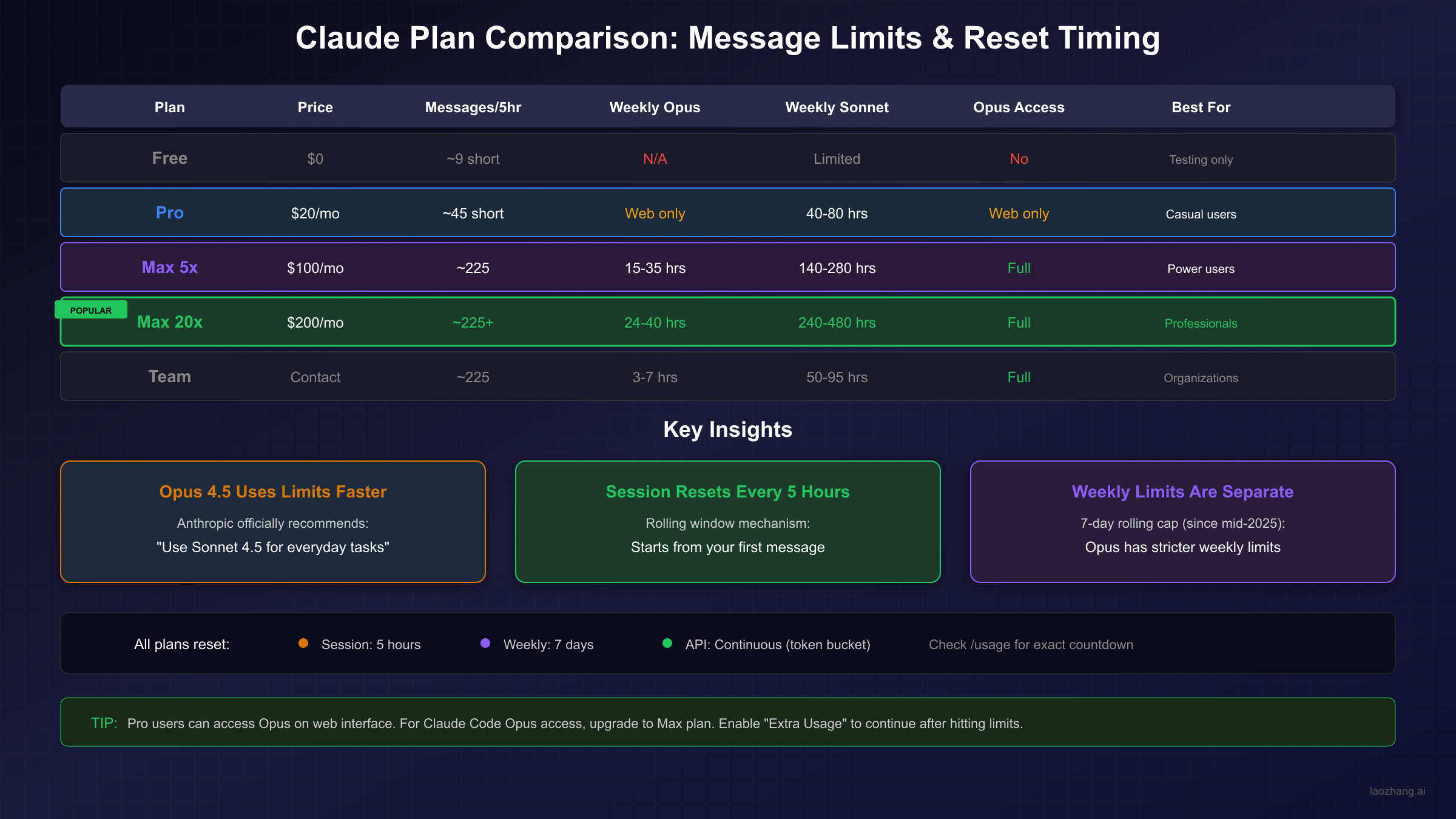
The consumption difference is substantial. Where Sonnet usage might allow 140-280 hours of weekly Claude Code use on a Max 5x plan, Opus limits that same plan to 15-35 hours weekly. That's roughly an 8:1 ratio favoring Sonnet for raw usage time. For users who measured their productivity in hours spent with Claude, this requires significant adjustment.
This disparity exists by design. Opus processes more thoroughly, maintains broader context, and produces more nuanced outputs. These capabilities require more computational resources per token processed. From Anthropic's infrastructure perspective, serving one Opus request consumes resources that could serve multiple Sonnet requests.
The practical implication is model selection strategy. Tasks where Opus excels include: complex multi-step reasoning, analyzing subtle edge cases in code, understanding ambiguous requirements, and producing highly refined outputs. Tasks where Sonnet suffices include: standard coding assistance, documentation generation, straightforward analysis, and general Q&A.
For API users building applications, this consideration directly impacts costs and architecture. At $5 per million input tokens and $25 per million output tokens, Opus 4.5 costs significantly more than Sonnet. Combined with rate limit implications, many production applications reserve Opus for specific high-value tasks while handling routine requests with Sonnet.
If you've found yourself hitting limits unexpectedly after starting to use Opus 4.5, the solution often isn't upgrading—it's strategic model selection. Reserve Opus for tasks where its capabilities make a meaningful difference, and handle everyday work with Sonnet. This approach often eliminates limit issues entirely while maintaining access to Opus when you genuinely need it.
For comprehensive pricing details across Claude models, see our Claude 4 Opus pricing guide which covers token costs, caching strategies, and enterprise considerations.
Complete Plan Comparison: Free to Max 20x
Understanding your plan's specific limits helps set realistic expectations and make informed decisions about potential upgrades. Each tier offers distinct trade-offs between cost, capacity, and feature access.
The Free tier provides limited access for evaluation purposes. Expect approximately 9 short messages per 5-hour session with highly variable availability during peak times. Free users access only Sonnet models—no Opus availability. This tier works for occasional users testing Claude's capabilities but quickly proves insufficient for regular use.
The Pro plan at $20/month represents the entry point for serious users. You receive approximately 45 messages per 5-hour session, access to Opus through the web interface (but not Claude Code), and 40-80 hours of weekly Sonnet capacity. Pro users frequently hit limits during intensive work sessions, making the plan suitable for moderate but not heavy use.
Max 5x at $100/month dramatically increases capacity. The approximately 225 messages per 5-hour session rarely feels limiting for most users. More importantly, Max grants Opus access in Claude Code—essential for developers who want Opus assistance in their terminal. Weekly limits provide 15-35 hours of Opus and 140-280 hours of Sonnet, sufficient for most professional use cases.
Max 20x at $200/month targets professional heavy users. While the session limit matches Max 5x (around 225 messages), weekly limits increase significantly: 24-40 hours of Opus and 240-480 hours of Sonnet. Users on this plan rarely report hitting limits during normal professional use, including extended coding sessions and complex analysis work.
Team and Enterprise plans provide organizational access with per-member limits. Premium seats include approximately 225 messages per session, while weekly allocations vary: 50-95 hours of Sonnet and 3-7 hours of Opus for Team premium seats. Enterprise arrangements offer customized limits based on organizational needs.
The upgrade decision often comes down to workflow interruption tolerance. If hitting limits once weekly is acceptable, Pro might suffice. If daily limit encounters disrupt productivity, Max 5x probably makes sense. If you're billing clients hourly and can't afford any interruption, Max 20x's generous allocations provide peace of mind.
For a detailed breakdown of Claude's API pricing structure and cost optimization strategies, see our comprehensive Claude API pricing guide.
What to Do When You Hit Your Limit
Hitting your usage limit doesn't have to mean stopping work. Several options exist for continuing immediately or optimizing future sessions to avoid limits entirely.
Extra Usage represents the most immediate solution for paid subscribers. Available on Pro, Max 5x, and Max 20x plans, Extra Usage switches you to pay-as-you-go pricing when your included allocation is exhausted. You prepay by adding funds to your account, then continue using Claude at standard API rates. For Opus 4.5, this means $5 per million input tokens and $25 per million output tokens—potentially costly for heavy sessions but valuable for critical work.
Enabling Extra Usage requires visiting Settings, navigating to Usage, and adding a payment method with prepaid balance. You can set monthly spending caps to prevent surprises. The system notifies you when approaching included limits and confirms before switching to Extra Usage billing.
Upgrading your plan provides more included capacity for regular heavy users. If you're consistently hitting Pro limits, the $80/month jump to Max 5x often proves worthwhile through increased productivity alone. Similarly, users regularly exhausting Max 5x weekly limits should evaluate whether Max 20x's additional $100/month saves more time than it costs.
Waiting for reset works when timing permits. The 5-hour session reset is predictable—check when it occurs and schedule a break accordingly. Weekly limits require more patience; if you've exhausted your weekly Opus allocation Tuesday, you'll see gradual recovery as last week's Monday usage ages out, with full recovery by the following Tuesday.
Model switching often provides the best immediate relief. If you're hitting limits with Opus 4.5, switch to Sonnet 4.5 for tasks that don't require Opus's advanced capabilities. Given Sonnet's much higher weekly limits, this often resolves the situation while maintaining productivity. Many users report this forces beneficial habits—evaluating whether Opus is truly necessary often reveals it isn't.
For users interested in free access options while managing limits, our Claude Code free trial guide covers available alternatives including API access methods.
API Rate Limits vs Consumer Limits (For Developers)
Developers using the Claude API encounter a different limit system than web users. Understanding these differences is essential for building robust applications that gracefully handle rate constraints.
The API uses a token-bucket algorithm rather than the fixed session windows of consumer products. Your capacity continuously replenishes up to your maximum limit, providing smoother recovery from bursts. If you consume your full allocation at 2 PM, capacity starts regenerating immediately rather than waiting for a 5-hour window to elapse.
Response headers provide precise reset information. The anthropic-ratelimit-requests-remaining header shows your current available capacity. The anthropic-ratelimit-requests-reset header contains an RFC3339 timestamp indicating when your bucket will reach a specific level. These headers enable sophisticated scheduling and queue management.
Rate limits apply differently than consumer caps. The API measures requests per minute (RPM) and tokens per minute (TPM) rather than messages per session. Limits vary by tier and model, with higher tiers receiving greater allocations. Opus 4.x models share a combined rate limit across Opus 4, Opus 4.1, and Opus 4.5.
Implementing proper error handling prevents user-facing failures. When receiving a 429 "Too Many Requests" response, applications should implement exponential backoff—waiting 1 second after the first retry, 2 seconds after the second, 4 seconds after the third, and so on. This approach respects the API while maximizing throughput during recovery.
For applications requiring consistent throughput, consider request queuing with rate limiting. Libraries like Bottleneck (JavaScript) or ratelimit (Python) manage request pacing automatically. This prevents bursts that trigger rate limits while maintaining predictable performance for users.
Production applications often benefit from API gateway services that handle rate limiting, retry logic, and multi-provider failover automatically. These services abstract rate limit complexity while providing access to multiple AI models through unified endpoints. For detailed solutions to API rate limit errors, see our Claude API 429 error solution guide.
Understanding the API's continuous replenishment model enables creative solutions. Unlike the consumer 5-hour window, API limits recover constantly. An application that hit limits at noon might have substantial capacity recovered by 12:30. Monitoring the reset headers and implementing adaptive request rates can dramatically improve effective throughput.
FAQ and Troubleshooting
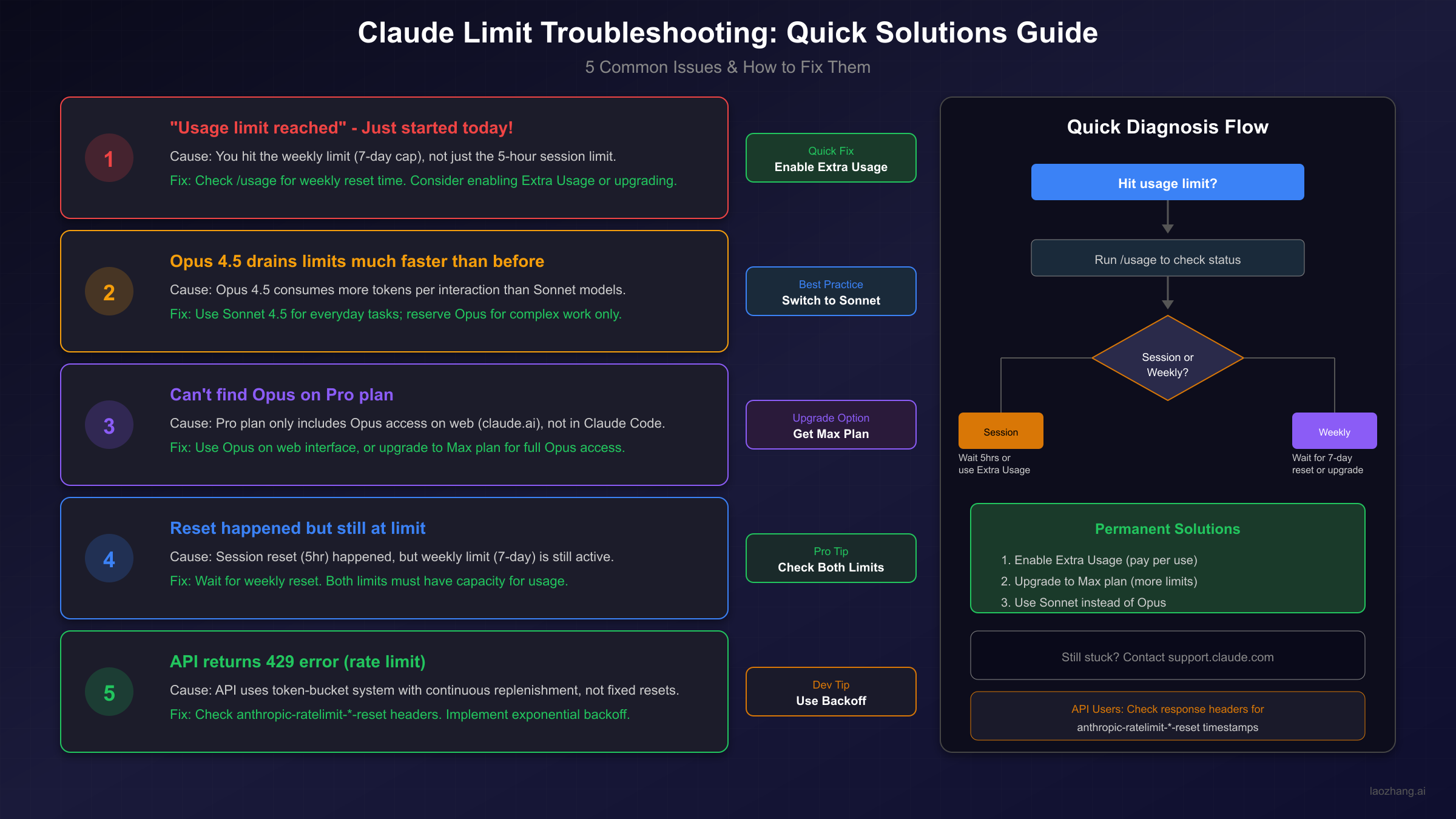
Understanding common limit scenarios helps resolve issues quickly and prevents recurring frustrations. These frequently asked questions address the situations users most commonly encounter.
Why did I hit my limit when I just started using Claude today?
You likely exhausted your weekly limit, not your session limit. The 5-hour session reset doesn't help if your 7-day rolling allocation is depleted. Check your weekly usage in Settings to confirm. Solution: Wait for weekly capacity to recover as older usage ages out, or enable Extra Usage for immediate access.
My session should have reset, but I'm still limited. What's happening?
Both session and weekly limits must have available capacity. Your session reset occurred, but your weekly limit remains exhausted. The session reset restored your short-term capacity, but the weekly cap still blocks usage. This commonly occurs after several days of intensive use. Solution: Evaluate your weekly pattern and consider spacing out heavy usage days.
How do I know which limit I've hit?
In Claude's web interface, Settings > Usage shows both your session and weekly status. In Claude Code, run /usage for detailed information. The display indicates remaining capacity for each limit type and when each resets or refreshes.
Why does Opus drain my limits so much faster than before?
Opus 4.5's improved capabilities require more computational resources. Anthropic explicitly states that "Opus 4.5 consumes your weekly limit faster than Sonnet" and recommends reserving it for tasks requiring its capabilities. Solution: Default to Sonnet for everyday tasks, reserving Opus for complex work where its strengths provide clear value.
Can I check exactly when my limits reset?
Yes. Web users see countdown timers in Settings > Usage. Claude Code users can run /usage for detailed timing. API users should check the anthropic-ratelimit-*-reset response headers for precise timestamps. The information is always available if you know where to look.
Does usage across devices count together?
Yes. Your Claude account's usage aggregates across all access points: claude.ai, Claude Code, and any other Anthropic products using your account. Switching devices doesn't provide additional capacity or separate allocations.
What happens if I'm mid-conversation when I hit my limit?
Your conversation history remains accessible for reading, but you cannot send new messages until capacity returns. In most cases, you'll have a few more messages available before hard limits apply, as the system checks eligibility before processing rather than after.
Is there any way to increase my limits beyond Max 20x?
Enterprise arrangements with custom limits exist for organizations with specific requirements. For individual users, Max 20x represents the highest standard allocation. Extra Usage provides unlimited access at per-token pricing for those willing to pay beyond included allocations. Using alternative API services like laozhang.ai can provide additional capacity with competitive pricing when needed.
How can I maximize my usage within limits?
Several strategies help: batch multiple questions into single messages rather than sending separately; avoid re-uploading documents within the same conversation since context persists; use Projects for documents you reference repeatedly since cached content counts less toward limits; and select appropriate models rather than defaulting to Opus.
Understanding Claude's limit system transforms it from a frustrating obstacle into a manageable constraint. The key insights: two separate limits (session and weekly) that both must have capacity; Opus consumes limits faster than Sonnet by design; and multiple options exist for continuing work when limits are reached. With this knowledge, you can plan effectively, choose models strategically, and avoid the surprise interruptions that frustrate uninformed users.
The practical approach most users eventually adopt: default to Sonnet 4.5 for routine tasks, switch to Opus for complex challenges, monitor weekly usage to avoid exhaustion, and consider Extra Usage or plan upgrades if limits regularly disrupt workflow. This balanced strategy delivers the benefits of Claude's most capable model while maintaining sustainable usage patterns.