
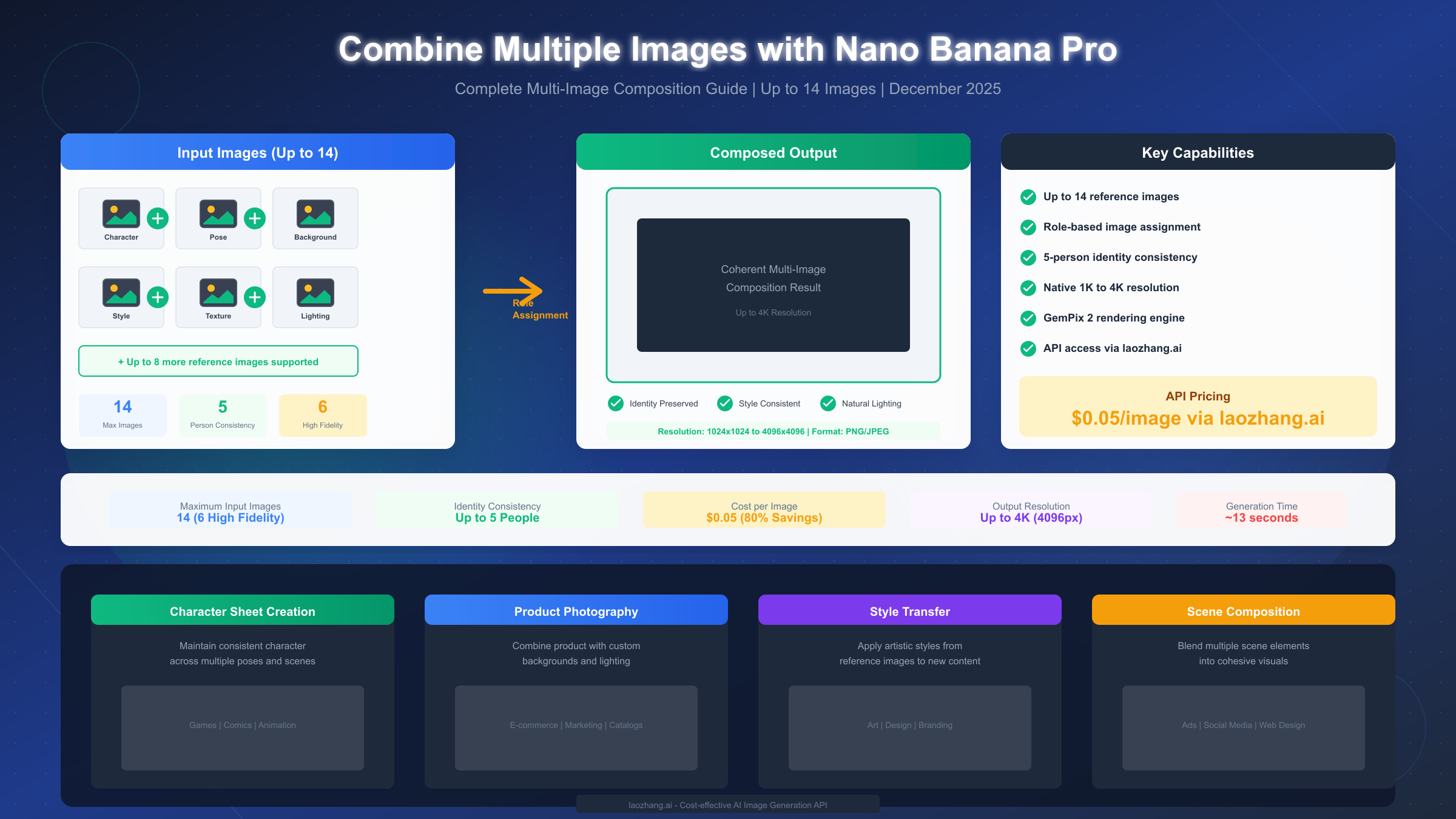
Nano Banana Pro enables combining up to 14 reference images simultaneously using role-based assignments in your prompt structure. To compose multiple images, upload your references and specify roles like "Image 1: character face, Image 2: pose reference, Image 3: background scene" in your prompt. The model maintains identity consistency for up to 5 people across the final output. For API access at $0.05 per image through laozhang.ai—approximately 80% below official pricing—developers can integrate via an OpenAI-compatible endpoint. This comprehensive December 2025 guide covers everything from basic concepts to production-ready Python code.
Understanding Multi-Image Composition in AI
Multi-image composition represents a significant advancement in AI-generated imagery, allowing creators to blend multiple reference inputs into a single coherent output. Unlike traditional image editing that requires manual masking and layering, AI-powered composition understands the semantic content of each input and intelligently merges them based on explicit or implicit instructions.
The core challenge in multi-image AI generation lies in maintaining consistency across disparate sources. When you upload a face reference, a pose image, and a background scene, the AI must understand what elements to extract from each and how to harmoniously combine them. This requires sophisticated understanding of lighting, perspective, and visual coherence that earlier models struggled to achieve.
Why multi-image composition matters for modern workflows. Content creators, product photographers, game developers, and marketing teams increasingly need the ability to rapidly iterate on visual concepts. Rather than shooting dozens of photos or manually compositing in Photoshop, multi-image AI composition enables rapid prototyping and production-quality outputs in seconds rather than hours.
The technical evolution behind multi-image capability involves advances in attention mechanisms that can process multiple image embeddings simultaneously. Models like Nano Banana Pro (powered by Google's GemPix 2 engine) have been specifically architected to handle up to 14 reference inputs while maintaining internal coherence—a capability that sets it apart from competitors limited to 2-5 images.
Key terminology you should understand. "Role assignment" refers to explicitly telling the model what each input image represents. "Identity locking" means maintaining a person's facial features consistently across generated outputs. "Fidelity" describes how closely the output matches specific input characteristics. These concepts form the foundation for effective multi-image composition.
The practical applications span industries: e-commerce product placement, character sheet generation for games and comics, marketing material creation with consistent brand imagery, and architectural visualization combining multiple design references into unified concepts.
Nano Banana Pro's 14-Image Capability Explained
Nano Banana Pro stands apart in the AI image generation landscape with its industry-leading support for up to 14 reference images in a single composition. This capability, combined with identity consistency for up to 5 people, opens creative possibilities that simply weren't feasible with previous generation tools.
Understanding the 14-image architecture. The model processes images in two tiers: 6 images with "high fidelity" that closely influence the output, and an additional 8 images that provide supplementary guidance. This tiered approach allows for nuanced control—your primary references (face, pose, background) receive maximum attention while secondary elements (texture patterns, lighting references, prop details) add refinement without overwhelming the composition.
| Image Count | Use Case | Fidelity Level |
|---|---|---|
| 1-2 images | Simple style transfer | High |
| 3-4 images | Character + background | High |
| 5-6 images | Complex scenes with multiple elements | High |
| 7-10 images | Detailed compositions with props | Mixed |
| 11-14 images | Production character sheets | Mixed |
When to use different image counts. For straightforward tasks like applying an artistic style to a portrait, 2 images suffice. Character sheet generation for game assets typically works best with 4-6 images covering face, body, outfit, and multiple poses. Production workflows involving consistent characters across varied scenes benefit from the full 14-image capacity with saved style and character references.
Identity consistency across 5 people represents another breakthrough capability. Traditional image generators struggle to maintain facial consistency even for a single person across multiple outputs. Nano Banana Pro can track and preserve the unique facial characteristics of up to 5 different individuals simultaneously—essential for group scenes, family portraits, or multi-character narrative content.
High fidelity vs supplementary inputs. The distinction matters for practical prompting. Your first 6 images receive the highest processing priority and will most strongly influence the output. Position your most critical references—typically the character face and primary pose—in these slots. Secondary elements like background textures or lighting references work well in the supplementary slots.
Native resolution support ranges from 1024x1024 to 4096x4096 (4K). Higher resolutions take longer to generate but provide production-quality detail suitable for print materials and large-format displays. Most web and social media applications work perfectly with 1024x1024 or 2048x2048 outputs.
The ~13-second generation time for multi-image compositions compares favorably to competitors taking 30-60 seconds for simpler operations. This speed advantage compounds significantly in production workflows generating hundreds of images.
Role Assignment Mastery - Complete Syntax Guide
Role assignment transforms multi-image composition from a guessing game into a precise creative tool. By explicitly telling Nano Banana Pro what each input image represents, you gain fine-grained control over how elements combine in the final output.
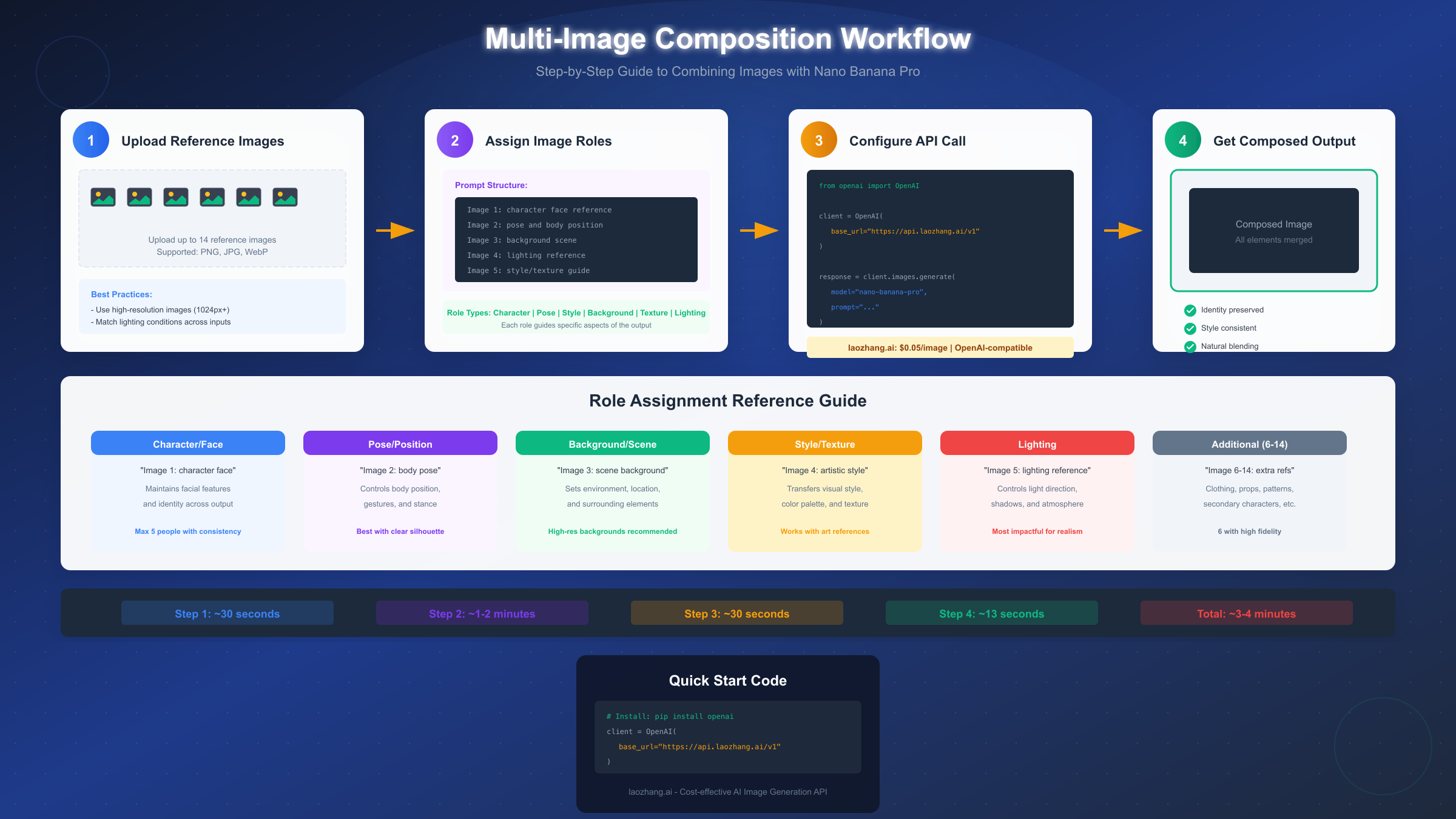
The fundamental role assignment structure follows a straightforward pattern in your prompt. Each image receives a designation that the model uses to extract specific visual information:
Image 1: [role description]
Image 2: [role description]
Image 3: [role description]
...
[Additional creative direction for the composition]
Core role types and their applications. Understanding what each role controls helps you structure effective prompts:
Character/Face roles preserve identity. Use explicit language like "Image 1: character face reference - maintain exact facial features" when you need consistent character representation. The model extracts facial geometry, skin tone, and distinctive features while allowing pose and expression changes.
Pose and body position roles control physical arrangement. "Image 2: body pose and hand position" tells the model to adopt the posture and gesture from that reference while potentially applying different clothing or identity from other inputs.
Background and environment roles set the scene. Specify "Image 3: background environment and lighting atmosphere" to transfer spatial context, color grading, and ambient lighting from a reference scene.
Style and texture roles apply artistic treatment. "Image 4: artistic style and color palette" extracts the visual aesthetic—brush strokes, color harmony, rendering style—without copying literal content.
Lighting roles specifically control illumination. "Image 5: lighting direction and shadow style" proves particularly useful when you want dramatic lighting from one reference applied to a different scene composition.
| Role Type | Prompt Phrase | What It Controls |
|---|---|---|
| Face/Identity | "character face reference" | Facial features, skin tone |
| Pose | "body pose and position" | Posture, gestures, stance |
| Background | "scene background" | Environment, setting |
| Style | "artistic style guide" | Rendering, color palette |
| Lighting | "lighting reference" | Shadows, highlights, atmosphere |
| Texture | "surface texture" | Material appearance |
A complete example prompt for a character portrait in a new setting:
Image 1: character face - preserve exact identity and features
Image 2: standing pose with arms crossed
Image 3: modern office background with city view
Image 4: cinematic lighting with dramatic shadows
Image 5: professional photography style with shallow depth of field

Create a professional portrait placing the character from Image 1
in the pose from Image 2, within the office environment from Image 3.
Apply the lighting style from Image 4 and the photographic quality
from Image 5. The character should be wearing business attire.
Common role assignment mistakes to avoid. Vague descriptions like "use this image for style" leave too much to interpretation. Conflicting instructions—such as both a bright and dark lighting reference—create inconsistent outputs. Overloading a single image with multiple roles ("Image 1: face, pose, and outfit") reduces precision compared to separating concerns across multiple inputs.
Advanced technique: weighted role emphasis. While Nano Banana Pro doesn't support explicit numerical weights, you can emphasize importance through language: "primarily use," "strongly maintain," or "loosely reference" provide gradation in how strictly the model adheres to each input.
Developer Integration Guide with Python Code
Moving from web interfaces to API integration unlocks Nano Banana Pro's full potential for production workflows. The following guide provides complete, working Python code for multi-image composition using laozhang.ai's OpenAI-compatible endpoint—currently the most cost-effective option at $0.05 per image.
Setting up your development environment. Install the required dependencies:
pythonpip install openai pip install requests # For image handling pip install base64 # Standard library
Basic API connection through laozhang.ai uses the familiar OpenAI client structure:
pythonfrom openai import OpenAI
import base64
import requests

# Initialize client with laozhang.ai endpoint
client = OpenAI(
    api_key="your-laozhang-api-key",
    base_url="https://api.laozhang.ai/v1"
)
Helper function for image encoding. Multi-image inputs require base64 encoding:
pythondef encode_image_to_base64(image_path: str) -> str:
    """Convert local image file to base64 string."""
    with open(image_path, "rb") as image_file:
        return base64.standard_b64encode(image_file.read()).decode("utf-8")

def encode_image_from_url(image_url: str) -> str:
    """Fetch and encode image from URL to base64."""
    response = requests.get(image_url)
    return base64.standard_b64encode(response.content).decode("utf-8")
Complete multi-image composition function:
pythondef compose_multiple_images(
    image_paths: list[str],
    role_assignments: list[str],
    creative_direction: str,
    size: str = "1024x1024"
) -> str:
    """
    Compose multiple images using Nano Banana Pro.

    Args:
        image_paths: List of local file paths to reference images
        role_assignments: List of role descriptions for each image
        creative_direction: Overall composition instructions
        size: Output size (1024x1024, 2048x2048, or 4096x4096)

    Returns:
        URL of generated image
    """
    # Build the prompt with role assignments
    prompt_parts = []
    for i, role in enumerate(role_assignments, 1):
        prompt_parts.append(f"Image {i}: {role}")

    prompt_parts.append("")  # Empty line separator
    prompt_parts.append(creative_direction)

    full_prompt = "\n".join(prompt_parts)

    # Encode images
    image_contents = []
    for path in image_paths:
        encoded = encode_image_to_base64(path)
        image_contents.append({
            "type": "image_url",
            "image_url": {
                "url": f"data:image/png;base64,{encoded}"
            }
        })

    # Make API call
    response = client.chat.completions.create(
        model="nano-banana-pro",
        messages=[
            {
                "role": "user",
                "content": [
                    {"type": "text", "text": full_prompt},
                    *image_contents
                ]
            }
        ],
        max_tokens=1000
    )

    # Extract generated image URL
    return response.choices[0].message.content
Usage example for character sheet generation:
python# Define your reference images and their roles
images = [
    "character_face.png",
    "standing_pose.png",
    "action_pose.png",
    "background_scene.png",
    "style_reference.png"
]

roles = [
    "character face - maintain exact identity across all outputs",
    "relaxed standing pose",
    "dynamic action pose with raised arm",
    "fantasy forest background",
    "anime art style with cel shading"
]

direction = """
Generate a character sheet with two panels:
Left panel: Character in standing pose from Image 2
Right panel: Same character in action pose from Image 3
Both panels use the forest background from Image 4 and
artistic style from Image 5. Maintain perfect character
consistency using the face from Image 1.
"""

result = compose_multiple_images(images, roles, direction, "2048x2048")
print(f"Generated image: {result}")
Error handling and retry logic for production reliability:
pythonimport time
from openai import APIError, RateLimitError

def compose_with_retry(
    image_paths: list[str],
    role_assignments: list[str],
    creative_direction: str,
    max_retries: int = 3
) -> str:
    """Compose images with automatic retry on failure."""
    for attempt in range(max_retries):
        try:
            return compose_multiple_images(
                image_paths, role_assignments, creative_direction
            )
        except RateLimitError:
            wait_time = 2 ** attempt  # Exponential backoff
            print(f"Rate limited. Waiting {wait_time}s...")
            time.sleep(wait_time)
        except APIError as e:
            if attempt == max_retries - 1:
                raise
            print(f"API error: {e}. Retrying...")
            time.sleep(1)

    raise Exception("Max retries exceeded")
The laozhang.ai endpoint maintains OpenAI compatibility, meaning existing OpenAI SDK code requires minimal modification—primarily just changing the base_url parameter. This makes migration straightforward for teams already using OpenAI's image generation APIs.
Pricing Deep Dive - Cost Comparison December 2025
Understanding the cost structure for multi-image composition helps teams budget effectively and choose the right solution for their volume requirements. This analysis covers current December 2025 pricing across major platforms.
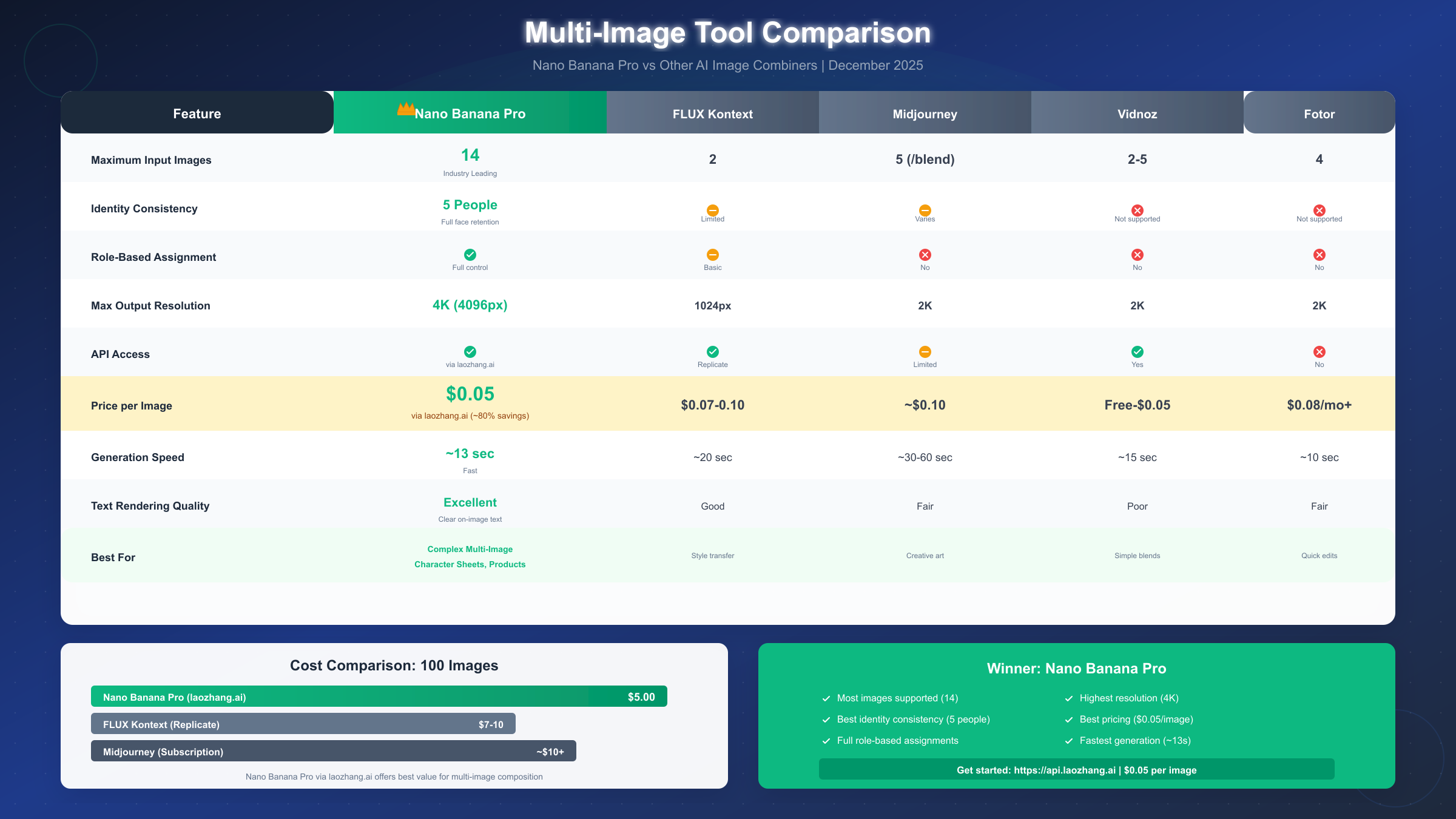
Nano Banana Pro via laozhang.ai offers the most competitive pricing for API access at $0.05 per image generation. This represents approximately 80% savings compared to directly accessing similar models through other providers. The pricing applies uniformly regardless of input image count—whether you're composing 2 images or the maximum 14.
| Provider | Price per Image | Multi-Image Support | API Access |
|---|---|---|---|
| laozhang.ai (Nano Banana Pro) | $0.05 | Up to 14 | Yes |
| FLUX Kontext (Replicate) | $0.07-0.10 | 2 images | Yes |
| Midjourney | ~$0.10 (subscription) | 5 images (/blend) | Limited |
| Vidnoz AI | Free-$0.05 | 2-5 images | Yes |
| Fotor | $0.08/mo subscription | 4 images | No |
Volume cost calculations reveal significant differences at scale. For a project requiring 1,000 composed images:
- laozhang.ai: $50 total (1,000 × $0.05)
- FLUX Kontext: $70-100 total
- Midjourney subscription: ~$100+ depending on plan
If you're working through ChatGPT's daily image limits, API access through laozhang.ai provides unlimited generation without rate restrictions—a significant advantage for production workflows.
Understanding laozhang.ai's pricing model. The platform operates on a straightforward pay-per-use basis with no minimum commitments. Credits can be purchased starting at $5 (approximately 100 images), making it accessible for testing before committing to larger volumes. Bulk purchases of $100+ include bonus credits, further reducing effective per-image costs.
Hidden costs to consider. Some platforms charge separately for higher resolutions—laozhang.ai's $0.05 rate includes all supported resolutions from 1024x1024 to 4096x4096. Bandwidth and storage costs for the generated images depend on your hosting solution, not the generation API.
For teams evaluating the cheapest Nano Banana 2 API options, laozhang.ai consistently ranks as the most cost-effective solution while maintaining production-grade reliability and speed.
ROI calculation for common use cases. A product photography workflow replacing traditional shoots might generate 50-100 product variants per day. At $0.05 per image, daily costs of $2.50-5.00 compare favorably to traditional photography requiring studio time, photographer fees, and post-processing labor.
Troubleshooting Common Issues
Even with a capable model like Nano Banana Pro, multi-image composition can encounter challenges. Understanding common failure modes and their solutions helps maintain production workflow efficiency.
Identity drift across compositions occurs when the character's face gradually changes between outputs. This typically happens when the face reference image lacks sufficient detail or lighting clarity. Solution: Use high-resolution face references (at least 512x512 for the face region) with even, front-facing lighting. Reinforce identity in your prompt with explicit instructions like "maintain exact facial features from Image 1 with no modifications."
Lighting conflicts between inputs create unnatural-looking compositions where shadows point in different directions or color temperatures clash. When your pose reference has afternoon golden-hour lighting but your background shows midday harsh light, the output struggles to reconcile these differences. Solution: Choose reference images with compatible lighting conditions, or explicitly designate one image as the lighting authority: "Use lighting direction and color temperature exclusively from Image 4."
Pose accuracy degradation happens when complex poses don't transfer cleanly. Hands, fingers, and intricate body positions are particularly challenging. Solution: Use pose references with clear silhouettes against neutral backgrounds. Supplement difficult poses with explicit text descriptions: "right hand raised with palm facing forward, fingers spread naturally."
| Problem | Symptom | Solution |
|---|---|---|
| Identity drift | Face changes between outputs | Higher-res face reference, explicit preservation prompt |
| Lighting conflicts | Inconsistent shadows | Designate single lighting authority |
| Pose degradation | Incorrect limb positions | Clear silhouette references + text reinforcement |
| Style bleeding | Wrong style applied to elements | Separate style from content references |
| Resolution mismatch | Blurry output regions | Match input image resolutions |
Style bleeding into unwanted areas occurs when artistic style from one reference affects regions you wanted to remain photorealistic. Solution: Be explicit about style application scope: "Apply artistic style from Image 5 only to the background elements, keep the character rendered in photorealistic style."
Resolution and quality mismatches between inputs can cause visible seams or quality variations in the output. If your face reference is 4K but your background is 720p, the composition may show inconsistent detail levels. Solution: Standardize input image resolutions, or accept that output quality will be limited by the lowest-resolution critical input.
Generation failures and error handling. The API may return errors for various reasons: oversized images (keep inputs under 4MB each), unsupported formats (stick to PNG, JPG, WebP), or rate limiting during high traffic. Implement retry logic with exponential backoff as shown in the code examples above.
When to simplify your composition. If outputs consistently fail to meet expectations with 10+ images, consider whether all inputs are truly necessary. Often, 4-6 well-chosen, clearly-roled images produce better results than 14 images with overlapping or conflicting guidance.
Real-World Use Cases and Examples
Understanding practical applications helps translate technical capabilities into valuable creative workflows. The following scenarios demonstrate how multi-image composition solves real production challenges.
Character sheet generation for games and animation. Game studios and animation teams need consistent character representation across multiple poses, expressions, and environments. With Nano Banana Pro, a single face reference combined with various pose and expression images generates cohesive character sheets in minutes rather than hours of manual illustration.
Example workflow: Upload character face (Image 1), 4 different poses (Images 2-5), an expression sheet reference (Image 6), and the game's art style guide (Image 7). Generate a unified character sheet with all poses maintaining perfect facial consistency.
Product photography with scene customization. E-commerce sellers can photograph products once and then composite them into unlimited scene variations. A single product photo combined with various lifestyle backgrounds, lighting setups, and styling props generates a complete product gallery without repeated photography sessions.
For those comparing AI image generation options, understanding the differences between Nano Banana Pro and ChatGPT Image generator helps select the right tool for specific use cases.
Marketing campaign asset generation. Brand teams can maintain visual consistency across campaign materials by using saved brand style guides, color palettes, and approved imagery as reference inputs. Each new generation inherits brand DNA while varying creative elements.
Example: Brand style guide (Image 1), approved color palette (Image 2), product hero shot (Image 3), campaign photography style (Image 4). Generate variations for social media, web banners, and email headers—all maintaining brand consistency.
Architectural visualization compositing. Interior designers and architects can combine furniture references, material samples, lighting studies, and spatial layouts into cohesive room visualizations. Rather than rendering complex 3D scenes, multi-image composition achieves similar results from 2D reference images.
Content creator consistency. YouTube thumbnails, blog graphics, and social media posts benefit from consistent character or mascot representation. Upload your avatar once as the face/character reference, then generate unlimited scene variations while maintaining recognizable identity.
| Use Case | Typical Image Count | Key Roles | Time Savings |
|---|---|---|---|
| Character sheets | 5-8 | Face, poses, style | 4-6 hours vs 15 minutes |
| Product scenes | 3-5 | Product, background, lighting | 2 hours vs 2 minutes |
| Marketing assets | 4-6 | Brand, style, product, scene | 1 hour vs 5 minutes |
| Arch visualization | 6-10 | Space, materials, lighting, furniture | 8 hours vs 20 minutes |
Batch processing for scale. The Python code examples provided enable automated batch processing—feed a CSV of prompts and image paths to generate hundreds of variations overnight. Production teams regularly generate thousands of images per week using this approach.
FAQ and Conclusion
How many images can Nano Banana Pro actually combine? The model accepts up to 14 reference images, with the first 6 receiving "high fidelity" processing that most strongly influences the output. Images 7-14 provide supplementary guidance with somewhat reduced priority.
What's the maximum output resolution? Native support ranges from 1024x1024 to 4096x4096 (4K). Higher resolutions increase generation time proportionally but maintain quality throughout the composition.
How does identity locking work for multiple people? The model can track and maintain consistent facial features for up to 5 different individuals in a single composition. Each person needs a clear face reference, and you should explicitly designate which reference corresponds to which individual in the output.
Can I use Nano Banana Pro for commercial projects? Yes. Images generated through the API are cleared for commercial use according to standard AI image generation terms. Verify specific licensing with laozhang.ai for your use case.
What file formats are supported for input images? PNG, JPG, and WebP are fully supported. Keep individual files under 4MB for reliable processing. Higher-resolution inputs generally produce better outputs, but diminishing returns set in beyond 2048x2048 for most reference types.
How does pricing work with multiple images? Regardless of whether you submit 2 or 14 reference images, the price remains $0.05 per generated output through laozhang.ai. This flat-rate model simplifies cost calculation for complex compositions.
What happens if the generation fails? The API returns error messages indicating the failure reason. Common issues include oversized images, unsupported formats, or rate limiting. Implement retry logic with exponential backoff as demonstrated in the code examples for production reliability.
Conclusion: Multi-image composition represents a fundamental shift in how creative teams approach visual content production. Nano Banana Pro's industry-leading 14-image support, combined with identity consistency for 5 people and production-grade speed, enables workflows that simply weren't possible with previous generation tools.
For developers and teams ready to integrate multi-image composition, laozhang.ai provides the most cost-effective access at $0.05 per image with full OpenAI SDK compatibility. The combination of capability, speed, and pricing makes Nano Banana Pro via laozhang.ai the recommended solution for serious multi-image composition work.
Getting started takes minutes: sign up at laozhang.ai, obtain your API key, and adapt the Python code examples in this guide for your specific use case. The documentation at https://docs.laozhang.ai/ provides additional endpoint details and advanced configuration options.
Whether you're generating character sheets for game development, product photography variations for e-commerce, or consistent brand imagery for marketing campaigns, mastering multi-image composition with Nano Banana Pro opens creative possibilities that translate directly into production efficiency and cost savings.