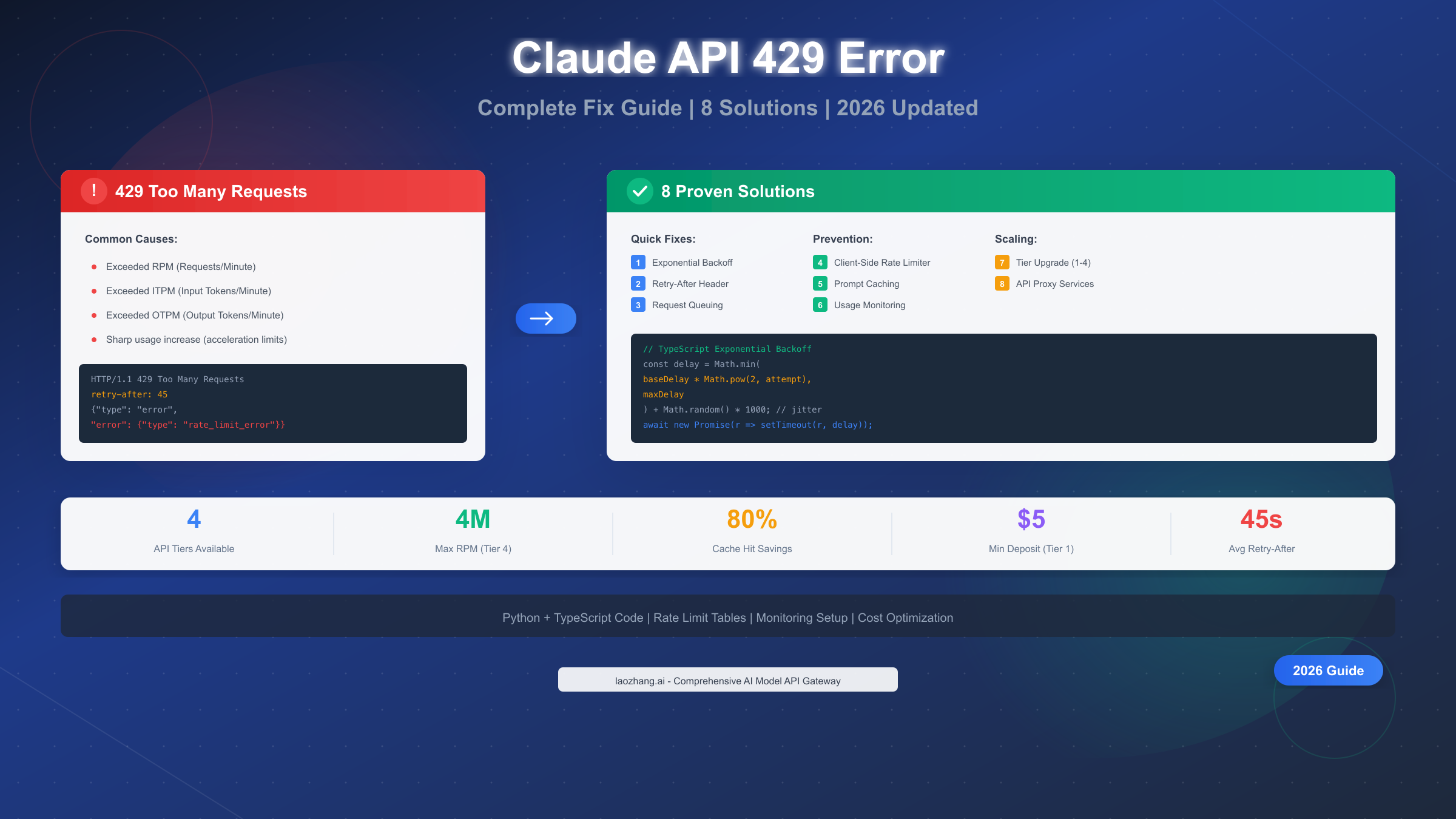
Claude API returns a 429 "Too Many Requests" error when your organization exceeds rate limits for requests per minute (RPM), input tokens per minute (ITPM), or output tokens per minute (OTPM). According to Anthropic's official documentation (https://platform.claude.com/docs/en/api/rate-limits ), you can fix this by implementing exponential backoff with jitter, using the retry-after header for precise wait times, or upgrading your tier from Tier 1 ($5 deposit) to Tier 4 ($400 deposit) for up to 80x higher limits. This January 2026 guide covers 8 proven solutions with working Python and TypeScript code, plus monitoring strategies to prevent errors before they happen.
The 429 error strikes without warning—one moment your application processes requests smoothly, the next you're staring at rate limit violations. This isn't just frustrating; it's a production issue that can cascade into user complaints, failed automations, and lost revenue. Understanding why these errors occur and how to prevent them separates amateur implementations from production-ready systems that handle Claude's rate limits gracefully.
What Is the Claude API 429 Error?
The HTTP 429 status code represents "Too Many Requests"—a standardized response indicating you've exceeded the allowed request rate within a specific time window. When Anthropic's servers receive more requests from your organization than your tier permits, they respond with this error to protect system stability and ensure fair access across all users.
What makes Claude's rate limiting unique is its organization-level enforcement. Unlike some APIs that limit per API key, Claude applies limits across your entire organization. This means all API keys under your account share the same limit pool—a critical detail that catches many developers off guard when scaling applications.
The error response contains valuable debugging information beyond just the status code. Every 429 response includes a retry-after header specifying exactly how many seconds to wait before your next request attempt. This server-provided timing eliminates guesswork from retry logic, though many developers overlook this header entirely and implement suboptimal fixed delays.
Understanding the difference between 429 and 529 errors is equally important. While 429 indicates you've hit your rate limit (something you can control), 529 signals that Anthropic's servers are temporarily overloaded—a situation beyond your control requiring different handling strategies. The 529 error requires patience rather than optimization, as it stems from server-side capacity constraints during high-traffic periods.
If you're new to Claude's API, our complete Claude API key guide covers the fundamentals of authentication and initial setup before diving into rate limit optimization.
Claude API Rate Limits Explained (2026 Complete Reference)
Claude's rate limiting operates through three distinct mechanisms, each serving a specific purpose in maintaining system stability. Understanding these limits in detail is the foundation for any effective rate limit management strategy.
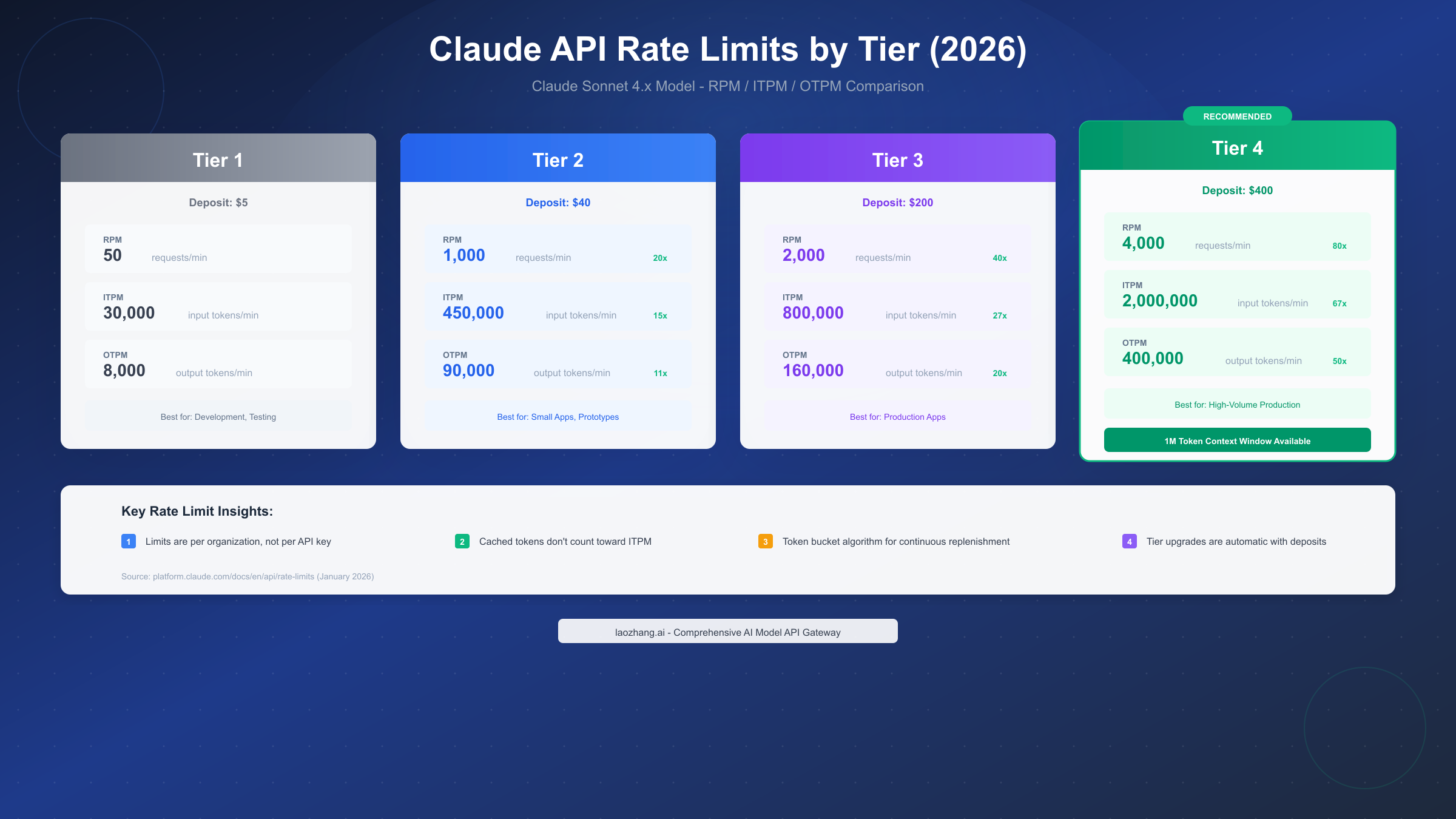
Requests Per Minute (RPM) caps the number of API calls regardless of their complexity. Even simple requests consuming minimal tokens count against this limit. At Tier 1, you're limited to 50 RPM, while Tier 4 allows 4,000 RPM—an 80x increase that dramatically changes what's possible with the API.
Input Tokens Per Minute (ITPM) restricts the total input tokens processed. This includes your system prompts, user messages, and any context you send. The good news for high-volume applications: cached tokens don't count toward ITPM limits on most current models, making prompt caching an effective strategy for increasing effective throughput.
Output Tokens Per Minute (OTPM) limits the tokens Claude generates in responses. If you're hitting OTPM limits earlier than expected, reducing your max_tokens parameter to better approximate actual completion sizes can help, as OTPM is estimated from max_tokens at request start.
Complete Tier Comparison Table (January 2026)
The following table consolidates rate limits for Claude Sonnet 4.x across all tiers. Anthropic uses the token bucket algorithm, meaning capacity replenishes continuously rather than resetting at fixed intervals.
| Tier | Deposit Required | RPM | ITPM | OTPM | Best For |
|---|---|---|---|---|---|
| Tier 1 | $5 | 50 | 30,000 | 8,000 | Development, Testing |
| Tier 2 | $40 | 1,000 | 450,000 | 90,000 | Small Apps, Prototypes |
| Tier 3 | $200 | 2,000 | 800,000 | 160,000 | Production Applications |
| Tier 4 | $400 | 4,000 | 2,000,000 | 400,000 | High-Volume Production |
Important Notes on Tier Advancement:
- Deposits are cumulative—advancing from Tier 1 to Tier 4 requires a total of $400 in purchases
- Advancement is automatic upon reaching deposit thresholds
- Model-specific limits apply: Opus 4.x limits cover combined Opus 4 and Opus 4.1 traffic
- Organizations in Tier 4 can access the 1M token context window (beta feature)
For detailed pricing information beyond rate limits, our Claude API pricing guide provides comprehensive cost analysis and optimization strategies.
Response Headers for Monitoring
Every API response includes headers that reveal your current rate limit status. Understanding these headers enables proactive monitoring before errors occur:
| Header | Description |
|---|---|
retry-after | Seconds to wait before retrying (only on 429 responses) |
anthropic-ratelimit-requests-limit | Maximum RPM allowed |
anthropic-ratelimit-requests-remaining | Requests remaining in current window |
anthropic-ratelimit-tokens-limit | Maximum tokens per minute |
anthropic-ratelimit-tokens-remaining | Tokens remaining (rounded to nearest thousand) |
anthropic-ratelimit-input-tokens-limit | Maximum ITPM |
anthropic-ratelimit-output-tokens-limit | Maximum OTPM |
These headers display values for the most restrictive limit currently in effect, helping you identify which specific constraint is closest to triggering a 429 error.
Quick Fix: Implementing Retry Logic
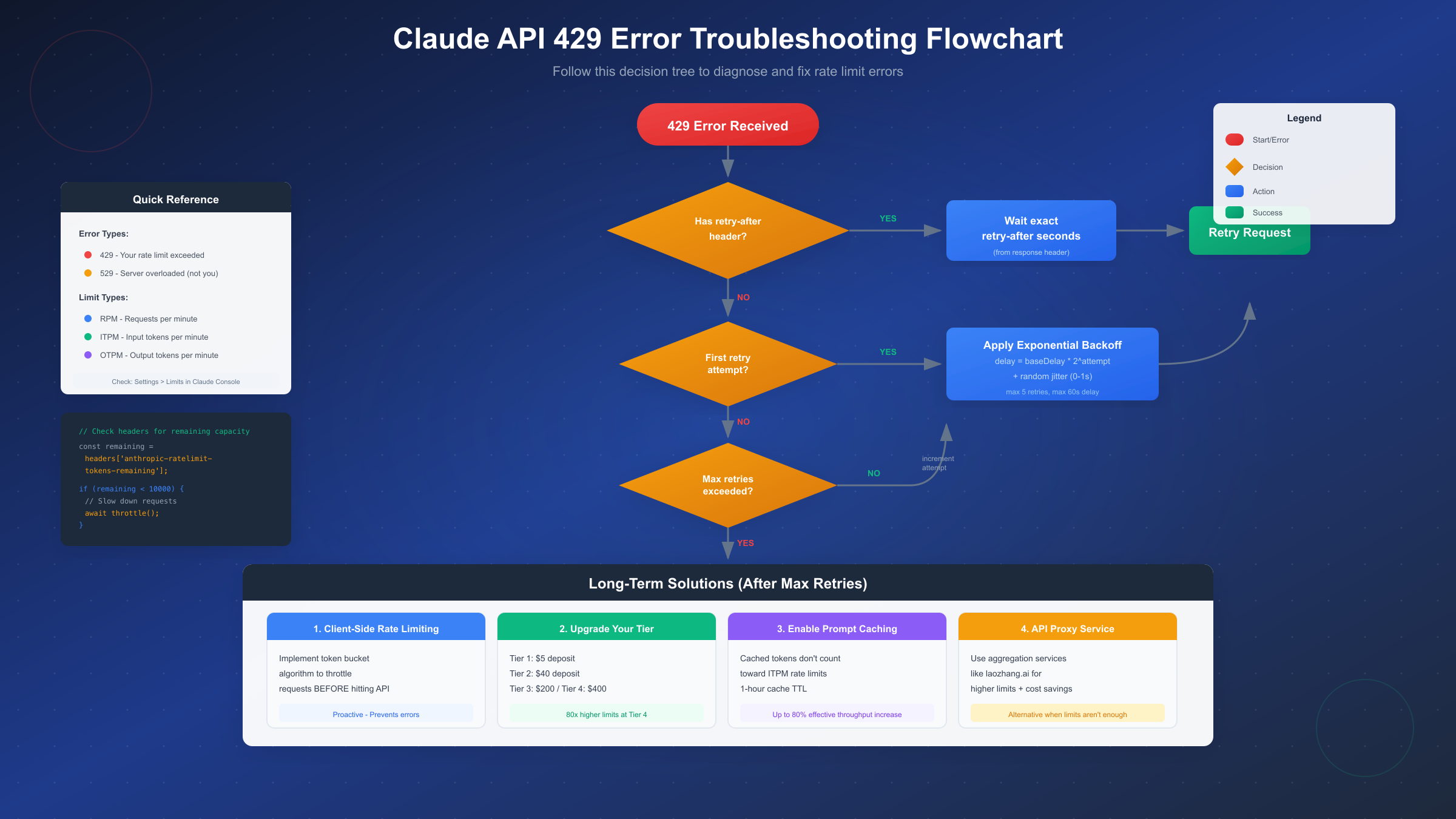
When a 429 error occurs, the immediate solution is implementing proper retry logic. The most effective approach combines the retry-after header with exponential backoff as a fallback, ensuring optimal recovery in all scenarios.
Python Implementation with Header Parsing
This production-ready implementation handles 429 errors gracefully, using the server-provided retry timing when available and falling back to exponential backoff with jitter:
import time
import random
import httpx
from typing import Optional, Dict, Any

class ClaudeAPIClient:
    def __init__(self, api_key: str, max_retries: int = 5):
        self.api_key = api_key
        self.max_retries = max_retries
        self.base_delay = 1.0
        self.max_delay = 60.0
        self.client = httpx.Client(timeout=120.0)

    def make_request(
        self,
        messages: list[Dict],
        model: str = "claude-sonnet-4-20250514",
        max_tokens: int = 1024
    ) -> Optional[Dict]:
        """Make API request with intelligent retry handling."""

        headers = {
            "x-api-key": self.api_key,
            "anthropic-version": "2023-06-01",
            "content-type": "application/json"
        }

        payload = {
            "model": model,
            "max_tokens": max_tokens,
            "messages": messages
        }

        for attempt in range(self.max_retries):
            try:
                response = self.client.post(
                    "https://api.anthropic.com/v1/messages",
                    json=payload,
                    headers=headers
                )

                if response.status_code == 200:
                    return response.json()

                if response.status_code == 429:
                    # Check for server-provided retry timing
                    retry_after = response.headers.get("retry-after")

                    if retry_after:
                        delay = float(retry_after)
                        print(f"Rate limited. Server says wait {delay}s")
                    else:
                        # Exponential backoff with jitter
                        delay = min(
                            self.base_delay * (2 ** attempt),
                            self.max_delay
                        )
                        jitter = random.uniform(0, delay * 0.1)
                        delay += jitter
                        print(f"Rate limited. Backoff: {delay:.2f}s")

                    time.sleep(delay)
                    continue

                if response.status_code == 529:
                    # Server overload - wait longer
                    delay = 30 + random.uniform(0, 30)
                    print(f"Server overloaded (529). Waiting {delay:.1f}s")
                    time.sleep(delay)
                    continue

                response.raise_for_status()

            except httpx.TimeoutException:
                print(f"Timeout on attempt {attempt + 1}")
                time.sleep(self.base_delay * (2 ** attempt))

        raise Exception(f"Max retries ({self.max_retries}) exceeded")

# Usage example
client = ClaudeAPIClient(api_key="your-api-key")
response = client.make_request([
    {"role": "user", "content": "Explain rate limiting in APIs"}
])
TypeScript Implementation for Node.js
For TypeScript developers, here's an equivalent implementation using modern async patterns:
import Anthropic from '@anthropic-ai/sdk';

interface RetryConfig {
  maxRetries: number;
  baseDelay: number;
  maxDelay: number;
}

class ResilientClaudeClient {
  private client: Anthropic;
  private config: RetryConfig;

  constructor(apiKey: string, config?: Partial<RetryConfig>) {
    this.client = new Anthropic({ apiKey });
    this.config = {
      maxRetries: config?.maxRetries ?? 5,
      baseDelay: config?.baseDelay ?? 1000,
      maxDelay: config?.maxDelay ?? 60000,
    };
  }

  async createMessage(
    messages: Anthropic.MessageParam[],
    options?: { model?: string; maxTokens?: number }
  ): Promise<Anthropic.Message> {
    const model = options?.model ?? 'claude-sonnet-4-20250514';
    const maxTokens = options?.maxTokens ?? 1024;

    for (let attempt = 0; attempt < this.config.maxRetries; attempt++) {
      try {
        return await this.client.messages.create({
          model,
          max_tokens: maxTokens,
          messages,
        });
      } catch (error: any) {
        if (error.status === 429) {
          const retryAfter = error.headers?.['retry-after'];
          const delay = retryAfter
            ? parseInt(retryAfter) * 1000
            : this.calculateBackoff(attempt);

          console.log(`Rate limited. Waiting ${delay}ms before retry ${attempt + 1}`);
          await this.sleep(delay);
          continue;
        }

        if (error.status === 529) {
          const delay = 30000 + Math.random() * 30000;
          console.log(`Server overloaded. Waiting ${delay}ms`);
          await this.sleep(delay);
          continue;
        }

        throw error;
      }
    }

    throw new Error(`Max retries (${this.config.maxRetries}) exceeded`);
  }

  private calculateBackoff(attempt: number): number {
    const exponentialDelay = this.config.baseDelay * Math.pow(2, attempt);
    const cappedDelay = Math.min(exponentialDelay, this.config.maxDelay);
    const jitter = Math.random() * cappedDelay * 0.1;
    return cappedDelay + jitter;
  }

  private sleep(ms: number): Promise<void> {
    return new Promise(resolve => setTimeout(resolve, ms));
  }
}

// Usage
const client = new ResilientClaudeClient('your-api-key');
const message = await client.createMessage([
  { role: 'user', content: 'Explain exponential backoff' }
]);
Why Jitter Matters: Adding randomness to retry delays prevents the "thundering herd" problem where multiple clients retry simultaneously after a rate limit period ends, immediately triggering another wave of 429 errors. Even 10% jitter significantly smooths out retry patterns across distributed systems.
Advanced Prevention: Client-Side Rate Limiting
Reactive retry logic handles errors after they occur, but proactive prevention is the superior approach. Implementing client-side rate limiting stops you from hitting Anthropic's limits in the first place, resulting in smoother application performance and happier users.
Token Bucket Algorithm Implementation
The token bucket algorithm matches Anthropic's own rate limiting mechanism, making it ideal for client-side implementation. Tokens are added to a bucket at a constant rate up to a maximum capacity, and each request consumes tokens:
import time
import threading
from collections import deque

class TokenBucketRateLimiter:
    """Client-side rate limiter using token bucket algorithm."""

    def __init__(
        self,
        requests_per_minute: int = 50,
        tokens_per_minute: int = 30000
    ):
        self.rpm_capacity = requests_per_minute
        self.tpm_capacity = tokens_per_minute

        self.rpm_tokens = requests_per_minute
        self.tpm_tokens = tokens_per_minute

        self.rpm_refill_rate = requests_per_minute / 60  # per second
        self.tpm_refill_rate = tokens_per_minute / 60

        self.last_refill = time.time()
        self.lock = threading.Lock()

    def _refill(self):
        """Refill tokens based on elapsed time."""
        now = time.time()
        elapsed = now - self.last_refill

        self.rpm_tokens = min(
            self.rpm_capacity,
            self.rpm_tokens + elapsed * self.rpm_refill_rate
        )
        self.tpm_tokens = min(
            self.tpm_capacity,
            self.tpm_tokens + elapsed * self.tpm_refill_rate
        )

        self.last_refill = now

    def acquire(self, estimated_tokens: int = 1000) -> float:
        """
        Attempt to acquire tokens. Returns wait time if throttled.

        Args:
            estimated_tokens: Estimated input + output tokens for request

        Returns:
            Wait time in seconds (0 if no wait needed)
        """
        with self.lock:
            self._refill()

            # Check if we have capacity
            if self.rpm_tokens >= 1 and self.tpm_tokens >= estimated_tokens:
                self.rpm_tokens -= 1
                self.tpm_tokens -= estimated_tokens
                return 0.0

            # Calculate wait time for token replenishment
            rpm_wait = (1 - self.rpm_tokens) / self.rpm_refill_rate if self.rpm_tokens < 1 else 0
            tpm_wait = (estimated_tokens - self.tpm_tokens) / self.tpm_refill_rate if self.tpm_tokens < estimated_tokens else 0

            return max(rpm_wait, tpm_wait)

    def wait_and_acquire(self, estimated_tokens: int = 1000):
        """Block until tokens are available."""
        wait_time = self.acquire(estimated_tokens)
        if wait_time > 0:
            print(f"Rate limiter: waiting {wait_time:.2f}s")
            time.sleep(wait_time)
            self.acquire(estimated_tokens)  # Acquire after waiting

# Integration with API client
class ThrottledClaudeClient:
    def __init__(self, api_key: str, tier: int = 1):
        self.api_key = api_key

        # Set limits based on tier
        tier_limits = {
            1: (50, 30000),
            2: (1000, 450000),
            3: (2000, 800000),
            4: (4000, 2000000)
        }
        rpm, tpm = tier_limits.get(tier, tier_limits[1])

        # Use 90% of limits for safety margin
        self.limiter = TokenBucketRateLimiter(
            requests_per_minute=int(rpm * 0.9),
            tokens_per_minute=int(tpm * 0.9)
        )

    def estimate_tokens(self, messages: list) -> int:
        """Rough token estimation (4 chars ≈ 1 token)."""
        text = " ".join(
            m.get("content", "") for m in messages
            if isinstance(m.get("content"), str)
        )
        return len(text) // 4 + 500  # +500 for response estimate

    def make_request(self, messages: list):
        estimated = self.estimate_tokens(messages)
        self.limiter.wait_and_acquire(estimated)
        # ... actual API call here
Leveraging Prompt Caching
One of the most powerful but underutilized features for rate limit management is prompt caching. According to Anthropic's documentation, cached tokens don't count toward ITPM rate limits on most current models. This means you can effectively process 5-10x more total input tokens by caching system prompts and repeated context.
Prompt caching is particularly effective for:
- System instructions that remain constant across requests
- Large context documents referenced in multiple conversations
- Tool definitions and function schemas
- Conversation history in multi-turn interactions
With the extended 1-hour cache TTL, applications with predictable query patterns can achieve substantial throughput increases. For example, with a 2,000,000 ITPM limit and an 80% cache hit rate, you could effectively process 10,000,000 total input tokens per minute since cached tokens don't count against your limit.
Monitoring Your API Usage in Real-Time
Prevention is better than cure, but you need visibility into your usage to prevent effectively. Implementing real-time monitoring lets you know when you're approaching limits before triggering 429 errors.
Header-Based Usage Tracking
Extract rate limit information from every API response to maintain awareness of your remaining capacity:
interface RateLimitStatus {
  requestsLimit: number;
  requestsRemaining: number;
  tokensLimit: number;
  tokensRemaining: number;
  utilizationPercent: number;
}

function parseRateLimitHeaders(headers: Headers): RateLimitStatus {
  const requestsLimit = parseInt(
    headers.get('anthropic-ratelimit-requests-limit') ?? '0'
  );
  const requestsRemaining = parseInt(
    headers.get('anthropic-ratelimit-requests-remaining') ?? '0'
  );
  const tokensLimit = parseInt(
    headers.get('anthropic-ratelimit-tokens-limit') ?? '0'
  );
  const tokensRemaining = parseInt(
    headers.get('anthropic-ratelimit-tokens-remaining') ?? '0'
  );

  const requestUtil = requestsLimit > 0
    ? ((requestsLimit - requestsRemaining) / requestsLimit) * 100
    : 0;
  const tokenUtil = tokensLimit > 0
    ? ((tokensLimit - tokensRemaining) / tokensLimit) * 100
    : 0;

  return {
    requestsLimit,
    requestsRemaining,
    tokensLimit,
    tokensRemaining,
    utilizationPercent: Math.max(requestUtil, tokenUtil)
  };
}

// Usage with alerting
async function monitoredRequest(client: Anthropic, messages: any[]) {
  const response = await client.messages.create({
    model: 'claude-sonnet-4-20250514',
    max_tokens: 1024,
    messages
  });

  // Parse headers from raw response
  const status = parseRateLimitHeaders(response._response?.headers);

  // Alert if utilization is high
  if (status.utilizationPercent > 80) {
    console.warn(`⚠️ Rate limit utilization: ${status.utilizationPercent.toFixed(1)}%`);
    console.warn(`   Requests remaining: ${status.requestsRemaining}`);
    console.warn(`   Tokens remaining: ${status.tokensRemaining}`);
  }

  if (status.utilizationPercent > 95) {
    // Trigger throttling or alerting
    await sendSlackAlert('Rate limit critical - approaching 429 threshold');
  }

  return response;
}
Building a Usage Dashboard
For production applications, consider tracking usage metrics over time. The Claude Console dashboard provides built-in monitoring, but custom metrics give you more granular control:
from dataclasses import dataclass
from datetime import datetime, timedelta
from collections import deque
import statistics

@dataclass
class UsageMetric:
    timestamp: datetime
    requests_used: int
    tokens_used: int
    utilization: float

class UsageTracker:
    def __init__(self, window_minutes: int = 60):
        self.metrics = deque(maxlen=window_minutes * 60)  # Per-second granularity

    def record(self, requests: int, tokens: int, utilization: float):
        self.metrics.append(UsageMetric(
            timestamp=datetime.now(),
            requests_used=requests,
            tokens_used=tokens,
            utilization=utilization
        ))

    def get_summary(self) -> dict:
        if not self.metrics:
            return {"status": "no data"}

        recent = [m for m in self.metrics
                  if m.timestamp > datetime.now() - timedelta(minutes=5)]

        return {
            "avg_utilization": statistics.mean(m.utilization for m in recent),
            "max_utilization": max(m.utilization for m in recent),
            "total_requests_5min": sum(m.requests_used for m in recent),
            "total_tokens_5min": sum(m.tokens_used for m in recent),
            "risk_level": self._calculate_risk(recent)
        }

    def _calculate_risk(self, metrics: list) -> str:
        if not metrics:
            return "unknown"
        avg = statistics.mean(m.utilization for m in metrics)
        if avg > 90:
            return "critical"
        if avg > 75:
            return "high"
        if avg > 50:
            return "moderate"
        return "low"
When to Upgrade Your Tier
At some point, optimization isn't enough—you need higher limits. Understanding when to upgrade versus when to optimize saves both money and engineering time.
Cost-Benefit Analysis
Consider upgrading when:
- You're consistently hitting limits despite optimization
- The cost of rate limit errors exceeds the tier upgrade cost
- Your application's growth trajectory requires headroom
| Current Tier | Upgrade Cost | Limit Increase | Break-Even Point |
|---|---|---|---|
| Tier 1 → 2 | $35 more | 20x RPM, 15x ITPM | ~500 requests/day blocked |
| Tier 2 → 3 | $160 more | 2x RPM, 1.8x ITPM | ~2,000 requests/day blocked |
| Tier 3 → 4 | $200 more | 2x RPM, 2.5x ITPM | ~5,000 requests/day blocked |
The math is straightforward: if blocked requests cost you more than the tier upgrade (in user experience, lost conversions, or engineering time debugging), upgrade immediately.
Optimization vs. Upgrade Decision Matrix
| Scenario | Recommended Action |
|---|---|
| Hitting RPM but not TPM | Implement request batching first |
| Hitting TPM consistently | Enable prompt caching; if still hitting, upgrade |
| Sharp traffic spikes | Implement queue with smoothing |
| Steady high volume | Upgrade tier—optimization won't help |
| Development/testing | Stay at Tier 1; implement proper retry logic |
For teams looking to reduce costs while maintaining high availability, API aggregation services offer an alternative path. Services like laozhang.ai (https://docs.laozhang.ai/ ) provide access to Claude models with different rate limit structures, which can be useful when your usage patterns don't fit neatly into Anthropic's tier system.
Alternative Solutions: API Proxy Services
When Anthropic's rate limits don't align with your needs—or when you need guaranteed availability across multiple AI providers—API proxy services offer a compelling alternative.
When to Consider Proxy Services
API aggregation services become valuable when:
- You need higher effective rate limits than Tier 4 provides
- Your application requires failover across multiple AI providers
- You want to optimize costs through smart routing
- Regional availability or latency is a concern
For production deployments requiring consistent availability, laozhang.ai offers an API aggregation service that combines multiple providers. The platform provides text models at competitive pricing (matching major AI platform rates) and supports easy model switching without code changes. This can be particularly useful for applications that need to gracefully handle rate limits by distributing load across providers.
Multi-Provider Strategy
Rather than relying solely on Claude, consider implementing a fallback chain:
class MultiProviderClient:
    def __init__(self):
        self.providers = [
            ("claude", ClaudeClient()),
            ("fallback", FallbackClient())  # e.g., via laozhang.ai
        ]

    async def request_with_fallback(self, messages: list):
        for name, client in self.providers:
            try:
                return await client.create_message(messages)
            except RateLimitError:
                print(f"{name} rate limited, trying next provider")
                continue
        raise Exception("All providers exhausted")
This pattern ensures your application remains functional even during rate limit events, though you should monitor response quality across providers and implement appropriate validation.
If you've experienced similar rate limit issues with ChatGPT, many of the same patterns apply—the main difference is in the specific header names and tier structures.
Best Practices Summary & FAQ
Quick Reference Checklist
Immediate Response to 429:
- Check
retry-afterheader first - If no header, use exponential backoff (start 1s, max 60s)
- Add 10% jitter to prevent thundering herd
- Maximum 5 retry attempts before failing
- Log errors for pattern analysis
Prevention Strategies:
- Implement client-side rate limiting at 90% of tier limits
- Enable prompt caching for repeated content
- Monitor utilization via response headers
- Set alerts at 80% and 95% thresholds
- Consider tier upgrade when consistently above 75%
Architecture Best Practices:
- Use request queues for traffic smoothing
- Implement graceful degradation paths
- Cache responses where appropriate
- Batch requests when possible
- Use streaming for long responses
Frequently Asked Questions
Q: Why am I getting 429 errors even with low request volume?
The most common causes are: (1) Sharp traffic increases triggering acceleration limits—ramp up gradually and maintain consistent patterns; (2) Other applications using the same organization's API keys; (3) Large input/output tokens exceeding TPM limits even with few requests.
Q: How do I check my current tier and limits?
Log into the Claude Console at console.anthropic.com and navigate to Settings → Limits. This page shows your organization's current tier, rate limits for each model, and usage statistics.
Q: Should I use multiple API keys to increase limits?
No—Claude rate limits apply at the organization level, not per API key. Multiple keys under the same organization share the same limit pool. To get higher limits, upgrade your tier or use separate organizations.
Q: What's the difference between 429 and 529 errors?
429 means you've hit your rate limit (your responsibility). 529 means Anthropic's servers are temporarily overloaded (not your fault). For 429, optimize your request patterns. For 529, implement backoff and wait—there's nothing else you can do.
Q: How quickly do rate limits refill?
Claude uses a token bucket algorithm with continuous replenishment. If your limit is 60 RPM, you effectively get 1 request per second continuously, rather than 60 requests at minute start followed by nothing. This makes burst handling more predictable.
Q: Can I request custom rate limits?
Enterprise customers can negotiate custom limits through Anthropic's sales team. Access this via the Claude Console at Settings → Limits → "Contact Sales for higher limits."
Rate limiting is a fact of life when building with APIs, but it doesn't have to derail your applications. By implementing proper retry logic, proactive rate limiting, and usage monitoring, you can build resilient systems that gracefully handle Claude's rate limits while maximizing throughput. Start with the retry implementation in this guide, add client-side rate limiting as you scale, and upgrade tiers when optimization alone isn't enough.
For more resources on working with Claude's API, explore the official documentation at https://platform.claude.com/docs/ or join Anthropic's developer community for real-world implementation patterns from other developers facing similar challenges.