
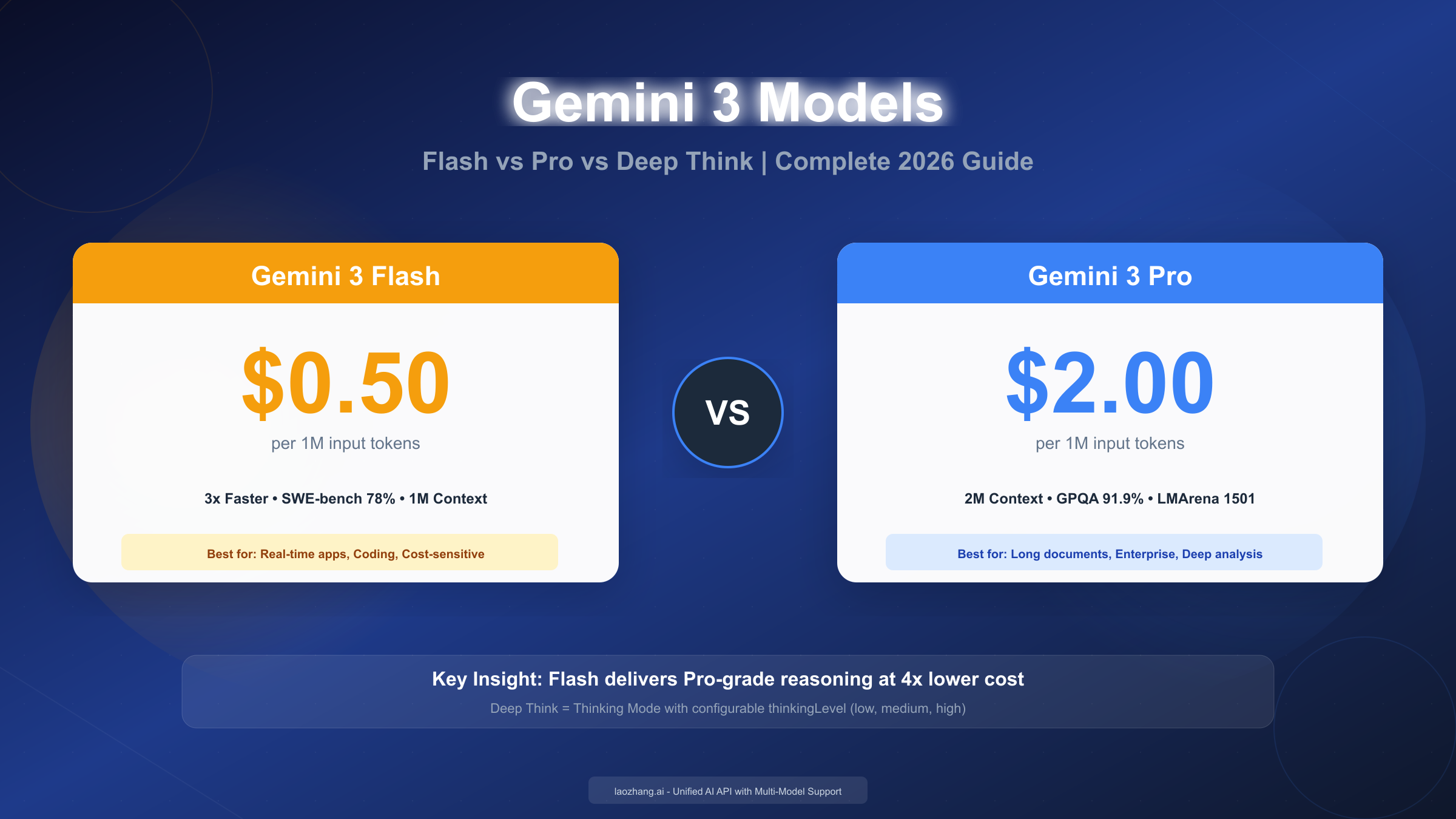
Google's Gemini 3 "Deep Think" refers to the Thinking Mode—an advanced reasoning capability that enables step-by-step problem-solving for complex tasks like coding and mathematics. In January 2026, Gemini 3 Flash costs $0.50 per million input tokens while Pro costs $2.00-$4.00, yet Flash often matches or exceeds Pro's benchmark performance while running 3x faster. Choose Flash with high thinkingLevel for most applications, or Pro when you need the 2M token context window or maximum reasoning depth for edge cases. This guide covers complete benchmarks, pricing calculations, API configuration, and a decision framework to help you select the optimal model.
What is Gemini "Deep Think"? Understanding Thinking Mode
The term "Deep Think" has created significant confusion among developers searching for information about Google's reasoning models. When you search for "Gemini Deep Think," you're actually looking for what Google officially calls "Thinking Mode"—a feature that enables Gemini models to reason through problems step-by-step before generating their final response. Understanding this terminology mapping is crucial before diving into model comparisons.
Thinking Mode represents Google's approach to reasoning AI, competing directly with OpenAI's o1 and o3 models and DeepSeek's R1. Rather than simply generating an immediate answer, Gemini models with Thinking Mode enabled break down complex problems into discrete reasoning steps, evaluate multiple approaches, and show their work. This transparency allows developers to understand not just what the model concluded, but how it reached that conclusion—invaluable for debugging and building trust in AI-assisted workflows.
The Thinking Mode capability first appeared in Gemini 2.0 Flash Thinking Experimental in early 2025, where Google demonstrated significant improvements on reasoning benchmarks. On the AIME2024 mathematics benchmark, Gemini 2.0 Flash with thinking enabled scored 73.3%, compared to just 35.5% for the same model without thinking. This dramatic improvement validated the approach, leading Google to integrate thinking capabilities across the entire Gemini 3 model family.
How Thinking Mode works in practice involves the model generating "thinking tokens" that represent its internal reasoning process. These tokens consume part of your output token budget, which means enabling thinking mode increases costs but improves accuracy on complex tasks. The model processes your prompt, generates its reasoning chain (which you can optionally view), and then produces a final response informed by that reasoning. For straightforward queries like "What's the capital of France?", thinking adds unnecessary overhead. For multi-step problems like debugging code or solving math proofs, thinking dramatically improves results.
Google provides two different control mechanisms depending on which Gemini generation you're using. For Gemini 3 models (Flash and Pro), you configure thinking using the thinkingLevel parameter, which accepts values like "minimal," "low," "medium," and "high." For Gemini 2.5 models, you instead use thinkingBudget, which specifies a token count between 0 and 24,576. Critically, you cannot mix these parameters across model generations—using thinkingLevel with a Gemini 2.5 model or thinkingBudget with Gemini 3 will cause errors. This distinction catches many developers when they upgrade between model generations.
The practical impact of Thinking Mode extends beyond benchmark scores. When building applications that require reliable reasoning—legal document analysis, financial calculations, scientific research assistance, or complex code generation—Thinking Mode provides a mechanism for the model to verify its own work before committing to an answer. According to Google's official documentation (https://ai.google.dev/gemini-api/docs/thinking ), this self-verification process substantially reduces errors on tasks where getting the answer wrong has significant consequences.
Gemini 3 Model Family: Flash, Pro, and Thinking Explained
Google released Gemini 3 Flash on December 17, 2025, marketing it as delivering "frontier intelligence built for speed at a fraction of the cost." This positioning represents a significant strategic shift from previous model generations, where Flash variants were clearly positioned as less capable alternatives to Pro. With Gemini 3, Flash has evolved into what Google describes as "Pro-grade reasoning with Flash-level latency and efficiency"—not a reduced Pro, but an optimized variant that trades maximum context window size for dramatically improved speed and cost efficiency.
The Gemini 3 Flash core specifications include a 1-million-token context window, output capacity of 64,000 tokens, and a knowledge cutoff of January 2025. The model supports full multimodal input including text, images, video, audio, and PDFs, plus function calling, structured output generation, and integration with Google Search and code execution tools. Flash processes over 1 trillion tokens daily across Google's API, indicating massive production adoption. For developers already using Gemini models, Flash is available through Google AI Studio, Vertex AI, the Gemini API, Gemini CLI, and Android Studio.
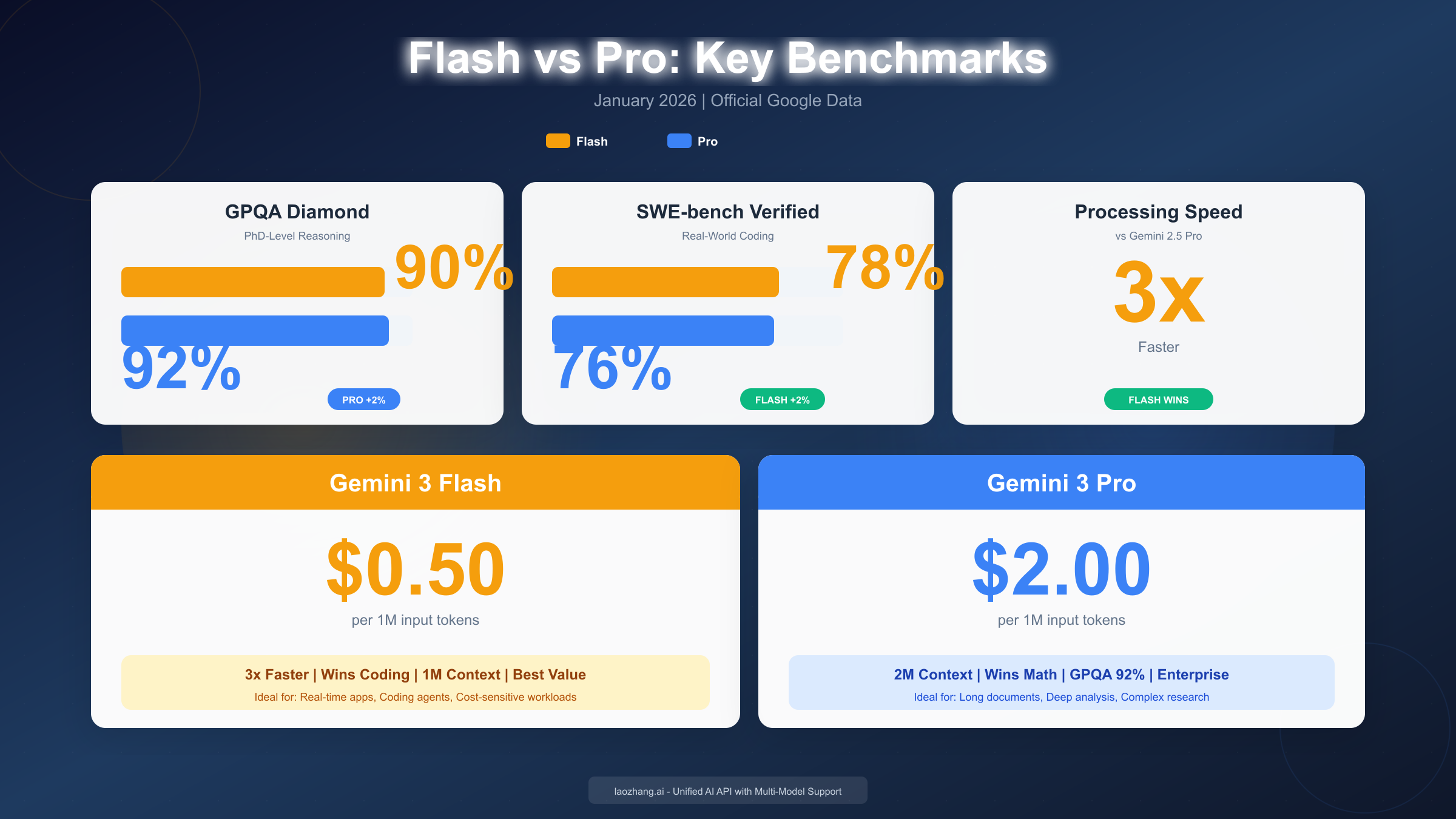
Gemini 3 Pro represents the capability flagship, optimized for tasks requiring sustained reasoning, extended tool usage, and structured workflows. Pro's defining feature is its 2-million-token context window—double Flash's capacity—enabling analysis of entire codebases, lengthy legal documents, or comprehensive research papers in a single prompt. Pro also leads on certain reasoning benchmarks, particularly at the extreme edge of complexity. According to Google DeepMind (https://deepmind.google/models/gemini/flash/ ), Pro achieves 91.9% on GPQA Diamond compared to Flash's 90.4%, and reaches a historic 1501 Elo on LMArena—the first model to cross the 1500 threshold.
Thinking levels differ between Flash and Pro, which affects how you configure reasoning behavior. Gemini 3 Flash supports four thinking levels: "minimal" (approximately 512 tokens of reasoning), "low," "medium," and "high." This granularity allows precise control over the reasoning depth versus speed tradeoff. Gemini 3 Pro supports only "low" and "high" thinking levels—it cannot disable thinking entirely, reflecting Google's design philosophy that Pro users always want at least some reasoning capability. The default for both models is "high," which maximizes reasoning depth at the cost of increased latency and token consumption.
For context on the evolution, Gemini 2.5 Flash and Pro remain available and use the older thinkingBudget parameter system. Gemini 2.5 Flash pricing starts at $0.30 per million input tokens—cheaper than Gemini 3 Flash—but with measurably lower benchmark performance. Many production systems successfully use 2.5 models, and they remain appropriate for cost-sensitive applications where the latest reasoning capabilities aren't required. If you're exploring the 2.5 generation, our free Gemini 2.5 Pro API access guide covers available options.
Gemini 3 Flash vs Pro: Complete Benchmark Comparison
The benchmark comparison between Gemini 3 Flash and Pro reveals a counterintuitive pattern that challenges assumptions about model capabilities. Traditional wisdom suggested that "Pro" variants should outperform "Flash" variants across all metrics, with Flash offering only speed and cost advantages. Gemini 3 breaks this pattern: Flash actually outperforms Pro on several important benchmarks, including coding tasks, while Pro maintains advantages only in specific domains requiring maximum reasoning depth or extended context processing.
Reasoning and Scientific Knowledge
On GPQA Diamond, the PhD-level science reasoning benchmark, Pro edges Flash by a small margin: 91.9% versus 90.4%. This 1.5 percentage point gap represents Pro's advantage on questions requiring the deepest scientific reasoning, but the practical difference is minimal for most applications. Both scores significantly exceed human expert performance (approximately 89.8%), meaning either model provides superhuman scientific reasoning capability. On Humanity's Last Exam, a benchmark designed to test the limits of AI reasoning, Flash scores 33.7% without tools while Pro reaches 37.5%—a more meaningful gap that reflects Pro's additional reasoning capacity on the most challenging problems.
Coding and Software Engineering
The coding benchmarks tell a different story entirely. On SWE-bench Verified, which measures a model's ability to resolve real GitHub issues, Flash scores 78.0% compared to Pro's 76.2%. This means Flash is actually the better choice for practical software development tasks. Independent testing confirms this pattern: in one evaluation, Flash completed a battery of coding tests in 2.5 minutes with a $0.17 total cost, achieving 90% accuracy, while Pro took longer and achieved only 84.7% accuracy. For developers primarily using AI for coding assistance, Flash offers superior performance at lower cost.
On the LiveCodeBench competitive programming benchmark, Pro leads with a 2,439 Elo rating compared to Flash's 2,316. This distinction matters for algorithm-heavy applications where Pro's additional reasoning depth helps on problems requiring complex algorithmic insights. However, for typical software development—building features, debugging code, writing tests—Flash's SWE-bench advantage makes it the practical choice.
Mathematical reasoning shows similar nuance. On AIME 2025 (the American Invitational Mathematics Examination) without tools, Flash achieves 95.2% while Pro reaches slightly higher. However, with code execution enabled—the realistic scenario for most production math applications—both models converge toward 99.7% accuracy. Since you'll typically want code execution enabled for mathematical applications anyway, the practical difference between Flash and Pro for math is negligible while the cost difference remains 4x.
Multimodal understanding shows parity. On MMMU Pro, the multimodal understanding benchmark, Flash and Pro tie at 81.2%. This parity across multimodal tasks means choosing between models for image analysis, document understanding, or video processing should be driven by other factors (cost, speed, context window needs) rather than capability differences.
Speed represents Flash's most dramatic advantage. Flash's most dramatic advantage comes in processing speed. According to Artificial Analysis benchmarking, Flash runs 3x faster than Gemini 2.5 Pro while maintaining superior accuracy. Flash also demonstrates 30% better token efficiency, meaning it accomplishes equivalent tasks with fewer tokens—directly translating to cost savings beyond the already lower per-token pricing. For applications requiring real-time responsiveness—chatbots, voice assistants, live coding tools—this speed difference is decisive.
When Flash Beats Pro: Understanding the Results
The counterintuitive benchmark results where Flash outperforms Pro on coding tasks deserve deeper analysis. Understanding why this happens helps you make informed model selection decisions rather than defaulting to "Pro is better, it costs more."
Flash represents optimization, not reduction. Traditional AI model families follow a pattern where smaller variants sacrifice capability for efficiency. Google took a different approach with Gemini 3 Flash. Rather than simply training a smaller version of Pro, they optimized specifically for the tasks that matter most to developers: coding, structured output generation, and rapid iteration. This focused optimization allows Flash to actually exceed Pro on its target use cases while Pro retains advantages on edge cases requiring maximum reasoning depth.
Pro's advantages are real but specific. The 2-million-token context window is Pro's most concrete differentiator. If you're analyzing complete codebases with millions of lines, processing entire books, or handling massive structured datasets in single prompts, Pro's larger context is essential—Flash simply cannot fit these workloads. Additionally, Pro's slight edge on the most extreme reasoning benchmarks (Humanity's Last Exam, competitive programming at Grandmaster level) matters for applications pushing the absolute limits of AI capability. For a typical chatbot, API integration, or development workflow, these edge cases rarely arise.
The "always available" thinking aspect of Pro influences its behavior in ways that can help or hurt depending on use case. Pro cannot fully disable thinking—its minimum is "low" rather than "minimal" or off. This means Pro always applies some reasoning overhead, which improves accuracy on complex queries but adds latency on simple ones. Flash's "minimal" option allows near-instant responses for straightforward requests while still enabling full reasoning when needed.
Enterprise testimonials reflect these distinctions. According to Google's announcement (https://blog.google/products/gemini/gemini-3-flash/ ), Bridgewater Associates stated that "Gemini 3 Flash is the first to deliver Pro-class depth at the speed and scale our workflows demand." JetBrains integrated Flash for coding assistance specifically because it matched Pro's code quality while meeting their latency requirements. These adoption patterns from sophisticated organizations validate Flash as the primary recommendation for most use cases.
For teams building AI applications, the decision framework becomes clear: start with Flash, measure your specific accuracy requirements, and only upgrade to Pro if you encounter the specific scenarios where Pro's advantages matter—maximum context, extreme reasoning edges, or workloads where the "always some thinking" behavior improves results.
Pricing Comparison: Flash vs Pro vs Thinking Mode Costs
Understanding Gemini 3 pricing requires attention to several factors: base token costs, the input/output pricing difference, context window tier effects, and thinking token overhead. Many developers underestimate actual costs by only considering input token prices, missing the substantial output and thinking costs.
Base Pricing Structure
Gemini 3 Flash maintains flat pricing regardless of context length:
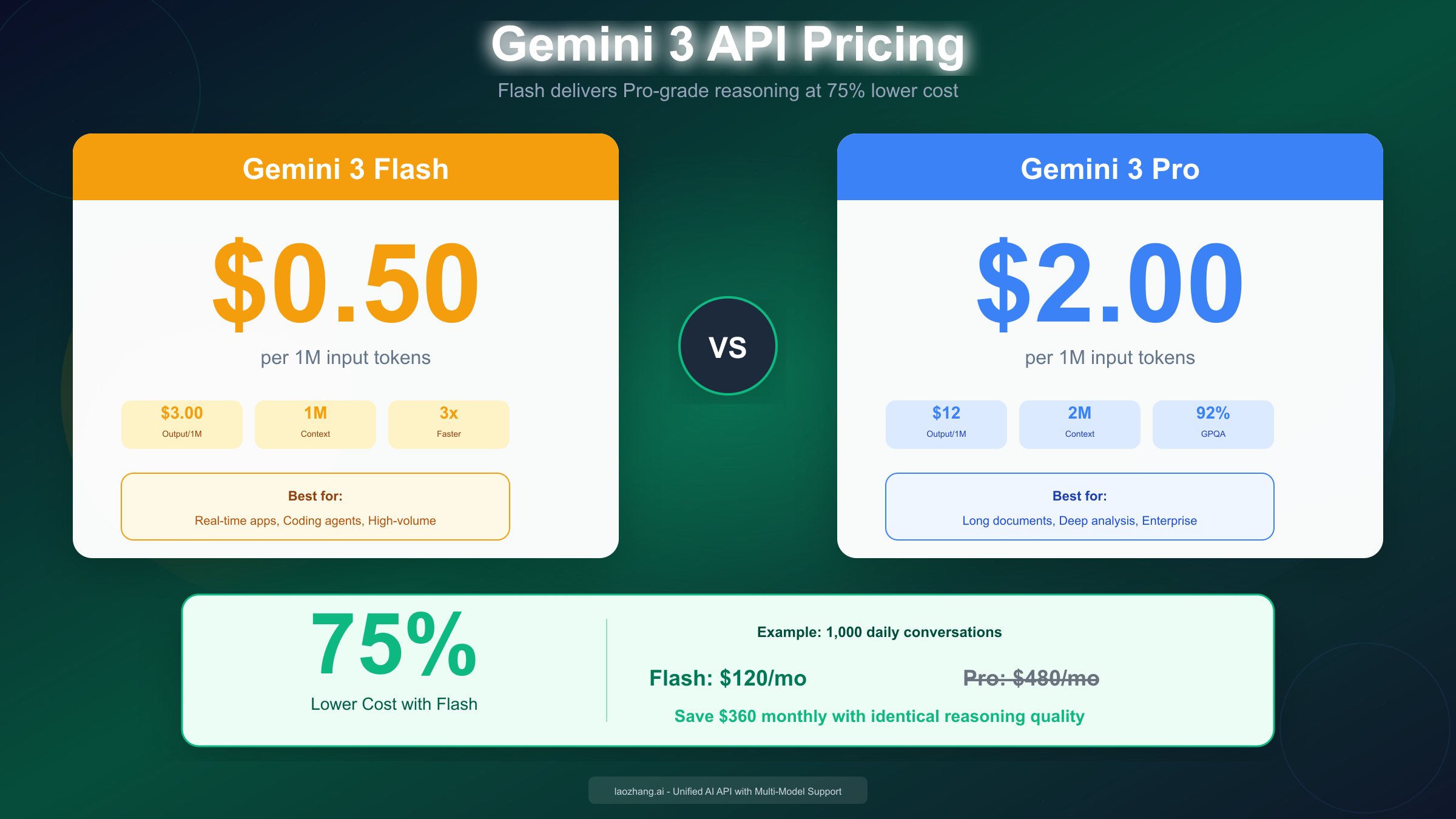
- Input tokens (text/image/video): $0.50 per million
- Input tokens (audio): $1.00 per million
- Output tokens: $3.00 per million
Gemini 3 Pro uses tiered pricing based on context window usage:
- Standard tier (≤200K tokens): $2.00 input, $12.00 output per million
- Long context tier (>200K tokens): $4.00 input, $18.00 output per million
This pricing structure means Pro costs 4x more than Flash for typical workloads, and up to 8x more when using extended context. For our complete Gemini API pricing breakdown, including 2.5 series and legacy model pricing, see the detailed guide.
Thinking mode adds cost overhead. Thinking tokens count toward your output token budget and are billed at output token rates. When you enable high thinking level, the model might generate 2,000-5,000 thinking tokens in addition to your actual response. For Flash, this adds $6-15 per million queries at typical thinking levels. For Pro, thinking overhead reaches $24-60 per million queries.
The thinking cost is justified when accuracy matters. For a legal document analyzer where errors have liability implications, spending an extra $0.01 per query on thorough reasoning is trivial compared to the cost of mistakes. For a high-volume chat application where occasional imperfection is acceptable, minimizing thinking reduces costs substantially.
Real-World Cost Scenarios
Scenario: Customer service chatbot processing 1,000 conversations per day
Assumptions: 2,000 input tokens and 1,000 output tokens per conversation average, moderate thinking level.
- Flash: $30/month input + $90/month output = $120/month
- Pro: $120/month input + $360/month output = $480/month
- Monthly savings with Flash: $360 (75% reduction)
Scenario: Code review assistant for development team
Assumptions: 50 code reviews per day, 10,000 input tokens (code context) and 2,000 output tokens per review, high thinking level.
- Flash: $7.50/month input + $9/month output = $16.50/month
- Pro: $30/month input + $36/month output = $66/month
- Monthly savings with Flash: $49.50 (75% reduction)
For teams requiring multi-model flexibility, platforms like laozhang.ai offer unified API access with pricing matching official rates while providing the convenience of switching between Gemini, Claude, and GPT models through a single integration. This approach simplifies cost management when you're experimenting across model families.
Batch processing offers 50% discounts. Both Flash and Pro offer 50% discounts on batch processing jobs. If your workload tolerates asynchronous processing—generating reports overnight, analyzing document archives, bulk content creation—batch pricing halves your costs. Flash batch processing reaches $0.25 per million input tokens, making high-volume AI processing remarkably economical.
How to Configure Gemini Thinking Mode: API Guide
Implementing Gemini Thinking Mode requires understanding the correct parameters for your model generation and configuring appropriate thinking levels for your use case. This section provides complete, working code examples for both Gemini 3 (using thinkingLevel) and Gemini 2.5 (using thinkingBudget).
Gemini 3: Using thinkingLevel
For Gemini 3 Flash and Pro, configure thinking using the thinkingLevel parameter. Available levels depend on the model:
Gemini 3 Flash levels:
"minimal": Minimal reasoning tokens (~512), fastest responses"low": Light reasoning, balances speed and accuracy"medium": Moderate reasoning for typical complexity"high": Maximum reasoning (default), best accuracy
Gemini 3 Pro levels:
"low": Light reasoning (minimum available—Pro cannot disable thinking)"high": Maximum reasoning (default)
Python implementation:
pythonimport google.generativeai as genai


genai.configure(api_key="YOUR_API_KEY")

# Initialize model with thinking configuration
model = genai.GenerativeModel(
    model_name="gemini-3-flash-preview",
    generation_config={
        "temperature": 0.7,
        "thinking_level": "high"  # Options: minimal, low, medium, high
    }
)

# Generate with thinking enabled
response = model.generate_content(
    "Analyze this code for security vulnerabilities and suggest fixes: [code here]"
)

# Access the response
print(response.text)

# Access thinking summary if you want to see reasoning
if hasattr(response, 'thinking_content'):
    print("Reasoning:", response.thinking_content)
JavaScript implementation:
javascriptimport { GoogleGenerativeAI } from "@google/generative-ai";

const genAI = new GoogleGenerativeAI("YOUR_API_KEY");

const model = genAI.getGenerativeModel({
  model: "gemini-3-flash-preview",
  generationConfig: {
    temperature: 0.7,
    thinkingLevel: "high"
  }
});

async function analyzeWithThinking(prompt) {
  const result = await model.generateContent(prompt);
  const response = await result.response;

  console.log("Response:", response.text());

  // Access thinking if available
  if (response.candidates[0].thinkingContent) {
    console.log("Reasoning:", response.candidates[0].thinkingContent);
  }
}

analyzeWithThinking("Solve this optimization problem step by step...");
Gemini 2.5: Using thinkingBudget
For Gemini 2.5 models, use the thinkingBudget parameter instead:
pythonimport google.generativeai as genai

genai.configure(api_key="YOUR_API_KEY")

# Gemini 2.5 Flash with thinking budget
model = genai.GenerativeModel(
    model_name="gemini-2.5-flash",
    generation_config={
        "temperature": 0.7,
        "thinking_budget": 8192  # Range: 0-24576 for Flash, 128-32768 for Pro
    }
)

# Setting to 0 disables thinking (2.5 Flash only)
# Setting to -1 enables dynamic thinking (model decides based on complexity)
Best Practices for Thinking Configuration
Match thinking level to task complexity. For simple queries (fact retrieval, classification, formatting), use "minimal" or disable thinking to minimize latency and cost. For moderate tasks (summarization, basic analysis, template generation), "low" or "medium" provides appropriate reasoning. For complex tasks (multi-step math, code debugging, legal analysis), "high" maximizes accuracy.
Monitor thinking token consumption. Thinking tokens contribute to your output token costs. Track thinking token usage in your analytics to understand the actual cost impact and identify opportunities for optimization.
Consider streaming for responsive UX. When thinking adds latency, streaming responses improves perceived responsiveness. The model begins streaming its output while still processing, giving users immediate feedback even on complex queries.
For comprehensive setup including authentication, error handling, and production patterns, refer to our Gemini API key setup guide and Gemini 3.0 API comprehensive guide.
Which Model Should You Choose? Decision Framework
Selecting between Gemini 3 Flash, Pro, and different thinking levels depends on your specific requirements across four dimensions: context window needs, accuracy requirements, latency constraints, and budget. This decision framework provides concrete guidance for common scenarios.
Decision Tree: Quick Selection
Step 1: Do you need more than 1M tokens of context?
- Yes → Gemini 3 Pro (only option with 2M context)
- No → Continue to Step 2
Step 2: Is sub-second latency critical?
- Yes → Gemini 3 Flash with "minimal" or "low" thinking
- No → Continue to Step 3
Step 3: Are you working on extremely complex reasoning (PhD-level science, competitive programming, edge-case math)?
- Yes → Gemini 3 Pro with "high" thinking
- No → Gemini 3 Flash with "medium" or "high" thinking
Specific Use Case Recommendations
Customer service chatbot: Flash with "low" thinking. Speed matters for user experience, and most customer queries don't require deep reasoning. The 75% cost savings compounds significantly at scale.
Code review and generation: Flash with "high" thinking. Flash actually outperforms Pro on SWE-bench, making it the capability leader for software development. High thinking catches subtle bugs and security issues.
Legal document analysis: Pro with "high" thinking if documents exceed 1M tokens; Flash with "high" thinking otherwise. Legal work requires maximum accuracy, and the cost difference is insignificant compared to the value of error-free analysis.
Real-time voice assistant: Flash with "minimal" thinking. Voice applications require immediate responses—even 500ms of thinking delay feels unnatural in conversation.
Research paper summarization: Flash with "medium" thinking for typical papers. Upgrade to Pro only if processing extremely long documents or multiple papers simultaneously.
Math tutoring application: Flash with "high" thinking. Both models achieve near-perfect math accuracy with tools enabled, so Flash's 4x cost advantage makes it the clear choice.
Enterprise RAG system: Flash with "medium" thinking for most queries, Pro with "high" thinking for complex analytical queries. Consider routing logic that selects the model based on query complexity.
Cost-Performance Optimization Strategy
For teams balancing cost and performance, a tiered approach works well:
- Default to Flash with medium thinking for baseline operations
- Escalate to Flash with high thinking when the initial response quality is insufficient
- Route to Pro only for specific use cases requiring extended context or maximum reasoning
- Use batch processing for any workload that tolerates asynchronous handling
This strategy typically achieves 90%+ of maximum capability at 30-40% of the cost of always using Pro with high thinking.
Summary and Next Steps
The Gemini 3 model family represents a significant evolution in Google's AI offerings, with Flash emerging as the default recommendation for most use cases while Pro serves specific needs requiring maximum context or reasoning depth.
Key takeaways from this comparison:
The "Deep Think" terminology refers to Google's Thinking Mode—not a separate model, but a configurable reasoning capability available across Flash and Pro. Understanding this mapping is essential for effective API usage.
Flash outperforms Pro on practical coding benchmarks (SWE-bench: 78% vs 76.2%) while running 3x faster at 4x lower cost. This counterintuitive result reflects Google's optimization-focused approach to Flash development.
Pricing structures favor Flash dramatically: $0.50 vs $2.00-$4.00 per million input tokens, with Pro only justified when you need the 2M context window or are pursuing marginal gains on extreme reasoning tasks.
Configure thinking using thinkingLevel for Gemini 3 or thinkingBudget for Gemini 2.5—these parameters cannot be mixed across generations.
Most applications should default to Flash with medium or high thinking, upgrading to Pro only for specific validated use cases.
Next steps for implementation:
If you're building production applications requiring stable API access across multiple AI providers, consider unified platforms that aggregate Gemini, Claude, and GPT models with consistent availability. Documentation at https://docs.laozhang.ai/ covers multi-model integration patterns.
Start with Flash using the default high thinking level, measure your specific accuracy requirements, and optimize thinking levels based on actual performance data rather than assumptions.
For complex applications, implement routing logic that selects between Flash and Pro based on query characteristics—context length, complexity signals, and accuracy requirements.
The Gemini 3 family delivers frontier-level AI capabilities at accessible price points. Whether you're building chatbots, code assistants, research tools, or enterprise systems, the combination of Flash's optimization and Pro's depth provides the flexibility to match model selection to your specific needs.