
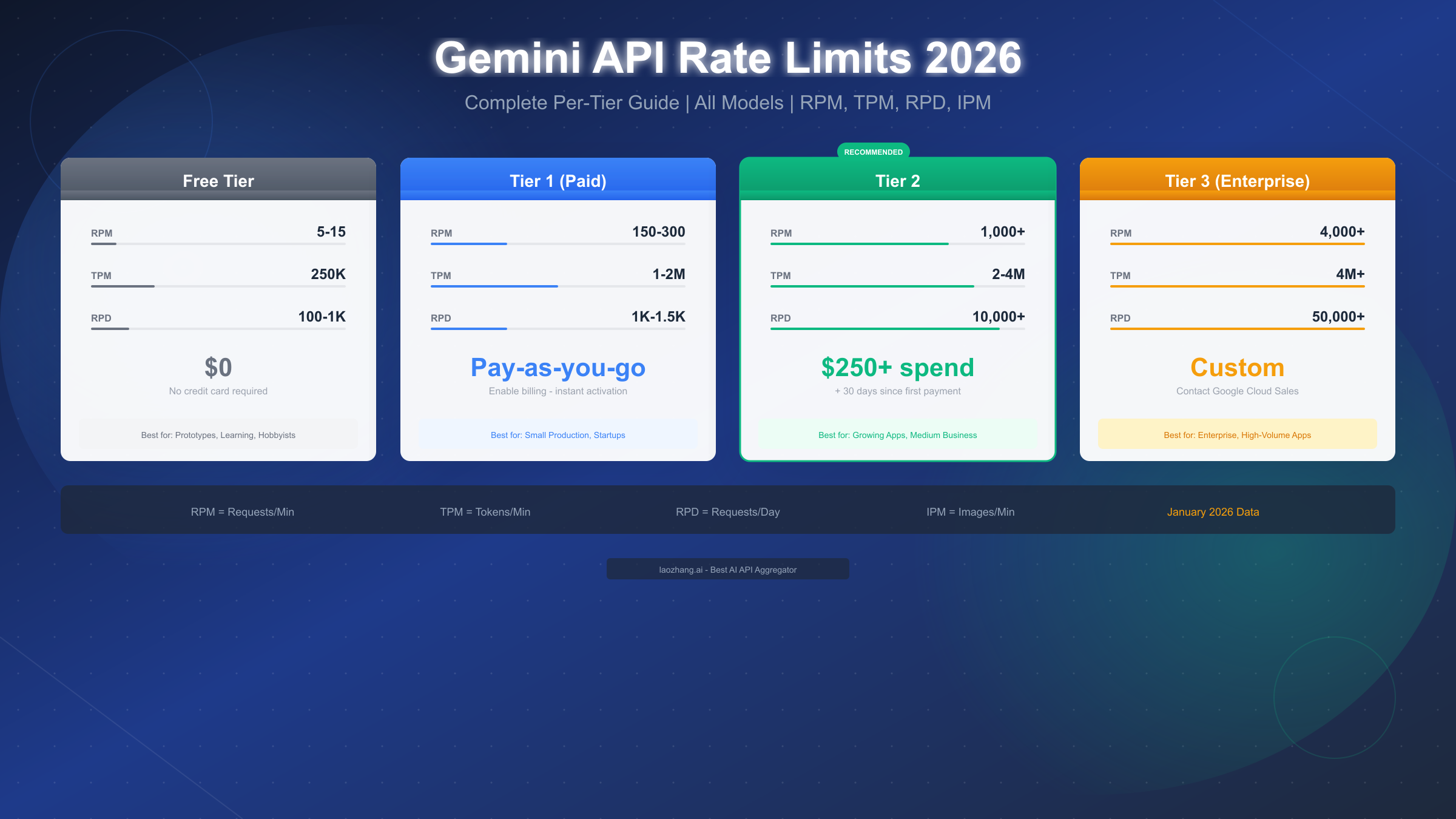
Gemini API rate limits control how many requests you can make within specific timeframes, measured across four dimensions: RPM (requests per minute), TPM (tokens per minute), RPD (requests per day), and IPM (images per minute). As of January 2026, free tier users can make 5-15 RPM depending on the model, Tier 1 paid users get 150-300 RPM, Tier 2 offers 1,000+ RPM after $250 cumulative spend, and Tier 3 enterprise provides custom limits up to 4,000+ RPM. Rate limits apply per Google Cloud project, not per individual API key.
Understanding Gemini API Rate Limits
Rate limits exist to ensure fair access to Google's AI infrastructure and protect the system from abuse. Understanding how these limits work is essential for building reliable applications that scale without unexpected interruptions.
The Four Dimensions of Rate Limiting
Google enforces rate limits across four distinct dimensions, each serving a specific purpose in resource management. The first dimension, Requests Per Minute (RPM), caps the number of API calls within any 60-second window. This prevents burst traffic from overwhelming the system. The second dimension, Tokens Per Minute (TPM), limits the total tokens processed—both input and output combined—within a minute. This controls computational load since longer prompts and responses require more processing power.
The third dimension, Requests Per Day (RPD), sets a daily ceiling on total API calls and resets at midnight Pacific Time (00:00 PT). This ensures sustained access throughout the day rather than exhausting quotas in short bursts. The fourth dimension, Images Per Minute (IPM), specifically governs multimodal requests involving image generation or processing.
Rolling Windows and Project-Level Enforcement
Rate limits use a rolling window approach rather than fixed time slots. This means the system continuously evaluates your request volume over the past 60 seconds for RPM and TPM calculations. If you make 10 requests at 2:00:30 PM and your limit is 15 RPM, you can make 5 more requests anytime until 2:01:30 PM when the first batch expires from the window.
A critical point that many developers miss: rate limits apply at the Google Cloud Project level, not per API key. Creating multiple API keys within the same project won't multiply your limits—all keys share the same quota pool. This architectural decision means you need separate Google Cloud projects for genuinely isolated quota allocations.
For developers just getting started with the API setup process, our complete guide to getting your API key covers the essential steps for project configuration and key management.
Complete Rate Limits by Tier
Understanding the exact limits for each tier helps you choose the right level for your application and plan for growth. Here's the comprehensive breakdown as of January 2026, including the December 2025 quota adjustments that affected free and lower-tier users.
Free Tier Limits
The free tier provides genuine, ongoing access without requiring a credit card—a significant advantage over competitors. However, the December 2025 update tightened enforcement algorithms and reduced some quotas:
| Model | RPM | TPM | RPD | Context |
|---|---|---|---|---|
| Gemini 2.5 Pro | 5 | 250,000 | 100 | 1M tokens |
| Gemini 2.5 Flash | 10 | 250,000 | 250 | 1M tokens |
| Gemini 2.5 Flash-Lite | 15 | 250,000 | 1,000 | 1M tokens |
| Gemini 3 Pro Preview | 10 | 250,000 | 100 | 1M+ tokens |
The free tier suits prototyping, learning, personal projects, and low-traffic applications. With Flash-Lite's 1,000 daily requests and 15 RPM, you can build surprisingly capable tools without spending anything. For more details on maximizing free tier capabilities, see our detailed free tier guide.
Tier 1 (Paid) Limits
Enabling billing on your Google Cloud project instantly upgrades you to Tier 1 with significantly expanded limits:
| Model | RPM | TPM | RPD |
|---|---|---|---|
| Gemini 2.5 Pro | 150 | 1,000,000 | 1,000 |
| Gemini 2.5 Flash | 300 | 2,000,000 | 1,500 |
| Gemini 2.5 Flash-Lite | 300 | 2,000,000 | 1,500 |
The jump from free tier is substantial—30x more RPM for Pro models, 4x more TPM across the board. This supports small production applications, startup MVPs, and content generation tools. Activation is instant once billing is enabled; there's no waiting period or approval process.
Tier 2 Limits
Tier 2 targets growing applications with substantial throughput requirements:
| Model | RPM | TPM | RPD |
|---|---|---|---|
| Gemini 2.5 Pro | 1,000 | 2,000,000 | 10,000 |
| Gemini 2.5 Flash | 2,000 | 4,000,000 | 10,000 |
| Gemini 2.5 Flash-Lite | 2,000 | 4,000,000 | 10,000 |
Tier 2 Requirements: Achieving Tier 2 requires meeting two conditions: $250 in cumulative Google Cloud spending (across any services, not just Gemini API) AND 30 days since your first successful payment. Google Cloud free credits don't count toward this threshold—only actual charges to your payment method qualify. The upgrade typically completes within 24-48 hours after meeting both requirements.
Tier 3 (Enterprise) Limits
Tier 3 provides custom limits negotiated directly with Google Cloud sales:
| Metric | Typical Range |
|---|---|
| RPM | 2,000 - 4,000+ |
| TPM | 4,000,000+ |
| RPD | 50,000 - Unlimited |
Tier 3 Requirements: $1,000 cumulative spend plus 30 days, OR direct engagement with Google Cloud sales. The enterprise sales process typically takes 2-4 weeks and includes technical reviews, security assessments, and contract negotiations. Organizations processing millions of requests daily or requiring guaranteed SLAs should pursue this path.
Real-World Use Case Examples
Raw numbers don't always translate into practical understanding. Let's examine specific scenarios to see how rate limits affect real applications.
Scenario 1: Customer Support Chatbot
A company deploys a customer support chatbot handling inquiries for 500 concurrent users during peak hours. Each conversation averages 8 message exchanges with prompts around 500 tokens and responses around 300 tokens.
Calculations:
- Peak concurrent users: 500
- Messages per minute (assuming 30-second response time): 1,000
- RPM needed: ~1,000 RPM
- Tokens per exchange: 800 (500 input + 300 output)
- TPM needed: 800,000 TPM
Recommendation: Tier 2 is essential. Tier 1's 300 RPM would bottleneck during peaks, causing user frustration and timeouts.
Scenario 2: Content Generation Platform
A content marketing tool generates 200 articles daily, each requiring 3 API calls (outline, draft, refinement) with 2,000 tokens average per call.
Calculations:
- Daily API calls: 600
- Token consumption: 1.2M tokens/day
- Peak RPM (if generating in bursts): ~50 RPM
- TPM during generation: ~200,000
Recommendation: Tier 1 suffices for steady generation. The 1,000 RPD limit accommodates 600 daily calls with headroom for retries and revisions.
Scenario 3: Code Assistant for Development Team
A 20-person engineering team uses an AI code assistant. Each developer makes approximately 40 queries daily with variable context lengths (100-50,000 tokens).
Calculations:
- Daily queries: 800
- Average tokens per query: 10,000 (including code context)
- Daily token consumption: 8M tokens
- Peak RPM during active coding: 20-30
Recommendation: Tier 1 handles this comfortably. The team's usage spreads across working hours, avoiding rate limit spikes.
Scenario 4: Multi-Model API Aggregation
For applications requiring multiple AI models—perhaps using Gemini for certain tasks, GPT-4 for others, and Claude for specific capabilities—API relay services like laozhang.ai provide unified access with consistent rate limit handling across providers. This approach simplifies switching between models based on cost, capability, or availability without managing separate quota systems for each provider.
Handling 429 Rate Limit Errors
When you exceed any rate limit dimension, Gemini API returns HTTP status 429 with a RESOURCE_EXHAUSTED error. Proper handling prevents application failures and maintains user experience.
Understanding the Error Response
A typical 429 response includes:
json{
  "error": {
    "code": 429,
    "message": "Resource has been exhausted",
    "status": "RESOURCE_EXHAUSTED",
    "details": [
      {
        "@type": "type.googleapis.com/google.rpc.QuotaViolation",
        "description": "Exceeded quota for requests per minute"
      }
    ]
  }
}
The details array specifies which dimension you exceeded—critical information for targeted responses. Check response headers for Retry-After which suggests wait time before retrying.
Implementing Exponential Backoff with Jitter
The gold standard for handling rate limits combines exponential backoff with random jitter. This progressively increases wait times while adding randomization to prevent synchronized retry storms across multiple clients.
Python Implementation:
pythonimport time
import random
from tenacity import retry, wait_random_exponential, stop_after_attempt
import google.generativeai as genai

genai.configure(api_key="YOUR_API_KEY")

@retry(
    wait=wait_random_exponential(multiplier=1, max=60),
    stop=stop_after_attempt(6)
)
def generate_with_retry(prompt: str, model_name: str = "gemini-2.5-flash"):
    """Generate content with automatic retry on rate limits."""
    model = genai.GenerativeModel(model_name)
    response = model.generate_content(prompt)
    return response.text


try:
    result = generate_with_retry("Explain quantum computing")
    print(result)
except Exception as e:
    print(f"Failed after retries: {e}")
JavaScript Implementation:
javascriptconst { GoogleGenerativeAI } = require("@google/generative-ai");

const genAI = new GoogleGenerativeAI("YOUR_API_KEY");

async function generateWithRetry(prompt, maxRetries = 5) {
  const model = genAI.getGenerativeModel({ model: "gemini-2.5-flash" });

  for (let attempt = 0; attempt < maxRetries; attempt++) {
    try {
      const result = await model.generateContent(prompt);
      return result.response.text();
    } catch (error) {
      if (error.status === 429 && attempt < maxRetries - 1) {
        const backoff = Math.min(60, Math.pow(2, attempt)) * 1000;
        const jitter = Math.random() * 1000;
        console.log(`Rate limited. Retrying in ${(backoff + jitter) / 1000}s`);
        await new Promise(r => setTimeout(r, backoff + jitter));
      } else {
        throw error;
      }
    }
  }
}
Prevention Strategies
Rather than just handling errors, proactive strategies prevent hitting limits:
- Request Batching: Combine multiple small requests into fewer larger ones
- Token Optimization: Trim unnecessary context, use concise prompts
- Response Caching: Cache identical or similar request responses
- Client-Side Rate Limiting: Implement your own throttling before API calls
- Model Fallback: Route to faster/cheaper models when primary hits limits
Choosing the Right Tier
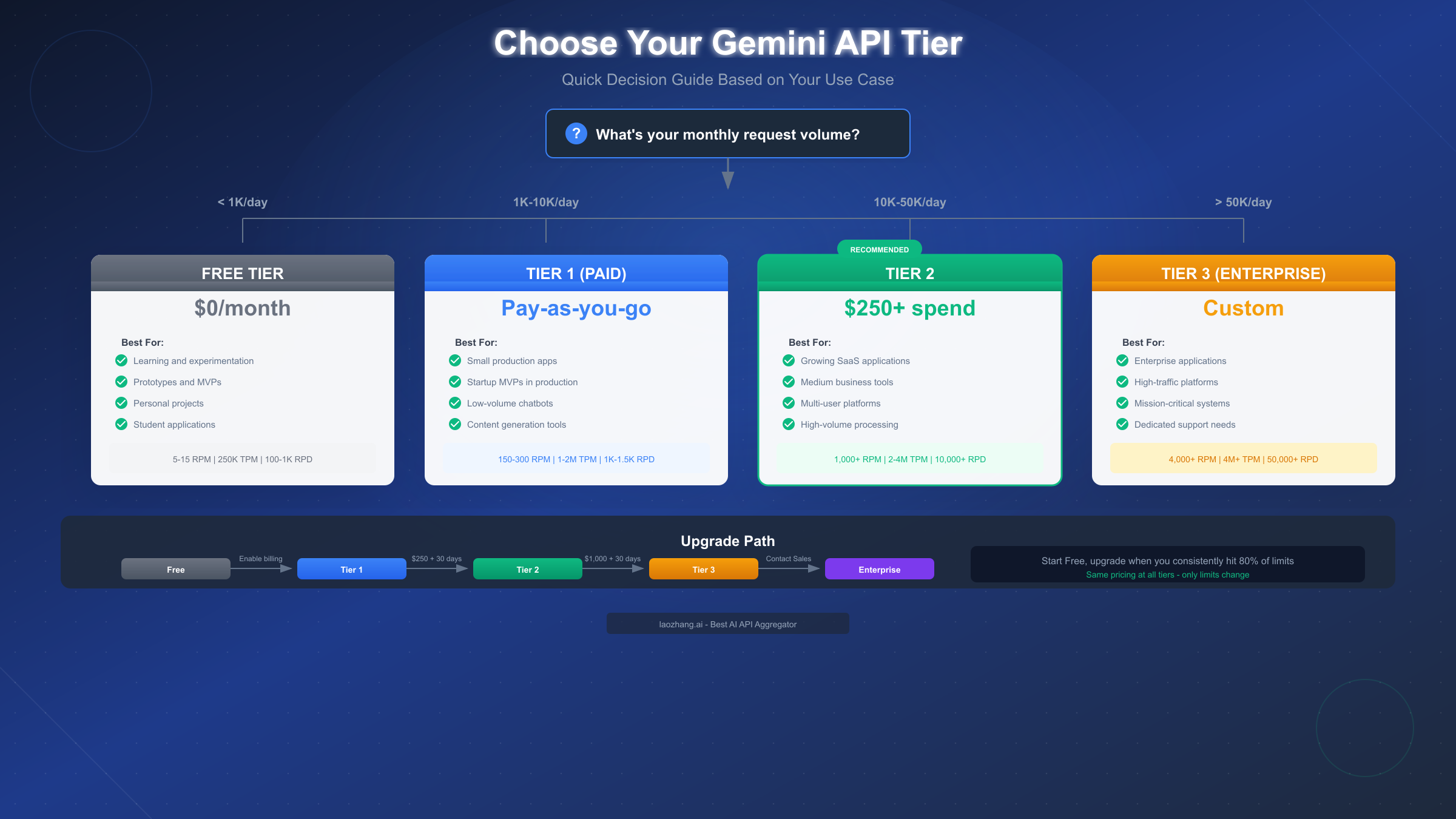
Selecting the appropriate tier balances cost, performance, and growth potential. This decision matrix helps navigate the choice.
Decision Framework by Use Case
| Use Case | Recommended Tier | Reasoning |
|---|---|---|
| Learning/Experimentation | Free | No cost, sufficient for testing |
| Personal Projects | Free | 1,000 RPD covers hobby use |
| Prototype/MVP | Free → Tier 1 | Start free, upgrade when validating |
| Small Production App | Tier 1 | 150-300 RPM handles moderate traffic |
| Growing SaaS | Tier 2 | 1,000+ RPM supports scaling |
| Enterprise Platform | Tier 3 | Custom limits + SLA guarantees |
When to Upgrade
Monitor your usage in Google AI Studio's rate limit dashboard. Upgrade when you consistently hit 80% of your current tier's limits—this provides headroom for traffic spikes without service interruptions.
Upgrade Process: Free to Tier 1
- Navigate to Google Cloud Console
- Select your project
- Go to Billing section
- Add a valid payment method
- Tier 1 limits activate immediately
No minimum balance or prepayment required. You're only charged for usage exceeding free tier allocations.
Upgrade Process: Tier 1 to Tier 2
- Ensure $250+ cumulative Google Cloud spend (any services)
- Verify 30+ days since first successful payment
- Check billing history in Cloud Console
- Upgrade happens automatically within 24-48 hours
- Monitor AI Studio for confirmation
The $250 threshold represents actual charges, not commitments. Tier 1 and Tier 2 use identical per-token pricing—you're unlocking capacity, not paying a subscription.
Cost Analysis and Optimization
Understanding the cost implications helps maximize value from your API investment. For detailed pricing breakdowns, refer to our Gemini API pricing guide.
Cost Calculation Examples
| Usage Level | Model | Monthly Tokens | Estimated Cost |
|---|---|---|---|
| Light | Flash | 10M | $0.75 |
| Medium | Flash | 100M | $7.50 |
| Heavy | Flash | 1B | $75 |
| Light | Pro | 10M | $12.50 |
| Medium | Pro | 100M | $125 |
| Heavy | Pro | 1B | $1,250 |
Optimization Strategies
Model Selection: Use Flash for speed-sensitive tasks, Pro for complex reasoning. Flash costs 16x less than Pro while handling most use cases adequately.
Token Management: Implement context pruning—remove irrelevant conversation history, summarize long documents, use system prompts efficiently.
Batch Processing: Gemini's Batch API offers 50% cost reduction for non-time-sensitive workloads. Ideal for content generation, data analysis, and preprocessing tasks.
Context Caching: For repeated similar prompts, Google's context caching can reduce costs by up to 75% on cached portions.
Third-party API services can reduce costs significantly. For example, API relay platforms like laozhang.ai offer pricing at approximately 84% of official rates ($100 gets you $110 in credits), making high-volume API usage more economical while maintaining reliability.
Gemini vs Competitors
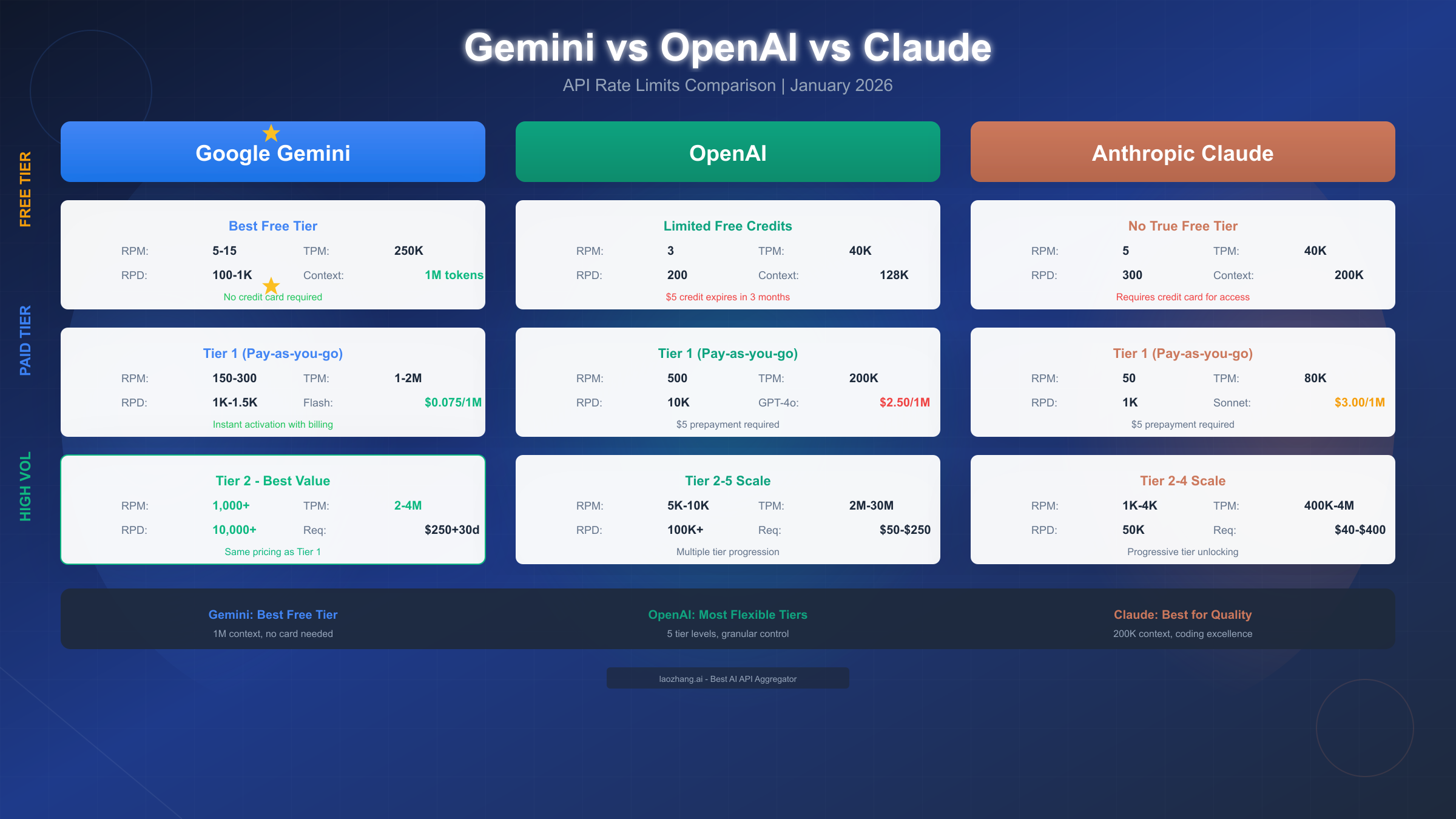
Understanding how Gemini's rate limits compare to alternatives helps inform platform decisions. Here's an objective comparison as of January 2026.
Free Tier Comparison
| Provider | Free Tier | RPM | TPM | Context | Credit Card |
|---|---|---|---|---|---|
| Gemini | Yes (ongoing) | 5-15 | 250K | 1M | Not required |
| OpenAI | $5 credit (expires) | 3 | 40K | 128K | Required |
| Claude | Limited | 5 | 40K | 200K | Required |
Gemini offers the most generous free tier with no credit card requirement, the largest context window (1M tokens), and ongoing access rather than expiring credits.
Paid Tier Comparison (Entry Level)
| Provider | RPM | TPM | RPD | Entry Cost |
|---|---|---|---|---|
| Gemini Tier 1 | 150-300 | 1-2M | 1K-1.5K | $0 (pay-as-you-go) |
| OpenAI Tier 1 | 500 | 200K | 10K | $5 prepay |
| Claude Tier 1 | 50 | 80K | 1K | $5 prepay |
OpenAI offers higher RPM at entry level, while Gemini provides significantly higher TPM. Claude's lower limits reflect its focus on quality over throughput. For detailed Claude comparison, see our Claude API pricing and limits guide, and for OpenAI specifics, check our OpenAI API pricing structure.
When to Choose Each Platform
- Gemini: Best for long-context applications, cost-sensitive projects, and teams wanting generous free tier
- OpenAI: Best for GPT-4 specific capabilities, established ecosystem tools, and highest throughput needs
- Claude: Best for complex reasoning tasks, coding assistance, and preference for Anthropic's approach
Frequently Asked Questions
Q: Are rate limits per API key or per project? Rate limits apply at the Google Cloud Project level. Multiple API keys within the same project share the same quota pool. Create separate projects for isolated quotas.
Q: When do daily limits reset? RPD (requests per day) resets at midnight Pacific Time (00:00 PT / 08:00 UTC). Plan batch jobs accordingly if you're in other time zones.
Q: Do streaming requests count differently? No, a streaming request counts as one request for RPM purposes. Token consumption counts both streamed and non-streamed tokens equally toward TPM.
Q: What's the difference between Tier 2 and Tier 3? Tier 2 offers fixed higher limits accessible through spending thresholds. Tier 3 provides custom limits, dedicated support, and SLAs negotiated with Google Cloud sales.
Q: Can I request a quota increase without upgrading tiers? Tier-based limits are fixed. For higher limits within a tier, you must upgrade. Enterprise customers can negotiate custom allocations.
Q: How do I monitor my current usage? Google AI Studio (aistudio.google.com) provides a rate limit dashboard showing current consumption against limits. The Google Cloud Console also displays API metrics.
Q: What happens if I exceed limits during a critical operation? Implement retry logic with exponential backoff. For business-critical applications, consider Tier 3 with guaranteed SLAs, or use multiple projects to distribute load.
Quick Reference Table
| Tier | RPM | TPM | RPD | Requirements |
|---|---|---|---|---|
| Free | 5-15 | 250K | 100-1K | None |
| Tier 1 | 150-300 | 1-2M | 1K-1.5K | Enable billing |
| Tier 2 | 1,000+ | 2-4M | 10K+ | $250 spend + 30 days |
| Tier 3 | 4,000+ | 4M+ | 50K+ | $1K spend or sales |
Key Takeaways
- Rate limits apply per project, not per API key
- Free tier provides genuine ongoing access without credit card
- Tier upgrades unlock capacity at the same per-token pricing
- Implement exponential backoff with jitter for 429 handling
- Monitor usage at 80% threshold to plan upgrades
- Consider multi-model strategies for optimal cost/performance
For additional resources, visit the official Gemini API documentation at ai.google.dev and the laozhang.ai documentation at https://docs.laozhang.ai/ for API aggregation options.