
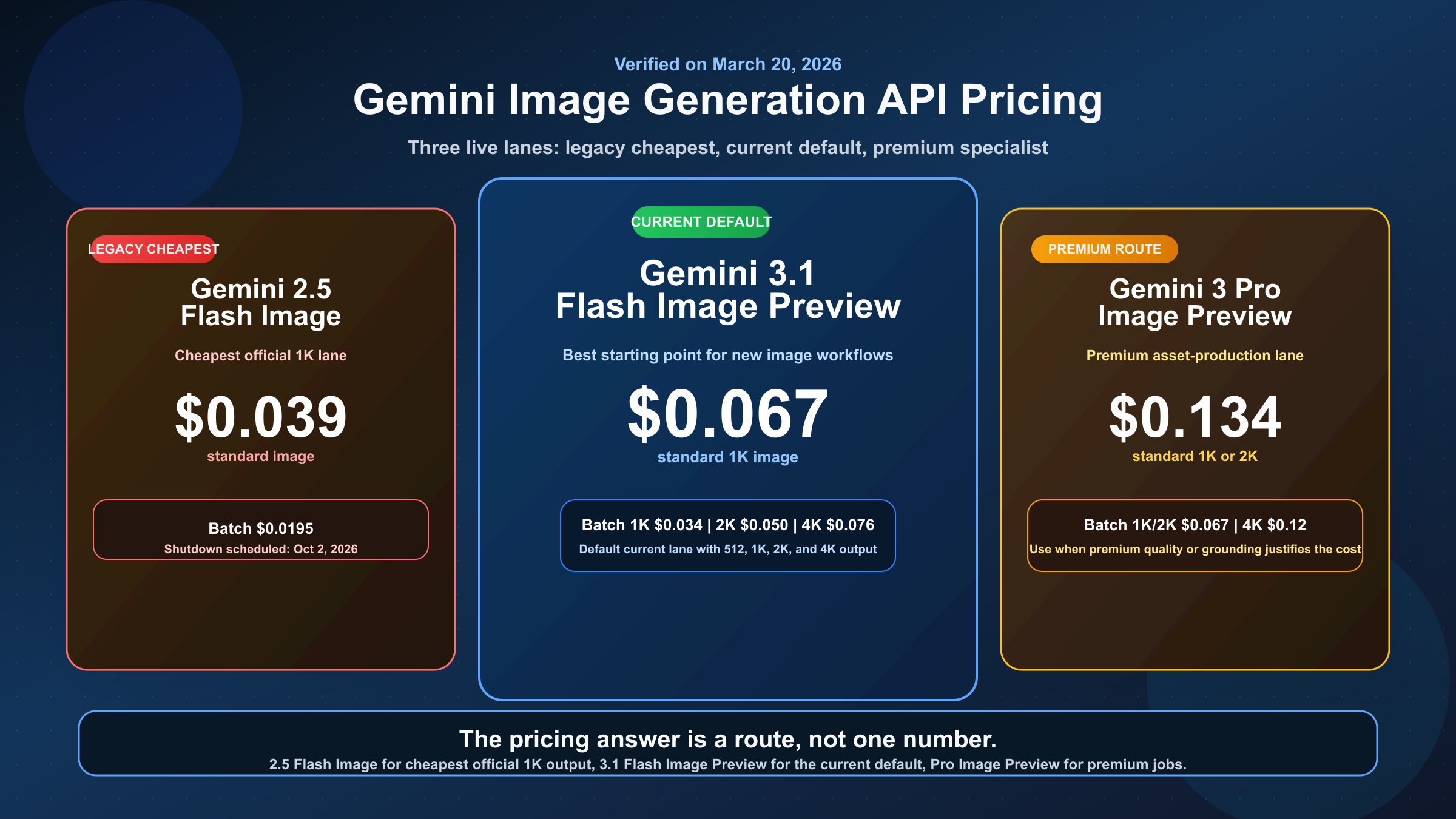
As of March 20, 2026, the live Gemini image generation API models are paid-only, and there is no single "Gemini image price." The current official answer splits across three different lanes: gemini-2.5-flash-image at $0.039 per standard image, gemini-3.1-flash-image-preview at $0.045 to $0.151 depending on output size, and gemini-3-pro-image-preview at $0.134 to $0.24 depending on output size. If you searched expecting one neat number, that is why so many pages feel incomplete.
The harder part is choosing which number matters. Google's current docs do not present these models as three interchangeable SKUs. They present a cheaper legacy image lane, a newer default image lane, and a premium specialist lane. That is the piece broad Gemini pricing calculators often hide, and it is also the reason older gemini-2.5-flash-image-preview pricing posts now mislead more than they help.
This guide stays on the official Gemini API side of the question. If you are actually trying to understand app limits or whether the consumer Gemini app still gives you free image generations, our Gemini image free tier 2026 guide covers that separate question. Here, the goal is narrower: what the current Gemini image API costs, which model those prices belong to, and how to budget without getting trapped by stale model names.
TL;DR
If you want the shortest useful answer, use this table first and then read the sections below for the tradeoffs.
| Model | Current status | Standard output pricing | Batch output pricing | Free Tier on pricing page | Best fit |
|---|---|---|---|---|---|
gemini-2.5-flash-image | Live legacy lane, shutdown scheduled for October 2, 2026 | $0.039 per image at up to 1024x1024 | $0.0195 per image | Not available | Cheapest official 1K image generation while it remains live |
gemini-3.1-flash-image-preview | Current default Gemini image lane | $0.045 at 512, $0.067 at 1K, $0.101 at 2K, $0.151 at 4K | $0.022 at 512, $0.034 at 1K, $0.050 at 2K, $0.076 at 4K | Not available | Best default choice for new image-generation work |
gemini-3-pro-image-preview | Premium Gemini image lane | $0.134 at 1K or 2K, $0.24 at 4K | $0.067 at 1K or 2K, $0.12 at 4K | Not available | Higher-end asset production, grounded workflows, and more demanding image briefs |
The cleanest budgeting rule is this: start with Gemini 3.1 Flash Image Preview for new builds, fall back to Gemini 2.5 Flash Image only when cheapest official 1K output matters more than lifecycle risk, and pay for Gemini 3 Pro Image Preview only when premium asset quality or more complex workflows justify the jump.
Current Gemini Image API Prices By Model
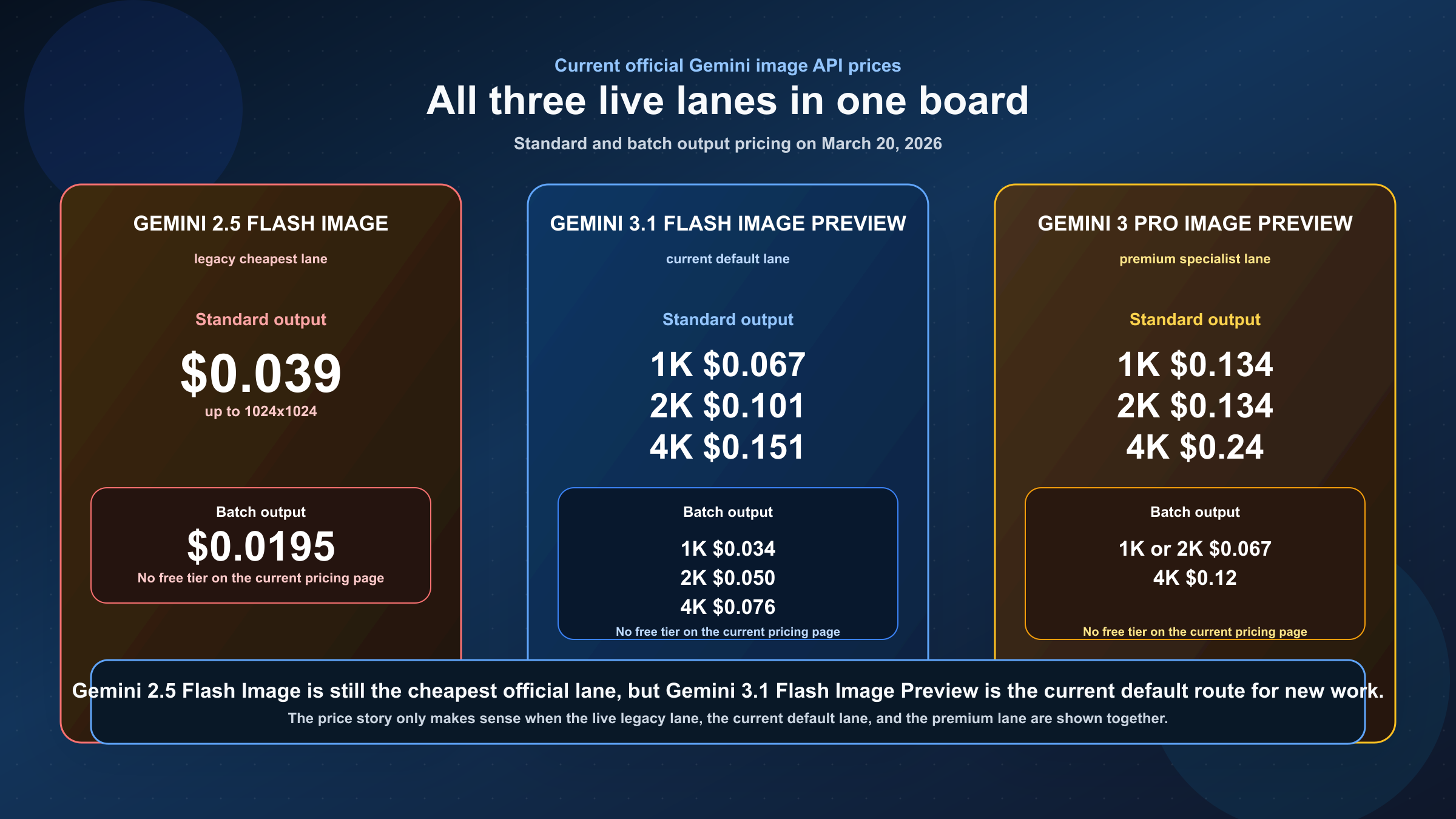
The biggest trap in this keyword family is treating "Gemini image generation" as one product. Google's own pricing page and image generation guide do not support that simplification. The live image family is split across three distinct model lanes, and each one answers a different operational question.
The cheapest official route today is still gemini-2.5-flash-image. That matters because it is easy to assume the newest model must also be the lowest-cost default. It is not. Google still lists the 2.5 Flash Image model at $0.039 per standard output image and $0.0195 in batch mode. If your workflow is high-volume 1K generation and you care more about minimizing per-image spend than about running the newest lane, that number is still relevant.
But the current default route for new Gemini image work is gemini-3.1-flash-image-preview, not the old 2.5 model. Google's image-generation docs explicitly position Gemini 3.1 Flash Image as the speed and high-volume lane for the Gemini 3 family, while the pricing page shows the broader output-size range that makes that positioning practical. It can produce 512, 1K, 2K, and 4K output, with standard prices from $0.045 to $0.151 depending on size. That is why the right mental model is not "newest equals more expensive for no reason." The real model is "newest default lane costs more because it does more."
Then there is gemini-3-pro-image-preview, which Google frames as the professional asset-production lane. The pricing page shows why it is a specialist route, not a casual default. The standard output price is $0.134 at 1K or 2K and $0.24 at 4K, which makes it roughly double the 1K price of Gemini 3.1 Flash Image and far above the legacy 2.5 Flash Image lane. That only makes sense when the image itself is expensive enough that the premium workflow matters more than the extra cost.
This is why broad pages that compress the family into one headline price create more confusion than clarity. If you want the answer that actually survives contact with a budget, you need to know which Gemini image model you are pricing before you care about the number itself.
How Google Actually Bills Gemini Image Generation
The published Gemini image prices look like flat per-image rates, but they come from token-based billing. Google's current pricing pages still separate text or image input tokens from image output tokens, and the output side is what drives most of the visible cost. In practice, that means a basic text prompt usually adds very little to the total bill compared with the image output itself, while image-editing or reference-heavy workflows can add a bit more because image inputs are also billed.
For plain text-to-image generation, the operationally important numbers are the output-image equivalents Google publishes directly. That is why the standard table above is more useful than forcing readers to multiply token counts by hand. The live Gemini docs already did that math for the current image models, so the better use of this section is to explain what changes the bill in real life.
The first lever is output size. On Gemini 3.1 Flash Image Preview, going from 1K to 4K moves you from $0.067 to $0.151 per image. On Gemini 3 Pro Image Preview, going from 1K or 2K to 4K moves you from $0.134 to $0.24. If your product displays images at web scale, treating 4K as the default is often just wasted budget. If you actually need higher-resolution creative assets, the jump can be justified. The point is to make the resolution choice deliberately instead of accepting the highest available setting as the safe default.
The second lever is batch mode. Google's current pricing pages list batch output prices at half the standard rate for all three live Gemini-native image models. That discount is big enough to matter. It turns gemini-3.1-flash-image-preview from $0.067 to $0.034 at 1K, gemini-3-pro-image-preview from $0.134 to $0.067 at 1K or 2K, and gemini-2.5-flash-image from $0.039 to $0.0195. If your workload is catalog generation, marketing variations, or any pipeline that does not need instant results, batch pricing is the most obvious cost-control lever in the current official stack.
The third lever is whether you are doing generation only or generation plus image editing. Google's pricing page for Pro Image explicitly notes a separate image-input equivalent, which means image-to-image or reference-heavy workflows are not billed exactly the same way as prompt-only generation. The visible takeaway is simple: output price dominates the public headline number, but reference-heavy workflows are not free on the input side. If your product depends heavily on multi-image composition, you should budget from the full workflow, not from a text-only generation assumption.
Which Gemini Image Model Should You Actually Choose?
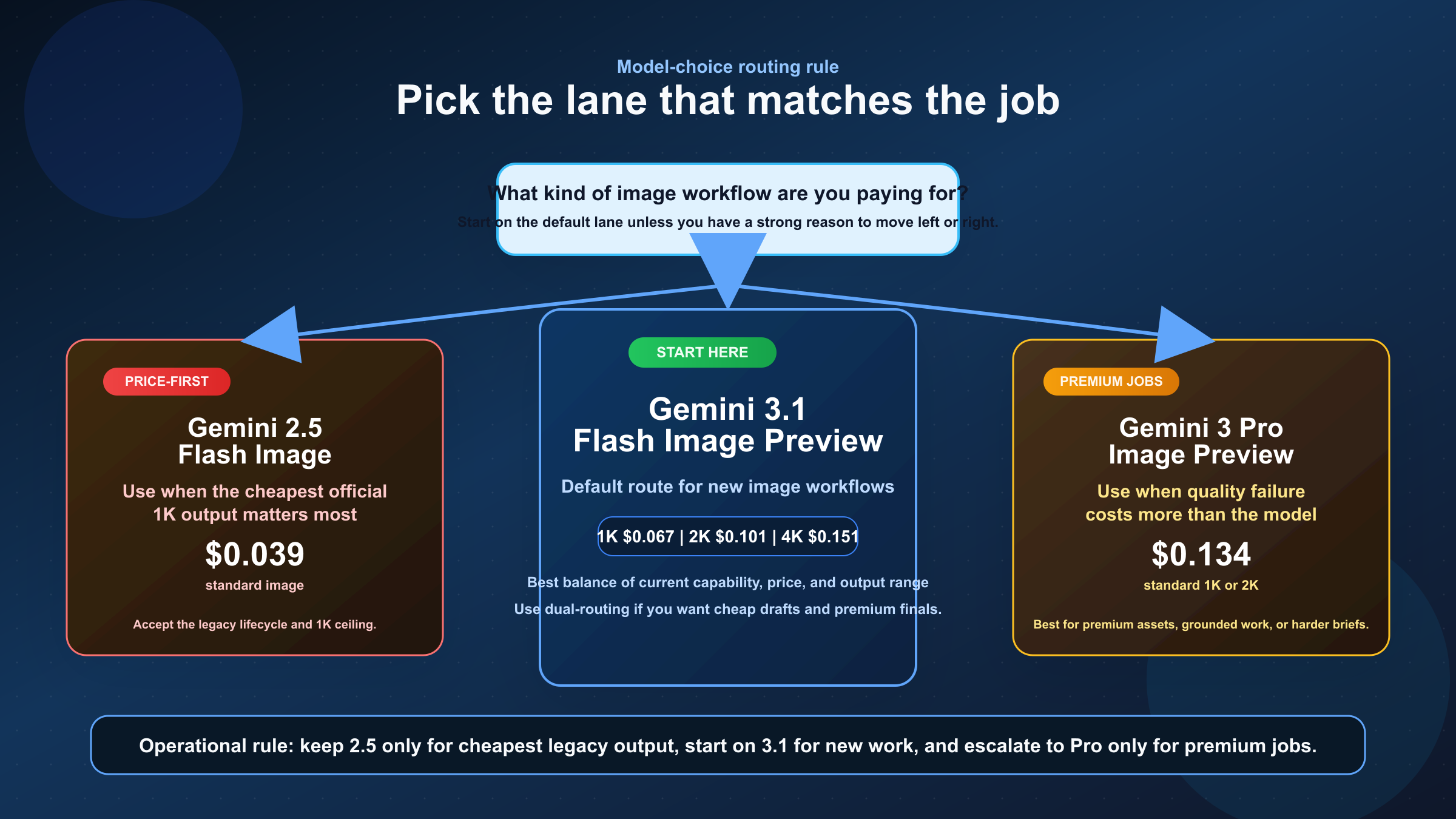
The cleanest way to pick a model is to stop asking which one is "best" and start asking what kind of image job you are paying for.
If your main goal is the cheapest official Gemini image generation, gemini-2.5-flash-image still wins. That is the right answer today, even though it is not the answer Google wants most new builds to center. The catch is lifecycle risk. Google's current deprecations table says gemini-2.5-flash-image is scheduled to shut down on October 2, 2026 and names gemini-3.1-flash-image-preview as the recommended replacement. So this is not a dead model yet, but it is not the lane to build a fresh long-horizon roadmap around unless the near-term price advantage really matters.
If your goal is the best default route for new work, gemini-3.1-flash-image-preview is the safest recommendation. The official image-generation guide already frames it as the speed and high-volume lane for the Gemini 3 image family, and the pricing page gives it a wide enough resolution range that it can cover much more than quick drafts. If you are starting a new image workflow and do not yet have a strong reason to pay Pro prices, this is the model the current docs push you toward.
If your goal is premium image work where the cost of a bad result is high, gemini-3-pro-image-preview is the right escalation. This is the lane for text-heavy assets, more demanding briefs, grounded workflows, and jobs where premium asset quality is worth real money. The price premium only makes sense when the downstream consequence of defects or weak adherence is more expensive than the extra generation cost.
| Situation | Best current official route | Why |
|---|---|---|
| You need the cheapest official Gemini image output | gemini-2.5-flash-image | Lowest published per-image price, but legacy lifecycle |
| You are building a new default image workflow | gemini-3.1-flash-image-preview | Best balance of current capability, range, and price |
| You need premium production assets or more complex image workflows | gemini-3-pro-image-preview | Higher-end lane for more demanding work |
| You only need non-urgent output and care about cost | Batch mode on the model you already chose | Official 50 percent discount is the biggest cost lever |
For a deeper route-selection breakdown between the two newer image lanes, our Gemini 3.1 Flash Image Preview vs Gemini 3 Pro Image Preview comparison goes further on when Pro is actually worth the jump.
Why Older Gemini Image Pricing Pages Disagree
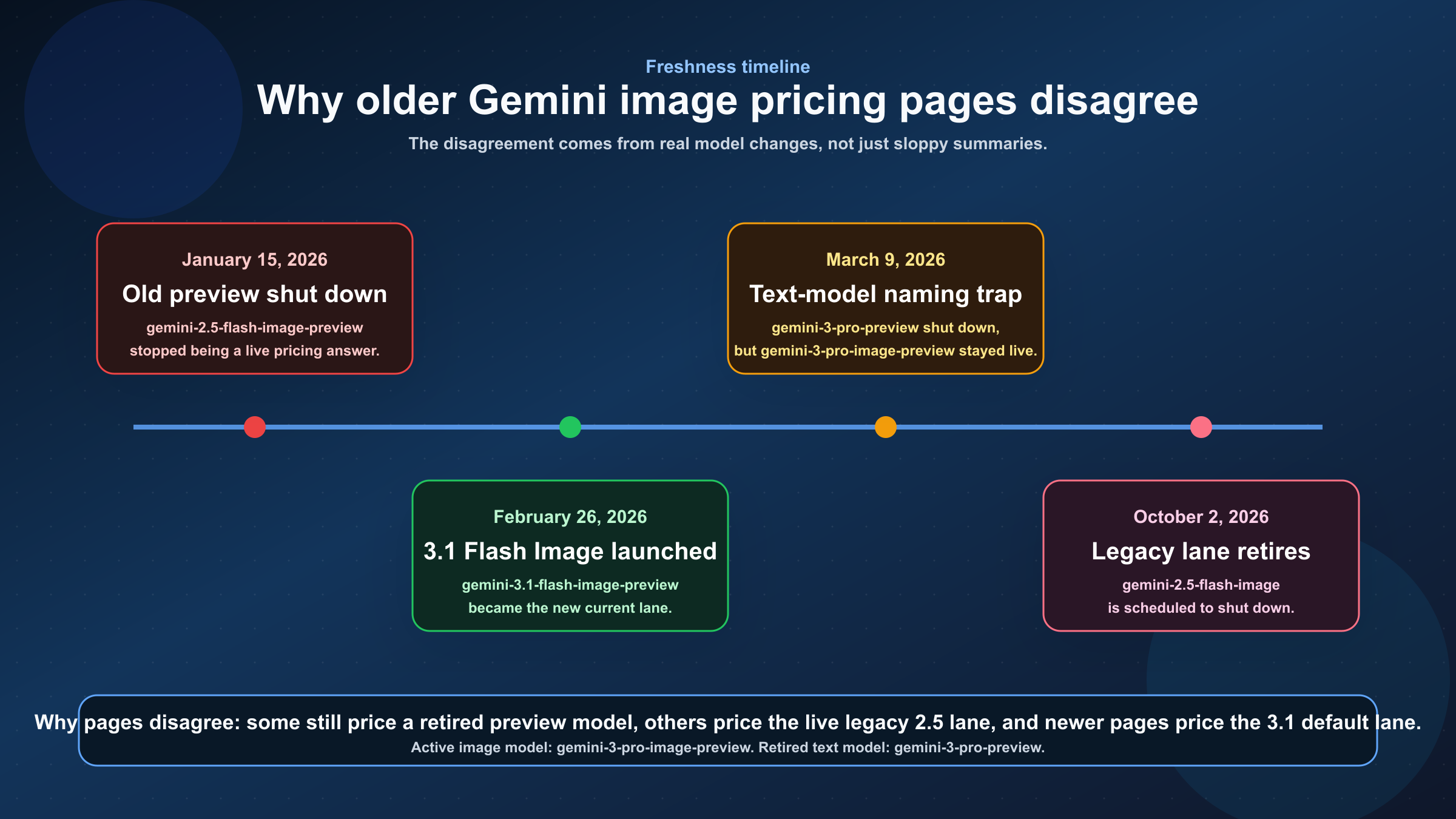
This is where most page-one results lose the reader. They are often not wrong in the narrow sense. They are wrong because they answer an older version of the question without telling you that the version changed.
The most important date is January 15, 2026. Google's current deprecations page says gemini-2.5-flash-image-preview shut down on that date. A lot of older posts and screenshots still center that preview SKU, especially in free-tier or low-cost articles. Those pages may still explain the history accurately, but they are no longer the right current answer if you are choosing a live image model today.
The second important date is February 26, 2026. That is the release date Google's deprecations table gives for gemini-3.1-flash-image-preview, the newer Flash image lane that now occupies the default position in Google's current image-generation docs. This launch changed the practical answer to the pricing question because it introduced the live current model many new developers actually mean when they search "Gemini image API pricing."
The third important date is October 2, 2026. That is the shutdown date Google currently gives for gemini-2.5-flash-image. This is why the cheapest official answer is still relevant but not strategically complete. The model is live today, yet it is also explicitly on a retirement path.
There is also a naming problem that keeps tripping people up. gemini-3-pro-image-preview is an active image model. gemini-3-pro-preview was a different Gemini 3 text model, and Google's deprecations page says that text model shut down on March 9, 2026. When pages or internal docs shorten both names to "Gemini 3 Pro," the pricing conversation becomes sloppy fast.
That is the real reason old pages disagree. They are not all measuring the same live product surface. Some are talking about a retired preview SKU, some are talking about the still-live legacy 2.5 Flash Image model, and some are talking about the newer 3.1 Flash Image lane. Unless a page tells you which one it means and when that statement was checked, it is not finished.
If you are planning around the legacy model specifically, our Gemini 2.5 Flash Image replacement guide is the right next read because the migration question is different from the broad pricing question.
Vertex AI, Billing Tiers, And Other Pricing Caveats
One useful current correction is that Google's published Gemini image-model prices now line up cleanly across the Gemini Developer API pricing page and the current Vertex AI pricing page. As checked on March 20, 2026, both pages publish the same headline rates for Gemini 3.1 Flash Image Preview and Gemini 3 Pro Image Preview. That matters because some older discussions were built around discrepancies between different Google surfaces. For the current live image rows, the official published numbers match.
That does not mean the operational experience is identical everywhere. Google's rate-limits page says current active limits depend on usage tier and can be viewed in AI Studio, rather than assumed from one universal static quota table. It also says requests per day reset at midnight Pacific time, and that paid tiers are tied to billing activation and cumulative spend thresholds. So when someone asks "What will this really cost in production?" the honest answer is: the per-image price is published, but the throughput you get around that price still depends on tier and current account status.
This is also where it helps to separate API pricing from Gemini app pricing. A Gemini app subscription or Google AI plan price is not the same thing as Gemini API usage pricing. If you are actually asking whether there is a free consumer image allowance in the app, that is a different surface with different rules and different refresh behavior. For API budgeting, the current official answer is pay-as-you-go pricing on the live image models.
For the surrounding quota mechanics, our Gemini API rate limit explained guide is the better companion piece. This page should stay focused on image pricing first, with rate limits as a caveat rather than the main story.
FAQ
Is Gemini image generation API pricing free anywhere on the current official pages?
No for the live image API models covered here. As checked on March 20, 2026, Google's pricing page lists Free Tier as not available for gemini-2.5-flash-image, gemini-3.1-flash-image-preview, and gemini-3-pro-image-preview.
Which Gemini image model is cheapest right now?
gemini-2.5-flash-image is the cheapest official live Gemini image model at $0.039 per standard output image, or $0.0195 in batch mode. The catch is that Google's deprecations table says it is scheduled to shut down on October 2, 2026.
Which Gemini image model should most new projects start with?
Most new projects should start with gemini-3.1-flash-image-preview. It is the cleanest current default route because it is the active newer Flash image lane and the official image-generation guide positions it for speed and high-volume use cases.
When is Gemini 3 Pro Image Preview worth the price?
Pay for gemini-3-pro-image-preview when the image itself is expensive to get wrong: premium production assets, more complex image briefs, grounded workflows, or jobs where premium output quality matters more than retry cost.
Is Vertex AI cheaper than Gemini Developer API for the same image models?
Not on the currently published official price tables checked on March 20, 2026. The current Gemini Developer API and Vertex AI pricing pages show matching rates for the live Gemini image models discussed here.
What is the biggest pricing mistake teams make with Gemini image generation?
Treating all Gemini image models as one product. The live budget choice is not just about one price number. It is about whether you are buying the cheapest legacy lane, the current default lane, or the premium specialist lane.
Bottom Line
The best current answer is not one number. It is a route.
Use gemini-2.5-flash-image if you need the cheapest official Gemini image generation today and you understand that it is the legacy lane with a scheduled shutdown on October 2, 2026. Use gemini-3.1-flash-image-preview as the default route for new image-generation work. Use gemini-3-pro-image-preview only when premium asset quality or more demanding workflows justify the higher price. That is the cleanest way to budget around the current official Gemini image API pricing surface without getting trapped by old preview-model answers.