
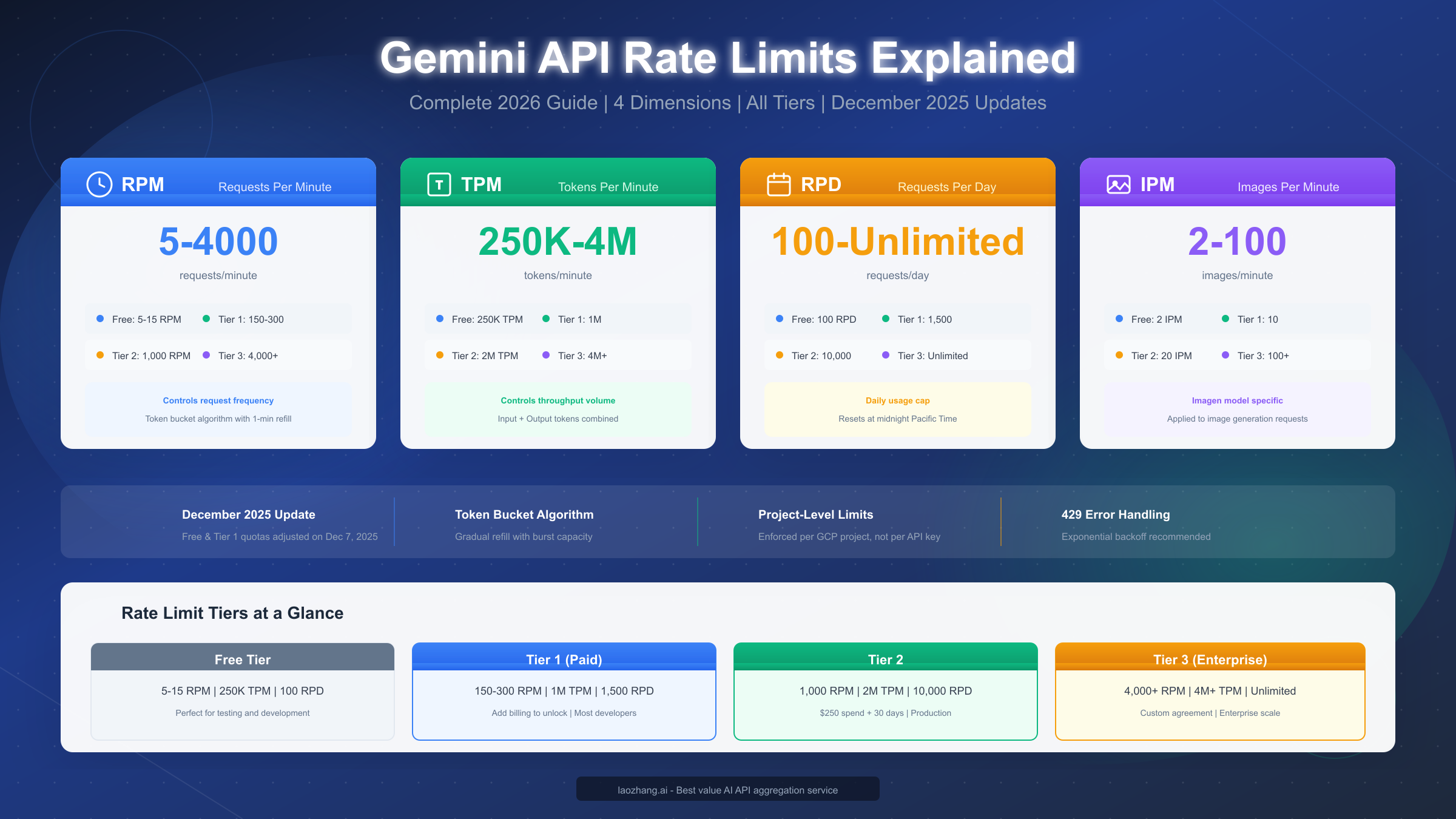
Gemini API rate limits control how many requests you can make within specific timeframes, measured across four dimensions: RPM (requests per minute), TPM (tokens per minute), RPD (requests per day), and IPM (images per minute). As of January 2026, following the December 2025 quota adjustments, free tier users can make 5-15 RPM depending on the model, while Tier 1 paid users get 150-300 RPM. Rate limits are enforced per project using a token bucket algorithm, and exceeding any dimension triggers a 429 quota-exceeded error that requires implementing exponential backoff strategies.
What Are Gemini API Rate Limits?
Rate limits represent Google's mechanism for controlling API usage across its Gemini platform, ensuring fair access and system stability for all developers. Unlike simple request caps, Gemini implements a sophisticated multi-dimensional limiting system that tracks your usage across four distinct metrics simultaneously. Understanding these limits is essential for building reliable applications that won't unexpectedly fail when traffic increases.
The fundamental concept behind rate limiting is resource allocation. Google's Gemini infrastructure handles millions of requests daily, and without rate limits, a small number of heavy users could potentially degrade service quality for everyone else. By implementing rate limits, Google ensures that each project receives a fair share of computing resources while preventing any single application from overwhelming the system.
Project-level enforcement is a critical aspect that many developers overlook. Gemini API rate limits are enforced at the Google Cloud Project level, not per individual API key. This means if you create multiple API keys within the same project hoping to multiply your limits, you'll be disappointed—all keys share the same quota pool. For applications requiring higher throughput, you need to either upgrade your tier or strategically distribute workloads across multiple projects, each with its own billing account.
The rate limiting mechanism operates continuously, not just at the start of each minute or day. Google uses a token bucket algorithm (which we'll explore in detail later) that allows for burst traffic while maintaining average rate compliance. This design choice benefits developers who experience traffic spikes, as the system permits temporary bursts above the average rate as long as you haven't exhausted your token bucket.
For a deeper understanding of how pricing relates to your quota limits, check out our comprehensive Gemini API pricing and quotas guide which covers cost calculations alongside rate limit considerations.
Why these limits matter for production applications: When you're developing locally, you might never encounter rate limits. But once your application goes live with real users, traffic patterns become unpredictable. A viral social media post, a product launch, or even a scheduled marketing email can suddenly drive thousands of concurrent users to your AI-powered feature. Without proper rate limit handling, these scenarios result in cascading failures, frustrated users, and potential revenue loss.
Understanding Rate Limit Dimensions
Gemini API measures your usage across four independent dimensions, and exceeding any single dimension triggers rate limiting. This multi-dimensional approach provides more flexibility than simple request counting but also requires more sophisticated monitoring and management.
RPM (Requests Per Minute) represents the most straightforward limit—the maximum number of API calls you can make within a 60-second window. For free tier users, this ranges from 5 RPM for Gemini 2.0 Flash to 15 RPM for Gemini 1.5 Flash. Tier 1 paid users see a significant jump to 150-300 RPM depending on the model. Each API call, regardless of its size or complexity, counts as exactly one request against your RPM quota.
The RPM dimension primarily controls request frequency rather than volume. A simple "Hello world" prompt counts the same as a complex multi-turn conversation with image analysis. This makes RPM particularly important for applications that make many small requests, such as real-time chat interfaces or streaming applications that poll frequently.
TPM (Tokens Per Minute) measures the total number of tokens processed per minute, combining both input and output tokens. Free tier users receive 250,000 TPM, while Tier 1 users get 1,000,000 TPM (1M). This limit becomes critical for applications processing large documents, maintaining extensive conversation contexts, or generating lengthy outputs.
Understanding token counting is essential for TPM management. A token roughly corresponds to 4 characters in English text, meaning a 1,000-word document uses approximately 1,300 tokens. Images are converted to token equivalents based on their resolution—a standard 512×512 image consumes about 258 tokens, while a full-resolution 1024×1024 image uses approximately 1,032 tokens. For applications that process visual content alongside text, TPM often becomes the limiting factor before RPM.
RPD (Requests Per Day) sets a daily ceiling on total requests, resetting at midnight Pacific Time (PT). Free tier users are limited to 100 RPD, which can feel surprisingly restrictive during development phases. Tier 1 users receive 1,500 RPD, and Tier 2 users get 10,000 RPD. Enterprise Tier 3 users typically have unlimited RPD as part of their custom agreements.
The daily reset time being fixed to Pacific Time means developers in other timezones need to plan accordingly. If you're running a global application, your "day" starts and ends at midnight PT regardless of your users' locations. This can create patterns where quota is abundant at certain hours and scarce at others from a user experience perspective.
IPM (Images Per Minute) specifically applies to the Imagen model for image generation tasks. Free tier users are limited to just 2 IPM, making batch image generation virtually impossible without upgrading. Tier 1 provides 10 IPM, Tier 2 offers 20 IPM, and Tier 3 enterprise users can achieve 100+ IPM based on their agreements.
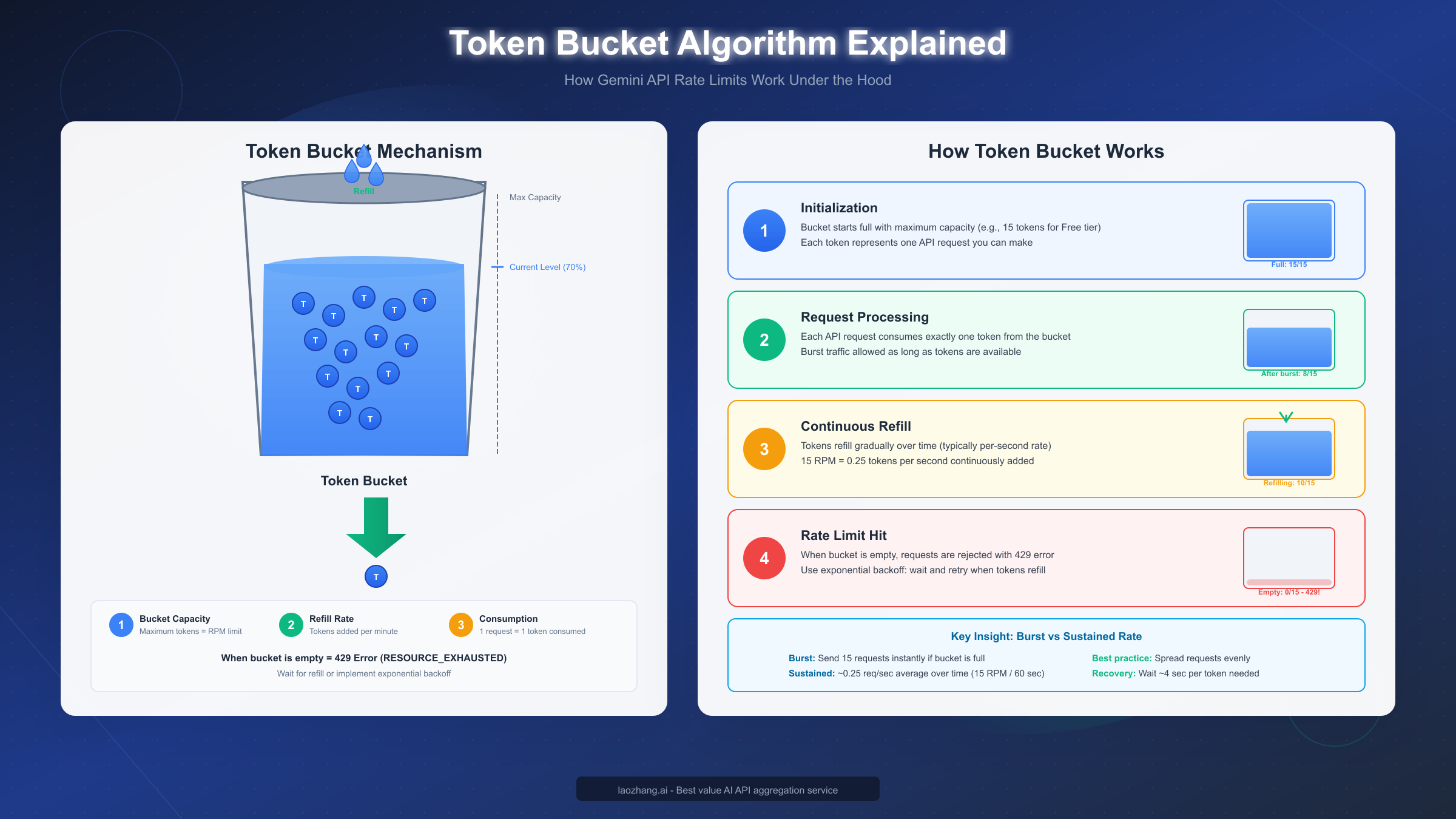
The Token Bucket Algorithm underpins how Gemini enforces all these limits. Rather than hard-resetting your quota at the start of each minute, the token bucket algorithm provides a more graceful approach. Imagine a bucket that can hold tokens equal to your limit (e.g., 15 tokens for 15 RPM). Tokens refill continuously—for 15 RPM, that's 0.25 tokens per second. Each request consumes one token. When the bucket is empty, requests are rejected.
This algorithm enables burst traffic handling. If your bucket is full, you can send 15 requests instantly. But then you must wait for refills before sending more. The practical implication: applications with sporadic, bursty traffic patterns work well with token bucket limiting, while applications with sustained high-frequency requests may still hit limits despite technically staying under the per-minute average.
December 2025 Quota Changes
On December 7, 2025, Google implemented significant changes to Gemini API quotas that affected both Free and Tier 1 users. These adjustments came with minimal advance notice, leaving many developers scrambling to understand why their previously working applications suddenly started returning 429 errors.
What Changed: The December 2025 update reduced quotas across several dimensions for lower-tier users. Free tier RPM for Gemini 2.0 Flash dropped from 10 to 5 RPM, and daily request limits saw similar reductions. Tier 1 users experienced less dramatic changes but still noticed tighter constraints, particularly on TPM allocations for newer models.
| Metric | Before Dec 2025 | After Dec 2025 | Change |
|---|---|---|---|
| Free RPM (2.0 Flash) | 10 | 5 | -50% |
| Free RPD | 500 | 100 | -80% |
| Tier 1 TPM | 1.5M | 1M | -33% |
| Free IPM | 5 | 2 | -60% |
Why Google Made These Changes: According to Google's official communications, the adjustments were necessary to "ensure sustainable service quality" as Gemini API adoption grew beyond initial projections. The explosive growth of AI applications in 2025, combined with the release of Gemini 2.0 models, placed unprecedented demand on Google's infrastructure. Rather than degrading service for paying customers, Google chose to limit free tier access more aggressively.
The timing—just before the holiday season—was particularly challenging for many development teams. Applications that worked fine during testing suddenly hit limits under real user load. The reduction in RPD from 500 to 100 for free tier users meant that even moderate testing workflows became unsustainable without upgrading.
Impact on Developers: The changes hit different user segments in various ways. Hobby developers and students experimenting with AI found the 100 RPD free limit severely constraining. Startups that had launched products on free tier during development faced unexpected costs when forced to upgrade. Even Tier 1 users building production applications needed to revisit their architectures to accommodate the tighter TPM limits.
For detailed information about how these changes specifically affect free tier users, see our guide on Gemini 2.5 Pro free tier limitations which covers the current state of free tier access.
Practical Responses to the Changes: Successful developers responded to the December 2025 changes through several strategies. Implementing aggressive caching reduced redundant API calls. Optimizing prompts to use fewer tokens stretched TPM budgets further. Some teams migrated non-critical workloads to alternative providers while keeping Gemini for core features. Others simply upgraded tiers, accepting the cost increase as necessary for production viability.
The most forward-thinking teams used the December changes as motivation to implement proper rate limit handling from the start. Rather than assuming limits won't be hit, they built retry logic, queue management, and graceful degradation into their applications—practices that serve them well regardless of future quota adjustments.
Complete Rate Limits by Tier
Understanding exactly what limits apply to your tier is essential for capacity planning. Google's tier system provides a clear progression path from free experimentation through enterprise-scale production, with each tier offering substantially higher limits.
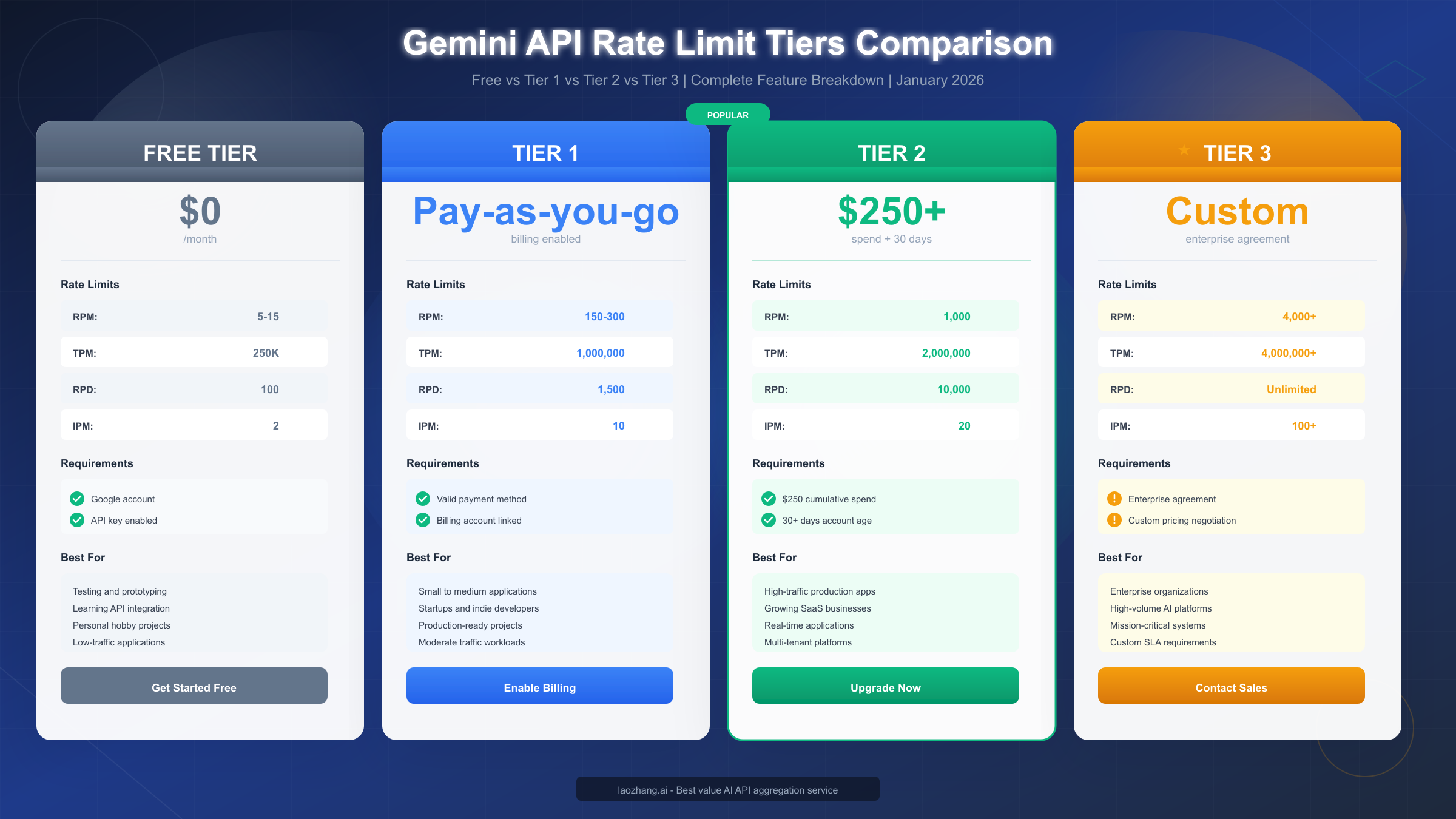
Free Tier requires only a Google account and API key enablement. While suitable for learning and prototyping, the current limits (post-December 2025) make sustained development challenging.
| Model | RPM | TPM | RPD | IPM |
|---|---|---|---|---|
| Gemini 2.0 Flash | 5 | 250,000 | 100 | 2 |
| Gemini 1.5 Flash | 15 | 250,000 | 100 | 2 |
| Gemini 1.5 Pro | 5 | 250,000 | 100 | 2 |
| Imagen 3 | 2 | N/A | 50 | 2 |
The free tier's 100 RPD limit is particularly restrictive. During an eight-hour development day, that allows approximately 12 requests per hour—barely enough for iterative testing. The 2 IPM for Imagen means you can only generate 120 images per hour maximum, and 100 per day.
Tier 1 (Paid) activates automatically when you add a valid payment method to your Google Cloud billing account. The increase from free tier is substantial, typically 10-20x across all dimensions.
| Model | RPM | TPM | RPD | IPM |
|---|---|---|---|---|
| Gemini 2.0 Flash | 150 | 1,000,000 | 1,500 | 10 |
| Gemini 1.5 Flash | 300 | 1,000,000 | 1,500 | 10 |
| Gemini 1.5 Pro | 150 | 1,000,000 | 1,500 | 10 |
| Imagen 3 | 10 | N/A | 500 | 10 |
For a complete breakdown of free tier limits across all models, our complete free tier limits breakdown provides model-by-model analysis.
Tier 2 requires both cumulative spend of $250 and account age of at least 30 days. These requirements prevent rapid tier-hopping and ensure Google can verify payment reliability.
| Model | RPM | TPM | RPD | IPM |
|---|---|---|---|---|
| Gemini 2.0 Flash | 1,000 | 2,000,000 | 10,000 | 20 |
| Gemini 1.5 Flash | 1,000 | 2,000,000 | 10,000 | 20 |
| Gemini 1.5 Pro | 1,000 | 2,000,000 | 10,000 | 20 |
| Imagen 3 | 20 | N/A | 2,000 | 20 |
The jump to 1,000 RPM and 10,000 RPD opens possibilities for production applications serving real user traffic. Most mid-sized SaaS applications can operate comfortably within Tier 2 limits.
Tier 3 (Enterprise) operates on custom agreements negotiated directly with Google Cloud sales. Limits are typically 4,000+ RPM, 4M+ TPM, and unlimited RPD, but actual allocations depend on your specific agreement and use case.
Enterprise customers often receive additional benefits beyond higher limits: dedicated support channels, custom model fine-tuning options, and SLA guarantees. The application process typically requires direct engagement with Google Cloud sales and may take 2-4 weeks to complete.
Handling 429 Rate Limit Errors
When you exceed any rate limit dimension, Gemini API returns a 429 status code with a RESOURCE_EXHAUSTED error type. Properly handling these errors is crucial for production applications—naive retry approaches can exacerbate problems, while sophisticated handling maintains user experience during quota pressure.
Understanding the Error Response: The 429 response includes headers that help you understand and respond appropriately. The Retry-After header suggests how long to wait before retrying. The response body's error.details array may contain QuotaViolation information specifying which dimension you exceeded.
python{ "error": { "code": 429, "message": "Quota exceeded for quota metric 'Generate Content API requests per minute'", "status": "RESOURCE_EXHAUSTED", "details": [ { "@type": "type.googleapis.com/google.rpc.QuotaFailure", "violations": [ { "subject": "project:your-project-id", "description": "RPM limit exceeded" } ] } ] } }
Exponential Backoff Strategy represents the industry-standard approach for handling rate limit errors. Rather than retrying immediately (which would likely fail again and waste resources), exponential backoff progressively increases wait times between retry attempts.
pythonimport time
import random

def call_gemini_with_backoff(prompt, max_retries=5):
    base_delay = 1  # Start with 1 second

    for attempt in range(max_retries):
        try:
            response = gemini_client.generate_content(prompt)
            return response
        except RateLimitError as e:
            if attempt == max_retries - 1:
                raise  # Re-raise on final attempt

            # Calculate delay with jitter
            delay = base_delay * (2 ** attempt)
            jitter = random.uniform(0, 0.1 * delay)
            wait_time = delay + jitter

            print(f"Rate limited. Waiting {wait_time:.1f}s before retry {attempt + 2}")
            time.sleep(wait_time)

    raise Exception("Max retries exceeded")
The jitter component (random variation) is important when multiple clients might be rate-limited simultaneously. Without jitter, all clients would retry at exactly the same intervals, creating "thundering herd" patterns that perpetuate the overload.
For extensive error handling patterns and debugging techniques, our detailed 429 error troubleshooting guide covers advanced scenarios including distributed systems and high-availability architectures.
Prevention Techniques are more valuable than error handling—the best 429 error is the one that never occurs. Implementing client-side rate limiting prevents you from exceeding quotas in the first place.
pythonfrom ratelimit import limits, sleep_and_retry

# Limit to 10 requests per minute (conservative for Tier 1)
@sleep_and_retry
@limits(calls=10, period=60)
def rate_limited_gemini_call(prompt):
    return gemini_client.generate_content(prompt)
Request Queuing provides another layer of protection for applications with variable traffic. Instead of making API calls synchronously, requests enter a queue that processes them at a controlled rate.
pythonimport asyncio
from collections import deque

class RequestQueue:
    def __init__(self, requests_per_minute):
        self.queue = deque()
        self.rpm = requests_per_minute
        self.interval = 60 / requests_per_minute

    async def process(self):
        while True:
            if self.queue:
                request = self.queue.popleft()
                await self.execute(request)
                await asyncio.sleep(self.interval)
            else:
                await asyncio.sleep(0.1)
How to Upgrade Your Tier
Upgrading your Gemini API tier unlocks significantly higher rate limits, enabling production-scale applications. The process differs by tier, with each level having specific requirements and timelines.
Upgrading to Tier 1 is straightforward: add a valid payment method to your Google Cloud billing account. Navigate to the Google Cloud Console, select your project, go to Billing, and add a credit card or bank account. Once billing is active, Tier 1 limits apply immediately to all Gemini API calls.
The billing account doesn't require a minimum balance or pre-payment. You're billed monthly based on actual usage at Google's standard Gemini API rates. Free tier requests (within quotas) remain free even after enabling billing—you're not charged until you exceed free tier allocations or explicitly switch to paid model endpoints.
Upgrading to Tier 2 requires meeting two conditions: cumulative spending of $250 on Gemini API services and maintaining the account for at least 30 days. These requirements exist to prevent abuse and ensure Google can verify payment reliability before extending higher limits.
To track your progress toward Tier 2 eligibility, monitor your billing dashboard for cumulative spend. The 30-day account age starts from when you first enabled Gemini API, not from when you added billing. If you enabled the API months ago but only recently started paying, the account age requirement may already be satisfied.
Once you meet both requirements, Tier 2 limits activate automatically within 24-48 hours. There's no manual application process—Google's systems detect eligibility and upgrade your quota allocations. You can verify your current tier by checking the Quotas page in Google Cloud Console under IAM & Admin.
Requesting Tier 3 (Enterprise) involves a different process entirely. Enterprise agreements require direct engagement with Google Cloud sales. To initiate this process:
- Visit the Google Cloud sales contact page
- Describe your use case and expected volume requirements
- Schedule a discovery call with the sales team
- Provide business documentation for verification
- Negotiate custom terms including pricing and SLA
The enterprise sales cycle typically takes 2-4 weeks minimum, often longer for larger agreements. Plan ahead if you anticipate needing enterprise-level limits—don't wait until you're already hitting Tier 2 ceilings to start the conversation.
Cost Considerations Across Tiers: While higher tiers provide more capacity, they don't necessarily cost more per request. Tier 1 and Tier 2 use identical per-token pricing. The $250 spend requirement for Tier 2 represents actual usage costs, not a subscription fee. Enterprise Tier 3 may negotiate volume discounts, but terms vary by agreement.
Rate Limit Optimization Strategies
Beyond simply upgrading tiers, several technical strategies can maximize your effective throughput within existing limits. These optimizations often provide 2-5x improvement without additional cost.
Request Batching combines multiple independent operations into single API calls where supported. Rather than sending ten separate prompts, batch them into one request. Gemini's batch processing capabilities allow up to 100 items per batch for certain endpoints.
python# Instead of 10 separate calls
prompts = ["Summarize article 1", "Summarize article 2", ...]

# Use batch processing
batch_response = gemini_client.batch_generate_content(prompts)
Each batch counts as a single request against RPM, though TPM still accumulates across all prompts. For applications processing many similar items, batching can effectively multiply your RPM by the batch size.
Token Optimization reduces TPM consumption through careful prompt engineering. Shorter, more focused prompts achieve the same results with fewer tokens. System instructions that set context once can be more efficient than repeating context in every user prompt.
python# Inefficient: 150 tokens per request
prompt = "You are an expert translator. Please translate the following English text to French, maintaining the original tone and style: 'Hello'"

# Optimized: 50 tokens per request
system = "Translate to French, preserve tone."
prompt = "Hello"
Response length control through parameters like max_output_tokens prevents unnecessarily verbose responses from consuming quota. If you only need a yes/no answer, set the limit to 10 tokens rather than accepting the default 2048.
Model Selection Strategy leverages different models' varying limits. Gemini 1.5 Flash offers higher RPM (300 vs 150) compared to Gemini 1.5 Pro while maintaining good quality for many tasks. Routing simpler queries to Flash and reserving Pro for complex reasoning can significantly increase overall throughput.
Intelligent Caching prevents redundant API calls for repeated queries. Implement a caching layer that stores responses keyed by prompt hashes. For deterministic prompts (same input should produce equivalent output), cache hits can reduce API calls by 30-80% depending on your query patterns.
pythonimport hashlib
import redis

cache = redis.Redis()

def cached_gemini_call(prompt, ttl=3600):
    cache_key = hashlib.sha256(prompt.encode()).hexdigest()

    cached = cache.get(cache_key)
    if cached:
        return cached.decode()

    response = gemini_client.generate_content(prompt)
    cache.setex(cache_key, ttl, response.text)
    return response.text
Alternative Providers for Overflow: For teams consistently hitting Gemini rate limits, services like laozhang.ai provide API aggregation that routes requests across multiple providers without per-account rate limiting. This approach maintains API compatibility while effectively removing rate limit constraints. The service offers multi-model access through a unified API, with no throttling on request frequency—particularly valuable for production applications with variable traffic patterns.
FAQ and Conclusion
Q: Do rate limits apply per API key or per project? Rate limits are enforced at the Google Cloud Project level. All API keys within the same project share the same quota pool. Creating multiple keys doesn't increase your limits.
Q: When does my daily quota (RPD) reset? Daily quotas reset at midnight Pacific Time (PT). This is fixed regardless of your timezone or server location.
Q: Can I see my current quota usage in real-time? Yes, the Google Cloud Console provides real-time quota monitoring under IAM & Admin > Quotas. You can also track usage programmatically through the Cloud Monitoring API.
Q: What happens if I exceed limits across multiple dimensions simultaneously? You'll receive a 429 error for whichever limit was exceeded first. The error response indicates which specific quota was violated, helping you identify the bottleneck.
Q: Are there different limits for different Gemini models? Yes, limits vary by model. Gemini 1.5 Flash typically has higher RPM than Gemini 1.5 Pro. Imagen has separate IPM limits. Check the official documentation for model-specific quotas.
Q: How long does Tier 2 upgrade take after meeting requirements? Tier 2 activation typically occurs within 24-48 hours after meeting both the $250 spend and 30-day requirements. The process is automatic.
Key Takeaways: Gemini API rate limits operate across four dimensions (RPM, TPM, RPD, IPM) using a token bucket algorithm that allows burst traffic while maintaining average rate compliance. The December 2025 changes significantly tightened free tier limits, making Tier 1 or higher essential for serious development. Proper 429 error handling with exponential backoff is crucial for production applications.
For teams needing higher throughput without the complexity of enterprise agreements, API aggregation services provide an alternative path. Resources like the laozhang.ai documentation (https://docs.laozhang.ai/ ) offer guides on implementing multi-provider strategies that effectively bypass individual provider rate limits while maintaining cost efficiency.
Successfully working with Gemini API rate limits requires understanding the system's mechanics, proactively implementing handling strategies, and selecting the appropriate tier for your needs. With the strategies outlined in this guide, you're equipped to build reliable, production-ready applications that gracefully handle quota constraints.