
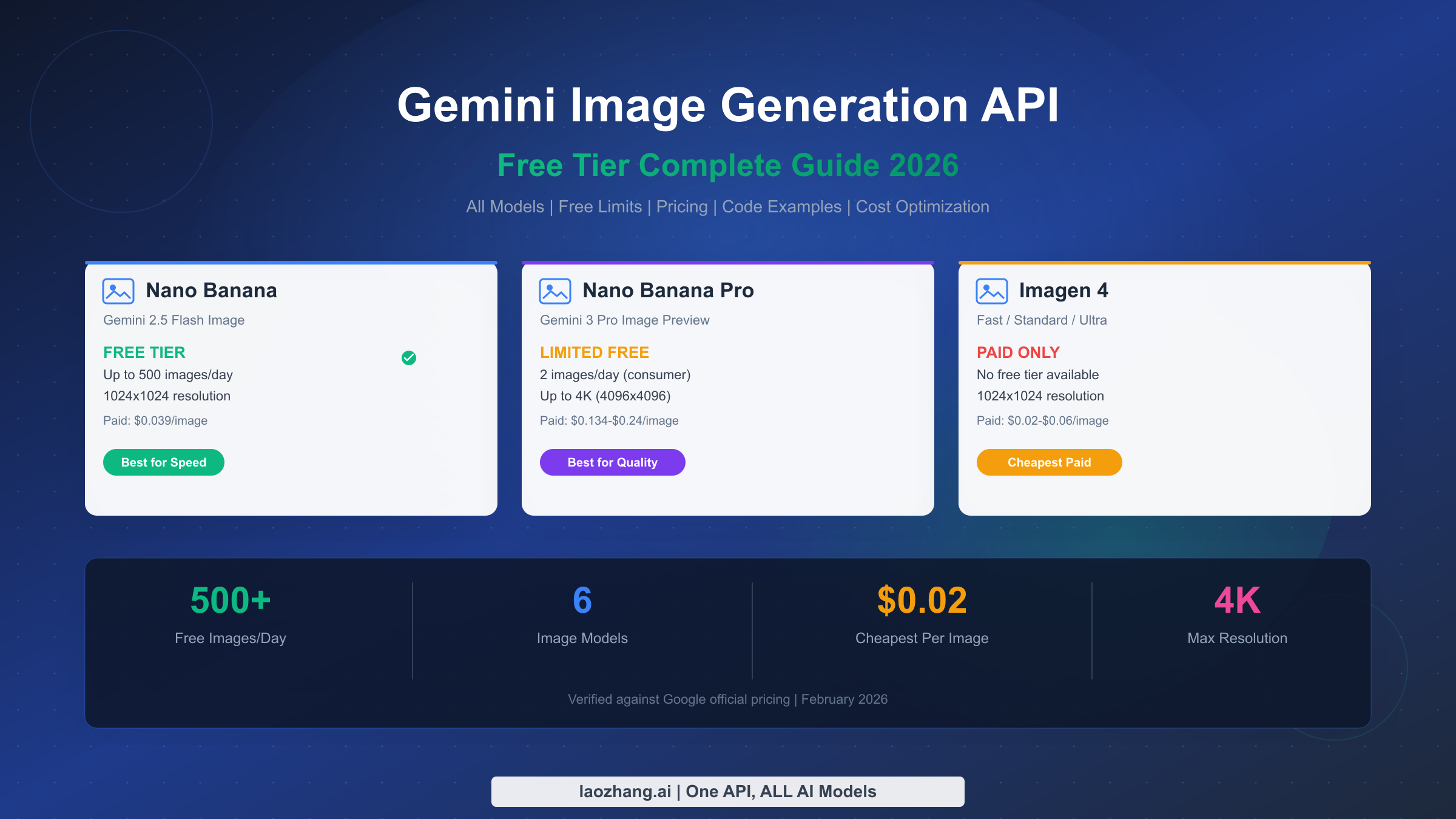
Google's Gemini API currently offers the most generous free image generation tier among major AI providers, allowing developers to generate up to 500 images per day at absolutely zero cost through Google AI Studio. Whether you need quick prototypes with Nano Banana (Gemini 2.5 Flash Image), professional-grade outputs with Nano Banana Pro (Gemini 3 Pro Image Preview), or budget-friendly batch processing with Imagen 4 Fast at just $0.02 per image, this guide covers everything you need to start generating images today with verified pricing data from February 2026.
TL;DR
Google's Gemini image generation ecosystem includes three model families. Nano Banana (Gemini 2.5 Flash Image) offers the best free tier with up to 500 images per day at 1024x1024 resolution through Google AI Studio, requiring no credit card. Nano Banana Pro (Gemini 3 Pro Image Preview) delivers professional 4K output with limited free access and paid pricing starting at $0.134 per image. Imagen 4 has no free tier but offers the cheapest per-image pricing at $0.02 (Fast variant). For developers looking to optimize costs beyond free tier, the Batch API provides 50% savings across all compatible models, and third-party platforms like laozhang.ai offer Nano Banana Pro quality at approximately $0.05 per image — a 63% reduction from official pricing.
Understanding Gemini's Image Generation Models
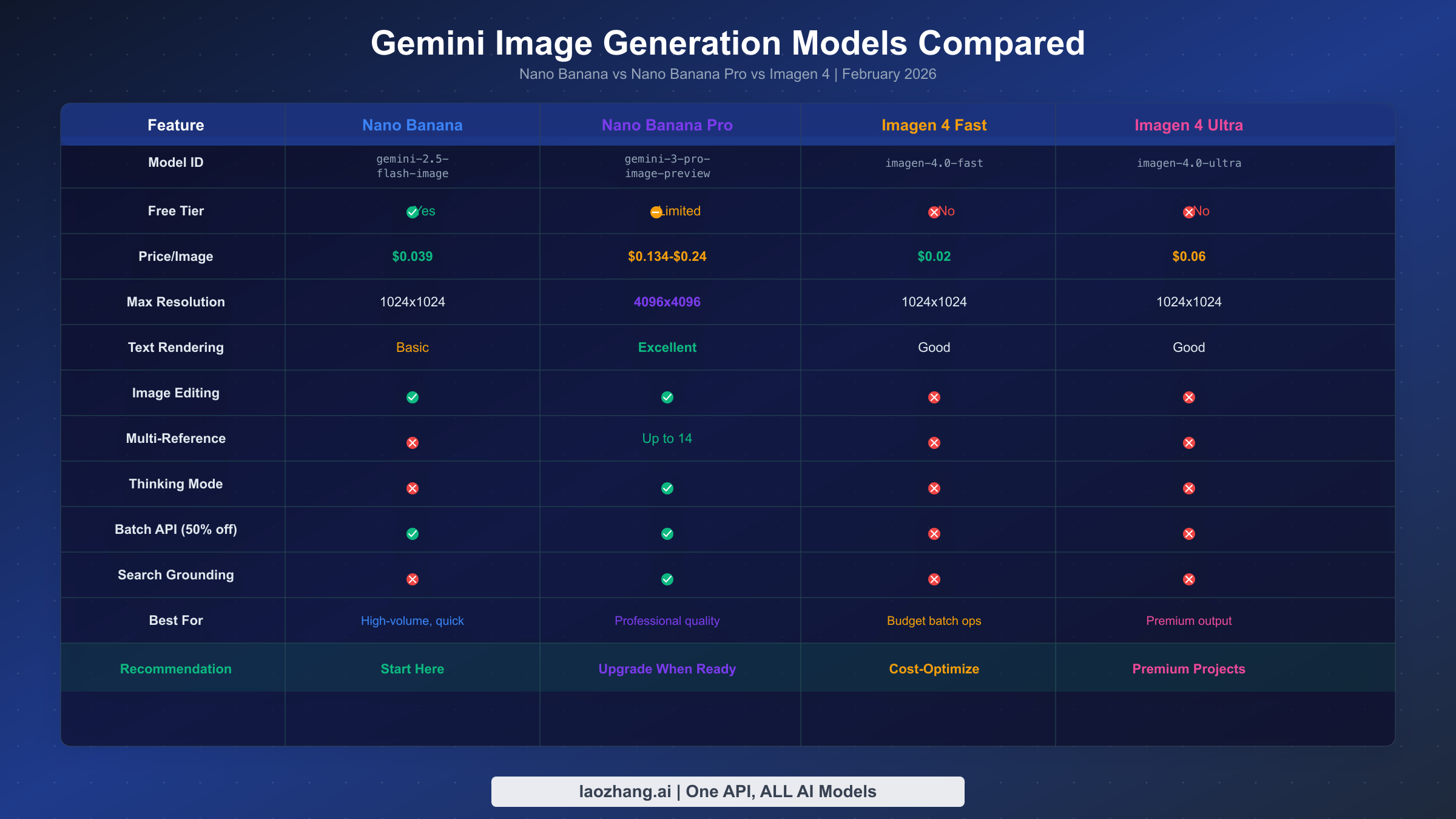
Google's image generation landscape can feel overwhelming at first glance. Three distinct model families serve different use cases, and understanding their differences is essential before writing a single line of code. The naming convention alone — with Nano Banana, Nano Banana Pro, and Imagen existing as separate product lines — has confused many developers who assume they're variations of the same model. In reality, each family uses fundamentally different architectures and is optimized for distinct workflows. If you need a detailed comparison between Nano Banana and Nano Banana Pro, we've covered that extensively in a separate guide.
Nano Banana (Gemini 2.5 Flash Image) is your everyday workhorse for image generation. Running on the gemini-2.5-flash-image model ID, it prioritizes speed and efficiency, making it ideal for high-volume, low-latency tasks where you need images generated quickly. It supports both text-to-image generation and image editing capabilities, allowing you to modify existing images through natural language prompts. The output resolution caps at 1024x1024 pixels, which is perfectly adequate for web thumbnails, social media posts, and prototype mockups. Most importantly, this is the model with the most generous free tier — and for many developers, the free allocation is more than sufficient for production workloads.
Nano Banana Pro (Gemini 3 Pro Image Preview) represents Google's flagship image generation model, built on top of Gemini 3 Pro's advanced reasoning engine. Unlike traditional diffusion-based generators, Nano Banana Pro effectively "plans" scenes before rendering them, which produces remarkably accurate text rendering across multiple languages, maintains character consistency across different scenes, and supports up to 14 reference images for guided generation. The model supports resolutions up to 4096x4096 pixels (true 4K), includes a unique "thinking" mode for complex compositions, and can integrate with Google Search grounding for real-time data visualization. These capabilities come at a higher price point — $0.134 per image at 2K resolution and $0.24 at 4K — but the quality difference is substantial for professional work (Google AI official documentation, verified February 25, 2026).
Imagen 4 is Google's dedicated image generation family that operates independently from the Gemini conversational models. Available in three tiers — Fast ($0.02/image), Standard ($0.04/image), and Ultra ($0.06/image) — Imagen 4 focuses exclusively on text-to-image generation without the editing or multi-turn conversation capabilities of the Nano Banana models. While it lacks a free tier entirely, the Fast variant at $0.02 per image makes it the cheapest official option for developers who need purely generative output without editing features (Google AI pricing page, verified February 25, 2026).
| Model | ID | Free Tier | Price/Image | Max Resolution | Editing | Batch API |
|---|---|---|---|---|---|---|
| Nano Banana | gemini-2.5-flash-image | Yes | $0.039 | 1024x1024 | Yes | Yes (50% off) |
| Nano Banana Pro | gemini-3-pro-image-preview | Limited | $0.134-$0.24 | 4096x4096 | Yes | Yes (50% off) |
| Imagen 4 Fast | imagen-4.0-fast-generate-001 | No | $0.02 | 1024x1024 | No | No |
| Imagen 4 Standard | imagen-4.0-generate-001 | No | $0.04 | 1024x1024 | No | No |
| Imagen 4 Ultra | imagen-4.0-ultra-generate-001 | No | $0.06 | 1024x1024 | No | No |
The decision tree is straightforward: start with Nano Banana for free development and testing, upgrade to Nano Banana Pro when you need professional quality or 4K resolution, and consider Imagen 4 Fast when you need the absolute lowest per-image cost for simple generation tasks at scale.
Complete Free Tier Guide - Every Way to Generate Images for $0
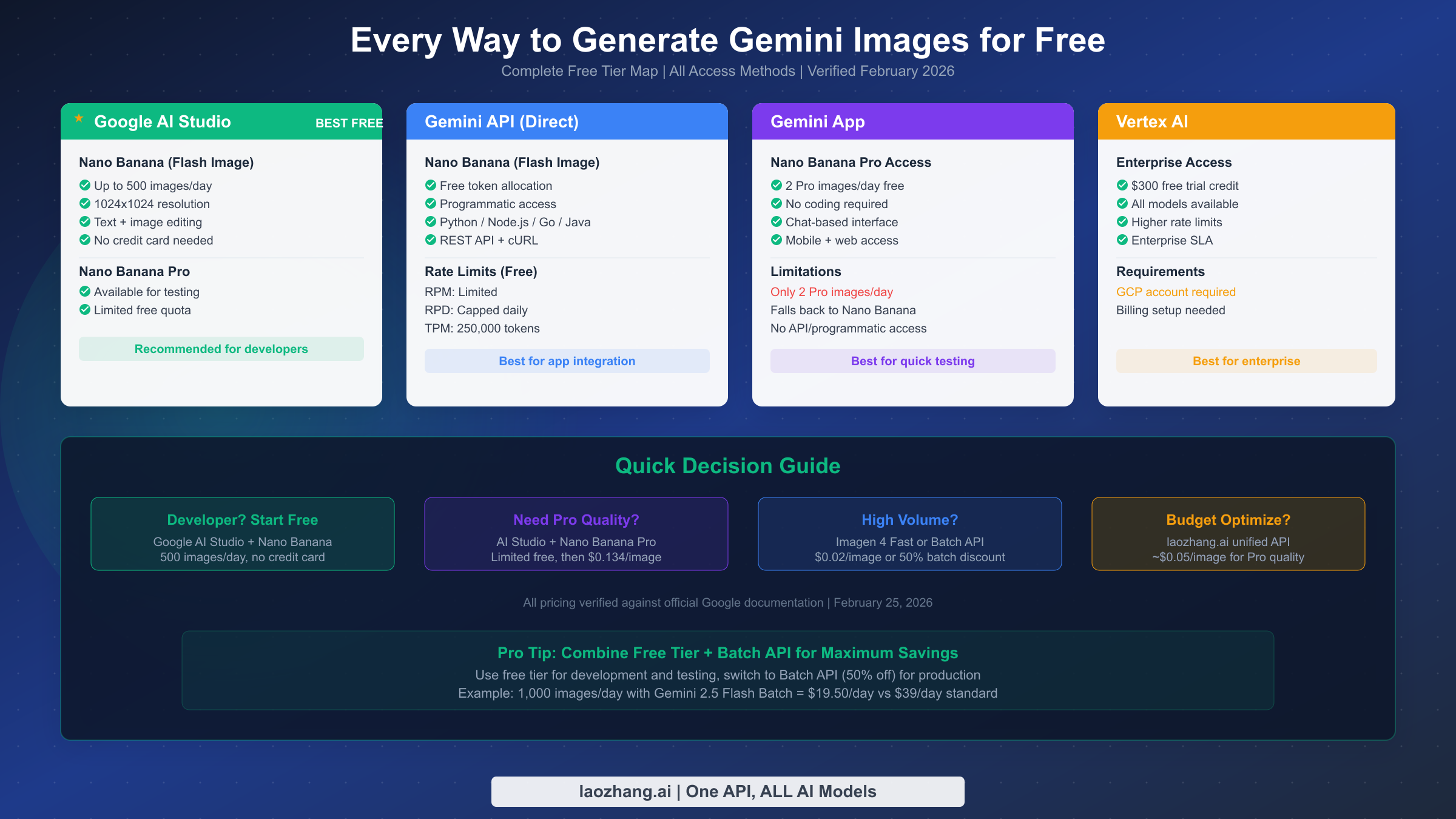
Understanding exactly how much free image generation you can access requires looking at four distinct access methods, each with its own quota structure. The free tier is genuinely generous — Google currently offers one of the most liberal free allocations in the AI image generation space — but the limits vary significantly depending on how you access the service. Many developers are surprised to learn that the same model can have different quotas depending on whether you're using Google AI Studio, the direct API, or the consumer Gemini app.
Google AI Studio provides the most generous free access and is the recommended starting point for any developer exploring Gemini image generation. Through AI Studio, you can use Nano Banana (Gemini 2.5 Flash Image) to generate up to approximately 500 images per day at no cost, with no credit card required. The interface is browser-based, which means you can test prompts, upload reference images for editing, and experiment with different parameters before writing any code. Nano Banana Pro (Gemini 3 Pro Image Preview) is also available for testing in AI Studio with a limited free quota, though the exact daily limit is lower and may vary based on demand. The key advantage of AI Studio is that it serves as both a testing environment and a free production endpoint — many indie developers run their entire image generation pipeline through AI Studio's free tier without ever enabling billing.
Direct API access through a Gemini API key provides programmatic free tier access that follows the same general token allocation as Google AI Studio. When you generate images via the API with the free tier, your requests consume tokens from a daily allocation. Gemini 2.5 Flash Image (Nano Banana) outputs at 1024x1024 resolution consume approximately 1,290 tokens per image, and the free tier provides a generous daily token pool. Rate limits include requests per minute (RPM) and total tokens per minute (TPM) caps, which are set at the project level rather than per API key. This means multiple API keys under the same Google Cloud project share the same quota. Daily quotas reset at midnight Pacific Time, and the free tier TPM is universally capped at 250,000 tokens (Google AI rate limits documentation, verified February 2026).
The Gemini consumer app offers a different kind of free access specifically for Nano Banana Pro. Free-tier users in the Gemini app can generate images with Pro quality by selecting "Create images" with the Thinking model, but they receive only approximately 2 Nano Banana Pro images per day before the system reverts to the standard Nano Banana model. This is useful for occasionally testing Pro-quality output, but it's not suitable for any kind of volume usage. AI Pro subscribers ($19.99/month) get approximately 100 Nano Banana Pro images per day at up to 2K resolution through the app.
Vertex AI provides enterprise-grade access with a $300 free trial credit for new Google Cloud accounts. This credit can be applied to any Gemini image generation model, including Nano Banana Pro and Imagen 4, effectively giving you thousands of free images during the trial period. Vertex AI also offers higher rate limits and enterprise SLA guarantees, making it the appropriate choice for production deployments that need reliability beyond what the free tier provides. However, it requires a GCP account with billing enabled, which represents a higher barrier to entry than AI Studio.
For most developers, the optimal strategy is clear: start with Google AI Studio for free development and testing, use the direct API for integration, and only move to Vertex AI or paid tiers when your volume exceeds the free allocation.
5-Minute Quickstart - Generate Your First Free Image
Getting from zero to your first AI-generated image takes less than five minutes with Google's Gemini API. The process involves three steps: obtaining an API key, installing the SDK (or using curl), and making your first generation request. This section provides complete, copy-paste-ready code that works immediately — no additional configuration or setup required beyond the API key. If you need more detailed API key setup instructions, check out our complete guide to getting your Gemini API key.
Step 1: Get your free API key. Visit Google AI Studio and sign in with any Google account. Click "Get API key" in the left navigation, then "Create API key." Select or create a Google Cloud project. Your key will be generated instantly — copy it and keep it secure. No credit card is required for free tier access, and you can start making requests immediately after key creation.
Step 2: Generate your first image with Python. Install the Gemini SDK with pip install google-genai, then use the following complete script that generates an image and saves it to disk. This script handles the full workflow including error handling and file output, so you can run it directly:
pythonimport google.genai as genai
from google.genai import types
import base64


client = genai.Client(api_key="YOUR_API_KEY_HERE")

# Generate an image using Nano Banana (free tier)
response = client.models.generate_content(
    model="gemini-2.5-flash-image",
    contents="Generate a professional product photo of a modern wireless headphone on a clean white background with soft studio lighting",
    config=types.GenerateContentConfig(
        response_modalities=["image", "text"],
    ),
)

# Save the generated image
for part in response.candidates[0].content.parts:
    if part.inline_data:
        image_data = base64.b64decode(part.inline_data.data)
        with open("generated_image.png", "wb") as f:
            f.write(image_data)
        print("Image saved as generated_image.png")
Step 3: Alternative - generate with curl (no SDK needed). If you prefer not to install any dependencies, you can generate images directly through the REST API. This curl command generates an image and returns the base64-encoded data, which you can decode with any tool. The REST endpoint works identically to the SDK and uses the same free tier quota:
bashcurl -X POST "https://generativelanguage.googleapis.com/v1beta/models/gemini-2.5-flash-image:generateContent?key=YOUR_API_KEY" \
  -H "Content-Type: application/json" \
  -d '{
    "contents": [{"parts": [{"text": "A serene mountain landscape at sunset with warm golden light"}]}],
    "generationConfig": {"responseModalities": ["image", "text"]}
  }'
Both methods use the free tier and count against the same daily quota. The Python SDK is recommended for production applications because it handles retries, streaming, and error parsing automatically. The curl approach is ideal for quick testing and integration with non-Python environments. Every generated image includes a SynthID watermark, which is an invisible digital watermark that identifies AI-generated content — this does not affect image quality or usability.
Nano Banana Pro - Professional Quality on a Budget
Nano Banana Pro represents a genuine leap forward in AI image generation capability. Built on Gemini 3 Pro's reasoning engine, it doesn't simply generate images from diffusion noise — it plans compositions, understands spatial relationships, and renders text with near-human accuracy. For developers who've been frustrated by garbled text in DALL-E or Midjourney outputs, Nano Banana Pro's text rendering is a revelation, achieving error rates under 10% for single-line text across most languages (Google DeepMind technical report, November 2025).
The key capabilities that distinguish Nano Banana Pro from the standard Nano Banana model go beyond just higher resolution. The reasoning-based architecture means the model can follow complex multi-step instructions — for instance, "create an infographic showing three categories of data, with the first category having the tallest bar, using a blue-to-green gradient, and include a title in both English and Japanese." Standard image generators would struggle with such a specific composition request, while Nano Banana Pro can plan the layout before rendering it, resulting in dramatically more accurate outputs. Additionally, the multi-reference capability allows you to upload up to 14 images as reference material, enabling style transfer, character consistency across multiple generations, and product photography that matches specific brand guidelines.
Free access to Nano Banana Pro is available through several channels, though none offer the same volume as the free Nano Banana tier. Through the Gemini consumer app, free users can generate approximately 2 Pro-quality images per day. Google AI Studio also allows testing with Nano Banana Pro using limited free quota. For developers who need more volume, the most cost-effective approach is to use the Batch API, which cuts the per-image cost in half: $0.067 per image at 2K resolution versus $0.134 for standard requests (Google AI pricing, verified February 25, 2026). This makes batch processing the go-to strategy for any workflow that doesn't require real-time generation.
When considering whether to upgrade from Nano Banana to Nano Banana Pro, the decision hinges on three factors. First, do you need text in your images? If so, Pro's text rendering is dramatically better. Second, do you need resolution above 1024x1024? Only Pro supports 2K and 4K output. Third, do you need character or style consistency across multiple images? Only Pro supports multi-reference generation with up to 14 input images. If none of these apply, the free Nano Banana model is likely more than sufficient for your needs.
For developers who need Pro quality at scale but find the official pricing prohibitive, third-party API aggregators offer a compelling alternative. Platforms like laozhang.ai provide access to Nano Banana Pro at approximately $0.05 per image — roughly 63% less than Google's direct pricing — while maintaining the same output quality and API compatibility. This pricing advantage comes from enterprise-tier volume agreements that individual developers typically can't access directly.
Complete Pricing Breakdown and Cost Optimization
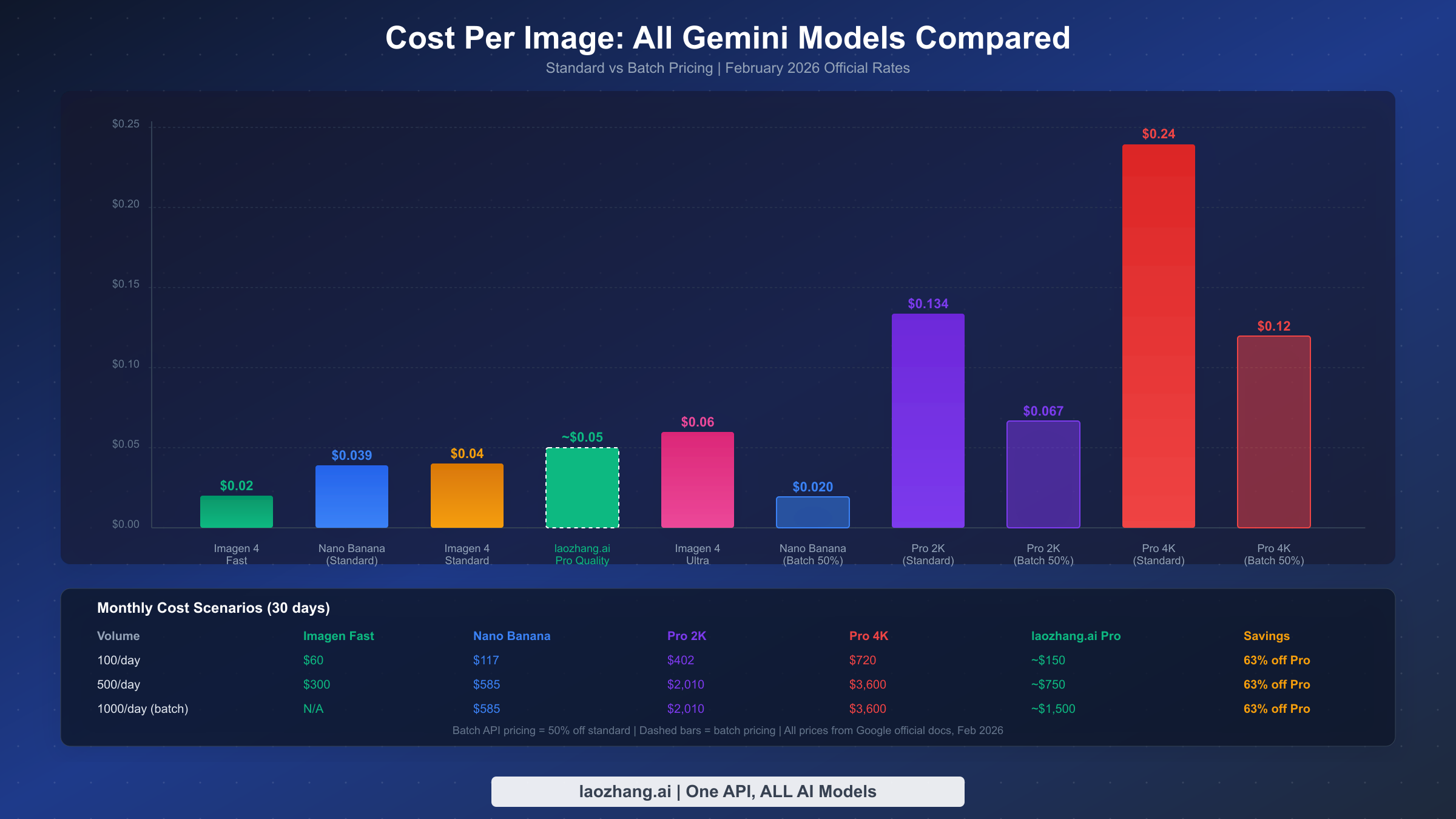
Understanding image generation costs requires looking beyond the per-image sticker price. The actual cost of running an image generation workflow depends on your chosen model, output resolution, access method (standard vs. batch), and volume. Many developers overpay because they don't realize that the Batch API — which provides the same output quality with a longer delivery window — costs exactly 50% less than standard API calls for both Nano Banana and Nano Banana Pro. For a deeper dive into Nano Banana Pro pricing specifically, see our Nano Banana Pro pricing breakdown.
The complete pricing structure across all models and resolution tiers, verified against Google's official pricing page as of February 25, 2026, breaks down as follows. Nano Banana (Gemini 2.5 Flash Image) at 1024x1024 costs $0.039 per image standard and $0.0195 per image via Batch API, with output images consuming 1,290 tokens priced at $30 per million tokens. Nano Banana Pro (Gemini 3 Pro Image Preview) varies by resolution: 1K-2K images cost $0.134 standard ($0.067 batch), while 4K images cost $0.24 standard ($0.12 batch). The input cost for Pro is minimal at approximately $0.0011 per image. Imagen 4 uses flat per-image pricing: Fast at $0.02, Standard at $0.04, and Ultra at $0.06, with no batch option available.
Cost optimization strategies that can dramatically reduce your spending start with the Batch API. Any workflow that can tolerate up to 24 hours of processing time — background processing, catalog updates, scheduled content generation — should use batch processing to cut costs by 50%. For a developer generating 500 images per day with Nano Banana standard pricing, the monthly bill would be $585. Switching to batch processing drops that to $292.50, saving nearly $300 per month with identical output quality. The only tradeoff is delivery time: standard API responses arrive in seconds, while batch jobs can take up to 24 hours.
Resolution-based optimization offers another avenue for savings. Many developers default to the highest resolution available, but most web use cases don't require 4K output. A 1024x1024 image is perfectly adequate for social media posts, blog thumbnails, email marketing, and mobile app interfaces. Reserving 2K and 4K generation for print materials, large displays, and hero images where resolution actually matters can reduce Nano Banana Pro costs by up to 44% ($0.134 vs $0.24 per image).
| Daily Volume | Nano Banana (Batch) | Pro 2K (Batch) | Pro 4K (Batch) | Imagen Fast |
|---|---|---|---|---|
| 100/day | $58.50/month | $201/month | $360/month | $60/month |
| 500/day | $292.50/month | $1,005/month | $1,800/month | $300/month |
| 1,000/day | $585/month | $2,010/month | $3,600/month | N/A |
Third-party API platforms represent the final optimization layer. Services like laozhang.ai aggregate enterprise-tier API access and pass volume discounts to individual developers. For Nano Banana Pro specifically, this can mean pricing around $0.05 per image — a 63% discount from standard pricing and still 25% less than the batch rate. When generating 500 Pro-quality images per day, this translates to approximately $750/month versus $2,010 standard or $1,005 batch, representing savings of over $1,200 per month. For teams looking for the cheapest unlimited Nano Banana Pro API access, these aggregator platforms are worth serious consideration.
Gemini vs DALL-E vs Midjourney - Which Image API Is Right for You?
Choosing an image generation API isn't just about price — it involves evaluating quality, speed, features, and ecosystem fit. Google's Gemini models compete directly with OpenAI's GPT-Image (DALL-E successor), Stability AI's Stable Diffusion API, and Midjourney's upcoming API access. Each platform has distinct strengths, and the "best" choice depends entirely on your specific use case and budget constraints.
Google Gemini's primary competitive advantages are its free tier generosity and model diversity. No other major provider offers 500 free images per day through a production-ready API. OpenAI's GPT-Image provides limited free access through ChatGPT but lacks a dedicated free API tier for developers. Stability AI offers a small free allocation but with significantly lower daily limits. Midjourney requires a paid subscription ($10+/month) with no free API access at all. For developers in the prototyping or early-stage phase, Gemini's free tier alone is a compelling reason to build on Google's platform.
On quality, Nano Banana Pro stands at or near the top of current benchmarks. Google DeepMind reports highest Elo scores in image editing, text-to-image generation, and infographic creation compared to competing models. The text rendering capability is particularly notable — Nano Banana Pro achieves under 10% error rates for single-line text, significantly outperforming DALL-E 3 and Midjourney v6 in typographic accuracy. For any use case that involves text within images — posters, diagrams, infographics, UI mockups — this advantage is decisive.
| Feature | Gemini (Nano Banana) | Gemini (Pro) | GPT-Image 1 | Midjourney v7 | Stability SDXL |
|---|---|---|---|---|---|
| Free Tier | 500/day | Limited | Limited | None | 25/month |
| Price/Image | $0.039 | $0.134-$0.24 | ~$0.04 | ~$0.01 (sub) | $0.03 |
| Max Resolution | 1K | 4K | 1K | 2K | 1K |
| Text Accuracy | Good | Excellent | Good | Fair | Poor |
| Image Editing | Yes | Yes | Yes | No | Limited |
| API Access | Yes | Yes | Yes | Limited | Yes |
| Batch Discount | 50% off | 50% off | No | No | No |
The pricing comparison reveals interesting dynamics at different volume levels. For low volume (under 100 images/day), Gemini's free tier makes it the clear winner regardless of other factors. For medium volume (100-1,000/day), the choice depends on quality requirements: Imagen 4 Fast at $0.02/image is cheapest for simple generation, while Nano Banana Pro via batch at $0.067/image delivers the best quality-to-price ratio. For high volume (1,000+ images/day), platforms like laozhang.ai that aggregate multiple providers offer the most flexibility, allowing you to route different request types to different models based on the optimal price-quality tradeoff.
The ecosystem consideration also matters for long-term platform choice. Building on Gemini gives you access to Google's broader AI ecosystem — including text generation, code assistance, video generation (Veo), and multimodal understanding — through a single API key and billing account. This reduces integration complexity for teams that need multiple AI capabilities beyond just image generation.
Advanced Features and Best Practices
Beyond basic text-to-image generation, Gemini's image models include several advanced features that can significantly improve output quality and workflow efficiency. Understanding these capabilities helps you extract maximum value from both free and paid tiers.
Thinking mode is exclusive to Nano Banana Pro and represents one of its most powerful features. When enabled, the model spends additional computation time "reasoning" about your prompt before generating the image. This produces measurably better results for complex compositions involving multiple objects, spatial relationships, text rendering, and specific style requirements. The tradeoff is slightly higher latency and additional thinking token consumption, but for high-value images where quality matters more than speed, thinking mode consistently produces superior output. To enable it, set the thinking configuration in your API request — the model will output both thinking tokens (billed at the text rate of $12/1M tokens) and the final image.
Multi-reference image generation allows you to provide up to 14 reference images alongside your text prompt. This feature enables style transfer (maintaining a consistent visual style across multiple outputs), character consistency (keeping the same character looking identical across different scenes), and product photography (generating variations of a product that match specific brand guidelines). Each reference image consumes input tokens, so budget-conscious developers should be selective about which references they include. In practice, 3-5 well-chosen reference images typically produce better results than the maximum 14, as too many references can create conflicting style signals.
Google Search grounding allows Nano Banana Pro to integrate real-time information into generated images. When enabled, the model can look up current data — stock prices, weather information, sports scores — and incorporate accurate, up-to-date data into infographics and data visualizations. This feature consumes Search grounding quota (500 free queries per day for the free tier, 1,500 for paid), making it a powerful but limited resource that should be reserved for data-driven visual content.
Content policy and safety apply across all Gemini image generation models. Google's safety filters block generation of explicit content, realistic depictions of violence, deceptive content (such as realistic fake photos of real public figures), and content that violates Google's terms of service. All generated images include an invisible SynthID watermark that can be detected by Google's verification tools. This watermark does not affect visual quality or interfere with image editing, but it does mean that Gemini-generated images can be identified as AI-generated. For commercial use, there are no additional restrictions beyond the safety filters — images generated through the API can be used in commercial products, marketing materials, and published content.
Best practices for prompt engineering with Gemini image models follow patterns similar to other generators but with some platform-specific nuances. Be specific about composition, lighting, and style. Include aspect ratio in your prompt if it matters ("landscape format", "square composition", "portrait orientation"). For Nano Banana Pro, mention the desired text explicitly and in quotes for best rendering accuracy. Use negative prompting sparingly — Gemini models respond better to positive descriptions of what you want rather than lists of what to avoid.
FAQ - Your Questions Answered
Is Gemini image generation really free?
Yes, genuinely free with meaningful limits. Through Google AI Studio, Nano Banana (Gemini 2.5 Flash Image) provides up to approximately 500 images per day at 1024x1024 resolution with no credit card required. Nano Banana Pro offers limited free testing access. Imagen 4 has no free tier. The free tier uses the same infrastructure and produces the same quality as paid access — there's no quality degradation for free-tier users.
What is the difference between Nano Banana and Nano Banana Pro?
Nano Banana is the fast, efficient model (Gemini 2.5 Flash Image) optimized for high volume at $0.039/image with a generous free tier. Nano Banana Pro is the premium model (Gemini 3 Pro Image Preview) with 4K resolution support, superior text rendering, thinking mode, multi-reference generation, and search grounding at $0.134-$0.24/image. The naming reflects Google's Gemini branding for image generation — Nano Banana for standard and Nano Banana Pro for professional.
Can I use Gemini-generated images commercially?
Yes. Images generated through the Gemini API can be used in commercial products, marketing materials, websites, and published content. All images include an invisible SynthID watermark that identifies them as AI-generated, but this does not restrict commercial usage. You should comply with Google's terms of service and applicable laws regarding AI-generated content disclosure in your jurisdiction.
How do I avoid hitting rate limits?
Implement exponential backoff with jitter for retry logic, spread requests across time rather than bursting, use the Batch API for non-urgent workloads, and monitor your quota usage through the Google Cloud Console. Rate limits apply per project (not per API key), so creating multiple API keys under the same project won't increase your limits. If you consistently hit limits, consider upgrading to a paid tier or using a third-party aggregator with higher concurrency limits.
Which model should I choose for my project?
Start with Nano Banana (free tier) for development, prototyping, and any use case that doesn't require text rendering or resolution above 1024x1024. Move to Nano Banana Pro when you need professional quality, accurate text, 4K resolution, or multi-reference consistency. Use Imagen 4 Fast ($0.02/image) when you need the lowest possible cost for simple generation at scale. Consider third-party platforms like laozhang.ai when you need Pro quality at scale but want to optimize costs beyond Google's standard pricing.
Getting Started Today
The path from reading this guide to generating your first free Gemini image takes less than five minutes. Start by visiting Google AI Studio, create a free API key, and run the Python or curl example from the quickstart section above. With up to 500 free images per day, you have ample room to experiment with different prompts, test various aspect ratios, and build a complete image generation pipeline without spending a cent.
For developers ready to scale beyond free tier, the optimization hierarchy is clear. First, exhaust your daily free allocation for development and testing. Second, use the Batch API for any workflow that can tolerate asynchronous processing — the 50% discount makes an enormous difference at scale. Third, choose your model based on actual quality requirements rather than defaulting to the most expensive option. Fourth, consider aggregator platforms when your volume justifies the account setup. Following this hierarchy, most developers can achieve professional-quality image generation at costs significantly below what they'd pay with competing providers.
The Gemini image generation ecosystem continues to evolve rapidly. Google has been steadily improving model quality, expanding free tier limits, and adding new capabilities like search grounding and thinking mode. By building on this platform now, you position yourself to take advantage of future improvements while enjoying what is currently the most generous free image generation API available to developers worldwide.