
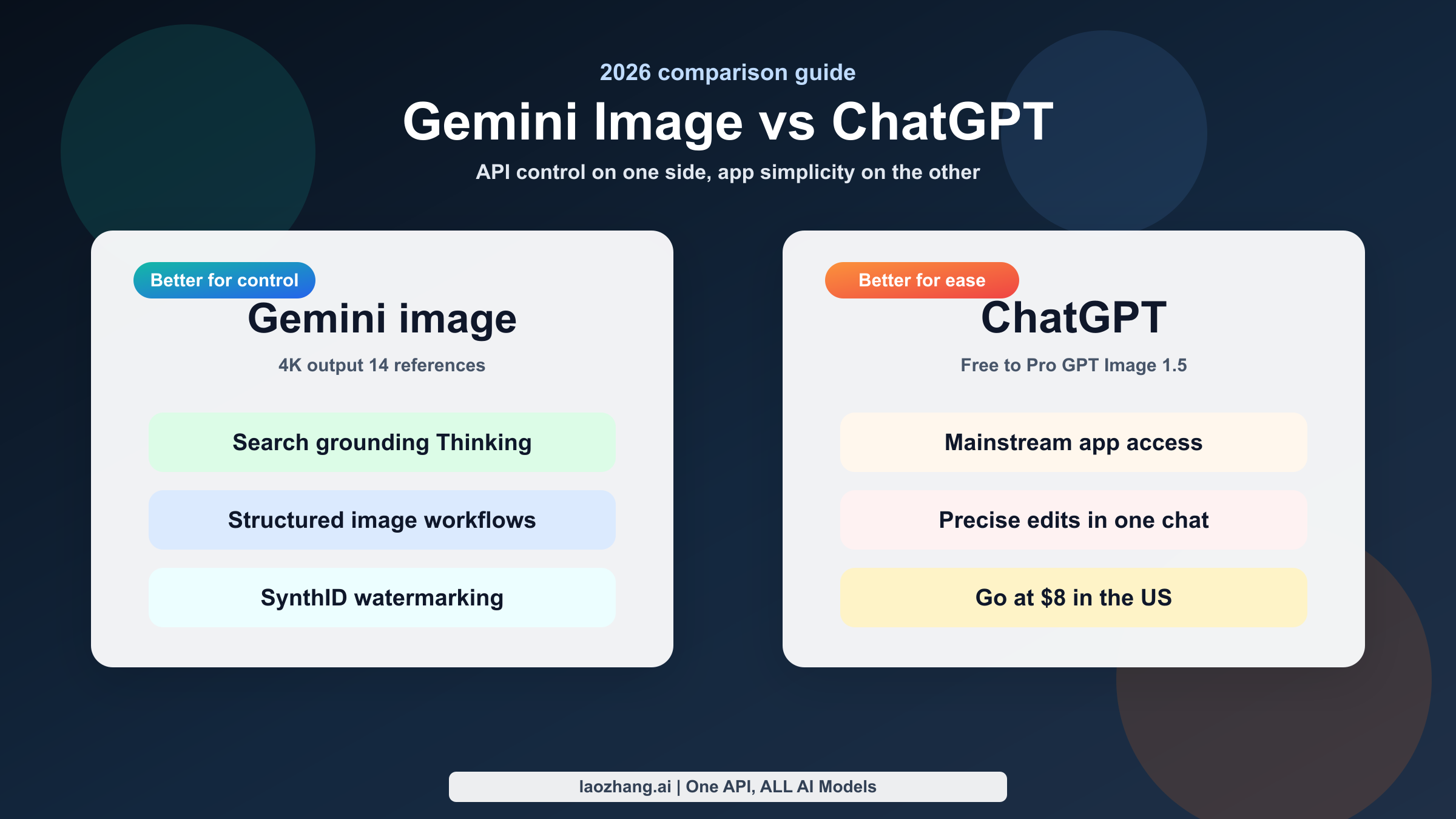
As of March 18, 2026, Gemini is the better choice when you care about a more controllable image workflow, richer API-side features, and higher-resolution output, while ChatGPT is the easier default when you want mainstream image generation inside one familiar chat product. That is the real answer behind this keyword, and most comparison pages still miss it because they mix app usage, subscriptions, and APIs into one blurry scorecard.
The comparison is harder than it looks because neither side is a single clean product. "Gemini image" can mean the Gemini app, Gemini 2.5 Flash Image, or Gemini 3 Pro Image Preview. "ChatGPT image" can mean the image tool inside ChatGPT or the API model called GPT Image 1.5. If you do not separate those surfaces, the pricing and feature discussion becomes misleading fast.
This guide fixes that. It uses current official Google and OpenAI sources, keeps consumer-plan claims separate from API claims, and turns the comparison into a practical decision for casual users, marketers, and developers. If you want deeper background on the Google side first, our guides to whether Nano Banana Pro is really Gemini 3 Pro Image, Gemini web vs API limits, and Nano Banana Pro vs GPT Image are useful companions.
TL;DR
If you want one fast rule, choose Gemini when the image is part of a system and choose ChatGPT when the image is part of a conversation. Gemini's current image stack is stronger for reference-heavy work, controllable revisions, 2K or 4K output, and production-style image generation. ChatGPT is stronger when you want quick access inside the app you already use, a cleaner consumer plan ladder, and a simpler all-in-one image experience.
| Your priority | Better pick | Why it wins right now |
|---|---|---|
| Simple everyday image generation in one app | ChatGPT | OpenAI now sells image generation as a standard ChatGPT feature from Free through Pro, which makes the consumer path easier to understand. |
| Higher-resolution API output | Gemini | Google's image docs explicitly support 1K, 2K, and 4K output for Gemini image models. |
| Reference-heavy image work | Gemini | Google's current image docs support up to 14 reference images, which is unusually strong for production-style asset work. |
| Clear low-cost paid consumer entry point in the US | ChatGPT | OpenAI's January 16, 2026 worldwide rollout post lists ChatGPT Go at $8/month in the United States. |
| Text-heavy marketing assets and structured visuals | Gemini | Google explicitly frames Gemini image generation around advanced text rendering, infographics, and marketing-style assets. |
| Conversational image edits inside a mainstream chat workflow | ChatGPT | The new ChatGPT Images rollout is designed as a built-in image feature with precise edits inside the same chat experience. |
| Watermarking and provenance language | Gemini | Google's current docs explicitly say generated images include SynthID watermarking. |
| App-plan clarity | ChatGPT | ChatGPT's current plan ladder is more explicit: Free is limited and slower, Go expands usage, Plus expands and speeds image creation, and Pro allows unlimited faster image creation. |
The biggest pricing trap is that users often compare a ChatGPT subscription with Gemini API pricing as if they were the same thing. They are not. ChatGPT app plans are consumer subscriptions. Gemini's most useful image pricing pages are API-model pricing pages. If a comparison page says one is "cheaper" without saying which workflow it means, it is skipping the part that actually matters.
What "Gemini Image" and "ChatGPT Image" Mean in 2026
The first thing this query needs is naming cleanup. On the Google side, there is a difference between the Gemini app and the Gemini image APIs. Google's current Gemini image-generation docs and pricing page are the clearest place to compare image capabilities because they name the actual model surfaces and prices. The lower-cost API option is Gemini 2.5 Flash Image, which Google currently lists at $0.039 per image on the standard path and $0.0195 per image in Batch for images up to 1024x1024. The premium image option is Gemini 3 Pro Image Preview, which Google currently lists at $0.134 for 1K or 2K output and $0.24 for 4K output, with Batch prices of $0.067 and $0.12.
The Gemini app is a different story. Google's August 26, 2025 Gemini app update says Nano Banana is the latest upgrade to image generation in the Gemini app and highlights likeness-preserving edits, photo blending, and multi-turn editing. That is useful product context, but it is not the same thing as a neat API-model comparison. The app experience is quota-based and plan-based, while the API pages give you direct model IDs, explicit prices, and output settings.
OpenAI has a similar split. The product-side experience is now the new ChatGPT Images rollout that OpenAI published on December 16, 2025. That post says the experience is rolling out in ChatGPT for all users and is available in the API as GPT Image 1.5. On the API side, OpenAI's image-generation guide shows GPT Image 1.5 for image generation and editing, including masks and transparent backgrounds.
That naming split is why so many pages feel sloppy. The cleanest comparison is not "Gemini versus ChatGPT" in the abstract. It is this:
- Gemini app image generation vs ChatGPT image generation for ordinary users.
- Gemini image APIs vs GPT Image 1.5 for developers and teams.
Once you separate those two decisions, the article stops sounding like a fake benchmark war and starts sounding like a tool-buying guide.
Where Gemini Beats ChatGPT for Image Work
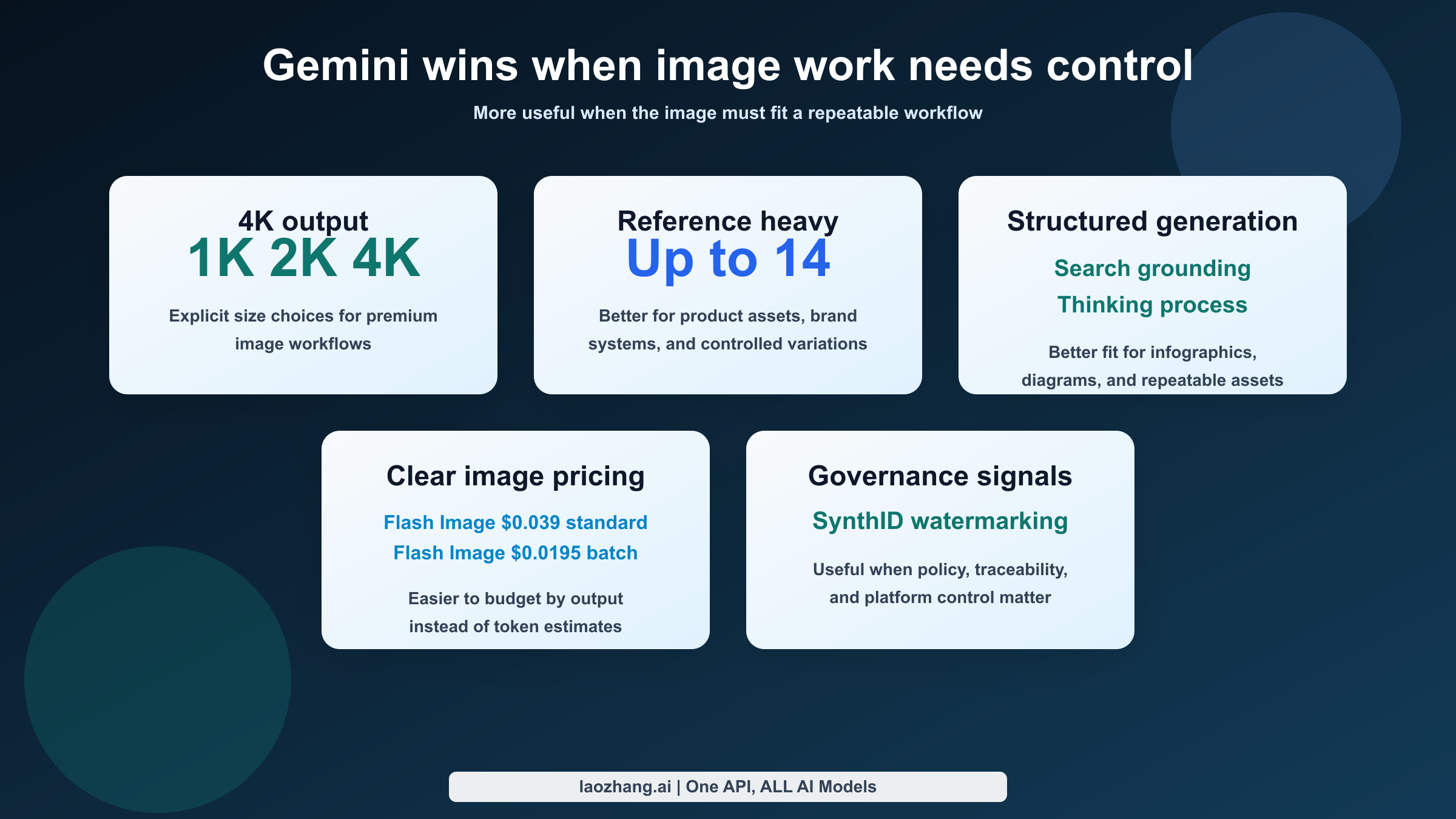
Gemini's strongest case is that Google's image stack feels more like a configurable image system than a consumer feature that also happens to have an API. Google's current documentation explicitly supports 1K, 2K, and 4K image sizes, up to 14 reference images, Search grounding, and a thinking process for complex prompts. That matters because it changes which jobs the tool naturally fits: product banners, infographic-style assets, reference-based variations, localized creative updates, and repeatable image workflows all benefit from those controls.
Resolution is the easiest place to see the difference. Google does not force the premium story into one vague "high quality" label. It tells you exactly what the output tiers are. If your team needs 2K or 4K assets for ads, sales decks, web hero images, or print-adjacent creative, Gemini gives you a direct way to choose that path. ChatGPT can absolutely generate good images, but Google's docs are currently more explicit about output-size control.
Reference-based work is the second big advantage. Up to 14 reference images is not a cosmetic feature. It changes how feasible it is to keep product shots, style anchors, packaging cues, and brand constraints stable across multiple generations. A tool becomes more useful the moment the twentieth image looks like it belongs to the same campaign as the first. That is where Gemini feels more operationally mature.
Google also speaks more directly to structured image generation. The current Gemini image docs call out advanced text rendering and show workflows around infographics and edits. That matters for teams generating assets that contain labels, numbers, menus, diagrams, callouts, or in-image copy. The gap is not that ChatGPT cannot do text or edits. The gap is that Google is currently more explicit about making image generation work for structured asset production rather than only creative exploration.
There is also a governance advantage. Google's image docs say generated images include SynthID watermarking. If provenance and internal policy matter, that kind of first-party wording is useful. It does not magically solve every commercial-use concern, but it is a meaningful platform-level signal that Google is thinking about image generation as part of a governed system rather than only a consumer delight feature.
Finally, Gemini has the cleaner premium-to-budget image ladder on the API side. You can move between Gemini 2.5 Flash Image at $0.039 standard or $0.0195 batch and Gemini 3 Pro Image Preview at $0.134, $0.24, $0.067, or $0.12 depending on size and batch mode. That is not "cheap" in every scenario, but it is legible. Teams can model real workloads instead of translating token costs into approximate image costs after the fact.
Where ChatGPT Still Beats Gemini for Everyday Use
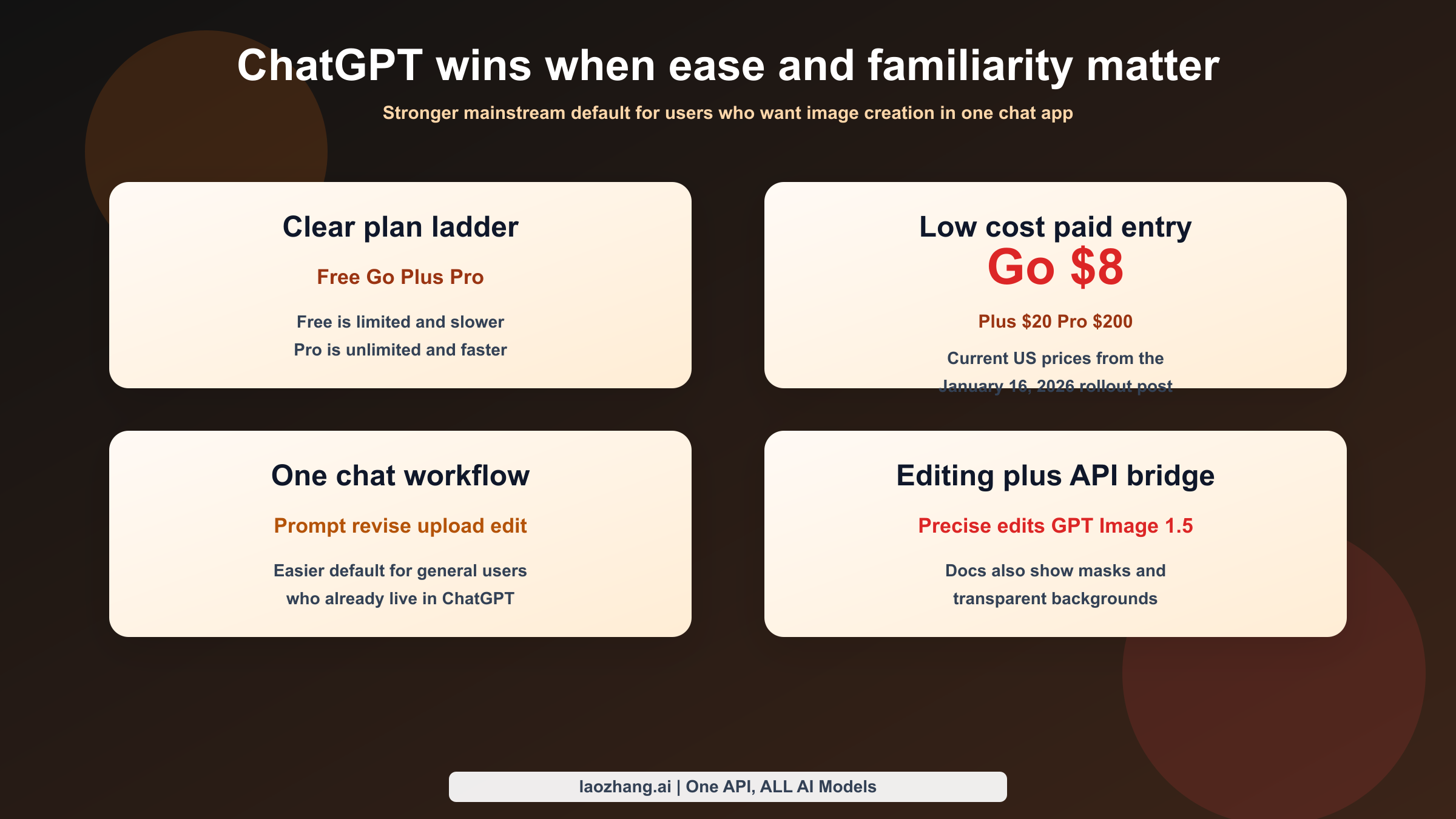
ChatGPT's biggest advantage is not that it has the most technical image stack. It is that the mainstream consumer story is easier to understand. OpenAI's current ChatGPT pricing page says the Free tier includes limited and slower image generation, Go includes image generation, Plus includes expanded and faster image creation, and Pro includes unlimited and faster image creation. OpenAI's January 16, 2026 worldwide rollout post for ChatGPT Go adds the actual US consumer prices: Go at $8/month, Plus at $20/month, and Pro at $200/month.
That clarity matters more than comparison pages usually admit. Many users are not shopping for an image API. They are deciding which app to open. In that decision, ChatGPT is the simpler answer because the company now frames image generation as a standard part of the ChatGPT product rather than as one feature across a broader, more fragmented ecosystem.
The second ChatGPT advantage is workflow familiarity. OpenAI's December 16, 2025 launch post says the new ChatGPT Images experience makes precise edits while keeping details intact and generates images up to 4x faster than the prior ChatGPT image experience. That is not a Gemini head-to-head benchmark, and it should not be treated as one. But it does tell you what OpenAI is optimizing for: keeping image generation inside the same conversational loop people already use for writing, brainstorming, summarizing, and editing.
For ordinary users, that loop is powerful. You can ask for the first image, refine the brief, upload a source image, request a change, and keep the whole conversation in one place. Gemini also supports multi-turn editing in the app, and Google has improved likeness-preserving edits a lot, so this is not a one-sided category. The difference is that ChatGPT currently feels more like the default app people already know how to operate.
ChatGPT is also better documented today for some specific image-editing tasks. OpenAI's image-generation guide shows editing with a mask and explicitly documents transparent backgrounds for GPT Image models, including gpt-image-1.5. That makes ChatGPT a solid choice when the real job is "edit an existing asset inside the same OpenAI stack I already use" rather than "choose the deepest image-specific control plane."
This is why a practical buyer answer sounds different from a benchmark answer. If you are a marketer, founder, or general user who wants the easiest path from prompt to result inside a familiar consumer product, ChatGPT still has the better default posture. If you are a developer or a team trying to design a repeatable image workflow, Gemini's advantage grows quickly.
Pricing and Access: App Plans vs API Math
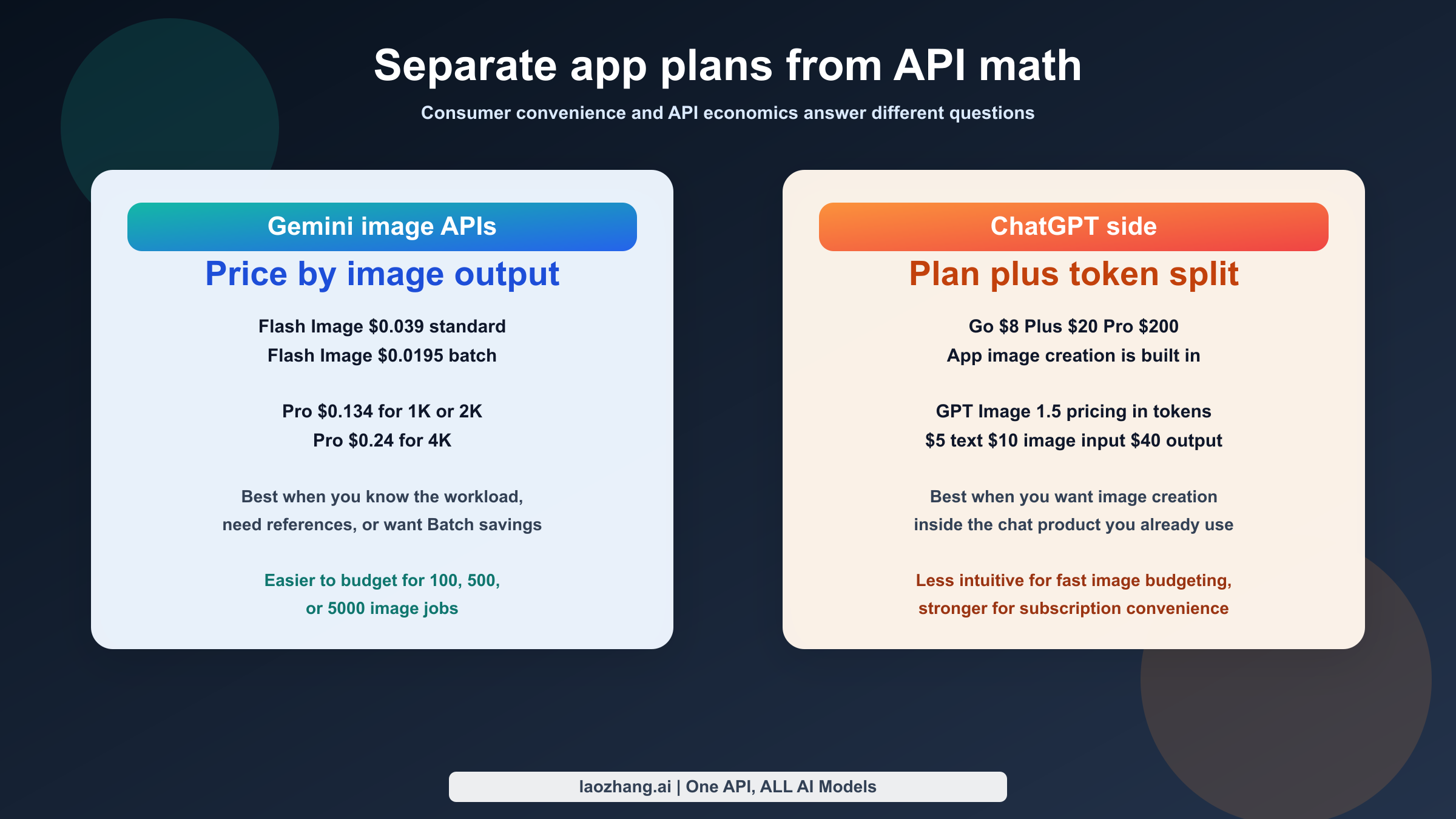
This is where most articles become misleading. They compare ChatGPT app plans with Gemini API prices and act like they are the same type of product. A better approach is to separate consumer access from API economics.
| Consumer access question | Gemini | ChatGPT |
|---|---|---|
| Free path exists | Yes, but Google treats free access and quotas as variable by surface | Yes, with limited and slower image generation |
| Cheapest paid path named clearly in current official source | Less clear in the specific image docs because Google emphasizes quotas and paid subscribers rather than one consumer ladder | ChatGPT Go at $8/month in the US |
| Current official consumer image story | Gemini app with Nano Banana upgrade, photo blending, likeness-preserving edits, and higher quotas for paid subscribers | New ChatGPT Images experience rolling out for all users, with a clear Free to Pro ladder |
| Best for | Users already inside Google's ecosystem or teams that may later move into Google API routes | Users who want the simplest mainstream consumer image tool today |
Now compare the API side instead of the app side:
| API path | Official current pricing | What the pricing means |
|---|---|---|
| Gemini 2.5 Flash Image | $0.039 per image standard, $0.0195 per image in Batch | Clear low-cost image generation option for high-volume or draft-quality work |
| Gemini 3 Pro Image Preview | $0.134 for 1K/2K, $0.24 for 4K, $0.067 and $0.12 in Batch | Premium Gemini path for higher-resolution and more demanding image work |
| GPT Image 1.5 | Official pricing doc currently lists $5 per 1M text tokens, $10 per 1M image-input tokens, and $40 per 1M image-output tokens | Powerful, but less intuitive if you want immediate per-image budgeting |
That table does not automatically make Gemini "cheaper." It makes Gemini easier to cost-model. If you know you need 100, 500, or 5,000 output images, Google's current image pricing is easier to translate into a project budget because the pricing page already speaks the language of images. OpenAI's GPT Image 1.5 pricing is official and valid, but it is expressed as token pricing, which is harder for non-developers to reason about quickly.
There is another practical difference: Batch pricing. Google cuts the listed image output prices by 50% on the Batch path for the relevant models above. That is a real production lever if your job is scheduled generation rather than instant chat-driven creation. ChatGPT can still be the better product if your workflow lives in the app or if your team already uses OpenAI widely. But if you are making a spreadsheet and asking which system is easier to price for image volume, Gemini currently has the more transparent answer.
The cost story also changes with plan psychology. ChatGPT can feel cheaper for many people because a user paying $8, $20, or $200 a month is not doing per-image math in the same way. That is a consumer-product advantage, not a raw image-model advantage. For an individual user who just wants image creation to exist inside the subscription they already pay for, ChatGPT often wins that budget conversation by avoiding separate API thinking entirely.
Best Choice by Use Case
Once you split consumer usage from production usage, the decision gets much cleaner. The right tool depends on whether you care most about simplicity, controllability, or predictable scale.
| User or team | Better default | Why | When to override |
|---|---|---|---|
| Casual app user | ChatGPT | The Free, Go, Plus, and Pro ladder is easier to understand and image generation is now framed as a core ChatGPT feature | Choose Gemini if you already live in Google's app ecosystem and prefer its editing behavior |
| Marketer making text-heavy creatives | Gemini | Google's current image docs lean harder into advanced text rendering, structured assets, and higher-resolution output | Choose ChatGPT if the real need is quick one-off creative work inside the app |
| Team revising product visuals from references | Gemini | Up to 14 reference images and explicit 2K/4K sizing support make the workflow easier to control | Choose ChatGPT if the team is already centered on OpenAI and mostly edits inside conversations |
| Developer building image features | Gemini | The image-specific API controls and per-image pricing are easier to operationalize | Choose GPT Image 1.5 if your stack is already deeply standardized on OpenAI and you value mask editing or transparent-background workflows |
| Buyer who only wants one paid app plan | ChatGPT | Go, Plus, and Pro are presented cleanly, with image creation clearly included | Choose Gemini if you expect to graduate from app usage into Google API workflows later |
| Team that cares about provenance wording | Gemini | Google's image docs explicitly call out SynthID watermarking | Choose ChatGPT if provenance language is secondary to product familiarity |
The simplest practical rule is this: use ChatGPT when you want the shortest path from "I have an idea" to "I have an image" inside a mainstream app, and use Gemini when you want the shortest path from "I have an image workflow" to "I can scale and control it."
That is why this keyword should not be answered with a fake overall winner. The average consumer often should choose ChatGPT first. The average team doing structured image work often should choose Gemini first. The hidden question is not "which model is cooler." It is "which tool creates fewer second-order problems for the kind of work I actually do."
FAQ
Is Gemini better than ChatGPT for images?
Gemini is better for controllable image workflows, richer image-specific API features, explicit 2K/4K output choices, reference-heavy work, and more transparent image-side pricing. ChatGPT is better for users who want image generation to feel like a built-in feature of the chat app they already use.
Is GPT Image 1.5 the same thing as ChatGPT image generation?
Not exactly. GPT Image 1.5 is the API model name. ChatGPT image generation is the product experience inside ChatGPT. OpenAI's December 16, 2025 launch post ties them together by saying the new ChatGPT Images experience is available in the API as GPT Image 1.5.
Which one is better for editing photos?
The honest answer is that both are strong, but in different ways. Google emphasizes likeness-preserving edits, blending photos, and multi-turn editing in the Gemini app. OpenAI's docs are currently clearer on masked edits and transparent backgrounds in the API. Choose based on whether you want app-first edits or API-first edits.
Which one is better for text-heavy visuals?
Gemini. Google's current image-generation docs explicitly position the model for advanced text rendering and structured visual assets such as infographics and similar layouts.
Which one is cheaper for API use?
Gemini is usually easier to price because Google's current official pages express image costs directly as image prices for the relevant models. GPT Image 1.5 can still be cost-effective, but the official pricing is token-based, so it is less intuitive for fast per-image budgeting.
Which one is easier for ordinary users in 2026?
ChatGPT. The current plan ladder is easier to understand, the image feature is clearly part of the product from Free through Pro, and the chat workflow is already familiar to a larger general audience.
Bottom Line
The clean 2026 answer is this: Gemini is the better choice for image work that has to be controlled, priced, referenced, resized, or integrated. ChatGPT is the better choice for image work that has to be easy, immediate, and built into the chat product people already use.
That is why the strongest recommendation is conditional, not absolute. A casual user picking a single consumer app should usually start with ChatGPT. A team building a repeatable image workflow should usually start with Gemini. If you want one sentence to remember, use this one: choose ChatGPT when the image is part of a conversation, and choose Gemini when the image is part of a system.