
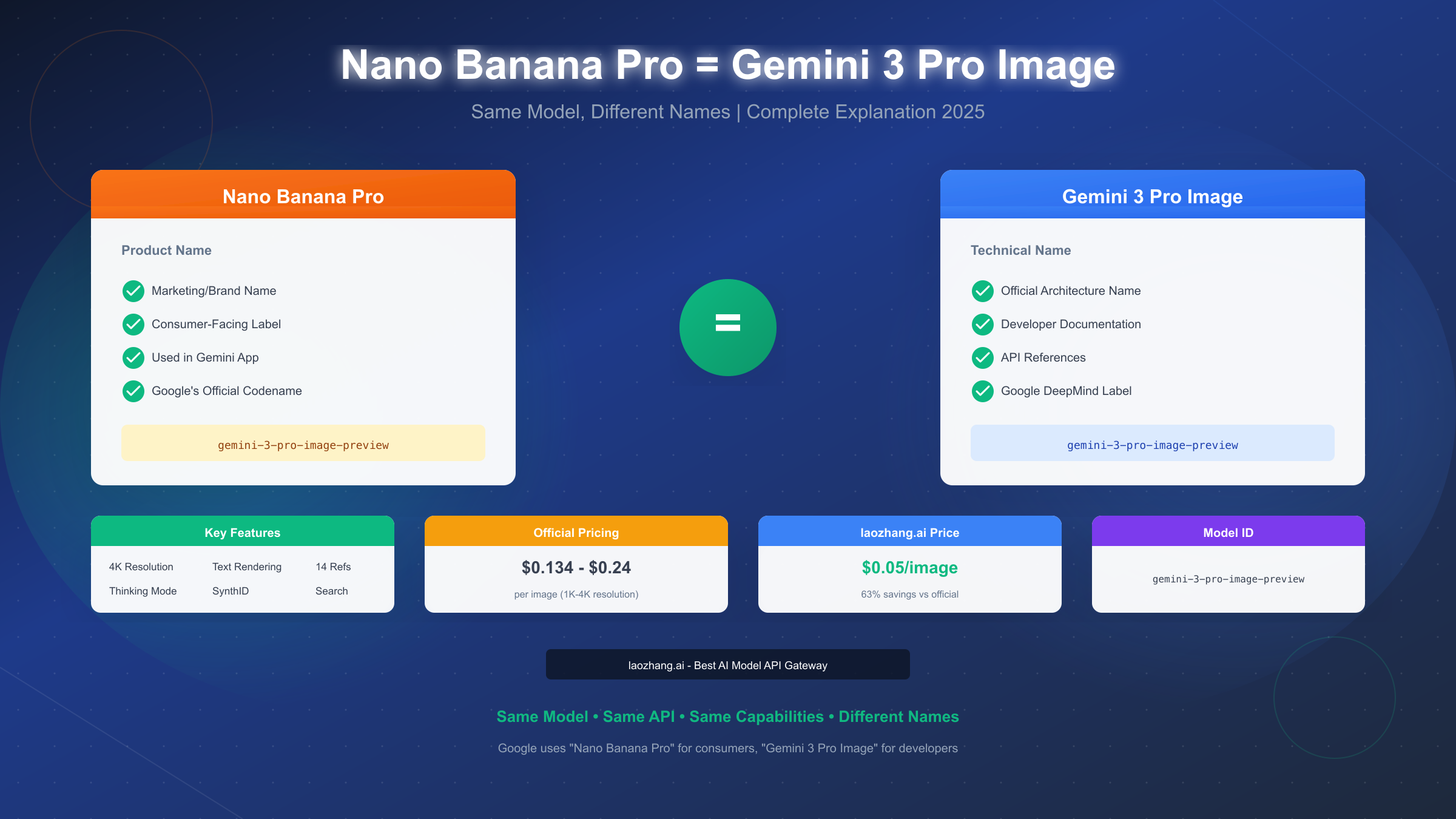
Nano Banana Pro and Gemini 3 Pro Image refer to the exact same AI image generation model developed by Google DeepMind. Released in November 2025 as part of the Gemini 3.0 launch, this model represents Google's most advanced image generation capability, offering 4K resolution output, exceptional text rendering, and sophisticated reasoning abilities. The naming difference exists because Google uses "Nano Banana Pro" for consumer-facing applications (like the Gemini app) while reserving "Gemini 3 Pro Image" for developer documentation and API references. The API model ID is gemini-3-pro-image-preview regardless of which name you encounter.
The Short Answer: Yes, They're Identical
The confusion is understandable—Google's naming conventions can be perplexing. When you see "Nano Banana Pro" in the Gemini app or "Gemini 3 Pro Image" in technical documentation, you're looking at references to the same underlying model.
The definitive breakdown:
Google maintains two naming systems for their AI products. Consumer-facing names like "Nano Banana Pro" are designed to be memorable and approachable for everyday users. Meanwhile, technical names like "Gemini 3 Pro Image" follow Google's internal architecture naming conventions, making it easier for developers to understand the model's lineage and capabilities.
This dual naming approach isn't unique to image generation. Google has historically used similar strategies—think "Bard" versus "Gemini" for their conversational AI, or product names versus technical model versions across their entire AI portfolio.
The key proof that they're identical lies in the API model ID. Whether you're accessing the model through Google AI Studio, the Gemini API, or third-party providers, you'll use the same identifier: gemini-3-pro-image-preview. This single model ID serves both naming conventions, confirming they reference exactly the same underlying technology.
For developers building applications, this means you don't need to choose between "Nano Banana Pro" and "Gemini 3 Pro Image"—they're interchangeable terms for the same capability. Your API calls, pricing, and output quality remain identical regardless of which terminology your documentation uses.
Understanding Google's Naming Convention
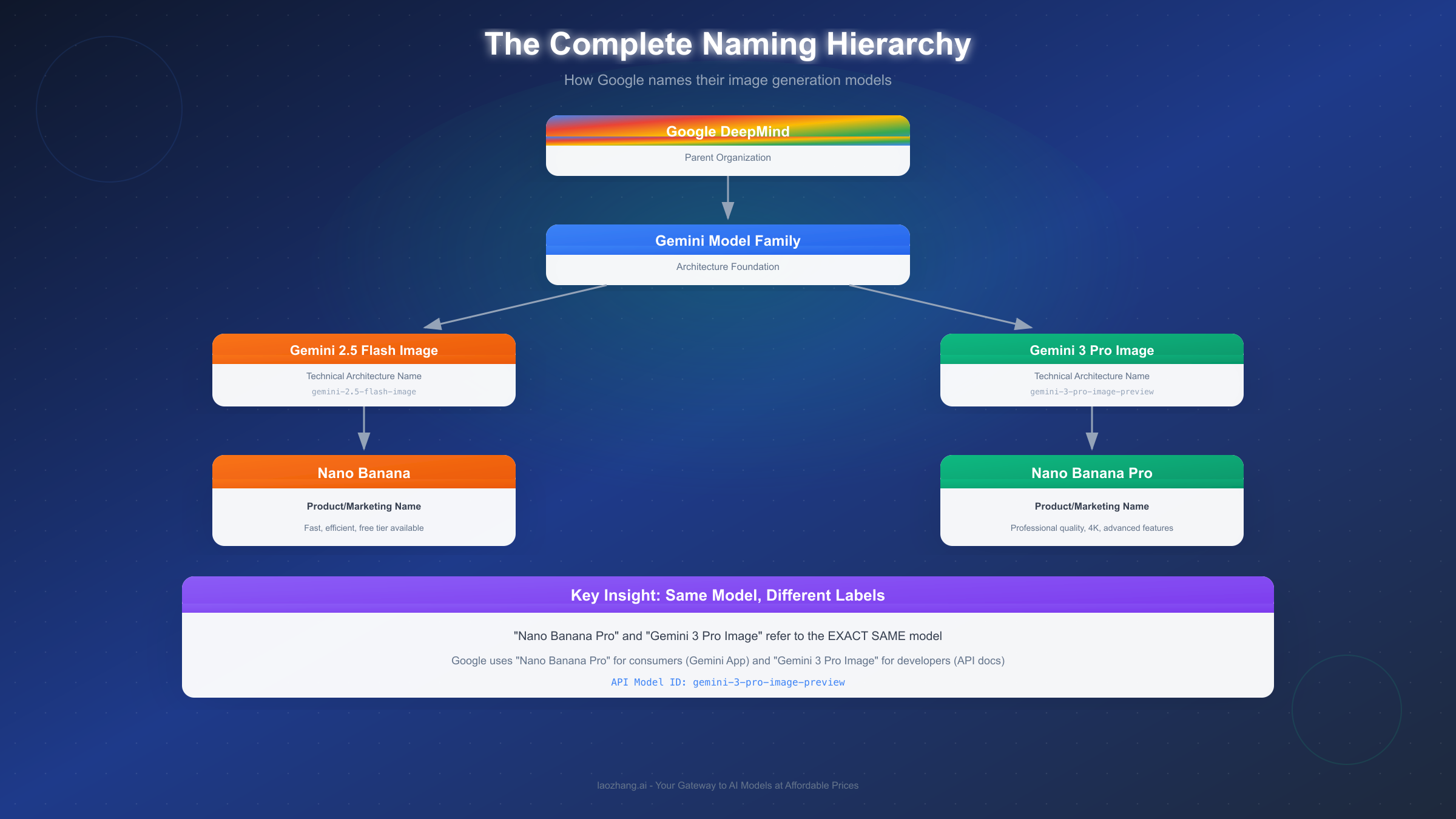
Google's approach to naming AI products follows a specific logic that becomes clearer once you understand the pattern. The company maintains separate naming systems for different audiences, each serving a distinct purpose.
The consumer naming system focuses on memorability and brand recognition. "Nano Banana" as a product family name emerged as Google's way of creating a distinctive identity for their image generation tools. The "Pro" suffix indicates the premium, more capable version—similar to how Apple uses "Pro" to distinguish their higher-end products.
The technical naming system emphasizes the model's architecture and version lineage. "Gemini 3 Pro Image" tells developers several things at once: it belongs to the Gemini model family, it's version 3.0, it's the Pro (not Flash) tier, and it's specialized for image tasks. This structured naming helps engineers quickly understand a model's capabilities and appropriate use cases.
The Nano Banana family follows this pattern consistently. Nano Banana (without "Pro") refers to Gemini 2.5 Flash Image—the faster, more efficient model optimized for high-volume, low-latency tasks. Nano Banana Pro refers to Gemini 3 Pro Image—the reasoning-enhanced model designed for professional-quality output.
Understanding this pattern helps you navigate Google's AI ecosystem more effectively. When you encounter either name in articles, documentation, or API references, you can confidently recognize they describe identical capabilities. If you're interested in how Nano Banana Pro compares to the original Nano Banana model, you can explore our detailed Nano Banana vs Nano Banana Pro comparison guide for a comprehensive breakdown.
Complete Technical Specifications
Nano Banana Pro (Gemini 3 Pro Image) represents a significant advancement in AI image generation. Understanding its technical specifications helps you evaluate whether it's the right tool for your projects.
Resolution capabilities set Nano Banana Pro apart from its predecessor. The model supports three resolution tiers: 1K (1024×1024 pixels) as the default, 2K (2048×2048 pixels) for higher-fidelity needs, and 4K (4096×4096 pixels) for professional production requirements. This 4K capability—generating 8-megapixel images—makes it suitable for print materials, large-format displays, and commercial applications where resolution matters.
The Thinking mode is perhaps the most distinctive feature. Unlike standard image generation models that directly translate prompts to pixels, Nano Banana Pro employs an intermediate reasoning phase. The model analyzes your prompt, decomposes complex instructions, resolves potential ambiguities, and plans the composition before generating the final image. This "thinking before drawing" approach produces more accurate results for multi-step instructions and nuanced creative requests.
Text rendering quality reaches new standards with this model. Previous image generation models struggled to produce legible text within images—letters would often appear distorted, misspelled, or illegible. Nano Banana Pro achieves breakthrough accuracy in text generation, supporting multiple languages and various typographic styles. Whether you need a product mockup with specific copy, an infographic with data labels, or an image with stylized text, the model handles these requests with unprecedented precision.
Reference image support enables sophisticated creative workflows. You can provide up to 14 reference images to guide the generation process, including up to 6 images of objects for style matching and up to 5 images of humans for character consistency. This multi-reference capability supports complex use cases like maintaining brand consistency across marketing materials or creating character-consistent illustrations for storytelling.
Additional technical capabilities include Google Search integration for real-time data grounding, SynthID watermarking for AI content verification, and support for various aspect ratios (1:1, 3:2, 16:9, 9:16, 21:9, and more). The model also offers localized editing features for selective image modification and advanced control over lighting, color grading, and depth of field.
| Specification | Value |
|---|---|
| Model ID | gemini-3-pro-image-preview |
| Max Resolution | 4096×4096 (4K) |
| Reference Images | Up to 14 (6 objects + 5 humans) |
| Text Rendering | Multi-language, high accuracy |
| Thinking Mode | Enabled by default |
| Output Formats | PNG, JPEG |
| Watermark | SynthID (imperceptible) |
Nano Banana Pro vs Nano Banana: Key Differences
While this article focuses on clarifying that Nano Banana Pro equals Gemini 3 Pro Image, understanding how Pro differs from the standard Nano Banana helps contextualize when to use each model.
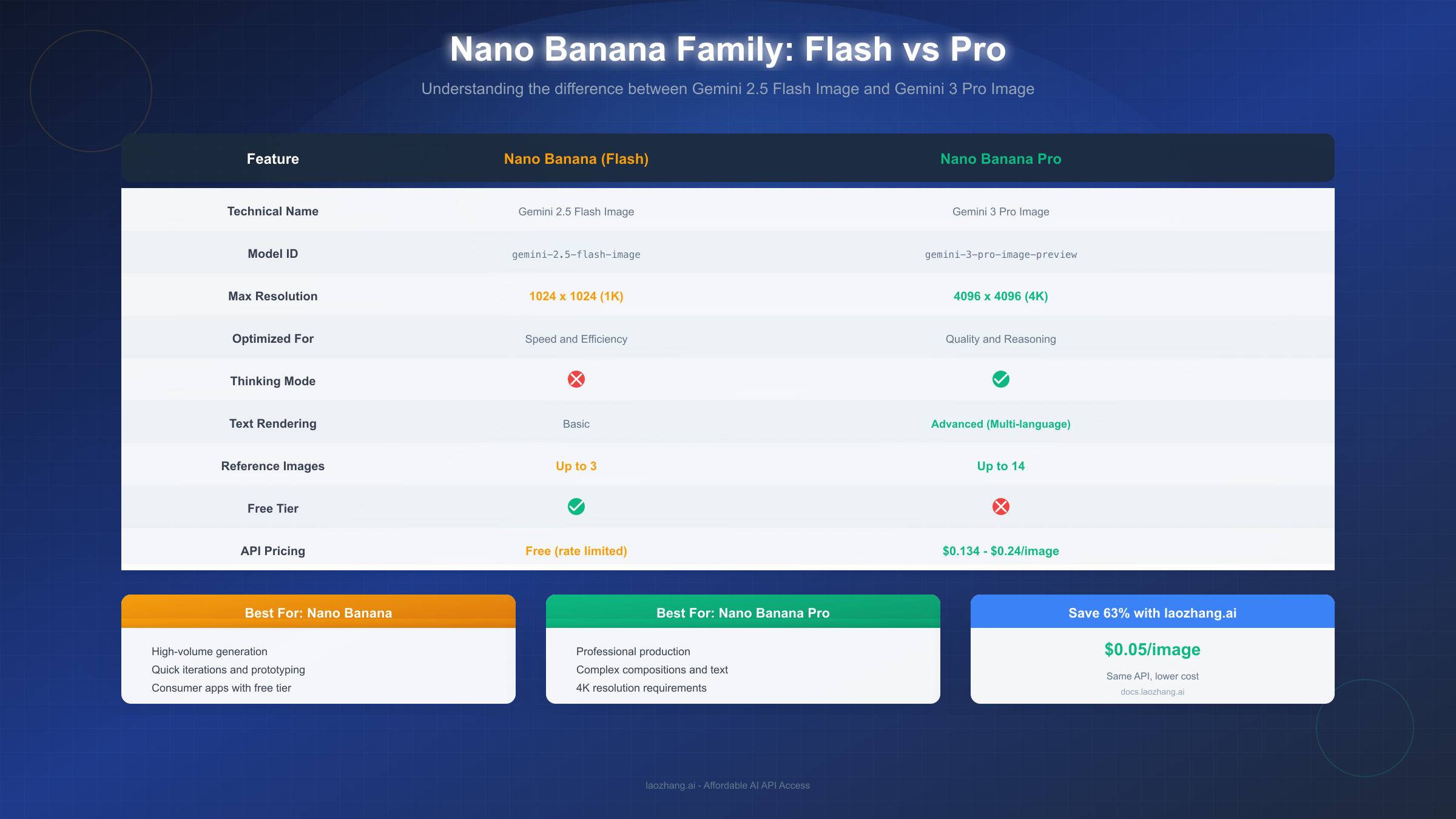
Nano Banana (Gemini 2.5 Flash Image) prioritizes speed and efficiency. Built on the Flash architecture, it's optimized for high-volume generation with low latency—ideal for real-time applications, rapid prototyping, or consumer features that need quick turnaround. The trade-off is lower resolution (max 1024×1024) and less sophisticated reasoning capabilities.
Nano Banana Pro (Gemini 3 Pro Image) prioritizes quality and precision. The "Thinking" mode adds processing time but dramatically improves output quality for complex prompts. The 4K resolution support, advanced text rendering, and multi-reference image handling make it the choice for professional production work.
The pricing model reflects this distinction. Nano Banana offers a free tier with rate limits, making it accessible for experimentation and lightweight applications. Nano Banana Pro requires paid API access, with costs of $0.134 per image at 1K/2K resolution and $0.24 per image at 4K resolution.
For developers choosing between them, consider your use case priorities. If you need speed, volume, and cost efficiency for consumer-facing features, Nano Banana delivers. If you need precision, high resolution, and complex prompt handling for professional output, Nano Banana Pro is the appropriate choice. Many production workflows combine both—using Nano Banana for rapid iteration and prototyping, then switching to Nano Banana Pro for final deliverables.
How to Access Nano Banana Pro API
Accessing Nano Banana Pro for development requires setting up API access through one of several available channels. The process differs depending on whether you choose Google's official platform or third-party providers.
Through Google AI Studio (Official):
The official path starts at Google AI Studio (aistudio.google.com). Sign in with your Google account and navigate to the model selector where you'll find "Nano Banana Pro (Gemini 3 Pro Image)" listed among available models. Note that unlike Nano Banana, the Pro version requires billing to be enabled—there's no free tier for this model.
Setting up billing involves connecting a payment method through Google Cloud Console. You'll need a credit card or other accepted payment method. Once billing is active, you can generate an API key and begin making requests. For a detailed walkthrough of this process, our Nano Banana Pro API key and billing guide covers each step with screenshots.
The Google Gen AI SDK simplifies integration for Python and JavaScript developers. After installing the SDK (pip install google-genai or npm install @google/genai), you can generate images with just a few lines of code:
pythonfrom google import genai

client = genai.Client(api_key="YOUR_API_KEY")

response = client.models.generate_images(
    model="gemini-3-pro-image-preview",
    prompt="A professional product photo of wireless earbuds on a marble surface",
    config={"number_of_images": 1, "output_options": {"mime_type": "image/png"}}
)


image = response.generated_images[0].image
Through Third-Party Providers:
Alternative API providers offer simplified access, often with advantages like consolidated billing across multiple AI models, no credit card requirements for certain regions, and potentially lower costs.
Services like laozhang.ai provide access to Nano Banana Pro at reduced rates—approximately $0.05 per image compared to official pricing of $0.134-$0.24. These services maintain API compatibility, meaning the same code works with minimal modifications (typically just changing the base URL and API key). For teams managing costs across multiple projects or developers in regions where Google Cloud billing is complicated, third-party providers offer a practical alternative.
The trade-offs include potential latency differences (requests route through the provider's infrastructure) and dependency on a third-party service's availability. For production applications, evaluate reliability and support options alongside pricing when choosing your access method.
Pricing Comparison: Official vs Third-Party
Understanding the cost structure helps you budget accurately and identify opportunities for optimization, especially for high-volume applications.
Official Google Pricing:
Google's pricing for Nano Banana Pro follows a resolution-based structure. Standard resolution (1K and 2K) costs $0.134 per image. High resolution (4K) costs $0.24 per image. The Batch API, designed for non-time-sensitive workloads with up to 24-hour delivery, offers a 50% discount on these rates.
For reference, generating 1,000 images at 2K resolution costs approximately $134 through official channels. At 4K resolution, the same volume costs $240. These costs can accumulate quickly for applications involving significant image generation volume.
Third-Party Provider Pricing:
Alternative providers like laozhang.ai offer Nano Banana Pro access at substantially reduced rates. At approximately $0.05 per image, this represents about 63% savings compared to official 1K/2K pricing and nearly 80% savings compared to 4K pricing.
Using the same example of 1,000 images, third-party access costs approximately $50—a difference of $84-$190 compared to official pricing depending on resolution. For startups, indie developers, or high-volume applications, these savings directly impact project viability.
| Pricing Tier | Official Google | laozhang.ai | Savings |
|---|---|---|---|
| 1K/2K Resolution | $0.134/image | $0.05/image | 63% |
| 4K Resolution | $0.24/image | $0.05/image | 79% |
| 1,000 images (2K) | $134 | $50 | $84 |
| 10,000 images (2K) | $1,340 | $500 | $840 |
When to Use Official vs Third-Party:
Official Google access makes sense when you need guaranteed SLA commitments, direct support from Google, or compliance requirements that mandate using the primary provider. Enterprise applications with strict vendor policies often fall into this category.
Third-party access works well for development and testing (lower costs mean more experimentation), startups optimizing runway, applications where a few hundred milliseconds of additional latency doesn't matter, and teams in regions where Google Cloud billing is cumbersome. For documentation and getting started with third-party access, visit docs.laozhang.ai.
Frequently Asked Questions
Can I use "Nano Banana Pro" and "Gemini 3 Pro Image" interchangeably in API calls?
For API calls, you use the model ID gemini-3-pro-image-preview regardless of which name you reference in your documentation or internal discussions. The names are interchangeable for conceptual purposes, but the API specifically requires the model ID string.
Why did Google choose the name "Nano Banana"?
Google hasn't officially explained the naming choice, but the pattern follows their approach of creating distinctive, memorable product names for consumer-facing features. The "Banana" name family creates brand recognition for their image generation tools, with "Nano" suggesting advanced, compact technology and "Pro" indicating the premium tier.
Is there a free tier for Nano Banana Pro?
No, Nano Banana Pro (Gemini 3 Pro Image) does not have a free tier. Unlike the standard Nano Banana (Gemini 2.5 Flash Image) which offers limited free access, the Pro version requires paid API access with billing enabled.
What's the difference between Nano Banana Pro and GPT-Image-1?
These are different models from different companies. Nano Banana Pro is Google's offering built on Gemini 3 Pro architecture, while GPT-Image-1 is OpenAI's image generation model. They have different capabilities, pricing, and API structures. For a detailed comparison of Nano Banana Pro versus other image generators, check our Nano Banana Pro vs ChatGPT image generator comparison.
Does Nano Banana Pro support image editing, or just generation?
Both. Nano Banana Pro supports text-to-image generation (creating images from prompts), image-to-image editing (modifying existing images based on instructions), and multi-image blending (combining multiple reference images into new compositions). The model can also perform localized editing—selecting and modifying specific portions of an image while preserving the rest.
How accurate is the text rendering in generated images?
Nano Banana Pro achieves breakthrough accuracy for in-image text generation, supporting legible typography in multiple languages directly within the image. While not perfect for all edge cases, it handles most common use cases—product labels, signs, infographics, and short text overlays—with high reliability. Complex formatting or very long text passages may still require post-processing.
Are images generated with Nano Banana Pro watermarked?
Yes, all images include SynthID watermarking—an imperceptible digital watermark that allows verification of AI-generated content. This watermark is invisible to viewers but detectable through verification tools. It's designed for authenticity tracking rather than preventing commercial use.
Can I use Nano Banana Pro commercially?
Yes, images generated through the API can be used commercially, subject to Google's terms of service and content policies. The SynthID watermark doesn't restrict commercial use—it's for verification purposes. Review Google's current usage policies for any specific restrictions on your intended application.
This article has clarified that Nano Banana Pro and Gemini 3 Pro Image are indeed the same model, explained Google's naming conventions, covered technical specifications, and provided practical guidance for API access and cost optimization. Whether you encountered one name or the other, you now understand they refer to Google's most capable image generation model—and you have the information needed to start building with it.