
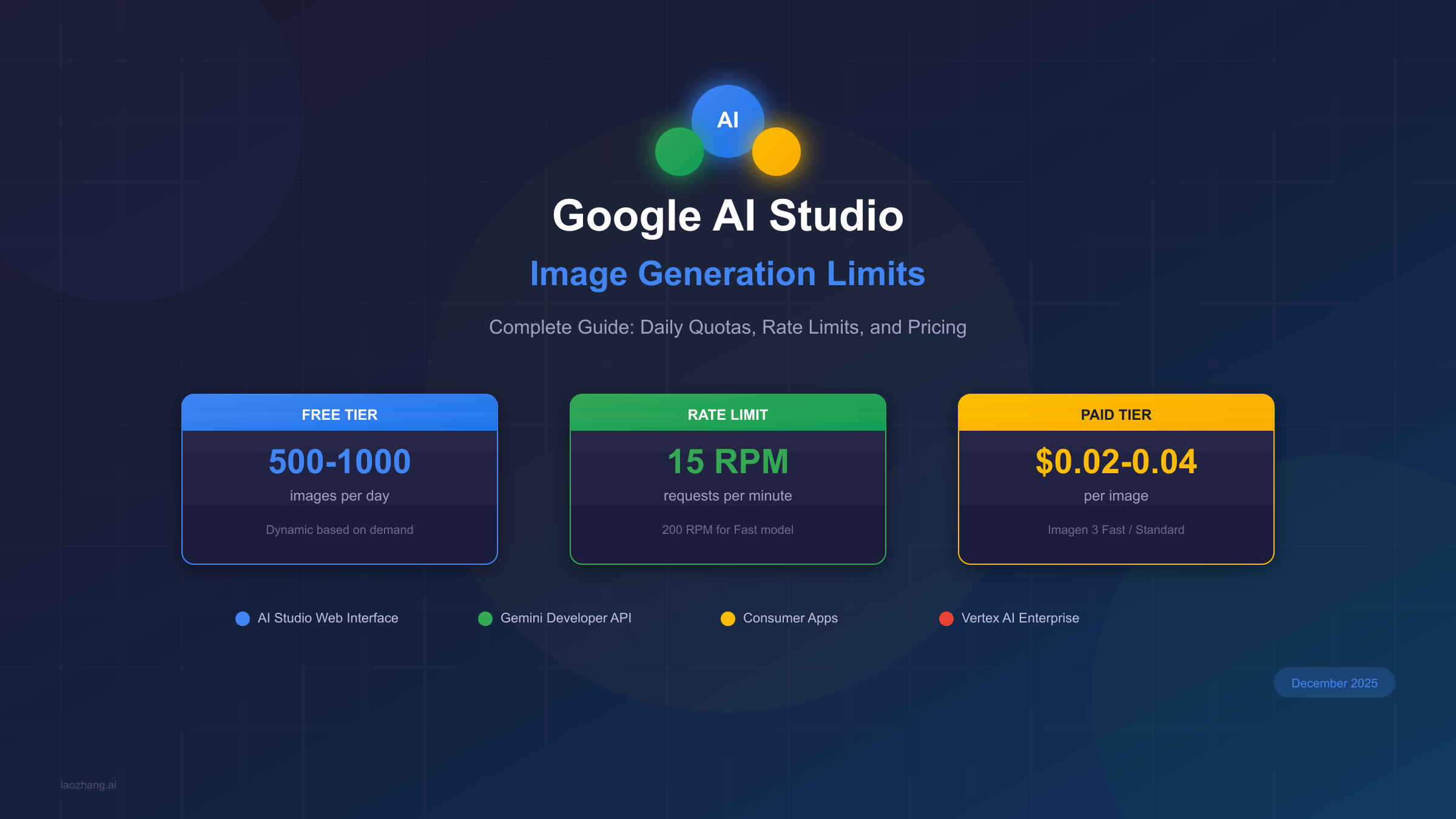
Google AI Studio offers one of the most generous free tiers for AI image generation available today. With Imagen 3 powering the backend, users can generate between 500 and 1,000 images per day completely free—but understanding exactly how these limits work requires navigating a surprisingly complex system of access methods, rate limits, and tier progressions.
This comprehensive guide breaks down everything you need to know about Google AI Studio image generation limits as of December 2025, including the recent quota adjustments announced on December 7th that caught many developers off guard. Whether you're a hobbyist exploring AI art, a developer building image generation into your applications, or a business evaluating cost-effective alternatives to DALL-E and Midjourney, you'll find the specific numbers and optimization strategies you need.
Quick Answer: Google AI Studio Image Limits in December 2025
For those who need the numbers immediately, here's what you're working with when generating images through Google AI Studio:
Free Tier (AI Studio Web Interface): You can generate between 500 and 1,000 images per day, with the exact limit being dynamic based on current server demand. The rate limit is 15 requests per minute (RPM), and your daily quota resets at midnight Pacific Time. This is by far the most generous free tier among major AI image generators, as DALL-E 3 offers no free tier at all, and Midjourney requires a subscription for any access.
API Access (Gemini Developer API): Through the programmatic API, free tier limits are more restrictive at 100-500 images per day depending on the specific model you're using. The Gemini 2.5 Flash Image model offers the highest free allowance at 500 requests per day, while other models may be limited to as few as 20 requests daily.
Paid Tier Pricing: Once you exceed free limits or need guaranteed access, Imagen 3 Fast costs $0.02 per image and Imagen 3 Standard costs $0.04 per image. These prices apply uniformly regardless of output resolution, which differs from some competitors that charge more for higher resolutions.
| Access Method | Daily Limit | Rate Limit | Reset Time | Cost |
|---|---|---|---|---|
| AI Studio Web | 500-1000 | 15 RPM | Midnight PT | Free |
| Gemini API Free | 100-500 | 2-15 RPM | Midnight UTC | Free |
| Imagen 3 Fast | Unlimited | 200 RPM | N/A | $0.02/img |
| Imagen 3 Standard | Unlimited | 20 RPM | N/A | $0.04/img |
Understanding the Three Ways to Access Imagen 3
Google has made Imagen 3 available through three distinct access methods, each with its own limits, requirements, and ideal use cases. Understanding these differences is crucial for maximizing your free usage and choosing the right approach for your needs.
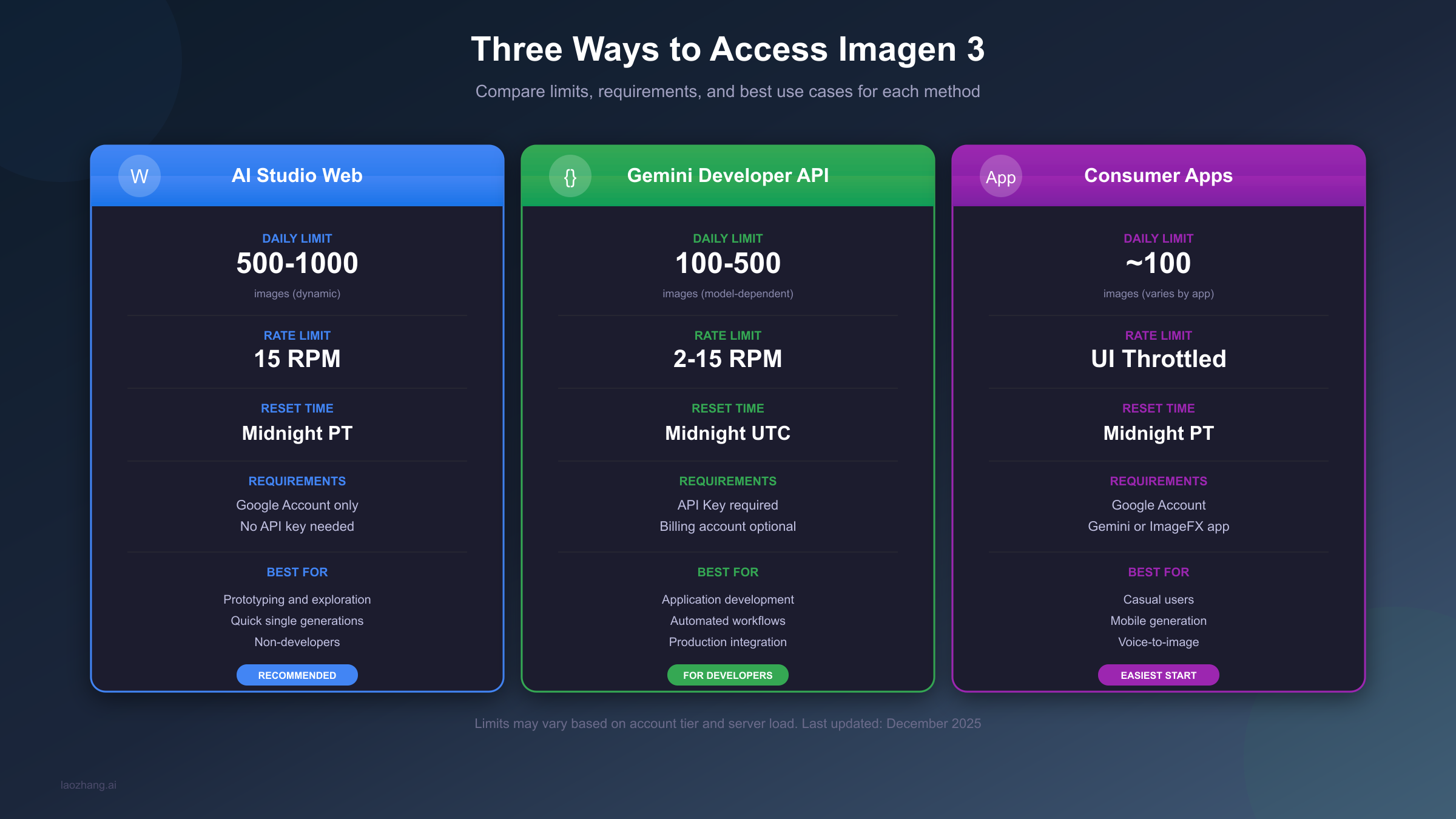
AI Studio Web Interface represents the easiest entry point for most users. You simply navigate to aistudio.google.com, sign in with your Google account, and start generating images through a friendly chat-like interface. No API keys, no billing setup, no code required. The trade-off is that you're limited to interactive use—you can't automate generations or integrate this access into applications. For prototyping, exploration, and personal creative projects, this is typically the best choice. The 500-1000 daily limit is dynamic, meaning Google adjusts availability based on current server load, but most users report consistently hitting the higher end of this range during off-peak hours.
Gemini Developer API opens up programmatic access to Imagen 3 for developers who need to integrate image generation into applications. This requires creating an API key through Google AI Studio and writing code to make requests. The free tier here is more restrictive than the web interface, offering 100-500 images per day depending on which model endpoint you use. However, the API enables automation, batch processing, and production-grade integrations. If you're building an app that generates images for users, this is your path. The rate limits (2-15 RPM depending on model) are designed to prevent abuse while still allowing reasonable throughput for legitimate applications.
Consumer Apps like Gemini and ImageFX provide a mobile-friendly way to access Imagen 3 with approximately 100 images per day. These apps offer features like voice-to-image generation and camera integration for style transfer that aren't available through other methods. While the daily limits are lower, the user experience is optimized for casual, on-the-go creation. If you primarily use your phone for creative work and don't need high volume, this approach offers unique convenience features worth considering.
Free Tier Daily Limits: What You Actually Get
The most common question users have is simply "how many images can I generate for free?" The answer depends heavily on which access method you're using and how you're counting.
AI Studio Web Interface Limits are the most generous at 500-1000 images per day. This "dynamic" limit means Google adjusts availability in real-time based on server capacity. During peak hours (typically 9 AM to 6 PM Pacific Time), you might find yourself limited to the lower end of this range. During off-peak hours—especially late evening and early morning Pacific Time—most users report being able to generate closer to 1,000 images without hitting limits. The 15 RPM rate limit means you can generate one image approximately every 4 seconds, which is fast enough for interactive use but will slow down bulk generation.
For context on what these limits mean practically: if you're generating images at a reasonable pace during a work session, 500-1000 images is typically more than enough for a day of creative exploration. Most individual users never actually hit these limits unless they're deliberately trying to batch-generate large numbers of images.
Gemini Developer API Free Tier operates differently, with limits tied to specific model endpoints rather than a single pool. The Gemini 2.5 Flash Image model offers the highest free allowance at 500 requests per day, making it the recommended choice for developers prioritizing free tier usage. Other models like Imagen 4 Ultra provide only 5-20 requests daily but offer 4K output capability. Your choice of model directly impacts both quality and available quota.
One important distinction: API limits reset at midnight UTC, while AI Studio web interface limits reset at midnight Pacific Time. This 7-8 hour difference means you can potentially maximize free usage by timing requests strategically across both access methods. For more details on optimizing your API usage, check out our Gemini API rate limit guide.
| Model | Free Daily Limit | Rate Limit | Best For |
|---|---|---|---|
| Gemini 2.5 Flash Image | 500 | 15 RPM | Most use cases |
| Imagen 3.0 Generate 002 | 100 | 20 RPM | High quality |
| Imagen 3.0 Fast | 200 | 200 RPM | Speed priority |
| Imagen 4 Ultra | 5-20 | 5 RPM | 4K resolution |
Rate Limits Explained: Images Per Minute
Beyond daily quotas, rate limits determine how quickly you can generate images within your allowed quota. These per-minute limits are particularly important for developers building applications that need to serve multiple users or process batch requests.
Standard Imagen 3 models (imagen-3.0-generate-001 and imagen-3.0-generate-002) have a rate limit of 20 requests per minute (RPM). This works out to generating one image every 3 seconds at maximum throughput. For most interactive use cases, this is more than sufficient—you're unlikely to manually request images faster than this. However, if you're building an application serving multiple concurrent users, you'll need to implement queuing or consider paid tiers with higher limits.
Imagen 3 Fast (imagen-3.0-fast-generate-001) offers dramatically higher rate limits at 200 RPM—ten times the standard model. This makes it the ideal choice for applications requiring high throughput, such as batch image processing or serving many concurrent users. The trade-off is slightly lower image quality compared to the standard model, though for most use cases the difference is negligible.
Capability Model (imagen-3.0-capability-001) for image editing and customization sits in the middle at 100 RPM. If your application involves modifying existing images rather than generating new ones, this model provides the best balance of features and throughput.
When you exceed rate limits, you'll receive HTTP 429 "Too Many Requests" errors. The recommended approach is implementing exponential backoff: wait 1 second after the first 429, then 2 seconds, 4 seconds, and so on. Google's servers will automatically allow your requests through once you're back under the limit. Most HTTP client libraries have built-in retry logic that handles this automatically, but if you're building custom integrations, you'll want to implement this pattern. For detailed solutions to rate limiting issues, see our guide on Gemini API error 429 fixes.
Paid Tier Pricing: Cost Per Image
When free tier limits aren't sufficient for your needs, Google offers straightforward per-image pricing through Vertex AI. Understanding these costs helps you budget appropriately and compare against alternatives like DALL-E and Midjourney.
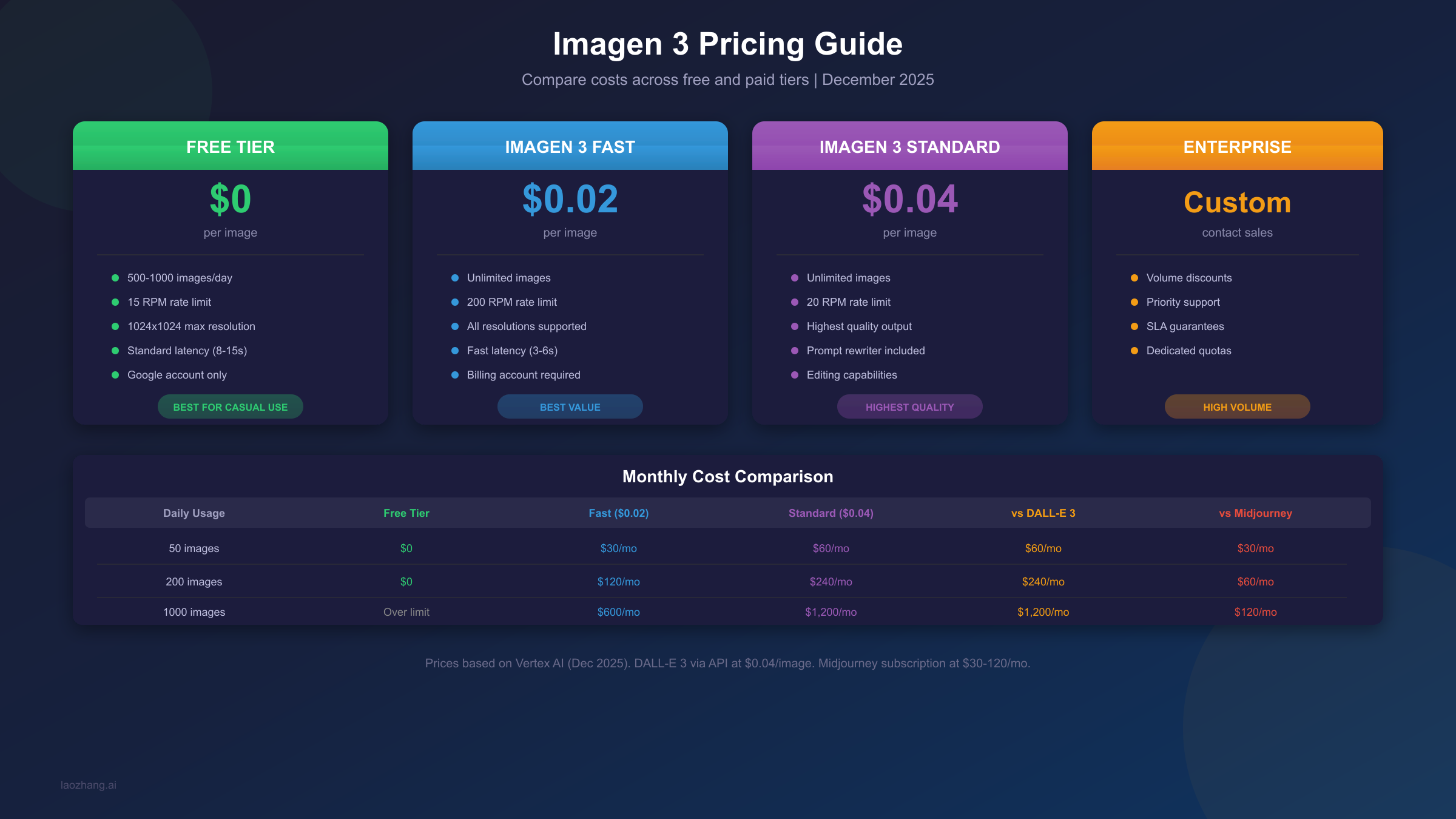
Imagen 3 Fast at $0.02 per image represents the best value for most production use cases. This model optimizes for generation speed (3-6 seconds typical) while maintaining good quality. At this price point, you can generate 50 images for $1—significantly cheaper than DALL-E 3's ~$0.04 per image via API. The 200 RPM rate limit makes it suitable for high-throughput applications.
Imagen 3 Standard at $0.04 per image provides the highest quality output with features like the built-in prompt rewriter that automatically enhances your prompts for better results. Generation time is longer (8-15 seconds typical) and rate limits are lower (20 RPM), but the output quality justifies the cost for applications where image quality is paramount. This matches DALL-E 3 pricing while offering access to Google's latest image generation technology.
Editing and Customization also cost $0.04 per operation, making it straightforward to budget for workflows that involve modifying or combining images. This includes features like inpainting, outpainting, and style transfer.
One notable advantage of Google's pricing: costs are uniform regardless of output resolution. Whether you're generating 1024x1024 or 4096x4096 images, the per-image price remains the same. Competitors often charge 2-4x more for higher resolutions, making Google's approach particularly cost-effective for applications requiring larger images.
| Monthly Usage | Free Tier | Imagen 3 Fast | Imagen 3 Standard | DALL-E 3 API | Midjourney |
|---|---|---|---|---|---|
| 50 images/day | $0 | $30 | $60 | $60 | $30 |
| 200 images/day | $0 | $120 | $240 | $240 | $60 |
| 500 images/day | Limit exceeded | $300 | $600 | $600 | $120 |
| 1000 images/day | Limit exceeded | $600 | $1,200 | $1,200 | N/A |
For developers seeking cost-effective high-volume access, laozhang.ai offers Gemini-compatible APIs with competitive pricing and support for 100+ concurrent requests, which can significantly reduce costs for production applications.
What Changed in December 2025
The AI image generation landscape shifted significantly in early December 2025 when Google announced quota adjustments affecting both free and paid tier users. Understanding these changes is crucial for anyone who had built workflows or applications around previous limits.
December 7, 2025 Announcement: Google adjusted quotas across the Gemini Developer API, affecting both Free Tier and Paid Tier 1 users. The most dramatic change hit Gemini 2.5 Flash users, with daily request limits reduced by approximately 92%—from around 250 requests per day to just 20. Many developers who had built applications around the previous limits suddenly encountered floods of 429 "quota exceeded" errors without warning.
Why the Changes? Google's stated rationale centers on ensuring sustainable service for all users. As adoption of AI image generation has accelerated, the previous generous limits were straining infrastructure and creating unpredictable availability. By reducing free tier quotas and creating clearer tier distinctions, Google aims to provide more reliable service for paying customers while still maintaining accessibility for casual users and developers experimenting with the technology.
Tier Progression Requirements have also become more relevant. Moving from the Free tier to Tier 1 requires linking a billing account to your project. Reaching Tier 2 requires $50+ cumulative spend, while Tier 3 requires $1,000+ spend. Each tier unlocks higher rate limits and more consistent access, creating an incentive for serious users to move to paid tiers.
Practical Impact: For hobbyists and experimenters, the changes have minimal impact—500-1000 daily images through the web interface remains generous. For developers who had built production applications on free tier API access, the changes necessitate either implementing more efficient caching strategies, migrating to paid tiers, or exploring alternative API providers.
Choosing the Right Imagen 3 Model
Google offers four distinct Imagen 3 model variants, each optimized for different use cases. Selecting the right model impacts both your available quota and the quality of results.
imagen-3.0-generate-002 is the latest and most capable model, featuring an integrated prompt rewriter that automatically enhances your prompts for better results. This model produces the highest quality output and is recommended for production applications where image quality is the primary concern. The trade-off is slower generation times (8-15 seconds) and a 20 RPM rate limit.
imagen-3.0-generate-001 is the previous standard model without the prompt rewriter feature. It's still available for applications that were built against it and don't want to risk behavioral changes from switching to the newer model. Quality is excellent, though slightly below the 002 variant in complex scenes.
imagen-3.0-fast-generate-001 prioritizes speed and throughput over maximum quality. Generation times drop to 3-6 seconds, and the 200 RPM rate limit enables high-volume use cases. The quality difference from standard models is noticeable in side-by-side comparisons but acceptable for most applications. This is the recommended choice for production applications requiring volume at the best price point ($0.02 vs $0.04 per image).
imagen-3.0-capability-001 handles image editing and customization tasks rather than generation from scratch. Use this model when you need to modify existing images through inpainting, outpainting, or style transfer. The 100 RPM rate limit sits between fast and standard models.
| Model Version | Speed | Quality | Rate Limit | Price | Best For |
|---|---|---|---|---|---|
| generate-002 | 8-15s | Highest | 20 RPM | $0.04 | Quality priority |
| generate-001 | 8-15s | High | 20 RPM | $0.04 | Legacy compatibility |
| fast-generate-001 | 3-6s | Good | 200 RPM | $0.02 | Volume/speed priority |
| capability-001 | 5-10s | High | 100 RPM | $0.04 | Image editing |
Cost Optimization Strategies
Maximizing value from Google AI Studio's image generation capabilities requires understanding the system's nuances and optimizing your usage patterns accordingly. These strategies can significantly reduce costs while maintaining productivity.
Timing Optimization leverages the dynamic nature of free tier limits. Server load varies predictably throughout the day, with off-peak hours (11 PM to 7 AM Pacific Time) typically offering the most generous limits and fastest response times. If your workflow allows flexibility in when you generate images, shifting to off-peak hours can increase your effective daily quota by 30-50%.
Multi-Method Stacking exploits the fact that different access methods have separate quota pools. Your 500-1000 daily images through the web interface don't count against your 100-500 API quota, and neither affects your consumer app allowance. By strategically distributing generation requests across methods, power users can theoretically access hundreds of additional daily generations beyond any single method's limit.
Model Selection for Cost makes a significant difference at scale. Using imagen-3.0-fast-generate-001 at $0.02/image instead of standard models at $0.04/image cuts costs in half with minimal quality impact for most use cases. Only default to standard models when quality is truly paramount—for thumbnails, previews, or high-volume content, the fast model is typically indistinguishable.
Caching and Deduplication can dramatically reduce actual generation needs. Implement prompt normalization to recognize semantically identical requests, cache generated images by prompt hash, and consider storing variations that might be reused. Applications serving multiple users often find that 20-40% of generation requests can be served from cache.
Batch Request Optimization takes advantage of Imagen 3's ability to generate up to 4 images per request. When you need variations of an image, requesting multiple in a single call is more efficient than multiple single-image requests. This approach also reduces API overhead and improves overall throughput.
For high-volume production needs, consider using API providers like laozhang.ai that offer unified access to multiple image generation APIs with optimized pricing and higher concurrency limits than individual providers.
Troubleshooting 429 Errors
The dreaded HTTP 429 "Too Many Requests" error indicates you've exceeded rate limits, but the specific cause and solution depend on which limit you've hit.
Per-Minute Rate Limit Exceeded is the most common 429 scenario, occurring when you send requests faster than your RPM allowance. The solution is straightforward: implement exponential backoff with jitter. Start with a 1-second wait, then 2 seconds, 4 seconds, up to a maximum of about 60 seconds. Adding random jitter (e.g., ±500ms) prevents thundering herd problems when multiple processes retry simultaneously.
pythonimport time
import random

def generate_with_retry(prompt, max_retries=5):
    for attempt in range(max_retries):
        try:
            return generate_image(prompt)
        except RateLimitError:
            wait_time = (2 ** attempt) + random.uniform(0, 1)
            time.sleep(wait_time)
    raise Exception("Max retries exceeded")
Daily Quota Exceeded manifests as 429 errors that don't resolve with retries. Check your quota usage in the Google Cloud Console or AI Studio dashboard. If you've exhausted your daily limit, the only options are waiting until the reset time (midnight PT for web interface, midnight UTC for API) or switching to a paid tier.
Burst Limit Triggered can occur even when you're under both per-minute and daily limits. Google implements burst protection that temporarily blocks requests if you send many in quick succession. The pattern is usually a few successful requests followed by 429 errors, then working again after a brief pause. Spacing requests more evenly typically resolves this.
Tier Mismatch Errors occur when you're trying to use features or quotas not available at your tier level. Verify your project's tier status in Google Cloud Console and ensure you meet the requirements for the access level you're attempting.
For persistent issues, check Google's status dashboard for any ongoing service disruptions, and consult the Gemini image API free tier guide for additional troubleshooting steps.
FAQ
How many images can I generate for free in Google AI Studio?
Through the AI Studio web interface, you can generate between 500 and 1,000 images per day completely free. This limit is dynamic based on server demand—off-peak hours typically allow the higher end of this range. Through the Gemini Developer API, free tier limits are 100-500 per day depending on the model selected, with Gemini 2.5 Flash offering the highest allowance at 500 requests daily.
When do Google AI Studio image limits reset?
Reset times depend on your access method. The web interface quota resets at midnight Pacific Time (PT), while API quotas reset at midnight UTC. This 7-8 hour difference means you can strategically use both methods to maximize total daily generations.
How much does Imagen 3 cost after the free tier?
Imagen 3 Fast costs $0.02 per image, while Imagen 3 Standard costs $0.04 per image. These prices apply uniformly regardless of output resolution. For editing and customization operations, the cost is also $0.04 per image. There are no additional per-token or resolution-based fees.
What happened to Google AI Studio limits in December 2025?
On December 7, 2025, Google announced significant quota adjustments affecting the Gemini Developer API. Gemini 2.5 Flash saw its free tier reduced by approximately 92%, from around 250 requests per day to just 20. The web interface limits remained largely unchanged at 500-1000 per day.
Is Google AI Studio's Imagen 3 better than DALL-E 3?
Quality comparisons are subjective, but both models produce excellent results. Google AI Studio's primary advantages are its generous free tier (500-1000 images/day vs. no free tier for DALL-E 3), consistent pricing regardless of resolution, and higher rate limits on paid tiers. DALL-E 3 may have slight advantages in following complex prompts and text rendering within images.
Can I use Google AI Studio for commercial projects?
Yes, images generated through Google AI Studio can be used for commercial purposes under Google's terms of service. However, you should review the current terms for any restrictions, ensure your usage complies with content policies, and consider paid tiers for production applications requiring guaranteed availability and higher throughput.
What's the difference between AI Studio and Vertex AI for image generation?
Google AI Studio provides a consumer-friendly interface with simpler setup and generous free tiers, ideal for prototyping and individual use. Vertex AI offers enterprise-grade infrastructure with SLAs, more granular controls, higher rate limits, and integration with Google Cloud's broader ecosystem. Pricing is similar, but Vertex AI is designed for production-scale deployments.
Summary
Google AI Studio offers remarkably generous access to Imagen 3 image generation, with free tier limits of 500-1000 images per day through the web interface far exceeding what competitors offer. Understanding the three access methods—web interface, Gemini API, and consumer apps—allows you to choose the right approach for your needs and potentially stack limits across methods.
The December 2025 quota adjustments primarily affected API users, while web interface limits remained intact. For most individual users and small-scale projects, the free tier remains more than sufficient. When you need guaranteed access or higher volumes, Imagen 3's paid tiers at $0.02-0.04 per image provide cost-effective scaling.
Key takeaways for maximizing your usage:
- Use the AI Studio web interface for the most generous free limits (500-1000/day)
- Time generation requests during off-peak hours (11 PM - 7 AM PT) for higher effective limits
- Choose imagen-3.0-fast-generate-001 for the best balance of cost, speed, and quality
- Implement proper retry logic with exponential backoff to handle 429 errors gracefully
- Consider multi-method stacking to extend beyond single-method daily limits
For production applications requiring higher throughput and reliability, check out laozhang.ai's documentation for unified API access with competitive pricing and enhanced concurrency support.
Whether you're exploring AI image generation for personal projects or building it into production applications, Google AI Studio provides one of the most accessible and cost-effective entry points available today—just be mindful of the limits and plan your usage accordingly.