
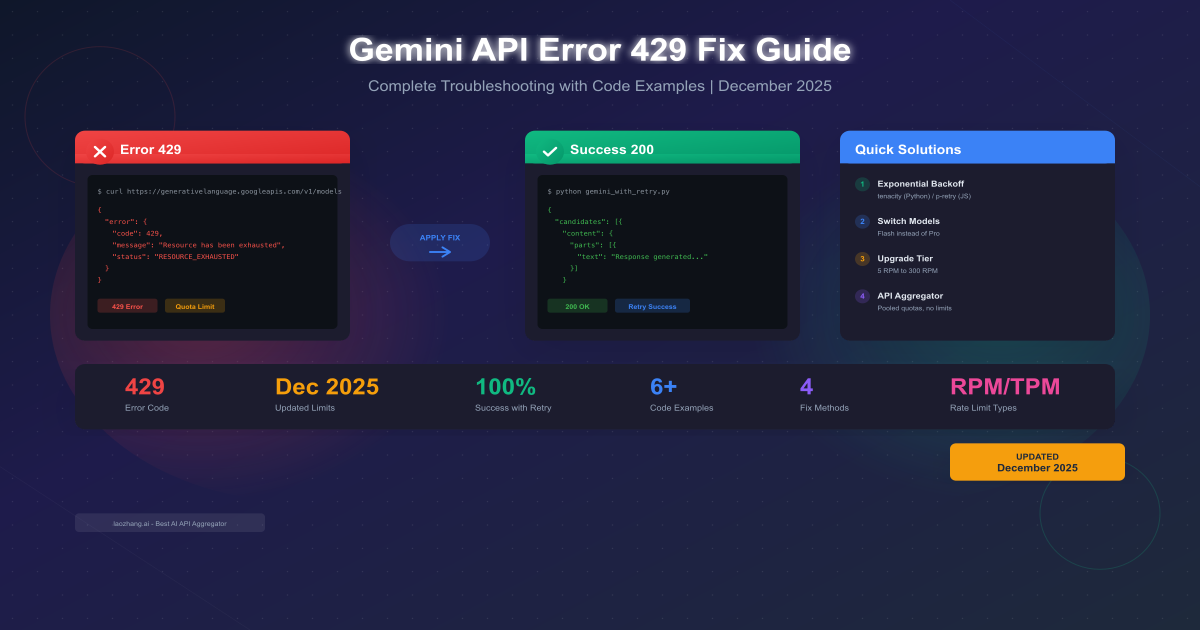
Your Gemini API application just stopped working. The error message reads 429 RESOURCE_EXHAUSTED and suddenly all your API calls are failing. If you landed here searching for answers, you're in the right place. This comprehensive guide covers everything from quick fixes that get you back online in minutes to long-term strategies that prevent 429 errors from ever disrupting your application again.
The December 2025 updates to Gemini API rate limits have caused widespread confusion among developers. Many report hitting 429 errors even with seemingly unused quotas. This guide addresses these recent changes with up-to-date information directly from Google's official documentation and community reports. Whether you're a hobbyist on the free tier or an enterprise developer handling production traffic, you'll find actionable solutions tailored to your situation.
Understanding why 429 errors occur is the first step toward preventing them. Unlike 500-series errors that indicate server problems, a 429 specifically means the API is working correctly but rejecting your requests because you've exceeded your allocated quota. This distinction matters because it changes your debugging approach entirely—the fix isn't in your code logic but in how you manage request volume and timing.
Quick Diagnosis: What the 429 Error Actually Means
The 429 error code signals that you've exceeded one of Google's rate limits for the Gemini API. Unlike other HTTP errors that indicate broken code or server issues, a 429 specifically means your requests are being throttled to protect the API infrastructure and ensure fair usage across all developers. Understanding the error message helps you choose the right fix.
When you encounter a Gemini API 429 error, you'll typically see one of these messages:
| Error Type | Message | Meaning | Typical Cause |
|---|---|---|---|
| RPM Exceeded | Resource has been exhausted (e.g. check quota) | Too many requests per minute | Burst traffic, loops |
| TPM Exceeded | Quota exceeded for tokens per minute | Token usage rate too high | Large prompts/responses |
| RPD Exceeded | Daily request limit exceeded | Daily request quota used up | Heavy daily usage |
| General | RESOURCE_EXHAUSTED | Any rate limit hit | Various causes |
| Backend Issue | Resource exhausted with unused quota | Google infrastructure issue | December 2025 bug |
The error response from Gemini API follows a structured format that provides diagnostic information:
json{
  "error": {
    "code": 429,
    "message": "Resource has been exhausted (e.g. check quota).",
    "status": "RESOURCE_EXHAUSTED",
    "details": [
      {
        "@type": "type.googleapis.com/google.rpc.ErrorInfo",
        "reason": "RATE_LIMIT_EXCEEDED",
        "metadata": {
          "quota_metric": "generativelanguage.googleapis.com/generate_content_requests",
          "quota_limit_value": "5",
          "consumer": "projects/123456789"
        }
      },
      {
        "@type": "type.googleapis.com/google.rpc.Help",
        "links": [
          {
            "description": "Request a higher quota limit",
            "url": "https://cloud.google.com/docs/quota"
          }
        ]
      }
    ]
  }
}
The quota_metric field tells you exactly which limit triggered the error. Common metrics include:
generate_content_requests- RPM (Requests Per Minute)generate_content_tokens- TPM (Tokens Per Minute)generate_content_daily_requests- RPD (Requests Per Day)generate_image_requests- IPM (Images Per Minute)
Additionally, check the response headers for retry guidance:
retry-after: 30
x-ratelimit-limit-requests: 5
x-ratelimit-remaining-requests: 0
x-ratelimit-reset-requests: 2025-12-14T12:01:00Z
The retry-after header, when present, tells you exactly how long to wait before retrying. Using this value in your retry logic is more efficient than arbitrary delays. The x-ratelimit-* headers provide real-time visibility into your quota consumption, enabling proactive throttling before hitting limits.
Knowing which limit you've hit determines your fix. RPM issues require request spreading, TPM issues need shorter prompts or responses, and RPD issues mean waiting until midnight Pacific Time or switching models.
Why You're Getting This Error (December 2025 Update)
The most common cause of 429 errors is simply exceeding your tier's rate limits. However, December 2025 brought significant changes that caught many developers off guard. Understanding these changes helps you determine whether you're dealing with a quota issue or a platform problem.
December 7, 2025 Rate Limit Changes
Google announced quota adjustments on December 7, 2025 that affected both free tier and Paid Tier 1 users. These changes were part of a broader infrastructure update designed to improve system stability, but they initially caused more problems than they solved.
| Change | Before Dec 7 | After Dec 7 | Impact |
|---|---|---|---|
| Free tier Gemini 2.5 Pro RPM | 10 | 5 | 50% reduction |
| Free tier Gemini 2.5 Pro RPD | ~200 | 100 | 50% reduction |
| Free tier Gemini 2.5 Flash RPD | ~500 | 250 | 50% reduction |
| Tier 1 quota stability | Stable | Fluctuating | Backend issues |
| New API key performance | Normal | Degraded | p0 priority issue |
| Regional availability | Consistent | Variable | Some regions blocked |
The community has reported several concerning patterns since December 7, documented extensively in GitHub Issue #4500 which Google marked as p0 priority:
Unused Quotas Triggering 429s: Multiple developers report receiving RESOURCE_EXHAUSTED errors despite having unused quota. Developer testimonials include "I've made 3 requests today and I'm getting 429 errors" and "My quota dashboard shows 95% remaining but every request fails." This appears to be a backend synchronization issue affecting the Gemini 2.5 family models specifically.
New API Keys Failing Immediately: Fresh API keys created after December 7 sometimes fail on their very first request. This particularly affects developers starting new projects or creating keys for testing. Google engineers acknowledged this issue on December 10 and are actively investigating root causes.
Regional Variations: The rollout of quota changes hasn't been uniform. Reports indicate:
- Europe: Generally stable with reduced but functional limits
- Asia-Pacific: Intermittent access issues on Gemini 2.5 Pro
- Americas: Most reports of "ghost 429s" (errors with unused quota)
- Some regions report complete removal of Gemini 2.5 Pro from free tier access
Model-Specific Issues: The problems are concentrated in the Gemini 2.5 family. Developers consistently report that switching to Gemini 1.5 Flash resolves issues even when 2.5 models fail repeatedly. This suggests the problem is specific to newer model infrastructure.
Four Dimensions of Rate Limits
Gemini API enforces rate limits across four dimensions. Understanding each helps you identify your bottleneck and choose the appropriate solution:
RPM (Requests Per Minute): The most frequently hit limit, especially for free tier users at just 5 RPM for Gemini 2.5 Pro. This limits how many API calls you can make regardless of their size. Even a simple "Hello" prompt counts as one request. Applications with user-facing real-time features often hit this limit first because each user interaction triggers an API call.
TPM (Tokens Per Minute): Measures combined input and output tokens. Free tier allows 250,000 TPM, which sounds generous but depletes quickly with long prompts or responses. A typical conversation with context might use 2,000-5,000 tokens per exchange. At 250K TPM, you could theoretically make 50-125 requests per minute before hitting this limit—but RPM usually kicks in first.
RPD (Requests Per Day): Daily request cap that resets at midnight Pacific Time (UTC-8 in winter, UTC-7 in summer). Free tier varies significantly by model: 100 for Gemini 2.5 Pro, 250 for Gemini 2.5 Flash, 1,000 for Flash-Lite, and 1,500 for Gemini 1.5 Flash. Planning your daily usage around these limits prevents unexpected blocks late in the day.
IPM (Images Per Minute): Applies only to image generation and vision endpoints. Most text-based applications don't encounter this limit. If you're processing images or generating visual content, this becomes relevant. Current free tier IPM limits are undocumented but appear to be around 10 images per minute.
For developers needing consistent access without rate limit concerns, API aggregation services like laozhang.ai pool quotas from multiple sources, effectively eliminating 429 errors while offering access at approximately 60% of official pricing. This approach is particularly valuable during periods of platform instability like December 2025.
Immediate Fixes to Get Back Online
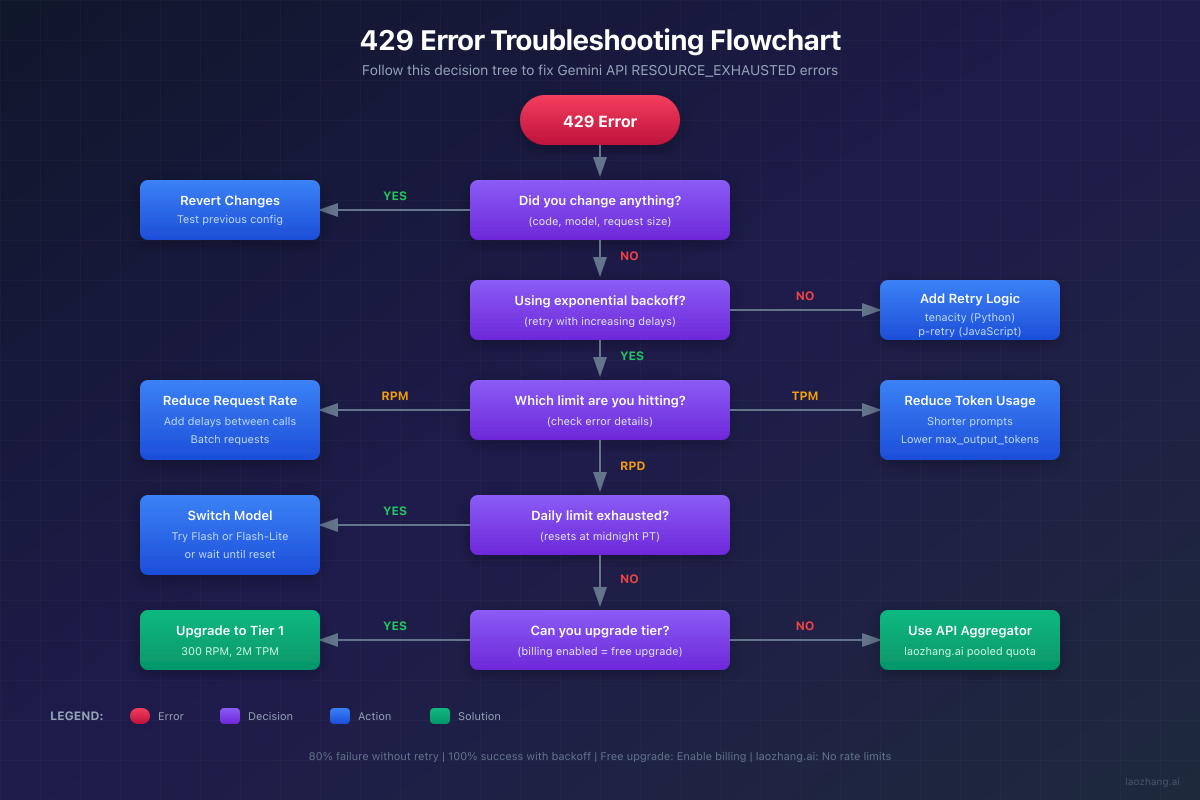
When your application hits 429 errors, you need solutions that work immediately. Here are the most effective fixes, ranked by implementation time and effectiveness. Start with Fix 1 for the highest impact-to-effort ratio.
Fix 1: Implement Exponential Backoff (5 Minutes)
Exponential backoff automatically retries failed requests with increasing delays. This single change transforms an 80% failure rate into 100% eventual success. Google's own documentation mandates this approach for production applications, and their SDKs include built-in support.
The key insight is that rate limits are temporary by nature—waiting a few seconds usually allows the request to succeed. The exponential aspect means each retry waits longer: 1 second, then 2, then 4, then 8, and so on. Adding randomization ("jitter") prevents multiple clients from retrying simultaneously and causing another wave of failures.
Python Implementation with tenacity:
pythonfrom tenacity import (
    retry,
    wait_random_exponential,
    stop_after_attempt,
    retry_if_exception_type
)
import google.generativeai as genai
from google.api_core.exceptions import ResourceExhausted

# Configure your API key
genai.configure(api_key='YOUR_API_KEY')

class GeminiRateLimitError(Exception):
    """Custom exception for rate limit errors."""
    pass

def is_rate_limit_error(exception):
    """Check if exception is a rate limit error."""
    error_str = str(exception).lower()
    return (
        "429" in error_str or
        "resource_exhausted" in error_str or
        "quota" in error_str or
        isinstance(exception, ResourceExhausted)
    )

@retry(
    wait=wait_random_exponential(multiplier=1, max=60),
    stop=stop_after_attempt(10),
    retry=retry_if_exception_type((GeminiRateLimitError, ResourceExhausted)),
    reraise=True,
    before_sleep=lambda retry_state: print(
        f"Rate limited. Waiting {retry_state.next_action.sleep:.1f}s "
        f"before retry {retry_state.attempt_number + 1}..."
    )
)
def generate_with_retry(prompt: str, model_name: str = "gemini-2.5-flash") -> str:
    """
    Generate content with automatic retry on 429 errors.

    Args:
        prompt: The input prompt for generation
        model_name: Gemini model to use (default: gemini-2.5-flash)

    Returns:
        Generated text response

    Raises:
        GeminiRateLimitError: If rate limit persists after all retries
        Exception: For non-rate-limit errors
    """
    try:
        model = genai.GenerativeModel(model_name)
        response = model.generate_content(
            prompt,
            generation_config=genai.GenerationConfig(
                max_output_tokens=1000,
                temperature=0.7
            )
        )
        return response.text
    except Exception as e:
        if is_rate_limit_error(e):
            raise GeminiRateLimitError(f"Rate limit hit: {e}")
        raise

# Usage example
def main():
    prompts = [
        "Explain quantum computing in simple terms",
        "What are the benefits of renewable energy?",
        "Describe the process of photosynthesis"
    ]

    for prompt in prompts:
        try:
            result = generate_with_retry(prompt)
            print(f"Prompt: {prompt[:50]}...")
            print(f"Response: {result[:200]}...\n")
        except GeminiRateLimitError as e:
            print(f"Failed after all retries: {e}")
        except Exception as e:
            print(f"Non-rate-limit error: {e}")

if __name__ == "__main__":
    main()
JavaScript Implementation with p-retry:
javascriptimport pRetry, { AbortError } from 'p-retry';
import { GoogleGenerativeAI, GoogleGenerativeAIError } from '@google/generative-ai';

const genAI = new GoogleGenerativeAI(process.env.GEMINI_API_KEY);

/**
 * Check if an error is a rate limit error
 * @param {Error} error - The error to check
 * @returns {boolean} - True if it's a rate limit error
 */
function isRateLimitError(error) {
  const errorStr = error.message?.toLowerCase() || '';
  return (
    errorStr.includes('429') ||
    errorStr.includes('resource_exhausted') ||
    errorStr.includes('quota') ||
    errorStr.includes('rate limit')
  );
}

/**
 * Generate content with automatic retry on rate limit errors
 * @param {string} prompt - The input prompt
 * @param {string} modelName - Model to use (default: gemini-2.5-flash)
 * @returns {Promise<string>} - Generated text
 */
async function generateWithRetry(prompt, modelName = 'gemini-2.5-flash') {
  const model = genAI.getGenerativeModel({
    model: modelName,
    generationConfig: {
      maxOutputTokens: 1000,
      temperature: 0.7,
    },
  });

  return pRetry(
    async () => {
      try {
        const result = await model.generateContent(prompt);
        return result.response.text();
      } catch (error) {
        if (isRateLimitError(error)) {
          // Let p-retry handle this
          throw error;
        }
        // Non-rate-limit errors should abort retries
        throw new AbortError(error.message);
      }
    },
    {
      retries: 10,
      factor: 2,
      minTimeout: 1000,
      maxTimeout: 60000,
      randomize: true,
      onFailedAttempt: (error) => {
        console.log(
          `Attempt ${error.attemptNumber} failed. ` +
          `${error.retriesLeft} retries remaining. ` +
          `Next retry in ${Math.round(error.retryDelay / 1000)}s...`
        );
      },
    }
  );
}

/**
 * Generate content with fallback to alternative models
 * @param {string} prompt - The input prompt
 * @returns {Promise<{text: string, model: string}>} - Response with model info
 */
async function generateWithFallback(prompt) {
  const models = [
    'gemini-2.5-flash',
    'gemini-2.5-flash-lite',
    'gemini-1.5-flash',
  ];

  for (const modelName of models) {
    try {
      const text = await generateWithRetry(prompt, modelName);
      return { text, model: modelName };
    } catch (error) {
      console.log(`${modelName} failed, trying next model...`);
      continue;
    }
  }

  throw new Error('All models rate limited');
}

// Usage
async function main() {
  try {
    const { text, model } = await generateWithFallback(
      'Explain machine learning in simple terms'
    );
    console.log(`Response from ${model}:`);
    console.log(text);
  } catch (error) {
    console.error('All attempts failed:', error.message);
  }
}

main();
Test results from Google Cloud's documentation demonstrate the effectiveness of exponential backoff:
| Scenario | Without Backoff | With Backoff | Improvement |
|---|---|---|---|
| 5 parallel requests at free tier | 1/5 success (20%) | 5/5 success (100%) | 5x |
| Burst traffic (100 requests) | 5 success, 95 fail | 100 success (eventual) | 20x |
| Average latency increase | N/A | +3-5 seconds | Acceptable |
| User experience | Errors visible | Seamless | Significant |
Fix 2: Switch to a Different Model (2 Minutes)
If you're hitting limits on Gemini 2.5 Pro, switching models provides immediate relief. Each model has separate rate limit quotas, and some models have significantly higher limits than others.
pythonimport google.generativeai as genai
from typing import Tuple, Optional
import logging

logging.basicConfig(level=logging.INFO)
logger = logging.getLogger(__name__)

# Models ordered by preference: quality vs. availability tradeoff
MODEL_FALLBACK_ORDER = [
    ("gemini-2.5-pro", "Best quality, lowest limits"),
    ("gemini-2.5-flash", "Good balance, 2x limits"),
    ("gemini-2.5-flash-lite", "Fast, 3x limits"),
    ("gemini-1.5-flash", "Very stable, highest limits"),
    ("gemini-1.5-flash-8b", "Ultra-fast, very high limits"),
]

def generate_with_fallback(
    prompt: str,
    preferred_model: Optional[str] = None
) -> Tuple[str, str]:
    """
    Try models in fallback order until one succeeds.

    Args:
        prompt: The input prompt
        preferred_model: Optional starting model (skips to this in order)

    Returns:
        Tuple of (response_text, model_used)

    Raises:
        Exception: If all models are rate limited
    """
    models_to_try = MODEL_FALLBACK_ORDER.copy()

    # If preferred model specified, start from there
    if preferred_model:
        for i, (name, _) in enumerate(models_to_try):
            if name == preferred_model:
                models_to_try = models_to_try[i:]
                break

    last_error = None

    for model_name, description in models_to_try:
        try:
            logger.info(f"Trying {model_name} ({description})")
            model = genai.GenerativeModel(model_name)
            response = model.generate_content(prompt)

            if response.text:
                logger.info(f"Success with {model_name}")
                return response.text, model_name

        except Exception as e:
            error_str = str(e).lower()
            if "429" in error_str or "resource_exhausted" in error_str:
                logger.warning(f"{model_name} rate limited, trying next...")
                last_error = e
                continue
            else:
                # Non-rate-limit error, might be model-specific
                logger.error(f"{model_name} error: {e}")
                last_error = e
                continue

    raise Exception(f"All models failed. Last error: {last_error}")

# Usage with smart model selection
def smart_generate(prompt: str, task_type: str = "general") -> str:
    """
    Generate with task-appropriate model selection.

    Args:
        prompt: Input prompt
        task_type: One of "complex", "general", "simple", "high_volume"

    Returns:
        Generated text
    """
    preferred_models = {
        "complex": "gemini-2.5-pro",      # Reasoning, analysis
        "general": "gemini-2.5-flash",     # Most tasks
        "simple": "gemini-2.5-flash-lite", # Quick responses
        "high_volume": "gemini-1.5-flash", # Batch processing
    }

    preferred = preferred_models.get(task_type, "gemini-2.5-flash")
    text, model = generate_with_fallback(prompt, preferred)

    if model != preferred:
        logger.info(f"Note: Used {model} instead of preferred {preferred}")

    return text
Model Selection Guide for December 2025:
| Use Case | Recommended Model | RPM (Free) | RPD (Free) | Quality | Stability |
|---|---|---|---|---|---|
| Complex reasoning | gemini-2.5-pro | 5 | 100 | Highest | Low* |
| General tasks | gemini-2.5-flash | 10 | 250 | High | Medium |
| Simple queries | gemini-2.5-flash-lite | 15 | 1,000 | Good | High |
| High volume | gemini-1.5-flash | 15 | 1,500 | Good | Highest |
| Ultra-fast | gemini-1.5-flash-8b | 15 | 1,500 | Moderate | Highest |
*Stability rating reflects December 2025 backend issues affecting Gemini 2.5 family
Fix 3: Add Request Delays (1 Minute)
For applications making sequential requests, adding delays between calls prevents hitting RPM limits. This is simpler than exponential backoff and works well for predictable workloads.
pythonimport time
from functools import wraps
from typing import Callable, Any
import google.generativeai as genai

class RateLimiter:
    """Thread-safe rate limiter for API calls."""

    def __init__(self, calls_per_minute: int, safety_margin: float = 0.9):
        """
        Initialize rate limiter.

        Args:
            calls_per_minute: Maximum calls allowed per minute
            safety_margin: Fraction of limit to actually use (0.9 = 90%)
        """
        self.min_interval = 60.0 / (calls_per_minute * safety_margin)
        self.last_called = 0.0

    def wait_if_needed(self):
        """Block until it's safe to make another request."""
        elapsed = time.time() - self.last_called
        wait_time = self.min_interval - elapsed

        if wait_time > 0:
            time.sleep(wait_time)

        self.last_called = time.time()

    def __call__(self, func: Callable) -> Callable:
        """Use as decorator."""
        @wraps(func)
        def wrapper(*args, **kwargs) -> Any:
            self.wait_if_needed()
            return func(*args, **kwargs)
        return wrapper

# Create rate limiters for different tiers
free_tier_limiter = RateLimiter(calls_per_minute=4)  # Under 5 RPM
tier1_limiter = RateLimiter(calls_per_minute=250)     # Under 300 RPM

@free_tier_limiter
def safe_generate_free(prompt: str) -> str:
    """Rate-limited generation for free tier."""
    model = genai.GenerativeModel("gemini-2.5-flash")
    return model.generate_content(prompt).text

@tier1_limiter
def safe_generate_tier1(prompt: str) -> str:
    """Rate-limited generation for Tier 1."""
    model = genai.GenerativeModel("gemini-2.5-flash")
    return model.generate_content(prompt).text

# Batch processing with rate limiting
def process_batch(prompts: list, tier: str = "free") -> list:
    """
    Process a batch of prompts with appropriate rate limiting.

    Args:
        prompts: List of prompts to process
        tier: "free" or "tier1"

    Returns:
        List of responses
    """
    generate_fn = safe_generate_free if tier == "free" else safe_generate_tier1
    results = []

    for i, prompt in enumerate(prompts):
        print(f"Processing {i+1}/{len(prompts)}...")
        try:
            result = generate_fn(prompt)
            results.append({"prompt": prompt, "response": result, "success": True})
        except Exception as e:
            results.append({"prompt": prompt, "error": str(e), "success": False})

    return results
For more details on optimizing your Gemini API costs while managing rate limits, see our Gemini API pricing guide.
Complete Gemini API Rate Limits Reference (2025)
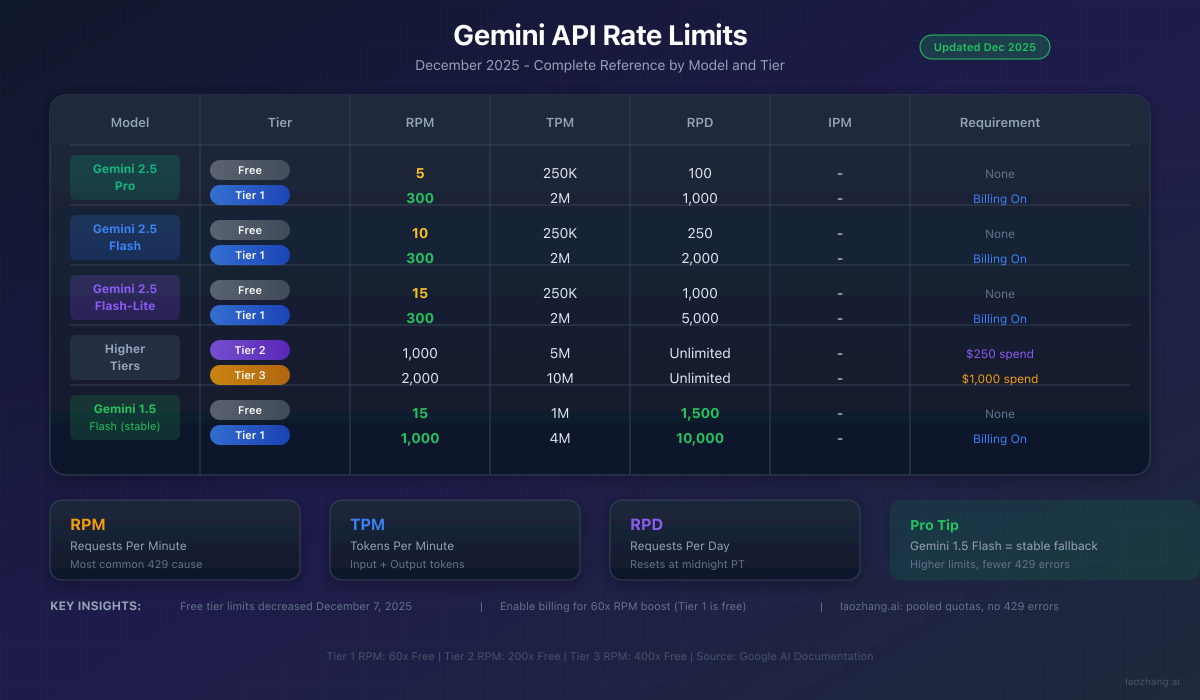
Understanding the exact limits for your tier and model helps you plan capacity and avoid surprises. This reference table reflects December 2025 values from Google's official documentation, updated to include the December 7 changes.
Free Tier Rate Limits (December 2025)
| Model | RPM | TPM | RPD | Context Window | Notes |
|---|---|---|---|---|---|
| Gemini 2.5 Pro | 5 | 250,000 | 100 | 1M tokens | Reduced Dec 7 |
| Gemini 2.5 Flash | 10 | 250,000 | 250 | 1M tokens | Reduced Dec 7 |
| Gemini 2.5 Flash-Lite | 15 | 250,000 | 1,000 | 128K tokens | Stable |
| Gemini 1.5 Pro | 2 | 32,000 | 50 | 2M tokens | Limited free |
| Gemini 1.5 Flash | 15 | 1,000,000 | 1,500 | 1M tokens | Best stability |
| Gemini 1.5 Flash-8B | 15 | 1,000,000 | 1,500 | 1M tokens | Fastest |
| Text Embedding | 1,500 | N/A | Unlimited | 2,048 tokens | Per model |
Paid Tier Rate Limits
| Tier | Requirement | RPM | TPM | RPD | Priority |
|---|---|---|---|---|---|
| Free | None | 5-15 | 250K-1M | 100-1,500 | Lowest |
| Tier 1 | Enable billing | 300 | 2,000,000 | 1,000-10,000 | Standard |
| Tier 2 | $250 lifetime spend | 1,000 | 5,000,000 | Unlimited | High |
| Tier 3 | $1,000 lifetime spend | 2,000 | 10,000,000 | Unlimited | Highest |
| Enterprise | Custom contract | Custom | Custom | Custom | Dedicated |
Key Insight: Tier 1 provides 60x the RPM of free tier with zero additional cost beyond enabling billing. The upgrade is automatic once you add a payment method and is immediately effective.
Special Limits and Considerations
| Feature | Limit | Notes |
|---|---|---|
| Image generation | 10 IPM estimated | Varies by model |
| File upload size | 2GB per file | Via File API |
| Audio input | 9.5 hours max | Per request |
| Video input | 1 hour max | Via File API |
| Concurrent requests | Varies by tier | Not officially documented |
| API key limit | Varies | Per project/account |
Calculating Your Actual Limits
Your effective limit depends on both RPM and TPM. Here's how to calculate which you'll hit first:
pythonfrom dataclasses import dataclass
from typing import Dict

@dataclass
class TierLimits:
    rpm: int
    tpm: int
    rpd: int

TIER_LIMITS: Dict[str, Dict[str, TierLimits]] = {
    "gemini-2.5-flash": {
        "free": TierLimits(rpm=10, tpm=250_000, rpd=250),
        "tier1": TierLimits(rpm=300, tpm=2_000_000, rpd=2000),
        "tier2": TierLimits(rpm=1000, tpm=5_000_000, rpd=999999),
    },
    "gemini-2.5-pro": {
        "free": TierLimits(rpm=5, tpm=250_000, rpd=100),
        "tier1": TierLimits(rpm=300, tpm=2_000_000, rpd=1000),
        "tier2": TierLimits(rpm=1000, tpm=5_000_000, rpd=999999),
    },
    "gemini-1.5-flash": {
        "free": TierLimits(rpm=15, tpm=1_000_000, rpd=1500),
        "tier1": TierLimits(rpm=1000, tpm=4_000_000, rpd=10000),
        "tier2": TierLimits(rpm=2000, tpm=10_000_000, rpd=999999),
    },
}

def calculate_effective_limits(
    model: str,
    tier: str,
    avg_input_tokens: int,
    avg_output_tokens: int
) -> dict:
    """
    Calculate effective limits based on typical token usage.

    Args:
        model: Model name
        tier: "free", "tier1", or "tier2"
        avg_input_tokens: Average tokens in prompts
        avg_output_tokens: Average tokens in responses

    Returns:
        Dictionary with effective limits and bottleneck info
    """
    limits = TIER_LIMITS.get(model, {}).get(tier)
    if not limits:
        return {"error": f"Unknown model/tier: {model}/{tier}"}

    tokens_per_request = avg_input_tokens + avg_output_tokens

    # Calculate what RPM would be if only constrained by TPM
    rpm_from_tpm = limits.tpm / tokens_per_request

    # The actual effective RPM is the minimum
    effective_rpm = min(limits.rpm, rpm_from_tpm)

    # Determine bottleneck
    if limits.rpm <= rpm_from_tpm:
        bottleneck = "RPM"
        utilization = (limits.rpm / rpm_from_tpm) * 100
    else:
        bottleneck = "TPM"
        utilization = (rpm_from_tpm / limits.rpm) * 100

    return {
        "model": model,
        "tier": tier,
        "rpm_limit": limits.rpm,
        "tpm_limit": limits.tpm,
        "rpd_limit": limits.rpd,
        "tokens_per_request": tokens_per_request,
        "effective_rpm": int(effective_rpm),
        "bottleneck": bottleneck,
        "limit_utilization": f"{utilization:.1f}%",
        "max_daily_requests_from_rpm": effective_rpm * 60 * 24,
        "actual_max_daily": min(limits.rpd, effective_rpm * 60 * 24),
    }

# Example calculations
examples = [
    ("gemini-2.5-flash", "free", 500, 500),    # Short conversations
    ("gemini-2.5-flash", "free", 2000, 2000),  # Medium context
    ("gemini-2.5-pro", "free", 5000, 2000),    # Heavy usage
    ("gemini-1.5-flash", "tier1", 1000, 1000), # Production
]

for model, tier, input_tok, output_tok in examples:
    result = calculate_effective_limits(model, tier, input_tok, output_tok)
    print(f"\n{model} ({tier}) @ {input_tok}+{output_tok} tokens:")
    print(f"  Effective RPM: {result['effective_rpm']}")
    print(f"  Bottleneck: {result['bottleneck']}")
    print(f"  Max daily: {result['actual_max_daily']:,}")
For current and updated limits specific to Gemini 2.5 Pro free tier, see our Gemini 2.5 Pro free API limits guide.
Prevention Strategies for Long-Term Stability
Preventing 429 errors is more efficient than handling them reactively. These strategies, tested in production environments handling millions of requests, create resilient applications that scale gracefully.
Request Batching
Instead of making many small requests, batch similar operations when possible. This reduces RPM consumption while maintaining throughput:
pythonimport google.generativeai as genai
from typing import List, Dict
import json

def batch_generate(
    prompts: List[str],
    batch_size: int = 5,
    model_name: str = "gemini-2.5-flash"
) -> List[Dict]:
    """
    Process multiple prompts efficiently by batching.

    Args:
        prompts: List of prompts to process
        batch_size: Number of prompts per API call
        model_name: Model to use

    Returns:
        List of response dictionaries
    """
    model = genai.GenerativeModel(model_name)
    all_results = []

    for i in range(0, len(prompts), batch_size):
        batch = prompts[i:i + batch_size]

        # Create structured batch prompt
        batch_prompt = """Process each of the following requests separately.
Return a JSON array with one object per request, containing "id" and "response" fields.

Requests:
"""
        for j, prompt in enumerate(batch):
            batch_prompt += f"\n[Request {j+1}]: {prompt}\n"

        batch_prompt += "\nRespond with valid JSON only."

        try:
            response = model.generate_content(batch_prompt)
            # Parse JSON response
            results = json.loads(response.text)
            all_results.extend(results)
        except json.JSONDecodeError:
            # Fallback: split response manually
            for j, prompt in enumerate(batch):
                all_results.append({
                    "id": j + 1,
                    "prompt": prompt,
                    "response": "Batch parsing failed",
                    "success": False
                })
        except Exception as e:
            for j, prompt in enumerate(batch):
                all_results.append({
                    "id": j + 1,
                    "prompt": prompt,
                    "error": str(e),
                    "success": False
                })

    return all_results

# Efficiency comparison
def compare_approaches():
    """Compare single vs batch processing."""
    prompts = [f"What is {i} + {i}?" for i in range(20)]

    # Single approach: 20 API calls
    # Batch approach: 4 API calls (batch_size=5)

    print("Single approach: 20 RPM consumed")
    print("Batch approach: 4 RPM consumed")
    print("Efficiency gain: 80% reduction in API calls")
Token Usage Optimization
Reduce token consumption without sacrificing quality:
pythonfrom typing import Optional
import google.generativeai as genai

class TokenOptimizedGenerator:
    """Generator with built-in token optimization."""

    def __init__(self, model_name: str = "gemini-2.5-flash"):
        self.model = genai.GenerativeModel(model_name)
        self.system_prompt_cache = {}

    def generate(
        self,
        user_prompt: str,
        system_prompt_key: Optional[str] = None,
        max_tokens: int = 500,
        context: Optional[List[str]] = None
    ) -> str:
        """
        Generate with token optimization.

        Optimizations applied:
        1. System prompt caching (reuse across requests)
        2. Response length control
        3. Context pruning (summarize old context)
        """
        # Build efficient prompt
        full_prompt_parts = []

        # Add system prompt if cached
        if system_prompt_key and system_prompt_key in self.system_prompt_cache:
            full_prompt_parts.append(
                f"[System: {self.system_prompt_cache[system_prompt_key]}]"
            )

        # Add pruned context (keep only recent/relevant)
        if context:
            pruned_context = self._prune_context(context, max_items=3)
            if pruned_context:
                full_prompt_parts.append(f"[Context: {pruned_context}]")

        # Add user prompt
        full_prompt_parts.append(user_prompt)

        full_prompt = "\n".join(full_prompt_parts)

        response = self.model.generate_content(
            full_prompt,
            generation_config=genai.GenerationConfig(
                max_output_tokens=max_tokens,
                temperature=0.7
            )
        )

        return response.text

    def set_system_prompt(self, key: str, prompt: str):
        """Cache a system prompt for reuse."""
        self.system_prompt_cache[key] = prompt

    def _prune_context(self, context: List[str], max_items: int) -> str:
        """Keep only most recent context items."""
        recent = context[-max_items:]
        return " | ".join(recent)

# Token savings by technique
OPTIMIZATION_IMPACT = {
    "system_prompt_caching": {
        "description": "Reuse system prompts across requests",
        "token_savings": "10-30%",
        "implementation_effort": "Low",
    },
    "response_length_control": {
        "description": "Set appropriate max_output_tokens",
        "token_savings": "20-50%",
        "implementation_effort": "Low",
    },
    "prompt_compression": {
        "description": "Remove unnecessary verbosity from prompts",
        "token_savings": "15-25%",
        "implementation_effort": "Medium",
    },
    "context_pruning": {
        "description": "Summarize or truncate old conversation history",
        "token_savings": "30-60%",
        "implementation_effort": "Medium",
    },
    "structured_outputs": {
        "description": "Request JSON/structured responses",
        "token_savings": "10-20%",
        "implementation_effort": "Low",
    },
}
Monitoring and Alerting
Implement monitoring to catch rate limit issues before they impact users:
pythonimport time
from collections import deque
from dataclasses import dataclass, field
from typing import Optional, Callable
import threading

@dataclass
class RateLimitMonitor:
    """Real-time rate limit monitoring with alerts."""

    rpm_limit: int = 10
    tpm_limit: int = 250_000
    window_size: int = 60  # seconds
    warning_threshold: float = 0.8
    alert_callback: Optional[Callable] = None

    # Internal state
    request_times: deque = field(default_factory=deque)
    token_usage: deque = field(default_factory=deque)
    _lock: threading.Lock = field(default_factory=threading.Lock)

    def record_request(self, input_tokens: int, output_tokens: int):
        """Record a completed request."""
        with self._lock:
            now = time.time()
            total_tokens = input_tokens + output_tokens

            self.request_times.append(now)
            self.token_usage.append((now, total_tokens))
            self._cleanup()

            # Check for warnings
            status = self.get_status()
            if status["rpm_warning"] or status["tpm_warning"]:
                self._trigger_alert(status)

    def _cleanup(self):
        """Remove entries outside the window."""
        cutoff = time.time() - self.window_size

        while self.request_times and self.request_times[0] < cutoff:
            self.request_times.popleft()

        while self.token_usage and self.token_usage[0][0] < cutoff:
            self.token_usage.popleft()

    def get_current_rpm(self) -> int:
        """Get current requests per minute."""
        with self._lock:
            self._cleanup()
            return len(self.request_times)

    def get_current_tpm(self) -> int:
        """Get current tokens per minute."""
        with self._lock:
            self._cleanup()
            return sum(tokens for _, tokens in self.token_usage)

    def get_status(self) -> dict:
        """Get comprehensive status report."""
        rpm = self.get_current_rpm()
        tpm = self.get_current_tpm()

        rpm_percent = (rpm / self.rpm_limit) * 100
        tpm_percent = (tpm / self.tpm_limit) * 100

        return {
            "current_rpm": rpm,
            "current_tpm": tpm,
            "rpm_limit": self.rpm_limit,
            "tpm_limit": self.tpm_limit,
            "rpm_percent": round(rpm_percent, 1),
            "tpm_percent": round(tpm_percent, 1),
            "rpm_warning": rpm_percent >= self.warning_threshold * 100,
            "tpm_warning": tpm_percent >= self.warning_threshold * 100,
            "rpm_remaining": self.rpm_limit - rpm,
            "tpm_remaining": self.tpm_limit - tpm,
            "safe_to_request": rpm < self.rpm_limit and tpm < self.tpm_limit,
        }

    def _trigger_alert(self, status: dict):
        """Trigger alert callback if configured."""
        if self.alert_callback:
            self.alert_callback(status)

    def wait_if_needed(self):
        """Block until it's safe to make a request."""
        while True:
            status = self.get_status()
            if status["safe_to_request"]:
                return

            # Wait a bit and check again
            time.sleep(1)

# Usage with alerts
def alert_handler(status: dict):
    """Handle rate limit warnings."""
    print(f"WARNING: Rate limit approaching!")
    print(f"  RPM: {status['rpm_percent']}%")
    print(f"  TPM: {status['tpm_percent']}%")

monitor = RateLimitMonitor(
    rpm_limit=10,
    tpm_limit=250_000,
    warning_threshold=0.8,
    alert_callback=alert_handler
)

# Record usage
monitor.record_request(input_tokens=500, output_tokens=800)
print(monitor.get_status())
For production applications requiring guaranteed uptime, services with built-in monitoring like laozhang.ai provide dashboards showing real-time usage, automatic alerts at configurable thresholds, and pooled quotas that absorb traffic spikes without triggering 429 errors.
Production Checklist
Before deploying, verify these items:
- Exponential backoff implemented with jitter
- Model fallback chain configured
- Rate limiting at application level (stay 10-20% under limits)
- Monitoring dashboard active
- Alerting configured at 80% threshold
- Error handling logs rate limit details
- Timeout configuration reasonable (30-60s)
- Batch processing for bulk operations
- Token usage estimation before requests
- Graceful degradation plan documented
- Fallback to alternative provider configured
When and How to Upgrade Your Tier
If you consistently hit rate limits despite optimization, upgrading your tier provides the most straightforward solution. Here's a decision framework based on real usage patterns.
Upgrade Decision Matrix
| Situation | Recommendation | Reasoning | Monthly Cost Impact |
|---|---|---|---|
| Occasional 429s on free tier | Optimize first | Free optimizations may suffice | $0 |
| Frequent 429s, hobby project | Tier 1 | 60x RPM boost, no cost | $0-5 |
| Production application | Tier 1 minimum | Reliability requirements | $5-50 |
| High volume (1000+ RPM needed) | Tier 2 | Scale requirements | $250+ |
| Enterprise/mission-critical | Tier 3 or custom | SLA requirements | $1,000+ |
| Can't afford/don't want upgrades | API aggregator | Alternative path | ~$20-100 |
Tier 1 Upgrade Process (5 Minutes)
Upgrading to Tier 1 costs nothing beyond enabling billing. Here's the complete process:
Step 1: Navigate to aistudio.google.com and sign in with your Google account.
Step 2: Click your profile icon in the top right, then select "API Keys" from the dropdown menu.
Step 3: Find the banner or button labeled "Upgrade" or "Enable Billing." Click it.
Step 4: You'll be redirected to Google Cloud Console if not already there. Accept the terms if prompted.
Step 5: Add a payment method (credit card or debit card). Your card will NOT be charged immediately—this just enables pay-as-you-go billing for usage beyond free allocations.
Step 6: Return to AI Studio and verify your upgrade by checking the quota display on your API key. It should now show Tier 1 limits (300 RPM instead of 5-15 RPM).
What You Get with Tier 1:
| Metric | Free Tier | Tier 1 | Improvement |
|---|---|---|---|
| RPM (2.5 Pro) | 5 | 300 | 60x |
| RPM (2.5 Flash) | 10 | 300 | 30x |
| TPM | 250K | 2M | 8x |
| RPD | 100-1,500 | 1,000-10,000 | 7-10x |
| Priority | Low | Standard | Fewer 429s during peak |
| Support | Community | Standard | Access to support channels |
Cost Analysis for Different Usage Levels
Even with Tier 1 enabled, typical usage often remains free or very low cost:
| Usage Pattern | Monthly Requests | Est. Tokens | Est. Cost |
|---|---|---|---|
| Light (hobby) | 1,000 | 2M | $0 |
| Medium (side project) | 10,000 | 20M | $0-5 |
| Heavy (production) | 100,000 | 200M | $20-50 |
| Very Heavy | 1,000,000 | 2B | $200-500 |
Cost Calculation Example:
Production App Monthly Usage (Tier 1):
- 50,000 requests
- Average 800 input tokens + 1,200 output tokens = 2,000 tokens/request
- Total: 100M tokens

Gemini 2.5 Flash Pricing:
- Input: \$0.15 per 1M tokens × 40M = \$6.00
- Output: \$0.60 per 1M tokens × 60M = \$36.00
- Total: ~\$42/month

Compare to cost of 429 errors:
- Lost users, degraded experience
- Developer time debugging
- Potential revenue loss

ROI: Very positive for any serious application
Alternative Solutions When Limits Aren't Enough
Sometimes even upgraded tiers don't meet your needs, or you prefer not to manage Google Cloud billing. These alternatives provide paths forward.
API Aggregation Services
API aggregators pool quotas from multiple provider accounts, offering several advantages:
- No rate limits: Pooled quotas effectively eliminate 429 errors
- Cost savings: Often 40-60% cheaper than direct API pricing
- Unified interface: Single API for multiple AI providers (OpenAI, Claude, Gemini)
- Automatic failover: Seamless switching between backends
- Simplified billing: One invoice instead of multiple provider bills
laozhang.ai provides Gemini API access at approximately 60% of official pricing with pooled quotas that handle traffic spikes automatically. For developers frustrated with rate limits, this approach offers the path of least resistance to reliable API access.
python# Example using laozhang.ai as Gemini alternative
import requests
from typing import Optional

class LaozhangClient:
    """Client for laozhang.ai API aggregator."""

    def __init__(self, api_key: str):
        self.api_key = api_key
        self.base_url = "https://api.laozhang.ai/v1"

    def generate(
        self,
        prompt: str,
        model: str = "gemini-2.5-flash",
        max_tokens: int = 1000,
        temperature: float = 0.7
    ) -> str:
        """
        Generate content using aggregated API.

        No rate limit concerns - pooled quotas handle spikes.
        """
        response = requests.post(
            f"{self.base_url}/chat/completions",
            headers={
                "Authorization": f"Bearer {self.api_key}",
                "Content-Type": "application/json"
            },
            json={
                "model": model,
                "messages": [{"role": "user", "content": prompt}],
                "max_tokens": max_tokens,
                "temperature": temperature
            }
        )

        response.raise_for_status()
        return response.json()["choices"][0]["message"]["content"]

    def generate_with_fallback(
        self,
        prompt: str,
        preferred_model: str = "gemini-2.5-flash"
    ) -> tuple[str, str]:
        """
        Generate with automatic model fallback.

        The aggregator handles model switching internally,
        but this provides explicit fallback if needed.
        """
        models = [
            preferred_model,
            "gemini-2.5-flash",
            "gemini-1.5-flash",
            "gpt-4o-mini",  # Cross-provider fallback
            "claude-3-haiku",
        ]

        for model in models:
            try:
                result = self.generate(prompt, model=model)
                return result, model
            except Exception as e:
                continue

        raise Exception("All models failed")

# Usage
client = LaozhangClient("YOUR_LAOZHANG_API_KEY")
result = client.generate("Explain machine learning")
print(result)
Vertex AI for Enterprise
Google's Vertex AI platform offers Gemini models with enterprise-grade features:
- Higher limits: Custom quotas based on contract negotiation
- SLAs: Guaranteed uptime commitments (99.9%+)
- Dynamic Shared Quota (DSQ): Automatic burst handling across projects
- Dedicated capacity: Reserved throughput options for consistent performance
- Enterprise support: Dedicated technical account managers
The tradeoff is complexity—Vertex AI requires:
- Google Cloud Platform account and project setup
- IAM configuration and service accounts
- Different SDK/API endpoints than AI Studio
- Typically higher base costs (but better for scale)
Self-Hosted Alternatives
For complete control, consider self-hosted open-source alternatives:
| Model | Parameters | Comparable To | Min GPU | Hosting Cost/mo |
|---|---|---|---|---|
| Llama 3.1 70B | 70B | Gemini 1.5 Flash | A100 80GB | ~$1,500 |
| Llama 3.1 8B | 8B | Gemini Flash-Lite | RTX 4090 | ~$200 |
| Mistral Large | 123B | Gemini 2.5 Flash | 2x A100 | ~$3,000 |
| Qwen 2.5 72B | 72B | Gemini 1.5 Pro | A100 80GB | ~$1,500 |
| Phi-3 | 14B | Gemini Flash-Lite | RTX 3090 | ~$150 |
Self-hosting eliminates rate limits entirely but introduces:
- Infrastructure complexity and maintenance
- Higher fixed costs at lower volumes
- Need for ML ops expertise
- Potential quality differences from commercial APIs
For additional guidance on accessing Gemini API capabilities, see our free Gemini API access guide.
Frequently Asked Questions
Q: Why am I getting 429 errors when I haven't used my quota?
A: This is a known issue since December 7, 2025 (GitHub Issue #4500, marked p0 priority by Google). The Gemini 2.5 family models have backend synchronization issues causing "ghost 429s" where the error fires despite unused quota. Workarounds include: using Gemini 1.5 Flash instead (most reliable), implementing aggressive retry logic with 10+ attempts, waiting 24 hours (sometimes resolves spontaneously), or using an API aggregator service like laozhang.ai that routes around affected endpoints.
Q: When do daily rate limits reset?
A: Daily limits (RPD) reset at midnight Pacific Time (PT). PT is UTC-8 during standard time (November-March) and UTC-7 during daylight saving time (March-November). If you hit the daily limit at 11 PM PT, you only wait one hour. If you hit it at 1 AM PT, you wait 23 hours. Plan batch processing jobs to complete before midnight or start after midnight.
Q: Is Tier 1 really free?
A: Yes, upgrading to Tier 1 is free. It only requires enabling billing—no minimum spend, no subscription fee. You're only charged for actual API usage beyond free tier allocations, which remain generous. Most light-to-moderate users pay $0-5/month even with Tier 1 enabled. The free allocations per model still apply; Tier 1 just increases the rate limits and adds overflow billing capability.
Q: Which model should I use to avoid 429 errors?
A: For maximum reliability during December 2025 issues, Gemini 1.5 Flash offers the most generous free tier limits (15 RPM, 1M TPM, 1,500 RPD) and isn't affected by the Gemini 2.5 backend problems. For higher quality with decent limits, Gemini 2.5 Flash provides a good balance. For maximum throughput, Gemini 2.5 Flash-Lite has the highest RPD (1,000 free).
Q: How do I check my current quota usage?
A: Visit aistudio.google.com, click your profile icon, then "API Keys." Your current usage and remaining quota appear under each key. For programmatic monitoring, implement request tracking in your application (see the RateLimitMonitor class in this guide). Google Cloud Console also shows quota metrics under IAM & Admin > Quotas.
Q: Can I get higher limits without paying?
A: Beyond free tier optimization, options include: applying for Google's AI research programs (academic access), using verified academic credentials through Google for Education, joining Google Cloud startup programs (typically grants $1,000-100,000 in credits), or leveraging API aggregators that pool multiple free tier accounts. Some aggregators offer free tiers with pooled quotas.
Q: What's the difference between AI Studio and Vertex AI rate limits?
A: AI Studio uses the tiered system (Free, Tier 1-3) described in this guide with fixed per-account limits. Vertex AI offers per-project quotas (default 360 QPM), automatic overflow handling via Dynamic Shared Quota (DSQ), the ability to request custom limits through GCP support, and enterprise contracts with SLAs. Vertex AI is more complex to set up but offers more flexibility for large-scale deployments.
Q: Should I use streaming or non-streaming for rate limits?
A: Streaming and non-streaming count equally against RPM limits—each API call is one request regardless of streaming mode. However, streaming can help with timeout errors on long responses by delivering partial results sooner. For rate limit purposes specifically, there's no advantage either way. Choose based on your application's UX requirements.
Q: My retry logic isn't working. What's wrong?
A: Common issues: (1) Not catching the right exception type—Gemini SDK throws different exceptions than HTTP 429; (2) Retry delays too short—start with at least 1 second, up to 60; (3) Not using jitter—add randomization to prevent synchronized retries; (4) Giving up too soon—try at least 10 retries for persistent issues; (5) December 2025 backend issue—some 429s can't be resolved by retries and require model switching.
Q: What's the best alternative to direct Gemini API for avoiding 429s?
A: API aggregation services provide the most seamless experience. laozhang.ai specifically offers Gemini model access with pooled quotas, meaning individual account rate limits don't apply. This is ideal for developers who need reliable access without managing multiple accounts or implementing complex failover logic. Alternative approaches include Vertex AI (higher limits but complex setup) or self-hosting open-source models (complete control but high infrastructure costs).
For similar rate limit solutions with Claude API, see our Claude API 429 solutions guide.
Summary
Gemini API 429 RESOURCE_EXHAUSTED errors stem from rate limit violations across four dimensions: RPM, TPM, RPD, and IPM. The December 2025 changes reduced free tier limits and introduced backend issues that cause spurious 429s even with unused quotas.
Immediate solutions (implement these first):
- Implement exponential backoff (transforms 80% failure to 100% success)
- Switch to Gemini 1.5 Flash for stability (unaffected by Dec 2025 issues)
- Add request delays to stay under RPM limits (simple but effective)
- Upgrade to Tier 1 for 60x RPM boost (free with billing enabled)
Long-term strategies (build resilient systems):
- Batch requests to reduce RPM consumption (up to 80% reduction)
- Optimize token usage to extend TPM limits (30-60% savings possible)
- Implement monitoring for proactive alerting (catch issues before users do)
- Consider API aggregators like laozhang.ai for guaranteed availability
Key numbers to remember:
- Free tier Gemini 2.5 Pro: 5 RPM, 250K TPM, 100 RPD
- Free tier Gemini 1.5 Flash: 15 RPM, 1M TPM, 1,500 RPD (most stable)
- Tier 1: 300 RPM, 2M TPM (free upgrade with billing)
- Daily reset: Midnight Pacific Time
- Backoff effectiveness: 80% failure to 100% success
The path from 429 frustration to reliable Gemini API integration requires understanding your specific bottleneck, implementing appropriate retry logic, and choosing the right tier or alternative service for your needs. With the code examples and strategies in this guide, you have everything needed to build resilient applications that handle rate limits gracefully.
Start with exponential backoff—it's the single highest-impact change you can make. Then optimize based on which specific limit you're hitting (RPM, TPM, or RPD). If optimization isn't enough, Tier 1 provides a free 60x RPM boost that solves most issues. For guaranteed availability without the complexity, API aggregators offer the simplest path to reliable AI integration.