
![Google AI Studio Vision: Complete Guide to Image Analysis, Video & Multimodal AI [2025]](/posts/en/google-ai-studio-vision/img/cover.png)
Google AI Studio has emerged as one of the most powerful platforms for visual AI development, offering developers access to Gemini's sophisticated multimodal capabilities without complex infrastructure setup. Whether you need to analyze images, process videos, extract text from documents, or build intelligent vision applications, understanding Google AI Studio's vision features is essential for modern AI development. This comprehensive guide covers everything from basic image analysis to advanced object detection, with practical code examples across multiple programming languages.
The integration of vision capabilities directly into the Gemini model family represents a significant advancement over traditional computer vision approaches. Instead of training specialized models for each task, developers can now leverage Gemini's multimodal understanding to perform image captioning, visual question answering, document analysis, and object detection through a unified API. This guide will walk you through every aspect of these capabilities, helping you choose the right approach for your specific use case.
What is Google AI Studio Vision and Why It Matters
Google AI Studio serves as the primary development environment for prototyping and testing with Gemini models, Google's most advanced multimodal AI family. The platform provides a web-based interface for experimenting with prompts, along with API access for production deployments. Vision capabilities within this ecosystem allow models to process and understand visual content alongside text, enabling applications that were previously impossible or required multiple specialized systems.
The multimodal architecture of Gemini models differs fundamentally from previous approaches. Rather than using separate vision and language models connected through translation layers, Gemini processes visual and textual information through a unified architecture. This results in more coherent understanding when answering questions about images, generating descriptions, or performing complex reasoning that requires both visual and textual context. The practical benefit is that developers can send images and text in the same prompt and receive contextually aware responses.
Real-world applications of Google AI Studio vision span numerous industries. E-commerce platforms use it for automatic product categorization and description generation. Healthcare organizations employ it for preliminary medical image analysis (with appropriate human oversight). Content moderation systems leverage visual understanding to identify problematic imagery. Educational technology companies build interactive learning tools that can explain diagrams and scientific illustrations. The common thread across these applications is the need for AI that truly understands visual content rather than just pattern matching.
Getting started requires minimal setup. Unlike traditional computer vision systems that demanded extensive infrastructure, Google AI Studio provides immediate access through a web interface. Developers can test vision capabilities within minutes by signing in with a Google account, uploading an image, and writing a natural language prompt. For production deployments, obtaining an API key from Google AI Studio unlocks programmatic access. If you need detailed guidance on API key setup, check out our comprehensive Gemini API key guide which covers the entire process.
| Feature | Google AI Studio | Traditional CV |
|---|---|---|
| Setup Time | Minutes | Days/Weeks |
| Training Required | None | Extensive |
| Task Flexibility | Any vision task | Specific tasks |
| Natural Language | Built-in | Requires integration |
| Cost Model | Pay per use | Infrastructure costs |
The competitive landscape positions Google AI Studio favorably against alternatives. OpenAI's GPT-4 Vision offers similar capabilities but at higher price points for equivalent usage. Anthropic's Claude provides vision features but with different strengths in certain domains. Google's advantage lies in pricing, particularly with the free tier and cost-effective Flash models, combined with the seamless integration with other Google Cloud services for enterprise deployments. For developers already using Google Cloud infrastructure, the ecosystem benefits are substantial.
Vision-Capable Gemini Models: Complete Comparison
Understanding which Gemini model to choose for vision tasks is crucial for optimizing both performance and cost. Each model in the family offers different tradeoffs between capability, speed, and price. The model selection significantly impacts your application's effectiveness and operational costs.
Gemini 3 Pro represents the cutting edge of Google's multimodal capabilities. As the flagship model, it delivers the highest quality responses for complex vision tasks requiring deep understanding or nuanced reasoning. The model supports up to 900 images per request with a 1 million token context window, making it suitable for analyzing large image collections or lengthy video content. However, its premium pricing at $2.00 per million input tokens positions it for applications where quality justifies the cost. For a comprehensive overview of Gemini 3 capabilities, see our Gemini 3.0 API guide.
Gemini 2.5 Pro offers advanced reasoning capabilities with full vision support including segmentation, a feature not available in Gemini 3 Pro at the time of writing. The model excels at tasks requiring structured output generation or complex multi-step reasoning about visual content. At $1.25 per million input tokens, it provides a middle ground between cost and capability. The segmentation feature proves particularly valuable for applications needing precise object boundaries rather than just detection.
Gemini 2.5 Flash stands out as the recommended model for most production vision applications. It delivers excellent quality at $0.30 per million input tokens, representing a significant cost advantage over competitors. The model supports all core vision features including object detection and segmentation, processes up to 3,000 images per request, and maintains the full 1 million token context window. For production workloads requiring reliable, cost-effective vision processing, Flash provides the optimal balance.
Gemini 2.5 Flash-Lite targets high-volume, cost-sensitive applications where speed matters more than maximum accuracy. At $0.10 per million input tokens, it offers the lowest cost option while still providing capable vision understanding. The model lacks object detection and segmentation features, making it most suitable for simpler tasks like image classification, basic visual question answering, or initial screening before more detailed analysis.
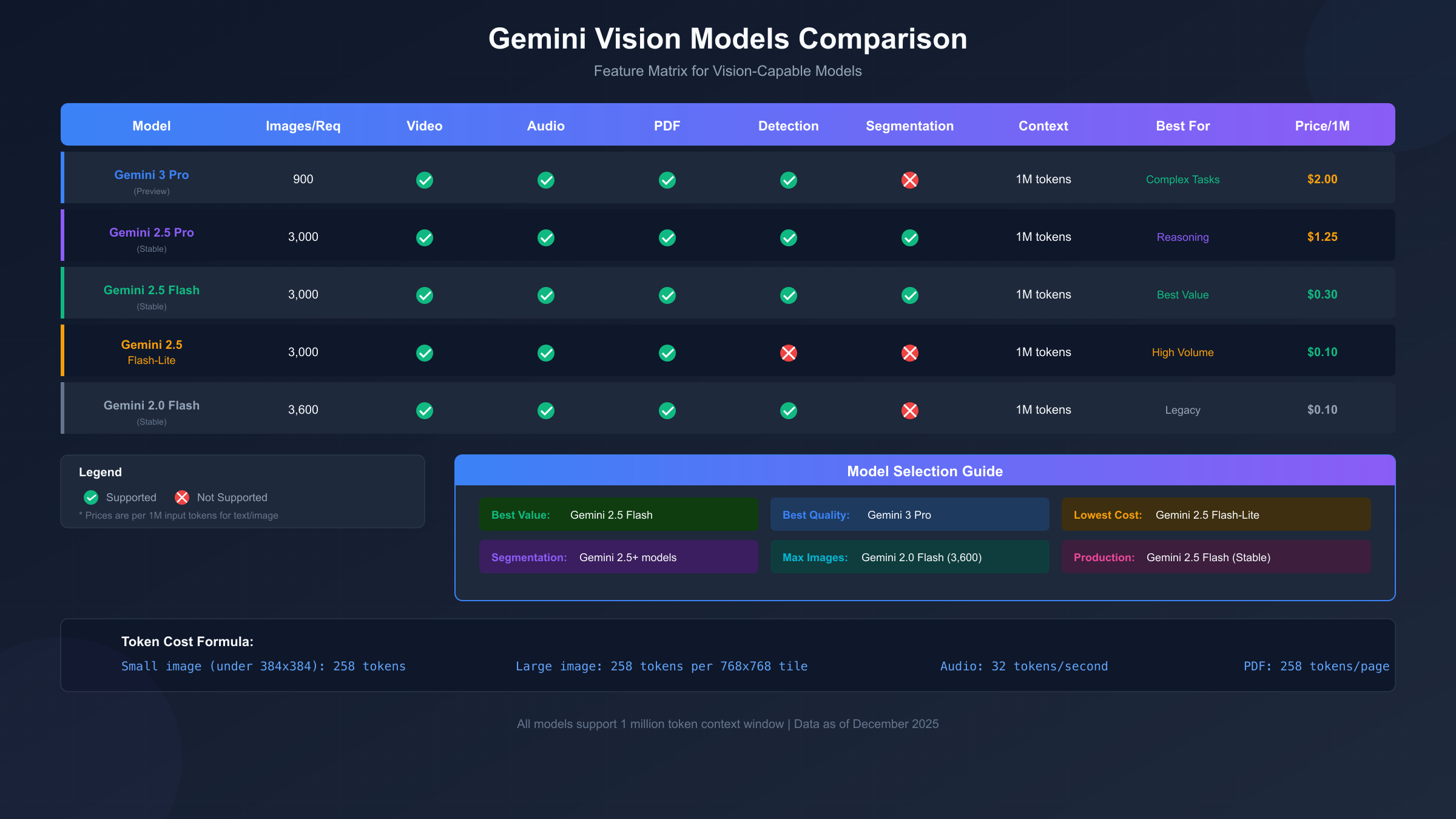
| Model | Images/Request | Detection | Segmentation | Price/1M Tokens | Best Use Case |
|---|---|---|---|---|---|
| Gemini 3 Pro | 900 | Yes | No | $2.00 | Complex analysis |
| Gemini 2.5 Pro | 3,000 | Yes | Yes | $1.25 | Reasoning tasks |
| Gemini 2.5 Flash | 3,000 | Yes | Yes | $0.30 | Production (Recommended) |
| Gemini 2.5 Flash-Lite | 3,000 | No | No | $0.10 | High volume |
| Gemini 2.0 Flash | 3,600 | Yes | No | $0.10 | Legacy support |
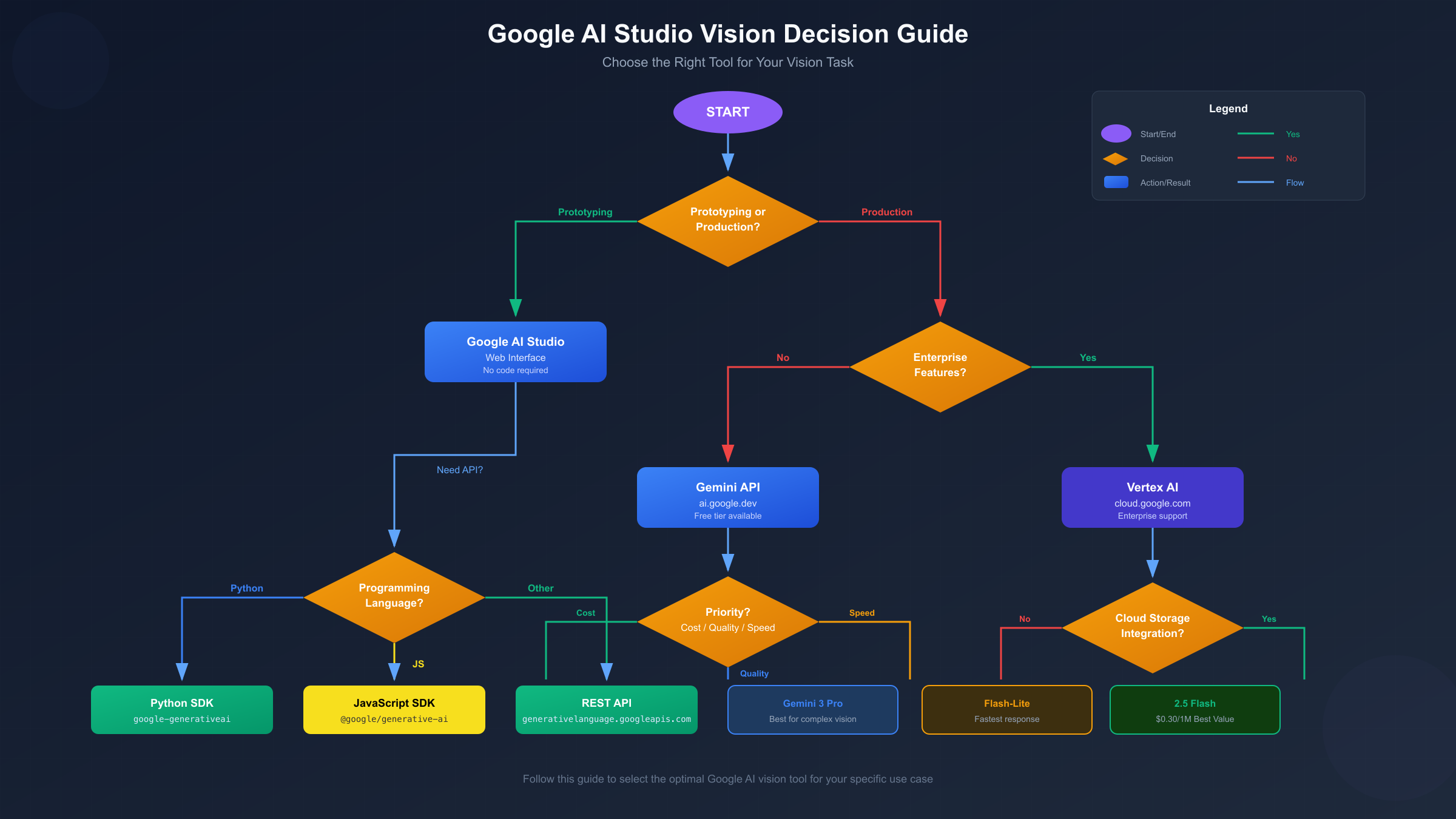
Model selection strategy should consider several factors beyond raw capability. For development and prototyping, start with Gemini 2.5 Flash to validate your approach at reasonable cost. Move to Gemini 3 Pro only for specific tasks that demonstrably benefit from its enhanced capabilities. For high-volume production workloads, establish quality benchmarks with Flash, then test Flash-Lite to determine if the cost savings outweigh any quality reduction for your specific use case. For more on managing API limits effectively, see our Gemini 2.5 Pro rate limits guide.
Image Formats and Technical Specifications
Understanding technical constraints ensures your applications handle visual content correctly and efficiently. Google AI Studio vision supports specific formats, imposes size limits, and uses a particular token calculation method that directly impacts costs and context window usage.
Supported image formats include five MIME types: PNG (image/png), JPEG (image/jpeg), WebP (image/webp), HEIC (image/heic), and HEIF (image/heif). PNG works best for images with text, screenshots, or graphics requiring lossless quality. JPEG suits photographs where some compression is acceptable. WebP offers excellent compression for web applications. HEIC and HEIF support enables processing images directly from iOS devices without conversion, a convenience that reduces preprocessing overhead.
Size and quantity limits vary by input method. Inline data uploads (base64-encoded images) work within a 20MB total request size limit. For larger files or when reusing images across multiple requests, the Files API supports individual files up to 30MB with Cloud Storage integration extending this to larger sizes in enterprise contexts. The maximum images per request ranges from 900 for Gemini 3 Pro to 3,600 for Gemini 2.0 Flash models, with most 2.5 series models supporting 3,000 images.
Token calculation directly impacts costs and requires careful consideration for high-volume applications. Images 384x384 pixels or smaller consume 258 tokens regardless of exact dimensions. Larger images are automatically tiled into 768x768 pixel segments, each consuming 258 tokens. A 2048x2048 image would require 9 tiles (3x3 grid), totaling approximately 2,322 tokens just for the image before any prompt text.
| Image Size | Tiles | Token Cost |
|---|---|---|
| 384x384 or smaller | 1 | 258 |
| 768x768 | 1 | 258 |
| 1536x1536 | 4 | 1,032 |
| 2048x2048 | 9 | 2,322 |
| 3072x3072 | 16 | 4,128 |
The media_resolution parameter in Gemini 3 provides granular control over this tradeoff. Higher resolution settings improve the model's ability to read small text and identify fine details but increase token consumption proportionally. For applications processing many images where coarse understanding suffices, lowering resolution can significantly reduce costs. Conversely, OCR applications or detailed analysis tasks benefit from maximum resolution settings.
Best practices for image preparation include several considerations. Verify images are correctly oriented before sending, as the model may misinterpret rotated content. Use clear, well-lit images without blur when possible. For mixed content (images with text), PNG format typically yields better results than highly compressed JPEG. When processing multiple images, consider whether the task requires all images in a single context or can be parallelized across separate requests for better latency.
Using Vision in Google AI Studio Interface
The Google AI Studio web interface provides an intuitive environment for testing vision capabilities before implementing API-based solutions. Understanding this interface accelerates development by allowing rapid iteration on prompts and immediate feedback on model responses.
Accessing AI Studio requires only a Google account. Navigate to ai.google.dev/aistudio and sign in to reach the main workspace. The interface presents a prompt editor where you can enter text instructions, with options to attach files including images, PDFs, and other supported media types. The right panel displays model configuration options including temperature, model selection, and safety settings.
Creating a vision prompt involves combining text instructions with visual content. Click the attachment icon or drag an image directly into the prompt area. The interface supports multiple images in a single prompt, enabling comparative analysis or multi-image understanding tasks. Write your text prompt describing what you want the model to analyze or generate about the image. For example, "Describe the main objects in this image and estimate their relative positions" provides clear direction for the model.
Testing and iteration becomes straightforward through the interface's immediate feedback. After submitting a prompt, responses appear within seconds for most requests. If the output doesn't match expectations, refine your prompt wording, adjust temperature settings for more or less creative responses, or try a different model. Save successful prompts as templates for reuse. The interface also provides a "Get code" button that generates equivalent API calls in multiple languages, bridging the gap between prototyping and implementation.
Structured prompts improve consistency for production applications. Instead of free-form questions, specify the expected output format explicitly. For example: "Analyze this product image and return a JSON object with fields: category (string), color_dominant (string), estimated_price_range (string), quality_score (1-10)." This approach yields more predictable, parseable outputs suitable for downstream processing.
Multimodal conversations allow iterative refinement of understanding. Start with a broad question about an image, then ask follow-up questions in the same conversation context. The model retains awareness of the image across turns, enabling drill-down analysis: "What objects are in this room?" followed by "Tell me more about the chair in the corner" without needing to reference the image again explicitly.
Vision API Code Examples: Python, JavaScript, and REST
Implementing vision capabilities programmatically requires understanding the SDK patterns and REST API structure. The following examples demonstrate common operations across the primary supported languages, providing copy-paste starting points for your applications.
Python implementation uses the google-generativeai package, the officially supported SDK for Python developers.
pythonimport google.generativeai as genai
from pathlib import Path


genai.configure(api_key="YOUR_API_KEY")

# Initialize the model
model = genai.GenerativeModel("gemini-2.5-flash")

# Load and analyze an image
image_path = Path("product_photo.jpg")
image_data = image_path.read_bytes()

response = model.generate_content([
    "Analyze this product image. Provide: 1) Product category 2) Key features visible 3) Suggested improvements for the photo",
    {"mime_type": "image/jpeg", "data": image_data}
])

print(response.text)

# Multiple images in one request
image1 = Path("before.jpg").read_bytes()
image2 = Path("after.jpg").read_bytes()

comparison = model.generate_content([
    "Compare these two images and describe the differences",
    {"mime_type": "image/jpeg", "data": image1},
    {"mime_type": "image/jpeg", "data": image2}
])

print(comparison.text)
JavaScript implementation uses the @google/generative-ai npm package for Node.js and browser environments.
javascriptimport { GoogleGenerativeAI } from "@google/generative-ai";
import * as fs from "fs";

const genAI = new GoogleGenerativeAI("YOUR_API_KEY");

async function analyzeImage() {
  const model = genAI.getGenerativeModel({ model: "gemini-2.5-flash" });

  // Read image and convert to base64
  const imageData = fs.readFileSync("product_photo.jpg");
  const base64Image = imageData.toString("base64");

  const result = await model.generateContent([
    "Describe this image in detail, including any text visible",
    {
      inlineData: {
        mimeType: "image/jpeg",
        data: base64Image
      }
    }
  ]);

  console.log(result.response.text());
}

async function detectObjects() {
  const model = genAI.getGenerativeModel({ model: "gemini-2.5-flash" });

  const imageData = fs.readFileSync("street_scene.jpg").toString("base64");

  const result = await model.generateContent([
    "Detect all objects in this image. Return JSON with format: [{object: string, confidence: number, bounding_box: {x, y, width, height}}]",
    {
      inlineData: {
        mimeType: "image/jpeg",
        data: imageData
      }
    }
  ]);

  console.log(result.response.text());
}

analyzeImage();
REST API provides language-agnostic access using standard HTTP requests.
bash# Basic image analysis
curl -X POST \
  "https://generativelanguage.googleapis.com/v1beta/models/gemini-2.5-flash:generateContent?key=YOUR_API_KEY" \
  -H "Content-Type: application/json" \
  -d '{
    "contents": [{
      "parts": [
        {"text": "What is in this image?"},
        {
          "inline_data": {
            "mime_type": "image/jpeg",
            "data": "'$(base64 -i image.jpg)'"
          }
        }
      ]
    }]
  }'

# Using Files API for larger files
# Step 1: Upload file
curl -X POST \
  "https://generativelanguage.googleapis.com/upload/v1beta/files?key=YOUR_API_KEY" \
  -H "X-Goog-Upload-Protocol: raw" \
  -H "X-Goog-Upload-Command: upload" \
  -H "Content-Type: image/jpeg" \
  --data-binary @large_image.jpg

# Step 2: Use file URI in generation request
curl -X POST \
  "https://generativelanguage.googleapis.com/v1beta/models/gemini-2.5-flash:generateContent?key=YOUR_API_KEY" \
  -H "Content-Type: application/json" \
  -d '{
    "contents": [{
      "parts": [
        {"text": "Analyze this document"},
        {"file_data": {"file_uri": "files/abc123xyz"}}
      ]
    }]
  }'
Error handling requires attention in production applications. Network timeouts, rate limits, and content filtering can all cause request failures. Implement retry logic with exponential backoff for transient errors. For rate limit management across multiple providers, services like laozhang.ai provide unified API gateways that handle load balancing and failover automatically.
Pricing and Cost Optimization Strategies
Understanding pricing structure and implementing optimization strategies significantly impacts the economics of vision-enabled applications. Token-based pricing means both input images and output text contribute to costs, requiring attention to both prompt design and response handling.
Base pricing for vision follows the same token-based model as text, with images converted to tokens as described earlier. For Gemini 2.5 Flash at $0.30 per million input tokens, a typical image analysis might cost approximately $0.00008 per image (assuming 258 tokens per image). At scale, processing 100,000 images would cost roughly $8 for the image tokens alone, plus additional costs for prompt text and output tokens.
| Scenario | Images | Tokens/Image | Input Cost | Output Est. | Total |
|---|---|---|---|---|---|
| Product catalog | 10,000 | 258 | $0.77 | $0.50 | ~$1.27 |
| Document OCR | 1,000 | 516 | $0.15 | $2.00 | ~$2.15 |
| High-res analysis | 1,000 | 2,322 | $0.70 | $1.00 | ~$1.70 |
| Video frames | 100,000 | 258 | $7.74 | $5.00 | ~$12.74 |
Resolution optimization offers the most significant cost reduction opportunity. For tasks not requiring fine detail recognition, resize images to smaller dimensions before sending. An image reduced from 2048x2048 to 768x768 drops from 9 tiles (2,322 tokens) to 1 tile (258 tokens), a 9x cost reduction. Implement resolution selection based on task requirements: thumbnails for classification, medium resolution for general understanding, full resolution only for text extraction or detailed analysis.
Batch processing through the Batch API provides a 50% cost reduction for non-time-sensitive workloads. Jobs submitted to the batch endpoint process asynchronously with completion within 24 hours. For processing large image archives, nightly report generation, or content indexing tasks, batch processing halves the effective cost while eliminating rate limit concerns.
Context caching benefits applications repeatedly analyzing similar content or using consistent system prompts. Cached tokens cost only a fraction of standard input tokens, making it economical for applications with large, reusable contexts. Enable caching when using lengthy system instructions or when the same reference images inform multiple queries.
Cost comparison with alternatives positions Gemini favorably. OpenAI's GPT-4 Vision charges higher rates for equivalent capability. Self-hosted models eliminate per-token costs but require infrastructure investment and maintenance. For most applications, Gemini 2.5 Flash provides the best value proposition, with Flash-Lite offering additional savings for simpler tasks. For detailed pricing analysis, see our comprehensive Gemini API pricing guide.
Monitoring and optimization workflow should include tracking actual costs against projections. Implement logging to capture token usage per request type. Identify opportunities where lower-resolution settings maintain acceptable quality. Consider model tiering strategies where initial screening uses Flash-Lite while detailed analysis escalates to Flash or Pro only when needed. Services like laozhang.ai provide cost analytics across multiple AI providers, helping identify optimization opportunities across your entire AI infrastructure.
Advanced Vision Features: Object Detection, Segmentation, and Documents
Beyond basic image understanding, Gemini models offer advanced capabilities for specific vision tasks. Understanding these features and their model requirements enables sophisticated applications that extract structured information from visual content.
Object detection (available in Gemini 2.0+) identifies distinct objects within images and returns bounding box coordinates. The model outputs coordinates normalized to a 0-1000 scale relative to image dimensions, requiring developers to scale values based on actual pixel dimensions. This approach enables building applications that highlight detected objects, crop specific regions, or perform spatial analysis.
python# Object detection example
model = genai.GenerativeModel("gemini-2.5-flash")

response = model.generate_content([
    """Detect all products visible in this retail shelf image.
    Return JSON array with:
    [{
      "product_type": string,
      "bounding_box": {"x_min": int, "y_min": int, "x_max": int, "y_max": int}
    }]
    Coordinates should be 0-1000 scale.""",
    {"mime_type": "image/jpeg", "data": shelf_image}
])

detections = json.loads(response.text)
# Scale coordinates to actual image dimensions
for d in detections:
    d["bounding_box"]["x_min"] = d["bounding_box"]["x_min"] * img_width // 1000
    # ... scale other coordinates
Segmentation (available in Gemini 2.5 models) provides pixel-level object boundaries rather than just bounding boxes. The model returns contour masks as base64-encoded PNG probability maps, enabling precise object isolation for compositing, measurement, or detailed analysis. This capability proves valuable for applications requiring exact object boundaries rather than approximate rectangular regions.
Document processing leverages vision capabilities for PDF analysis, extracting both text and understanding layout, tables, charts, and diagrams. PDFs up to 1,000 pages and 50MB can be processed, with each page consuming approximately 258 tokens. The model understands document structure, enabling queries like "summarize the financial data in section 3" or "extract all action items from meeting notes."
python# PDF document analysis
pdf_path = Path("quarterly_report.pdf")
pdf_data = pdf_path.read_bytes()

model = genai.GenerativeModel("gemini-2.5-flash")

response = model.generate_content([
    "Extract all quarterly revenue figures from this report as a JSON array",
    {"mime_type": "application/pdf", "data": pdf_data}
])
Video processing (through Veo models) extends vision capabilities to temporal analysis. While the core Gemini models can analyze video frames, dedicated video models like Veo 3.1 generate video content from text or image prompts. Video understanding involves extracting key frames or uploading video files for the model to analyze sequentially. Output videos range from 4-8 seconds at 720p or 1080p resolution.
Audio understanding completes the multimodal picture, with Gemini processing audio at 32 tokens per second for up to 9.5 hours of content. Combined with vision, this enables analyzing video content with both visual and audio understanding, useful for content moderation, accessibility transcription, or multimedia analysis applications.
For detailed information about Gemini's vision limitations and known issues, our Gemini 3 multimodal vision limitations guide provides comprehensive coverage of edge cases and workarounds.
FAQ and Best Practices
Developers commonly encounter specific questions and challenges when implementing vision capabilities. The following addresses the most frequent issues along with proven solutions.
Q: What's the best model for general vision tasks in production?
Gemini 2.5 Flash offers the optimal balance of capability, cost, and reliability for most production workloads. It supports all major features including object detection and segmentation at $0.30 per million input tokens. Reserve Gemini 3 Pro for tasks specifically requiring its enhanced reasoning capabilities, and use Flash-Lite only after verifying it meets quality requirements for your specific use case.
Q: How do I handle images that fail content safety filters?
Gemini applies safety filters that may block certain content types including medical imagery, potentially violent content, or images the system deems inappropriate. For legitimate use cases requiring such content, use the safety_settings parameter to adjust thresholds. Enterprise customers through Vertex AI have access to additional configuration options. Always ensure your use case complies with Google's acceptable use policies.
Q: What resolution should I use for OCR tasks?
Text extraction benefits significantly from higher resolution settings. For documents with small text, use the original resolution or explicitly request high resolution through the media_resolution parameter. For printed text at reasonable sizes, medium resolution often suffices. Test with your specific content to find the minimum resolution that maintains acceptable accuracy.
Q: How can I reduce hallucinations in image descriptions?
Lower temperature settings (0.1-0.3) reduce creative embellishment in favor of conservative descriptions. Request that the model explicitly state uncertainty rather than guessing. Ask for structured output with confidence scores. For critical applications, implement verification by asking the model to describe specific elements and comparing responses across multiple requests.
Q: Can I use vision features for real-time applications?
While not truly real-time, latency for simple vision tasks typically ranges from 500ms to 2 seconds depending on image complexity and model selection. Flash-Lite offers the lowest latency. For applications requiring faster response, consider preprocessing strategies like maintaining warm connections, using smaller images, and parallelizing requests where possible.
Best practice: Prompt engineering for vision follows specific principles. Place images before text in the content array for single-image prompts. Be specific about what aspects of the image to analyze. Request structured output formats (JSON, lists) for parseable responses. Include examples of expected output format when consistency matters.
Best practice: Error handling requires comprehensive coverage. Implement retry logic with exponential backoff for rate limits and transient errors. Validate image formats and sizes before sending to avoid unnecessary API calls. Log failures with sufficient context for debugging. For production systems requiring high reliability across multiple AI providers, laozhang.ai provides unified API access with automatic failover and comprehensive error handling.
Best practice: Cost monitoring prevents unexpected bills. Set up billing alerts in Google Cloud Console. Implement application-level spending limits. Track token usage per request category to identify optimization opportunities. Consider batch processing for non-urgent workloads to leverage the 50% cost reduction.
Best practice: Security considerations protect sensitive visual data. Avoid sending personally identifiable information in images unless necessary. Understand data retention policies for uploaded files. For enterprise deployments requiring data residency controls, Vertex AI provides additional compliance options. Never embed API keys in client-side code; use server-side proxies or authenticated backends.
The combination of powerful vision capabilities, competitive pricing, and straightforward implementation makes Google AI Studio an excellent choice for developers building visual AI applications. By understanding the model options, technical specifications, and best practices covered in this guide, you can implement effective vision solutions while optimizing for both quality and cost. For additional support with API integration or to explore unified access across multiple AI providers, laozhang.ai offers comprehensive API gateway services designed for production AI applications.