
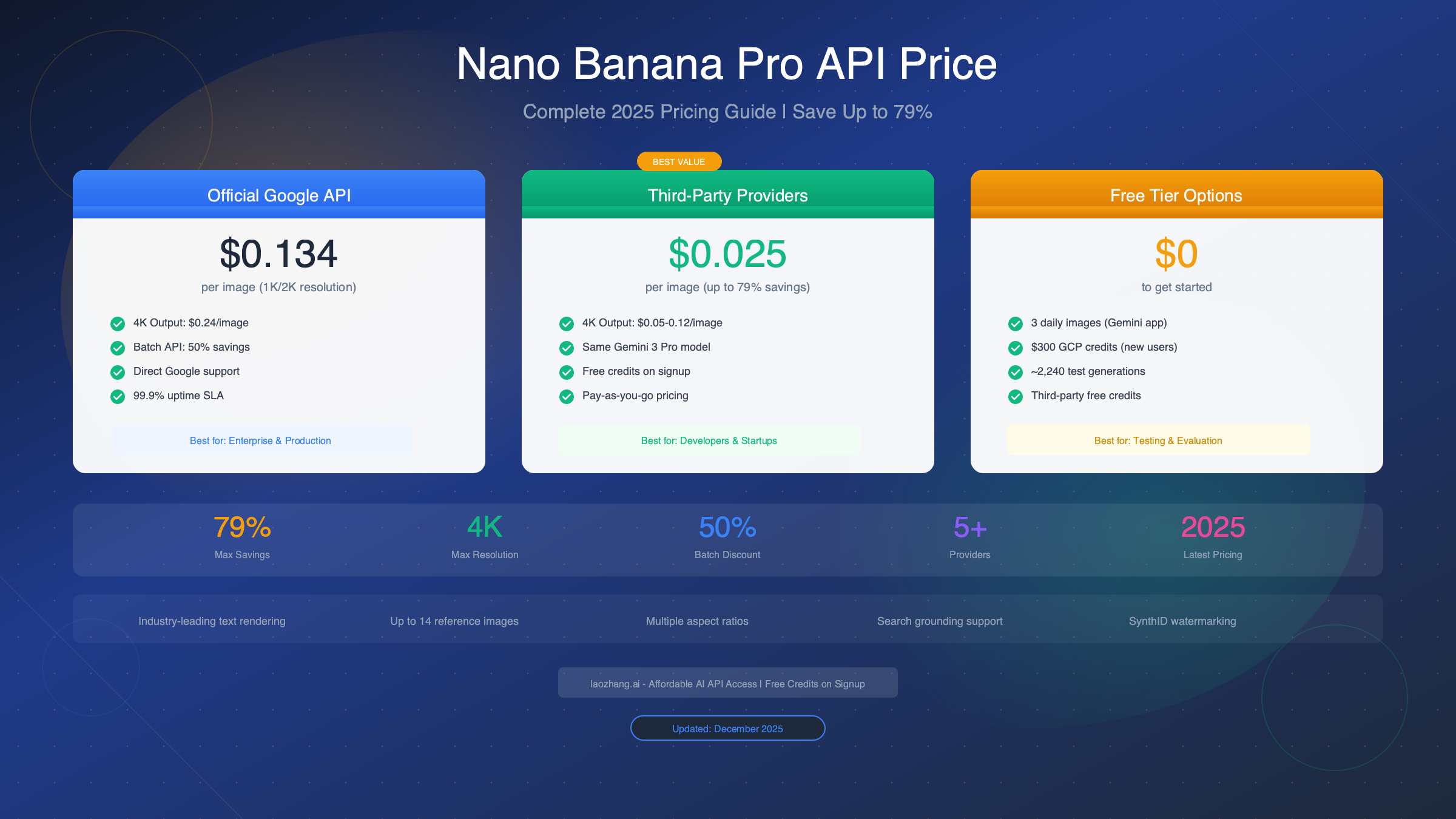
Nano Banana Pro API pricing ranges from $0.134 to $0.24 per image through Google's official API, with third-party providers offering rates as low as $0.02 per image—a savings of up to 79%. As of December 2025, this model (officially known as Gemini 3 Pro Image) supports 1K, 2K, and 4K resolution output with industry-leading text rendering accuracy. Batch API processing offers 50% savings at $0.067/image for standard resolutions. Free tier access includes 3 daily images via the Gemini app plus $300 in Google Cloud credits for new users, enabling approximately 2,240 test generations before incurring any costs.
Quick Answer: How Much Does Nano Banana Pro API Cost?
For developers and businesses evaluating Nano Banana Pro for production use, understanding the complete pricing landscape is essential before making infrastructure decisions. The pricing structure involves multiple dimensions—resolution, access method, and provider choice—each significantly impacting your total cost of ownership.
The Quick Reference:
| Access Method | 1K/2K Images | 4K Images | Best For |
|---|---|---|---|
| Google Standard API | $0.134/image | $0.24/image | Enterprise with SLA needs |
| Google Batch API | $0.067/image | $0.12/image | Non-urgent bulk processing |
| Third-Party (laozhang.ai) | $0.025/image | $0.05/image | Cost-conscious developers |
| Third-Party (Kie.ai) | $0.02/image | $0.09/image | Startups and testing |
| Free Tier | $0 | Limited | Evaluation and prototyping |
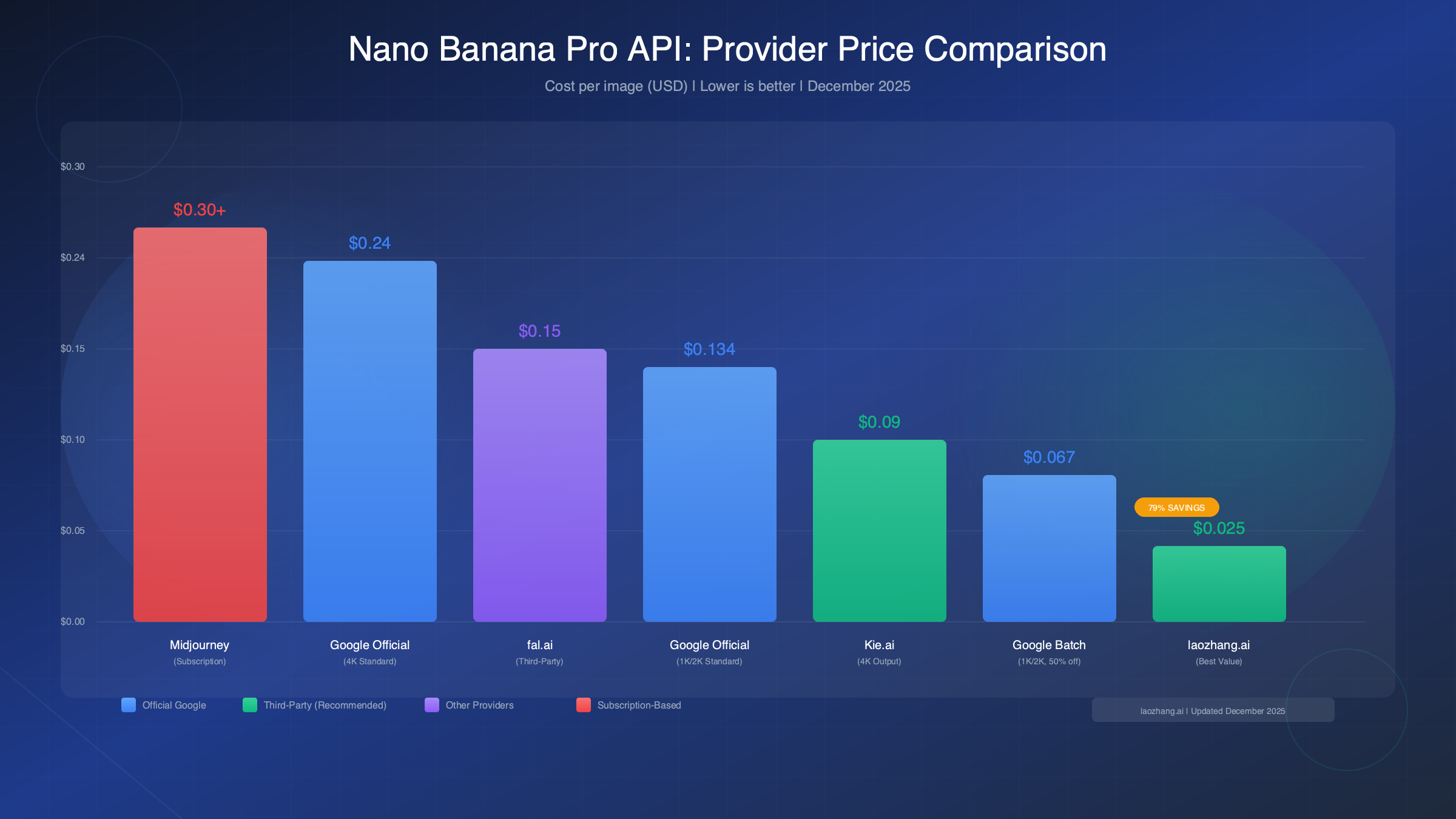
The stark price difference between official and third-party providers often surprises developers encountering this ecosystem for the first time. A project generating 1,000 images monthly would cost $134 through Google's standard API but only $25 through optimized third-party access—an annual savings exceeding $1,300. This gap exists because third-party providers leverage volume licensing agreements and infrastructure optimization to offer the same underlying Gemini 3 Pro Image model at reduced rates.
Understanding these pricing tiers requires context about what you're actually paying for. Google's official API pricing includes guaranteed uptime SLAs, direct technical support, and enterprise compliance certifications. Third-party providers trade some of these enterprise features for dramatically lower costs while still providing access to the identical AI model. For many use cases—particularly prototyping, small-scale production, and cost-sensitive applications—the third-party route delivers equivalent results at a fraction of the cost.
Complete Official Google API Pricing Breakdown
Google structures Nano Banana Pro pricing through a token-based system that translates to per-image costs varying by resolution. The official pricing model, accessible through both Google AI Studio and Vertex AI, operates on three cost components: text input tokens, thinking output tokens, and image generation tokens. Understanding each component helps predict and optimize your actual spending.
Token-Based Pricing Structure:
| Component | Standard Rate | Batch Rate | Notes |
|---|---|---|---|
| Text Input | $2.00/million tokens | $1.00/million tokens | Prompt text |
| Thinking Output | $12.00/million tokens | $6.00/million tokens | Model reasoning |
| Image Input | $0.0011/image | $0.0011/image | Reference images |
| 1K/2K Output | $0.134/image | $0.067/image | 1,120 tokens |
| 4K Output | $0.24/image | $0.12/image | 2,000 tokens |
The image generation costs dominate your bill in practice. Text prompt costs remain negligible—even elaborate prompts with 500 words consume only about $0.001 worth of input tokens. The "thinking" token costs apply to the model's internal reasoning process, which typically adds $0.01-0.03 per generation depending on prompt complexity. Image input costs for reference images remain fixed at approximately $0.0011 regardless of resolution.
Why Resolution Matters for Your Budget:
Higher resolution images consume more "image tokens" during generation. A 1K or 2K image uses approximately 1,120 tokens internally, while a 4K image consumes about 2,000 tokens. This nearly 2x token increase explains the corresponding price jump from $0.134 to $0.24. The practical implication: reserve 4K output for content requiring maximum detail—marketing hero images, print materials, or detailed product photography—while using 2K for social media, thumbnails, and iterative prototyping.
Batch API: The 50% Discount Strategy
Google's Batch API offers identical output quality at half the cost, with one trade-off: you may wait up to 24 hours for results. The system queues your requests and processes them during off-peak capacity windows. For workflows that don't require real-time generation—background content creation, overnight batch processing, or scheduled marketing asset production—the Batch API represents the most cost-effective official Google option.
To access Batch API pricing, you submit requests through Vertex AI's batch prediction endpoint rather than the standard online prediction API. The request format remains identical; only the endpoint changes. This architectural difference allows Google to optimize infrastructure utilization while passing savings to users willing to accept asynchronous delivery.
Free Tier and Trial Options: Getting Started Without Spending
Before committing budget to Nano Banana Pro, several legitimate free access paths allow extensive testing and evaluation. These options provide enough capacity for prototyping, prompt engineering, and production feasibility assessment without any upfront costs.
Gemini App Free Tier
The most accessible free option runs through Google's consumer Gemini application, available on web, Android, and iOS. Free users receive approximately 3 Nano Banana Pro generations daily at standard resolution. While limited, this allowance provides hands-on experience with the model's capabilities, text rendering accuracy, and style interpretation. Mobile app users consistently report slightly higher quotas than desktop users, though Google doesn't officially document this difference.
The Gemini app free tier includes visible watermarks (SynthID) on all generated images, and outputs are limited to standard resolution. These restrictions typically matter less for evaluation purposes, where understanding the model's creative capabilities takes priority over production-ready output.
Google Cloud $300 Credits
New Google Cloud Platform accounts receive $300 in free credits applicable to Gemini API usage, including Nano Banana Pro. At official standard pricing of $0.134 per image, this credit enables approximately 2,240 generations—substantial capacity for thorough evaluation and initial production testing.
Activating these credits requires:
- Creating a Google Cloud account at cloud.google.com
- Enabling billing (credit card required for verification, not charged during trial)
- Enabling the Vertex AI API
- Generating an API key through Google AI Studio
The $300 credit expires after 90 days or upon exhaustion, whichever comes first. For serious evaluation purposes, this represents the most generous official free tier available for any major image generation API.
Third-Party Free Credits
Several third-party providers offer signup bonuses specifically for Nano Banana Pro access. Services like laozhang.ai provide free credits upon registration, allowing immediate testing without payment method requirements. These credits typically cover 20-50 image generations—sufficient for API integration testing and basic prompt optimization.
The third-party free tier advantage lies in reduced friction: no Google Cloud account configuration, no credit card verification, and immediate access through standard REST API calls. For developers evaluating whether Nano Banana Pro fits their technical requirements, this path offers the fastest route to working code.
For those exploring related Google AI capabilities, our complete Gemini API pricing guide covers the full model family including text generation and multimodal capabilities.
Third-Party Providers: Cheaper Alternatives That Work
Third-party API providers offer Nano Banana Pro access at 50-79% below official Google pricing. These services operate as authorized resellers or infrastructure optimization layers, providing the identical Gemini 3 Pro Image model through standardized API interfaces. For cost-conscious developers, understanding these alternatives often determines project viability.
Provider Comparison Matrix:
| Provider | 2K Price | 4K Price | Free Credits | Documentation | Support |
|---|---|---|---|---|---|
| laozhang.ai | $0.025 | $0.05 | Yes | Comprehensive | 24/7 |
| Kie.ai | $0.02 | $0.09 | Yes | Good | Business hours |
| NanoBananaAPI.ai | $0.02 | $0.12 | Yes | Basic | Email only |
| fal.ai | $0.15 | $0.15 | No | Excellent | Community |
Why Third-Party Pricing Is Lower
Third-party providers achieve lower prices through several mechanisms. Volume licensing agreements with Google provide access at reduced per-unit rates compared to individual developer accounts. Infrastructure optimization—including request batching, intelligent routing, and regional API selection—further reduces operational costs. These savings flow to customers as competitive pricing while providers maintain sustainable margins.
The critical question for production use: do these cost savings compromise quality or reliability? The underlying model remains Google's Gemini 3 Pro Image regardless of access method. Generated images are byte-for-byte identical whether accessed through official channels or third-party providers. The differences lie in peripheral factors: support responsiveness, uptime guarantees, and enterprise compliance documentation.
When to Choose Third-Party vs Official
Third-party providers work well for: development and testing environments, startups with constrained budgets, applications where image generation isn't mission-critical, and projects without strict enterprise compliance requirements. Services like laozhang.ai provide production-grade reliability for these use cases at a fraction of official costs.
Official Google API makes sense for: applications requiring guaranteed SLAs documented for compliance, enterprises needing direct vendor relationships for procurement, projects where support escalation paths matter, and organizations with existing Google Cloud commitments providing additional volume discounts.
Risk Assessment for Third-Party Usage
Third-party services introduce dependency on an additional vendor's infrastructure and business continuity. While established providers like laozhang.ai maintain strong operational track records, developers should implement basic resilience patterns: rate limit handling, fallback logic, and monitoring for service degradation. These practices apply regardless of provider choice and represent standard production hygiene for any external API dependency.
Money-Saving Strategies That Actually Work
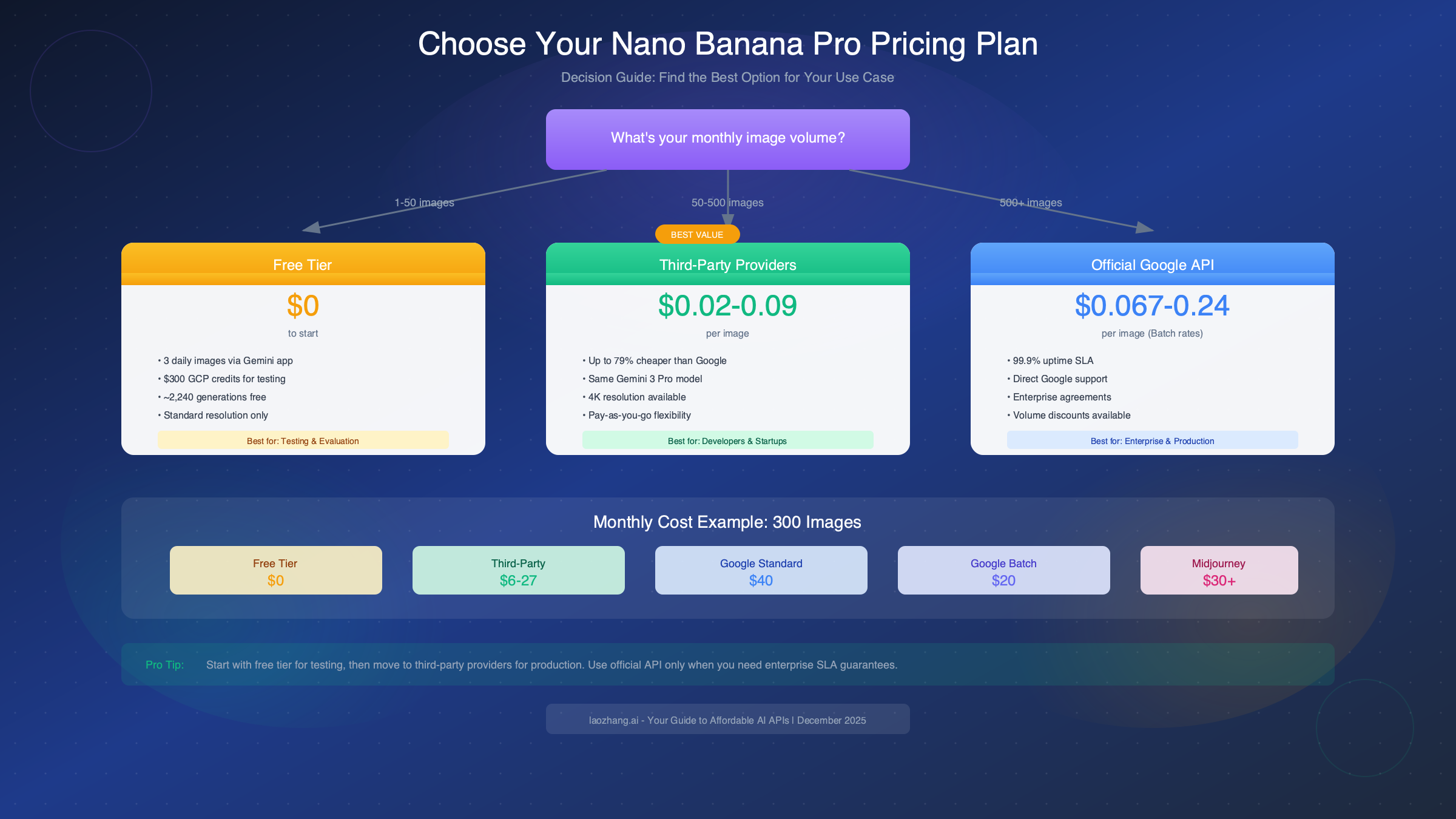
Beyond choosing the right provider, several optimization strategies compound to significantly reduce Nano Banana Pro costs. Implementing even a subset of these techniques often cuts spending by 30-50% compared to naive API usage.
Resolution Optimization: Matching Output to Purpose
The simplest cost reduction comes from matching output resolution to actual requirements. A 4K image costs nearly twice as much as 2K, yet many applications never display images at resolutions where this difference becomes visible. Social media posts, email thumbnails, web content, and mobile app assets typically render at effective resolutions below 2K—paying for 4K output wastes budget without visible benefit.
Reserve 4K generation for specific high-value use cases: hero images for marketing campaigns, print-ready materials, product photography for e-commerce galleries, and content specifically targeting 4K displays. For everything else, 2K output delivers equivalent perceived quality at half the cost.
Batch API for Non-Urgent Workflows
Google's Batch API cuts costs by 50% in exchange for potentially delayed delivery (up to 24 hours, though often faster). Many production workflows accommodate this trade-off naturally. Content pipelines that generate tomorrow's social posts, overnight marketing asset refreshes, and scheduled content creation all fit the Batch API pattern without compromising user experience.
Hybrid approaches work effectively: route urgent requests through standard API while queuing non-time-sensitive work for batch processing. This strategy captures batch savings for the majority of volume while maintaining real-time capability when needed.
Prompt Engineering for Efficiency
Concise, specific prompts reduce token consumption and often improve output quality simultaneously. Verbose prompts with redundant descriptions increase input token costs while potentially confusing the model. Effective prompts communicate clear visual intent in minimal words:
| Less Effective | More Effective |
|---|---|
| "I would like you to create a beautiful image of a mountain landscape with snow on the peaks and a clear blue sky with some fluffy white clouds..." | "Snow-capped mountain, clear blue sky, fluffy clouds, photorealistic" |
The efficient prompt achieves identical results while consuming fewer input tokens. Over thousands of generations, these token savings accumulate meaningfully.
Reference Image Reuse
When generating multiple images requiring the same style reference, brand assets, or character references, upload reference images once and reuse them across requests. Nano Banana Pro supports up to 14 reference images per request. Uploading the same logo or brand guide repeatedly across separate requests wastes image input tokens and increases latency.
Structure workflows to batch style-consistent generations together, reusing uploaded references rather than re-uploading for each request. This optimization reduces both cost and generation time.
Code Examples and API Implementation
Unlike other guides that stop at pricing tables, practical implementation often determines whether Nano Banana Pro fits your project. These working code examples demonstrate API integration patterns, from basic generation to production-ready implementations with cost tracking.
Basic Python Implementation
pythonimport google.generativeai as genai
from google.generativeai import types
import os


genai.configure(api_key=os.environ.get("GEMINI_API_KEY"))

# Select model - Nano Banana Pro
model = genai.GenerativeModel("gemini-3-pro-image-preview")

def generate_image(prompt: str, resolution: str = "2k") -> bytes:
    """
    Generate image with Nano Banana Pro.

    Estimated costs per call:
    - 2k resolution: ~\$0.134 (standard), ~\$0.067 (batch)
    - 4k resolution: ~\$0.24 (standard), ~\$0.12 (batch)
    """

    # Configure generation parameters
    generation_config = types.GenerationConfig(
        response_modalities=["image"],
        output_mime_type="image/png",
        # Set resolution: "1k", "2k", or "4k"
        image_resolution=resolution
    )

    response = model.generate_content(
        prompt,
        generation_config=generation_config
    )

    # Extract image bytes from response
    if response.candidates and response.candidates[0].content.parts:
        for part in response.candidates[0].content.parts:
            if hasattr(part, 'inline_data'):
                return part.inline_data.data

    raise ValueError("No image generated in response")

# Example usage
image_bytes = generate_image(
    "A futuristic cityscape at sunset, cyberpunk style, neon lights reflecting on wet streets",
    resolution="2k"
)

with open("output.png", "wb") as f:
    f.write(image_bytes)
Using Third-Party Provider (laozhang.ai)
For cost-optimized access, third-party providers offer OpenAI-compatible endpoints requiring minimal code changes:
pythonimport openai
import os

# Configure for third-party provider
# Cost: ~\$0.025/image (79% savings vs Google)
client = openai.OpenAI(
    api_key=os.environ.get("LAOZHANG_API_KEY"),
    base_url="https://api.laozhang.ai/v1"
)

def generate_image_affordable(prompt: str, size: str = "1024x1024") -> str:
    """
    Generate image via third-party provider.

    Estimated cost: ~\$0.025 per image
    Savings: 79% vs Google official API
    """

    response = client.images.generate(
        model="gemini-3-pro-image",  # Nano Banana Pro
        prompt=prompt,
        size=size,
        n=1
    )

    return response.data[0].url

# Example usage
image_url = generate_image_affordable(
    "Professional headshot of a business executive, studio lighting, neutral background"
)
print(f"Generated image: {image_url}")
Production Implementation with Cost Tracking
For production applications, implement cost tracking to monitor and optimize spending:
pythonfrom dataclasses import dataclass
from datetime import datetime
from typing import Optional
import json

@dataclass
class GenerationCost:
    timestamp: str
    prompt_tokens: int
    image_resolution: str
    estimated_cost_usd: float
    provider: str

class NanoBananaProTracker:
    # Pricing constants (December 2025)
    GOOGLE_PRICES = {
        "1k": 0.134, "2k": 0.134, "4k": 0.24
    }
    BATCH_PRICES = {
        "1k": 0.067, "2k": 0.067, "4k": 0.12
    }
    THIRD_PARTY_PRICES = {
        "1k": 0.025, "2k": 0.025, "4k": 0.05
    }

    def __init__(self, provider: str = "google"):
        self.provider = provider
        self.costs: list[GenerationCost] = []

    def track_generation(
        self,
        prompt: str,
        resolution: str,
        batch: bool = False
    ) -> float:
        """Track cost for a generation request."""

        if self.provider == "google":
            prices = self.BATCH_PRICES if batch else self.GOOGLE_PRICES
        else:
            prices = self.THIRD_PARTY_PRICES

        cost = prices.get(resolution, prices["2k"])
        prompt_tokens = len(prompt.split()) * 1.3  # Rough token estimate

        self.costs.append(GenerationCost(
            timestamp=datetime.now().isoformat(),
            prompt_tokens=int(prompt_tokens),
            image_resolution=resolution,
            estimated_cost_usd=cost,
            provider=self.provider
        ))

        return cost

    def get_total_cost(self) -> float:
        return sum(c.estimated_cost_usd for c in self.costs)

    def get_monthly_projection(self, days_elapsed: int = 1) -> float:
        daily_average = self.get_total_cost() / max(days_elapsed, 1)
        return daily_average * 30

    def export_costs(self, filepath: str):
        with open(filepath, "w") as f:
            json.dump([vars(c) for c in self.costs], f, indent=2)

# Usage example
tracker = NanoBananaProTracker(provider="third_party")

# Track multiple generations
for prompt in ["landscape photo", "product image", "portrait"]:
    cost = tracker.track_generation(prompt, resolution="2k")
    print(f"Generated: ${cost:.3f}")

print(f"Total cost: ${tracker.get_total_cost():.2f}")
print(f"Monthly projection: ${tracker.get_monthly_projection():.2f}")
For developers working with similar APIs, our guide on getting your Gemini API key covers the authentication setup process in detail.
Nano Banana Pro vs Competitors: Is It Worth the Price?
Evaluating Nano Banana Pro's value requires context: how does its pricing compare to alternatives, and what capabilities justify cost differences? This comparison covers the major image generation APIs available in December 2025.
Head-to-Head Pricing Comparison:
| Model | Per-Image Cost | Text Accuracy | Max Resolution | API Access |
|---|---|---|---|---|
| Nano Banana Pro | $0.02-$0.24 | 94% | 4K | Yes |
| DALL-E 3 | $0.016-$0.12 | 78% | 1024x1792 | Yes |
| Midjourney | $0.30-$0.60 | ~40% | 1024x1024 | No official API |
| Imagen 4 | $0.03-$0.10 | 85% | 4K | Limited |
| FLUX Pro | $0.04-$0.08 | 75% | 2K | Yes |
Where Nano Banana Pro Excels
Text rendering accuracy stands as Nano Banana Pro's defining advantage. At 94% legibility for generated text, it dramatically outperforms competitors. DALL-E 3 achieves 78% accuracy, dropping to 31% for non-Latin scripts. Midjourney produces mostly decorative pseudo-text. For applications requiring readable text in images—infographics, social media graphics, instructional content, marketing materials with copy—Nano Banana Pro delivers results others cannot match.
The 4K resolution support enables use cases requiring maximum detail: print materials, hero images for high-resolution displays, and product photography. Combined with support for up to 14 reference images, Nano Banana Pro handles complex creative briefs that simpler models struggle to execute consistently.
Where Competitors Win
DALL-E 3 offers the lowest per-image API costs at $0.016, making it attractive for budget-constrained applications where text rendering matters less. For purely artistic output—abstract imagery, fantasy concepts, atmospheric scenes—Midjourney often produces more aesthetically striking results, though its subscription model and lack of official API limit programmatic usage.
FLUX Pro provides an excellent middle-ground for developers prioritizing API reliability and reasonable pricing without Nano Banana Pro's text rendering capabilities. Our FLUX image generation API guide covers that alternative in detail.
The Value Judgment
Nano Banana Pro justifies its premium over DALL-E for applications where text rendering, high resolution, or reference image support matter. The ~5x cost difference compared to DALL-E 3 buys capabilities those cheaper alternatives cannot provide. For simpler generation tasks without these requirements, lower-cost alternatives may deliver equivalent value.
When accessing Nano Banana Pro through third-party providers at $0.02-$0.05 per image, the value proposition strengthens considerably. At these rates, you're paying DALL-E-comparable prices for superior text accuracy and higher resolution output.
FAQ: Common Pricing Questions Answered
How much does Nano Banana Pro API cost per image?
Official Google pricing is $0.134 per image for 1K/2K resolution and $0.24 per image for 4K resolution through the standard API. The Batch API offers 50% savings at $0.067 and $0.12 respectively. Third-party providers like laozhang.ai offer rates as low as $0.025 per image—79% below official pricing for equivalent output.
Is there a free tier for Nano Banana Pro?
Yes. The Gemini app provides approximately 3 free generations daily. New Google Cloud accounts receive $300 in credits (approximately 2,240 images at standard pricing). Third-party providers typically offer signup bonuses providing 20-50 free generations for testing. For comprehensive free access methods, see our free Gemini image generation guide.
What's the cheapest way to use Nano Banana Pro?
For production usage, third-party API providers offer the lowest costs at $0.02-$0.05 per image. For official Google access, the Batch API at $0.067 per image provides the best value. Combining third-party access with optimized prompts and appropriate resolution selection minimizes costs while maintaining quality.
How does Nano Banana Pro pricing compare to Midjourney?
Nano Banana Pro is significantly cheaper. Midjourney's subscription model works out to approximately $0.30-$0.60 per image depending on plan tier. Nano Banana Pro through third-party providers costs $0.02-$0.05—roughly 10x cheaper—while offering superior text rendering and higher resolution output.
Are there hidden costs beyond per-image pricing?
Text input tokens add approximately $0.001 per prompt, negligible in practice. Thinking tokens add $0.01-$0.03 per generation for complex prompts. Reference image uploads cost $0.0011 each regardless of resolution. In total, these additional costs typically add 5-10% to the base image generation price.
Do third-party providers use the real Nano Banana Pro model?
Yes. Authorized third-party providers access the identical Gemini 3 Pro Image model through volume licensing arrangements. Generated images are functionally identical to official API output. The difference lies in support, SLAs, and compliance documentation rather than model quality.
What's included in enterprise pricing?
Enterprise agreements through Google Cloud offer volume discounts (typically 20-40% below list pricing), dedicated support, custom SLAs, and compliance certifications. Contact Google Cloud sales for enterprise pricing based on projected volume. Third-party enterprise plans typically offer flat monthly rates with unlimited generation within fair-use policies.
Summary and Next Steps
Nano Banana Pro API pricing spans from completely free to $0.24 per image, with the optimal choice depending on your specific requirements. For most developers and startups, third-party providers deliver the best value—offering the identical Gemini 3 Pro Image model at 50-79% below official Google pricing.
Quick Decision Framework:
Start with the free tier to validate Nano Banana Pro meets your technical requirements. The $300 Google Cloud credit provides substantial testing capacity at zero cost. Once you've confirmed the model's capabilities match your needs, choose your production path based on priorities.
For cost optimization, services like laozhang.ai offer immediate API access with free credits for testing, followed by production pricing at $0.025-$0.05 per image. For enterprise requirements demanding SLAs and vendor compliance, Google's official API through Vertex AI provides the necessary guarantees at higher cost.
Regardless of provider choice, implement the optimization strategies covered above: match resolution to purpose, use Batch API for non-urgent workflows, keep prompts concise, and reuse reference images. These practices compound to reduce spending by 30-50% compared to unoptimized usage.
The code examples provided demonstrate working integration patterns for both official and third-party access. Copy these implementations as starting points, then customize for your specific workflow requirements.
For related API pricing information, explore our guides on Midjourney API access and OpenAI API pricing to compare alternatives across the image generation landscape.