
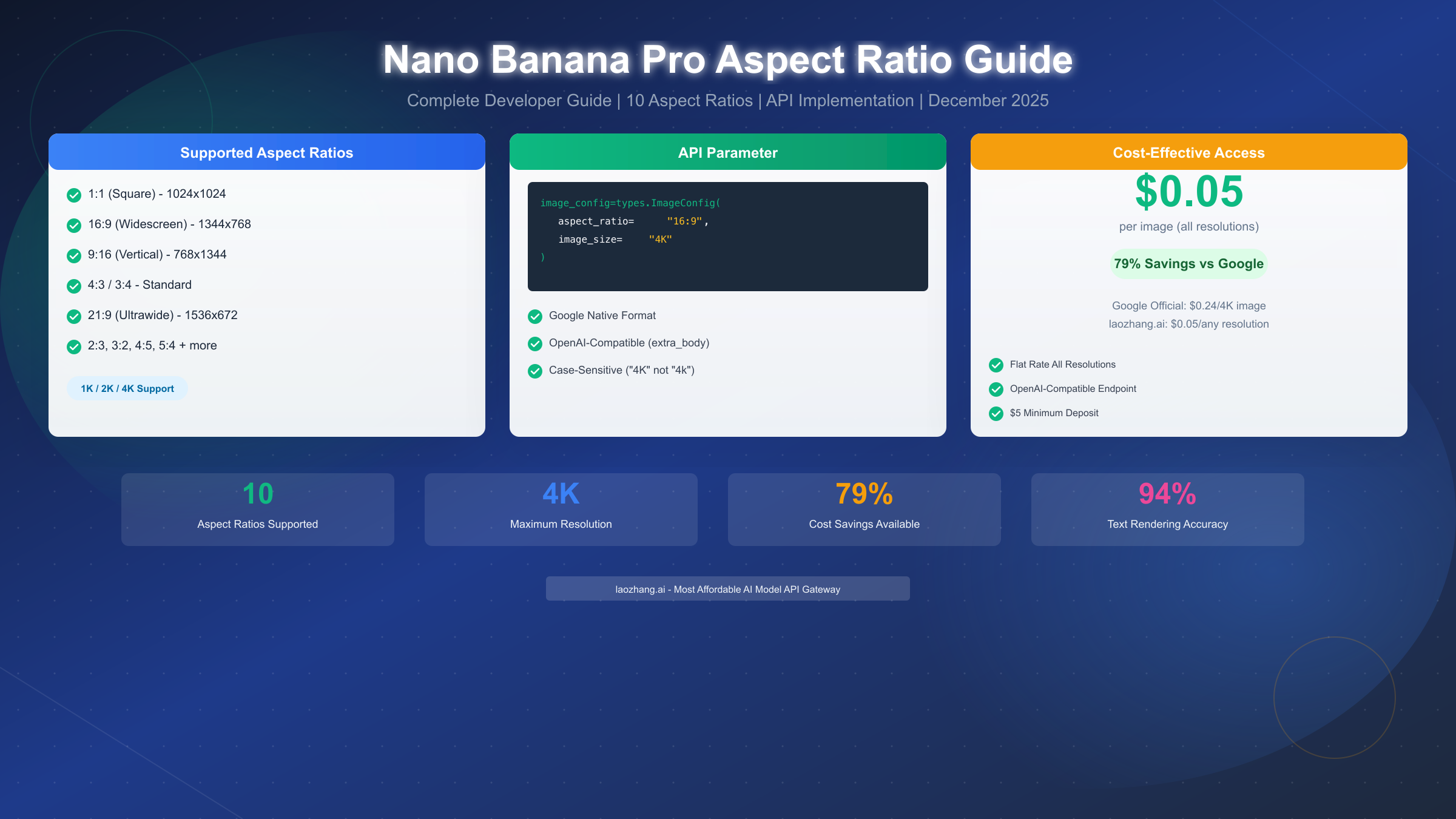
Nano Banana Pro (Gemini 3 Pro Image) supports 10 aspect ratios through the aspectRatio parameter in the API's imageConfig object. Supported values include: 1:1 (square), 2:3, 3:2, 3:4, 4:3, 4:5, 5:4, 9:16 (vertical), 16:9 (widescreen), and 21:9 (ultrawide). As of December 2025, you can specify aspect ratio in both Google's native format and OpenAI-compatible format using the extra_body parameter, with resolution options of 1K, 2K, and 4K available across all ratios.
What Aspect Ratios Does Nano Banana Pro Support?
Nano Banana Pro stands out as Google's most capable image generation model, offering extensive aspect ratio support that rivals and often exceeds competing platforms like DALL-E 3 and Midjourney. Understanding which aspect ratios are available is the first step to creating properly dimensioned images for your specific use case.
The model supports ten distinct aspect ratios, each optimized for different content types and platforms. The 1:1 square format produces perfectly balanced images ideal for profile pictures, avatars, and social media posts where symmetry matters. At 1K resolution, this generates 1024×1024 pixel images, scaling up to 4096×4096 at 4K resolution.
Widescreen and landscape formats represent some of the most popular aspect ratios in Nano Banana Pro. The 16:9 ratio matches standard HD and 4K video dimensions, making it perfect for YouTube thumbnails, desktop wallpapers, and presentation backgrounds. The even wider 21:9 ultrawide format caters to cinematic content, website banners, and panoramic scenes that need that extra horizontal space to breathe.
Vertical and portrait orientations have become increasingly important with the rise of mobile-first content. The 9:16 ratio directly corresponds to smartphone screens and vertical video platforms like TikTok, Instagram Reels, and YouTube Shorts. Content creators targeting mobile audiences should prioritize this format for maximum screen coverage without cropping.
The traditional photography ratios—3:2 and 2:3—mirror DSLR camera sensor proportions, making them ideal for photorealistic content that needs to feel authentic. Similarly, 4:3 and 3:4 match classic film and medium format camera outputs, while 5:4 and 4:5 provide slight variations that work well for Instagram's slightly taller post format.
| Aspect Ratio | Orientation | Primary Use Cases |
|---|---|---|
| 1:1 | Square | Avatars, Profile Pictures, Instagram Posts |
| 16:9 | Landscape | YouTube, Desktop, Presentations |
| 9:16 | Portrait | TikTok, Reels, Stories |
| 4:3 | Landscape | Classic Photos, Presentations |
| 3:4 | Portrait | Pinterest, Portrait Photography |
| 3:2 | Landscape | DSLR Standard, Print Media |
| 2:3 | Portrait | Portrait DSLR, Posters |
| 5:4 | Landscape | Large Format, Art Prints |
| 4:5 | Portrait | Instagram Posts, Social Media |
| 21:9 | Ultrawide | Cinema, Banners, Panoramas |
Complete Aspect Ratio Reference with Pixel Dimensions
Understanding exact pixel dimensions for each aspect ratio and resolution combination is essential for professional work where precise specifications matter. Designers working on print projects, developers building image pipelines, and content creators managing multi-platform distribution all need these concrete numbers.
Nano Banana Pro calculates pixel dimensions using a consistent formula: the short side equals the resolution base value, and the long side equals the short side multiplied by the aspect ratio. For 4K resolution, the base value is 4096 pixels, for 2K it's 2048 pixels, and for 1K it's 1024 pixels. This predictable calculation helps you anticipate output dimensions before making API calls.
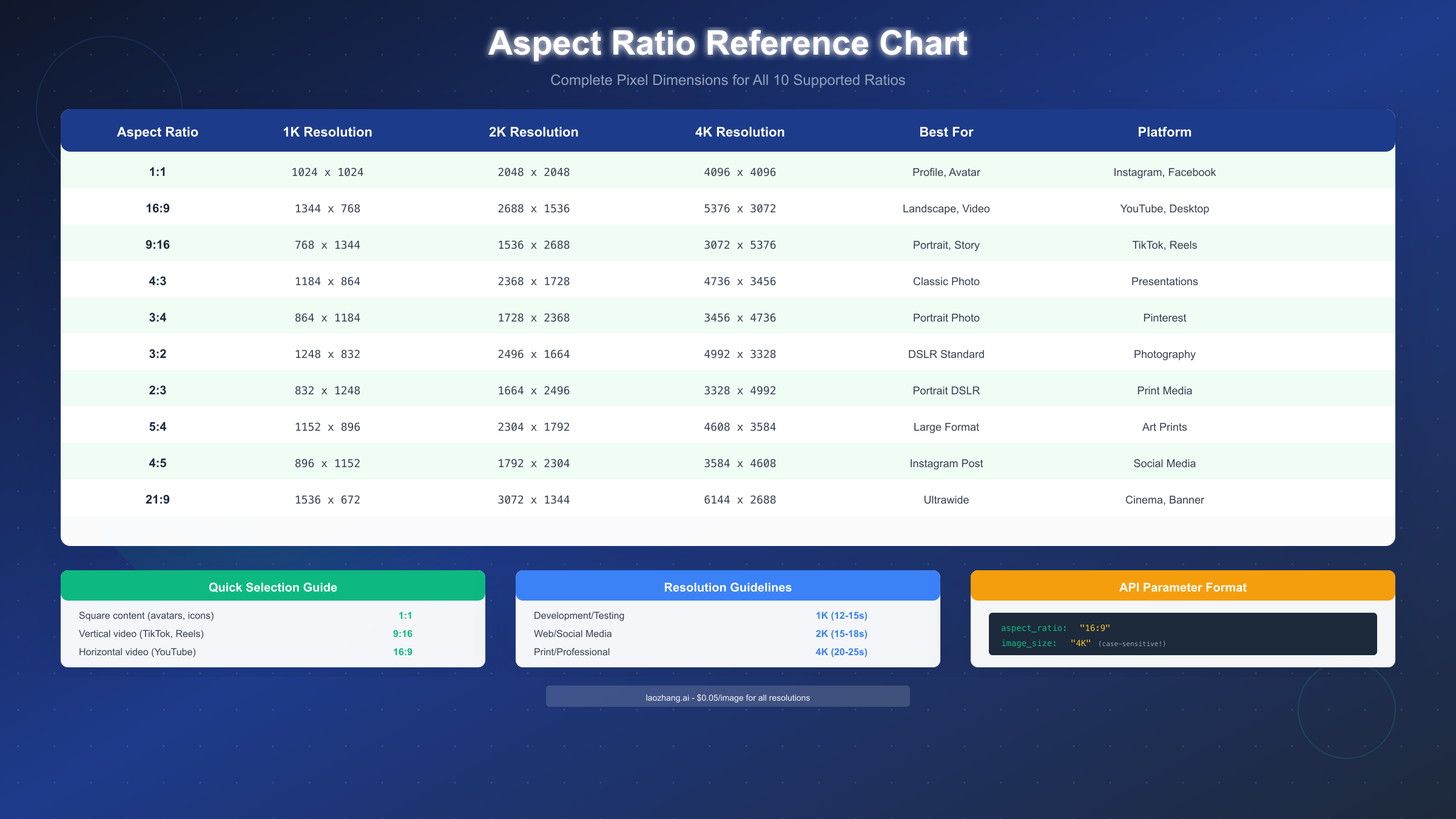
Square format (1:1) maintains equal dimensions across all resolutions: 1024×1024 at 1K, 2048×2048 at 2K, and 4096×4096 at 4K. This format produces the largest file sizes per resolution tier since both dimensions are maximized. A 4K square image can exceed 20MB in PNG format, so consider JPEG output for web applications where file size matters.
Widescreen 16:9 format generates dimensions of 1344×768 at 1K resolution, scaling to 2688×1536 at 2K and 5376×3072 at 4K. These dimensions closely match but don't exactly equal standard video resolutions like 1920×1080 or 3840×2160, so you may need slight cropping or scaling when integrating generated images into video projects.
Vertical 9:16 format simply inverts the 16:9 dimensions: 768×1344 at 1K, 1536×2688 at 2K, and 3072×5376 at 4K. The resulting tall images work perfectly for mobile-first content but may require horizontal cropping when repurposed for desktop viewing.
Professional photography ratios like 3:2 produce 1248×832 at 1K, 2496×1664 at 2K, and 4992×3328 at 4K. These dimensions align well with standard print sizes like 6×4 inches, making them ideal for photorealistic generations intended for physical printing.
| Ratio | 1K Resolution | 2K Resolution | 4K Resolution |
|---|---|---|---|
| 1:1 | 1024×1024 | 2048×2048 | 4096×4096 |
| 16:9 | 1344×768 | 2688×1536 | 5376×3072 |
| 9:16 | 768×1344 | 1536×2688 | 3072×5376 |
| 4:3 | 1184×864 | 2368×1728 | 4736×3456 |
| 3:4 | 864×1184 | 1728×2368 | 3456×4736 |
| 3:2 | 1248×832 | 2496×1664 | 4992×3328 |
| 2:3 | 832×1248 | 1664×2496 | 3328×4992 |
| 5:4 | 1152×896 | 2304×1792 | 4608×3584 |
| 4:5 | 896×1152 | 1792×2304 | 3584×4608 |
| 21:9 | 1536×672 | 3072×1344 | 6144×2688 |
How to Specify Aspect Ratio - API Implementation Guide
Implementing aspect ratio control in your Nano Banana Pro API calls requires understanding the correct parameter placement and format for your chosen SDK. The API accepts aspect ratio specifications through the imageConfig object, but the exact syntax varies between Google's native format and the OpenAI-compatible endpoint format that many developers prefer.
Google's native Python SDK uses the google-genai library with a structured configuration approach. You import the types module and construct a GenerateContentConfig object containing an ImageConfig with your desired aspect ratio and resolution. This format offers the most direct access to Nano Banana Pro's capabilities but requires installing Google's specific SDK.
pythonfrom google import genai
from google.genai import types

client = genai.Client(api_key="your-api-key")

response = client.models.generate_content(
    model="gemini-3-pro-image-preview",
    contents="A professional product photo of headphones on a white background",
    config=types.GenerateContentConfig(
        response_modalities=['TEXT', 'IMAGE'],
        image_config=types.ImageConfig(
            aspect_ratio="16:9",
            image_size="4K"
        )
    )
)


for part in response.candidates[0].content.parts:
    if hasattr(part, 'inline_data'):
        image_data = part.inline_data.data
        # Save or process the base64-encoded image
OpenAI-compatible format offers a familiar interface for developers already using OpenAI's SDK. This approach works with third-party endpoints like laozhang.ai that provide OpenAI-compatible access to Gemini models. The key difference is using the extra_body parameter to pass aspect ratio and resolution settings, since these parameters aren't part of OpenAI's standard API specification. For detailed pricing information on Gemini API access, see our Gemini API pricing structure guide.
pythonfrom openai import OpenAI

client = OpenAI(
    api_key="your-laozhang-api-key",
    base_url="https://api.laozhang.ai/v1"
)

response = client.chat.completions.create(
    model="gemini-3-pro-image-preview",
    messages=[
        {
            "role": "user",
            "content": "A professional product photo of headphones on a white background"
        }
    ],
    extra_body={
        "aspect_ratio": "16:9",
        "resolution": "4K"
    }
)
cURL requests provide a language-agnostic way to test the API before implementing in your preferred programming language. The JSON body structure mirrors the Python examples, with aspect ratio and resolution nested under the generation configuration.
bashcurl -X POST "https://api.laozhang.ai/v1/chat/completions" \
  -H "Authorization: Bearer your-api-key" \
  -H "Content-Type: application/json" \
  -d '{
    "model": "gemini-3-pro-image-preview",
    "messages": [
      {
        "role": "user",
        "content": "A professional product photo of headphones on white background"
      }
    ],
    "extra_body": {
      "aspect_ratio": "16:9",
      "resolution": "4K"
    }
  }'
Node.js implementation follows the same pattern as Python when using the OpenAI-compatible endpoint. The extra_body parameter passes through the aspect ratio and resolution settings to the underlying Gemini model.
javascriptimport OpenAI from 'openai';

const client = new OpenAI({
  apiKey: 'your-laozhang-api-key',
  baseURL: 'https://api.laozhang.ai/v1'
});

const response = await client.chat.completions.create({
  model: 'gemini-3-pro-image-preview',
  messages: [
    {
      role: 'user',
      content: 'A professional product photo of headphones on white background'
    }
  ],
  extra_body: {
    aspect_ratio: '16:9',
    resolution: '4K'
  }
});
Resolution and Aspect Ratio Combinations
Choosing the right resolution for your aspect ratio involves balancing quality requirements against generation time and cost. Nano Banana Pro offers three resolution tiers—1K, 2K, and 4K—each with distinct use cases and performance characteristics that affect your workflow decisions.
1K resolution generates the fastest results with typical generation times of 12-15 seconds per image. This tier works best during development and testing phases when you're iterating on prompts and don't need production-quality output. The lower pixel count also means smaller file sizes, typically under 1MB for JPEG output, making 1K ideal for rapid prototyping workflows.
2K resolution represents the sweet spot for most web and social media applications. Generation times increase modestly to 15-18 seconds, but the resulting images display crisp details on standard desktop monitors and high-resolution mobile screens. Most content creators find 2K sufficient for their needs, as the visual difference from 4K is minimal at typical viewing distances and file sizes remain manageable for web delivery.
4K resolution delivers the highest quality output with generation times of 20-25 seconds per image. This tier is essential for print applications, large format displays, and any use case where images will be viewed at close range or cropped significantly. The larger pixel count provides more flexibility in post-processing, allowing for substantial cropping while maintaining adequate resolution.
The formula for calculating exact pixel dimensions combines resolution base values with aspect ratios. For 4K output, take the base value of 4096 and apply the aspect ratio. A 16:9 image at 4K equals approximately 4096 × (16/9) = 7282 pixels on the long side by 4096 pixels on the short side, though the actual output may round to nearby values like 5376×3072 depending on internal processing constraints.
Generation time increases roughly linearly with total pixel count. A 4K 1:1 image (16.7 megapixels) takes about twice as long as a 2K 1:1 image (4.2 megapixels). Ultrawide 21:9 images at 4K can push generation times past 30 seconds due to their large horizontal dimensions.
| Resolution | Base Pixels | Gen Time | Best For | File Size (PNG) |
|---|---|---|---|---|
| 1K | 1024 | 12-15s | Development, Testing | 0.5-1 MB |
| 2K | 2048 | 15-18s | Web, Social Media | 2-4 MB |
| 4K | 4096 | 20-25s | Print, Professional | 8-24 MB |
Cost-Effective Implementation with laozhang.ai
Google's official Nano Banana Pro pricing follows a tiered structure that charges more for higher resolutions, with 4K images costing $0.24 each compared to $0.134 for lower resolutions. For developers and businesses generating significant image volumes, these costs accumulate quickly and can strain project budgets.
Third-party API providers like laozhang.ai offer substantial cost savings by aggregating volume across multiple customers and negotiating bulk rates with Google. The resulting pricing passes these savings to individual developers: laozhang.ai charges a flat $0.05 per image regardless of resolution, representing 79% savings compared to Google's 4K pricing and 63% savings compared to their base tier. For more affordable options, explore the cheapest Nano Banana API options available.

Setting up laozhang.ai access requires minimal configuration changes to existing code. If you're already using the OpenAI SDK, you simply change the base URL and API key while keeping all other code identical. The platform provides OpenAI-compatible endpoints that translate requests to the appropriate Gemini format behind the scenes.
pythonfrom openai import OpenAI

# Switch from OpenAI to laozhang.ai
client = OpenAI(
    api_key="your-laozhang-api-key",  # Get from api.laozhang.ai
    base_url="https://api.laozhang.ai/v1"
)

# Same code works - just different endpoint
response = client.chat.completions.create(
    model="gemini-3-pro-image-preview",
    messages=[{"role": "user", "content": "Your prompt here"}],
    extra_body={
        "aspect_ratio": "16:9",
        "resolution": "4K"
    }
)
Unified billing across 200+ AI models simplifies cost tracking for teams using multiple AI services. Instead of managing separate accounts with Google, OpenAI, Anthropic, and others, you use a single API key and receive one consolidated invoice. The $5 minimum deposit lets you verify quality and performance before committing to larger volumes.
The flat rate pricing structure particularly benefits 4K generation workflows. While Google charges nearly double for 4K compared to lower resolutions, laozhang.ai's $0.05 flat rate means you can generate the highest quality images without worrying about cost escalation. A project generating 1,000 4K images monthly saves $190 compared to Google's direct pricing.
| Provider | 1K/2K Price | 4K Price | 1000 4K Images |
|---|---|---|---|
| Google Official | $0.134 | $0.24 | $240 |
| laozhang.ai | $0.05 | $0.05 | $50 |
| Savings | 63% | 79% | $190/month |
Documentation and support resources are available at docs.laozhang.ai, including SDK examples, error handling guides, and rate limit information. The platform commits to 99.9% API availability with real-time service status monitoring.
Common Issues and Troubleshooting
Even with correct implementation, developers frequently encounter aspect ratio issues that produce unexpected results. Understanding the most common problems and their solutions saves debugging time and prevents frustration during development.
Case sensitivity errors represent the most frequent issue with resolution parameters. The API requires uppercase resolution values—"4K" not "4k". Using lowercase causes the API to silently default to 1K resolution, producing smaller images than expected without throwing an error. Always double-check that your resolution strings use uppercase letters.
Parameter placement errors occur when developers place aspect ratio and resolution parameters at the wrong level in the request structure. In the OpenAI-compatible format, these parameters must go inside the extra_body object, not at the root level of the request. Placing them at the root level causes them to be ignored, resulting in default 1:1 square output.
python# WRONG - parameters at root level (will be ignored)
response = client.chat.completions.create(
    model="gemini-3-pro-image-preview",
    messages=[...],
    aspect_ratio="16:9",  # Ignored!
    resolution="4K"       # Ignored!
)

# CORRECT - parameters in extra_body
response = client.chat.completions.create(
    model="gemini-3-pro-image-preview",
    messages=[...],
    extra_body={
        "aspect_ratio": "16:9",  # Correct!
        "resolution": "4K"       # Correct!
    }
)
Aspect ratio string format must match exactly—"16:9" works, but "16/9" or "16x9" do not. The colon separator is required, and there should be no spaces around the numbers. Invalid format strings cause the API to fall back to 1:1 square output.
Default behavior when no aspect ratio is specified produces 1:1 square images at 1K resolution. If you're consistently getting square images when you expected a different format, check that your aspect ratio parameter is actually being sent and parsed correctly. Adding logging to print the full request body before sending can reveal missing or malformed parameters.
Model name changes occasionally cause issues when Google updates the model identifier. The current preview model is "gemini-3-pro-image-preview" but this may change as the model moves from preview to general availability. Check the official documentation or your provider's model list if requests suddenly start failing with "model not found" errors.
Rate limiting on free tiers restricts generation volume. Google's free tier limits users to 20 requests per day, which can quickly exhaust during development. Using a third-party provider with pay-per-request billing eliminates these restrictions while potentially reducing costs compared to Google's paid tiers.
Platform-Specific Recommendations and Use Cases
Choosing the optimal aspect ratio depends heavily on your target platform and content type. Each major social media platform and use case has preferred dimensions that maximize content visibility and engagement.
Instagram content performs best with 1:1 square format for feed posts and 4:5 for slightly taller images that occupy more screen real estate. Stories and Reels require 9:16 vertical format to fill the mobile screen completely. Using wrong aspect ratios results in automatic cropping or letterboxing that reduces visual impact.
TikTok and YouTube Shorts strictly require 9:16 vertical format. Content with other aspect ratios displays with black bars on the sides, looking unprofessional and reducing the visible content area. Always generate vertical content in 9:16 from the start rather than cropping from horizontal sources.
YouTube thumbnails and videos use 16:9 widescreen format as the platform standard. Thumbnails should be generated at 2K or higher resolution since they're often cropped and scaled during display. Video backgrounds and b-roll footage should match your project's resolution—typically 1080p (approximately 2K) or 4K.
LinkedIn and Twitter display images at various aspect ratios depending on post type, but 16:9 landscape and 1:1 square generally perform well across both platforms. For link preview images, 16:9 provides the most consistent display across different viewing contexts. Discover additional platforms offering unlimited Nano Banana Pro access for high-volume content creation.
Pinterest favors tall vertical formats, with 2:3 and 3:4 performing particularly well due to the platform's vertical scrolling feed. Pins with these ratios occupy more feed real estate and tend to receive higher engagement than square or horizontal alternatives.
Print and professional applications require careful resolution planning. Standard 6×4 inch prints need approximately 1800×1200 pixels at 300 DPI, which 2K resolution easily covers. Larger prints like 12×8 inches need 3600×2400 pixels, pushing into 4K territory for adequate quality.
| Platform | Recommended Ratio | Resolution | Notes |
|---|---|---|---|
| Instagram Feed | 1:1 or 4:5 | 2K | Square or slightly tall |
| Instagram/TikTok Stories | 9:16 | 2K | Full vertical |
| YouTube Thumbnail | 16:9 | 2K+ | Higher res for cropping |
| 2:3 or 3:4 | 2K | Tall vertical | |
| 16:9 or 1:1 | 2K | Landscape or square | |
| Print (6×4") | 3:2 | 2K | Matches photo ratio |
| Print (12×8") | 3:2 | 4K | Larger prints need more |
FAQ
What happens if I don't specify an aspect ratio?
When no aspect ratio parameter is provided, Nano Banana Pro defaults to 1:1 square format at 1K resolution. This conservative default ensures you always receive an image, but the dimensions may not match your intended use case. Always explicitly specify both aspect ratio and resolution in production code to ensure consistent output.
Can I use aspect ratios not in the supported list?
The API only accepts the ten pre-defined aspect ratios: 1:1, 2:3, 3:2, 3:4, 4:3, 4:5, 5:4, 9:16, 16:9, and 21:9. Attempting to use other ratios like 2:1 or 5:3 results in either an error or fallback to the default 1:1 square. For custom ratios, generate at the nearest supported ratio and crop in post-processing.
Why does my 4K request produce 1K quality images?
This almost always indicates a case sensitivity issue. The resolution parameter requires uppercase: "4K" not "4k". Lowercase values silently default to 1K rather than throwing an error, making this bug difficult to diagnose without careful logging.
How do I determine the exact pixel dimensions before generation?
Use the formula: short side equals resolution base (1024/2048/4096), long side equals short side multiplied by the larger aspect ratio number divided by the smaller. For 16:9 at 4K: 4096 × (16/9) ≈ 7282. Actual output may vary slightly due to internal rounding.
Is there a quality difference between aspect ratios?
Quality remains consistent across aspect ratios at the same resolution tier. A 16:9 4K image has the same pixel density and detail level as a 1:1 4K image. The only difference is total pixel count—wider ratios contain more total pixels than square formats at the same resolution setting.
How do generation times vary by aspect ratio?
Generation time correlates with total pixel count rather than aspect ratio specifically. Ultrawide 21:9 images contain more pixels than square 1:1 images at the same resolution, so they take slightly longer to generate. The difference is typically 2-5 seconds at 4K resolution.
Can I change aspect ratio of an existing image?
Nano Banana Pro's editing capabilities can adjust aspect ratios of uploaded images while attempting to preserve subject positioning. Use prompts like "Adjust to 16:9 aspect ratio while keeping the main subject centered" for best results. This feature works best when adding background content rather than cropping existing elements.