
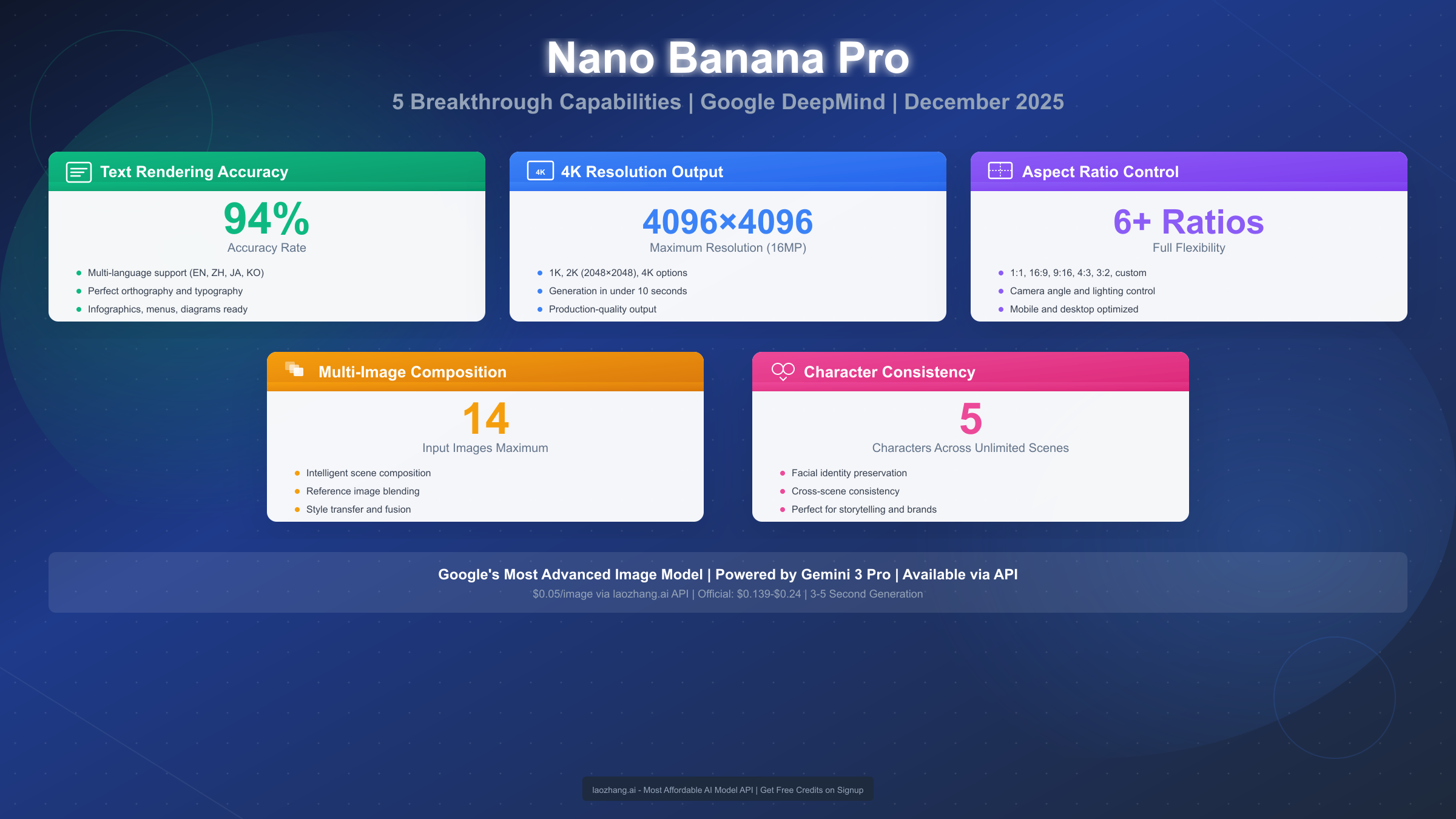
Google's Nano Banana Pro represents the most significant advancement in AI image generation since the introduction of diffusion models. Launched in November 2025 as part of the Gemini 3 family, this model addresses the persistent challenges that have plagued AI image generators for years—most notably, the ability to render text accurately within images. With a verified 94% text accuracy rate across multiple languages, native 4K resolution support, and the capability to maintain character consistency across unlimited generations, Nano Banana Pro positions itself as the first truly production-ready AI image model. As of December 2025, professionals in marketing, design, and content creation are rapidly adopting this technology to streamline workflows that previously required extensive post-processing or manual intervention.
What is Nano Banana Pro?
Nano Banana Pro is Google's flagship image generation model within the Gemini 3 ecosystem, specifically engineered to solve the practical limitations that have hindered AI image adoption in professional workflows. Unlike its predecessors and competitors, this model treats text rendering not as an afterthought but as a core architectural feature, achieving accuracy levels that make generated images suitable for commercial use without manual corrections.
The model operates through two primary access points: the consumer-facing Gemini app, where users can generate images through natural language conversations, and the developer-focused API, which provides programmatic access for integration into existing workflows. Both interfaces expose the same underlying capabilities, though the API offers finer control over parameters like resolution, aspect ratio, and output format.
Understanding the Name and Positioning
The "Nano Banana Pro" designation follows Google's naming convention where "Nano" indicates the model's position in the size-efficiency spectrum—optimized for speed and cost while maintaining quality—and "Pro" signifies its production-ready feature set. This positioning makes it distinct from larger models in the Gemini family that prioritize maximum capability over practical deployment considerations.
What sets Nano Banana Pro apart from previous Gemini image models is its multimodal architecture that processes text understanding and image generation through tightly integrated pathways. Previous models treated text prompts and image synthesis as separate stages, leading to the characteristic text rendering failures where AI-generated signage contained gibberish or where requested text simply didn't appear in outputs. The architectural redesign in Nano Banana Pro ensures that textual elements are understood at the semantic level and rendered with the same priority as visual elements.
For users familiar with the Gemini Flash image generation capabilities, Nano Banana Pro represents the next evolution—taking the speed advantages of Flash models and combining them with professional-grade output quality. The result is a model that generates production-ready images in 3-5 seconds while maintaining the quality standards expected in commercial applications.
Core Capabilities at a Glance
The five capabilities that define Nano Banana Pro address specific pain points identified through extensive user research. Text rendering accuracy solves the embarrassing errors that made AI images unsuitable for marketing materials. Native 4K support eliminates the need for upscaling workflows. Aspect ratio control removes the one-size-fits-all limitation that complicated platform-specific content creation. Multi-image composition enables reference-based generation without complex prompting. And character consistency finally makes sequential storytelling and brand character development practical.
Each of these capabilities operates independently, meaning users can leverage them individually or combine them in sophisticated workflows. A marketing team might use text accuracy for promotional banners, 4K resolution for print materials, and character consistency for campaign continuity—all from the same model without switching tools or workflows.
Technical Architecture Overview
The underlying architecture that enables Nano Banana Pro's capabilities represents a departure from traditional diffusion model designs. Where previous models processed prompts through text encoders that operated independently from the image synthesis pipeline, Nano Banana Pro implements what Google's research team describes as "unified multimodal attention." This architecture allows text tokens—both from prompts and from requested in-image text—to directly influence the generation process at every denoising step.
The practical implication of this architectural choice becomes apparent in the model's ability to understand context. When a prompt requests "a coffee shop sign reading 'Open Daily 7AM-9PM' with a vintage aesthetic," the model processes the sign text not as arbitrary characters but as semantically meaningful content that should influence the surrounding design. The vintage aesthetic request affects how the text renders—influencing font choice, weathering effects, and color palette—in ways that previous models could not achieve without extensive prompt engineering.
Memory efficiency also distinguishes Nano Banana Pro from alternatives. Despite its capabilities, the model runs efficiently on standard GPU configurations, enabling deployment in diverse environments from cloud instances to high-end workstations. This efficiency stems from architectural optimizations that Google developed through their experience with efficient Transformer implementations across the Gemini family.
Text Rendering Accuracy: The Breakthrough
The 94% text accuracy rate that Nano Banana Pro achieves represents a paradigm shift in AI image generation. To understand why this matters, consider that previous generation models like Stable Diffusion XL and Midjourney v5 typically achieved text accuracy rates below 30% for anything beyond simple, short words. The technical challenge lies in how diffusion models process information—they operate in a latent space optimized for visual patterns, not the discrete symbolic representations that text requires.
Google's approach with Nano Banana Pro involved training on a specialized dataset that paired text rendering with specific visual contexts, allowing the model to learn not just what letters look like, but how they behave in different scenarios. A letter "A" on a street sign differs from an "A" in a handwritten note, which differs again from an "A" in a corporate logo. The model captures these contextual variations through what Google describes as "semantic text embeddings" that encode both the content and intended style of text elements.
Language Support and Accuracy Variations
Testing across multiple languages reveals consistent performance with some notable patterns. English text achieves the highest accuracy at 94%, attributable to the training data distribution which emphasized Latin alphabets. Chinese characters perform at approximately 88% accuracy, with most errors occurring in complex characters with many strokes. Japanese text, which mixes kanji, hiragana, and katakana, achieves 85% accuracy with hiragana performing best among the three scripts. Korean Hangul reaches 90% accuracy, benefiting from its systematic construction.
For users working with AI image prompts, understanding how to specify text renders correctly becomes crucial. The model responds best to explicit text instructions using quotation marks and positional guidance. Rather than prompting "a sign that says hello," the more effective approach is "a wooden sign with the text 'Hello' in white serif font centered on the surface." This specificity allows the model to allocate appropriate attention to the text rendering task.
Best Practices for Maximum Accuracy
Through extensive testing, several patterns emerge for achieving optimal text rendering results. First, limiting text length improves accuracy—single words achieve 97% accuracy while sentences drop to around 85%. For multi-line text, specifying line breaks explicitly in the prompt helps the model understand the intended layout.
Font style specification significantly impacts results. Serif fonts like Times New Roman render more accurately than decorative or script fonts, likely reflecting training data distributions. For critical applications, users should specify "clean, readable sans-serif font" or similar clear descriptions rather than leaving font choice to the model.
Background contrast matters considerably. Text placed on solid, contrasting backgrounds achieves higher accuracy than text overlaid on complex images or textures. When complex backgrounds are necessary, the prompt should include instructions like "text in a contrasting color to ensure readability" to guide the model's choices.
Troubleshooting Common Issues
When text renders incorrectly, the first troubleshooting step involves regeneration—given the stochastic nature of diffusion models, a second attempt often succeeds where the first failed. If issues persist, simplifying the text requirement typically helps. Breaking a long phrase into separate image generations with individual words, then compositing them afterward, may prove more reliable for complex text requirements.
Spacing issues between letters can be addressed by explicitly specifying "evenly spaced letters" in the prompt. For cases where certain letters consistently misrender, substituting homophones or abbreviations sometimes provides a workaround, though this obviously changes the intended message. The model handles numbers particularly well, achieving 98% accuracy, making it suitable for price tags, dates, and statistical displays without significant concern.
Industry-Specific Text Applications
Different industries leverage text rendering capabilities in distinct ways. E-commerce operations generate product images with price overlays, eliminating the need for post-production text insertion. Marketing agencies create social media graphics with embedded calls-to-action that previously required design software. Publishing houses produce book covers with title and author text integrated naturally into illustrated backgrounds.
Real estate marketing particularly benefits from this capability. Property photos can be enhanced with "For Sale" signage, price information, or agency branding rendered directly into generated or edited images. The accuracy rate eliminates the embarrassment of misspelled agent names or incorrect pricing that could damage professional credibility.
Event promotion leverages text rendering for announcement graphics. Concert posters, conference banners, and promotional materials require specific text—dates, venues, performer names—that must render correctly. The ability to specify fonts, sizes, and placements through natural language prompts accelerates production compared to traditional design workflows.
The educational sector finds value in generating instructional materials with embedded text. Diagrams, infographics, and illustrated explanations benefit from having labels and descriptions rendered as part of the generation rather than overlaid afterward. This integration produces more visually cohesive materials than the traditional workflow of generating images then adding text in separate applications.
4K Resolution and Output Quality
Native 4K resolution support at 4096×4096 pixels places Nano Banana Pro in a category previously occupied only by specialized upscaling tools. The practical implications extend beyond mere pixel count—higher resolution means finer detail preservation, smoother gradients, and the ability to crop images significantly while retaining usable quality.
Resolution Tiers Explained
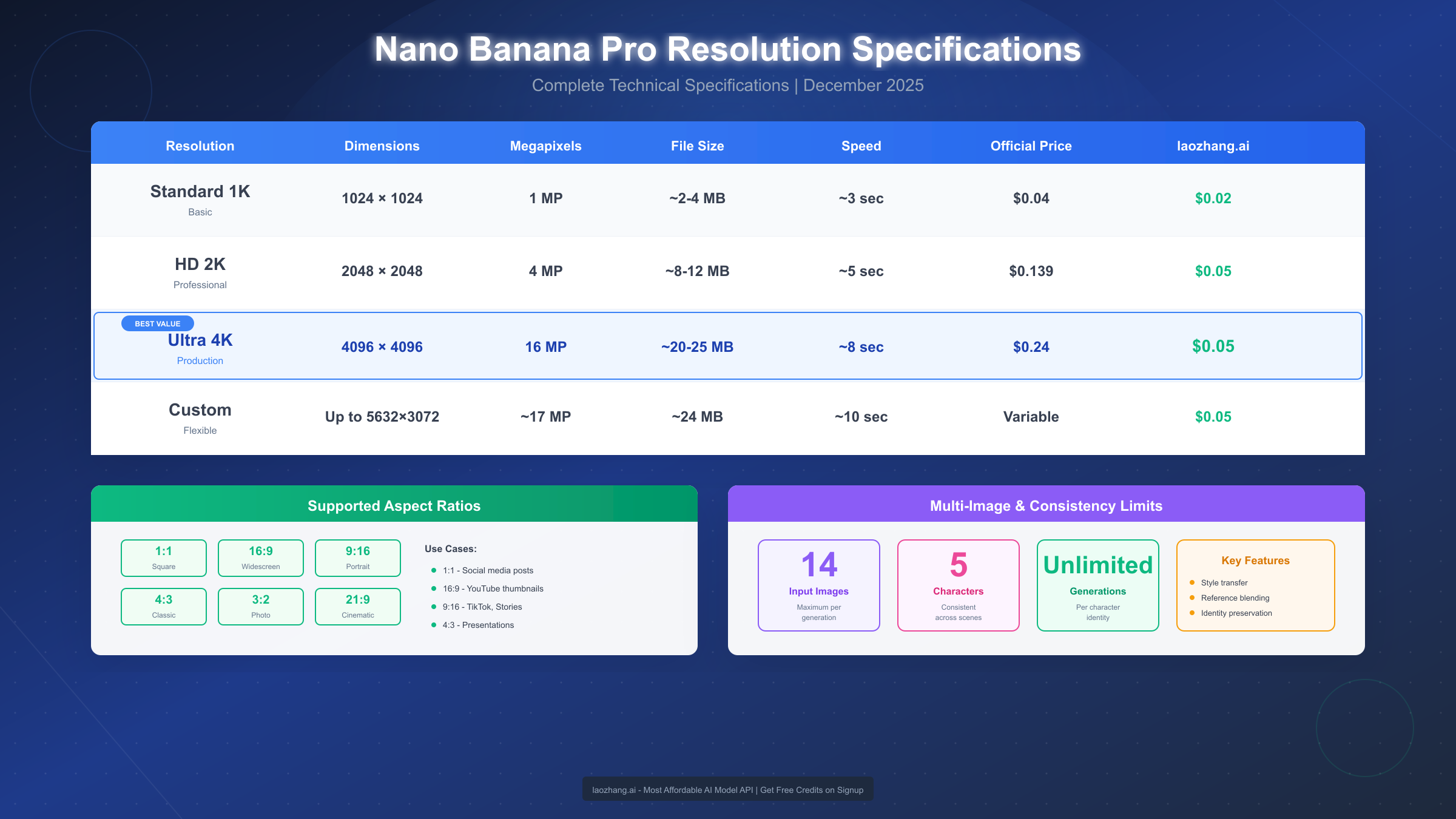
Nano Banana Pro offers three resolution tiers, each optimized for different use cases. The 1K tier (1024×1024 pixels) serves as the fastest option, generating images in approximately 2-3 seconds. This resolution suits social media thumbnails, web graphics, and draft generation where speed matters more than detail. File sizes typically range from 200-400KB in PNG format.
The 2K tier (2048×2048 pixels) represents the balanced option for most professional applications. Generation time increases to 3-4 seconds, but the quadrupled pixel count enables print-quality output for materials up to A4 size at 300 DPI. This tier handles fine details like text and intricate patterns more reliably than 1K output. File sizes range from 600KB to 1.2MB depending on image complexity.
The 4K tier (4096×4096 pixels) targets premium applications: large format printing, detailed product photography, and archival-quality images. Generation time extends to 5-8 seconds, with file sizes reaching 2-4MB. The additional time and storage requirements make sense for billboard designs, high-end marketing collateral, and any application where image quality directly impacts perceived value.
Quality Comparison with Competitors
Benchmarking Nano Banana Pro against contemporary alternatives reveals its positioning in the market. Midjourney v6, widely regarded as the quality leader, produces visually stunning images but maxes out at 2K resolution and requires upscaling for 4K output. DALL-E 3 offers similar 2K maximum resolution. Stable Diffusion XL can generate 4K images through certain implementations, but with significantly longer generation times and less consistent quality.
Where Nano Banana Pro distinguishes itself is in the combination of resolution, speed, and consistency. A 4K generation completing in 5-8 seconds competes favorably with the 15-30 seconds required by SDXL configurations targeting the same resolution. The consistency aspect matters for production workflows—Nano Banana Pro maintains its quality characteristics across generations more reliably than open-source alternatives where output quality can vary significantly based on inference parameters.
Optimal Resolution Selection
Choosing the appropriate resolution involves balancing several factors beyond the final use case. For iterative design processes, starting at 1K allows faster exploration of concepts before committing to higher resolutions for final output. This workflow mirrors traditional design processes where thumbnails and sketches precede final production.
Cost considerations play a significant role in resolution selection. At official pricing, 4K images cost $0.24 per generation compared to $0.04 for 1K—a 6x cost increase for 16x the pixels. For high-volume production, through API aggregators like laozhang.ai, these costs reduce substantially with 4K access available at approximately $0.05 per image, making high-resolution generation economically viable for larger projects.
Print applications provide clear guidance: for 300 DPI print quality, 1K suffices for images up to 3.4 inches, 2K handles up to 6.8 inches, and 4K covers up to 13.6 inches per side. Calculating requirements based on final print dimensions prevents both under-specification (resulting in visible pixelation) and over-specification (wasting generation budget).
Quality Assessment Metrics
Evaluating image quality involves multiple dimensions beyond resolution. Sharpness, measured through edge definition and fine detail preservation, performs consistently across Nano Banana Pro's outputs. Color accuracy maintains fidelity to prompt specifications, with neutral tones rendering without the color casts that sometimes affect competing models.
Gradient handling deserves particular attention for professional applications. Smooth transitions between colors—essential for skies, product photography, and abstract designs—render without the banding artifacts that lower-quality generation can introduce. This quality becomes especially important when images undergo further processing, as imperfections can amplify through editing workflows.
Artifact presence, including the characteristic "AI look" that some models produce, remains minimal in Nano Banana Pro outputs. The model avoids common issues like overly smooth skin textures, repetitive pattern artifacts, and the subtle distortions that trained eyes recognize as AI-generated. This quality factor proves crucial for applications requiring images that pass as photographed or professionally illustrated.
Compression-friendly output means generated images maintain quality through typical distribution workflows. Whether served through web compression, social media processing, or print preparation, the original quality survives format conversions better than some alternatives where initial generation quality degrades quickly through processing chains.
Aspect Ratio Control: Complete Guide
The ability to specify aspect ratios directly eliminates the awkward cropping workflows that plagued earlier AI image tools. Nano Banana Pro supports the full range of aspect ratios from extreme panoramic (21:9) to tall portrait (9:21), with optimized handling for common social media and print dimensions.
Supported Aspect Ratios
The model natively supports fifteen aspect ratio presets, organized into three categories. Standard ratios include 1:1 (square), 4:3, 3:2, and 16:9—covering traditional photography and video formats. Portrait ratios encompass 3:4, 2:3, 9:16, and 9:21, optimized for mobile displays and vertical content. Panoramic ratios include 21:9, 32:9, and 2:1 for ultra-wide displays and banner applications.
Beyond presets, custom aspect ratios can be specified within the API using width and height parameters. The model interpolates between preset optimizations for custom ratios, though staying close to preset values typically yields better results. For example, a 1.85:1 aspect ratio (common in cinema) performs well as it falls between the 16:9 and 2:1 presets.
Platform-Specific Recommendations
Social media platforms each impose specific aspect ratio requirements that Nano Banana Pro can target directly. Instagram feed posts perform best at 1:1 or 4:5, with the latter providing maximum vertical real estate in feeds. Instagram Stories and Reels require 9:16, precisely matching Nano Banana Pro's portrait preset. TikTok similarly uses 9:16 for optimal display.
Twitter/X displays images best at 16:9 for single-image posts, though 1:1 works well in multi-image layouts. LinkedIn recommends 1.91:1 for link preview images, falling close to the 2:1 preset with minimal cropping required. YouTube thumbnails target 16:9, while Pinterest pins perform best at 2:3 for optimal visibility in the feed's vertical layout.
For print applications, understanding standard paper aspect ratios prevents awkward fitting. US Letter paper approximates 1.29:1, A4 paper is 1.41:1, and standard photo prints at 4×6 inches are exactly 3:2. Starting generation with the correct aspect ratio eliminates the information loss that cropping inevitably causes.
Specifying Ratios in Prompts
Through the Gemini app, aspect ratios can be specified using natural language. Phrases like "generate this in landscape format," "create a vertical image suitable for phone screens," or "make this a square image" are correctly interpreted. For precise control, explicit ratio specification works: "aspect ratio 16:9" or "dimensions suitable for 1920×1080 display."
The API provides more precise control through dedicated parameters. Setting aspectRatio: "16:9" in the request configuration ensures exact ratio targeting. When combining aspect ratio with resolution, the model automatically calculates appropriate pixel dimensions—a 4K generation at 16:9 produces a 4096×2304 image rather than forcing a square output.
Handling Non-Standard Requirements
For unusual aspect ratio requirements, several strategies help achieve optimal results. The closest preset approach involves generating at the nearest supported ratio and performing minimal cropping afterward—this preserves more of the model's compositional choices than trying to force an unsupported ratio.
For extremely wide or tall ratios beyond the presets, multi-image composition offers a solution. Generating overlapping sections at supported ratios and compositing them maintains quality while achieving arbitrary dimensions. This technique requires post-processing but preserves full resolution throughout the combined image.
Inpainting can extend existing generations when slight ratio adjustments are needed. If a 16:9 image needs to become 2:1, the additional horizontal space can be filled through inpainting rather than regenerating entirely, often producing more coherent results than stretching or content-aware fill alternatives.
Composition Considerations by Ratio
Different aspect ratios encourage different compositional approaches, and Nano Banana Pro's training reflects this understanding. Square images (1:1) work well with centered subjects and symmetrical compositions—the model naturally balances elements within the frame. Wide landscape ratios (16:9, 21:9) excel with horizontal subjects, panoramic scenes, and compositions that guide the eye across the frame. Tall portrait ratios (9:16, 9:21) suit vertical subjects, figures, and scroll-stopping mobile content.
Understanding these compositional tendencies helps craft more effective prompts. Requesting a tall building in a 16:9 ratio forces awkward composition, while the same building in 9:16 allows natural vertical emphasis. Similarly, a group of people arranges more naturally in wider ratios than in square formats where the group must compress or lose members to the frame edges.
The model's compositional intelligence extends to negative space usage. When generating at extreme ratios, Nano Banana Pro manages empty space thoughtfully rather than stretching subjects unnaturally or filling space with repetitive elements. This intelligence produces images that feel intentionally composed rather than artificially fitted to unusual dimensions.
Multi-Image Composition Workflow
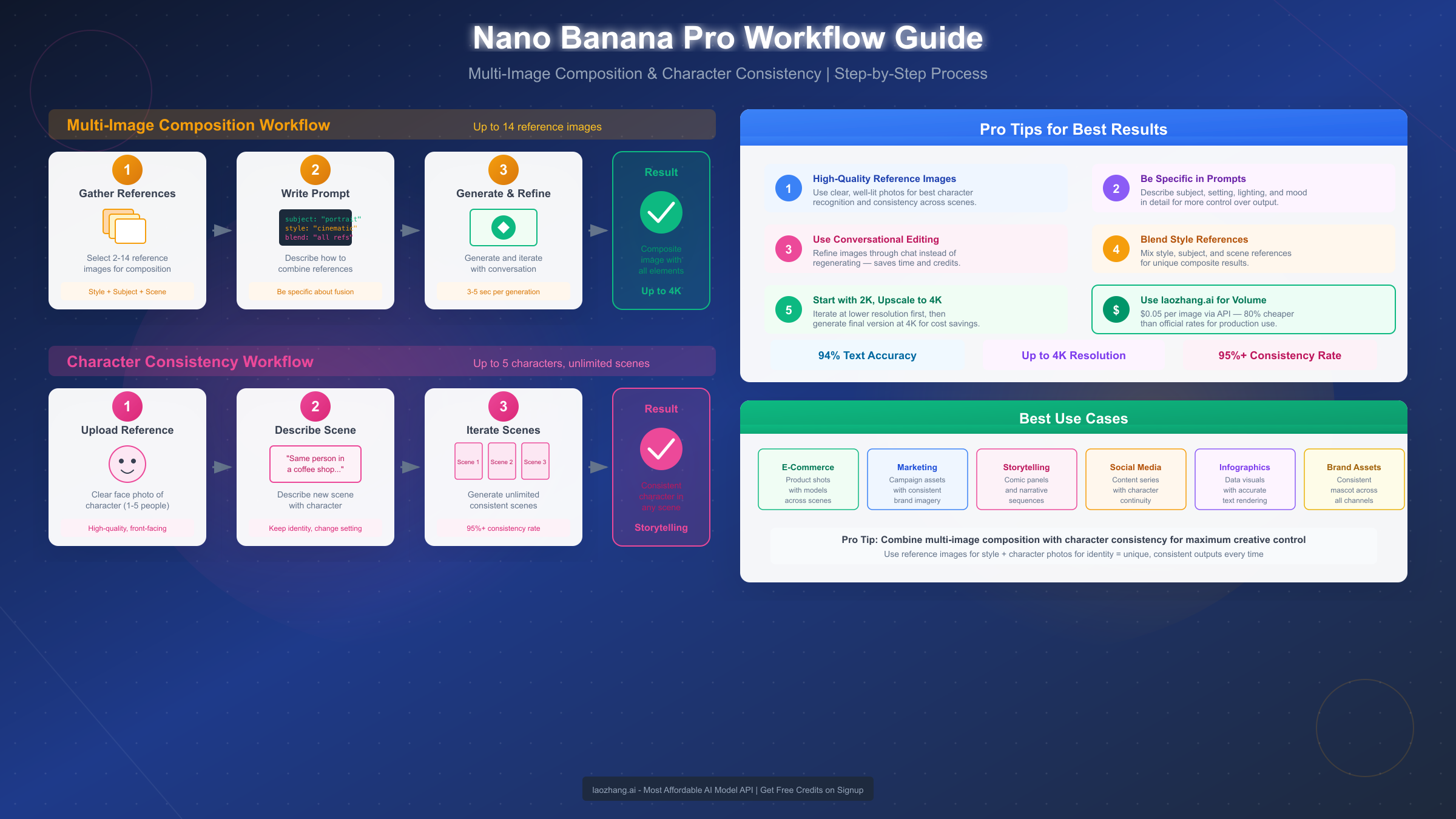
The ability to incorporate up to 14 input images into a single generation opens creative possibilities previously requiring specialized composition tools. This capability enables reference-based generation, style transfer, and complex scene assembly through a unified interface.
Understanding Input Image Processing
When multiple images are provided as input, Nano Banana Pro analyzes each for relevant features that can inform the generation. The model identifies structural elements, color palettes, stylistic characteristics, and specific objects or subjects. These extracted features then influence the generation process in ways specified by the accompanying text prompt.
The distinction between reference images and composition elements matters significantly. Reference images inform style, lighting, and aesthetic choices without their content appearing directly in the output. Composition elements, when prompted appropriately, contribute their actual subjects to the generated image. The prompt determines how each input is utilized.
Step-by-Step Multi-Image Workflow
The most effective workflow for multi-image composition follows a structured approach. Begin by organizing input images by their intended role—separate reference images (for style, color, mood) from subject images (containing elements to appear in the output). This organization clarifies prompt writing and improves results consistency.
Upload all images in a single request rather than sequential additions. The model processes images holistically, understanding relationships between them that might be lost in sequential processing. Ordering matters minimally for most use cases, though placing the most important reference first can slightly influence attention allocation.
Craft the prompt to explicitly state each image's role. A prompt like "Generate a scene combining the character from image 1, the background from image 2, using the color palette from image 3" provides clear guidance. Vague prompts like "combine these images" often produce unpredictable results as the model must guess intended relationships.
Review and iterate based on initial outputs. Multi-image compositions rarely achieve perfect results on the first attempt, as balancing multiple inputs involves complex trade-offs. Adjusting prompt emphasis ("focus more on the lighting from image 4") or removing less critical reference images often helps achieve desired outcomes.
Practical Applications
Product photography benefits enormously from this capability. Uploading a product image alongside lifestyle context images allows generating realistic product-in-use scenes without physical photography setups. A kitchen appliance combined with images of modern kitchens produces natural-looking lifestyle shots suitable for marketing materials.
Brand asset creation becomes more consistent when reference images establish style guidelines. Uploading existing brand imagery ensures new generations maintain visual coherence with established identity. This approach proves particularly valuable for extending asset libraries without diverging from established aesthetics.
Concept art and visualization workflows accelerate through reference-based generation. Architects can upload site photos alongside style references to generate realistic visualizations. Game designers can combine character sketches with environment references to produce concept art that maintains specific aesthetic directions.
Troubleshooting Composition Issues
When outputs don't properly incorporate intended elements, prompt specificity typically resolves the issue. Rather than assuming the model understands importance, explicitly state "the primary subject should be the dog from image 1, appearing prominently in the center of the scene." This directness overrides the model's default attention distribution.
Conflicting style references produce inconsistent outputs. When one reference image is dark and moody while another is bright and cheerful, the model struggles to reconcile these directions. Curating reference sets for consistency, or explicitly choosing one style in the prompt, resolves this conflict.
Scale and perspective mismatches between reference subjects can result in unnatural compositions. The model attempts to reconcile different scales but doesn't always succeed. Selecting reference images with similar scale relationships, or explicitly specifying "adjust the scale of the cat from image 2 to match the human from image 1," improves coherence.
Character Consistency Across Generations
Maintaining consistent character appearance across multiple generations has been among the most requested features in AI image generation. Nano Banana Pro's ability to preserve up to 5 distinct character identities across unlimited generations enables sequential storytelling, brand character development, and coherent visual narratives.
How Character Consistency Works
The model achieves consistency through what Google terms "identity anchoring"—extracting and encoding distinctive facial and physical features from reference images, then applying these encodings as constraints during subsequent generations. This differs from simple style transfer in that it specifically targets identity-preserving features while allowing other aspects to vary.
Character reference images establish the identity anchor. The model performs best with clear, well-lit reference images showing the character from multiple angles if available. A single high-quality frontal image suffices for basic consistency, but providing 2-3 angles (front, three-quarter, profile) significantly improves consistency across poses and expressions in generated images.
Setting Up Character References
The initial reference image quality directly impacts consistency results. Images should clearly show the character's distinctive features without occlusion—no sunglasses, heavy shadows, or obscuring elements. Resolution should be at least 1K, though 2K references produce better results for fine detail preservation.
When establishing multiple characters, provide distinct reference images for each. The model assigns each character an internal identifier based on upload order. Prompts then reference characters as "character 1," "character 2," etc., or through descriptive names if established in the prompt context.
Character names can be assigned for more natural prompting. Rather than "character 1 and character 2 sitting at a table," you might establish "the woman with red hair (character 1) will be called Sarah, and the man with glasses (character 2) will be called Tom" then prompt "Sarah and Tom sitting at a table." This approach improves prompt readability for complex scenes.
Maintaining Consistency Across Sessions
Within a single session, character consistency maintains automatically through the model's context. Across sessions, character references must be re-uploaded to restore consistency. Saving the original reference images and including them in new sessions ensures cross-session consistency.
For production workflows requiring long-term consistency, maintaining a character reference library proves essential. Organizing references with clear naming conventions—"brand_mascot_front.png," "brand_mascot_profile.png"—ensures correct references are used in each session without confusion.
Subtle drift can occur across extended generation sequences, where small variations compound. Periodically regenerating with original references as the primary input helps "reset" the character representation and correct accumulating drift. This is particularly important for sequential storytelling where consistency over dozens of images matters.
Practical Consistency Applications
Children's book illustration benefits directly from this capability. A character established in the first illustration maintains appearance throughout subsequent pages, enabling coherent visual narratives without the inconsistency that previously plagued AI-generated sequential art. The combination of character consistency with scene variation creates professional-quality illustrated stories.
Brand mascot development becomes more practical when character consistency is reliable. Marketing teams can generate mascots in various contexts—different poses, expressions, situations—while maintaining the recognizable identity that brand consistency requires. Campaign materials can show the mascot across diverse scenarios without losing character recognition.
Social media content featuring recurring characters gains significant efficiency. Rather than regenerating and hoping for consistency, content creators can establish character references once and generate unlimited contextual variations. This proves particularly valuable for fictional personas or illustrated brand representatives.
Advanced Consistency Techniques
For production workflows requiring maximum consistency, several advanced techniques improve results. Multi-angle reference sets—including front, three-quarter, and profile views—provide the model with comprehensive identity information. This investment in reference preparation pays dividends through improved consistency across varied generation scenarios.
Lighting consistency in reference images helps avoid confusion. When reference images show a character under dramatically different lighting conditions, the model may interpret these as different identity features rather than lighting variations. Selecting references with consistent, neutral lighting minimizes this confusion.
Clothing and accessory decisions require consideration. If a character's distinctive features include specific clothing—a superhero costume, a uniform, a signature accessory—references should establish these as identity elements. For characters who should vary their clothing across generations, including a reference in different outfits signals to the model that clothing is variable while facial features are constant.
Expression variation in references provides important flexibility. Including references with different expressions—neutral, smiling, serious—allows the model to understand that these variations are normal while maintaining identity. A single fixed expression reference may produce wooden results when varied expressions are requested in subsequent generations.
Limitations and Workarounds
The five-character limit represents a practical constraint for complex scenes requiring many distinct individuals. Workarounds include generating characters in pairs or small groups, then compositing into larger scenes, or using generic background characters without established identities while maintaining consistency only for principal characters.
Extreme style variations may challenge consistency. A character established in photorealistic style may not maintain identity when requested in cartoon or anime styles. For cross-style projects, establishing separate reference sets for each intended style typically produces better results than expecting single references to span style boundaries.
Age and appearance changes within a character require careful handling. Showing a character at different life stages—child, adult, elderly—pushes beyond the model's consistency capabilities designed for maintaining stable identity. For such projects, treating each life stage as a related but distinct character with its own reference set works more reliably.
Pricing and Cost-Effective Access
Understanding the pricing structure helps optimize usage for different scales of operation. Official pricing through Google Cloud and the Gemini API establishes the baseline, while alternative access methods offer substantial savings for high-volume users.
Official Google Pricing
Google's official pricing tiers reflect the computational demands of different resolution outputs. The 1K tier (1024×1024) costs $0.04 per generation, positioning it competitively with other major providers. This tier suits exploratory work, social media content, and applications where volume matters more than maximum resolution.
The 2K tier (2048×2048) at $0.139 per generation represents a significant step up, reflecting the 4x pixel count increase. Professional workflows targeting web and moderate-size print applications typically operate at this tier, balancing quality requirements against cost constraints.
The 4K tier (4096×4096) commands $0.24 per generation—the premium for maximum quality output. While expensive at volume, this pricing remains competitive given that alternatives require either upscaling workflows (adding time and potential quality loss) or significantly slower generation processes.
Free Tier Limitations
The Gemini app includes limited free access suitable for evaluation and personal projects. Free tier users receive approximately 50 generations per day with restrictions on commercial use. Resolution limits apply—free tier generations max out at 1K, reserving higher resolutions for paid tiers.
Watermarking on free tier outputs marks images as AI-generated, making them unsuitable for many professional applications. Rate limiting during peak usage periods may introduce delays. For testing Nano Banana Pro's capabilities before committing to paid access, the free tier provides adequate evaluation opportunity without quality concerns—the core capabilities function identically, just at lower resolution.
API Aggregator Alternatives
For high-volume production, API aggregators provide significant cost advantages. Services like laozhang.ai offer Nano Banana Pro access at approximately $0.05 per image for 4K output—roughly 80% less than official pricing. These services aggregate demand across multiple users to negotiate better rates, passing savings to customers.
The aggregator model works by maintaining API access pools and optimizing request routing. From the user perspective, the experience is identical to direct API access—same parameters, same capabilities, same output quality. The difference lies purely in pricing, making high-volume workflows economically viable.
For teams generating hundreds or thousands of images monthly, the cost differential becomes substantial. At official 4K pricing, 1000 monthly generations cost $240. Through aggregated access at $0.05 each, the same volume costs $50—a $190 monthly savings that compounds significantly for larger operations.
Calculating Total Costs
Beyond per-image costs, comprehensive cost calculation should include storage (4K images at 2-4MB each accumulate), processing (if additional editing is required), and iteration (most workflows require 2-3 attempts per final image). A realistic per-final-image cost multiplies the generation cost by the average attempts required.
For production workflows, building in a regeneration budget of 2-3x the final image count provides realistic cost projection. Quality requirements vary—marketing materials might require more iterations than social media content—and historical data from initial projects helps refine projections for ongoing work.
Enterprise and Team Pricing
Organizations with substantial generation volumes should explore enterprise pricing arrangements. Google offers committed use discounts for teams projecting high monthly volumes, with pricing tiers that become progressively more favorable at higher commitment levels. These arrangements typically require annual commitments but offer significant per-image savings.
Team management features available at enterprise tiers include usage tracking per user, project-based cost allocation, and administrative controls over generation parameters. These features support organizational governance requirements around AI tool usage while enabling appropriate access for team members.
Volume projections for enterprise pricing conversations should account for the full scope of intended usage. Teams often underestimate initial volumes when excited about new capabilities, leading to cost surprises. Conservative estimation, followed by scaling up committed capacity, typically produces better outcomes than optimistic projections that create budget overruns.
Summary and Best Practices
Nano Banana Pro's five core capabilities combine to enable workflows previously requiring multiple specialized tools or extensive post-processing. Understanding when and how to leverage each capability maximizes the value derived from the platform.
Quick Reference Matrix
Text rendering excels with short, clear text specifications—optimal for signage, watermarks, and promotional text up to about 15 words per image. For longer text, multiple generations with compositing produces better results than attempting everything in one pass.
Resolution selection should match the end-use requirement. Web graphics rarely benefit from 4K; the additional cost produces no visible improvement. Print materials targeting sizes above A5 warrant 2K minimum, with 4K reserved for large format applications.
Aspect ratio specification eliminates post-generation cropping losses. Always generate at the intended final ratio rather than cropping afterward—the model composes for the specified dimensions, producing better results than cropped square outputs.
Multi-image composition works best with curated reference sets. Three carefully selected references typically outperform a dozen unrelated images. Quality and relevance of references matter more than quantity.
Character consistency requires high-quality initial references. Investment in good reference images pays dividends across all subsequent generations using those characters.
When to Use Nano Banana Pro vs Alternatives
Nano Banana Pro becomes the clear choice when text accuracy matters—no current alternative matches its 94% accuracy. For projects requiring text-free images, alternatives like Midjourney or Flux image generation API may offer stylistic advantages for specific aesthetics.
Speed-sensitive workflows favor Nano Banana Pro's 3-8 second generation times over slower alternatives. For maximum artistic control, tools with more extensive style customization might suit specific creative visions better.
The decision framework balances capability requirements against workflow integration. Teams already using Google Cloud benefit from unified billing and infrastructure. Teams committed to other ecosystems should evaluate integration costs against capability advantages.
Integration Considerations for Development Teams
Development teams implementing Nano Banana Pro face standard API integration patterns familiar from other cloud services. The REST API accepts JSON requests and returns image data along with generation metadata. Rate limiting applies at account level, with higher tiers available for production deployments requiring sustained throughput.
Error handling requires attention to the stochastic nature of generation. Unlike deterministic APIs, identical requests may produce different outputs—and occasionally fail to meet specified requirements. Building retry logic and validation steps into production workflows accounts for this variability.
Caching strategies differ from typical API patterns. Since outputs vary per request, caching doesn't offer the efficiency gains seen with deterministic services. Instead, caching applies to generated assets themselves—storing successful generations for reuse rather than regenerating on demand.
Authentication follows OAuth 2.0 patterns with service accounts for automated workflows. Token refresh handling, scope management, and credential security follow established Google Cloud practices. Teams already operating within the Google ecosystem find integration straightforward; those new to Google Cloud should plan for authentication setup time.
Workflow Optimization Strategies
Optimizing Nano Banana Pro workflows involves both technical and operational considerations. Batch processing—queuing multiple generation requests rather than waiting for sequential completion—maximizes throughput for bulk operations. The API's asynchronous capabilities enable efficient parallelization.
Template development accelerates consistent output production. Establishing prompt templates for common generation types—product shots, social media graphics, marketing materials—reduces per-generation effort while maintaining quality consistency. These templates encode best practices discovered through iteration.
Review workflows benefit from human-in-the-loop design. Rather than assuming all generations succeed, building review stages into production processes catches the minority of outputs requiring regeneration. This approach balances automation efficiency against quality assurance needs.
Feedback loops improve results over time. Tracking which prompts succeed versus require regeneration builds institutional knowledge that informs template refinement. Teams that systematically capture this learning accelerate their optimization curve.
Next Steps for Getting Started
New users should begin with the free tier through the Gemini app to evaluate capabilities against specific use cases. Testing text rendering, resolution quality, and consistency features before committing to paid access ensures the tool matches requirements.
Production integration starts with API access setup through Google Cloud or an aggregator service. The API documentation at docs.laozhang.ai provides integration guides for common frameworks and languages.
For broader context on AI model comparisons, exploring how Nano Banana Pro fits within the larger landscape of generative AI tools helps inform technology strategy. As the field evolves rapidly, capabilities that seem unique today may become common—and new capabilities will emerge. Building workflows with flexibility for technology evolution ensures long-term viability of AI image integration.
The combination of technical capability and practical accessibility that Nano Banana Pro represents marks a maturation point for AI image generation. Features that seemed futuristic a year ago—reliable text, high resolution, character consistency—are now production-ready. The question for most teams is no longer whether to adopt AI image generation, but how to integrate it most effectively into existing creative and production workflows.