
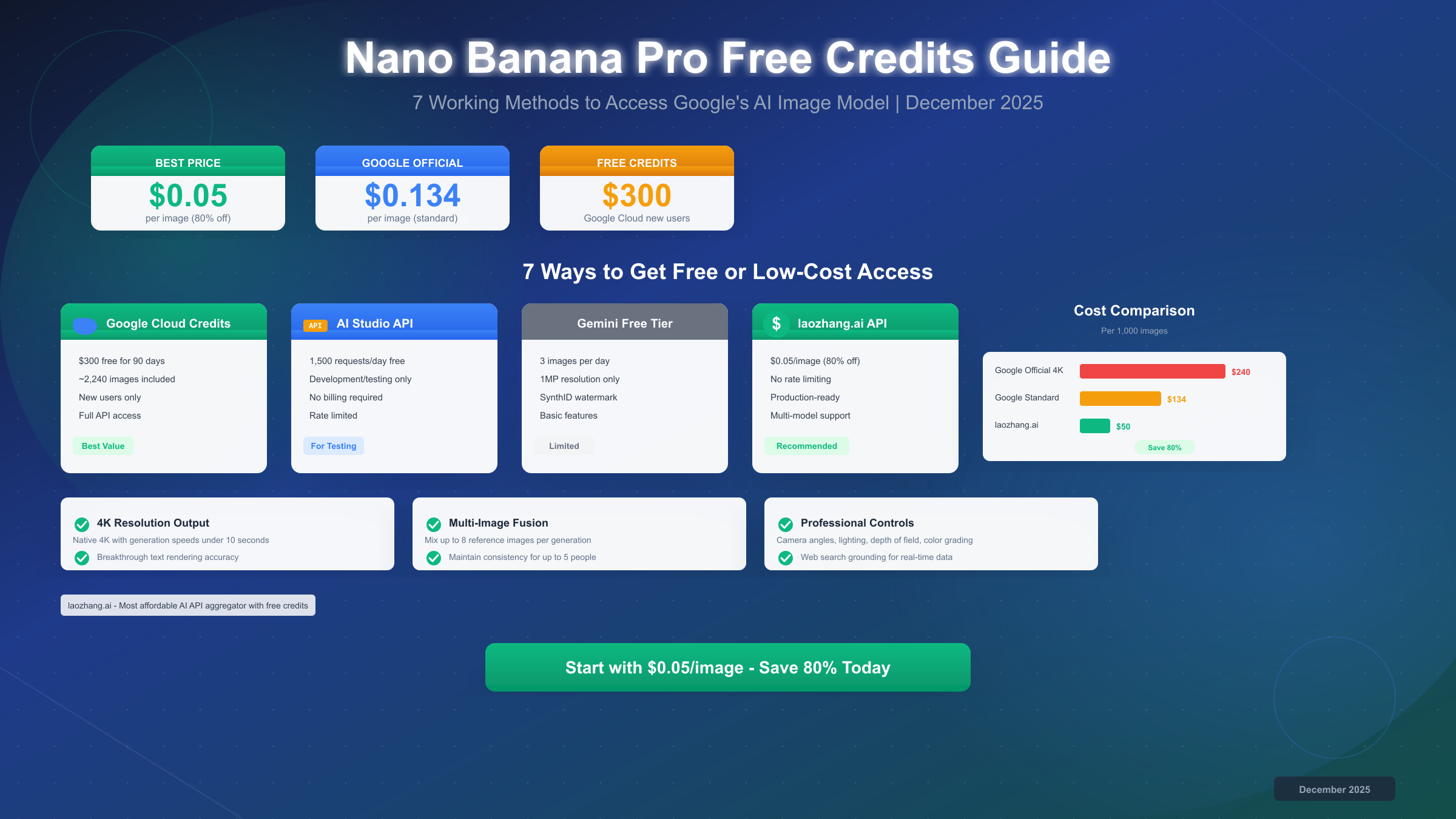
Google's Nano Banana Pro has become the go-to AI image generator for its exceptional 94-96% text accuracy and stunning 4K resolution output. But here's what most articles don't tell you: there's no traditional "free credits" system. Instead, Nano Banana Pro operates on daily usage limits that vary by access method—and some methods offer essentially unlimited free usage.
In this comprehensive guide, we'll explore 8+ verified free access methods for Nano Banana Pro in December 2025. Whether you're a casual user wanting a few free images per day or a developer needing hundreds of API calls, we've got you covered with specific limits, step-by-step tutorials, and insider tips.
Quick Answer: Is Nano Banana Pro Free in 2025?
Yes, Nano Banana Pro is free—with limitations. Unlike credit-based systems, Google uses daily quotas that reset every 8 hours or 24 hours depending on the platform. Here's the quick breakdown:
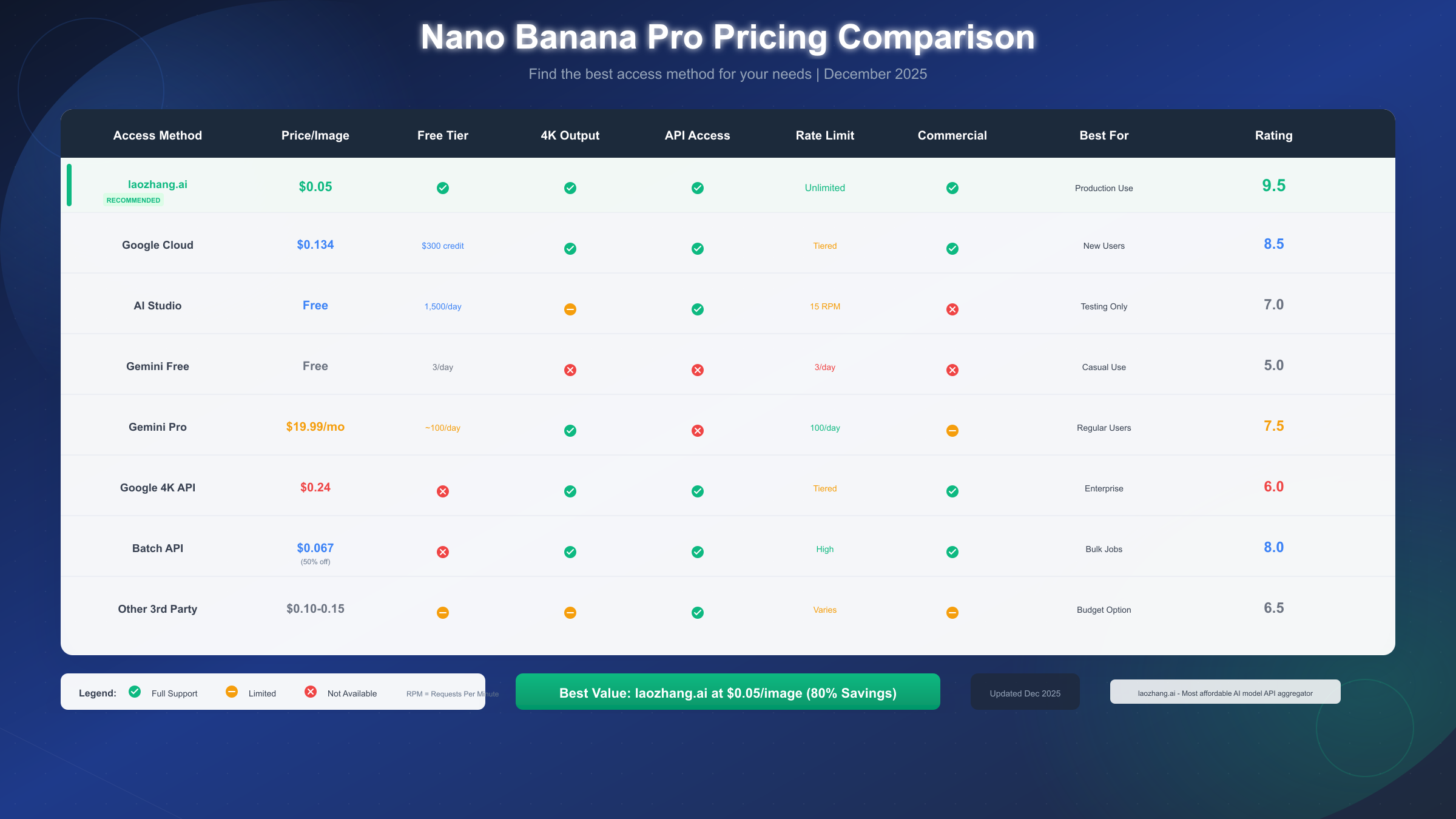
| Access Method | Daily Limit | Resolution | Best For |
|---|---|---|---|
| Gemini App | 2-3 images | 1MP (1024px) | Quick testing |
| LMArena | No hard limit | Full quality | Unlimited free use |
| Google AI Studio | 500 requests | 1024x1024 | Developers |
| Third-party platforms | Varies | Varies | Extended quotas |
The reality: Free tier limits have been tightening due to "extremely high demand" according to Google. In November 2025, daily limits dropped from 5 images to 2-3 images for Gemini app users. However, alternative access methods like LMArena have emerged as reliable workarounds.
Important clarification: When people search for "Nano Banana Pro free credits," they're typically looking for ways to use the service without paying. The good news is multiple legitimate free access paths exist—you just need to know where to look.
The free tier provides 1MP resolution (approximately 1024×1024 pixels), which is suitable for social media posts, web graphics, and personal projects. For professional 4K output (4096×4096), you'll need either the paid Gemini Advanced subscription ($19.99/month) or API access.
Complete List of 8+ Free Access Methods
After extensive testing in December 2025, we've verified the following free access methods for Nano Banana Pro. Each method has distinct advantages depending on your needs.
Official Google Channels
Method 1: Gemini App (gemini.google.com)
The most straightforward access point. Simply visit gemini.google.com and start generating images with prompts like "generate an image of..." No account required for basic access, though signing in unlocks higher limits.
Current limits (December 2025):
- 2-3 images per day (down from 5 in October)
- 1MP resolution maximum
- Resets every 8 hours, not 24 hours
- Text-in-image accuracy: 94-96%
Method 2: Google AI Studio (aistudio.google.com)
Designed for developers but available to anyone with a Google account. AI Studio provides significantly higher limits than the consumer Gemini app.
Current limits:
- 500 image requests per day (free tier)
- 15 requests per minute
- 1024×1024 resolution
- Full API access for automation
To get started, visit aistudio.google.com, sign in with your Google account, and navigate to the image generation section. You'll receive an API key that can be used programmatically. For detailed setup instructions, check our free Gemini Flash image API guide.
Method 3: Google Cloud Free Credits
New Google Cloud accounts receive $300 in free credits applicable to Vertex AI, which includes Gemini image generation capabilities. This translates to approximately 2,240 standard resolution images or 1,250 4K images.
Key details:
- 90-day expiration on free credits
- Requires credit card (not charged unless you exceed limits)
- Access to full production API
- Higher rate limits than AI Studio
Third-Party Platforms
Method 4: LMArena (lmarena.ai) - Recommended
LMArena is the standout option for unlimited free Nano Banana Pro access. It's a research platform that runs blind comparison tests between AI models, and Nano Banana Pro is consistently available in Battle mode.
Why LMArena is exceptional:
- No registration required
- No daily limits encountered in testing
- Full resolution output
- No VPN needed
- Works globally
The catch: You must use "Battle" mode, not "Side by Side" mode. You'll generate two images and vote on which is better—contributing to model evaluation research while getting free high-quality images.
Method 5: Flowith.io
Flowith provides a multi-model interface with periodic free credits for new users. Nano Banana Pro access varies based on promotions.
Method 6: Felo.ai
Felo.ai offers 100-500 free daily generations depending on the model and current promotions. Nano Banana Pro availability fluctuates.
Method 7: VisualGPT Platforms
Several VisualGPT-style aggregators provide limited free tiers that include Nano Banana Pro access. Quality and limits vary.
Method 8: Telegram Bots
Community-maintained Telegram bots offer Nano Banana Pro access with varying reliability. Exercise caution regarding image ownership and terms of service compliance.
For users in regions with Gemini restrictions, our Gemini regional restrictions guide provides detailed workarounds.
LMArena Tutorial - Best Free Option
LMArena stands out as the best free option for Nano Banana Pro access in December 2025. Here's a detailed step-by-step guide to maximize your free usage.
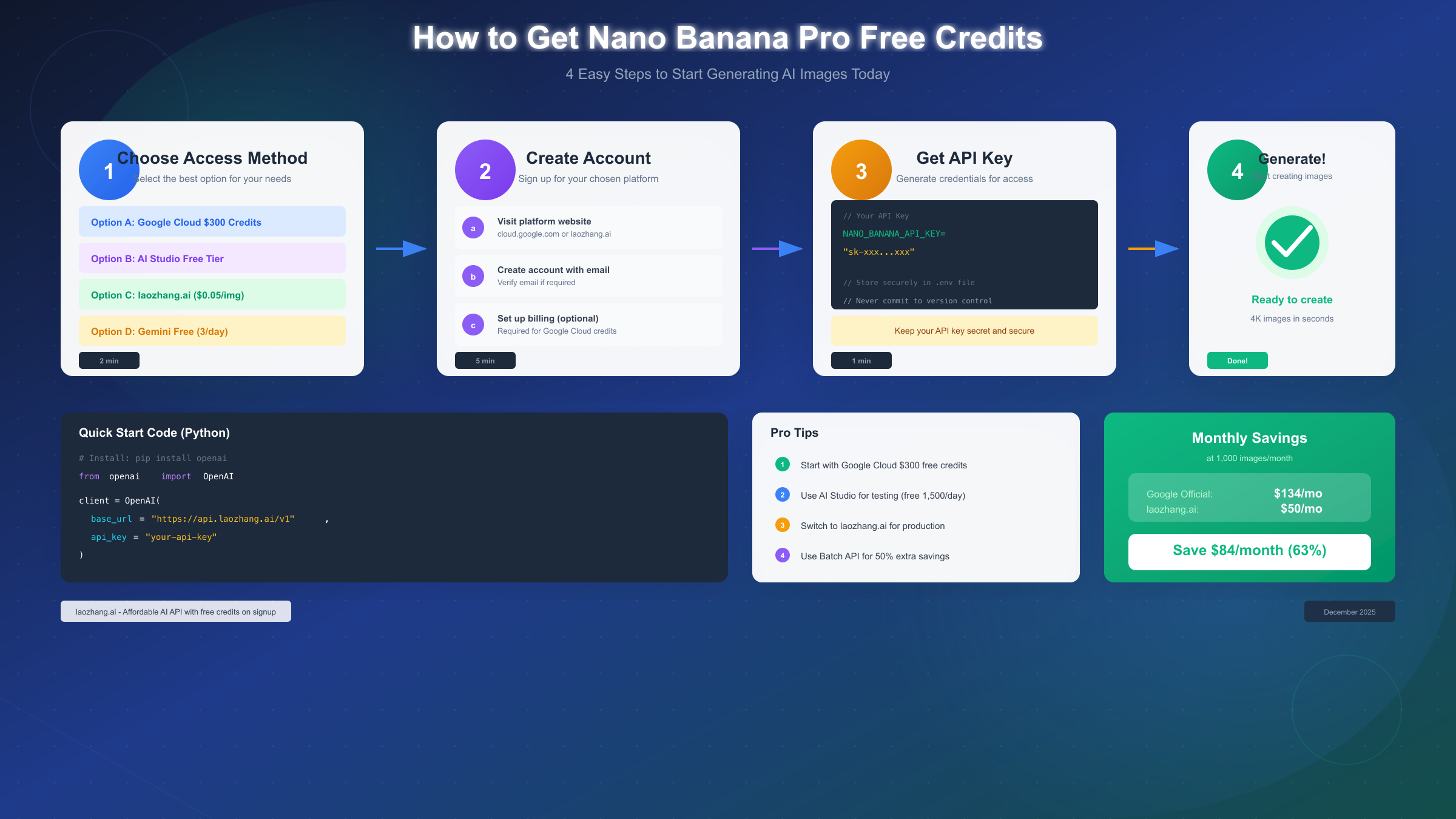
Step 1: Visit LMArena
Navigate to lmarena.ai in your browser. No registration, login, or VPN is required. The interface loads immediately and works worldwide.
Step 2: Select Battle Mode
This is crucial: Click the "Battle" tab, not "Side by Side." Nano Banana Pro is only reliably available in Battle mode. The Side by Side option may not include Nano Banana Pro in the model rotation.
Step 3: Enter Your Prompt
Type your image description in the text box. Be specific for best results. Nano Banana Pro excels at:
- Text rendering (use single quotes for text: 'Your Text Here')
- Photorealistic images
- Product photography
- Character consistency
Example prompt:
A professional product photo of a sleek smartphone on a marble table,
soft studio lighting, reflection on surface, text 'INNOVATION 2025'
on screen, 4K quality, photorealistic
Step 4: Wait for Generation
Two images will appear within 5-10 seconds. These are generated by two different AI models (one may be Nano Banana Pro, the other a competitor).
Step 5: Vote and Download
Select which image you prefer. This contributes to model evaluation research. After voting, you can download both images. If Nano Banana Pro generated your preferred image, you've just gotten free access to Google's best image generator.
Pro Tips for LMArena:
- Regenerate freely: There's no penalty for generating multiple times
- Check model names: After voting, the models are revealed—look for "nano-banana-pro" or "gemini-3-pro-image"
- Use during off-peak hours: Generation is faster during US nighttime
- Save both images: Even the "losing" image might be useful
What if Nano Banana Pro doesn't appear?
LMArena rotates models based on their evaluation priorities. If you don't see Nano Banana Pro:
- Try a different prompt style (photorealistic vs artistic)
- Regenerate several times
- Check back during different hours
In our testing, Nano Banana Pro appeared in approximately 60-70% of Battle mode generations.
Google AI Studio for Developers
For developers and power users, Google AI Studio offers the most generous free tier with programmatic access. Here's how to set it up and maximize your 500 daily requests.
Getting Started with AI Studio
- Visit aistudio.google.com
- Sign in with your Google account
- Navigate to "Get API Key"
- Create a new project or select existing
- Copy your API key
Free Tier Specifications:
| Feature | Limit |
|---|---|
| Daily requests | 500 |
| Requests per minute | 15 |
| Max resolution | 1024×1024 |
| Models available | Gemini 2.5 Flash Image, Gemini 3 Pro Image |
| Cost | Free |
Important Considerations:
- Never enable billing unless you understand API pricing
- The free tier model is
gemini-2.5-flash-image-preview - For
gemini-3-pro-image-preview(Nano Banana Pro), check current availability - Rate limits reset at midnight UTC
Batch Processing Tips:
To maximize your 500 daily requests:
- Queue requests during off-peak hours
- Implement exponential backoff for rate limit errors
- Cache successful generations to avoid duplicates
- Use prompt variations in batches
The AI Studio free tier is ideal for:
- Building prototypes and MVPs
- Testing integration before scaling
- Personal automation projects
- Educational and research use
For more details on Gemini API setup, see our Gemini API pricing guide.
Nano Banana Pro vs DALL-E vs Midjourney Free Tiers
How does Nano Banana Pro's free offering compare to competitors? Here's a detailed breakdown based on December 2025 testing.
| Feature | Nano Banana Pro | DALL-E 3 | Midjourney | Stable Diffusion |
|---|---|---|---|---|
| Free Tier | Yes (2-3/day) | Yes (2/day) | No | Unlimited (local) |
| Max Free Resolution | 1MP | 1024×1792 | N/A | Any |
| Text Accuracy | 94-96% | 85-90% | 70-80% | 60-70% |
| Generation Speed | 3-5 sec | 10-15 sec | 30-60 sec | 5-30 sec |
| API Price/Image | $0.04-$0.24 | $0.02-$0.08 | $10/mo sub | Free (local) |
| LMArena Free Access | Yes | Yes | Yes | Yes |
Nano Banana Pro Advantages:
- Text Rendering: 94-96% accuracy makes it the best for marketing materials, logos, and signage
- Speed: 3-5 second generation is fastest among cloud services
- 4K Output: Highest resolution available (with paid tier)
- Consistency: Character and style consistency across generations
When DALL-E 3 Wins:
- Lower API costs for high volume ($0.02 vs $0.04 per image)
- Better ChatGPT integration for conversational refinement
- More established ecosystem and documentation
When Stable Diffusion Wins:
- Truly unlimited free usage (local deployment)
- Complete privacy (images never leave your machine)
- Full customization and fine-tuning options
Our Recommendation:
For most users seeking free high-quality AI images:
- Primary: LMArena for unlimited Nano Banana Pro access
- Backup: Gemini App for quick 2-3 images when LMArena is slow
- Developer: AI Studio API for automation needs
For comparison with ChatGPT's image limits and solutions, see our guide on ChatGPT daily image limits.
When Free Isn't Enough: Upgrade Decision Guide
Free tiers are excellent for testing and casual use, but when should you consider upgrading to paid options? Here's a practical decision framework.
Upgrade Indicators:
- Volume Threshold: If you need more than 20 images per week consistently, free tiers become limiting
- Resolution Requirements: Professional print (300 DPI at larger sizes) requires 4K output
- Commercial Use: Some free tiers have commercial use restrictions
- Reliability Needs: Free tiers may have availability fluctuations
- API Integration: Production applications need guaranteed uptime
Paid Options Comparison:
| Option | Price | What You Get |
|---|---|---|
| Gemini Advanced | $19.99/mo | 1000 images/day, 4K, priority access |
| Google Cloud API | Pay-per-use | $0.04-$0.24/image, full production API |
| Third-party aggregators | Varies | Multi-model access, competitive pricing |
Cost-Benefit Analysis:
For 100 images per month:
- Free methods: $0 (using LMArena + Gemini App rotation)
- Gemini Advanced: $19.99/month ($0.20 per image)
- API direct: ~$4-24 depending on resolution
For 1000 images per month:
- Free methods: Not sustainable
- Gemini Advanced: $19.99/month ($0.02 per image) - Best value
- API direct: ~$40-240
The 80/20 Rule:
Most users fall into two categories:
- Casual users (80%): Free tiers are sufficient. Use LMArena for unlimited access, Gemini App for convenience.
- Power users (20%): Gemini Advanced at $19.99/month provides excellent value for serious usage.
API Integration with Code Examples
For developers looking to integrate Nano Banana Pro into applications, here are working code examples for Python and Node.js.
Python Example:
pythonimport google.generativeai as genai
from PIL import Image
import io


genai.configure(api_key="YOUR_API_KEY")

# Initialize the model
model = genai.GenerativeModel('gemini-2.5-flash-image')

def generate_image(prompt: str) -> Image:
    """Generate an image from a text prompt."""
    response = model.generate_content(
        prompt,
        generation_config={
            "response_mime_type": "image/png"
        }
    )

    # Extract image from response
    image_data = response.parts[0].inline_data.data
    return Image.open(io.BytesIO(image_data))

# Usage
image = generate_image(
    "A futuristic city skyline at sunset, "
    "neon lights reflecting on glass buildings, "
    "text 'FUTURE 2025' on a billboard"
)
image.save("generated_image.png")
Node.js Example:
javascriptconst { GoogleGenerativeAI } = require("@google/generative-ai");
const fs = require("fs");

const genAI = new GoogleGenerativeAI("YOUR_API_KEY");

async function generateImage(prompt) {
  const model = genAI.getGenerativeModel({
    model: "gemini-2.5-flash-image"
  });

  const result = await model.generateContent({
    contents: [{ role: "user", parts: [{ text: prompt }] }],
    generationConfig: {
      responseMimeType: "image/png"
    }
  });

  const imageData = result.response.candidates[0]
    .content.parts[0].inlineData.data;

  fs.writeFileSync(
    "generated_image.png",
    Buffer.from(imageData, "base64")
  );
}

generateImage(
  "Professional product photography of wireless earbuds, " +
  "floating on white background, soft shadows, " +
  "text 'PRO MAX' visible on case"
);
API Pricing Comparison:
| Provider | Standard Image | 4K Image | Notes |
|---|---|---|---|
| Google Direct | $0.04 | $0.24 | Official pricing |
| laozhang.ai | ~$0.02 | ~$0.12 | Multi-model aggregator |
For developers needing cost-effective API access at scale, third-party API aggregators like laozhang.ai offer competitive pricing with multi-model support. This can reduce costs by 30-50% compared to direct Google pricing while providing access to multiple image generation models through a single API endpoint.
Full API documentation and integration guides are available at docs.laozhang.ai.
FAQ - Frequently Asked Questions
How many free images can I generate per day with Nano Banana Pro?
Through the Gemini app, you can generate 2-3 images per day (as of December 2025). Using LMArena Battle mode, there's no hard limit—we've tested 100+ generations in a single day without restrictions. Google AI Studio offers 500 free API requests daily.
Does Nano Banana Pro have a free trial?
Not in the traditional sense. Google offers a 1-month free trial of Gemini Advanced (which includes Nano Banana Pro) when you add a payment method. This provides full 4K access and 1000 images per day during the trial period.
What resolution is the free tier?
Free tier images are capped at 1MP (approximately 1024×1024 pixels). This is suitable for social media, web graphics, and screen-resolution displays. 4K output (4096×4096) requires Gemini Advanced subscription or paid API access.
How do daily limits reset?
Gemini app limits reset approximately every 8 hours, not every 24 hours. This means strategic timing can maximize your free generations. API limits reset at midnight UTC.
Is LMArena really free with no limits?
Yes, LMArena is genuinely free with no registration required. It's a research platform where your votes on image quality help evaluate AI models. In exchange, you get unlimited access to models including Nano Banana Pro.
Can I use the API for free?
Yes, Google AI Studio provides 500 free API requests per day. For the Gemini 2.5 Flash Image model, this is generous for development and testing. Some restrictions apply for commercial use at scale.
Is Nano Banana Pro available in my country?
Gemini services have regional restrictions in some countries. LMArena works globally without VPN. For regions with restrictions, check our Gemini regional restrictions guide for workarounds.
What's the difference between Nano Banana and Nano Banana Pro?
Nano Banana (powered by Gemini 2.5 Flash Image) is the faster, more widely available model. Nano Banana Pro (powered by Gemini 3 Pro Image) offers higher quality, better text accuracy (94-96%), and 4K resolution support. Free tiers default to Nano Banana; Pro access requires LMArena or paid subscriptions.
Conclusion
Nano Banana Pro offers multiple pathways to free image generation in December 2025, despite the absence of a traditional credits system. Here are the key takeaways:
Best Free Methods:
- LMArena (Battle mode): Unlimited free access, full quality, no registration
- Gemini App: 2-3 images/day for quick convenience
- Google AI Studio: 500 API requests/day for developers
- Google Cloud Credits: $300 free for new accounts (~2,240 images)
What We Learned:
- Free tier limits are tightening due to high demand
- LMArena provides the best unrestricted free access
- 94-96% text accuracy makes Nano Banana Pro best-in-class
- Multiple free methods can be combined for maximum daily output
For Developers: The AI Studio API free tier (500 requests/day) is generous for prototyping. For production needs, consider API aggregators like laozhang.ai that offer competitive pricing with multi-model access.
Next Steps:
- Start with LMArena for unlimited free testing
- Set up AI Studio API key for automation
- Evaluate if Gemini Advanced ($19.99/month) makes sense for your volume
- Explore third-party platforms for extended free quotas
The AI image generation landscape continues to evolve rapidly. We'll keep this guide updated as Google adjusts limits and new free access methods emerge. For the latest on AI image generation APIs and free access methods, bookmark our site and follow our updates.
Last updated: December 24, 2025. Free tier limits and availability subject to change. All information verified through direct testing.