
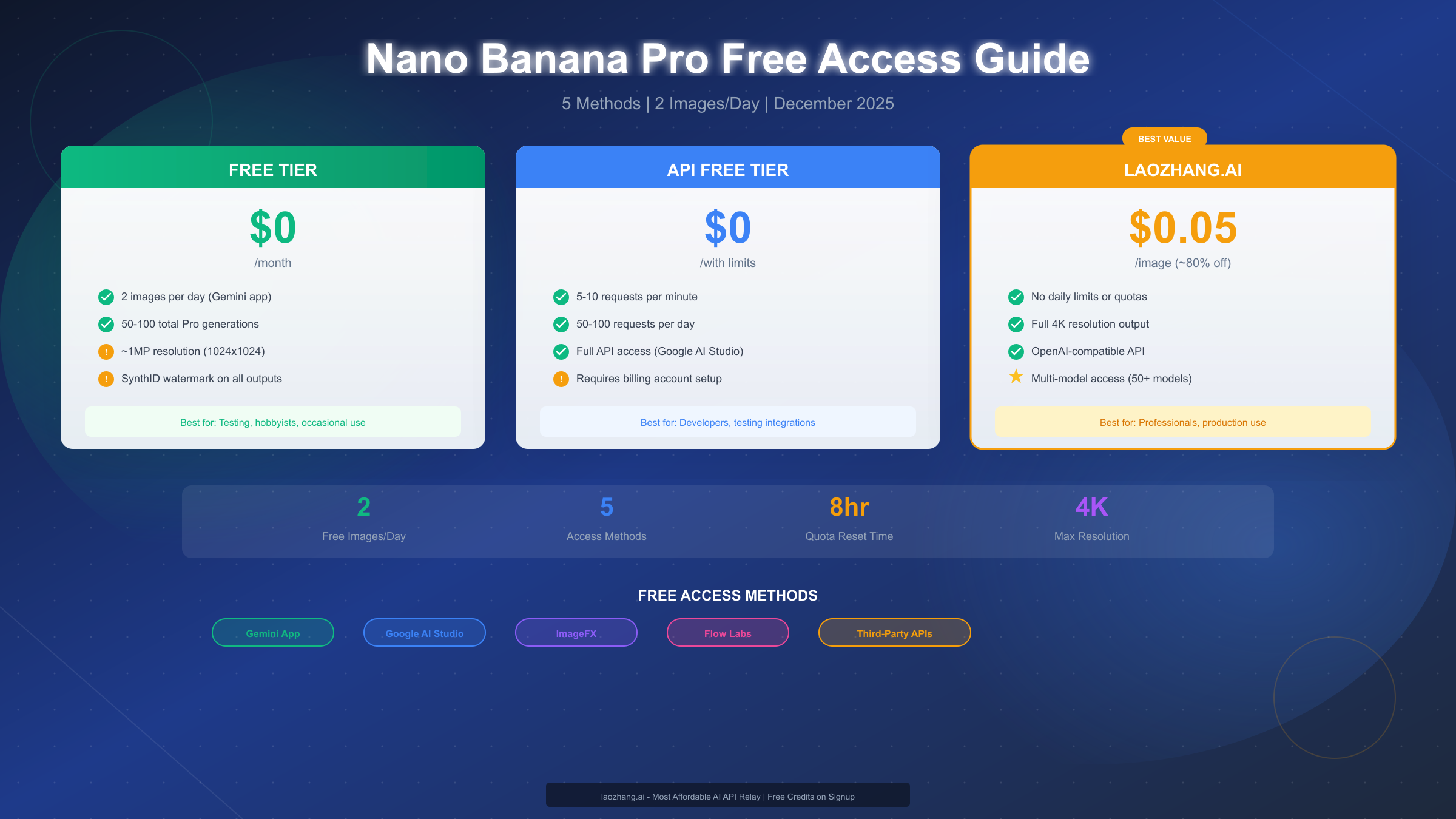
Google's Nano Banana Pro has emerged as one of the most capable AI image generators available, offering native 4K resolution, accurate text rendering in multiple languages, and consistency across multi-image projects. The good news is that you can access Nano Banana Pro for free—but with significant limitations. Free tier users receive just 2 images per day through the Gemini app (reduced from 3 in November 2025), with a lifetime cap of 50-100 Pro-quality generations before the system reverts to the older Nano Banana model. This guide covers every legitimate method to maximize your free access, plus cost-effective alternatives when those quotas inevitably run out.
What is Nano Banana Pro?
Nano Banana Pro represents Google DeepMind's most advanced image generation model, built on the Gemini 3 Pro architecture. Released on November 20, 2025, this model combines deep reasoning capabilities with real-world knowledge to produce professional-quality visuals that surpass previous generations in several key areas.
The core capabilities that set Nano Banana Pro apart include native 4K resolution output at 4096x4096 pixels, which produces print-ready images without upscaling artifacts. The model also excels at text rendering accuracy—achieving approximately 94% accuracy for embedded text across multiple languages including English, Chinese, Japanese, and Korean. This makes it particularly valuable for creating marketing materials, product mockups, and infographics where text clarity is essential.
Multi-image reference support allows users to upload up to 14 reference images simultaneously, enabling consistent character designs, brand elements, and style matching across projects. This feature has made Nano Banana Pro particularly popular among e-commerce businesses that need consistent product photography and content creators maintaining visual brand identity.
The model integrates Google Search data for real-world grounding, meaning it can accurately render current logos, celebrities, landmarks, and products based on real-time information. This distinguishes it from models trained on static datasets that may produce outdated or incorrect representations.
For developers and businesses, Nano Banana Pro offers API access through both Google AI Studio and Vertex AI, with pricing around $0.13-0.24 per image depending on resolution and output format. However, the focus of this guide is on the various free access methods available to individual users and developers testing the platform.
Free Tier Reality Check: What You Actually Get
Before diving into access methods, it's crucial to understand exactly what "free" means with Nano Banana Pro. The limitations are more restrictive than many users initially expect, and understanding these constraints will help you plan your usage effectively.
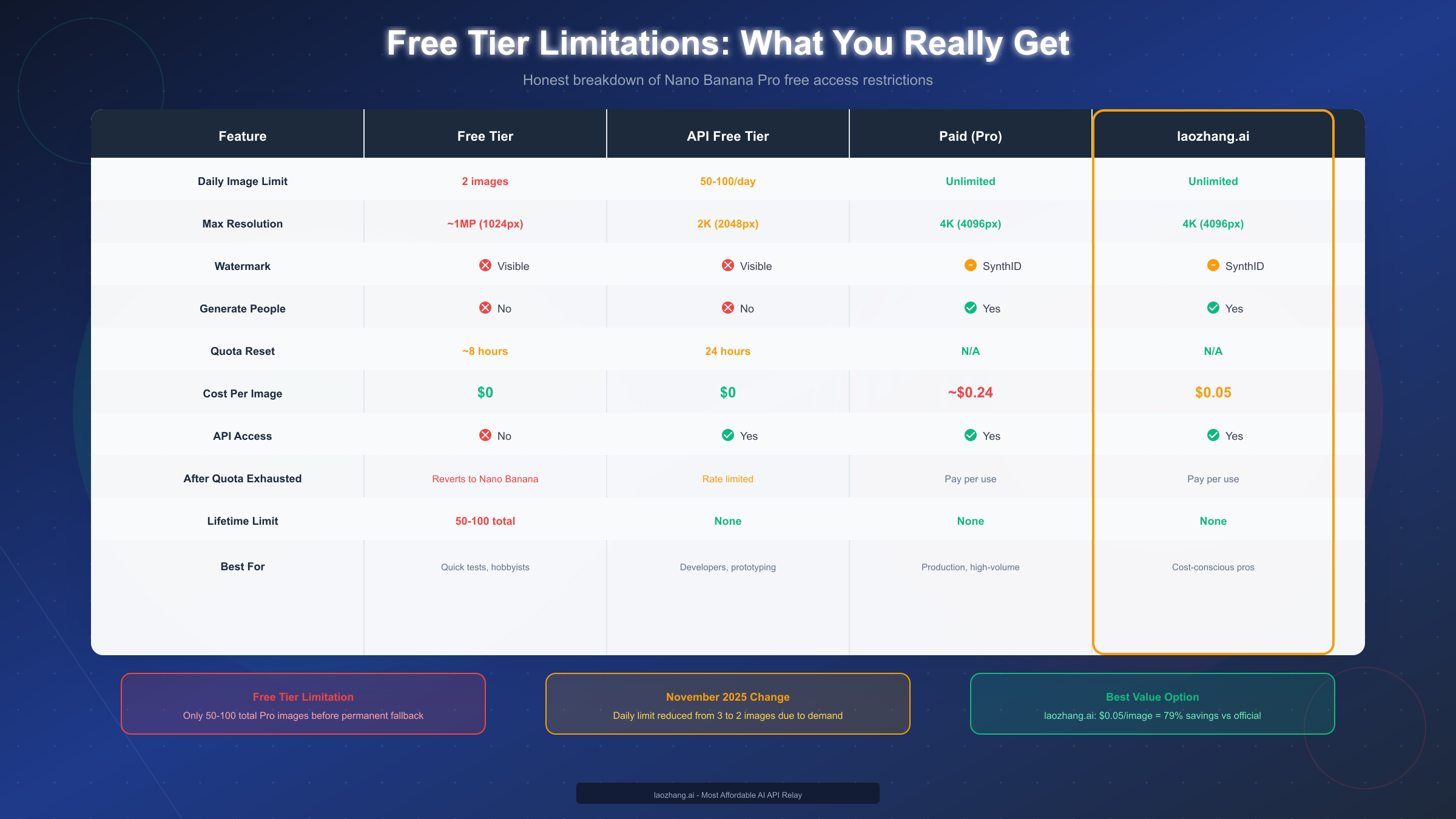
The Gemini app free tier provides just 2 images per day as of late November 2025—this limit was reduced from 3 images due to overwhelming demand. Each generation counts against your daily quota whether the image meets your expectations or not, making careful prompt crafting essential.
| Limitation | Free Tier (Gemini) | API Free Tier | Paid Pro |
|---|---|---|---|
| Daily Limit | 2 images | 50-100 requests | Unlimited |
| Max Resolution | ~1MP (1024px) | 2K (2048px) | 4K (4096px) |
| Watermark | Visible sparkles | SynthID + visible | SynthID only |
| Generate People | No | No | Yes |
| Quota Reset | ~8 hours | 24 hours | N/A |
| Lifetime Cap | 50-100 total | None | None |
The lifetime cap deserves special attention. After generating approximately 50-100 images using Nano Banana Pro, the system permanently reverts your account to the older Nano Banana model. This isn't a daily reset—once you've exhausted your Pro generations, you cannot access Pro-quality output again through the free tier. Mobile users have reported slightly higher quotas than desktop users, though Google hasn't officially confirmed different limits by platform.
Resolution limitations significantly impact professional use cases. Free tier outputs max out around 1 megapixel (approximately 1024x1024 pixels), while the full model supports up to 16 megapixels at 4096x4096. This difference becomes immediately apparent when zooming in on images or printing at larger sizes.
All free tier outputs include visible Gemini watermarks—the distinctive sparkle pattern in the corner of generated images. While these can sometimes be cropped, they appear consistently and cannot be disabled on free accounts. Paid tiers use invisible SynthID watermarking instead, which doesn't affect visual appearance.
One of the most frustrating limitations for many users is the restriction on generating people. Free tier accounts cannot create images containing human subjects, receiving error messages or filtered outputs when attempting people-related prompts. This restriction exists across all free access methods and cannot be bypassed through prompt engineering.
If you're experiencing similar limitations with other AI image tools, you might find helpful strategies in our guide on ChatGPT image generation limits and solutions, which covers comparable quota management techniques.
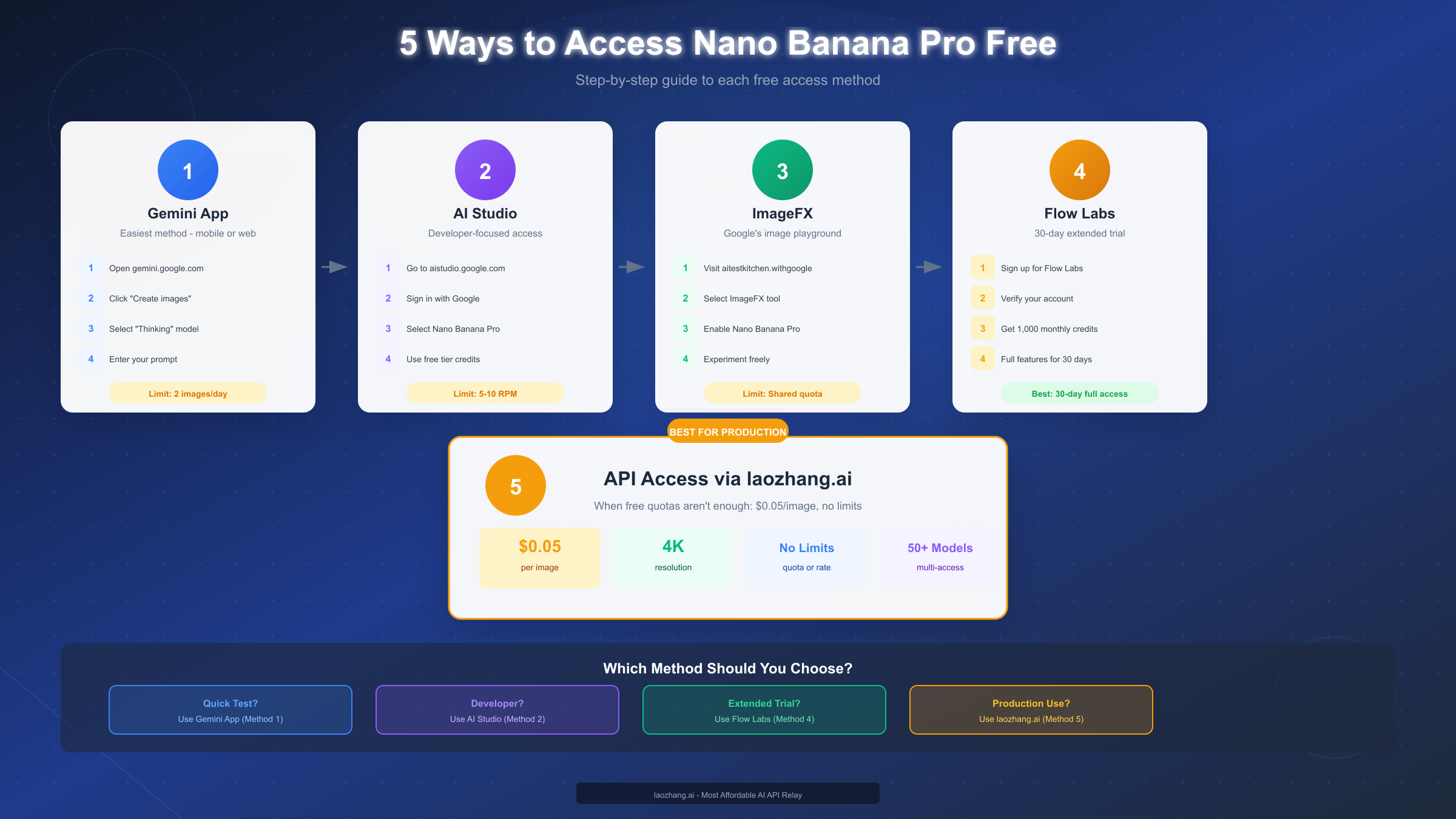
5 Ways to Access Nano Banana Pro Free
Understanding the available access methods helps you choose the right approach for your needs. Each method offers different advantages in terms of quota limits, features, and ease of use.
Method 1: Gemini App (Easiest)
The most straightforward way to access Nano Banana Pro is through Google's Gemini app, available on both mobile and web. This method requires only a Google account and provides immediate access to the model.
To get started, visit gemini.google.com or open the Gemini mobile app. Sign in with your Google account—this is essential as your free quota is tied to your account. Once logged in, click the "Tools" button (or equivalent on mobile) and select "Create images." In the model selector located at the bottom right of the interface, switch from the default to "Thinking" or "Gemini 3 Pro." This activates Nano Banana Pro for your image generation.
The quota resets approximately every 8 hours, meaning you can potentially generate up to 6 images per day if you time your generations at the start and end of each reset period. However, the 50-100 lifetime cap still applies regardless of how strategically you time your usage.
Method 2: Google AI Studio (Developer-Focused)
For developers and technical users, Google AI Studio offers more flexibility and a larger free tier quota. Access requires a Google account and provides both a web interface and API access.
Navigate to aistudio.google.com and sign in. The platform offers free-tier credits that refresh monthly—often starting with $300 in trial credits, followed by ongoing limited free credits. From the model picker, select Nano Banana Pro (Gemini 3 Pro Image) to begin generating.
The API free tier allows 5-10 requests per minute with 50-100 requests per day, making it suitable for testing integrations and development workflows. After exhausting trial credits, you'll need to enable billing to continue, though you won't be charged until you exceed free limits.
For detailed information on Gemini API capabilities and pricing tiers, our Gemini API pricing guide covers the complete cost structure.
Method 3: ImageFX / AI Test Kitchen
Google's ImageFX, part of the AI Test Kitchen initiative, provides another free access point. This experimental platform often has different quota allocations than the main Gemini app.
Visit aitestkitchen.withgoogle.com and sign in with your Google account. Select the ImageFX tool from the available experiments, then enable Nano Banana Pro in the model settings. The platform is designed for creative experimentation, so quotas may vary and features might change as Google iterates on the experience.
Method 4: Google Flow Labs (30-Day Extended Trial)
Flow Labs offers one of the most generous free access options, providing a full 30-day trial with 1,000 monthly AI credits. Unlike the Gemini app's restrictive daily limits, Flow provides extended access to the full feature set.
Sign up for a Flow Labs account and complete the verification process. Once verified, you'll receive monthly credits that cover Nano Banana Pro generation along with other AI capabilities. This method is particularly valuable for users who want to thoroughly evaluate the model before committing to a paid plan.
Method 5: Third-Party Platforms
Various third-party platforms have integrated Nano Banana Pro or similar models, sometimes offering more generous free tiers or trial periods. Platforms like NoteGPT, VisualGPT, and Fooocus provide access through their interfaces, though reliability and feature parity vary.
When using third-party platforms, verify their legitimacy and understand their terms of service. Some platforms offer unlimited free trials that may have undisclosed restrictions or use older model versions.
Maximize Your Free Quota: Pro Tips
Getting the most from limited free generations requires strategic planning. These techniques help ensure you don't waste precious quota on test prompts or suboptimal results.
The most important strategy is drafting prompts outside the generation interface before committing to an actual generation. Write and refine your prompts in a text editor, considering specific details about composition, lighting, style, and any text elements you want included. Only submit to Nano Banana Pro when you're confident in your prompt.
Use the older Nano Banana model (standard tier) for initial tests and iterations. The standard model doesn't count against your Pro quota and provides a reasonable preview of composition and layout. Once you've refined your concept through standard-tier testing, use your Pro generations for the final high-quality output.
Batch similar requests into comprehensive prompts. Instead of generating five separate product shots, describe multiple variations in a single detailed prompt. Nano Banana Pro can handle complex multi-element prompts, and consolidating requests maximizes the value of each generation.
Time your generations strategically around the 8-hour reset window. If you need multiple images for a project, plan your workflow to span reset periods. Generate your first batch, wait for the reset, then complete additional images without exceeding daily limits.
Leverage Google's prompt engineering best practices for better first-attempt success rates:
- Be hyper-specific about subjects, colors, lighting, and composition
- Provide context about the intended use or mood
- Use positive framing ("include a blue sky") rather than negative prompts ("no clouds")
- Break complex scenes into sequential, clear instructions
- Specify aspect ratio and orientation explicitly
If you encounter rate limiting or quota errors, our guide on Gemini Flash image generation API covers additional strategies for managing API access efficiently.
When Free Isn't Enough: Cost-Effective Alternatives
At some point, most serious users exhaust free quotas and face a decision: wait for resets, pay official API pricing, or find alternatives. Understanding the cost landscape helps make informed choices.
Official Google API pricing runs approximately $0.13-0.24 per image depending on resolution and output format. For users generating hundreds or thousands of images monthly, these costs add up quickly. A small e-commerce business creating 1,000 product images monthly would face $130-240 in generation costs alone.
This is where API relay services become valuable. Services like laozhang.ai offer Nano Banana Pro access at significantly reduced rates—approximately $0.05 per image, representing roughly 80% savings compared to official pricing. These services aggregate API access across multiple users, passing volume discounts through to individual customers.
| Usage Level | Official API Cost | laozhang.ai Cost | Monthly Savings |
|---|---|---|---|
| 100 images | $13-24 | $5 | $8-19 |
| 500 images | $65-120 | $25 | $40-95 |
| 1,000 images | $130-240 | $50 | $80-190 |
| 5,000 images | $650-1,200 | $250 | $400-950 |
The decision point typically comes when you're generating more than 50-100 images monthly. Below that threshold, managing free quotas across multiple methods remains viable. Above it, paying for API access becomes more practical than the productivity loss from quota management.
For production use cases requiring consistent output without daily limits, relay services eliminate the friction of quota tracking while maintaining full 4K resolution and feature access. The tradeoff is slightly increased latency compared to direct API calls, though this difference is typically measured in hundreds of milliseconds—imperceptible for most workflows.
Developer's Guide: API Free Tier Access
Developers integrating Nano Banana Pro into applications can leverage the API free tier for testing and prototyping. This section covers the technical details of API access, including code examples and rate limit handling.
The Gemini API free tier provides 5-10 requests per minute with 50-100 daily requests for image generation. These limits are sufficient for development and testing but require careful handling in production code.
Basic Python implementation for Nano Banana Pro image generation:
pythonimport google.generativeai as genai
from PIL import Image
import io


genai.configure(api_key="YOUR_API_KEY")

# Initialize the model
model = genai.GenerativeModel('gemini-3-pro-image')

def generate_image(prompt: str, size: str = "1024x1024"):
    """Generate an image using Nano Banana Pro."""
    try:
        response = model.generate_content(
            prompt,
            generation_config={
                "response_mime_type": "image/png",
                "image_size": size
            }
        )

        # Extract image data from response
        image_data = response.candidates[0].content.parts[0].inline_data.data
        image = Image.open(io.BytesIO(image_data))
        return image

    except Exception as e:
        print(f"Generation error: {e}")
        return None

# Example usage
image = generate_image(
    "A professional product photo of a silver laptop on a white background, "
    "soft studio lighting, 4K quality, commercial photography style"
)
if image:
    image.save("output.png")
For production applications requiring higher throughput, implementing rate limit handling prevents request failures:
pythonimport time
from functools import wraps

def rate_limit_handler(max_retries=3, base_delay=1.0):
    """Decorator for handling API rate limits with exponential backoff."""
    def decorator(func):
        @wraps(func)
        def wrapper(*args, **kwargs):
            retries = 0
            while retries < max_retries:
                try:
                    return func(*args, **kwargs)
                except Exception as e:
                    if "429" in str(e) or "rate limit" in str(e).lower():
                        delay = base_delay * (2 ** retries)
                        print(f"Rate limited. Waiting {delay}s...")
                        time.sleep(delay)
                        retries += 1
                    else:
                        raise
            raise Exception("Max retries exceeded for rate limit")
        return wrapper
    return decorator

@rate_limit_handler(max_retries=5)
def generate_with_retry(prompt):
    return generate_image(prompt)
When the free tier proves insufficient for development needs, API relay services offer an alternative path. For comprehensive API integration patterns, see our Gemini 3.0 API integration guide.
python# Using laozhang.ai API relay for higher throughput
import requests

def generate_via_relay(prompt: str, api_key: str):
    """Generate using API relay service."""
    response = requests.post(
        "https://api.laozhang.ai/v1/images/generations",
        headers={
            "Authorization": f"Bearer {api_key}",
            "Content-Type": "application/json"
        },
        json={
            "model": "nano-banana-pro",
            "prompt": prompt,
            "size": "2048x2048",
            "quality": "hd"
        }
    )
    return response.json()
FAQ & Common Issues
How long does the free quota take to reset?
The Gemini app quota resets approximately every 8 hours, not at a fixed daily time. This means strategic users can generate up to 6 images per day by timing generations around reset windows. The API free tier resets on a 24-hour rolling basis tied to your first request of the period.
What happens after I hit the lifetime limit?
After 50-100 Pro-quality generations, your account permanently reverts to the standard Nano Banana model. This isn't a temporary restriction—you cannot regain Pro access through the free tier. The only options are subscribing to a paid plan, using the API with billing enabled, or accessing through third-party services.
Why can't I generate images of people?
Free tier accounts have restrictions on generating human subjects, likely due to content moderation concerns and potential misuse. This limitation exists across all free access methods and cannot be circumvented through prompt engineering. Paid tiers and API access with billing enabled do support people generation.
Why is my image quality lower than examples I've seen?
Free tier outputs are limited to approximately 1 megapixel resolution, while promotional materials and examples often showcase 4K (16 megapixel) outputs available only on paid tiers. The quality difference becomes particularly noticeable when zooming in or using images for print applications.
Can I remove the watermark from free tier images?
The visible Gemini sparkle watermark appears on all free tier outputs. While cropping may remove it in some cases, the watermark is intentionally positioned to discourage this. Using free tier images commercially typically violates terms of service, and watermark removal for such purposes is not recommended.
What's the difference between Nano Banana and Nano Banana Pro?
Nano Banana is the standard image generation model with lower resolution caps and less advanced reasoning. Nano Banana Pro, built on Gemini 3 Pro, offers higher resolution, better text accuracy, multi-image reference support, and improved consistency. Free accounts may switch between models or revert to standard Nano Banana after exhausting Pro quotas.
Error: "Content policy violation" - what does this mean?
This error indicates your prompt triggered safety filters. Common causes include requests for copyrighted characters, adult content, violence, or specific named individuals. Rephrase prompts to avoid triggering terms, using descriptive alternatives rather than specific names or protected content.
Conclusion: Making the Most of Free Access
Nano Banana Pro's free tier provides genuine value for casual users, hobbyists, and developers testing integrations. The 2 images per day limit, while restrictive, enables evaluation of the model's capabilities before committing to paid access. However, the 50-100 lifetime cap means free access is ultimately temporary for active users.
For sustained usage, the most cost-effective path combines strategic free tier management with affordable API access through relay services. Using free quotas for experimentation and refinement, then transitioning to $0.05/image API access for production needs, minimizes costs while maintaining access to full 4K quality and features.
The key actions to take now:
- Start with the Gemini app for immediate, zero-friction access
- Register for Google AI Studio to unlock developer-focused free tier
- Apply for Flow Labs' 30-day extended trial if available
- Track your Pro generation count to avoid unexpected reversion
- Evaluate API relay services like laozhang.ai when free quotas become limiting
For developers requiring consistent API access without quotas, documentation and signup are available at https://docs.laozhang.ai/. The platform supports OpenAI-compatible endpoints for easy integration with existing workflows.