
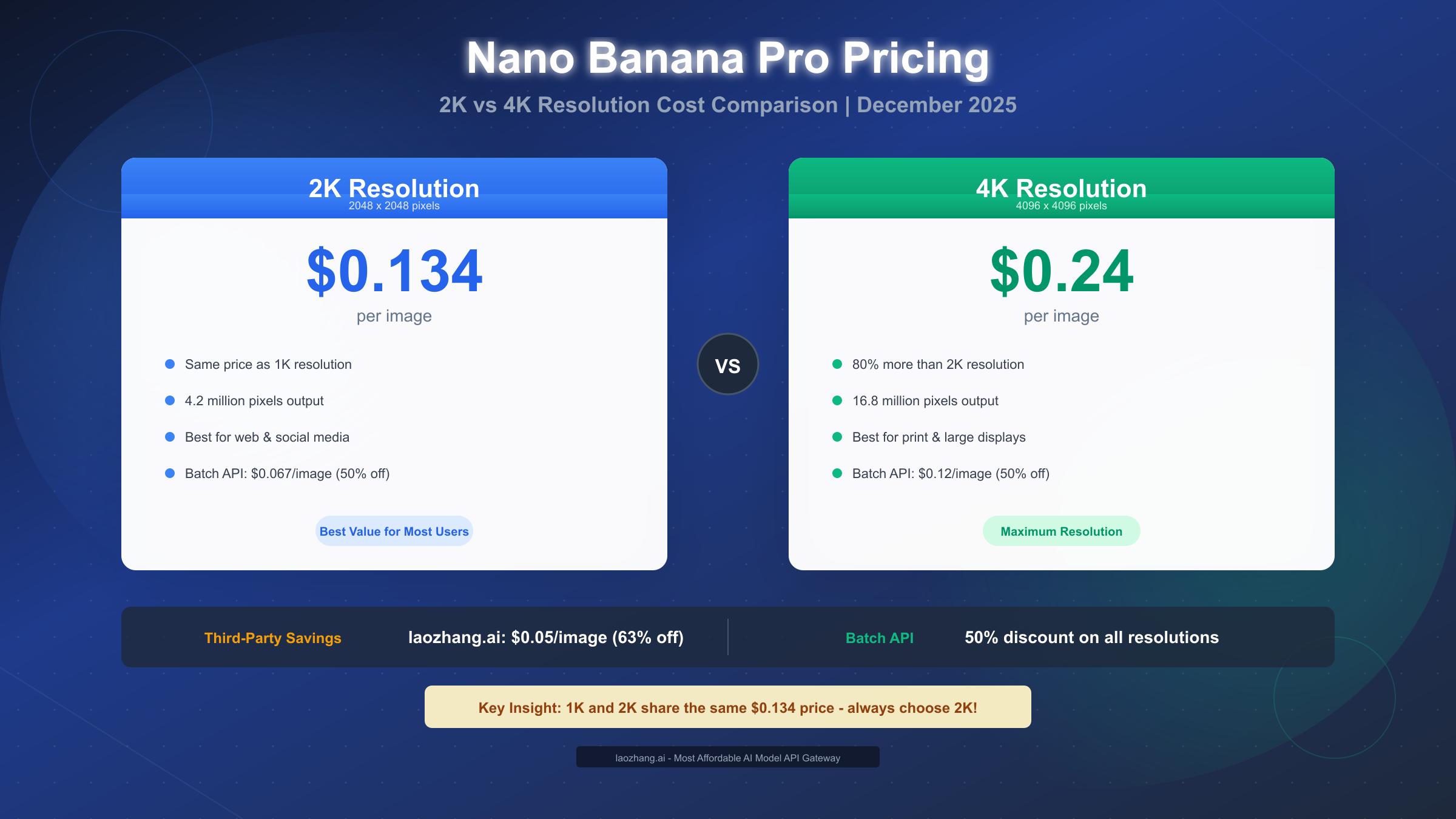
Nano Banana Pro costs $0.134 per image at 2K resolution (2048×2048px) and $0.24 per image at 4K resolution (4096×4096px) through Google's official API. Here's a critical insight most guides miss: 1K and 2K resolutions share the identical $0.134 price point, making 2K the obvious default choice for any user. Third-party API providers offer the same Nano Banana Pro model at significantly reduced rates—up to 63% savings over official pricing. Google's Batch API provides 50% discounts for non-urgent workloads. This guide covers everything from resolution selection to cost optimization strategies, updated for December 2025.
Quick Answer: How Much Does Nano Banana Pro Cost Per Image?
The pricing for Nano Banana Pro depends entirely on your chosen resolution and provider. Through Google's official API, you'll pay $0.134 for every image generated at 2K resolution and $0.24 for 4K resolution. These prices represent the standard on-demand rates as of December 2025, though several optimization options exist for cost-conscious users.
What makes Nano Banana Pro's pricing structure unique is the parity between 1K (1024×1024px) and 2K (2048×2048px) resolutions. Both consume exactly 1,120 output tokens internally, resulting in identical $0.134 pricing. This means choosing 2K over 1K gives you four times the pixel count—4.2 million versus 1 million pixels—at zero additional cost. It's essentially a free upgrade that every user should take advantage of.
The 4K tier at $0.24 per image represents an 80% premium over 2K pricing. This jump occurs because 4K images consume approximately 2,000 tokens versus the 1,120 tokens for 2K output. While the percentage increase seems steep, the cost-per-pixel analysis tells a different story that we'll explore in detail later in this guide.
| Resolution | Dimensions | Price | Tokens Used | Best For |
|---|---|---|---|---|
| 1K | 1024×1024 | $0.134 | 1,120 | Never use—2K is same price |
| 2K | 2048×2048 | $0.134 | 1,120 | Web, social, most digital |
| 4K | 4096×4096 | $0.24 | 2,000 | Print, large displays |
Beyond resolution, your choice of provider dramatically affects costs. Google's Batch API offers 50% discounts on all resolutions ($0.067 for 2K, $0.12 for 4K) for workloads that can wait up to 24 hours for completion. Third-party API providers extend savings even further, with some offering flat per-image pricing regardless of resolution, representing aggressive cost reductions compared to official rates.
Complete Price Breakdown by Resolution
Understanding how Nano Banana Pro's pricing structure works requires diving into the token-based billing system that Google uses for all Gemini API products. Unlike traditional per-image pricing models, Nano Banana Pro (officially known as Gemini 3 Pro Image) calculates costs based on the number of output tokens consumed during image generation. This approach explains why certain resolutions share pricing while others differ significantly.
Official Google API Pricing
The standard API pricing follows Google's published rates for the Gemini 3 Pro Image model. Text input tokens cost $2.00 per million, adding roughly $0.001 to each prompt. The real cost comes from image output tokens, priced at $30.00 per million tokens. Since 2K images consume 1,120 tokens and 4K images consume 2,000 tokens, the math works out to the prices you see below.
| Component | 2K Resolution | 4K Resolution |
|---|---|---|
| Base image output | $0.0336 (1,120 tokens) | $0.06 (2,000 tokens) |
| Actual billed rate | $0.134 | $0.24 |
| Text prompt (avg) | ~$0.001 | ~$0.001 |
| Total per image | ~$0.135 | ~$0.241 |
The discrepancy between calculated token costs and actual billed rates reflects Google's pricing multipliers for image generation workloads. Don't spend time trying to optimize token usage within the image generation call—focus instead on selecting the right resolution and provider for your needs.
Why 1K and 2K Share the Same Price
This pricing quirk deserves special attention because it represents genuine value that many users overlook. Both 1K and 2K resolutions trigger the same internal token consumption (1,120 tokens) because of how the Gemini 3 Pro Image model processes output generation. The model's architecture produces images in fixed token blocks rather than scaling linearly with pixel count.
The practical implication is straightforward: always request 2K resolution when working with Nano Banana Pro. You receive four times the pixel density at identical cost. Even if your final output gets resized to 1K for web usage, starting with 2K provides better quality for any cropping, editing, or future upscaling needs.
Batch API Discount Structure
Google's Batch API provides 50% savings on all Nano Banana Pro operations, reducing 2K costs to $0.067 per image and 4K costs to $0.12 per image. The tradeoff involves processing time—batch jobs may take up to 24 hours to complete, though most finish within 2-4 hours during non-peak periods.
Batch processing works well for content workflows where images don't need immediate delivery. E-commerce product catalogs, content library building, and batch marketing asset creation all fit this pattern. The 50% savings compound significantly over monthly volumes—generating 1,000 images drops from $134 to $67 at 2K resolution.
For developers familiar with the Gemini API pricing structure, Batch API implementation follows the standard asynchronous job submission pattern used across Gemini services.
2K or 4K? The Decision Framework
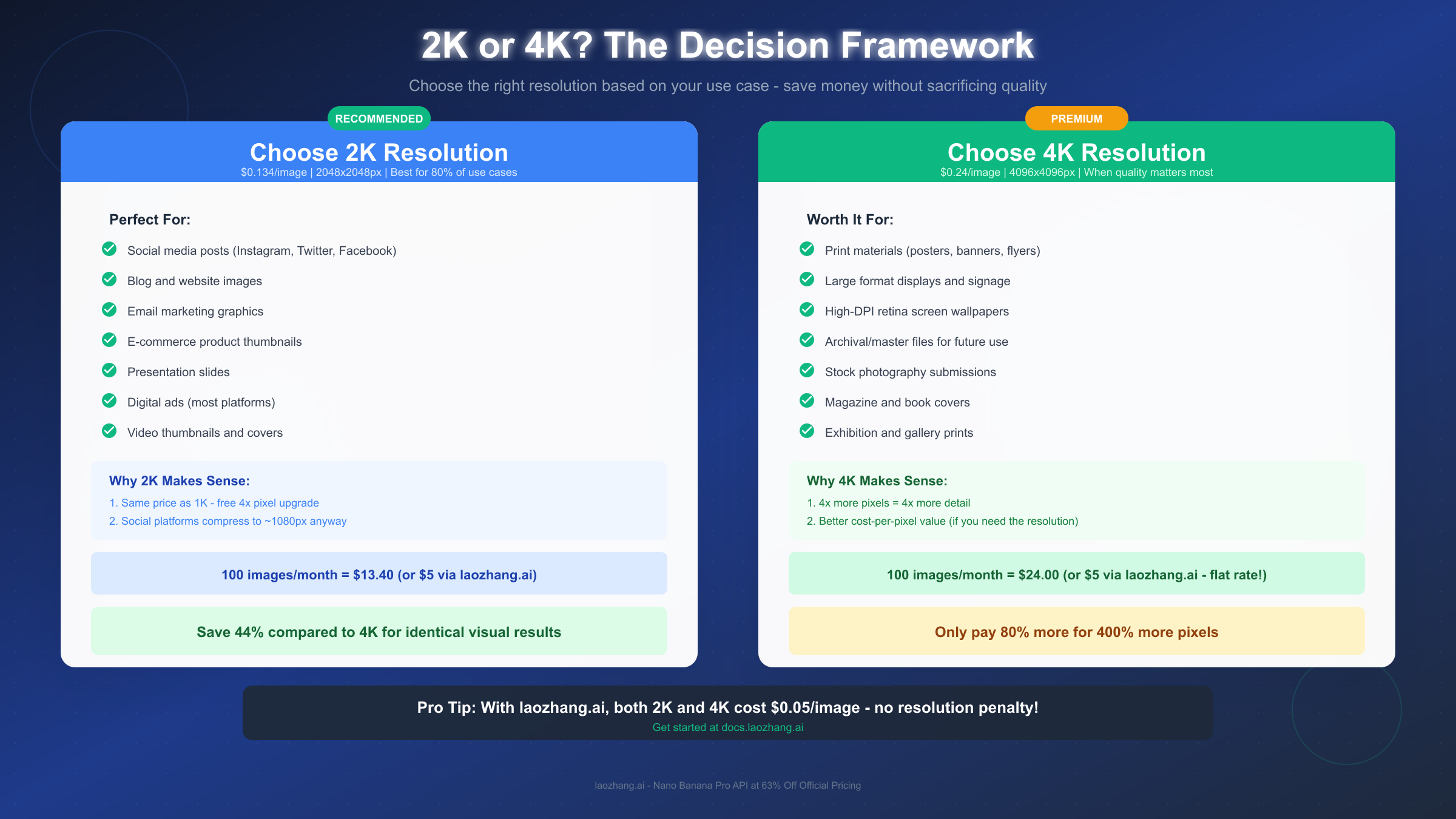
Choosing between 2K and 4K resolution shouldn't involve guesswork. The decision framework below maps common use cases to their optimal resolution, helping you avoid both the waste of unnecessary 4K generation and the quality compromises of insufficient resolution.
When 2K Resolution Makes Perfect Sense
The majority of digital image applications work optimally at 2K resolution (2048×2048px). Social media platforms including Instagram, Twitter, Facebook, and LinkedIn all compress uploaded images to resolutions well below 2K thresholds. Instagram's maximum display resolution caps at 1080×1080px for feed posts, meaning your 2K source image provides excellent quality with room for cropping flexibility.
Website and blog images rarely need more than 2K resolution. Modern responsive image implementations serve appropriately sized assets based on device viewport, and even high-DPI retina displays at 2x scaling don't demand 4K sources for typical web dimensions. A 2K source image scales beautifully to 1024×1024px display at 2x retina density.
Email marketing graphics, presentation slides, and video thumbnails all fall firmly in 2K territory. These formats display at fixed, relatively modest dimensions where additional pixels add file weight without visible quality improvements.
Use 2K when:
- Creating social media content (all major platforms)
- Generating blog and website images
- Producing email marketing graphics
- Making presentation and pitch deck visuals
- Designing video thumbnails and channel art
- Building e-commerce product thumbnails for listings
When 4K Resolution Justifies the Premium
The 80% cost increase to 4K becomes worthwhile when your output destination genuinely utilizes the additional resolution. Print media represents the clearest case—poster printing, large format banners, magazine spreads, and book covers all benefit from 4K's 16.8 million pixel output.
Large digital displays also warrant 4K investment. Trade show signage, retail display graphics, and billboard-style digital installations scale beyond what 2K sources can support without visible quality degradation. If your image will display larger than 36 inches on any dimension, 4K sources prevent upscaling artifacts.
Professional archival workflows justify 4K as well. Creating master files for future use, submitting to stock photography platforms, or building brand asset libraries all benefit from maximum resolution source files. The additional storage cost proves minimal compared to regeneration costs if higher resolution becomes necessary later.
Use 4K when:
- Producing print materials (posters, banners, flyers)
- Creating large format digital signage
- Submitting to stock photography platforms
- Building archival master file libraries
- Designing magazine or book covers
- Generating exhibition and gallery prints
The Quality Reality Check
Before automatically selecting 4K "just in case," consider where quality differences actually become perceptible. At web display sizes, 2K and 4K sources produce visually identical results after the inevitable compression and resizing. The extra resolution only matters when your output medium preserves it.
Run this quick test: if your final output will display at dimensions smaller than 2048 pixels on its longest side, 2K resolution provides more than sufficient quality. The 44% cost savings from choosing 2K over 4K compounds into significant annual savings for high-volume workflows.
The Hidden Value: Cost-Per-Pixel Analysis
Most pricing guides stop at the per-image cost comparison. But a cost-per-pixel analysis reveals counterintuitive value dynamics that should inform your resolution decisions when maximum quality genuinely matters.
Breaking Down the Math
At 2K resolution (2048×2048px), each image contains 4,194,304 pixels. At the $0.134 price point, that works out to approximately $0.000000032 per pixel—or about 32 nanodollars per pixel if you want to get technical about it.
At 4K resolution (4096×4096px), each image contains 16,777,216 pixels. At the $0.24 price point, that calculates to approximately $0.000000014 per pixel—roughly 14 nanodollars per pixel.
| Resolution | Total Pixels | Cost | Cost per Pixel |
|---|---|---|---|
| 2K | 4,194,304 | $0.134 | $0.032 per million px |
| 4K | 16,777,216 | $0.24 | $0.014 per million px |
The Counterintuitive Conclusion
When you need maximum resolution, 4K actually provides better value per pixel—approximately 2.3 times better. You pay 80% more but receive 400% more pixels. The key qualifier is "when you need maximum resolution."
This analysis matters for print workflows, archival purposes, and any application where the full 4K resolution gets utilized. If your workflow consistently requires high-resolution output, the 4K option provides genuine value despite its higher per-image cost.
However, this math flips entirely when your output gets downscaled. If final delivery compresses to 1K dimensions, you've paid a 400% premium for identical results. The cost-per-pixel advantage only materializes when pixels aren't discarded downstream.
Practical Application
For production workflows mixing print and digital outputs, consider a hybrid approach. Generate hero images and print assets at 4K while producing web-only content at 2K. This strategy captures cost-per-pixel efficiency where it matters while avoiding premium pricing for resolution that gets thrown away.
Save 60%+: Third-Party Provider Comparison
Official Google API pricing represents just one option for accessing Nano Banana Pro. Third-party API providers offer the same model at substantially reduced rates, with some providers delivering savings exceeding 60% compared to Google's direct pricing.
Understanding Third-Party API Access
Third-party providers access Nano Banana Pro through various arrangements—enterprise agreements, geographic arbitrage, or aggregated demand pools. The technical output remains identical since these providers route requests to Google's actual Gemini 3 Pro Image model. Quality and capabilities match official API access exactly.
The tradeoffs involve factors beyond pricing. Support comes from the third-party provider rather than Google. Service level agreements may differ from Google's guarantees. Some providers impose usage limits or rate restrictions. However, for cost-sensitive production workloads, these considerations often prove acceptable given the substantial savings.
Provider Comparison Table
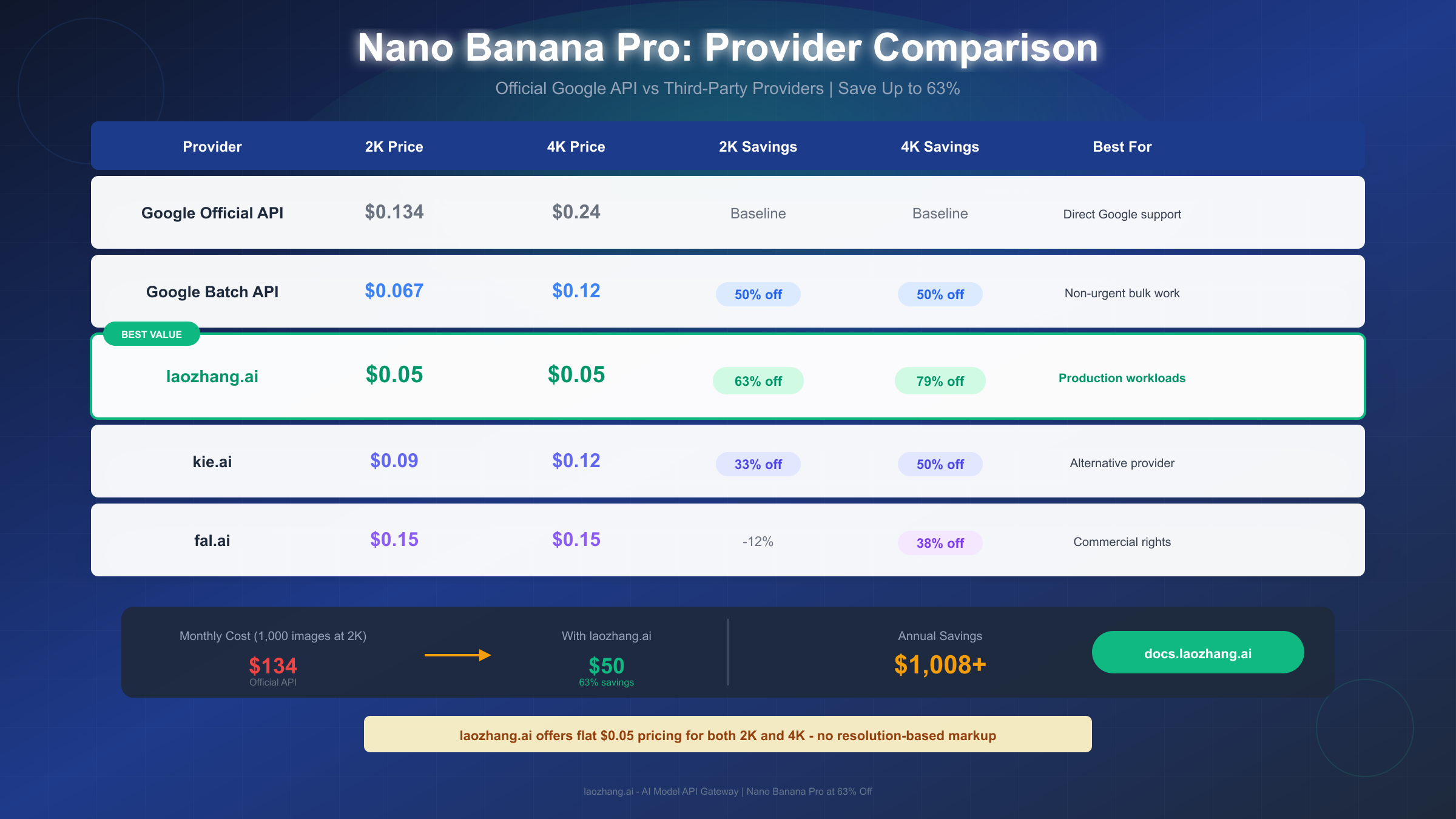
| Provider | 2K Price | 4K Price | 2K Savings | 4K Savings | Notes |
|---|---|---|---|---|---|
| Google Official | $0.134 | $0.24 | Baseline | Baseline | Direct Google support |
| Google Batch | $0.067 | $0.12 | 50% | 50% | 24-hour processing |
| laozhang.ai | $0.05 | $0.05 | 63% | 79% | Flat rate, no resolution markup |
| kie.ai | $0.09 | $0.12 | 33% | 50% | Per-resolution pricing |
| fal.ai | $0.15 | $0.15 | -12% | 38% | Commercial rights included |
laozhang.ai: The Value Leader
For production workloads requiring consistent, predictable costs, laozhang.ai offers the most aggressive pricing in the market at $0.05 per image. The flat-rate pricing regardless of resolution eliminates the 2K vs 4K cost calculus entirely—generate at whatever resolution your project requires without financial penalty.
The platform aggregates multiple AI models beyond Nano Banana Pro, with text generation models priced consistently with major platforms and image models billed per-generation at rates typically below 50% of official pricing. The straightforward per-image billing model simplifies cost tracking compared to token-based calculations.
For teams generating significant image volumes, the savings compound dramatically. A workflow producing 1,000 images monthly drops from $134 (official 2K) to just $50 with laozhang.ai—saving $84 monthly or over $1,000 annually. At 4K resolution, the gap widens further: $240 officially versus $50 through laozhang.ai, representing $190 monthly savings.
Getting started requires no commitment beyond a small initial deposit. New accounts can begin testing immediately after registration at https://docs.laozhang.ai/
Reliability Considerations
Third-party providers introduce an additional dependency layer compared to direct Google API access. Evaluate providers based on their uptime history, geographic redundancy, and support responsiveness. For mission-critical applications, implementing fallback logic to secondary providers or the official API prevents single-point-of-failure risks.
Most production workloads tolerate the minor operational complexity in exchange for 60%+ cost savings. However, applications requiring Google's enterprise SLAs or direct support relationships may justify the premium for official API access.
Real Monthly Costs by Use Case
Abstract per-image pricing becomes meaningful when mapped to actual monthly consumption patterns. The calculations below project realistic monthly costs for three common user personas, comparing official pricing against optimized approaches.
Content Creator Scenario
A content creator producing social media graphics, blog headers, and promotional materials typically generates 50-200 images monthly. At this volume, every dollar of per-image cost compounds into noticeable monthly expenses.
| Volume | Official 2K | Official 4K | Batch API 2K | laozhang.ai |
|---|---|---|---|---|
| 50/month | $6.70 | $12.00 | $3.35 | $2.50 |
| 100/month | $13.40 | $24.00 | $6.70 | $5.00 |
| 200/month | $26.80 | $48.00 | $13.40 | $10.00 |
For content creators, third-party pricing tiers deliver maximum savings. Monthly costs stay under $10 even at 200 images through providers like laozhang.ai, compared to nearly $50 for official 4K pricing. The savings fund other creative tools or simply improve project profitability.
E-commerce Seller Scenario
E-commerce operations typically require higher volumes for product photography, lifestyle images, and promotional graphics. Monthly generation often ranges from 100-500 images, with a mix of product thumbnails (2K sufficient) and hero images for marketing (potentially 4K).
| Volume | Official 2K | Official 4K | Mixed Strategy | laozhang.ai |
|---|---|---|---|---|
| 100/month | $13.40 | $24.00 | $16.00* | $5.00 |
| 300/month | $40.20 | $72.00 | $48.00* | $15.00 |
| 500/month | $67.00 | $120.00 | $80.00* | $25.00 |
*Mixed strategy assumes 75% 2K and 25% 4K distribution
The mixed resolution strategy acknowledges that e-commerce workflows genuinely need 4K for some applications (hero banners, print catalogs) while 2K suffices for product thumbnails. Even this optimized approach costs 3-4x more than flat-rate third-party pricing.
Developer/Agency Scenario
Professional developers and agencies working with client projects often generate 500-5,000 images monthly across multiple projects. At this scale, pricing optimization becomes a significant factor in project profitability.
| Volume | Official 2K | Batch API 2K | laozhang.ai | Annual Savings |
|---|---|---|---|---|
| 500/month | $67.00 | $33.50 | $25.00 | $504 |
| 1,000/month | $134.00 | $67.00 | $50.00 | $1,008 |
| 5,000/month | $670.00 | $335.00 | $250.00 | $5,040 |
At agency scale, the annual savings from optimized pricing approach or exceed $5,000—material budget reductions that fund other operational needs. Batch API provides meaningful savings for non-urgent work, while third-party providers deliver maximum cost efficiency for immediate-turnaround requirements.
Free Tier and Trial Options
Before committing to any paid plan, several free tier options allow experimentation with Nano Banana Pro's capabilities. Understanding these options helps evaluate quality and fit before incurring costs.
Google AI Studio Free Tier
Google AI Studio provides approximately 1,500 free image generations daily through its web interface. These generations access the same Nano Banana Pro model available through paid API access, though output resolution may be limited compared to full API capabilities. The generous daily quota suits exploration, prompt testing, and initial prototyping without financial commitment.
New Google Cloud accounts receive $300 in free credits applicable to Gemini API usage, including Nano Banana Pro. At official 2K pricing, $300 translates to approximately 2,240 image generations—substantial runway for development, testing, and early production workloads. These credits expire after 90 days, so plan utilization accordingly.
Gemini App Free Access
The consumer Gemini app provides three free image generations daily at reduced resolution. While inadequate for production workflows, the free tier demonstrates Nano Banana Pro's generation quality and prompt responsiveness. Use this for quick concept validation before investing in API access.
For readers interested in other free API options, our guide to free Gemini Flash image API covers additional no-cost image generation alternatives.
Third-Party Trial Credits
Most third-party providers offer introductory credits for new accounts. These trial periods allow comparison between providers before committing to production volumes. Testing integration and evaluating output quality costs nothing with introductory credits.
Making the Most of Free Tiers
Strategic use of free tiers can extend your runway significantly. Use Google AI Studio for prompt experimentation and concept development. Apply Google Cloud credits to initial production batches. Reserve paid API access for ongoing production after validating workflows through free options.
This staged approach minimizes financial risk while building confidence in Nano Banana Pro's suitability for your specific use cases. Many users discover that free tier allocation alone supports their initial months of exploration before any paid commitment becomes necessary.
Summary and Recommendations
Nano Banana Pro's pricing structure rewards informed decision-making. The key insights from this comprehensive analysis distill into actionable recommendations for different user scenarios.
Core Pricing Facts
The fundamental pricing reality: $0.134 per 2K image and $0.24 per 4K image through Google's official API. The 1K-2K price parity means always selecting 2K resolution. Batch API provides 50% savings for non-urgent work. Third-party providers reduce costs by 60%+ compared to official rates.
Resolution Decision Summary
Default to 2K resolution for digital-only workflows. The 44% savings compared to 4K pricing adds up across monthly volumes while delivering identical quality for web, social, and email applications. Reserve 4K for documented print requirements, large-format displays, or archival master files where the resolution will actually be utilized.
Provider Recommendation
For most production workflows, laozhang.ai's $0.05 flat-rate pricing delivers the best value. The 63% savings over official 2K pricing and 79% savings over official 4K pricing translate to thousands of dollars annually at typical production volumes. The elimination of resolution-based pricing simplifies budgeting and removes any disincentive to generate at maximum quality when projects warrant it.
Teams requiring Google's enterprise support relationships or specific SLA guarantees should weigh those factors against the substantial cost premiums. For the majority of independent developers, agencies, and content teams, third-party providers deliver identical output quality at dramatically reduced costs.
Getting Started Recommendations
For individual creators: Start with Google AI Studio's free tier to test prompts and validate quality. Move to a third-party provider when free allocation exhausts, targeting 2K resolution for cost efficiency.
For small teams: Apply Google Cloud's $300 credit to initial production. Transition to third-party providers for ongoing needs. Consider Batch API for large, non-urgent batches that can wait for processing.
For agencies and developers: Implement a third-party provider as primary for maximum savings. Maintain Google API access as fallback for redundancy. Use Batch API for overnight processing of next-day deliverables.
The AI image generation landscape continues evolving, but Nano Banana Pro's combination of quality and accessible pricing positions it as a leading option for diverse image generation needs. Whether your monthly volume measures in dozens or thousands of images, understanding the pricing structure outlined in this guide equips you to minimize costs while maximizing output quality.
For complete API documentation and registration, visit https://docs.laozhang.ai/ to begin generating Nano Banana Pro images at optimized pricing.