
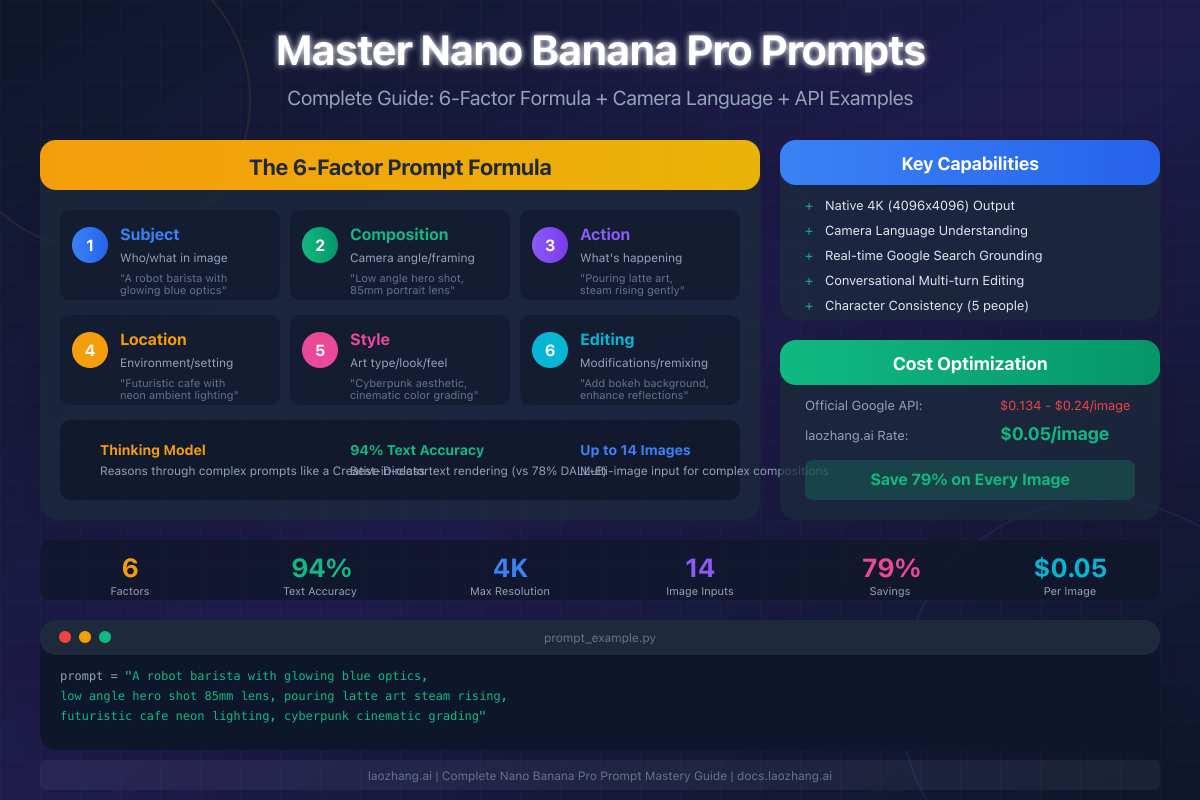
Nano Banana Pro (Gemini 3 Pro Image) represents Google's most advanced AI image generator, featuring 94% text rendering accuracy and native 4K output—capabilities that require a fundamentally different prompting approach than previous models. Mastering its prompts means understanding the 6-factor formula (Subject, Composition, Action, Location, Style, and Editing instructions) and thinking like a Creative Director rather than a keyword optimizer. Official pricing ranges from $0.134 to $0.24 per image, but third-party providers like laozhang.ai offer all capabilities at a flat $0.05/image—delivering 79% savings while accessing the same underlying model.
Understanding Nano Banana Pro: The Thinking Model
Nano Banana Pro differs fundamentally from earlier AI image generators because it incorporates "thinking" capabilities inherited from the Gemini 3 architecture. Where previous models essentially matched keywords to visual patterns, Nano Banana Pro reasons through your prompt, plans the composition, and can even access Google Search to ground images in real-world accuracy before rendering begins.
Why this matters for your prompts: The model doesn't respond well to what professionals call "tag soup"—lists of disconnected keywords like "dog, park, 4k, realistic, beautiful, professional." Instead, it excels when you write prompts the way a Creative Director would brief a human photographer or artist: with clear intent, specific technical requirements, and contextual understanding of the final use case.
The technical specifications reveal the scope of advancement. Nano Banana Pro achieves 94% text rendering accuracy, compared to approximately 78% for DALL-E 3 and significantly lower for Midjourney. This means text elements in images—whether bold headlines, fine print captions, or stylized typography—render correctly and legibly far more consistently. For product photography, marketing materials, and infographics, this capability transforms AI image generation from creative experimentation to production-ready workflow.
The model supports up to 14 reference images in a single prompt, with 6 of those maintaining high-fidelity consistency for character preservation across multiple generations. This enables workflows previously impossible: maintaining a consistent character across different scenes, poses, and lighting conditions without regenerating from scratch each time.
According to Google's official documentation, Nano Banana Pro uses "visual reasoning to think through complex instructions, plan the composition, and access Google Search to ground the image in reality before it starts rendering." This search-grounding capability means you can request images of specific real-world locations, current events, or data visualizations with accurate information—the model verifies details before generating.
The model operates through Google AI Studio, Vertex AI, or third-party API providers. Free tier access through the Gemini app limits you to approximately 3 images daily at 1K resolution with watermarks. Production use requires API access, where resolution options include 1K (1024×1024), 2K (2048×2048), and 4K (4096×4096) native generation.
The 6-Factor Prompt Formula
Professional results from Nano Banana Pro follow a structured approach that addresses every element the model needs to generate precisely what you envision. The 6-factor formula provides this structure, transforming vague requests into detailed creative briefs.
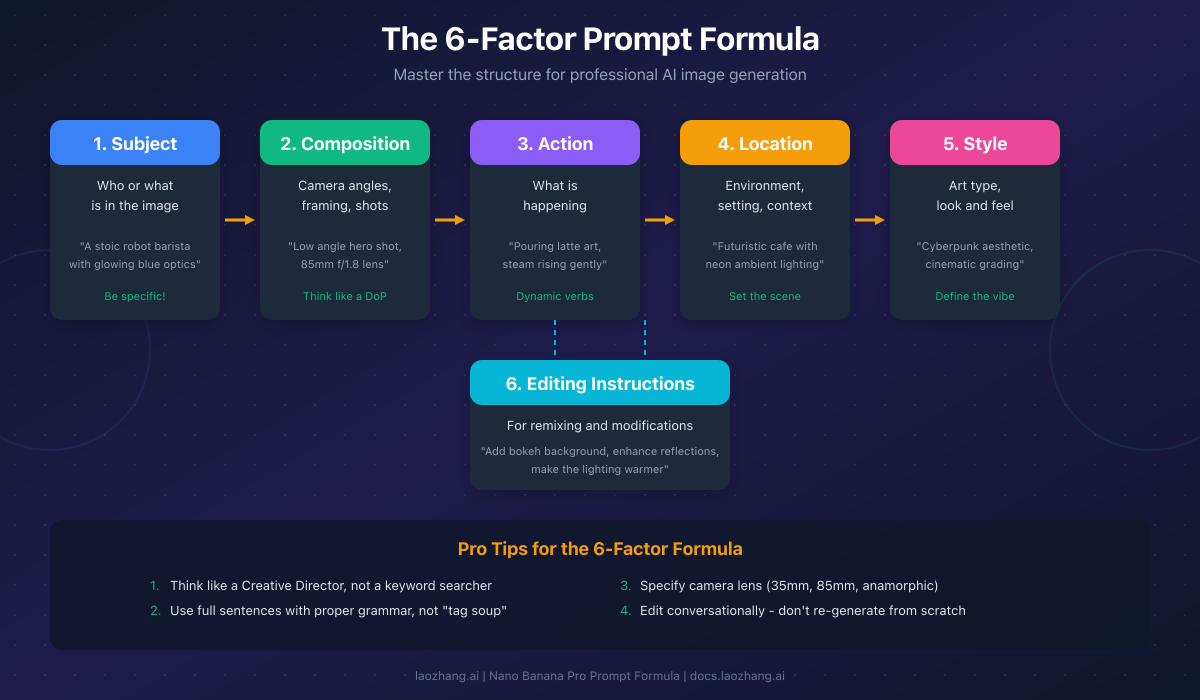
Factor 1: Subject defines who or what appears in the image. Specificity matters enormously—"a barista" produces generic results, while "a stoic robot barista with glowing blue optics and chrome finish" gives the model concrete visual elements to render. Include physical characteristics, distinguishing features, and any emotional qualities the subject should convey. For products, specify materials, colors, and dimensional relationships.
Factor 2: Composition addresses how the shot is framed. The model understands cinematographic language, so specify camera angles ("low angle hero shot," "overhead flat lay," "Dutch angle for tension"), lens characteristics ("35mm wide establishing shot," "85mm portrait lens," "anamorphic cinematic ratio"), and depth of field ("f/1.4 shallow depth of field," "f/11 sharp throughout"). This factor controls the visual storytelling and professional quality of the output.
Factor 3: Action describes what's happening in the scene. Dynamic verbs create more engaging images than static descriptions. "Pouring latte art, steam rising gently" generates more interesting results than "holding a coffee cup." For product photography, the action might be "liquid splashing against glass" or "fabric draping naturally from suspension." This factor adds life and narrative to your images.
Factor 4: Location establishes the environment and context. Beyond naming a place, describe atmospheric qualities: "futuristic cafe with neon ambient lighting reflecting off polished concrete floors" provides more guidance than "coffee shop." The model uses this information to set appropriate lighting, background elements, and overall mood. Real-world locations work well because the model's search capabilities can verify accuracy.
Factor 5: Style defines the artistic approach and overall aesthetic. This encompasses art style ("photorealistic," "oil painting," "anime illustration"), color grading ("cyberpunk teal and orange," "muted earth tones," "high key white"), and reference styles ("like a Wes Anderson film," "editorial fashion photography"). Combining specific style references with technical requirements produces the most controlled results.
Factor 6: Editing Instructions apply when modifying existing images or refining generations. The model excels at conversational editing—if an image is 80% correct, don't regenerate from scratch. Instead, request specific changes: "add bokeh to the background," "warm up the lighting," "remove the object on the left." Use the five key action words: add, change, make, remove, replace.
The combined formula structure:
[Subject + specific characteristics] doing [Action + dynamic details] in [Location + atmospheric qualities]. [Composition: camera angle, lens, depth of field]. [Style: aesthetic, color grading, references]. [Any specific constraints or text to include].
Applying this formula, a complete prompt might read: "A stoic robot barista with glowing blue optics and chrome finish, pouring intricate latte art while steam rises gently from the cup, in a futuristic cafe with neon ambient lighting reflecting off polished concrete floors. Low angle hero shot on 85mm lens at f/1.8 creating shallow depth of field. Cyberpunk aesthetic with teal and orange color grading, cinematic quality."
Intermediate Techniques: Camera Language and Text Rendering
Moving beyond the basic formula requires mastering two capabilities that distinguish professional results: cinematographic camera language and precise text rendering. These techniques leverage Nano Banana Pro's specific strengths and produce results impossible with earlier models.
Camera Language Reference: The model interprets cinematographic terminology with remarkable precision because it "thinks like a Director of Photography." The following specifications produce consistent, predictable results:
| Camera Element | Terminology | Effect |
|---|---|---|
| Wide angle | 24mm, 35mm | Environmental context, slight distortion |
| Portrait | 50mm, 85mm | Natural perspective, flattering for faces |
| Telephoto | 135mm, 200mm | Compression, isolated subjects |
| Aperture | f/1.4 - f/2.8 | Strong background blur, dreamy |
| Aperture | f/5.6 - f/8 | Moderate depth, balanced |
| Aperture | f/11 - f/16 | Sharp throughout, landscapes |
| Angle | Low angle | Power, heroism, drama |
| Angle | High angle | Vulnerability, overview |
| Angle | Dutch angle | Tension, unease |
| Angle | Eye level | Neutral, relatable |
For photorealistic results, specifying actual camera equipment produces more consistent results. "Shot on Arri Alexa" triggers film-like grain and color science, "Shot on Hasselblad" suggests medium format detail, and "iPhone 15 Pro" produces that distinctive computational photography look with slightly boosted colors and sharpness.
Lighting terminology follows similar patterns. "Three-point lighting with key at 45 degrees" provides classic portrait illumination. "Rembrandt lighting" creates that distinctive triangular highlight on the cheek. "Soft golden hour" and "harsh midday sun" produce predictable outdoor results. For dramatic effect, specify "low key with rim light" or "high key white background."
Text Rendering Mastery: Nano Banana Pro's 94% text accuracy represents a breakthrough that makes AI-generated text practical for production use. However, achieving this accuracy requires proper formatting in your prompts.
Always place actual text content in quotation marks within your prompt, then specify placement and typography. For example: "Create a coffee shop menu board with the text 'DAILY SPECIALS' in bold sans-serif at the top, followed by 'Espresso - $3' 'Latte - $5' 'Cappuccino - $4.50' in a clean list format below."
For complex text layouts like infographics or posters, treat the prompt as a design document. Specify hierarchy ("headline text 'AI Revolution' in 72pt bold, subheading 'The Future of Work' in 36pt light"), positioning ("centered at top third of composition"), and style ("modern sans-serif, white on dark background").
The model renders code particularly well given its integration with the Gemini 3 language model. For documentation, tutorials, or technical content, include actual code snippets in your prompts—the model understands syntax highlighting and can render it accurately.
For complete resolution specifications at each quality tier, including pixel dimensions for different aspect ratios, see our dedicated resolution guide.
Advanced Mastery: Think Like a Creative Director
The distinction between amateur and professional AI image results comes down to systematic prompt engineering. Moving from "good enough" to "production ready" requires adopting the mindset of a Creative Director: understanding intent, communicating precisely, and iterating intelligently.
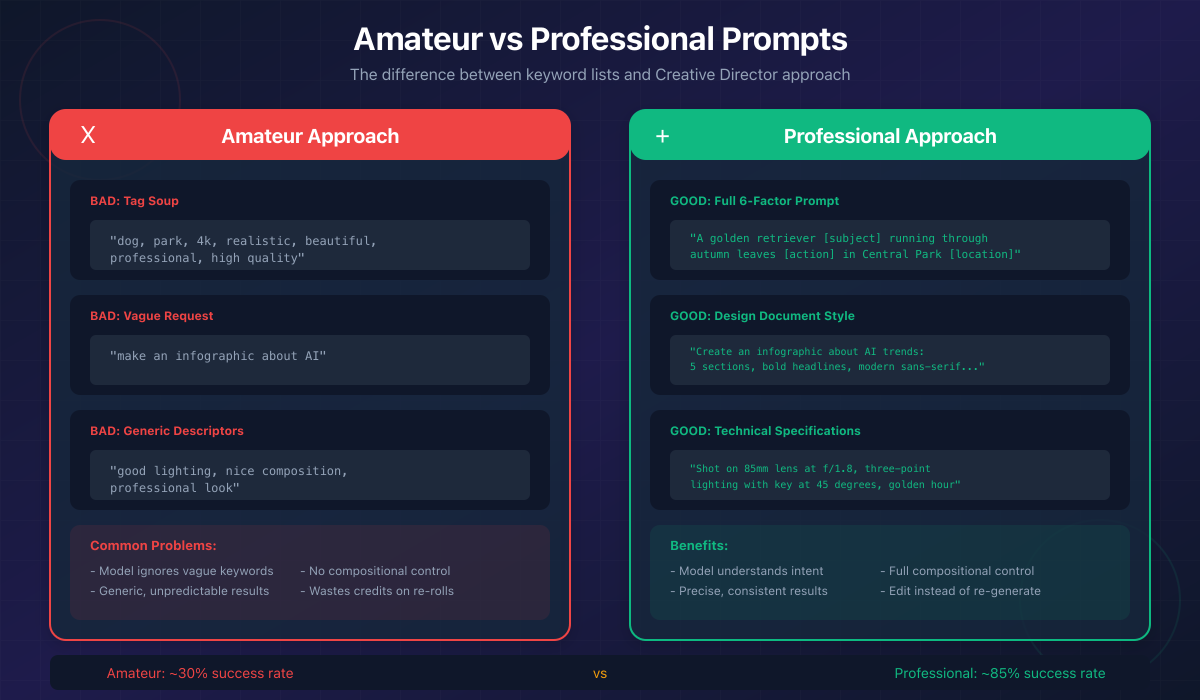
The Creative Director Approach: Stop thinking about keywords and start thinking about briefs. A Creative Director doesn't tell a photographer "dog, park, beautiful"—they explain the campaign concept, the emotional tone, the technical requirements, and how this image fits the larger project. Apply the same comprehensive thinking to your prompts.
Before writing any prompt, answer these questions: What emotion should viewers feel? What action should this image drive? Where will this image appear (social, web, print)? What technical specifications does that placement require? What existing brand guidelines or style references apply?
Common Mistakes and Fixes:
| Mistake | Problem | Solution |
|---|---|---|
| Tag soup | "cat, cute, 4k, professional" | Write complete sentences describing the scene |
| Vague requests | "make an infographic" | Provide full design document with sections, colors, typography |
| Generic descriptors | "good lighting" | Specify: "three-point lighting, key at 45°, soft fill" |
| Re-generating from scratch | Starting over when 80% correct | Use conversational editing: "make the background warmer" |
| Ignoring context | Just describing visuals | Include intended use: "for Brazilian gourmet cookbook" |
The Conversational Editing Workflow: Nano Banana Pro excels at understanding iterative refinements. The most efficient workflow generates an initial image, evaluates what's working and what isn't, then requests specific modifications. This approach typically produces better results in fewer generations than attempting to perfect a prompt upfront.
First generation: Focus on composition and subject placement. Second iteration: Refine lighting and mood. Third iteration: Adjust specific details and text. This progression matches how professional photographers work—nail the fundamentals first, then polish.
Context Drives Artistic Decisions: Because Nano Banana Pro "thinks," providing context helps it make intelligent creative choices you didn't explicitly specify. "Create a sandwich photo for a Brazilian high-end gourmet cookbook" triggers inferences about professional food photography, shallow depth of field, perfect plating, and studio lighting—without you specifying each element.
Include the "why" behind your image: "for Instagram feed" suggests square format and bold colors; "for medical journal" implies clinical precision and neutral tones; "for children's book" triggers appropriate color palettes and simplified forms.
API Implementation: Python Code Examples
Implementing Nano Banana Pro programmatically unlocks batch processing, automated workflows, and integration with existing applications. The following examples demonstrate each prompting technique through the Python SDK, with both official Google and cheapest API access alternatives.
Basic 6-Factor Prompt Implementation:
pythonimport google.generativeai as genai
from PIL import Image
import io
import base64


genai.configure(api_key="YOUR_API_KEY")
model = genai.GenerativeModel("gemini-3-pro-image-preview")

# Complete 6-factor prompt
prompt = """
A professional barista with tattooed forearms and focused expression,
carefully pouring steamed milk into a ceramic cup creating latte art,
in a modern specialty coffee shop with exposed brick walls and pendant lighting.
Medium shot on 50mm lens at f/2.8, natural window light from the left.
Documentary photography style, warm earth tones with slight grain.
"""

response = model.generate_content(
    prompt,
    generation_config={
        "response_modalities": ["image", "text"],
        "resolution": "2048x2048"
    }
)

# Extract and save image
for part in response.candidates[0].content.parts:
    if hasattr(part, 'inline_data'):
        image_data = base64.b64decode(part.inline_data.data)
        image = Image.open(io.BytesIO(image_data))
        image.save("barista_output.png")
        print(f"Generated: {image.size[0]}×{image.size[1]} pixels")
Text Rendering Example:
python# Prompt with precise text specifications
text_prompt = """
Create a modern coffee shop menu board with:
- Header text "ARTISAN ROASTS" in bold condensed sans-serif, cream color
- Three coffee names listed below:
  "Ethiopian Yirgacheffe - \$18/bag"
  "Colombian Supremo - \$16/bag"
  "Sumatra Mandheling - \$17/bag"
- Text should be legible, clean modern typography
- Dark wood background with subtle grain texture
- Soft warm lighting from above
- Styled product photography aesthetic
"""

response = model.generate_content(
    text_prompt,
    generation_config={
        "response_modalities": ["image", "text"],
        "resolution": "2048x2048"
    }
)
Camera Language Specification:
python# Cinematographic prompt with technical specs
cinema_prompt = """
A vintage sports car emerging from morning fog on a coastal highway,
headlights cutting through the mist, wet asphalt reflecting golden light.
Wide establishing shot on 35mm anamorphic lens, f/4, slight lens flare.
Shot on Arri Alexa with cinematic color grading—lifted blacks,
desaturated midtones, warm highlights. 2.39:1 aspect ratio feel.
"""

response = model.generate_content(
    cinema_prompt,
    generation_config={
        "response_modalities": ["image", "text"],
        "resolution": "4096x4096",
        "aspect_ratio": "21:9"
    }
)
laozhang.ai Integration (79% Savings):
Using the laozhang.ai endpoint provides identical capabilities at dramatically reduced cost—$0.05 per image regardless of resolution tier:
pythonimport openai
from PIL import Image
import io
import base64

# Configure laozhang.ai endpoint
client = openai.OpenAI(
    api_key="YOUR_LAOZHANG_API_KEY",
    base_url="https://api.laozhang.ai/v1"
)

# Same prompt quality, 79% lower cost
response = client.chat.completions.create(
    model="gemini-3-pro-image-preview",
    messages=[{
        "role": "user",
        "content": """
        A robot barista with chrome finish and blue optics,
        pouring latte art in a cyberpunk cafe with neon lighting.
        Low angle hero shot on 85mm lens, cinematic color grading.
        """
    }],
    extra_body={
        "resolution": "4096x4096",
        "response_modalities": ["image", "text"]
    }
)

# Cost: \$0.05 (vs \$0.24 official for 4K = 79% savings)
print("Image generated at \$0.05 via laozhang.ai")
Multi-Image Character Consistency:
python# Using reference images for character consistency
character_prompt = """
Using Image 1 as the character reference, maintain exact facial features
and proportions. Generate the same person in a different setting:
standing at a podium giving a presentation, professional attire,
confident posture, large screen behind showing graphs.
Corporate event photography style, professional lighting.
"""

# Include reference image in the request
# (specifics depend on SDK version - check documentation)
Cost Optimization: Save 79% on Image Generation
Production use of Nano Banana Pro requires understanding the cost structure and optimization strategies. The gap between official pricing and third-party alternatives represents significant savings for any volume workflow.
Official Google API Pricing (December 2025):
| Resolution | Standard API | Batch API (50% off) | Free Tier |
|---|---|---|---|
| 1K (1024px) | $0.134/image | $0.067/image | ~3/day (watermarked) |
| 2K (2048px) | $0.134/image | $0.067/image | Not available |
| 4K (4096px) | $0.240/image | $0.120/image | Not available |
The batch API offers 50% savings but requires asynchronous delivery—up to 24 hours for results. For real-time applications or iterative workflows, standard API pricing applies.
laozhang.ai Alternative Pricing:
| Resolution | laozhang.ai | Savings vs Official | Savings vs Batch |
|---|---|---|---|
| 1K (1024px) | $0.05/image | 63% | 25% |
| 2K (2048px) | $0.05/image | 63% | 25% |
| 4K (4096px) | $0.05/image | 79% | 58% |
The flat-rate structure eliminates pricing complexity. Whether generating thumbnails at 1K or print-quality 4K images, each generation costs exactly $0.05. This pricing model particularly benefits prompt engineering workflows where iteration is essential—you can experiment freely without watching costs accumulate.
For detailed pricing breakdowns and additional provider comparisons, see our Nano Banana Pro pricing guide.
Monthly Cost Comparison (1,000 images):
| Workflow | Google Standard | Google Batch | laozhang.ai | Annual Savings |
|---|---|---|---|---|
| All 2K | $134 | $67 | $50 | $1,008 |
| All 4K | $240 | $120 | $50 | $2,280 |
| Mixed workflow | $187 | $93.50 | $50 | $1,644 |
For production workflows emphasizing 4K output, annual savings approach $2,300 versus official pricing. These savings often exceed the total laozhang.ai cost for the same volume.
Getting Started with laozhang.ai:
- Register at docs.laozhang.ai for API access
- Receive initial credits for testing (no credit card required)
- Use identical model name (
gemini-3-pro-image-preview) - Same prompt syntax and capabilities
- Flat $0.05 rate for all resolutions
The implementation requires only changing the base URL and API key in your existing code—all prompting techniques, resolution options, and capabilities remain identical.
FAQ: Prompt Mastery Questions
What makes Nano Banana Pro different from DALL-E or Midjourney for prompting?
Nano Banana Pro uses a "thinking" architecture that reasons through prompts rather than pattern-matching keywords. This means full sentences with proper grammar outperform keyword lists, and providing context (like the intended use case) helps the model make intelligent creative decisions. The 94% text accuracy versus 78% for DALL-E 3 makes it the clear choice for any image requiring legible text. For a detailed comparison of capabilities, see our model comparison guide.
How do I structure prompts for different use cases?
Start with the 6-factor formula (Subject, Composition, Action, Location, Style, Editing) and weight factors based on your use case. Product photography emphasizes Subject and Style with clinical Composition. Editorial work emphasizes Action and Location for narrative. Social media content benefits from bold Style choices. Text-heavy designs like infographics require detailed Style specifications for typography. Always include the "why"—telling the model the end use improves results.
Why do my text prompts sometimes render incorrectly?
Text rendering requires specific formatting. Always place actual text content in quotation marks within your prompt: "The text 'SALE' in bold red letters." Specify position ("centered at top"), size relationships ("large headline above smaller body text"), and typography ("modern sans-serif, condensed"). For complex layouts, treat the prompt as a design document listing each text element with its specifications.
Should I use the official API or a third-party provider?
For most use cases, third-party providers like laozhang.ai offer identical capabilities at 63-79% lower cost. The underlying model is the same—you're accessing Gemini 3 Pro Image regardless of endpoint. Official API makes sense for enterprise compliance requirements or when you need Google's SLA guarantees. For development, testing, and production workflows without specific compliance needs, the cost savings are substantial.
How do I maintain character consistency across multiple images?
Nano Banana Pro supports up to 14 reference images per prompt, with 6 maintaining high-fidelity for character consistency. Upload a reference image of your character, then include instructions like "maintain exact facial features from Image 1" while describing the new scene, pose, or context. Start with 2-3 reference images before attempting more complex multi-image compositions.
What's the most efficient workflow for refining prompts?
Don't attempt to perfect prompts before generating. Start with a basic 6-factor prompt focusing on Subject and Composition. Generate an initial image. If it's 80% correct, use conversational editing ("make the lighting warmer," "add more background blur") rather than regenerating from scratch. This iterative approach typically produces better final results in fewer total generations than attempting to specify everything upfront.
Last updated: December 2025. Prompting techniques verified against Google's official documentation and community best practices. Pricing confirmed with official rate cards and provider documentation.