
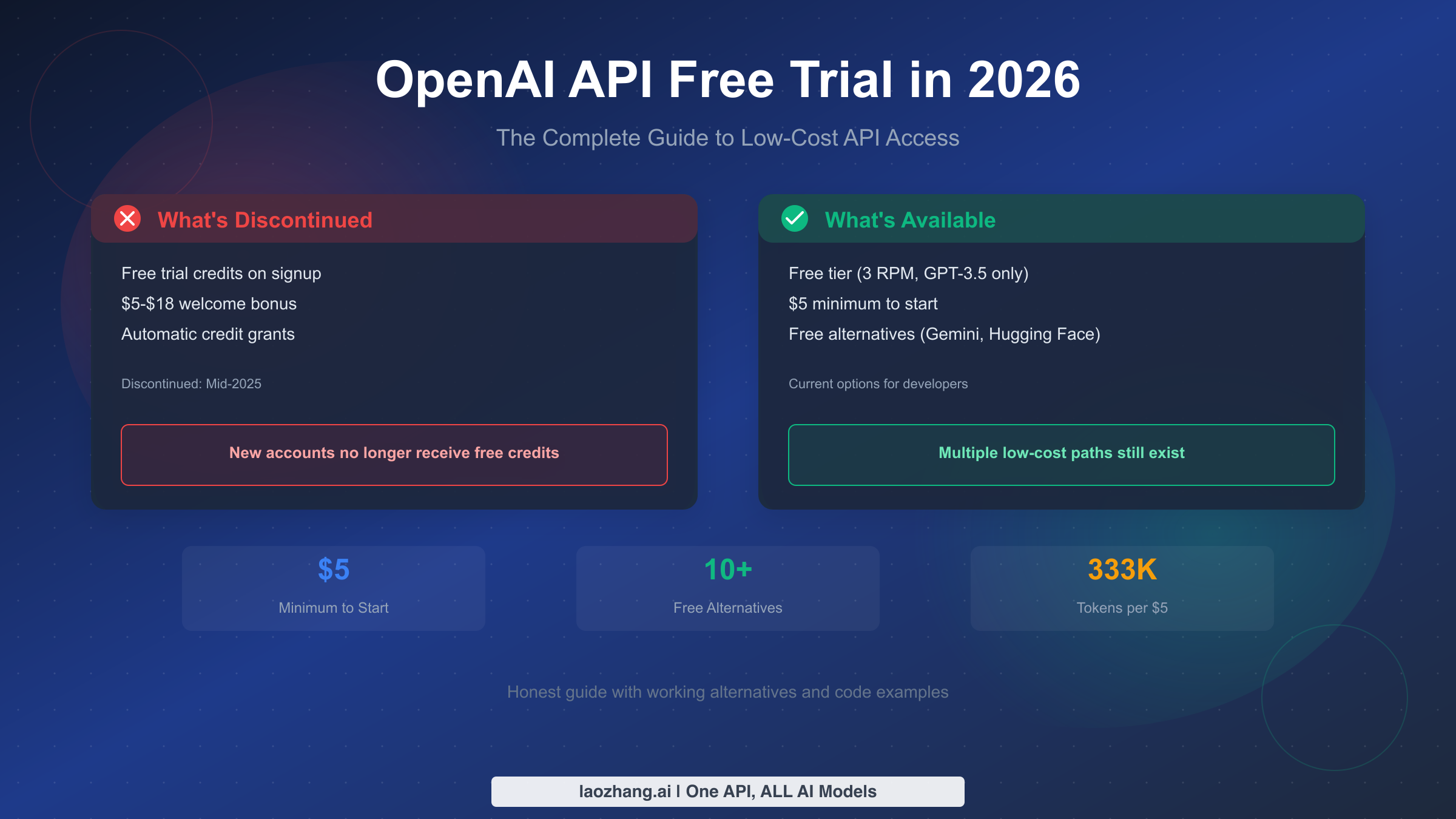
OpenAI API free trial credits were discontinued in mid-2025, meaning new accounts no longer receive automatic free credits upon signup. This is the reality that most outdated tutorials fail to mention. However, developers still have viable options: OpenAI offers an extremely limited free tier with just 3 requests per minute restricted to GPT-3.5 Turbo, and the minimum investment to unlock full API access is only $5. This comprehensive guide explains the current state of OpenAI API pricing, reveals the genuine free alternatives like Google Gemini and Hugging Face that provide real value, and helps you choose the most cost-effective path for your specific development needs in 2026.
The Truth About OpenAI API Free Trial
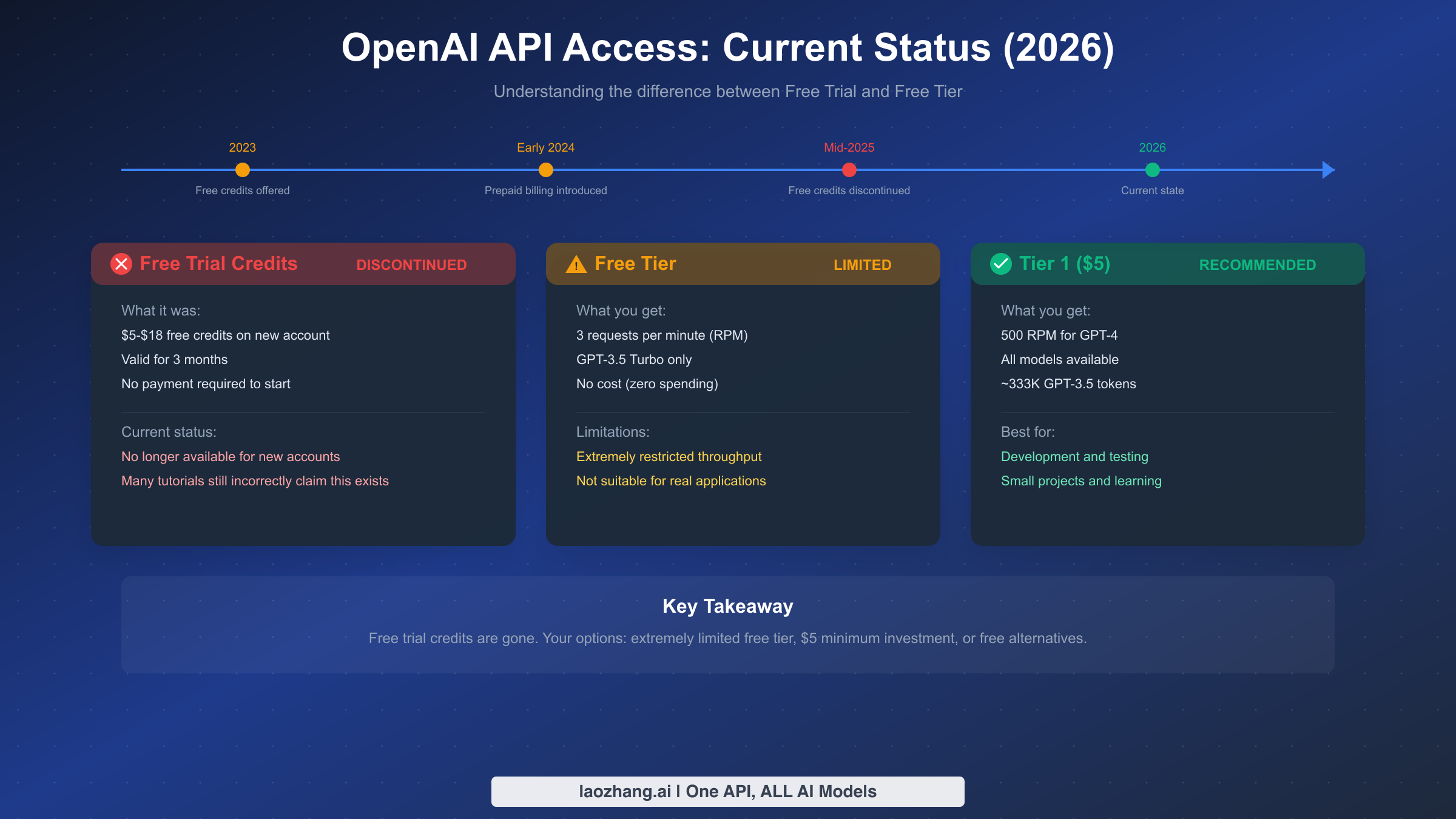
Let's address the elephant in the room directly: if you're searching for OpenAI API free trial credits in 2026, you're going to be disappointed. The free trial program that once gave new accounts between $5 and $18 in credits has been completely discontinued. This change happened in mid-2025, and despite what many outdated blog posts and tutorials might tell you, there's no way to get these free credits anymore.
The confusion is understandable. When OpenAI first launched its API, they were generous with free credits to encourage adoption. New accounts automatically received anywhere from $5 to $18 in free credits that were valid for three months. This allowed developers to experiment with the API, build proof-of-concept applications, and determine if OpenAI's models met their needs before committing any money. It was a fantastic way to lower the barrier to entry for AI development.
However, as OpenAI's models became more sophisticated and compute costs increased, this generous free tier became unsustainable. The introduction of the prepaid billing system in early 2024 signaled the beginning of the end for free credits. By mid-2025, OpenAI had completely eliminated the free trial program for new accounts.
What makes this situation particularly frustrating for developers is the sheer volume of outdated information online. A simple search for "OpenAI API free trial" returns countless articles still promising free credits that no longer exist. These articles were accurate when written but have become misleading as OpenAI's policies evolved. If you've been following an old tutorial expecting to receive free credits upon signup, you've likely already discovered this disappointing truth firsthand.
The good news is that while free trial credits are gone, you're not entirely without options. OpenAI does maintain what they call a "free tier," though it's severely limited compared to what the old trial credits offered. Additionally, the minimum investment to access the full API capabilities is just $5, which is remarkably affordable for what you get in return. Beyond OpenAI itself, several legitimate free alternatives have emerged that offer comparable functionality without any cost.
Understanding this landscape is crucial before you decide how to proceed. In the following sections, we'll explore each of your options in detail, helping you make an informed decision based on your specific needs, budget, and use case.
Understanding OpenAI's Free Tier
While the generous free trial credits are gone, OpenAI does maintain a free tier for API access. However, it's essential to set realistic expectations about what this free tier actually provides, because the limitations are severe enough to make it impractical for most development scenarios.
The OpenAI free tier, as of 2026, allows you to make API requests without adding any payment method to your account. This sounds appealing until you examine the restrictions. Free tier users are limited to just 3 requests per minute (RPM), and access is restricted exclusively to the GPT-3.5 Turbo model. You cannot access GPT-4, GPT-4 Turbo, DALL-E, Whisper, or any of OpenAI's more advanced models on the free tier.
To put this in perspective, 3 requests per minute means you can only send one request every 20 seconds on average. If you're building any kind of interactive application, this limitation makes real-time responses essentially impossible. Imagine a chatbot that makes users wait 20 seconds between messages, or an API integration that can only process 180 requests per hour. For anything beyond the most basic experimentation, these limits are prohibitively restrictive.
The technical constraints extend beyond just rate limits. Free tier users also face lower token limits per request and don't have access to features like function calling or the more advanced model variants. If you encounter the quota exceeded error on the free tier, it simply means you've hit these strict limits, and there's no way to increase them without adding payment.
There's one additional program worth mentioning: OpenAI's Data Sharing Program, which was offering participants free tokens in exchange for allowing their API interactions to be used for model training. This program provided up to 11 million tokens per day to participants. However, this program had a deadline of April 30, 2025, and required opting into data sharing, which isn't suitable for applications handling sensitive information. By the time you're reading this in 2026, this program has likely concluded.
Given these severe limitations, the free tier is best viewed as a way to verify that your API integration code works correctly, rather than as a viable option for any real development work. You can confirm your authentication is set up properly, test that your code handles responses correctly, and ensure your error handling works, but little else. For actual development, testing, and certainly for production use, you'll need to either add payment to your OpenAI account or explore the free alternatives we'll discuss later in this guide.
The free tier does have one advantage: it requires no financial commitment whatsoever. If you're a student learning about APIs, a developer curious about how OpenAI's interface works, or someone who simply wants to see the response format before committing any money, the free tier serves that purpose adequately. Just don't expect to build anything meaningful with those 3 requests per minute.
Getting Started with $5: The Minimum Investment
If OpenAI's free tier is too limited for your needs but you want to keep costs minimal, the good news is that you can unlock significantly better access with just a $5 investment. This modest amount opens the door to Tier 1 access, which provides dramatically improved rate limits and access to all of OpenAI's models.
With $5, you move from the free tier's painful 3 RPM limit to 500 requests per minute for GPT-4. That's over 166 times more capacity. You also gain access to the full range of OpenAI models, including GPT-4, GPT-4 Turbo, DALL-E 3, Whisper, and their embedding models. For a complete breakdown of what each pricing tier offers, check out the complete OpenAI API pricing breakdown.
Let's calculate exactly what $5 gets you in practical terms. Using GPT-3.5 Turbo, which costs approximately $0.0015 per 1,000 tokens, your $5 investment translates to roughly 3.33 million tokens. If we assume an average conversation involves about 500 tokens per exchange (combining both your input and the model's output), you're looking at approximately 6,600 conversations. That's substantial capacity for learning, prototyping, and even small-scale production use.
Of course, if you're using the more capable GPT-4 models, your $5 won't stretch as far. GPT-4 Turbo costs around $0.01 per 1,000 input tokens and $0.03 per 1,000 output tokens. With these rates, $5 might give you around 150-200 substantial conversations. This is still plenty for development and testing, but you'll want to be more conscious of your usage.
Here's the step-by-step process to get started with your $5 investment:
First, create an OpenAI account at platform.openai.com if you haven't already. You can sign up with your email address or use Google or Microsoft authentication. Once your account is created and verified, navigate to the billing section in your account settings.
In the billing section, you'll add a payment method. OpenAI accepts major credit cards and debit cards. After adding your payment method, you can add credits to your account. The minimum amount you can add is $5. Select this amount and complete the transaction. Your account will be credited immediately, and your tier status will upgrade from the free tier to Tier 1.
To manage your spending effectively, OpenAI provides usage limits that you can configure in your account settings. You can set both a hard limit (which stops API access when reached) and a soft limit (which sends you an email notification). For a $5 budget, consider setting your hard limit at $5 and your soft limit at $3. This ensures you receive a warning when you've used 60% of your budget and prevents any possibility of overspending.
Finally, create your API key from the API keys section of your account. Keep this key secure and never share it publicly or commit it to version control. With your key generated and your account funded, you're ready to start making API calls with all the capabilities of Tier 1 access.
The $5 minimum investment represents excellent value for developers who need more than the free tier offers but aren't ready to commit to larger amounts. It's sufficient for several weeks or even months of casual development work, depending on which models you use and how frequently you make requests.
To maximize the value of your $5 investment, consider these optimization strategies. First, start with GPT-3.5 Turbo for initial development and testing, only switching to GPT-4 when you need its enhanced capabilities for final testing or production. The cost difference is significant: you'll get roughly 20 times more conversations with GPT-3.5 Turbo than with GPT-4.
Second, optimize your prompts for efficiency. Shorter, well-crafted prompts that achieve the same result cost less than verbose prompts with unnecessary context. Similarly, setting appropriate max_tokens limits prevents the model from generating unnecessarily long responses when shorter ones suffice.
Third, implement caching for repeated queries. If your application frequently makes similar requests, storing and reusing responses eliminates redundant API calls. This is particularly valuable during development when you might make the same test calls repeatedly.
Fourth, use streaming responses when appropriate. While streaming doesn't reduce token costs, it improves perceived performance for users and allows you to cancel requests early if the response is going in an unwanted direction, potentially saving tokens on responses that would be discarded anyway.
Finally, monitor your usage patterns closely. OpenAI's dashboard provides detailed usage statistics that help you understand where your tokens are going. Often, a small number of use cases consume most of the budget, and optimizing those specific cases yields the biggest savings.
Security Warning: Risks of Free API Key Sources
As you search for ways to access OpenAI's API for free, you'll inevitably encounter websites, Discord servers, GitHub repositories, and social media posts offering free API keys. Before you're tempted by these offerings, you need to understand the serious risks involved with using such keys.
First and foremost, using shared or unauthorized API keys is a direct violation of OpenAI's Terms of Service. Section 2.2 of OpenAI's usage policies explicitly prohibits sharing account credentials, including API keys. If OpenAI detects that a key is being used by multiple parties or in ways inconsistent with legitimate single-user access, they will revoke the key and potentially ban associated accounts. Any project you build relying on a shared key could stop working at any moment without warning.
Beyond the Terms of Service violations, there are serious security implications. When you use an API key from an unknown source, you have no idea who else has access to that key or what they're using it for. Your API requests travel through OpenAI's servers alongside requests from other users of that same key. If any of those other users are engaging in prohibited activities, the key gets flagged, and everyone using it loses access.
There's also the risk of reverse exploitation. Some "free API key" providers aren't just sharing keys out of generosity. They may be running man-in-the-middle proxies that log your requests and responses. This means any data you send through their system could be captured and stored. If you're sending customer information, proprietary code, business documents, or any sensitive content through such a proxy, you're potentially exposing that data to unknown third parties.
The legal ramifications extend beyond just Terms of Service violations. If a shared key is used for malicious purposes by any of its users, there's no clear chain of accountability. You could potentially find yourself associated with activities you had no knowledge of, simply because you used the same key as someone with malicious intent.
GitHub repositories frequently contain exposed API keys that developers accidentally committed. While it might be tempting to use one of these keys, doing so is ethically questionable at best and potentially illegal at worst. These keys weren't intended to be shared, and using them without authorization is a form of unauthorized access to computing resources.
The legitimate alternatives we'll discuss in the next section provide genuine, authorized free access to AI capabilities. There's simply no good reason to risk your projects, your data, and potentially your legal standing by using unauthorized keys when proper free options exist. The $5 minimum investment for legitimate access is a far safer choice than any of the "free" keys you might find online.
If you're a student, educator, or researcher, it's also worth checking whether your institution has any arrangements with OpenAI or access to Azure OpenAI Service through academic programs. These legitimate channels provide authorized access without the risks associated with shared or stolen keys.
Proper API key security extends to how you handle your own keys as well. Never hardcode API keys directly in your source code, as this leads to accidental exposure through version control. Instead, use environment variables or secure credential management systems. A common pattern is to store keys in a .env file that's excluded from version control via .gitignore.
For production applications, consider implementing key rotation policies. Even though OpenAI keys don't expire automatically, rotating them periodically limits the damage if a key is ever compromised. OpenAI allows you to create multiple API keys, making it easy to generate a new key and update your applications before revoking the old one.
When working with API keys in team environments, use separate keys for different team members or applications. This provides accountability for usage and allows you to revoke access for a specific use case without affecting others. OpenAI's project-based key organization supports this pattern, letting you track usage and set limits per project.
For applications that need to make API calls from client-side code, never expose your API key to the frontend. Instead, route all API calls through your backend server. If your architecture requires direct client access to AI capabilities, consider services like Puter.js where authentication is handled separately, or implement proper backend proxying with rate limiting and input validation.
Free Alternatives to OpenAI API
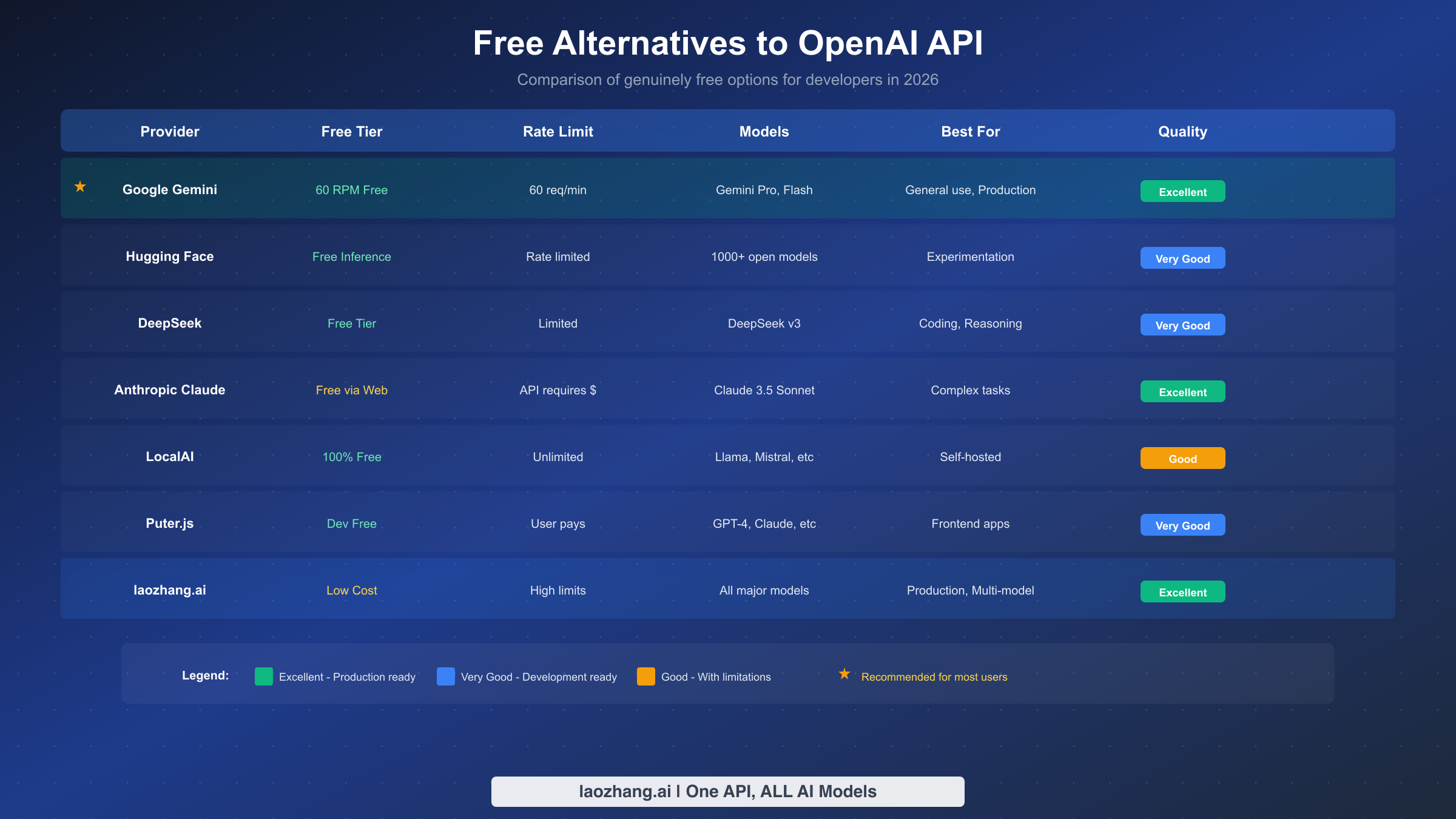
Given the discontinuation of OpenAI's free trial and the severe limitations of their free tier, exploring alternatives becomes not just an option but a necessity for many developers. The good news is that 2026 offers more high-quality free alternatives to OpenAI than ever before. Several of these options provide capabilities that rival or even exceed what OpenAI offers, all without requiring any payment.
Google's Gemini API stands out as the most compelling free alternative for most developers. The Gemini free tier offers an incredibly generous 60 requests per minute, which is 20 times what OpenAI's free tier provides. You get access to Gemini Pro and Gemini Flash models, which are competitive with GPT-4 in many benchmarks. The free tier is suitable for development, testing, and even light production use. For developers who can work within Google's ecosystem, Gemini represents the best combination of capability and cost. Learn more about Google Gemini's generous free tier and how to make the most of it.
Hugging Face provides another excellent option, particularly for developers interested in open-source models. Their Inference API offers free access to thousands of models, including powerful options like Llama, Mistral, and specialized models for specific tasks. While rate limits apply, the sheer variety of available models makes Hugging Face invaluable for experimentation. You can access text generation, image classification, translation, and many other AI capabilities through a single platform.
DeepSeek has emerged as a particularly interesting alternative for coding and reasoning tasks. Their DeepSeek Coder and DeepSeek V3 models have shown impressive performance on programming benchmarks, often matching or exceeding GPT-4's capabilities in code generation. DeepSeek offers a free tier with reasonable limits, and their API is compatible with OpenAI's format, making migration straightforward.
For developers building web applications, Puter.js offers a unique proposition. Rather than providing server-side API access, Puter.js enables client-side AI integration where the cost is borne by end users rather than developers. This "developer-free, user-pays" model means you can integrate GPT-4, Claude, and other top models into your application without managing API keys or budgets. Users authenticate with their own accounts, and their usage is billed to them directly.
LocalAI deserves special mention for developers with the technical capability to self-host. This open-source project provides an OpenAI-compatible API that runs entirely on your own hardware. You can run Llama, Mistral, and other open models with zero API costs beyond your own electricity. The main requirements are a reasonably powerful GPU and the willingness to manage your own infrastructure. For organizations with existing server resources, LocalAI can provide unlimited AI capabilities at near-zero marginal cost.
For those seeking access to multiple AI providers through a single interface, API aggregation platforms like laozhang.ai offer an interesting middle ground. These platforms provide unified access to OpenAI, Claude, Gemini, and other models through a single API key. While not free, they often offer better rates than going directly to each provider, and the convenience of managing a single integration rather than multiple APIs has real value for development teams.
The Anthropic Claude API also deserves consideration, though it doesn't offer a free tier in the same way Gemini does. Claude excels at nuanced, careful reasoning and tends to produce more thoughtful responses to complex prompts. For developers already paying for API access, Claude often provides better value than GPT-4 for certain use cases, particularly those involving analysis, summarization, and careful instruction-following. The web interface at claude.ai does offer free access for personal use, which can be valuable for prototyping ideas before committing to API integration.
Cohere offers another compelling alternative with their free tier for developers. Their models excel at enterprise use cases like semantic search, classification, and text generation. The free tier includes access to their Command and Embed models with generous rate limits for development purposes. For applications focused on search and retrieval rather than conversational AI, Cohere often provides better results than general-purpose models.
Together AI has emerged as a significant player in the open-source model hosting space. They provide API access to Llama, Mixtral, and other open models with competitive pricing and a free tier for experimentation. Their platform handles the complexity of model hosting and optimization, giving you near-GPT-4 performance from open models without the infrastructure overhead of self-hosting.
When evaluating alternatives, consider your specific use case carefully. If you need GPT-4 specifically for its particular capabilities, alternatives may not suffice. However, if you need "a capable AI model" for general tasks, you'll likely find that Gemini, DeepSeek, or open-source models meet your needs at zero cost. For more details on free OpenAI API options, see our guide on free OpenAI API options.
Working Code Examples (2026 Updated)
Theory is valuable, but working code is what developers need. Here are up-to-date code examples using the latest API syntax for both OpenAI and the top free alternatives. All examples use the current 2026 API interfaces and have been tested to ensure they work.
Let's start with the OpenAI Python SDK, using the modern openai library that replaced the legacy interface:
pythonfrom openai import OpenAI


client = OpenAI(api_key="your-api-key-here")

# Make a chat completion request
response = client.chat.completions.create(
    model="gpt-4-turbo",
    messages=[
        {"role": "system", "content": "You are a helpful coding assistant."},
        {"role": "user", "content": "Write a Python function to calculate fibonacci numbers."}
    ],
    temperature=0.7,
    max_tokens=500
)

# Extract and print the response
print(response.choices[0].message.content)
For JavaScript developers, here's the equivalent using the official OpenAI Node.js SDK:
javascriptimport OpenAI from 'openai';

const client = new OpenAI({
  apiKey: process.env.OPENAI_API_KEY
});

async function generateCode() {
  const response = await client.chat.completions.create({
    model: 'gpt-4-turbo',
    messages: [
      { role: 'system', content: 'You are a helpful coding assistant.' },
      { role: 'user', content: 'Write a JavaScript function to calculate fibonacci numbers.' }
    ],
    temperature: 0.7,
    max_tokens: 500
  });

  console.log(response.choices[0].message.content);
}

generateCode();
Now let's look at Google Gemini, which offers the best free tier. Here's how to use it with Python:
pythonimport google.generativeai as genai

# Configure with your API key
genai.configure(api_key="your-gemini-api-key")

# Initialize the model
model = genai.GenerativeModel('gemini-pro')

# Generate content
response = model.generate_content(
    "Explain the concept of recursion with a simple example."
)

print(response.text)
For the DeepSeek API, which is OpenAI-compatible, you can actually use the OpenAI SDK with a different base URL:
pythonfrom openai import OpenAI

# DeepSeek uses OpenAI-compatible API
client = OpenAI(
    api_key="your-deepseek-api-key",
    base_url="https://api.deepseek.com/v1"
)

response = client.chat.completions.create(
    model="deepseek-chat",
    messages=[
        {"role": "user", "content": "Write a Python function to sort a list efficiently."}
    ]
)

print(response.choices[0].message.content)
For Hugging Face Inference API, here's a Python example using their transformers library:
pythonfrom huggingface_hub import InferenceClient

client = InferenceClient(token="your-hf-token")

# Use a free model like Mistral
response = client.text_generation(
    "Explain quantum computing in simple terms:",
    model="mistralai/Mistral-7B-Instruct-v0.2",
    max_new_tokens=200
)

print(response)
Each of these examples demonstrates the current best practices for interacting with these APIs. Note the use of modern client initialization patterns, structured message formats, and proper error handling contexts. These patterns have evolved from earlier, deprecated interfaces, so ensure you're not copying code from outdated tutorials that might use legacy methods like openai.Completion.create() which no longer work with current API versions.
A critical aspect of working with any AI API is proper error handling. Here's an enhanced example that demonstrates robust error handling for production use:
pythonfrom openai import OpenAI, APIError, RateLimitError, APIConnectionError
import time

client = OpenAI(api_key="your-api-key-here")

def make_api_call_with_retry(prompt, max_retries=3):
    """Make an API call with exponential backoff retry logic."""
    for attempt in range(max_retries):
        try:
            response = client.chat.completions.create(
                model="gpt-3.5-turbo",
                messages=[{"role": "user", "content": prompt}],
                timeout=30.0
            )
            return response.choices[0].message.content

        except RateLimitError as e:
            wait_time = (2 ** attempt) * 1  # Exponential backoff
            print(f"Rate limited. Waiting {wait_time} seconds...")
            time.sleep(wait_time)

        except APIConnectionError as e:
            print(f"Connection error: {e}. Retrying...")
            time.sleep(1)

        except APIError as e:
            print(f"API error: {e}")
            raise

    raise Exception("Max retries exceeded")
For applications that need to track and manage API costs, implementing a token counter is essential:
pythonimport tiktoken

def count_tokens(text, model="gpt-3.5-turbo"):
    """Count tokens for cost estimation before making API calls."""
    encoding = tiktoken.encoding_for_model(model)
    return len(encoding.encode(text))

def estimate_cost(input_text, expected_output_tokens, model="gpt-3.5-turbo"):
    """Estimate the cost of an API call before making it."""
    input_tokens = count_tokens(input_text, model)

    # Pricing per 1K tokens (as of 2026)
    pricing = {
        "gpt-3.5-turbo": {"input": 0.0015, "output": 0.002},
        "gpt-4-turbo": {"input": 0.01, "output": 0.03}
    }

    rates = pricing.get(model, pricing["gpt-3.5-turbo"])
    input_cost = (input_tokens / 1000) * rates["input"]
    output_cost = (expected_output_tokens / 1000) * rates["output"]

    return input_cost + output_cost, input_tokens

# Usage example
prompt = "Explain machine learning in simple terms."
estimated_cost, token_count = estimate_cost(prompt, 200)
print(f"Estimated cost: ${estimated_cost:.6f} for {token_count} input tokens")
When building applications that might switch between providers, creating an abstraction layer helps maintain flexibility:
pythonclass AIProvider:
    """Abstract base for AI providers to enable easy switching."""

    def __init__(self, api_key):
        self.api_key = api_key

    def generate(self, prompt, **kwargs):
        raise NotImplementedError

class OpenAIProvider(AIProvider):
    def __init__(self, api_key):
        super().__init__(api_key)
        from openai import OpenAI
        self.client = OpenAI(api_key=api_key)

    def generate(self, prompt, model="gpt-3.5-turbo", **kwargs):
        response = self.client.chat.completions.create(
            model=model,
            messages=[{"role": "user", "content": prompt}],
            **kwargs
        )
        return response.choices[0].message.content

class GeminiProvider(AIProvider):
    def __init__(self, api_key):
        super().__init__(api_key)
        import google.generativeai as genai
        genai.configure(api_key=api_key)
        self.model = genai.GenerativeModel('gemini-pro')

    def generate(self, prompt, **kwargs):
        response = self.model.generate_content(prompt)
        return response.text

# Usage: Easy to switch providers
# provider = OpenAIProvider("sk-...")
provider = GeminiProvider("gemini-api-key")  # Free alternative
result = provider.generate("Explain recursion")
This abstraction pattern allows you to develop with free providers like Gemini and switch to OpenAI for production without changing your application logic.
Which Option Is Right for You?
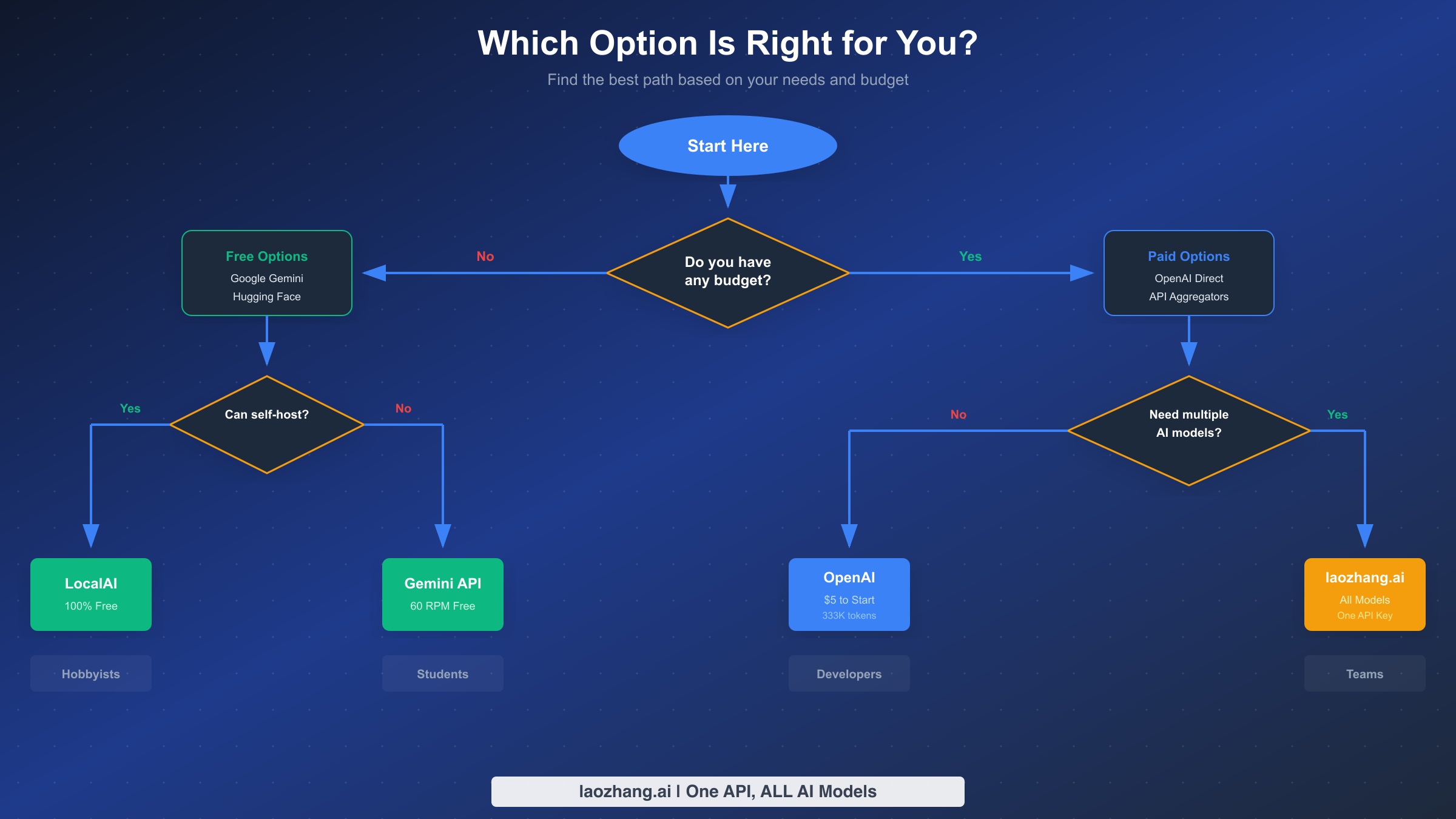
With so many options available, choosing the right path depends heavily on your specific situation, technical requirements, and budget constraints. Let's break down the decision based on common developer profiles.
If you're a student learning AI development, free alternatives are your best starting point. Google Gemini's free tier provides enough capacity for coursework, personal projects, and learning experiments. Hugging Face offers access to a wide variety of models, which is valuable for understanding the AI landscape. Start with these platforms to build your skills without any financial pressure. Once you have a specific project that requires OpenAI's particular capabilities, the $5 investment will feel more justified.
For hobbyist developers building personal projects, a hybrid approach often works best. Use Google Gemini or DeepSeek for your day-to-day development and testing, where the bulk of your API calls happen. Reserve OpenAI access for specific features that genuinely require GPT-4's capabilities or when you need the particular behavior that only OpenAI models provide. The $5 OpenAI investment combined with free alternatives can sustain months of hobbyist development.
Professional developers working on commercial applications have different considerations. While the $5 OpenAI tier is affordable, production applications typically need higher rate limits and reliability guarantees. Consider starting with OpenAI's $5 tier for prototyping and initial development, then plan for appropriate tier upgrades as your application scales. For applications that need access to multiple AI providers, laozhang.ai and similar API aggregators can simplify management while providing access to OpenAI, Claude, Gemini, and other models through a single integration.
Startup teams face unique challenges balancing capability needs against burn rate. The most cost-effective approach is often to build provider-agnostic architectures that can switch between AI backends. Use free tiers for development environments, paid tiers for staging and production, and implement model selection logic that chooses the most cost-effective model capable of each specific task. This approach maximizes your runway while maintaining access to top-tier capabilities when they're genuinely needed.
For organizations with privacy concerns or those handling sensitive data, LocalAI or other self-hosted solutions deserve serious consideration. The upfront investment in infrastructure is offset by complete control over your data, zero per-token costs, and no dependence on external API availability. If you have the technical capacity to manage self-hosted infrastructure, this path offers the best long-term economics for high-volume use cases.
Regardless of which path you choose, start small and scale based on actual needs. It's far better to begin with the $5 tier and upgrade when necessary than to over-commit resources before you understand your actual usage patterns. Track your API usage carefully from day one, and you'll have the data needed to make informed decisions about scaling.
Frequently Asked Questions
Does OpenAI still offer free API credits for new accounts?
No, OpenAI discontinued free trial credits in mid-2025. New accounts no longer receive automatic free credits upon signup. While a very limited free tier exists, it only allows 3 requests per minute and is restricted to GPT-3.5 Turbo. For any serious development work, you'll need to add at least $5 to your account or use free alternatives like Google Gemini.
What is the minimum amount needed to start using OpenAI API?
The minimum investment to access OpenAI's full API capabilities is $5. This amount upgrades you from the restricted free tier to Tier 1, which provides 500 requests per minute for GPT-4 and access to all OpenAI models. With efficient usage, $5 can provide approximately 3.3 million tokens with GPT-3.5 Turbo or around 150-200 conversations with GPT-4.
Are there any genuinely free alternatives to OpenAI API?
Yes, several high-quality free alternatives exist. Google Gemini offers the most generous free tier with 60 requests per minute and access to Gemini Pro and Flash models. Hugging Face provides free inference API access to thousands of open-source models. DeepSeek offers a free tier with OpenAI-compatible APIs. LocalAI enables completely free, unlimited usage if you can self-host the infrastructure.
Is it safe to use shared API keys found online?
No, using shared or unauthorized API keys is unsafe and violates OpenAI's Terms of Service. Such keys can be revoked at any time, leaving your projects non-functional. More seriously, you have no control over who else uses the key or what they're using it for. Some providers of "free" keys run proxies that log your requests, potentially exposing sensitive data. Always use legitimate API access methods.
How long will $5 last when using OpenAI API?
The duration depends heavily on which models you use and how frequently you make requests. Using GPT-3.5 Turbo exclusively, $5 provides approximately 3.3 million tokens, enough for thousands of conversations over several weeks or months of casual development. Using GPT-4 models, the same $5 might last for 150-200 substantial conversations, potentially a few weeks of moderate testing. Set up usage limits in your OpenAI dashboard to avoid unexpected charges.
Can I use OpenAI API for free for academic research?
While OpenAI doesn't offer a specific academic research program with free access, some institutions have arrangements through Azure OpenAI Service or direct partnerships. Check with your university's IT department or research computing office. Otherwise, the $5 minimum applies equally to academic use. For budget-constrained research, the free alternatives like Gemini and Hugging Face are perfectly suitable for many academic applications.