
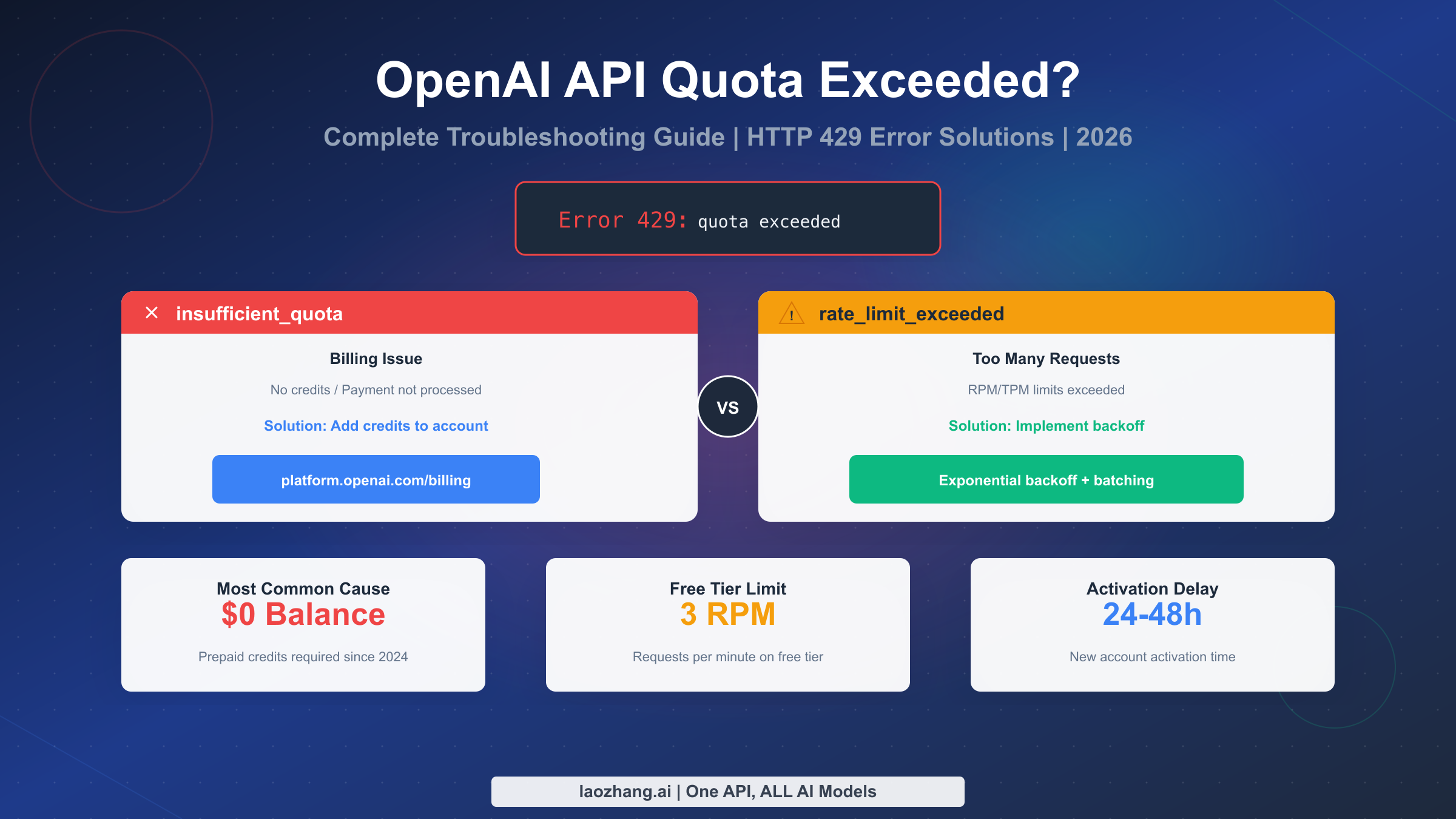
The OpenAI API "quota exceeded" error (HTTP 429) comes in two distinct types requiring different solutions. The "insufficient_quota" type indicates billing issues, meaning your account lacks prepaid credits or your payment hasn't processed yet. The "rate_limit_exceeded" type means you're sending too many requests too quickly for your tier. According to community forums and support data, payment processing delays account for approximately 40% of confusing quota errors where users have credits but still can't access the API. This guide covers diagnosis for both error types, step-by-step solutions, and what to do when you have credits but still encounter errors.
The frustration of seeing "You exceeded your current quota, please check your plan and billing details" when your code was working fine is real. Unlike simple "add credits" guides that assume the solution is obvious, this troubleshooting guide addresses the complex scenarios: when you've already added credits, when you're unsure which error type you have, and when standard fixes don't work. Whether you're a new developer encountering this error for the first time or an experienced user facing an unexpected quota issue, you'll find specific solutions here.
Quick Diagnosis - Which Type of Error Do You Have?
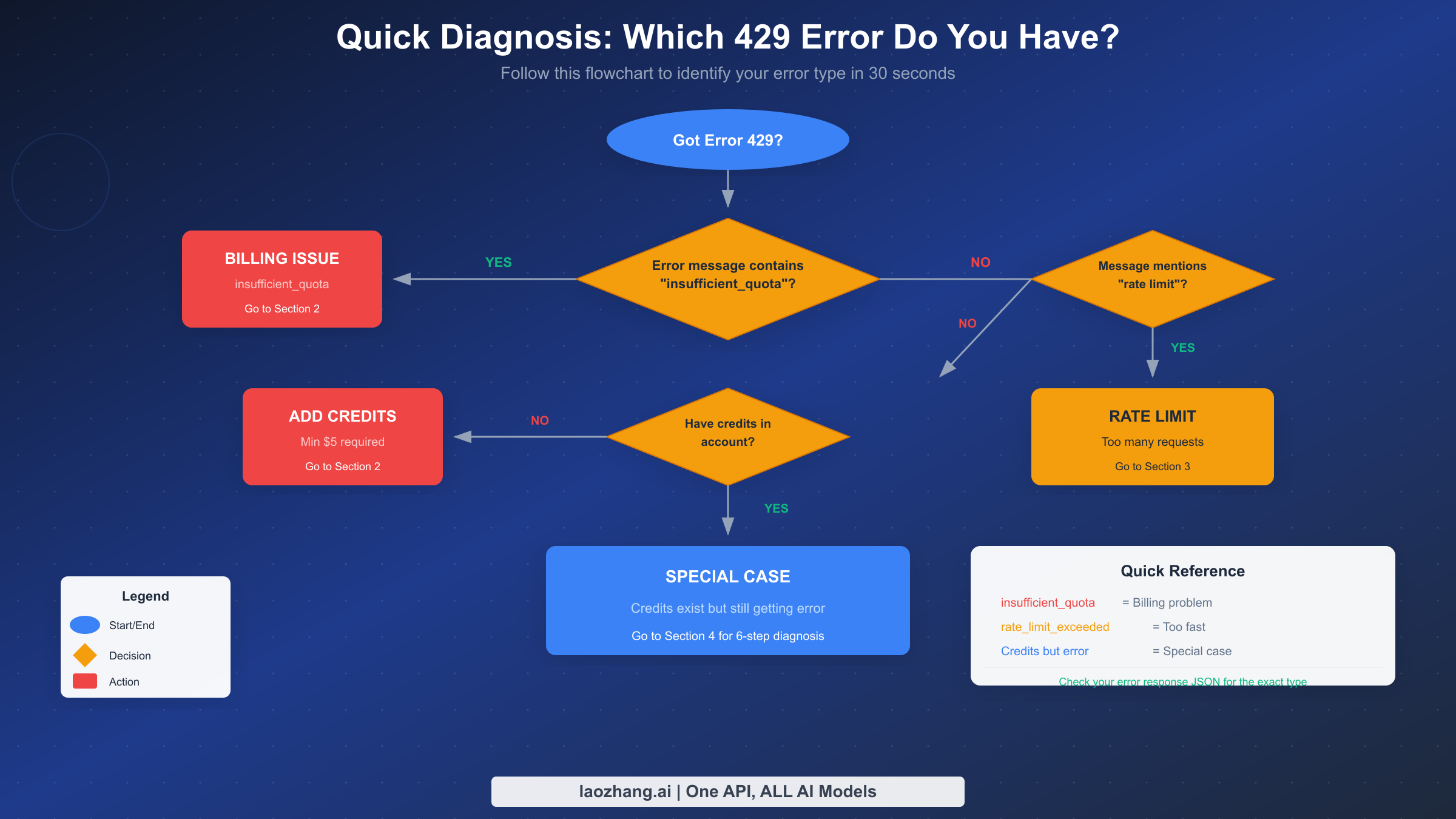
Before diving into specific fixes, taking thirty seconds to diagnose your exact error type will save you significant time. The HTTP 429 error code can represent two fundamentally different problems, and applying the wrong solution wastes time and creates more confusion.
Start by examining your error response. When you receive a 429 error, the response body contains a JSON object with specific details. Look for the "type" field in the error object. If it says "insufficient_quota," you're dealing with a billing issue and need to add credits or wait for payment processing. If it mentions "rate_limit_exceeded" or "too_many_requests," you're hitting the request frequency limits for your account tier and need to implement request throttling.
The error message itself provides clues but can be misleading. The message "You exceeded your current quota, please check your plan and billing details" typically indicates an insufficient_quota error related to billing. Messages containing "Rate limit reached" or "Too many requests" indicate rate limiting issues. However, some users report receiving the quota message even when they have credits, which we'll address in the special cases section.
Check your account dashboard for additional context. Navigate to platform.openai.com and go to Settings, then Billing. If your credit balance shows $0.00, you definitely have a billing issue. If you see a positive balance but still get errors, the problem might be payment processing delay, organization mismatch, or rate limiting. The Usage tab shows your recent API consumption, which helps identify whether you're hitting rate limits. Understanding the distinction between these two error types is crucial because the solutions are completely different. Trying to implement exponential backoff for a billing issue wastes development time, while adding credits won't help if you're genuinely hitting rate limits.
Fix Insufficient Quota Error (Billing Issue)
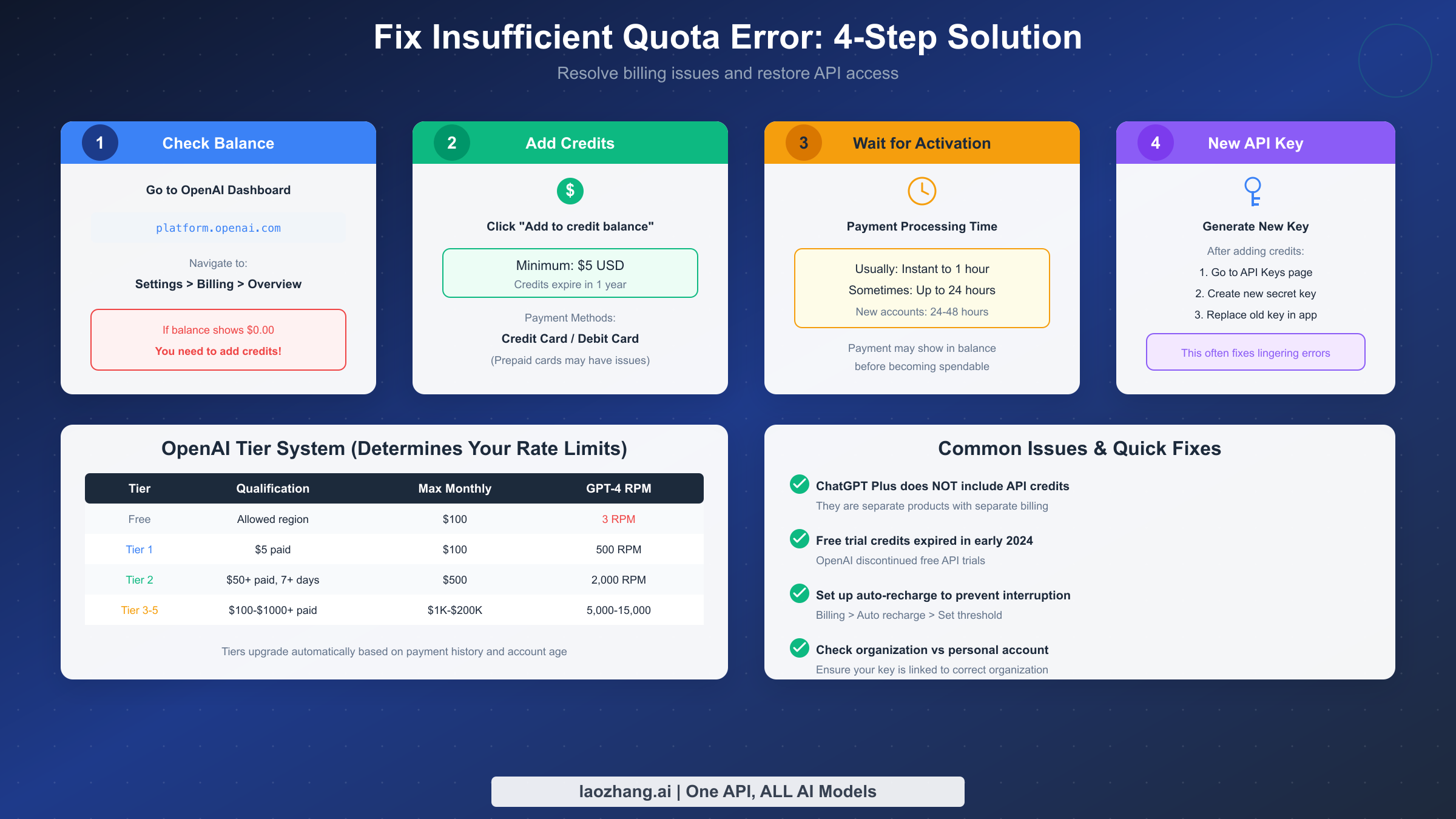
The insufficient_quota error indicates that your OpenAI account lacks the prepaid credits necessary to make API calls. Since OpenAI's transition to a prepaid billing model in early 2024, all API users must maintain a positive credit balance before making requests. This represents a fundamental change from the previous post-paid model where users could accumulate charges and pay at the end of the month.
To add credits to your account, log into the OpenAI platform and navigate to Settings, then Billing, then Pay as you go. Click the "Add to credit balance" button to deposit funds. The minimum purchase is $5 USD, and credits remain valid for one year from purchase. OpenAI accepts major credit cards and debit cards, though prepaid cards may experience issues with some payment processors.
After adding credits, you may need to wait for payment processing. Most payments activate within minutes, but some users report delays of several hours or even up to 24 hours before credits become spendable. This delay is particularly common for new accounts or first-time payments. The credit balance may appear in your dashboard immediately while the funds aren't yet accessible for API calls. If you've just added credits and still see the error, waiting a few hours often resolves the issue.
Generating a new API key after adding credits helps ensure proper activation. Navigate to the API Keys page, create a new secret key, and replace your old key in your application. Some users report that API keys created before adding credits don't properly recognize the new balance. While this shouldn't be necessary in theory, creating a fresh key after funding your account is a reliable workaround that takes only seconds.
Understanding OpenAI's tier system helps prevent future quota issues. Your account tier determines both your rate limits and maximum monthly spending. Tier 1 requires $5 in total payments and provides $100 monthly limit with 500 requests per minute for GPT-4. Tier 2 requires $50 in payments and 7 days of account age, increasing limits to $500 monthly and 2,000 RPM. Higher tiers require progressively more payment history and account age, with Tier 5 requiring $1,000 in total payments and 30 days, offering $200,000 monthly limit and 15,000 RPM. Your tier upgrades automatically as you meet the requirements through normal usage and payments.
Setting up auto-recharge prevents unexpected service interruptions. In your billing settings, you can configure automatic credit purchases when your balance falls below a specified threshold. This ensures continuous API access without manual intervention, particularly useful for production applications where downtime has business impact. For more details on OpenAI API pricing, see our complete pricing guide.
Fix Rate Limit Error (Too Many Requests)
The rate_limit_exceeded error indicates that your application is sending API requests faster than your account tier allows. Unlike billing issues, rate limit errors occur even with positive credit balances. The solution involves implementing request management strategies in your code rather than adding funds.
OpenAI enforces rate limits through several metrics. Requests Per Minute (RPM) limits how many separate API calls you can make. Tokens Per Minute (TPM) limits the total tokens processed across all requests. Tokens Per Day (TPD) provides a daily ceiling. Free tier accounts face significant restrictions at just 3 RPM and limited token throughput, while Tier 1 paid accounts receive 500 RPM for GPT-4. Understanding which limit you're hitting helps target your solution.
Exponential backoff represents the most effective strategy for handling rate limits. When you receive a 429 error, wait before retrying, with the wait time increasing exponentially after each failed attempt. This prevents your application from hammering the API during high-load periods and allows time for your rate limit window to reset. The Python tenacity library provides an elegant implementation:
pythonfrom tenacity import retry, stop_after_attempt, wait_random_exponential
import openai

@retry(wait=wait_random_exponential(min=1, max=60), stop=stop_after_attempt(6))
def completion_with_backoff(**kwargs):
    return openai.chat.completions.create(**kwargs)
This decorator automatically retries failed requests with randomized exponential delays, starting at 1 second and capping at 60 seconds, with a maximum of 6 attempts. The randomization prevents synchronized retry storms when multiple clients hit limits simultaneously.
Batching requests reduces RPM consumption when processing multiple items. Instead of sending individual API calls for each task, combine multiple prompts into single requests where possible. This approach works particularly well for classification, extraction, or analysis tasks where you can process several inputs together. Batching reduces the number of requests while potentially increasing token usage, so monitor your TPM limits accordingly.
Request queuing provides fine-grained control over API call frequency. Implement a queue that releases requests at a controlled rate matching your tier's RPM limit. This proactive approach prevents hitting limits rather than reacting after errors occur. For production applications, consider using a dedicated rate limiting library or implementing a token bucket algorithm.
If rate limits consistently constrain your application, consider upgrading your account tier through increased usage and payments. OpenAI automatically upgrades tiers as you demonstrate reliable usage patterns. You can also request manual tier increases through the platform for legitimate business needs. For users facing persistent rate limit challenges, similar strategies apply to Claude API 429 errors and other LLM providers.
Special Case - Credits Available But Still Getting Error
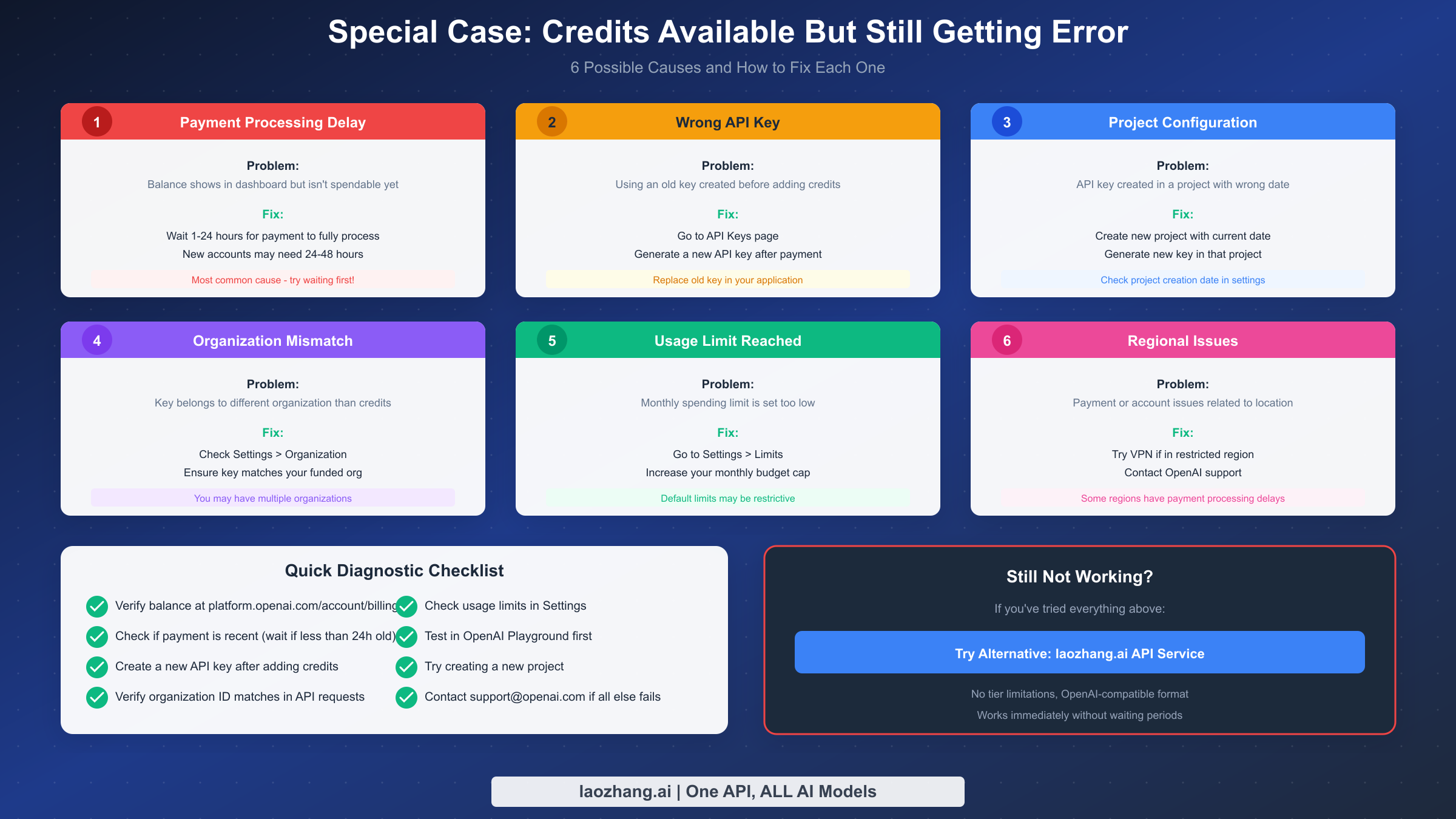
The most frustrating scenario occurs when you've added credits to your account but continue receiving the "quota exceeded" error. This situation confuses many developers because the obvious solution of adding funds doesn't work. Multiple causes can create this scenario, each requiring different troubleshooting steps.
Payment processing delay represents the most common cause. When you add credits, the balance appears in your dashboard almost immediately, but the funds may not become spendable for hours. OpenAI's payment processing system sometimes requires time to fully activate new credits, particularly for first-time payments or new accounts. If you added credits within the past 24 hours, simply waiting often resolves the issue. New accounts may require 24-48 hours for initial payment processing to complete.
API key timing issues affect some users who created keys before adding credits. The key may not properly recognize the new balance until you generate a fresh one. Navigate to the API Keys page, create a new secret key with full permissions, and update your application to use this new key. This takes only seconds and resolves a surprising number of persistent quota errors.
Project configuration problems have emerged with OpenAI's newer project-based organization system. Some users discovered their API keys were associated with projects that had incorrect creation dates or misconfigured permissions. Creating a new project with a current creation date and generating a fresh API key within that project resolved their issues. Check your project settings to ensure the creation date is accurate and permissions are properly configured.
Organization mismatch occurs when your API key belongs to a different organization than where your credits reside. If you belong to multiple OpenAI organizations, ensure your API requests specify the correct organization ID. Check Settings, then Organization to see your available organizations and their respective IDs. The API key itself doesn't contain organization information, so you must pass the organization header in your requests if you have multiple organizations.
Usage limit configuration may block API access even with available credits. OpenAI allows setting monthly spending limits that can prevent API calls when reached, regardless of credit balance. Navigate to Settings, then Limits to review and adjust your monthly budget cap. If your limit is set lower than your credit balance, API calls will fail once you hit the limit.
Regional issues affect users in certain geographic locations. Some regions experience payment processing delays or account restrictions. If you're located outside the United States, particularly in regions with limited OpenAI availability, you may face additional activation delays. Using a VPN during account setup or contacting OpenAI support directly may help resolve region-specific issues.
If none of these solutions work, test your account directly in OpenAI's Playground. Navigate to platform.openai.com/playground and try a simple API call through the web interface. If the Playground works but your application doesn't, the issue lies in your code or key configuration rather than your account. If the Playground also fails, contact support@openai.com with your account details and screenshots of the error.
Understanding OpenAI's Rate Limit System
Understanding how OpenAI's rate limiting works helps you design applications that stay within bounds and recover gracefully when limits are exceeded. The system uses multiple metrics evaluated independently, and exceeding any single metric triggers rate limiting.
Requests Per Minute (RPM) measures the total number of API calls regardless of their size. This limit affects applications that make many small requests more than those making fewer large requests. Free tier accounts are limited to 3 RPM, making real-time applications essentially impossible without upgrading. Tier 1 accounts receive 500 RPM, sufficient for most development and moderate production workloads.
Tokens Per Minute (TPM) measures the total tokens processed, including both input and output tokens. Large prompts or requests for long completions consume more of this budget. TPM limits vary significantly by model, with more advanced models typically having lower limits. Monitor your token usage carefully when processing documents or generating substantial outputs.
The tier system determines your limits across all metrics. Free tier accounts can access API functionality but with severe restrictions. Tier 1 requires $5 in total payments and provides substantial limit increases. Higher tiers require progressively more payment history and account age, with automatic upgrades occurring as you meet requirements. Tier 5 at the highest level requires $1,000 in cumulative payments and 30 days of account age, providing limits suitable for high-volume enterprise applications with up to 15,000 RPM and 40 million TPM for the latest models.
Rate limit headers in API responses provide real-time visibility into your consumption. The "x-ratelimit-remaining-requests" header shows remaining requests in your current window. The "x-ratelimit-reset-requests" header indicates when your request limit resets. Monitoring these headers allows your application to proactively slow down before hitting hard limits. Implementing adaptive request pacing based on these headers creates a more resilient application than relying solely on error-based backoff.
Alternative Solutions When OpenAI Limits Don't Work
When OpenAI's rate limits, pricing, or payment requirements don't fit your use case, alternative approaches provide viable paths forward. These alternatives range from using different providers to leveraging API aggregation services that offer more flexible terms.
API aggregation services like laozhang.ai provide access to OpenAI models without the same tier restrictions. These services maintain their own high-tier OpenAI accounts and resell access to users, often with more generous rate limits and simpler payment processing. The trade-off involves trusting a third party with your API traffic and potentially different pricing structures. For developers facing payment processing issues or needing higher limits than their tier allows, aggregation services offer immediate access without waiting for tier upgrades.
Using laozhang.ai as an alternative provides several advantages for developers facing OpenAI limitations. The service uses an OpenAI-compatible API format, meaning you can often switch by simply changing your base URL and API key without modifying your code. There are no tier limitations or waiting periods for new accounts, and the service supports multiple AI models beyond just OpenAI. This flexibility proves valuable for production applications that require reliable access without the uncertainty of tier upgrades or payment processing delays. The documentation is available at docs.laozhang.ai for detailed integration instructions.
Multiple provider strategies reduce dependency on any single service. Implementing fallback logic that switches between OpenAI, Anthropic, and other providers ensures your application remains functional even when one provider experiences issues. This approach requires more development effort but provides the highest reliability for production applications. Consider implementing a provider abstraction layer that normalizes API calls across different services.
For users who need free OpenAI API access options, exploring promotional credits, educational programs, or alternative providers may offer solutions. However, sustainable production use typically requires paid access to avoid the severe limitations of free tiers.
Preventing Future Quota Errors
Proactive monitoring and configuration prevent quota errors from interrupting your applications. Implementing these practices catches issues before they affect users and provides visibility into your API consumption patterns.
Set up usage alerts in your OpenAI dashboard. Navigate to Settings, then Limits to configure email notifications when usage approaches your monthly limit. Setting alerts at 50%, 80%, and 95% of your limit provides graduated warning as you approach the ceiling. These alerts give you time to add credits or adjust usage before hitting hard limits.
Implement application-level monitoring for API responses. Log all 429 errors with timestamps and request details to identify patterns. Track your daily and hourly API consumption to understand usage spikes. Set up alerting in your monitoring system to notify you when error rates exceed thresholds or when you're approaching rate limits based on response headers.
Configure auto-recharge in your billing settings to prevent balance depletion. Set a threshold below which OpenAI automatically purchases additional credits using your stored payment method. This ensures continuous service even during unexpected usage spikes or when you're unavailable to manually add credits.
Consider implementing request caching for repeated queries. Many applications make similar or identical API calls that could be served from cache. Implementing a caching layer with appropriate TTL reduces both costs and rate limit consumption. Be thoughtful about cache invalidation and ensure cached responses remain appropriate for your use case.
Build graceful degradation into your application. When rate limits are hit, provide users with useful feedback rather than raw error messages. Queue requests for later processing when possible. Consider implementing tiered functionality that reduces API calls during high-load periods while maintaining core functionality.
FAQ
Why am I getting "quota exceeded" when I just created my account?
New OpenAI accounts require prepaid credits to use the API. The free trial credits that OpenAI previously offered were discontinued in early 2024. Even though you can create an account for free, you must add at least $5 in credits before making API calls. Additionally, new accounts may require 24-48 hours for initial activation even after adding funds, so if you've just set up your account and added credits, waiting may resolve the error.
What's the difference between "insufficient_quota" and "rate_limit_exceeded" errors?
These are two distinct types of 429 errors requiring different solutions. The "insufficient_quota" error indicates a billing issue, meaning your account lacks prepaid credits or your payment hasn't fully processed. The solution involves adding credits and potentially waiting for activation. The "rate_limit_exceeded" error means you're sending too many requests for your account tier. The solution involves implementing exponential backoff, batching requests, or upgrading your tier for higher limits.
How long does it take for OpenAI credits to become active?
Most credit purchases activate within minutes, but delays can occur. First-time payments or new accounts may take up to 24 hours for credits to become spendable, even though the balance appears in your dashboard immediately. Some users report waiting up to 48 hours for new accounts. If you've waited over 24 hours and credits still aren't working, try generating a new API key or contacting OpenAI support.
Does ChatGPT Plus subscription include API credits?
No. ChatGPT Plus ($20/month) and API access are completely separate products with separate billing. ChatGPT Plus provides unlimited access to GPT-4 through the ChatGPT interface, but it includes zero API credits. To use the API, you must separately purchase prepaid credits through the API billing section at platform.openai.com. Many users discover this distinction when their API calls fail despite having an active ChatGPT Plus subscription.
Can I get more API credits for free?
OpenAI discontinued free API trial credits in early 2024. There are no longer promotional credits issued to new accounts. The minimum purchase is $5, which provides substantial usage for development and testing. Some users explore educational programs or research grants that may include API credits, but standard accounts require paid credits. Creating multiple accounts to obtain free credits violates OpenAI's Terms of Service and risks permanent account suspension.
What should I do if I have credits but still get the error?
This frustrating situation has multiple potential causes. First, wait at least 24 hours if you recently added credits, as payment processing may be delayed. Second, generate a new API key after adding credits, as keys created before funding may not recognize the new balance. Third, check your organization settings to ensure your key matches your funded organization. Fourth, verify your usage limits in Settings aren't blocking calls. Fifth, try testing in OpenAI Playground to isolate whether the issue is account-related or code-related. If all else fails, consider using alternative services like laozhang.ai for immediate access while troubleshooting.