
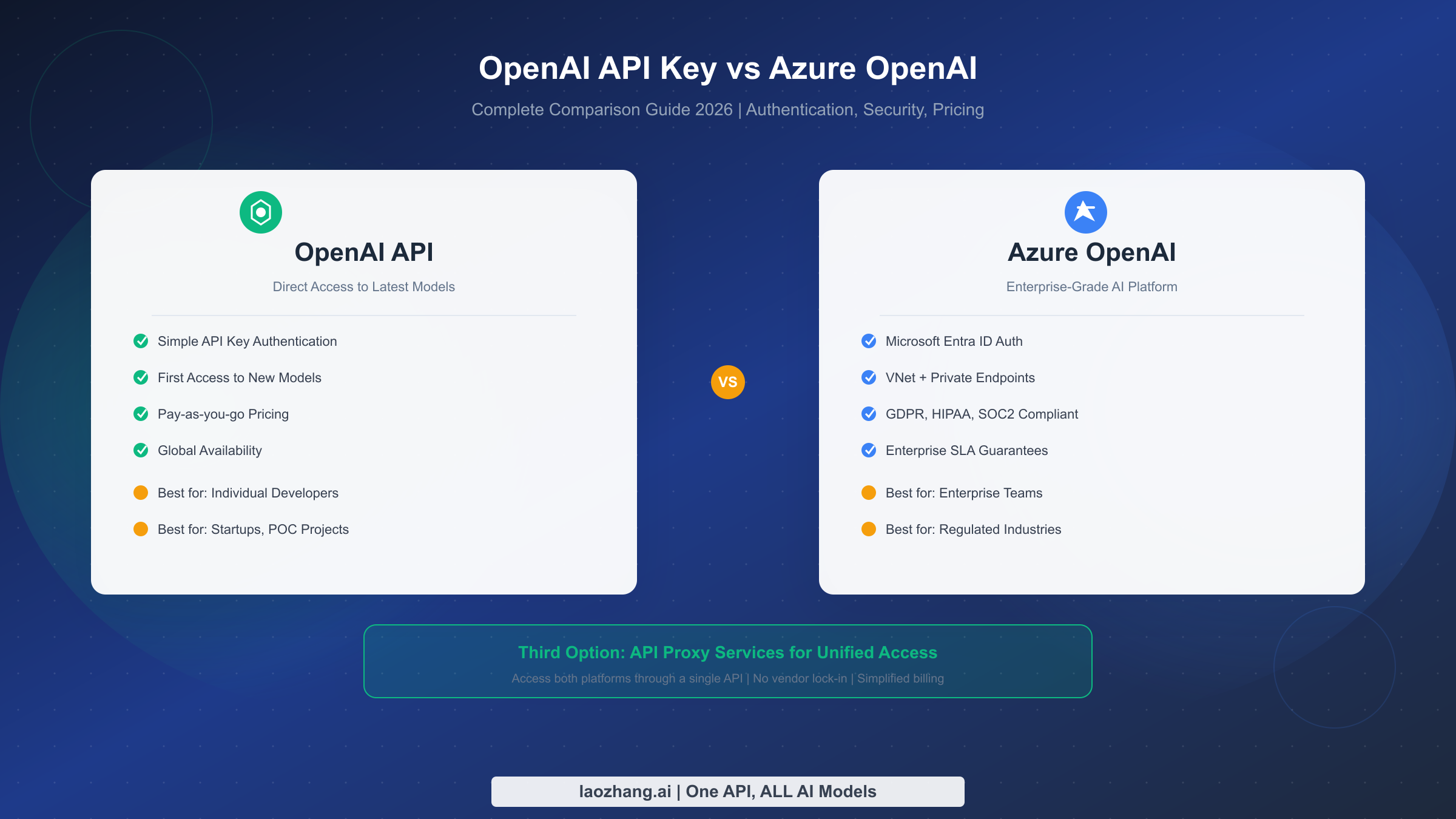
OpenAI API and Azure OpenAI represent two distinct approaches to accessing the same powerful AI models. While they share the underlying technology, their authentication methods, security features, pricing structures, and target audiences differ significantly. This comprehensive guide will help you understand these differences and make an informed decision for your specific use case in 2026.
TL;DR
OpenAI API uses simple Bearer token authentication and offers the fastest access to new models like GPT-5.2. Azure OpenAI provides enterprise-grade security with Microsoft Entra ID, VNet integration, and compliance certifications including GDPR, HIPAA, and SOC2. For individual developers and startups, OpenAI's direct API is often the better choice due to its simplicity. For enterprises with strict compliance requirements, Azure OpenAI is the safer bet. If you want flexibility without vendor lock-in, consider API proxy services like laozhang.ai that provide unified access to both platforms.
Understanding the Key Differences
The fundamental distinction between OpenAI API and Azure OpenAI lies not in the AI models themselves, but in how you access, manage, and secure them. Both platforms give you access to GPT-4, GPT-5.2, and other OpenAI models, but the infrastructure surrounding these models differs substantially.
OpenAI operates as a direct API provider. You create an account on platform.openai.com, generate an API key, and start making requests immediately. The setup process takes less than five minutes, and you can begin experimenting with the latest models right away. This simplicity makes OpenAI the preferred choice for developers who want to move fast and iterate quickly.
Azure OpenAI, on the other hand, is a managed service within the Microsoft Azure ecosystem. It wraps OpenAI's models in Azure's enterprise infrastructure, adding layers of security, compliance, and integration with other Azure services. This additional infrastructure comes with more complex setup requirements but provides the security guarantees that enterprise customers demand.
The practical implications of this difference extend beyond just getting started. With OpenAI, you manage a single API key and interact directly with OpenAI's infrastructure. With Azure OpenAI, you work within Azure's identity and access management system, which provides more granular control but requires familiarity with Azure concepts like resource groups, subscriptions, and role-based access control.
| Feature | OpenAI API | Azure OpenAI |
|---|---|---|
| Setup Time | 5 minutes | 30-60 minutes |
| Authentication | API Key (Bearer Token) | API Key, Entra ID, Managed Identity |
| New Model Access | Day 1 | 2-4 weeks delay |
| Security Features | Basic | Enterprise-grade (VNet, Private Endpoint) |
| Compliance | Limited | GDPR, HIPAA, SOC2, FedRAMP |
| SLA | Best effort | 99.9% uptime guarantee |
| Target Audience | Developers, Startups | Enterprises, Regulated Industries |
Understanding which category you fall into will guide your decision. If you're building a weekend project or an early-stage startup, the enterprise features of Azure OpenAI are likely overkill. If you're deploying AI in a healthcare application or financial services platform, Azure's compliance certifications may be non-negotiable.
Beyond the feature checklist, consider the operational model that fits your organization. OpenAI's model is self-service and developer-first. You sign up, pay with a credit card, and manage everything through their web dashboard. There's minimal bureaucracy and no need to involve procurement or IT departments. This agility is invaluable when you're moving fast.
Azure's model integrates with enterprise processes. Billing goes through your Azure subscription, which might already be approved and budgeted. Access control integrates with your existing identity provider. Security and compliance teams can apply their standard Azure governance policies. For organizations with established Azure practices, this integration reduces friction even if the initial setup is more complex.
The model availability timeline deserves special attention. When OpenAI releases a new model, it appears immediately on their API. Azure OpenAI typically lags by 2-4 weeks as Microsoft completes their deployment and validation process. For some organizations, having access to GPT-5.2 on day one matters. For others, the brief delay is irrelevant compared to the benefits of Azure's enterprise features.
Rate limits and quotas also differ between platforms. OpenAI assigns rate limits based on your usage tier, which increases automatically as you use the API more. Azure OpenAI rate limits are tied to your specific deployment configuration, and increasing them may require requesting quota increases through Azure support. For applications with unpredictable scaling needs, OpenAI's automatic tier progression can be more convenient.
API Key and Authentication Methods
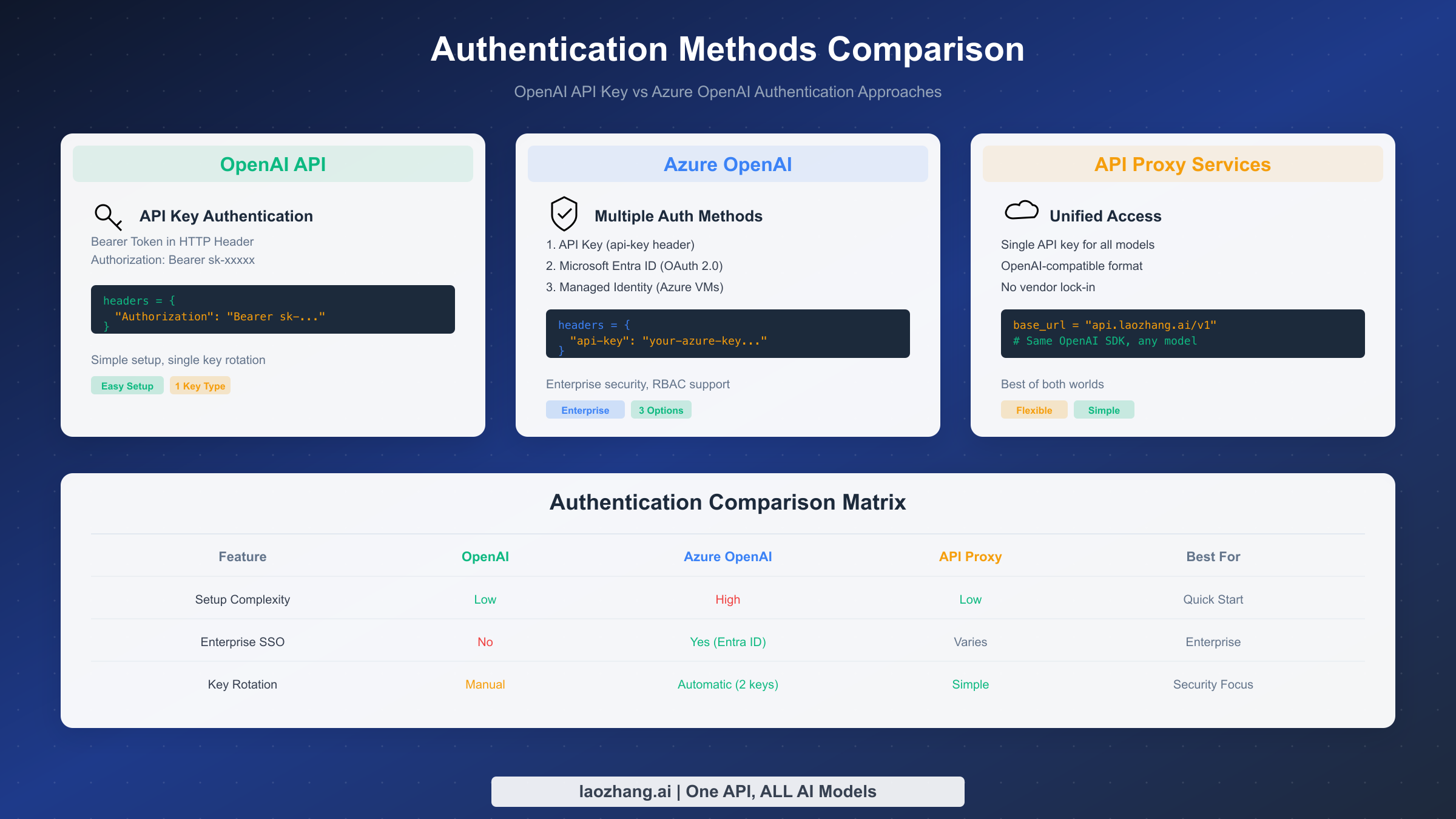
Authentication represents one of the most significant practical differences between the two platforms. The way you prove your identity to the API affects everything from your code structure to your security posture.
OpenAI uses a straightforward Bearer token authentication model. When you create an account, you generate an API key that looks something like sk-proj-abc123.... This key gets included in the Authorization header of every API request. The simplicity is both a strength and a limitation. Anyone with your API key can make requests on your behalf, which means protecting that key becomes critical.
pythonimport openai client = openai.OpenAI( api_key="sk-proj-your-api-key-here" ) response = client.chat.completions.create( model="gpt-5.2", messages=[{"role": "user", "content": "Hello!"}] )
Azure OpenAI offers three distinct authentication methods, each suited to different scenarios. The simplest is API key authentication, which works similarly to OpenAI but uses a different header format. Instead of the Authorization header, Azure uses the api-key header.
python# Azure OpenAI Authentication (API Key)
from openai import AzureOpenAI

client = AzureOpenAI(
    api_key="your-azure-api-key",
    api_version="2024-02-01",
    azure_endpoint="https://your-resource.openai.azure.com"
)

response = client.chat.completions.create(
    model="gpt-5.2",  # This is your deployment name
    messages=[{"role": "user", "content": "Hello!"}]
)
The second authentication method is Microsoft Entra ID (formerly Azure Active Directory). This approach uses OAuth 2.0 tokens instead of static API keys. The tokens expire after a short period, typically one hour, which limits the damage if a token is compromised. Entra ID also integrates with your organization's identity provider, enabling single sign-on and centralized access control.
python# Azure OpenAI Authentication (Entra ID)
from azure.identity import DefaultAzureCredential
from openai import AzureOpenAI

credential = DefaultAzureCredential()
token = credential.get_token("https://cognitiveservices.azure.com/.default" )

client = AzureOpenAI(
    azure_ad_token=token.token,
    api_version="2024-02-01",
    azure_endpoint="https://your-resource.openai.azure.com"
)
The third method, Managed Identity, is available when running code on Azure infrastructure like Virtual Machines or Azure Functions. It eliminates the need to manage credentials entirely. Azure automatically provides the identity context, and your code simply uses the DefaultAzureCredential to authenticate. This approach is the most secure for production deployments on Azure because there are no secrets to leak.
For developers looking to learn more about API authentication best practices, our Claude API authentication guide covers similar concepts that apply across AI platforms.
The v1 API changes introduced in 2025 simplified some aspects of Azure OpenAI authentication, making it more consistent with the OpenAI SDK. You can now use the same openai Python package for both platforms, just with different client configuration. This was a significant improvement over the previous approach that required separate SDKs.
| Authentication Aspect | OpenAI | Azure OpenAI |
|---|---|---|
| Key Format | sk-proj-... | 32-character hex string |
| Header Name | Authorization: Bearer | api-key |
| Token Rotation | Manual | Automatic (2 keys available) |
| OAuth Support | No | Yes (Entra ID) |
| Managed Identity | No | Yes (on Azure infrastructure) |
| MFA Support | Account level only | Full integration |
Key rotation practices differ significantly between platforms and deserve careful consideration. With OpenAI, you generate a new key, update your applications, and delete the old key. There's no built-in mechanism for zero-downtime rotation, so you need to coordinate carefully to avoid service interruptions. Many teams maintain multiple active keys to facilitate gradual rollouts.
Azure OpenAI provides two keys per resource by design. This dual-key system enables zero-downtime rotation. You regenerate key 1, update applications to use key 2, then regenerate key 2 later. The process is well-documented and integrates with Azure's key management best practices. For organizations with strict key rotation policies, this built-in capability simplifies compliance.
For developers exploring different AI platforms and their authentication methods, understanding these patterns helps when working with other providers as well. The concepts of Bearer tokens, API keys, and OAuth flows appear across most AI services.
Security, Compliance and Data Privacy
Security considerations often determine the choice between OpenAI and Azure OpenAI, especially for enterprise deployments. The two platforms take fundamentally different approaches to protecting your data and meeting compliance requirements.
OpenAI provides reasonable security for a cloud API service. Your data is encrypted in transit using TLS 1.2 or higher, and OpenAI has implemented various measures to protect their infrastructure. However, the security model is relatively simple. You get an API key, and anyone with that key can access your account's resources. There's no network-level isolation, no private connectivity options, and limited audit logging capabilities.
From a data handling perspective, OpenAI's policies have evolved significantly. As of 2026, data sent through the API is not used for model training by default for paid accounts. You can also opt out of data retention for safety monitoring, though this requires contacting OpenAI support. The company has also obtained SOC 2 Type 2 certification, demonstrating that basic security controls are in place.
Azure OpenAI, by contrast, inherits the full security apparatus of the Azure platform. This includes features that enterprise security teams expect. Virtual Network integration allows you to restrict API access to specific network ranges. Private Endpoints enable you to access the service over private IP addresses that never traverse the public internet. Azure Private Link ensures that traffic between your application and the OpenAI service stays entirely within Microsoft's network backbone.
The compliance certification picture heavily favors Azure OpenAI. Microsoft has invested decades in obtaining and maintaining compliance certifications for Azure services. Azure OpenAI inherits these certifications, including GDPR, HIPAA, SOC 1/2/3, ISO 27001, FedRAMP, and many others. For organizations in regulated industries like healthcare, finance, or government, these certifications aren't optional. They're baseline requirements that OpenAI simply cannot match.
Data residency is another crucial consideration. Azure OpenAI lets you choose the Azure region where your data is processed and stored. This matters for organizations subject to data sovereignty requirements. If your data must stay within the European Union, you can deploy Azure OpenAI in EU regions. OpenAI, being a US-based company, processes all data through their US infrastructure, which may not meet certain regulatory requirements.
The audit and logging capabilities differ significantly as well. Azure OpenAI integrates with Azure Monitor and Azure Log Analytics, providing detailed logs of every API call, including who made it, when, and from where. These logs can be retained for years if needed, supporting compliance audits and security investigations. OpenAI provides usage statistics but lacks the detailed audit trails that enterprise security teams require.
| Security Feature | OpenAI | Azure OpenAI |
|---|---|---|
| Encryption in Transit | TLS 1.2+ | TLS 1.2+ |
| Encryption at Rest | Yes | Yes (Customer-managed keys available) |
| VNet Integration | No | Yes |
| Private Endpoint | No | Yes |
| IP Allowlisting | No | Yes |
| RBAC | Basic | Full Azure RBAC |
| Audit Logging | Limited | Comprehensive (Azure Monitor) |
| Data Residency | US only | Choice of 60+ regions |
The decision between platforms often comes down to a single question: does your organization have security or compliance requirements that mandate specific controls? If you need Private Endpoints, customer-managed encryption keys, or specific compliance certifications, Azure OpenAI is your only option. If you don't have these requirements, the simpler security model of OpenAI's direct API may be sufficient.
It's worth noting that security requirements can change. A startup that begins with OpenAI might land an enterprise customer that requires SOC 2 compliance and data residency guarantees. Having a migration path in mind from the beginning can save significant rework later. The unified adapter pattern shown in the code examples section facilitates this kind of migration.
For organizations in the European Union, data residency is particularly important following various regulatory developments. Azure OpenAI's ability to process and store data exclusively within EU regions provides a clear compliance path. OpenAI has improved their data handling practices but cannot offer the same geographic guarantees that Azure provides through its regional deployment model.
Code Examples - OpenAI vs Azure OpenAI
Understanding the code differences between the two platforms is essential for developers evaluating a potential migration or making an initial choice. While the underlying API semantics are similar, the configuration and setup differ in important ways.
Let's start with a complete Python example showing how to implement the same functionality on both platforms. This example demonstrates a chat completion request with streaming, which is a common pattern for interactive applications.
python# OpenAI Direct API - Complete Example
import openai
from openai import OpenAI

def openai_chat_completion(user_message: str) -> str:
    """
    Make a chat completion request to OpenAI API.
    Uses Bearer token authentication.
    """
    client = OpenAI(
        api_key="sk-proj-your-api-key-here"
    )

    response = client.chat.completions.create(
        model="gpt-5.2",
        messages=[
            {"role": "system", "content": "You are a helpful assistant."},
            {"role": "user", "content": user_message}
        ],
        temperature=0.7,
        max_tokens=1000
    )

    return response.choices[0].message.content

def openai_streaming_chat(user_message: str):
    """
    Streaming chat completion with OpenAI.
    Yields chunks as they arrive.
    """
    client = OpenAI(api_key="sk-proj-your-api-key-here")

    stream = client.chat.completions.create(
        model="gpt-5.2",
        messages=[{"role": "user", "content": user_message}],
        stream=True
    )

    for chunk in stream:
        if chunk.choices[0].delta.content:
            yield chunk.choices[0].delta.content
The Azure OpenAI equivalent requires additional configuration for the endpoint and API version, but uses the same SDK. Notice how the model parameter refers to your deployment name rather than the model name itself.
python# Azure OpenAI - Complete Example
from openai import AzureOpenAI

def azure_openai_chat_completion(user_message: str) -> str:
    """
    Make a chat completion request to Azure OpenAI.
    Uses api-key header authentication.
    """
    client = AzureOpenAI(
        api_key="your-32-char-azure-api-key",
        api_version="2024-02-01",
        azure_endpoint="https://your-resource-name.openai.azure.com"
    )

    # Note: model parameter is your deployment name, not the model name
    response = client.chat.completions.create(
        model="my-gpt5-deployment",  # Your deployment name
        messages=[
            {"role": "system", "content": "You are a helpful assistant."},
            {"role": "user", "content": user_message}
        ],
        temperature=0.7,
        max_tokens=1000
    )

    return response.choices[0].message.content

def azure_openai_with_entra_id(user_message: str) -> str:
    """
    Azure OpenAI with Entra ID authentication.
    More secure for production deployments.
    """
    from azure.identity import DefaultAzureCredential

    credential = DefaultAzureCredential()
    token = credential.get_token("https://cognitiveservices.azure.com/.default" )

    client = AzureOpenAI(
        azure_ad_token=token.token,
        api_version="2024-02-01",
        azure_endpoint="https://your-resource-name.openai.azure.com"
    )

    response = client.chat.completions.create(
        model="my-gpt5-deployment",
        messages=[{"role": "user", "content": user_message}]
    )

    return response.choices[0].message.content
For Node.js developers, the pattern is similar. Both platforms use the official OpenAI npm package, with configuration differences.
javascript// OpenAI Direct API - Node.js
import OpenAI from 'openai';

const openai = new OpenAI({
  apiKey: 'sk-proj-your-api-key-here'
});

async function chatWithOpenAI(message) {
  const completion = await openai.chat.completions.create({
    model: 'gpt-5.2',
    messages: [{ role: 'user', content: message }]
  });

  return completion.choices[0].message.content;
}

// Azure OpenAI - Node.js
import { AzureOpenAI } from 'openai';

const azureClient = new AzureOpenAI({
  apiKey: 'your-azure-api-key',
  apiVersion: '2024-02-01',
  endpoint: 'https://your-resource.openai.azure.com'
});

async function chatWithAzure(message) {
  const completion = await azureClient.chat.completions.create({
    model: 'my-gpt5-deployment', // Deployment name
    messages: [{ role: 'user', content: message }]
  });

  return completion.choices[0].message.content;
}
If you need to support both platforms or want to make switching easy, you can create a unified adapter pattern. This approach abstracts away the platform differences and allows your application code to remain unchanged regardless of which backend you use.
python# Unified Adapter Pattern
from abc import ABC, abstractmethod
from typing import Generator, List, Dict
import os

class AIProvider(ABC):
    @abstractmethod
    def chat(self, messages: List[Dict], **kwargs) -> str:
        pass

    @abstractmethod
    def stream_chat(self, messages: List[Dict], **kwargs) -> Generator[str, None, None]:
        pass

class OpenAIProvider(AIProvider):
    def __init__(self):
        from openai import OpenAI
        self.client = OpenAI(api_key=os.getenv("OPENAI_API_KEY"))
        self.model = os.getenv("OPENAI_MODEL", "gpt-5.2")

    def chat(self, messages, **kwargs):
        response = self.client.chat.completions.create(
            model=self.model,
            messages=messages,
            **kwargs
        )
        return response.choices[0].message.content

    def stream_chat(self, messages, **kwargs):
        stream = self.client.chat.completions.create(
            model=self.model,
            messages=messages,
            stream=True,
            **kwargs
        )
        for chunk in stream:
            if chunk.choices[0].delta.content:
                yield chunk.choices[0].delta.content

class AzureOpenAIProvider(AIProvider):
    def __init__(self):
        from openai import AzureOpenAI
        self.client = AzureOpenAI(
            api_key=os.getenv("AZURE_OPENAI_KEY"),
            api_version=os.getenv("AZURE_API_VERSION", "2024-02-01"),
            azure_endpoint=os.getenv("AZURE_OPENAI_ENDPOINT")
        )
        self.deployment = os.getenv("AZURE_DEPLOYMENT_NAME")

    def chat(self, messages, **kwargs):
        response = self.client.chat.completions.create(
            model=self.deployment,
            messages=messages,
            **kwargs
        )
        return response.choices[0].message.content

    def stream_chat(self, messages, **kwargs):
        stream = self.client.chat.completions.create(
            model=self.deployment,
            messages=messages,
            stream=True,
            **kwargs
        )
        for chunk in stream:
            if chunk.choices[0].delta.content:
                yield chunk.choices[0].delta.content

# Usage - switch providers by changing one line
def get_provider(provider_type: str = "openai") -> AIProvider:
    providers = {
        "openai": OpenAIProvider,
        "azure": AzureOpenAIProvider
    }
    return providers[provider_type]()

# Application code remains the same
provider = get_provider(os.getenv("AI_PROVIDER", "openai"))
response = provider.chat([{"role": "user", "content": "Hello!"}])
The code examples above demonstrate the core patterns, but real-world applications often require additional considerations. Error handling, retry logic, and timeout configuration all need attention. Both platforms support similar retry strategies using exponential backoff, but the specific error codes and rate limit headers differ slightly.
For production applications, consider implementing a circuit breaker pattern that can gracefully degrade when the API is experiencing issues. Azure OpenAI's integration with Azure Monitor makes it easier to build observability into your application, while OpenAI applications typically require third-party monitoring solutions.
Testing is another area where the platforms differ in practice. OpenAI doesn't provide a sandbox or test environment, so you test against production APIs with real costs. Azure OpenAI similarly lacks a free testing tier, but organizations with Azure credits can use those for development and testing purposes.
Pricing Comparison (The Hidden Costs)
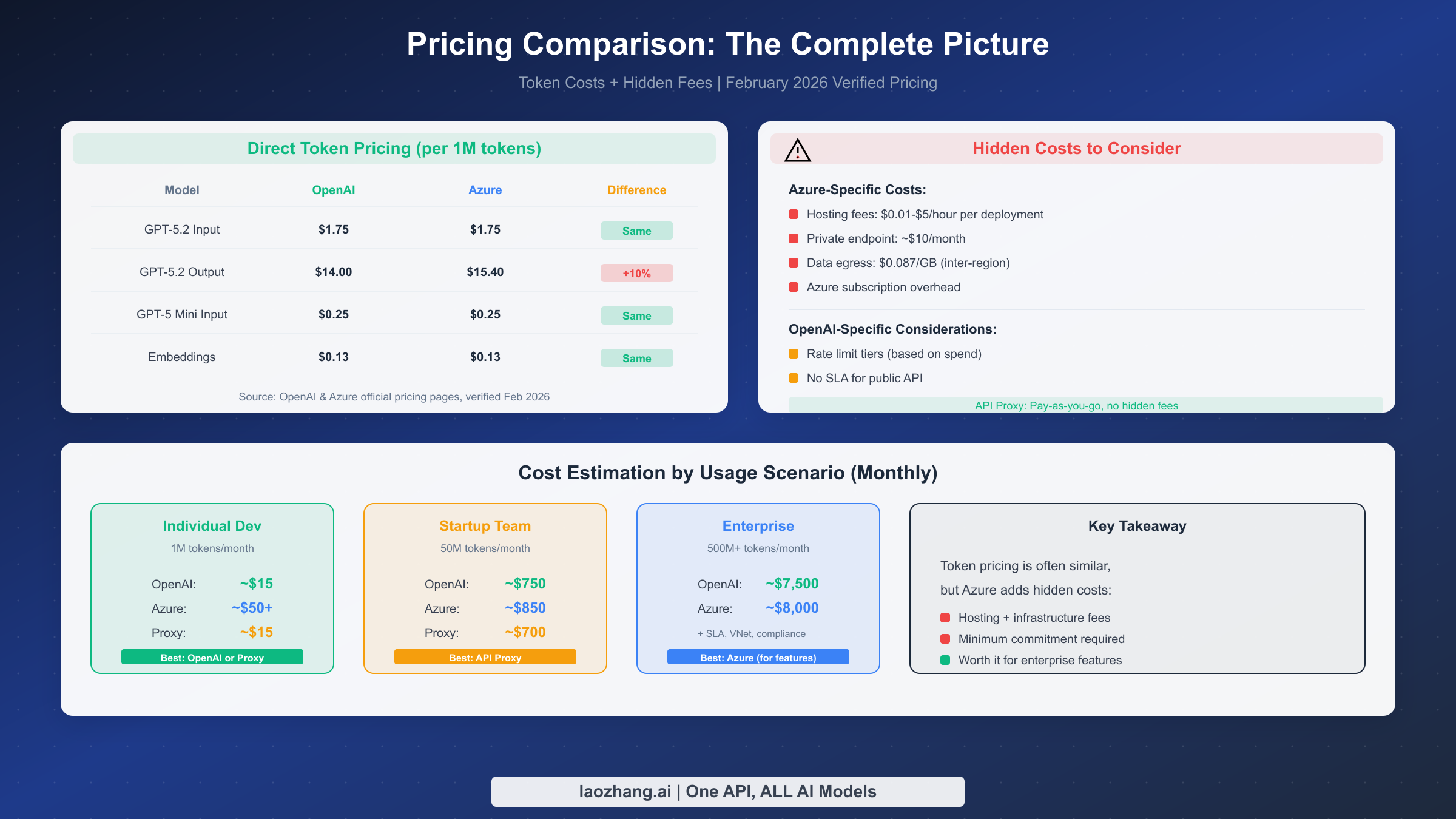
Pricing is often cited as a key decision factor, but the comparison is more nuanced than it first appears. The token pricing for the underlying models is similar between platforms, but the total cost of ownership can differ significantly when you factor in hidden costs and volume commitments.
As of February 2026, here's the direct token pricing comparison for the most popular models (verified from official pricing pages):
| Model | OpenAI Input | OpenAI Output | Azure Input | Azure Output |
|---|---|---|---|---|
| GPT-5.2 | $1.75/1M | $14.00/1M | $1.75/1M | $14.00/1M |
| GPT-5.2 Pro | $21.00/1M | $168.00/1M | $21.00/1M | $168.00/1M |
| GPT-5 Mini | $0.25/1M | $2.00/1M | $0.25/1M | $2.00/1M |
| o4-mini | $4.00/1M | $16.00/1M | $4.00/1M | $16.00/1M |
At first glance, the pricing looks identical. However, the story changes when you consider the full picture of Azure OpenAI costs. There are several hidden costs that don't appear in simple token pricing comparisons.
The first hidden cost is provisioned throughput. Azure OpenAI offers a provisioned throughput option where you pay for reserved capacity rather than per-token. This can be cost-effective for high-volume, predictable workloads, but you pay whether you use the capacity or not. The monthly commitment can range from several hundred to several thousand dollars depending on your throughput requirements.
Data egress charges represent another hidden cost on Azure. When your application retrieves responses from Azure OpenAI, you may incur charges for data leaving Azure's network. These charges are minimal for typical chat applications but can add up for applications that generate large volumes of output. OpenAI's direct API doesn't have separate egress charges since the pricing is purely usage-based.
Networking costs come into play if you use Azure's advanced security features. Private Endpoints incur hourly charges plus data processing fees. VNet integration requires additional networking infrastructure that has its own costs. For a production deployment with proper security, these costs can add $100-500 per month to your Azure bill.
Support costs differ between platforms. OpenAI offers email support for all customers and priority support for enterprise customers. Azure includes support based on your Azure support plan, which ranges from free (community support only) to $1000+/month for enterprise-level support. If you need guaranteed response times for production issues, factor this into your Azure cost calculation.
For a realistic cost comparison, consider this scenario-based analysis:
| Scenario | Monthly Tokens | OpenAI Cost | Azure Cost (Full) |
|---|---|---|---|
| Hobby Project | 1M tokens | ~$10 | ~$10 + $0 (no extras) |
| Startup MVP | 10M tokens | ~$100 | ~$100-150 (with monitoring) |
| Production App | 100M tokens | ~$1,000 | ~$1,200-1,500 (with security) |
| Enterprise | 1B+ tokens | Custom pricing | Custom + Azure costs |
For developers looking to optimize costs, several strategies can help. First, consider using cached responses where the input context remains the same. OpenAI offers significant discounts for cached input tokens ($0.175/1M vs $1.75/1M for GPT-5.2). Second, choose the right model size for your task. GPT-5 Mini at $0.25/1M input is often sufficient for simpler tasks. Third, explore API proxy services that can provide unified access with potential cost benefits.
Our detailed GPT-4o token pricing analysis provides additional context on how token costs impact real-world applications.
For organizations committed to cost optimization, several additional strategies deserve consideration. Prompt engineering to reduce token usage often provides the best ROI. A well-crafted prompt that's 50% shorter saves 50% on input tokens while potentially improving response quality. Caching strategies for common queries can dramatically reduce costs for applications with repetitive patterns.
Enterprise agreements merit investigation for high-volume users. Both OpenAI and Microsoft offer custom pricing for organizations with significant usage. These negotiations can yield substantial discounts but typically require annual commitments. If you're spending more than $10,000 per month on AI APIs, it's worth reaching out to discuss enterprise terms.
The cost comparison becomes even more interesting when you consider multi-provider strategies. By routing different types of requests to different providers based on cost-performance tradeoffs, you can optimize your overall spend. Simple classification tasks might go to cheaper models, while complex reasoning goes to premium models. API proxy services can facilitate this routing without complicating your application code.
Which One Should You Choose?
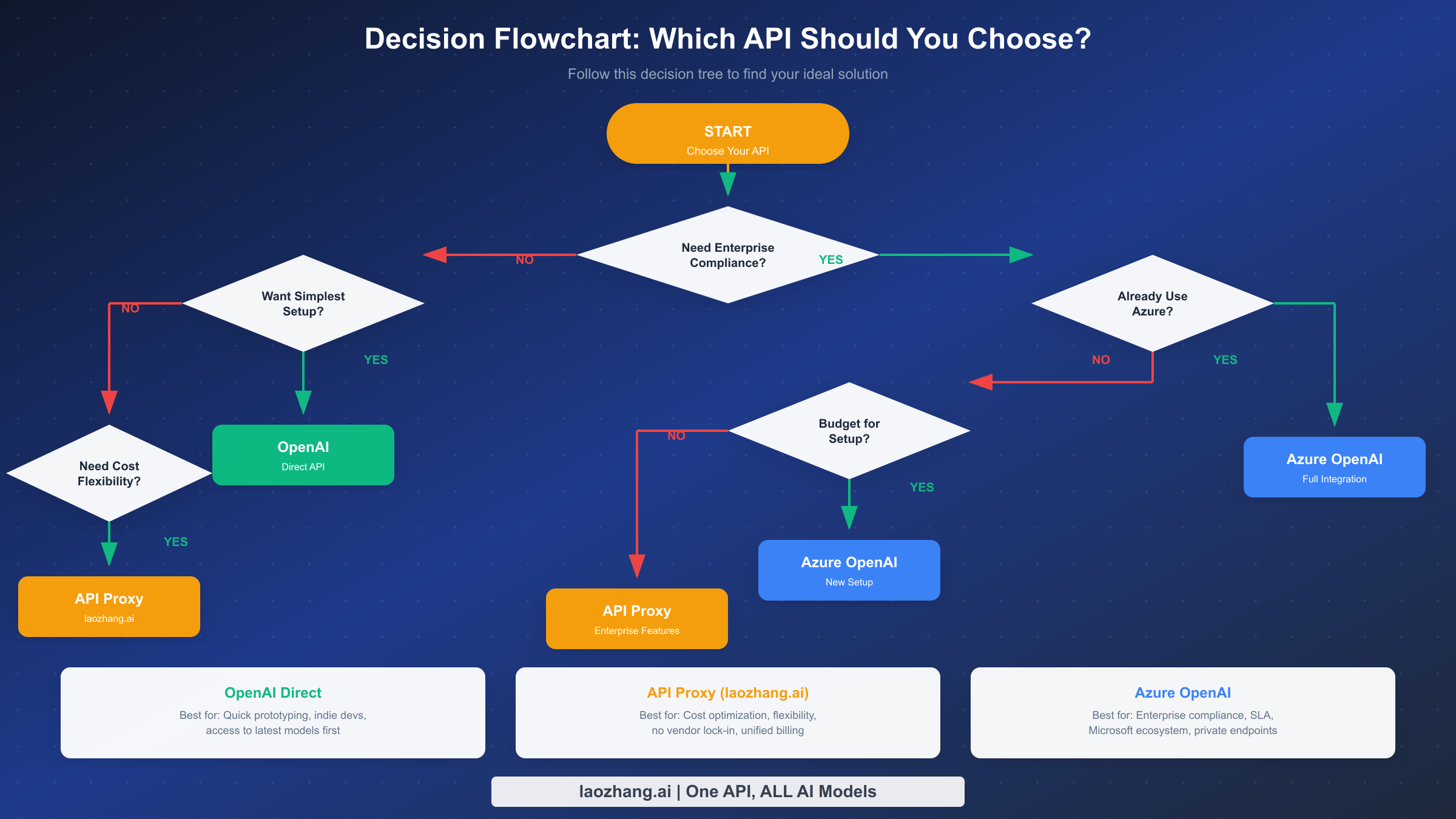
After examining the technical differences, security features, and cost structures, the decision framework becomes clearer. Your choice should be guided by your specific requirements rather than a one-size-fits-all recommendation.
Choose OpenAI direct API if you prioritize speed and simplicity. Individual developers and small teams benefit most from OpenAI's straightforward onboarding. You can have a working prototype within minutes, and there's no overhead of managing Azure infrastructure. OpenAI is also the better choice if you need the latest models immediately. New releases typically appear on OpenAI's platform 2-4 weeks before they're available on Azure OpenAI.
Startups and early-stage companies often find OpenAI more practical during the rapid iteration phase. When you're validating product-market fit, the last thing you need is to spend days configuring Azure resources. OpenAI's pay-as-you-go model with no minimum commitment aligns well with the uncertain resource needs of an early startup.
Choose Azure OpenAI if compliance is non-negotiable. Organizations in healthcare, finance, government, or other regulated industries often have compliance requirements that OpenAI simply cannot meet. Azure's extensive compliance certifications, combined with features like Private Endpoints and customer-managed encryption keys, make it the only viable option for these use cases.
Enterprises already invested in the Microsoft ecosystem should strongly consider Azure OpenAI. The integration with Azure Active Directory, Azure Monitor, and other Azure services provides a unified management experience. Your security team already understands Azure's security model, and your finance team is already familiar with Azure billing.
Organizations requiring enterprise SLAs need Azure OpenAI. OpenAI provides best-effort service without formal uptime guarantees. Azure OpenAI comes with Microsoft's standard 99.9% uptime SLA, which is often a requirement for mission-critical applications.
There's also a middle ground worth considering. If you're unsure or want to avoid vendor lock-in, API proxy services offer an alternative approach. These services provide a unified interface to multiple AI providers, allowing you to switch backends without code changes. This flexibility can be valuable if your requirements might change over time.
Quick Decision Matrix:
| Your Situation | Recommendation |
|---|---|
| Solo developer or small team | OpenAI Direct |
| Need latest models immediately | OpenAI Direct |
| Healthcare/Finance/Government | Azure OpenAI |
| Existing Azure infrastructure | Azure OpenAI |
| Need 99.9% SLA guarantee | Azure OpenAI |
| Want flexibility and cost optimization | API Proxy Service |
| Uncertain about long-term needs | API Proxy Service |
The decision doesn't have to be permanent. Many organizations start with OpenAI for rapid prototyping and proof-of-concept work, then evaluate Azure OpenAI as they move toward production. The unified adapter pattern shown earlier makes this transition manageable. You can even run both platforms simultaneously, routing different workloads to each based on their specific requirements.
Consider documenting your decision criteria and the factors that might trigger a reevaluation. Technology landscapes change, and what's the right choice today might not be optimal in a year. OpenAI continues to improve their enterprise offerings, while Azure OpenAI continues to reduce the gap in model availability. Regular reassessment ensures you're always using the best tool for your current needs.
For teams still in the evaluation phase, a phased approach often works well. Start with a small pilot on your preferred platform, measure the results, and expand based on real-world experience. Both platforms offer pay-as-you-go pricing that supports this kind of incremental adoption without large upfront commitments.
The Third Option - API Proxy Services
While the OpenAI vs Azure debate dominates most discussions, there's a third approach worth considering: API proxy services. These platforms act as intermediaries between your application and multiple AI providers, offering benefits that neither direct platform provides alone.
API proxy services solve several real problems that developers face. First, they eliminate the need to choose a single platform. You can route requests to OpenAI for the latest models while using Azure OpenAI for compliance-sensitive workloads, all through a single API interface. This flexibility becomes valuable as your requirements evolve.
Second, proxy services simplify billing and cost management. Instead of managing separate accounts with OpenAI and Azure (and potentially other providers like Anthropic or Google), you get unified billing through one platform. This simplification is particularly valuable for agencies and consulting firms managing multiple client projects.
Third, many proxy services offer cost optimization through intelligent routing. They can automatically direct requests to the most cost-effective provider for a given model quality level. Some also provide caching and rate limiting features that help reduce costs and improve reliability.
laozhang.ai is one such service that provides unified access to both OpenAI and Azure OpenAI models through an OpenAI-compatible interface. The integration is straightforward since it uses the same API format that developers are already familiar with.
python# Using API Proxy Service (laozhang.ai example)
from openai import OpenAI

# Simply change the base URL - same OpenAI SDK
client = OpenAI(
    api_key="your-laozhang-api-key",
    base_url="https://api.laozhang.ai/v1"
)

# Use any model from any provider
response = client.chat.completions.create(
    model="gpt-5.2",  # Or "claude-3-opus", "gemini-pro", etc.
    messages=[{"role": "user", "content": "Hello!"}]
)
The key advantages of using a proxy service include:
No Vendor Lock-in: Your code uses a standard interface. Switching providers or adding new ones requires no code changes.
Unified Access: Access models from OpenAI, Azure, Anthropic, and other providers through a single API key.
Simplified Billing: One invoice, one payment method, easier expense tracking.
No Subscription Requirements: Pay only for what you use, no minimum commitments.
Built-in Fallbacks: Some services automatically route to backup providers if the primary is experiencing issues.
For developers exploring options for accessing multiple AI models, our guide on free o4-mini API access demonstrates how proxy services can provide cost-effective access to premium models.
The trade-off with proxy services is an additional layer of abstraction. You're trusting another party with your API traffic, which may not be acceptable for all use cases. However, for many applications, the convenience and flexibility outweigh this concern.
When evaluating API proxy services, consider factors beyond just pricing. Uptime and reliability are crucial since the proxy becomes a dependency for your application. Latency overhead matters for real-time applications. Data handling policies should align with your security requirements. And the provider's roadmap should indicate commitment to supporting new models as they're released.
The API proxy approach is particularly valuable during periods of rapid AI development. As new models emerge from different providers, being able to switch or add models without code changes accelerates your ability to leverage improvements. This flexibility has practical value as the AI landscape continues to evolve rapidly.
Learn more about API proxy capabilities: https://docs.laozhang.ai/
Frequently Asked Questions
What is the main difference between OpenAI API Key and Azure OpenAI API Key?
The main difference lies in format, security features, and how they integrate with broader infrastructure. OpenAI API keys start with sk-proj- and are used as Bearer tokens in the Authorization header. Azure OpenAI keys are 32-character hexadecimal strings used in the api-key header. More importantly, Azure OpenAI keys can be supplemented or replaced by Microsoft Entra ID authentication, providing enterprise-grade identity management that OpenAI's simple API key model cannot match. Azure also provides two keys per resource for zero-downtime rotation, while OpenAI requires manual key management.
Is Azure OpenAI more secure than OpenAI?
Yes, Azure OpenAI offers more comprehensive security features. While OpenAI provides basic security with TLS encryption and SOC 2 certification, Azure OpenAI adds Virtual Network integration, Private Endpoints, customer-managed encryption keys, comprehensive audit logging through Azure Monitor, and integration with Microsoft's identity management platform. For organizations with strict security requirements, particularly those in regulated industries, Azure OpenAI's security capabilities often make it the only viable option. However, for applications without regulatory compliance needs, OpenAI's security is generally adequate.
Can I use the same code for both OpenAI and Azure OpenAI?
Mostly yes, with minor configuration changes. Since the 2025 v1 API updates, both platforms use the same official OpenAI Python and Node.js SDKs. The main differences are in client initialization: Azure OpenAI requires additional parameters for the endpoint URL and API version, and uses a different authentication header. The request and response formats are identical. Using the unified adapter pattern shown earlier in this article, you can write application code that works with either platform without modification.
How much does Azure OpenAI cost compared to OpenAI?
The per-token pricing is identical between platforms for the same models. However, Azure OpenAI can have higher total costs when you factor in infrastructure requirements. Private Endpoints, VNet integration, enhanced monitoring, and Azure support plans all add to the cost. For a production deployment with proper security, expect to pay 10-50% more on Azure than the pure token costs suggest. Conversely, Azure may offer cost advantages for very high volumes through provisioned throughput pricing and enterprise agreements that include AI credits.
Which one should I choose for a startup?
For most startups, OpenAI's direct API is the better initial choice. The faster onboarding, simpler configuration, and immediate access to the latest models align well with startup needs. You can always migrate to Azure OpenAI later if you acquire enterprise customers with compliance requirements. However, if you're building in a regulated industry like healthcare or fintech, starting with Azure OpenAI may save you a painful migration later. Consider API proxy services if you want flexibility without premature commitment to either platform.
How quickly can I access new models on each platform?
OpenAI provides same-day access to new model releases. When OpenAI announces a new model, it's immediately available through their API for all users. Azure OpenAI typically has a 2-4 week delay as Microsoft goes through their deployment and validation process. This gap has narrowed over time but remains a factor for organizations that want to leverage cutting-edge capabilities immediately.
What happens if I need to migrate from OpenAI to Azure OpenAI (or vice versa)?
Migration between platforms is straightforward at the API level since both use compatible SDKs. The main work involves updating configuration (endpoints, authentication) rather than rewriting application logic. However, consider these factors: Azure OpenAI uses deployment names instead of model names, so you'll need to create deployments for each model you use. Rate limits may differ and require adjustment. Any OpenAI-specific features like the Assistants API may have different availability on Azure. Plan for thorough testing after migration to catch any subtle differences in behavior.
Does Azure OpenAI support all OpenAI models?
Azure OpenAI supports most but not all OpenAI models. Core models like GPT-4, GPT-4 Turbo, and GPT-5.2 are available on both platforms. However, some specialized models or very new releases may only be available on OpenAI's direct API. Additionally, Azure may have different regional availability for certain models. Always check Azure's model availability documentation for your specific region before committing to a deployment architecture.
Can I use both platforms simultaneously?
Yes, many organizations use both platforms for different purposes. You might use OpenAI for development and testing where you want the latest models immediately, while using Azure OpenAI for production workloads that require enterprise security features. The unified adapter pattern shown earlier in this article makes this multi-platform approach practical. API proxy services also facilitate this by providing a single interface to multiple backends.
The choice between OpenAI API and Azure OpenAI ultimately depends on your specific requirements, existing infrastructure, and risk tolerance. For most developers, starting with OpenAI and considering Azure when compliance needs arise is a practical approach. For enterprises with existing Azure investments and strict security requirements, Azure OpenAI provides the enterprise-grade platform they need. And for those who want the best of both worlds, API proxy services like laozhang.ai offer a flexible middle path that preserves options for the future while meeting today's needs.