
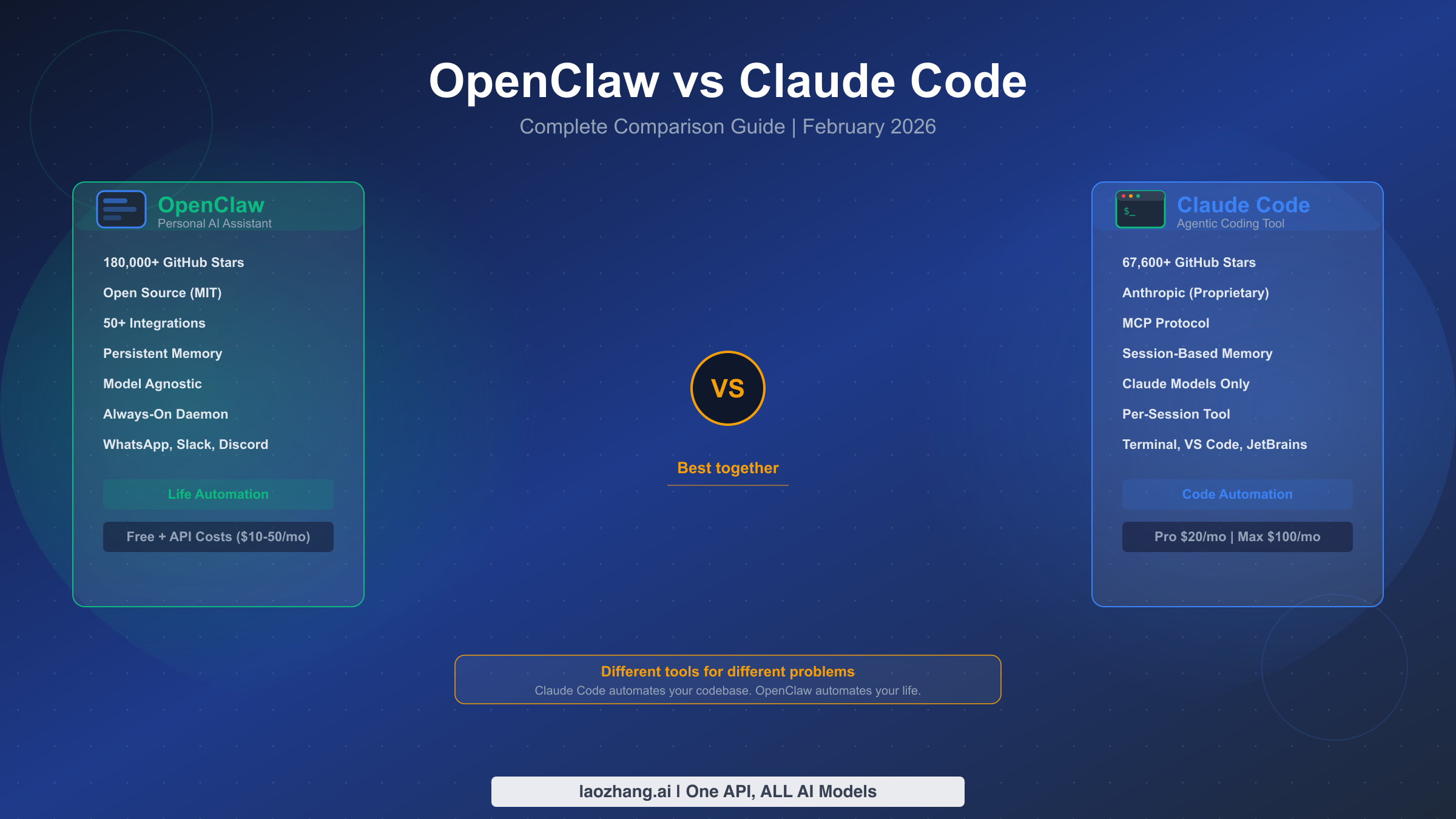
OpenClaw and Claude Code serve fundamentally different purposes in your AI toolkit. Claude Code is Anthropic's terminal-based coding agent (67.6k GitHub stars, as of February 2026) that writes, tests, and deploys code directly in your terminal. OpenClaw is an open-source personal AI assistant (180k+ GitHub stars) that automates your entire digital life through messaging platforms like WhatsApp, Slack, and Telegram. Rather than competing with each other, these two tools occupy entirely separate categories — and the smartest developers in 2026 are using both of them together.
TL;DR — The Quick Verdict
Before diving deep into architecture, features, and security, here is a side-by-side summary of the eleven dimensions that matter most when choosing between these two tools. This table reflects verified data as of February 19, 2026, with all pricing pulled directly from official sources.
| Dimension | OpenClaw | Claude Code |
|---|---|---|
| Primary Purpose | Personal AI assistant | Agentic coding tool |
| GitHub Stars | 180,000+ | 67,600+ |
| License | MIT (open source) | Proprietary (Anthropic) |
| AI Models | Any (OpenAI, Claude, local) | Claude only |
| Interface | WhatsApp, Slack, Telegram | Terminal, VS Code, JetBrains |
| Memory | Persistent (weeks/months) | Session-based (resets) |
| Architecture | Always-on daemon | Per-session agent |
| Security Model | Broad access, user-managed | Sandboxed, enterprise controls |
| Pricing | Free + API costs ($10-50/mo) | Free tier / Pro $20/mo / Max $100/mo |
| Best For | Life automation, scheduling, email | Writing, testing, deploying code |
| Setup Complexity | Moderate (Docker, API keys) | Low (npm install, authenticate) |
The one-sentence verdict is straightforward: if you primarily write code, start with Claude Code. If you want to automate everything outside of coding — email triage, calendar management, smart home control, research — start with OpenClaw. If you want maximum AI-powered productivity across your entire workflow, use both.
Understanding the Architecture: How They Actually Work
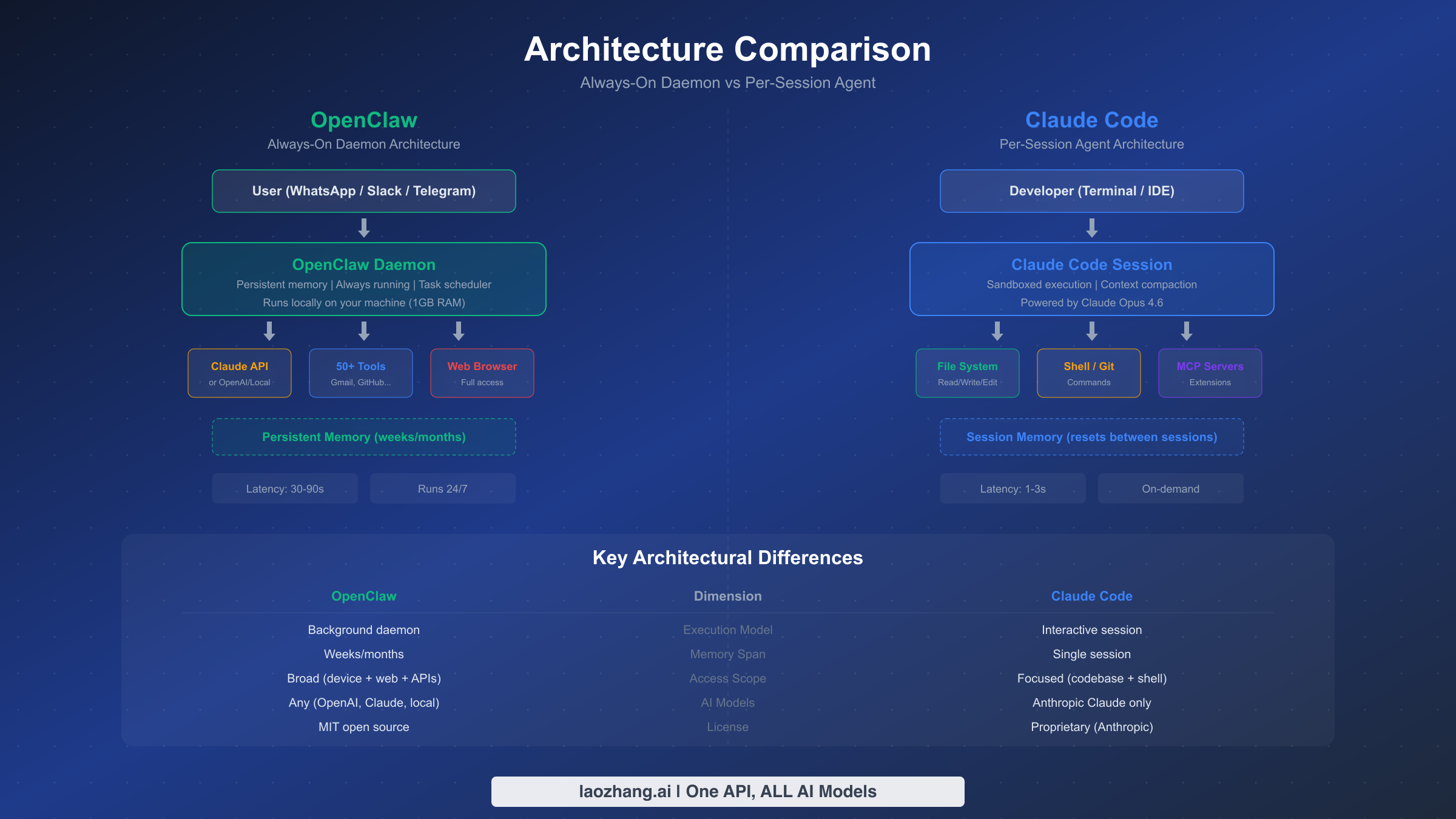
The most important difference between OpenClaw and Claude Code is not what they can do, but how they run. OpenClaw operates as a persistent background daemon that stays alive on your machine around the clock, while Claude Code launches as an interactive session that exists only while you are actively using it. This architectural distinction explains virtually every other difference between the two tools, from memory behavior to security posture to response latency.
OpenClaw runs as a local daemon process that consumes roughly 1GB of RAM and 500MB of disk space. Once started, it stays resident in memory, continuously listening for incoming messages from connected platforms like WhatsApp, Slack, or Telegram. When you send a message like "summarize my unread emails and reschedule my 3pm meeting," OpenClaw processes the request through its AI backbone (configurable to use Claude, GPT-4o, Kimi 2.5, or even local models), executes the necessary actions using its library of over 50 integrations, and responds through the same messaging channel. Critically, OpenClaw maintains persistent memory across conversations — it remembers your preferences, your calendar patterns, and the context of discussions from weeks or even months ago. The latest stable release, v2026.2.17, introduced improved memory compression that reduces storage requirements while maintaining recall accuracy over longer timeframes.
Claude Code takes a fundamentally different approach. When you type claude in your terminal or open a session through VS Code or JetBrains, a new agent session spins up. This session has full access to your file system, shell commands, and git history within the project you are working on, but its memory exists only for the duration of that session. Once you close the terminal, the context is gone. Anthropic compensates for this ephemeral design through context compaction, a technique that intelligently summarizes earlier conversation turns when the context window approaches its 200,000-token limit, and through CLAUDE.md project files that persist instructions across sessions. The session architecture means Claude Code is highly focused — it cannot get distracted by notifications, it cannot access your email, and it does not consume resources when you are not coding. Response latency is typically 1-3 seconds, compared to OpenClaw's 30-90 seconds for complex multi-step tasks, because Claude Code communicates directly with Anthropic's API rather than routing through messaging platform intermediaries.
How Memory Works in Practice
The memory difference has profound practical implications. With OpenClaw, you can say "remember that I prefer TypeScript over JavaScript for new projects" and it will factor that preference into every future suggestion. You can ask it next month about a conversation you had last week, and it will recall the details. This persistent memory makes OpenClaw feel more like a personal assistant who knows you, which is exactly the experience it is designed to provide. Claude Code, by contrast, treats each session as a fresh start. It compensates by reading your project's CLAUDE.md file, analyzing your codebase structure, and inferring conventions from existing code — but it does not remember that you spent two hours yesterday debugging a race condition unless you resume the same session or provide that context explicitly.
The API Routing Question
Another architectural difference that matters for cost-conscious users is how each tool connects to AI models. Claude Code communicates exclusively with Anthropic's Claude models (Sonnet, Opus, Haiku) through a first-party connection — your subscription fee covers the API costs. OpenClaw, being model-agnostic, routes requests through whatever API you configure. This means you need your own API keys and you pay per-token costs directly to the model provider. The upside is flexibility: you can switch from Claude to GPT-4o to a local LLaMA model depending on the task. The downside is complexity and unpredictable monthly costs, which can range from $10 to $50 or more depending on your usage patterns. Services like laozhang.ai aggregate multiple AI model APIs through a single endpoint, which can simplify management and reduce costs when running OpenClaw with multiple model backends.
Feature-by-Feature Comparison
Understanding the feature sets of OpenClaw and Claude Code requires accepting that these tools were designed for completely different jobs. Comparing their coding capabilities is like comparing a Swiss Army knife to a surgical scalpel — one offers breadth, the other offers depth. That said, there are areas of overlap, and understanding where each tool excels helps you maximize the value you get from your AI investment.
Coding Capabilities
Claude Code is purpose-built for software development and it shows. The tool can read your entire codebase, understand project architecture, write new features, fix bugs, run tests, create git commits, and even open pull requests — all from a single conversation in your terminal. It understands complex codebases spanning hundreds of files, and Anthropic reports that Claude Code now accounts for roughly 4% of all public GitHub commits with projections suggesting this could reach 20% or more by the end of 2026. The tool supports multi-agent workflows through its team feature, where you can spawn specialized sub-agents to handle different aspects of a complex task in parallel. Through Claude Code's MCP plugin system, you can extend its capabilities with custom tools, database connections, and third-party integrations that bring external data into your coding sessions.
OpenClaw can interact with code — it has GitHub integration, can create issues, review pull requests, and even execute simple scripts — but it was never designed to be a deep coding tool. Its approach to code is more administrative than creative: it can file a bug report based on a crash log you paste into WhatsApp, or it can summarize the changes in a pull request, but it cannot architect a new feature across multiple files or refactor a legacy codebase. Where OpenClaw truly excels is in the thousands of non-coding tasks that consume a developer's day: reading and drafting emails, managing calendar conflicts, researching documentation, setting reminders, controlling smart home devices, and automating repetitive workflows that would otherwise require switching between dozens of apps.
Integration Ecosystem
The integration story highlights the fundamental design philosophy of each tool. OpenClaw ships with over 50 built-in integrations covering email (Gmail, Outlook), calendars (Google Calendar, Outlook Calendar), messaging (WhatsApp, Slack, Discord, Telegram), task management (Todoist, Linear), smart home (HomeKit, Home Assistant), and browsers (full web access for research and automation). Each integration is a first-class citizen with deep functionality — the Gmail integration, for instance, can search, read, compose, reply, label, and archive messages, not just send notifications.
Claude Code's integration model is more focused but extensible through the Model Context Protocol (MCP). Out of the box, Claude Code integrates with your file system, shell, git, and your IDE (VS Code and JetBrains). MCP servers extend this to databases, documentation services, monitoring tools, and more — but each extension requires explicit setup and configuration. The MCP ecosystem is growing rapidly, with community-contributed servers covering Postgres, MongoDB, Figma, Jira, and dozens of other developer tools. However, setting up MCP servers requires more technical sophistication than toggling an integration switch in OpenClaw's configuration file.
Model Flexibility
OpenClaw's model-agnostic architecture is one of its strongest differentiators. You can configure it to use Claude 3.5 Sonnet for complex reasoning tasks, GPT-4o for general conversation, and a local LLaMA model for privacy-sensitive requests — all within the same installation. This flexibility means you are never locked into a single provider's pricing or capabilities. You can even route requests through API aggregation platforms that offer both OpenAI and Anthropic models through a single endpoint, simplifying key management and potentially reducing costs.
Claude Code is locked to Anthropic's Claude model family: Sonnet for speed, Opus for depth, and Haiku for lightweight tasks. While this limits flexibility, it provides a significant advantage in optimization — because Anthropic controls both the model and the agent, Claude Code's prompting, tool use, and context management are tuned specifically for Claude's strengths. This tight integration means Claude Code typically produces better coding results than OpenClaw running the same Claude model through its generic API interface.
Security and Privacy: The Critical Difference
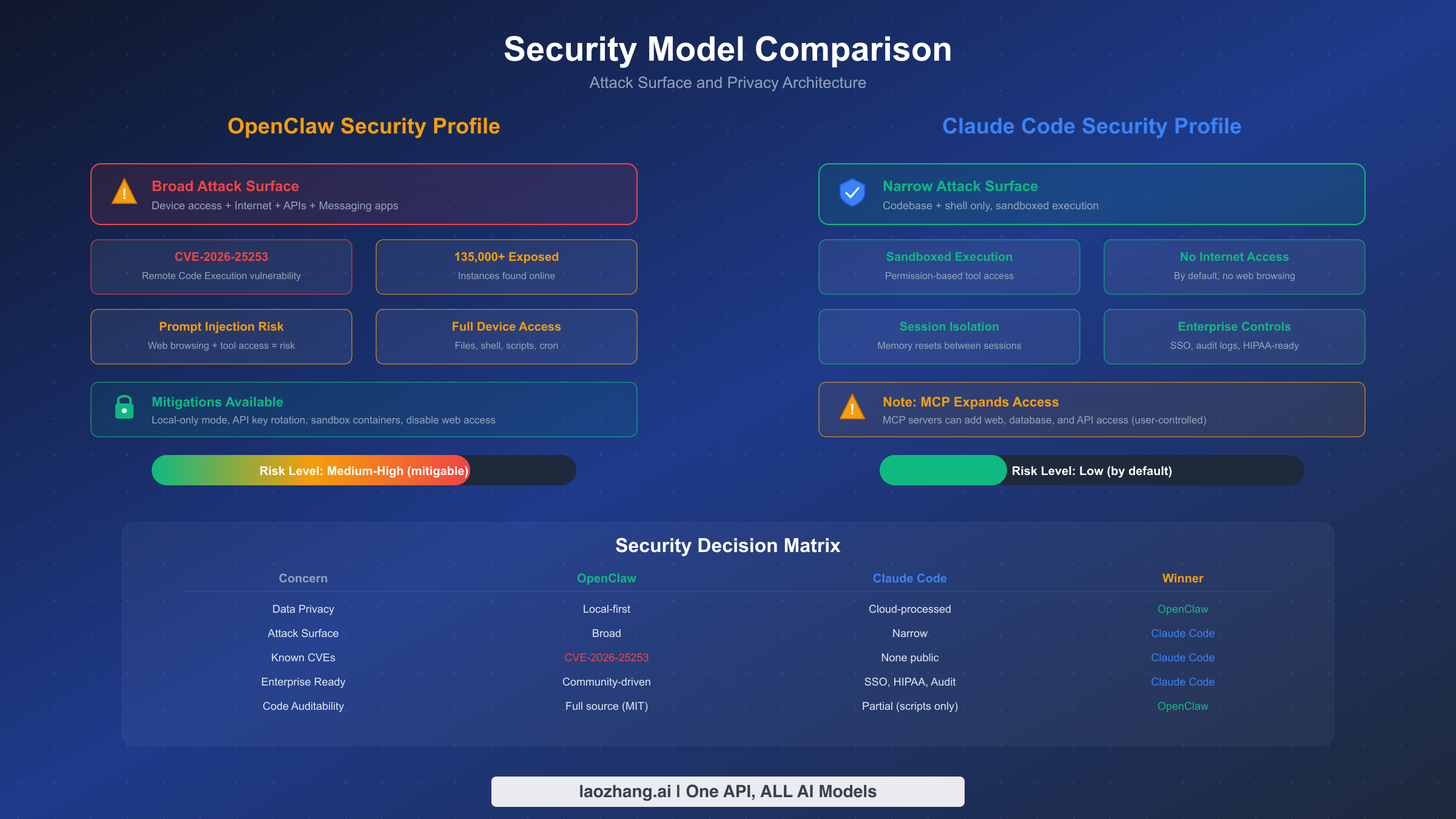
Security is the dimension where OpenClaw and Claude Code diverge most dramatically, and it is the one most users underestimate when making their choice. The fundamental tension is simple: OpenClaw's power comes from broad access to your digital life, which creates a correspondingly broad attack surface. Claude Code's power comes from deep access to your codebase, but within a tightly sandboxed environment that limits blast radius.
OpenClaw's security model grants the daemon access to your email, calendar, messaging platforms, web browser, file system, and any other integration you enable. This access is necessary for the tool to function as a personal assistant — you cannot ask it to "reschedule my 3pm meeting" if it cannot access your calendar. However, this broad access means that a compromise of OpenClaw could theoretically expose your email contents, calendar events, messaging history, and any credentials stored in connected accounts. This is not a theoretical concern: in February 2026, security researchers disclosed CVE-2026-25253, a remote code execution vulnerability in OpenClaw's message parsing system that could allow attackers to execute arbitrary code on the host machine through a crafted message. At the time of disclosure, researchers identified over 135,000 OpenClaw instances exposed directly to the internet without adequate access controls (CyberPress, February 2026). The OpenClaw team patched the vulnerability within 48 hours in v2026.2.17, but the incident highlighted the inherent risk of running a daemon with broad system access.
Prompt injection represents another class of risk specific to tools like OpenClaw. Because OpenClaw processes messages from external platforms and uses AI models to interpret them, a malicious actor could craft a message that tricks the AI into performing unintended actions — for example, forwarding sensitive emails or modifying calendar entries. The OpenClaw community has implemented several mitigations, including sandboxed action execution and user confirmation for destructive operations, but the fundamental challenge of prompt injection in AI systems remains an active area of research.
Claude Code takes a fundamentally different approach to security. Each session runs in a sandboxed environment with explicit permission boundaries. By default, Claude Code cannot access the internet, cannot read files outside your project directory, and requires user approval for operations like installing packages or running shell commands. The permission system uses three tiers: read-only operations (always allowed), write operations (require one-time approval), and dangerous operations (require approval every time). Anthropic also provides enterprise features including SSO integration, audit logs, HIPAA compliance options, and centralized policy management that allow organizations to control exactly what Claude Code can and cannot do across their entire development team.
For individual developers, both tools can be used safely with proper precautions. For OpenClaw, this means running it behind a VPN or firewall, keeping it updated, enabling two-factor authentication on connected accounts, and reviewing its action logs regularly. For Claude Code, the default security posture is already quite conservative — the main risk is approving a shell command without reading it carefully, which is a human judgment issue rather than a tool vulnerability. For enterprise teams with compliance requirements, Claude Code's built-in controls and audit capabilities give it a clear advantage that OpenClaw's community-driven security model cannot currently match.
Pricing and Real-World Costs
Understanding the true cost of each tool requires looking beyond headline pricing to actual monthly expenditure. The pricing models are fundamentally different: Claude Code uses a subscription model where your fee covers both the tool and the AI compute, while OpenClaw is free software where you pay separately for the AI models it consumes.
Claude Code Pricing (Verified February 19, 2026)
Claude Code is included with every tier of Claude's subscription plans (claude.com/pricing, verified 2026-02-19). The Free tier gives you access to Claude Code with limited usage — enough to try the tool and handle small tasks, but you will hit rate limits during sustained coding sessions. The Pro tier at $20 per month (or $17/month billed annually at $200/year) includes significantly higher usage limits and access to all Claude models including Opus, which delivers the highest quality results for complex coding tasks. For power users who spend most of their day coding with AI assistance, the Max tier starts at $100 per month and provides the highest throughput with minimal rate limiting. All paid tiers include Claude Code plus the Cowork feature for multi-agent collaboration. For a detailed breakdown of what you get at each tier, see our guide to Claude Code's free tier and usage limits.
OpenClaw Pricing
OpenClaw itself is free and open source under the MIT license. You download it, run it locally, and there is no subscription fee. However, to actually use it, you need API keys for at least one AI model provider. The cost depends entirely on which models you use and how heavily you use them. Based on community reports and usage analysis, a typical developer who uses OpenClaw for email triage, calendar management, and occasional research tasks spends between $10 and $30 per month on API costs. Heavy users who route complex tasks through premium models like GPT-4o or Claude Opus can spend $50 or more. The major cost drivers are token consumption per request and the frequency of multi-step tasks that require multiple API calls.
Monthly Cost Scenarios
To make this concrete, here are three realistic monthly cost scenarios based on different usage profiles:
| Profile | Claude Code | OpenClaw | Both Together |
|---|---|---|---|
| Light user (1-2 hrs/day coding, basic automation) | $0 (Free tier) | $10-15/mo (APIs) | $10-15/mo |
| Professional developer (4-6 hrs/day coding, moderate automation) | $20/mo (Pro) | $20-30/mo (APIs) | $40-50/mo |
| Power user (8+ hrs coding, heavy automation) | $100/mo (Max) | $30-50/mo (APIs) | $130-150/mo |
The key insight from this comparison is that Claude Code offers more predictable costs through its subscription model, while OpenClaw's costs scale with usage in ways that can be difficult to predict. For budget-conscious users, the Claude Code Free tier combined with OpenClaw using a lower-cost model like GPT-4o-mini or a local model represents the most affordable entry point at roughly $10-15 per month total.
Which Tool Should You Choose? The Decision Framework
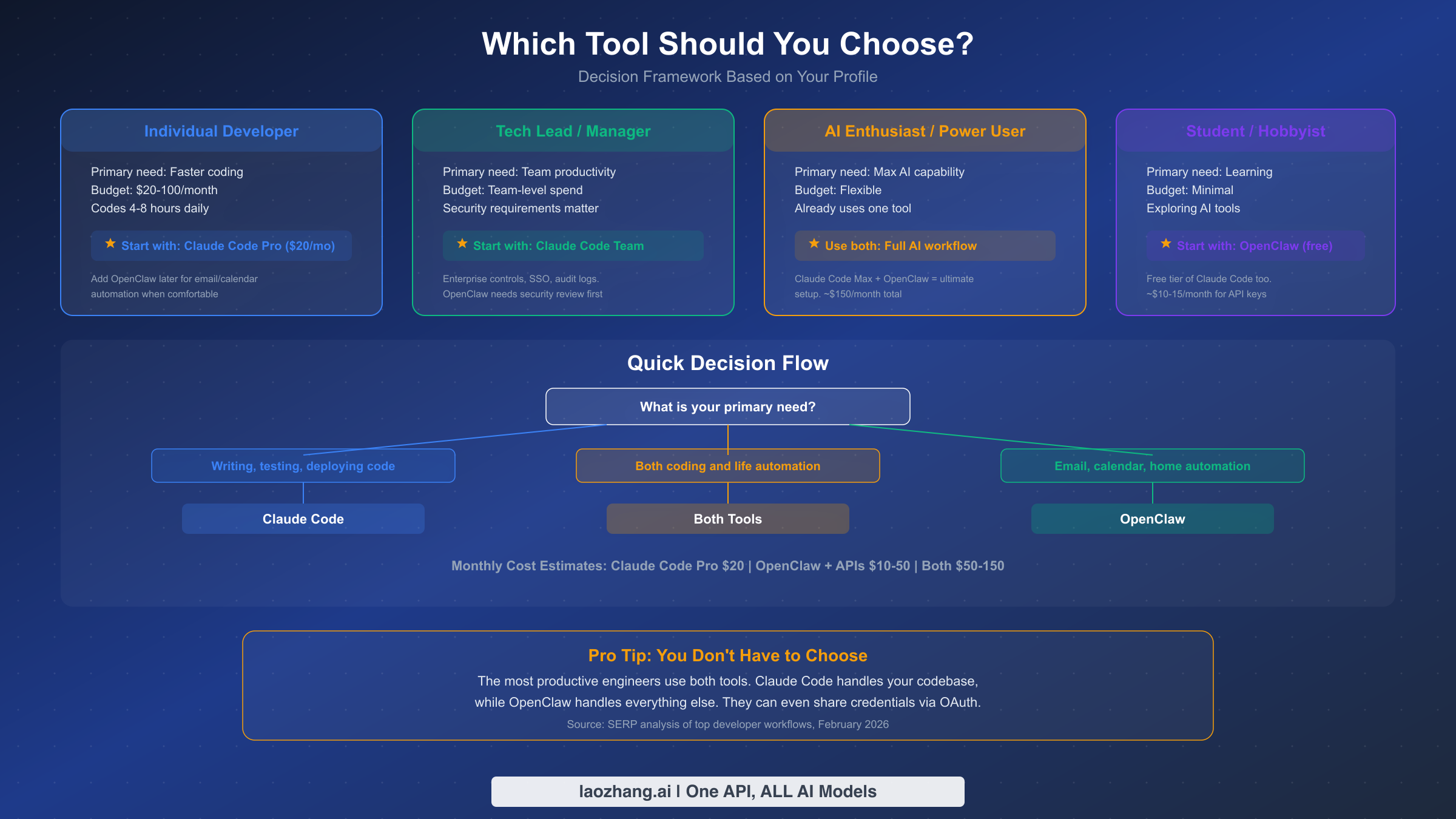
Rather than the generic "it depends on your needs" advice that dominates other comparison guides, here is a concrete decision framework based on four common user profiles. Each recommendation is specific, actionable, and includes a clear starting point.
If you are an individual developer whose primary goal is writing better code faster, and you spend 4-8 hours per day in your editor, start with Claude Code Pro at $20 per month. It will immediately accelerate your coding workflow with capabilities that feel like having a senior engineer pair-programming with you. The subscription model means predictable costs, and the tight integration with your terminal and IDE means zero context-switching overhead. Once you are comfortable with Claude Code, consider adding OpenClaw for the tasks that fall outside your editor — email management, meeting scheduling, and research automation. This staged approach lets you evaluate each tool's value separately rather than paying for both from day one.
If you are a tech lead or engineering manager whose concern is team-wide productivity and security, Claude Code Team is the right starting point. Enterprise controls like SSO, audit logging, and centralized permission management are essential for teams working with proprietary codebases, and these features simply do not exist in OpenClaw's current offering. Before introducing OpenClaw to your team, conduct a thorough security review — the CVE-2026-25253 incident demonstrated that OpenClaw's attack surface requires careful management, and deploying it across an engineering team without proper network isolation and access controls could expose your organization to significant risk.
If you are an AI enthusiast or power user who already uses one of these tools and wants to maximize your AI-powered productivity, the answer is to use both. The combination of Claude Code Max ($100/month) for coding and OpenClaw with premium API access ($30-50/month) creates an AI workflow that covers virtually every task in your professional and personal life. The total cost of $130-150 per month sounds substantial, but users report that the combination saves 2-4 hours per day compared to working without AI assistance — a return on investment that makes the subscription fee trivial for most professionals.
If you are a student or hobbyist with a minimal budget who wants to explore AI tools, start with OpenClaw using free or low-cost API options. The free tier of Claude Code gives you enough access to try AI-powered coding, and running OpenClaw with GPT-4o-mini or a local model keeps monthly costs around $10-15. This entry-level combination lets you experience both paradigms — agentic coding and personal AI assistance — without committing to premium subscriptions.
The decision ultimately comes down to where you feel the most friction in your daily workflow. If the bottleneck is writing, debugging, and shipping code, Claude Code eliminates that friction directly. If the bottleneck is everything else — the emails, meetings, research, and administrative tasks that fragment your focus — OpenClaw addresses those friction points. Most developers eventually realize that both types of friction exist simultaneously, which is why the "use both" recommendation keeps appearing throughout this comparison.
Using Both Tools Together
The most productive workflow in 2026 combines Claude Code and OpenClaw into a unified AI-powered system where each tool handles the tasks it was designed for. This is not just a theoretical recommendation — developers who have adopted this approach report significant improvements in both coding output and overall productivity, because the cognitive overhead of context-switching between coding and administrative tasks is virtually eliminated.
The practical integration works through a daily workflow pattern. You start your morning by asking OpenClaw (through WhatsApp or Slack) to summarize your unread emails, identify urgent items, and draft responses to routine messages. While OpenClaw handles your inbox, you open your terminal and launch Claude Code to pick up where you left off on your current coding project. Claude Code reads your CLAUDE.md project file, understands the codebase context, and immediately begins helping you implement features, fix bugs, or write tests. Throughout the day, when you receive a message about a meeting conflict or need to research a technical question that is not directly related to your code, you route it to OpenClaw rather than breaking your coding flow. At the end of the day, you can ask OpenClaw to summarize what you accomplished (by reading your git log) and prepare a status update for your team.
The tools can also share context indirectly. For example, if Claude Code generates a technical document or API specification, you can ask OpenClaw to email it to your team or post it to a Slack channel. If OpenClaw surfaces a bug report from a customer email, you can paste the relevant details into Claude Code and ask it to investigate the issue in your codebase. Some users have even set up webhook-based bridges where OpenClaw watches for specific events (like a failing CI pipeline notification in Slack) and automatically creates a summary that the developer can feed into their next Claude Code session.
One particularly effective pattern is using OpenClaw as a "triage layer" for development notifications. Modern software teams generate an overwhelming volume of alerts — CI/CD failures, pull request comments, Sentry error reports, Datadog alerts, Slack mentions across dozens of channels. Instead of having these notifications constantly interrupt your coding flow, you can route them through OpenClaw and instruct it to categorize them by urgency. OpenClaw reads each notification, evaluates whether it requires immediate attention or can wait, and sends you a consolidated summary at intervals you define — say, every two hours or at natural break points in your day. Critical alerts (production down, security incident) get forwarded immediately, while routine notifications (PR review requests, non-critical CI failures) are batched for later review. This single workflow pattern, which takes about 15 minutes to configure, can recover an hour or more of focused coding time per day.
Getting started with this combined approach is simpler than it sounds. If you already have Claude Code, adding OpenClaw requires following the Docker installation guide on the OpenClaw website, configuring your API keys (you can use the same Anthropic API key for both tools if you wish), and connecting your messaging platforms. The initial setup takes roughly 30-45 minutes for a basic configuration. If you are starting fresh with both tools, begin by getting Claude Code installed first — it is the simpler setup and you will see immediate productivity gains in your coding workflow while you take time to configure OpenClaw's more complex integration ecosystem.
The Future: What Steinberger's Move to OpenAI Means
On February 15, 2026 — just four days before this article's publication — Peter Steinberger, the creator of OpenClaw, announced that he was joining OpenAI. This news sent shockwaves through the OpenClaw community, which had grown to over 180,000 GitHub stars and a vibrant ecosystem of contributors and plugin developers. The immediate question on everyone's mind: what happens to OpenClaw now?
The short answer is that OpenClaw is not going away. The project is MIT-licensed, which means the codebase cannot be taken private or restricted regardless of Steinberger's employment. The open-source community has already begun organizing around a governance model that distributes maintainership across multiple core contributors rather than depending on a single founder. Several prominent contributors have signaled their commitment to continued development, and the project's momentum — measured by weekly commit activity, pull request velocity, and community Discord engagement — has actually increased since the announcement, as contributors rally to demonstrate the project's resilience.
However, the long-term implications are more nuanced and worth considering before you invest heavily in OpenClaw as a core part of your workflow. Steinberger's move to OpenAI suggests that the vision behind OpenClaw — a model-agnostic personal AI assistant — aligned closely enough with OpenAI's strategy that they wanted the person who built it. This could mean several things for the ecosystem. OpenAI might release its own personal assistant product that competes directly with OpenClaw, potentially with tighter integration to GPT models and access to resources that a community project cannot match. Alternatively, OpenAI might contribute engineering resources back to the open-source project, making OpenClaw stronger while ensuring it works optimally with OpenAI's API — a strategy similar to how large companies contribute to projects like Kubernetes or React.
For users deciding between OpenClaw and Claude Code right now, the Steinberger situation introduces a new variable into the equation. Claude Code's future is more predictable because it is backed by Anthropic, a well-funded company with a clear product roadmap and revenue model. Anthropic has invested heavily in Claude Code as a core product, and the fact that the tool now accounts for an estimated 4% of all public GitHub commits — with projections of 20% or more by end of 2026 — suggests that the company views agentic coding as central to its long-term strategy. OpenClaw's future depends on community governance, which historically works well for developer tools (Linux, Git) but has a mixed track record for consumer-facing products that require frequent updates and tight model integration.
The competitive landscape is also shifting rapidly. With Steinberger at OpenAI, and Anthropic doubling down on Claude Code, the personal AI assistant space is likely to see more investment and innovation in the coming months. Microsoft's Copilot, Google's Gemini assistant, and now potentially an OpenAI-backed successor to OpenClaw could all reshape the options available to developers by mid-2026. For now, the practical advice remains the same: use Claude Code for coding (it is the most capable option available today), use OpenClaw for personal automation (it is the most flexible), and stay informed about new developments in both ecosystems. If stability and predictability are important to your workflow, this tilts the balance slightly toward Claude Code for the coding half of the equation. For the personal automation half, OpenClaw remains the best option available, and the MIT license ensures that even in a worst-case scenario, the current codebase will always be available for the community to fork and maintain.
FAQ
Is OpenClaw safe to use after the CVE-2026-25253 vulnerability?
Yes, OpenClaw is safe to use if you are running version v2026.2.17 or later, which patches the remote code execution vulnerability. The critical step is ensuring your OpenClaw instance is not directly exposed to the internet — run it behind a firewall or VPN, use strong authentication on all connected accounts, and keep the software updated. The 135,000+ exposed instances identified by security researchers were primarily misconfigured deployments that bypassed basic network security practices. With proper configuration, OpenClaw's security posture is reasonable for personal use, though enterprise deployments should implement additional controls including network isolation and action logging.
Can Claude Code replace OpenClaw (or vice versa)?
No, because they solve fundamentally different problems. Claude Code cannot access your email, manage your calendar, control your smart home, or automate non-coding workflows — it has no integrations with messaging platforms, no persistent memory across sessions, and no background daemon to process tasks while you are away. OpenClaw cannot deeply understand a codebase, refactor across multiple files, write comprehensive tests, or manage complex git operations — it lacks the deep file system access, context compaction, and code-specialized prompting that make Claude Code effective as a coding agent. Attempting to use one tool for the other's purpose will result in a frustrating experience. The correct framing is not replacement but complementary use — each tool eliminates a different category of friction from your daily workflow.
What happens to my data with each tool?
With OpenClaw, your data stays on your local machine by default. The daemon runs locally, stores its memory database locally, and only sends data to external AI model APIs when processing your requests. You control which model provider receives your data. With Claude Code, your conversation data is processed through Anthropic's API. Anthropic's data retention policies apply, but file contents read during a session are sent to the API for processing. For enterprise users, Anthropic offers data residency options and zero-retention API configurations.
Which tool is easier to set up?
Claude Code wins handily on setup simplicity. You install it with npm install -g @anthropic-ai/claude-code, authenticate with your Anthropic account, and you are ready to go — typically under 5 minutes. OpenClaw requires Docker, API key configuration for your chosen model provider, and connecting each messaging platform integration individually. A basic OpenClaw setup takes 30-45 minutes; a fully configured installation with all integrations can take several hours. However, OpenClaw's one-time setup cost is offset by the breadth of automation it provides once configured.
How much does it cost to use both tools together?
The minimum viable combined setup costs approximately $10-15 per month: Claude Code's free tier plus OpenClaw with a low-cost API model. A comfortable professional setup runs $40-50 per month: Claude Code Pro at $20 plus $20-30 in API costs for OpenClaw. The maximum configuration with Claude Code Max and premium API models costs $130-150 per month but provides essentially unlimited AI assistance across both coding and life automation workflows.