
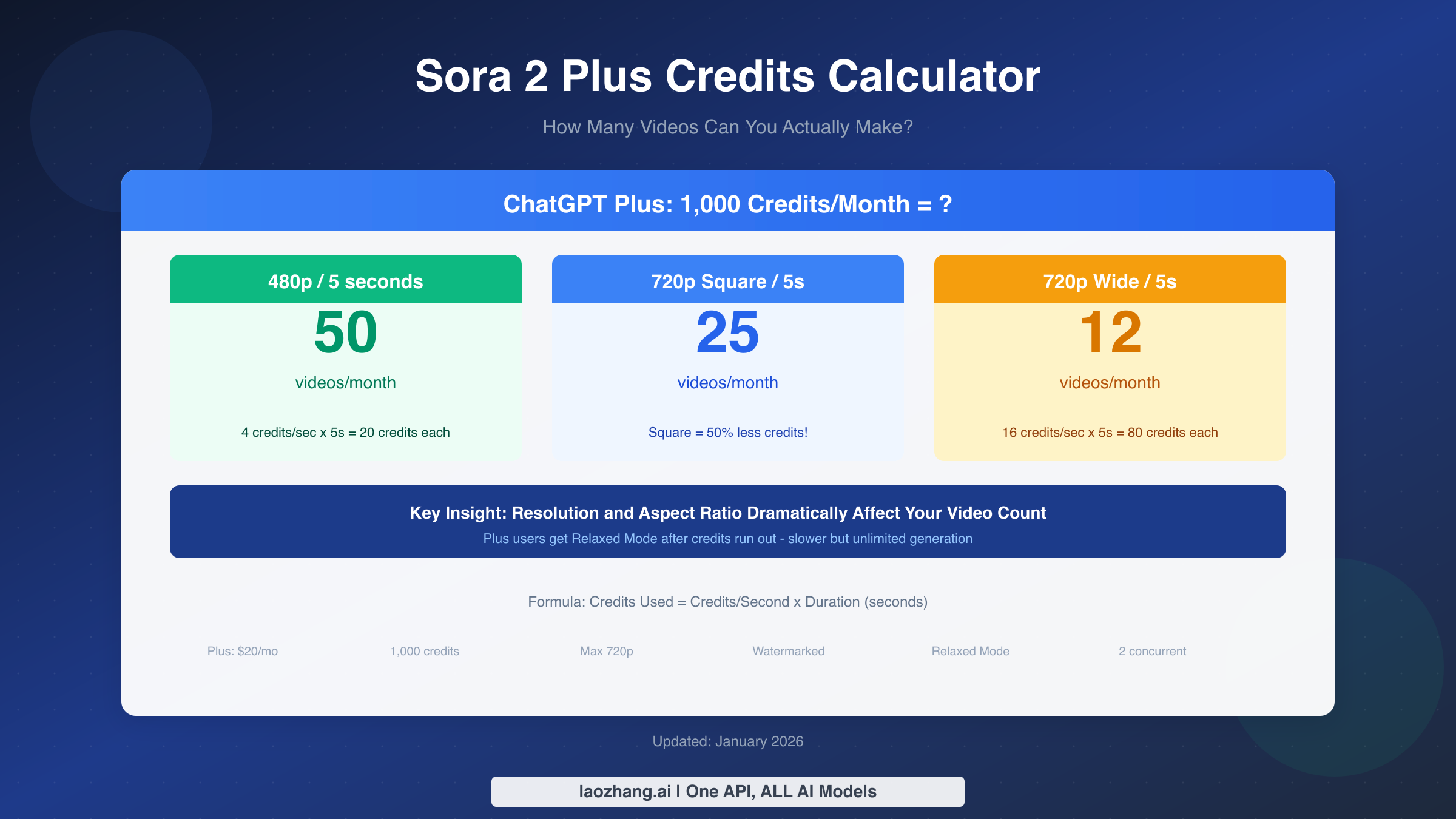
With ChatGPT Plus ($20/month), you get 1,000 Sora credits monthly. At the most efficient settings (480p, 5-second, square format), this equals approximately 50 videos. However, at 720p HD—the maximum resolution for Plus users—you'll get around 12-25 videos depending on duration and aspect ratio. The difference is dramatic: choosing square format over widescreen can save you 50% of your credits for the same resolution and duration.
This guide provides the complete calculation tables you need to plan your Sora usage, explains exactly how resolution and format affect credit consumption, and helps you maximize your monthly video output with practical optimization strategies.
TL;DR - Quick Answer
How many videos can you make with 1,000 Sora credits? Here's the quick reference:
| Setting | Credits Each | Videos/Month | Best For |
|---|---|---|---|
| 480p Square, 5s | 20 | 50 | Testing prompts |
| 480p Wide, 5s | 25 | 40 | Draft widescreen |
| 720p Square, 5s | 40 | 25 | Instagram/TikTok |
| 720p Wide, 5s | 80 | 12 | YouTube/Ads |
| 720p Wide, 10s | 160 | 6 | Longer content |
The key insight most guides miss: Square videos (1:1 aspect ratio) consume approximately 50% fewer credits than widescreen (16:9) at the same resolution and duration. If you're making content for Instagram or TikTok, you're already saving money without knowing it.
Important for planning: These are theoretical maximums. In practice, you'll likely generate 2-3 versions of each video to get the result you want, meaning your "effective" video count is roughly one-third of the numbers above. A Plus subscriber realistically produces 4-17 polished videos per month depending on resolution choices.
The Complete Credit Calculation Guide
Understanding Sora's credit system is essential for budgeting your monthly video output. The formula is straightforward, but the variables interact in ways that can dramatically affect your costs.
The Basic Formula:
Credits Used = Credits per Second × Video Duration (seconds)
The credit-per-second rates by resolution are:
- 480p: 4 credits/second (square), 5 credits/second (16:9)
- 720p: 8 credits/second (square), 16 credits/second (16:9)
- 1080p: 20 credits/second (square), 40 credits/second (16:9) — Pro only
Let's break down exactly what 1,000 credits gets you at each combination. The table below shows credits consumed per video and the maximum videos possible with a Plus subscription's monthly allocation.
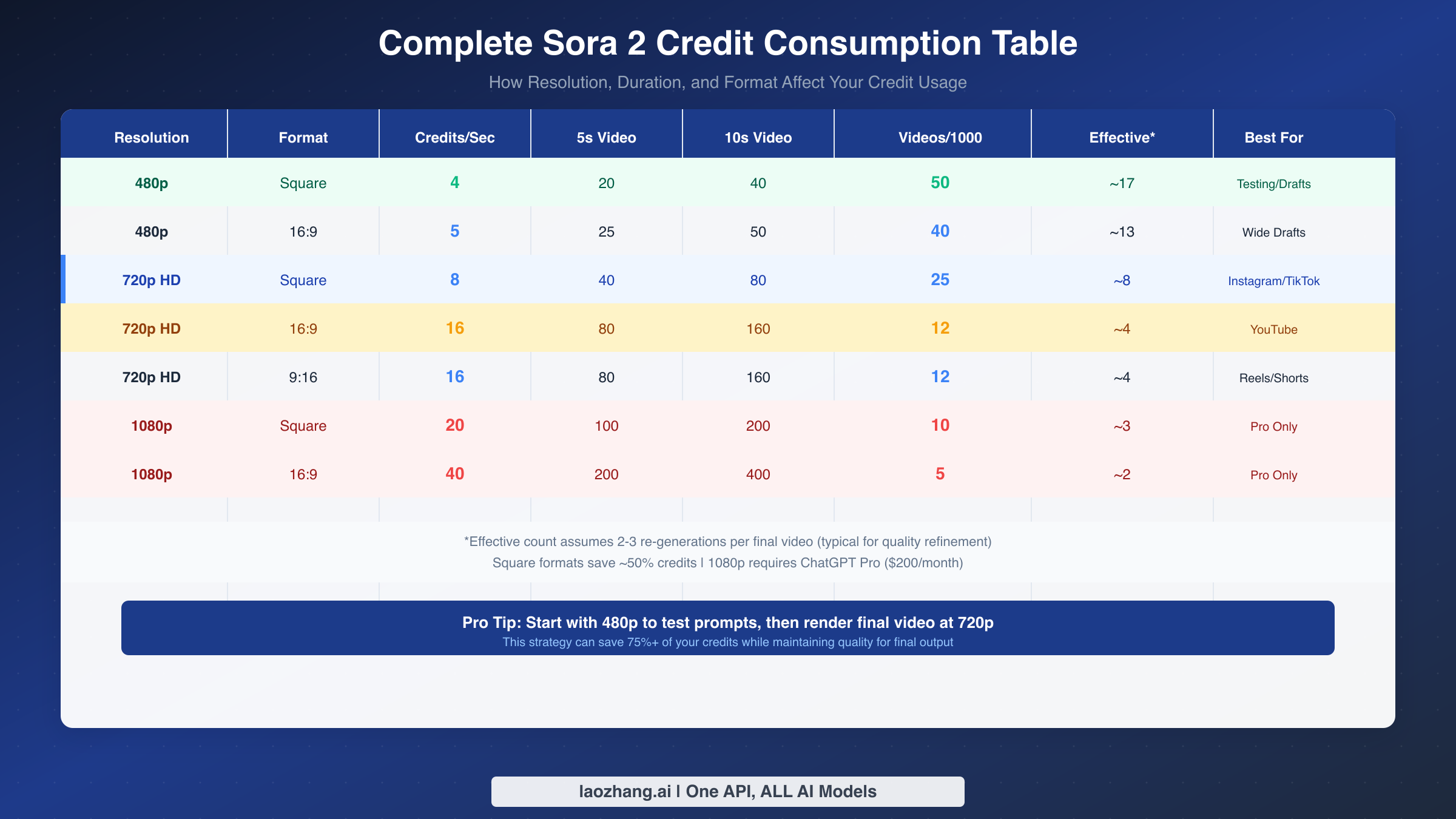
480p resolution offers the most videos per month but at lower quality. This resolution is ideal for testing your prompts and concepts before committing credits to higher-quality renders. A 5-second 480p square video costs just 20 credits, allowing you to generate 50 test videos monthly. Even at widescreen format, you can produce 40 videos at 480p, making it the workhorse resolution for experimentation.
720p HD resolution is the maximum available to ChatGPT Plus subscribers and represents the sweet spot for most social media content. However, the credit cost varies dramatically by aspect ratio. A 5-second 720p square video costs 40 credits (25 videos/month), while the same settings in widescreen format cost 80 credits (only 12 videos/month). This 50% difference makes format selection crucial for maximizing your subscription value.
Understanding "effective" video count: The numbers above assume every generation is a keeper. In reality, AI video generation often requires 2-3 attempts to get the desired result. When you're testing prompts, lighting directions, or camera movements, you'll regenerate frequently. For realistic planning, divide the theoretical maximum by 3 to get your expected output of final, usable videos. A Plus subscriber at 720p widescreen might theoretically generate 12 videos, but will likely produce 4 polished pieces after accounting for iterations.
Duration scaling isn't linear in value terms. While a 10-second video costs exactly twice as much as a 5-second video in credits, the production value doesn't always double. Consider whether you actually need 10 seconds, or if two 5-second clips would serve your purpose better—and give you more flexibility in editing. For a detailed breakdown of all Plus limitations, check out our ChatGPT Plus Sora limits guide.
How Resolution and Format Affect Your Credits
The relationship between resolution, aspect ratio, and credit consumption is where most Sora users leave money on the table. Understanding these dynamics can effectively double or triple your monthly output without any quality compromise for your use case.
Resolution impact is exponential, not linear. Moving from 480p to 720p doesn't just double your credit consumption—it quadruples it for widescreen content (from 5 credits/second to 16 credits/second). This reflects the exponential increase in computational resources needed: 720p has 2.25 times more pixels than 480p, but processing complexity scales faster than raw pixel count due to AI inference requirements.
Aspect ratio is the hidden multiplier most users ignore. Square videos (1:1) consume roughly 50% fewer credits than widescreen (16:9) at the same resolution. This isn't arbitrary—square videos have fewer pixels than widescreen at equivalent vertical resolution. A 720p square video is 720×720 (518,400 pixels), while 720p widescreen is 1280×720 (921,600 pixels). The credit system reflects this computational difference.
Practical implications for different platforms:
For Instagram Reels and TikTok, square or vertical (9:16) format is native, meaning you can use the lower-credit square format without any creative compromise. Your 1,000 credits stretch 2x further than if you were making widescreen content, producing 25 videos instead of 12.
For YouTube and traditional video, widescreen (16:9) is expected, and you'll pay the full 16 credits/second at 720p. However, consider whether all your content truly needs widescreen—B-roll, social clips, and promotional shorts often work in square format.
The 480p testing strategy can save 75%+ of your credits. Before rendering any video at 720p, generate a 480p draft first. At 480p square, you can test 12-15 prompt variations for the same credit cost as a single 720p widescreen video. Once you've refined your prompt, camera direction, and style, render the final version at 720p. This workflow is how professional Sora users consistently maximize their output.
Duration planning matters more at higher resolutions. A 10-second video costs twice as much as a 5-second video in raw credits, but the relative impact depends on resolution. At 480p, extending from 5 to 10 seconds adds only 20 credits. At 720p widescreen, the same extension costs 80 additional credits—the equivalent of a complete separate video at lower resolution. Plan your durations carefully at higher quality settings.
Relaxed Mode: Your Credit Safety Net
One of the most valuable but least-understood features for ChatGPT Plus subscribers is Relaxed Mode—the unlimited generation option that activates after your priority credits are exhausted. Understanding how it works can fundamentally change how you think about your subscription value.
What is Relaxed Mode? When your 1,000 monthly credits run out, Plus subscribers don't lose access to Sora entirely. Instead, you enter Relaxed Mode, where you can continue generating videos without using credits. The tradeoff is speed: Relaxed Mode requests enter a lower-priority queue with significantly longer wait times.
How long is the wait? Based on current reports from January 2026, Relaxed Mode generation typically takes 5-15 minutes per video, compared to 1-3 minutes for priority credit-based generation. Wait times vary based on overall Sora demand—expect longer waits during peak hours and faster processing overnight or early morning.
When is Relaxed Mode acceptable? For non-urgent projects where you're batch-processing ideas, Relaxed Mode is essentially free video generation. If you're exploring creative directions, testing unusual prompts, or generating content for future use, the time cost is often worth the credit savings. Many creators use their priority credits for client work and Relaxed Mode for personal projects.
When should you avoid Relaxed Mode? For time-sensitive work, client deadlines, or iterative refinement sessions where you need rapid feedback, priority credits are worth spending. The productivity loss from 15-minute waits between iterations compounds quickly when you're trying to nail a specific effect.
Pro users get the best of both worlds. ChatGPT Pro subscribers ($200/month) receive 10,000 priority credits—10 times the Plus allocation—plus unlimited Relaxed Mode generation. For heavy users, this combination effectively means unlimited Sora access with priority processing for most of their work and relaxed mode as overflow capacity.
Strategic credit allocation: Consider spending your priority credits at the beginning of the month when you have fresh ideas and need rapid iteration. As projects mature and you're doing final renders of proven concepts, Relaxed Mode becomes more practical since you're not iterating as frequently.
Real-World Usage Scenarios
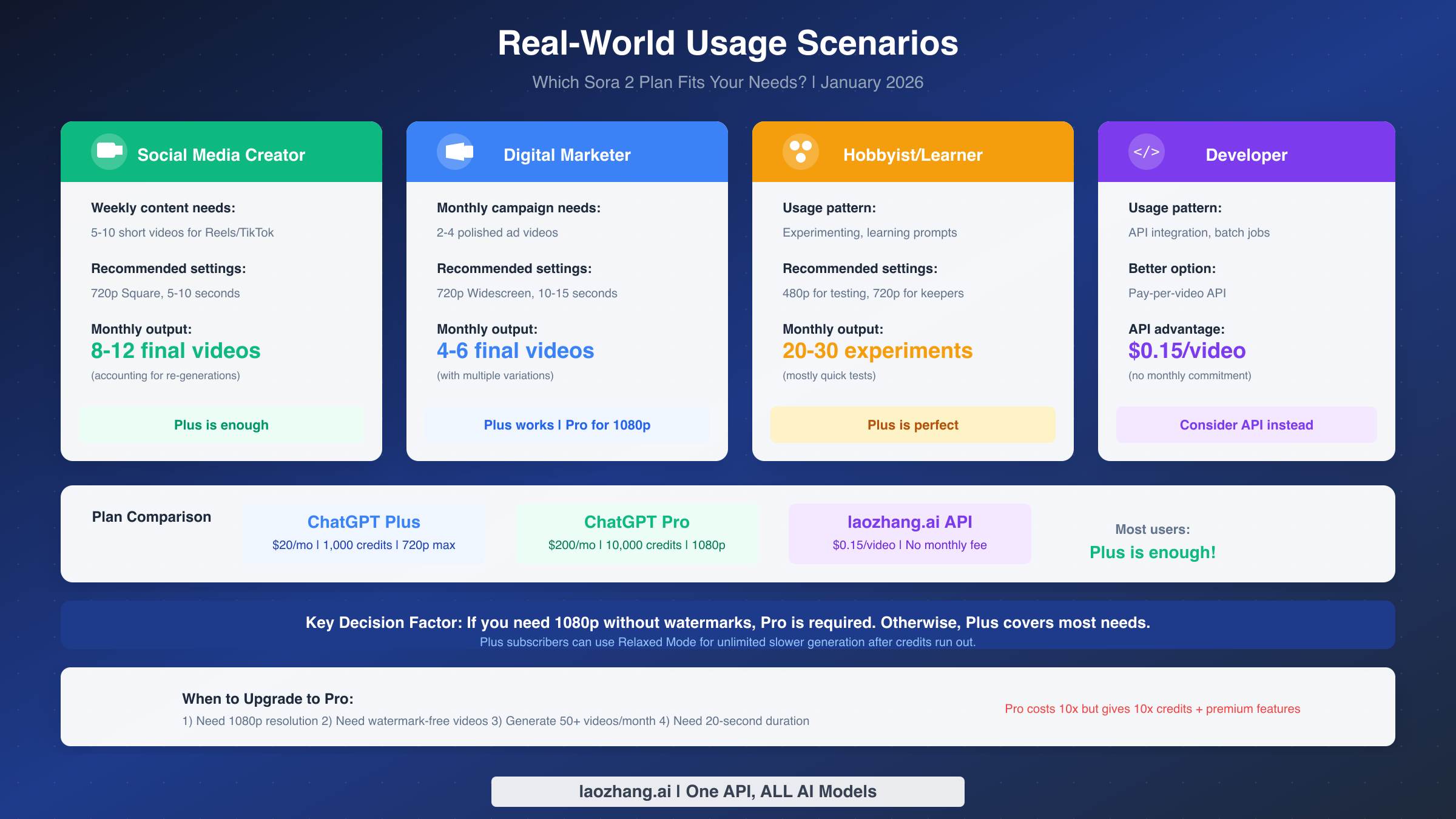
Abstract credit calculations only tell part of the story. Let's examine how different user types can plan their Sora usage with the Plus subscription's 1,000 monthly credits.
Scenario A: Social Media Creator
You're producing content for Instagram Reels and TikTok, needing 5-10 short videos weekly. Your content is primarily square or vertical format, 5-10 seconds each.
Recommended approach: Use 720p square format (8 credits/second) for final content. This gives you 25 videos at 5 seconds each from your monthly allocation. Assuming 2 regenerations per final video, you'll produce 8-12 polished pieces monthly—roughly 2-3 per week. Test prompts at 480p first (4 credits/second) to conserve credits for final renders. Verdict: Plus is sufficient for consistent social media output.
Scenario B: Digital Marketer
You're creating occasional campaign videos—maybe 2-4 polished ad spots per month. Quality matters more than quantity, and you need widescreen format for YouTube and web placements.
Recommended approach: Use 720p widescreen (16 credits/second) for final renders. At 10-15 seconds per ad, each video consumes 160-240 credits. Your monthly allocation supports 4-6 final videos, but accounting for creative iterations, expect 2-3 polished ads. Use 480p for all storyboarding and concept testing. Verdict: Plus works for moderate marketing needs. Consider Pro if you need 1080p resolution or higher volume.
Scenario C: Hobbyist/Learner
You're exploring Sora's capabilities, learning prompt engineering, and experimenting with different styles. Volume of experiments matters more than polish.
Recommended approach: Maximize at 480p for most work. This resolution supports 50 videos monthly, or realistically 20-30 experimental pieces after testing. Reserve 720p credits for your best concepts worth preserving at higher quality. Verdict: Plus is perfect for learning and experimentation.
Scenario D: Developer/API User
You're integrating video generation into an application or workflow. You need predictable costs and potentially high volume.
Recommended approach: Consider API-based access rather than subscription. With laozhang.ai's Sora 2 API, you pay $0.15 per video (standard) or $0.8 per video (Pro quality) with no monthly commitment. For fewer than 70 videos monthly, API is more cost-effective than Plus. For higher volumes with predictable patterns, API allows precise cost control. The async API also offers no charge on failures—a significant advantage when testing integration code. Verdict: API may be better than subscription for programmatic access. For detailed pricing comparisons, see our cheapest Sora 2 API guide.
Plus vs Pro: When to Upgrade
The decision between ChatGPT Plus ($20/month) and ChatGPT Pro ($200/month) isn't just about credit volume—it's about capabilities and workflow.
| Feature | Plus ($20/mo) | Pro ($200/mo) |
|---|---|---|
| Monthly Credits | 1,000 | 10,000 |
| Max Resolution | 720p HD | 1080p Full HD |
| Max Duration | 10-20 seconds | 20 seconds |
| Watermark | Yes | No |
| Relaxed Mode | After credits | Unlimited |
| Concurrent Generation | 2 | 5 |
| Priority Queue | Standard | Highest |
When Plus is enough:
Plus subscribers get substantial value if: you're creating content for social media where 720p is sufficient, watermarks are acceptable (or you remove them in post), you're learning and experimenting, or your monthly output stays under 25 HD videos. The combination of 1,000 priority credits plus unlimited Relaxed Mode provides significant generation capacity.
When Pro is justified:
Upgrade to Pro if: you need watermark-free videos for commercial use, 1080p resolution is required for your distribution channels, you're producing more than 50 videos monthly, you need 20-second maximum duration consistently, or wait times in Relaxed Mode impact your workflow. Pro also offers 5 concurrent generations versus 2 for Plus—a major productivity boost for batch processing.
The break-even analysis:
Pro costs 10x more than Plus and provides 10x the credits—seemingly neutral. However, Pro's premium features (1080p, no watermark, longer duration) unlock use cases impossible on Plus. If you genuinely need these features, Pro isn't just "more credits"—it's access to capabilities you can't otherwise obtain. If you only need volume, evaluate whether API pricing ($0.15/video) is more cost-effective at your scale.
The hybrid approach:
Some creators maintain Plus for personal projects while using API access for commercial work. This provides the ChatGPT integration benefits for everyday use while offering scalable, watermark-free output through API for paid projects.
For Developers: API Alternative
If you're building applications that generate videos, or need predictable per-video pricing without monthly commitments, API access offers compelling advantages over subscription models.
Subscription vs API economics:
With ChatGPT Plus, you're paying $20/month for 1,000 credits, equating to roughly $0.40-1.60 per video depending on resolution and duration. For Plus users generating fewer than 70 videos monthly at 720p, individual API pricing often provides better value.
laozhang.ai offers two Sora 2 API approaches:
Standard API ($0.15/video): Generates 720p video, 10-15 seconds duration, suitable for most applications. At this price, you'd need to generate 134 videos monthly to match Plus subscription cost—meaning API is more economical for moderate use.
Pro API ($0.8/video): Generates 1080p HD video with premium processing. Still cheaper than Pro subscription unless you're generating 250+ videos monthly.
The critical advantage: No charge on failures. Unlike synchronous APIs where you pay regardless of output quality, laozhang.ai's async API only charges when generation succeeds. If content moderation rejects your prompt, if the generation times out, or if the result fails quality checks—you pay nothing. For production workloads with diverse prompts, this significantly reduces effective cost.
Implementation considerations:
The async API workflow requires polling for completion (typically every 5 seconds) and handling the completed video download. This adds code complexity compared to the synchronous ChatGPT interface, but provides more control over error handling and retry logic. For batch processing or background generation, async design is actually preferable.
When to use API over subscription:
Choose API if: you're building programmatic workflows, need predictable per-unit costs, want to avoid monthly commitments, require watermark-free output without Pro subscription, or have variable monthly volume that makes subscription cost-ineffective. Full API documentation and integration guides are available at docs.laozhang.ai.
For a step-by-step tutorial on using Sora 2 for text-to-video generation, including prompt engineering tips, see our Sora 2 text-to-video tutorial.
FAQ
Do Sora credits roll over to the next month?
No, Sora credits expire at the end of each billing cycle and do not accumulate. If you have unused credits on the last day of your subscription period, they're lost when your allocation refreshes. This makes strategic credit spending throughout the month important—don't hoard credits expecting to save them.
Can I buy additional credits mid-month?
OpenAI offers credit purchases for flexibility, and purchased credits remain valid for 12 months from purchase date. However, for most users, Relaxed Mode provides a more economical overflow option than buying additional credits. Evaluate whether waiting 5-15 minutes per video is acceptable before purchasing top-ups.
What's the maximum video length with Plus?
ChatGPT Plus officially supports video durations up to 10-20 seconds depending on resolution. Some users report successful 20-second generations at lower resolutions, while 720p typically maxes at 10 seconds. Pro subscribers have consistent 20-second access across all resolutions.
Does video quality vary based on credit usage?
No—credit consumption is based solely on resolution, duration, and aspect ratio. A video consuming 80 credits has identical quality potential to another 80-credit video with the same settings. Quality variations come from prompt engineering, not credit spending.
Can I use Sora credits for images too?
Yes, Sora credits are flexible across both video and image generation. Image generation typically costs fewer credits than video, but specific rates vary. Check current pricing in your ChatGPT interface, as the unified credit system was introduced in late 2025.
What happens if video generation fails?
If generation fails due to content policy violations, timeouts, or technical errors, your credits are typically not consumed. OpenAI's system only charges credits for successful generations. However, if a video generates but doesn't meet your creative expectations, those credits are still spent—there's no refund for unsatisfactory output.
Why do square videos cost less?
Square videos have fewer total pixels than widescreen at equivalent vertical resolution. A 720p square video (720×720) contains 518,400 pixels, while 720p widescreen (1280×720) contains 921,600 pixels. Since AI video generation cost scales with computational complexity, fewer pixels means lower credit consumption.
Is 480p quality acceptable for any final content?
For quick social media stories, animated thumbnails, or content where motion matters more than detail, 480p can be acceptable. However, most platforms now expect at least 720p, and viewers notice quality differences on larger screens. Use 480p for testing and internal use; reserve 720p for public-facing content.