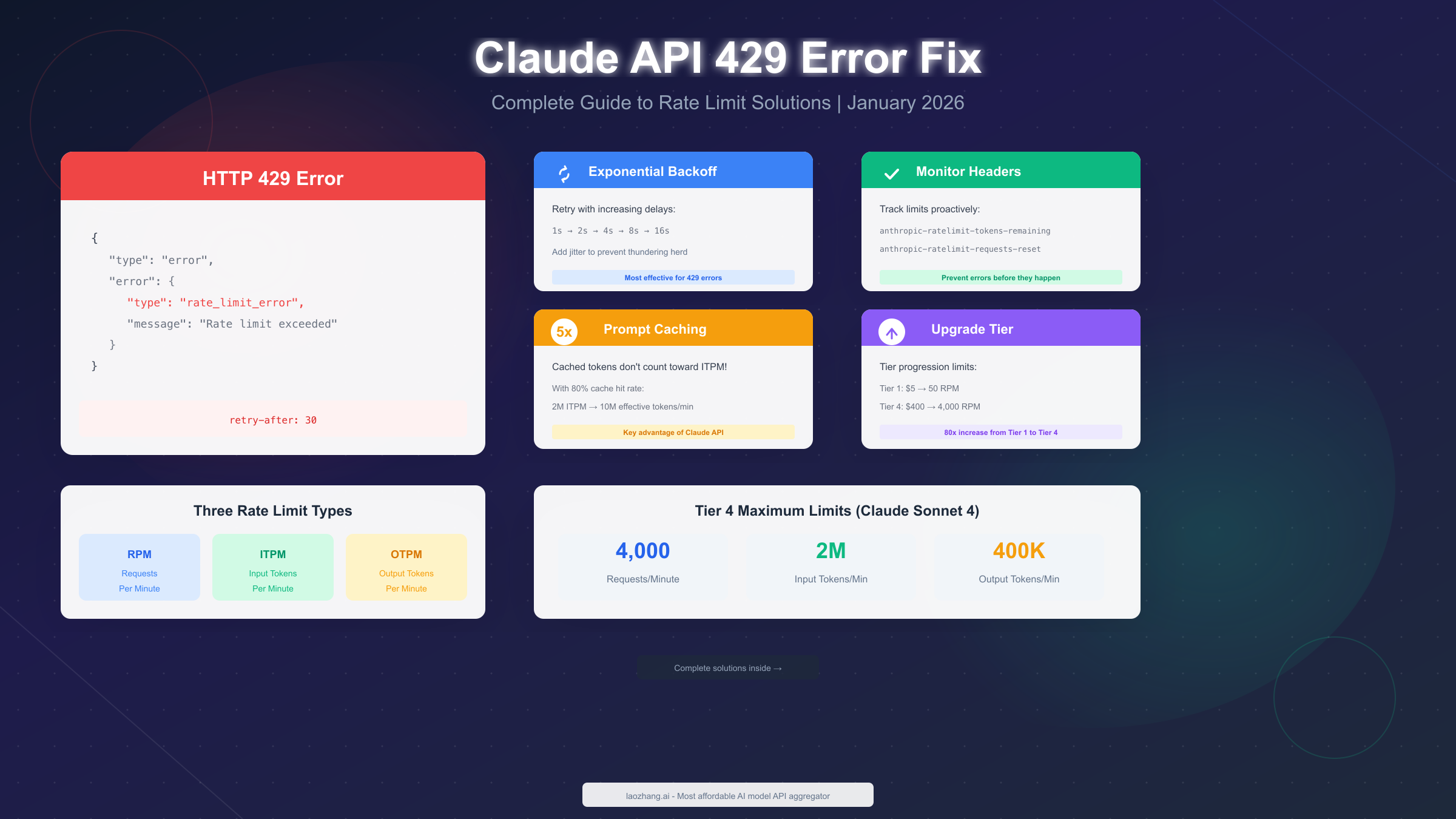
Claude API 429 error occurs when your application exceeds the rate limits set by Anthropic, specifically requests per minute (RPM), input tokens per minute (ITPM), or output tokens per minute (OTPM). As of January 2026, limits range from 50 RPM on Tier 1 to 4,000 RPM on Tier 4 for Claude Sonnet 4. Fix this error by implementing exponential backoff retry logic, monitoring response headers proactively, and leveraging prompt caching—which can increase your effective throughput by 5x since cached tokens don't count toward ITPM limits.
What Is Claude API 429 Error?
The HTTP 429 status code means "Too Many Requests" and indicates that your organization has exceeded one of Anthropic's rate limits. Unlike other API errors that might indicate code problems or authentication issues, 429 errors are purely about usage volume—your code is correct, but you're sending requests faster than your current tier allows.
When you receive a 429 error, the API returns a JSON response that looks like this:
{
  "type": "error",
  "error": {
    "type": "rate_limit_error",
    "message": "Rate limit exceeded. Please try again later."
  },
  "request_id": "req_01ABC123..."
}
The response includes a crucial retry-after header that tells you exactly how many seconds to wait before retrying. This header is your most reliable guide for recovery timing—ignore it at your peril, as retrying too soon will only result in more 429 errors.
Key characteristics of 429 errors:
- They occur at the organization level, not per API key
- All API keys under your organization share the same rate limit pool
- The error counts toward your billing (you're charged for the request even though it failed)
- They're entirely preventable with proper request management
Understanding this error is the first step toward building robust applications. The good news is that with the right implementation patterns, you can virtually eliminate 429 errors from your production systems while maximizing your actual throughput.
Understanding 429 vs 529 Errors
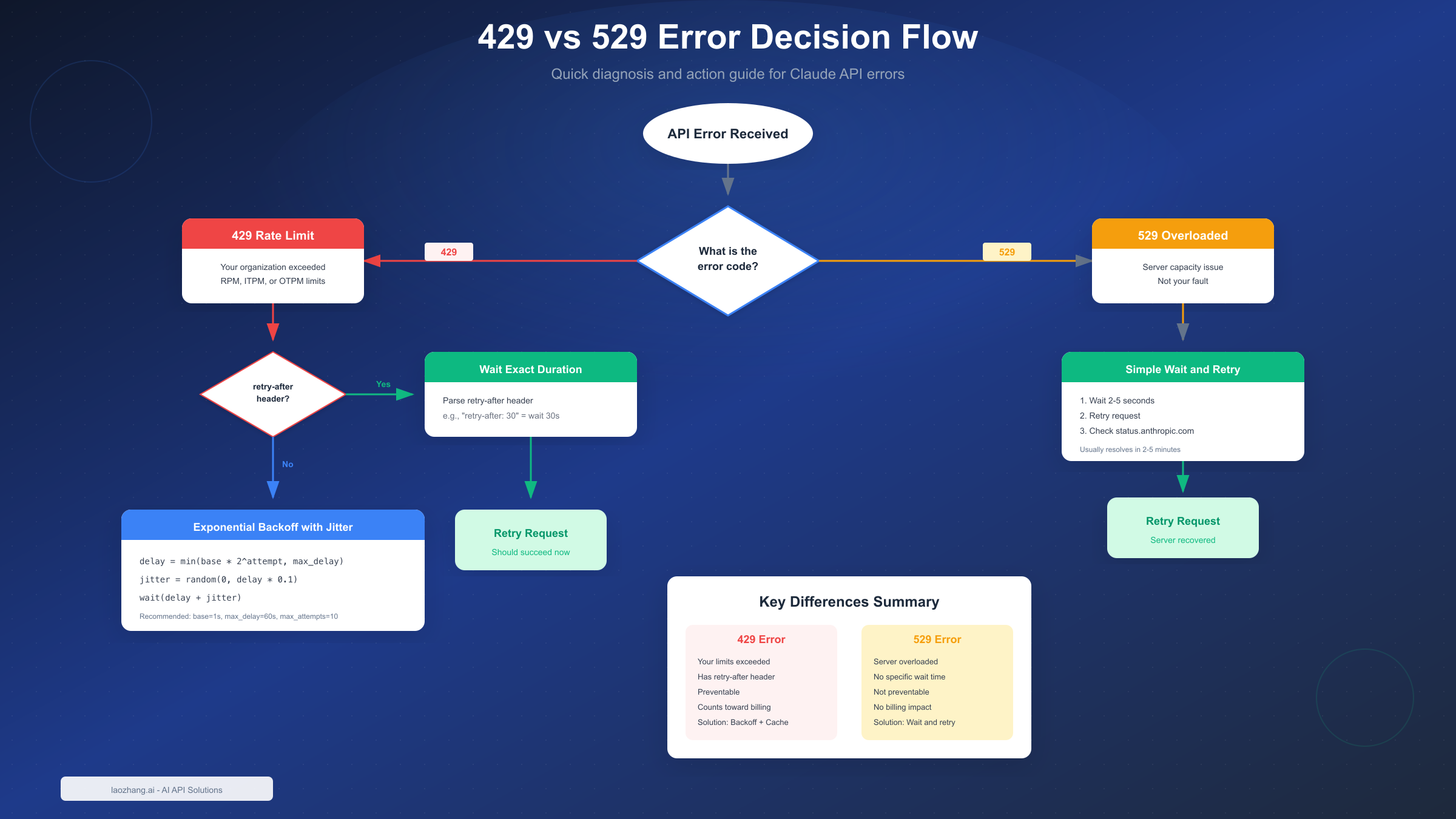
One of the most common sources of confusion for developers is distinguishing between 429 and 529 errors. While both might seem similar—they both prevent your request from completing—they have fundamentally different causes and require different handling strategies.
Key Differences Between Error Types
The 429 rate_limit_error is your responsibility. Your organization has exceeded the limits assigned to your usage tier. The error message will specify which limit you hit (RPM, ITPM, or OTPM), and the response includes a retry-after header with the exact wait time. You're charged for these failed requests, and they're entirely preventable through proper rate limiting on your end.
The 529 overloaded_error is not your fault. It occurs when Anthropic's servers experience high traffic across all users. There's no specific rate limit information provided, and the error typically resolves within 2-5 minutes. Rejected 529 requests don't count toward your billing, and you cannot prevent these errors through code changes.
When to Retry vs When to Wait
For 429 errors, always check for the retry-after header first. If present, wait exactly that duration—no more, no less. Retrying earlier wastes resources and may extend your rate limit window. If no header is present (rare for 429s), use exponential backoff starting at 1 second.
For 529 errors, implement simple retry logic with a 2-5 second initial delay. Since these are server-side issues, exponential backoff isn't strictly necessary, but it doesn't hurt. Check Anthropic's status page (status.anthropic.com) if you see sustained 529 errors—there might be an ongoing incident.
Error Message Examples
Understanding exact error messages helps with debugging:
# 429 Rate Limit - RPM exceeded
"message": "Number of request tokens has exceeded your per-minute rate limit"

# 429 Rate Limit - ITPM exceeded
"message": "Number of input tokens has exceeded your per-minute rate limit"

# 429 Rate Limit - OTPM exceeded
"message": "Number of output tokens has exceeded your per-minute rate limit"

# 529 Overloaded
"message": "Anthropic's API is temporarily overloaded"
Claude API Rate Limits Explained
Understanding how Claude's rate limit system works is essential for building applications that maximize throughput without hitting errors. Anthropic uses a tiered system with three distinct rate limit types, and knowing how they interact will help you optimize your API usage.
Rate Limit Types (RPM/ITPM/OTPM)
Claude API enforces three concurrent limits, and exceeding any one of them triggers a 429 error:
Requests Per Minute (RPM) caps the total number of API calls you can make regardless of their size. Even a simple "Hello" message counts the same as a 100K token request. This limit matters most for applications making many small requests.
Input Tokens Per Minute (ITPM) limits the total tokens you send to the API. This includes your system prompt, conversation history, and user message. The key advantage here is that cached tokens don't count toward ITPM for most Claude models—a critical optimization opportunity.
Output Tokens Per Minute (OTPM) restricts the total tokens Claude generates in responses. This is estimated based on your max_tokens parameter at the start of each request and adjusted after completion.
Tier System Overview
Anthropic's tier system automatically advances your organization as you make credit purchases:
| Tier | Credit Purchase | Max RPM | Max ITPM (Sonnet 4) | Max OTPM |
|---|---|---|---|---|
| Tier 1 | $5 | 50 | 30,000 | 8,000 |
| Tier 2 | $40 | 1,000 | 450,000 | 90,000 |
| Tier 3 | $200 | 2,000 | 800,000 | 160,000 |
| Tier 4 | $400 | 4,000 | 2,000,000 | 400,000 |
For a comprehensive breakdown of all tiers and models, see our complete tier system guide. The progression is immediate upon reaching the credit purchase threshold—no waiting period required.
Token Bucket Algorithm
Anthropic uses a token bucket algorithm for rate limiting rather than simple fixed windows. Understanding this helps you optimize request timing:
The token bucket continuously refills up to your maximum limit rather than resetting at fixed intervals. If your tier allows 1,000 RPM, you don't get 1,000 requests at the start of each minute—instead, your "bucket" refills at roughly 16.7 requests per second. This means:
- Short bursts can temporarily exceed your average rate
- Sustained high volume will eventually trigger limits
- Spacing requests evenly maximizes effective throughput
This is why you might hit rate limits even when your average usage seems within limits—a burst of rapid requests can drain the bucket faster than it refills.
Implementing Retry Logic
Production applications need robust retry logic that handles 429 errors gracefully. The key is balancing quick recovery with avoiding additional errors from overly aggressive retries.
Basic Exponential Backoff
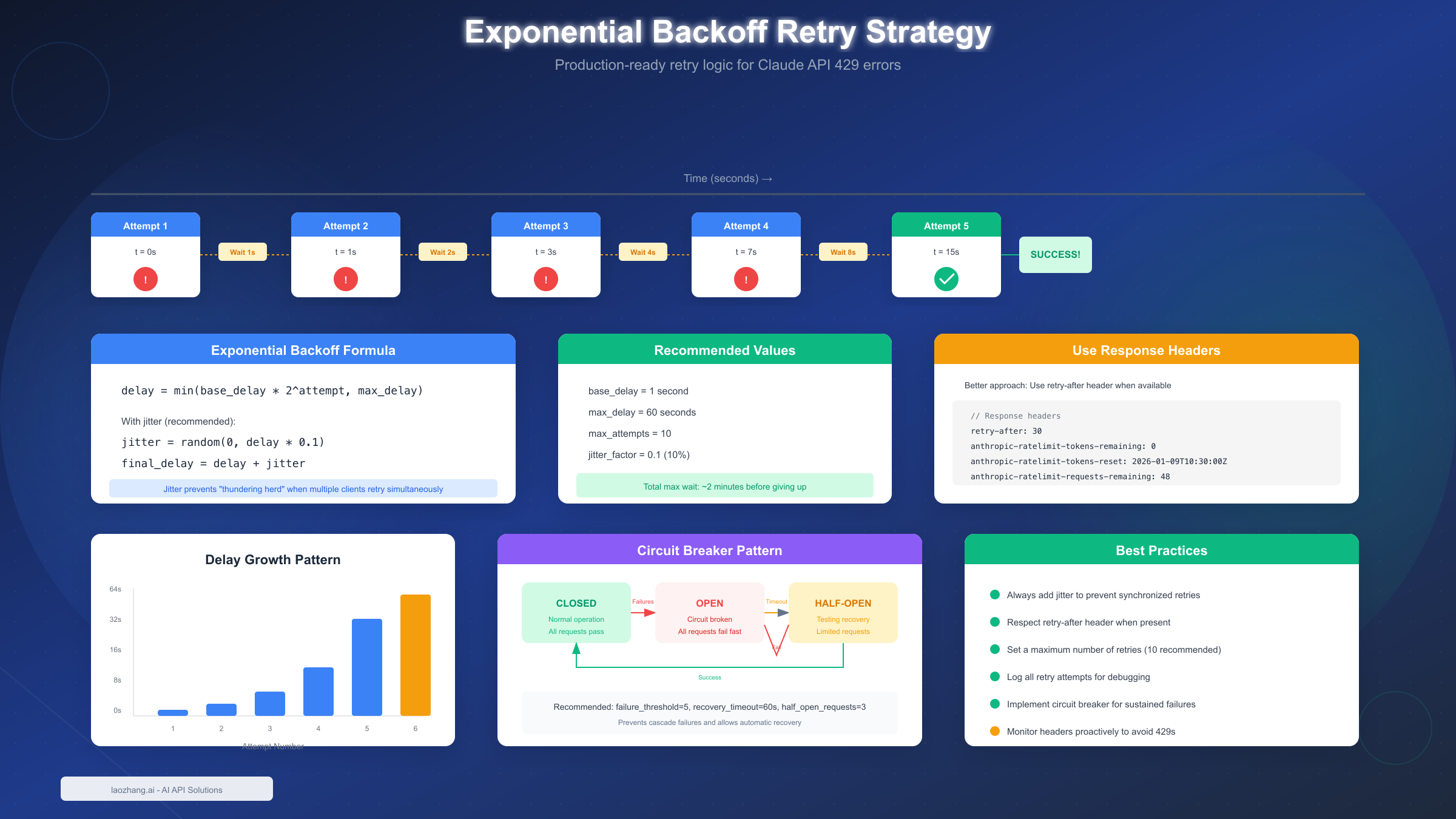
Exponential backoff increases wait time with each failed attempt, preventing the "thundering herd" problem where many clients retry simultaneously and make congestion worse. Here's the core formula:
delay = min(base_delay * 2^attempt, max_delay)Adding jitter (random variation) prevents synchronized retries when multiple clients hit limits simultaneously:
jitter = random(0, delay * 0.1)
final_delay = delay + jitter
Production-Ready Handler
Here's a complete implementation in Python that handles both 429 and 529 errors appropriately:
import anthropic
import time
import random
from typing import Optional

class ClaudeRateLimitHandler:
    def __init__(
        self,
        base_delay: float = 1.0,
        max_delay: float = 60.0,
        max_attempts: int = 10,
        jitter_factor: float = 0.1
    ):
        self.base_delay = base_delay
        self.max_delay = max_delay
        self.max_attempts = max_attempts
        self.jitter_factor = jitter_factor
        self.client = anthropic.Anthropic()

    def _calculate_delay(self, attempt: int, retry_after: Optional[float] = None) -> float:
        """Calculate delay with exponential backoff and jitter."""
        if retry_after:
            return retry_after

        delay = min(self.base_delay * (2 ** attempt), self.max_delay)
        jitter = random.uniform(0, delay * self.jitter_factor)
        return delay + jitter

    def _parse_retry_after(self, headers: dict) -> Optional[float]:
        """Extract retry-after value from response headers."""
        retry_after = headers.get('retry-after')
        if retry_after:
            try:
                return float(retry_after)
            except ValueError:
                return None
        return None

    def send_message(self, **kwargs) -> anthropic.types.Message:
        """Send message with automatic retry on rate limit errors."""
        last_exception = None

        for attempt in range(self.max_attempts):
            try:
                response = self.client.messages.create(**kwargs)
                return response

            except anthropic.RateLimitError as e:
                last_exception = e
                retry_after = self._parse_retry_after(
                    getattr(e, 'response', {}).get('headers', {})
                )
                delay = self._calculate_delay(attempt, retry_after)

                print(f"Rate limit hit (attempt {attempt + 1}/{self.max_attempts}). "
                      f"Waiting {delay:.1f}s...")
                time.sleep(delay)

            except anthropic.APIStatusError as e:
                if e.status_code == 529:
                    # Server overloaded - simple retry
                    last_exception = e
                    delay = self._calculate_delay(attempt)
                    print(f"Server overloaded (attempt {attempt + 1}). "
                          f"Waiting {delay:.1f}s...")
                    time.sleep(delay)
                else:
                    raise

        raise last_exception

# Usage
handler = ClaudeRateLimitHandler()
response = handler.send_message(
    model="claude-sonnet-4-20250514",
    max_tokens=1024,
    messages=[{"role": "user", "content": "Hello, Claude!"}]
)
For TypeScript/Node.js applications:
import Anthropic from '@anthropic-ai/sdk';

class ClaudeRateLimitHandler {
  private client: Anthropic;
  private baseDelay: number;
  private maxDelay: number;
  private maxAttempts: number;
  private jitterFactor: number;

  constructor(options: {
    baseDelay?: number;
    maxDelay?: number;
    maxAttempts?: number;
    jitterFactor?: number;
  } = {}) {
    this.client = new Anthropic();
    this.baseDelay = options.baseDelay ?? 1.0;
    this.maxDelay = options.maxDelay ?? 60.0;
    this.maxAttempts = options.maxAttempts ?? 10;
    this.jitterFactor = options.jitterFactor ?? 0.1;
  }

  private calculateDelay(attempt: number, retryAfter?: number): number {
    if (retryAfter) return retryAfter;

    const delay = Math.min(
      this.baseDelay * Math.pow(2, attempt),
      this.maxDelay
    );
    const jitter = Math.random() * delay * this.jitterFactor;
    return delay + jitter;
  }

  async sendMessage(
    params: Anthropic.MessageCreateParams
  ): Promise<Anthropic.Message> {
    let lastError: Error | null = null;

    for (let attempt = 0; attempt < this.maxAttempts; attempt++) {
      try {
        return await this.client.messages.create(params);
      } catch (error) {
        if (error instanceof Anthropic.RateLimitError) {
          lastError = error;
          const retryAfter = parseInt(
            error.headers?.get('retry-after') ?? ''
          );
          const delay = this.calculateDelay(
            attempt,
            isNaN(retryAfter) ? undefined : retryAfter
          );

          console.log(
            `Rate limit hit (attempt ${attempt + 1}/${this.maxAttempts}). ` +
            `Waiting ${delay.toFixed(1)}s...`
          );
          await this.sleep(delay * 1000);
        } else {
          throw error;
        }
      }
    }

    throw lastError;
  }

  private sleep(ms: number): Promise<void> {
    return new Promise(resolve => setTimeout(resolve, ms));
  }
}
Monitoring and Prevention
The best approach to 429 errors is preventing them entirely. By monitoring your usage proactively and implementing client-side rate limiting, you can maintain optimal throughput without ever hitting Anthropic's limits.
Response Header Parsing
Every Claude API response includes headers that show your current rate limit status. Parsing these headers lets you implement predictive throttling:
def parse_rate_limit_headers(response) -> dict:
    """Extract rate limit information from response headers."""
    headers = response.headers if hasattr(response, 'headers') else {}

    return {
        'requests_limit': int(headers.get(
            'anthropic-ratelimit-requests-limit', 0
        )),
        'requests_remaining': int(headers.get(
            'anthropic-ratelimit-requests-remaining', 0
        )),
        'requests_reset': headers.get(
            'anthropic-ratelimit-requests-reset', ''
        ),
        'tokens_limit': int(headers.get(
            'anthropic-ratelimit-tokens-limit', 0
        )),
        'tokens_remaining': int(headers.get(
            'anthropic-ratelimit-tokens-remaining', 0
        )),
        'tokens_reset': headers.get(
            'anthropic-ratelimit-tokens-reset', ''
        ),
        'input_tokens_remaining': int(headers.get(
            'anthropic-ratelimit-input-tokens-remaining', 0
        )),
        'output_tokens_remaining': int(headers.get(
            'anthropic-ratelimit-output-tokens-remaining', 0
        ))
    }

# Usage example
response = client.messages.create(...)
limits = parse_rate_limit_headers(response)

if limits['requests_remaining'] < 10:
    print("Warning: Approaching request limit")
if limits['input_tokens_remaining'] < 10000:
    print("Warning: Approaching input token limit")
Proactive Rate Limiting
Instead of waiting for 429 errors, implement client-side throttling based on your tier limits. You can track your current tier limits in the Claude Console:
import asyncio
from datetime import datetime, timedelta
from collections import deque

class ProactiveRateLimiter:
    def __init__(self, rpm_limit: int, safety_margin: float = 0.9):
        self.rpm_limit = int(rpm_limit * safety_margin)
        self.request_times: deque = deque()
        self.lock = asyncio.Lock()

    async def acquire(self):
        """Wait until we can safely make a request."""
        async with self.lock:
            now = datetime.now()
            cutoff = now - timedelta(minutes=1)

            # Remove requests older than 1 minute
            while self.request_times and self.request_times[0] < cutoff:
                self.request_times.popleft()

            # If at limit, wait until oldest request expires
            if len(self.request_times) >= self.rpm_limit:
                wait_until = self.request_times[0] + timedelta(minutes=1)
                wait_seconds = (wait_until - now).total_seconds()
                if wait_seconds > 0:
                    await asyncio.sleep(wait_seconds)
                self.request_times.popleft()

            self.request_times.append(datetime.now())

# Usage with Tier 2 limits (1000 RPM)
limiter = ProactiveRateLimiter(rpm_limit=1000)

async def make_request():
    await limiter.acquire()
    # Now safe to make API call
    response = await client.messages.create(...)
This approach ensures you never exceed your limits while maximizing actual throughput within those constraints.
Optimization Strategies
Beyond retry logic and monitoring, several optimization strategies can dramatically increase your effective rate limits without paying for a higher tier.
Prompt Caching Benefits
Claude's prompt caching feature is your most powerful tool for increasing effective throughput. Here's the key insight: cached input tokens don't count toward your ITPM limit on most Claude models.
With an 80% cache hit rate, your effective ITPM increases 5x. If your tier allows 2,000,000 ITPM, you could effectively process 10,000,000 total input tokens per minute (2M uncached + 8M cached).
To maximize cache effectiveness:
- Place static content (system prompts, instructions, examples) before dynamic content
- Use cache breakpoints strategically with the
cache_controlparameter - Reuse conversation prefixes for multi-turn interactions
- Cache large context documents that multiple requests reference
# Example: Caching a large system prompt
response = client.messages.create(
    model="claude-sonnet-4-20250514",
    max_tokens=1024,
    system=[
        {
            "type": "text",
            "text": "You are an expert assistant...",  # Large prompt
            "cache_control": {"type": "ephemeral"}
        }
    ],
    messages=[{"role": "user", "content": user_input}]
)
Request Batching
For non-time-sensitive workloads, the Message Batches API offers separate rate limits and a 50% cost discount. Batch processing is ideal for:
- Bulk content generation
- Data processing pipelines
- Evaluation and testing workflows
- Background analysis tasks
Batch requests don't count toward your regular RPM/ITPM/OTPM limits—they have their own pool. This means you can run batch jobs alongside real-time requests without interference.
Token estimation before sending helps prevent OTPM issues. Estimate your expected output size and set max_tokens appropriately rather than using unnecessarily high values:
def estimate_output_tokens(prompt_type: str) -> int:
    """Estimate reasonable max_tokens based on expected output."""
    estimates = {
        "short_answer": 150,
        "paragraph": 300,
        "detailed_explanation": 800,
        "code_generation": 1500,
        "long_form": 4000
    }
    return estimates.get(prompt_type, 500)
Advanced Solutions
When basic optimization isn't enough, consider these advanced strategies for handling high-volume workloads.
Tier Upgrade Decision
Upgrading tiers is straightforward—just purchase more credits. But when does it make financial sense?
Upgrade when:
- You're consistently hitting rate limits despite optimization
- The cost of delayed processing exceeds the tier upgrade cost
- Your application requires sustained high throughput
- Customer experience is impacted by rate limit delays
Consider the math: Moving from Tier 1 to Tier 4 requires $400 in credit purchases but increases your RPM from 50 to 4,000 (80x improvement). For production applications processing thousands of requests daily, this investment pays for itself quickly through improved reliability and user experience.
For detailed pricing and cost analysis, see our Claude API pricing guide.
Enterprise Options
Organizations with needs beyond Tier 4 can contact Anthropic sales for custom limits. Enterprise arrangements typically include:
- Higher rate limits tailored to your usage patterns
- Priority support channels
- Custom SLAs for availability and response times
- Volume pricing discounts
Multi-provider fallback is another enterprise pattern worth considering. In a lower-risk formulation, this should mean designing graceful degradation, queueing, retry controls, and official cloud or provider failover policies where applicable, rather than treating third-party aggregation as the default solution to Anthropic rate limits.
If you need your API key setup, start there before implementing these advanced patterns.
Frequently Asked Questions
Why do I get 429 errors even though my dashboard shows I'm under limits?
Rate limits apply per-minute using a token bucket algorithm, not averaged over longer periods. Your dashboard might show low overall usage, but a burst of rapid requests can temporarily exceed the per-minute limit. Additionally, all API keys in your organization share the same limit pool—check if other applications or team members are consuming capacity.
Does the 429 error count toward my billing?
Yes, unfortunately. Rate-limited requests (429 errors) are charged at the standard rate because the API processed your request enough to determine it exceeded limits. This is another reason to implement proactive rate limiting rather than relying on reactive retry logic.
How quickly do rate limits reset?
The token bucket refills continuously rather than resetting at fixed intervals. Your capacity replenishes at roughly 1/60th of your per-minute limit each second. The retry-after header tells you exactly when to retry for the quickest recovery.
Can I get rate limits increased without buying more credits?
Not for standard tiers—the tier system is tied directly to credit purchases. However, enterprise customers can negotiate custom limits through Anthropic's sales team. If your use case has unusual characteristics (very bursty traffic, specific model requirements), contact sales to discuss options.
What's the difference between ITPM limits on different models?
Different model classes have different limits, and older models (marked with † in Anthropic's documentation) count cached tokens toward ITPM while newer models don't. Always check the current rate limits documentation for your specific model, as these can change with new releases.
Summary and Next Steps
Successfully handling Claude API 429 errors requires a multi-layered approach combining reactive error handling with proactive prevention strategies.
Key takeaways:
- 429 errors mean you've exceeded RPM, ITPM, or OTPM limits—use the
retry-afterheader for optimal recovery - 529 errors are server-side issues requiring simple wait-and-retry, not your code's fault
- Implement exponential backoff with jitter for robust retry logic
- Monitor response headers proactively to avoid hitting limits
- Leverage prompt caching to increase effective ITPM by up to 5x
- Consider tier upgrades when optimization isn't sufficient
Next steps:
- Implement the retry handler code in your application
- Add response header monitoring to track usage patterns
- Identify caching opportunities in your prompts
- Review your current tier and consider if upgrades make sense
- Set up alerting when you approach 80% of any limit
With these strategies in place, you'll build applications that maximize Claude's capabilities while maintaining reliability—turning rate limits from obstacles into manageable parameters of your system design.