
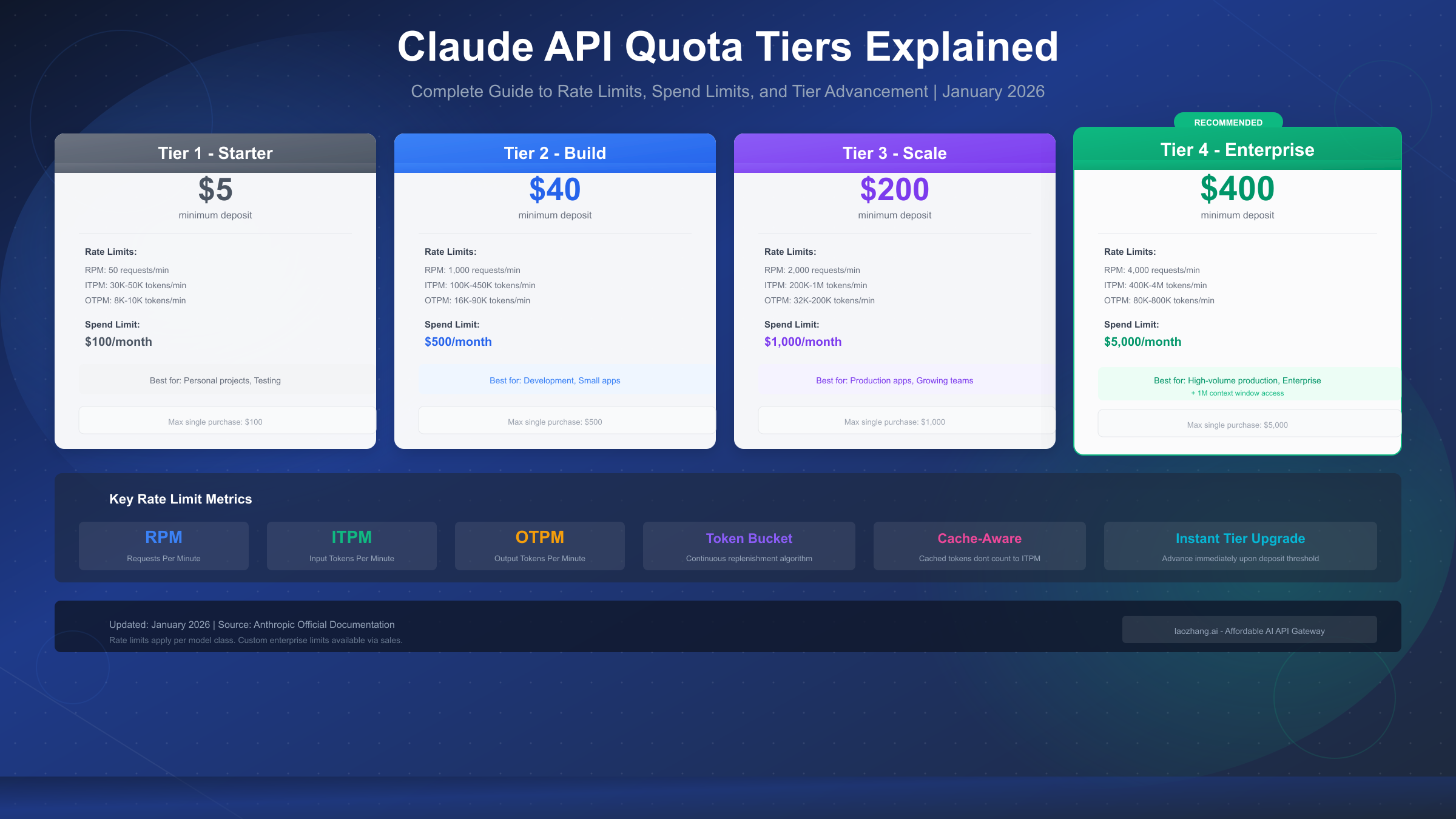
Anthropic's Claude API uses a 4-tier usage system that determines how many requests you can make and how much you can spend each month. Each tier, from Tier 1 starting at a $5 deposit to Tier 4 at $400+, comes with different rate limits measured in requests per minute (RPM), input tokens per minute (ITPM), and output tokens per minute (OTPM). The system uses a token bucket algorithm for continuous capacity replenishment rather than fixed interval resets, and cached tokens from prompt caching don't count toward your ITPM limits—allowing you to potentially 5-10x your effective throughput. As of January 2026, Tier 4 users also gain access to the 1M token context window for Claude Sonnet models.
What Are Claude API Quotas and Limits?
When you start using the Claude API, you'll encounter two fundamental types of constraints that Anthropic implements to manage capacity and prevent misuse. Understanding these limits is essential for building reliable applications and planning your usage effectively.
Spend limits define the maximum monthly cost your organization can incur for API usage. Once you hit your tier's spend limit, you'll need to wait until the next calendar month to continue using the API—unless you advance to a higher tier. Rate limits, on the other hand, control how quickly you can make requests, measured across three dimensions: requests per minute, input tokens per minute, and output tokens per minute.
These limits operate at the organization level, not per individual API key. This means if you have multiple team members or applications using the same Anthropic organization account, they all share the same pool of capacity. You can monitor your current usage and limits through the Limits page in the Claude Console at any time.
Anthropic implements these constraints for several important reasons. Server resource management ensures fair distribution of computational capacity across all users. The limits also help prevent abuse scenarios where bad actors might attempt to overwhelm the system. For legitimate users, the tiered system actually provides a growth path—as your usage increases and you demonstrate reliable payment history, you automatically unlock higher limits.
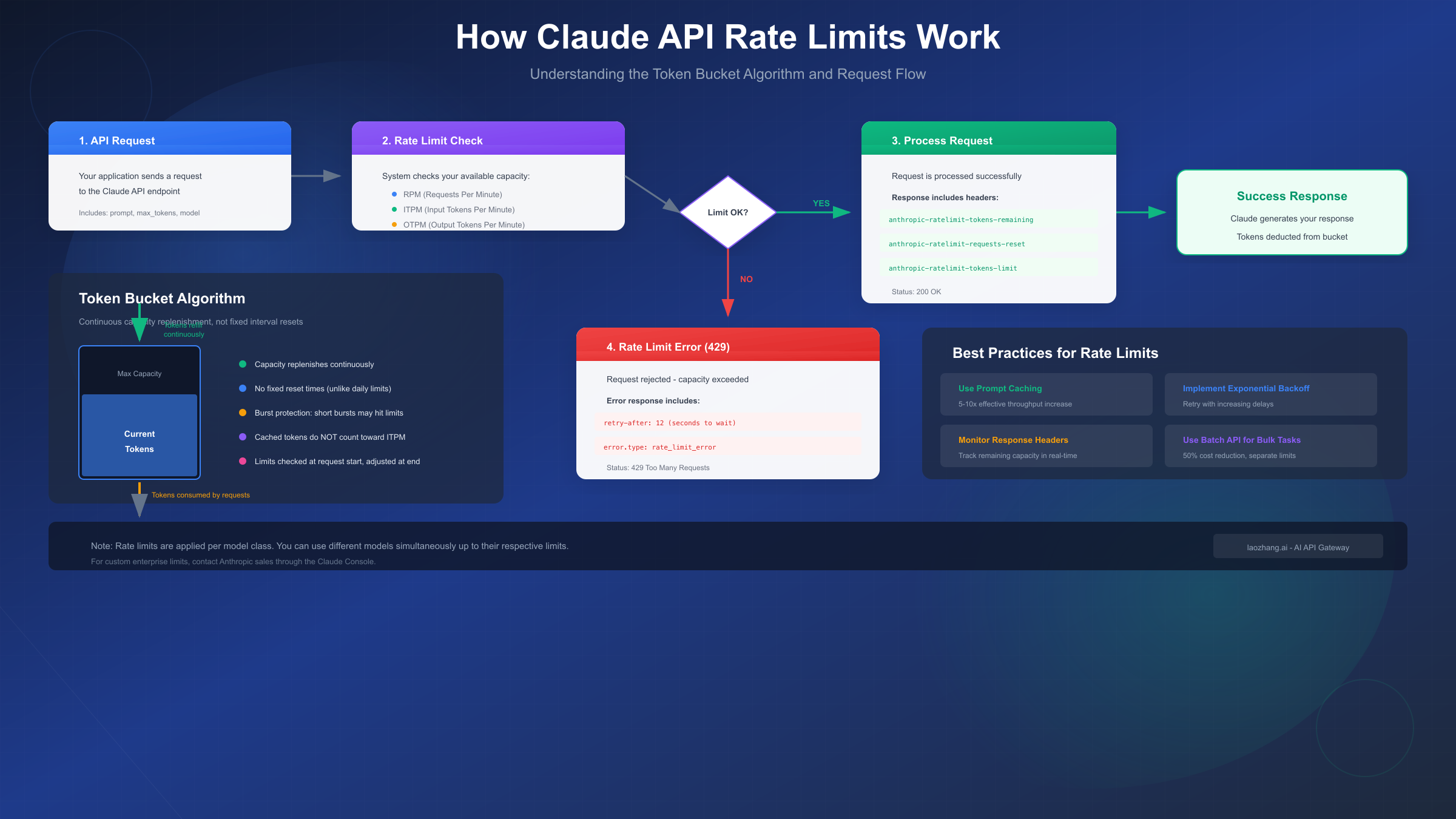
The good news is that Anthropic uses the token bucket algorithm for rate limiting rather than fixed interval resets. This means your capacity continuously replenishes up to your maximum limit. If you consume all your tokens at 2:15 PM, you don't have to wait until 3:00 PM for a reset—tokens start refilling immediately at a steady rate.
If you're just getting started with the Claude API, you'll want to first get your Claude API key and understand the basic setup process before diving into limit optimization.
Understanding Claude API Usage Tiers (Tier 1-4)
Anthropic's tier system is designed to accommodate organizations at every stage, from individual developers just testing the waters to enterprises processing millions of requests. Each tier has specific deposit requirements, spend limits, and rate limits that increase progressively.
Tier 1: Starter ($5 Deposit)
Tier 1 is where most developers begin their Claude API journey. With a minimum deposit of just $5, you can start building and testing immediately. This tier suits personal projects, learning purposes, and early prototyping work.
The key constraints at Tier 1 include a monthly spend limit of $100 and relatively conservative rate limits. You're allowed 50 requests per minute across all Claude models. For input tokens, Claude Sonnet models allow 30,000 tokens per minute, while Claude Haiku offers 50,000 ITPM due to its lighter computational requirements. Output tokens are limited to 8,000-10,000 per minute depending on the model.
One important limitation: you cannot add more than $100 to your account in a single transaction at this tier. This prevents accidental overspending while you're still learning the system.
Tier 2: Build ($40 Deposit)
Tier 2 represents a significant jump in capabilities, making it appropriate for development teams and small production applications. Reaching this tier requires a cumulative deposit of $40 or more.
At Tier 2, your request rate jumps 20x to 1,000 RPM. Input token limits increase dramatically—Claude Sonnet allows 450,000 ITPM (15x higher than Tier 1), and output capacity rises to 90,000 OTPM. Your monthly spend limit increases to $500, and you can add up to $500 in a single transaction.
This tier strikes a good balance for applications with moderate traffic. Most development teams find Tier 2 sufficient for staging environments, CI/CD pipelines, and applications serving dozens of concurrent users.
Tier 3: Scale ($200 Deposit)
Tier 3 serves production applications with serious traffic requirements. The $200 cumulative deposit unlocks 2,000 requests per minute, 800,000 ITPM for Claude Sonnet (with Haiku reaching 1,000,000 ITPM), and 160,000-200,000 OTPM.
Monthly spend capacity increases to $1,000, with matching transaction limits. Organizations at this tier typically run customer-facing applications where reliability and throughput directly impact business outcomes.
The jump from Tier 2 to Tier 3 approximately doubles your rate limits while doubling the monthly spend ceiling. This scaling factor is intentional—Anthropic wants to ensure that organizations investing more in the platform receive proportionally better access.
Tier 4: Enterprise ($400 Deposit)
Tier 4 represents the highest standard tier level, designed for enterprise-scale deployments. With a cumulative $400 deposit, you unlock the maximum self-service rate limits: 4,000 RPM, up to 2,000,000 ITPM for Claude Sonnet (4,000,000 for Haiku), and 400,000-800,000 OTPM.
Beyond the raw numbers, Tier 4 includes an exclusive feature: access to the 1M token context window for Claude Sonnet 4 and Sonnet 4.5 models. This extended context capability is currently in beta and only available to Tier 4 organizations and those with custom enterprise agreements.
Monthly spend increases to $5,000, with matching transaction limits. For organizations requiring even higher limits, Anthropic offers custom enterprise plans through their sales team, available via the Claude Console.
Complete Tier Comparison Table
The following table provides a comprehensive side-by-side comparison of all four tiers, making it easy to see exactly what you get at each level and plan your tier selection accordingly.
| Aspect | Tier 1 | Tier 2 | Tier 3 | Tier 4 |
|---|---|---|---|---|
| Deposit Required | $5 | $40 | $200 | $400 |
| Max Spend/Month | $100 | $500 | $1,000 | $5,000 |
| RPM (All Models) | 50 | 1,000 | 2,000 | 4,000 |
| Sonnet ITPM | 30,000 | 450,000 | 800,000 | 2,000,000 |
| Sonnet OTPM | 8,000 | 90,000 | 160,000 | 400,000 |
| Haiku ITPM | 50,000 | 450,000 | 1,000,000 | 4,000,000 |
| Haiku OTPM | 10,000 | 90,000 | 200,000 | 800,000 |
| 1M Context | No | No | No | Yes (Beta) |
| Max Transaction | $100 | $500 | $1,000 | $5,000 |
Tier Advancement Process
Advancing between tiers happens immediately once you meet the deposit threshold. There's no waiting period, approval process, or additional verification required. Simply add credits to your account, and once your cumulative purchases hit the next tier's threshold, your limits upgrade automatically.
For example, if you're currently at Tier 1 with $20 in lifetime purchases and add another $25, you'll immediately advance to Tier 2 (total $45 exceeds the $40 requirement). Your new rate limits take effect within minutes.
This design makes it easy to scale up when you need to, without bureaucratic delays that could impact your production systems. For detailed pricing information across all models, see our Claude API pricing guide.
Rate Limits Explained: RPM, ITPM, and OTPM
Understanding the three dimensions of rate limits is crucial for building applications that work reliably within your tier's constraints. Each metric serves a different purpose and is enforced independently.
Requests Per Minute (RPM)
RPM limits the total number of API calls your organization can make within any 60-second window. This is the simplest limit to understand: if your tier allows 1,000 RPM, you can make up to 1,000 separate API requests per minute, regardless of how large or small each request is.
RPM primarily protects Anthropic's infrastructure from sudden traffic spikes. Even if each request is small, processing thousands of simultaneous requests requires significant server resources. The RPM limit ensures no single organization can monopolize the request processing pipeline.
One subtlety: while documented as "per minute," the rate limiting actually operates on a per-second basis to prevent bursting. A 60 RPM limit effectively means 1 request per second maximum. If you send 10 requests in a single second, you'll hit the limit even though you haven't exceeded 60 in the full minute.
Input Tokens Per Minute (ITPM)
ITPM controls the total volume of input tokens your requests can contain within a minute. This includes your system prompt, conversation history, any documents you're sending for analysis, and the actual user query. More complex requests with longer prompts consume more ITPM capacity.
The key insight about ITPM is how it interacts with prompt caching. Anthropic's documentation states clearly: "For most Claude models, only uncached input tokens count towards your ITPM rate limits." This means if you're using prompt caching effectively, cached tokens read from cache don't consume your ITPM allocation.
Here's what counts toward ITPM:
input_tokens: Tokens after the last cache breakpointcache_creation_input_tokens: Tokens being written to cachecache_read_input_tokens: Do NOT count toward ITPM (for most models)
This distinction is enormously important. With an 80% cache hit rate, your effective ITPM capacity becomes 5x higher than the stated limit. A 2,000,000 ITPM limit effectively becomes 10,000,000 tokens per minute of processing capacity because 8 million of those tokens come from cache and don't count.
Output Tokens Per Minute (OTPM)
OTPM limits how many tokens Claude can generate in responses across all your requests within a minute. Unlike input tokens, output tokens cannot be cached—every generated token counts toward your limit.
OTPM is estimated at the start of each request based on your max_tokens parameter, then adjusted at the end to reflect actual usage. If you're consistently setting max_tokens much higher than your actual response lengths, you may hit OTPM limits earlier than expected because the initial estimate reserves that capacity.
To optimize OTPM usage, set max_tokens to a reasonable estimate of your expected response length rather than always using the maximum allowed value. If your typical responses are 500 tokens, setting max_tokens: 500 rather than max_tokens: 4096 helps the rate limiter make better predictions.
The Token Bucket Algorithm
Anthropic uses the token bucket algorithm rather than fixed-window rate limiting. This approach offers significant advantages for legitimate users while still preventing abuse.
Imagine a bucket that can hold up to your maximum capacity (say, 2,000,000 ITPM). Tokens flow into this bucket at a constant rate throughout the minute. When you make requests, tokens are removed from the bucket. If the bucket runs empty, you hit the rate limit and receive a 429 error.
The key benefit: if you've been idle, your bucket refills to maximum capacity. You can then burst up to that maximum for a short period before settling into a sustainable rate. This differs from fixed-window limits where you might have to wait until the top of the hour for your allocation to reset.
However, be aware of acceleration limits. If your organization has a sharp, sudden increase in usage, you might encounter 429 errors even if you're technically within your rate limits. Anthropic implements acceleration limits to prevent rapid traffic spikes. The solution is to ramp up usage gradually rather than going from zero to maximum overnight.
Choosing the Right Tier for Your Use Case
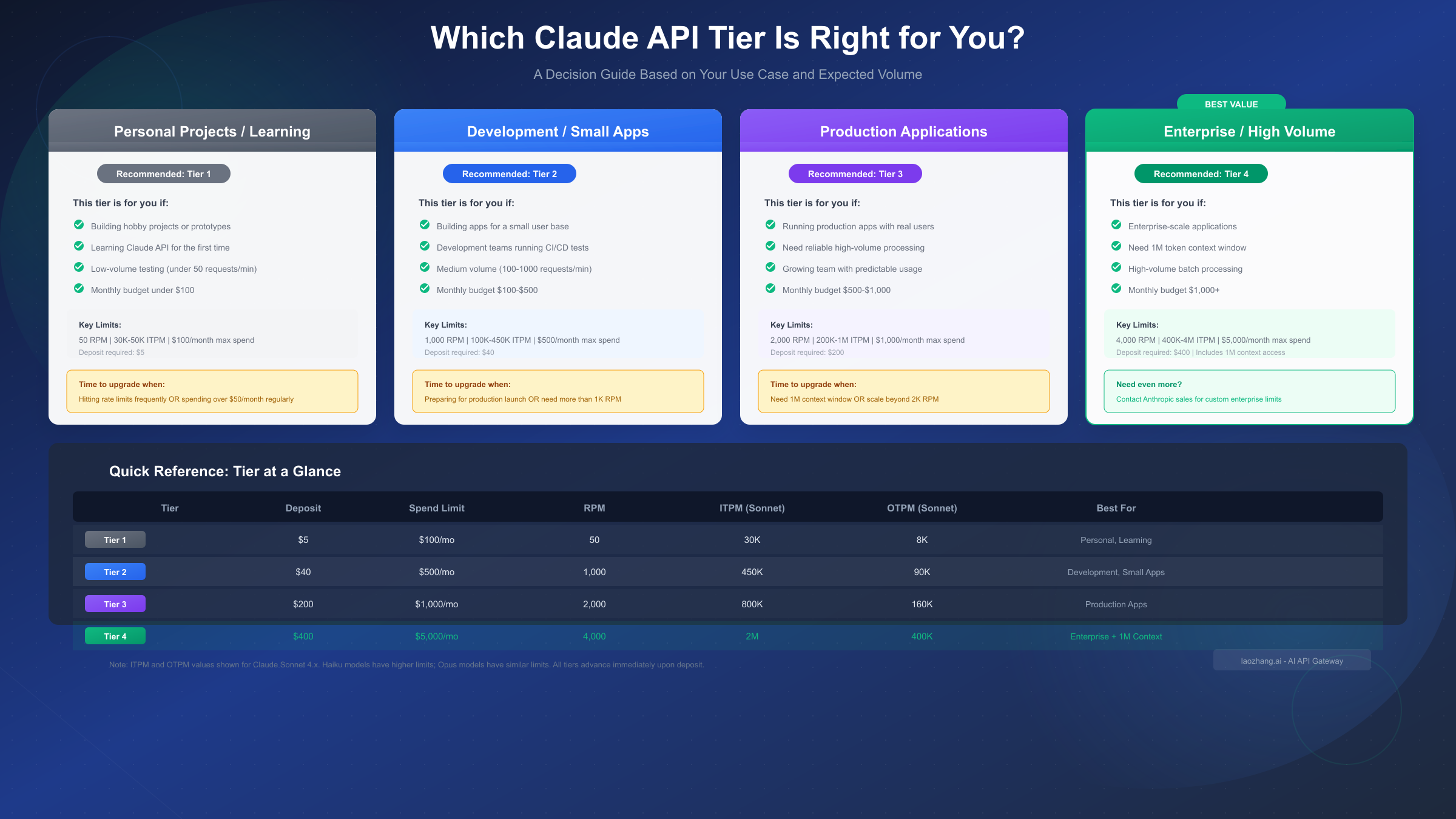
Selecting the appropriate tier involves balancing your expected usage patterns against cost efficiency. Starting too low means frequent rate limit errors; starting too high means unnecessary capital tied up in deposits.
Personal Projects and Learning (Tier 1)
Tier 1 suits individual developers exploring the Claude API for personal projects, learning purposes, or early-stage prototyping. If your use case involves:
- Building weekend projects or hackathon prototypes
- Learning prompt engineering and API integration
- Testing Claude for potential future projects
- Running occasional batch analyses on small datasets
The $5 entry point and $100 monthly ceiling provide sufficient headroom while limiting financial exposure. At 50 RPM, you can comfortably make hundreds of requests during development sessions without hitting limits.
Upgrade trigger: Consider advancing to Tier 2 when you're preparing to deploy an application to real users, or if you're frequently encountering rate limit errors during development.
Development and Small Apps (Tier 2)
Tier 2 serves development teams and applications with moderate traffic requirements. This tier makes sense when:
- Running CI/CD pipelines with automated testing against Claude
- Deploying internal tools for a small team (5-50 users)
- Building MVPs for customer validation
- Processing medium-sized batch jobs regularly
The 1,000 RPM and 450,000 ITPM provide substantial headroom for most development scenarios. The $500 monthly limit supports meaningful usage without requiring enterprise-level commitment.
Upgrade trigger: Move to Tier 3 when preparing for production launch with external customers, or when your staging environment starts hitting rate limits.
Production Applications (Tier 3)
Tier 3 serves production applications with real user traffic. Consider this tier when:
- Launching customer-facing applications
- Serving hundreds to thousands of daily active users
- Running production workloads where reliability is critical
- Processing significant batch volumes (hundreds of thousands of requests/month)
At 2,000 RPM and 800,000+ ITPM, Tier 3 handles substantial traffic while the $1,000 monthly limit supports meaningful production operations.
Upgrade trigger: Advance to Tier 4 when you need the 1M context window, when approaching rate limits regularly, or when scaling beyond 2,000 concurrent requests per minute.
Enterprise and High-Volume (Tier 4)
Tier 4 serves enterprise-scale deployments and high-volume applications. This tier is appropriate when:
- Running enterprise applications with thousands of users
- Requiring the 1M token context window for document analysis
- Processing millions of requests per month
- Needing maximum self-service rate limits
The 4,000 RPM and up to 4,000,000 ITPM (for Haiku) support serious production scale. The $5,000 monthly limit accommodates substantial enterprise usage.
Beyond Tier 4: If you need even higher limits, contact Anthropic's sales team through the Claude Console for custom enterprise arrangements with dedicated capacity and negotiated pricing.
Cost Optimization Strategy
When planning your tier selection, consider that deposits remain in your account as prepaid credits—they're not fees that disappear. A $400 Tier 4 deposit simply means you have $400 in API credits available for use.
For teams needing to optimize costs while accessing Claude's capabilities, API aggregation platforms like laozhang.ai offer consistent pricing with major platforms while providing additional benefits like multi-model access and enhanced monitoring. These platforms can help reduce overall API costs, particularly for teams using multiple AI providers.
Handling Rate Limit Errors (429)
When you exceed any rate limit, the Claude API returns a 429 Too Many Requests error. Understanding how to interpret and respond to these errors is essential for building resilient applications.
Understanding 429 Errors
A 429 error indicates you've exceeded one of your rate limits—RPM, ITPM, or OTPM. The error response includes information about which specific limit was exceeded and when you can retry.
python{ "type": "error", "error": { "type": "rate_limit_error", "message": "Rate limit exceeded. Please retry after 12 seconds." } }
The response headers provide detailed information about your current rate limit status:
| Header | Description |
|---|---|
retry-after | Seconds to wait before retrying |
anthropic-ratelimit-requests-limit | Your RPM limit |
anthropic-ratelimit-requests-remaining | Requests remaining this period |
anthropic-ratelimit-tokens-remaining | Tokens remaining (most restrictive limit) |
anthropic-ratelimit-tokens-reset | When limits will reset (RFC 3339 format) |
Common Causes of 429 Errors
There are several common scenarios that trigger rate limit errors, even when you believe you should be within your limits. Understanding these causes helps you design more resilient applications.
Bursting: Sending too many requests in a short time window, even if your minute-total would be within limits. Solution: Add small delays (100-500ms) between requests.
Acceleration limits: Sudden usage spikes trigger protective measures. Solution: Ramp up traffic gradually over hours or days rather than instantly.
Large prompts: Requests with very large context windows can quickly exhaust ITPM. Solution: Use prompt caching for repeated content.
High max_tokens: Setting unnecessarily high output limits reserves OTPM capacity that isn't used. Solution: Set realistic max_tokens values.
For comprehensive troubleshooting, see our Claude API 429 error solution guide.
Implementing Retry Logic
The most robust approach to handling rate limits combines exponential backoff with jitter. Here's a production-ready pattern:
pythonimport time
import random

def call_claude_with_retry(prompt, max_retries=5):
    base_delay = 1.0

    for attempt in range(max_retries):
        try:
            response = client.messages.create(
                model="claude-sonnet-4-20250514",
                max_tokens=1024,
                messages=[{"role": "user", "content": prompt}]
            )
            return response

        except anthropic.RateLimitError as e:
            if attempt == max_retries - 1:
                raise

            # Use retry-after header if available
            retry_after = getattr(e, 'retry_after', None)
            if retry_after:
                delay = retry_after
            else:
                # Exponential backoff with jitter
                delay = base_delay * (2 ** attempt)
                delay += random.uniform(0, delay * 0.1)

            print(f"Rate limited. Waiting {delay:.1f}s before retry.")
            time.sleep(delay)

    return None
Monitoring Rate Limit Usage
Proactive monitoring prevents rate limit surprises. Parse the rate limit headers from every successful response:
pythondef log_rate_limits(response):
    headers = response.headers
    remaining_requests = headers.get('anthropic-ratelimit-requests-remaining')
    remaining_tokens = headers.get('anthropic-ratelimit-tokens-remaining')

    if remaining_requests and int(remaining_requests) < 10:
        print(f"Warning: Only {remaining_requests} requests remaining")

    if remaining_tokens and int(remaining_tokens) < 10000:
        print(f"Warning: Only {remaining_tokens} tokens remaining")
The Claude Console also provides rate limit monitoring charts showing your hourly maximum usage versus your limits, helping identify patterns and plan capacity needs.
Optimizing Your Rate Limits
Several strategies can help you get more effective capacity from your existing tier limits. The most impactful is prompt caching, but request batching, load distribution, and careful prompt engineering all contribute.
Prompt Caching Strategy
Prompt caching is the single most effective optimization for ITPM limits. When you mark content as cacheable, subsequent requests that include that cached content don't count the cached portion toward your ITPM limits.
Ideal candidates for caching include:
- System instructions: Your consistent system prompt likely appears in every request. Caching it eliminates its ITPM cost after the first request.
- Reference documents: If you're building RAG applications where the same documents appear in multiple queries, caching them dramatically reduces token consumption.
- Conversation history: For chat applications, earlier messages in long conversations can be cached.
- Tool definitions: If you use the same tools across requests, cache those definitions.
The math is compelling: with 80% of your input tokens coming from cache, you effectively 5x your ITPM capacity. A Tier 3 account with 800,000 ITPM could process 4,000,000 total input tokens per minute if caching is optimized.
To implement caching, add cache_control markers to your message content:
pythonresponse = client.messages.create(
    model="claude-sonnet-4-20250514",
    max_tokens=1024,
    system=[
        {
            "type": "text",
            "text": "You are an expert assistant...",
            "cache_control": {"type": "ephemeral"}
        }
    ],
    messages=[{"role": "user", "content": "Your question here"}]
)
Request Batching with the Batch API
For non-real-time workloads, the Batch API offers both cost savings (50% discount) and separate rate limits that don't impact your standard API capacity.
Batch API rate limits operate independently:
| Tier | RPM | Max Queue Size | Max Requests/Batch |
|---|---|---|---|
| Tier 1 | 50 | 100,000 | 100,000 |
| Tier 2 | 1,000 | 200,000 | 100,000 |
| Tier 3 | 2,000 | 300,000 | 100,000 |
| Tier 4 | 4,000 | 500,000 | 100,000 |
Batch processing suits use cases like:
- Document classification of large datasets
- Content moderation pipelines
- Bulk translation or summarization
- Analytics and reporting workflows
The 24-hour processing window means batches aren't suitable for real-time applications, but for background processing, the cost savings and separate rate pool make it highly attractive.
Load Distribution Patterns
For high-traffic applications, implement request queuing with priority levels:
pythonfrom queue import PriorityQueue
import threading

class RateLimitedClient:
    def __init__(self, rpm_limit):
        self.queue = PriorityQueue()
        self.rpm_limit = rpm_limit
        self.tokens_available = rpm_limit

    def add_request(self, request, priority=5):
        # Lower priority number = higher priority
        self.queue.put((priority, request))

    def process_requests(self):
        while True:
            if self.tokens_available > 0 and not self.queue.empty():
                _, request = self.queue.get()
                # Process request
                self.tokens_available -= 1
            # Replenish tokens gradually
            time.sleep(60 / self.rpm_limit)
            self.tokens_available = min(self.rpm_limit, self.tokens_available + 1)
This pattern ensures high-priority requests get processed first while maintaining steady throughput within rate limits.
Advanced Topics: Batch API and Long Context
Two specialized features deserve deeper coverage: the Batch API for high-volume processing and the 1M context window for document-intensive applications.
Message Batches API Details
The Batch API is designed for processing large volumes of requests asynchronously with a 50% discount on all token costs. Unlike the standard API where you wait for immediate responses, batch requests enter a processing queue and complete within 24 hours.
Key characteristics:
- Separate rate limits: Batch processing doesn't count against your standard RPM/TPM limits
- Queue-based: Requests sit in a processing queue until capacity is available
- 50% cost reduction: Both input and output tokens are billed at half the standard rate
- 24-hour SLA: All requests in a batch complete within 24 hours, typically much faster
A batch request is considered "in queue" from submission until successful processing. The queue limits ensure fair distribution across customers while allowing substantial throughput.
When to use batches:
- Processing datasets where immediate response isn't required
- Running overnight analysis jobs
- Handling periodic bulk operations (daily reports, weekly summaries)
- Any workload that can tolerate hours of latency
When NOT to use batches:
- Real-time chat applications
- Interactive features requiring immediate feedback
- Time-sensitive decisions
Long Context Rate Limits (1M Window)
The 1M token context window is available only to Tier 4 organizations and those with custom enterprise agreements. When enabled via the context-1m-2025-08-07 beta header, requests exceeding 200K tokens use dedicated rate limits:
| Metric | Tier 4 Limit |
|---|---|
| ITPM | 1,000,000 |
| OTPM | 200,000 |
These limits are separate from your standard rate limits, meaning you can process large documents without impacting capacity for shorter requests.
Use cases for 1M context include:
- Analyzing entire codebases in a single request
- Processing lengthy legal or medical documents
- Reviewing complete books or research papers
- Multi-document comparison and synthesis
To maximize 1M context efficiency:
- Use prompt caching aggressively—large documents that repeat across queries should definitely be cached
- Set appropriate
max_tokensfor outputs to avoid over-reservation - Consider chunking if your use case allows multiple smaller requests instead
For access to extended features and competitive pricing, platforms like laozhang.ai provide API aggregation services that can help optimize costs across multiple AI providers, with documentation available at their resource center.
FAQ: Common Questions About Claude API Limits
How quickly do rate limits reset?
Unlike fixed-window systems, Claude's token bucket algorithm replenishes capacity continuously. If you exhaust your tokens, you don't wait until the next minute—replenishment begins immediately at a steady rate. A completely empty bucket refills to maximum within one minute.
Can I have different limits for different API keys?
Rate limits apply at the organization level, not per API key. All keys under one organization share the same capacity pool. If you need separate limits, create separate Anthropic organizations (each requires its own billing setup and tier progression).
Do cached tokens count toward my limits?
For most current Claude models, cached tokens read from cache (cache_read_input_tokens) do NOT count toward ITPM. Only uncached input tokens and tokens being written to cache count. Some older models (marked with † in documentation) do count cache reads—check the official rate limits page for your specific model.
What happens when I hit my monthly spend limit?
Once you reach your tier's monthly spend limit, additional API requests will fail until either: (1) the next calendar month begins and your spend resets, or (2) you advance to a higher tier with increased limits. There's no automatic notification before hitting the limit—monitor your usage proactively.
How do I contact sales for custom limits?
Custom enterprise arrangements require direct engagement with Anthropic's sales team. Access the contact form through the Claude Console by navigating to Settings > Limits and selecting the custom/enterprise option.
Are rate limits shared across models?
Rate limits apply per model class, not globally. You can use Claude Sonnet up to its limits while simultaneously using Claude Haiku up to its separate limits. The exception: Claude Opus 4.x limits are shared across Opus 4, 4.1, and 4.5 variants, and Claude Sonnet 4.x limits are shared across Sonnet 4 and 4.5.
What's the difference between Priority Tier and standard tiers?
Priority Tier is a separate offering providing enhanced service levels in exchange for committed spend. Standard tiers (1-4) are self-service with no commitment. Priority Tier users receive additional rate limit headers and potentially faster processing during peak periods.
Summary and Quick Reference
Claude API rate limits follow a 4-tier structure designed to scale with your usage:
Quick Reference:
- Tier 1 ($5): 50 RPM, 30K-50K ITPM, $100/month limit
- Tier 2 ($40): 1,000 RPM, 100K-450K ITPM, $500/month limit
- Tier 3 ($200): 2,000 RPM, 200K-1M ITPM, $1,000/month limit
- Tier 4 ($400): 4,000 RPM, 400K-4M ITPM, $5,000/month limit + 1M context
Key Optimizations:
- Use prompt caching—cached tokens don't count toward ITPM
- Set realistic
max_tokensvalues to avoid OTPM over-reservation - Implement exponential backoff for 429 error handling
- Consider Batch API for non-real-time workloads (50% savings)
- Monitor rate limit headers proactively
Tier Advancement:
- Happens immediately upon meeting deposit threshold
- No waiting period or approval required
- Deposits become prepaid API credits
For the most current rate limit values, always check the official Anthropic documentation, as limits may be updated over time. Understanding these limits enables you to build reliable, cost-effective applications that scale smoothly as your needs grow.