
Anthropic's Claude Opus 4.6 represents the most capable reasoning model in the Claude family, and gaining programmatic access to it through the Messages API unlocks a wide range of possibilities for developers building intelligent applications. Whether you are architecting a complex agentic workflow, building a customer-facing assistant, or running large-scale data analysis pipelines, the first essential step is the same: obtaining your API key and writing your first successful API call. This guide walks you through every stage of that journey, from creating your Anthropic account and generating a secure API key, all the way through production-grade SDK integration, credential security, rate limit management, and cost optimization. Every pricing figure and rate limit threshold cited in this article has been verified against Anthropic's official documentation as of February 8, 2026, so you can rely on these numbers when planning your integration budget and architecture.
TL;DR
Getting started with Claude Opus 4.6 through the API is straightforward once you understand the key steps and constraints. New Anthropic accounts receive $5 in free credits, which is enough to send dozens of Opus 4.6 requests for testing purposes. Your API key will follow the sk-ant-api03-... format and is displayed only once at creation time, so you must copy it immediately. Install the official Python SDK with pip install anthropic or the Node.js SDK with npm install @anthropic-ai/sdk, then set your key as the ANTHROPIC_API_KEY environment variable to keep it out of source code. Claude Opus 4.6 is priced at $5 per million input tokens and $25 per million output tokens, but the Batch API cuts those costs by 50 percent to $2.50 and $12.50 respectively for non-time-critical workloads (Anthropic official documentation, 2026-02-08). Rate limits start at 50 requests per minute on Tier 1 and scale up to 4,000 RPM at Tier 4, with token-bucket-based replenishment ensuring smooth throughput. Prompt caching can reduce repeated input costs by up to 90 percent, bringing the effective cache read price down to just $0.50 per million tokens. Always store your key in environment variables or a secrets manager, never in source code, and rotate it at least every 90 days.
Account Setup and API Key Generation
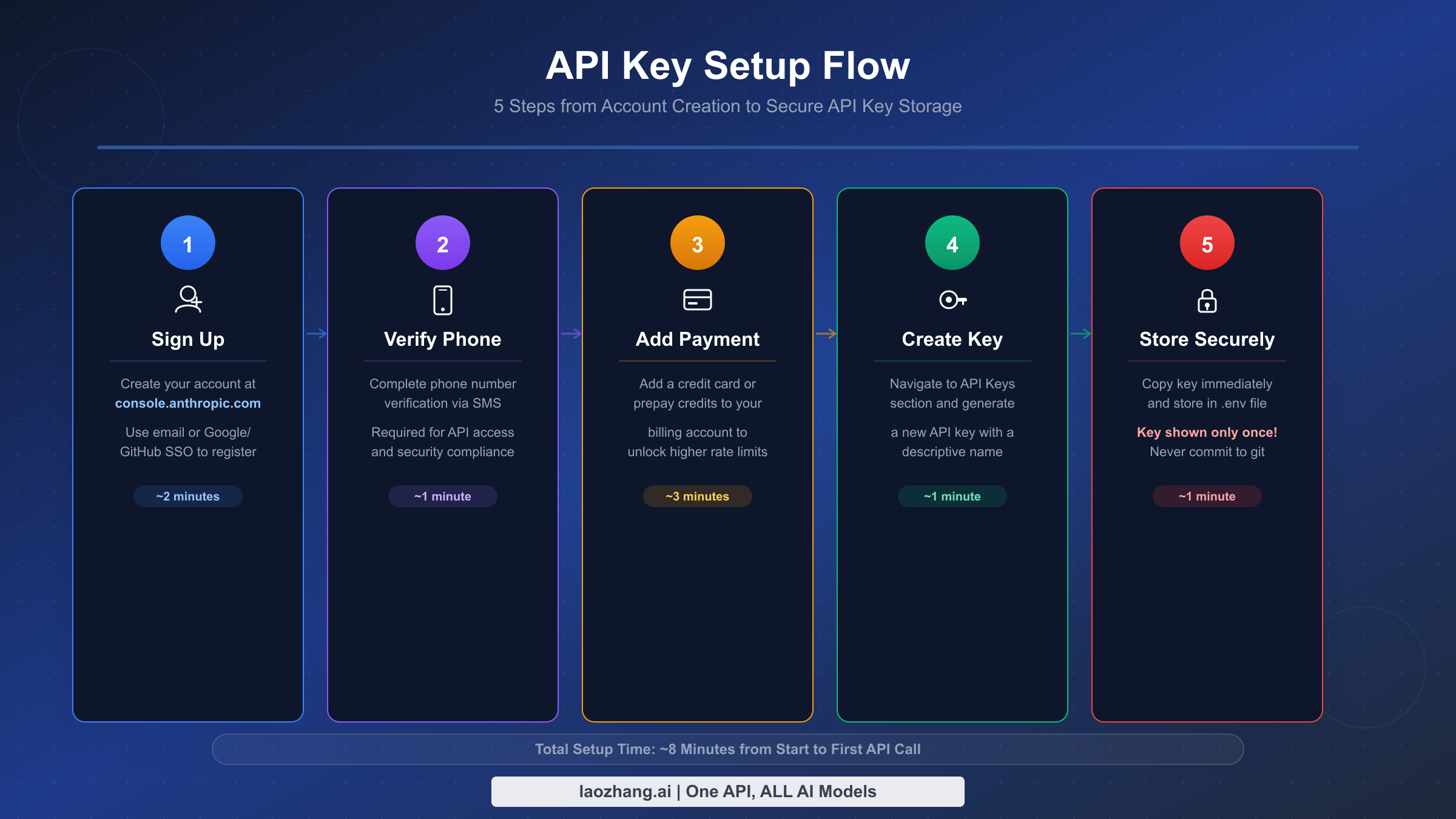
The process of obtaining a Claude Opus 4.6 API key begins at Anthropic's developer console, and while the steps themselves are not complicated, several details deserve careful attention because mistakes at this stage can cause frustrating delays later. The entire process takes about ten minutes if you have a supported phone number and a valid payment method ready, but developers in certain regions or those using virtual phone numbers may encounter friction at the verification step that requires planning ahead.
Navigating to the Console and Creating Your Account is the first concrete action you need to take. Open your browser and go to console.anthropic.com, then click the sign-up button. You can register with an email address and password, or authenticate through Google. The email-and-password path requires you to verify your email address through a confirmation link sent to your inbox, which typically arrives within a few seconds. If you choose Google authentication, the process is faster because your email is pre-verified. Regardless of the method you choose, the account you create here is entirely separate from any Claude.ai consumer subscription you may have. A Claude Pro or Team subscription does not grant API access, and your API account does not include the features of the consumer product. This distinction trips up many developers who assume their existing Claude login will work for API calls, so it is worth emphasizing: these are two independent systems with separate billing, separate usage tracking, and separate authentication credentials. If you already have experience with the consumer product and want to learn more about getting your API key specifically, you can refer to our comprehensive Claude API key guide for additional context on the differences between these two access paths.
Completing Phone Verification is the second step, and it is where some developers encounter their first obstacle. Anthropic requires SMS-based phone verification to prevent abuse and bot-driven account creation. You will need to provide a phone number that can receive SMS messages, and Anthropic will send a six-digit verification code that you must enter on the console page. The critical detail here is that Voice over IP (VoIP) numbers are rejected by the verification system. Services like Google Voice, Skype numbers, and many virtual phone number providers will fail verification with an unhelpful error message. If you are located in a country where Anthropic's SMS delivery is unreliable, or if you only have access to a VoIP number, you may need to obtain a physical SIM card or ask a colleague with a supported number to help with the initial verification. Each phone number can be associated with a limited number of accounts, so this is not a step you can bypass through repeated attempts with the same number.
Adding a Payment Method and Understanding Free Credits is the third step that establishes your billing relationship with Anthropic. Navigate to the Billing section of the console and add a credit card. Anthropic requires a minimum initial deposit of $5, which is automatically applied as a prepaid credit balance. The good news is that new accounts also receive $5 in complimentary free credits (Anthropic official documentation, 2026-02-08), so your initial $5 deposit effectively gives you $10 of total spending capacity. For Claude Opus 4.6 at $5 per million input tokens and $25 per million output tokens, those ten dollars translate to roughly 400,000 output tokens or 2,000,000 input tokens worth of experimentation, which is more than enough to build and test a proof of concept. The billing system is prepaid, meaning you spend down your credit balance and then add more funds as needed. You can also configure auto-recharge to avoid interruptions when your balance runs low.
Generating Your API Key is the step that produces the credential you will use in every API call going forward. Navigate to the API Keys section in the left sidebar of the console, then click the "Create Key" button. You will be prompted to give the key a descriptive name, such as "development-local" or "prod-backend-v1", and to assign it to a workspace if your organization uses multiple workspaces for project isolation. Choose a name that will make sense three months from now when you are reviewing your active keys and trying to determine which one powers which application. Once you confirm creation, the console displays the full key string exactly once. The key follows the format sk-ant-api03- followed by a long alphanumeric string. Copy it immediately and store it in a secure location such as a password manager. If you navigate away from this page or close the dialog before copying the key, there is no way to retrieve it. You would need to revoke the lost key and generate a new one, which means updating every application that referenced the old key.
Verifying Your Key Works is the final sanity check before you move on to integration. The simplest verification is a cURL command from your terminal that sends a minimal request to the Messages API endpoint. If you receive a valid JSON response containing a message from Claude, your key is active, your billing is configured correctly, and you are ready to begin building. If you receive an authentication error, double-check that you copied the key completely, including the sk-ant-api03- prefix, and that your account's billing status is active with a positive credit balance.
Your First API Call with Python, Node.js, and cURL
Making your first successful API call to Claude Opus 4.6 is a milestone worth celebrating, and the process has been streamlined considerably through Anthropic's official SDKs for Python and Node.js, as well as direct HTTP access via cURL for environments where an SDK is impractical. Each approach produces identical results because they all communicate with the same Messages API endpoint, but the SDKs provide significant quality-of-life improvements including automatic retry logic, type-safe response objects, and simplified authentication that reads your API key from an environment variable without you needing to write header-management code. The choice between Python and Node.js typically comes down to your existing technology stack and team preferences, while cURL is most useful for quick ad-hoc testing and debugging.
Setting Up the Python SDK and Making Your First Call requires Python 3.8 or later and a single pip install command. Run pip install anthropic in your terminal or virtual environment, then set your API key as an environment variable with export ANTHROPIC_API_KEY=sk-ant-api03-your-key-here on macOS and Linux, or set ANTHROPIC_API_KEY=sk-ant-api03-your-key-here on Windows. With those two steps complete, the following code will send a message to Claude Opus 4.6 and print the response:
pythonimport anthropic

client = anthropic.Anthropic()  # Uses ANTHROPIC_API_KEY env var

message = client.messages.create(
    model="claude-opus-4-6",
    max_tokens=1024,
    messages=[
        {"role": "user", "content": "Explain quantum computing in one paragraph."}
    ]
)

print(message.content[0].text)
The Anthropic() constructor automatically reads the ANTHROPIC_API_KEY environment variable, so you do not need to pass the key as a parameter. The model parameter specifies claude-opus-4-6, which is the model identifier string for Opus 4.6, and max_tokens sets an upper bound on the length of the response. The messages array follows the conversation format where each message has a role (either "user" or "assistant") and a content string. When this code runs successfully, it prints Claude's explanation of quantum computing directly to the console, confirming that your API key, SDK installation, and network connectivity are all working correctly.
Using the Node.js SDK follows a nearly identical pattern. Install the package with npm install @anthropic-ai/sdk, ensure your ANTHROPIC_API_KEY environment variable is set, and run the following code:
javascriptimport Anthropic from '@anthropic-ai/sdk';

const client = new Anthropic();  // Uses ANTHROPIC_API_KEY env var

const message = await client.messages.create({
    model: "claude-opus-4-6",
    max_tokens: 1024,
    messages: [
        { role: "user", content: "Explain quantum computing in one paragraph." }
    ]
});

console.log(message.content[0].text);
The Node.js SDK uses ESM imports by default, so ensure your project's package.json includes "type": "module" or that you are using a .mjs file extension. The response object structure mirrors what you get from the Python SDK, with message.content being an array of content blocks, the first of which contains the text response in its text property. Both SDKs handle HTTP connection management, request serialization, and response deserialization transparently, letting you focus on the logic of your application rather than the plumbing of HTTP communication.
Making a Direct cURL Request is the most transparent way to interact with the API because you can see every header and every byte of the request body. This approach is particularly valuable when debugging SDK issues or when integrating from a language that does not have an official SDK:
bashcurl https://api.anthropic.com/v1/messages \
  -H "content-type: application/json" \
  -H "x-api-key: $ANTHROPIC_API_KEY" \
  -H "anthropic-version: 2023-06-01" \
  -d '{
    "model": "claude-opus-4-6",
    "max_tokens": 1024,
    "messages": [
      {"role": "user", "content": "Explain quantum computing in one paragraph."}
    ]
  }'
The response from this call is a JSON object with several important fields. The id field is a unique message identifier you can use for logging and debugging. The type field will be "message", the role will be "assistant", and the content array contains the response text blocks. The model field confirms which model processed your request, and the usage object breaks down your token consumption into input_tokens and output_tokens, which directly maps to your billing. Monitoring these usage fields from your very first call helps you build intuition about token costs before you scale to production volumes. For a deeper understanding of how those token counts affect budget planning, compare them against Anthropic's official pricing tables and your own workload profile.
SDK Integration for Production Applications
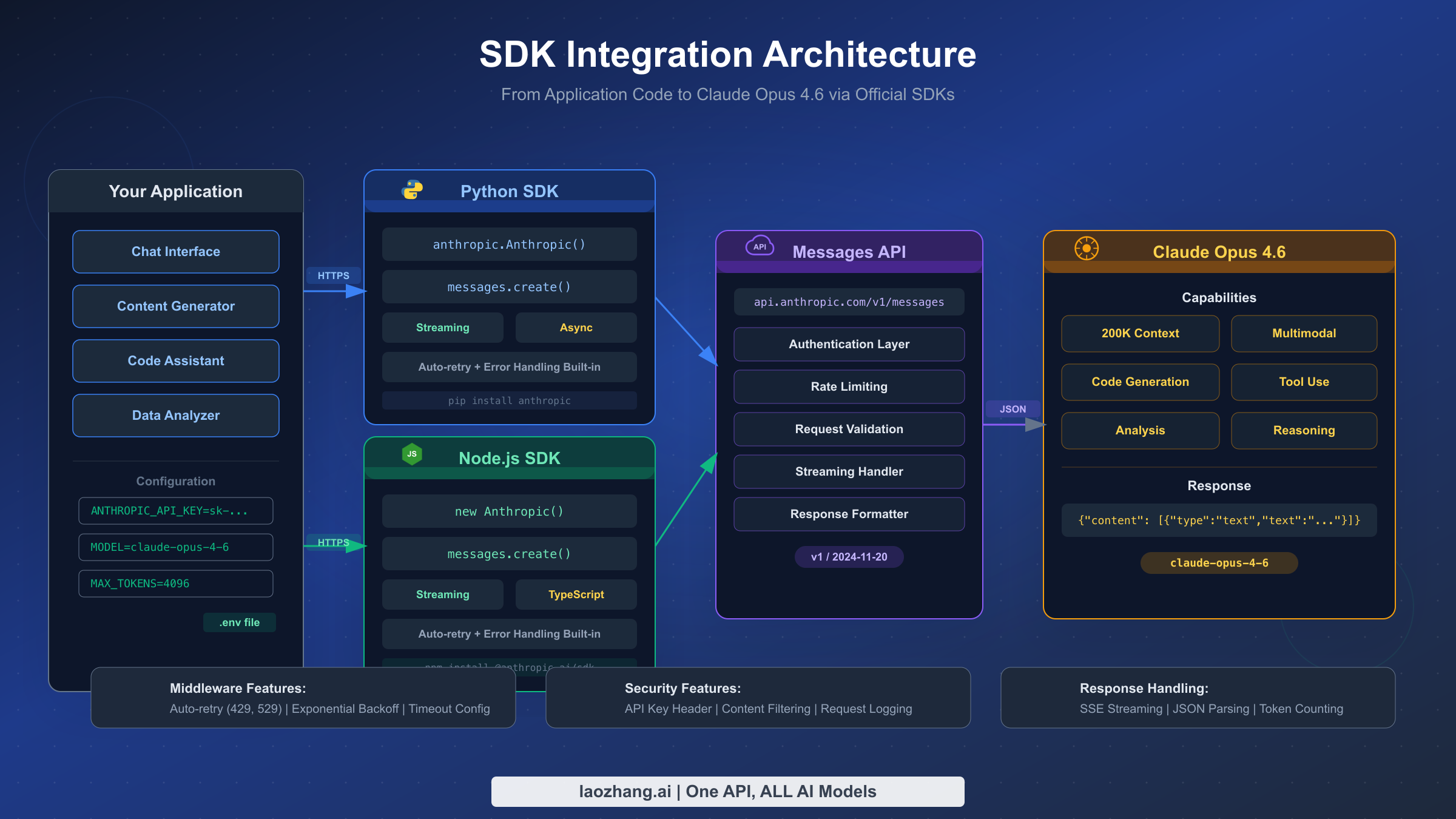
Moving from a simple test script to a production-grade integration requires adopting several patterns that the basic "hello world" example does not cover. Production applications need to handle streaming responses for real-time user interfaces, manage multi-turn conversation state across requests, integrate tool use for applications that need Claude to interact with external systems, and run asynchronous operations to avoid blocking your application's event loop. Each of these capabilities is well-supported by the official SDKs, but the implementation patterns differ enough from the basic example that they warrant dedicated attention and complete code examples.
Streaming Responses for Real-Time Output is essential for any application where users are waiting for Claude's response in a chat interface, a document editor, or any other interactive context. Without streaming, your application would need to wait for the entire response to be generated before displaying anything, which creates an uncomfortable delay that can last tens of seconds for complex Opus 4.6 outputs. With streaming enabled, your application receives and displays tokens as they are generated, creating the familiar "typing" effect that modern AI chat interfaces have trained users to expect. The Python SDK provides an elegant context-manager-based streaming interface that handles connection lifecycle automatically:
pythonwith client.messages.stream(
    model="claude-opus-4-6",
    max_tokens=1024,
    messages=[{"role": "user", "content": "Write a short story."}]
) as stream:
    for text in stream.text_stream:
        print(text, end="", flush=True)
The stream context manager opens a server-sent events (SSE) connection to the API, and the text_stream iterator yields individual text chunks as they arrive. The flush=True parameter in the print statement ensures each chunk appears immediately in the terminal rather than being buffered. In a web application, you would typically forward these chunks through a WebSocket connection or an SSE endpoint to the client's browser. The stream also provides access to the final message object after iteration completes, so you can extract the total token usage for billing tracking. One critical implementation detail is that network timeouts need to be configured more generously for streaming requests than for standard requests, because the connection remains open for the entire duration of response generation, which can be substantial for long outputs from Opus 4.6.
Managing Multi-Turn Conversations requires maintaining a history of all previous messages and passing that history with each new request. The Messages API is stateless, meaning Anthropic does not store your conversation history on their servers. Every request must include the complete conversation context that you want Claude to consider. This design gives you full control over conversation management but requires disciplined state handling in your application layer. The pattern is straightforward: maintain an array of message objects, append each user message before sending, and append the assistant's response after receiving it:
pythonconversation = []

def chat(user_message):
    conversation.append({"role": "user", "content": user_message})

    response = client.messages.create(
        model="claude-opus-4-6",
        max_tokens=4096,
        system="You are a helpful programming assistant.",
        messages=conversation
    )

    assistant_message = response.content[0].text
    conversation.append({"role": "assistant", "content": assistant_message})
    return assistant_message
As conversations grow longer, the accumulated token count for the message history increases with each turn, which directly impacts both latency and cost. A conversation with 20 turns might accumulate 10,000 or more input tokens from history alone, even before the user's latest message is counted. Production systems typically implement conversation summarization or sliding window strategies to keep the context within a manageable size, particularly important when the cumulative history threatens to approach Opus 4.6's context window limits.
Integrating Tool Use (Function Calling) enables Claude to request information from external systems or trigger actions in your application. You define a set of tools with JSON Schema descriptions of their parameters, and Claude can choose to invoke one or more of them during a response. Your application then executes the tool, returns the result, and Claude incorporates that information into its final answer. This pattern is the foundation of agentic applications where Claude acts as an orchestrator that can query databases, call APIs, search documents, or perform calculations. The implementation requires a request-response loop: send a message, check if the response contains tool_use blocks, execute the requested tools, send the tool results back, and repeat until Claude produces a final text response without tool requests. The official SDK documentation provides comprehensive examples of this pattern for both Python and Node.js.
Running Asynchronous Operations prevents your application from blocking while waiting for API responses, which is critical for server applications that handle multiple concurrent users. The Python SDK provides an AsyncAnthropic client that returns awaitable coroutines compatible with asyncio:
pythonimport asyncio
import anthropic

async def analyze_document(document_text):
    client = anthropic.AsyncAnthropic()

    message = await client.messages.create(
        model="claude-opus-4-6",
        max_tokens=2048,
        messages=[{
            "role": "user",
            "content": f"Analyze this document:\n\n{document_text}"
        }]
    )
    return message.content[0].text


async def main():
    documents = ["doc1 text...", "doc2 text...", "doc3 text..."]
    results = await asyncio.gather(
        *[analyze_document(doc) for doc in documents]
    )
    return results
Using asyncio.gather allows you to dispatch multiple API calls concurrently and collect all results together, which is dramatically faster than making the same calls sequentially. Be mindful of your rate limits when doing this, as each concurrent call counts against your requests-per-minute quota. The Node.js SDK is inherently asynchronous since it returns Promises, so the same concurrency pattern is achieved through Promise.all() without needing a separate async client class.
API Key Security from Development to Production
Securing your Claude Opus 4.6 API key is not an optional best practice that you can defer until later. A leaked key can result in unauthorized usage that drains your credit balance within minutes, and because the API is billed on a consumption basis with no inherent spending ceiling unless you configure one, the financial exposure from a compromised key can be significant. Beyond the direct financial risk, a leaked key could be used to generate harmful content that is attributed to your account, creating legal and reputational complications that extend far beyond the immediate cost. Treating your API key with the same care you would give a database password or a payment processing credential is the appropriate security posture from day one.
Environment Variable Management is the foundational practice that keeps your API key out of source code, configuration files, and version control history. Create a .env file in your project root containing your key, and use a library like python-dotenv for Python or dotenv for Node.js to load it into your application's environment at startup:
bash# .env file
ANTHROPIC_API_KEY=sk-ant-api03-your-key-here

# .gitignore (add this BEFORE your first commit)
.env
.env.*
.env.local
The critical step that many developers miss is adding .env to .gitignore before their first commit. If the .env file is committed even once and later removed, the key remains in the Git history and can be extracted by anyone with access to the repository. Both the Python and Node.js Anthropic SDKs are designed to read the ANTHROPIC_API_KEY environment variable automatically, so once you load the .env file into the process environment, the SDK constructor needs no explicit key parameter. This convention eliminates the temptation to hardcode the key directly in your source files, which is the single most common security mistake developers make with API credentials. For team environments, consider using a shared secrets manager rather than distributing .env files through insecure channels like email or Slack.
Implementing a Key Rotation Strategy reduces the risk window if a key is compromised without your knowledge. Establish a policy of rotating your API keys at least every 90 days, and follow a specific sequence to avoid downtime: first, create a new key in the Anthropic console and give it a name that includes the rotation date for easy tracking. Then update the key in all environments where it is used, starting with development, then staging, and finally production. Verify that each environment works correctly with the new key. Only after confirming that the old key is no longer referenced anywhere should you revoke it through the console. This create-update-verify-revoke sequence ensures that there is never a moment when your application is using a revoked key, which would cause immediate authentication failures for all API calls. For organizations with automated deployment pipelines, key rotation can be scripted through the Anthropic Admin API, which allows programmatic key management without manual console interaction.
Maintaining Separate Keys for Each Environment is an organizational practice that limits the blast radius of any single key compromise and provides clearer audit trails for usage tracking. Create distinct API keys for your local development machine, your staging or QA environment, and your production deployment, assigning each to a different workspace if your Anthropic organization supports workspace-level access controls. This separation means that a developer accidentally exposing their local development key in a public repository does not compromise production access. It also allows you to set different spending limits per workspace, ensuring that a runaway development script cannot consume your production budget. Name each key clearly, such as "prod-api-server-feb-2026" or "dev-local-jsmith", so that the console's key management page provides an immediate visual inventory of what is deployed where.
Preparing a Leaked Key Response Plan before you need it ensures that your team can act quickly when a security incident occurs. The moment you suspect or confirm that a key has been exposed, whether through a GitHub secret scanning alert, a notification from Anthropic's automated detection system, or your own monitoring, you should immediately revoke the compromised key through the console. Then generate a new key and deploy it to all affected systems. Next, review the usage logs in the console for the period between the suspected exposure and revocation to quantify any unauthorized usage and identify the nature of the requests made with the compromised key. Finally, investigate how the leak occurred and implement controls to prevent recurrence, such as additional pre-commit hooks, repository scanning automation, or stricter access controls on secret storage systems.
Deploying to Production with Cloud Secret Managers provides the strongest security posture for API keys in cloud-hosted applications. AWS Secrets Manager, Google Cloud Secret Manager, and Azure Key Vault all offer encrypted storage with fine-grained access control, automatic rotation capabilities, and comprehensive audit logging. Instead of setting environment variables directly on your compute instances, your application retrieves the key from the secrets manager at startup, and IAM policies control which service accounts are authorized to access the secret. This architecture means the key never exists on disk in plaintext and is never visible in deployment configuration files, container definitions, or orchestration templates. The small additional latency of a secrets manager lookup at application startup is negligible compared to the security benefit.
Automating Repository Scanning catches accidental key commits before they reach remote repositories. Install Gitleaks or a similar tool as a pre-commit hook that scans every commit for patterns matching API key formats. Anthropic participates in GitHub's secret scanning partnership program, which means GitHub automatically scans public repositories for Anthropic API key patterns and notifies both the repository owner and Anthropic when a key is found. However, relying solely on GitHub's scanning is reactive rather than proactive, and it only covers public repositories. Running your own pre-commit scanning catches mistakes before they leave your local machine, which is far better than discovering the problem after the key has been pushed to a shared or public repository.
Understanding Rate Limits and Handling Errors
Rate limits are the guardrails that Anthropic places on API usage to ensure fair access across all customers and to protect the infrastructure from traffic spikes that could degrade service quality. Understanding how these limits work, which tier your account falls into, and how to write code that gracefully handles limit-related errors is essential for building reliable production applications. The most common mistake developers make with rate limits is treating them as an afterthought, bolting on error handling only after their application starts failing in production. Instead, rate limit awareness should be designed into your application architecture from the start, because the difference between a well-behaved client and a poorly-behaved one determines whether your application delivers a smooth user experience or one punctuated by unexplained failures and long pauses.
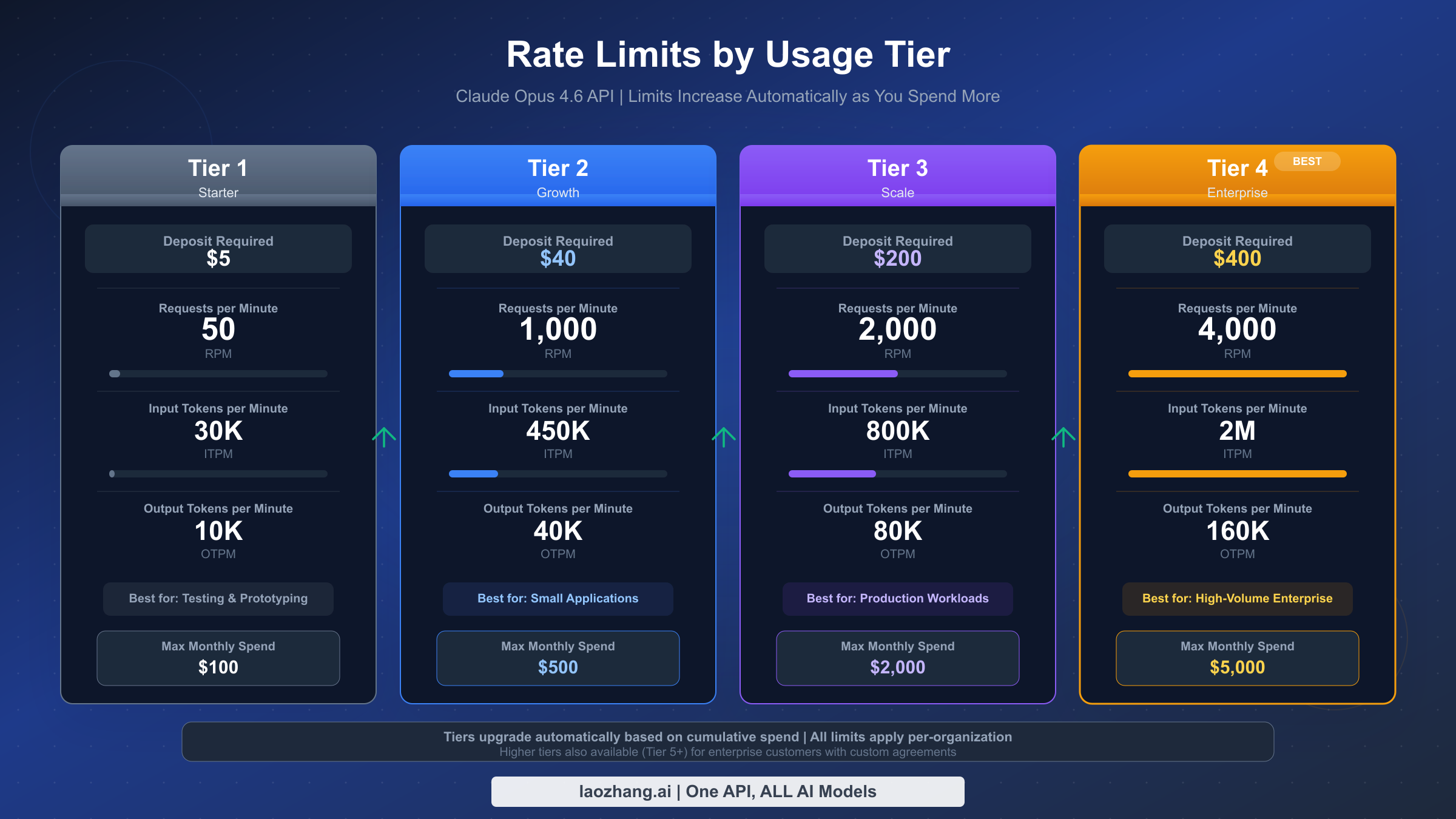
Understanding the Rate Limit Tier System is the starting point for capacity planning. Anthropic organizes API access into four tiers, each with progressively higher limits that unlock as you increase your deposit or spending history with the platform. The following table shows the Opus 4.6-specific limits for each tier (Anthropic official documentation, 2026-02-08):
| Tier | Required Deposit | Requests per Minute | Input Tokens per Minute | Output Tokens per Minute |
|---|---|---|---|---|
| Tier 1 | $5 | 50 | 30,000 | 8,000 |
| Tier 2 | $40 | 1,000 | 450,000 | 90,000 |
| Tier 3 | $200 | 2,000 | 800,000 | 160,000 |
| Tier 4 | $400 | 4,000 | 2,000,000 | 400,000 |
New accounts start at Tier 1 after making the $5 minimum deposit. Moving to a higher tier requires meeting the cumulative deposit threshold for that tier. The jump from Tier 1 to Tier 2 is the most dramatic in terms of capability, increasing your request limit by 20x from 50 to 1,000 RPM and your input token capacity by 15x from 30,000 to 450,000 ITPM. If your application serves more than a few concurrent users, you will almost certainly need Tier 2 or higher. For a deeper analysis of how these tiers affect different usage patterns, see our complete rate limits and tier guide.
How the Token Bucket Algorithm Works determines the actual moment-to-moment availability of your rate limit capacity. Rather than using a simple counter that resets at fixed intervals, Anthropic uses a token bucket algorithm where capacity replenishes continuously. Imagine a bucket that holds your tier's maximum capacity (for example, 1,000 requests for Tier 2) and has a steady stream filling it up at a rate calibrated to your per-minute limit. When you make a request, one "token" is removed from the bucket. If the bucket is full, excess replenishment is wasted. If the bucket is empty, your request receives a 429 rate limit error. The practical implication is that short bursts of traffic above your per-minute rate are allowed as long as you have accumulated capacity in the bucket from periods of lower usage. Conversely, if you sustain maximum throughput for an extended period, you will consume your bucket's reserve and then be limited to exactly your per-minute rate. This burst-friendly behavior means that many applications with variable traffic patterns operate comfortably within their tier limits even during peak moments, because the quiet periods between peaks refill the bucket.
Implementing Exponential Backoff with Retry Logic transforms rate limit errors from application-crashing exceptions into gracefully-handled delays that are largely invisible to your end users. The strategy is simple in concept: when you receive a 429 error, wait a short time and try again, doubling the wait period with each consecutive failure until you reach a maximum wait time. The following Python implementation demonstrates a robust retry pattern that handles both rate limit errors and transient server errors:
pythonimport time
import anthropic

def call_with_retry(client, max_retries=5, **kwargs):
    for attempt in range(max_retries):
        try:
            return client.messages.create(**kwargs)
        except anthropic.RateLimitError as e:
            if attempt == max_retries - 1:
                raise
            wait_time = min(2 ** attempt, 60)
            retry_after = e.response.headers.get("retry-after")
            if retry_after:
                wait_time = int(retry_after)
            time.sleep(wait_time)
        except anthropic.APIStatusError as e:
            if e.status_code >= 500:
                time.sleep(2 ** attempt)
                continue
            raise
This function checks for the retry-after header that Anthropic includes in rate limit responses, which tells you exactly how many seconds to wait before the server will accept your next request. Using this header value when available is more efficient than a blind exponential backoff because it avoids both retrying too soon (wasting a request) and waiting too long (adding unnecessary latency). The function also handles 500-series server errors with a simpler retry strategy, since these transient infrastructure errors are rare but do occur and are almost always resolved within seconds. For applications experiencing persistent 429 errors, refer to our dedicated guide on fixing 429 rate limit errors for more advanced strategies including request queuing and load shedding.
Understanding Cache-Aware Rate Limits is an important nuance that affects how you plan your throughput capacity. When you use prompt caching, the input tokens that are served from cache do not count against your input tokens per minute (ITPM) limit. Only the uncached, freshly-processed input tokens consume your ITPM quota. This means that applications with high cache hit rates effectively have a much higher input throughput capacity than their nominal tier suggests. For example, a Tier 2 account with a 90 percent cache hit rate on a 10,000-token prompt is only consuming 1,000 uncached input tokens per request against its 450,000 ITPM limit, rather than the full 10,000. This cache-aware behavior creates a strong incentive to design your prompt architecture around caching, because it simultaneously reduces your cost per request and increases the effective number of requests you can make per minute. The output token limits are not affected by caching since output tokens are always freshly generated.
Cost Optimization Strategies for API Integration
Claude Opus 4.6 delivers the highest reasoning quality in the Claude model family, but at $5 per million input tokens and $25 per million output tokens (Anthropic official documentation, 2026-02-08), it is also the most expensive tier. Building a cost-efficient integration does not mean avoiding Opus 4.6 entirely. Rather, it means using the right model for each task, leveraging caching and batching features to reduce per-request costs, and monitoring your spending closely so you can identify optimization opportunities before they become budget problems. The most successful production deployments typically route requests to different models based on task complexity, reserve prompt caching for high-frequency system prompts, and use the Batch API for any workload that does not require real-time responses.
Choosing the Right Model for Each Task is the single most impactful cost optimization available to you because the price difference between model tiers is substantial. Claude Opus 4.6 at $5/$25 per million tokens for input and output respectively is five times more expensive than Claude Haiku 4.5 at $1/$5 per million tokens on both dimensions. Claude Sonnet 4.5 sits in the middle at $3/$15 per million tokens. For many common tasks, including text summarization, simple question answering, classification, and data extraction, Haiku or Sonnet deliver results that are functionally indistinguishable from Opus at a fraction of the cost. Reserve Opus 4.6 for tasks that genuinely require its superior reasoning: complex multi-step analysis, nuanced creative writing, advanced code generation with architectural reasoning, and problems that require synthesizing information across very long contexts. A routing layer that classifies incoming requests by complexity and directs them to the appropriate model can reduce your average per-request cost by 60 to 80 percent compared to sending everything to Opus. For a comprehensive breakdown of all model pricing, see our detailed Claude API pricing breakdown.
The following table illustrates how combining optimization strategies compounds your savings:
| Strategy | Standard Cost | Optimized Cost | Savings |
|---|---|---|---|
| Opus 4.6 Standard | $5 / $25 MTok | -- | Baseline |
| Prompt Caching | $5 input | $0.50 cache read | Up to 90% on input |
| Batch API | $5 / $25 | $2.50 / $12.50 | 50% across the board |
| Cache + Batch combined | $5 / $25 | ~$0.25 / $12.50 | Up to 95% on input |
(Anthropic official documentation, 2026-02-08)
Implementing Prompt Caching for Repeated System Prompts targets the most common source of wasted input tokens: sending the same lengthy system prompt or document context with every request. When you mark a portion of your input with a cache breakpoint, Anthropic stores that content and serves it from cache on subsequent requests that include the same content in the same position. The cache read cost is just $0.50 per million tokens, compared to the standard $5 per million tokens for Opus 4.6 input processing, representing a 90 percent reduction. This is particularly powerful for applications that embed a long system prompt, a reference document, or a few-shot example set at the beginning of every request. A chatbot with a 4,000-token system prompt making 1,000 requests per day would spend $0.02 per day on cached reads versus $0.20 on uncached input for just the system prompt portion, saving $5.40 per month on that single component. The cache has a minimum lifetime of five minutes and is refreshed each time it is hit, so applications with sustained traffic maintain their cache effectively. Learn the implementation details in our prompt caching implementation guide.
Using the Batch API for Non-Time-Critical Workloads provides a straightforward 50 percent cost reduction with no code changes beyond switching to the batch submission endpoint. The Batch API accepts a file containing multiple message requests, processes them asynchronously (typically within a few hours, though Anthropic guarantees completion within 24 hours), and returns all results in a single downloadable output file. This is ideal for use cases like nightly document processing, bulk classification, content generation pipelines, evaluation and testing suites, and any other workload where the response is not needed in real time. At the batch pricing of $2.50 per million input tokens and $12.50 per million output tokens for Opus 4.6, the cost savings are automatic and require no changes to your prompt engineering or output handling logic. The only tradeoff is latency: you submit a batch and poll for completion rather than receiving an immediate response. For workloads that can tolerate this delay, the Batch API should be your default.
Setting Up Spend Monitoring and Alerts prevents budget overruns and gives you visibility into your cost trajectory before it becomes a problem. The Anthropic console's Usage page shows your daily and monthly spending broken down by model, and you can configure spending limits at the workspace level to create a hard ceiling on consumption. Set your spending limit to slightly above your expected monthly budget, and configure email alerts at 50 percent, 75 percent, and 90 percent of that limit so your team has advance warning before the cap is reached. In your application code, log the usage object from every API response, which includes the exact input_tokens and output_tokens counts, and aggregate these in your monitoring system to track cost trends at the application level rather than relying solely on the console's account-level view. This application-level tracking helps you identify which features, users, or endpoints are driving the most cost, enabling targeted optimization.
Keeping Access Official by Default is the safer recommendation for an API key guide. If your article is teaching developers how to obtain, secure, and rotate a Claude API key, the cleanest path is to keep that workflow anchored to Anthropic's own console, billing settings, and SDKs. Multi-provider routing can be a valid architecture topic in a separate article, but it should not be the default recommendation inside an API key setup guide.
Frequently Asked Questions
Is the Claude API free to use? The Claude API is not entirely free, but Anthropic provides meaningful free credits to help new developers get started without financial commitment. When you create a new Anthropic API account and add a payment method with the minimum $5 deposit, your account is credited with $5 in complimentary usage credits (Anthropic official documentation, 2026-02-08). Combined with your deposit, this gives you $10 of total spending capacity. At Claude Opus 4.6 pricing of $5 per million input tokens and $25 per million output tokens, those ten dollars are sufficient for substantial experimentation, enough to send hundreds of moderately-sized requests and thoroughly evaluate the model's capabilities for your use case. After the free credits are exhausted, the API operates on a prepaid pay-as-you-go basis where you add funds to your account and spend them down through usage. There is no monthly subscription or minimum recurring fee for API access, so you only pay for what you actually consume.
What format does a Claude API key use? Claude API keys follow a distinctive format that begins with the prefix sk-ant-api03- followed by a long string of alphanumeric characters. The total length of the key is typically around 100 characters. This prefix structure serves multiple purposes: the sk- convention indicates it is a secret key that should never be shared publicly, ant identifies Anthropic as the issuer, api03 indicates the key generation version, and the remaining characters are a unique cryptographic identifier tied to your specific account and workspace. This well-defined format is what enables tools like Gitleaks and GitHub's secret scanning to detect accidentally committed keys with high accuracy and low false positive rates. If you are building input validation for a settings page that accepts API keys, you can check for the sk-ant-api03- prefix as a basic format validation, though you should always verify the key against the actual API to confirm it is active and authorized.
Can I use my Claude.ai login for the API? No, the Claude.ai consumer product and the Claude API are separate systems with entirely independent authentication. Your Claude.ai account, whether you are on the free tier, Claude Pro, or Claude Team, does not provide API access and its credentials will not authenticate against the API endpoint. Conversely, having an API account does not grant you access to Claude.ai's chat interface features. This separation exists because the two products serve different audiences with different needs: Claude.ai is a consumer-facing conversational product with its own subscription model, while the API is a developer infrastructure service with consumption-based pricing. You can create both types of accounts using the same email address, but they will have separate passwords (or OAuth sessions), separate billing configurations, and separate usage tracking.
How do I check my current rate limit tier? Your current rate limit tier is displayed in the Anthropic console under Settings, then on the Limits page. This page shows your tier number, the associated rate limits for each model, and the deposit or spending threshold required to advance to the next tier. You can also determine your effective limits programmatically by inspecting the response headers that Anthropic includes with every API response. The headers anthropic-ratelimit-requests-limit, anthropic-ratelimit-requests-remaining, and anthropic-ratelimit-requests-reset tell you your request-per-minute cap, how many requests remain in the current window, and when the window resets, respectively. Similar headers exist for input and output token limits. Monitoring these headers in your application provides real-time visibility into your rate limit consumption without requiring a manual check of the console.
What happens if my API key is leaked? If you discover or suspect that your API key has been exposed, you should act immediately because every minute the key remains active is a minute during which an attacker could be consuming your credits or generating content attributed to your account. The first step is to log into the Anthropic console, navigate to the API Keys page, and revoke the compromised key. This instantly invalidates the key so no further requests can be made with it. Then create a new key, update it in all your deployment environments, and verify that your applications are functioning with the new key. Finally, review the Usage page in the console to check for any unusual spending between the suspected time of exposure and the moment you revoked the key. If you see unauthorized charges, contact Anthropic's support team with the details. As a preventive measure, enable GitHub secret scanning for your repositories and install a pre-commit hook tool like Gitleaks that scans for API key patterns before allowing commits to proceed.
Can I access Claude API through AWS or Google Cloud? Yes, Anthropic has partnered with both Amazon Web Services and Google Cloud to make Claude models available through their respective AI service platforms. On AWS, Claude is accessible through Amazon Bedrock, which means you authenticate using your existing AWS IAM credentials rather than an Anthropic API key, and billing goes through your AWS account. On Google Cloud, Claude is available through Vertex AI with similar integration patterns using Google Cloud credentials and billing. These cloud provider integrations are particularly attractive for organizations that have existing enterprise agreements with AWS or Google Cloud, because the API usage can be consolidated into a single vendor bill and governed by the same access controls and compliance policies that apply to other cloud services. The model identifiers and some request parameters differ slightly between the direct Anthropic API and the cloud provider versions, so consult the cloud-specific documentation for exact integration details.
Is there a cheaper way to access Claude models? Yes, but the lower-risk answer is to optimize within official Anthropic billing. The most impactful levers are Batch API for non-real-time workloads, prompt caching for repeated input, and model selection that reserves Opus for genuinely difficult tasks while routing simpler work to Haiku or Sonnet. In practice, combining model routing, caching, and batch processing can reduce your effective average cost dramatically without changing your official account path.