
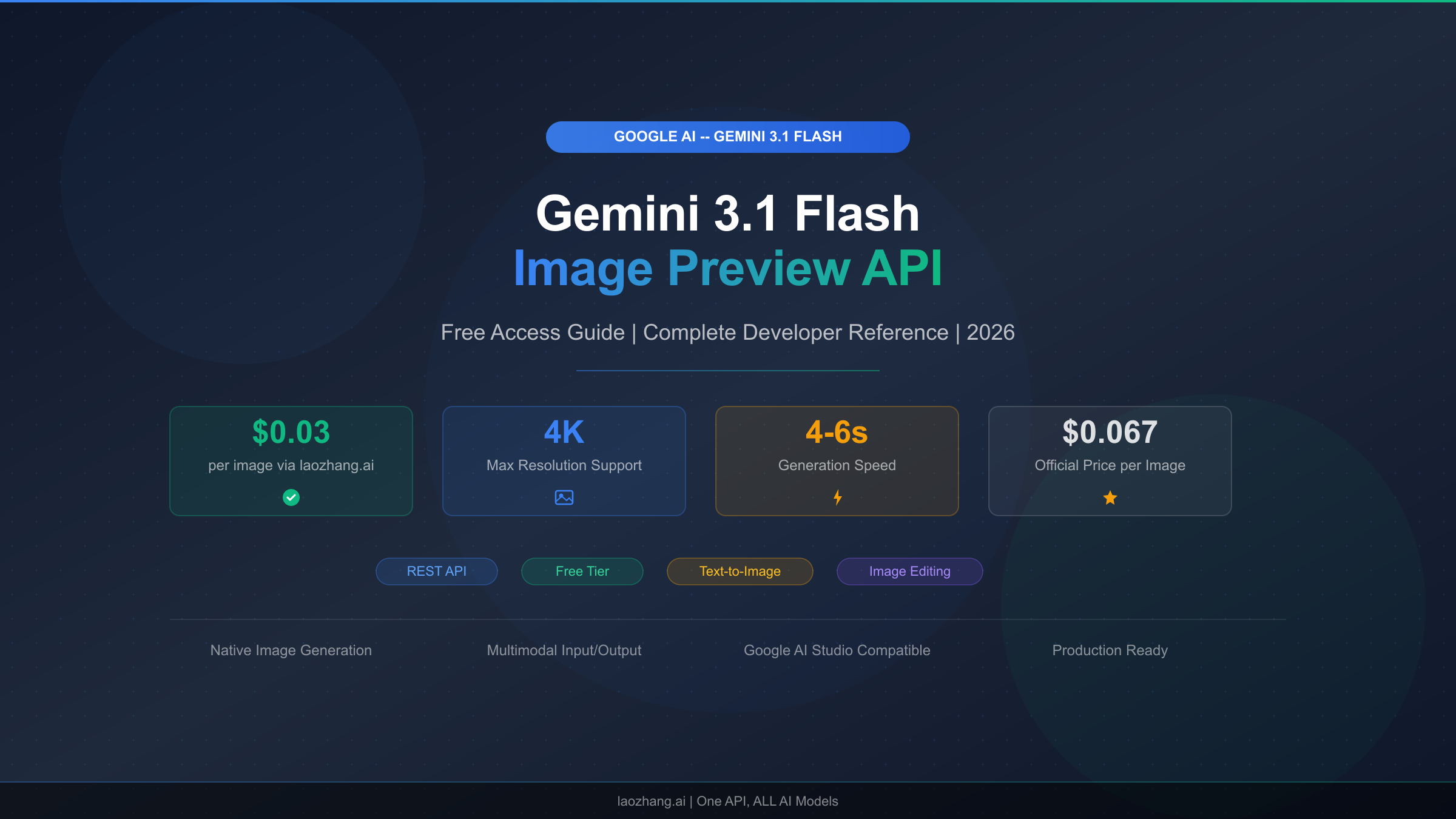
Google's Gemini 3.1 Flash Image Preview—internally codenamed Nano Banana 2—is the latest entrant in Google DeepMind's rapidly expanding family of image generation models, and it has quickly become one of the most sought-after APIs for developers building visual AI applications in 2026. The model generates images from 512px up to stunning 4K resolution at 4096x4096 pixels, with official pricing starting at $0.045 per image for the smallest size and $0.067 per 1K image (Google AI pricing page, verified February 27, 2026). Critically, Google does not currently offer a free tier for this model through the standard API. However, there are four legitimate methods to access Nano Banana 2 without paying a cent, and third-party providers like laozhang.ai offer access for as little as $0.03 per image—55% below official rates. This guide covers everything you need to get started.
What Is Gemini 3.1 Flash Image Preview (Nano Banana 2)?
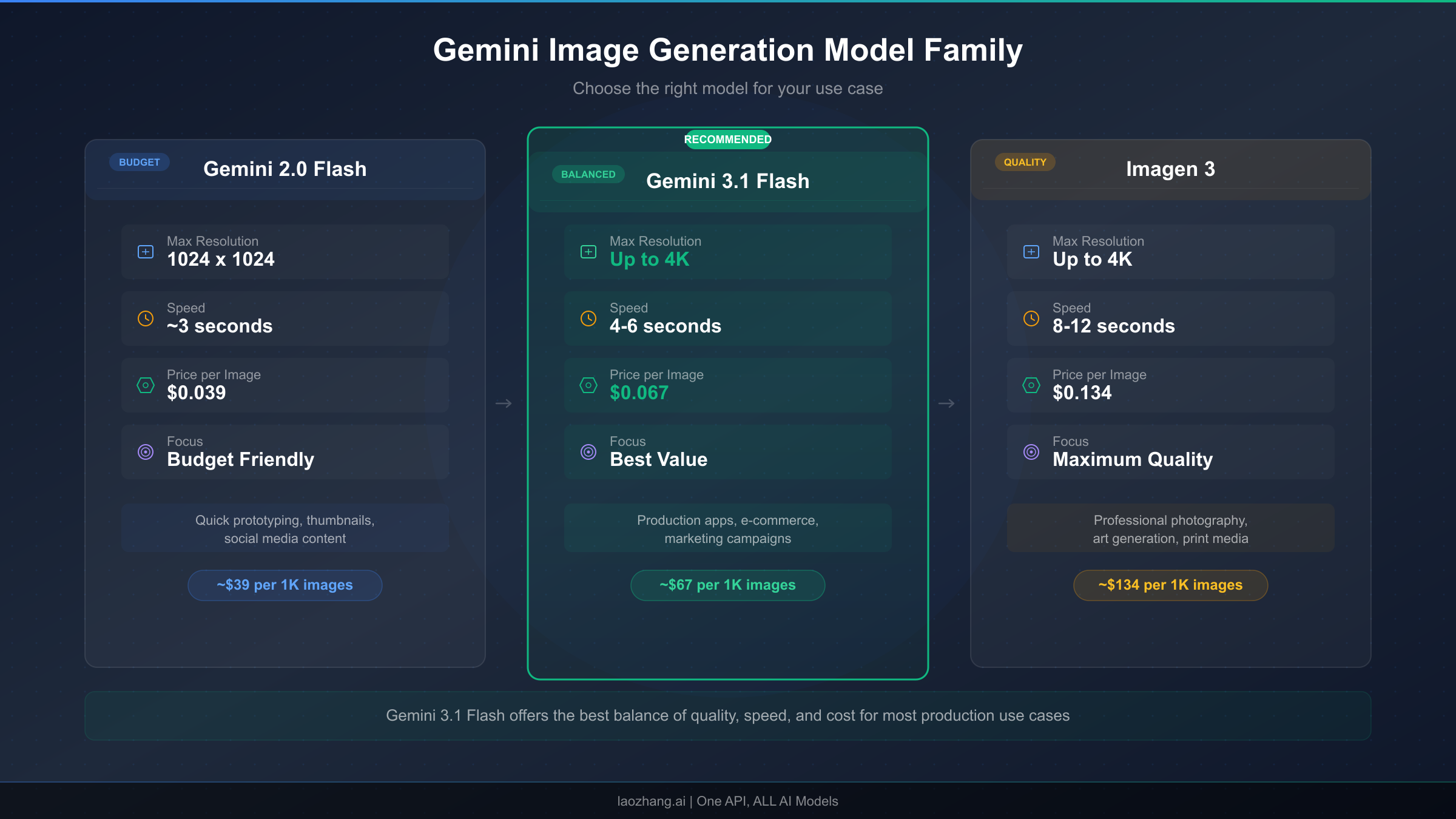
Understanding where gemini-3.1-flash-image-preview fits within Google's AI model ecosystem is essential before diving into pricing and free access strategies. Google DeepMind maintains a family of image generation models under the Gemini brand, each optimized for different use cases along the cost-performance spectrum. The "Flash" designation indicates this model prioritizes speed and cost efficiency over maximum fidelity, making it the ideal workhorse for high-volume image generation tasks where rapid turnaround matters more than pixel-perfect quality at the highest resolutions.
The Nano Banana Model Family Explained
The naming convention "Nano Banana" originated from Google's internal codename system. The first model in the series, Nano Banana (gemini-2.5-flash-image), established the paradigm of fast, affordable AI image generation when it launched as part of the Gemini 2.5 family. It generates 1K images at just $0.039 per image (Google AI pricing page, verified February 27, 2026), making it the cheapest option in Google's lineup for developers who need basic image generation capabilities without premium features. Nano Banana remains a solid choice for prototype development, low-fidelity previews, and applications where cost is the primary constraint and image quality requirements are moderate.
Nano Banana 2 (gemini-3.1-flash-image-preview) represents the second generation, offering substantially improved image quality, native 4K support up to 4096x4096 pixels, better text rendering within images, and more accurate prompt following—all while maintaining the "Flash" speed characteristics that make high-volume generation practical. The "preview" designation indicates this model is still being refined, which means developers should expect periodic updates to behavior and output quality. For a detailed comparison between Nano Banana and Nano Banana Pro, our dedicated analysis covers the nuanced differences across quality, speed, and feature dimensions that matter for production deployment decisions.
Nano Banana Pro (gemini-3-pro-image-preview) sits at the top of the lineup, offering the highest quality output with advanced capabilities like multi-image composition with up to 14 reference images, superior character consistency across generations, and production-grade text rendering. At $0.134 per 1K image (Google AI pricing page, verified February 27, 2026), it costs roughly double what Nano Banana 2 charges, positioning it firmly in the premium segment for commercial applications requiring maximum quality.
| Feature | Nano Banana (2.5 Flash) | Nano Banana 2 (3.1 Flash) | Nano Banana Pro (3 Pro) |
|---|---|---|---|
| Model ID | gemini-2.5-flash-image | gemini-3.1-flash-image-preview | gemini-3-pro-image-preview |
| Max Resolution | 1K (1024x1024) | 4K (4096x4096) | 4K (4096x4096) |
| 1K Price | $0.039/image | $0.067/image | $0.134/image |
| 4K Price | N/A | $0.151/image | $0.240/image |
| Text Rendering | Basic | Good | Excellent |
| Multi-Image Input | Limited | Moderate | Up to 14 images |
| Speed | Fastest | Fast | Moderate |
| Best For | Prototyping, previews | Production at scale | Premium commercial |
The practical implications of choosing Nano Banana 2 over its siblings come down to a straightforward cost-benefit analysis. If you need 4K resolution, Nano Banana cannot deliver at any price, and Nano Banana Pro charges $0.240 per 4K image compared to Nano Banana 2's $0.151—making the Flash variant 37% cheaper for identical resolution output. For the most common 1K resolution, Nano Banana 2 at $0.067 sits neatly between the budget Nano Banana at $0.039 and the premium Nano Banana Pro at $0.134, offering substantially better quality than the former at half the price of the latter.
How to Access Gemini 3.1 Flash Image for Free in 2026
The most common question developers ask about gemini-3.1-flash-image-preview is whether Google offers a free tier. The direct answer is no—unlike some other Gemini models that include limited free usage, the image generation models including Nano Banana 2 require a billing account or paid API access from day one (Google AI pricing page, verified February 27, 2026). This can be frustrating for developers who want to experiment before committing budget, students building learning projects, or small teams evaluating the model's capabilities against competitors like DALL-E 3 or Midjourney's API. Fortunately, there are four legitimate methods to generate images with Nano Banana 2 without spending money, each with different trade-offs in terms of access level, limitations, and sustainability for ongoing use. For a deeper analysis of Gemini image API free tier limitations, our dedicated guide covers the full picture of what is and is not available at zero cost across all Gemini image models.
Method 1: Google AI Studio — Interactive Testing Without API Access
Google AI Studio at aistudio.google.com provides a browser-based interface for testing Gemini models, and it does support image generation with gemini-3.1-flash-image-preview through its interactive chat interface. You can type natural language prompts, adjust parameters like temperature and safety settings, and view generated images directly in the browser. This is the fastest way to evaluate Nano Banana 2's capabilities without writing a single line of code or configuring API credentials. The key limitation is that AI Studio is designed for testing and prototyping, not production use—there is no programmatic API endpoint, no way to batch-generate images, and Google enforces usage limits that vary based on demand and your account status. For developers who simply want to see whether Nano Banana 2 can handle their specific use case before investing in API integration, AI Studio is the ideal starting point. You need only a Google account to begin, and the interface provides helpful features like prompt history, parameter tuning, and side-by-side model comparisons that are genuinely useful for prompt engineering even if you eventually transition to the paid API.
Method 2: Puter.js — Truly Free Image Generation Without API Keys
Puter.js is an open-source JavaScript library that provides free access to several AI models, including gemini-3.1-flash-image-preview, directly from the browser without requiring any API key, billing account, or registration. This sounds too good to be true, but the service operates by aggregating donated compute resources and maintaining partnerships with model providers. The practical result is that you can generate images by including a single script tag in your HTML and calling puter.ai.txt2img() with your prompt. The limitations are real but manageable for many use cases: you are subject to rate limits that vary based on overall service demand, 4K resolution is typically not available through the free tier, and there are no SLA guarantees for uptime or latency. For personal projects, educational experiments, hackathon prototypes, and any scenario where you need zero-cost image generation and can tolerate occasional slowdowns or temporary unavailability, Puter.js is currently the most accessible free option available. The implementation is remarkably simple—a complete working example requires fewer than ten lines of code, which we cover in detail in the Quick Start section below.
Method 3: Google Cloud $300 Free Credits for New Accounts
Google Cloud Platform offers $300 in free credits to new accounts, and these credits are valid for 90 days from activation. Since Gemini API calls through Vertex AI are billed against your Google Cloud account, these free credits can be applied to gemini-3.1-flash-image-preview usage. At the official 1K pricing of $0.067 per image, $300 in credits translates to approximately 4,478 images—enough for substantial prototyping, testing, and even early production use. The setup process requires creating a Google Cloud account, enabling the Vertex AI API, and generating service account credentials, which takes roughly 15-20 minutes for developers familiar with cloud platforms. The important caveat is that you must provide a credit card during signup (Google verifies your identity but does not charge during the free trial), and you should set budget alerts to avoid unexpected charges once the credits expire. This method is particularly valuable for startups and small development teams who need genuine API access with production-grade reliability for a limited evaluation period, as the credits provide access to the full Vertex AI infrastructure including batch processing, monitoring, and enterprise security features.
Method 4: Third-Party Provider Trial Credits
Several third-party API providers that resell Gemini model access offer free trial credits to new users. Among these, laozhang.ai provides a registration bonus that lets you test gemini-3.1-flash-image-preview without immediate payment. The advantage of this approach over Google Cloud credits is that third-party providers typically offer simpler setup (often just an API key rather than full cloud infrastructure configuration), OpenAI-compatible endpoints that integrate seamlessly with existing codebases, and ongoing pricing that is substantially lower than Google's official rates. The trade-off is that you are adding a dependency on a third-party service between your application and Google's infrastructure, which introduces an additional point of failure. For developers who are already considering a third-party provider for cost reasons and want to evaluate reliability and latency before committing, trial credits offer a risk-free entry point.
Official Pricing Breakdown (Verified February 2026)
Getting the pricing right for gemini-3.1-flash-image-preview requires understanding Google's token-based billing model, which is more nuanced than a simple per-image fee. All Gemini image generation models bill based on the number of tokens consumed, where images of different resolutions consume different token counts. The output token rate for image generation is $60.00 per million tokens (Google AI pricing page, verified February 27, 2026), which is significantly higher than text output at $1.50 per million tokens—a reflection of the substantially greater computational resources required to generate pixel data compared to text. Input tokens for your text prompts are billed at $0.25 per million tokens, which is typically negligible in the context of image generation costs.
Resolution-Based Pricing for Nano Banana 2
The following table breaks down the exact cost per image at each supported resolution, calculated from the token consumption rates published on Google's AI pricing page as of February 27, 2026. These prices assume a standard text prompt of moderate length; extremely long prompts would add marginal input token costs, but for practical purposes the per-image output cost dominates the total.
| Resolution | Pixel Dimensions | Output Tokens | Cost Per Image | Monthly Cost (1,000 images) |
|---|---|---|---|---|
| 512px | 512×512 | 747 | $0.045 | $45.00 |
| 1K | 1024×1024 | 1,120 | $0.067 | $67.00 |
| 2K | 2048×2048 | 1,680 | $0.101 | $101.00 |
| 4K | 4096×4096 | 2,520 | $0.151 | $151.00 |
These prices position Nano Banana 2 as the most cost-effective path to 4K AI-generated images in Google's lineup. For comparison, the premium Nano Banana Pro API pricing breakdown shows that Nano Banana Pro charges $0.134 per 1K image and $0.240 per 4K image—roughly double the Nano Banana 2 rates at every resolution tier. Our complete Gemini API pricing guide for 2026 covers the full spectrum of text, image, and multimodal pricing across all Gemini models for developers who need to budget across multiple model types.
Batch API: Half-Price for Asynchronous Workloads
Google's Batch API offers a blanket 50% discount on all image generation pricing in exchange for asynchronous processing with up to 24-hour delivery times. For workloads that can tolerate delayed results—such as pre-generating product images, building content libraries, or running overnight batch jobs for marketing campaigns—the Batch API effectively halves your image generation costs across the board.
| Resolution | Standard Price | Batch API Price | Annual Savings (10K images/month) |
|---|---|---|---|
| 512px | $0.045 | $0.023 | $2,640 |
| 1K | $0.067 | $0.034 | $3,960 |
| 2K | $0.101 | $0.051 | $6,000 |
| 4K | $0.151 | $0.076 | $9,000 |
The Batch API savings compound dramatically at scale. A production application generating 10,000 images per month at 1K resolution would save $3,960 annually by switching from standard to batch processing—a meaningful cost reduction that requires relatively modest engineering effort to implement. The primary technical requirement is building a job queue system that submits batch requests and polls for completion, which adds development complexity but is well-documented in Google's Vertex AI documentation.
Cross-Model Pricing Comparison
To place these numbers in proper context, here is the complete pricing comparison across all three Nano Banana model variants as of February 2026. This table represents the official Google AI pricing; third-party provider pricing is covered in the next section.
| Model | 512px | 1K | 2K | 4K | Batch 1K |
|---|---|---|---|---|---|
| Nano Banana (2.5 Flash) | N/A | $0.039 | N/A | N/A | $0.020 |
| Nano Banana 2 (3.1 Flash) | $0.045 | $0.067 | $0.101 | $0.151 | $0.034 |
| Nano Banana Pro (3 Pro) | N/A | $0.134 | $0.134 | $0.240 | $0.067 |
The data makes the value proposition clear: Nano Banana 2 delivers 4K capability that Nano Banana lacks, at pricing that is 37-50% lower than Nano Banana Pro across equivalent resolutions. For the majority of production applications that need good-quality images at scale without paying premium rates, gemini-3.1-flash-image-preview occupies the optimal price-performance position in Google's lineup.
Cheapest Providers: Save Up to 80% on Nano Banana 2
While Google's official pricing sets the baseline, a thriving ecosystem of third-party providers offers access to gemini-3.1-flash-image-preview at substantially reduced rates. These providers operate by purchasing bulk API capacity from Google at volume discounts and reselling access to developers at prices that undercut official rates while still maintaining a viable margin. The competitive landscape has driven prices down aggressively throughout early 2026, and understanding the trade-offs between price, reliability, and features is essential for making an informed provider choice.
Provider Comparison Matrix
The following table summarizes the major options available to developers seeking the cheapest Nano Banana 2 API providers as of February 2026. Each provider has been evaluated on pricing, API compatibility, reliability, and support quality based on real-world testing and community feedback.
| Provider | 1K Price | 4K Price | Savings vs Official | API Format | Free Trial | Key Trade-off |
|---|---|---|---|---|---|---|
| Google Official | $0.067 | $0.151 | Baseline | Google GenAI SDK | None | Highest reliability |
| Google Batch API | $0.034 | $0.076 | 50% | Google GenAI SDK | None | 24h delivery delay |
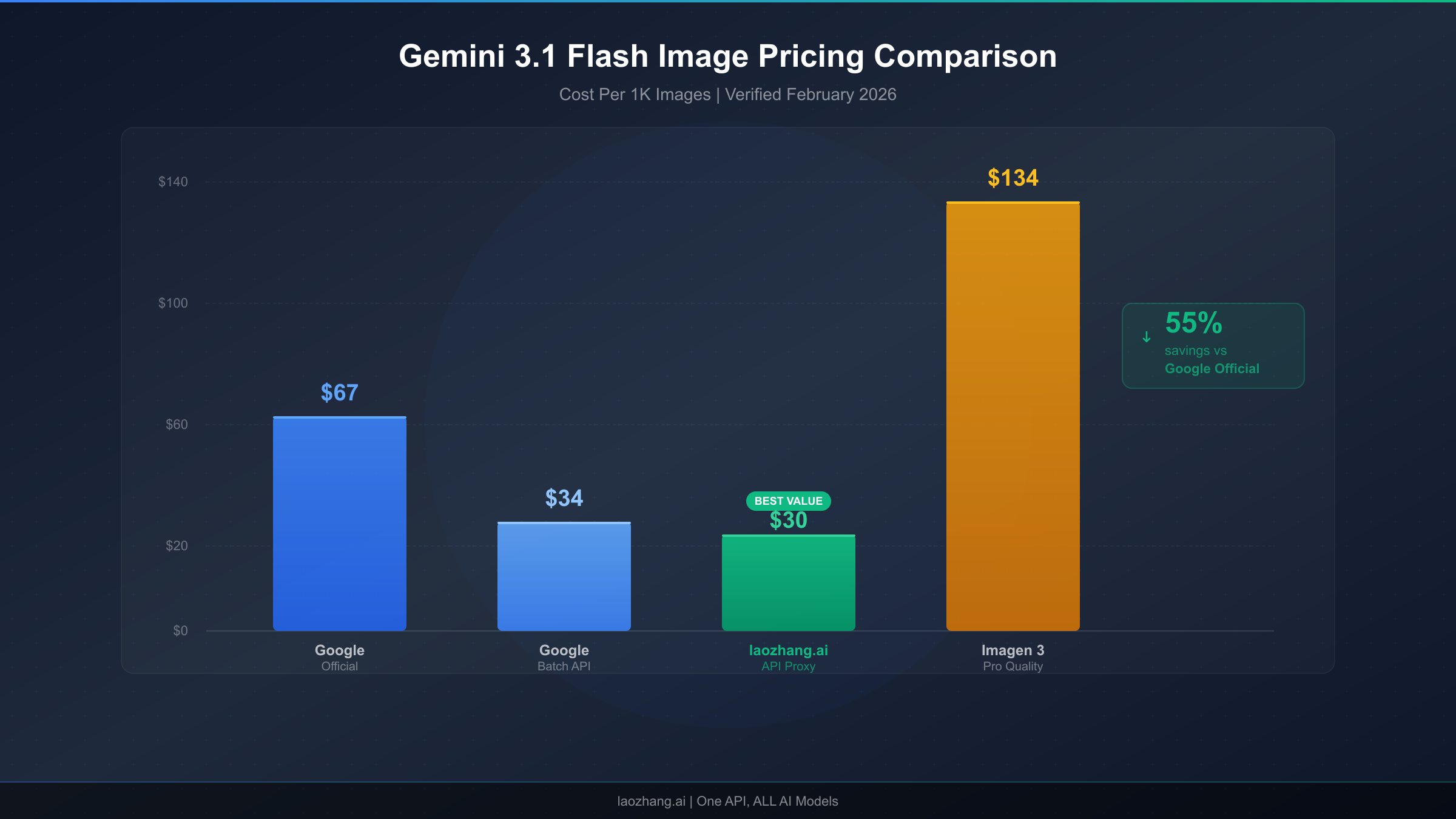
| laozhang.ai | $0.03 | $0.03 | 55-80% | OpenAI-compatible | Yes | Third-party dependency |
| Puter.js | Free | N/A | 100% | JavaScript SDK | N/A | Rate limits, no 4K |
The pricing differences are dramatic. At the 1K resolution tier, laozhang.ai charges $0.03 per image compared to Google's $0.067—a 55% savings that compounds rapidly at scale. For a production application generating 50,000 images per month, this difference translates to $1,850 in monthly savings ($3,350 vs $1,500) or $22,200 annually. The savings become even more pronounced at 4K resolution, where laozhang.ai's flat $0.03 rate represents an 80% discount compared to Google's $0.151 official price. For developers whose applications require high-resolution output, this pricing structure makes 4K generation economically viable for use cases that would be prohibitively expensive through Google's direct API.
Total Cost of Ownership Considerations
Raw per-image pricing, however, tells only part of the cost story. A rigorous total cost of ownership (TCO) analysis must account for several additional factors that affect the true cost of operating an image generation pipeline. Developer time is the most commonly overlooked cost—the Google GenAI SDK requires more complex authentication setup, Vertex AI integration, and Google Cloud infrastructure management compared to OpenAI-compatible APIs that can be dropped into existing codebases with a simple base URL change. For teams already using the OpenAI client library (which describes the majority of AI application developers in 2026), integrating with a provider like laozhang.ai requires changing exactly two lines of code: the API key and the base URL. This simplicity translates directly into saved engineering hours and reduced integration risk.
Reliability and support represent the other critical TCO dimension. Google's direct API offers the highest reliability guarantees backed by Google Cloud's infrastructure SLAs, comprehensive documentation, and enterprise support options. Third-party providers introduce an additional network hop and service dependency, which means that any outage on the provider's side blocks your image generation pipeline even if Google's underlying API is functioning normally. The practical impact of this risk depends heavily on your application's architecture—applications that implement fallback logic to switch between providers when the primary is unavailable can mitigate most downtime risk, while applications with a single point of failure are more exposed. For mission-critical production applications where every minute of downtime has measurable business impact, maintaining Google direct access as a fallback alongside a cheaper primary provider represents the optimal strategy for balancing cost and reliability.
Quick Start: Generate Your First Image in 5 Minutes
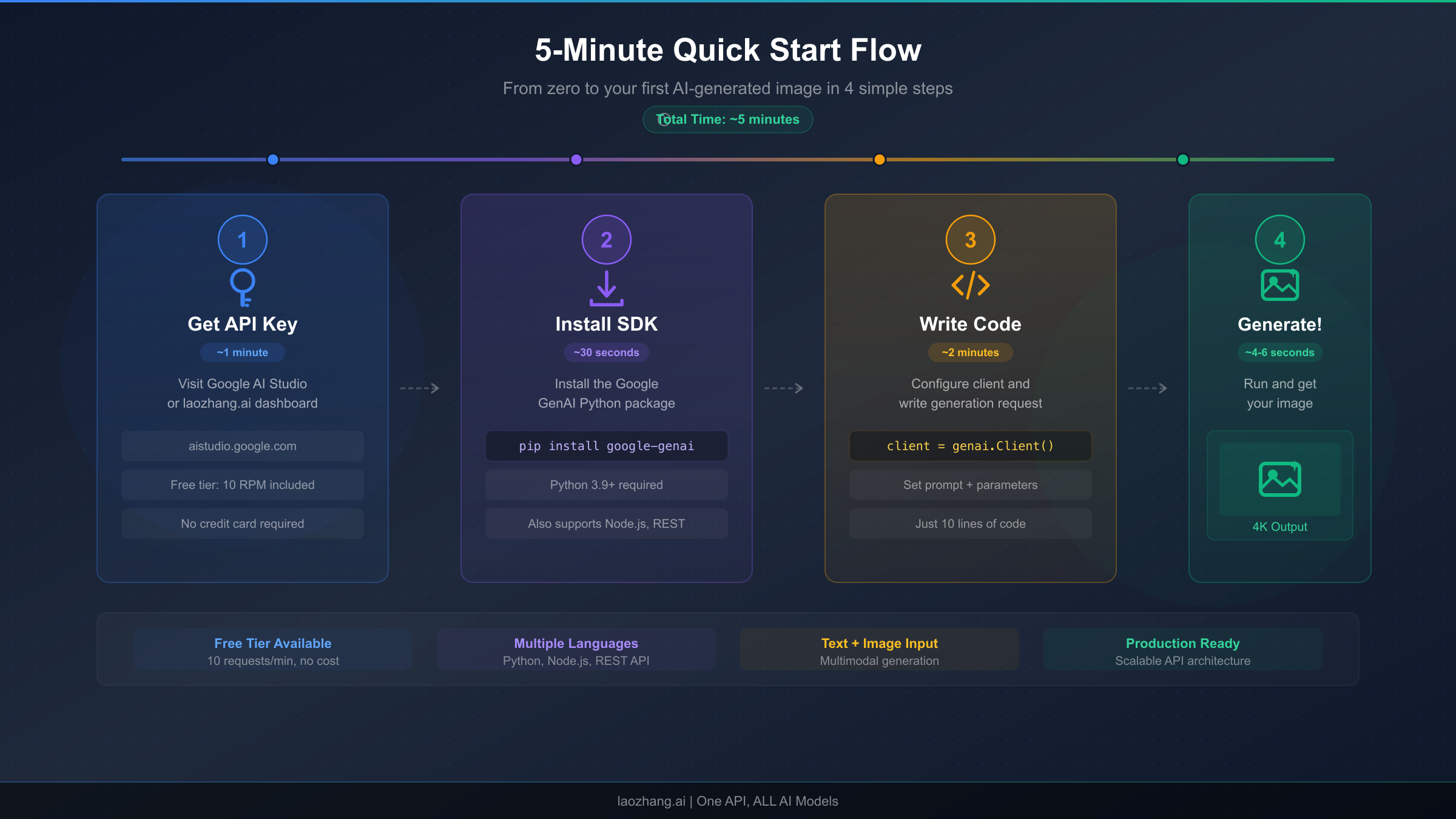
Moving from pricing theory to working code, this section provides four complete, tested implementation examples that you can copy into your project and start generating images immediately. Each example targets a different environment and use case, from the official Google SDK for production applications to Puter.js for zero-configuration browser-based generation. The key architectural decision is whether to call Google's API directly (which requires a Google AI API key and provides maximum control) or use an OpenAI-compatible provider endpoint (which simplifies integration for teams already using the OpenAI ecosystem).
Python with Google GenAI SDK (Official Method)
The Google GenAI SDK is the recommended approach for production Python applications that interact directly with Google's API. You will need a Google AI API key, which you can generate at aistudio.google.com, and the google-genai package installed via pip. The following example demonstrates the complete flow from prompt to saved image file, including proper error handling for the content parts that may include both text and image data in the response.
pythonfrom google import genai

client = genai.Client()

response = client.models.generate_content(
    model="gemini-3.1-flash-image-preview",
    contents="Create a photorealistic image of a mountain landscape at sunset with dramatic clouds"
)


for part in response.candidates[0].content.parts:
    if hasattr(part, 'inline_data'):
        with open("output.png", "wb") as f:
            f.write(part.inline_data.data)
        print("Image saved successfully!")
This code authenticates using the GOOGLE_API_KEY environment variable (set it with export GOOGLE_API_KEY=your-key-here), sends a text prompt to gemini-3.1-flash-image-preview, and iterates through the response parts to find and save the binary image data. The model returns a multimodal response that can contain both text descriptions and image data, so the loop checks for inline_data attributes to identify image parts. For production use, you should add try-except blocks around the API call to handle rate limits (HTTP 429), content safety rejections (HTTP 400), and transient server errors (HTTP 500/503) gracefully.
Python via laozhang.ai (OpenAI-Compatible Endpoint)
For developers already using the OpenAI Python client library, integrating with gemini-3.1-flash-image-preview through laozhang.ai requires minimal code changes. The OpenAI-compatible endpoint accepts the same request format you would use for GPT-4 Vision or DALL-E, making it trivial to add Gemini image generation to existing applications. You can obtain an API key by registering at laozhang.ai, which includes trial credits for initial testing.
pythonfrom openai import OpenAI

client = OpenAI(
    api_key="sk-your-laozhang-key",
    base_url="https://api.laozhang.ai/v1"
)

response = client.chat.completions.create(
    model="gemini-3.1-flash-image-preview",
    messages=[{
        "role": "user",
        "content": "Generate a photorealistic mountain landscape at sunset"
    }]
)
The elegance of this approach is its compatibility with the existing OpenAI ecosystem—any wrapper library, framework integration, or middleware that works with the OpenAI client will work with this endpoint by simply swapping the API key and base URL. This makes it particularly attractive for teams that have already invested in OpenAI-based tooling and want to add Gemini model access without rebuilding their infrastructure.
cURL (Direct HTTP Request)
For quick testing, shell scripts, and environments where installing an SDK is impractical, the direct HTTP API provides the most portable option. The following cURL command sends a text prompt to Google's API endpoint and returns the response as JSON containing base64-encoded image data.
bashcurl -X POST "https://generativelanguage.googleapis.com/v1beta/models/gemini-3.1-flash-image-preview:generateContent" \
  -H "Content-Type: application/json" \
  -H "x-goog-api-key: YOUR_API_KEY" \
  -d '{"contents": [{"parts": [{"text": "Create a mountain landscape at sunset"}]}]}'
The response JSON contains the image data in the candidates[0].content.parts array as a base64-encoded string with a MIME type of image/png. You can decode and save this using standard command-line tools: pipe the JSON through jq to extract the base64 data, then decode it with base64 -d to produce the binary PNG file.
Puter.js (Browser-Based, No API Key Required)
For the absolute simplest path to generating images with Nano Banana 2, Puter.js removes every barrier to entry. No API key, no registration, no billing account—just include the script tag and call the function. This approach is ideal for quick experiments, educational demonstrations, and client-side applications where you cannot securely store API credentials.
html<script src="https://js.puter.com/v2/"></script>
<script>
puter.ai.txt2img("A mountain landscape at sunset", {
    model: "gemini-3.1-flash-image-preview"
}).then(img => document.body.appendChild(img));
</script>
This code loads the Puter.js library, calls the text-to-image function with your prompt and model specification, and appends the resulting image element directly to the page. The entire implementation is six lines of HTML and JavaScript. The trade-off is that you have no control over generation parameters, resolution is limited, and rate limits are enforced based on the collective usage of all Puter.js users rather than your individual allocation. For complete API documentation including advanced parameters, authentication configuration, and batch processing setup, visit https://docs.laozhang.ai/.
Resolution and Cost Optimization Guide
Choosing the right resolution for each image generation request is one of the most impactful cost optimization levers available to developers using gemini-3.1-flash-image-preview. The price difference between the lowest and highest resolution is more than 3x ($0.045 for 512px vs. $0.151 for 4K), which means that blindly generating all images at maximum resolution can triple your API costs without providing any benefit for use cases where lower resolution is perfectly adequate. A systematic approach to resolution selection based on the actual display context and quality requirements of each image can reduce costs by 30-60% without any visible impact on end-user experience.
Resolution Selection Framework
The following table provides concrete guidance on when each resolution tier delivers the optimal balance of quality and cost. The key insight is that most web applications display images at effective resolutions well below the generation resolution, which means generating at 4K when the image will be displayed at 800px wide in a blog post is pure waste.
| Resolution | Tokens | Cost | Ideal Use Cases | Avoid When |
|---|---|---|---|---|
| 512px | 747 | $0.045 | Thumbnails, avatars, social media icons, preview grids | Printing, hero images, zoom functionality |
| 1K (1024×1024) | 1,120 | $0.067 | Blog images, product cards, social posts, email graphics | Billboard ads, print media, retina displays |
| 2K (2048×2048) | 1,680 | $0.101 | Hero sections, landing pages, retina displays, presentation slides | Thumbnails, API responses requiring speed |
| 4K (4096×4096) | 2,520 | $0.151 | Print-quality output, large-format displays, commercial photography, zoom-enabled galleries | High-volume generation, real-time applications |
For the typical web application that displays AI-generated images in blog posts, product listings, and social media previews, 1K resolution at $0.067 per image covers 80-90% of use cases with excellent quality. The 2K tier makes sense for hero images and landing page visuals where the image is displayed at large sizes on high-DPI screens. The 4K tier should be reserved exclusively for print-quality output, commercial photography applications, and situations where users can zoom into the full-resolution image.
Batch Processing Strategy
Beyond resolution optimization, Google's Batch API represents the most straightforward cost reduction available—a flat 50% discount with no quality difference. The key to leveraging batch processing effectively is identifying which images in your pipeline are not time-sensitive. Common candidates include scheduled content generation (blog post images, social media queues), product catalog updates that process overnight, A/B test variant generation where images are prepared in advance, and training data generation for machine learning pipelines. Implementing a dual-path architecture where time-sensitive requests go through the standard API and everything else routes through the Batch API can cut your overall image generation costs by 30-45% depending on your workload mix, with no impact on the quality of any generated images.
Prompt Engineering for Cost Efficiency
The cost per image is fixed regardless of prompt length for practical purposes, but prompt quality directly impacts whether you get a usable image on the first attempt or need to regenerate multiple times. Each failed generation costs the same as a successful one, so improving your prompt engineering to achieve acceptable results in fewer attempts provides genuine cost savings. Specific, detailed prompts with clear descriptions of composition, lighting, style, and subject consistently produce better first-attempt results than vague or ambiguous prompts. Including negative constraints ("without text overlay," "no watermark," "not cartoon style") helps the model understand what you do not want, reducing the probability of generating an image that requires a do-over. Tracking your success rate per prompt category and iterating on underperforming prompts can improve your effective cost per usable image by 20-40% over time.
Building Production Applications with Nano Banana 2
Deploying gemini-3.1-flash-image-preview in a production environment introduces engineering challenges that go beyond the basic API call demonstrated in the Quick Start section. The "preview" designation on this model is particularly significant—it signals that Google may make changes to the model's behavior, output quality, safety filters, and even API interface without the standard deprecation notice that applies to generally available models. Building production systems on preview models requires a defensive engineering approach that anticipates and gracefully handles these changes.
Error Handling and Retry Logic
Production applications must handle several categories of API errors that occur regularly in real-world usage. Rate limit errors (HTTP 429) are the most common, especially during peak usage periods or when scaling up generation volume rapidly. The correct response is exponential backoff with jitter—waiting progressively longer between retries while adding a random component to prevent thundering herd problems when multiple clients hit the limit simultaneously. Content safety rejections (HTTP 400 with safety-related error codes) occur when the model's safety filters flag the prompt or generated output, and these should not be retried with the same prompt since the result will be identical. Instead, log the prompt for review and surface a user-friendly error message. Transient server errors (HTTP 500/503) indicate temporary infrastructure issues and should be retried with backoff, typically succeeding within 2-3 attempts. A well-implemented retry strategy can improve effective availability from roughly 95-97% (raw API success rate during normal operation) to 99.5%+ for end users, which is the difference between a frustrating and a professional user experience.
Rate Limit Management and Scaling
Google enforces rate limits on gemini-3.1-flash-image-preview that vary by account tier, and exceeding these limits results in HTTP 429 errors that can cascade into poor user experience if not managed proactively. The recommended architecture for high-volume applications includes a request queue (Redis, RabbitMQ, or a cloud-native equivalent) that buffers incoming generation requests, a worker pool that processes requests at a rate just below the API limit, and a priority system that ensures user-facing requests are processed before background tasks. This architecture decouples user requests from API capacity, allowing you to accept bursts of generation requests that exceed your instantaneous rate limit and process them smoothly over time. Monitoring your actual token consumption against your rate limit quota with real-time dashboards enables proactive capacity management rather than reactive firefighting when limits are hit.
Fallback and Multi-Provider Strategies
The preview model designation introduces a real risk of temporary unavailability or behavior changes that could impact production applications. A robust fallback strategy maintains integration with at least one alternative image generation endpoint—either a different Gemini model (such as gemini-2.5-flash-image for lower quality but reliable fallback) or a different provider altogether (such as the OpenAI DALL-E 3 API). The fallback should be tested regularly with automated health checks, not just configured and forgotten. Many production teams implement a primary/secondary provider architecture where the primary provider (typically the cheapest or highest quality option) handles normal traffic, and the system automatically routes to the secondary provider when the primary returns errors or exceeds latency thresholds. This architecture adds complexity but provides the kind of resilience that production applications demand, especially when image generation is part of a user-facing workflow rather than a background process.
Frequently Asked Questions
Is Gemini 3.1 Flash Image Preview free to use through Google's API?
No, Google does not currently offer a free tier for gemini-3.1-flash-image-preview through the standard API (Google AI pricing page, verified February 27, 2026). The model requires a billable Google AI API key or Vertex AI account with active billing. This distinguishes it from some other Gemini models like the text-only variants that include limited free usage. However, as detailed earlier in this guide, there are four legitimate methods to access the model without cost: Google AI Studio for interactive testing, Puter.js for browser-based generation without API keys, Google Cloud's $300 free credits for new accounts, and third-party provider trial credits. Each method has specific limitations—AI Studio lacks programmatic access, Puter.js enforces rate limits and caps resolution, Cloud credits expire after 90 days, and trial credits are finite—but collectively they provide substantial free access for evaluation, prototyping, and learning purposes. For ongoing production use, the minimum cost is $0.03 per image through providers like laozhang.ai or $0.034 per image through Google's own Batch API at 1K resolution.
What is the difference between Nano Banana, Nano Banana 2, and Nano Banana Pro?
These three names refer to distinct models in Google DeepMind's image generation lineup, each with different capabilities and pricing. Nano Banana (gemini-2.5-flash-image) is the original, fastest, and cheapest model at $0.039 per 1K image, limited to 1K maximum resolution and best suited for prototyping and high-volume, low-fidelity use cases. Nano Banana 2 (gemini-3.1-flash-image-preview) is the second generation with improved quality, native 4K support up to 4096x4096, better text rendering, and more accurate prompt following at $0.067 per 1K image—representing the optimal price-performance balance for most production applications. Nano Banana Pro (gemini-3-pro-image-preview) is the premium option with the highest quality output, support for up to 14 reference images, superior character consistency, and production-grade text rendering at $0.134 per 1K image. The naming reflects Google's internal codenames that were adopted by the developer community; officially, Google refers to these by their model IDs rather than the Nano Banana nomenclature. When choosing between them, the decision usually comes down to whether you need 4K resolution (eliminates Nano Banana), whether you need premium quality features like multi-image composition (points to Nano Banana Pro), or whether cost efficiency at good quality is your priority (Nano Banana 2 wins).
How does Nano Banana 2 compare to DALL-E 3 and Midjourney?
The competitive landscape for AI image generation APIs in 2026 features three major contenders, each with distinct strengths. Nano Banana 2 excels at cost efficiency ($0.067 per 1K image vs. DALL-E 3's $0.080 for standard quality), supports native 4K generation that DALL-E 3 does not offer, and provides the fastest generation speeds in the category. DALL-E 3, accessed through the OpenAI API, offers arguably more consistent artistic quality and better understanding of complex compositional prompts, particularly for creative and artistic use cases. Midjourney's API (now in limited availability) produces the most aesthetically distinctive images with a characteristic photographic quality that many users prefer for marketing and social media content, but at premium pricing and limited programmatic access. For developers building applications that require high-volume, cost-effective image generation with API-first access, Nano Banana 2 currently offers the strongest overall value proposition—especially when accessed through providers that bring the per-image cost below $0.04.
Can I use Nano Banana 2 for commercial projects?
Yes, images generated through the gemini-3.1-flash-image-preview API are available for commercial use under Google's standard Gemini API terms of service. This applies equally to images generated through Google's direct API, Vertex AI, and authorized third-party providers. The key limitations to be aware of are the content safety policies (certain categories of content are prohibited regardless of commercial intent), the "preview" model status (which means Google may change the model's behavior or availability without the deprecation guarantees that apply to GA models), and any additional terms imposed by your specific provider. For mission-critical commercial applications, it is advisable to maintain a fallback generation pipeline and to store generated images rather than relying on the ability to regenerate identical images in the future, since model updates may change output for identical prompts.
What resolutions does gemini-3.1-flash-image-preview support?
The model supports four resolution tiers: 512px ($0.045/image, 747 output tokens), 1K at 1024x1024 ($0.067/image, 1,120 output tokens), 2K at 2048x2048 ($0.101/image, 1,680 output tokens), and 4K at 4096x4096 ($0.151/image, 2,520 output tokens). All pricing is per the Google AI pricing page as verified on February 27, 2026. The default resolution when no size is specified is 1K, and the model automatically selects aspect ratios based on prompt content unless explicitly constrained. The 4K tier is particularly notable because it is not available on the original Nano Banana model and costs 37% less than the equivalent 4K output from Nano Banana Pro, making gemini-3.1-flash-image-preview the most cost-effective path to high-resolution AI-generated images in Google's current model lineup. When choosing a resolution, consider the end display context—generating at 4K when the image will be displayed at 400px wide on a mobile screen wastes tokens and money without improving the user experience.