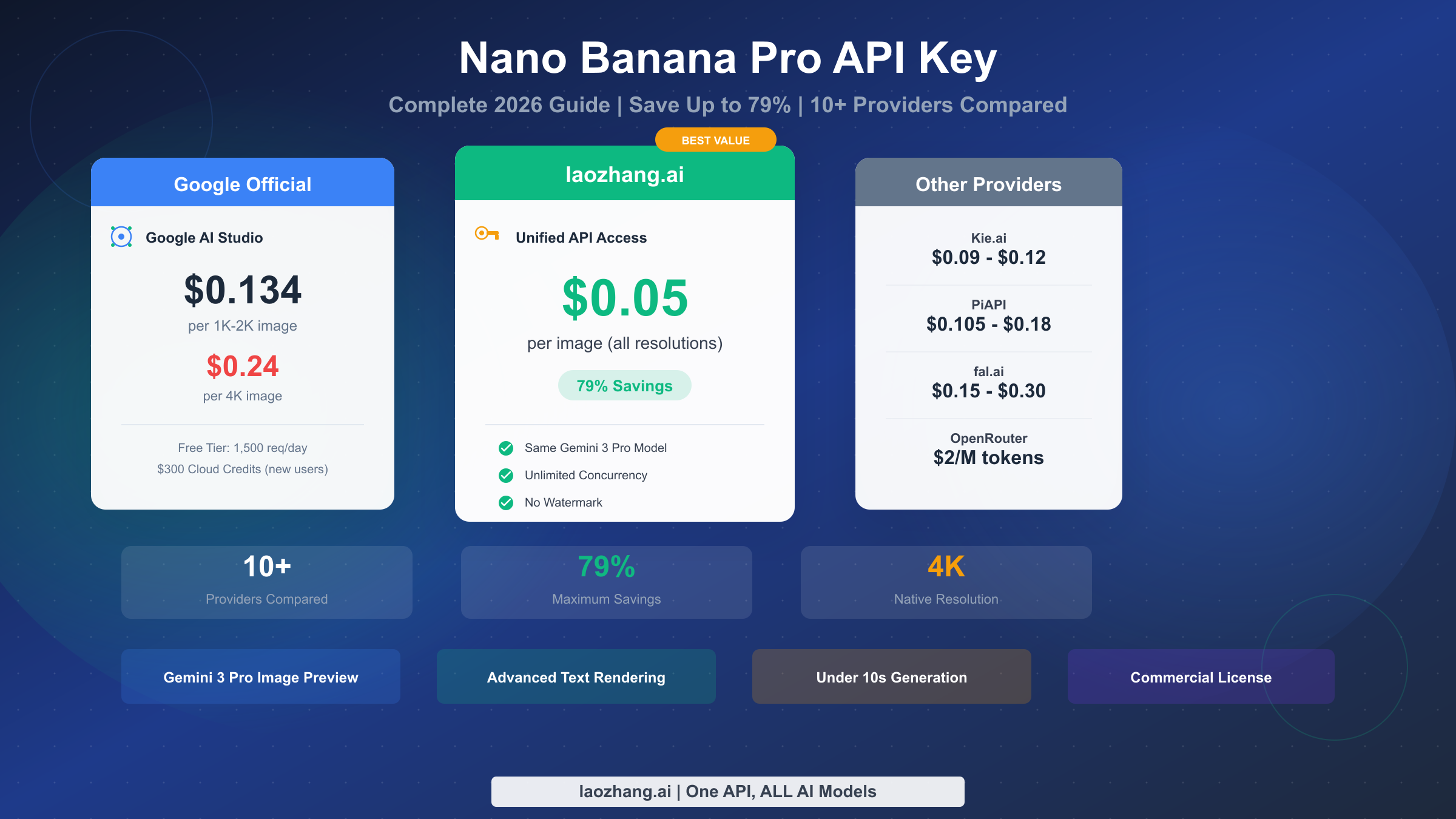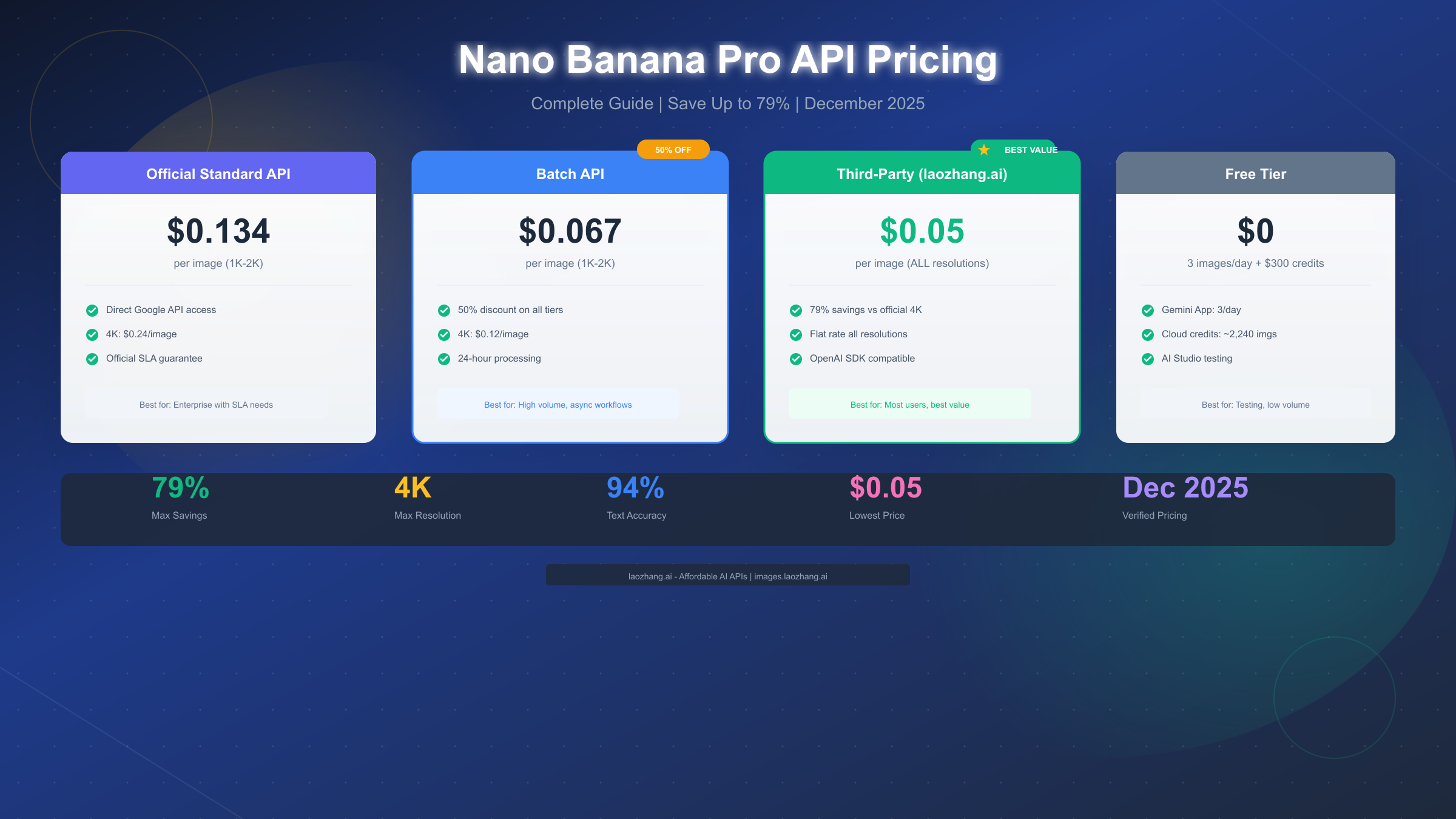
Nano Banana Pro API official pricing is $0.134/image (1K-2K resolution) and $0.24/image (4K resolution), while third-party platforms like laozhang.ai offer just $0.05/image, saving up to 79% (Google AI Pricing Page, January 2026). This guide will help you fully understand various pricing options and find the best choice for your needs.
TL;DR
Understanding the core pricing points of Nano Banana Pro can help you make quick decisions. The official API charges by resolution: $0.134 per image for 1K-2K resolution, $0.24 for 4K resolution, with Batch API offering a 50% discount. Among third-party platforms, laozhang.ai provides a unified $0.05/image pricing regardless of resolution, making it the most cost-effective choice. Free users can get 50 free requests daily through Google AI Studio, plus $300 in new user credits (valid for 90 days), allowing light users to experience it at zero cost.
If your monthly usage is under 100 images, free tier credits are sufficient. For medium usage of 500-3000 images, laozhang.ai is the optimal choice, supporting Alipay/TG payment, making it extremely convenient for users in China. Heavy users with 3000+ images should consider the Ultra subscription ($99.99/month, approximately 30,000 image quota) or adopt a hybrid third-party + official approach for optimal costs.
Official Pricing Deep Dive
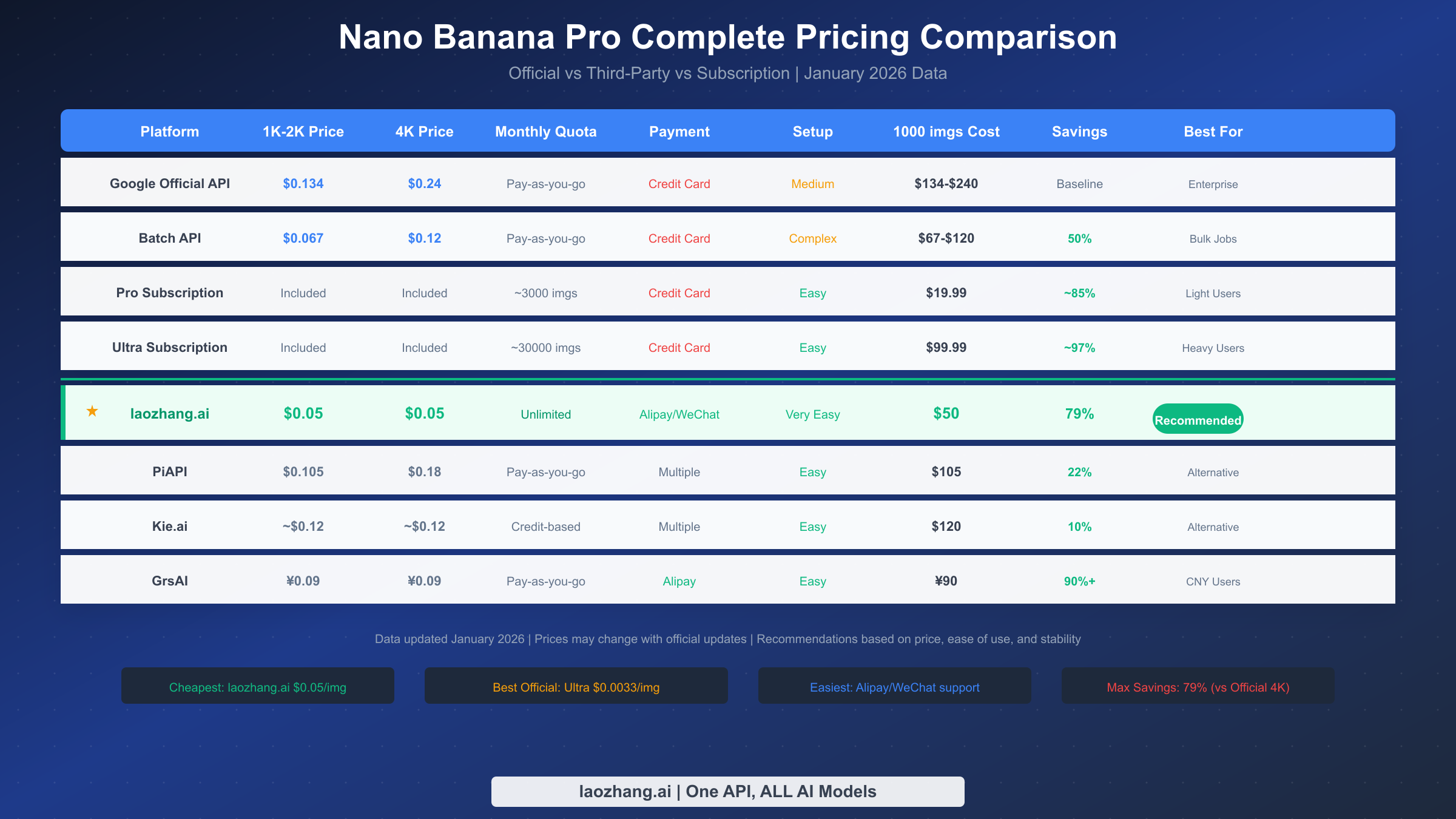
Google officially charges for Nano Banana Pro (Model ID: gemini-3-pro-image-preview) using a token-based billing model. Output images are billed at $30-$120 per million tokens, which translates to approximately $0.134 per image for standard resolution (1K-2K) and $0.24 per image for 4K resolution (Google AI Studio Pricing Page, January 2026 data). This pricing has been adjusted compared to earlier versions, particularly in the December 2025 update when Google optimized the token consumption calculation method, making actual costs more transparent.
Understanding the specific logic of token billing is worthwhile since it directly affects your cost budget. Each standard resolution image (maximum 2048x2048 pixels) consumes approximately 1,120 output tokens, while 4K images (maximum 4096x4096 pixels) consume about 2,000 tokens. Input-side costs are relatively low, with text input billed at $2.00 per million tokens, making the input cost per image approximately $0.0011, which is negligible. Therefore, when estimating costs, focus mainly on output-side token consumption.
Batch API is an important money-saving option provided officially, reducing costs by 50%. With Batch API, 1K-2K resolution drops to $0.067/image and 4K resolution to $0.12/image. The trade-off is accepting asynchronous processing mode, with delivery times potentially up to 24 hours. For batch image generation and non-real-time business scenarios (such as e-commerce bulk image generation, content pre-generation), Batch API is a very cost-effective choice.
Subscription plans offer another option for users who prefer not to pay per use. Pro subscription at $19.99/month includes approximately 3,000 image quota (about 100 per day), and if fully utilized, the per-image cost can be as low as $0.0067. Ultra subscription at $99.99/month increases quota to approximately 30,000 images (about 1,000 per day), with a per-image cost of just $0.0033 when fully used, making it the cheapest option among official plans. Note that subscription plans require overseas credit card payment, and quotas reset daily without accumulation, meaning weekends or holidays not using them results in waste.
For the complete Gemini API pricing system, including text models and other image model fees, check out our dedicated article for more details.
Complete Free Usage Guide
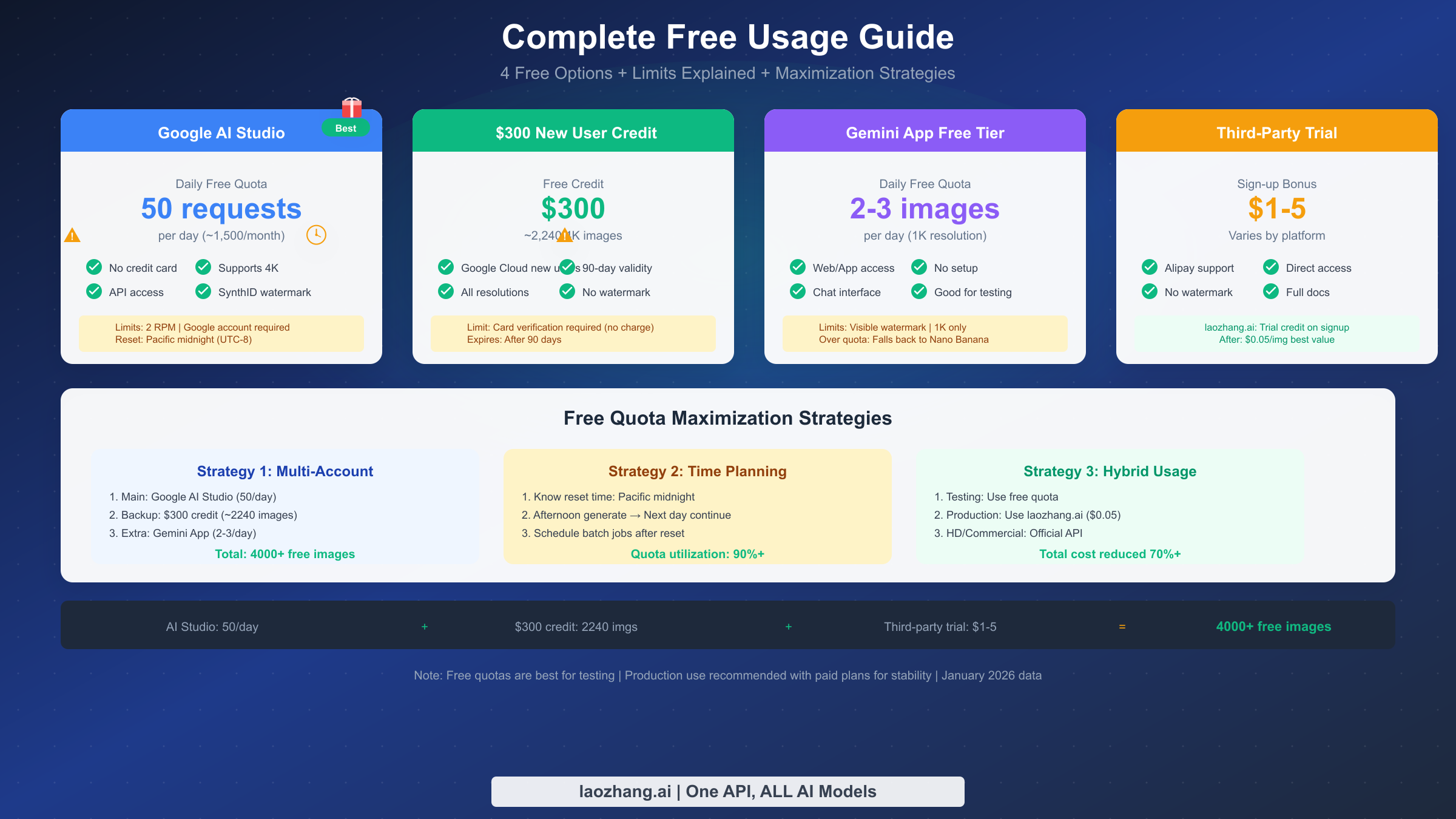
There are multiple ways to use Nano Banana Pro for free, and combining them strategically can yield substantial free quotas. The most recommended method is using the API through Google AI Studio (aistudio.google.com), where free users can get 50 requests per day without binding a credit card, requiring only a Google account to get started. These 50 quota requests support all resolutions including 4K, accumulating to approximately 1,500 free generations per month, which is quite generous for personal projects and testing.
New Google Cloud users can also claim $300 in free credits, valid for 90 days. At the 4K resolution rate of $0.134/image, this credit can generate approximately 2,240 high-resolution images. To claim it, complete account registration and billing information setup in Google Cloud Console (requires credit card binding for verification, but no actual charges). This credit can be used for all Google AI services including Nano Banana Pro, making it an excellent opportunity for new users to experience high-resolution image generation.
Gemini App (web and mobile versions) also provides free image generation functionality, though with relatively limited quotas. Free users can only generate 2-3 images per day, with resolution limited to 1K (approximately 1024x1024 pixels), and images will have visible Gemini watermarks. When daily quota is exceeded, the system automatically downgrades to Nano Banana (based on Gemini 2.5 Flash), with reduced generation quality. This option is more suitable for simple experimentation and not recommended as the primary usage method.
Third-party platforms typically also provide registration trial credits. For example, laozhang.ai offers trial credits to newly registered users, allowing zero-cost experience of the API calling process. Although trial credits are generally only $1-5, they're sufficient to verify the integration process and generation quality. For users planning long-term use, third-party platform paid prices (such as $0.05/image) are far lower than official rates, making them a more economical choice.
The strategy for maximizing free quotas is multi-channel combined usage. Use Google AI Studio's 50/day as the main source for daily testing and small batch generation; use $300 credits for important projects requiring high-resolution output; use Gemini App as temporary supplementation. Understanding quota reset times is also important - Google AI Studio quotas reset at Pacific midnight (around 4 PM Beijing time), so scheduling work time appropriately can maximize daily free usage.
For complete information on Nano Banana Pro free quotas, including detailed limits for each tier, refer to our dedicated guide article.
Comprehensive Third-Party Platform Comparison
For budget-conscious users or those in China, third-party API platforms offer better value than official pricing. These platforms obtain cost advantages through bulk purchasing and regional price differences, then pass lower prices to end users. When choosing, consider multiple dimensions including price, stability, payment methods, and technical support.
laozhang.ai is our recommended first choice, primarily based on these advantages: unified pricing of $0.05/image regardless of resolution, saving 79% compared to official 4K pricing; supports Alipay and TG payment, allowing Chinese users to use without overseas credit cards; provides complete Chinese documentation and technical support; direct domestic access without proxy. From actual usage experience, laozhang.ai's API response speed and stability perform well, suitable for production environment use. Visit laozhang.ai documentation for detailed integration guides.
PiAPI is another option worth considering, priced at $0.105/image for 1K-2K resolution and $0.18/image for 4K resolution. While slightly more expensive than laozhang.ai, it offers richer model selection and more detailed usage statistics. If you need to use multiple AI models simultaneously, PiAPI's one-stop platform might be more suitable.
Kie.ai uses a credit point mechanism, with each image consuming approximately 24 credit points, equivalent to about $0.12/image. The platform interface is user-friendly, suitable for users unfamiliar with API calls. However, the credit point mechanism makes cost calculation less intuitive, so understand the exchange ratio before recharging.
GrsAI offers RMB pricing for Chinese users, with Nano Banana Pro at just 0.09 yuan/image (approximately $0.012), one of the lowest prices seen. The platform uses dual-node deployment (overseas and domestic direct connection), ensuring network stability. If you primarily use it in China and pursue ultimate cost-effectiveness, GrsAI is worth trying.
Regarding third-party platform security, a rational perspective is needed. These platforms are essentially API relay services, with your requests and images passing through their servers. For non-sensitive business (such as marketing materials, testing and development), third-party platforms can be used with confidence. However, if involving trade secrets or privacy data, using official API is recommended for better data protection.
For more detailed tutorials on using Nano Banana Pro API through laozhang.ai, including registration, recharging, and code examples, refer to the dedicated article.
Four Major Scenario Cost Calculations
Cost differences vary greatly across different usage scenarios, and choosing the right plan can save substantial expenses. Below is detailed analysis of four typical scenarios to help you find the best fit.
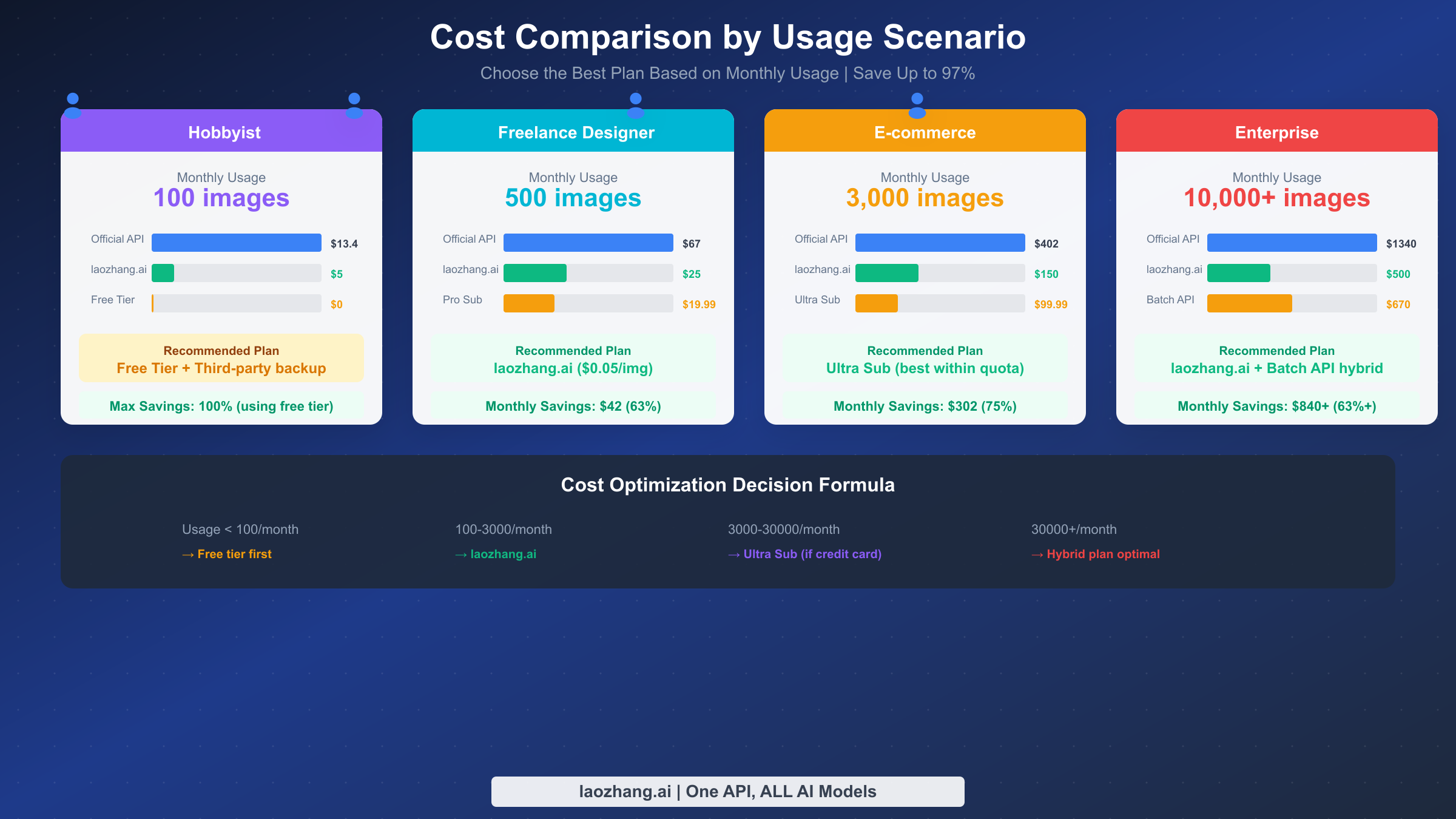
The hobbyist scenario assumes monthly usage under 100 images. This volume can be fully covered by free options: Google AI Studio offers 50 times daily, which is 1,500 times monthly, more than enough. Even if you don't want to log in daily, you can use the $300 new user credits to generate several hundred images at once. If free quotas run out, supplementing with laozhang.ai only costs $5/month. Conclusion: this scenario doesn't require payment; free quotas are sufficient.
The freelance designer scenario assumes monthly usage around 500 images for client projects and creative design. Using official API ($0.134/image), monthly cost is $67; Batch API can reduce it to $33.5, but delivery delays might affect work efficiency. Pro subscription at $19.99/month theoretically suffices (3,000 image quota), but requires overseas credit card. The most recommended plan is laozhang.ai, where 500 images only costs $25/month with Alipay payment available, hassle-free. Compared to official API, monthly savings of $42, annual savings exceeding $500.
The e-commerce operations scenario assumes monthly usage of 3,000 images for product image generation, detail page creation, etc. Official API cost is as high as $402/month, Batch API can reduce to $201, but batch image timing requirements often don't allow 24-hour waits. Ultra subscription at $99.99/month has just enough quota, making it the optimal official option. However, without overseas credit card, laozhang.ai provides instant response service at $150/month (3,000 x $0.05), also a good alternative. Overall consideration: choose Ultra subscription if you have overseas payment capability, otherwise choose laozhang.ai.
The enterprise scenario assumes monthly usage of 10,000+ images for large-scale content production. Official API cost is $1,340+/month, even Batch API requires $670+. Ultra subscription quota is only 30,000 images, with excess still requiring pay-per-use. This scenario recommends a hybrid approach: use Ultra subscription to cover daily base volume (1,000 images), with excess supplemented by laozhang.ai ($0.05/image) or Batch API ($0.067/image). Actual costs can be controlled at $500-600/month, saving over 50% compared to pure official solutions.
Cost optimization formula summary: usage below 100 images use free quotas; 100-3,000 images choose laozhang.ai; 3,000-30,000 images choose Ultra subscription (if you have credit card) or laozhang.ai; 30,000+ images adopt hybrid approach.
Cost-Saving Pitfalls and Optimization Tips
There are some hidden costs and common pitfalls when using Nano Banana Pro, and understanding these can help you avoid unnecessary expenses.
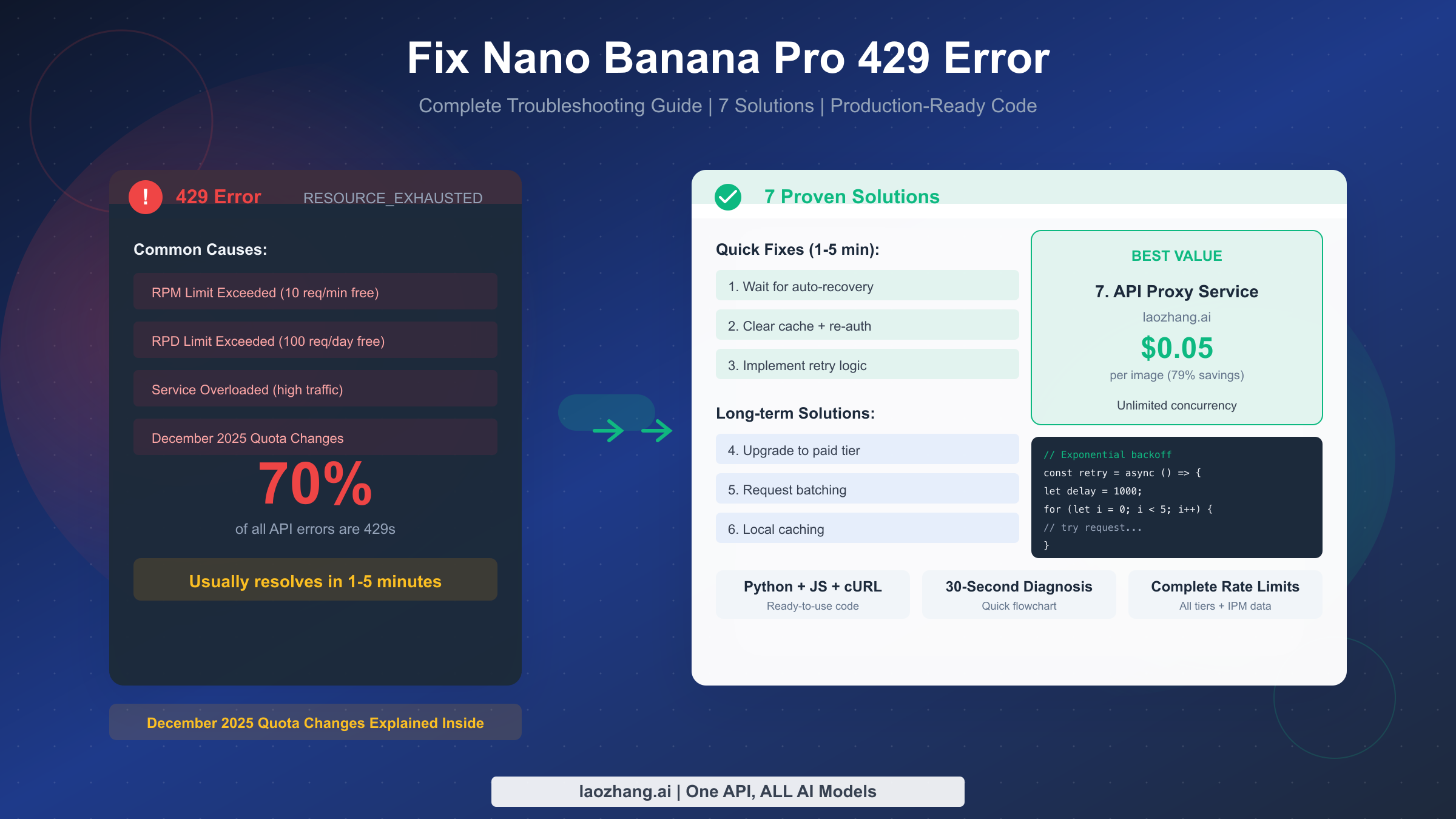
Failed requests still consuming quota is one of the most common pitfalls. When requests fail due to prompt violations, format errors, or server overload, quota is still deducted. This means retries double your quota consumption. The solution is to check prompts before sending requests to avoid triggering content moderation; also establish reasonable retry mechanisms, avoiding infinite retries of failed requests. If you frequently encounter 429 errors (rate limiting), it indicates need to adjust request frequency or upgrade quota tier.
Quota waste due to daily reset mechanism is another often overlooked issue. Subscription users' quotas are allocated daily and reset each day without accumulation. If you don't work on weekends or holidays, those days' quotas are wasted. Assuming Ultra users only use it on weekdays, actual quota utilization is only 70% (5/7), with effective unit price rising from $0.0033 to $0.0047. Optimization suggestion: pre-generate some potentially useful materials, or schedule automated batch tasks on non-working days.
Inappropriate resolution selection also causes cost waste. Many scenarios don't actually need 4K resolution: 1K is sufficient for social media images, 2K is sufficient for web display. But if resolution isn't specified, the system might default to generating high-resolution images, causing extra costs. Recommend explicitly specifying output resolution based on actual use, using 2K instead of 4K when possible, using 1K instead of 2K when possible.
Prompt optimization can significantly reduce retry counts. A good prompt should be clear, specific, and unambiguous. Vague prompts may lead to results not meeting expectations, requiring multiple retries to get satisfactory images. Spending time optimizing prompt templates can increase first-time success rate from 60-70% to 90%+, indirectly saving 20-30% in costs.
Timezone differences also need attention. Google AI Studio quotas reset at Pacific midnight, corresponding to around 4 PM Beijing time. If you have urgent needs at 3 PM but quota is exhausted, you only need to wait an hour for new quota. Knowing this timing can help you better plan your work.
Quick Integration Guide
Integrating Nano Banana Pro into your project is actually quite simple. Here are code examples for two mainstream approaches.
Using the official API requires first obtaining an API Key from Google AI Studio, then calling through the google-generativeai SDK. Here's a Python example:
pythonimport google.generativeai as genai
from google.generativeai import types
import base64

# Configure API
genai.configure(api_key="YOUR_API_KEY")

# Initialize model
model = genai.GenerativeModel("gemini-3-pro-image-preview")

# Generate image
response = model.generate_content(
    "A cute Shiba Inu playing under cherry blossom trees, Japanese anime style",
    generation_config=types.GenerationConfig(
        response_mime_type="image/png",
        max_output_tokens=4096
    )
)

# Save image
if response.parts:
    for i, part in enumerate(response.parts):
        if hasattr(part, 'inline_data'):
            image_data = base64.b64decode(part.inline_data.data)
            with open(f"output_{i}.png", "wb") as f:
                f.write(image_data)
            print(f"Image saved: output_{i}.png")
Using third-party platforms like laozhang.ai is even simpler, as they typically support OpenAI SDK format:
pythonfrom openai import OpenAI
import base64

# Configure laozhang.ai endpoint
client = OpenAI(
    api_key="YOUR_LAOZHANG_API_KEY",
    base_url="https://api.laozhang.ai/v1"
)

# Generate image
response = client.images.generate(
    model="gemini-3-pro-image-preview",
    prompt="A cute Shiba Inu playing under cherry blossom trees, Japanese anime style",
    n=1,
    size="1024x1024",
    response_format="b64_json"
)

# Save image
image_data = base64.b64decode(response.data[0].b64_json)
with open("output.png", "wb") as f:
    f.write(image_data)
print("Image saved: output.png")
JavaScript/Node.js users can use the following code:
javascriptconst OpenAI = require('openai');
const fs = require('fs');

// Configure client
const client = new OpenAI({
  apiKey: 'YOUR_LAOZHANG_API_KEY',
  baseURL: 'https://api.laozhang.ai/v1'
});

async function generateImage() {
  const response = await client.images.generate({
    model: 'gemini-3-pro-image-preview',
    prompt: 'A cute Shiba Inu playing under cherry blossom trees, Japanese anime style',
    n: 1,
    size: '1024x1024',
    response_format: 'b64_json'
  });

  // Save image
  const imageBuffer = Buffer.from(response.data[0].b64_json, 'base64');
  fs.writeFileSync('output.png', imageBuffer);
  console.log('Image saved: output.png');
}

generateImage();
For detailed steps on obtaining API Keys, refer to the Nano Banana Pro API Key Guide, including complete registration processes for official and third-party platforms.
FAQ
What's the difference between Nano Banana Pro and regular Nano Banana?
Nano Banana Pro is based on Gemini 3 Pro, Google's currently most advanced image generation model, supporting higher resolutions (up to 4K), better text rendering capability (94% accuracy), and advanced features like multi-image reference and character consistency. Regular Nano Banana is based on Gemini 2.5 Flash, faster but slightly lower quality, supporting only 1K resolution. Price-wise, Nano Banana Pro costs $0.134-$0.24 per image, while the regular version costs $0.039.
Are third-party platform APIs safe?
Third-party platforms are essentially API relay services, with your requests passing through their servers. For non-sensitive business (marketing materials, testing and development, public content), using third-party platforms is perfectly fine, with significant cost-effectiveness advantages. However, for scenarios involving trade secrets, privacy data, or requiring data compliance certification, using official API is recommended. When choosing third-party platforms, prioritize those with established reputation and user base, such as laozhang.ai.
Why is my free quota being used up so quickly?
Possible reasons include: failed requests still consuming quota (check error logs); high-resolution outputs consuming more resources; multiple uses of the same account causing duplicate consumption. Recommendations: optimize prompts to reduce failure rates, explicitly specify lower resolution (if needed), and centrally manage API calling entry points.
What scenarios is Batch API suitable for?
Batch API offers a 50% discount but requires accepting up to 24-hour delivery delays. Suitable scenarios include: e-commerce product image batch generation, content pre-generation and caching, data augmentation and training set creation, non-real-time batch processing tasks. Not suitable for scenarios requiring instant response, such as real-time chatbots, interactive user generation, etc.
What should users in China do without overseas credit cards?
Three solutions: use third-party platforms like laozhang.ai, supporting Alipay and TG payment; apply for a virtual credit card for Google billing; use Google AI Studio's free quota, which doesn't require card binding (50 times daily). The first option is most recommended, simple and direct, with even lower prices.
How do I determine which plan I should use?
Simple decision process: monthly usage below 100 images -> prioritize free quotas; 100-500 images -> laozhang.ai ($0.05/image); 500-3,000 images -> laozhang.ai or Pro subscription (if you have credit card); 3,000-30,000 images -> Ultra subscription or laozhang.ai; 30,000+ images -> hybrid approach (Ultra + third-party/Batch API).
Summary and Recommendations
Nano Banana Pro offers diverse pricing options, with the key being choosing the optimal plan based on your usage volume and payment conditions. Official pricing of $0.134-$0.24/image suits enterprise users requiring data compliance and official support; Batch API's 50% discount suits large-volume non-real-time scenarios; subscription plans suit users with stable usage and overseas payment capability; third-party platforms like laozhang.ai at $0.05/image have become the value king, particularly suitable for Chinese users and budget-sensitive projects.
For most readers, my suggestion is: first use free quotas to fully test and confirm Nano Banana Pro meets your needs; then choose a paid plan based on actual usage, with small to medium usage prioritizing laozhang.ai, and large usage considering Ultra subscription or hybrid approach. Regardless of which plan you choose, you can further reduce costs through resolution optimization, prompt optimization, and avoiding quota waste.
Ready to get started? Visit laozhang.ai to register an account and experience the super value price of $0.05/image, supporting Alipay and TG payment, with integration completed in 5 minutes.