
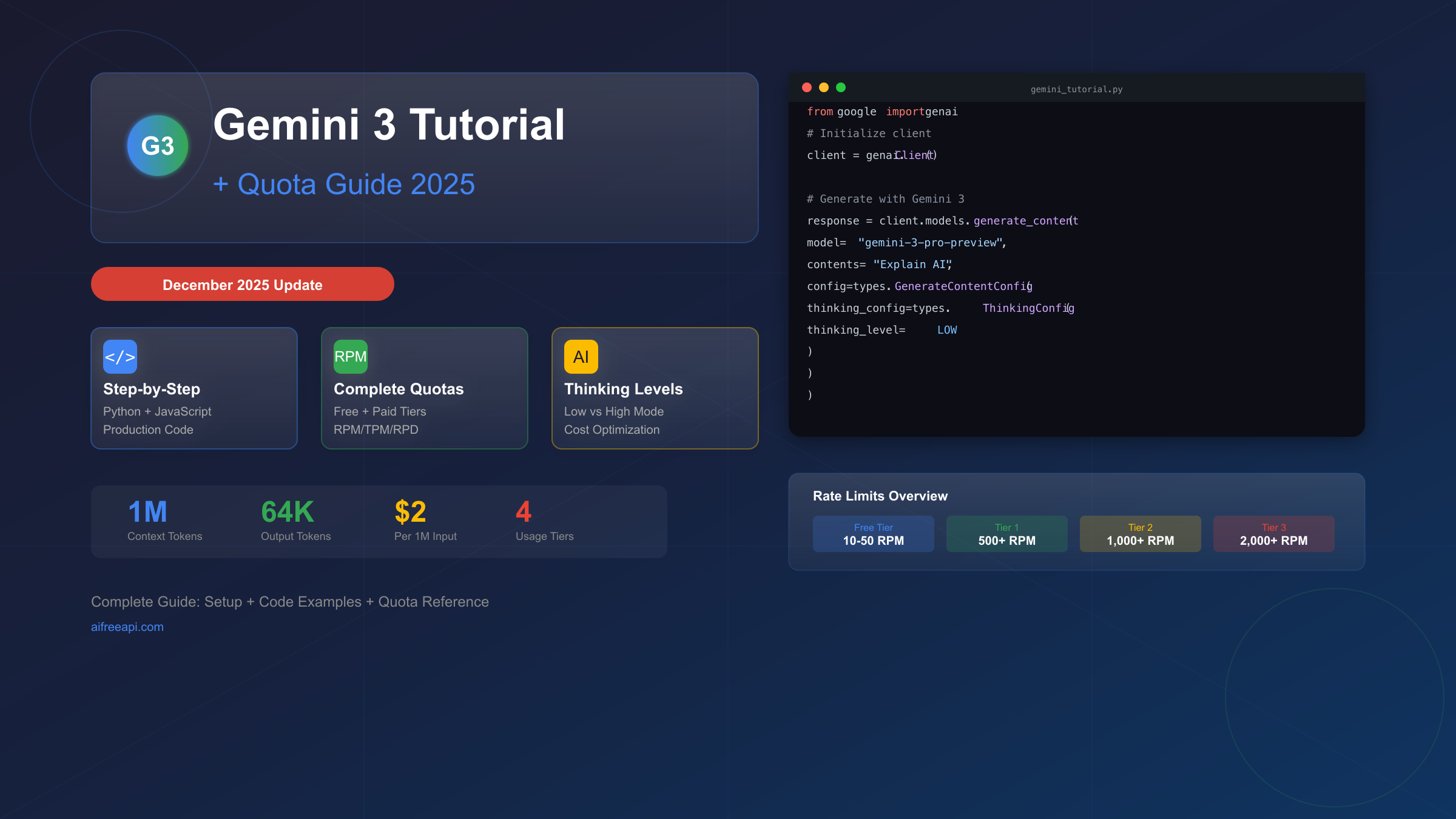
[Updated December 2025] Gemini 3 Pro represents Google's most advanced reasoning model to date, but understanding its quota system can determine whether your project succeeds or hits frustrating 429 errors within hours. This comprehensive gemini 3 tutorial quota guide takes you from zero API experience to production-ready code, with complete rate limit awareness built into every step. Whether you're exploring for the first time or migrating from Gemini 2.5, you'll find everything you need to succeed with Gemini 3 API.
The release of Gemini 3 Pro in December 2025 brought remarkable capabilities—1 million token context windows, adjustable thinking levels, and multimodal reasoning—but also introduced a complex quota system that trips up even experienced developers. Understanding these quotas isn't optional; it's essential for any serious implementation.
Understanding Gemini 3: What's New and Why It Matters
Gemini 3 Pro (gemini-3-pro-preview) isn't just an incremental update—it represents a fundamental shift in how Google approaches AI reasoning. While previous models excelled at pattern matching and text generation, Gemini 3 introduces genuine reasoning capabilities that can break down complex problems, maintain context across massive documents, and generate structured, actionable outputs.
The Model Specifications tell an impressive story. Gemini 3 Pro offers a 1 million token input context window—enough to process entire codebases, lengthy legal documents, or hours of transcribed audio in a single request. Output capacity reaches 64,000 tokens, enabling comprehensive responses for complex queries. The knowledge cutoff extends to January 2025, meaning the model understands recent developments in technology, business, and current events.
For a deeper dive into Gemini 3's capabilities beyond this tutorial, see our complete Gemini 3.0 API guide which covers advanced features in detail.
The Thinking Level System represents Gemini 3's most significant innovation. Unlike previous models where reasoning depth was fixed, Gemini 3 lets you explicitly control how much internal reasoning the model performs before generating a response. The thinking_level parameter accepts two values:
-
LOW: Minimizes latency and cost by reducing internal reasoning. Best for simple instruction following, straightforward Q&A, and high-throughput applications where speed matters more than depth.
-
HIGH (default): Maximizes reasoning depth for complex problem-solving. Enables the model to work through multi-step problems, consider edge cases, and provide more thorough analysis. Increases latency and token usage but significantly improves output quality for challenging tasks.
Multimodal Processing capabilities have expanded significantly. Gemini 3 can now process text, images, audio, video, and PDFs within the same conversation. The media_resolution parameter gives you granular control over how much computational budget to allocate to visual inputs:
| Media Type | Resolution Setting | Max Tokens | Best Use Case |
|---|---|---|---|
| Images | high | 1,120 | Detailed analysis, OCR |
| Images | medium | 560 | General understanding |
| PDFs | medium | 560/page | Document processing |
| Video | high | 280/frame | Text-heavy content |
| Video | low | 70/frame | Action recognition |
Thought Signatures are a new concept unique to Gemini 3. These encrypted tokens preserve the model's reasoning state across API calls in multi-turn conversations. If you're building a chat interface, you must return thought signatures back to the model exactly as received—the official SDKs handle this automatically, but custom implementations need explicit handling.
Getting Started: Your First Gemini 3 API Call
Before writing any code, you'll need to complete a few setup steps. The process takes approximately 5-10 minutes for most developers.
Prerequisites Checklist:
- Python 3.9+ or Node.js v18+ installed
- A Google account (personal Gmail works fine)
- Optional: A Google Cloud project for paid tier access
Step 1: Get Your API Key. Navigate to Google AI Studio and sign in with your Google account. Click "Get API Key" in the left sidebar, then "Create API Key." You can create a key without a Google Cloud project for free tier access, or link an existing project for paid tier benefits.
Step 2: Install the SDK. The Gen AI SDK unifies access to Gemini models across platforms. Open your terminal and run the appropriate command:
For Python:
bashpip install -U google-genai
For JavaScript/Node.js:
bashnpm install @google/genai
Step 3: Set Your Environment Variable. Store your API key securely as an environment variable rather than hardcoding it:
bashexport GEMINI_API_KEY="your-api-key-here" # Windows (PowerShell) $env:GEMINI_API_KEY="your-api-key-here"
Step 4: Make Your First API Call. Here's a complete Python example that demonstrates the basic pattern:
pythonfrom google import genai
from google.genai import types

# Client automatically reads GEMINI_API_KEY from environment
client = genai.Client()

# Basic generation with default settings
response = client.models.generate_content(
    model="gemini-3-pro-preview",
    contents="Explain quantum computing in simple terms."
)

print(response.text)
For JavaScript, the equivalent code:
javascriptimport { GoogleGenAI } from "@google/genai";

const ai = new GoogleGenAI({});

const response = await ai.models.generateContent({
    model: "gemini-3-pro-preview",
    contents: "Explain quantum computing in simple terms."
});

console.log(response.text);
Understanding the Response. The response object contains several important fields:
response.text: The generated text contentresponse.candidates: Array of possible responses (usually one)response.usage_metadata: Token counts for billing calculationresponse.model_version: Exact model version used
The usage_metadata field is particularly important for quota management—it tells you exactly how many tokens were consumed by your request.
Complete Quota Reference: December 2025 Rate Limits
Understanding Gemini 3's quota system is crucial because exceeding any limit triggers HTTP 429 errors that can disrupt your application. The quota system operates across multiple dimensions, and each dimension is enforced independently.
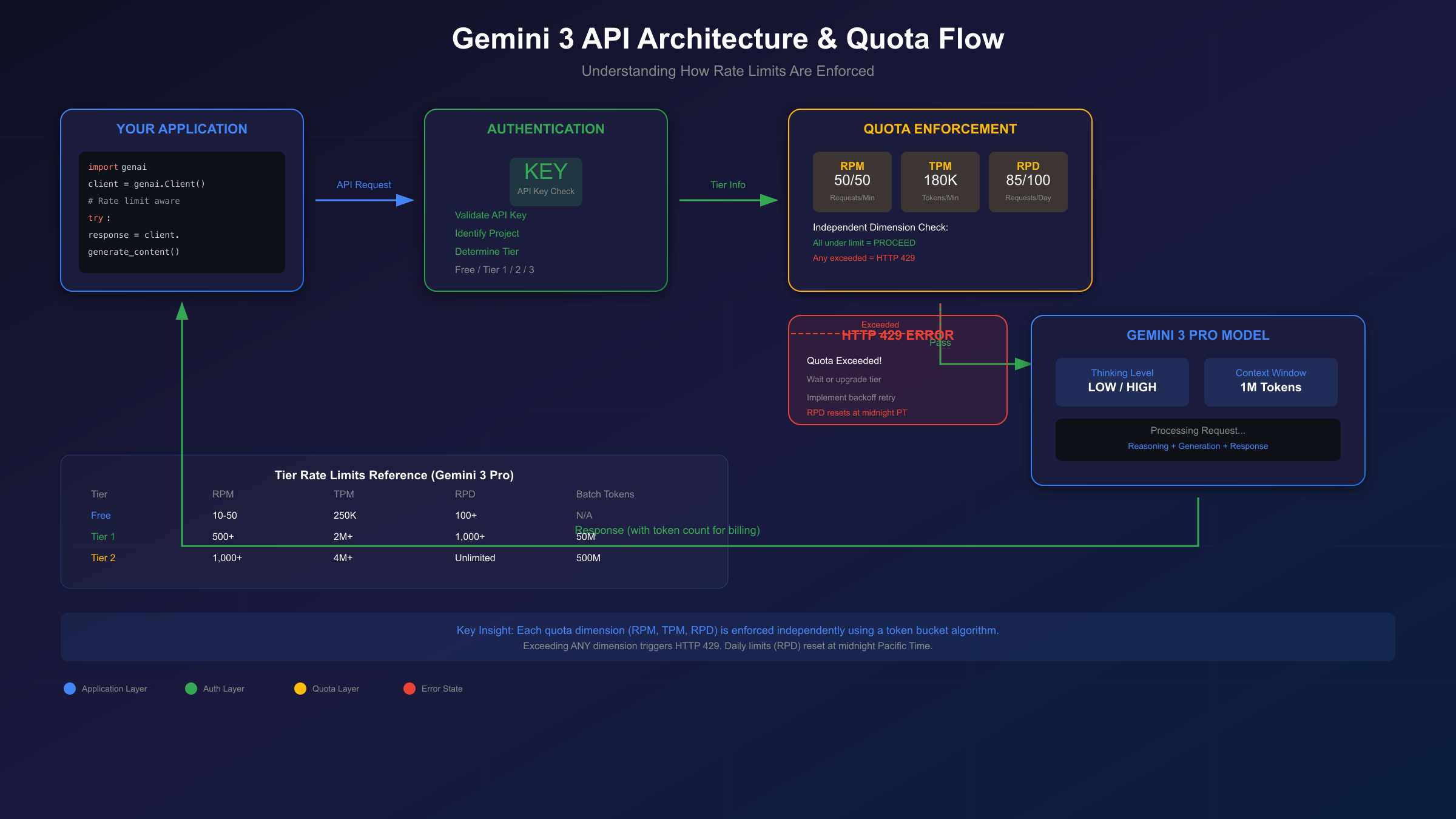
The Three Quota Dimensions:
- RPM (Requests Per Minute): The number of API calls you can make in a rolling 60-second window
- TPM (Tokens Per Minute): The total tokens (input + output) processed per minute
- RPD (Requests Per Day): Daily request limit, resetting at midnight Pacific Time
Each dimension uses a token bucket algorithm that refills continuously. This means burst requests that would have been tolerated before December 2025 are now more likely to trigger rate limiting.
December 2025 Changes Impact. On December 7, 2025, Google adjusted quota enforcement across all tiers. The actual numbers didn't decrease significantly, but the enforcement became stricter. Previously, the system allowed some flexibility for burst traffic; now, limits are applied more precisely on a per-minute basis.
For detailed information on free tier limits specifically, see our Gemini 2.5 Pro free API limits guide which covers the evolution of Google's free tier policies.
Free Tier Limits (No Credit Card Required):
| Model | RPM | TPM | RPD | Batch API |
|---|---|---|---|---|
| gemini-3-pro-preview | 10-50 | 250,000 | 100+ | Not available |
| gemini-2.5-flash | 15 | 250,000 | 250 | Not available |
| gemini-2.5-flash-lite | 30 | 250,000 | 1,000 | Not available |
Paid Tier Comparison:
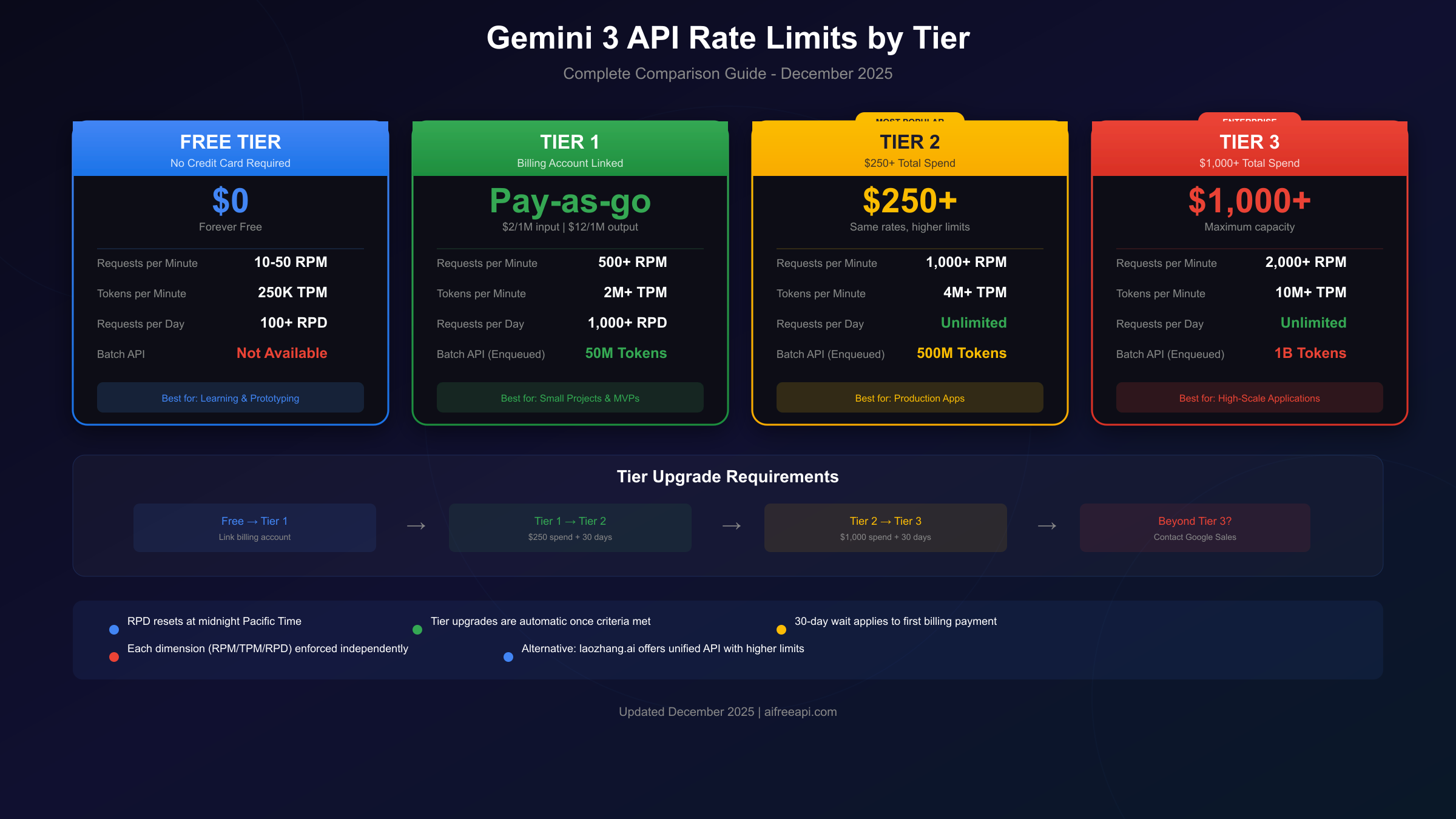
| Tier | Requirement | RPM | TPM | RPD | Batch Tokens |
|---|---|---|---|---|---|
| Tier 1 | Billing linked | 500+ | 2M+ | 1,000+ | 50M |
| Tier 2 | $250+ spend, 30 days | 1,000+ | 4M+ | Unlimited | 500M |
| Tier 3 | $1,000+ spend, 30 days | 2,000+ | 10M+ | Unlimited | 1B |
AI Studio vs API Quotas. There's an important distinction between using Gemini through AI Studio's web interface versus the API. AI Studio provides more generous limits for interactive testing, while API access follows the tier structure above. The Gemini CLI tool offers yet another access path with its own limits (approximately 60 RPM, 1,000 RPD).
Batch API Considerations. The Batch API allows queuing large numbers of requests for asynchronous processing. While the per-minute limits don't apply, you're constrained by the total tokens you can have "enqueued" at once. Batch processing offers a 50% cost discount but requires your application to handle asynchronous result retrieval.
Practical Code Examples with Built-in Quota Handling
Production applications need more than basic API calls—they need robust error handling, retry logic, and quota awareness. This section provides copy-paste-ready code patterns.
Basic Text Generation with Thinking Levels
The thinking level dramatically affects both response quality and token consumption:
pythonfrom google import genai
from google.genai import types

client = genai.Client()

# Low thinking - fast responses for simple tasks
fast_response = client.models.generate_content(
    model="gemini-3-pro-preview",
    contents="What is 2 + 2?",
    config=types.GenerateContentConfig(
        thinking_config=types.ThinkingConfig(
            thinking_level=types.ThinkingLevel.LOW
        )
    ),
)

# High thinking - thorough analysis for complex problems
thorough_response = client.models.generate_content(
    model="gemini-3-pro-preview",
    contents="Analyze the economic implications of quantum computing on cryptography.",
    config=types.GenerateContentConfig(
        thinking_config=types.ThinkingConfig(
            thinking_level=types.ThinkingLevel.HIGH
        )
    ),
)
Using Thinking Levels Strategically
Choose your thinking level based on task complexity:
pythondef smart_generate(prompt: str, complexity: str = "auto"):
    """Generate content with appropriate thinking level."""

    # Simple heuristic: longer prompts or questions likely need more thinking
    if complexity == "auto":
        complexity = "high" if len(prompt) > 500 or "?" in prompt else "low"

    thinking_level = (
        types.ThinkingLevel.HIGH
        if complexity == "high"
        else types.ThinkingLevel.LOW
    )

    return client.models.generate_content(
        model="gemini-3-pro-preview",
        contents=prompt,
        config=types.GenerateContentConfig(
            thinking_config=types.ThinkingConfig(
                thinking_level=thinking_level
            )
        ),
    )
Rate Limit Error Handling with Exponential Backoff
This pattern handles 429 errors gracefully:
pythonimport time
from google.api_core.exceptions import ResourceExhausted

def generate_with_retry(prompt: str, max_retries: int = 5):
    """Generate content with automatic retry on rate limit errors."""

    base_delay = 1.0  # Start with 1 second

    for attempt in range(max_retries):
        try:
            response = client.models.generate_content(
                model="gemini-3-pro-preview",
                contents=prompt,
            )
            return response.text

        except ResourceExhausted as e:
            if attempt == max_retries - 1:
                raise  # Re-raise on final attempt

            # Exponential backoff with jitter
            delay = base_delay * (2 ** attempt) + (time.time() % 1)
            print(f"Rate limited. Waiting {delay:.1f}s before retry...")
            time.sleep(delay)

    return None
For more comprehensive 429 error handling strategies across different AI APIs, see our Claude API 429 solution guide which covers advanced patterns that apply to Gemini as well.
For developers needing higher rate limits without the wait for tier upgrades, API aggregation services like laozhang.ai provide unified access to multiple AI models with more generous quotas and built-in load balancing.
Understanding Costs and Token Management
Gemini 3 pricing follows a straightforward per-token model, but the interaction between thinking levels, context length, and output size creates complexity worth understanding.
Current Pricing (December 2025):
| Scenario | Input Cost | Output Cost |
|---|---|---|
| Prompts ≤200K tokens | $2/1M tokens | $12/1M tokens |
| Prompts >200K tokens | $4/1M tokens | $18/1M tokens |
Thinking Level Cost Implications. Higher thinking levels consume more tokens internally before generating the visible response. While you're only billed for tokens that appear in the response, the processing time increases significantly:
- LOW thinking: Minimal internal reasoning, fastest response, lowest latency
- HIGH thinking: Extensive internal reasoning, slower response, higher quality for complex tasks
Token Counting for Budget Planning. Estimate costs before committing to large-scale processing:
pythondef estimate_request_cost(input_tokens: int, estimated_output: int = 1000):
    """Estimate cost for a single request."""

    # Determine pricing tier based on input length
    if input_tokens <= 200_000:
        input_rate = 2.0 / 1_000_000
        output_rate = 12.0 / 1_000_000
    else:
        input_rate = 4.0 / 1_000_000
        output_rate = 18.0 / 1_000_000

    input_cost = input_tokens * input_rate
    output_cost = estimated_output * output_rate

    return {
        "input_cost": f"${input_cost:.4f}",
        "output_cost": f"${output_cost:.4f}",
        "total_cost": f"${input_cost + output_cost:.4f}"
    }

# Example: Processing a 50K token document
print(estimate_request_cost(50_000, 2_000))
# {'input_cost': '\$0.1000', 'output_cost': '\$0.0240', 'total_cost': '\$0.1240'}
Batch Mode Savings. The Batch API offers 50% reduced pricing for non-time-sensitive workloads. If your application can tolerate asynchronous processing (results returned within 24 hours), batch mode can significantly reduce costs.
For comprehensive pricing analysis across all Gemini models, see our Gemini API pricing guide which covers batch discounts, tier benefits, and cost optimization strategies.
Alternative API providers like laozhang.ai often offer competitive pricing with simplified billing—worth considering if cost optimization is a priority for your project.
Migration and Optimization Strategies
If you're coming from Gemini 2.5 or optimizing an existing Gemini 3 implementation, these strategies will help you get the most from the API.
From Gemini 2.5 to Gemini 3
The migration involves several code changes:
SDK Update Required. Gemini 3 API features require Gen AI SDK version 1.51.0 or later:
bashpip install --upgrade google-genai>=1.51.0
Model Identifier Change. Update your model string:
python# Old (Gemini 2.5)
model="gemini-2.5-pro"

# New (Gemini 3)
model="gemini-3-pro-preview"
Temperature Settings. Unlike Gemini 2.5 where temperature tuning was common, Gemini 3 is optimized for the default temperature of 1.0. Changing this value may cause unexpected behavior including response looping.
Prompt Style Adjustments. Gemini 3 responds better to direct, concise instructions. Complex prompt engineering techniques designed for older models may actually reduce output quality:
python# Less effective with Gemini 3
prompt = """
You are an expert assistant. Please think step by step.
First, consider the context carefully. Then, analyze...
[lengthy chain-of-thought instructions]
"""

# More effective with Gemini 3
prompt = "Analyze the security implications of this code:\n\n" + code_snippet
Quota Optimization Tips
Request Batching. Combine related queries into single requests when possible:
python# Instead of multiple separate calls
for question in questions:
    response = client.generate(question)

# Combine into a single call
combined_prompt = "Answer each question:\n" + "\n".join(questions)
response = client.generate(combined_prompt)
Response Caching. For repeated or similar queries, implement caching:
pythonimport hashlib
from functools import lru_cache

@lru_cache(maxsize=1000)
def cached_generate(prompt_hash: str, prompt: str):
    """Cache responses for identical prompts."""
    return client.models.generate_content(
        model="gemini-3-pro-preview",
        contents=prompt,
    ).text

def generate_cached(prompt: str):
    prompt_hash = hashlib.md5(prompt.encode()).hexdigest()
    return cached_generate(prompt_hash, prompt)
Smart Retry Scheduling. If you're hitting daily limits, schedule requests to spread across the day:
pythonimport datetime

def should_throttle() -> bool:
    """Check if approaching daily reset time."""
    now = datetime.datetime.now(datetime.timezone(datetime.timedelta(hours=-8)))  # Pacific
    # Be conservative near midnight PT when RPD resets
    return now.hour >= 23 and now.minute >= 45
For projects requiring consistent high throughput, services like laozhang.ai aggregate capacity across multiple providers, effectively multiplying available quota.
Choosing Your Tier: Decision Framework
The right tier depends on your use case, budget, and timeline. Here's a practical framework for decision-making.
Stay on Free Tier When:
- You're learning or prototyping
- Your application makes fewer than 100 requests daily
- Response latency isn't critical (you can implement backoff)
- Cost control is the primary concern
Upgrade to Tier 1 When:
- Free tier limits are regularly hit
- You need the Batch API for async processing
- Your project is moving toward production
- You're willing to pay for usage
Target Tier 2 When:
- Building production applications with consistent traffic
- Daily request limits are problematic
- You need 500M+ batch tokens for large-scale processing
- $250 spend over 30 days is acceptable
Enterprise (Tier 3) When:
- High-scale production with thousands of daily users
- Maximum throughput is essential
- You need 1B+ batch token capacity
- Budget exceeds $1,000/month
The Upgrade Process:
- Link a billing account to your Google Cloud project
- Enable the Gemini API in Cloud Console
- Use the API to accumulate spend
- Wait 30 days from first payment for tier upgrades
Alternative Approach. If tier requirements don't match your timeline, consider API aggregation services. laozhang.ai provides unified access to Gemini and other models with:
- Higher effective rate limits through intelligent routing
- Simplified billing across multiple AI providers
- Built-in retry logic and failover
- Competitive pricing (often lower than direct access)
This can bridge the gap while waiting for official tier upgrades or provide a permanent solution for projects needing maximum flexibility.
Frequently Asked Questions
Q: Can I use Gemini 3 Pro for free?
Yes, Gemini 3 Pro is available on the free tier through Google AI Studio. Free tier limits are approximately 10-50 RPM, 250K TPM, and 100+ RPD. No credit card is required. For higher limits, link a billing account to upgrade to Tier 1.
Q: Why am I getting 429 errors even though I'm under the limit?
Quota is enforced per-project, not per-API-key. If you have multiple applications or team members using the same project, their usage counts against your quota. Additionally, the December 2025 changes made enforcement stricter on a per-minute basis—burst traffic is less tolerated than before.
Q: What's the difference between thinking levels?
LOW thinking minimizes latency by reducing internal reasoning—best for simple tasks. HIGH thinking (default) maximizes reasoning depth for complex problems but increases response time and token usage. Choose based on task complexity: use LOW for classification, simple Q&A, and formatting; use HIGH for analysis, planning, and creative tasks.
Q: How long does tier upgrade take?
Once you've linked a billing account (instant) and accumulated $250 in spend, you must wait 30 days from your first payment. Tier upgrades are automatic—you don't need to apply. Check your current tier in Google AI Studio settings.
Q: Are there alternatives if I need higher limits immediately?
Yes. Services like laozhang.ai provide aggregated API access with higher effective limits, routing your requests across multiple providers. This is useful for production applications that can't wait for tier upgrades or need to exceed even Tier 3 limits.
Q: Does the thinking level affect cost?
Indirectly. You're billed for output tokens generated, not internal reasoning tokens. However, HIGH thinking typically produces longer, more detailed responses, which increases output token count. The latency increase is more noticeable than cost increase for most use cases.
Q: What happens at midnight Pacific Time?
Daily quotas (RPD) reset at midnight PT (UTC-8 during standard time, UTC-7 during daylight saving). If you've exhausted your daily quota, you'll regain full access at this time. Per-minute quotas (RPM, TPM) use continuous token bucket refill and don't have a fixed reset.
Q: Can I use Gemini 3 for commercial applications?
Yes, Gemini 3 is licensed for commercial use. The free tier, Tier 1, and all paid tiers support commercial applications. Review Google's terms of service for specific restrictions, particularly around generated content attribution and prohibited use cases.
This gemini 3 tutorial quota guide should give you everything needed to start building with Gemini 3 API while staying within your quota limits. The key is understanding that quota management isn't separate from development—it's an integral part of building reliable AI applications. Start with the free tier, implement proper error handling from day one, and scale your tier as your needs grow.
For ongoing updates to rate limits and API changes, bookmark Google's official rate limits documentation and check back as the Gemini 3 preview progresses toward general availability.